New on the Toolchain — issue 003, October 12, 2026
 THE CYBER TOOLCHAIN
NO. 003
92 improvements to help you get more from the Toolchain. 27 tools arrived on the Toolchain this week.
ISSUE 003 · 2026-10-04 → 2026-10-11
New Features & Improvements 92
This week's improvements to the Toolchain.
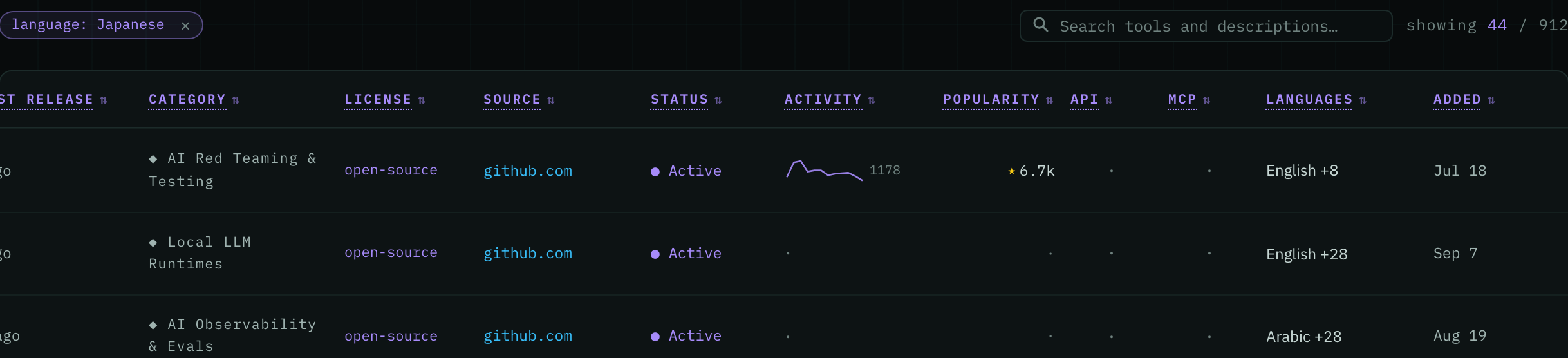
You can now see which human languages a tool is offered in before you roll it out to a team abroad. The Tools table has a LANGUAGES column you can filter, so picking Japanese shows only the tools with a Japanese interface or documentation. Open a tool to see where each language came from: its own translation files, its documentation, or the release note that announced it.
Uniq's September issue now includes the vendor checks it was missing. We re-ran the month, so the issue page shows what each tracked vendor did instead of a notice that the checks didn't finish. In a busy month, the email shows the newest deals and links to the issue page for the rest.
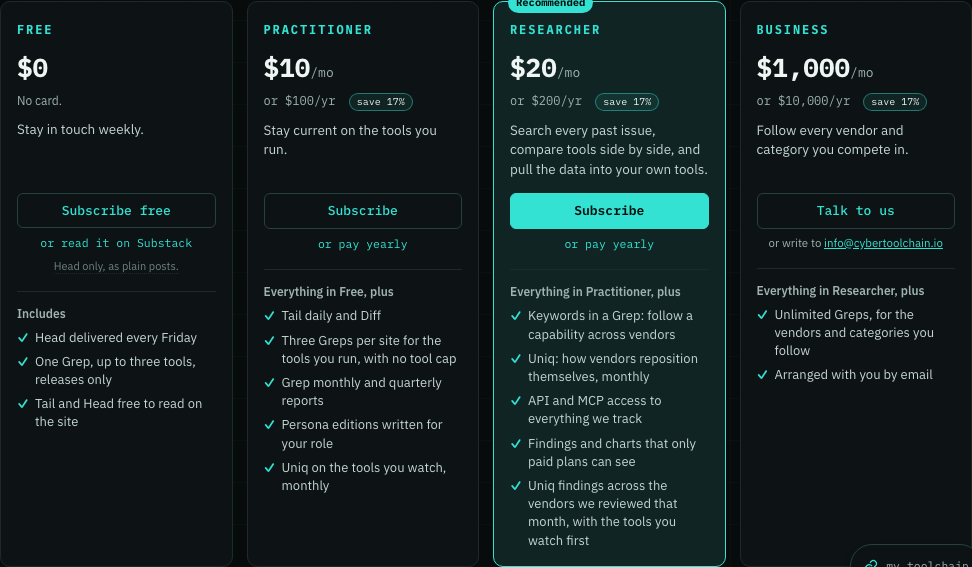
The plans page now fits on one screen. Each plan is a card with its price, its button and only what it adds over the plan before it, so you can see the difference and choose without scrolling. Researcher is the plan we recommend: it is the first with the market signals, peer rankings and the API. The full feature table is one click below, now about half as long: one row per product, with the difference between plans written in the cells, so you can check any one thing without wading through paragraphs.
The vendors page now opens with question cards: who shipped the most this month, who slowed shipping and, as we find them, who changed pricing lately and who rebranded. Each shows its top three; click a card to sort the whole table by that question, or click a vendor to open its profile at the part that answers it, so you get from "who's moving?" to the evidence in one click.
The activity chart on this page now spans only the months the site has been live, so you can read each week's shipping pace instead of a single spike squeezed against the right edge.
Each new Diff issue now opens with the week's numbers, on the site and in your inbox: what share of the documentation and API changes we found were not announced in any release note, changelog or launch we track, how many made the issue, and how many removals or deprecations were among them. The FAQ explains exactly how we count it.
Diff now leaves out anything the vendor already announced. A documentation change that only repeats a release, changelog or launch Tail covered for the same tool in the past month is dropped, and one that mixes the two keeps only the part nobody announced. Diff is shorter and holds just the changes vendors made quietly.
Opening a newsletter issue now shows the newsletter's name, such as The Tail Newsletter, at the top of the page instead of repeating the site name that the sidebar already shows. You can tell which newsletter you are reading at a glance.
84 more improvements
Long releases now read short. When a release lists more than eight changes, related ones (a batch of new connectors, a set of new checks, several tweaks to one dashboard) are combined into a single bullet that still names every one, so you can take in the whole release at a glance instead of scrolling past twenty lines.
The Personas page now says plainly how much each edition sets aside. Before, it promised every edition was filtered to what that reader acts on, which overstated some of them: a Product Manager's edition keeps most of an issue, while others keep a small slice. Now you know what to expect before you pick one.
Compare score cards now shows a preview before you subscribe. Pick the tools you are weighing and you see their cards side by side, with the scores hidden, so you know exactly what a plan gives you before you start one.
Search now finds every tool we watch by name, including ones that have not shipped a release yet, so you can jump straight to any tool page from ⌘K.
In vim and emacs keyboard modes, Space now ticks the selected row for Compare and s stars it, the same on every table with a Compare box, so you can build a comparison without reaching for the mouse.
A test send from your account page no longer opens with a late-delivery apology. You chose when it went out, so the preview now looks exactly like the issue you will receive.
History issues, the ones numbered below 1 that were rebuilt from release archives before the newsletter started, no longer show a PDF download button that led to an error page. Those issues were never sent, so there was never a PDF to download. Every issue that went out by email still has its PDF.
The tools table has ten new categories, so a filter returns the kind of product you asked for. Device management tools such as Intune, Jamf and NinjaOne now sit under Endpoint Management (UEM/RMM) instead of Patch Management. Software Supply Chain Security collects SBOM, signing, malicious-package and ASPM tools such as Socket, cosign, Apiiro and Cycode. WAF, Bot & API Protection separates runtime defenses like Wallarm and DataDome from the web scanners. Security Validation holds breach and attack simulation and automated pentesting. Privileged Access Management and Non-Human & Agent Identity split out of identity, AI security now divides into runtime guardrails, red teaming and posture, and AI / LLM Gateways gets its own category.
You can now follow the main vendors in three markets we covered thinly. Privileged access adds CyberArk, Delinea, StrongDM, Keeper and Britive. Security validation adds Picus, Cymulate, Pentera and AttackIQ. OT and ICS security adds Dragos, Nozomi Networks, Armis, Forescout, TXOne, Waterfall, Xage, Radiflow, Ordr, Asimily and Microsoft Defender for IoT, plus the open-source Malcolm, Conpot and CSET.
You can now compare tools straight from the tools table. Tick the box beside two to four tools and press Compare, and they open side by side in a window over the table. Ticks are separate from your stars, so you can weigh tools you don't run without adding them to My Toolchain.
Adding a vendor in the Compare vendors window now shows matching vendors as you type, with how many products each one has. Move through them with the arrow keys and press Enter, so adding the one you want takes a keystroke and the list looks the same in every browser.
The supply chain page now opens by saying what it is for, and each library's vulnerability list is easier to scan. Sort it by Most urgent, with anything exploited in the wild first, then the most severe, then the ones with no fix yet, or by Newest to see the latest advisories first. Every advisory now carries a green Fix available or a red No fix label. The list shows every advisory, not just the top six, and some advisories that named the wrong fixed version now name the right one.
A vendor's acquisitions chart now picks up new deals within a week of the buyer announcing them, so you see a company's latest purchases without waiting for a manual update. Deals that are announced but not yet closed are labelled as such.
Comparing vendors side by side is now part of every paid plan. On the vendors table you can still tick up to four vendors and press Compare; with a plan, their products open lined up by market and month by month, and without one the window shows what the comparison covers and a link to the plans.
A vendor's website history now goes beyond its home and pricing pages. Every page in the vendor's main menu, and the pages its homepage links to, is now checked every week and filled in from the Wayback Machine, so you can see how a vendor's product pages changed, not just its front door. They appear under More pages on a tool's website history, by the menu's own names, as each vendor's history fills in over the coming weeks.
Each vendor's details now say who owns it: a public or private company, a non-profit, a government agency, an open-source project, or the company that bought it. A listed company shows its share price and a one-year chart, and a company owned by another shows its parent's, so Wiz shows Google's. Vendor details also show their curated founding year and revenue again; a build fault had been hiding them. A vendor that has bought other companies now charts those deals next to its founding year, and marks the ones we also track.
Comparing vendors no longer takes you off the vendors table. Tick up to four vendors and press Compare, and their products open side by side in a window over the table, so you can close it and pick different vendors without losing your place. The Compare button is now easier to spot too.
Patch management now has its own category, with more than 30 patching tools to follow, among them Action1, Ivanti Neurons, Tanium, BigFix, ManageEngine, NinjaOne, Intune, Jamf and Rapid7 Active Patching. Automox moved there from Endpoint Security, so filtering for EDR no longer turns up a patching tool, and you can compare the whole patching market in one place.
Email Security is now its own category on the tools table. Abnormal AI, Sublime Security, INKY, Material Security, Sophos Email Security and Rspamd used to sit under Firewalls & Network Defense, so filtering for firewalls showed you email products and email products were hard to find. Now the Email Security filter shows all of them in one place.
Read every issue in Japanese, German, Chinese, Spanish, Portuguese, Korean or Hindi: pick a language from the globe in the top bar, save it in Account to get your newsletter in it too, and we'll offer it once if your browser is already set that way. Tool names, versions and commands stay exactly as written.
You can now give a colleague their first month free. Your account page has a Share it card with your own link, and each colleague who subscribes through it and pays earns you up to three months of your plan, free. It shows how many have joined and subscribed, never who. Business plans aren't included.
The Supply chain page now shows which shared libraries carry known vulnerabilities. Each library lists its advisories with a CISA known-exploited badge, the chance it will be exploited (EPSS), the version that fixes it, and which tools ship an affected version. A new Risk column and filter find the worst first.
Your persona edition now comes in three sizes. On your account page, choose Essentials for the 10 tools that matter most to your role, Standard for your role's full edition, or Everything for the whole issue with your role's items reframed for you. You can also read Headlines only, one line per release, and put the releases that matter most to you at the top of each section. Your email and the issue pages both follow what you choose, so a busy week takes a minute to read and a quiet one shows you everything.
The Edit button beside Monthly Reports and Quarterly Reports on your account page now stands out in teal. It used to look like one more grey tool name in the list below it, so it was easy to miss that you can choose which tools get a report.
You can now compare every product from up to four vendors on one page. Tick vendors on the Vendors table and press Compare, and each market they sell into becomes a row. You see at a glance where Palo Alto, CrowdStrike and Rapid7 compete head to head and where only one of them has a product. Open a row to read those products side by side, or switch to Over time to see how often each one shipped, month by month.
The page you land on from a sign-in link now looks like the rest of the site. It opens dark, or in the colour theme you picked on your account, instead of a plain page that followed your computer's light setting.
Every newsletter choice on your account page is now a card you can click anywhere, and the ones you've picked light up. At a glance you can see what you're getting, instead of hunting for a small tick box.
Website history now sits in the same centred column as the rest of the site, with the player and its month rail on one screen. Turn on Whole page to scroll a vendor’s full pricing or home page inside the player instead of seeing only the top. New captures are taken at twice the resolution, so pages stay sharp on high-density screens.
Every command a tool page knows about is now in one Commands list, instead of spread over Examples, Documented commands and the conversation cards. Each command appears once, with a dot that says whether we ran it, it comes from the docs, or the community posted it, so you can filter to just the ones that were proven to work. Pick one and it opens beside the list with its output, what its flags do and every place it was seen. Options, Timeline and Compare are tabs in the same section.
Rule tools out in a Capability Search with the new but not button, so you can find every tool with a REST API but no MCP server, or every tool that never mentions a word. Pressing Enter now searches exactly what you typed, so BPF finds the word BPF instead of the closest capability; use the arrow keys to pick a suggestion.
Analytics now shows coverage and source dates beside each chart, and withholds comparisons that fail evidence checks, so you can tell which conclusions the data supports.
The home discovery chart now marks missing GitHub census months as unavailable, so gaps no longer appear as zero growth.
Your account menu now shows which plan you're on, right under Signed in, on every page and however you open it, so you can check your plan without visiting your account.
Add an ATT&CK mitigation to a Capability Search with its own button, then join it to a capability with and or or, so you can ask for tools that do both, or either.
You can now offer to help shape the data. Tick the box on your account page or after checkout, and we'll occasionally invite you to short research questions and polls about the tools you use. It starts unticked, and you can untick it anytime.
Vendor details now show the whole company, not just its tools: the year it was founded and how that compares with vendors in the same category, how fast it ships, how well it writes release notes, how often its pricing moves, open roles, uptime and revenue where we have them, then its tools grouped by category, its pricing and website history, and the launches we have covered. History opens the same view, landing on the history, so you no longer switch between two dialogs. Hover or tab across the founding timeline to see which vendor each dot is. Every product shows when it started and how long it has run, and one that has gone quiet or been retired says so.
See every tool a vendor makes at a glance: vendor details now lay products out as compact tiles instead of a long scrolling list.
Open any chart on Analytics by clicking anywhere on its card. Cards now lift as you point at them, so you can tell at a glance what will open.
See which plan includes personas in one clear note, instead of an upgrade button on every persona.
On the samples page, the description of each newsletter now sits above its sample instead of inside it, so you can tell at a glance what the newsletter covers and where the real issue excerpt begins.
The methodology page now says plainly that it comes with Practitioner, Researcher and Business and not the Free plan, so you know before you click whether your account can open it.
Every tool page's one-line description now tells you what the tool does. We read each description, summary and highlights list against the job that section has, and a line that only says where the code lives or asks for pull requests is replaced. Wireshark's page used to open with a note about its Git mirror. It now says it captures and analyzes network traffic.
A hardware price change now shows the new price, the old one struck through, and a coloured arrow pill with how much it moved, in dollars and percent. Green ▼ means it got cheaper, magenta ▲ means it got dearer, so you can see a deal at a glance on the site and in your email.
After you buy a plan, the thank-you page now says Sign in on its button, because that is where it takes you. It also lists the three steps to pick your tools, so you know exactly where to tell us which ones are yours.
Buying a plan with an email that already has an account no longer gets you charged twice. Checkout now emails that address a sign-in link so you can change your plan instead, and if a second subscription still goes through it is cancelled and refunded in full within moments, with an email telling you so.
Searching Capability Search by an ATT&CK mitigation now finds far more tools: 31 of the 44 mitigations return results, up from 11. Tools that audit what a mitigation configures are listed too and marked Assesses configuration, so M1015 (Active Directory Configuration) now shows BloodHound and adscan without claiming they configure Active Directory for you.
Signing in as a different account now switches every open tab to it. Before, if you opened a sign-in link for a second account, pages you already had open kept showing the first account's settings and plan, and could switch you back to it.
When you open a vendor, its Website history now comes first, so you see how the vendor's site has changed before you scroll to its pricing history.
When you sign in from an emailed link, the top bar now shows your account menu straight away. It used to keep offering Sign in and Subscribe until you reloaded the page.
A tool's video no longer shows up twice in a row. When a same-day update repeated the video already shown with the new features, it now appears once, so each entry is shorter and you aren't scrolling past the same clip.
Read vendor updates with the precision their sources provide: month-only releases show the month, and weekly batches show Week of instead of an invented release day.
Open the original vendor release notes directly from older, reconstructed entries on a tool’s timeline.
Explore shared libraries in a sortable supply-chain table with comparison bars. Start with the market view, search for a tool, and open a library for its dependent tools and package links. Measurement notes stay tucked away until you expand them.
Build a kit, compare devices and follow hardware changes more easily with clearer borders, distinct result cards and larger view buttons.
Read the Capability Search guidance from a tooltip, so you can focus on your question without scrolling past the explanation.
Read the Supply Chain counting rules and missing-tool explanation from a tooltip, leaving more room for the dependency chart and packages.
On Hardware, Compare, Clear stars and Share my toolchain stay close at hand, without the software detection button.
API endpoint links now bring the endpoint heading into view below the site header, and the endpoint index no longer hides beneath the header.
Keep your place in the navigation: the sidebar now stays where you scrolled when you open another page, including in the phone menu.
Explore more of a tool’s past releases, including Abnormal AI updates going back to 2022. Breaking-release figures now count each release once when it appears in both current and historical coverage.
Start reading as soon as you join: Subscriber issues now includes a starter edition of each newsletter in your plan, alongside new issues as they publish. Original dates stay visible, and Methodology sits below your reading list.
Checkout now opens with colors suited to your chosen page theme, with readable fields and consistent teal buttons in dark, light, sepia and contrast modes. Your payment details stay in place if you change the page theme while checking out.
Click anywhere on a page without unexpectedly dimming it. The mobile menu still dims the background while open and closes when you click outside it or press Escape.
Sample introductions are now labeled Summary, so you can tell them apart from the newsletter excerpts. Diff descriptions include wording fixes and individual character changes, and Uniq describes a single vendor rewrite as a data point.
Find the chart you need without scrolling through the whole Analytics page. Search the chart library, filter by topic or confidence, and expand any chart to explore its controls and sources, with a full-screen option. Closing it keeps your place.
Practitioner now includes three Greps per site, so you can keep separate newsletters for your tools, your team and the vendors you follow.
Delete your account yourself from My account, choosing this site only or both Cyber Toolchain and AI Toolchain. Review the permanent deletion and subscription cancellation details before confirming, then receive a final email. Our privacy policy, terms and refund policy explain what is removed and retained.
The Manage your subscription link in your purchase email now signs you in when needed, just like Pick my tools, so you can reach your billing and account settings from either link.
Read vendor pricing changes in color-coded diffs, with clearly styled plan cards and price labels that fit on mobile. Vendor histories now keep their formatting when opened from the Vendors page.
Deleting your account now prevents its old sign-in links and API keys from opening a later account at the same address. Unsubscribing from email keeps your paid access for the period you have paid for; our privacy policy explains the difference and the deletion safeguard we retain.
Browse every vendor from one Vendors page, with the pricing stats and chart still at the top. Open vendor details without leaving your search or losing your place in the list.
Find hardware for a UART, SPI flash or radio-receive task with Build my Kit, reuse gear you own, and see the prerequisites still needed. Compare Hardware puts two devices side by side with sourced specifications, and What Changed lets you follow their firmware, price and availability history. Historical launch prices and unpriced accessories stay separate from your device budget.
New categories in Ls now have prominent headings, so you can spot a newly added shelf at a glance. Browse the shelf opens only that category’s tools, including from older emails.
Choose which Grep gets a tool from the New on the Toolchain email, or create a new Grep for it. The buttons now say Add to Grep. If you are signed out, your picks are saved to My Toolchain in this browser so you can keep them without signing in.
See what you can do with this week’s Toolchain improvements before browsing new tools in Ls. Screenshots, practical examples and links help you try what shipped; an improvements-only week now gets an issue too.
Website history now checks every vendor's home, pricing and product pages every day and keeps a new frame whenever one really changes, a new headline, new colours, a reworked layout or rewritten copy. You see a rebrand or a pricing change within about two days, dated to the day, instead of waiting weeks for an archived copy, and a rotating banner or one-day promotion never clutters the timeline.
Analytics now shows a quality grade on every chart and the collection gaps behind each comparison. AI assistant signals and captured API changes earn Solid, hiring charts label carried observations, and incident charts distinguish reported activity from service uptime.
Follow how a vendor’s homepage, product and pricing pages change over time: switch page histories in the timeline or comparison view, with a clear note when snapshots are not available yet.
Reply to any Toolchain email with a support question, feature request, or other feedback; your message goes directly to Jon.
Saving account preferences and creating an API key now show the successful result even when your browser storage is full, so a saved change is not reported as lost and a new key remains available to copy.
Newsletter retries now keep the original issue content tied to its newsletter and site. Recovered Diff issues check that their promised paid details are available before sending, so a recovery cannot silently drop those details.
Watchlist notices now respect your email pause and unsubscribe settings, keep separate history for each site, and avoid repeating a notice when delivery confirmation is uncertain.
Watch buttons in the New on the Toolchain email now open your Grep editor with the tool already picked, wherever you were last on your account page. Before, some readers landed on a page that would not scroll until they refreshed.
Understand website changes with AI summaries beside each analysed snapshot. Follow dated rebrand observations and yearly vendor and market charts; Uniq includes recent observations with before-and-after images. Possible rebrands are labeled, and coverage shows how much history has been assessed.
New tools 27
We recommend checking out these 3.
Windows Package Manager
Windows Package Manager (WinGet) is a command-line tool that lets users discover, install, upgrade, remove, and configure applications on Windows.
If you're tired of manually hunting down installers and updates across endpoints, WinGet lets you script app installs and upgrades from the command line.
cutter
Cutter is a free and open-source reverse engineering platform powered by Rizin, available for Linux, macOS, and Windows.
If you need to analyze binaries without paying for a disassembler, Cutter gives you a free GUI built on Rizin for Linux, macOS, and Windows.
wstg
Comprehensive guide and framework of best practices for testing the security of web applications and web services.
If you need a structured methodology for pentesting web apps rather than guessing what to check, the WSTG gives you that framework.
// ALSO NEW 24
Add a tool to a Grep to get its releases by email, or save it to My Toolchain while signed out, and we’ll sync it to your account when you sign in.
-
retoolkit · 5 yr 6 mo old — retoolkit is a collection of tools for reverse engineering and malware analysis on x86 and x64 Windows systems, bundled as a pre-configured installer.Add to Grep
-
aya · 5 yr 8 mo old — Rust library for building and loading eBPF programs into the Linux kernel without libbpf or C toolchain dependencies.Add to Grep
-
Malcolm · 7 yr 4 mo old — Malcolm is an open-source network traffic analysis tool suite that ingests PCAP files, Zeek logs, and Suricata alerts for network security monitoring.Add to Grep
-
masvs · 10 yr 1 mo old — Introducing MASVS-PRIVACY After collecting and processing all feedback from the MASVS-PRIVACY Proposal we're releasing the new MASVS-PRIVACY category. The main goal of MASVS-PRIVACY is to provi...Add to Grep
-
sbom-tool · 4 yr 4 mo old — SBOM Tool creates SPDX 2.2 and SPDX 3.0 compatible SBOMs for any variety of artifacts.Add to Grep
-
CSET · 7 yr 4 mo old — CSET is a free software tool by CISA and INL that guides users through assessing cybersecurity posture and comparing it to security standards.Add to Grep
-
sandboxed-api · 7 yr 7 mo old — Sandboxed API (SAPI) is an open-source project built on Google's Sandbox2 that makes sandboxing individual C/C++ libraries less burdensome.Add to Grep
-
Conpot · 13 yr 6 mo old — Conpot is an ICS honeypot that collects intelligence about the motives and methods of adversaries targeting industrial control systems.Add to Grep
-
Installomator · 6 yr 7 mo old — Installation script to deploy standard software on Macs - Installomator/InstallomatorAdd to Grep
-
pip-audit · 5 yr 1 mo old — pip-audit is a tool for scanning Python environments for packages with known vulnerabilities, using the Python Packaging Advisory Database as a source.Add to Grep
-
asnmap · 4 yr old — Go CLI and Library for quickly mapping organization network ranges using ASN information.Add to Grep
-
kubehound · 3 yr 4 mo old — KubeHound is a Kubernetes attack graph tool that automates calculation of attack paths between assets in a cluster.Add to Grep
12 more arrived this week; they are all on the site.