PAGES
Subscribe Get it delivered — five to ten releases we picked each morning from the tools you run, with every release in the issue on the web. Compare plans →

The Cyber Toolchain — issue 108, October 14, 2026

THE CYBER TOOLCHAIN NO. 108
Tail
THE DAILY RELEASE FIREHOSE
PUBLISHED OCTOBER 14, 2026 · EVERY DAY
EDITIONS tail grep head ls diff uniq

The daily firehose — everything the toolchain shipped today, already filtered.

We read every release from the 1338 tools on our watchlist at the source — GitHub and GitLab release notes, vendor release pages and changelogs, project blogs and feeds, vendor press releases, and the source code behind the tag. Bug-fix-only releases and non-product newsroom noise are dropped; what's left is summarized down to the new capability, how to try it, and any screenshots or videos the release itself published. Every entry links to the sources it was built from.

VIEW
ISSUE VIEW scroll
INFORMATION DENSITY everything
ISSUE WIDTH reading width
Do you prefer scroll?
ADDITIONAL FILTERS
$ tct list   # 29 tools matched

What stands out across today's releases, grouped by what it lets you do. Every tool named links to its entry below.

Agent identity work is the one real pattern today: Aembit can now see and kill a live MCPMCPModel Context Protocol, a standard for connecting AI applications to external tools and data sources. A compatible server exposes capabilities an assistant can use through a common interface. user session, and Runlayer governs agent-to-agent handoffs rather than treating the chain as one actor. Separately, Endor Labs turns VS Code extensions into a blockable supply-chain surface, and Censys shows which hosts are still on pre-quantum crypto.

  • protect

    Cut off an agent's access mid-session instead of waiting for a token to expire

    Aembit surfaces MCP user sessions and lets you revoke them, so a misbehaving agent connection ends on demand rather than at token lifetime. Runlayer's agent-to-agent handoff governance means a delegated call carries policy with it, instead of the second agent inheriting the first's blanket authority.

    Aembit · Runlayer

  • protect

    Block a malicious IDE extension before a developer installs it

    Threat Center malware detection and Package Firewall now cover VS Code extensions, a channel that normally bypasses package policy entirely because it installs from the marketplace into a developer laptop with no registry in the path. Teams get both an inventory of what engineers have installed and a gate on new installs.

    Endor Labs

  • identify

    Find the hosts you'll have to re-key for post-quantum

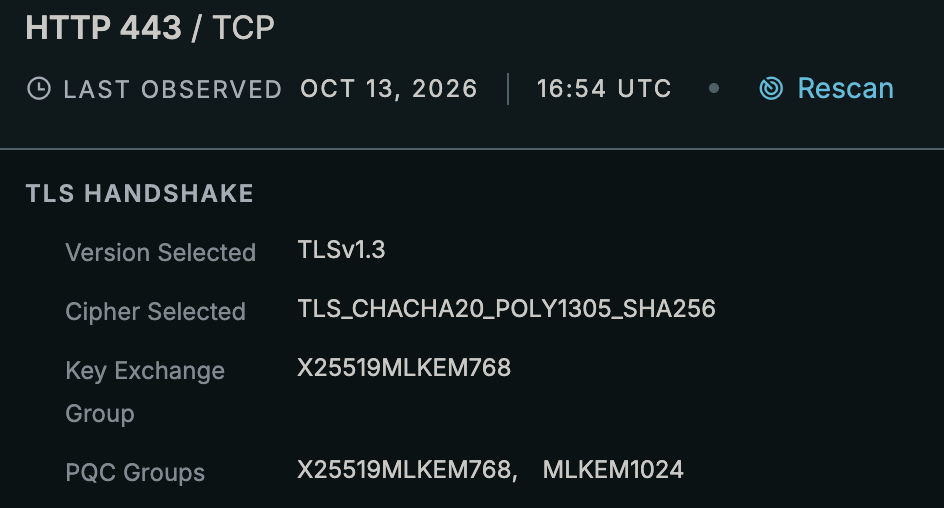
    Censys exposes post-quantum cryptographypost-quantum cryptographyCryptography designed to stay secure against a large quantum computer, which could break today's RSA and elliptic-curve keys. NIST standardized the first algorithms in 2024 as ML-KEM, ML-DSA and SLH-DSA. status on host and web endpoints, turning a migration that usually starts with a spreadsheet of guesses into a query. Wallarm's Discovered Inventory consolidates shadow APIs and MCP serverMCP serverA process that exposes tools, resources, and prompts over Anthropic's Model Context Protocol, letting an AI agent call external APIs or local services through a standardised interface. exposure in one view, so undocumented endpoints and agent infrastructure show up next to the traffic actually hitting them.

    Censys · Wallarm

  • protect

    Keep secrets out of the filesystem during local development

    op run can now inject project secrets as environment variables or mount a local .env without writing it to disk, which removes the usual failure mode of a plaintext .env surviving in a repo or a backup. A later release trims the network round-trips, so the secure path stops being the slow one.

    1Password

Offensive Security
◆  Reconnaissance & OSINT

ProjectDiscovery cloudlist

Sources Release notes →Source code → v1.5.0 Notes Code

Cloudlist is a tool for listing Assets from multiple Cloud Providers.

Adds -auto-discovery, exclude_services filter, AWS keyless auth (IRSAIRSAAn AWS mechanism that lets a Kubernetes pod assume an IAM role via a service account token, so cyber tools running in EKS can call AWS APIs without storing long-lived credentials./instance profile), AWS org discovery with account exclusion, and GCP project exclusion.

└──▷ GET THIS VERSION
$ git clone --branch v1.5.0 https://github.com/projectdiscovery/cloudlist.git
# already have the repo? check out this version:
$ git checkout v1.5.0
  • Updated integrationAdds -auto-discovery flag to automatically detect and enumerate AWS, GCP, Azure, and Kubernetes using ambient environment credentials — no provider config file required. Not checked yet
  • Adds exclude_services filter (-es / -exclude-service) to skip specific services for a provider during enumeration.
  • Adds AWS keyless authentication via IRSA and EC2EC2Amazon's cloud virtual-machine service, letting tools run on-demand servers without managing physical hardware. instance profiles, removing the need to store long-lived credentials in provider-config.yaml.
  • Adds AWS org discovery with account exclusion support, enabling enumeration across all accounts in an AWS Organization.
  • Adds GCP project exclusion, allowing specific project_ids to be skipped during org-level discovery.
+1 more show less
  • Adds Cloudflare credential verification without a full resource fetch.

6 details in Everything

Was this useful?
◆  Autonomous Offensive Frameworks (AOF)

PurpleAILAB Decepticon

Sources Release notes → v1.4.3 Notes Rank Why this rank top features scored 80/70/55, +6 runnable example — 74.33 How ranking works →

Decepticon v1.4.3 lets operators switch between Plan, Red, and Blue conversations mid-session without losing context, adds an explicit approval gate for Red execution, a recovery command for interrupted prompts, and trims engagement setup to just a name.⁠︀︄︇︀︅︉︀︅︀︀︃︀︀︅︅︀︅︊︀︄︆︀︃︄⁠

Autonomous Hacking Agent for Red Team

Decepticon v1.4.3 lets operators switch between Plan, Red, and Blue conversations mid-session without losing context, adds an explicit approval gate for Red execution, a recovery command for interrupted prompts, and trims engagement setup to just a name.⁠︀︄︇︀︅︉︀︅︀︀︃︀︀︅︅︀︅︊︀︄︆︀︃︄⁠

└──▷ WHAT SHIPPED · 4 FEATURES 0 OF 4 FEATURES most completely described first
what's the number?

Each feature carries 0–100 for how completely the vendor documented it — not how big or important the work is. A major capability described in eight words scores low, and that is the finding.

  • depth0–40 what it does and how it works or what changed
  • specificity0–30 names real surfaces — APIs, flags, formats, limits, numbers
  • actionability0–30 enough to go use it — a named endpoint, flag, or config key tops this; a UI path is a starting point

Code and config rank first by construction: a documented endpoint, flag or config key scores at the top of specificity and actionability, so it sorts above a feature described only in prose. Under 60 the notes go thin — everything below the “thinner coverage” line is thinner documentation, not smaller work. Hover any meter for that feature's three sub-scores.

01 00
Mid-session mode switching across Plan, Red, Blue Not checked yet new 80

New /mode plan, /mode red, and /mode blue commands let an operator switch conversations during a running session, preserving each mode's thread, pending question, and paused checkpoint; if the pause fails, the original mode is kept.⁠︀︄︇︀︅︉︀︅︀︀︃︀︀︅︅︀︅︊︀︄︆︀︃︄⁠

Jump to Blue investigation while Red is running, then return to Plan — each thread resumes where it left off.
$ /mode blue
# ... investigate sensor events ...
/mode plan
— Names three commands and the exact state-preservation and fallback behaviour. v1.4.3
02 00
Explicit approval gate for Red execution Not checked yet new 70

/mode red approve grants execution permission for Red operations against the validated Plan scope, gating live action behind an explicit approval step after planning.

Switch from a running Plan session into Red mid-engagement once the plan is validated and scope is approved.
$ /mode red approve
— Names the exact command and what it authorizes, but mechanism is brief. v1.4.3
thinner coverage below
03 00
Resume command for paused questions Not checked yet new 55

/resume reopens a paused question after the operator escapes with Escape to enter commands, letting them return to the interrupted prompt.

Recover a paused question that was interrupted to run a command during a session.
$ /resume
— Clear single command and trigger, but limited detail on edge cases. v1.4.3
04 00
Name-only engagement creation Not checked yet improved 50

Engagement creation is simplified to require only a name, opening directly into Plan without blocking on target, mode, or authorization-reference inputs.

— Describes before/after but gives no command or UI path to follow. v1.4.3
Was this useful?
◆  Exploitation & C2

Bugcrowd

Sources Blog / feed → Trigger Savant Pathseeker Tests with the API (2026-10-13) Blog Rank Why this rank top features scored 90, +6 runnable example — 96 How ranking works →

Bugcrowd is a crowdsourced security platform that connects organizations with ethical hackers to find and report vulnerabilities through bug bounty and penetration testing programs.

Bugcrowd shipped an API endpoint to trigger Savant Pathseeker tests programmatically from CI/CD pipelines, with supporting UI controls and run traceability metadata.⁠︀︄︇︀︅︉︀︅︀︀︃︀︀︅︅︀︅︊︀︄︆︀︃︄⁠

└──▷ WHAT SHIPPED · 1 FEATURE 0 OF 1 FEATURE most completely described first
what's the number?

Each feature carries 0–100 for how completely the vendor documented it — not how big or important the work is. A major capability described in eight words scores low, and that is the finding.

  • depth0–40 what it does and how it works or what changed
  • specificity0–30 names real surfaces — APIs, flags, formats, limits, numbers
  • actionability0–30 enough to go use it — a named endpoint, flag, or config key tops this; a UI path is a starting point

Code and config rank first by construction: a documented endpoint, flag or config key scores at the top of specificity and actionability, so it sorts above a feature described only in prose. Under 60 the notes go thin — everything below the “thinner coverage” line is thinner documentation, not smaller work. Hover any meter for that feature's three sub-scores.

01 00
API-triggered Pathseeker test execution Not checked yet new 90

Adds the POST /scan_configurations/{id}/scan_executions endpoint (API v1.2.0) to start an existing Pathseeker test using its saved targets, credentials, and settings, enabling CI/CD pipelines to trigger retests programmatically.⁠︀︄︇︀︅︉︀︅︀︀︃︀︀︅︅︀︅︊︀︄︆︀︃︄⁠ Runs triggered via the API carry a trigger_source label field (e.g. github-actions) alongside the token owner and timestamp for traceability, and a new Allow API-triggered runs option in Pathseeker test setup surfaces a Configuration ID (visible on the test's Test Overview page) used to reference the test in API calls.

Trigger a Pathseeker retest of your staging environment after each CI/CD release, tagging the run with the pipeline source for traceability.
$ curl -X POST https://api.bugcrowd.com/scan_configurations/{id}/scan_executions \
  -H 'Authorization: Token <api_token>' \
  -H 'Content-Type: application/json' \
  -d '{"trigger_source": "github-actions"}'
Enable API-triggered runs for a Pathseeker test and retrieve its Configuration ID so it can be referenced in automation.
📍In the Pathseeker test setup, turn on Allow API-triggered runs. Copy the displayed Configuration ID. To retrieve it later, go to the test's Test Overview page and reopen the setup instructions.
— Names endpoint, version, field, and UI toggle with working example Trigger Savant Pathseeker Tests with the API…
Was this useful?
Application Security
◆  Software Supply Chain Security

Endor Labs

Sources Blog / feed → Learn how Endor Labs detects malicious VS Code extensions | Endor Labs (2026-10-13) Blog Rank Why this rank top features scored 83/45 — 64 How ranking works →

Endor Labs extended its Threat Center malware detection and Package Firewall blocking to VS Code extensions, giving security teams visibility and policy control over IDE extension installs alongside existing package ecosystem coverage.⁠︀︄︇︀︅︉︀︅︀︀︃︀︀︅︅︀︅︊︀︄︆︀︃︄⁠

Endor Labs is an application security platform built for AI-generated and human-written code, helping teams prioritize and fix real risk across the SDLC.

Endor Labs extended its Threat Center malware detection and Package Firewall blocking to VS Code extensions, giving security teams visibility and policy control over IDE extension installs alongside existing package ecosystem coverage.⁠︀︄︇︀︅︉︀︅︀︀︃︀︀︅︅︀︅︊︀︄︆︀︃︄⁠

└──▷ WHAT SHIPPED · 2 FEATURES 0 OF 2 FEATURES most completely described first
what's the number?

Each feature carries 0–100 for how completely the vendor documented it — not how big or important the work is. A major capability described in eight words scores low, and that is the finding.

  • depth0–40 what it does and how it works or what changed
  • specificity0–30 names real surfaces — APIs, flags, formats, limits, numbers
  • actionability0–30 enough to go use it — a named endpoint, flag, or config key tops this; a UI path is a starting point

Code and config rank first by construction: a documented endpoint, flag or config key scores at the top of specificity and actionability, so it sorts above a feature described only in prose. Under 60 the notes go thin — everything below the “thinner coverage” line is thinner documentation, not smaller work. Hover any meter for that feature's three sub-scores.

01 00
Package Firewall blocking and policy controls for VS Code extensions Not checked yet new 83

Package Firewall blocking now extends to VS Code extensions, preventing unsafe versions from appearing in the VS Code marketplace and blocking unsafe extensions installed through the command line.⁠︀︄︇︀︅︉︀︅︀︀︃︀︀︅︅︀︅︊︀︄︆︀︃︄⁠ Three new policy controls are available: Malware (block versions identified as malicious), Minimum package age (hold back new versions until vetted), and Exceptions (always-allow list for trusted extensions); each rule can be set to block or warn, letting teams start in monitoring mode and tighten policy over time. Every VS Code extension install is logged for workstation activity tracking, and the feature deploys via existing MDMMDMMobile device management, centrally configuring and managing enrolled devices. Administrators use it to apply settings, distribute applications and enforce device security policies. with no agent, wrapper, or certificate required on developer devices.

— Names all three policy controls, modes, and MDM deployment path Learn how Endor Labs detects malicious VS Co…
thinner coverage below
02 00
Threat Center detection for VS Code extensions Not checked yet new 45

Extends Threat Center malicious-package detection to the Visual Studio Marketplace, covering VS Code extensions alongside existing coverage of npm, PyPI, Go, Maven, and NuGetNuGetMicrosoft's package manager for .NET, hosting a public registry of reusable libraries so tools can pull in dependencies without bundling or manually maintaining third-party code..

— Names ecosystems covered but no detection mechanism detail Learn how Endor Labs detects malicious VS Co…
Was this useful?
◆  Code Security

GitHub

Sources Blog / feed → GitHub App improvements for least privilege and management (2026-10-13) Blog Rank Why this rank top features scored 95/75/75, +10 product media, +6 runnable example — 97.67 How ranking works →

GitHub is a web-based platform for version control and collaborative software development using Git repositories.

GitHub rolled out least-privilege permissions and credential management for GitHub Apps, brought Gemini 4 Argon into Copilot's model lineup, and expanded secret scanningsecret scanningChecking files, code or other data for exposed credentials such as passwords, API keys and tokens. Findings help teams remove the secret and revoke or rotate it., audit logging, Dependabot alert handling, Copilot enterprise settings enforcement, and billing budget search.⁠︀︄︇︀︅︉︀︅︀︀︃︀︀︅︅︀︅︊︀︄︆︀︃︄⁠

└──▷ WHAT SHIPPED · 7 FEATURES 2 OF 7 FEATURES most completely described first
what's the number?

Each feature carries 0–100 for how completely the vendor documented it — not how big or important the work is. A major capability described in eight words scores low, and that is the finding.

  • depth0–40 what it does and how it works or what changed
  • specificity0–30 names real surfaces — APIs, flags, formats, limits, numbers
  • actionability0–30 enough to go use it — a named endpoint, flag, or config key tops this; a UI path is a starting point

Code and config rank first by construction: a documented endpoint, flag or config key scores at the top of specificity and actionability, so it sorts above a feature described only in prose. Under 60 the notes go thin — everything below the “thinner coverage” line is thinner documentation, not smaller work. Hover any meter for that feature's three sub-scores.

01 01
Least-privilege permissions and credential management for GitHub Apps Not checked yet new 95

GitHub Apps and fine-grained PATsPATsA personal access token, a credential used by scripts and integrations instead of a user's password. Its permissions and expiry depend on the service issuing it. gain repository_creation:write (create repos without needing repository_administration:write) and installation_repositories:write (add/remove a repo from any org installation via the Add/Remove a repository to an installation APIs, previously requiring the coarse repo scope).⁠︀︄︇︀︅︉︀︅︀︀︃︀︀︅︅︀︅︊︀︄︆︀︃︄⁠ Apps can now use the offline_access scope to get a refresh tokenrefresh tokenA credential used to obtain a new access token without signing in again. It is sent to the authorization service rather than used directly to call the protected API. alongside the expiring access tokenaccess tokenA credential that authorizes a client to use a service or API. It usually has limited permissions and a lifetime; anyone holding it may be able to use those permissions., enabling gradual migration to short-lived rotating tokens. The Get an app API now returns details for private and internal apps sharing ownership (same org, same enterprise, or enterprise-to-organization). Repository administrators can add repos to already-installed, org-owner-approved apps without further approval, and app credential management has moved to a dedicated Credentials tab in the app configuration UI, separate from general settings.

Create a repository in an org using only the new least-privilege permission, avoiding the need to grant repository_administration:write.
$ curl -X POST https://api.github.com/orgs/{org}/repos \
  -H 'Authorization: Bearer <installation_token>' \
  -H 'Accept: application/vnd.github+json' \
  -d '{"name": "my-new-repo", "private": true}'
Add a repository to a specific app installation using installation_repositories:write, replacing broad admin-PATPATA personal access token, a credential used by scripts and integrations instead of a user's password. Its permissions and expiry depend on the service issuing it. automation with a scoped credential.
$ curl -X PUT https://api.github.com/orgs/{org}/installations/{installation_id}/repositories/{repository_id} \
  -H 'Authorization: Bearer <installation_token>' \
  -H 'Accept: application/vnd.github+json'
Audit private or internal GitHub Apps across your enterprise by fetching their details from a peer app that shares the same enterprise.
$ curl -X GET https://api.github.com/apps/{app_slug} \
  -H 'Authorization: Bearer <jwt_or_installation_token>' \
  -H 'Accept: application/vnd.github+json'
— Names exact permissions and API endpoints with runnable curl examples GitHub App improvements for least privilege …
02 00
Enterprise managed settings enforcement for Copilot clients Not checked yet improved 75

Adds forceRemoteSettingsRefresh (supported in server-managed, MDMMDMMobile device management, centrally configuring and managing enrolled devices. Administrators use it to apply settings, distribute applications and enforce device security policies.-managed, and file-based delivery) requiring Copilot clients to fetch current server-managed settings at startup instead of using a cached policy, failing closed if current policy can't be confirmed. Also enforces a minimum required client version on the sandbox managed settings key, forcing users on older Copilot client versions to update before Copilot will run.

Ensure a freshly pushed policy change takes effect before any Copilot client starts — useful after revoking access or changing sandbox rules in a compliance-sensitive environment.
yaml
forceRemoteSettingsRefresh: true
— Named config keys with a sample YAML setting Enterprise managed settings enforcement upda…
03 00
Dependabot alert withdrawal detection Not checked yet improved 75

The dependabot_alert webhook event gains a withdrawn action, with a payload containing the alert number, GHSA and CVE IDs, package, and manifest path captured before removal. REST APIREST APIA web API design style where clients interact with resources over HTTP using standard methods like GET, POST, and DELETE, giving cyber tools a predictable, language-agnostic way to integrate with external services. requests to get or update a withdrawn Dependabot alert now return 410 Gone instead of 404 Not Found, letting callers distinguish withdrawn alerts from ones that never existed.

Poll the REST API and branch on 410 Gone to identify withdrawn Dependabot alerts rather than treating them as unknown.
$ curl -i -H 'Authorization: Bearer <token>' \
  https://api.github.com/repos/<owner>/<repo>/dependabot/alerts/<alert_number>
# HTTP/2 410 Gone  →  alert was withdrawn (advisory no longer valid)
# HTTP/2 404 Not Found  →  alert number never existed
— Named status codes and webhook action with a runnable curl check Improved detection for withdrawn Dependabot …
04 00
Gemini 4 Argon available in Copilot Not checked yet new 70

Gemini 4 Argon is now generally available in the GitHub Copilot model picker for complex coding, agentic, and reasoning tasks, for Copilot Pro+, Max, Business, and Enterprise users across Visual Studio Code, Visual Studio, Copilot CLI, GitHub Copilot coding agent, GitHub Copilot app, JetBrains IDEs, Xcode, and Eclipse. Copilot Enterprise and Business admins can control access via the model policy in Copilot settings; new models are enabled by default under the default model enablement policy unless the global default is off or the model is explicitly disabled.

Select Gemini 4 Argon for an agentic coding task in Copilot CLI where its edge-case verification gives higher confidence in generated scripts.
📍In Copilot CLI, open the model picker and select Gemini 4 Argon, then run your prompt as normal.
As a Copilot Business or Enterprise admin, restrict access to Gemini 4 Argon for your organisation while keeping other models available.
📍In GitHub org settings, go to Copilot › Policies › Model policy, find Gemini 4 Argon, and set it to Disabled.
— Clear admin UI path but no API/config key given Gemini 4 Argon in GitHub Copilot (2026-10-13)
05 00
Audit log events for Code Quality finding dismissals and reopenings Not checked yet new 70

GitHub adds repo.code_quality_findings_dismissed and repo.code_quality_findings_reopened audit log events, recording who dismissed or reopened backlog Code Quality findings, when, the repository and rule, and the identifiers and count of affected findings. Both events are retrievable via the audit log API on GitHub Enterprise Cloud.

Filter your organization audit log to see all Code Quality finding dismissals across repositories — useful for compliance reviews or investigating when sensitive findings were suppressed.
📍In the organization audit log, filter by action name repo.code_quality_findings_dismissed to list all dismissal events with actor, timestamp, repository, rule, and affected finding IDs.
— Named event types and API access but only a filter instruction Audit GitHub Code Quality finding dismissals…
06 02
Secret scanning adds Salesforce, Anthropic and Cloudsmith detection Not checked yet new 65

Secret scanning adds salesforce_marketing_cloud_api_oauth2_token detection via a new Salesforce partnership, automatically forwarding found secrets to Salesforce for revocation in public repos. It also adds detection of anthropic_service_api_key, anthropic_user_api_key (alerts in public and private repos), and cloudsmith_api_key (alerts in public and private repos). Push protection now blocks commits containing anthropic_service_api_key and anthropic_user_api_key by default on all repositories with secret scanning enabled, including free public repositories.

— Named secret types and defaults but no usage example or command Secret scanning blocks Anthropic keys by def…
07 00
Search and filter for billing budgets Not checked yet improved 60

The Budgets and alerts billing page gains search and filter by scope, product, or SKU, avoiding pagination through the full list. It adds user-level budget search in enterprises and organizations to find which budget applies to a specific user, plus a Scope menu to narrow the list to a single scope such as organizations or cost centers.

Find the budget covering a specific user in a large enterprise without scrolling through every entry.
📍In GitHub billing settings, go to Budgets and alerts, type the user's name in the search box, and use the Scope menu to select Organizations to confirm which budget applies.
— UI navigation given but no API or config surface named Search and filter for budgets now available …
Was this useful?

GitLab

Sources Blog / feed → GitLab's agent orchestration eliminates the wait between development stages (2026-10-13) Blog Rank Why this rank top features scored 95/85/85, +15 breaking change, +10 product media, +6 runnable example — 119.33 How ranking works →

Teams and agents ship trusted software faster with GitLab, the intelligent orchestration platform with context and governance for the entire software lifecycle.

GitLab's biggest push this window is deeper agent orchestration across Duo Agent Platform: goal-driven /goal flows, Custom Flows, Slack-triggered agents, and new MCPMCPModel Context Protocol, a standard for connecting AI applications to external tools and data sources. A compatible server exposes capabilities an assistant can use through a common interface. tooling and governance, alongside credit/cost controls, a GitLab Orbit context graph, a private-beta next-gen SCMSCMSource Code Management: version-control systems (Git, SVN, etc.) that track changes to code over time, giving cyber tools reproducible builds, audit trails, and collaborative development workflows. architecture for agent workloads, and scanner/license updates.⁠︀︄︇︀︅︉︀︅︀︀︃︀︀︅︅︀︅︊︀︄︆︀︃︄⁠

└──▷ WHAT SHIPPED · 15 FEATURES 6 OF 15 FEATURES most completely described first
what's the number?

Each feature carries 0–100 for how completely the vendor documented it — not how big or important the work is. A major capability described in eight words scores low, and that is the finding.

  • depth0–40 what it does and how it works or what changed
  • specificity0–30 names real surfaces — APIs, flags, formats, limits, numbers
  • actionability0–30 enough to go use it — a named endpoint, flag, or config key tops this; a UI path is a starting point

Code and config rank first by construction: a documented endpoint, flag or config key scores at the top of specificity and actionability, so it sorts above a feature described only in prose. Under 60 the notes go thin — everything below the “thinner coverage” line is thinner documentation, not smaller work. Hover any meter for that feature's three sub-scores.

01 01
Goal-driven `/goal` flows in Duo CLI Not checked yet new 95

The /goal <task> slash command (requires GitLab 19.3+ and GitLab Duo CLI 9.17.0+) delegates open-ended objectives to a governed, goal-driven local flow with pause, update, and redirect controls.⁠︀︄︇︀︅︉︀︅︀︀︃︀︀︅︅︀︅︊︀︄︆︀︃︄⁠ duo run --goal runs the same goal-driven mode headless, chaining review, tests, security scans, and approvals as one connected sequence until the objective is met.

Delegate an open-ended coding task to GitLab Duo CLI without writing step-by-step instructions — the agent implements and verifies the result autonomously.
$ /goal Fix the failing tests in spec/models/user_spec.rb
Start a goal-driven flow from the CLI to fix a bug and keep working until CI is green — no manual handoffs between steps.
$ duo run --goal "Fix the checkout timeout. Continue until tests pass and CI is green."
— Exact commands, version gates, and mechanism given GitLab's agent orchestration eliminates the …
02 00
New MCP server tools for CI/CD, merge requests, repos, work items Not checked yet new 85

Adds save_pipeline and get_job for CI/CD (trigger, retry, cancel pipelines, retrieve job metadata with trace logs); save_merge_request, get_merge_request, save_merge_request_review, and accept_merge_request for the full MR loop (diff/conflict/approval inspection and line-level review comments); list_projects and get_user for project discovery and user lookup; list_repository_tree, list_tags, list_releases, get_commit, list_commits, add_commit, and fork_repository for browsing repos and proposing changes; and get_work_item, list_work_items, save_work_item, and save_note for issues, epics, tasks, incidents, objectives, and key results, including commenting in discussion threads.

— Every tool name listed but no invocation example product docs
03 02
Model Selection and open-weight models in Duo Agent Platform Not checked yet new 85

A new Model Selection > Manage Models admin setting in top-level group GitLab Duo settings lets admins pin a specific model to each Duo feature. Three GitLab-managed open-weight models — GLM 5.3, Kimi K3, and MiniMax M3 — are introduced as lower-cost alternatives to frontier models.

Pin a cheaper open-weight model to a high-frequency routine workload to avoid defaulting every agent run to an expensive frontier model.
📍In your top-level group, go to Settings › GitLab Duo › Model Selection › Manage Models, then pin Kimi K3 to Agentic Chat and MiniMax M3 to agents and flows.
— Named setting path, models, and worked example Make every AI credit count: See, cap, and re…
04 00
Credit and usage visibility and controls in Duo Agent Platform Not checked yet new 80

Duo Agent Platform adds Impact Analytics, showing credit consumption broken down by team, task, and model for a chosen date range with open-weight vs. frontier model cost comparison; a GitLab Credits dashboard tracing credit usage down to the individual user and session level; and credit and usage caps with alerts at 50%, 80%, and 100% of spend and automatic pause at the cap, supporting caps at the subscription, group, or user level, per-user flat caps (e.g. 1,000 credits/user/month), and individual overrides (e.g. 500 additional credits).

Cap per-user credit spend to prevent runaway agent loops, while giving power users room to experiment without a full escalation.
📍In your top-level group credit and usage controls, set a flat cap of 1,000 credits per user per month, then apply a 500-credit individual override for engineers running experimental agent sessions.
— Describes the view but no navigation or filters Minimal description of granularity only Exact thresholds and a worked configuration example Make every AI credit count: See, cap, and re…
05 00
GitLab flow builder (Beta) in VS Code Not checked yet new 75

A visual editor in GitLab for VS Code 6.87.0+ for composing, testing, and publishing custom AI-native flows to the AI Catalog, enabled via the gitlab.featureFlags.flowBuilder VS Code setting.

Enable the GitLab flow builder beta in VS Code so you can visually compose, test, and publish custom AI-native flows to the AI Catalog.
json
{
  "gitlab.featureFlags.flowBuilder": true
}
— Exact config key and version requirement given product docs
06 03
`semantic_code_search` renamed to `semantic_search` Not checked yet breaking 70

The MCP tool semantic_code_search is renamed to semantic_search and gains a scope parameter (currently accepts code only, reserved for future content-type expansion). Any MCP client or agent referencing the old tool name must be updated.

— Named tool and param, clear migration need product docs
07 00
MCP governance and access restriction controls Not checked yet new 70

GitLab MCP serverMCP serverA process that exposes tools, resources, and prompts over Anthropic's Model Context Protocol, letting an AI agent call external APIs or local services through a standardised interface. tools can now be governed from the same group and project GitLab Duo settings as internal Duo Agent Platform tools, with per-tool modes (Always Allow / Always Ask) for read-only vs write/delete tools. A beta MCP server access restriction control additionally lets admins allow or deny entire external MCP servers or individual tools, enforced across Agentic Chat, Flows, and IDE/CLI environments.

— Describes settings and modes but no exact UI path product docs
08 00
SPDX compound license expression support Not checked yet new 70

Dependency and license scanning now supports SPDXSPDXAn open standard for describing software components, licenses and their relationships. Its documents let different tools exchange a software bill of materials without inventing a new format. compound license expressions (e.g. MIT OR Apache-2.0, GPL-2.0-only WITH Classpath-exception-2.0), making composite licenses visible in the dependency list and actionable in license approval policies.

— Named expression formats and where they surface product docs
09 04
Next-gen SCM architecture for agentic workloads (private beta) Not checked yet new 70

A new agent-native SCM architecture lets agents request specific files and history without cloning entire repositories, cutting per-invocation data transfer from 5–10 GB to a fraction of that. Stateless compute scales horizontally against shared object storage to support thousands of concurrent agents against large monorepos, with deployment on GitLab.com or S3-compatibleS3-compatibleAn object-storage API that mirrors Amazon S3's HTTP interface, so any client or cyber tool written for AWS S3 works unchanged against any compliant storage backend. storage in customer-controlled infrastructure including air-gapped data centers. Isolated agent sessions let unsuccessful experiments be discarded without disrupting shared code, while successful changes flow into existing merge requests, pipelines, security checks, and governance controls.

— Rich mechanism and numbers, but private beta, no action yet Scaling Git for the agentic software factory…
10 00
Advanced SAST expands to Kotlin, Dart, and Scala Not checked yet improved 65

Advanced SASTSASTStatic application security testing, analyzing source code or compiled code for vulnerabilities without running the application. It helps developers find problems before deployment. now scans Kotlin (Android APIs), Dart (Flutter/Dio framework), and Scala (Play, Slick, Akka) with deep taint analysis and source-to-sink code flows.

— Named languages/frameworks but no config step product docs
11 00
GitLab Duo Slack integration (Experimental) Not checked yet new 65

@GitLab mentions in any Slack channel or thread via GitLab for Slack trigger agent flows, query the codebase, and create GitLab issues from conversations, with real-time streamed responses.

Trigger a GitLab flow to fix a failing pipeline without leaving the Slack thread where the incident was reported.
📍@GitLab fix the failing pipeline on the checkout service
— Mention syntax and outcomes shown via example GitLab's agent orchestration eliminates the …
12 05
Custom Flows for multi-step agent chains Not checked yet new 60

Custom Flows chain agents into multi-step sequences triggered by GitLab events (mention, assignment, or pipeline) and run them in CI/CD pipelines, including human-in-the-loophuman-in-the-loopHuman in the loop, involving a person in an otherwise automated workflow. The person can review, approve, correct or supply information before work continues. checkpoints.

Configure a merge-request-created trigger so your flow runs a first-pass review the moment a contributor opens a new MR.
📍In your project, go to AI › Triggers, click Add trigger, choose event type Merge request, and select the Created action. Attach your flow or external agent, then save.
— Trigger types named with a UI configuration example GitLab's agent orchestration eliminates the …
13 06
GitLab Orbit lifecycle context graph Not checked yet new 60

GitLab Orbit is a lifecycle context graph mapping code, work items, merge requests, pipelines, deployments, and security findings into a single queryable graph to reduce agent retries and token consumption. External agents (e.g. Claude Code, Codex) connect via Model Context ProtocolModel Context ProtocolModel Context Protocol, a standard for connecting AI applications to external tools and data sources. A compatible server exposes capabilities an assistant can use through a common interface. (MCP); custom tooling connects through the REST APIREST APIA web API design style where clients interact with resources over HTTP using standard methods like GET, POST, and DELETE, giving cyber tools a predictable, language-agnostic way to integrate with external services.. Still described as in development as of the next-gen SCM announcement.

thinner coverage below
14 00
Vulnerability Context Flow (Ultimate) Not checked yet new 40

Produces authentication, authorization, and sensitive-data context to assist in vulnerability triage, available on the Ultimate tier.

— What it produces is named, no usage detail product docs
15 00
Agent action attribution and authorization Not checked yet new 30

Adds attribution and authorization of agent actions, preservation of the instructions and decisions behind code changes, and reviewer context intended to focus human judgment.

— Described only in general prose, no mechanism Scaling Git for the agentic software factory…
└──▷ ALSO FROM THESE RELEASES
└──▷ BREAKING ON UPGRADE
  • !
    The semantic_code_search MCP tool is renamed to semantic_search; any MCP client or agent referencing the old tool name must be updated.
Was this useful?

Veracode

Sources Blog / feed → Integration updates (2026-10-13) Blog Rank Why this rank top features scored 92/65/55, +15 breaking change, +10 product media, +6 runnable example — 101.67 How ranking works →

Veracode is a cloud-based application security platform that scans software code, binaries, and dependencies to identify and help remediate security vulnerabilities throughout development.

Veracode's workflow integrations gained a cluster of new veracode.yml configuration parameters for pre-packaging commands, SCASCASoftware composition analysis, identifying third-party dependencies and checking them for known vulnerabilities and license issues. It covers software a team uses rather than writes itself. build runners, IaCIaCInfrastructure as Code: the practice of defining and provisioning compute infrastructure through machine-readable config files rather than manual processes, giving cyber tools repeatable, version-controlled environment setup. policy gates and branch-pinned scans, alongside deeper GitHub platform management, IDE scanning refinements in Visual Studio and VS Code, and Jira 11 support — while flagging a breaking Azure DevOps extension migration and the end of support for Jira Server 9.x.⁠︀︄︇︀︅︉︀︅︀︀︃︀︀︅︅︀︅︊︀︄︆︀︃︄⁠

└──▷ WHAT SHIPPED · 10 FEATURES 0 OF 10 FEATURES most completely described first
what's the number?

Each feature carries 0–100 for how completely the vendor documented it — not how big or important the work is. A major capability described in eight words scores low, and that is the finding.

  • depth0–40 what it does and how it works or what changed
  • specificity0–30 names real surfaces — APIs, flags, formats, limits, numbers
  • actionability0–30 enough to go use it — a named endpoint, flag, or config key tops this; a UI path is a starting point

Code and config rank first by construction: a documented endpoint, flag or config key scores at the top of specificity and actionability, so it sorts above a feature described only in prose. Under 60 the notes go thin — everything below the “thinner coverage” line is thinner documentation, not smaller work. Hover any meter for that feature's three sub-scores.

01 00
New veracode.yml parameters across workflow integrations Not checked yet new 92

GitHub, GitLab, and Azure DevOps workflow integrations gained new veracode.yml parameters: predependency_command (GitHub v2.1.9, GitLab v2.1.9, Azure DevOps v2.4.4) runs a single-line or multiline command before Veracode packages the project; build_runs_on (GitHub v2.1.9) targets SCA scans; policy (Azure DevOps v2.4.5, GitLab v2.1.9, GitHub v2.1.7) enforces an IaC scan policy; a custom agent pool name parameter (Azure DevOps v2.4.3) lets you pick the agent pool for pipeline execution; and analysis_branch (Azure DevOps v2.3.10) pins scheduled scans to a specified branch instead of the repo default.⁠︀︄︇︀︅︉︀︅︀︀︃︀︀︅︅︀︅︊︀︄︆︀︃︄⁠

Run a build script before Veracode packages your project in a GitHub static scan pipeline.
yaml
predependency_command: mvn package -DskipTests
Enforce an IaC policy gate in a GitLab or Azure DevOps workflow scan so pipeline breaks on policy violations.
yaml
policy: My IaC Policy
Pin scheduled Azure DevOps workflow scans to a specific analysis branch instead of the repo default.
yaml
analysis_branch: release/2026-q4
— Every config key named with runnable yaml examples and exact versions. Integration updates (2026-10-13)
02 00
Azure DevOps Extension v4.0.0 migration requirement Not checked yet breaking 65

Veracode Azure DevOps Extension v4.0.0 requires manual migration of existing pipelines from v3 to v4 for both Azure DevOps Server and Azure DevOps (Cloud); the deprecated Veracode Flaw Importer v3 task is replaced by VeracodeFlawImporter v4.

— Names exact task rename and migration scope. Integration updates (2026-10-13)
thinner coverage below
03 00
GitHub integration management on the Veracode Platform Not checked yet new 55

GitHub Workflow Integration v2.0.0 enables installing, configuring, and updating the Veracode GitHub Integration directly from the Veracode Platform (eliminating manual GitHub Marketplace steps) and scheduling Static Analysis, SCA, and IaC scans for GitHub organizations from the Platform; v2.1.1 adds a new uninstallation workflow for removing the Veracode app from GitHub organizations.

— Names versions and capabilities but no exact UI path. Integration updates (2026-10-13)
04 00
Jira Server/Data Center 9.x end of support Not checked yet deprecated 55

Veracode will end support for the Veracode Integration for Jira on Jira Server and Jira Data Center 9.x on November 30, 2026; customers must upgrade to Jira 10 or later to continue using a supported version.

— Exact deadline and required upgrade path given. Integration updates (2026-10-13)
05 00
Static Scan Findings filtering and grouping in VS Code Not checked yet improved 50

Veracode Scan for VS Code v1.16.3 adds a Current File filter and an option to filter and group Static Scan Findings by file name, with findings for each file grouped by severity.

— Describes two linked UI additions without exact navigation. Integration updates (2026-10-13)
06 00
Jira 11 support in Jira Server integration Not checked yet new 50

Veracode Integration for Jira Server v5.0.2 adds support for Jira 11, including required Java 21 and platform compatibility updates.

— Names versions and dependency but little mechanism. Integration updates (2026-10-13)
07 00
Scan Scope setting in Visual Studio extension Not checked yet new 45

Veracode Scan for Visual Studio v0.8.0 adds a Scan Scope setting to scan the full project directory or only the active solution for faster, more focused results.

— Named setting and effect, no exact navigation path. Integration updates (2026-10-13)
08 00
OAuth region selection in VS Code extension Not checked yet new 45

Veracode Scan for VS Code v1.16.3 adds an option to change the region during OAuth authentication, displaying the current or most recently used region below Authentication.

— Names the settings location but not a full workflow. Integration updates (2026-10-13)
09 00
Mitigated Findings section in VS Code policy view Not checked yet new 45

Veracode Scan for VS Code v1.16.4 adds a Mitigated Findings section to the Flaws That Violate Policy view for findings with approved mitigations.

— Named view and section but no further mechanism. Integration updates (2026-10-13)
10 00
Autopackaging support for Apex, VB6, and Perl Not checked yet new 30

GitHub Workflow Integration v2.0.0 adds autopackaging support for Apex, VB6, and Perl.

— Bare statement with no mechanism detail. Integration updates (2026-10-13)
└──▷ ALSO FROM THESE RELEASES
└──▷ BREAKING ON UPGRADE
  • !
    Veracode Azure DevOps Extension v4.0.0 requires manual migration of existing pipelines from v3 to v4 for both Azure DevOps Server and Azure DevOps (Cloud); the deprecated Veracode Flaw Importer v3 task is replaced by VeracodeFlawImporter v4.
  • !
    Veracode will end support for the Veracode Integration for Jira on Jira Server and Jira Data Center 9.x on November 30, 2026; upgrade to Jira 10 or later to continue using a supported version.
Was this useful?
◆  Secrets Detection & Management

infisical

Sources Release notes → v0.166.6 Notes Rank Why this rank top features scored 65/60/55, +15 breaking change, +6 runnable example — 81 How ranking works →

Infisical v0.166.6 adds MSSQL discovery to Privileged Access ManagementPrivileged Access ManagementBrokering administrator sessions through a gateway instead of handing out standing credentials. Access is granted for one session, to one target, and recorded., Palo Alto Networks certificate syncing via PKIPKIA framework of policies, roles, and cryptographic standards for issuing and managing digital certificates that bind public keys to identities, letting tools verify authenticity and encrypt communications without pre-shared secrets. sync, OpenRouterOpenRouterA unified API gateway that routes requests to dozens of LLM providers under one endpoint, letting cyber tools swap or compare models without rewriting provider-specific integration code. secret rotation support, and encrypted data bag support in the Chef secret sync integration, alongside breaking changes to Agent/Vault member and variable handling.⁠︀︄︇︀︅︉︀︅︀︀︃︀︀︅︅︀︅︊︀︄︆︀︃︄⁠

Infisical is an open-source platform for managing secrets, API keys, and environment variables, with encryption, access controls, and audit logs for developer teams.

Infisical v0.166.6 adds MSSQL discovery to Privileged Access ManagementPrivileged Access ManagementBrokering administrator sessions through a gateway instead of handing out standing credentials. Access is granted for one session, to one target, and recorded., Palo Alto Networks certificate syncing via PKIPKIA framework of policies, roles, and cryptographic standards for issuing and managing digital certificates that bind public keys to identities, letting tools verify authenticity and encrypt communications without pre-shared secrets. sync, OpenRouterOpenRouterA unified API gateway that routes requests to dozens of LLM providers under one endpoint, letting cyber tools swap or compare models without rewriting provider-specific integration code. secret rotation support, and encrypted data bag support in the Chef secret sync integration, alongside breaking changes to Agent/Vault member and variable handling.⁠︀︄︇︀︅︉︀︅︀︀︃︀︀︅︅︀︅︊︀︄︆︀︃︄⁠

└──▷ WHAT SHIPPED · 6 FEATURES 0 OF 6 FEATURES most completely described first
what's the number?

Each feature carries 0–100 for how completely the vendor documented it — not how big or important the work is. A major capability described in eight words scores low, and that is the finding.

  • depth0–40 what it does and how it works or what changed
  • specificity0–30 names real surfaces — APIs, flags, formats, limits, numbers
  • actionability0–30 enough to go use it — a named endpoint, flag, or config key tops this; a UI path is a starting point

Code and config rank first by construction: a documented endpoint, flag or config key scores at the top of specificity and actionability, so it sorts above a feature described only in prose. Under 60 the notes go thin — everything below the “thinner coverage” line is thinner documentation, not smaller work. Hover any meter for that feature's three sub-scores.

01 00
Palo Alto Networks certificate sync in PKI Not checked yet new 65

Adds a Palo Alto Networks app connection and certificate sync via the PKI sync subsystem, letting teams automatically push PKI certificates to a Palo Alto Networks device.⁠︀︄︇︀︅︉︀︅︀︀︃︀︀︅︅︀︅︊︀︄︆︀︃︄⁠ Set up from PKI > Certificate Syncs > New Sync by choosing Palo Alto Networks as the app connection and configuring the target.

Set up a Palo Alto Networks certificate sync to automatically push PKI certificates to a Palo Alto Networks device.
📍In the Infisical console, go to PKI › Certificate Syncs › New Sync, choose Palo Alto Networks as the app connection, configure the target and save.
— Exact navigation and named subsystem given, mechanism beyond that is thin v0.166.6
02 00
MSSQL discovery for Privileged Access Management Not checked yet new 60

Adds MSSQL discovery for PAMPAMBrokering administrator sessions through a gateway instead of handing out standing credentials. Access is granted for one session, to one target, and recorded., enabling automated detection of MSSQL database credentials. In the console this is run from Privileged Access Management > Discovery by selecting MSSQL as the discovery target and running the scan, surfacing found credentials under managed accounts.

Navigate to the PAM section to run MSSQL discovery and surface MSSQL credentials under managed accounts.
📍In the Infisical console, go to Privileged Access Management › Discovery, select MSSQL as the discovery target, and run the scan.
— Names exact UI path and mechanism, but limited detail on scan scope v0.166.6
thinner coverage below
03 00
Agent/Vault member revocation and variable handling changes Not checked yet breaking 55

Breaking change: Agent/Vault member revocation now uses DELETE (previously a different method), and roles can now only be changed in bulk, which may break existing single-member role-change workflows. Also, every variable in Agent/Vault is now treated as a secret, meaning previously non-secret variables will be reclassified on upgrade.

— Names method and behavior change but no migration steps given v0.166.6
04 00
Encrypted data bags in Chef secret sync Not checked yet improved 35

The Chef secret sync integration now supports encrypted data bags.

— Names the capability but no usage detail or steps v0.166.6
05 00
OpenRouter workspace support for secret rotation Not checked yet new 25

Adds workspace support for OpenRouter secret rotation.

— Bare one-line description with no mechanism or steps v0.166.6
06 00
Project templates split by product type Not checked yet improved 25

Project templates in the UI are now split by product type for clearer onboarding.

— Vague UI change with no specifics on product types or location v0.166.6
└──▷ BREAKING ON UPGRADE
  • !
    Agent/Vault member revocation now uses DELETE (previously a different method); roles can now only be changed in bulk — existing single-member role-change workflows may break.
  • !
    Agent/Vault: every variable is now treated as a secret — previously non-secret variables will be reclassified on upgrade.
Was this useful?
◆  WAF, Bot & API Protection

Wallarm

Sources Blog / feed → Introducing a New API Discovery Dashboard (2026-10-13) Blog Rank Why this rank top features scored 70, +6 runnable example — 76 How ranking works →

Wallarm launched a new Discovered Inventory dashboard that consolidates shadow API discovery, attack-traffic prioritization, and MCP serverMCP serverA process that exposes tools, resources, and prompts over Anthropic's Model Context Protocol, letting an AI agent call external APIs or local services through a standardised interface. exposure into a single view.⁠︀︄︇︀︅︉︀︅︀︀︃︀︀︅︅︀︅︊︀︄︆︀︃︄⁠

Discover the latest features, improvements, and updates in Wallarm API Security

Wallarm launched a new Discovered Inventory dashboard that consolidates shadow API discovery, attack-traffic prioritization, and MCP serverMCP serverA process that exposes tools, resources, and prompts over Anthropic's Model Context Protocol, letting an AI agent call external APIs or local services through a standardised interface. exposure into a single view.⁠︀︄︇︀︅︉︀︅︀︀︃︀︀︅︅︀︅︊︀︄︆︀︃︄⁠

└──▷ WHAT SHIPPED · 1 FEATURE 0 OF 1 FEATURE most completely described first
what's the number?

Each feature carries 0–100 for how completely the vendor documented it — not how big or important the work is. A major capability described in eight words scores low, and that is the finding.

  • depth0–40 what it does and how it works or what changed
  • specificity0–30 names real surfaces — APIs, flags, formats, limits, numbers
  • actionability0–30 enough to go use it — a named endpoint, flag, or config key tops this; a UI path is a starting point

Code and config rank first by construction: a documented endpoint, flag or config key scores at the top of specificity and actionability, so it sorts above a feature described only in prose. Under 60 the notes go thin — everything below the “thinner coverage” line is thinner documentation, not smaller work. Hover any meter for that feature's three sub-scores.

01 00
Discovered Inventory dashboard Not checked yet new 70

Adds the Dashboards → Discovered inventory dashboard, surfacing internet-exposed APIs, unauthenticated endpoints, shadow and zombie APIs, and open security issues in a single view.⁠︀︄︇︀︅︉︀︅︀︀︃︀︀︅︅︀︅︊︀︄︆︀︃︄⁠ It highlights endpoints with the highest proportion of attack traffic so teams can prioritize remediation by actual threat signal, and adds visibility into exposed MCP servers, including their tools, resources, authentication status, and any sensitive data detected.

Review your full API attack surfaceattack surfaceThe exposed systems, interfaces and access points an attacker could try to use. It includes internet-facing services as well as identities, software and other reachable resources. — including shadow and zombie APIs — without any setup or migration.
📍In the Wallarm console, go to Dashboards → Discovered inventory to view internet-exposed APIs, unauthenticated endpoints, shadow and zombie APIs, and open security issues at a glance.
Investigate exposed MCP servers and check whether they require authentication or expose sensitive data.
📍In the Wallarm console, go to Dashboards → Discovered inventory, then scroll to the MCP servers section to review each server's tools, resources, authentication status, and sensitive data exposure.
— Names exact dashboard path and facets; no setup steps beyond navigation. Introducing a New API Discovery Dashboard (2…
Was this useful?

Fastly

Sources Blog / feed → Fastly Terraform Provider (beta) 0.2.3 (2026-10-13) Blog Rank Why this rank top features scored 70/65/40, +15 breaking change — 73.33 How ranking works →

Fastly shipped AI agent integration support and a batch of new Terraform provider resources, alongside a breaking change tightening enum value casing.⁠︀︄︇︀︅︉︀︅︀︀︃︀︀︅︅︀︅︊︀︄︆︀︃︄⁠

Fastly is a cloud edge platform offering content delivery network, edge computing, and web application security services that accelerate and protect websites and APIs for developers.

Fastly shipped AI agent integration support and a batch of new Terraform provider resources, alongside a breaking change tightening enum value casing.⁠︀︄︇︀︅︉︀︅︀︀︃︀︀︅︅︀︅︊︀︄︆︀︃︄⁠

└──▷ WHAT SHIPPED · 3 FEATURES 0 OF 3 FEATURES most completely described first
what's the number?

Each feature carries 0–100 for how completely the vendor documented it — not how big or important the work is. A major capability described in eight words scores low, and that is the finding.

  • depth0–40 what it does and how it works or what changed
  • specificity0–30 names real surfaces — APIs, flags, formats, limits, numbers
  • actionability0–30 enough to go use it — a named endpoint, flag, or config key tops this; a UI path is a starting point

Code and config rank first by construction: a documented endpoint, flag or config key scores at the top of specificity and actionability, so it sorts above a feature described only in prose. Under 60 the notes go thin — everything below the “thinner coverage” line is thinner documentation, not smaller work. Hover any meter for that feature's three sub-scores.

01 00
New resource types and filtering in Terraform provider (beta) Not checked yet new 70

Fastly Terraform Provider Beta 0.2.3 adds optional service_id filtering to service-scoped Terraform query List Resources, plus new resources fastly_service_request_setting (explicit/default), fastly_service_response_object (explicit/default), and fastly_service_resource_link (explicit), all with Terraform query support.⁠︀︄︇︀︅︉︀︅︀︀︃︀︀︅︅︀︅︊︀︄︆︀︃︄⁠ It also adds support for explicit image optimizer defaults via image_optimizer_default_explicit with Terraform query support.

— Names every resource and attribute but no usage example Fastly Terraform Provider (beta) 0.2.3 (2026…
02 00
Lowercase-only enum values on service settings resources Not checked yet breaking 65

Enum attributes action, xff, and logger_type on request_setting, cache_setting, and rate_limiter Terraform resources now only accept lowercase values — uppercase values that previously worked will now be rejected.

— Names exact attributes and resources affected by the change Fastly Terraform Provider (beta) 0.2.3 (2026…
thinner coverage below
03 00
AI agent setup via Fastly Agent Toolkit and MCP server Not checked yet new 40

Fastly adds support for AI coding agents (Claude Code, Codex, Cursor) through the Fastly Agent Toolkit for command-capable agents, plus a Fastly MCP serverMCP serverA process that exposes tools, resources, and prompts over Anthropic's Model Context Protocol, letting an AI agent call external APIs or local services through a standardised interface. for AI agents that cannot run commands directly.

— Names the toolkit and agents but no setup steps product docs
└──▷ BREAKING ON UPGRADE
  • !
    Enum attributes action, xff, and logger_type on request_setting, cache_setting, and rate_limiter resources now only accept lowercase values — uppercase values that previously worked will now be rejected.
Was this useful?
Reverse Engineering, Malware & Forensics
◆  Reverse Engineering

Finite State Platform

Sources Blog / feed → October 12, 2026 - Compare project versions and component fixes (2026-10-12) Blog Rank Why this rank top features scored 88/55, +6 runnable example — 77.5 How ranking works →

Finite State Platform adds a version-comparison API endpoint for diffing firmware builds and speeds up project loading by parallelizing permission fetches.⁠︀︄︇︀︅︉︀︅︀︀︃︀︀︅︅︀︅︊︀︄︆︀︃︄⁠

Finite State Platform is a firmware and software supply chain security tool that analyzes binaries and SBOMs to detect vulnerabilities, malware, and licensing risks in embedded and connected devices.

Finite State Platform adds a version-comparison API endpoint for diffing firmware builds and speeds up project loading by parallelizing permission fetches.⁠︀︄︇︀︅︉︀︅︀︀︃︀︀︅︅︀︅︊︀︄︆︀︃︄⁠

└──▷ WHAT SHIPPED · 2 FEATURES 0 OF 2 FEATURES most completely described first
what's the number?

Each feature carries 0–100 for how completely the vendor documented it — not how big or important the work is. A major capability described in eight words scores low, and that is the finding.

  • depth0–40 what it does and how it works or what changed
  • specificity0–30 names real surfaces — APIs, flags, formats, limits, numbers
  • actionability0–30 enough to go use it — a named endpoint, flag, or config key tops this; a UI path is a starting point

Code and config rank first by construction: a documented endpoint, flag or config key scores at the top of specificity and actionability, so it sorts above a feature described only in prose. Under 60 the notes go thin — everything below the “thinner coverage” line is thinner documentation, not smaller work. Hover any meter for that feature's three sub-scores.

01 00
Version comparison endpoint for Projects Not checked yet new 88

New GET /api/public/v0/versions/{baseVersionId}/compare/{targetVersionId} endpoint compares two Versions of a Project, returning Findings introduced, no longer present, or changed, and Components added, removed, or changed version.⁠︀︄︇︀︅︉︀︅︀︀︃︀︀︅︅︀︅︊︀︄︆︀︃︄⁠

Diff two firmware versions before triaging new Findings — identify what was introduced, resolved, or changed between a baseline and a candidate build.
$ curl -s -H "Authorization: Bearer <token>" \
  "https://platform.finitestate.io/api/public/v0/versions/<baseVersionId>/compare/<targetVersionId>"
— Names exact endpoint with method, path, and response contents. October 12, 2026 - Compare project versions …
thinner coverage below
02 00
Parallel loading of Project details and permissions Not checked yet improved 55

GET /api/public/v0/projects now loads Project details and permissions together in parallel, eliminating the serial wait between the two fetches.

— Names endpoint and mechanism but no benchmark numbers. October 12, 2026 - Compare project versions …
Was this useful?
Cloud & Container Security
◆  CNAPP

Plerion

Sources Release page → APEC Cross-Border Privacy Rules requirements are now available: Notes Rank Why this rank top features scored 55, +6 runnable example — 61 How ranking works →

Plerion added APEC Cross-Border Privacy Rules as a new compliance framework, mapping cloud posture across AWS, Azure, GCP, and Kubernetes.⁠︀︄︇︀︅︉︀︅︀︀︃︀︀︅︅︀︅︊︀︄︆︀︃︄⁠

Plerion added APEC Cross-Border Privacy Rules as a new compliance framework, mapping cloud posture across AWS, Azure, GCP, and Kubernetes.⁠︀︄︇︀︅︉︀︅︀︀︃︀︀︅︅︀︅︊︀︄︆︀︃︄⁠

└──▷ WHAT SHIPPED · 1 FEATURE 0 OF 1 FEATURE most completely described first
what's the number?

Each feature carries 0–100 for how completely the vendor documented it — not how big or important the work is. A major capability described in eight words scores low, and that is the finding.

  • depth0–40 what it does and how it works or what changed
  • specificity0–30 names real surfaces — APIs, flags, formats, limits, numbers
  • actionability0–30 enough to go use it — a named endpoint, flag, or config key tops this; a UI path is a starting point

Code and config rank first by construction: a documented endpoint, flag or config key scores at the top of specificity and actionability, so it sorts above a feature described only in prose. Under 60 the notes go thin — everything below the “thinner coverage” line is thinner documentation, not smaller work. Hover any meter for that feature's three sub-scores.

01 00
APEC Cross-Border Privacy Rules compliance framework Not checked yet new 55

Plerion adds the APEC Cross-Border Privacy Rules (CBPRCBPRCross-Border Privacy Rules, an APEC-led certification framework that lets organizations demonstrate compliance with data-privacy standards when transferring personal data across member economies.) System Program Requirements as a new compliance framework, mapping to AWS, Azure, GCP, and Kubernetes.⁠︀︄︇︀︅︉︀︅︀︀︃︀︀︅︅︀︅︊︀︄︆︀︃︄⁠ It is off by default and must be enabled from Compliance under Manage frameworks by locating APEC Cross-Border Privacy Rules (CBPR) System Program Requirements and toggling it on.

Enable the APEC CBPRAPEC CBPRA voluntary privacy certification framework run by the Asia-Pacific Economic Cooperation that lets organizations demonstrate cross-border data transfer practices meet a baseline standard across member economies. framework to start mapping your cloud posture against its requirements.
📍In Plerion, go to Manage frameworks under Compliance, locate APEC Cross-Border Privacy Rules (CBPR) System Program Requirements, and toggle it on.
— Names exact UI path to enable but no mapping mechanism detail. APEC Cross-Border Privacy Rules requirements…
Was this useful?

Upwind

Sources Blog / feed → Upwind x Cursor Origin – Securing Software Factories (2026-10-13) Blog

Upwind is a runtime-powered CNAPP that protects cloud workloads by combining posture, detection and response, and identity security with real-time runtime context.

Upwind now scans Cursor Origin repositories on every PR and branch push, delivering findings as inline comments, PR checks, and console alerts, with merge-blocking support.

  • Installs via Components > Integrations > Origin in the Upwind console; repositories are discovered automatically within seconds. Not checked yet
  • Scans trigger on PR open, reopen, or update, and on every branch push — no developer or agent action required. Not checked yet
  • Findings surface in the Upwind console, as inline PR comments, and in the PR Checks tab, so agents can resolve issues in the same pass. Not checked yet
  • Upwind checks can block a merge, stopping risky agent-written code at the gate and instructing the agent on what to change. Not checked yet

4 details in Everything

Was this useful?
◆  Container & Image Security

Chainguard

Sources Release page → Week of 2026-10-12 Notes Rank Why this rank top features scored 95/75/70, +15 breaking change, +10 product media, +6 runnable example — 111 How ranking works →

Chainguard provides trusted open source artifacts for every layer of your modern software stack—containers, language libraries, and VM images.

Chainguard rolled out SigstoreSigstoreAn open-source project maintained by the Linux Foundation that provides free signing, verification, and transparency infrastructure for software artifacts, letting cyber tools prove code provenance without managing private keys.-based verification for agent skills across chainctl, took Chainguard Actions and the Compliance Dashboard to general availability, launched the Guardener AI migration agent in Early Access, and added 17 new container images while retiring spark:3.5.⁠︀︄︇︀︅︉︀︅︀︀︃︀︀︅︅︀︅︊︀︄︆︀︃︄⁠

└──▷ WHAT SHIPPED · 6 FEATURES 4 OF 6 FEATURES most completely described first
what's the number?

Each feature carries 0–100 for how completely the vendor documented it — not how big or important the work is. A major capability described in eight words scores low, and that is the finding.

  • depth0–40 what it does and how it works or what changed
  • specificity0–30 names real surfaces — APIs, flags, formats, limits, numbers
  • actionability0–30 enough to go use it — a named endpoint, flag, or config key tops this; a UI path is a starting point

Code and config rank first by construction: a documented endpoint, flag or config key scores at the top of specificity and actionability, so it sorts above a feature described only in prose. Under 60 the notes go thin — everything below the “thinner coverage” line is thinner documentation, not smaller work. Hover any meter for that feature's three sub-scores.

01 01
Agent skill signature verification in chainctl Not checked yet new 95

Adds chainctl skills verify to confirm a Chainguard-signed agent skill's Sigstore bundle against the owning organization's SKILLS identity, accepting a tag or digest reference and outputting table or JSON (-o json) results; a verification field is embedded in JSON output when combined with --verify.⁠︀︄︇︀︅︉︀︅︀︀︃︀︀︅︅︀︅︊︀︄︆︀︃︄⁠ Adds --verify to chainctl skills pull and chainctl skills install to check the signature on the exact fetched digest before writing any files, failing nonzero and writing nothing on a non-verified result, plus --allow-unverifiable-host to accept skills from staging/dev registries (not skills.cgr.dev) with a warning instead of a hard failure. Supports independent verification via chainctl auth configure-docker and cosign verify --certificate-oidc-issuer=https://issuer.enforce.dev --certificate-identity=https://issuer.enforce.dev/<skills-identity-uidp>, with the org's SKILLS identity UIDP obtainable via chainctl iam account-associations describe <org> --chainguard -o json | jq -r '.[0].chainguard.service_bindings.SKILLS'. Verifying a skill requires the groups.list capability, available through the built-in editor, viewer, limited_owner, or console_viewer roles.

Verify a public skill by tag before deciding to install it — resolves to a pinned digest so you know exactly what you verified.
$ chainctl skills verify skills.cgr.dev/public/github.com/github/awesome-copilot/game-engine:latest -o json
Install a skill only after confirming Chainguard's signature on the exact fetched digest — exits nonzero and writes nothing if verification fails.
$ chainctl skills install --verify skills.cgr.dev/public/github.com/github/awesome-copilot/game-engine:latest
Look up your organization's SKILLS identity UIDP so you can pass it to cosign verify for independent signature verification.
$ chainctl iam account-associations describe your-organization --chainguard -o json \
  | jq -r '.[0].chainguard.service_bindings.SKILLS'
Verify a hardened skill signature before pulling it locally, so nothing is downloaded unless Chainguard's signature checks out.
$ chainctl skills pull --verify "$HARDENED_REF" ./harden-demo-reviewed
Confirm a hardened skill is signed by Chainguard for your org before committing to an install in your environment.
$ chainctl skills verify "$HARDENED_REF"
Verify a published agent skill's Chainguard signature before trusting it in a pipeline.
$ chainctl skills verify skills.cgr.dev/public/github.com/github/awesome-copilot/game-engine:latest
Pull an agent skill only if its signature verifies — safe for use in automated or CI environments.
$ chainctl skills pull --verify skills.cgr.dev/public/github.com/github/awesome-copilot/game-engine:latest ./game-engine
Confirm Chainguard signed an agent skill before trusting it in your organization's registry.
$ chainctl skills verify "$HARDENED_REF"
Install an agent skill only if its signature verifies — block installation of tampered or unsigned skills in a pipeline.
$ chainctl skills install --verify "$HARDENED_REF"
— Full command set, flags and Cosign fallback given verbatim product docs
02 02
Compliance Dashboard GA with FIPS audit evidence Not checked yet new 75

The Chainguard Compliance Dashboard is GA in the Chainguard Console, giving a centralized view of container compliance, vulnerability posture, and audit-ready reporting with continuously logged image attestations and real-time CVE status. It surfaces OpenSCAPOpenSCAPAn open-source implementation of the SCAP standard, maintained by Red Hat, that lets cyber tools automate compliance checks and vulnerability scanning against policy benchmarks like CIS or STIG. scan results against the DISA General Purpose Operating System (GPOS) SRG and FIPS 140-3FIPS 140-3A US federal standard, maintained by NIST, that defines requirements for cryptographic modules used in government systems. Cyber tools target it to satisfy procurement mandates requiring validated crypto. validation details on every FIPSFIPSA set of US federal standards published by NIST that define approved cryptographic algorithms and modules; cyber tools use it to meet compliance requirements in government and regulated environments. image, and adds per-architecture downloadable XCCDF reports on FIPS images for inclusion as supporting evidence in FedRAMPFedRAMPA US government program that standardizes cloud security authorization, letting vendors get a single assessment accepted across federal agencies instead of repeating the process for each one. and other audit packages.

— Specific standards and report formats named, reached via Console UI Week of 2026-10-12
03 03
Chainguard Actions reach general availability Not checked yet new 70

Chainguard Actions is GA with 1,000+ continuously hardened, drop-in replacements for GitHub ActionsGitHub ActionsGitHub's built-in CI/CD system that runs automated workflows triggered by repository events, letting cyber tools automate testing, building, and releasing without managing separate pipeline infrastructure., including pinning of transitive action dependencies and a Hardening.md report per action listing removed vulnerabilities. Self-serve action requests are available with a one-business-day SLASLAA formal agreement between a service provider and customer that defines expected uptime, response times, and remedies for failures, giving cyber tools a contractual baseline for availability and support commitments. and automated migration through the Chainguard App or a migration skill.

— Names scale and artifacts but migration path is UI-driven, not a command Week of 2026-10-12
thinner coverage below
04 04
Guardener AI migration agent (Early Access) Not checked yet new 50

Guardener, Chainguard's AI-native adoption agent, launches in Early Access providing continuous repository scanning across Dockerfiles, Helm charts, and Kubernetes manifests, with automated pull requests configured in YAML for image swaps.

— Describes scope but no config example or command shown Week of 2026-10-12
05 00
17 new container images added Not checked yet new 50

Adds 17 new container images this week, including aws-sqs-controller, zeek, istioctl, llm-d-router-coordinator, llm-d-router-disagg-sidecar, llm-d-router-endpoint-picker, openstack-keystone-oshelm-fips, verdaccio, whereabouts-fips, openstack-barbican-oshelm, and openstack-manila-oshelm, most available in standard and FIPS variants.

— Named images but no pull command or usage detail given Week of 2026-10-12
06 00
spark:3.5 image removed after grace period Not checked yet deprecated 35

The spark:3.5 container image has passed its grace period and is no longer available as of 2026-10-12.

— States removal and date but no migration guidance Week of 2026-10-12
└──▷ BREAKING ON UPGRADE
  • !
    The spark:3.5 container image has passed its grace period and is no longer available as of 2026-10-12.
Was this useful?
Detection & Response
◆  SIEM

Cisco Splunk Enterprise

Sources Release page → changelog · Oct 14, 2026 Notes Rank Why this rank top features scored 40 — 40 How ranking works →

Splunk Enterprise's cloud platform gains new OpenAPIOpenAPIA vendor-neutral specification for describing REST APIs in a machine-readable format, maintained by the OpenAPI Initiative. Cyber tools use it to auto-generate clients, documentation, and validation from a single source of truth.-based Configuration Management REST APIREST APIA web API design style where clients interact with resources over HTTP using standard methods like GET, POST, and DELETE, giving cyber tools a predictable, language-agnostic way to integrate with external services. endpoints for managing instance configurations.⁠︀︄︇︀︅︉︀︅︀︀︃︀︀︅︅︀︅︊︀︄︆︀︃︄⁠

Splunk Enterprise enables you to search, analyze and visualize your data to quickly act on insights from across your technology landscape.

Splunk Enterprise's cloud platform gains new OpenAPIOpenAPIA vendor-neutral specification for describing REST APIs in a machine-readable format, maintained by the OpenAPI Initiative. Cyber tools use it to auto-generate clients, documentation, and validation from a single source of truth.-based Configuration Management REST APIREST APIA web API design style where clients interact with resources over HTTP using standard methods like GET, POST, and DELETE, giving cyber tools a predictable, language-agnostic way to integrate with external services. endpoints for managing instance configurations.⁠︀︄︇︀︅︉︀︅︀︀︃︀︀︅︅︀︅︊︀︄︆︀︃︄⁠

└──▷ WHAT SHIPPED · 1 FEATURE 0 OF 1 FEATURE most completely described first
what's the number?

Each feature carries 0–100 for how completely the vendor documented it — not how big or important the work is. A major capability described in eight words scores low, and that is the finding.

  • depth0–40 what it does and how it works or what changed
  • specificity0–30 names real surfaces — APIs, flags, formats, limits, numbers
  • actionability0–30 enough to go use it — a named endpoint, flag, or config key tops this; a UI path is a starting point

Code and config rank first by construction: a documented endpoint, flag or config key scores at the top of specificity and actionability, so it sorts above a feature described only in prose. Under 60 the notes go thin — everything below the “thinner coverage” line is thinner documentation, not smaller work. Hover any meter for that feature's three sub-scores.

01 00
Configuration Management REST API endpoints Not checked yet new 40

Splunk Cloud Platform adds OpenAPI-specification-based Configuration Management API REST endpoints to create and update instance configurations, complementing the existing standard REST API methods.⁠︀︄︇︀︅︉︀︅︀︀︃︀︀︅︅︀︅︊︀︄︆︀︃︄⁠

— Names API but omits specific endpoint paths or methods. 2026-10-14-05ab12aa
Was this useful?

Sumo Logic

Sources Blog / feed → Google Workspace Activities (Apps) (2026-10-14) Blog

Sumo Logic is a cloud-native machine data analytics platform that collects, searches, and analyzes logs and metrics for security monitoring, troubleshooting, and operational insights.

Was this useful?

Databricks

Sources Blog / feed → Google Gemini 4 Argon is now available on Unity Gateway (2026-10-13) Blog Rank Why this rank top features scored 80/50/40, +10 product media, +6 runnable example — 72.67 How ranking works →

Databricks shipped a chat-driven Data Science Agent for building notebooks, GA'd on-demand state repartitioning for stateful streaming and Lakeflow pipelines, and brought context-based ingress policies for private connectivity to general availability.⁠︀︄︇︀︅︉︀︅︀︀︃︀︀︅︅︀︅︊︀︄︆︀︃︄⁠

Databricks is a unified data analytics platform built on Apache Spark that provides data engineering, machine learning, and collaborative notebook-based analytics in the cloud.

Databricks shipped a chat-driven Data Science Agent for building notebooks, GA'd on-demand state repartitioning for stateful streaming and Lakeflow pipelines, and brought context-based ingress policies for private connectivity to general availability.⁠︀︄︇︀︅︉︀︅︀︀︃︀︀︅︅︀︅︊︀︄︆︀︃︄⁠

└──▷ WHAT SHIPPED · 3 FEATURES 1 OF 3 FEATURES most completely described first
what's the number?

Each feature carries 0–100 for how completely the vendor documented it — not how big or important the work is. A major capability described in eight words scores low, and that is the finding.

  • depth0–40 what it does and how it works or what changed
  • specificity0–30 names real surfaces — APIs, flags, formats, limits, numbers
  • actionability0–30 enough to go use it — a named endpoint, flag, or config key tops this; a UI path is a starting point

Code and config rank first by construction: a documented endpoint, flag or config key scores at the top of specificity and actionability, so it sorts above a feature described only in prose. Under 60 the notes go thin — everything below the “thinner coverage” line is thinner documentation, not smaller work. Hover any meter for that feature's three sub-scores.

01 00
Context-based ingress policies GA Not checked yet new 80

Context-based ingress policies for inbound private connectivity are now generally available.⁠︀︄︇︀︅︉︀︅︀︀︃︀︀︅︅︀︅︊︀︄︆︀︃︄⁠ Enable the Context-Based Ingress: Workspace Private Access Policies feature via the account console Previews page for accounts where it is not yet active, then configure your policy under Configure private access policy.

Enable context-based ingress policies for a Databricks account where the preview has not yet been turned on.
📍In the account console, go to Previews and enable Context-Based Ingress: Workspace Private Access Policies, then configure your policy under Configure private access policy.
— Names exact feature flag and UI steps to enable it Context-based ingress policies for inbound p…
thinner coverage below
02 00
On-demand state repartitioning GA Not checked yet improved 50

On-demand state repartitioning is now generally available for stateful Structured Streaming queries and Lakeflow pipelines, allowing the number of shuffle partitions to be resized without losing checkpoint state.

— Explains mechanism but no exact command to invoke it On-demand state repartitioning is now genera…
03 01
Data Science Agent for notebook generation Not checked yet new 40

A Data Science Agent orchestrates multi-step notebook workflows from a single chat prompt, supporting tasks like EDA, forecasting, and machine learning built from scratch.

— Describes capability but no concrete UI path or command product docs
Was this useful?
◆  Endpoint Security (EDR/XDR)

Trend Vision One

Sources Blog / feed → Service Gateway firmware version 3.0.35 (October 2026) (2026-10-14) Blog Rank Why this rank top features scored 65/40/25, +6 runnable example — 49.33 How ranking works →

Trend Vision One unified its data source and third-party integration management into a single hub, while Service Gateway appliance firmware and its caching service received incremental operational and security improvements.⁠︀︄︇︀︅︉︀︅︀︀︃︀︀︅︅︀︅︊︀︄︆︀︃︄⁠

Trend Vision One is Trend Micro's unified cybersecurity platform that consolidates threat detection, prevention, and response across endpoints, cloud, email, and networks.

Trend Vision One unified its data source and third-party integration management into a single hub, while Service Gateway appliance firmware and its caching service received incremental operational and security improvements.⁠︀︄︇︀︅︉︀︅︀︀︃︀︀︅︅︀︅︊︀︄︆︀︃︄⁠

└──▷ WHAT SHIPPED · 3 FEATURES 0 OF 3 FEATURES most completely described first
what's the number?

Each feature carries 0–100 for how completely the vendor documented it — not how big or important the work is. A major capability described in eight words scores low, and that is the finding.

  • depth0–40 what it does and how it works or what changed
  • specificity0–30 names real surfaces — APIs, flags, formats, limits, numbers
  • actionability0–30 enough to go use it — a named endpoint, flag, or config key tops this; a UI path is a starting point

Code and config rank first by construction: a documented endpoint, flag or config key scores at the top of specificity and actionability, so it sorts above a feature described only in prose. Under 60 the notes go thin — everything below the “thinner coverage” line is thinner documentation, not smaller work. Hover any meter for that feature's three sub-scores.

01 00
Unified Data Sources and Connectors hub Not checked yet New supported platformRetired supported platform new 65

Trend Vision One introduces Data Sources and Connectors, a unified hub replacing the separate Data Source and Log Management and Third-Party Integrations capabilities, accessible under Agentic SIEMSIEMSecurity information and event management, collecting logs from many systems and correlating events to find suspicious activity. Analysts use it to investigate alerts and incidents. & XDRXDRExtended detection and response, combining signals and investigation across endpoints, networks, identities or cloud services. It helps analysts connect activity that separate tools might miss..⁠︀︄︇︀︅︉︀︅︀︀︃︀︀︅︅︀︅︊︀︄︆︀︃︄⁠ Users can access all native data sources and third-party connectors from one consolidated view instead of navigating two separate capability areas, via Agentic SIEM & XDR > Data Sources and Connectors.

Access all native data sources and third-party connectors from one consolidated view instead of navigating two separate capability areas.
📍In the console, go to Agentic SIEM & XDR › Data Sources and Connectors to manage both TrendAI native data sources and third-party connectors.
— Names exact navigation path and prior capabilities merged Data Source and Log Management and Third-Par…
thinner coverage below
02 00
Appliance-managed certificate bundle in Generic Caching Service Not checked yet new 40

Generic Caching Service 1.0.8 supports an appliance-managed certificate bundle for custom certificate configuration in the Generic Caching Service.

— Names the feature but not configuration steps Service Gateway: Generic Caching Service 1.0…
03 00
Improved appliance upgrade history tracking Not checked yet improved 25

Service Gateway firmware 3.0.35 improves appliance upgrade history visibility, with expanded appliance logs covering service network diagnostics.

— Vague description with no mechanism or UI location Service Gateway firmware version 3.0.35 (Oct…
TrendAI Vision One agent now supports macOS Golden Gate (27.0 and later) (2026-10-14) Blog LatestStable
└──▷ BREAKING ON UPGRADE
  • !The Trend Vision One agent will no longer support macOS Monterey (12.0) after December 2026.
Was this useful?
Exposure & Vulnerability Management
◆  Vulnerability & Exposure Management

Censys

Sources Blog / feed → October 13, 2026 (2026-10-13) Blog Rank Why this rank top features scored 73/65/65, +15 breaking change, +10 product media — 92.67 How ranking works →

Censys shipped post-quantum cryptographypost-quantum cryptographyCryptography designed to stay secure against a large quantum computer, which could break today's RSA and elliptic-curve keys. NIST standardized the first algorithms in 2024 as ML-KEM, ML-DSA and SLH-DSA. visibility on host/web endpoints, a major Splunk Platform integration update (v1.2.0), a breaking migration for the Microsoft Sentinel ASMASMAttack Surface Management: the continuous practice of discovering, inventorying, and monitoring an organization's externally exposed assets so that cyber tools can flag unknown or misconfigured entry points before attackers find them. integration, and five new asset fingerprints.⁠︀︄︇︀︅︉︀︅︀︀︃︀︀︅︅︀︅︊︀︄︆︀︃︄⁠

Censys is a internet-wide scanning and search platform that catalogs hosts, services, and certificates, letting security teams discover and assess exposed assets.

Censys shipped post-quantum cryptographypost-quantum cryptographyCryptography designed to stay secure against a large quantum computer, which could break today's RSA and elliptic-curve keys. NIST standardized the first algorithms in 2024 as ML-KEM, ML-DSA and SLH-DSA. visibility on host/web endpoints, a major Splunk Platform integration update (v1.2.0), a breaking migration for the Microsoft Sentinel ASMASMAttack Surface Management: the continuous practice of discovering, inventorying, and monitoring an organization's externally exposed assets so that cyber tools can flag unknown or misconfigured entry points before attackers find them. integration, and five new asset fingerprints.⁠︀︄︇︀︅︉︀︅︀︀︃︀︀︅︅︀︅︊︀︄︆︀︃︄⁠

└──▷ WHAT SHIPPED · 4 FEATURES 1 OF 4 FEATURES most completely described first
what's the number?

Each feature carries 0–100 for how completely the vendor documented it — not how big or important the work is. A major capability described in eight words scores low, and that is the finding.

  • depth0–40 what it does and how it works or what changed
  • specificity0–30 names real surfaces — APIs, flags, formats, limits, numbers
  • actionability0–30 enough to go use it — a named endpoint, flag, or config key tops this; a UI path is a starting point

Code and config rank first by construction: a documented endpoint, flag or config key scores at the top of specificity and actionability, so it sorts above a feature described only in prose. Under 60 the notes go thin — everything below the “thinner coverage” line is thinner documentation, not smaller work. Hover any meter for that feature's three sub-scores.

01 00
PQC key exchange data on hosts and web properties Not checked yet new 73

Adds key_exchange_group and pqc_groups fields to host services and web property endpoints, exposing post-quantumpost-quantumCryptography designed to stay secure against a large quantum computer, which could break today's RSA and elliptic-curve keys. NIST standardized the first algorithms in 2024 as ML-KEM, ML-DSA and SLH-DSA. cryptography key exchange group data including ML-KEMML-KEMNIST's post-quantum key-exchange standard (FIPS 203), formerly Kyber. Two parties use it to agree on a shared secret, usually alongside X25519 in a hybrid TLS handshake. (KyberKyberNIST's post-quantum key-exchange standard (FIPS 203), formerly Kyber. Two parties use it to agree on a shared secret, usually alongside X25519 in a hybrid TLS handshake.) and hybrid exchanges like X25519MLKEM768.⁠︀︄︇︀︅︉︀︅︀︀︃︀︀︅︅︀︅︊︀︄︆︀︃︄⁠

— Names exact new fields and algorithms but no usage example October 13, 2026 (2026-10-13)
02 00
Splunk Platform integration v1.2.0 enrichment and workflow features Not checked yet improved 65

Censys Splunk Platform integration v1.2.0 adds support for the get host enrichment API endpoint, configurable as the default instead of the get host API endpoint; a workflow action and a custom command for related infrastructure data; a Splunk ES adaptive response for related infrastructure data; and new data enrichment fields for reputation score, GreyNoise, IPinfo, and Mallory.

— Lists concrete Splunk capabilities but no config steps shown October 13, 2026 (2026-10-13)
03 01
Sentinel ASM integration migrates to log ingestion API Not checked yet breaking 65

Updates the ASM integration with Microsoft Sentinel to use the log ingestion API instead of the retired Azure Monitor HTTP data collection API (retired September 14, 2026); existing setups must migrate to the new log ingestion API configuration.

— States required migration but not exact config steps October 13, 2026 (2026-10-13)
thinner coverage below
04 00
Five new asset fingerprints added Not checked yet new 50

Adds five new fingerprints to the Platform: Cudy WR3000 Router (hardware), OpenPrinting CUPS (software), OSGeo GeoNetwork (software), Midoks mdserver-web (software), and Sangoma Switchvox (software).

— Names all five fingerprints but no further detail October 13, 2026 (2026-10-13)
└──▷ BREAKING ON UPGRADE
  • !
    The ASM integration with Microsoft Sentinel no longer uses the Azure Monitor HTTP data collection API (retired September 14, 2026); existing setups must migrate to the log ingestion API configuration.
Was this useful?
Identity, Access & Data Protection
◆  Identity & Access Management

JumpCloud

Sources Changelog → changelog · Oct 14, 2026 Changelog Rank Why this rank top features scored 78, +10 product media — 88 How ranking works →

JumpCloud shipped new REST APIsREST APIsA convention for building HTTP-based interfaces where resources are addressed by URL and manipulated with standard verbs like GET, POST, and DELETE, giving cyber tools a predictable way to integrate with external services. for managing AI Agent identities and groups, plus a Custom Messaging system for publishing login dialogs and banners to users.⁠︀︄︇︀︅︉︀︅︀︀︃︀︀︅︅︀︅︊︀︄︆︀︃︄⁠

JumpCloud makes it simple to manage Windows, Apple, Linux, and Android devices and to deliver secure access with SSO, MFA, Zero Trust, RADIUS, and more.

JumpCloud shipped new REST APIsREST APIsA convention for building HTTP-based interfaces where resources are addressed by URL and manipulated with standard verbs like GET, POST, and DELETE, giving cyber tools a predictable way to integrate with external services. for managing AI Agent identities and groups, plus a Custom Messaging system for publishing login dialogs and banners to users.⁠︀︄︇︀︅︉︀︅︀︀︃︀︀︅︅︀︅︊︀︄︆︀︃︄⁠

└──▷ WHAT SHIPPED · 1 FEATURE 1 OF 1 FEATURE most completely described first
what's the number?

Each feature carries 0–100 for how completely the vendor documented it — not how big or important the work is. A major capability described in eight words scores low, and that is the finding.

  • depth0–40 what it does and how it works or what changed
  • specificity0–30 names real surfaces — APIs, flags, formats, limits, numbers
  • actionability0–30 enough to go use it — a named endpoint, flag, or config key tops this; a UI path is a starting point

Code and config rank first by construction: a documented endpoint, flag or config key scores at the top of specificity and actionability, so it sorts above a feature described only in prose. Under 60 the notes go thin — everything below the “thinner coverage” line is thinner documentation, not smaller work. Hover any meter for that feature's three sub-scores.

01 01
REST APIs for AI Agent identity management Not checked yet new 78

New Agents API and Agent Groups API let admins register, retrieve, update, suspend, activate, and delete AI Agent identities programmatically, manage agent credentials, manage Agent Groups, and handle group memberships and application assignments.⁠︀︄︇︀︅︉︀︅︀︀︃︀︀︅︅︀︅︊︀︄︆︀︃︄⁠

— Names specific endpoints and operations but no example calls shown. changelog-20261014-8868dd7d
└──▷ ALSO FROM THESE RELEASES
Was this useful?

Ory

Sources Release page → Ory Network, Ory Hydra, Ory Kratos, Ory Keto, Ory Polis, Ory Elements v26.4.0 released Notes Rank Why this rank top features scored 55 — 55 How ranking works →

Ory added request-level correlation to its live event stream in this release.⁠︀︄︇︀︅︉︀︅︀︀︃︀︀︅︅︀︅︊︀︄︆︀︃︄⁠

Discover the latest features, improvements, and updates to Ory.

Ory added request-level correlation to its live event stream in this release.⁠︀︄︇︀︅︉︀︅︀︀︃︀︀︅︅︀︅︊︀︄︆︀︃︄⁠

└──▷ WHAT SHIPPED · 1 FEATURE 0 OF 1 FEATURE most completely described first
what's the number?

Each feature carries 0–100 for how completely the vendor documented it — not how big or important the work is. A major capability described in eight words scores low, and that is the finding.

  • depth0–40 what it does and how it works or what changed
  • specificity0–30 names real surfaces — APIs, flags, formats, limits, numbers
  • actionability0–30 enough to go use it — a named endpoint, flag, or config key tops this; a UI path is a starting point

Code and config rank first by construction: a documented endpoint, flag or config key scores at the top of specificity and actionability, so it sorts above a feature described only in prose. Under 60 the notes go thin — everything below the “thinner coverage” line is thinner documentation, not smaller work. Hover any meter for that feature's three sub-scores.

01 00
TraceID added to live event stream Not checked yet improved 55

Live event stream payloads now include a TraceID key in eventAttributes, enabling correlation of all events belonging to a single request.⁠︀︄︇︀︅︉︀︅︀︀︃︀︀︅︅︀︅︊︀︄︆︀︃︄⁠

— Names exact field and key but no usage example Ory Network, Ory Hydra, Ory Kratos, Ory Keto…
Was this useful?

1Password

Sources Blog / feed → 1Password CLI 2.41.0 (2026-10-12) Blog Rank Why this rank top features scored 89, +10 product media, +6 runnable example — 105 How ranking works →

All the latest releases from the 1Password team

1Password CLI and docs introduced Environments support in op run, letting developers inject project secrets as environment variables or mount them as a local .env file without writing them to disk, with a later release cutting the network round-trips needed to do so.⁠︀︄︇︀︅︉︀︅︀︀︃︀︀︅︅︀︅︊︀︄︆︀︃︄⁠

└──▷ WHAT SHIPPED · 1 FEATURE 1 OF 1 FEATURE most completely described first
what's the number?

Each feature carries 0–100 for how completely the vendor documented it — not how big or important the work is. A major capability described in eight words scores low, and that is the finding.

  • depth0–40 what it does and how it works or what changed
  • specificity0–30 names real surfaces — APIs, flags, formats, limits, numbers
  • actionability0–30 enough to go use it — a named endpoint, flag, or config key tops this; a UI path is a starting point

Code and config rank first by construction: a documented endpoint, flag or config key scores at the top of specificity and actionability, so it sorts above a feature described only in prose. Under 60 the notes go thin — everything below the “thinner coverage” line is thinner documentation, not smaller work. Hover any meter for that feature's three sub-scores.

01 01
Environments support in `op run` Not checked yet new 89

Project secrets stored in a 1Password Environment can now be accessed via a locally mounted .env file on Mac and Linux (contents are not tracked by Git or stored on disk), via the new op run --environment <environmentID> -- <command> flag which injects secrets as environment variables scoped to a subprocess, or read directly in code using the 1Password SDKs.⁠︀︄︇︀︅︉︀︅︀︀︃︀︀︅︅︀︅︊︀︄︆︀︃︄⁠ A subsequent release reduced the network requests made by op run --environment from 6 to 4, improving performance for environment-based secret injection.

Inject secrets from a 1Password Environment into a Node.js app at runtime without writing them to disk.
$ op run --environment <environmentID> -- npm start
Inject secrets from a named 1Password Environment into a process at runtime, without hard-coding credentials in shell config.
$ op run --environment <environment-name> -- your-app --start
— Names exact flag, file behaviour, SDK, and a before/after request count 1Password CLI 2.41.0 (2026-10-12)
└──▷ ALSO FROM THESE RELEASES
Was this useful?
◆  Secure Access (VPN / SASE / ZTNA)

Firezone

Sources Blog / feed → Linux GUI 1.5.19 (2026-10-14) Blog Rank Why this rank top features scored 40 — 40 How ranking works →

Firezone's Linux GUIGUIA graphical user interface, controls such as windows, buttons and menus. It lets people use software visually rather than entering commands. 1.5.19 release makes two small UX changes: a less intrusive disconnection notice and a clearer resource list grouped by device pools.⁠︀︄︇︀︅︉︀︅︀︀︃︀︀︅︅︀︅︊︀︄︆︀︃︄⁠

Replace your VPN with Firezone, an open-source zero trust access platform built on WireGuard®. Connect users to anything, anywhere.

Firezone's Linux GUIGUIA graphical user interface, controls such as windows, buttons and menus. It lets people use software visually rather than entering commands. 1.5.19 release makes two small UX changes: a less intrusive disconnection notice and a clearer resource list grouped by device pools.⁠︀︄︇︀︅︉︀︅︀︀︃︀︀︅︅︀︅︊︀︄︆︀︃︄⁠

└──▷ WHAT SHIPPED · 1 FEATURE 0 OF 1 FEATURE most completely described first
what's the number?

Each feature carries 0–100 for how completely the vendor documented it — not how big or important the work is. A major capability described in eight words scores low, and that is the finding.

  • depth0–40 what it does and how it works or what changed
  • specificity0–30 names real surfaces — APIs, flags, formats, limits, numbers
  • actionability0–30 enough to go use it — a named endpoint, flag, or config key tops this; a UI path is a starting point

Code and config rank first by construction: a documented endpoint, flag or config key scores at the top of specificity and actionability, so it sorts above a feature described only in prose. Under 60 the notes go thin — everything below the “thinner coverage” line is thinner documentation, not smaller work. Hover any meter for that feature's three sub-scores.

01 00
Linux GUI notification and resource list updates Not checked yet improved 40

The Linux GUI replaces the Firezone disconnected alert with a notification, and the resource list now shows device pools instead of listing all connected devices in one view.⁠︀︄︇︀︅︉︀︅︀︀︃︀︀︅︅︀︅︊︀︄︆︀︃︄⁠

— Names both UI changes but no deeper mechanism given Linux GUI 1.5.19 (2026-10-14)
Was this useful?

DNSFilter

Sources Blog / feed → 10/13 October 13 – Web Application and API Update (2026-10-13) Blog Rank Why this rank top features scored 60/45 — 52.5 How ranking works →

DNSFilter localized its block page unblock request form and migrated managed branded subdomains to a new domain.⁠︀︄︇︀︅︉︀︅︀︀︃︀︀︅︅︀︅︊︀︄︆︀︃︄⁠

Give feedback to the DNSFilter team so we can make more informed product decisions. Powered by Canny.

DNSFilter localized its block page unblock request form and migrated managed branded subdomains to a new domain.⁠︀︄︇︀︅︉︀︅︀︀︃︀︀︅︅︀︅︊︀︄︆︀︃︄⁠

└──▷ WHAT SHIPPED · 2 FEATURES 0 OF 2 FEATURES most completely described first
what's the number?

Each feature carries 0–100 for how completely the vendor documented it — not how big or important the work is. A major capability described in eight words scores low, and that is the finding.

  • depth0–40 what it does and how it works or what changed
  • specificity0–30 names real surfaces — APIs, flags, formats, limits, numbers
  • actionability0–30 enough to go use it — a named endpoint, flag, or config key tops this; a UI path is a starting point

Code and config rank first by construction: a documented endpoint, flag or config key scores at the top of specificity and actionability, so it sorts above a feature described only in prose. Under 60 the notes go thin — everything below the “thinner coverage” line is thinner documentation, not smaller work. Hover any meter for that feature's three sub-scores.

01 00
Branded subdomain migration to dnsfilter.io Not checked yet improved 60

Managed branded subdomains migrate from .app.dnsfilter.app to app.dnsfilter.io; existing subdomains carry over automatically.⁠︀︄︇︀︅︉︀︅︀︀︃︀︀︅︅︀︅︊︀︄︆︀︃︄⁠

— Names exact old and new domain pattern 10/13 October 13 – Web Application and API U…
thinner coverage below
02 00
Localized Unblock Request Form on block page Not checked yet improved 45

The block page's Unblock Request Form now displays in Spanish, French, and German, based on the user's browser language setting.

— Clear behavior described, no config surface to act on 10/13 October 13 – Web Application and API U…
Was this useful?

tailscale

Sources Blog / feed → Tailscale Kubernetes Operator v1.104.1 (2026-10-13) Blog Rank Why this rank top features scored 85/78/65, +6 runnable example — 82 How ranking works →

Tailscale's Kubernetes Operator v1.104.1 adds shared Let's Encrypt account keys for Ingress ProxyGroups, custom PeerRelay UDPUDPA network protocol that sends individual messages without guaranteeing delivery or order. Applications trade built-in reliability for less overhead and can add their own recovery. ports, broader image pull secret support, Helm chart naming overrides, a fix for cluster-reachable Ingress proxies, and readiness-aware rolling updates for egress ProxyGroups, while Aperture separately gains Claude Sonnet and Opus 5.5 models with subscription passthrough API keys.⁠︀︄︇︀︅︉︀︅︀︀︃︀︀︅︅︀︅︊︀︄︆︀︃︄⁠

Tailscale creates private WireGuard-based mesh networks with centralized identity and access controls.

Tailscale's Kubernetes Operator v1.104.1 adds shared Let's Encrypt account keys for Ingress ProxyGroups, custom PeerRelay UDPUDPA network protocol that sends individual messages without guaranteeing delivery or order. Applications trade built-in reliability for less overhead and can add their own recovery. ports, broader image pull secret support, Helm chart naming overrides, a fix for cluster-reachable Ingress proxies, and readiness-aware rolling updates for egress ProxyGroups, while Aperture separately gains Claude Sonnet and Opus 5.5 models with subscription passthrough API keys.⁠︀︄︇︀︅︉︀︅︀︀︃︀︀︅︅︀︅︊︀︄︆︀︃︄⁠

└──▷ WHAT SHIPPED · 7 FEATURES 0 OF 7 FEATURES most completely described first
what's the number?

Each feature carries 0–100 for how completely the vendor documented it — not how big or important the work is. A major capability described in eight words scores low, and that is the finding.

  • depth0–40 what it does and how it works or what changed
  • specificity0–30 names real surfaces — APIs, flags, formats, limits, numbers
  • actionability0–30 enough to go use it — a named endpoint, flag, or config key tops this; a UI path is a starting point

Code and config rank first by construction: a documented endpoint, flag or config key scores at the top of specificity and actionability, so it sorts above a feature described only in prose. Under 60 the notes go thin — everything below the “thinner coverage” line is thinner documentation, not smaller work. Hover any meter for that feature's three sub-scores.

01 00
Cluster-reachable Ingress proxies via new env var Not checked yet improved 85

The operator now sets TS_SERVE_ALLOW_ALL_INTERFACES automatically on proxies for Ingress resources annotated with tailscale.com/experimental-forward-cluster-traffic-via-ingress, keeping them reachable from inside the cluster after Tailscale Serve on Linux narrowed its listening interface.⁠︀︄︇︀︅︉︀︅︀︀︃︀︀︅︅︀︅︊︀︄︆︀︃︄⁠

— Names env var and annotation and explains the before/after fix. Tailscale Kubernetes Operator v1.104.1 (2026…
02 00
Image pull secret support for DNS pods and ServiceAccounts Not checked yet improved 78

The DNSConfig custom resource now supports image pull secrets for nameserver pods, and the operator Helm chart applies image pull secrets to every ServiceAccount it creates rather than only the operator ServiceAccount.

Allow nameserver pods managed by DNSConfig to pull images from a private registry by referencing an existing image pull secret.
yaml
apiVersion: tailscale.com/v1alpha1
kind: DNSConfig
metadata:
  name: ts-dns
spec:
  nameserver:
    image:
      repo: my-registry.example.com/tailscale/k8s-nameserver
    imagePullSecrets:
      - name: my-registry-secret
— Names both the CRD field and ServiceAccount scope with an example manifest. Tailscale Kubernetes Operator v1.104.1 (2026…
03 00
Claude Sonnet and Opus 5.5 in Aperture Not checked yet new 65

Aperture provider configuration now supports claude-sonnet-5-5 and claude-opus-5-5 as models, and adds subscription passthrough providers so users can supply their own API key via provider config instead of relying on shared keys.

Configure Aperture to use your own Anthropic API key with Claude Sonnet 5.5 via subscription passthrough, rather than relying on the shared key.
json
"model": "claude-sonnet-5-5"
— Named models and config key given, but little mechanism detail. product docs
04 00
Custom resource names in operator Helm chart Not checked yet new 65

The operator Helm chart adds nameOverride and fullnameOverride values to customize the names of installed resources.

Override the default resource names when installing the operator into a cluster that has naming conventions or conflicts with the defaults.
$ helm upgrade --install tailscale-operator tailscale/tailscale-operator \
  --set nameOverride=ts-operator \
  --set fullnameOverride=ts-operator-prod
— Named Helm values with a runnable install command. Tailscale Kubernetes Operator v1.104.1 (2026…
thinner coverage below
05 00
Shared Let's Encrypt account key for Ingress ProxyGroups Not checked yet new 55

Ingress ProxyGroups can now share a single persistent Let's Encrypt account key per tailnet to maintain rate-limit exemptions across certificate renewals.

— Explains benefit and mechanism but no config surface named. Tailscale Kubernetes Operator v1.104.1 (2026…
06 00
Custom UDP port and static endpoints for PeerRelay Not checked yet new 45

PeerRelay resources now support a custom UDP port and additional static endpoints for peers that cannot reach the relay at its load balancer address.

— Describes the capability without naming the exact field or command. Tailscale Kubernetes Operator v1.104.1 (2026…
07 00
Readiness-aware rolling updates for egress ProxyGroups Not checked yet improved 45

Rolling updates of egress ProxyGroups now wait for each new pod to route traffic to all of its egress Services before advancing to the next pod.

— Explains the mechanism but gives no flag or command to invoke it. Tailscale Kubernetes Operator v1.104.1 (2026…
Was this useful?
Agent
◆  MCP Servers & Tooling

Runlayer

Sources Blog / feed → 1.28.1284 - Vendor agent detection and thread replies (2026-10-13) Blog Rank Why this rank top features scored 86/85/83, +15 breaking change, +6 runnable example — 105.67 How ranking works →

Runlayer is an MCP gateway that enforces identity-mapped permissions and detects threats across the agents and MCP servers employees use.

Across ten releases, Runlayer's biggest additions were agent-to-agent handoff governance, AI Watch Detect inventories of browser extensions and Office add-ins, and a broad expansion of its LLMLLMA large language model, a neural network trained on large amounts of text to recognize patterns and generate language. Applications use it for tasks such as answering, summarizing and writing code. Gateway, TerraformTerraformAn open-source infrastructure-as-code tool by HashiCorp that provisions cloud and on-premises resources through declarative configuration files, letting cyber tools automate and version-control their deployment environments., and MCPMCPModel Context Protocol, a standard for connecting AI applications to external tools and data sources. A compatible server exposes capabilities an assistant can use through a common interface. tool surfaces, alongside headless OAuth for local connectors and a wave of Slack, session-analytics, and artifact features.⁠︀︄︇︀︅︉︀︅︀︀︃︀︀︅︅︀︅︊︀︄︆︀︃︄⁠

└──▷ WHAT SHIPPED · 44 FEATURES 2 OF 44 FEATURES most completely described first
what's the number?

Each feature carries 0–100 for how completely the vendor documented it — not how big or important the work is. A major capability described in eight words scores low, and that is the finding.

  • depth0–40 what it does and how it works or what changed
  • specificity0–30 names real surfaces — APIs, flags, formats, limits, numbers
  • actionability0–30 enough to go use it — a named endpoint, flag, or config key tops this; a UI path is a starting point

Code and config rank first by construction: a documented endpoint, flag or config key scores at the top of specificity and actionability, so it sorts above a feature described only in prose. Under 60 the notes go thin — everything below the “thinner coverage” line is thinner documentation, not smaller work. Hover any meter for that feature's three sub-scores.

01 00
Agent usage metrics endpoint and MCP tools Not checked yet New detection new 86

Adds GET /api/v1/agents/metrics/usage endpoint to pull every agent's creator, consumers, sharing, and token and cost usage into a BI tool or data warehouse, plus get_agent_usage_report and list_agent_usage_consumers MCP tools so AI clients can query agent usage directly.⁠︀︄︇︀︅︉︀︅︀︀︃︀︀︅︅︀︅︊︀︄︆︀︃︄⁠

Pull token and cost usage for all agents into a data warehouse or BI tool on a schedule.
$ curl -s -H "Authorization: Bearer <token>" https://app.runlayer.com/api/v1/agents/metrics/usage
Ask your AI client to list who is consuming each agent and how many tokens they have used, using the new MCP tools.
📍Use the get_agent_usage_report tool (via Runlayer MCP) to retrieve creator, consumer, sharing, and token usage for all agents; then call list_agent_usage_consumers to break down consumers per agent.
— Exact endpoint and tool names with runnable examples. 1.28.1078 - Agent usage feed and faster hook…
02 00
Headless OAuth via `--no-browser` flag Not checked yet new 85

Adds runlayer run --no-browser flag for headless OAuth, letting you authorize local HTTP/SSESSEServer-Sent Events, a browser API and HTTP-based protocol where a server pushes a stream of text events to a client over a single long-lived connection, giving tools a lightweight alternative to WebSockets for one-way real-time updates. connectors on a browserless host and complete login with curl.

Authorize a local HTTP/SSE MCP connector on a headless server where no browser is available, then complete the OAuth flow over SSH with curl.
$ runlayer run --no-browser
— Exact command given with clear mechanism and output. 1.28.1271 - Bot thread monitoring and unifie…
03 00
Signed diagnostic support-access keys Not checked yet breaking 83

Adds DEBUG_OPS_REQUEST_SIGNING_JWKS environment variable (set in the Kubernetes runlayer-app Secret) and the debug_ops_request_signing_jwks Terraform input (for ECSECSElastic Common Schema, an open specification maintained by Elastic that defines a standard field naming convention for log and event data, letting cyber tools share and correlate records without per-source field mapping.) to supply Runlayer's trusted public signing keys for signed, encrypted diagnostic support-access requests. Both Kubernetes and ECS deployments must supply these keys before upgrading, or missing/unusable keys disable all diagnostic support access.

Supply Runlayer's public signing keys for signed support-access on a Kubernetes deployment before upgrading.
text
# In the runlayer-app Secret
DEBUG_OPS_REQUEST_SIGNING_JWKS='{"keys":[{...}]}'
— Named env var, Terraform input, and config example given. 1.28.1158 - Slack bot triggers and Deploy au…
04 00
Bedrock model selection improvements Not checked yet New supported platform improved 81

Adds bedrock:ListFoundationModels, bedrock:ListInferenceProfiles, and bedrock:GetFoundationModelAvailability IAMIAMIdentity and Access Management — a framework of policies and services for controlling who can authenticate to systems and what resources they are authorized to use, letting cyber tools enforce least-privilege and audit access. permissions to AWS Bedrock provider setup, enabling Validate connection to check the role and list only the models enabled in that Region; and shows readable model names for custom Bedrock inference-profile ARNs in the model picker (e.g. Claude Sonnet 4.5 (inference profile)), requiring bedrock:GetInferenceProfile on the provider's role.

Scope your Bedrock provider to only the models your account has actually enabled, so users cannot attempt to invoke unavailable models.
📍In your AWS IAM role for Runlayer, add the following permissions, then go to Runlayer › AI Providers › AWS Bedrock › Validate connection: - bedrock:ListFoundationModels - bedrock:ListInferenceProfiles - bedrock:GetFoundationModelAvailability Runlayer will list your enabled models with all checked by default; uncheck any you want to hide.
05 00
MCP audit and usage tool query filters Not checked yet improved 81

Adds rl_session_id to the list_audit_logs MCP tool for fetching a single session's audit activity without paging the full window, and group_by=actor to get_agent_token_usage, returning an Other actors row for everyone past the top 30 so per-person spend always totals to the org.

Pull audit events for a single agent session without paging the full audit window — useful during an incident investigation.
$ list_audit_logs(rl_session_id="ses_01abc123def")
Review per-person token spend across the whole org, including a catch-all row for contributors outside the top 30.
$ get_agent_token_usage(group_by="actor")
— Exact tool parameters with runnable call examples. 1.28.979 - Interactive agent cards and priva…
06 00
AI Watch Detect inventory of browser extensions and Office add-ins Not checked yet Updated detectionRetired detectionNew detection new 75

Adds AI Watch Detect inventory of browser extensions across Chrome, Edge, Brave, Chromium, and Firefox profiles, surfacing AI extensions (including Claude in Chrome, ChatGPT browser control, Perplexity, Grammarly, Browser MCP, Playwright MCP Bridge, and meeting recorders) on the Shadow AI page with store, enabled state, install method, and sideload status; and a matching inventory of Office add-ins for Excel, Word, PowerPoint, Outlook, and OneNote on Windows and macOS, surfacing AI add-ins (including Claude for Excel/Word/PowerPoint/Outlook and the ChatGPT add-in) with publisher, version, host application, store origin, and sideload status. The AI Watch backend must be upgraded before the AI Watch endpoint, or unrecognized extensions and add-ins remain hidden until both sides are updated.

— Extensive named coverage, only a dashboard page given. 1.28.1158 - Slack bot triggers and Deploy au…
07 00
Slack channel monitor targeting: thread replies and per-bot filtering Not checked yet improved 75

Slack channel monitors gained an Also evaluate their replies in a thread option, letting a monitor act on bot or app replies inside a thread (one reply per thread triggers a run), and per-bot filtering via Respond to messages from bots — all bots/apps or only named ones selected from recently active bots or a message link — with noisy bots rate-limited per channel and the agent never triggering itself.

Restrict a Slack channel monitor to trigger only from a specific alerting bot, selected from recently active bots in that channel.
📍In the channel monitor settings, enable Respond to messages from bots, select Only specific bots and apps, then pick your alerting bot from the list of recently active bots or paste a link to one of its messages.
08 00
Named environment-variable inheritance for local connectors Not checked yet new 75

Adds support for listing named environment variables such as GH_TOKEN and NODE_OPTIONS in the inherit list on a local stdio connector, so runlayer run copies each user's shell values into the MCP process without storing the values server-side.

Pass a user's local GitHub token and Node options into a local MCP without storing the values in Runlayer — useful when the MCP needs per-user credentials at runtime.
📍On the local stdio connector settings page, add GH_TOKEN and NODE_OPTIONS to the list of inherited environment variables, then save. Runlayer stores only the names; values are read from each user's shell when runlayer run starts the MCP.
— Exact config list and env var names with setup steps. 1.28.991 - Agent handoffs and delegation rev…
09 00
Slack app creation now opt-in via `enable_channels` Not checked yet breaking 75

Adds enable_channels=["slack"] parameter to the create_agent MCP tool to opt in to Slack app creation; agents created without it no longer receive a Slack app or slack_app_created event, and Slack can be added later via update_agent. The create_agent MCP tool no longer creates a Slack app by default, so callers that relied on automatic Slack app creation must now pass enable_channels=["slack"] explicitly.

Create a new agent that is Slack-enabled from the start, now that Slack setup is opt-in.
json
{ "name": "ops-assistant", "enable_channels": ["slack"] }
Add Slack to an agent that was created without it, now that Slack setup is decoupled from agent creation.
json
{ "agent_id": "<agent_id>", "enable_channels": ["slack"] }
— Exact parameter with before/after payload examples. 1.28.902 - Artifact view analytics and custo…
10 00
LLM Gateway routing rule and virtual key management Not checked yet improved 71

The LLM Gateway API and UI gained finer-grained control: API support for setting a routing rule's evaluation position when creating or updating it (so automation can manage rule order one rule at a time); new GET endpoints to fetch a single LLM gateway usage rule by ID and a single virtual key by ID (secret shown only at creation); and admins can now edit an existing routing rule's pattern, target, and condition in place, plus edit a virtual key's name, spend budget, and over-budget behavior from Settings → LLM Gateway without rotating the key.

11 00
Terraform resources for plugins and agent schedules Not checked yet New detection new 70

Adds runlayer_plugin Terraform resource to define plugins with their connectors and skills as code, and runlayer_agent_schedule Terraform resource to deploy an agent's cron schedules alongside the agent itself.

— Exact resource names usable directly in Terraform. 1.28.1233 - Claude subscriptions and policy …
12 00
Deploy autoscaling via `infrastructure.scaling` Not checked yet new 70

Adds infrastructure.scaling config to run Runlayer Deploy MCP servers as multiple replicas — a fixed count or CPUCPUThe main general-purpose processor in a computer. It runs application instructions and coordinates work with memory and other hardware./network autoscaled — with each MCP session pinned to one replica.

— Config key and scaling behavior named, no sample manifest. 1.28.1158 - Slack bot triggers and Deploy au…
13 00
Agent-to-agent handoff and delegation controls Not checked yet new 70

Adds agent handoff approvals: when an agent hands work to another agent within a conversation, it proceeds only after you approve, showing the target agent and owner, the task it will send, and a summary of what it shares and expects back. Adds a Can hand work to other agents toggle in agent settings to control whether an agent can discover and delegate tasks, and a Review agent delegation policy template under Policies so workspaces can require approval for every agent-to-agent run, including scheduled ones.

Require human approval for every agent-to-agent delegation — including scheduled runs — before it executes, to enforce a governance boundary in multi-agent workspaces.
📍In the Runlayer console, go to Policies and create a new policy using the Review agent delegation template, then attach it to the workspace or the agents you want gated.
14 00
Agent token usage and cost accounting enhancements Not checked yet improved 70

Adds Claude Code subagent token usage (Explore, Plan, and custom agents) to Sessions and the Usage page, attributed to the parent session and priced per model (requires the updated Runlayer CLI / AI Watch hook); adds analytics grouping by department and person with drill-down into department or group spend and per-run output visibility; and adds a model cost breakdown filter by provider with matching row count display. Agent run token accounting now also covers cache read, cache write, and reasoning tokensreasoning tokensIntermediate reasoning a model writes out before its final answer. Reasoning models generate it automatically and it is often billed as extra output tokens.: the Agent Monitor's Tokens tile counts them alongside input and output with a model pricing hover card listing the cache write price per million tokens, and a finished run's status strip shows input, output, and cached token counts next to its cost with a hover breakdown including cache writes and reasoning tokens. Note: running both the local Claude Code hook and Anthropic inference hooks simultaneously may reduce reported Claude Code spend, since turns previously counted once per feed are now deduplicated.

— Detailed mechanism and UI locations, no runnable command. 1.28.979 - Interactive agent cards and priva…1.28.902 - Artifact view analytics and custo…
15 01
Scanner overrides API and tool-settings response change Not checked yet breaking 65

Adds API endpoints that return stored scanner overrides for an MCP client, a local tool family, or a single local tool, in the same shape that updating them returns. Updating a tool's security settings now returns the scanner overrides (tool name plus settable fields) instead of the full stored settings row, so automation that parsed the previous full-row response needs updating.

16 00
MCP tools to edit schedules, triggers, and webhooks in place Not checked yet new 65

Adds update_agent_schedule, update_agent_trigger, and update_agent_webhook MCP tools to edit existing schedules, triggers, and webhooks in place — preserving webhook URLs.

— Exact tool names, no sample call shown. 1.28.979 - Interactive agent cards and priva…
17 00
Terraform `procedures_validator` deprecated Not checked yet deprecated 65

The procedures_validator input in the Terraform ECS module is deprecated and ignored; procedure validation now runs in the agent sandbox and requires enable_runlayer_agents with the AgentCore runtime. Setting procedures_validator causes terraform plan to warn; it will stop being accepted in the next major module version.

— Exact input and replacement requirement, clear migration path. 1.28.979 - Interactive agent cards and priva…
18 02
Skill tool argument change for `get_skill`/`get_skill_file` Not checked yet breaking 65

get_skill and get_skill_file plugin skill tools no longer accept the old query, skill, and file arguments — only skill_id (and file_id for files) are accepted; clients holding an older tool list receive an error directing them to use search_skills instead.

— Exact old and new argument names given as migration note. 1.28.902 - Artifact view analytics and custo…
19 00
Agent failure analysis workflow Not checked yet new 63

Adds agent failure analysis: mark runs Pass or Fail with a note from the run drawer, then use Analyze failures on the Evals tab to group failing notes into categories and start an offline eval from any category.

— Clear workflow and tab names, no exact command. 1.28.979 - Interactive agent cards and priva…
20 00
Long-lived API keys for agent accounts Not checked yet new 60

Adds long-lived API keys for agent accounts, creatable from the Manage API keys menu and usable on the MCP gateway in place of the client credentials flow; unavailable when Require DPoP, Strict mode, or Enforce audience is on.

— Scope and exceptions named, only a UI path given. 1.28.1158 - Slack bot triggers and Deploy au…
21 00
Sessions tab filtering and quick-navigation links Not checked yet improved 60

Adds a clickable failed-runs count under Success rate on an agent's Monitor tab that opens Sessions pre-filtered to failed runs; a View runs button on a scheduled task's edit dialog that opens Sessions filtered to runs that task started; a Status filter on the Sessions tab; and makes Analytics → Agents → Top erroring agents link to that agent's Sessions tab filtered to failed runs.

Review all runs a specific scheduled task has started, without manually filtering the Sessions tab.
📍Open the agent › Scheduled tasks › click the task › in the edit dialog, click View runs. The Sessions tab opens pre-filtered to only the runs that task triggered.
thinner coverage below
22 00
Admin API parity across webhooks, settings, skills, servers, teams Not checked yet New detection improved 57

Adds a GET endpoint to read a single agent webhook by its ID; webhook creation now returns fields at the top level of the response (the nested webhook object is still returned for existing integrations); API support for setting hidden clients alongside other organization settings; API support for setting a skill's tags and marking it verified at creation time; Servers API parity so creating or updating a server returns the same response as fetching it, including access level and allowed clients; and Teams API calls to fetch a single group bound to a team and bind a group in one idempotent call by group ID.

— Multiple API behaviors named, no exact request paths. 1.28.1271 - Bot thread monitoring and unifie…
23 00
Interactive agent cards, private artifact previews, and Slack/Teams support Not checked yet new 57

Adds interactive agent cards in chat that let agents present inline decision cards (approve a plan, add a connector) and continue the conversation from the user's choice; private artifact previews in agent chat for generated reports or visuals, visible only to you and expiring unless you choose Save artifact; and brings agent cards and artifact previews to Slack and Microsoft Teams with inline button responses that continue the agent in the same thread.

— Rich description, no exact command or config shown. 1.28.979 - Interactive agent cards and priva…
24 00
Agent Slack app settings: collaborator access and notifications Not checked yet improved 55

Adds an Add me as collaborator button in an agent's Slack settings, letting workspace admins become collaborators on a Runlayer-managed Slack app; and moves run-result and budget-alert DMs for agents with their own Slack app into a new Notifications section in the app's Slack settings, where Run results now also controls the scheduled run failure DM.

25 00
In-chat voice input Not checked yet new 55

Adds in-chat voice input — click the microphone in the message box, speak, then click stop; Runlayer transcribes the recording into the message box using your workspace's OpenAI provider.

Send a voice prompt to an agent without typing, useful when dictating a long or complex task during an active conversation.
📍In an open agent chat, click the microphone icon in the message box, speak your prompt, then click stop. Runlayer transcribes the audio using your workspace OpenAI provider into the message box for review before you send.
— Clear UI steps, dependent only on OpenAI provider. 1.28.1019 - Voice messages and agent handoff…
26 00
Shadow AI dashboard drill-downs with shareable URLs Not checked yet new 55

Clicking a row on a Shadow AI dashboard card (skill risk level or managed connector) now opens the Details table with matching filters applied; Details table filters are persisted in the page URL, enabling shareable filtered views and a functioning Back button that returns to the originating dashboard tab.

Share a pre-filtered Shadow AI details view with a teammate — copy the URL after drilling into a risk level row and send it directly.
📍In the Shadow AI dashboard, click a skill risk level or managed connector row to open the Details table, then copy the URL from the browser address bar and share it.
— Clear UI steps for creating a shareable filtered view. 1.28.911 - Shadow AI dashboard drill-downs (…
27 00
`RUNLAYER_HAPPY_EYEBALLS` env var for AI Watch hooks Not checked yet new 55

Adds RUNLAYER_HAPPY_EYEBALLS=0 environment variable to restore previous per-IP connect behaviour for AI Watch hooks when the network path to Runlayer is unavailable.

Restore the old per-IP failover connect behaviour for AI Watch hooks in environments where the new happy-eyeballs logic causes unexpected timeouts.
env
RUNLAYER_HAPPY_EYEBALLS=0
— Exact env var and value to set, minimal context. 1.28.902 - Artifact view analytics and custo…
28 00
Runlayer Assistant model/provider admin control Not checked yet new 50

Adds admin control to set the model, provider (including OpenAI-compatible gateways), and model settings for the Runlayer Assistant from Settings → AI Providers.

— UI path given, no further mechanism described. 1.28.1158 - Slack bot triggers and Deploy au…
29 00
Run limits and cost budgets moved to Monitor tab Not checked yet breaking 50

Moves run limits and cost budgets from the agent's Settings tab (now removed) to the Monitor tab as a Limits card showing usage against each limit, with an Edit limits button.

— Clear relocation, exact UI card and button named. 1.28.1019 - Voice messages and agent handoff…
30 00
Cursor billing integration Not checked yet new 50

Adds a Cursor Team or Enterprise billing API key connection under Settings → Integrations, with key verification on save, key erasure on disconnect, and preserved historical usage.

— Named integration and lifecycle, UI path only. 1.28.991 - Agent handoffs and delegation rev…
31 00
Skill usage analytics Not checked yet new 47

Adds skill usage analytics accessible through the Runlayer connector — daily trends, totals, and top users, scoped to the skill's editor permissions — and a Usage & edits panel on the skill page showing uses, unique users, and edits over the last 7, 30, or 90 days, with edit markers on the usage chart and a top-users breakdown.

32 00
Organization LLM budget covers agent runs and virtual keys Not checked yet improved 45

Extends the organization usage rule's total budget to cover agent runs and virtual keys, halting both at the LLM gateway once the budget is exhausted.

— Scope extension stated, no configuration detail given. 1.28.933 - Organization LLM budget covers ag…
33 00
Artifacts page enhancements: custom links, view analytics, and sorting Not checked yet new 45

Assistants and agents can now set, change, or remove an artifact's custom link, and open an artifact from its custom link, through Runlayer MCP; an artifact views counter in the artifact header shows who opened it and whether they arrived from Runlayer, Slack, or an MCP client, plus an org-wide Artifacts tab in Analytics for admins showing the most viewed artifacts; and the Artifacts page now supports sorting by newest, oldest, most recently updated, or least recently updated.

— Capability named, no tool name or call shown. UI elements named, no exact navigation steps. Simple UI sort options, minimal further detail. 1.28.911 - Shadow AI dashboard drill-downs (…1.28.902 - Artifact view analytics and custo…1.28.1078 - Agent usage feed and faster hook…
34 00
Audit-log events for connector prompt discovery Not checked yet new 40

Adds audit-log events for prompt discovery via connectors (listing a connector's prompts through Runlayer), matching existing coverage for tools and resources; events also appear in SIEMSIEMSecurity information and event management, collecting logs from many systems and correlating events to find suspicious activity. Analysts use it to investigate alerts and incidents. exports.

— Names the event type and SIEM export, little else. 1.28.1158 - Slack bot triggers and Deploy au…
35 00
PagerDuty agent triggers Not checked yet new 40

Adds PagerDuty triggers so agents can start when a PagerDuty incident is triggered, acknowledged, reassigned, or has its priority changed.

— Named trigger conditions, no setup steps given. 1.28.979 - Interactive agent cards and priva…
36 00
File attachments in agent playground Not checked yet new 40

Adds file attachments in the agent playground — images, PDFs, Office documents, and text files — via paperclip, paste, or drag-and-drop.

— File types and input methods named, nothing more. 1.28.979 - Interactive agent cards and priva…
37 00
AI Watch uninstall restores default LLM routing Not checked yet improved 38

Uninstalling AI Watch on macOS and Windows now removes LLM routing from Claude Code and Codex managed settings, returning retired devices to their normal provider.

— Clear before/after but no steps or config shown. 1.28.933 - Organization LLM budget covers ag…
38 00
Approval required for in-chat automation setup Not checked yet new 35

Adds an approval requirement for setting up or changing a schedule, trigger, webhook, or Slack channel monitor from within a conversation.

— States the gate but no configuration detail. 1.28.1019 - Voice messages and agent handoff…
39 00
AgentGuard scoring in AI Watch Monitor mode Not checked yet improved 35

Extends AgentGuard to score sessions from devices in AI Watch Monitor mode, surfacing detections as alerts without blocking tool calls.

— States scope and non-blocking behavior, nothing actionable. 1.28.979 - Interactive agent cards and priva…
40 00
AI-generated agent icons Not checked yet new 35

The agent icon picker gains a Generate tab that creates an icon from the agent's name, instructions, and workspace; requires an OpenAI API key.

— Dependency named, otherwise a short UI description. 1.28.902 - Artifact view analytics and custo…
41 00
Faster AI Watch Monitor mode hooks Not checked yet improved 35

Reduces latency in AI Watch Monitor mode by delivering tool-call hook answers before output scanning runs, so coding-agent sessions no longer block on scanner latency per tool call.

— Mechanism explained but nothing for reader to action. 1.28.1078 - Agent usage feed and faster hook…
42 00
Slack DMs from any agent run Not checked yet new 33

Agents started from the playground, a webhook, or a schedule can now DM people on Slack by email address.

— States capability, no setup or config shown. 1.28.902 - Artifact view analytics and custo…
43 00
OAuth Scopes policy reflects granted scopes Not checked yet improved 30

OAuth Scopes policy conditions now always reflect the scopes the upstream provider granted, rather than the scopes an MCP client requested at reconnect.

— Behavior change stated with no action for readers. 1.28.1158 - Slack bot triggers and Deploy au…
44 00
Plain-language explanations for bypassed blocks Not checked yet new 20

Adds plain-language explanations to Block bypassed tool calls in a session, describing why the block did not take effect and how to prevent similar calls.

— Bare description with no mechanism or location detail. 1.28.991 - Agent handoffs and delegation rev…
└──▷ BREAKING ON UPGRADE
  • !
    Updating a tool's security settings now returns the scanner overrides (tool name plus settable fields) instead of the full stored settings row — automation that parsed the previous full-row response will need to be updated.
  • !
    ECS deployments must supply Runlayer's trusted public signing keys via the debug_ops_request_signing_jwks Terraform input before upgrading — missing or unusable keys disable all diagnostic support access.
  • !
    Kubernetes deployments must set DEBUG_OPS_REQUEST_SIGNING_JWKS in the runlayer-app Secret before upgrading — missing or unusable keys disable all diagnostic support access.
  • !
    The AI Watch backend must be upgraded before the AI Watch endpoint; unrecognized browser extensions and Office add-ins remain hidden until both sides are updated.
  • !
    The agent's Settings tab is removed; run limits and cost budgets are now on the Monitor tab under a Limits card.
  • !
    The procedures_validator input in the Terraform ECS module is deprecated and ignored; procedure validation now runs in the agent sandbox and requires enable_runlayer_agents with the AgentCore runtime. Setting procedures_validator causes terraform plan to warn; it will stop being accepted in the next major module version.
  • !
    If you run both the local Claude Code hook and Anthropic inference hooks simultaneously, reported Claude Code spend may drop because turns previously counted once per feed are now deduplicated.
  • !
    get_skill and get_skill_file plugin skill tools no longer accept the old query, skill, and file arguments — only skill_id (and file_id for files) are accepted; clients holding an older tool list receive an error directing them to use search_skills instead.
  • !
    The create_agent MCP tool no longer creates a Slack app by default; callers that relied on automatic Slack app creation must now pass enable_channels=["slack"] explicitly.
1.28.1284 - Vendor agent detection and thread replies (2026-10-13) Blog LatestStable

Session Grants API gains single-grant fetch by ID; agents reply to own Slack thread posts without @mention when Thread follow-ups is Anyone in the thread.

  • Adds GET by ID to the Session Grants API so automation can fetch a single session grant in the same shape returned by create/update, without listing all grants for an agent account. Not checked yet
  • Enables agents to answer replies to their own Slack posts (for example, scheduled-run updates) without an @mention when Thread follow-ups is set to Anyone in the thread.

2 details in Everything

1.28.1115 - Agent inventory and artifact folders (2026-10-09) Blog Stable

Adds agent Inventory tab with bulk management, artifact folders via set_artifact_folder/create_artifact, per-user hook daemon on by default, custom model pricing in Settings → AI Providers, and policy-aware audit logs.

  • Adds Inventory tab to the Agents page for bulk model upgrades and disables, replacing the Unused tab. Not checked yet
  • Adds artifact folder organization with set_artifact_folder tool and folder option on create_artifact, browsable from the Artifacts page. Not checked yet
  • Enables per-user hook daemon by default on enrolled macOS and Windows devices; verify with aiwatch daemon status. Not checked yet
  • Lets admins configure input, output, cache-read, and cache-write prices per custom model in Settings → AI Providers. Not checked yet
  • Adds Allowed by row to audit log tool-call details, listing policies that permitted each allowed call. Not checked yet
+4 more show less
  • Extends Run now to all users a scheduled task runs for, not only editors. Not checked yet
  • Extends agent run failure Slack DM alerts to webhook-triggered runs; toggle renamed to Run failures, on by default. Not checked yet
  • Deactivated users' in-progress agent runs can no longer post or react in Slack. Not checked yet
  • workspace removed as a default allowed built-in MCP serverMCP serverA process that exposes tools, resources, and prompts over Anthropic's Model Context Protocol, letting an AI agent call external APIs or local services through a standardised interface. for Claude Code; must be re-added explicitly. Not checked yet

9 details in Everything

└──▷ BREAKING ON UPGRADE
  • !workspace is no longer a default allowed built-in MCPMCPModel Context Protocol, a standard for connecting AI applications to external tools and data sources. A compatible server exposes capabilities an assistant can use through a common interface. server for Claude Code and has been removed from existing custom allowed lists — add it back explicitly in Enforce policy only if you accept that a user's own Claude Desktop MCP server can take that name.
1.28.1073 - Scoped AI Watch policies, allowed agents (2026-10-07) Blog Stable

Adds scoped AI Watch policy rules API, plugin-scoped agent tokens, allowed-agent handoff controls, schedule_continuation for agents, and artifact embed links.

  • Adds GET /ai-watch/policy-rules/check?device_id=… to preview the effective AI Watch policy a specific machine receives before applying changes. Not checked yet
  • Adds the /ai-watch/policy-rules API to set AI Watch mode, session capture, browser controls, detection phases, and scan bounds per team, group, user, or device without a separate deployment. Not checked yet
  • Adds plugin-scoped agent on-behalf-of tokens by passing a plugin's MCPMCPModel Context Protocol, a standard for connecting AI applications to external tools and data sources. A compatible server exposes capabilities an assistant can use through a common interface. URL as resource, restricting the token to that plugin's endpoint only.
  • Adds Allowed agents section on an agent's detail page so each user of a shared agent can choose which agents it may hand work to on their behalf. Not checked yet
  • Adds schedule_continuation for agents to end a run and resume the same conversation after a delay of 1 minute to 24 hours.
+8 more show less
  • Adds webhook source allowlists for self-hosted ECSECSElastic Common Schema, an open specification maintained by Elastic that defines a standard field naming convention for log and event data, letting cyber tools share and correlate records without per-source field mapping. deployments to permit integration source IP ranges for agent webhook invocation. Not checked yet
  • Adds Approve always option on agent handoff prompts, which adds the agent to Allowed agents so future handoffs skip the approval prompt. Not checked yet
  • Adds /artifacts/<id>/embed link to share an artifact full-screen without the Runlayer header. Not checked yet
  • Batches AI Watch hook telemetry to disk and delivers up to 100 events per request, surviving daemon restarts and short outages. Not checked yet
  • Reduces AI Watch inventory to a single request per scan, uploading content only when Runlayer has not seen it before. Not checked yet
  • Skips redundant hook round trips in AI Watch Protect mode for tool calls already routed through the Runlayer gateway. Not checked yet
  • Masks redacted tool-call inputs in the run transcript on Pi agents when a scanner's Mask action redacts a secret. Not checked yet
  • Hides tokens, keys, and credential-like values in approval requests in the web app, Slack, and Microsoft Teams. Not checked yet

13 details in Everything

└──▷ BREAKING ON UPGRADE
  • !An agent account with no Runlayer-hosted agent behind it (an external agent using client credentials) can no longer call run_agent.
  • !Scheduled and triggered agent handoffs now hand off only to agents listed in Allowed agents; targets from the prior 30 days are auto-added up to 50 per person and calling agent.
1.28.944 - Configurable invisible character detection (2026-10-01) Blog Stable

Per-category invisible character actions (Allow/Alert/Mask/Block) are now overridable at the connector, client, local-tool family, or individual tool level.

  • Splits invisible character detection into distinct categories — Hidden characters, ANSI colour codes, Control characters, Isolated zero-width characters, C1 control characters, and Encoded hidden text — each configurable with its own action (Allow, Alert, Mask, or Block). Not checked yet
  • Enables per-category action overrides at the connector, client, local-tool family, or individual tool level, mirroring the existing PIIPIIPersonally Identifiable Information — data that can identify a specific individual, such as names, email addresses, or SSNs. Cyber tools flag or redact it to limit exposure and meet privacy regulations.-type override model. Not checked yet

2 details in Everything

└──▷ BREAKING ON UPGRADE
  • !Terminal-noise incidents previously dismissed under HIDDEN_CHARS are not transferred to the new CONTROL_CHARS category — prior dismissals are lost and must be re-applied.
1.28.943 - Agent web browsing and output analytics (2026-10-01) Blog Stable

Adds RunlayerInstance.spec.extraEnv, OTelOTelAn open standard and set of tools for collecting traces, metrics and logs from applications. It lets services export observability data without tying instrumentation to one monitoring vendor. sidecar health export, list_teams MCPMCPModel Context Protocol, a standard for connecting AI applications to external tools and data sources. A compatible server exposes capabilities an assistant can use through a common interface. tool, eval judge agreement, and universal agent web browsing.

  • Adds RunlayerInstance.spec.extraEnv to the Kubernetes operator CRDCRDA Kubernetes extension that adds a new object type to the cluster, so a tool's configuration is stored, validated and versioned by Kubernetes itself rather than in a file beside it. to append environment variables to every backend-image workload (backend, worker, migration job, consumers) for settings the CRD has no dedicated field for. Not checked yet
  • Adds OpenTelemetryOpenTelemetryAn open standard and set of tools for collecting traces, metrics and logs from applications. It lets services export observability data without tying instrumentation to one monitoring vendor. collector sidecar health metric export in the Kubernetes operator — queue depth, send failures, and receiver refusals — published to endpoints named runlayer-* using protocol: http. Not checked yet
  • Adds list_teams tool to Runlayer MCP for listing workspace teams. Not checked yet
  • Extends list_agents in Runlayer MCP to filter by drafts, tags, disabled status, team, and All Workspace, and to sort by name, last used, or run count. Not checked yet
  • Enables AI output analytics (Output view in Analytics) for all users without requiring admin activation — tracks pull requests, documents, and other artifacts produced by AI sessions. Not checked yet
+5 more show less
  • Adds a Most / Least toggle to the Top active accounts card on Analytics → Overview, surfacing the least-active users (including those with zero actions) in the selected range. Not checked yet
  • Adds judge agreement tracking to agent eval comparative scorers — each scorer now shows a confusion matrix and a verdict-match rate against your labels, with a warning when too few cases are labelled. Not checked yet
  • Gives every agent a real browser automatically; per-agent Web browsing toggle is removed — use the agent's network access policy to control site reach. Not checked yet
  • Adds connector search link for admins in My Connectors to jump directly to Manage connectors, including connectors not granted to the admin. Not checked yet
  • Enforces connector tool selection at the gateway — a connector with zero tools selected on an agent now grants that agent zero tools, closing a gap where agent-credentialed requests could previously call every tool on the connector. Not checked yet

10 details in Everything

└──▷ BREAKING ON UPGRADE
  • !The enable_web_fetch API field and Terraform field are removed — all agents now have web browsing unconditionally; use the agent network access policy to restrict site access instead.
  • !OpenTelemetry collector sidecar health metrics are published ONLY to endpoints named runlayer-* with protocol: http; endpoints with any other name never receive these metrics.
Was this useful?
Govern
◆  Model & Agent Protection

NVIDIA OpenShell

Sources Release notes → v0.1.4 Notes Rank Why this rank top features scored 85/65/50, +6 runnable example — 72.67 How ranking works →

OpenShell's v0.1.4 release adds gRPCgRPCAn open-source remote procedure call framework from Google that uses HTTP/2 and Protocol Buffers to let services call each other's functions across a network, giving tools low-latency, strongly typed inter-process communication. server reflection to the gateway, operator-only credential retrieval, and a batch of SDK and CLI refinements spanning TypeScript, Python and provider label management.⁠︀︄︇︀︅︉︀︅︀︀︃︀︀︅︅︀︅︊︀︄︆︀︃︄⁠

OpenShell runs autonomous AI agents in policy-controlled sandboxes with isolated filesystem, network, and credential access.

OpenShell's v0.1.4 release adds gRPCgRPCAn open-source remote procedure call framework from Google that uses HTTP/2 and Protocol Buffers to let services call each other's functions across a network, giving tools low-latency, strongly typed inter-process communication. server reflection to the gateway, operator-only credential retrieval, and a batch of SDK and CLI refinements spanning TypeScript, Python and provider label management.⁠︀︄︇︀︅︉︀︅︀︀︃︀︀︅︅︀︅︊︀︄︆︀︃︄⁠

└──▷ WHAT SHIPPED · 7 FEATURES 0 OF 7 FEATURES most completely described first
what's the number?

Each feature carries 0–100 for how completely the vendor documented it — not how big or important the work is. A major capability described in eight words scores low, and that is the finding.

  • depth0–40 what it does and how it works or what changed
  • specificity0–30 names real surfaces — APIs, flags, formats, limits, numbers
  • actionability0–30 enough to go use it — a named endpoint, flag, or config key tops this; a UI path is a starting point

Code and config rank first by construction: a documented endpoint, flag or config key scores at the top of specificity and actionability, so it sorts above a feature described only in prose. Under 60 the notes go thin — everything below the “thinner coverage” line is thinner documentation, not smaller work. Hover any meter for that feature's three sub-scores.

01 00
gRPC server reflection in gateway Not checked yet new 85

Adds gRPC server reflection (v1 protocol) to the gateway, enabling schema introspection without supplying proto files, e.g.⁠︀︄︇︀︅︉︀︅︀︀︃︀︀︅︅︀︅︊︀︄︆︀︃︄⁠ grpcurl -plaintext localhost:18080 list and grpcurl -plaintext localhost:18080 describe openshell.v1.OpenShell.

Introspect the gateway's gRPC API surface on a local plaintext gateway without any proto files checked out.
$ grpcurl -plaintext localhost:18080 list
grpcurl -plaintext localhost:18080 describe openshell.v1.OpenShell
grpcurl -plaintext -d '{}' localhost:18080 openshell.v1.OpenShell/Health
— Runnable grpcurl commands make this immediately usable v0.1.4
02 00
Loss-aware log streaming in TypeScript SDK Not checked yet new 65

Adds watchLogs with loss-aware resume to the TypeScript SDK for streaming sandbox logs, automatically reconnecting and tracking gaps in the stream.

— Mechanism described but no code sample v0.1.4
thinner coverage below
03 00
createdAtMs field on SandboxRef Not checked yet new 50

Adds a createdAtMs field to SandboxRef in the TypeScript SDK for millisecond-precision sandbox creation timestamps.

— Field name given but no usage shown v0.1.4
04 00
Snap gateway runs as user service Not checked yet improved 45

Adds snap gateway as a user service by default, removing the need for system-level privileges on snap-based installs.

— Clear before/after but no exact install steps v0.1.4
05 00
Sandbox status conditions in Python SDK Not checked yet new 40

Exposes sandbox status conditions in the Python SDK so callers can inspect structured lifecycle state.

— No field or method name given v0.1.4
06 00
CLI label management for providers Not checked yet new 40

Adds CLI label creation and filtering for providers, enabling operators to tag and query providers by label.

— No exact subcommand or flag named v0.1.4
07 00
Operator-only provider credential retrieval Not checked yet new 35

Adds operator-only provider credential retrieval so privileged identities can fetch provider credentials without exposing them to sandbox workloads.

— No API or command named for invoking it v0.1.4
Was this useful?

ToolHive

Sources Release notes → v0.53.0 Notes Rank Why this rank top features scored 90/50, +15 breaking change — 85 How ranking works →

ToolHive v0.53.0 adds group-based upstream filtering for the vMCP embedded auth server and deprecates the Kubernetes operator's permission profile field in favor of pod template security contexts and NetworkPolicyNetworkPolicyA Kubernetes API object that defines which pods may send or receive traffic, enforced by the cluster's CNI plugin to give cyber tools namespace-level network segmentation without host firewall rules. resources.⁠︀︄︇︀︅︉︀︅︀︀︃︀︀︅︅︀︅︊︀︄︆︀︃︄⁠

ToolHive is an open-source tool from Stacklok that runs and manages MCP (Model Context Protocol) servers in isolated containers, with security controls and easy client integration.

ToolHive v0.53.0 adds group-based upstream filtering for the vMCP embedded auth server and deprecates the Kubernetes operator's permission profile field in favor of pod template security contexts and NetworkPolicyNetworkPolicyA Kubernetes API object that defines which pods may send or receive traffic, enforced by the cluster's CNI plugin to give cyber tools namespace-level network segmentation without host firewall rules. resources.⁠︀︄︇︀︅︉︀︅︀︀︃︀︀︅︅︀︅︊︀︄︆︀︃︄⁠

└──▷ WHAT SHIPPED · 2 FEATURES 1 OF 2 FEATURES most completely described first
what's the number?

Each feature carries 0–100 for how completely the vendor documented it — not how big or important the work is. A major capability described in eight words scores low, and that is the finding.

  • depth0–40 what it does and how it works or what changed
  • specificity0–30 names real surfaces — APIs, flags, formats, limits, numbers
  • actionability0–30 enough to go use it — a named endpoint, flag, or config key tops this; a UI path is a starting point

Code and config rank first by construction: a documented endpoint, flag or config key scores at the top of specificity and actionability, so it sorts above a feature described only in prose. Under 60 the notes go thin — everything below the “thinner coverage” line is thinner documentation, not smaller work. Hover any meter for that feature's three sub-scores.

01 01
Deprecation of MCPServer permissionProfile field Not checked yet breaking 90

MCPServer.spec.permissionProfile is deprecated: the Kubernetes operator now ignores it, emits a PermissionProfileUnsupported Warning event on MCPServers that still set it, and no longer mounts the configmap profile volume.⁠︀︄︇︀︅︉︀︅︀︀︃︀︀︅︅︀︅︊︀︄︆︀︃︄⁠ thv export --format k8s no longer emits the field. Operators should instead use podTemplateSpec security contexts and NetworkPolicy resources; MCPServers that set the old field may have their proxy pods rolled once after upgrading.

— Names exact field, event, flag, and migration path. v0.53.0
thinner coverage below
02 00
Group-based upstream filtering for vMCP auth server Not checked yet new 50

Adds group-based upstream filtering configurable in authserver-config.yaml for the vMCP embedded auth server.

— Only a one-line summary; no mechanism or example given. v0.53.0
└──▷ BREAKING ON UPGRADE
  • !
    The Kubernetes operator no longer passes spec.permissionProfile to the runner; MCPServers that set the field may have their proxy pods rolled once after upgrading.
  • !
    The configmap profile volume is no longer mounted by the operator.
  • !
    thv export --format k8s no longer emits the spec.permissionProfile field.
Was this useful?
Platforms & Utilities
◆  General Utilities & Libraries

bpf-linker

Sources Release notes → v0.12.0 Notes Rank Why this rank top features scored 45/35 — 40 How ranking works →

bpf-linker v0.12.0 adds Linux RISC-V binary releases and fixes a bug in extern symbol internalization.⁠︀︄︇︀︅︉︀︅︀︀︃︀︀︅︅︀︅︊︀︄︆︀︃︄⁠

BPF static linker

bpf-linker v0.12.0 adds Linux RISC-V binary releases and fixes a bug in extern symbol internalization.⁠︀︄︇︀︅︉︀︅︀︀︃︀︀︅︅︀︅︊︀︄︆︀︃︄⁠

└──▷ WHAT SHIPPED · 2 FEATURES 0 OF 2 FEATURES most completely described first
what's the number?

Each feature carries 0–100 for how completely the vendor documented it — not how big or important the work is. A major capability described in eight words scores low, and that is the finding.

  • depth0–40 what it does and how it works or what changed
  • specificity0–30 names real surfaces — APIs, flags, formats, limits, numbers
  • actionability0–30 enough to go use it — a named endpoint, flag, or config key tops this; a UI path is a starting point

Code and config rank first by construction: a documented endpoint, flag or config key scores at the top of specificity and actionability, so it sorts above a feature described only in prose. Under 60 the notes go thin — everything below the “thinner coverage” line is thinner documentation, not smaller work. Hover any meter for that feature's three sub-scores.

01 00
Extern symbol internalization fix Not checked yet improved 45

Fixes extern symbol internalization by preserving extern definitions from internalization and emitting proper section info during linking.⁠︀︄︇︀︅︉︀︅︀︀︃︀︀︅︅︀︅︊︀︄︆︀︃︄⁠

— Explains fix mechanism but no repro steps v0.12.0
02 00
Linux RISC-V binary releases Not checked yet new 35

Pre-built Linux RISC-V binaries are now included in the release distribution.

— Names platform but no further detail v0.12.0
Was this useful?
Saved in this browser. Sign in to sync your tools.