New on the Toolchain — issue 006, November 2, 2026
 THE CYBER TOOLCHAIN
NO. 006
34 improvements to help you get more from the Toolchain. Here's what you can do now.
ISSUE 006 · 2026-10-25 → 2026-11-01
New Features & Improvements 34
This week's improvements to the Toolchain.
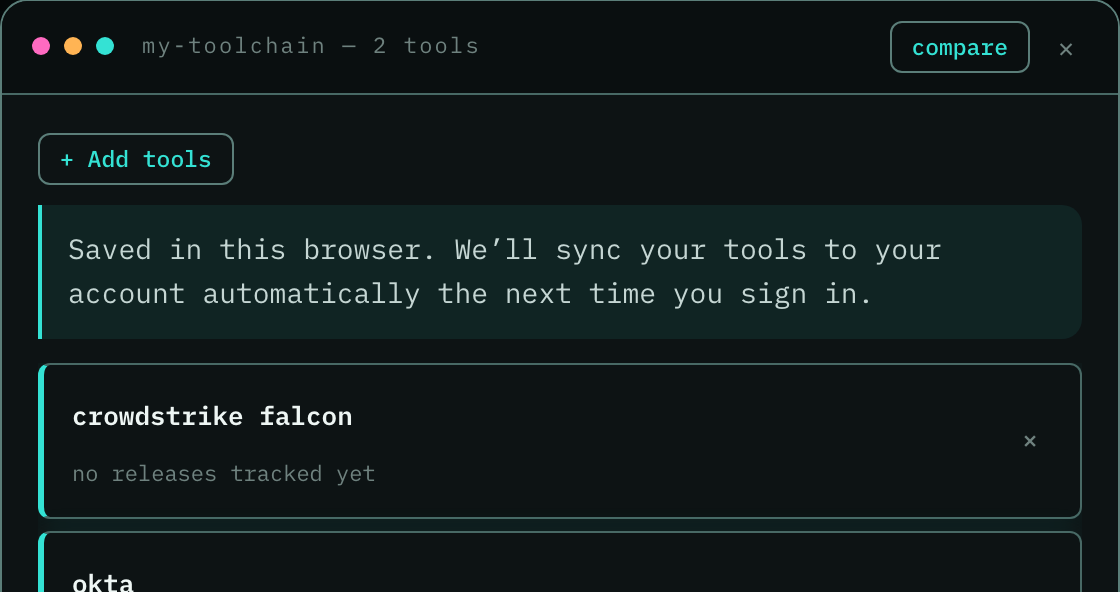
Your tools now follow you. Sign in and the tools you’ve saved sync to your account automatically, so they’re there on your other devices. Not signed in? We keep them in your browser and sync them the next time you sign in. Your email stays exactly as you set it.
When a tool changes its name, its page moves to the new name and lists every name it has had. Your old links, bookmarks, saved tools and searches still find it, and Tail and Uniq tell every reader about the change once, without counting it as a release.
We now read every hardware vendor's pages we watch for what changed and what it means, not for one set phrase, so a device that lands gets a dated entry in the daily issue. A device with a date ahead of it also gets a star, so it joins the tools you follow.

Every tool page now has a See other tools by this vendor link. It opens a window listing the vendor's other tools grouped by what they do, so you can jump from Nuclei to the rest of ProjectDiscovery without searching.
Release candidates, betas and nightly builds are now hidden on the newsletter pages until you click show prereleases, so the issue you read is what you can actually run today. We remember your choice. In email they stay off unless you turn on Include prereleases in my emails under Customization on your account, and the Developer edition includes them already, because people building on a tool want to see what's coming.
If you asked us to track a tool we didn't have yet, we now email you once it's live, with a link to its page. We wait until its full history is collected and its page is up on both sites, so the link you get is complete. You'll also see the request marked resolved in My Requests.
Monthly and quarterly top picks now read like a story. We start with the problem you were living with, walk through what the product shipped over the period, and say why it beat the others. The release notes come after, as examples, so you can see why it won before you read the details. It's on every top pick page now and comes to your inbox with the next pick.
When My Toolchain checks your tools for a capability, a tool we haven't read the docs for now says We haven't looked yet instead of Not checked yet, and it has a Know? Tell us button next to it. In testing, readers took Not checked yet to mean the tool doesn't have it. If you know the answer, one click sends it to us with the tool and capability already filled in.
26 more improvements
The weekly New on the Toolchain email now opens with the same activity chart as the changelog, in your email theme, so you can see how much we shipped each week without leaving your inbox.
Every tool page now has its summary and its How it helps answers. 133 tools across our two sites were missing them, because our weekly refresh only rewrote pages that already had one. We also taught it to read the vendor's homepage when a tool has no release feed, so products without public notes get a page too.
New on the Toolchain now says so when a week has no new tools to show. If we started watching tools but are still processing their data, the issue tells you, and we introduce them in a later issue instead of skipping them.
Coverage changes in your newsletter email no longer have underlines, so the titles and links are easier to read on a phone.
The home page chart now says what it counts: new open-source cyber projects each month, so you can see that cyber software specifically is growing, not software in general.
My Toolchain is easier to keep up with. Click an update to read it right there, then close it to land back on your list. Close updates one at a time or clear them all, and bring them back any time from the last 30 days. Long lists of tools and updates now scroll, so neither one pushes the other off the screen.
Release summaries read more plainly. Each one now opens with the tool and what it adds, like Keycloak adds SCIM support, instead of the vendor's product names and marketing words. Commands and settings come at the end of a sentence, after what they let you do, so you can skim an update before you reach the code.
Head now opens with the week in numbers and 12 weeks of charts, so you can compare the picks with the wider week. Click any total to browse the changes, tools, product launches or breaking changes, then filter by tool.
The Tail email now opens with five to ten picks instead of three. We pick more on a day with more worth reading and fewer on a quiet one, so a busy release day doesn't squeeze the good ones out. Each pick still gets its own card with what changed and something to try, and every release is still in the issue on the web.
We now track Latio, Mandos and IT-Harvest, the analyst platforms that map the cybersecurity market, so the firms that rate your vendors sit next to the vendors they rate. Each one has a tool page fed by its blog, and Mandos also links its pricing page and MCP server.
Release histories for 17 tools are complete again, including Abnormal AI, Veracode and Palo Alto Networks. On October 13 a history merge treated releases that shared a title, like weekly update posts, as one release and dropped 157 of them. They're back, and a merge that drops rows now gets stopped before it publishes.
Docs lead time is gone from every tool's signals, the compare table and the score card. It was built from when our crawler first saw a documentation change, and a new release makes us crawl sooner, so it mostly measured us and not the vendor. Breaking-change discipline now scores only how rarely a tool's releases break you, so a tool is no longer marked down or up for documentation timing we can't see.
The edition list at the top of every newsletter email now wraps between edition names on a phone, so uniq no longer splits into un and iq and the list reads cleanly.
Head now shows commands, flags and function names as code, so you can spot what to type at a glance. The stray backticks are gone from the page and the email. The Tail email's picks and Try this lines get the same fix.
Our privacy page now says what happens to your "Was this useful?" answers. It used to say a vote wasn't tied to your account, but if you're signed in, these are saved to it. They go when you delete your account, and the tool name goes to our analytics without your email address.
The rebrand list on Vendors now waits for changes we've confirmed, so a label on a company means what it says.
Opening an entry at Briefed showed its first line twice. Now you get it once. Tools we've only read one release of no longer mark every option new in, a marker that led nowhere. And the plans button on Samples now looks like every other paid label, so you can tell at a glance it's a plan and not a free signup.
Capability Search answers again. Since yesterday every search stopped with an error, so you couldn't see which tools match. Now your question gets its full answer, with the proof behind each match.
Compare links show the public facts again. If you opened a shared compare link without a plan, the table could stay empty because the full tool list hadn't arrived yet. Now it fills in as soon as the list loads. Anything you type in the tools search during that moment counts too, so you don't have to type it twice.
Switching language now translates the whole Tools table and the Threats list. Before, only the first screen of tools changed, and Threats stayed in English however you set it. The rest of the site's main pages are filling in now, ahead of tool pages and older issues.
Account changes stay consistent across tabs, so an older request cannot undo a newer sign-in or sign-out.
Some projects mark every GitHub release as a prerelease, finished versions included. Those versions now show as releases. We check each tool's release habits every day, so when a project changes how it ships, the labels follow.
Release candidates and other previews now have a Prerelease label and their own history filter, so you can tell previews from final releases.
When you look up tools through the API or your AI assistant, you now get the full answer every time. Before, a server that had been answering for a few minutes could start replying with no tools at all. Now it keeps what it has loaded and reads again only when our data changes, so capability searches stay quick too.
Restored documentation monitoring for pages that were incorrectly read as empty.
Moving a tool’s docs to a new address no longer creates a false documentation update.
New tools
No new cyber tools ready this week.
We started watching 155 tools this week, and we're still processing their data. They should be available soon, and we'll introduce them in an upcoming issue.