New on the Toolchain — issue 008, November 16, 2026
 THE CYBER TOOLCHAIN
NO. 008
58 improvements to help you get more from the Toolchain. Here's what you can do now.
ISSUE 008 · 2026-11-08 → 2026-11-15
New Features & Improvements 58
This week's improvements to the Toolchain.
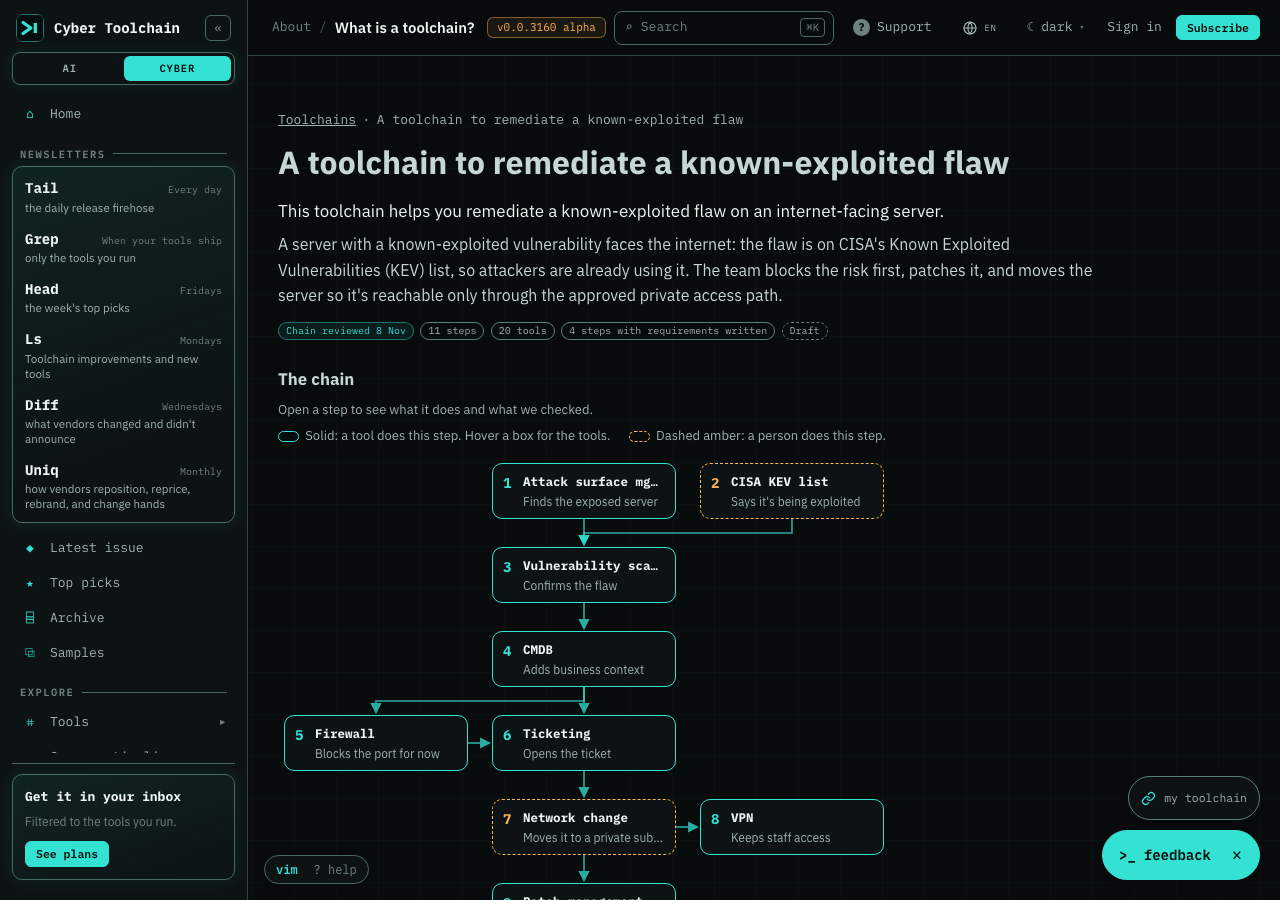
Each toolchain on /toolchain now has its own page. You see the chain step by step, open any step to read what it needs from the step before it and what it hands on, and see which of your saved tools already fit. Copy a set-up prompt to have your coding agent build it with you, or follow the toolchain in this browser to come back to it. Steps we haven't checked yet say so, and every page starts as a draft until a reviewer signs off on its tools.
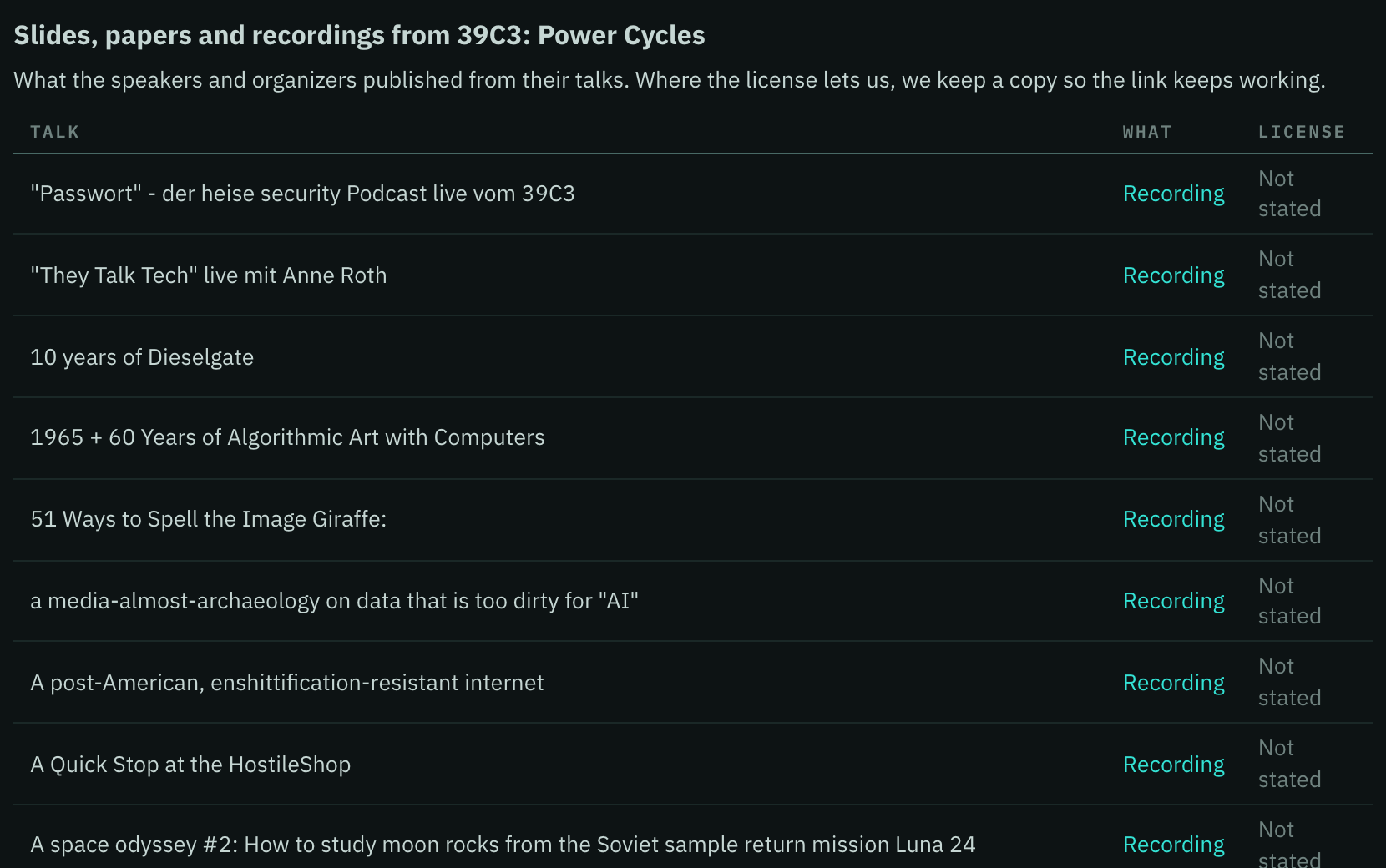
A conference's page now lists the slides, papers and recordings its speakers and organisers published, one line per talk with the licence as stated, so you can go straight to a talk's recording without searching the conference's own site. Where the licence lets us, we keep a copy so the link keeps working.
Every tool's own page now has an Add to my stack button. One tap adds it to the list My Toolchain keeps, and Undo is there for a few seconds if you tapped by mistake. Before, you had to find the tool again in My Toolchain or tap the star on the Tools page.

Toolchains has its own page, in alpha. Every toolchain in the library sits in one table you can search, sort and filter by the tools it uses, the same way you use /tools. Open one and it slides in beside the list, so you can read its steps without losing your place, and the link opens that same view for a teammate.
/toolchain now lists the kinds of toolchain you can build. Pipelines, security operations chains and agent chains, from a CI/CD pipeline to a SOAR playbook to an agent skill chain. Each shows the steps it runs through, so you can see which kind you have and where to look when a tool in it changes.
Starting My Toolchain is quicker. Pick a ready-made set, like Application security or Pen testing, and add all its tools in one tap, then change the list however you like. Before, you added each tool one at a time or pasted a list. A set you only partly have says how many more it would add.
Each conference's page now shows where its speakers work, taken from the line each speaker writes under their name on the schedule, and the conference list has a Speaker company filter, so you can find the events where a vendor or a peer team presents. We show the company, never the speaker's name.
Click a tool, a vendor or a dataset to see a summary beside the list, so you can check one without losing your place. For a tool you get its latest version, when it shipped, its releases per week and its newest features. For a vendor you get the tools we follow, its newest release and when its pricing last changed. For a dataset you get its type, license and safety notes, with a clear warning when it holds live malware. With keyboard keys on, press j and k to move down the list and the summary follows. Escape closes it, and Open full details is one click, or one more Enter, away.
50 more improvements
You can now ask which official client libraries a cyber tool ships, and what to install. For 24 commercial tools, including CrowdStrike, Okta, Auth0, Datadog, Zscaler, Palo Alto Networks, SailPoint and Cloudflare, we read the vendor's own packages from PyPI, npm and the Go module proxy and list the latest version, its release date and the install line. Ask our API at /v1/tools/<slug>/sdk or our MCP server with get_tool_surface and facet sdk. A tool we haven't captured says so instead of guessing.
You can now ask which Terraform resources a cyber tool gives you. For CrowdStrike, Cloudflare, Zscaler, Palo Alto Networks, Okta, 1Password, Sumo Logic, Splunk, Datadog, Netskope, Auth0, GitHub and GitLab we read the vendor's own provider from the Terraform Registry and list its version, resources and data sources. Ask our API at /v1/tools/<slug>/terraform or our MCP server with get_tool_surface and facet terraform. A tool we haven't captured says so instead of guessing.
Every vendor we've confirmed now has its own page under Vendors, more than 330 of them. Open one and you see every tool of theirs we watch and what each one shipped in the last 30 days, so you can catch up on a whole company in one place instead of opening its tools one by one. Vendors with a pricing history keep it on the same page, and old links to those pages still work.
A new Subprocessors page lists every company and AI model the Cyber Toolchain uses, what each one does for us, and what it can see of yours, so you can check where your data goes before you subscribe. It covers the models we run on our own machines too. We don't send your personal data to any AI model. The privacy policy now links to it and names our current host.
A tool's page now says how many defense technologies it documents controls for in real attacks, with a link to the exact controls and how to set them, so you can see whether a tool you already run helps against what attackers are doing.
On iPhone and iPad, browser notifications only work once the site is on your Home Screen. The notifications card in your account now has a How to add to Home Screen button that walks you through the three taps. Added to the Home Screen, the site opens full screen with its own icon, on Android too.
The Hacking Hardware list now opens on the devices you can buy, with form, price, stock and status on each row. Firmware and companion software sit one click away under Software & firmware. The kit planner is now a one-line bar above the list that opens when you pick Build my Kit, Compare Hardware or What Changed?, and its answer is a short card instead of a page of tiles, so you get your recommendation without scrolling.
My Toolchain now has a menu down the left, so you read one part at a time. Overview shows your whole stack at a glance, with a bar for each tool coloured by whether it needs attention, then what to do first and your tools in one table you can search, sort and filter. How you're keeping up has its own place. Before, everything was one long page you scrolled through.
The plans page is simpler to choose from. Each plan now says in plain words what lands in your inbox, one switch flips every price between monthly and yearly, and the full feature comparison is open right under the plans so you don't have to hunt for it.
My Toolchain is easier to read. Each tool is one short row that says how far behind you are, in red when something will break, so you can see what needs attention without opening anything. Tap a row for what to check before you upgrade and what you would gain, instead of scrolling a tall card for every tool.
Open a tool in My Toolchain and it now starts with where you are: the version you run, the latest, how far behind you are and how many changes will break. You can pick your version right there. A line of releases shows yours among them, so four behind is something you can see, and breaking changes come first.
The Toolchains page now tags every toolchain with its NIST CSF function. Pick Protect or Respond above the table to see only those, or filter the new Function column. Open a toolchain and its chain draws as a diagram: a filled node is a step a tool covers, a dashed ring is a step a person does. Click a node to open that step, expand the panel to see the chain beside the steps, and send us feedback from the panel.
Analytics now puts what a chart found at the top of its card, such as a total or the leader, so you can scan the page for answers before you open anything. The topics sit in a list on the left with the number of charts in each, and every card shows where its numbers came from and when they were built. Descriptions are no longer cut off, and chart legends no longer sit on top of the axis labels.
Every page in the sidebar now has an icon you can recognise at a glance, instead of a mix of tiny symbols and a grey chain. Pages about toolchains share an amber chain, so you can spot them as you scroll.
Every analytics reply in the API and MCP now carries the day its data runs through and a status, so you can tell whether a chart is up to date before you build on it. The chart list shows both for every chart. A chart we can't date yet says so instead of guessing, and the dates fill in as each chart's next refresh reports in.
Conferences now has its filters down the left side, each with the number of conferences it would show: calls for papers open, starting within 30 days, with recordings, the kind of conference and how you attend. The list reads month by month, the months chart is smaller, and the page no longer runs into the sidebar, so you can narrow the list and read it without scrolling past four cards first.
The MCP page now takes you through three steps: copy the endpoint, add it to your assistant, and ask it something, with four example questions to start from. The questions we test sit in a column beside the steps, so you can check what we promise without scrolling past the setup.
Adding tools from your AI assistant is now three short steps: copy the prompt, paste its reply, then confirm. You see which tools we found, and untick any that aren't yours, before anything is added to your list, instead of having them all added at once.
The watchlist now starts with the tools. This week's three figures sit beside the title, and the table begins on the first screen instead of below a chart and a paragraph, so you can search and filter right away. The 52-week releases chart is one click away, under the header.
MCP lookups that miss now say which tools you might have meant. Ask get_tool_history, get_tool_surface or search_tool_surface for a name we do not carry, such as a product name instead of its slug, and the error lists up to five nearest slugs to pass as tool_name, so an assistant can ask again instead of giving up.
On your phone, the top bar now has an Account button that opens Subscribe and Login, so you can reach either one without opening the main menu.
The vendors page now starts with the vendors. The four questions (who changed pricing, who shipped the most, who slowed shipping, who rebranded) are small tiles beside the title, so the search box, the filters, Compare vendors and the table begin on the first screen. Pick a tile to sort the table by that question and see the top three vendors for it, and open the quarterly pricing chart from one line under the header.
Company timelines now show you what is behind the sign-in. Signed out, you see an example timeline built from an invented company, clearly marked, with a short guide to the colours (funding or hiring, what they shipped, a name or category change) and what our coverage does not include. Business accounts read the real timelines in the same layout, and the page no longer runs into the sidebar.
The test datasets page now gets you to the table sooner. The counts and a bar for every type sit in one band under the title, and the search box and quick filters (All, Type, Format, License and No live malware) sit right above the rows, so you can leave out the datasets that contain live malware in one click.
The newsletter archive now starts with the issues. The big monthly chart is one total and a short strip of bars, one per month, so the list begins on the first screen. Issues are grouped by month, each with the tools inside it and how much it holds. The menu on the left counts every series and every year, so you can jump straight to Head, Diff, the top picks or a single year, and pick a bar in the strip to see that month's issues.
The FAQ now groups its questions in a list on the left, with the number of questions in each group. A search box filters the questions and answers as you type, and only one answer is open at a time, so you reach the answer you need without scrolling past the rest.
Feeds now has a menu down the left (Newsletter, By category, By tool, and one OPML file for everything), with a count beside each, and a search box that finds a feed or a category as you type. Every feed shows its full address when you hover it, so you can see exactly what you are about to copy.
Personas now puts the picker down the left, each role with a line on what it keeps. Choose one and the example entry changes beside the original, along with the three notes on what the edition keeps, leaves out and how it reads, so you can judge on one screen what reading as that role would be like.
The Webhook page now shows all five steps on one page, with a menu on the left that jumps to each one and marks the step you are reading. An example request stays in view beside them, with a Copy button. Webhooks are not live yet, so the page says so and shows how they will work, so you can get your end ready now.
Your AI assistant now gets told how to name a tool the moment it connects to our MCP server: a tool_name is the slug, usually vendor-product in lowercase with hyphens, and a miss should be retried with one of the suggested slugs or found with search_tool_surface. Before, an assistant that tried a product name and got Unknown tool often gave up and answered from memory; now it keeps looking in our data.
Capability search now sorts its example questions by what they ask: capabilities, readiness questions and known issues. Once you pick one, a preview beside your question lists the first matching tools with the words that put each one there and where we read them, and the full table with the proof is just below. The coverage note that says a missing match can mean missing evidence now sits with the question.
Top picks now shows one pick at a time. Monthly opens first and Quarterly is one click away. The newest pick fills the page: why it won, what to try, and the rivals it beat. Every earlier pick is listed on the left, and choosing one shows it in the same place without leaving the page. While a month or quarter is still being decided, a card on the left shows the days left and how many Head picks are in the running.
Website history gets you to the player faster. The header is a title and one paragraph with the counts, and the vendor search and the free histories sit in a column on the left, so you can switch vendors from the same screen. The screenshot, the play controls and the month strip fill the rest, with what changed beside them.
Each chart on Analytics now says how current its data is. It reads Data through 12 Nov 2026 when it's up to date, says so when it's older than usual and we're working on it, and tells you when we can't say yet. Before, a chart showed when it was built, which could look newer than the data in it.
A chart we haven't graded yet now shows today's numbers with a Not graded yet label, instead of hiding behind a Chart withheld notice. We grade each chart weekly, so the grade follows. A chart whose grade doesn't match its data is still held back.
The changelog now starts with the updates themselves, newest first. A list on the left filters them by kind and by month, with the number of updates in each, and the activity chart is a small card beside the list, so you can find the change you care about without scrolling past a chart.
The methodology page now shows what the guide covers before you subscribe. Its sections are listed beside the plan card, each with a line on what it explains, so you can see what a paid plan opens up before you choose one.
The menu is regrouped so related pages sit together. Vendors, their funding timeline and Conferences now live under Industry. Hardware and Datasets open from Tools. Capability and Integration Search sit under one Search entry. Developers is now Data Access, with REST, MCP and Webhook under API. About opens to Methodology, FAQ and Personas. You find a page by what it's about instead of scanning one long list.
Uniq's Where the newer companies are chart now says how many of the companies we track have a founding year so far, so a thin or empty column reads as a gap in what we know, not a quiet market. We now look for founding years every week on each company's own site, so the chart fills in as we find them.
We now track Akamai App & API Protector, Symantec Endpoint Security, OpenText Fortify on Demand, Avast Business Hub and Imperva Cloud WAF, so every large public cyber vendor your team is likely to run has a tool page here. Each page fills with the vendor's release notes and blog as we collect them, and the ones with a readable changelog get their history too.
Uniq no longer prints the Category size over time table. Every cell in it read "—" because we cannot yet count companies per category with confidence, so it took up room without telling you anything. The rest of Market lifecycle, the newer-company map and every dated event, is unchanged.
Tool pages show what you can do now again. For about two days every tool page said Plays could not be checked, even though the actions were published. You now see each action and the release note behind it, whether or not it has a deadline.
The daily newsletter no longer waits on a slow check of ours. Before, one check that ran long before the send could hold your issue back for hours. Now that check has a time limit and the send goes ahead without it, so the issue reaches you on schedule.
Adopt now clears its answer the moment you sign out or switch accounts, in every open tab. The list of tools you share in an Adopt link is also kept out of our analytics.
Removing a tool from your toolchain with the keyboard now keeps your place in the list, so you can keep going without tabbing back from the top. On a tool's page, Add to my stack now tells screen readers whether the tool is in your stack, and removing a tool offers Undo for a few seconds, so a stray tap on a phone is easy to take back.
The hiring focus and location charts keep up with each day's job boards again. Some vendors' job board pages from mid-October can't be rechecked, because we never kept the originals. We now leave just those out instead of holding the whole chart back, and the note under each chart says how many we left out and from which days.
Conference pages now distinguish an announced event from confirmed dates. You can read the published talks even when we haven't captured the dates yet. Paid conference history also reports an unavailable source clearly instead of serving an older copy. CCC’s published recording pages are also linked alongside its talks, with unknown licences stated explicitly.
A product launch announced twice by its vendor, once on a blog and once in a press release, now shows once in Head's product launches list. The count at the top of the week page matches what you see in the list.
Tail emails lead with today's picks again. Since November 8, some issues arrived as the short version saying the picks weren't ready, so you had to open the web issue to find what mattered. Now the picks are written every day, even on the busiest days.
The Updates panel is easier to read. A long release title used to run off the edge of its card and cut off the summary under it. Now it wraps inside the card. Mark all seen, See all and Tune moved to the top of the panel, so you don't have to scroll past every update to reach them. And when you mark an update Useful, it leaves the list, so what is left is what you still have to read.
New tools
No new cyber tools ready this week.
We started watching 170 tools this week, and we're still processing their data. They should be available soon, and we'll introduce them in an upcoming issue.