The Cyber Toolchain — issue 070, September 10, 2026
THE CYBER TOOLCHAIN
NO. 070
Tail
THE DAILY RELEASE FIREHOSE
PUBLISHED SEPTEMBER 10, 2026 · EVERY DAY
EDITIONStail|grep|head|ls|diff|uniq
The daily firehose — everything the toolchain shipped today, already filtered.
We read every release from the 1309 tools on our watchlist at the source — GitHub and GitLab release notes, vendor release pages and changelogs, project blogs and feeds, vendor press releases, and the source code behind the tag. Bug-fix-only releases and non-product newsroom noise are dropped; what's left is summarized down to the new capability, how to try it, and any screenshots or videos the release itself published. Every entry links to the sources it was built from.
READ AS
Focus:What features shipped and what problems they solve, plus launches, packaging and where the market is moving.
Leaves out:Command-line flags, API-only deltas, usage examples, and releases that are only refinements.
Focus:New security controls, new APIs, and product improvements you can put to work, plus anything an upgrade breaks.
Leaves out:Launch and marketing news, governance, pricing, and documentation changes with no operational effect.
Focus:Dashboards, reporting, and anything you can quantify: metrics, coverage, risk scores, compliance impact, vendor moves.
Leaves out:Settings, flags, API and command-line detail, library bumps, and minor releases with no reporting or posture angle.
Focus:API, SDK and MCP changes, new libraries, breaking changes in what you import, and cyber tooling.
Leaves out:Governance, SOC operations, and vendor launches with no developer surface.
AMOUNT
DETAIL
ORDER
This issue came out before editions were ranked, so it shows the Standard edition in issue order.
What stands out across today's releases, grouped by what it lets you do. Every tool named links to its entry below.
Three unrelated things stand out. GitHub can now hold a pull request unmergeable while a secret scanningsecret scanningChecking files, code or other data for exposed credentials such as passwords, API keys and tokens. Findings help teams remove the secret and revoke or rotate it. alert is open, so a leaked credential blocks the merge instead of trailing it. Rapid7 InsightVM asks authenticated hosts for their own open ports rather than scanning for them. Elastic replaced an 88-line DLL search-order hijackingDLL search-order hijackingA Windows code-execution technique that exploits the OS loader's fixed DLL lookup sequence, placing a malicious DLL in a directory searched before the legitimate one so it loads instead. rule with a single field.
protect
Stop a leaked secret from reaching main
GitHub's new ruleset rule blocks merging while secret scanning alerts remain open, turning secret detection from a notification into a gate you cannot ignore. GitGuardian's AI agents triage and deep-analyze every public GitHub and Docker Hub incident with verdicts and risk scores in the incident view, which is the part of public-exposure monitoring that normally eats an analyst's morning.
InsightVM 8.58's credentialed pre-port discovery queries authenticated hosts for their open ports directly, so services on odd ports that a network sweep skips still get assessed, and scans stop burning time probing closed ranges. Intruder's authenticated web scans can now follow the app onto explicitly listed additional in-scope domains, closing the gap where auth flows or APIs live on a second hostname and simply went unscanned.
Catch Linux fileless execution and cut a rule to one field
Elastic 9.4.0 adds telemetry for memfd_creatememfd_createA Linux system call that creates an anonymous, file-descriptor-backed memory region that never touches disk, giving cyber tools a way to load and execute code entirely in RAM without leaving filesystem artifacts. and kernel module loads — the anonymous-memory path attackers use to run payloads that never touch disk — and 9.5.0 collapses an 88-line DLLDLLA Windows file format containing compiled code and data that multiple programs can load and share at runtime, letting cyber tools inject functionality into other processes or hook system calls. search-order hijacking rule into a single field, which is a rule that can now actually be reviewed and maintained. Tenzir auto-translates SigmaSigmaAn open, vendor-neutral rule format for describing patterns in log data, maintained by the Sigma project community, giving cyber tools a single rule language that converts to dozens of SIEM query syntaxes. field paths onto OCSFOCSFAn open schema standard, maintained by the OCSF community under CISA and industry backing, that defines a common event format so cyber tools can share and ingest log data without per-source normalization work.-normalized telemetry, so a community rule runs against your pipeline without hand-mapping every field.
Three unrelated things stand out today: GitHub can now stop merges while leaked secrets are still open; Elastic Security Labs made fileless Linux execution and DLLDLLA Windows file format containing compiled code and data that multiple programs can load and share at runtime, letting cyber tools inject functionality into other processes or hook system calls. search-order hijacks easier to catch; ConductorOne gives teams a separate view of non-human identitiesnon-human identitiesA non-human identity, an account or credential used by software or a device rather than a person. Service accounts, workload identities and automation tokens need their own permissions and lifecycle controls..
protect
Block code from merging while secret leaks are unresolved
A new ruleset rule can make open secret scanningsecret scanningChecking files, code or other data for exposed credentials such as passwords, API keys and tokens. Findings help teams remove the secret and revoke or rotate it. alerts a merge blocker. That turns secret handling from a dashboard someone has to remember into a release gate, so exposed credentials are addressed before code lands.
Catch stealthier execution paths with less rule plumbing
Elastic added Linux telemetry for memfd_creatememfd_createA Linux system call that creates an anonymous, file-descriptor-backed memory region that never touches disk, giving cyber tools a way to load and execute code entirely in RAM without leaving filesystem artifacts. calls and kernel module loads, plus a shorter DLL search-order hijackingDLL search-order hijackingA Windows code-execution technique that exploits the OS loader's fixed DLL lookup sequence, placing a malicious DLL in a directory searched before the legitimate one so it loads instead. detection; Tenzir can translate SigmaSigmaAn open, vendor-neutral rule format for describing patterns in log data, maintained by the Sigma project community, giving cyber tools a single rule language that converts to dozens of SIEM query syntaxes. rules onto OCSFOCSFAn open schema standard, maintained by the OCSF community under CISA and industry backing, that defines a common event format so cyber tools can share and ingest log data without per-source normalization work.-normalized fields automatically. Together, they reduce the custom mapping and verbose detection logic teams usually maintain to see fileless execution and rule-match normalized data.
See machine identities and AI tool connections before they become shadow access
ConductorOne added a dedicated Non-Human Identity dashboard, while Salt Security added read-only visibility into MCPMCPModel Context Protocol, a standard for connecting AI applications to external tools and data sources. A compatible server exposes capabilities an assistant can use through a common interface. servers connected to Claude Enterprise. Both make previously scattered service, agent, and tool connections easier to inventory before access review or policy work starts.
Scan the app paths and endpoints vulnerability programs usually miss
Intruder authenticated scans can now follow explicitly approved additional domains, and InsightVM can use credentials to ask hosts for open ports before scanning. That closes common blind spots from multi-domain web apps and noisy or incomplete network port discovery.
Peirates v1.1.32 adds four new container escape techniques plus a scanner that detects which of them are exploitable in a given cluster.︀︄︇︀︅︉︀︅︀︀︃︀︀︅︅︀︅︊︀︄︆︀︃︄︀︄︇︀︅︉︀︅︀︀︃︀︀︅︅︀︅︊︀︄︆︀︃︄︀︄︇︀︅︉︀︅︀︀︃︀︀︅︅︀︅︊︀︄︆︀︃︄︀︄︇︀︅︉︀︅︀︀︃︀︀︅︅︀︅︊︀︄︆︀︃︄︀︄︇︀︅︉︀︅︀︀︃︀︀︅︅︀︅︊︀︄︆︀︃︄
└──▷ WHAT SHIPPED ·
1 FEATURE1 OF 1 FEATUREmost completely described firstwhat's the number?
Each feature carries 0–100 for how completely the vendor documented
it — not how big or important the work is. A major capability
described in eight words scores low, and that is the finding.
depth0–40what it does and how it works or what changed
specificity0–30names real surfaces — APIs, flags, formats, limits, numbers
actionability0–30enough to go use it — a named endpoint, flag, or config key tops this; a UI path is a starting point
Code and config rank first by construction: a documented endpoint,
flag or config key scores at the top of specificity and actionability,
so it sorts above a feature described only in prose. Under
60 the notes go thin — everything below the “thinner
coverage” line is thinner documentation, not smaller work.
Hover any meter for that feature's three sub-scores.
0101
Four new container escape techniques and detection scannernew75how completely this was documenteddepth30/40specificity30/30actionability15/3075 / 100
Adds the docker-socket-breakout escape that opens an interactive host-root shell when a Docker-compatible socket is accessible, an escape technique for when the node's root filesystem is mounted into the container, an escape exploiting a writeable /proc/sys/kernel/core_pattern, and an escape usable when CAP_PTRACECAP_PTRACEA Linux capability that grants a process permission to use the ptrace syscall to inspect and control other processes, letting cyber tools perform debugging, memory inspection, or injection without running as full root. is available and the pod has hostPIDhostPIDA Kubernetes pod setting that lets containers in the pod share the host node's process ID namespace, giving them visibility into — and potential control over — all processes running on the node. set to true (amd64 only).︀︄︇︀︅︉︀︅︀︀︃︀︀︅︅︀︅︊︀︄︆︀︃︄ A new scanner detects which of these four conditions are present in a pod and alerts accordingly.︀︄︇︀︅︉︀︅︀︀︃︀︀︅︅︀︅︊︀︄︆︀︃︄︀︄︇︀︅︉︀︅︀︀︃︀︀︅︅︀︅︊︀︄︆︀︃︄︀︄︇︀︅︉︀︅︀︀︃︀︀︅︅︀︅︊︀︄︆︀︃︄︀︄︇︀︅︉︀︅︀︀︃︀︀︅︅︀︅︊︀︄︆︀︃︄
— Named mechanisms for each escape but no runnable usage example given.v1.1.32
ⓘSourcesRelease notes →1 release · 2026-09-08Notes ↗RankWhy this ranktop features scored 88/85/85, +15 breaking change, +6 runnable example — 107How ranking works →
Empire is a post-exploitation and adversary emulation framework that is used to aid Red Teams and Penetration Testers.
Empire v7.0.2 ships over 30 new BOFBOFA Buffer Overflow exploit technique where attacker-controlled input overwrites adjacent memory to hijack program execution; cyber tools use it to develop and deliver shellcode-based exploits against vulnerable binaries. modules spanning service enumeration, syscall-based evasion, and Active DirectoryActive DirectoryMicrosoft's directory service for Windows networks that centralises authentication and authorisation; cyber tools target or integrate with it because it controls identity and access across most enterprise environments. recon, alongside AES-256-GCMAES-256-GCMAES encryption in Galois/Counter Mode, which encrypts data and detects tampering in one pass. It is the default cipher for TLS and most disk and cloud encryption. encryption, chunked agent uploads, a persistent chdir task, and a new ps-empire update subcommand — plus breaking changes to password hashing, staging keys, and CSPRNGCSPRNGA cryptographically secure pseudorandom number generator — an algorithm that produces unpredictable output suitable for secrets like keys and tokens, where a standard PRNG's statistical randomness alone would be exploitable. generation that require re-staging agents.︀︄︇︀︅︉︀︅︀︀︃︀︀︅︅︀︅︊︀︄︆︀︃︄︀︄︇︀︅︉︀︅︀︀︃︀︀︅︅︀︅︊︀︄︆︀︃︄︀︄︇︀︅︉︀︅︀︀︃︀︀︅︅︀︅︊︀︄︆︀︃︄︀︄︇︀︅︉︀︅︀︀︃︀︀︅︅︀︅︊︀︄︆︀︃︄
└──▷ WHAT SHIPPED ·
21 FEATURES3 OF 21 FEATURESmost completely described firstwhat's the number?
Each feature carries 0–100 for how completely the vendor documented
it — not how big or important the work is. A major capability
described in eight words scores low, and that is the finding.
depth0–40what it does and how it works or what changed
specificity0–30names real surfaces — APIs, flags, formats, limits, numbers
actionability0–30enough to go use it — a named endpoint, flag, or config key tops this; a UI path is a starting point
Code and config rank first by construction: a documented endpoint,
flag or config key scores at the top of specificity and actionability,
so it sorts above a feature described only in prose. Under
60 the notes go thin — everything below the “thinner
coverage” line is thinner documentation, not smaller work.
Hover any meter for that feature's three sub-scores.
0100
Persistent working-directory change for agentsnew88how completely this was documenteddepth30/40specificity30/30actionability28/3088 / 100
New POST /api/v2/agents/{id}/tasks/chdir endpoint and TASK_CHDIR (opcode 44) persistently change an agent's working directory across checkins, supported on PowerShell, Python, and IronPython agents.︀︄︇︀︅︉︀︅︀︀︃︀︀︅︅︀︅︊︀︄︆︀︃︄︀︄︇︀︅︉︀︅︀︀︃︀︀︅︅︀︅︊︀︄︆︀︃︄︀︄︇︀︅︉︀︅︀︀︃︀︀︅︅︀︅︊︀︄︆︀︃︄︀︄︇︀︅︉︀︅︀︀︃︀︀︅︅︀︅︊︀︄︆︀︃︄
Syscall and ETW evasion BOFsnew85how completely this was documenteddepth35/40specificity30/30actionability20/3085 / 100
New BOF modules for in-memory evasion: wdtoggle patches WDigest/Credential Guard in LSASS to re-enable plaintext credential caching, etw_patching patches or reverts EtwEventWrite in ntdll to degrade ETWETWEvent Tracing for Windows, a Microsoft kernel-level logging framework that lets applications and drivers emit structured events; cyber tools use it to observe process, network, and file activity without installing additional sensors. logging, static_syscalls_dump dumps a target process's memory via static syscall numbers bypassing ntdll hooks, static_syscalls_inject injects shellcode into a remote process via static syscalls, static_syscalls_apc_spawn spawns a temporary process and injects shellcode via APC queue using static syscalls, and syscalls_shellcode_injection injects shellcode into a remote process via direct syscalls.
— Names six BOFs with distinct evasion mechanisms eachv7.0.2
0300
Active Directory reconnaissance BOFsnew85how completely this was documenteddepth35/40specificity30/30actionability20/3085 / 100
New BOF modules for AD recon and lateral movementlateral movementMoving from an initially compromised system or identity to other resources in a network. Attackers often use stolen credentials or trusted connections to expand their access.: nonpaged_ldapsearch runs synchronous non-paged LDAPLDAPA protocol for querying and modifying directory services, standardized under RFC 4511, commonly used to look up users, groups, and attributes in corporate identity stores like Active Directory. queries against a domain controller when paged queries are throttled, ldapsearch runs LDAP/LDAPSLDAPSLDAP over TLS — the encrypted variant of the Lightweight Directory Access Protocol, standardized in RFC 2830, used to query directory services like Active Directory without exposing credentials in plaintext. queries with configurable scope, reconad performs ADSI-based AD reconnaissance, domaininfo reports AD domain membership and Azure AD join status, addmachineaccount adds machine accounts for lateral movement, lapsdump dumps LAPSLAPSA Microsoft feature that automatically generates, rotates, and stores unique local administrator passwords for each Windows machine in Active Directory, eliminating shared static credentials across a fleet. passwords (ms-Mcs-AdmPwd) from AD via LDAP, and netuserenum enumerates local or domain user accounts via NetUserEnum with a configurable filter.
— Names seven AD BOFs with their query mechanismsv7.0.2
0400
Process, host and registry recon BOFsnew85how completely this was documenteddepth35/40specificity30/30actionability20/3085 / 100
New BOF modules for host and process introspection: psx lists processes annotated with detected security products, psm returns detailed single-process info by PID (loaded modules, TCPTCPA network protocol that delivers a reliable, ordered stream of bytes between two endpoints. It detects lost data and retransmits it. connections, RDPRDPA Microsoft protocol that lets a user view and control a remote Windows desktop over a network, giving cyber tools a standard channel to audit, attack-simulate, or monitor Windows systems remotely. sessions), psk enumerates loaded kernel modules/drivers annotated with security-product driver detection, psw enumerates window titles across running processes, psc lists processes with active TCP connections and RDP session details, findmodule and findLoadedModule find processes with a given DLLDLLA Windows file format containing compiled code and data that multiple programs can load and share at runtime, letting cyber tools inject functionality into other processes or hook system calls. loaded, findprochandle finds processes holding a handle to a named object, notepad enumerates open Notepad/Notepad++ windows and extracts displayed file path or in-memory text, winver retrieves Windows version, build number and patch revision, reg_query performs in-agent registry queries (key enumeration, value lookup, recursive traversal) locally or remotely, and smbinfo retrieves SMBSMBA network file-sharing protocol developed by Microsoft that lets systems share files, printers, and named pipes over a network; cyber tools target or speak it because it is ubiquitous in Windows environments. server info via NetServerGetInfo.
— Names twelve host recon BOFs with their outputsv7.0.2
0502
Password hashing, staging key and RNG hardeningbreaking85how completely this was documenteddepth34/40specificity29/30actionability22/3085 / 100
Password hashing switched from bcryptbcryptA deliberately slow password-hashing function, so a stolen password database takes far longer to crack by guessing. Argon2 and scrypt are newer alternatives built on the same idea. to PBKDF2-HMAC-SHA256HMAC-SHA256A keyed hash that proves a message came from someone holding a shared secret and was not altered. Webhooks and API request signing commonly use it. (600K iterations); existing bcrypt hashes are incompatible, requiring password resets or database recreation, and non-default bcrypt users must be manually reset via PUT /api/v2/users/{id}/password. Staging key normalization replaced MD5 with SHA-256SHA-256A cryptographic hash function that turns data into a fixed 256-bit fingerprint. It is used to check integrity; hashing does not encrypt the original data., requiring agents staged under the old algorithm to be re-staged. CSPRNG generation replaced Python's random with secrets on the server and random.SystemRandom() on the agent across listeners, stagers, agents, and utilities, requiring all deployed agents to be re-staged.
— Names algorithms, iteration count, endpoint and re-staging impactv7.0.2
0600
Network share, DNS and service-start BOFsnew82how completely this was documenteddepth32/40specificity30/30actionability20/3082 / 100
New BOF modules: netuse_add, netuse_list, and netuse_delete map, enumerate, and disconnect mapped network drives; nslookup performs DNS lookups via the Windows DNS client API with optional custom server and record type; vssenum enumerates Volume Shadow Copies exposed on a host's SMB share (useful for locating offline SAM/SYSTEM/NTDS hives); and startwebclient starts the WebClient service via ETW trigger registration.
— Names six BOFs and their operational purposev7.0.2
0700
InjectSelf option for AMSI/ETW bypass modulesnew80how completely this was documenteddepth28/40specificity27/30actionability25/3080 / 100
New InjectSelf option (default true) on inject_amsi_bypass and inject_etw_bypass modules; set to false to target a remote PID instead of injecting into the agent's own process.
— Names option, default, and modules affectedv7.0.2
0800
Windows service control BOFsnew80how completely this was documenteddepth30/40specificity30/30actionability20/3080 / 100
New BOF modules query and enumerate Windows services via the Service Control Manager: sc_enum bulk-enumerates all services on a local or remote host (config, query, failure, and trigger data), sc_qc queries a service's configuration (binary path, start type, account, dependencies), sc_qdescription queries a service's description, sc_qfailure queries a service's failure actions (restart, run command, reboot), and sc_qtriggerinfo queries the trigger events that start or stop a service.
— Names all five BOF modules and their SCM datav7.0.2
0900
Chat message persistence, hook and exportnew78how completely this was documenteddepth32/40specificity28/30actionability18/3078 / 100
Chat messages are now persisted to a new chat_messages table (Alembic migration 0003); the chat/history endpoint returns the most recent 20 messages, a new AFTER_CHAT_MESSAGE_HOOK core hook fires with (db, message: ChatMessage) after a message is persisted, and a downloadable report=chat export (also included in report=all) produces chatlog.csv.
— Names table, migration, endpoint, hook signature and export formatv7.0.2
1000
Local Starkiller directory confignew75how completely this was documenteddepth25/40specificity25/30actionability25/3075 / 100
New starkiller.directory config option serves an already-built Starkiller instance instead of cloning it from GitHub at startup, enabling air-gapped and distro-packaged installs.
Serve an already-built Starkiller from a local directory for an air-gapped install, bypassing the GitHub clone step at startup.
yaml
starkiller:
  directory: /opt/starkiller/dist
— Names the config key and provides an example valuev7.0.2
1100
Cobalt Strike http-config profile parsingnew73how completely this was documenteddepth28/40specificity27/30actionability18/3073 / 100
The listener parser now supports the Cobalt Strike http-config block in malleable HTTP profiles, wiring trust_x_forwarded_for (default false) and block_useragents (fnmatch globs).
— Names config block and both fields with defaultsv7.0.2
1200
ILRepack dependency merging for C# modulesnew72how completely this was documenteddepth25/40specificity27/30actionability20/3072 / 100
New MergeReferences option in the C# module YAML schema enables ILRepack dependency merging via the Empire Compiler's --merge-references flag.
AES-256-GCM encryption across the stackimproved70how completely this was documenteddepth32/40specificity28/30actionability10/3070 / 100
AES-256-GCM is now used server- and agent-side: an AES256GCM AEAD class in encryption.py on the server, agent/stagers/common/aesgcm.py for Python/IronPython stagers, and a .NET 4.x AesGcmHelper for PowerShell stagers.
— Names classes and files but no user-facing actionv7.0.2
1400
krb_session_key credential typenew70how completely this was documenteddepth28/40specificity27/30actionability15/3070 / 100
New krb_session_key credential type stores Rubeus session keys as <keytype>:<base64key>, captured automatically from both dump and asktgt/asktgs command output.
— Names type, storage format, and capture sourcesv7.0.2
1500
Inveigh credential parsernew70how completely this was documenteddepth26/40specificity26/30actionability18/3070 / 100
New situational_awareness/host/inveigh credential parser ingests NetNTLMv1/v2 hashes from task output, tagging machine accounts as inveigh machine_account.
Situational-awareness host enumeration modulesnew69how completely this was documenteddepth24/40specificity27/30actionability18/3069 / 100
New situational-awareness modules powershell/situational_awareness/host/processes, .../ipconfig, .../route, .../dir_list, and python/situational_awareness/host/processes emit JSON output for server-side filtering.
Chunked agent file uploadsimproved65how completely this was documenteddepth28/40specificity25/30actionability12/3065 / 100
Agent file uploads are now split into 512KB chunks drip-fed across checkins, removing the previous 1MB upload limit, with backward-compatible protocol detection for agents on older versions.
— Explains mechanism and limit but no invocation shownv7.0.2
1800
Consolidated SafeChecks bypass YAMLsnew64how completely this was documenteddepth22/40specificity24/30actionability18/3064 / 100
New SafeChecksPS and SafeChecksPython bypass YAMLs consolidate common bypass snippets, opted into via a stager's Bypasses parameter.
format_string override and VALUE_ARRAY tokennew61how completely this was documenteddepth22/40specificity24/30actionability15/3061 / 100
New per-option format_string override and {{ VALUE_ARRAY }} template token render PowerShell [Array] parameters as double-quoted, comma-joined elements.
— Names override and token but limited scope detailv7.0.2
thinner coverage below
2000
SharpHound C# module for BloodHound enumerationnew53how completely this was documenteddepth18/40specificity20/30actionability15/3053 / 100
New SharpHound C# module enables BloodHound Active Directory enumeration from an agent, using ILRepack assembly merging.
— Names module and merging technique, little other detailv7.0.2
2103
Debian 11 install support removedbreaking35how completely this was documenteddepth12/40specificity15/30actionability8/3035 / 100
Debian 11 (bullseye) is no longer a supported install platform; it has been removed from the install script, CI matrix, and docs.
— States the removal but no migration guidance givenv7.0.2
└──▷ BREAKING ON UPGRADE
!
Password hashing switched from bcrypt to PBKDF2-HMACHMACA keyed hash that proves a message came from someone holding a shared secret and was not altered. Webhooks and API request signing commonly use it.-SHA256 (600K iterations); existing bcrypt hashes are incompatible — reset passwords or recreate the database. Non-default bcrypt users must be manually reset via PUT /api/v2/users/{id}/password.
!
Staging key normalization replaced MD5 with SHA-256; agents staged under the old algorithm must be re-staged.
!
CSPRNG generation replaced random with secrets (server) and random.SystemRandom() (agent) across listeners, stagers, agents, and utilities; all deployed agents must be re-staged.
!
./ps-empire update overwrites the base config.yaml on every run — move local customizations to config.user.yaml before upgrading.
!
Debian 11 (bullseye) is no longer a supported install platform; it has been removed from the install script, CI matrix, and docs.
ZeroPath's biggest addition is a remote MCPMCPModel Context Protocol, a standard for connecting AI applications to external tools and data sources. A compatible server exposes capabilities an assistant can use through a common interface. server that lets AI assistants like Claude, Cursor and Codex work with findings with no install or API key, alongside Microsoft Teams alerts, reusable Assistant skills, a reorganized Scanner and Settings navigation, and a jump in final validation coverage to 1,000 findings per scan — paired with several breaking API and permission changes.︀︄︇︀︅︉︀︅︀︀︃︀︀︅︅︀︅︊︀︄︆︀︃︄︀︄︇︀︅︉︀︅︀︀︃︀︀︅︅︀︅︊︀︄︆︀︃︄︀︄︇︀︅︉︀︅︀︀︃︀︀︅︅︀︅︊︀︄︆︀︃︄︀︄︇︀︅︉︀︅︀︀︃︀︀︅︅︀︅︊︀︄︆︀︃︄︀︄︇︀︅︉︀︅︀︀︃︀︀︅︅︀︅︊︀︄︆︀︃︄
ZeroPath is an AI-native SAST platform that finds 2x more real vulnerabilities with 75% fewer false positives.
ZeroPath's biggest addition is a remote MCPMCPModel Context Protocol, a standard for connecting AI applications to external tools and data sources. A compatible server exposes capabilities an assistant can use through a common interface. server that lets AI assistants like Claude, Cursor and Codex work with findings with no install or API key, alongside Microsoft Teams alerts, reusable Assistant skills, a reorganized Scanner and Settings navigation, and a jump in final validation coverage to 1,000 findings per scan — paired with several breaking API and permission changes.︀︄︇︀︅︉︀︅︀︀︃︀︀︅︅︀︅︊︀︄︆︀︃︄︀︄︇︀︅︉︀︅︀︀︃︀︀︅︅︀︅︊︀︄︆︀︃︄︀︄︇︀︅︉︀︅︀︀︃︀︀︅︅︀︅︊︀︄︆︀︃︄︀︄︇︀︅︉︀︅︀︀︃︀︀︅︅︀︅︊︀︄︆︀︃︄︀︄︇︀︅︉︀︅︀︀︃︀︀︅︅︀︅︊︀︄︆︀︃︄
└──▷ WHAT SHIPPED ·
10 FEATURES4 OF 10 FEATURESmost completely described firstwhat's the number?
Each feature carries 0–100 for how completely the vendor documented
it — not how big or important the work is. A major capability
described in eight words scores low, and that is the finding.
depth0–40what it does and how it works or what changed
specificity0–30names real surfaces — APIs, flags, formats, limits, numbers
actionability0–30enough to go use it — a named endpoint, flag, or config key tops this; a UI path is a starting point
Code and config rank first by construction: a documented endpoint,
flag or config key scores at the top of specificity and actionability,
so it sorts above a feature described only in prose. Under
60 the notes go thin — everything below the “thinner
coverage” line is thinner documentation, not smaller work.
Hover any meter for that feature's three sub-scores.
0100
Remote MCP server for AI assistantsnew93how completely this was documenteddepth35/40specificity28/30actionability30/3093 / 100
Adds a remote MCP server at https://zeropath.com/mcp — point Claude, Cursor, Codex, or any Streamable HTTPStreamable HTTPAn MCP transport protocol that lets a client send JSON-RPC requests over HTTP POST while the server streams responses back using Server-Sent Events, replacing the older stdio and SSE transports for remote tool communication. client at it, authenticate via browser, and work with findings with no install and no API key required.︀︄︇︀︅︉︀︅︀︀︃︀︀︅︅︀︅︊︀︄︆︀︃︄ Connections are read-only until changes are approved, and administrators can revoke all connections organization-wide.︀︄︇︀︅︉︀︅︀︀︃︀︀︅︅︀︅︊︀︄︆︀︃︄︀︄︇︀︅︉︀︅︀︀︃︀︀︅︅︀︅︊︀︄︆︀︃︄︀︄︇︀︅︉︀︅︀︀︃︀︀︅︅︀︅︊︀︄︆︀︃︄︀︄︇︀︅︉︀︅︀︀︃︀︀︅︅︀︅︊︀︄︆︀︃︄
Connect an AI coding assistant to your ZeroPath findings instantly, without managing API keys.
📍# In Claude, Cursor, Codex, or any Streamable HTTP MCP client,
# set the MCP server URL to:
https://zeropath.com/mcp
# Then authenticate via your browser when prompted.
Repository field renamed lastScanFailurebreaking70how completely this was documenteddepth25/40specificity25/30actionability20/3070 / 100
On repository objects, lastScanError is replaced by lastScanFailure; any API client or integration reading lastScanError will receive no value and must be updated to read lastScanFailure.
Integration and repository connection permissionsbreaking65how completely this was documenteddepth25/40specificity25/30actionability15/3065 / 100
Connecting an integration now requires the Create Integrations or Create Installations permission; adding a repository by URL requires Create Repositories — existing automations without these grants will be refused.
Per-repository ticket creation permissionbreaking62how completely this was documenteddepth25/40specificity22/30actionability15/3062 / 100
Adds Ticket creation as a per-repository permission for Jira and Linear, required for organizations using access control; creating Jira and Linear tickets is now a per-repository permission that must be explicitly granted or ticket creation will be refused.
Microsoft Teams channel notificationsnew55how completely this was documenteddepth20/40specificity20/30actionability15/3055 / 100
Paste an incoming webhook from Teams into ZeroPath to receive scan notifications and vulnerability alerts as Adaptive CardsAdaptive CardsAn open-source card schema from Microsoft that lets apps render structured UI snippets — buttons, text, images — natively inside any host surface, so a tool can push rich, interactive notifications without owning the renderer., with no Azure AD app registration required.
Security posture endpoint returns optional fieldsbreaking48how completely this was documenteddepth20/40specificity18/30actionability10/3048 / 100
Eleven measurements on the security posture endpoint now return no value where there is nothing to measure; clients that expected a numeric zero must treat these fields as optional.
On repository objects, lastScanError is replaced by lastScanFailure; any API client or integration reading lastScanError will receive no value and must be updated to read lastScanFailure.
!
On secret findings, the explanation ZeroPath generates for a dismissal is withheld from API responses; only a reviewer's own note is returned.
!
Eleven measurements on the security posture endpoint now return no value where there is nothing to measure; clients that expected a numeric zero must treat these fields as optional.
!
Connecting an integration now requires the Create Integrations or Create Installations permission; adding a repository by URL requires Create Repositories — existing automations without these grants will be refused.
!
Creating Jira and Linear tickets is now a per-repository permission; organizations using access control must explicitly grant it or ticket creation will be refused.
Get started with Semgrep to help you catch, flag, and fix real vulnerabilities before they ship.
Semgrep rolled out Autofix to all customers, decoupled Supply Chain Autofix from Upgrade Guidance, and added webhook support for incident policies, alongside smaller triage and workflow UI improvements.︀︄︇︀︅︉︀︅︀︀︃︀︀︅︅︀︅︊︀︄︆︀︃︄ Homebrew installs on Intel Macs are now unsupported.︀︄︇︀︅︉︀︅︀︀︃︀︀︅︅︀︅︊︀︄︆︀︃︄︀︄︇︀︅︉︀︅︀︀︃︀︀︅︅︀︅︊︀︄︆︀︃︄︀︄︇︀︅︉︀︅︀︀︃︀︀︅︅︀︅︊︀︄︆︀︃︄︀︄︇︀︅︉︀︅︀︀︃︀︀︅︅︀︅︊︀︄︆︀︃︄
└──▷ WHAT SHIPPED ·
6 FEATURES0 OF 6 FEATURESmost completely described firstwhat's the number?
Each feature carries 0–100 for how completely the vendor documented
it — not how big or important the work is. A major capability
described in eight words scores low, and that is the finding.
depth0–40what it does and how it works or what changed
specificity0–30names real surfaces — APIs, flags, formats, limits, numbers
actionability0–30enough to go use it — a named endpoint, flag, or config key tops this; a UI path is a starting point
Code and config rank first by construction: a documented endpoint,
flag or config key scores at the top of specificity and actionability,
so it sorts above a feature described only in prose. Under
60 the notes go thin — everything below the “thinner
coverage” line is thinner documentation, not smaller work.
Hover any meter for that feature's three sub-scores.
0100
Autofix enabled for all customersimproved58how completely this was documenteddepth25/40specificity18/30actionability15/3058 / 100
Autofix is now enabled for all customers, though it remains opt-in per finding.︀︄︇︀︅︉︀︅︀︀︃︀︀︅︅︀︅︊︀︄︆︀︃︄ It can be triggered from the finding Details page or through the API.︀︄︇︀︅︉︀︅︀︀︃︀︀︅︅︀︅︊︀︄︆︀︃︄︀︄︇︀︅︉︀︅︀︀︃︀︀︅︅︀︅︊︀︄︆︀︃︄︀︄︇︀︅︉︀︅︀︀︃︀︀︅︅︀︅︊︀︄︆︀︃︄︀︄︇︀︅︉︀︅︀︀︃︀︀︅︅︀︅︊︀︄︆︀︃︄
ⓘSourcesBlog / feed →3 releases · 2026-09-09Blog ↗RankWhy this ranktop features scored 95/75/75, +15 breaking change, +6 runnable example — 102.67How ranking works →
Join the world's most widely adopted, AI-powered developer platform where millions of developers, businesses, and the largest open source community build software that advances humanity.
GitHub's biggest ship in this window is a new ruleset rule that blocks pull requests from merging while secret scanningsecret scanningChecking files, code or other data for exposed credentials such as passwords, API keys and tokens. Findings help teams remove the secret and revoke or rotate it. alerts remain open, alongside enterprise-managed permission controls for Copilot agent operations and a CodeQL 2.27.0 release adding Linux ARM64ARM64The 64-bit instruction set architecture from ARM Holdings, used in modern mobile chips, Apple Silicon, and cloud server CPUs; tools target it to run natively on those platforms without emulation overhead. support plus new query coverage for Rust, C/C++, Java/Kotlin, C#, and ASP.NET Core.︀︄︇︀︅︉︀︅︀︀︃︀︀︅︅︀︅︊︀︄︆︀︃︄︀︄︇︀︅︉︀︅︀︀︃︀︀︅︅︀︅︊︀︄︆︀︃︄︀︄︇︀︅︉︀︅︀︀︃︀︀︅︅︀︅︊︀︄︆︀︃︄︀︄︇︀︅︉︀︅︀︀︃︀︀︅︅︀︅︊︀︄︆︀︃︄︀︄︇︀︅︉︀︅︀︀︃︀︀︅︅︀︅︊︀︄︆︀︃︄
└──▷ WHAT SHIPPED ·
9 FEATURES4 OF 9 FEATURESmost completely described firstwhat's the number?
Each feature carries 0–100 for how completely the vendor documented
it — not how big or important the work is. A major capability
described in eight words scores low, and that is the finding.
depth0–40what it does and how it works or what changed
specificity0–30names real surfaces — APIs, flags, formats, limits, numbers
actionability0–30enough to go use it — a named endpoint, flag, or config key tops this; a UI path is a starting point
Code and config rank first by construction: a documented endpoint,
flag or config key scores at the top of specificity and actionability,
so it sorts above a feature described only in prose. Under
60 the notes go thin — everything below the “thinner
coverage” line is thinner documentation, not smaller work.
Hover any meter for that feature's three sub-scores.
0101
Block merges on unresolved secret scanning alertsnew95how completely this was documenteddepth35/40specificity30/30actionability30/3095 / 100
Adds the require_secret_scanning_alert_resolution rule type (with a secret_types parameter) to the REST APIREST APIA web API design style where clients interact with resources over HTTP using standard methods like GET, POST, and DELETE, giving cyber tools a predictable, language-agnostic way to integrate with external services. and the REQUIRE_SECRET_SCANNING_ALERT_RESOLUTION rule type to the GraphQL API, plus a Require secret scanning alerts are resolved ruleset rule under Repository > Rulesets in repository, organization, and enterprise settings.︀︄︇︀︅︉︀︅︀︀︃︀︀︅︅︀︅︊︀︄︆︀︃︄ The rule blocks PR merges until all introduced secret alerts are cleared, and the secret_types parameter can extend blocking to custom or generic patterns beyond default provider patterns.︀︄︇︀︅︉︀︅︀︀︃︀︀︅︅︀︅︊︀︄︆︀︃︄︀︄︇︀︅︉︀︅︀︀︃︀︀︅︅︀︅︊︀︄︆︀︃︄︀︄︇︀︅︉︀︅︀︀︃︀︀︅︅︀︅︊︀︄︆︀︃︄︀︄︇︀︅︉︀︅︀︀︃︀︀︅︅︀︅︊︀︄︆︀︃︄
Enable the secret scanning alert resolution rule via the UI to protect your default branch without writing any API calls.
📍1. Go to your repository (or organization/enterprise) Settings.
2. Navigate to Repository › Rulesets.
3. Create or edit a ruleset targeting your protected branches.
4. Enable Require secret scanning alerts are resolved.
5. Optionally expand Secret types to include custom or generic patterns.
6. Save the ruleset.
Enterprise managed permissions for Copilot agent operationsnew75how completely this was documenteddepth35/40specificity25/30actionability15/3075 / 100
Admins can centrally block, require human approval for, or auto-allow shell commands, file reads and edits, and network domains for GitHub Copilot agent operations, enforced across the GitHub Copilot app, GitHub Copilot CLI, and Visual Studio Code Agent Host sessions. Policies support per-team scoping, and managed restrictions override and cannot be weakened by user settings, workspace settings, auto-approval rules, or previously saved approvals.
Linux ARM64 support and per-platform CLI distributionbreaking75how completely this was documenteddepth30/40specificity25/30actionability20/3075 / 100
Adds native Linux ARM64 support for the CodeQL CLI and bundle via the linux-arm64 per-platform release assets. The generic multi-platform codeql.zip distribution will be removed in a future release — users must switch to the per-platform .zip for their platform — and the CLI now emits a warning when run from an all-platforms distribution, which can be suppressed by setting CODEQL_ALLOW_ALL_PLATFORMS_DIST=true.
New security queries for Rust and C/C++ SQL sinksnew70how completely this was documenteddepth25/40specificity30/30actionability15/3070 / 100
Adds the rust/command-line-injection query to detect uncontrolled command lines in Rust code, and adds PQexec, PQexecParams, PQprepare, PQsendQuery, PQsendQueryParams, and PQsendPrepare as SQL injectionSQL injectionAn attack that makes an application treat untrusted input as part of a database command. It can expose or modify data by changing what the query does. sinks for cpp/sql-injection and related C/C++ queries.
OData taint tracking for C#improved60how completely this was documenteddepth25/40specificity25/30actionability10/3060 / 100
Adds taint tracking support for OData action parameter binding in C#, improving detection for vulnerabilities involving ODataActionParameters and entities tracked by Delta.
Micronaut framework modeling for Java/Kotlinnew55how completely this was documenteddepth25/40specificity20/30actionability10/3055 / 100
Adds modeling for the Micronaut framework in Java/Kotlin, covering HTTP controllers, WebSocketWebSocketA protocol that upgrades an HTTP connection into a persistent, full-duplex channel, letting a server push data to a client without repeated polling. Cyber tools use it for real-time event streaming and live command output. endpoints, configuration injection, data access, security annotations, and HTTP client sinks.
Private registry authentication for code scanning default setupnew50how completely this was documenteddepth20/40specificity20/30actionability10/3050 / 100
Enables GitHub code scanning default setup to authenticate with container registries or the GitHub API using an organization's private registry configurations, supporting custom content from private Git sources and Docker registries.
Improved ASP.NET Core MVC action discoveryimproved50how completely this was documenteddepth25/40specificity20/30actionability5/3050 / 100
Improves ASP.NET Core MVC controller and action discovery to more closely match runtime behavior, covering application parts, endpoint mappings, inherited actions, and exclusions.
Stricter author-association checks in Actions queriesimproved45how completely this was documenteddepth25/40specificity15/30actionability5/3045 / 100
Improves how CodeQL evaluates author-association field checks in GitHub Actions event payloads, treating them as protection only when the relevant field is present — this may surface additional alerts for workflows relying on ineffective checks.
The generic multi-platform codeql.zip CLI distribution will be removed in a future release; users must switch to the per-platform .zip for their platform. The CLI now emits a warning when run from an all-platforms distribution.
The intelligent orchestration platform for DevSecOps, enabling teams and agents to ship trusted software at enterprise scale.
GitLab's H1 2026 co-create update centers on new automation surfaces — a User Applications REST APIREST APIA web API design style where clients interact with resources over HTTP using standard methods like GET, POST, and DELETE, giving cyber tools a predictable, language-agnostic way to integrate with external services., W3C Trace ContextW3C Trace ContextA W3C standard that defines HTTP headers for propagating trace identifiers across distributed services, letting cyber tools correlate requests end-to-end across microservice boundaries without custom instrumentation. CI variables, and instance-wide Secret Push Protection enforcement — alongside smaller additions spanning TerraformTerraformAn open-source infrastructure-as-code tool by HashiCorp that provisions cloud and on-premises resources through declarative configuration files, letting cyber tools automate and version-control their deployment environments. state APIs, Scala code-graph support, merge trains, container registry metadata, and Markdown PDF export.︀︄︇︀︅︉︀︅︀︀︃︀︀︅︅︀︅︊︀︄︆︀︃︄︀︄︇︀︅︉︀︅︀︀︃︀︀︅︅︀︅︊︀︄︆︀︃︄
└──▷ WHAT SHIPPED ·
9 FEATURES0 OF 9 FEATURESmost completely described firstwhat's the number?
Each feature carries 0–100 for how completely the vendor documented
it — not how big or important the work is. A major capability
described in eight words scores low, and that is the finding.
depth0–40what it does and how it works or what changed
specificity0–30names real surfaces — APIs, flags, formats, limits, numbers
actionability0–30enough to go use it — a named endpoint, flag, or config key tops this; a UI path is a starting point
Code and config rank first by construction: a documented endpoint,
flag or config key scores at the top of specificity and actionability,
so it sorts above a feature described only in prose. Under
60 the notes go thin — everything below the “thinner
coverage” line is thinner documentation, not smaller work.
Hover any meter for that feature's three sub-scores.
0100
W3C Trace Context CI/CD variablesnew85how completely this was documenteddepth30/40specificity25/30actionability30/3085 / 100
Introduces CI_TRACEPARENT and CI_TRACESTATE predefined CI/CD variables bringing W3C Trace Context into jobs for cross-pipeline and distributed-system trace correlation.︀︄︇︀︅︉︀︅︀︀︃︀︀︅︅︀︅︊︀︄︆︀︃︄︀︄︇︀︅︉︀︅︀︀︃︀︀︅︅︀︅︊︀︄︆︀︃︄
Correlate a CI/CD job's trace with upstream telemetry in a distributed system by forwarding the W3C Trace Context variables to an external observability endpoint.
Scala support in GitLab Orbit code graphnew55how completely this was documenteddepth25/40specificity20/30actionability10/3055 / 100
Adds Scala language support to GitLab Orbit, enabling code-graph definitions for classes, traits, objects, functions, and values in Scala repositories.
SCIM token inspection in Token Information APInew50how completely this was documenteddepth25/40specificity15/30actionability10/3050 / 100
Adds SCIMSCIMA standard for creating, updating and removing user accounts and groups across applications. It helps an identity provider keep access in sync when people join, change roles or leave. token support to the Token Information API, enabling identity and access management systems to inspect SCIM tokens alongside other GitLab tokens.
Instance-wide Secret Push Protection enforcementnew45how completely this was documenteddepth20/40specificity15/30actionability10/3045 / 100
Adds an instance-level enforcement setting for Secret Push Protection, letting administrators mandate the control across all projects on a GitLab instance.
Infisical is the open-source platform for secrets, certificates, and privileged access management.
Infisical v0.165.9 introduces a global command menu for the UI, a new environment variable for controlling server run modes, PKIPKIA framework of policies, roles, and cryptographic standards for issuing and managing digital certificates that bind public keys to identities, letting tools verify authenticity and encrypt communications without pre-shared secrets. license gating, and duplicate-sync detection for Daytona.︀︄︇︀︅︉︀︅︀︀︃︀︀︅︅︀︅︊︀︄︆︀︃︄︀︄︇︀︅︉︀︅︀︀︃︀︀︅︅︀︅︊︀︄︆︀︃︄︀︄︇︀︅︉︀︅︀︀︃︀︀︅︅︀︅︊︀︄︆︀︃︄︀︄︇︀︅︉︀︅︀︀︃︀︀︅︅︀︅︊︀︄︆︀︃︄︀︄︇︀︅︉︀︅︀︀︃︀︀︅︅︀︅︊︀︄︆︀︃︄
└──▷ WHAT SHIPPED ·
4 FEATURES0 OF 4 FEATURESmost completely described firstwhat's the number?
Each feature carries 0–100 for how completely the vendor documented
it — not how big or important the work is. A major capability
described in eight words scores low, and that is the finding.
depth0–40what it does and how it works or what changed
specificity0–30names real surfaces — APIs, flags, formats, limits, numbers
actionability0–30enough to go use it — a named endpoint, flag, or config key tops this; a UI path is a starting point
Code and config rank first by construction: a documented endpoint,
flag or config key scores at the top of specificity and actionability,
so it sorts above a feature described only in prose. Under
60 the notes go thin — everything below the “thinner
coverage” line is thinner documentation, not smaller work.
Hover any meter for that feature's three sub-scores.
0100
INFISICAL_RUN_MODES environment variablenew65how completely this was documenteddepth15/40specificity25/30actionability25/3065 / 100
Introduces the INFISICAL_RUN_MODES environment variable to control which operational modes the Infisical server runs in.︀︄︇︀︅︉︀︅︀︀︃︀︀︅︅︀︅︊︀︄︆︀︃︄︀︄︇︀︅︉︀︅︀︀︃︀︀︅︅︀︅︊︀︄︆︀︃︄︀︄︇︀︅︉︀︅︀︀︃︀︀︅︅︀︅︊︀︄︆︀︃︄︀︄︇︀︅︉︀︅︀︀︃︀︀︅︅︀︅︊︀︄︆︀︃︄︀︄︇︀︅︉︀︅︀︀︃︀︀︅︅︀︅︊︀︄︆︀︃︄
— Names exact env var but not the available mode valuesv0.165.9
thinner coverage below
0200
Global command menu in UInew40how completely this was documenteddepth15/40specificity10/30actionability15/3040 / 100
Adds a global command menu to the UI for fast keyboard-driven navigation across the platform.
— Describes what it does but no exact keybinding or pathv0.165.9
0300
PKI license gatingnew35how completely this was documenteddepth15/40specificity10/30actionability10/3035 / 100
Adds PKI license gating to enforce feature access based on license tier.
— States purpose but no tier names or gated featuresv0.165.9
0400
Daytona duplicate-sync detectionnew25how completely this was documenteddepth10/40specificity10/30actionability5/3025 / 100
Adds duplicate-sync detection for the Daytona integration.
— Only named in summary, no mechanism describedv0.165.9
ⓘSourcesBlog post →1 release · 2026-09-07Blog ↗RankWhy this ranktop features scored 77, +10 product media, +6 runnable example — 93How ranking works →
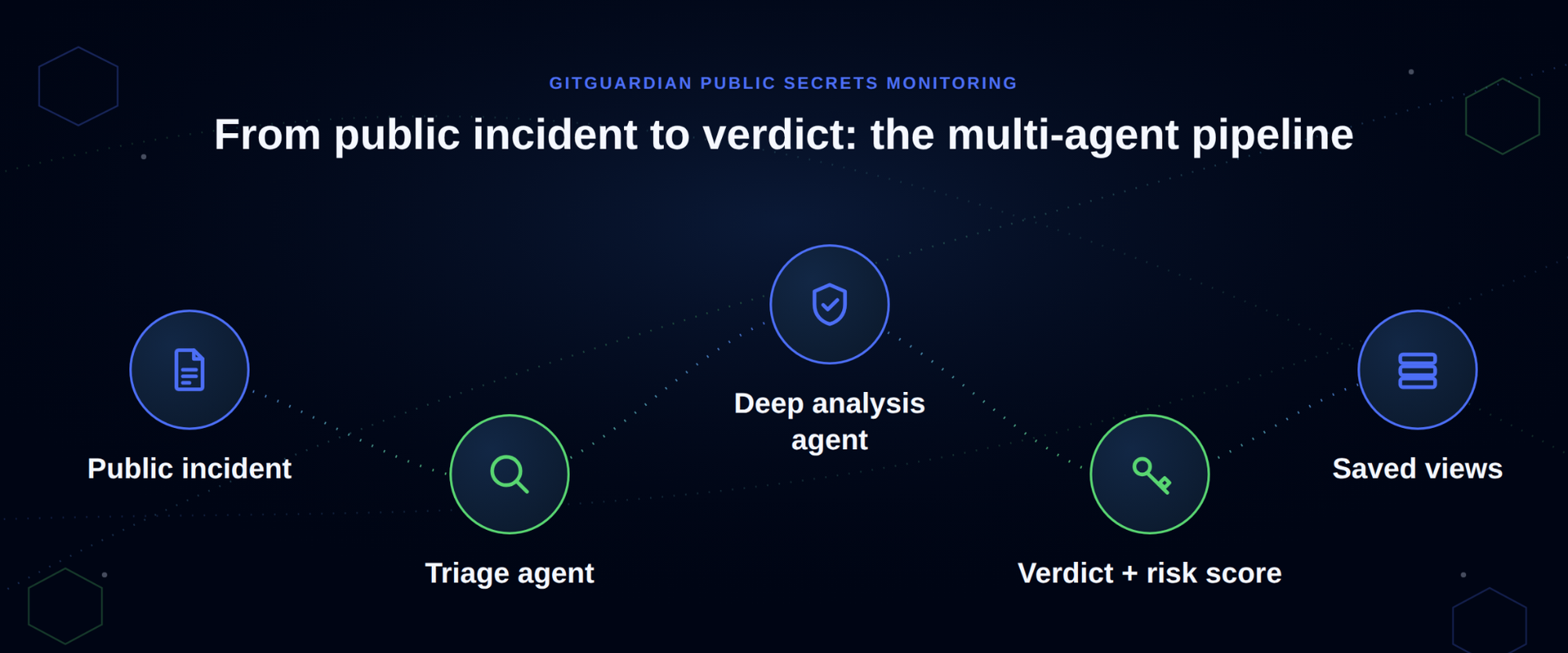
GitGuardian SaaS added dual AI agents to Public Secrets Monitoring that triage and deep-analyze every public GitHub and Docker Hub incident, surfacing verdicts, risk scores, and reasoning directly in the incident view.︀︄︇︀︅︉︀︅︀︀︃︀︀︅︅︀︅︊︀︄︆︀︃︄
GitGuardian SaaS is a cloud-based security platform that detects and prevents secrets leakage in git repositories and source code.
GitGuardian SaaS added dual AI agents to Public Secrets Monitoring that triage and deep-analyze every public GitHub and Docker Hub incident, surfacing verdicts, risk scores, and reasoning directly in the incident view.︀︄︇︀︅︉︀︅︀︀︃︀︀︅︅︀︅︊︀︄︆︀︃︄
└──▷ WHAT SHIPPED ·
1 FEATURE0 OF 1 FEATUREmost completely described firstwhat's the number?
Each feature carries 0–100 for how completely the vendor documented
it — not how big or important the work is. A major capability
described in eight words scores low, and that is the finding.
depth0–40what it does and how it works or what changed
specificity0–30names real surfaces — APIs, flags, formats, limits, numbers
actionability0–30enough to go use it — a named endpoint, flag, or config key tops this; a UI path is a starting point
Code and config rank first by construction: a documented endpoint,
flag or config key scores at the top of specificity and actionability,
so it sorts above a feature described only in prose. Under
60 the notes go thin — everything below the “thinner
coverage” line is thinner documentation, not smaller work.
Hover any meter for that feature's three sub-scores.
0100
AI agent triage for Public Secrets Monitoring incidentsnew77how completely this was documenteddepth32/40specificity25/30actionability20/3077 / 100
Adds a triage AI agent and a deep analysis AI agent that run over every public GitHub and Docker Hub incident, returning a company-related verdict (Related, Uncertain, or Unrelated) and an agent-computed risk score.︀︄︇︀︅︉︀︅︀︀︃︀︀︅︅︀︅︊︀︄︆︀︃︄ A new Analysis tab in the incident investigation details view shows the triage reasoning, deep-analysis findings, and the timeline of both agent passes. Three pre-configured saved views group incidents into company-related, unclear if company-related, and not company-related queues. Agents Analysis is enabled by default for new Public Secrets Monitoring workspaces, with gradual rollout to existing workspaces; customers can request early access through their Customer Success Manager.
Review the AI-generated reasoning for a public incident before deciding whether to escalate a credential rotation to your engineering team.
📍In the Public Secrets Monitoring incident list, open an incident, then select the Analysis tab to see the triage agent reasoning, the deep analysis verdict (Related / Uncertain / Unrelated), and the agent-computed risk score.
— Names the tab, verdict values and rollout flag but no scoring formula.launch-20260907-21a60e41
ffuf v2.3.0 adds multi-step request chaining via preflight and postflight requests with variable extraction, and bounds response snapshot sizes to control resource usage during large fuzzing runs.︀︄︇︀︅︉︀︅︀︀︃︀︀︅︅︀︅︊︀︄︆︀︃︄︀︄︇︀︅︉︀︅︀︀︃︀︀︅︅︀︅︊︀︄︆︀︃︄︀︄︇︀︅︉︀︅︀︀︃︀︀︅︅︀︅︊︀︄︆︀︃︄︀︄︇︀︅︉︀︅︀︀︃︀︀︅︅︀︅︊︀︄︆︀︃︄︀︄︇︀︅︉︀︅︀︀︃︀︀︅︅︀︅︊︀︄︆︀︃︄
└──▷ WHAT SHIPPED ·
2 FEATURES0 OF 2 FEATURESmost completely described firstwhat's the number?
Each feature carries 0–100 for how completely the vendor documented
it — not how big or important the work is. A major capability
described in eight words scores low, and that is the finding.
depth0–40what it does and how it works or what changed
specificity0–30names real surfaces — APIs, flags, formats, limits, numbers
actionability0–30enough to go use it — a named endpoint, flag, or config key tops this; a UI path is a starting point
Code and config rank first by construction: a documented endpoint,
flag or config key scores at the top of specificity and actionability,
so it sorts above a feature described only in prose. Under
60 the notes go thin — everything below the “thinner
coverage” line is thinner documentation, not smaller work.
Hover any meter for that feature's three sub-scores.
0100
Bounded response snapshot size for `-od`/`-audit-log`improved70how completely this was documenteddepth25/40specificity25/30actionability20/3070 / 100
Bounds the -od/-audit-log response snapshot and response header size to cap on-disk and in-memory growth during large fuzzing runs.︀︄︇︀︅︉︀︅︀︀︃︀︀︅︅︀︅︊︀︄︆︀︃︄︀︄︇︀︅︉︀︅︀︀︃︀︀︅︅︀︅︊︀︄︆︀︃︄︀︄︇︀︅︉︀︅︀︀︃︀︀︅︅︀︅︊︀︄︆︀︃︄︀︄︇︀︅︉︀︅︀︀︃︀︀︅︅︀︅︊︀︄︆︀︃︄︀︄︇︀︅︉︀︅︀︀︃︀︀︅︅︀︅︊︀︄︆︀︃︄
— Names exact flags affected but no size limit givenv2.3.0
thinner coverage below
0200
Preflight and postflight requests with variable extractionnew55how completely this was documenteddepth30/40specificity15/30actionability10/3055 / 100
Adds preflight and postflight requests with variable extraction, enabling multi-step request chains where values captured from an earlier response can be injected into subsequent fuzz requests.
— Describes mechanism but no exact flags or config shownv2.3.0
Salt Security launched Claude Connect, a new integration that gives continuous read-only visibility into MCPMCPModel Context Protocol, a standard for connecting AI applications to external tools and data sources. A compatible server exposes capabilities an assistant can use through a common interface. servers connected to Claude Enterprise organizations.︀︄︇︀︅︉︀︅︀︀︃︀︀︅︅︀︅︊︀︄︆︀︃︄︀︄︇︀︅︉︀︅︀︀︃︀︀︅︅︀︅︊︀︄︆︀︃︄
Salt Security is the only holistic AI security solution for the entire agentic AI lifecycle, from API discovery to posture management to threat protection.
Salt Security launched Claude Connect, a new integration that gives continuous read-only visibility into MCPMCPModel Context Protocol, a standard for connecting AI applications to external tools and data sources. A compatible server exposes capabilities an assistant can use through a common interface. servers connected to Claude Enterprise organizations.︀︄︇︀︅︉︀︅︀︀︃︀︀︅︅︀︅︊︀︄︆︀︃︄︀︄︇︀︅︉︀︅︀︀︃︀︀︅︅︀︅︊︀︄︆︀︃︄
└──▷ WHAT SHIPPED ·
1 FEATURE0 OF 1 FEATUREmost completely described firstwhat's the number?
Each feature carries 0–100 for how completely the vendor documented
it — not how big or important the work is. A major capability
described in eight words scores low, and that is the finding.
depth0–40what it does and how it works or what changed
specificity0–30names real surfaces — APIs, flags, formats, limits, numbers
actionability0–30enough to go use it — a named endpoint, flag, or config key tops this; a UI path is a starting point
Code and config rank first by construction: a documented endpoint,
flag or config key scores at the top of specificity and actionability,
so it sorts above a feature described only in prose. Under
60 the notes go thin — everything below the “thinner
coverage” line is thinner documentation, not smaller work.
Hover any meter for that feature's three sub-scores.
0100
Claude Connect integration for MCP server visibilitynew87how completely this was documenteddepth32/40specificity28/30actionability27/3087 / 100
Adds the Claude Connect integration in the Salt Data Source Hub, which authenticates to Anthropic's Compliance API using a read:compliance_activities-scoped Compliance Access Key.︀︄︇︀︅︉︀︅︀︀︃︀︀︅︅︀︅︊︀︄︆︀︃︄ It polls the Compliance API Activity Feed at https://api.anthropic.com/v1/compliance/activities to continuously inventory organization-managed MCP servers, surfacing each server's name, identity, status (active vs.︀︄︇︀︅︉︀︅︀︀︃︀︀︅︅︀︅︊︀︄︆︀︃︄ removed), and lifecycle timestamps into the Salt Agentic inventory, where discovered servers are labeled with source Claude Connect and show first- and last-seen times.
Confirm your Claude organization UUIDUUIDA universally unique identifier, usually a 128-bit value used to identify an object across systems. It is designed to make independently generated identifiers unlikely to collide. before entering it into Salt — retrieve it from any Compliance API activity record.
Connect Salt to your Claude Enterprise org so MCP server discovery starts immediately.
📍In the Salt dashboard, go to Data Source Hub › Claude Connect tile. Enter your Compliance Access Key (sk-ant-...), your Organization ID (UUID from the organization_uuid field), and optionally an API Base URL (default: https://api.anthropic.com). Click Connect — Salt validates the key and runs an initial discovery scan.
ZAP shipped a new LLMLLMA large language model, a neural network trained on large amounts of text to recognize patterns and generate language. Applications use it for tasks such as answering, summarizing and writing code. Support add-on while retiring the AJAX Spider and DOMDOMThe browser's in-memory tree representation of a web page's structure, standardized by the W3C, giving cyber tools a programmable interface to read or manipulate page content at runtime.XSSXSSCross-site scripting, an attack that runs malicious script in another user's browser through a trusted site. It can steal data or perform actions using the user's session. add-ons from its nightly and weekly release channels.︀︄︇︀︅︉︀︅︀︀︃︀︀︅︅︀︅︊︀︄︆︀︃︄
└──▷ WHAT SHIPPED ·
2 FEATURES2 OF 2 FEATURESmost completely described firstwhat's the number?
Each feature carries 0–100 for how completely the vendor documented
it — not how big or important the work is. A major capability
described in eight words scores low, and that is the finding.
depth0–40what it does and how it works or what changed
specificity0–30names real surfaces — APIs, flags, formats, limits, numbers
actionability0–30enough to go use it — a named endpoint, flag, or config key tops this; a UI path is a starting point
Code and config rank first by construction: a documented endpoint,
flag or config key scores at the top of specificity and actionability,
so it sorts above a feature described only in prose. Under
60 the notes go thin — everything below the “thinner
coverage” line is thinner documentation, not smaller work.
Hover any meter for that feature's three sub-scores.
0101
AJAX Spider and DOM XSS add-ons retiredbreaking55how completely this was documenteddepth20/40specificity20/30actionability15/3055 / 100
The AJAX Spider and DOM XSS add-ons are no longer available in nightly and weekly releases; workflows depending on either add-on will break on those release channels.︀︄︇︀︅︉︀︅︀︀︃︀︀︅︅︀︅︊︀︄︆︀︃︄
The AJAX Spider and DOM XSS add-ons are no longer available in nightly and weekly releases; workflows depending on either add-on will break on those release channels.
ALEAPP v2026.3.3 adds 70+ new app parsers alongside deep Android system artifacts, MMKVMMKVA key-value storage library from Tencent, built on memory-mapped files, that gives apps fast persistent storage without explicit write calls — useful for tools that need low-latency local state or config caching. decryption support, and a combined SMSSMSShort Message Service, the protocol built into cellular networks for sending text messages between phones; cyber tools use it for alerting, two-factor authentication delivery, or phishing simulation over mobile channels./MMSMMSMultimedia Messaging Service, a mobile carrier protocol that extends SMS to carry images, audio, and video between handsets; cyber tools use it to analyze or simulate rich-media mobile message delivery. messaging artifact.︀︄︇︀︅︉︀︅︀︀︃︀︀︅︅︀︅︊︀︄︆︀︃︄︀︄︇︀︅︉︀︅︀︀︃︀︀︅︅︀︅︊︀︄︆︀︃︄︀︄︇︀︅︉︀︅︀︀︃︀︀︅︅︀︅︊︀︄︆︀︃︄︀︄︇︀︅︉︀︅︀︀︃︀︀︅︅︀︅︊︀︄︆︀︃︄︀︄︇︀︅︉︀︅︀︀︃︀︀︅︅︀︅︊︀︄︆︀︃︄
└──▷ WHAT SHIPPED ·
14 FEATURES0 OF 14 FEATURESmost completely described firstwhat's the number?
Each feature carries 0–100 for how completely the vendor documented
it — not how big or important the work is. A major capability
described in eight words scores low, and that is the finding.
depth0–40what it does and how it works or what changed
specificity0–30names real surfaces — APIs, flags, formats, limits, numbers
actionability0–30enough to go use it — a named endpoint, flag, or config key tops this; a UI path is a starting point
Code and config rank first by construction: a documented endpoint,
flag or config key scores at the top of specificity and actionability,
so it sorts above a feature described only in prose. Under
60 the notes go thin — everything below the “thinner
coverage” line is thinner documentation, not smaller work.
Hover any meter for that feature's three sub-scores.
0100
Combined SMS/MMS Messages artifactnew70how completely this was documenteddepth30/40specificity25/30actionability15/3070 / 100
Adds a combined SMS and MMS Messages artifact that merges both transports into one table sorted by date, adding a Message Type column (SMS or MMS) and a Source Table column naming the originating table (sms, spam_sms, or pdu).︀︄︇︀︅︉︀︅︀︀︃︀︀︅︅︀︅︊︀︄︆︀︃︄︀︄︇︀︅︉︀︅︀︀︃︀︀︅︅︀︅︊︀︄︆︀︃︄︀︄︇︀︅︉︀︅︀︀︃︀︀︅︅︀︅︊︀︄︆︀︃︄︀︄︇︀︅︉︀︅︀︀︃︀︀︅︅︀︅︊︀︄︆︀︃︄︀︄︇︀︅︉︀︅︀︀︃︀︀︅︅︀︅︊︀︄︆︀︃︄
— Names exact columns and source tables but no query example.v2026.3.3
0200
MMS Attachments artifactnew70how completely this was documenteddepth30/40specificity25/30actionability15/3070 / 100
Adds a new MMS Attachments artifact reporting every part row joined to its message, including unreferenced files under app_parts and parts, with stored content type, sniffed type, size, and a status column.
— Names tables and fields, no worked example given.v2026.3.3
0300
MMKV decryption supportnew70how completely this was documenteddepth30/40specificity25/30actionability15/3070 / 100
Adds MMKV decryption support via a vendored mmkv_parser, correct varint header handling, and a new MMKV - Recovered Records artifact.
— Names the parser module and new artifact, mechanism described.v2026.3.3
0400
Android system artifact parsersnew65how completely this was documenteddepth25/40specificity30/30actionability10/3065 / 100
Adds Android system artifacts covering Android users, ADBADBAndroid Debug Bridge, a command-line tool maintained by Google that lets a host machine communicate with an Android device over USB or TCP, giving cyber tools shell access, file transfer, and app control. authorizations, and telecom phone accounts; install sessions, per-user package state, and per-app SSAID artifacts; Android dropbox, tombstone, and ANR crash record artifacts; and App Ops artifacts covering recent accesses, standby buckets, and permission modes, plus permission subsystem access.abx parsing.
— Enumerates many artifact types but no per-field detail for most.v2026.3.3
0500
70+ new app parsersnew65how completely this was documenteddepth20/40specificity30/30actionability15/3065 / 100
Adds 70+ new app parsers spanning secure messaging (WeChat, Element X, Silent Phone, Tutanota, Dust), password/security managers (Bitwarden, KeePassDX, Aegis, Magisk), productivity/note apps (Joplin, Tasks.org, Orgzly Revived, ColorNote), media/streaming (NewPipe, AntennaPod, Snapseed, Musicolet, InShot, VivaVideo), navigation/fitness (Organic Maps, OsmAnd, OpenTracks, Trail Sense, Sleep as Android), and others including GETTR, Xiaohongshu, Houseparty, CCleaner, Aurora Store, Breezy Weather, RedReader, Aves Gallery, Solid Explorer, HERE WeGo, Moovit, QR and Barcode Scanner, MX Player, Nova Launcher, Flipboard, Easy Voice Recorder, and CamScanner.
— Names dozens of apps but no per-app field detail.v2026.3.3
thinner coverage below
0600
Chromium/Chrome browser artifactsnew55how completely this was documenteddepth25/40specificity20/30actionability10/3055 / 100
Adds Chrome sync synced tabs and session devices artifacts, Chromium tab restore files reporting navigation entries, and Chromium browsers' HTTP cache artifacts for Android.
— Names three browser artifact types, no field-level detail.v2026.3.3
0700
ExoPlayer media cache artifactsnew50how completely this was documenteddepth20/40specificity20/30actionability10/3050 / 100
Adds ExoPlayer media cache artifacts for Twitter, Snapchat, Instagram, and Reddit.
— Names four apps covered, no field or mechanism detail.v2026.3.3
0800
WeChat message decoding improvementsimproved50how completely this was documenteddepth25/40specificity15/30actionability10/3050 / 100
WeChat messages are now fully human-readable with decoded content and media correctly attached to their parent messages.
— Describes before/after behavior, no field names given.v2026.3.3
0900
Xiaohongshu MMKV data parsingnew45how completely this was documenteddepth20/40specificity15/30actionability10/3045 / 100
Adds Xiaohongshu account data, recent chats, and app launches parsed directly from MMKV.
— Lists data types recovered but no field or table names.v2026.3.3
1000
Life360 cache artifacts and chat photosnew45how completely this was documenteddepth20/40specificity15/30actionability10/3045 / 100
Adds Life360 API cache artifacts and cached photos on chat messages.
— Describes two additions but no mechanism specifics.v2026.3.3
1100
Discord cache artifacts and attachment renderingnew45how completely this was documenteddepth20/40specificity15/30actionability10/3045 / 100
Adds Discord API cache artifacts and renders cached attachments on chats.
— Describes rendering behavior but no field names.v2026.3.3
1200
Nearby Fast Pair artifactsnew25how completely this was documenteddepth10/40specificity10/30actionability5/3025 / 100
Adds Nearby Fast Pair and discovered item artifacts.
— Bare mention of new artifact, no fields or mechanism.v2026.3.3
1300
Phone Link linked accounts artifactnew25how completely this was documenteddepth10/40specificity10/30actionability5/3025 / 100
Adds a Phone Link linked accounts artifact.
— One-line addition with no further detail.v2026.3.3
1400
Samsung IMS service logs supportnew25how completely this was documenteddepth10/40specificity10/30actionability5/3025 / 100
Adds Samsung IMS service logs support for Android.
CAPEv2 adds a GCP Pub/Sub diagnostic loop with Cloud Monitoring integration and symlink preservation in NFS report copy.︀︄︇︀︅︉︀︅︀︀︃︀︀︅︅︀︅︊︀︄︆︀︃︄
Adds _diagnostic_loop method to the GCP Pub/Sub service that periodically logs status and queue depth using google.cloud.monitoring_v3, with optional pip install google-cloud-monitoring for precise counts.︀︄︇︀︅︉︀︅︀︀︃︀︀︅︅︀︅︊︀︄︆︀︃︄
Adds symlinks=True to the shutil.copytree call in node_get_report_nfs, preserving symlinks when copying analysis results from workers over NFS.
Adds _diagnostic_loop method to the GCP Pub/Sub service that periodically logs status and queue depth using google.cloud.monitoring_v3, with optional pip install google-cloud-monitoring for precise counts.︀︄︇︀︅︉︀︅︀︀︃︀︀︅︅︀︅︊︀︄︆︀︃︄
Fastly launched a beta Terraform provider rewritten on the Plugin FrameworkPlugin FrameworkA structured API and runtime that lets developers extend an application by dropping in self-contained modules without modifying the core codebase, reducing integration effort for third-party contributors. with auto-managed service resources plus TLS, NGWAFNGWAFA next-generation web application firewall that inspects HTTP traffic at the application layer, using behavioral analysis and contextual rules rather than pure signature matching to block attacks like SQLi and XSS., TSIGTSIGA DNS authentication mechanism defined in RFC 2845 that uses shared secret keys and HMAC to sign DNS messages, letting resolvers and servers verify that updates or zone transfers come from a trusted peer., and object storage support, and added Direct Fetch to Object Storage for server-side migrations from S3.︀︄︇︀︅︉︀︅︀︀︃︀︀︅︅︀︅︊︀︄︆︀︃︄︀︄︇︀︅︉︀︅︀︀︃︀︀︅︅︀︅︊︀︄︆︀︃︄
Fastly is a content delivery network and edge computing platform that accelerates web content delivery and provides security services.
Fastly launched a beta Terraform provider rewritten on the Plugin FrameworkPlugin FrameworkA structured API and runtime that lets developers extend an application by dropping in self-contained modules without modifying the core codebase, reducing integration effort for third-party contributors. with auto-managed service resources plus TLS, NGWAFNGWAFA next-generation web application firewall that inspects HTTP traffic at the application layer, using behavioral analysis and contextual rules rather than pure signature matching to block attacks like SQLi and XSS., TSIGTSIGA DNS authentication mechanism defined in RFC 2845 that uses shared secret keys and HMAC to sign DNS messages, letting resolvers and servers verify that updates or zone transfers come from a trusted peer., and object storage support, and added Direct Fetch to Object Storage for server-side migrations from S3.︀︄︇︀︅︉︀︅︀︀︃︀︀︅︅︀︅︊︀︄︆︀︃︄︀︄︇︀︅︉︀︅︀︀︃︀︀︅︅︀︅︊︀︄︆︀︃︄
└──▷ WHAT SHIPPED ·
6 FEATURES1 OF 6 FEATURESmost completely described firstwhat's the number?
Each feature carries 0–100 for how completely the vendor documented
it — not how big or important the work is. A major capability
described in eight words scores low, and that is the finding.
depth0–40what it does and how it works or what changed
specificity0–30names real surfaces — APIs, flags, formats, limits, numbers
actionability0–30enough to go use it — a named endpoint, flag, or config key tops this; a UI path is a starting point
Code and config rank first by construction: a documented endpoint,
flag or config key scores at the top of specificity and actionability,
so it sorts above a feature described only in prose. Under
60 the notes go thin — everything below the “thinner
coverage” line is thinner documentation, not smaller work.
Hover any meter for that feature's three sub-scores.
0101
Direct Fetch for Object Storage migrationsnew96how completely this was documenteddepth38/40specificity28/30actionability30/3096 / 100
Adds fastly-object-storage-source-url request header support on PutObject and UploadPart S3 API calls, letting Fastly pull object data directly from a source URL server-side instead of requiring the client to upload a payload (sent with Content-Length: 0).︀︄︇︀︅︉︀︅︀︀︃︀︀︅︅︀︅︊︀︄︆︀︃︄ Partial range transfers are supported via a standard Range header (e.g.︀︄︇︀︅︉︀︅︀︀︃︀︀︅︅︀︅︊︀︄︆︀︃︄ bytes=0-41943039) on UploadPart for multipart uploads from a byte-range, and pre-signed URLs can be passed in the header to migrate private assets without exposing long-term credentials.
Trigger a server-side copy of a single S3 object into Fastly Object Storage without downloading it locally first.
Core service building blocks as Terraform resourcesnew68how completely this was documenteddepth18/40specificity30/30actionability20/3068 / 100
Adds Terraform resources for core service building blocks: domain, backend, ACLACLAn access control list, a set of rules allowing or denying operations for particular users, services or network addresses. It decides who can use a resource. and ACL entries, config store and items, secret store, dictionary items, cache settings, response object, request setting, custom dashboard, syslog logging, and DNS zone.
TSIG keys, object storage access keys, and Cloudfiles loggingnew63how completely this was documenteddepth18/40specificity25/30actionability20/3063 / 100
Adds a fastly_tsig_key resource and fastly_tsig_keys data source for managing TSIG keys, a new resource for managing Fastly object storage access keys, and support for Cloudfiles logging via logging_cloudfiles.
Auto-managed service resources in Terraform providernew58how completely this was documenteddepth28/40specificity15/30actionability15/3058 / 100
Introduces _auto service resources with provider-managed version lifecycle: the provider auto-clones, validates, and activates the service configuration on every CRUDCRUDThe four basic database operations — Create, Read, Update, Delete — used as shorthand for any system that manages persistent data records, giving cyber tools a standard model for interacting with stored information. operation.
Next-Gen WAF resources in Terraform providernew58how completely this was documenteddepth18/40specificity25/30actionability15/3058 / 100
Adds Next-Gen WAFWAFA reverse proxy that inspects HTTP/HTTPS traffic and blocks requests matching known attack patterns such as SQL injection or XSS, sitting between clients and a web application to filter malicious input before it reaches the server. (NGWAF) resources covering account rules, workspaces, workspace rules, thresholds, lists, signals, redactions, alert integrations, and virtual patching.
Security Onion is a free and open platform for threat hunting, enterprise security monitoring, and log management. It includes our own interfaces for alerting, dashboards, hunting, PCAP, detections, and case management.
Security Onion 3.3.0 introduces Agent Studio with agentic memory and Onion AI Reports Tools for Pro users, alongside Logstash tuning controls, MoM subgrid roles, ES troubleshooting, and drag-and-drop config ordering.︀︄︇︀︅︉︀︅︀︀︃︀︀︅︅︀︅︊︀︄︆︀︃︄︀︄︇︀︅︉︀︅︀︀︃︀︀︅︅︀︅︊︀︄︆︀︃︄
└──▷ WHAT SHIPPED ·
7 FEATURES0 OF 7 FEATURESmost completely described firstwhat's the number?
Each feature carries 0–100 for how completely the vendor documented
it — not how big or important the work is. A major capability
described in eight words scores low, and that is the finding.
depth0–40what it does and how it works or what changed
specificity0–30names real surfaces — APIs, flags, formats, limits, numbers
actionability0–30enough to go use it — a named endpoint, flag, or config key tops this; a UI path is a starting point
Code and config rank first by construction: a documented endpoint,
flag or config key scores at the top of specificity and actionability,
so it sorts above a feature described only in prose. Under
60 the notes go thin — everything below the “thinner
coverage” line is thinner documentation, not smaller work.
Hover any meter for that feature's three sub-scores.
0100
Logstash tuning via SOC configurationimproved65how completely this was documenteddepth20/40specificity25/30actionability20/3065 / 100
Adds log.level and log.format tuning for Logstash via SOCSOCA security operations center, the team or function that monitors threats, investigates alerts and coordinates incident response. Its work can be internal, outsourced or shared. configuration, and supports tuning multiple Logstash pipelines in SOC ES.︀︄︇︀︅︉︀︅︀︀︃︀︀︅︅︀︅︊︀︄︆︀︃︄︀︄︇︀︅︉︀︅︀︀︃︀︀︅︅︀︅︊︀︄︆︀︃︄
Chainguard provides trusted open source artifacts for every layer of your modern software stack—containers, language libraries, and VM images.
Chainguard shipped Go 1.27 images with runtime-selectable FIPSFIPSA set of US federal standards published by NIST that define approved cryptographic algorithms and modules; cyber tools use it to meet compliance requirements in government and regulated environments. crypto modules, integrated Chainguard Libraries into JFrog Catalog for Zero-Touch Remediation, and added 39 new container images including FIPS variants of the Kubeflow Pipelines stack.︀︄︇︀︅︉︀︅︀︀︃︀︀︅︅︀︅︊︀︄︆︀︃︄
└──▷ WHAT SHIPPED ·
3 FEATURES0 OF 3 FEATURESmost completely described firstwhat's the number?
Each feature carries 0–100 for how completely the vendor documented
it — not how big or important the work is. A major capability
described in eight words scores low, and that is the finding.
depth0–40what it does and how it works or what changed
specificity0–30names real surfaces — APIs, flags, formats, limits, numbers
actionability0–30enough to go use it — a named endpoint, flag, or config key tops this; a UI path is a starting point
Code and config rank first by construction: a documented endpoint,
flag or config key scores at the top of specificity and actionability,
so it sorts above a feature described only in prose. Under
60 the notes go thin — everything below the “thinner
coverage” line is thinner documentation, not smaller work.
Hover any meter for that feature's three sub-scores.
0100
Go 1.27 images with FIPS module selectionnew80how completely this was documenteddepth35/40specificity25/30actionability20/3080 / 100
Adds Go 1.27 support across the go, go-fips, and go-openssl-fips container images.︀︄︇︀︅︉︀︅︀︀︃︀︀︅︅︀︅︊︀︄︆︀︃︄ The go-openssl-fips image now selects its FIPS-validated cryptographic module at deployment rather than at build time, letting a single artifact run with either the OpenSSL FIPS provider or the Go Cryptographic Module without recompilation.
Chainguard Libraries in JFrog Catalognew70how completely this was documenteddepth30/40specificity25/30actionability15/3070 / 100
Integrates Chainguard Libraries with JFrog Catalog so joint customers can pull Chainguard-built packages through JFrog Artifact Repository without build errors, and enables JFrog Zero-Touch Remediation with patched Chainguard packages. Java support is live now; JavaScript and Python support are planned by end of September 2026.
39 new container images addednew60how completely this was documenteddepth15/40specificity30/30actionability15/3060 / 100
Adds 39 new container images including 10 FIPS variants of kubeflow-pipelines-* components, plus dbmate, hadolint, jruby, kserve-huggingfaceserver, gubernator, fortiotel, packer, security-profiles-operator, aws-lambda-dotnet, opentelemetry-go-instrumentation, presidio-anonymizer, redpanda-console-fips, and others.
CVE-2026-55092: Path traversal via a crafted vulnerability database or other downloaded artifacts (CVSSCVSSCommon Vulnerability Scoring System, a method for describing a vulnerability's characteristics and severity. Its score is not the probability that attackers will exploit it. 7.5, affects <0.71.1)︀︄︇︀︅︉︀︅︀︀︃︀︀︅︅︀︅︊︀︄︆︀︃︄
Plerion is a cloud security platform that discovers and manages vulnerabilities and misconfigurations across infrastructure.
Plerion added Google Cloud workload security scanning, extending vulnerability, SBOMSBOMA software bill of materials, an inventory of the components and versions inside an application. It helps teams find affected software when a dependency has a vulnerability or licensing issue., and secrets detection to Compute Engine, Cloud RunCloud RunGoogle's managed container runtime that executes stateless workloads on demand, scaling to zero when idle, so tools can deploy without managing servers or paying for idle capacity., and Cloud Functions with keyless, in-boundary access.︀︄︇︀︅︉︀︅︀︀︃︀︀︅︅︀︅︊︀︄︆︀︃︄︀︄︇︀︅︉︀︅︀︀︃︀︀︅︅︀︅︊︀︄︆︀︃︄︀︄︇︀︅︉︀︅︀︀︃︀︀︅︅︀︅︊︀︄︆︀︃︄︀︄︇︀︅︉︀︅︀︀︃︀︀︅︅︀︅︊︀︄︆︀︃︄︀︄︇︀︅︉︀︅︀︀︃︀︀︅︅︀︅︊︀︄︆︀︃︄
└──▷ WHAT SHIPPED ·
1 FEATURE0 OF 1 FEATUREmost completely described firstwhat's the number?
Each feature carries 0–100 for how completely the vendor documented
it — not how big or important the work is. A major capability
described in eight words scores low, and that is the finding.
depth0–40what it does and how it works or what changed
specificity0–30names real surfaces — APIs, flags, formats, limits, numbers
actionability0–30enough to go use it — a named endpoint, flag, or config key tops this; a UI path is a starting point
Code and config rank first by construction: a documented endpoint,
flag or config key scores at the top of specificity and actionability,
so it sorts above a feature described only in prose. Under
60 the notes go thin — everything below the “thinner
coverage” line is thinner documentation, not smaller work.
Hover any meter for that feature's three sub-scores.
0100
GCP workload vulnerability and secret scanningnew69how completely this was documenteddepth32/40specificity25/30actionability12/3069 / 100
Plerion now scans inside Google Cloud workloads — Compute Engine instances, managed instance groups, and custom images, as well as Cloud Run services and Cloud Functions (1st and 2nd gen) — for vulnerabilities, software bill of materialssoftware bill of materialsA software bill of materials, an inventory of the components and versions inside an application. It helps teams find affected software when a dependency has a vulnerability or licensing issue. (SBOM), and secrets.︀︄︇︀︅︉︀︅︀︀︃︀︀︅︅︀︅︊︀︄︆︀︃︄ All scans run inside a dedicated scanning project within the customer's own organization to keep data in-boundary, and GCP authentication is keyless via workload identityworkload identityAn identity assigned to software, such as a service or container, rather than a person. It lets the workload authenticate and receive permissions without sharing a user's credentials. federation (WIFWIFWorkload Identity Federation is a Google Cloud mechanism that lets external workloads authenticate to Google APIs using short-lived tokens from a trusted identity provider, eliminating the need to manage long-lived service account keys.).︀︄︇︀︅︉︀︅︀︀︃︀︀︅︅︀︅︊︀︄︆︀︃︄︀︄︇︀︅︉︀︅︀︀︃︀︀︅︅︀︅︊︀︄︆︀︃︄︀︄︇︀︅︉︀︅︀︀︃︀︀︅︅︀︅︊︀︄︆︀︃︄︀︄︇︀︅︉︀︅︀︀︃︀︀︅︅︀︅︊︀︄︆︀︃︄
Tines lets teams put AI to work across their most sensitive systems, data, and processes, with the security and governance to do it safely.
Tines 43.2.0 expands Cases with an API for updating fields and new MCPMCPModel Context Protocol, a standard for connecting AI applications to external tools and data sources. A compatible server exposes capabilities an assistant can use through a common interface. tools, adds audit log retention configuration, formula support in AI provider URLs, dashboard draft/edit mode, and change control comments.︀︄︇︀︅︉︀︅︀︀︃︀︀︅︅︀︅︊︀︄︆︀︃︄
└──▷ WHAT SHIPPED ·
6 FEATURES0 OF 6 FEATURESmost completely described firstwhat's the number?
Each feature carries 0–100 for how completely the vendor documented
it — not how big or important the work is. A major capability
described in eight words scores low, and that is the finding.
depth0–40what it does and how it works or what changed
specificity0–30names real surfaces — APIs, flags, formats, limits, numbers
actionability0–30enough to go use it — a named endpoint, flag, or config key tops this; a UI path is a starting point
Code and config rank first by construction: a documented endpoint,
flag or config key scores at the top of specificity and actionability,
so it sorts above a feature described only in prose. Under
60 the notes go thin — everything below the “thinner
coverage” line is thinner documentation, not smaller work.
Hover any meter for that feature's three sub-scores.
0100
Cases tools in Tines MCP integrationnew43how completely this was documenteddepth15/40specificity18/30actionability10/3043 / 100
Adds Cases tools to the Tines MCP (Model Context ProtocolModel Context ProtocolModel Context Protocol, a standard for connecting AI applications to external tools and data sources. A compatible server exposes capabilities an assistant can use through a common interface.) integration, extending the set of actions available to MCP-connected AI clients.︀︄︇︀︅︉︀︅︀︀︃︀︀︅︅︀︅︊︀︄︆︀︃︄
Trend Vision One is Trend Micro's cloud-based XDR platform providing unified security visibility and threat detection across endpoints, networks, and cloud environments.
Trend Vision One adds a Gmail add-in that lets users report suspicious emails and manage quarantine directly from their inbox.︀︄︇︀︅︉︀︅︀︀︃︀︀︅︅︀︅︊︀︄︆︀︃︄︀︄︇︀︅︉︀︅︀︀︃︀︀︅︅︀︅︊︀︄︆︀︃︄︀︄︇︀︅︉︀︅︀︀︃︀︀︅︅︀︅︊︀︄︆︀︃︄︀︄︇︀︅︉︀︅︀︀︃︀︀︅︅︀︅︊︀︄︆︀︃︄︀︄︇︀︅︉︀︅︀︀︃︀︀︅︅︀︅︊︀︄︆︀︃︄
└──▷ WHAT SHIPPED ·
1 FEATURE0 OF 1 FEATUREmost completely described firstwhat's the number?
Each feature carries 0–100 for how completely the vendor documented
it — not how big or important the work is. A major capability
described in eight words scores low, and that is the finding.
depth0–40what it does and how it works or what changed
specificity0–30names real surfaces — APIs, flags, formats, limits, numbers
actionability0–30enough to go use it — a named endpoint, flag, or config key tops this; a UI path is a starting point
Code and config rank first by construction: a documented endpoint,
flag or config key scores at the top of specificity and actionability,
so it sorts above a feature described only in prose. Under
60 the notes go thin — everything below the “thinner
coverage” line is thinner documentation, not smaller work.
Hover any meter for that feature's three sub-scores.
0100
Gmail add-in for reporting and quarantinenew50how completely this was documenteddepth20/40specificity15/30actionability15/3050 / 100
A new Gmail add-in lets users report suspicious emails for analysis with a single click directly from their inbox, and enables self-service quarantine review and management for Gmail users when a quarantine mailbox is configured, reducing admin overhead.︀︄︇︀︅︉︀︅︀︀︃︀︀︅︅︀︅︊︀︄︆︀︃︄︀︄︇︀︅︉︀︅︀︀︃︀︀︅︅︀︅︊︀︄︆︀︃︄︀︄︇︀︅︉︀︅︀︀︃︀︀︅︅︀︅︊︀︄︆︀︃︄︀︄︇︀︅︉︀︅︀︀︃︀︀︅︅︀︅︊︀︄︆︀︃︄︀︄︇︀︅︉︀︅︀︀︃︀︀︅︅︀︅︊︀︄︆︀︃︄
Iru brought Windows coverage to Vulnerability Management, matching its existing Mac support with app inventory, CVE tracking, severity-based enforcement, and low-disruption patching in one console.︀︄︇︀︅︉︀︅︀︀︃︀︀︅︅︀︅︊︀︄︆︀︃︄︀︄︇︀︅︉︀︅︀︀︃︀︀︅︅︀︅︊︀︄︆︀︃︄
Manage devices and everything they touch. See how security, IT, and compliance get easier when unified around devices with Iru.
Iru brought Windows coverage to Vulnerability Management, matching its existing Mac support with app inventory, CVE tracking, severity-based enforcement, and low-disruption patching in one console.︀︄︇︀︅︉︀︅︀︀︃︀︀︅︅︀︅︊︀︄︆︀︃︄︀︄︇︀︅︉︀︅︀︀︃︀︀︅︅︀︅︊︀︄︆︀︃︄
└──▷ WHAT SHIPPED ·
1 FEATURE1 OF 1 FEATUREmost completely described firstwhat's the number?
Each feature carries 0–100 for how completely the vendor documented
it — not how big or important the work is. A major capability
described in eight words scores low, and that is the finding.
depth0–40what it does and how it works or what changed
specificity0–30names real surfaces — APIs, flags, formats, limits, numbers
actionability0–30enough to go use it — a named endpoint, flag, or config key tops this; a UI path is a starting point
Code and config rank first by construction: a documented endpoint,
flag or config key scores at the top of specificity and actionability,
so it sorts above a feature described only in prose. Under
60 the notes go thin — everything below the “thinner
coverage” line is thinner documentation, not smaller work.
Hover any meter for that feature's three sub-scores.
0101
Windows support in Vulnerability Managementnew75how completely this was documenteddepth35/40specificity22/30actionability18/3075 / 100
Iru Vulnerability Management now covers Windows devices alongside existing Mac coverage.︀︄︇︀︅︉︀︅︀︀︃︀︀︅︅︀︅︊︀︄︆︀︃︄ It inventories all installed Windows applications, maps them against the National Vulnerability Database (NVDNVDThe National Vulnerability Database, maintained by NIST, is the U.S. government repository of CVE records enriched with CVSS scores and metadata; cyber tools query it to drive vulnerability prioritization.), and ranks findings by severity with an active-exploitation flag.︀︄︇︀︅︉︀︅︀︀︃︀︀︅︅︀︅︊︀︄︆︀︃︄ Each CVE is tracked through statuses — active, remediated, or risk-accepted — with device-level counts for fleet-wide visibility. Administrators can set severity-based remediation controls per CVE tier via Enforce immediately, Enforce on a timeframe, or No action under Vulnerability Management > Enforcement Controls, and patching is non-disruptive: silent installs when possible, with a user-facing countdown to save work if an app is open at the enforcement deadline.
Configure severity-based enforcement so critical CVEs are patched immediately while lower-severity findings follow a grace period — reducing exposure on Windows without disrupting users.
📍In the Iru console, go to Vulnerability Management › Enforcement Controls, select a CVE severity tier (e.g. Critical), and set the remediation action to Enforce immediately, Enforce on a timeframe, or No action.
Databricks is a unified analytics platform for data engineering, data science, and machine learning built on Apache Spark.
Databricks is preparing two upcoming changes: horizontal scaling for Apps in compliance security profile workspaces, and Data Classification scanning extended to Unity Catalog views.︀︄︇︀︅︉︀︅︀︀︃︀︀︅︅︀︅︊︀︄︆︀︃︄︀︄︇︀︅︉︀︅︀︀︃︀︀︅︅︀︅︊︀︄︆︀︃︄︀︄︇︀︅︉︀︅︀︀︃︀︀︅︅︀︅︊︀︄︆︀︃︄︀︄︇︀︅︉︀︅︀︀︃︀︀︅︅︀︅︊︀︄︆︀︃︄︀︄︇︀︅︉︀︅︀︀︃︀︀︅︅︀︅︊︀︄︆︀︃︄
└──▷ WHAT SHIPPED ·
2 FEATURES0 OF 2 FEATURESmost completely described firstwhat's the number?
Each feature carries 0–100 for how completely the vendor documented
it — not how big or important the work is. A major capability
described in eight words scores low, and that is the finding.
depth0–40what it does and how it works or what changed
specificity0–30names real surfaces — APIs, flags, formats, limits, numbers
actionability0–30enough to go use it — a named endpoint, flag, or config key tops this; a UI path is a starting point
Code and config rank first by construction: a documented endpoint,
flag or config key scores at the top of specificity and actionability,
so it sorts above a feature described only in prose. Under
60 the notes go thin — everything below the “thinner
coverage” line is thinner documentation, not smaller work.
Hover any meter for that feature's three sub-scores.
0100
Horizontal scaling for Databricks Appsnew45how completely this was documenteddepth20/40specificity15/30actionability10/3045 / 100
Enables horizontal scaling for Databricks Apps in workspaces with the compliance security profile enabled, running an app across multiple instances behind a single app URL for higher availability and concurrency.︀︄︇︀︅︉︀︅︀︀︃︀︀︅︅︀︅︊︀︄︆︀︃︄︀︄︇︀︅︉︀︅︀︀︃︀︀︅︅︀︅︊︀︄︆︀︃︄︀︄︇︀︅︉︀︅︀︀︃︀︀︅︅︀︅︊︀︄︆︀︃︄︀︄︇︀︅︉︀︅︀︀︃︀︀︅︅︀︅︊︀︄︆︀︃︄︀︄︇︀︅︉︀︅︀︀︃︀︀︅︅︀︅︊︀︄︆︀︃︄
Data Classification scans Unity Catalog viewsnew45how completely this was documenteddepth20/40specificity15/30actionability10/3045 / 100
Data Classification (Beta) now extends sensitive-data scanning to Unity Catalog views in addition to tables, classifying view columns for sensitive data using the same detection engine.
ⓘSourcesBlog / feed →2 releases · 2026-08-28 → 2026-09-01Blog ↗RankWhy this ranktop features scored 95/95/90, +10 product media, +6 runnable example — 109.33How ranking works →
Power insights and outcomes with The Elasticsearch Platform. See into your data and find answers that matter with enterprise solutions designed to help you accelerate time to insight.
Elastic Security 9.4.0 added new Linux fileless-execution telemetry for memfd_creatememfd_createA Linux system call that creates an anonymous, file-descriptor-backed memory region that never touches disk, giving cyber tools a way to load and execute code entirely in RAM without leaving filesystem artifacts. calls and kernel module loads, plus an open-source FENIX testing framework, while 9.5.0 introduced a single-field DLL search-order hijackingDLL search-order hijackingA Windows code-execution technique that exploits the OS loader's fixed DLL lookup sequence, placing a malicious DLL in a directory searched before the legitimate one so it loads instead. detection that replaces an 88-line rule.︀︄︇︀︅︉︀︅︀︀︃︀︀︅︅︀︅︊︀︄︆︀︃︄︀︄︇︀︅︉︀︅︀︀︃︀︀︅︅︀︅︊︀︄︆︀︃︄︀︄︇︀︅︉︀︅︀︀︃︀︀︅︅︀︅︊︀︄︆︀︃︄︀︄︇︀︅︉︀︅︀︀︃︀︀︅︅︀︅︊︀︄︆︀︃︄︀︄︇︀︅︉︀︅︀︀︃︀︀︅︅︀︅︊︀︄︆︀︃︄
└──▷ WHAT SHIPPED ·
4 FEATURES0 OF 4 FEATURESmost completely described firstwhat's the number?
Each feature carries 0–100 for how completely the vendor documented
it — not how big or important the work is. A major capability
described in eight words scores low, and that is the finding.
depth0–40what it does and how it works or what changed
specificity0–30names real surfaces — APIs, flags, formats, limits, numbers
actionability0–30enough to go use it — a named endpoint, flag, or config key tops this; a UI path is a starting point
Code and config rank first by construction: a documented endpoint,
flag or config key scores at the top of specificity and actionability,
so it sorts above a feature described only in prose. Under
60 the notes go thin — everything below the “thinner
coverage” line is thinner documentation, not smaller work.
Hover any meter for that feature's three sub-scores.
0100
memfd_create process event telemetrynew95how completely this was documenteddepth35/40specificity30/30actionability30/3095 / 100
Elastic Defend now records a process event whenever a process calls memfd_create on Linux (requires kernel 5.10.16+ for eBPFeBPFA Linux technology for running verified programs inside the kernel without changing its source. Tools use it to observe processes, enforce rules and process network traffic.-based event sourcing), starting in Elastic Security 9.4.0.︀︄︇︀︅︉︀︅︀︀︃︀︀︅︅︀︅︊︀︄︆︀︃︄ The event captures the syscall arguments via new fields process.Ext.memfd.name, process.Ext.memfd.flags, flag_cloexec, flag_allow_seal, flag_hugetlb, flag_noexec_seal, and flag_exec, enabling hunting for fileless ELFELFThe standard binary format for executables, shared libraries, and object files on Linux and most Unix-like systems, giving cyber tools a predictable structure to parse, instrument, or analyze compiled code. execution chains such as download → memfd_create → exec.︀︄︇︀︅︉︀︅︀︀︃︀︀︅︅︀︅︊︀︄︆︀︃︄︀︄︇︀︅︉︀︅︀︀︃︀︀︅︅︀︅︊︀︄︆︀︃︄︀︄︇︀︅︉︀︅︀︀︃︀︀︅︅︀︅︊︀︄︆︀︃︄︀︄︇︀︅︉︀︅︀︀︃︀︀︅︅︀︅︊︀︄︆︀︃︄
Hunt for memfd-based fileless ELF execution chains — download → memfd_create → exec — by querying the new process.Ext.memfd fields in Kibana.
$ event.category: process AND process.Ext.memfd.name: * AND NOT process.Ext.memfd.flag_noexec_seal: true
Single-field DLL search-order hijacking detectionnew95how completely this was documenteddepth35/40specificity30/30actionability30/3095 / 100
Elastic Defend 9.5.0 adds dll.Ext.defense_evasions: "DLL Hijack: Masquerading" to DLLDLLA Windows file format containing compiled code and data that multiple programs can load and share at runtime, letting cyber tools inject functionality into other processes or hook system calls. load events, enriching them when a loaded DLL is not Microsoft-signed and its name matches a cached inventory of Windows and system-library DLLs. This collapses detection logic that previously required ~88 lines covering ~2,600 named libraries, 10 excluded Windows system paths, signature checks, and a drop-to-load time window into a single field match.
Write a detection rule that fires on any DLL search-order hijacking attempt, replacing the previous ~88-line rule with a single field match.
FENIX open-source fileless execution labnew90how completely this was documenteddepth30/40specificity30/30actionability30/3090 / 100
Elastic released FENIX (Fileless Execution for NIX), an open-source lab framework at github.com/elastic/FENIX with a fenix run <technique> CLI for reproducing and testing memfd-based fileless execution patterns against Elastic Defend telemetry.
Run a representative fileless memfd_create technique in a lab environment using FENIX to generate Elastic Defend telemetry for detection validation.
$ git clone https://github.com/elastic/FENIX.git && cd FENIX
make all
python3 -m venv .venv && source .venv/bin/activate
pip install -e .
export FENIX_BIN_DIR=$PWD/bin
fenix run memfd_create
Kernel module load detection via load_module eventnew50how completely this was documenteddepth20/40specificity20/30actionability10/3050 / 100
Elastic Defend adds a load_module event action to process events, reporting init_module and finit_module-based loadable kernel module loads for visibility into fileless kernel module activity.
Sumo Logic is a cloud-based platform for real-time log management, monitoring, and security analytics across applications and infrastructure.
Sumo Logic shipped GA Content and Configuration Management (C3M) APIs that let MSSPMSSPA Managed Security Service Provider: a third-party company that operates cyber tooling and monitoring on behalf of clients, letting organizations outsource detection, response, and compliance functions. parent orgs programmatically distribute Cloud SIEMCloud SIEMA Security Information and Event Management platform delivered as a hosted service, aggregating logs and alerts from across an environment to detect threats without requiring on-premises infrastructure. content to child organizations.︀︄︇︀︅︉︀︅︀︀︃︀︀︅︅︀︅︊︀︄︆︀︃︄︀︄︇︀︅︉︀︅︀︀︃︀︀︅︅︀︅︊︀︄︆︀︃︄︀︄︇︀︅︉︀︅︀︀︃︀︀︅︅︀︅︊︀︄︆︀︃︄︀︄︇︀︅︉︀︅︀︀︃︀︀︅︅︀︅︊︀︄︆︀︃︄
└──▷ WHAT SHIPPED ·
1 FEATURE1 OF 1 FEATUREmost completely described firstwhat's the number?
Each feature carries 0–100 for how completely the vendor documented
it — not how big or important the work is. A major capability
described in eight words scores low, and that is the finding.
depth0–40what it does and how it works or what changed
specificity0–30names real surfaces — APIs, flags, formats, limits, numbers
actionability0–30enough to go use it — a named endpoint, flag, or config key tops this; a UI path is a starting point
Code and config rank first by construction: a documented endpoint,
flag or config key scores at the top of specificity and actionability,
so it sorts above a feature described only in prose. Under
60 the notes go thin — everything below the “thinner
coverage” line is thinner documentation, not smaller work.
Hover any meter for that feature's three sub-scores.
0101
C3M APIs for MSSP content distributionnew53how completely this was documenteddepth25/40specificity18/30actionability10/3053 / 100
The Content and Configuration Management (C3M) APIs are now generally available, letting MSSP parent org users programmatically push and sync Cloud SIEMSIEMSecurity information and event management, collecting logs from many systems and correlating events to find suspicious activity. Analysts use it to investigate alerts and incidents. rules, rule tuning expressions, Library content, monitors, and source templates across child orgs, replacing manual distribution through the Organizations UI.︀︄︇︀︅︉︀︅︀︀︃︀︀︅︅︀︅︊︀︄︆︀︃︄︀︄︇︀︅︉︀︅︀︀︃︀︀︅︅︀︅︊︀︄︆︀︃︄︀︄︇︀︅︉︀︅︀︀︃︀︀︅︅︀︅︊︀︄︆︀︃︄︀︄︇︀︅︉︀︅︀︀︃︀︀︅︅︀︅︊︀︄︆︀︃︄
MISP (core software) - Open Source Threat Intelligence and Sharing Platform
MISP v2.5.46 hardens outbound URL handling against SSRFSSRFServer-side request forgery, an attack that tricks a server into making requests chosen by an attacker. Those requests can reach internal services the attacker cannot access directly., delivers major query-performance improvements for event reports and sightings, and expands Overmind with new workflows, a first-run tutorial, and visualization options.︀︄︇︀︅︉︀︅︀︀︃︀︀︅︅︀︅︊︀︄︆︀︃︄︀︄︇︀︅︉︀︅︀︀︃︀︀︅︅︀︅︊︀︄︆︀︃︄︀︄︇︀︅︉︀︅︀︀︃︀︀︅︅︀︅︊︀︄︆︀︃︄︀︄︇︀︅︉︀︅︀︀︃︀︀︅︅︀︅︊︀︄︆︀︃︄
└──▷ WHAT SHIPPED ·
6 FEATURES1 OF 6 FEATURESmost completely described firstwhat's the number?
Each feature carries 0–100 for how completely the vendor documented
it — not how big or important the work is. A major capability
described in eight words scores low, and that is the finding.
depth0–40what it does and how it works or what changed
specificity0–30names real surfaces — APIs, flags, formats, limits, numbers
actionability0–30enough to go use it — a named endpoint, flag, or config key tops this; a UI path is a starting point
Code and config rank first by construction: a documented endpoint,
flag or config key scores at the top of specificity and actionability,
so it sorts above a feature described only in prose. Under
60 the notes go thin — everything below the “thinner
coverage” line is thinner documentation, not smaller work.
Hover any meter for that feature's three sub-scores.
0101
SSRF hardening via UrlEgressValidator and CurlClientnew70how completely this was documenteddepth35/40specificity25/30actionability10/3070 / 100
Introduces a shared UrlEgressValidator that enforces a common outbound URL policy, validating schemes and resolved addresses and blocking loopback, link-local, and private destinations across all remote-resource retrieval paths.︀︄︇︀︅︉︀︅︀︀︃︀︀︅︅︀︅︊︀︄︆︀︃︄ Extends CurlClient with host pinning, controlled and validated redirects, response size limits, and TLS peer verification enabled by default.︀︄︇︀︅︉︀︅︀︀︃︀︀︅︅︀︅︊︀︄︆︀︃︄︀︄︇︀︅︉︀︅︀︀︃︀︀︅︅︀︅︊︀︄︆︀︃︄︀︄︇︀︅︉︀︅︀︀︃︀︀︅︅︀︅︊︀︄︆︀︃︄
— Names the exact validator and client classes and their new checks.v2.5.46
0200
Sightings retrieval batching in fetchAttributesimproved65how completely this was documenteddepth35/40specificity25/30actionability5/3065 / 100
Batches sightings retrieval inside MispAttribute::fetchAttributes() instead of querying per attribute, reducing a 5,000-attribute case from 8.1 seconds / 10,661 queries to 0.149 seconds / 6 queries — more than a 50x improvement.
— Names the exact method and gives precise before/after benchmark.v2.5.46
0300
Overmind UI workflow and visualization expansionsnew65how completely this was documenteddepth25/40specificity25/30actionability15/3065 / 100
Expands Overmind event quick-action cards with merge attributes, enrich event, contact reporter, delegate publishing, execute ad-hoc workflows, and recorrelate events operations; adds warning-list filtering in correlation graphs, Galaxy support inside Tag Collections, and the first version of the MISP Tutorial; adds card views for additional indexes, server-specific card views, and multiple cards per row; and adds responsive correlation graph timelines with correlated events collapsed by default.
— Enumerates every named Overmind addition with a clear UI entry point.v2.5.46
thinner coverage below
0400
Event report query performance improvementimproved55how completely this was documenteddepth30/40specificity20/30actionability5/3055 / 100
Reduces event report count queries from one per event to one or two grouped queries per page, delivering roughly 19x to 35x improvements for that operation.
— Concrete before/after numbers but no user-facing action.v2.5.46
0500
Warning-list source refreshimproved45how completely this was documenteddepth15/40specificity20/30actionability10/3045 / 100
Refreshes misp-warninglists with new sources including network and security scanners, Network Telescope-derived scanner ranges, Cortex/Xpanse infrastructure, and Telegram-related infrastructure.
— Names the new warning-list sources but not counts or mechanism.v2.5.46
0600
MITRE ATT&CK galaxy content updateimproved35how completely this was documenteddepth15/40specificity15/30actionability5/3035 / 100
Updates MITRE ATT&CKMITRE ATT&CKA publicly maintained knowledge base of adversary tactics and techniques observed in real attacks, maintained by MITRE. Cyber tools use it as a common taxonomy to classify, map, and communicate threat behavior. galaxies in misp-galaxy to include Detection Strategies and Analytics concepts alongside refreshed tactics, techniques, and sub-techniques.
— Names new concepts but no mechanism or scope detail.v2.5.46
OpenCTI 7.260910.0 focuses on operational visibility, adding ingestion logs across multiple feed types, S3S3Amazon's object storage service, where files are stored in named buckets and retrieved over HTTP; cyber tools use it for scalable, cheap log or artifact storage without managing a filesystem. offload metrics for event streams, and a refreshed design system for the UI.︀︄︇︀︅︉︀︅︀︀︃︀︀︅︅︀︅︊︀︄︆︀︃︄︀︄︇︀︅︉︀︅︀︀︃︀︀︅︅︀︅︊︀︄︆︀︃︄
└──▷ WHAT SHIPPED ·
3 FEATURES0 OF 3 FEATURESmost completely described firstwhat's the number?
Each feature carries 0–100 for how completely the vendor documented
it — not how big or important the work is. A major capability
described in eight words scores low, and that is the finding.
depth0–40what it does and how it works or what changed
specificity0–30names real surfaces — APIs, flags, formats, limits, numbers
actionability0–30enough to go use it — a named endpoint, flag, or config key tops this; a UI path is a starting point
Code and config rank first by construction: a documented endpoint,
flag or config key scores at the top of specificity and actionability,
so it sorts above a feature described only in prose. Under
60 the notes go thin — everything below the “thinner
coverage” line is thinner documentation, not smaller work.
Hover any meter for that feature's three sub-scores.
0100
Ingestion logs for RSS, JSON, and stream feedsnew44how completely this was documenteddepth18/40specificity18/30actionability8/3044 / 100
Adds ingestion logs for RSS feed ingestion, JSON feed ingestion, and stream feed ingestion, enabling operators to audit and troubleshoot data pulls from each of these feed types.︀︄︇︀︅︉︀︅︀︀︃︀︀︅︅︀︅︊︀︄︆︀︃︄︀︄︇︀︅︉︀︅︀︀︃︀︀︅︅︀︅︊︀︄︆︀︃︄
— Names three feed types but no log format or access path7.260910.0
0200
S3 offload metrics for event streamsnew38how completely this was documenteddepth15/40specificity15/30actionability8/3038 / 100
Adds metrics and logging for stream events offloaded to S3, giving operators visibility into event offload activity.
— Names the S3 offload mechanism but lacks specific metric names7.260910.0
0300
Filigran design system V1 in UIimproved32how completely this was documenteddepth15/40specificity12/30actionability5/3032 / 100
Integrates the Filigran design system V1 into the UI, introducing updated visual components including a Slider input.
— Names one component but no broader scope detail7.260910.0
Get started with the Recorded Future API. Covers authentication, base URLs, API key setup, and how to integrate threat intelligence into your security workflows.
Recorded Future launched Digital Risk Protection, a unified workspace bringing five external threat-monitoring surfaces together with configurable alerting and an AI triage agent.︀︄︇︀︅︉︀︅︀︀︃︀︀︅︅︀︅︊︀︄︆︀︃︄︀︄︇︀︅︉︀︅︀︀︃︀︀︅︅︀︅︊︀︄︆︀︃︄
└──▷ WHAT SHIPPED ·
8 FEATURES8 OF 8 FEATURESmost completely described firstwhat's the number?
Each feature carries 0–100 for how completely the vendor documented
it — not how big or important the work is. A major capability
described in eight words scores low, and that is the finding.
depth0–40what it does and how it works or what changed
specificity0–30names real surfaces — APIs, flags, formats, limits, numbers
actionability0–30enough to go use it — a named endpoint, flag, or config key tops this; a UI path is a starting point
Code and config rank first by construction: a documented endpoint,
flag or config key scores at the top of specificity and actionability,
so it sorts above a feature described only in prose. Under
60 the notes go thin — everything below the “thinner
coverage” line is thinner documentation, not smaller work.
Hover any meter for that feature's three sub-scores.
0101
Digital Risk Protection unified workspacenew65how completely this was documenteddepth30/40specificity25/30actionability10/3065 / 100
Launches Digital Risk Protection, a unified workspace covering five external threat surfaces: Malicious Site Monitoring, Impersonation Monitoring, Code Repository Monitoring, Dark Web Brand Monitoring, and Identity Exposure Monitoring.︀︄︇︀︅︉︀︅︀︀︃︀︀︅︅︀︅︊︀︄︆︀︃︄ Includes configurable risk thresholds per use case so teams control which detections escalate to Alerts without losing underlying detection coverage, and one-click takedown coordination available across all five use cases from day one.︀︄︇︀︅︉︀︅︀︀︃︀︀︅︅︀︅︊︀︄︆︀︃︄
— Names all five surfaces and platform controls but no UI path or command.launch-20260909-ba3a1237
0202
Malicious Site Monitoring for lookalike domainsnew65how completely this was documenteddepth30/40specificity25/30actionability10/3065 / 100
Flags newly registered lookalike domains and phishing infrastructure within hours of registration, using logo detection and image OCROCROptical character recognition, converting text in an image or scanned document into machine-readable characters. It lets software search or process text that was stored as pixels. to catch impersonation beyond keyword matching.
AI Triage Agent for detectionsnew60how completely this was documenteddepth30/40specificity20/30actionability10/3060 / 100
An AI Triage Agent for Malicious Site Monitoring and Dark Web Brand Monitoring automatically evaluates high-interest detections and delivers an explicit verdict with reasoning, surfacing only critical, high-priority Alerts.
Identity Exposure Monitoring for credentialsnew60how completely this was documenteddepth30/40specificity20/30actionability10/3060 / 100
Surfaces compromised employee credentials from active infostealer logs within hours of exfiltration, with VIPVIPA Virtual IP address — a single IP shared across multiple hosts or services, commonly used for load balancing or failover so traffic can be rerouted without changing the client-facing address. monitoring available for executive accounts.
Code Repository Monitoringnew40how completely this was documenteddepth20/40specificity15/30actionability5/3040 / 100
Continuously scans public repositories for exposed credentials, PIIPIIPersonally Identifiable Information — data that can identify a specific individual, such as names, email addresses, or SSNs. Cyber tools flag or redact it to limit exposure and meet privacy regulations., and source code.
Tenzir is a data pipeline engine for security teams that collects, transforms, enriches, and routes telemetry.
Tenzir's biggest window feature is SigmaSigmaAn open, vendor-neutral rule format for describing patterns in log data, maintained by the Sigma project community, giving cyber tools a single rule language that converts to dozens of SIEM query syntaxes. rules that auto-match OCSFOCSFAn open schema standard, maintained by the OCSF community under CISA and industry backing, that defines a common event format so cyber tools can share and ingest log data without per-source normalization work.-normalized telemetry via automatic field-path translation, alongside new Kafka AvroAvroA row-oriented data serialization format maintained by Apache, using JSON-defined schemas bundled with the data so tools can read it without out-of-band schema management./Schema Registry decoding, Azure Blob Storage workload identityworkload identityAn identity assigned to software, such as a service or container, rather than a person. It lets the workload authenticate and receive permissions without sharing a user's credentials. federation, ClickHouse query pushdown, a Microsoft 365 activity source, and on-demand schema loading in the Explorer UI.︀︄︇︀︅︉︀︅︀︀︃︀︀︅︅︀︅︊︀︄︆︀︃︄︀︄︇︀︅︉︀︅︀︀︃︀︀︅︅︀︅︊︀︄︆︀︃︄
└──▷ WHAT SHIPPED ·
5 FEATURES0 OF 5 FEATURESmost completely described firstwhat's the number?
Each feature carries 0–100 for how completely the vendor documented
it — not how big or important the work is. A major capability
described in eight words scores low, and that is the finding.
depth0–40what it does and how it works or what changed
specificity0–30names real surfaces — APIs, flags, formats, limits, numbers
actionability0–30enough to go use it — a named endpoint, flag, or config key tops this; a UI path is a starting point
Code and config rank first by construction: a documented endpoint,
flag or config key scores at the top of specificity and actionability,
so it sorts above a feature described only in prose. Under
60 the notes go thin — everything below the “thinner
coverage” line is thinner documentation, not smaller work.
Hover any meter for that feature's three sub-scores.
0100
OCSF-native Sigma rule matchingnew98how completely this was documenteddepth38/40specificity30/30actionability30/3098 / 100
The sigma operator automatically matches conformant OCSF events without any configuration, covering SigmaHQSigmaHQAn open community repository on GitHub that maintains the Sigma generic signature format and its growing library of detection rules, giving cyber tools a vendor-neutral rule set they can convert to any SIEM query language. logsources including all Sysmon-backed Windows categories, Linux/macOS process creation, Windows Security/System/PowerShell/Defender channels, Okta, Entra IDEntra IDMicrosoft's cloud-based identity and access management service, formerly Azure Active Directory, used by cyber tools to authenticate users and enforce access policies in Microsoft 365 and Azure environments., Azure activity logs, AWS CloudTrailCloudTrailAWS service that records API calls and account activity across an AWS environment, giving cyber tools an audit log to detect anomalous or malicious actions., GCP Cloud Audit Logs, and Zeek DNS/HTTP/SMBSMBA network file-sharing protocol developed by Microsoft that lets systems share files, printers, and named pipes over a network; cyber tools target or speak it because it is ubiquitous in Windows environments.; use mapping="direct" to opt out.︀︄︇︀︅︉︀︅︀︀︃︀︀︅︅︀︅︊︀︄︆︀︃︄ It works by rewriting rule predicates to OCSF field paths (e.g.︀︄︇︀︅︉︀︅︀︀︃︀︀︅︅︀︅︊︀︄︆︀︃︄ Image → process.path, ParentImage → process.parent_process.path, CurrentDirectory → process.working_directory) guided by the rule's logsource, so stock SigmaHQ rules match normalized telemetry without per-rule field mapping. The new microsoft::windows::ocsf::normalize pipeline operator normalizes both Sysmon event 1 and Windows Security event 4688 to OCSF Process Activity events, letting a single Sigma rule fire across both producers.
Detect suspicious PowerShell spawned from script engines across both Sysmon and Windows Security producers using a stock SigmaHQ rule on OCSF-normalized events.
Replay Windows test-lab captures at 10x speed, normalize to OCSF, and match against a stock non-interactive PowerShell rule to produce Detection Findings continuously.
Azure Blob Storage workload identity federationnew95how completely this was documenteddepth35/40specificity30/30actionability30/3095 / 100
from_azure_blob_storage and to_azure_blob_storage gain an azure_auth record with a web_identity field enabling Entra workload identity federation per-operator, so a single node can authenticate to multiple tenants; web_identity accepts token_endpoint, token_file, or inline token. The token_endpoint.query_params record lets OIDCOIDCOpenID Connect, a sign-in protocol built on OAuth 2.0. An application uses identity information from a trusted provider instead of maintaining a separate password for each user. audience parameters be passed as structured key-value pairs (percent-encoded automatically) instead of concatenated onto the URL, accepting both string and secret values. Note: azure_auth cannot be combined with account_key.
Read Azure Blob Storage across multiple Entra tenants using workload identity federation from GitHub ActionsGitHub ActionsGitHub's built-in CI/CD system that runs automated workflows triggered by repository events, letting cyber tools automate testing, building, and releasing without managing separate pipeline infrastructure., without pinning the node to a single tenant via environment variables.
— Full config fields and constraint named, with runnable example.product docs
0300
On-demand schema loading in Explorerimproved71how completely this was documenteddepth28/40specificity25/30actionability18/3071 / 100
The Explorer now loads stored schemas on demand: clicking Load schemas in Stored data retrieves schema names and event counts without loading all schemas upfront, and expanding a schema loads field definitions for all schemas once, caching them until Refresh is clicked. A Retry option appears when schema loading fails, schema search now matches schema names only (not field contents), and the Explorer opens the Results tab by default instead of the stored-data view.
Browse stored schemas without waiting for a full load — pull schema names and event counts on demand, then expand only what you need.
📍In the Explorer, go to Stored data › click Load schemas to retrieve schema names and event counts. Expand a schema to load field definitions for all schemas; further expansions reuse cached definitions until you click Refresh.
ClickHouse operator query pushdownimproved65how completely this was documenteddepth25/40specificity25/30actionability15/3065 / 100
The from_clickhouse operator now pushes where, select, and head into the SQL query sent to ClickHouse (as WHERE, column selection, and LIMIT), so ClickHouse reads and transfers only what the pipeline needs.
— Named operator and SQL clauses, but no runnable example.product docs
thinner coverage below
0500
Improved node startup diagnosticsimproved48how completely this was documenteddepth22/40specificity18/30actionability8/3048 / 100
Node startup diagnostics now include source file locations and line/column pointers for broken tenzir.operators definitions and package pipelines, including call-site attribution when errors originate inside user-defined operators.
— Describes mechanism but offers no command or example.product docs
└──▷ BREAKING ON UPGRADE
!
The azure_auth record cannot be combined with account_key.
Cut SIEM cost without losing a detection. Realm reduces, enriches, and routes security data with detection-aware proof — live in days, no engineers.
Realm shipped AI-generated risk assessments for every recommended log reduction rule, plus new safeguards that protect detection-critical fields and retain a full backup of reduced data before it's cut.︀︄︇︀︅︉︀︅︀︀︃︀︀︅︅︀︅︊︀︄︆︀︃︄︀︄︇︀︅︉︀︅︀︀︃︀︀︅︅︀︅︊︀︄︆︀︃︄
└──▷ WHAT SHIPPED ·
3 FEATURES0 OF 3 FEATURESmost completely described firstwhat's the number?
Each feature carries 0–100 for how completely the vendor documented
it — not how big or important the work is. A major capability
described in eight words scores low, and that is the finding.
depth0–40what it does and how it works or what changed
specificity0–30names real surfaces — APIs, flags, formats, limits, numbers
actionability0–30enough to go use it — a named endpoint, flag, or config key tops this; a UI path is a starting point
Code and config rank first by construction: a documented endpoint,
flag or config key scores at the top of specificity and actionability,
so it sorts above a feature described only in prose. Under
60 the notes go thin — everything below the “thinner
coverage” line is thinner documentation, not smaller work.
Hover any meter for that feature's three sub-scores.
0100
Reduction Rule Assessments via Clarity AInew65how completely this was documenteddepth30/40specificity20/30actionability15/3065 / 100
Every recommended SIEMSIEMSecurity information and event management, collecting logs from many systems and correlating events to find suspicious activity. Analysts use it to investigate alerts and incidents. log reduction rule now ships with an AI-generated Reduction Rule Assessment split into a Reasoning section explaining why the rule is likely effective and a Considerations section flagging where it may not fit a given environment.︀︄︇︀︅︉︀︅︀︀︃︀︀︅︅︀︅︊︀︄︆︀︃︄ Realm's Clarity AI reasons over what each log source actually produces and what each destination needs, tuning assessments to the specific conditions defined in each rule rather than generic category descriptions.︀︄︇︀︅︉︀︅︀︀︃︀︀︅︅︀︅︊︀︄︆︀︃︄
Detection Integrity for reduction safetynew58how completely this was documenteddepth30/40specificity18/30actionability10/3058 / 100
Detection Integrity maps every candidate log reduction against the detections currently running, protects the specific log fields those detections depend on, and flags any at-risk detection as a finding instead of silently discarding the data it needs.
Data Haven immutable log backupnew58how completely this was documenteddepth30/40specificity18/30actionability10/3058 / 100
Data Haven retains a complete, immutable copy of all reduced log data with OCSFOCSFAn open schema standard, maintained by the OCSF community under CISA and industry backing, that defines a common event format so cyber tools can share and ingest log data without per-source normalization work. observables attached, keeping it searchable and re-suppliable to any destination if a reduction rule turns out to have been incorrect.
runZero is a continuous asset discovery and network intelligence platform that maps and monitors all connected devices and vulnerabilities in real-time.
runZero added granular authentication scopes for account-level API clients and stopped counting background MCPMCPModel Context Protocol, a standard for connecting AI applications to external tools and data sources. A compatible server exposes capabilities an assistant can use through a common interface. connections against API usage.︀︄︇︀︅︉︀︅︀︀︃︀︀︅︅︀︅︊︀︄︆︀︃︄︀︄︇︀︅︉︀︅︀︀︃︀︀︅︅︀︅︊︀︄︆︀︃︄︀︄︇︀︅︉︀︅︀︀︃︀︀︅︅︀︅︊︀︄︆︀︃︄︀︄︇︀︅︉︀︅︀︀︃︀︀︅︅︀︅︊︀︄︆︀︃︄︀︄︇︀︅︉︀︅︀︀︃︀︀︅︅︀︅︊︀︄︆︀︃︄
└──▷ WHAT SHIPPED ·
2 FEATURES0 OF 2 FEATURESmost completely described firstwhat's the number?
Each feature carries 0–100 for how completely the vendor documented
it — not how big or important the work is. A major capability
described in eight words scores low, and that is the finding.
depth0–40what it does and how it works or what changed
specificity0–30names real surfaces — APIs, flags, formats, limits, numbers
actionability0–30enough to go use it — a named endpoint, flag, or config key tops this; a UI path is a starting point
Code and config rank first by construction: a documented endpoint,
flag or config key scores at the top of specificity and actionability,
so it sorts above a feature described only in prose. Under
60 the notes go thin — everything below the “thinner
coverage” line is thinner documentation, not smaller work.
Hover any meter for that feature's three sub-scores.
0100
Granular auth scopes for API clientsnew50how completely this was documenteddepth25/40specificity15/30actionability10/3050 / 100
Account-level API clients can now use granular authentication scopes in addition to roles, with permissions capped by the creating user's own access rights.︀︄︇︀︅︉︀︅︀︀︃︀︀︅︅︀︅︊︀︄︆︀︃︄︀︄︇︀︅︉︀︅︀︀︃︀︀︅︅︀︅︊︀︄︆︀︃︄︀︄︇︀︅︉︀︅︀︀︃︀︀︅︅︀︅︊︀︄︆︀︃︄︀︄︇︀︅︉︀︅︀︀︃︀︀︅︅︀︅︊︀︄︆︀︃︄︀︄︇︀︅︉︀︅︀︀︃︀︀︅︅︀︅︊︀︄︆︀︃︄
Intruder now lets authenticated web app scans follow the application beyond its primary domain, by explicitly listing additional in-scope domains.︀︄︇︀︅︉︀︅︀︀︃︀︀︅︅︀︅︊︀︄︆︀︃︄︀︄︇︀︅︉︀︅︀︀︃︀︀︅︅︀︅︊︀︄︆︀︃︄︀︄︇︀︅︉︀︅︀︀︃︀︀︅︅︀︅︊︀︄︆︀︃︄︀︄︇︀︅︉︀︅︀︀︃︀︀︅︅︀︅︊︀︄︆︀︃︄︀︄︇︀︅︉︀︅︀︀︃︀︀︅︅︀︅︊︀︄︆︀︃︄
Give feedback to the Intruder team so we can make more informed product decisions. Powered by Canny.
Intruder now lets authenticated web app scans follow the application beyond its primary domain, by explicitly listing additional in-scope domains.︀︄︇︀︅︉︀︅︀︀︃︀︀︅︅︀︅︊︀︄︆︀︃︄︀︄︇︀︅︉︀︅︀︀︃︀︀︅︅︀︅︊︀︄︆︀︃︄︀︄︇︀︅︉︀︅︀︀︃︀︀︅︅︀︅︊︀︄︆︀︃︄︀︄︇︀︅︉︀︅︀︀︃︀︀︅︅︀︅︊︀︄︆︀︃︄︀︄︇︀︅︉︀︅︀︀︃︀︀︅︅︀︅︊︀︄︆︀︃︄
└──▷ WHAT SHIPPED ·
1 FEATURE0 OF 1 FEATUREmost completely described firstwhat's the number?
Each feature carries 0–100 for how completely the vendor documented
it — not how big or important the work is. A major capability
described in eight words scores low, and that is the finding.
depth0–40what it does and how it works or what changed
specificity0–30names real surfaces — APIs, flags, formats, limits, numbers
actionability0–30enough to go use it — a named endpoint, flag, or config key tops this; a UI path is a starting point
Code and config rank first by construction: a documented endpoint,
flag or config key scores at the top of specificity and actionability,
so it sorts above a feature described only in prose. Under
60 the notes go thin — everything below the “thinner
coverage” line is thinner documentation, not smaller work.
Hover any meter for that feature's three sub-scores.
0100
Additional domains for authenticated web app scansnew75how completely this was documenteddepth25/40specificity25/30actionability25/3075 / 100
A new Additional domains field in the authentication setup for web app targets lets users add subdomains (e.g.︀︄︇︀︅︉︀︅︀︀︃︀︀︅︅︀︅︊︀︄︆︀︃︄ api.example.com, auth.example.com) and external services such as identity providersidentity providersA service that authenticates users and supplies identity information to other applications. It is the sign-in authority behind many single sign-on systems., CDNs, or third-party APIs, so authenticated scans traverse the full application flow instead of stopping at the primary domain boundary.︀︄︇︀︅︉︀︅︀︀︃︀︀︅︅︀︅︊︀︄︆︀︃︄︀︄︇︀︅︉︀︅︀︀︃︀︀︅︅︀︅︊︀︄︆︀︃︄︀︄︇︀︅︉︀︅︀︀︃︀︀︅︅︀︅︊︀︄︆︀︃︄︀︄︇︀︅︉︀︅︀︀︃︀︀︅︅︀︅︊︀︄︆︀︃︄
When your web app calls across subdomains (e.g. a front-end on app.example.com hitting an API on api.example.com), add those domains so authenticated scans traverse the full application flow instead of stopping at the primary domain boundary.
📍In the target's authentication settings, locate the Additional domains field and add each subdomain or external URL (e.g. api.example.com, auth.example.com, or your identity provider's domain) to include them in the authenticated scan scope.
InsightVM 8.58 adds credentialed pre-port discovery, letting the scan engine ask authenticated hosts directly for their open ports instead of relying on a network port scan.︀︄︇︀︅︉︀︅︀︀︃︀︀︅︅︀︅︊︀︄︆︀︃︄︀︄︇︀︅︉︀︅︀︀︃︀︀︅︅︀︅︊︀︄︆︀︃︄
Rapid7 InsightVM is a vulnerability management platform that identifies, prioritizes, and remediates security vulnerabilities across IT environments.
InsightVM 8.58 adds credentialed pre-port discovery, letting the scan engine ask authenticated hosts directly for their open ports instead of relying on a network port scan.︀︄︇︀︅︉︀︅︀︀︃︀︀︅︅︀︅︊︀︄︆︀︃︄︀︄︇︀︅︉︀︅︀︀︃︀︀︅︅︀︅︊︀︄︆︀︃︄
└──▷ WHAT SHIPPED ·
1 FEATURE0 OF 1 FEATUREmost completely described firstwhat's the number?
Each feature carries 0–100 for how completely the vendor documented
it — not how big or important the work is. A major capability
described in eight words scores low, and that is the finding.
depth0–40what it does and how it works or what changed
specificity0–30names real surfaces — APIs, flags, formats, limits, numbers
actionability0–30enough to go use it — a named endpoint, flag, or config key tops this; a UI path is a starting point
Code and config rank first by construction: a documented endpoint,
flag or config key scores at the top of specificity and actionability,
so it sorts above a feature described only in prose. Under
60 the notes go thin — everything below the “thinner
coverage” line is thinner documentation, not smaller work.
Hover any meter for that feature's three sub-scores.
0100
Credentialed pre-port discovery for port enumerationnew78how completely this was documenteddepth32/40specificity26/30actionability20/3078 / 100
A per-template checkbox under Asset Discovery (available from version 8.58) lets the scan engine authenticate to a host via SSH (TCPTCPA network protocol that delivers a reliable, ordered stream of bytes between two endpoints. It detects lost data and retransmits it. 22), Scan Assistant (TCP 21047), or a direct Windows connection and pull the host's authoritative list of listening TCP and UDPUDPA network protocol that sends individual messages without guaranteeing delivery or order. Applications trade built-in reliability for less overhead and can add their own recovery. ports, replacing the outbound network port scan wherever authentication succeeds.︀︄︇︀︅︉︀︅︀︀︃︀︀︅︅︀︅︊︀︄︆︀︃︄ The engine auto-selects the credential method, preferring Scan Assistant, then SSH, then direct Windows connection, and silently falls back to a standard network port scan for hosts with no matching credential; the setting is also exposed via the REST APIREST APIA web API design style where clients interact with resources over HTTP using standard methods like GET, POST, and DELETE, giving cyber tools a predictable, language-agnostic way to integrate with external services. as documented in the configuration guide.︀︄︇︀︅︉︀︅︀︀︃︀︀︅︅︀︅︊︀︄︆︀︃︄
Enable pre-port discovery on a single scan template via the InsightVM console to test faster, more complete port enumeration on hardened or rate-limited hosts before rolling it out broadly.
📍In the InsightVM console, open the scan template you want to test, go to Asset Discovery, and enable the Pre-port discovery checkbox. Save the template, then run it against a representative group of hosts and compare port lists and scan times against previous results.
— Names exact ports, methods and fallback order; API mentioned but no endpoint given.2026-09-09-ca018e45
The easiest way to add authentication and user management to your application. Purpose-built for React, Next.js, Remix, and “The Modern Web”.
Clerk added beta support for the OAuth 2.0 Device Authorization GrantOAuth 2.0 Device Authorization GrantAn OAuth 2.0 extension that lets a device with no browser obtain an access token by directing the user to authenticate on a separate device, making it useful for CLIs and headless cyber tools., enabling authentication flows on devices without browsers.︀︄︇︀︅︉︀︅︀︀︃︀︀︅︅︀︅︊︀︄︆︀︃︄
└──▷ WHAT SHIPPED ·
1 FEATURE1 OF 1 FEATUREmost completely described firstwhat's the number?
Each feature carries 0–100 for how completely the vendor documented
it — not how big or important the work is. A major capability
described in eight words scores low, and that is the finding.
depth0–40what it does and how it works or what changed
specificity0–30names real surfaces — APIs, flags, formats, limits, numbers
actionability0–30enough to go use it — a named endpoint, flag, or config key tops this; a UI path is a starting point
Code and config rank first by construction: a documented endpoint,
flag or config key scores at the top of specificity and actionability,
so it sorts above a feature described only in prose. Under
60 the notes go thin — everything below the “thinner
coverage” line is thinner documentation, not smaller work.
Hover any meter for that feature's three sub-scores.
0101
OAuth 2.0 Device Authorization Grant (beta)new70how completely this was documenteddepth30/40specificity25/30actionability15/3070 / 100
Clerk now supports the OAuth 2.0OAuth 2.0An open authorization framework (IETF RFC 6749) that lets a service grant limited API access to a third party without sharing credentials, giving cyber tools a standard way to authenticate against external platforms.Device Authorization GrantDevice Authorization GrantAn OAuth 2.0 flow for devices that lack a browser or keyboard: the device gets a short code, displays it to the user, and polls the authorization server while the user approves on a separate device. (beta, RFC 8628RFC 8628An IETF standard defining the OAuth 2.0 Device Authorization Grant, letting input-constrained devices obtain tokens by having the user authenticate on a separate device with a browser.) for clients that cannot open a browser — CLIs, TVs, game consoles — enabling device-code polling flows without redirect URIs or PKCEPKCEProof Key for Code Exchange, an OAuth safeguard that binds an authorization code to the client that requested it. An intercepted code cannot be redeemed without the client's matching verifier..︀︄︇︀︅︉︀︅︀︀︃︀︀︅︅︀︅︊︀︄︆︀︃︄ Both public clients (Client ID only) and confidential clients (Client ID + Client Secret) are supported in this flow.
JumpCloud makes it simple to manage Windows, Apple, Linux, and Android devices and to deliver secure access with SSO, MFA, Zero Trust, RADIUS, and more.
Across five years of cumulative release notes and a cluster of 2026 updates, JumpCloud shipped a Password Vault spanning the Admin Portal, User Portal, mobile app, and browser extension, an Agentic IAMIAMIdentity and Access Management — a framework of policies and services for controlling who can authenticate to systems and what resources they are authorized to use, letting cyber tools enforce least-privilege and audit access. layer with Agent Identities and PAMPAMBrokering administrator sessions through a gateway instead of handing out standing credentials. Access is granted for one session, to one target, and recorded.-governed AI agent access, a growing AI Gateway/MCPMCPModel Context Protocol, a standard for connecting AI applications to external tools and data sources. A compatible server exposes capabilities an assistant can use through a common interface. ecosystem with discovery and token-cost tracking, and GA launches for Access Requests, Access Risk Detection, and Custom Admin Roles — alongside dozens of smaller additions to RADIUSRADIUSA networking protocol for centralised authentication, authorisation, and accounting of users connecting to a network, maintained under IETF standards. Cyber tools use it to integrate with existing enterprise identity infrastructure., MFAMFAMulti-factor authentication, requiring proof from different categories, such as a password and a hardware key, to sign in. It reduces reliance on a password alone., MDM, dynamic groups, asset management, and the Multi-Tenant Portal.︀︄︇︀︅︉︀︅︀︀︃︀︀︅︅︀︅︊︀︄︆︀︃︄
└──▷ WHAT SHIPPED ·
35 FEATURES6 OF 35 FEATURESmost completely described firstwhat's the number?
Each feature carries 0–100 for how completely the vendor documented
it — not how big or important the work is. A major capability
described in eight words scores low, and that is the finding.
depth0–40what it does and how it works or what changed
specificity0–30names real surfaces — APIs, flags, formats, limits, numbers
actionability0–30enough to go use it — a named endpoint, flag, or config key tops this; a UI path is a starting point
Code and config rank first by construction: a documented endpoint,
flag or config key scores at the top of specificity and actionability,
so it sorts above a feature described only in prose. Under
60 the notes go thin — everything below the “thinner
coverage” line is thinner documentation, not smaller work.
Hover any meter for that feature's three sub-scores.
0101
Agent Identities and Agentic IAM governance for AI agentsnew86how completely this was documenteddepth34/40specificity28/30actionability24/3086 / 100
Adds Agent Identities (Public Preview) under Identity Management > Agents to manage non-human AI agent identities: OAuth client credentials are generated on the agent's Authentication tab, SSOSSOSingle sign-on, using one identity provider to sign in to multiple applications. It reduces separate passwords and centralizes account and access management. application access is assigned via Identity Management > Agent Groups, and integration with Amazon Bedrock AgentCore is supported.︀︄︇︀︅︉︀︅︀︀︃︀︀︅︅︀︅︊︀︄︆︀︃︄ Every registered agent must have an assigned human owner before it can run, creating an automatic audit trail from creation to retirement, and PAM least-privilege rules can be applied directly to agents, granting temporary access that expires automatically when a task completes. A PAM MCP ServerMCP ServerA process that exposes tools, resources, and prompts over Anthropic's Model Context Protocol, letting an AI agent call external APIs or local services through a standardised interface. is planned (shipping before end of Q4 2026) to replace shared API keys with a zero-setup PAM agent that locks permissions to isolated agent identities.
Register a non-human AI agent with OAuth credentials and scoped SSO application access to audit and control what resources an AI agent can reach.
📍In the Admin Portal, go to Identity Management › Agents and click + Add. Enter the agent name, owner, and company email on the Details tab. On the Authentication tab, generate OAuth client credentials for the JumpCloud AI Gateway. Then go to Identity Management › Agent Groups, create an Agent Group, add the agent, and assign SSO applications.
Register a new AI agent with OAuth credentials so it can access SSO applications independently of any human account.
📍In the Admin Portal, go to Identity Management › Agents and click + Add. Enter the agent name, owner, and company email on the Details tab, then go to the Authentication tab and generate OAuth client credentials for the JumpCloud AI Gateway. Next, go to Identity Management › Agent Groups, create an Agent Group, add the agent, and assign SSO applications.
Register and configure an AI agent identity so an autonomous agent can authenticate via OAuth and access only its assigned SSO applications.
📍In the Admin Portal, go to Identity Management › Agents and click + Add. Fill in the agent name, owner, and company email on the Details tab. On the Authentication tab, generate OAuth client credentials for the JumpCloud AI Gateway. Then go to Identity Management › Agent Groups, create a group, add the agent, and assign the required SSO applications.
Grant an Amazon Bedrock agent a managed identity so its actions are auditable and policy-controlled in JumpCloud.
📍In the JumpCloud Admin Console, go to Agent Identities › Integrate Agents with Amazon Bedrock AgentCore and complete the integration wizard to assign the agent an identity and place it in an Agent Group.
MCP server discovery and connection management in AI & SaaS Managementnew85how completely this was documenteddepth30/40specificity30/30actionability25/3085 / 100
Adds MCP Discovery and Token & Cost Tracking toggles under Access > AI & SaaS Management > Settings > Enhanced Discovery Options to discover MCP servers and track token usage and estimated cost from Cursor, Claude Code, OpenCode, Codex, and VS Code Copilot CLI on managed Windows and macOS devices. Adds a mandatory App dropdown when adding a new MCP server in AI Gateway to scope access to a specific SSO application or bookmark, and an MCP Connection column in AI & SaaS Management > Applications showing Discovered, Connected, or Not Available status per app, with an Add MCP Server action and a View link. Shadow AI discovery automatically finds hidden MCP setups and routes them through the JumpCloud AI Gateway.
Enable MCP server discovery and AI token cost tracking across managed devices to get visibility into AI tool usage in your environment.
📍In the Admin Portal, go to Access › AI & SaaS Management › Settings. Under Enhanced Discovery Options, enable MCP Discovery and Token & Cost Tracking.
Enable MCP server discovery and AI coding tool token cost tracking for all managed devices in your org.
📍In the Admin Portal, go to the device management settings. Under Enhanced Discovery Options, enable MCP Discovery and Token & Cost Tracking.
Enable MCP server discovery and AI token cost tracking for managed developer workstations running tools like Cursor or VS Code.
📍In the Admin Portal, go to Access › AI & SaaS Management › Settings. Under Enhanced Discovery Options, enable MCP Discovery and Token & Cost Tracking.
Review which managed-device apps have discovered MCP servers and connect one to AI Gateway for group-scoped access control.
📍In the Admin Portal, go to Access › AI & SaaS Management › Applications. Check the MCP Connection column for Discovered status, click the status to review discovered servers, then click Add MCP Server to connect to AI Gateway.
Password Manager Desktop App: Linux/ARM builds, capacity, and UI improvementsimproved84how completely this was documenteddepth34/40specificity30/30actionability20/3084 / 100
Adds Password Manager trial support so admins can explore the feature by adding a user group, and a Linux Desktop App build (Debian/Ubuntu x86) that supports automatic updates, replacing the prior .appimage build — which is no longer supported as of April 18, 2024, requiring migration to the RPM or Debian build. Adds an ARMARMA family of RISC processor architectures designed by Arm Holdings and licensed to chip makers worldwide; tools target it to run natively on mobile, embedded, and increasingly server and desktop hardware. build for macOS M-series (M1+) devices with automatic update to the ARM build, Download Logs and Keyboard Shortcuts options under Settings, multi-select functionality, item sorting including sort by nickname, a Cloud Backup toggle under Password Manager Settings, and scales item storage capacity to up to 13,000 items with autofill enabled or up to 30,000 items without autofill, with a single shared folder supporting up to 5,000 items.
Enable Cloud Backup for JumpCloud Password Manager so users have a secure fallback if their local vault is lost.
📍In the Admin Portal, go to Password Manager › Settings, locate Cloud Backups, and toggle Enable Cloud Backup on to activate the feature for your organization.
API filter syntax: pipe escaping and $lte/$gte operatorsbreaking82how completely this was documenteddepth26/40specificity30/30actionability26/3082 / 100
Enables the pipe | character to be escaped with a backslash \ inside in and nin API filter search terms, e.g. GET /systemusers?filter=department:$in:Finance | Accounting|IT. Replaces the deprecated $le and $ge Dynamic Groups memberQuery filter operators with $lte and $gte — API integrations using the old operators must be updated.
Query users whose department is Finance | Accounting or IT, using the newly escapable pipe character in an in filter.
$ curl -s-X GET 'https://console.jumpcloud.com/api/systemusers?filter=department:$in:Finance%20%7C%20Accounting|IT' -H 'x-api-key: <api_key>'
Password Vault across Admin Portal, User Portal, mobile app, and browser extensionnew80how completely this was documenteddepth32/40specificity28/30actionability20/3080 / 100
Introduces JumpCloud Password Vault across the Admin Portal, User Portal, JumpCloud Protect mobile app, and JumpCloud Go browser extension. Admins can enable the vault, assign access to users and user groups, and manage shared credentials and folders with Connect/View/Edit/Manage permissions, with activity logged to Directory Insights. Users can view and autofill secrets in mobile apps and the mobile browser, bulk-import credentials via CSV or Excel in the User Portal, manage personal and shared folders with Connect, View Secret, View Detail, and Manage permissions, and get launch-and-autofill for non-SSO websites, 2FA codes, and password saving via the JumpCloud Go extension without device registration.
AI Gateway proxies AI client traffic with third-party integrationsnew80how completely this was documenteddepth30/40specificity30/30actionability20/3080 / 100
Launches JumpCloud MCP Server GA, connecting compatible AI tools and code editors to JumpCloud administrative capabilities via the Model Context ProtocolModel Context ProtocolModel Context Protocol, a standard for connecting AI applications to external tools and data sources. A compatible server exposes capabilities an assistant can use through a common interface.. Adds AI Gateway to proxy and secure AI client traffic, with integrations for Apollo.io, Asana, Atlassian Rovo, Cloudflare, Datadog, GitHub, GitLab, Google Workspace Apps, HubSpot, JumpCloud MCP Server, Linear, Slack, and Vanta, and supports connecting AI clients — ChatGPT, Claude, Copilot CLI, Cursor, Gemini CLI, OpenAI Codex, and VS Code — to the gateway.
Route and authenticate an AI client (e.g. Claude) through the JumpCloud AI Gateway to enforce identity-aware access controls on AI traffic.
📍In the JumpCloud Admin Console, go to AI Gateway › AI Clients, then follow Users: Connect Claude to the AI Gateway to configure the gateway endpoint and credentials for the Claude client.
Connect an AI tool or code editor to JumpCloud via the MCP Server to query org data and run administrative actions programmatically.
📍In the Admin Portal, go to Settings › JumpCloud MCP Server and follow the Get Started: JumpCloud MCP Server guide to generate credentials and configure your AI tool's MCP endpoint.
Dynamic Device and User Groups with attribute-based rulesnew76how completely this was documenteddepth28/40specificity24/30actionability24/3076 / 100
Adds Dynamic Device Groups and Dynamic User Groups automation, enabling attribute-based membership rules with optional pre-review of membership changes before they take effect. Adds Vendor and Public IP Address as new attributes for dynamic device groups, and Manager as a new attribute for dynamic user groups.
Set up a dynamic device group that automatically adds devices by vendor and public IP address, eliminating manual group management.
📍In the Admin Portal, go to Device Groups › Create Group, enable Dynamic, add a rule for Vendor equals Apple, add a second rule for Public IP Address in your corporate range, and save to activate automatic membership.
MFA and authentication method enhancements in JumpCloud Protectimproved76how completely this was documenteddepth30/40specificity26/30actionability20/3076 / 100
Adds Duo Universal Prompt support for JumpCloud MFA ahead of Duo's March 30, 2024 end-of-support for the traditional prompt; splits WebAuthnWebAuthnA web standard that lets a browser prove possession of a passkey or hardware key to a website. It is the browser-facing part of FIDO2 sign-in. enrollment into separate Security Keys and Device credentials credential types for admins and users; enables MFA by default for all new admin accounts, requiring a second factor at Admin Portal login (with an org-wide Global MFA Requirement toggle under Account > Settings); adds JumpCloud Protect push notification recovery to fetch missed notifications without requiring the user to re-send; and adds Push Bombing Mitigation settings under Security > MFA Configurations to tune or disable the lockout window after repeated push attempts.
Enable Push Bombing Mitigation settings for your org to tune the 60-second lockout window — or disable it for high-volume scenarios — via MFA Configurations in the Admin Portal.
📍In the Admin Portal, go to Security › MFA Configurations, locate the JumpCloud Protect Push Bombing Mitigation section, and set the maximum concurrent attempts or toggle the feature off.
Enforce MFA across all MSPMSPA managed service provider, a company that operates IT services for customers. It may manage systems, networks, backups or other ongoing technology needs. admins in a tenant from the Multi-Tenant Portal without touching individual admin accounts.
📍In the Admin Portal, go to Account › Settings and enable Global MFA Requirement.
AI & SaaS Management shadow IT and AI app discoveryimproved73how completely this was documenteddepth32/40specificity26/30actionability15/3073 / 100
Renames JumpCloud SaaS ManagementSaaS ManagementA category of software that tracks, governs, and optimises an organisation's portfolio of SaaS subscriptions, covering spend, access, and licence utilisation from a single control plane. to JumpCloud AI & SaaSSaaSSoftware delivered over the internet and run on the provider's infrastructure, so the buyer pays a subscription instead of installing or operating anything locally. Management, expanding coverage to generative AI shadow IT discovery via the Shadow AI Dashboard, which gives visibility into generative AI app adoption, usage by department, and most-active users, with proactive approval or restriction controls that can act before apps are formally discovered. Originally launched for discovering, tracking, categorizing, and blocking shadow IT SaaS apps via the JumpCloud Go browser extension (no longer requiring JumpCloud Go enabled at the org level, only on end-user devices), with customizable warning or blocking messaging; also adds enforced approved SaaS access applying security, device trust, and access policies uniformly across every AI tool and app.
Custom Admin Role permission scopes renamedbreaking72how completely this was documenteddepth24/40specificity24/30actionability24/3072 / 100
Renames Custom Admin Role scopes: Policy Management becomes Access Management, System Management becomes Devices, and Authentication Policies becomes Conditional Access Policies and IP Lists. Admins must review existing custom roles under Roles > Custom Roles > [role] > Permissions to confirm the renamed scopes still grant intended permissions.
Review and update a custom admin role after the scope renames to ensure the role still grants the intended permissions under the new names (Access Management, Devices, Conditional AccessConditional AccessA policy enforcement framework, most commonly Microsoft's in Entra ID, that grants or blocks resource access based on signals like user identity, device state, and location — letting cyber tools trigger step-up auth or deny risky sessions. Policies and IP Lists).
📍In the JumpCloud Admin Console, go to Roles › Custom Roles › select your role › Permissions, verify that previously configured scopes now appear as Access Management (was Policy Management), Devices (was System Management), and Conditional Access Policies and IP Lists (was Authentication Policies), and save any needed adjustments.
Step-up authentication and AMR claims for SSOnew69how completely this was documenteddepth28/40specificity26/30actionability15/3069 / 100
Honors ForceAuthn='true' in SAMLSAMLA standard for passing signed identity assertions between a sign-in provider and an application. It lets a user sign in through their organization's identity provider. and prompt=login in OIDCOIDCOpenID Connect, a sign-in protocol built on OAuth 2.0. An application uses identity information from a trusted provider instead of maintaining a separate password for each user. so applications can trigger step-up authentication without ending the user's existing session, and includes Authentication Methods References (AMRAMRAutonomous Mobile Robot — a self-navigating wheeled platform that maps its environment and plans its own path; cyber tools might target AMR firmware or fleet-management APIs in OT/ICS assessments.) claims in both SAML assertions and OIDC ID tokens, tagging logins with proof of factors used (e.g. password + OTPOTPOne-time password: a short-lived numeric or alphanumeric code valid for a single authentication attempt, generated via TOTP or HOTP standards, giving cyber tools phishing-resistant second-factor verification without stored shared secrets.).
User group exclusion from JumpCloud Protect Unified MFAnew66how completely this was documenteddepth22/40specificity20/30actionability24/3066 / 100
Adds User Group Exclusion from JumpCloud Protect Unified MFA, allowing specific groups to use TOTPTOTPA one-time password algorithm (RFC 6238) that generates short-lived codes from a shared secret and the current time, giving cyber tools phishing-resistant second-factor authentication without a server round-trip. only without Push enrollment, configured via Security > MFA > JumpCloud Protect > User Group Exclusions in the Admin Portal.
Exclude a regional user group from Push MFA enforcement so users in areas where Push is unavailable can authenticate with TOTP only.
📍In the Admin Portal, go to Security › MFA › JumpCloud Protect, open User Group Exclusions, and add the target group to exclude it from Push enforcement.
Command After Agent Install command typenew66how completely this was documenteddepth22/40specificity18/30actionability26/3066 / 100
Adds a new Command After Agent Install command type; in Commands > New Command, admins select this type, paste an enrollment script, and it runs automatically on any newly enrolled device once the agent install completes.
Enroll a new device and immediately run a hardening script the moment the JumpCloud agent finishes installing, without waiting for a manual trigger.
📍In the Admin Portal, go to Commands › New Command, select the Command After Agent Install command type, paste your enrollment script, and save. The command will execute automatically on any newly enrolled device once the agent install completes.
Asset Management gains invoice uploads, device accounts, and a scoped rolenew65how completely this was documenteddepth24/40specificity26/30actionability15/3065 / 100
Adds an Invoice field (File Upload type) under Purchase Details in Asset Management for uploading invoices or contracts to asset records, a Local Device Accounts section on the Asset Detail page under Device Management, and a new Asset Manager admin role scoped exclusively to Asset Management.
JumpCloud Go passwordless login and default MFA policynew65how completely this was documenteddepth28/40specificity22/30actionability15/3065 / 100
Adds the JumpCloud Go browser extension, enabling hardware-protected, phishing-resistant passwordless login to JumpCloud-protected web resources using Apple Touch ID and Windows HelloWindows HelloA Microsoft authentication framework built into Windows 10 and later that lets users sign in via biometrics or PIN instead of passwords, giving cyber tools a phishing-resistant credential layer to build on. on managed macOS and Windows devices. Conditional access policies for SSO apps now default to JumpCloud Go as the MFA method, with user and device verification occurring on every application session.
Service Accounts for API integrationsnew64how completely this was documenteddepth24/40specificity18/30actionability22/3064 / 100
Introduces Service Accounts for APIs — accounts not tied to individual admin accounts — improving the security and reliability of API integrations; create one via Settings > Service Accounts in the Admin Portal to generate an API key that replaces personal admin keys in automation scripts.
Scope an API integration to a non-personal service identity so that admin turnover no longer breaks your automation.
📍In the JumpCloud Admin Portal, go to Settings › Service Accounts, create a new Service Account, generate an API key, and replace any personal admin API keys used in your integration scripts with the new key.
Windows MDM policy framework using Configuration Service Providersnew64how completely this was documenteddepth24/40specificity28/30actionability12/3064 / 100
Introduces a new Windows MDMMDMMobile device management, centrally configuring and managing enrolled devices. Administrators use it to apply settings, distribute applications and enforce device security policies. policy framework using Configuration Service Providers (CSPs), with six new policies: Windows Wi-Fi Configuration, Windows VPNVPNA virtual private network, an encrypted tunnel between devices or networks. It carries traffic across another network as though the endpoints had a private connection., Install Certificate, Bluetooth Configuration, Control Policy Conflict (enabled by default), and Windows Notification Service (enabled by default).
MCP servers must be assigned an SSO application in AI Gatewaybreaking62how completely this was documenteddepth22/40specificity20/30actionability20/3062 / 100
MCP servers in AI Gateway that were previously created without an associated SSO application or bookmark must now have one assigned — access is not scoped by User Groups until an application is assigned, and admins are prompted to assign one on next access. This affects servers added before August 21, 2026.
TOTP support for LDAP MFAnew60how completely this was documenteddepth20/40specificity16/30actionability24/3060 / 100
Adds TOTP as an MFA factor option for LDAPLDAPA protocol for querying and modifying directory services, standardized under RFC 4511, commonly used to look up users, groups, and attributes in corporate identity stores like Active Directory. applications; admins enable MFA and select TOTP as an allowed factor under Directory > LDAP > [application] > MFA Settings, prompting users for a TOTP code on next login.
Require TOTP as a second factor for users authenticating into an LDAP application, without distributing push-notification capable devices.
📍In the Admin Portal, go to Directory › LDAP › select your LDAP application › MFA Settings, enable MFA, and select TOTP as an allowed factor. Users will be prompted for their TOTP code on next login.
Device Monitoring and Alerting across Windows, macOS, and Linuxnew60how completely this was documenteddepth26/40specificity22/30actionability12/3060 / 100
Introduces JumpCloud Device Monitoring and Alerting, enabling customizable alerts for device health (availability, software, uptime, disk, battery), policy/command/software management results, directory events (user addition, privilege elevation), and command execution monitoring across Windows, macOS, and Linux.
Multi-Tenant Portal admin and reporting capabilitiesnew57how completely this was documenteddepth22/40specificity20/30actionability15/3057 / 100
Adds Multi-Tenant Portal (MTP) Homepage widgets, including an aggregate reports widget bulk-exportable as JSON or CSV and an MDM Upcoming Certificate Expirations widget, and adds the ability for MSP admins to add new users and devices, export user and device lists, and perform bulk actions directly from the MTP.
RADIUS certificate authentication and multi-IP configurationnew56how completely this was documenteddepth24/40specificity20/30actionability12/3056 / 100
Supports certificate (passwordless) based authentication to JumpCloud RADIUS using any X.509X.509A standard defining the format of public-key certificates, maintained by the ITU-T, used by cyber tools to authenticate identities and establish encrypted connections over TLS and similar protocols.-compliant certificate authority, allowing imported certificates to be used for RADIUS authentication, and adds support for multiple IP addresses in a single RADIUS server configuration.
Remote Assist unlimited access with unresponsive-agent handlingimproved54how completely this was documenteddepth24/40specificity18/30actionability12/3054 / 100
Adds JumpCloud Remote Assist for unlimited, free remote desktop access and support on Windows and macOS devices, requiring JumpCloud Agent v1.61.0 or later. Remote Assist now automatically detects and terminates unresponsive agent instances on end-user devices before establishing a new admin connection.
Directory Insights filters split for application and resource namesimproved53how completely this was documenteddepth16/40specificity22/30actionability15/3053 / 100
Refines Directory Insights filters, splitting Application Name into Application Name, Application Display Name, and Application Display Label, and splitting Resource Name into Resource Name, Resource Display Name, and Resource Display Label.
AI Commands Builder generates admin commands from promptsnew49how completely this was documenteddepth20/40specificity14/30actionability15/3049 / 100
Launches AI Commands Builder, allowing admins to generate and refine commands for Windows, macOS, and Linux devices using natural-language prompts inside the Admin Portal.
Support case access in Admin Portal and Multi-Tenant Portalnew49how completely this was documenteddepth20/40specificity14/30actionability15/3049 / 100
Adds the JumpCloud Case Portal to the Admin Portal Support menu, centralizing all organization cases and ideas in a filterable list, and extends Customer Portal access to MTP admins, letting them access, view, and create support cases for all tenant organizations managed by their MTP account.
New third-party integrations: SentinelOne and Deel SSOnew48how completely this was documenteddepth18/40specificity18/30actionability12/3048 / 100
Adds the SentinelOne integration, allowing the SentinelOne Agent to be downloaded and installed on macOS, Windows, and Linux devices via JumpCloud Commands, and adds a Deel SSO Connector integration enabling admins to create a Deel SSO integration.
Frequency-based alert triggers in Insights Rulesimproved44how completely this was documenteddepth20/40specificity12/30actionability12/3044 / 100
Alert trigger conditions in Insights Rules can now fire based on event frequency thresholds rather than every individual event, letting admins define specific criteria for when an alert fires and reducing alert noise.
Self Service App Catalog reaches GAimproved42how completely this was documenteddepth16/40specificity14/30actionability12/3042 / 100
Self Service App Catalog is now generally available for macOS and Windows, letting users install JumpCloud App Catalog applications directly from their devices via Software Management.
Faster EAP reconnect via cached session credentialsimproved36how completely this was documenteddepth18/40specificity10/30actionability8/3036 / 100
Adds faster reconnect for EAP connections by caching session credentials to skip the full security handshake on reconnect, allowing recently authenticated devices to reconnect faster.
Identity First Login for User Portal and SSO appsnew36how completely this was documenteddepth18/40specificity10/30actionability8/3036 / 100
Introduces Identity First Login for the User Portal and SSO applications, splitting authentication into a username/email screen and a separate password screen.
Account-Driven User Enrollment for BYOD iOS/iPadOS reaches GAimproved36how completely this was documenteddepth14/40specificity14/30actionability8/3036 / 100
Adds support for Account-Driven User Enrollment (ADUE) for BYODBYODBring Your Own Device: a policy allowing employees to use personal phones, laptops, or tablets for work, creating a network of unmanaged endpoints that cyber tools must monitor or enforce policy on. iOS/iPadOS 18+ devices in MDM, now generally available.
M365/Azure AD security group support in Microsoft 365 integrationnew28how completely this was documenteddepth10/40specificity10/30actionability8/3028 / 100
Adds M365/Azure AD security group support to the JumpCloud Microsoft 365 directory integration.
Block unwanted macOS 13 Ventura upgrades across your fleet while still allowing security patch updates.
📍In the Admin Portal, go to Device Management › Policies › New Policy › macOS › select the Ventura delay/block software management policy, configure your deferral window, and bind the policy to the target device group.
Subscribe to only agent and product release note updates so your RSS reader filters out general Help Center noise.
📍1. Go to the JumpCloud Release Notes and Bug Fixes page.
2. Click Subscribe to Release Notes and Bug Fixes RSS Feed.
3. Open your RSS reader and add the resulting feed URL to receive product release notes and agent release note updates automatically.
└──▷ BREAKING ON UPGRADE
!
The GET /systemusers/reactivate/{id} endpoint is deprecated and now returns a 404 error; all scripts, automations, and integrations must switch to POST /systemusers/reactivate/{id} with activation_email in the request body.
!
The $le and $ge filter operators for Dynamic Groups memberQuery API filters are deprecated in favor of $lte and $gte; API integrations using these operators must be updated.
!
MCP servers in AI Gateway that were previously created without an associated SSO application or bookmark must now have one assigned — access is not scoped by User Groups until an application is assigned, and admins are prompted to assign one on next access.
!
The Policy Management scope is renamed to Access Management; any roles or documentation referencing Policy Management must be updated.
!
The System Management scope is renamed to Devices; any roles or documentation referencing System Management must be updated.
!
The Authentication Policies scope is renamed to Conditional Access Policies and IP Lists; any roles or documentation referencing Authentication Policies must be updated.
!
The .appimage Linux build is no longer supported as of April 18, 2024; users must migrate to the RPM or Debian build.
!
MCP servers added before August 21, 2026 that have no associated SSO application or bookmark must be assigned one in AI Gateway — access is not scoped by User Groups until an application is assigned.
!
Existing AI Gateway MCP servers created without an associated SSO application or bookmark must now have one assigned; access is not scoped by User Groups until an application is assigned.
Govern workforce access, deploy AI agents, and get work done with C1.
ConductorOne's biggest addition this window is a dedicated Non-Human Identity dashboard, alongside a full admin navigation reorganization with per-section overview pages, new MCPMCPModel Context Protocol, a standard for connecting AI applications to external tools and data sources. A compatible server exposes capabilities an assistant can use through a common interface. server resource governance and guided setup, role mining and findings-reprocessing improvements, and two breaking changes to automation expressions and finding field naming.︀︄︇︀︅︉︀︅︀︀︃︀︀︅︅︀︅︊︀︄︆︀︃︄︀︄︇︀︅︉︀︅︀︀︃︀︀︅︅︀︅︊︀︄︆︀︃︄︀︄︇︀︅︉︀︅︀︀︃︀︀︅︅︀︅︊︀︄︆︀︃︄︀︄︇︀︅︉︀︅︀︀︃︀︀︅︅︀︅︊︀︄︆︀︃︄
└──▷ WHAT SHIPPED ·
7 FEATURES1 OF 7 FEATURESmost completely described firstwhat's the number?
Each feature carries 0–100 for how completely the vendor documented
it — not how big or important the work is. A major capability
described in eight words scores low, and that is the finding.
depth0–40what it does and how it works or what changed
specificity0–30names real surfaces — APIs, flags, formats, limits, numbers
actionability0–30enough to go use it — a named endpoint, flag, or config key tops this; a UI path is a starting point
Code and config rank first by construction: a documented endpoint,
flag or config key scores at the top of specificity and actionability,
so it sorts above a feature described only in prose. Under
60 the notes go thin — everything below the “thinner
coverage” line is thinner documentation, not smaller work.
Hover any meter for that feature's three sub-scores.
0101
Non-Human Identity (NHI) overview dashboardnew88how completely this was documenteddepth35/40specificity28/30actionability25/3088 / 100
Adds an Identities > Overview dashboard surfacing every human and non-human identitynon-human identityA non-human identity, an account or credential used by software or a device rather than a person. Service accounts, workload identities and automation tokens need their own permissions and lifecycle controls. discovered across connected sources, with a dedicated NHINHIA non-human identity, an account or credential used by software or a device rather than a person. Service accounts, workload identities and automation tokens need their own permissions and lifecycle controls. tab scoped to app registrations (Entra enterprise apps, OAuth apps, GitHub Apps, Databricks service principals), assumable roles (AWS IAMAWS IAMAWS Identity and Access Management is Amazon's service for controlling who and what can call AWS APIs, by attaching policies that allow or deny actions on resources. Cyber tools use it to scope credentials to least privilege. roles, GCP workload identitiesworkload identitiesAn identity assigned to software, such as a service or container, rather than a person. It lets the workload authenticate and receive permissions without sharing a user's credentials.), and managed identities, plus separate Human users, Service, Secrets, and Agents tabs.︀︄︇︀︅︉︀︅︀︀︃︀︀︅︅︀︅︊︀︄︆︀︃︄ Shows type/subtype strings (e.g.︀︄︇︀︅︉︀︅︀︀︃︀︀︅︅︀︅︊︀︄︆︀︃︄ entra.enterprise_application, aws.role.lambda), owner, and open findings per identity, highlights unowned NHIsNHIsA non-human identity, an account or credential used by software or a device rather than a person. Service accounts, workload identities and automation tokens need their own permissions and lifecycle controls. as findings with evidence, remediation guidance, and activity trail, and supports filtering by app, owner, type, or Has findings, plus name search.︀︄︇︀︅︉︀︅︀︀︃︀︀︅︅︀︅︊︀︄︆︀︃︄︀︄︇︀︅︉︀︅︀︀︃︀︀︅︅︀︅︊︀︄︆︀︃︄
Quickly find all unowned non-human identitiesnon-human identitiesA non-human identity, an account or credential used by software or a device rather than a person. Service accounts, workload identities and automation tokens need their own permissions and lifecycle controls. across your connected apps to close a common access governance gap.
📍In the ConductorOne console, go to Identities › Overview, select the NHI tab, then apply the filter Has findings to surface every app registration, assumable role, or managed identity without an assigned owner.
— Full mechanism, named identity categories and filters, exact UI pathproduct docs
0200
Admin navigation reorganization with per-section dashboardsimproved78how completely this was documenteddepth30/40specificity28/30actionability20/3078 / 100
Adds a new Platform section housing Policies, Forms, Task log, and Integrations (excluding Connectors); adds a per-section Overview dashboard for every nav section except Apps, replacing the single Analytics/Product digest view; moves Connectors into Apps and Automations into Governance; renames Directory to Identities and Identity security to Security, which now also houses Decoys and the Graph explorer.
Find per-app governance and connector config in one place after the nav reorganization.
📍In the C1 admin console, go to Apps › Connectors to manage connector configuration alongside app governance.
Access the new per-section Overview dashboard to replace the single Analytics page.
📍In the C1 admin console, select any section (e.g., Security, Governance, Identities) and click its Overview page to view the section-scoped dashboard.
Bulk entitlement request limit in Formsnew78how completely this was documenteddepth25/40specificity25/30actionability28/3078 / 100
Adds a bulk request limit setting in Governance > Forms letting admins cap the number of entitlements a user can request at once, configurable from 1–100 with a default of 10.
Cap the number of entitlements users can bulk-request at once to reduce over-provisioning blast radius.
📍In the C1 admin console, go to Governance › Forms › Configure tenant-wide request settings and set the bulk request limit to a value between 1 and 100 (default is 10).
MCP static resource and URI template governancenew63how completely this was documenteddepth28/40specificity20/30actionability15/3063 / 100
Adds a dedicated tab for MCP static resources and URI templates discovered on a server, where admins can approve them; each approved resource gets its own read entitlement governed separately from tool and toolset access.
SSO silent, fresh, and passive authentication handlingimproved60how completely this was documenteddepth28/40specificity22/30actionability10/3060 / 100
Supports OIDCOIDCOpenID Connect, a sign-in protocol built on OAuth 2.0. An application uses identity information from a trusted provider instead of maintaining a separate password for each user. silent and fresh authentication requests and SAMLSAMLA standard for passing signed identity assertions between a sign-in provider and an application. It lets a user sign in through their organization's identity provider. passive requests in SSOSSOSingle sign-on, using one identity provider to sign in to multiple applications. It reduces separate passwords and centralizes account and access management. applications, returning an error instead of silently reusing a session when a request cannot be completed safely.
Role mining threshold and routing improvementsimproved52how completely this was documenteddepth22/40specificity18/30actionability12/3052 / 100
Adds a configurable shared-access threshold, pre-action entitlement list refinement, and optional access request task routing for automatic profile enrollments to role mining.
Manual deprovisioning fallback for unsupported revokesimproved47how completely this was documenteddepth22/40specificity15/30actionability10/3047 / 100
Revokes on connectors that cannot deprovision a given entitlement now route to manual deprovisioning instead of closing as Revoked with no source change.
Automation expressions consisting of the bare workflow context, or that pass it to a function, no longer compile — expressions must reference the step and field directly. Existing running automations are unaffected until next edited and saved, at which point indirect-reference expressions must be rewritten to a static path.
!
The Owner column, filter, detail field, and corresponding API/webhook field and audit-log event names on findings are renamed to Assignee. Consumers of the Finding object via API, webhook, or SIEMSIEMSecurity information and event management, collecting logs from many systems and correlating events to find suspicious activity. Analysts use it to investigate alerts and incidents. audit log must update to the new field and event names.
SailPoint is an identity governance platform that manages user access, provisioning, and compliance across enterprise applications and systems.
SailPoint expanded its connector catalog with ten new integrations and rolled out platform-wide Dark Mode support with custom branding.︀︄︇︀︅︉︀︅︀︀︃︀︀︅︅︀︅︊︀︄︆︀︃︄︀︄︇︀︅︉︀︅︀︀︃︀︀︅︅︀︅︊︀︄︆︀︃︄︀︄︇︀︅︉︀︅︀︀︃︀︀︅︅︀︅︊︀︄︆︀︃︄︀︄︇︀︅︉︀︅︀︀︃︀︀︅︅︀︅︊︀︄︆︀︃︄︀︄︇︀︅︉︀︅︀︀︃︀︀︅︅︀︅︊︀︄︆︀︃︄
└──▷ WHAT SHIPPED ·
2 FEATURES0 OF 2 FEATURESmost completely described firstwhat's the number?
Each feature carries 0–100 for how completely the vendor documented
it — not how big or important the work is. A major capability
described in eight words scores low, and that is the finding.
depth0–40what it does and how it works or what changed
specificity0–30names real surfaces — APIs, flags, formats, limits, numbers
actionability0–30enough to go use it — a named endpoint, flag, or config key tops this; a UI path is a starting point
Code and config rank first by construction: a documented endpoint,
flag or config key scores at the top of specificity and actionability,
so it sorts above a feature described only in prose. Under
60 the notes go thin — everything below the “thinner
coverage” line is thinner documentation, not smaller work.
Hover any meter for that feature's three sub-scores.
0100
Dark Mode across Identity Security Cloudnew55how completely this was documenteddepth25/40specificity20/30actionability10/3055 / 100
Enables Dark Mode across Identity Security Cloud, including SailPoint Agentic Fabric and most ISC modules.︀︄︇︀︅︉︀︅︀︀︃︀︀︅︅︀︅︊︀︄︆︀︃︄ Supports custom brand colors in Dark Mode with automatic switching between Light and Dark modes based on existing brand configuration, and adds color pickers for branding configuration.︀︄︇︀︅︉︀︅︀︀︃︀︀︅︅︀︅︊︀︄︆︀︃︄ Dark Mode configured in ISC extends automatically to Data Access Security (DASDASDirect-Attached Storage: disks connected directly to a host machine rather than over a network, giving tools low-latency, high-throughput access to raw storage without SAN or NAS overhead.) with no additional configuration required.︀︄︇︀︅︉︀︅︀︀︃︀︀︅︅︀︅︊︀︄︆︀︃︄︀︄︇︀︅︉︀︅︀︀︃︀︀︅︅︀︅︊︀︄︆︀︃︄︀︄︇︀︅︉︀︅︀︀︃︀︀︅︅︀︅︊︀︄︆︀︃︄
ⓘSourcesBlog / feed →1 release · 2026-09-09Blog ↗RankWhy this ranktop features scored 86/72/65, +15 breaking change, +6 runnable example — 95.33How ranking works →
Integration Client 26.2.1 adds tunable HTTP timeout config keys and new session asset columns for reporting, while removing username/password API authentication from Site Configuration in favor of Client ID/Secret.︀︄︇︀︅︉︀︅︀︀︃︀︀︅︅︀︅︊︀︄︆︀︃︄︀︄︇︀︅︉︀︅︀︀︃︀︀︅︅︀︅︊︀︄︆︀︃︄︀︄︇︀︅︉︀︅︀︀︃︀︀︅︅︀︅︊︀︄︆︀︃︄︀︄︇︀︅︉︀︅︀︀︃︀︀︅︅︀︅︊︀︄︆︀︃︄︀︄︇︀︅︉︀︅︀︀︃︀︀︅︅︀︅︊︀︄︆︀︃︄
BeyondTrust provides privileged access management and endpoint security solutions for controlling and monitoring user access to critical systems.
Integration Client 26.2.1 adds tunable HTTP timeout config keys and new session asset columns for reporting, while removing username/password API authentication from Site Configuration in favor of Client ID/Secret.︀︄︇︀︅︉︀︅︀︀︃︀︀︅︅︀︅︊︀︄︆︀︃︄︀︄︇︀︅︉︀︅︀︀︃︀︀︅︅︀︅︊︀︄︆︀︃︄︀︄︇︀︅︉︀︅︀︀︃︀︀︅︅︀︅︊︀︄︆︀︃︄︀︄︇︀︅︉︀︅︀︀︃︀︀︅︅︀︅︊︀︄︆︀︃︄︀︄︇︀︅︉︀︅︀︀︃︀︀︅︅︀︅︊︀︄︆︀︃︄
└──▷ WHAT SHIPPED ·
3 FEATURES1 OF 3 FEATURESmost completely described firstwhat's the number?
Each feature carries 0–100 for how completely the vendor documented
it — not how big or important the work is. A major capability
described in eight words scores low, and that is the finding.
depth0–40what it does and how it works or what changed
specificity0–30names real surfaces — APIs, flags, formats, limits, numbers
actionability0–30enough to go use it — a named endpoint, flag, or config key tops this; a UI path is a starting point
Code and config rank first by construction: a documented endpoint,
flag or config key scores at the top of specificity and actionability,
so it sorts above a feature described only in prose. Under
60 the notes go thin — everything below the “thinner
coverage” line is thinner documentation, not smaller work.
Hover any meter for that feature's three sub-scores.
0100
Configurable HTTP request timeoutsnew86how completely this was documenteddepth30/40specificity28/30actionability28/3086 / 100
New config keys DownloadTimeoutSeconds, ApiRequestTimeoutSeconds (default: 300 s), and ApiInfoTimeoutSeconds (default: 60 s) bound and tune HTTP timeouts per environment, preventing the client from hanging against a slow appliance.︀︄︇︀︅︉︀︅︀︀︃︀︀︅︅︀︅︊︀︄︆︀︃︄︀︄︇︀︅︉︀︅︀︀︃︀︀︅︅︀︅︊︀︄︆︀︃︄︀︄︇︀︅︉︀︅︀︀︃︀︀︅︅︀︅︊︀︄︆︀︃︄︀︄︇︀︅︉︀︅︀︀︃︀︀︅︅︀︅︊︀︄︆︀︃︄︀︄︇︀︅︉︀︅︀︀︃︀︀︅︅︀︅︊︀︄︆︀︃︄
Prevent the client from hanging indefinitely against a slow appliance by setting explicit timeouts for each request class.
Session asset columns in reporting pluginsnew72how completely this was documenteddepth30/40specificity27/30actionability15/3072 / 100
Adds four nullable session columns — asset_type, asset_name, asset_comments, and asset_tag — to both the Analytics DB Plugin and the SQL Server Plugin, populated from the Reporting API, letting reporting teams correlate session activity with the worked-on asset without joining an external inventory source.
API authentication now requires Client ID and Secretbreaking65how completely this was documenteddepth25/40specificity20/30actionability20/3065 / 100
The User Account / API Account toggle is removed from Site Configuration — every site must now be configured with a Client ID and Client Secret; any site that relies on username and password API authentication must be reconfigured before it will function.
The User Account / API Account toggle is removed from Site Configuration — every site must now be configured with a Client ID and Client Secret; any site that relies on username and password API authentication must be reconfigured before it will function.
1Password's September 9 releases focused on developer tooling and platform-specific security defaults: Developer Environments gained CLI/SDK access and environment ID copying across Linux, Mac and Windows betas, Linux added a per-request SSH approval setting, macOS expanded and made Autofill more controllable, Windows now defaults to TPMTPMA dedicated hardware chip, standardized by the Trusted Computing Group, that stores cryptographic keys and measurements in tamper-resistant silicon, giving cyber tools a root of trust that software alone cannot fake.-backed Windows HelloWindows HelloA Microsoft authentication framework built into Windows 10 and later that lets users sign in via biometrics or PIN instead of passwords, giving cyber tools a phishing-resistant credential layer to build on., iOS streamlined biometric unlocking across accounts, and the browser extension picked up split-screen login saving and diagnostic/UI polish.︀︄︇︀︅︉︀︅︀︀︃︀︀︅︅︀︅︊︀︄︆︀︃︄︀︄︇︀︅︉︀︅︀︀︃︀︀︅︅︀︅︊︀︄︆︀︃︄︀︄︇︀︅︉︀︅︀︀︃︀︀︅︅︀︅︊︀︄︆︀︃︄︀︄︇︀︅︉︀︅︀︀︃︀︀︅︅︀︅︊︀︄︆︀︃︄︀︄︇︀︅︉︀︅︀︀︃︀︀︅︅︀︅︊︀︄︆︀︃︄
└──▷ WHAT SHIPPED ·
9 FEATURES0 OF 9 FEATURESmost completely described firstwhat's the number?
Each feature carries 0–100 for how completely the vendor documented
it — not how big or important the work is. A major capability
described in eight words scores low, and that is the finding.
depth0–40what it does and how it works or what changed
specificity0–30names real surfaces — APIs, flags, formats, limits, numbers
actionability0–30enough to go use it — a named endpoint, flag, or config key tops this; a UI path is a starting point
Code and config rank first by construction: a documented endpoint,
flag or config key scores at the top of specificity and actionability,
so it sorts above a feature described only in prose. Under
60 the notes go thin — everything below the “thinner
coverage” line is thinner documentation, not smaller work.
Hover any meter for that feature's three sub-scores.
0100
Expanded macOS Autofill with disable toggleimproved75how completely this was documenteddepth25/40specificity25/30actionability25/3075 / 100
macOS Autofill now works in more places, including when connecting to a server in Finder, showing a confirmation prompt before filling; a new Settings > Autofill > 'Disable macOS Autofill' option lets users turn macOS Autofill off entirely from within the app.︀︄︇︀︅︉︀︅︀︀︃︀︀︅︅︀︅︊︀︄︆︀︃︄︀︄︇︀︅︉︀︅︀︀︃︀︀︅︅︀︅︊︀︄︆︀︃︄︀︄︇︀︅︉︀︅︀︀︃︀︀︅︅︀︅︊︀︄︆︀︃︄︀︄︇︀︅︉︀︅︀︀︃︀︀︅︅︀︅︊︀︄︆︀︃︄︀︄︇︀︅︉︀︅︀︀︃︀︀︅︅︀︅︊︀︄︆︀︃︄
Disable macOS Autofill if it is triggering in unwanted contexts after the expanded coverage in this release.
📍In 1Password, go to Settings › Autofill › Disable macOS Autofill.
CLI/SDK programmatic access in Developer Environmentsnew60how completely this was documenteddepth20/40specificity20/30actionability20/3060 / 100
Developer Environments now includes programmatic access options for the 1Password CLI and SDKs, plus an option to copy the environment ID, so developers can pull environment credentials into scripts or SDK-based workflows. Shipped across the Linux, Mac and Windows betas.
Access CLI and SDK credentials directly from Developer Environments to integrate 1Password secrets into automated workflows.
📍In 1Password, go to Developer Environments, open an environment, then use the programmatic access options to configure the 1Password CLI or SDKs, and copy the environment ID for use in scripts.
Retrieve the environment ID for a Developer Environment to use with the 1Password CLI or an SDK in automated pipelines.
📍In 1Password for Windows, go to Developer › Environments, open the target environment, then use the Copy environment ID option and the programmatic access panel to get the CLI or SDK credentials.
TPM support on by default with Windows Helloimproved50how completely this was documenteddepth20/40specificity20/30actionability10/3050 / 100
When Unlock using Windows Hello is turned on, the Convenient and Balanced security presets now turn on Trusted Platform Module (TPM) support by default.
Single Face ID unlock for all accounts in Autofillimproved45how completely this was documenteddepth20/40specificity15/30actionability10/3045 / 100
Improves Autofill unlocking on iOS so one Face ID prompt unlocks every available account, and skips biometric prompts when an account requires a password instead.
Simplified account setup with clearer SSO errorsimproved35how completely this was documenteddepth15/40specificity10/30actionability10/3035 / 100
Simplifies the steps to add an account from 1Password.com or via QR code scanned with 1Password on a mobile device, and SSOSSOSingle sign-on, using one identity provider to sign in to multiple applications. It reduces separate passwords and centralizes account and access management. account-add errors now show a specific error message instead of a generic one.
Redesigned SSO migration promptimproved15how completely this was documenteddepth10/40specificity5/30actionability0/3015 / 100
Visual improvements to the single sign-onsingle sign-onSingle sign-on, using one identity provider to sign in to multiple applications. It reduces separate passwords and centralizes account and access management. (SSO) migration prompt with a simpler, more compact design.
Didit expanded non-document identity verification with per-country method controls, failure-mode routing, automatic liveness for portrait-return lookups, and configurable retry limits, while surfacing verification method and assurance tier in its decision API and webhooks.︀︄︇︀︅︉︀︅︀︀︃︀︀︅︅︀︅︊︀︄︆︀︃︄
Didit provides identity verification, fraud prevention, and transaction-monitoring APIs, SDKs, and MCP tools.
Didit expanded non-document identity verification with per-country method controls, failure-mode routing, automatic liveness for portrait-return lookups, and configurable retry limits, while surfacing verification method and assurance tier in its decision API and webhooks.︀︄︇︀︅︉︀︅︀︀︃︀︀︅︅︀︅︊︀︄︆︀︃︄
└──▷ WHAT SHIPPED ·
7 FEATURES0 OF 7 FEATURESmost completely described firstwhat's the number?
Each feature carries 0–100 for how completely the vendor documented
it — not how big or important the work is. A major capability
described in eight words scores low, and that is the finding.
depth0–40what it does and how it works or what changed
specificity0–30names real surfaces — APIs, flags, formats, limits, numbers
actionability0–30enough to go use it — a named endpoint, flag, or config key tops this; a UI path is a starting point
Code and config rank first by construction: a documented endpoint,
flag or config key scores at the top of specificity and actionability,
so it sorts above a feature described only in prose. Under
60 the notes go thin — everything below the “thinner
coverage” line is thinner documentation, not smaller work.
Hover any meter for that feature's three sub-scores.
0100
Per-country method controls and failure-mode routingnew88how completely this was documenteddepth30/40specificity28/30actionability30/3088 / 100
A new Countries tab on the ID Verification step lets teams toggle document capture, non-document lookup, and digital wallet methods on or off per country, with the same controls available via the API.︀︄︇︀︅︉︀︅︀︀︃︀︀︅︅︀︅︊︀︄︆︀︃︄ For each non-document method, per-failure-mode switches (partial match, no match, no source response, wallet cancelled/timed out) route the user to document capture or decline the session.
Enable non-document lookup for specific countries via the console so users in those countries can verify without uploading a document.
📍In the console, open your workflow, select the ID Verification step, go to the Countries tab, find the target country row, and toggle Non-document lookup on. Set the per-failure-mode switches (partial match, no match, no response) to either Fall back to document capture or Decline session, then save.
SDK_VERSION export in Web SDKimproved83how completely this was documenteddepth25/40specificity28/30actionability30/3083 / 100
@didit-protocol/sdk-web now exports SDK_VERSION that correctly reflects the installed package version across all build formats and TypeScript declarations; upgrade with npm install @didit-protocol/sdk-web@latest to also pick up an embedded-mode sizing fix.
Upgrade the Web SDK to 0.3.1 to get the corrected SDK_VERSION and the embedded-mode sizing fix.
Automatic liveness and face-match for portrait-return lookup countriesimproved78how completely this was documenteddepth30/40specificity28/30actionability20/3078 / 100
For lookup countries whose government register returns a portrait (South Africa, Nigeria, Argentina, Panama), the non-document lookup automatically adds passive liveness and face-match, included in the lookup price, letting teams skip the separate downstream Liveness and Face Match workflow steps.
Verification method and assurance tier in decision API and webhooksnew70how completely this was documenteddepth25/40specificity25/30actionability20/3070 / 100
The status.updated webhook payload and decision API now include fields carrying the verification method (Documentary, Data match, Cryptographic) and the assurance tier for every ID Verification session.
Registry comparison and credential detail result viewsnew65how completely this was documenteddepth25/40specificity25/30actionability15/3065 / 100
Verification results now include a Registry comparison detail showing every field comparison — what the user provided, what the source held, and whether it matched — plus an error row when a source did not respond. Wallet verifications get a Credential details view showing wallet identity, issuing authority, level of assurance asserted, and signature validity.
Configurable lookup retry countnew65how completely this was documenteddepth25/40specificity25/30actionability15/3065 / 100
Non-document lookup retry count is now configurable from one to five attempts (default two); only attempts the source actually answered are counted and billed.
Digital ID wallet verification methodnew50how completely this was documenteddepth15/40specificity25/30actionability10/3050 / 100
Adds digital ID wallet as a configurable ID Verification method (MitID, BankID, itsme, Vipps, iDIN, UAE PASS, gov.br, EUDI Wallet), surfaced as Coming soon in the console and not yet enabled for production users.
Ory delivers identity and access management (IAM) for applications, enterprises, and AI agents. Cloud-native, API-first, and self-hostable.
Ory shipped a temporary workaround for firewalls that reject post-quantumpost-quantumCryptography designed to stay secure against a large quantum computer, which could break today's RSA and elliptic-curve keys. NIST standardized the first algorithms in 2024 as ML-KEM, ML-DSA and SLH-DSA. TLS handshakes triggered by its services offering ML-DSAML-DSANIST's main post-quantum digital signature standard (FIPS 204), formerly Dilithium. It is the planned replacement for RSA and ECDSA signatures on certificates and code. post-quantum signatures.︀︄︇︀︅︉︀︅︀︀︃︀︀︅︅︀︅︊︀︄︆︀︃︄︀︄︇︀︅︉︀︅︀︀︃︀︀︅︅︀︅︊︀︄︆︀︃︄︀︄︇︀︅︉︀︅︀︀︃︀︀︅︅︀︅︊︀︄︆︀︃︄
└──▷ WHAT SHIPPED ·
1 FEATURE0 OF 1 FEATUREmost completely described firstwhat's the number?
Each feature carries 0–100 for how completely the vendor documented
it — not how big or important the work is. A major capability
described in eight words scores low, and that is the finding.
depth0–40what it does and how it works or what changed
specificity0–30names real surfaces — APIs, flags, formats, limits, numbers
actionability0–30enough to go use it — a named endpoint, flag, or config key tops this; a UI path is a starting point
Code and config rank first by construction: a documented endpoint,
flag or config key scores at the top of specificity and actionability,
so it sorts above a feature described only in prose. Under
60 the notes go thin — everything below the “thinner
coverage” line is thinner documentation, not smaller work.
Hover any meter for that feature's three sub-scores.
0100
Workaround for post-quantum TLS firewall rejectionsimproved35how completely this was documenteddepth15/40specificity15/30actionability5/3035 / 100
Ory Network v26.3.13 adds a temporary workaround for firewalls that reject post-quantum TLS handshakes caused by Ory services offering ML-DSA post-quantum signatures.︀︄︇︀︅︉︀︅︀︀︃︀︀︅︅︀︅︊︀︄︆︀︃︄︀︄︇︀︅︉︀︅︀︀︃︀︀︅︅︀︅︊︀︄︆︀︃︄︀︄︇︀︅︉︀︅︀︀︃︀︀︅︅︀︅︊︀︄︆︀︃︄
ⓘSourcesBlog post →1 release · 2026-09-08Blog ↗RankWhy this ranktop features scored 88/46, +10 product media, +6 runnable example — 83How ranking works →
Auth0 introduced Agent Skills, a package of AI coding-agent skills including an automated tenant security and configuration audit (HealthCheck) and dozens of framework-specific quickstart modules.︀︄︇︀︅︉︀︅︀︀︃︀︀︅︅︀︅︊︀︄︆︀︃︄︀︄︇︀︅︉︀︅︀︀︃︀︀︅︅︀︅︊︀︄︆︀︃︄
Secure users, AI agents, and more with Auth0, an easy-to-implement, scalable, and adaptable authentication and authorization platform.
Auth0 introduced Agent Skills, a package of AI coding-agent skills including an automated tenant security and configuration audit (HealthCheck) and dozens of framework-specific quickstart modules.︀︄︇︀︅︉︀︅︀︀︃︀︀︅︅︀︅︊︀︄︆︀︃︄︀︄︇︀︅︉︀︅︀︀︃︀︀︅︅︀︅︊︀︄︆︀︃︄
└──▷ WHAT SHIPPED ·
2 FEATURES1 OF 2 FEATURESmost completely described firstwhat's the number?
Each feature carries 0–100 for how completely the vendor documented
it — not how big or important the work is. A major capability
described in eight words scores low, and that is the finding.
depth0–40what it does and how it works or what changed
specificity0–30names real surfaces — APIs, flags, formats, limits, numbers
actionability0–30enough to go use it — a named endpoint, flag, or config key tops this; a UI path is a starting point
Code and config rank first by construction: a documented endpoint,
flag or config key scores at the top of specificity and actionability,
so it sorts above a feature described only in prose. Under
60 the notes go thin — everything below the “thinner
coverage” line is thinner documentation, not smaller work.
Hover any meter for that feature's three sub-scores.
0101
HealthCheck skill for tenant security auditsnew88how completely this was documenteddepth32/40specificity28/30actionability28/3088 / 100
The Auth0 HealthCheck skill, installed via npx skills add auth0/agent-skills, queries a live Auth0 tenant through the Auth0 Management API and Auth0 CheckMate to produce confidence-weighted security posture and capability-fit scores, generating a prioritized findings report.︀︄︇︀︅︉︀︅︀︀︃︀︀︅︅︀︅︊︀︄︆︀︃︄ Automated scans cover token signing algorithms (RS256 vs HS256), DPoPDPoPAn IETF standard that binds an OAuth access token to a specific client's cryptographic key pair, so a stolen token cannot be replayed by an attacker who lacks the matching private key. configuration, CORSCORSA browser mechanism that lets a server declare which foreign origins may read its HTTP responses, enforced by the browser to block unauthorized cross-site requests from JavaScript. origins, attack protection settings, callback URLs, logout redirects, social connection keys, grant types, and database connection settings.︀︄︇︀︅︉︀︅︀︀︃︀︀︅︅︀︅︊︀︄︆︀︃︄
Install Auth0 Agent Skills into your local AI coding environment so your agent can audit live tenant configuration instead of guessing.
Framework quickstart skill modulesnew46how completely this was documenteddepth18/40specificity18/30actionability10/3046 / 100
Auth0 Agent Skills ships 35+ framework quickstart skill modules that detect the application framework in use and load relevant SDK guidance, with support named for React, Next.js, Node.js, Python, Swift, Flutter, and more.
Immuta's Request app gained bulk multi-user access requests and an email-hover tooltip to disambiguate similarly named users.︀︄︇︀︅︉︀︅︀︀︃︀︀︅︅︀︅︊︀︄︆︀︃︄︀︄︇︀︅︉︀︅︀︀︃︀︀︅︅︀︅︊︀︄︆︀︃︄︀︄︇︀︅︉︀︅︀︀︃︀︀︅︅︀︅︊︀︄︆︀︃︄︀︄︇︀︅︉︀︅︀︀︃︀︀︅︅︀︅︊︀︄︆︀︃︄︀︄︇︀︅︉︀︅︀︀︃︀︀︅︅︀︅︊︀︄︆︀︃︄
└──▷ WHAT SHIPPED ·
2 FEATURES0 OF 2 FEATURESmost completely described firstwhat's the number?
Each feature carries 0–100 for how completely the vendor documented
it — not how big or important the work is. A major capability
described in eight words scores low, and that is the finding.
depth0–40what it does and how it works or what changed
specificity0–30names real surfaces — APIs, flags, formats, limits, numbers
actionability0–30enough to go use it — a named endpoint, flag, or config key tops this; a UI path is a starting point
Code and config rank first by construction: a documented endpoint,
flag or config key scores at the top of specificity and actionability,
so it sorts above a feature described only in prose. Under
60 the notes go thin — everything below the “thinner
coverage” line is thinner documentation, not smaller work.
Hover any meter for that feature's three sub-scores.
0100
Bulk multi-user access requestsnew60how completely this was documenteddepth25/40specificity15/30actionability20/3060 / 100
The Immuta Request app now supports requesting access for multiple users in a single submission, replacing the need to create separate requests per person.︀︄︇︀︅︉︀︅︀︀︃︀︀︅︅︀︅︊︀︄︆︀︃︄ A requester can select all relevant users from the user picker, fill in the request details once, and submit a single request covering the entire group.︀︄︇︀︅︉︀︅︀︀︃︀︀︅︅︀︅︊︀︄︆︀︃︄︀︄︇︀︅︉︀︅︀︀︃︀︀︅︅︀︅︊︀︄︆︀︃︄︀︄︇︀︅︉︀︅︀︀︃︀︀︅︅︀︅︊︀︄︆︀︃︄︀︄︇︀︅︉︀︅︀︀︃︀︀︅︅︀︅︊︀︄︆︀︃︄
When a manager needs to onboard a team to a data product at once, submit a single group access request instead of repeating the process for each person.
📍In the Immuta Request app, open the request form, select all relevant users from the user picker, fill in the request details, then click Submit once to cover the entire group.
— Describes workflow and before/after but no API or config detailsnapshot-20260910
thinner coverage below
0200
Email tooltip for user names in requestsnew35how completely this was documenteddepth15/40specificity10/30actionability10/3035 / 100
Hovering over a user name in the Immuta Request app now displays that user's email address, helping disambiguate users with similar or identical names.
— Simple UI addition with no configurable surface namedsnapshot-20260910
DNSFilter's MCP ServerMCP ServerA process that exposes tools, resources, and prompts over Anthropic's Model Context Protocol, letting an AI agent call external APIs or local services through a standardised interface. integration is now generally available, letting AI assistants query DNS data and manage policies through natural language.︀︄︇︀︅︉︀︅︀︀︃︀︀︅︅︀︅︊︀︄︆︀︃︄︀︄︇︀︅︉︀︅︀︀︃︀︀︅︅︀︅︊︀︄︆︀︃︄︀︄︇︀︅︉︀︅︀︀︃︀︀︅︅︀︅︊︀︄︆︀︃︄︀︄︇︀︅︉︀︅︀︀︃︀︀︅︅︀︅︊︀︄︆︀︃︄︀︄︇︀︅︉︀︅︀︀︃︀︀︅︅︀︅︊︀︄︆︀︃︄
Give feedback to the DNSFilter team so we can make more informed product decisions. Powered by Canny.
DNSFilter's MCP ServerMCP ServerA process that exposes tools, resources, and prompts over Anthropic's Model Context Protocol, letting an AI agent call external APIs or local services through a standardised interface. integration is now generally available, letting AI assistants query DNS data and manage policies through natural language.︀︄︇︀︅︉︀︅︀︀︃︀︀︅︅︀︅︊︀︄︆︀︃︄︀︄︇︀︅︉︀︅︀︀︃︀︀︅︅︀︅︊︀︄︆︀︃︄︀︄︇︀︅︉︀︅︀︀︃︀︀︅︅︀︅︊︀︄︆︀︃︄︀︄︇︀︅︉︀︅︀︀︃︀︀︅︅︀︅︊︀︄︆︀︃︄︀︄︇︀︅︉︀︅︀︀︃︀︀︅︅︀︅︊︀︄︆︀︃︄
└──▷ WHAT SHIPPED ·
1 FEATURE0 OF 1 FEATUREmost completely described firstwhat's the number?
Each feature carries 0–100 for how completely the vendor documented
it — not how big or important the work is. A major capability
described in eight words scores low, and that is the finding.
depth0–40what it does and how it works or what changed
specificity0–30names real surfaces — APIs, flags, formats, limits, numbers
actionability0–30enough to go use it — a named endpoint, flag, or config key tops this; a UI path is a starting point
Code and config rank first by construction: a documented endpoint,
flag or config key scores at the top of specificity and actionability,
so it sorts above a feature described only in prose. Under
60 the notes go thin — everything below the “thinner
coverage” line is thinner documentation, not smaller work.
Hover any meter for that feature's three sub-scores.
0100
DNSFilter MCP Server general availabilitynew80how completely this was documenteddepth30/40specificity25/30actionability25/3080 / 100
The DNSFilter MCP Server integration is reachable under Integrations → AI Connectors and lets AI assistants (Claude, ChatGPT, Codex) query DNS activity and threat data, manage policies and allow/block lists, and automate reports and investigations via the Model Context ProtocolModel Context ProtocolModel Context Protocol, a standard for connecting AI applications to external tools and data sources. A compatible server exposes capabilities an assistant can use through a common interface., without dashboard navigation.︀︄︇︀︅︉︀︅︀︀︃︀︀︅︅︀︅︊︀︄︆︀︃︄ Connected MCP clients stay authorized for seven days before requiring reconnection, and operate under the connecting user's existing DNSFilter permissions.︀︄︇︀︅︉︀︅︀︀︃︀︀︅︅︀︅︊︀︄︆︀︃︄︀︄︇︀︅︉︀︅︀︀︃︀︀︅︅︀︅︊︀︄︆︀︃︄︀︄︇︀︅︉︀︅︀︀︃︀︀︅︅︀︅︊︀︄︆︀︃︄︀︄︇︀︅︉︀︅︀︀︃︀︀︅︅︀︅︊︀︄︆︀︃︄
Connect an AI assistant to DNSFilter so you can query threat data and manage block lists in natural language without opening the dashboard.
📍In DNSFilter, go to Integrations → AI Connectors, open the DNSFilter MCP Server card, copy the server URL, then follow the MCP Server setup guide to register that URL as the MCP server in your AI client (Claude, ChatGPT, or Codex). Setup requires an admin account.
Zscaler extended its Zero Trust Browser Extension to enforce existing web policies inside the ChatGPT desktop app's embedded Chromium browser on macOS and Windows.︀︄︇︀︅︉︀︅︀︀︃︀︀︅︅︀︅︊︀︄︆︀︃︄︀︄︇︀︅︉︀︅︀︀︃︀︀︅︅︀︅︊︀︄︆︀︃︄
Zscaler is a cloud-based security platform that inspects and filters internet traffic to protect against threats and enforce security policies.
Zscaler extended its Zero Trust Browser Extension to enforce existing web policies inside the ChatGPT desktop app's embedded Chromium browser on macOS and Windows.︀︄︇︀︅︉︀︅︀︀︃︀︀︅︅︀︅︊︀︄︆︀︃︄︀︄︇︀︅︉︀︅︀︀︃︀︀︅︅︀︅︊︀︄︆︀︃︄
└──▷ WHAT SHIPPED ·
1 FEATURE0 OF 1 FEATUREmost completely described firstwhat's the number?
Each feature carries 0–100 for how completely the vendor documented
it — not how big or important the work is. A major capability
described in eight words scores low, and that is the finding.
depth0–40what it does and how it works or what changed
specificity0–30names real surfaces — APIs, flags, formats, limits, numbers
actionability0–30enough to go use it — a named endpoint, flag, or config key tops this; a UI path is a starting point
Code and config rank first by construction: a documented endpoint,
flag or config key scores at the top of specificity and actionability,
so it sorts above a feature described only in prose. Under
60 the notes go thin — everything below the “thinner
coverage” line is thinner documentation, not smaller work.
Hover any meter for that feature's three sub-scores.
0100
Zero Trust Browser Extension in ChatGPT embedded browsernew88how completely this was documenteddepth35/40specificity25/30actionability28/3088 / 100
The Zero Trust Browser Extension now runs inside the ChatGPT desktop app's embedded Chromium browser on macOS and Windows, enforcing the same policies already used in Chrome, Edge, Firefox and Safari — DLPDLPData Loss Prevention: a category of controls that inspect and block sensitive data from leaving an organisation via email, web, or removable media, giving cyber tools a policy enforcement layer over data in motion and at rest., paste controls, URL category blocking, file upload/download, credential protection, and tenant restrictions — with no separate rulebook for the embedded case.︀︄︇︀︅︉︀︅︀︀︃︀︀︅︅︀︅︊︀︄︆︀︃︄ Deployment uses the same MDMMDMMobile device management, centrally configuring and managing enrolled devices. Administrators use it to apply settings, distribute applications and enforce device security policies.-based method as other browsers but requires an explicit change to the deployment script to target the ChatGPT desktop app's embedded browser, since installing for Chrome does not cover it automatically.︀︄︇︀︅︉︀︅︀︀︃︀︀︅︅︀︅︊︀︄︆︀︃︄ Agent-driven page loads appear in the Zscaler admin console as standard detections carrying user identity, device posture, extension version, browser, IP, geolocation, and URL, and the Paste Blocked and Content Blocked interstitials render in-page when policies trigger.
Start with full visibility before writing block rules — log every page the ChatGPT agent opens without blocking anything.
📍In the Zscaler Zero Trust Browser admin console, create a policy named Monitor All Website Visits with a single catch-all rule: Condition: page.url exists | Effect: Allow | Severity: Informational. Assign it to the target user group covering ChatGPT desktop app users.
Prevent users from pasting sensitive data into a known DLP test site when ChatGPT opens it in the embedded browser.
📍In the Zscaler Zero Trust Browser admin console, create a policy named Block Paste on DLP Test Site with rule: Condition: page.url.domain is equal to dlptest.com | Effect: Block | Severity: Medium. Assign to the relevant user group.
Block entire URL categories (e.g., Gambling) for ChatGPT agent browsing so that category-aware blocks catch retry attempts across domains.
📍In the Zscaler Zero Trust Browser admin console, create a policy named Block Gambling websites with rule: Condition: page.url.category is one of Gambling | Effect: Block | Severity: Medium. Assign to the relevant user group.
The easiest, most secure way to use WireGuard and 2FA.
Tailscale's Kubernetes Operator 1.102 adds a new PeerRelay CRDCRDA Kubernetes extension that adds a new object type to the cluster, so a tool's configuration is stored, validated and versioned by Kubernetes itself rather than in a file beside it. for automated in-cluster peer relays, extends ProxyGroup Egress to IPv6IPv6The current version of the Internet Protocol, standardized by the IETF, using 128-bit addresses to replace the exhausted IPv4 space. Cyber tools target it because modern networks run dual-stack or IPv6-only. destinations, and tightens up Let's Encrypt certificate issuance.︀︄︇︀︅︉︀︅︀︀︃︀︀︅︅︀︅︊︀︄︆︀︃︄︀︄︇︀︅︉︀︅︀︀︃︀︀︅︅︀︅︊︀︄︆︀︃︄
└──▷ WHAT SHIPPED ·
3 FEATURES0 OF 3 FEATURESmost completely described firstwhat's the number?
Each feature carries 0–100 for how completely the vendor documented
it — not how big or important the work is. A major capability
described in eight words scores low, and that is the finding.
depth0–40what it does and how it works or what changed
specificity0–30names real surfaces — APIs, flags, formats, limits, numbers
actionability0–30enough to go use it — a named endpoint, flag, or config key tops this; a UI path is a starting point
Code and config rank first by construction: a documented endpoint,
flag or config key scores at the top of specificity and actionability,
so it sorts above a feature described only in prose. Under
60 the notes go thin — everything below the “thinner
coverage” line is thinner documentation, not smaller work.
Hover any meter for that feature's three sub-scores.
0100
PeerRelay CRD for in-cluster peer relaysnew93how completely this was documenteddepth35/40specificity28/30actionability30/3093 / 100
The Kubernetes Operator can now deploy and manage in-cluster Tailscale peer relays via a new PeerRelay custom resource (apiVersion: tailscale.com/v1alpha1, kind: PeerRelay), with support for spec.replicas, tags, proxyClass inheritance, and tailnet configuration.︀︄︇︀︅︉︀︅︀︀︃︀︀︅︅︀︅︊︀︄︆︀︃︄︀︄︇︀︅︉︀︅︀︀︃︀︀︅︅︀︅︊︀︄︆︀︃︄
Deploy a highly-available in-cluster peer relay in a VPCVPCA logically isolated virtual network inside a public cloud provider's infrastructure, letting tools deploy resources with private addressing, controlled routing, and firewall rules without managing physical hardware.-isolated cluster to facilitate direct cross-cluster connections without manual Tailscale client configuration.
Let's Encrypt cert issuance optimizationsimproved55how completely this was documenteddepth25/40specificity20/30actionability10/3055 / 100
Certificate issuance for multiple domains now runs in parallel instead of serially, preventing provisioning of many domains from stalling behind each other. During Ingress deletion, VIPServices are now blocked from acquiring new certificates, avoiding wasted Let's Encrypt rate-limit quota in ephemeral deployments.
ⓘSourcesBlog / feed →2 releases · 2026-09-09Blog ↗RankWhy this ranktop features scored 85/58/50, +15 breaking change, +6 runnable example — 85.33How ranking works →
RegScale added Artifact Hub for templated, recurring compliance artifact generation and gave the CLI configurable console log formatting, alongside a small breaking change to jcam help output.︀︄︇︀︅︉︀︅︀︀︃︀︀︅︅︀︅︊︀︄︆︀︃︄︀︄︇︀︅︉︀︅︀︀︃︀︀︅︅︀︅︊︀︄︆︀︃︄︀︄︇︀︅︉︀︅︀︀︃︀︀︅︅︀︅︊︀︄︆︀︃︄︀︄︇︀︅︉︀︅︀︀︃︀︀︅︅︀︅︊︀︄︆︀︃︄︀︄︇︀︅︉︀︅︀︀︃︀︀︅︅︀︅︊︀︄︆︀︃︄
RegScale is a compliance management platform that automates regulatory reporting, audit preparation, and governance workflows for organizations.
RegScale added Artifact Hub for templated, recurring compliance artifact generation and gave the CLI configurable console log formatting, alongside a small breaking change to jcam help output.︀︄︇︀︅︉︀︅︀︀︃︀︀︅︅︀︅︊︀︄︆︀︃︄︀︄︇︀︅︉︀︅︀︀︃︀︀︅︅︀︅︊︀︄︆︀︃︄︀︄︇︀︅︉︀︅︀︀︃︀︀︅︅︀︅︊︀︄︆︀︃︄︀︄︇︀︅︉︀︅︀︀︃︀︀︅︅︀︅︊︀︄︆︀︃︄︀︄︇︀︅︉︀︅︀︀︃︀︀︅︅︀︅︊︀︄︆︀︃︄
└──▷ WHAT SHIPPED ·
3 FEATURES0 OF 3 FEATURESmost completely described firstwhat's the number?
Each feature carries 0–100 for how completely the vendor documented
it — not how big or important the work is. A major capability
described in eight words scores low, and that is the finding.
depth0–40what it does and how it works or what changed
specificity0–30names real surfaces — APIs, flags, formats, limits, numbers
actionability0–30enough to go use it — a named endpoint, flag, or config key tops this; a UI path is a starting point
Code and config rank first by construction: a documented endpoint,
flag or config key scores at the top of specificity and actionability,
so it sorts above a feature described only in prose. Under
60 the notes go thin — everything below the “thinner
coverage” line is thinner documentation, not smaller work.
Hover any meter for that feature's three sub-scores.
0100
Configurable CLI console log formatnew85how completely this was documenteddepth25/40specificity30/30actionability30/3085 / 100
Adds logFormat and logDateFormat keys to init.yaml to configure console log output format and date format, overridable via REGSCALE_LOG_FORMAT and REGSCALE_LOG_DATEFORMAT environment variables, with environment values taking precedence over the config file.︀︄︇︀︅︉︀︅︀︀︃︀︀︅︅︀︅︊︀︄︆︀︃︄︀︄︇︀︅︉︀︅︀︀︃︀︀︅︅︀︅︊︀︄︆︀︃︄︀︄︇︀︅︉︀︅︀︀︃︀︀︅︅︀︅︊︀︄︆︀︃︄︀︄︇︀︅︉︀︅︀︀︃︀︀︅︅︀︅︊︀︄︆︀︃︄︀︄︇︀︅︉︀︅︀︀︃︀︀︅︅︀︅︊︀︄︆︀︃︄
Artifact Hub for templated artifact generationnew58how completely this was documenteddepth25/40specificity18/30actionability15/3058 / 100
A new workflow for creating reusable artifact templates, marking fields that change over time, and generating updated artifacts through a guided process. Ships with 16 ready-to-use templates for standardized artifact creation out of the box.
When you need to generate a recurring compliance artifact (such as a monthly evidence package) from a standardized template without rebuilding it each time.
📍In RegScale, go to Artifact Hub, select one of the 16 ready-to-use templates, mark the fields that change each cycle, then follow the guided workflow to generate an updated artifact.
ⓘSourcesRelease page →5 releases · 2026-09-02 → 2026-09-04Notes ↗RankWhy this ranktop features scored 80/80/75, +10 product media, +6 runnable example — 94.33How ranking works →
Conveyor's biggest window feature is the new agentic answering engine, now available for RFP proposals and in Labs for security questionnaires, alongside a rebuilt Word workflow, Slack-native questionnaire approvals, and self-serve automation rule editing.︀︄︇︀︅︉︀︅︀︀︃︀︀︅︅︀︅︊︀︄︆︀︃︄︀︄︇︀︅︉︀︅︀︀︃︀︀︅︅︀︅︊︀︄︆︀︃︄︀︄︇︀︅︉︀︅︀︀︃︀︀︅︅︀︅︊︀︄︆︀︃︄︀︄︇︀︅︉︀︅︀︀︃︀︀︅︅︀︅︊︀︄︆︀︃︄︀︄︇︀︅︉︀︅︀︀︃︀︀︅︅︀︅︊︀︄︆︀︃︄
Conveyor delivers AI for high-stakes customer requests like security reviews, vendor assessments, and requests for proposal (RFP).
Conveyor's biggest window feature is the new agentic answering engine, now available for RFP proposals and in Labs for security questionnaires, alongside a rebuilt Word workflow, Slack-native questionnaire approvals, and self-serve automation rule editing.︀︄︇︀︅︉︀︅︀︀︃︀︀︅︅︀︅︊︀︄︆︀︃︄︀︄︇︀︅︉︀︅︀︀︃︀︀︅︅︀︅︊︀︄︆︀︃︄︀︄︇︀︅︉︀︅︀︀︃︀︀︅︅︀︅︊︀︄︆︀︃︄︀︄︇︀︅︉︀︅︀︀︃︀︀︅︅︀︅︊︀︄︆︀︃︄︀︄︇︀︅︉︀︅︀︀︃︀︀︅︅︀︅︊︀︄︆︀︃︄
└──▷ WHAT SHIPPED ·
8 FEATURES0 OF 8 FEATURESmost completely described firstwhat's the number?
Each feature carries 0–100 for how completely the vendor documented
it — not how big or important the work is. A major capability
described in eight words scores low, and that is the finding.
depth0–40what it does and how it works or what changed
specificity0–30names real surfaces — APIs, flags, formats, limits, numbers
actionability0–30enough to go use it — a named endpoint, flag, or config key tops this; a UI path is a starting point
Code and config rank first by construction: a documented endpoint,
flag or config key scores at the top of specificity and actionability,
so it sorts above a feature described only in prose. Under
60 the notes go thin — everything below the “thinner
coverage” line is thinner documentation, not smaller work.
Hover any meter for that feature's three sub-scores.
0100
Agentic answering engine for RFPs and questionnairesnew80how completely this was documenteddepth25/40specificity25/30actionability30/3080 / 100
A new agentic answering engine can be enabled for RFP projects via Settings > Answering > Custom Instructions, replacing the prior answering pipeline with an agentic one selectable from a pipeline dropdown.︀︄︇︀︅︉︀︅︀︀︃︀︀︅︅︀︅︊︀︄︆︀︃︄ Security questionnaire teams can now trial the same engine, currently in Labs, by creating a Test project.︀︄︇︀︅︉︀︅︀︀︃︀︀︅︅︀︅︊︀︄︆︀︃︄︀︄︇︀︅︉︀︅︀︀︃︀︀︅︅︀︅︊︀︄︆︀︃︄︀︄︇︀︅︉︀︅︀︀︃︀︀︅︅︀︅︊︀︄︆︀︃︄︀︄︇︀︅︉︀︅︀︀︃︀︀︅︅︀︅︊︀︄︆︀︃︄
Activate the new agentic answering engine so your team gets higher-quality, AI-driven answers on RFP proposal questions.
📍In the Conveyor console, go to Settings › Answering › Custom Instructions and enable the new agentic engine.
Switch your RFP projects to the deeper agentic pipeline to reduce weak answers on high-stakes proposals.
📍1. Log in as an Admin.
2. Go to Settings › Answering › Custom Instructions.
3. Open the pipeline dropdown and select Agentic.
4. Save. All new proposal questions will now use the agentic pipeline.
Self-serve automation rule editingnew80how completely this was documenteddepth25/40specificity30/30actionability25/3080 / 100
Admins can now edit automation rule settings — Content In Scope, Number of Questions, Update Requests, Answer Status Check, and Return complete materials to source — directly on the Automation Rules page under Settings > Workflow Automation > Automation Rules, without filing a support request.
Tune your Slack intake workflow — adjust which content is in scope, how many questions are handled, and what gets returned on completion — without waiting on support.
📍Go to Settings › Workflow Automation › Automation Rules, then edit Content In Scope, Number of Questions, Update Requests, Answer Status Check, or Return complete materials to source in place.
Slack-native questionnaire answer approvalnew75how completely this was documenteddepth30/40specificity20/30actionability25/3075 / 100
Assigned reviewers now receive a rich Slack notification with the draft answer and buttons to approve or edit in-channel, with results synced back to Conveyor; existing customers enable this per program under Settings > Self-Serve via Slack.
Existing customers turning on Slack approvals for a specific questionnaire program.
📍1. In Conveyor, go to Settings.
2. Select the questionnaire program you want to enable.
3. Open Self-Serve via Slack and toggle the feature on.
4. Reviewers assigned to questions will now receive draft answers in Slack with Approve or Edit buttons.
Separate preview and download analytics in Trust Centerimproved45how completely this was documenteddepth25/40specificity15/30actionability5/3045 / 100
Document previews and downloads are now tracked as separate actions in Trust Center analytics and reporting, replacing the previous behavior where previewing a PDF counted as a download.
safe2 CLI 0.2.0 introduces offline Challenge evidence bundle generation and verification with fingerprint pinning, broadens Skill Trust Gate scanning to unrecognized file types, and adds an executable-isolation flag for the SkillSpector adapter, alongside breaking changes to the skill-gate script and AISM ingestion validation.︀︄︇︀︅︉︀︅︀︀︃︀︀︅︅︀︅︊︀︄︆︀︃︄︀︄︇︀︅︉︀︅︀︀︃︀︀︅︅︀︅︊︀︄︆︀︃︄︀︄︇︀︅︉︀︅︀︀︃︀︀︅︅︀︅︊︀︄︆︀︃︄︀︄︇︀︅︉︀︅︀︀︃︀︀︅︅︀︅︊︀︄︆︀︃︄︀︄︇︀︅︉︀︅︀︀︃︀︀︅︅︀︅︊︀︄︆︀︃︄
Ai-Safe2-Framework provides governance, risk, and compliance controls for securing agentic AI systems and non-human identities.
safe2 CLI 0.2.0 introduces offline Challenge evidence bundle generation and verification with fingerprint pinning, broadens Skill Trust Gate scanning to unrecognized file types, and adds an executable-isolation flag for the SkillSpector adapter, alongside breaking changes to the skill-gate script and AISM ingestion validation.︀︄︇︀︅︉︀︅︀︀︃︀︀︅︅︀︅︊︀︄︆︀︃︄︀︄︇︀︅︉︀︅︀︀︃︀︀︅︅︀︅︊︀︄︆︀︃︄︀︄︇︀︅︉︀︅︀︀︃︀︀︅︅︀︅︊︀︄︆︀︃︄︀︄︇︀︅︉︀︅︀︀︃︀︀︅︅︀︅︊︀︄︆︀︃︄︀︄︇︀︅︉︀︅︀︀︃︀︀︅︅︀︅︊︀︄︆︀︃︄
└──▷ WHAT SHIPPED ·
7 FEATURES0 OF 7 FEATURESmost completely described firstwhat's the number?
Each feature carries 0–100 for how completely the vendor documented
it — not how big or important the work is. A major capability
described in eight words scores low, and that is the finding.
depth0–40what it does and how it works or what changed
specificity0–30names real surfaces — APIs, flags, formats, limits, numbers
actionability0–30enough to go use it — a named endpoint, flag, or config key tops this; a UI path is a starting point
Code and config rank first by construction: a documented endpoint,
flag or config key scores at the top of specificity and actionability,
so it sorts above a feature described only in prose. Under
60 the notes go thin — everything below the “thinner
coverage” line is thinner documentation, not smaller work.
Hover any meter for that feature's three sub-scores.
0100
Evidence bundle verification with fingerprint pinningnew93how completely this was documenteddepth35/40specificity28/30actionability30/3093 / 100
Adds safe2 challenge verify-bundle <dir> to verify an evidence bundle's internal consistency, rejecting missing or changed artifacts, unsupported versions, and inconsistent results.︀︄︇︀︅︉︀︅︀︀︃︀︀︅︅︀︅︊︀︄︆︀︃︄ The --expected-sha256 flag pins a complete bundle against a trusted manifest fingerprint obtained out-of-band.︀︄︇︀︅︉︀︅︀︀︃︀︀︅︅︀︅︊︀︄︆︀︃︄︀︄︇︀︅︉︀︅︀︀︃︀︀︅︅︀︅︊︀︄︆︀︃︄︀︄︇︀︅︉︀︅︀︀︃︀︀︅︅︀︅︊︀︄︆︀︃︄︀︄︇︀︅︉︀︅︀︀︃︀︀︅︅︀︅︊︀︄︆︀︃︄
Offline Challenge evidence bundle generationnew85how completely this was documenteddepth30/40specificity25/30actionability30/3085 / 100
Adds safe2 challenge quickstart 001 --output-dir <dir> to generate an offline Challenge 001 evidence bundle with a Decision Card, requiring no model credentials or paid APIs.
Expanded Skill Trust Gate scanning coverageimproved65how completely this was documenteddepth30/40specificity20/30actionability15/3065 / 100
The Skill Trust Gate now inspects scripts, extensionless files, and text with unfamiliar extensions — not just files with recognized extensions — covering injection directives, credential paths, and dynamic execution patterns.
Garak scans language models and applications for vulnerabilities including prompt injection and data leakage.
garak v0.17.0 adds EU AI ActEU AI ActEU regulation that classifies AI systems by risk level and imposes compliance obligations—documentation, transparency, human oversight—on developers and deployers, shaping how AI-based cyber tools are built and sold in Europe. risk category mapping for probe results and expands Ollama generator support with authentication, custom clients, and parameter forwarding, while dropping Python 3.10 support.︀︄︇︀︅︉︀︅︀︀︃︀︀︅︅︀︅︊︀︄︆︀︃︄︀︄︇︀︅︉︀︅︀︀︃︀︀︅︅︀︅︊︀︄︆︀︃︄︀︄︇︀︅︉︀︅︀︀︃︀︀︅︅︀︅︊︀︄︆︀︃︄︀︄︇︀︅︉︀︅︀︀︃︀︀︅︅︀︅︊︀︄︆︀︃︄︀︄︇︀︅︉︀︅︀︀︃︀︀︅︅︀︅︊︀︄︆︀︃︄
└──▷ WHAT SHIPPED ·
3 FEATURES1 OF 3 FEATURESmost completely described firstwhat's the number?
Each feature carries 0–100 for how completely the vendor documented
it — not how big or important the work is. A major capability
described in eight words scores low, and that is the finding.
depth0–40what it does and how it works or what changed
specificity0–30names real surfaces — APIs, flags, formats, limits, numbers
actionability0–30enough to go use it — a named endpoint, flag, or config key tops this; a UI path is a starting point
Code and config rank first by construction: a documented endpoint,
flag or config key scores at the top of specificity and actionability,
so it sorts above a feature described only in prose. Under
60 the notes go thin — everything below the “thinner
coverage” line is thinner documentation, not smaller work.
Hover any meter for that feature's three sub-scores.
0100
Ollama generator auth and parameter supportimproved45how completely this was documenteddepth20/40specificity15/30actionability10/3045 / 100
The Ollama generator gains authentication and custom client kwargs support, and now forwards generation parameters to Ollama via an options dict.︀︄︇︀︅︉︀︅︀︀︃︀︀︅︅︀︅︊︀︄︆︀︃︄︀︄︇︀︅︉︀︅︀︀︃︀︀︅︅︀︅︊︀︄︆︀︃︄︀︄︇︀︅︉︀︅︀︀︃︀︀︅︅︀︅︊︀︄︆︀︃︄︀︄︇︀︅︉︀︅︀︀︃︀︀︅︅︀︅︊︀︄︆︀︃︄︀︄︇︀︅︉︀︅︀︀︃︀︀︅︅︀︅︊︀︄︆︀︃︄
— Names generator and options dict but no exact flag namesv0.17.0
0200
EU AI Act risk mapping for probesnew40how completely this was documenteddepth15/40specificity15/30actionability10/3040 / 100
garak now tags and groups probe results by EU AI Act risk categories, mapping scan findings to the corresponding regulatory risk classifications.
— Describes what it does but no config keys or usage shownv0.17.0
0301
Python 3.10 support droppedbreaking35how completely this was documenteddepth15/40specificity15/30actionability5/3035 / 100
Python 3.10 is no longer supported by garak; Python 3.13 is now supported.
— Clear version change but no migration guidancev0.17.0
└──▷ BREAKING ON UPGRADE
!
Python 3.10 is no longer supported; Python 3.13 is now supported.
A full-stack AI Red Teaming platform securing AI ecosystems via Agent Scan, Skills Scan, MCP scan, AI Infra scan and LLM jailbreak evaluation.
AI-Infra-Guard's v4.6.1 release expands the API Checker's model fingerprinting with support for additional providers.︀︄︇︀︅︉︀︅︀︀︃︀︀︅︅︀︅︊︀︄︆︀︃︄︀︄︇︀︅︉︀︅︀︀︃︀︀︅︅︀︅︊︀︄︆︀︃︄︀︄︇︀︅︉︀︅︀︀︃︀︀︅︅︀︅︊︀︄︆︀︃︄︀︄︇︀︅︉︀︅︀︀︃︀︀︅︅︀︅︊︀︄︆︀︃︄
└──▷ WHAT SHIPPED ·
1 FEATURE0 OF 1 FEATUREmost completely described firstwhat's the number?
Each feature carries 0–100 for how completely the vendor documented
it — not how big or important the work is. A major capability
described in eight words scores low, and that is the finding.
depth0–40what it does and how it works or what changed
specificity0–30names real surfaces — APIs, flags, formats, limits, numbers
actionability0–30enough to go use it — a named endpoint, flag, or config key tops this; a UI path is a starting point
Code and config rank first by construction: a documented endpoint,
flag or config key scores at the top of specificity and actionability,
so it sorts above a feature described only in prose. Under
60 the notes go thin — everything below the “thinner
coverage” line is thinner documentation, not smaller work.
Hover any meter for that feature's three sub-scores.
0100
Gemini, Gemma, and GLM fingerprints in API Checkerimproved41how completely this was documenteddepth15/40specificity18/30actionability8/3041 / 100
The API Checker now identifies Gemini, Gemma, and GLM models via new fingerprints, and updates the GLM-5.3-Flash fingerprint baseline.︀︄︇︀︅︉︀︅︀︀︃︀︀︅︅︀︅︊︀︄︆︀︃︄︀︄︇︀︅︉︀︅︀︀︃︀︀︅︅︀︅︊︀︄︆︀︃︄︀︄︇︀︅︉︀︅︀︀︃︀︀︅︅︀︅︊︀︄︆︀︃︄︀︄︇︀︅︉︀︅︀︀︃︀︀︅︅︀︅︊︀︄︆︀︃︄
— Names specific model fingerprints but no mechanism detailv4.6.1
Complete visibility and control over every AI agent locally installed on the endpoint. Discover, understand, and safeguard every AI action across your organization.
Certiv introduced Certiv Cost in public preview, giving organizations session-level token cost attribution plus per-endpoint budget enforcement and a self-service usage view for end users.︀︄︇︀︅︉︀︅︀︀︃︀︀︅︅︀︅︊︀︄︆︀︃︄︀︄︇︀︅︉︀︅︀︀︃︀︀︅︅︀︅︊︀︄︆︀︃︄
└──▷ WHAT SHIPPED ·
2 FEATURES0 OF 2 FEATURESmost completely described firstwhat's the number?
Each feature carries 0–100 for how completely the vendor documented
it — not how big or important the work is. A major capability
described in eight words scores low, and that is the finding.
depth0–40what it does and how it works or what changed
specificity0–30names real surfaces — APIs, flags, formats, limits, numbers
actionability0–30enough to go use it — a named endpoint, flag, or config key tops this; a UI path is a starting point
Code and config rank first by construction: a documented endpoint,
flag or config key scores at the top of specificity and actionability,
so it sorts above a feature described only in prose. Under
60 the notes go thin — everything below the “thinner
coverage” line is thinner documentation, not smaller work.
Hover any meter for that feature's three sub-scores.
0100
Per-endpoint budget enforcement in Certiv Costnew83how completely this was documenteddepth35/40specificity28/30actionability20/3083 / 100
Adds per-endpoint dollar budgets with three enforcement modes — Report, Notify, and Block — where Block stops prompts at the endpoint before they are sent.︀︄︇︀︅︉︀︅︀︀︃︀︀︅︅︀︅︊︀︄︆︀︃︄ Supports configurable custom rates per model so thresholds reflect negotiated pricing rather than list pricing, and includes a budget simulation feature that shows how often an endpoint would have hit a proposed threshold using historical usage, to help calibrate limits before enforcing them.︀︄︇︀︅︉︀︅︀︀︃︀︀︅︅︀︅︊︀︄︆︀︃︄
— Names exact enforcement modes and mechanism but lacks config path or commandlaunch-20260904-934ae61c
thinner coverage below
0200
Scout view for end-user token usagenew50how completely this was documenteddepth20/40specificity15/30actionability15/3050 / 100
Adds a Scout view giving end users visibility into their own per-endpoint token consumption broken out by hour, without requiring administrator access.
— Names the feature and behavior but no exact navigation or config givenlaunch-20260904-934ae61c
Helm's v4.3.0 release (mirrored in accompanying docs) focuses on rollback auditability and reproducible builds, adding a documented rollback reason, revision tracing in history, duration template functions, SOURCE_DATE_EPOCHSOURCE_DATE_EPOCHA Unix timestamp set as an environment variable to make build tools substitute a fixed date for the current time, enabling reproducible builds whose output is byte-for-byte identical across machines and runs. support, ownership checks before uninstall, and faster status computation for large releases.︀︄︇︀︅︉︀︅︀︀︃︀︀︅︅︀︅︊︀︄︆︀︃︄︀︄︇︀︅︉︀︅︀︀︃︀︀︅︅︀︅︊︀︄︆︀︃︄︀︄︇︀︅︉︀︅︀︀︃︀︀︅︅︀︅︊︀︄︆︀︃︄︀︄︇︀︅︉︀︅︀︀︃︀︀︅︅︀︅︊︀︄︆︀︃︄︀︄︇︀︅︉︀︅︀︀︃︀︀︅︅︀︅︊︀︄︆︀︃︄
└──▷ WHAT SHIPPED ·
6 FEATURES0 OF 6 FEATURESmost completely described firstwhat's the number?
Each feature carries 0–100 for how completely the vendor documented
it — not how big or important the work is. A major capability
described in eight words scores low, and that is the finding.
depth0–40what it does and how it works or what changed
specificity0–30names real surfaces — APIs, flags, formats, limits, numbers
actionability0–30enough to go use it — a named endpoint, flag, or config key tops this; a UI path is a starting point
Code and config rank first by construction: a documented endpoint,
flag or config key scores at the top of specificity and actionability,
so it sorts above a feature described only in prose. Under
60 the notes go thin — everything below the “thinner
coverage” line is thinner documentation, not smaller work.
Hover any meter for that feature's three sub-scores.
0100
Rollback description and history tracingnew85how completely this was documenteddepth30/40specificity25/30actionability30/3085 / 100
helm rollback gains a --description flag to record a human-readable reason for the rollback (max 256 characters) in the release history, and helm history output now adds a rollback revision column so operators can trace which revision triggered each rollback.︀︄︇︀︅︉︀︅︀︀︃︀︀︅︅︀︅︊︀︄︆︀︃︄︀︄︇︀︅︉︀︅︀︀︃︀︀︅︅︀︅︊︀︄︆︀︃︄︀︄︇︀︅︉︀︅︀︀︃︀︀︅︅︀︅︊︀︄︆︀︃︄︀︄︇︀︅︉︀︅︀︀︃︀︀︅︅︀︅︊︀︄︆︀︃︄︀︄︇︀︅︉︀︅︀︀︃︀︀︅︅︀︅︊︀︄︆︀︃︄
Document why a rollback was performed so the reason is visible in audit history.
$ helm rollback my-release 3 --description 'Reverting due to latency spike in v4 deployment'
Roll back a release and capture the reason in release history for audit trails.
$ helm rollback my-release 2 --description 'Reverting due to latency regression in v1.4.2'
— Names exact flag, character limit, and new history columnv4.3.0
0200
Reproducible chart archives via SOURCE_DATE_EPOCHnew80how completely this was documenteddepth25/40specificity25/30actionability30/3080 / 100
helm package now honors the SOURCE_DATE_EPOCH environment variable when producing chart archives, enabling reproducible, deterministic builds for CI pipelines and supply-chain verification.
Produce a reproducible chart archive with a fixed modification timestamp for deterministic CI builds.
— Names exact env var with a runnable command examplev4.3.0
thinner coverage below
0300
Ownership verification before uninstall deletionnew50how completely this was documenteddepth25/40specificity15/30actionability10/3050 / 100
Helm now performs ownership verification before deleting resources during helm uninstall, preventing accidental removal of resources that are not owned by the release.
— Explains mechanism but gives no command or flagv4.3.0
0400
Debug logging for empty lookup resultsimproved40how completely this was documenteddepth20/40specificity15/30actionability5/3040 / 100
The template engine now emits debug logging when the lookup function returns empty results, aiding troubleshooting of missing lookups in chart templates.
— Describes behavior but no log format or example shownproduct docs
0500
Concurrent status computation for large releasesimproved35how completely this was documenteddepth20/40specificity10/30actionability5/3035 / 100
Helm enables concurrent status computation to prevent multi-minute delays on releases with many resources.
— States the benefit but no numbers or flags givenv4.3.0
0600
Duration functions in chart templatesnew30how completely this was documenteddepth15/40specificity10/30actionability5/3030 / 100
Adds duration template functions to the Helm chart templating engine for time-based calculations in charts.
— Names the capability but no function names or usagev4.3.0
ⓘSourcesBlog post →1 release · seen 2026-09-10Blog ↗RankWhy this ranktop features scored 91/88/88, +15 breaking change, +10 product media, +6 runnable example — 120How ranking works →
Visual Studio Code
VS Code introduces the Agent Host and an open Agent Host Protocol (AHPAHPAnalytic Hierarchy Process, a structured decision-making method that breaks a complex choice into a weighted hierarchy of criteria and scores alternatives against them, letting cyber tools rank or prioritize options mathematically.) for persistent, multi-client agent sessions, alongside a major expansion of the Agents window spanning layered approvals and sandboxingsandboxingRunning code inside a restricted environment that limits what it can access or change. The isolation reduces the impact of mistakes or untrusted code, depending on the sandbox's controls., harness handoff, Cloud PR-based delegation, scheduled Automations, and Git worktree isolation.︀︄︇︀︅︉︀︅︀︀︃︀︀︅︅︀︅︊︀︄︆︀︃︄︀︄︇︀︅︉︀︅︀︀︃︀︀︅︅︀︅︊︀︄︆︀︃︄
└──▷ WHAT SHIPPED ·
17 FEATURES3 OF 17 FEATURESmost completely described firstwhat's the number?
Each feature carries 0–100 for how completely the vendor documented
it — not how big or important the work is. A major capability
described in eight words scores low, and that is the finding.
depth0–40what it does and how it works or what changed
specificity0–30names real surfaces — APIs, flags, formats, limits, numbers
actionability0–30enough to go use it — a named endpoint, flag, or config key tops this; a UI path is a starting point
Code and config rank first by construction: a documented endpoint,
flag or config key scores at the top of specificity and actionability,
so it sorts above a feature described only in prose. Under
60 the notes go thin — everything below the “thinner
coverage” line is thinner documentation, not smaller work.
Hover any meter for that feature's three sub-scores.
0101
Agent Host process and Agent Host Protocol (AHP)new91how completely this was documenteddepth35/40specificity28/30actionability28/3091 / 100
Introduces the Agent Host, a self-contained process that owns agent sessions independently of any editor window so sessions stay alive after closing a folder or window; start one locally with code agent host (or code-insiders agent host for Insiders).︀︄︇︀︅︉︀︅︀︀︃︀︀︅︅︀︅︊︀︄︆︀︃︄ Defines the open Agent Host Protocol (AHP) for coordinating multiple independent clients around the same long-running session via URI-addressable channels (sessions, chats, terminals, changesets), supports multiple agent harnessesagent harnessesThe software around an AI agent that manages its tools, execution loop, state and limits. It determines how the model's proposed actions are run and checked. (Copilot via GitHub Copilot SDK, Claude via Anthropic Claude Agent SDK) sharing a common AHP session model within one host, and enables remote sessions reachable from desktop, browser (insiders.vscode.dev/agents), SSH, or dev tunnels.︀︄︇︀︅︉︀︅︀︀︃︀︀︅︅︀︅︊︀︄︆︀︃︄ The new Agents window acts as a synchronized client, letting practitioners monitor and interact with the same live session from an editor window and the Agents window simultaneously.
Start a standalone Agent Host so external AHP clients (or a browser at insiders.vscode.dev/agents) can connect to your local sessions without keeping an editor window open.
$ code agent host
Monitor a running agent session from the browser while the host continues work on your dev machine — navigate to the Agents window in VS Code, connect it to the remote Agent Host, start a session, then open the same host in the browser.
📍Open the Agents window in VS Code › select your remote Agent Host from the host picker › start or open a session › navigate to insiders.vscode.dev/agents in your browser › select the same host to continue the session.
Agents window configuration settingsnew88how completely this was documenteddepth30/40specificity30/30actionability28/3088 / 100
Adds chat.agentHost.byokModels.enabled to make Bring Your Own Key models available in Agent Host sessions and chat.agentHost.allowSignedOutWhenUsable (experimental) to enable Claude, Codex, and BYOKBYOKBring Your Own Key — a cloud deployment model where the customer supplies and controls the encryption keys rather than the provider, so sensitive data stays under the customer's cryptographic authority. models in the desktop Agents window without GitHub sign-in. Adds sessions.layout.singlePaneDetailPanel for an experimental single-pane layout combining the editor and side panel into one docked pane with a shared tab bar for Changes, Files, Browser, and Search, and sessions.layout.autoCollapseSessionsSidebar to auto-hide the sessions sidebar on narrow windows. Adds extensions.supportAgentsWindow to opt extensions into the Agents window by extension ID, and supports per-window settings overrides so settings can be scoped to the Agents window without affecting the main editor window.
Opt a specific extension into the Agents window so it activates during agent sessions alongside your main editor.
Use BYOK credentials (e.g. Anthropic or OpenAI) to run Agent Host sessions without signing in to GitHub.
📍In VS Code settings, set chat.agentHost.byokModels.enabled to true, then open the Agents window. The model picker will show models from your configured BYOK providers.
— Names six distinct config keys with example JSON snippets.product docs
0300
Automations for scheduled agent sessionsnew88how completely this was documenteddepth32/40specificity28/30actionability28/3088 / 100
Enables chat.automations.enabled to unlock an Automations panel in the Agents window sidebar for running saved prompts on a schedule (Manual, Hourly, Daily, or Weekly) against a chosen workspace and agent. Includes a run History view per automation to inspect, stop, or diagnose failures on past sessions before re-running; off by default in VS Code Stable.
Enable Automations in VS Code Stable (off by default) so the Automations panel appears in the Agents sidebar.
📍1. Open the Settings editor (Ctrl+,).
2. Search for chat.automations.enabled.
3. Check the box to enable it.
4. Open the Agents window — the Automations entry now appears in the sidebar.
Create a daily automation that summarises the last 24 hours of Git commits and posts a grouped report — useful for async team stand-ups.
📍1. In the Agents sidebar, select Automations › Create Automation.
2. Set Name: Daily commit summary.
3. Set Prompt: 'Summarize commits on the current branch from the last 24 hours. Group by feature, fix, and maintenance work. Include commit references and flag changes that might need documentation. Do not modify files.'
4. Choose your Git workspace and agent; optionally select New Worktree for isolation.
5. Set Schedule to Manual, select Create, then select Run now to verify output under History.
6. Once satisfied, edit the automation, set Schedule to Daily, pick a Time, ensure Enabled is checked, and select Save.
Schedule a nightly code-review automation so the agent runs a saved prompt against your repo every day without manual intervention.
📍In VS Code settings, set chat.automations.enabled to true, then open the Agents window and select Automations in the sidebar. Create a new automation, enter your saved prompt, and set the schedule to daily.
— Names the setting, schedule options, and a full walkthrough.product docs
0400
Sandbox isolation for agent terminal commandsnew87how completely this was documenteddepth32/40specificity30/30actionability25/3087 / 100
Introduces sandboxing as an independent security layer restricting file system and network access for agent terminal commands regardless of permission level. Adds chat.agent.sandbox.allowAutoApprove to require the normal approval flow for sandboxed commands, chat.agent.sandbox.allowNetworkAccess to give sandboxed commands unrestricted network access while keeping file system restrictions, chat.agent.sandbox.networkAccess as a fallback controlling behavior when network restrictions block a command (default: prompt to retry with unrestricted network), and chat.agent.sandbox.allowElevation to stop the agent offering to run a command outside the sandbox when it can't run inside it.
Lock down a high-risk session by keeping the sandbox on but requiring explicit approval for every terminal command inside it — useful when reviewing untrusted code.
📍In the chat input, open the permissions dropdown and select Manual permissions, then confirm that chat.agent.sandbox.enabled is true and chat.agent.sandbox.allowAutoApprove is false in your workspace settings.
— Names four sandbox settings with defaults and a lockdown example.product docs
0500
Prompt file and location-settings migration toolingnew86how completely this was documenteddepth30/40specificity28/30actionability28/3086 / 100
Adds chat.customizations.promptMigration.enabled (default true) to control prompt-file-to-skills migration, and chat.customizations.locationsMigration.enabled (default false) to migrate custom agents, instructions, and skills from folders configured via the deprecated location settings. Surfaces Migrate Prompt Files and Migrate Location Settings cards in the Agent Customizations editor when an Agent Host is selected and the corresponding setting is enabled.
Enable location-settings migration so the Agent Customizations editor surfaces the Migrate Location Settings card for your Agent Host.
Convert existing workspace prompt files to agent skills so they continue working after the Local agent is removed.
📍1. In the Chat view, select the Agent Host that should use the skills.
2. Open the Agent Customizations editor and select Migrate Prompt Files.
3. Choose 'Convert to Skills...' and select the prompt files to convert.
4. In the confirmation dialog, choose whether to delete the original prompt files, then select Convert to Skills.
— Names both settings, defaults, and exact migration UI steps.product docs
0600
Terminal auto-approval rule syntaxnew78how completely this was documenteddepth28/40specificity28/30actionability22/3078 / 100
Adds per-command terminal auto-approval rules in settings — set a command to true to auto-approve or false to require approval, wrap patterns in / for regex matching, and use the new object syntax with matchFullCommand to evaluate the full command line instead of each subcommand individually. Adds chat.agent.terminalApproval.useOnlyCustomRules (experimental) to ignore built-in terminal approval rules and rely solely on user-defined ones.
— Names exact rule syntax and setting, no runnable example.product docs
0700
Cloud target for remote PR-based task delegationnew78how completely this was documenteddepth28/40specificity25/30actionability25/3078 / 100
Adds a Cloud target in the Agents window that runs an agent harnessagent harnessThe software around an AI agent that manages its tools, execution loop, state and limits. It determines how the model's proposed actions are run and checked. on remote infrastructure, implements a task on a branch, and opens a GitHub pull request for review — selected from the harness control alongside your repository, agent role, and permissions.
Delegate a well-scoped coding task to the Cloud target so it runs remotely and opens a pull request — no local editor context needed.
📍In the Agents window: select the Cloud target from the harness control › choose your GitHub repository › configure the agent role and permissions › start the session. The agent implements the task on a branch and opens a pull request for your review.
— Describes mechanism and gives exact navigation steps.product docs
0800
Session permission levels and tool approval managementnew75how completely this was documenteddepth28/40specificity25/30actionability22/3075 / 100
Adds a permission level dropdown in the chat input to switch between Manual, AI-judged, and a new session-scoped Allow all level that bypasses approvals only for the current local or Copilot CLI session without enabling global auto-approval. Adds Run 'Configure Tool Approvals' from the Command Palette to review and set per-tool approval state (auto-approve run, auto-approve result, or always require manual approval) grouped by source, and Run 'Clear All Tool Approvals' to reset all saved tool approvals at once.
— Names dropdown levels and two exact command palette commands.product docs
0900
Shell environment setup for local Copilot sessionsnew75how completely this was documenteddepth25/40specificity25/30actionability25/3075 / 100
Adds chat.agentHost.shellTool.initScript.enabled to load .bashrc or PowerShell profiles before each command in local Copilot sessions using the SDK built-in shell tool, and sets python-envs.terminal.autoActivationType to shellStartup to auto-activate the selected workspace Python environment in those sessions.
Enable shell init scripts so your .bashrc profile (and activated Python environment) load before each agent command in a local Copilot session.
— Names both config keys with a runnable settings snippet.product docs
1002
Prompt files and location settings deprecated for Agent Hostdeprecated70how completely this was documenteddepth30/40specificity25/30actionability15/3070 / 100
Prompt files are deprecated for Agent Host sessions and are no longer loaded by Agent Host — they must be converted to agent skills to remain available, and the Local agent will be removed in a future release. The chat.agentFilesLocations, chat.modeFilesLocations, chat.instructionsFilesLocations, and chat.agentSkillsLocations settings are deprecated since Agent Host does not read them, and Agent Host sessions now load user-level customizations from supported folders instead of VS Code profile user data and VS Code-specific formats; custom agents/instructions in profile user data must be migrated to the selected Agent Host's user folders.
— Names deprecated settings and before/after behavior, no direct command.product docs
1100
AHP client libraries in five languagesnew65how completely this was documenteddepth15/40specificity30/30actionability20/3065 / 100
Publishes official Agent Host Protocol client libraries: Rust (ahp, ahp-types, ahp-ws), TypeScript (@microsoft/agent-host-protocol), Kotlin (com.microsoft.agenthostprotocol:agent-host-protocol), Go (github.com/microsoft/agent-host-protocol/clients/go), and Swift (via Swift Package Manager: microsoft/agent-host-protocol).
Session handoff between agent harnesses and Codex supportnew65how completely this was documenteddepth25/40specificity20/30actionability20/3065 / 100
Enables session handoff, carrying conversation history and context when switching harnesses (Copilot, Claude, Codex, or Cloud) mid-task, including a Start Implementation handoff action that moves from a Plan agent to an available implementation agent while preserving context. Codex can now run on the Agent Host, making it available in the Agents window alongside the existing OpenAI extension Codex target.
Hand off an in-progress plan to an implementation agent without losing conversation history.
📍In the Chat view or Agents window: after the Plan agent completes its plan, select Start Implementation › choose an available implementation agent (Copilot, Claude, or Codex). VS Code carries the full conversation history and context to the new agent.
— Names the handoff action and harnesses but limited mechanism detail.product docs
1300
Markdown Editor (Experimental) in Agents windownew62how completely this was documenteddepth25/40specificity22/30actionability15/3062 / 100
Adds workbench.editor.markdownDefaultEditorInAgentsWindow setting to control whether .md files open with the new Markdown Editor (Experimental) or Markdown Preview by default. The experimental editor supports Editing and Locked modes with Git change markers in the margin — green for added, blue for modified, red for deleted.
— Names setting and modes but no walkthrough given.product docs
1400
Git worktree isolation for agent sessionsnew60how completely this was documenteddepth25/40specificity20/30actionability15/3060 / 100
Adds code isolation via Git worktree so agent file changes stay separate from the active workspace: available in the Agents window via a New Worktree checkbox with base-branch control, as a New Worktree isolation option for Git workspaces when creating an Automation, and as a worktree isolation mode for workspace sessions generally.
— Explains mechanism across three surfaces, no exact setting name.product docs
thinner coverage below
1500
Voice Mode, quick chat promotion, and browser preview in Agents windownew49how completely this was documenteddepth22/40specificity15/30actionability12/3049 / 100
Adds Voice Mode to the Agents window chat input for steering active sessions by speech, the ability to promote a quick chat into a full workspace session while preserving title, conversation history, and the in-flight request, and a per-session browser preview panel accessible via right-click in the file explorer or a terminal link so agents can inspect and interact with web applications.
— Three distinct additions each described only briefly.product docs
1600
Two-step URL approval for agent requestsnew47how completely this was documenteddepth22/40specificity15/30actionability10/3047 / 100
Separates request approval (via the Trusted Domains list) from response approval for URLs an agent fetches, preventing data exfiltrationdata exfiltrationMoving data out of a system or organization without authorization. It can happen through network transfers, removable media or other channels. and prompt injectionprompt injectionAn attack where text the model reads, such as a web page, file or tool result, carries instructions that override the user's. It is the main security risk for agents with tools. independently.
— Explains mechanism but no setting name or steps.product docs
1703
Advanced Autopilot modenew28how completely this was documenteddepth15/40specificity8/30actionability5/3028 / 100
Introduces Advanced Autopilot mode, which delegates turn-completion decisions to a secondary model; enabled via a dedicated preview setting.
— No named setting or configuration given.product docs
└──▷ BREAKING ON UPGRADE
!
Prompt files are deprecated for Agent Host sessions and are not loaded by Agent Host; they must be converted to agent skills to remain available (the Local agent will be removed in a future release).
!
The chat.agentFilesLocations, chat.modeFilesLocations, chat.instructionsFilesLocations, and chat.agentSkillsLocations settings are deprecated because Agent Host sessions do not use them.
!
Custom agents and instructions stored in VS Code profile user data are not read by Agent Host; they must be migrated to the user folders for the selected Agent Host.
ⓘSourcesBlog post →2 releases · 2026-09-09Blog ↗RankWhy this ranktop features scored 88/70/60, +15 breaking change, +6 runnable example — 93.67How ranking works →
OpenSSL 4.1 lands full DTLS 1.3DTLS 1.3A UDP-based variant of TLS 1.3, standardized by the IETF, that adds record-layer sequencing and retransmission to handle packet loss, giving tools encrypted low-latency channels without TCP overhead. (RFC 9147RFC 9147An IETF standard specifying DTLS 1.3, the datagram transport variant of TLS 1.3, giving tools encrypted, low-latency communication over UDP without the overhead of a TCP connection.) support with a new listener API and post-quantumpost-quantumCryptography designed to stay secure against a large quantum computer, which could break today's RSA and elliptic-curve keys. NIST standardized the first algorithms in 2024 as ML-KEM, ML-DSA and SLH-DSA. crypto over DTLS, alongside RFC 8701RFC 8701An IETF specification that reserves specific TLS and QUIC extension values as "GREASE" placeholders, letting implementations send random reserved values to ensure peers tolerate unknown extensions without breaking.GREASEGREASEA TLS extension mechanism (RFC 8701) maintained by the IETF that injects reserved dummy values into handshakes to keep implementations from rejecting unknown extensions, ensuring future protocol additions deploy cleanly. support, new architecture and build-target support, several PQC/AES performance optimizations, and a handful of breaking removals in build targets, Configure options and the tsget utility.︀︄︇︀︅︉︀︅︀︀︃︀︀︅︅︀︅︊︀︄︆︀︃︄︀︄︇︀︅︉︀︅︀︀︃︀︀︅︅︀︅︊︀︄︆︀︃︄
General purpose TLS and crypto library
OpenSSL 4.1 lands full DTLS 1.3DTLS 1.3A UDP-based variant of TLS 1.3, standardized by the IETF, that adds record-layer sequencing and retransmission to handle packet loss, giving tools encrypted low-latency channels without TCP overhead. (RFC 9147RFC 9147An IETF standard specifying DTLS 1.3, the datagram transport variant of TLS 1.3, giving tools encrypted, low-latency communication over UDP without the overhead of a TCP connection.) support with a new listener API and post-quantumpost-quantumCryptography designed to stay secure against a large quantum computer, which could break today's RSA and elliptic-curve keys. NIST standardized the first algorithms in 2024 as ML-KEM, ML-DSA and SLH-DSA. crypto over DTLS, alongside RFC 8701RFC 8701An IETF specification that reserves specific TLS and QUIC extension values as "GREASE" placeholders, letting implementations send random reserved values to ensure peers tolerate unknown extensions without breaking.GREASEGREASEA TLS extension mechanism (RFC 8701) maintained by the IETF that injects reserved dummy values into handshakes to keep implementations from rejecting unknown extensions, ensuring future protocol additions deploy cleanly. support, new architecture and build-target support, several PQC/AES performance optimizations, and a handful of breaking removals in build targets, Configure options and the tsget utility.︀︄︇︀︅︉︀︅︀︀︃︀︀︅︅︀︅︊︀︄︆︀︃︄︀︄︇︀︅︉︀︅︀︀︃︀︀︅︅︀︅︊︀︄︆︀︃︄
└──▷ WHAT SHIPPED ·
7 FEATURES3 OF 7 FEATURESmost completely described firstwhat's the number?
Each feature carries 0–100 for how completely the vendor documented
it — not how big or important the work is. A major capability
described in eight words scores low, and that is the finding.
depth0–40what it does and how it works or what changed
specificity0–30names real surfaces — APIs, flags, formats, limits, numbers
actionability0–30enough to go use it — a named endpoint, flag, or config key tops this; a UI path is a starting point
Code and config rank first by construction: a documented endpoint,
flag or config key scores at the top of specificity and actionability,
so it sorts above a feature described only in prose. Under
60 the notes go thin — everything below the “thinner
coverage” line is thinner documentation, not smaller work.
Hover any meter for that feature's three sub-scores.
0101
DTLS 1.3 protocol supportnew88how completely this was documenteddepth35/40specificity28/30actionability25/3088 / 100
OpenSSL 4.1 adds full DTLSDTLSA variant of TLS adapted for UDP, standardized by the IETF, that adds handshake reliability and replay protection without sacrificing datagram semantics — letting cyber tools encrypt low-latency or connectionless traffic. 1.3 (RFC 9147) support, documented in the ossl-guide-dtlsv13(7) manual page, with fewer handshake round trips and removal of outdated cryptographic algorithms compared to DTLS 1.2.︀︄︇︀︅︉︀︅︀︀︃︀︀︅︅︀︅︊︀︄︆︀︃︄ SSL_new_listener() is extended to support DTLS, enabling DTLS 1.3 listener workflows (note DTLSv1_listen() does not support DTLS 1.3), and Post-Quantum CryptographyPost-Quantum CryptographyCryptography designed to stay secure against a large quantum computer, which could break today's RSA and elliptic-curve keys. NIST standardized the first algorithms in 2024 as ML-KEM, ML-DSA and SLH-DSA. algorithms — building on the PQCPQCCryptography designed to stay secure against a large quantum computer, which could break today's RSA and elliptic-curve keys. NIST standardized the first algorithms in 2024 as ML-KEM, ML-DSA and SLH-DSA. foundation introduced in OpenSSL 3.5 — now work over DTLS 1.3.︀︄︇︀︅︉︀︅︀︀︃︀︀︅︅︀︅︊︀︄︆︀︃︄ Reference demos demos/dtlsecho and demos/dtlslistenerecho illustrate client/server usage.
Consult the new DTLS 1.3 guide to understand how to establish DTLS 1.3 connections using the updated API.
tsget now requires Net::Curl::Easybreaking70how completely this was documenteddepth20/40specificity25/30actionability25/3070 / 100
The tsget utility now requires Net::Curl::Easy (from the Net-Curl CPANCPANThe Comprehensive Perl Archive Network, a public repository of reusable Perl modules maintained by the Perl community, giving cyber tools instant access to thousands of tested libraries without reinventing common functionality. distribution) instead of the abandoned WWW::Curl::Easy — install Net::Curl::Easy before upgrading.
Removed legacy build targets and Configure flagsbreaking60how completely this was documenteddepth15/40specificity25/30actionability20/3060 / 100
Windows-on-Itanium (VC-WIN64I) and Windows CE (VC-CE) build targets have been removed from Configurations. The no-ecdsa and no-ecdh options have been removed from Configure; use no-ec to disable elliptic curve support.
PQC and AES performance optimizationsimproved58how completely this was documenteddepth25/40specificity28/30actionability5/3058 / 100
Adds AVX-512-optimized SHAKE x4 operations for ML-DSAML-DSANIST's main post-quantum digital signature standard (FIPS 204), formerly Dilithium. It is the planned replacement for RSA and ECDSA signatures on certificates and code. on x86_64, AVX-512 and VAES optimizations for AES-CBC decryption on x86_64, optimized ML-DSA and ML-KEMML-KEMNIST's post-quantum key-exchange standard (FIPS 203), formerly Kyber. Two parties use it to agree on a shared secret, usually alongside X25519 in a hybrid TLS handshake. NTT operations on ppc64le, and optimized ML-DSA operations on s390x and x86_64.
The tsget utility now requires Net::Curl::Easy (from the Net-Curl CPAN distribution) instead of the abandoned WWW::Curl::Easy — install Net::Curl::Easy before upgrading.
!
Windows-on-Itanium (VC-WIN64I) and Windows CE (VC-CE) build targets have been removed from Configurations.
!
The no-ecdsa and no-ecdh options have been removed from Configure; use no-ec to disable elliptic curve support.
 THE CYBER TOOLCHAIN