c/side
Introducing CSP Builder commercialThe section your link pointed to isn't on c/side's page any more, so we've brought you to the top.
C/Side is a cloud-based IDE for Dynamics 365 Business Central development, enabling creation and modification of extensions and customizations.
Summary
c/side is a commercial web-app-security service that monitors client-side scripts running in the browser to catch malicious or unwanted behavior — ad injection, redirect abuse, bot and AI agent traffic, and browsers spoofed by VPNVPNA virtual private network, an encrypted tunnel between devices or networks. It carries traffic across another network as though the endpoints had a private connection. clients — before they compromise site visitors. It runs as a hosted dashboard, with a Cmd+K command palette for jumping across monitored domains and a Notifications Engine that routes alerts into Linear or Jira for remediation. It's aimed at application security and fraud teams responsible for third-party scripts and PCIPCIA hardware bus standard that connects peripheral devices to a computer's motherboard; cyber tools targeting hardware-level forensics or memory analysis use it to access device registers and DMA regions directly. compliance rather than at network-layer defenders; a guided setup flow tailors onboarding to goals like PCI, fraud prevention, or device fingerprinting. Its CSPCSPContent Security Policy: a browser security mechanism, standardized by the W3C, that lets a web server declare which sources of scripts, styles, and other resources a page may load, blocking injection attacks. Builder generates and lets teams tune a Content-Security-Policy from observed hosts, with a report-only mode before enforcement. The project shows steady development, with 10 releases in the window we track.
C/Side is a cloud-based IDE for Dynamics 365 Business Central development, enabling creation and modification of extensions and customizations.
How c/side helps
Which third-party scripts on my site are injecting ads or hijacking content?
flags client-side scripts exhibiting ad-injection behavior such as iframe data population and unexpected URL resolution, naming the script and the page it ran on
Which of my visitors are actually bots or AI agents, not real users?
separates automated traffic from human traffic using fingerprint and agent signals, so suspicious script activity can be traced to the traffic that triggered it
Is one of my visitors really a browser, or a VPN client pretending to be one?
fingerprints the full TLS handshake per connection and flags mismatches between the claimed browser and the cipher suites, extensions, and ALPN it actually presents
Which script just redirected a visitor somewhere it shouldn't?
alerts when a script produces five or more redirects in a chain, so runaway or malicious redirect behavior gets caught before it reaches visitors
What should my Content-Security-Policy actually allow, given what my site really loads?
builds a suggested policy from hosts already observed on the site, lets you toggle off unexpected ones, and can run it in report-only mode so you see what it would have blocked before enforcing it
Which alerts need to land in front of which team, and where do they go to get fixed?
routes alerts by configurable rule into Linear or Jira, turning a detection straight into a tracked issue instead of a dashboard notification someone has to notice
Languages
Features
Built from c/side's releases, docs, README and our own runs. “Seen” marks the month we first spotted a release the vendor didn't date. Group names and tags are our labels.
What c/side offers you
- Ticketing integration2
- Multi-factor authentication1
- Outbound webhooks (the product notifies you)1
- Role-based access control1
- Single sign-on1
- Web management console1
No capabilities match.
Client-side threat detection 1 capability c/side monitors scripts running in the browser and flags suspicious behaviours before they cause harm. This is the core function the cyber tool is built around.
Client-side script monitoring and threat detection shipped Watches client-side scripts in real time and raises alerts when they perform suspicious actions such as injecting ads, populating iframes, or chaining excessive redirects.
release
- Alerts customers when scripts exhibit suspicious redirect behavior (5 or more redirects). Script Ad Injection Detection · seen Jul 2026 · source · release history
- New detections identify ad injection via client-side scripts, including iframe data population and URL resolution. Script Ad Injection Detection · seen Jul 2026 · source · release history
- Alerts when scripts exhibit suspicious redirect behavior (e.g., 5 or more redirects). Script Ad Injection Detection · Jan 2026 · source · release history
- Adds detection of ad injection via client-side scripts. Script Ad Injection Detection · Jan 2026 · source · release history
- Adds pattern matching for dynamic script URLs to group similar requests into a single item for review. Script Pattern Matching feature · Jul 2025 · source · release history
Traffic fingerprinting and bot detection 3 capabilities c/side collects detailed fingerprint data at the connection and device level to identify non-human or disguised traffic. Teams can use this to filter bots, AI agents, and software masquerading as browsers.
Bot and AI agent traffic detection shipped Identifies bot traffic, AI agents, and browser-automation tools by surfacing distinguishing signals in fingerprint data and letting teams filter by agent type.
release
- Detects bots that spoof browser automation properties to evade fingerprinting, surfacing the signal in fingerprint data. We now detect when bots try to hide · seen Jul 2026 · source · release history
- Enables filtering by AI agent signals to distinguish automated visitors from real users. Fingerprint Dashboard is now generally available · seen Jul 2026 · source · release history
- Filters traffic data by AI agent signals to separate automated visitors from real ones. Fingerprint Dashboard is now generally available · May 2026 · source · release history
- Adds detection of bots attempting to hide by spoofing browser automation properties. We now detect when bots try to hide · May 2026 · source · release history
example
-
Separate bot and AI agent traffic from legitimate users to investigate suspicious script activity.
In the console, go to the Fingerprint Dashboard and apply the AI agent signals filter to view only automated visitors.Fingerprint Dashboard is now generally available · seen Jul 2026 · source -
Use the dashboard to distinguish automated bot traffic from human visitors by filtering on AI agent signals.
In the console, navigate to the Fingerprint Dashboard and apply the 'AI agent signals' filter.Fingerprint Dashboard is now generally available · May 2026 · source
Device fingerprinting dashboard shipped Gives teams a single dashboard view of device fingerprint data across all traffic, included within the existing subscription.
release
- Adds generally available Fingerprint Dashboard for monitoring device fingerprints across all traffic. Fingerprint Dashboard is now generally available · seen Jul 2026 · source · release history
- Provides unified single-view management of fingerprint data, billed within existing c/side subscriptions. Fingerprint Dashboard is now generally available · seen Jul 2026 · source · release history
- Monitors device fingerprints across traffic via the new Fingerprint Dashboard. Fingerprint Dashboard is now generally available · May 2026 · source · release history
- Manages all fingerprinting configuration from a single unified view. Fingerprint Dashboard is now generally available · May 2026 · source · release history
TLS/JA3/JA4 fingerprinting shipped Performs JA3 and JA4 TLS fingerprinting on every connection using the full ClientHello to spot VPN clients and other software pretending to be a standard web browser.
release
- Adds per-connection JA3/JA4 TLS fingerprinting using the full ClientHello (cipher suites, extensions, ALPN, elliptic curves) to detect VPN client software impersonating web browsers. JA4 TLD fingerprinting · seen Jul 2026 · source · release history
- Detects VPN client software that attempts to masquerade as a standard web browser JA4 TLD fingerprinting · Mar 2026 · source · release history
- Computes the JA4 hash from the full TLS ClientHello (including cipher suites, extensions, ALPN, and elliptic curves) JA4 TLD fingerprinting · Mar 2026 · source · release history
Alerting and integrations 2 capabilities c/side routes alerts to the destinations and workflows teams already use, reducing the gap between detection and response. Connections to issue trackers mean findings land directly in existing task queues.
Issue tracker integration shipped Automatically opens issues in Linear or Jira when c/side raises an alert, keeping security findings inside the team's existing workflow.
Also counts toward: Ticketing integration
release
- Integrates with Jira to automatically create issues from c/side alerts (Business and Enterprise plans). New Notifications Engine supporting Linear and Jira · seen Jul 2026 · source · release history
- Integrates with Linear to automatically create issues from c/side alerts (Business and Enterprise plans). New Notifications Engine supporting Linear and Jira · seen Jul 2026 · source · release history
- Adds Linear integration for automatically creating issues from alerts. New Notifications Engine supporting Linear and Jira · Mar 2026 · source · release history
- Adds Jira integration for automatically creating issues from alerts. New Notifications Engine supporting Linear and Jira · Mar 2026 · source · release history
example
-
Connect cside to Linear to auto-create issues for high-severity alerts.
In the console, go to Notifications Settings and enable the `Linear` integration.New Notifications Engine supporting Linear and Jira · Mar 2026 · source -
Connect cside to Jira to auto-create issues for high-severity alerts.
In the console, go to Notifications Settings and enable the `Jira` integration.New Notifications Engine supporting Linear and Jira · Mar 2026 · source
Alert routing and notifications shipped Lets users decide which alert types go to which destinations, giving granular control over how notifications reach channels and tools.
Also counts toward: Ticketing integration, Outbound webhooks (the product notifies you)
release
- New Notifications Engine lets you configure which alerts route to which destinations, giving granular control over alert delivery. New Notifications Engine supporting Linear and Jira · seen Jul 2026 · source · release history
-
Adds
webhooknotification support to the dashboard domain settings, enabling real-time alerts to Slack, Discord, or other platforms via an endpoint URL. Notifications Engine Released · Jul 2025 · source · release history
example
-
Route c/side security alerts directly into your Linear or Jira project to keep remediation in your existing issue tracker.
In the console, go to Settings > Notifications, connect your Linear or Jira account, and configure which alert types create issues.New Notifications Engine supporting Linear and Jira · seen Jul 2026 · source
Access and administration 2 capabilities c/side provides self-service controls for authentication and dashboard navigation so teams can manage the cyber tool without involving support. SSO configuration and keyboard-driven navigation reduce administrative overhead.
Self-service SSO configuration shipped Lets teams set up single sign-on with Okta, Microsoft Entra ID, or Duo Security directly in the dashboard, no support ticket required.
Shared capability: Single sign-on
Also counts toward: Multi-factor authentication, Single sign-on, Web management console
release
- Supports self-service SSO configuration for Okta, Microsoft Entra ID, and Duo Security directly in the cside dashboard — no support ticket required. Self-service SSO for enterprise customers · seen Jul 2026 · source · release history
- Adds self-service SSO configuration for Okta, Microsoft Entra ID, and Duo Security directly in the cside dashboard Self-service SSO for enterprise customers · Dec 2025 · source · release history
- Adds native multi-factor authentication (MFA) support for all plans, including authenticator apps and hardware tokens like YubiKey and Apple Touch ID. Multi-Factor Authentication for everyone! · Jul 2024 · source · release history
example
-
Onboard your organization's identity provider without waiting on support — configure SSO directly in the dashboard.
In the cside dashboard, go to Settings > SSO and select your identity provider (Okta, Microsoft Entra ID, or Duo Security) to complete setup.Self-service SSO for enterprise customers · seen Jul 2026 · source -
Onboard an enterprise identity provider without opening a support ticket
In the cside dashboard, navigate to Settings > Identity Provider and select Okta, Microsoft Entra ID, or Duo Security.Self-service SSO for enterprise customers · Dec 2025 · source
Dashboard command palette shipped Provides a keyboard shortcut (Cmd+K) that opens a command palette for jumping instantly to any domain, feature, or setting in the dashboard.
release
- New Cmd+K command palette enables instant keyboard-driven search and navigation to any domain, feature, or setting in the dashboard. Cmd+K command palette · seen Jul 2026 · source · release history
- Adds a new cside sidebar UI element that houses custom views and provides easier access to frequently used features Introducing the cside sidebar · Dec 2024 · source · release history
- Notifies users of new login attempts. Multi-Factor Authentication for everyone! · Jul 2024 · source · release history
- Enables viewing active account sessions and revoking previous sessions directly from the dashboard. Multi-Factor Authentication for everyone! · Jul 2024 · source · release history
example
-
Jump directly to any domain or setting without mouse navigation — useful when triaging alerts across many monitored domains.
Press Cmd+K from anywhere in the dashboard, then type the domain name or setting to jump to it instantly.Cmd+K command palette · seen Jul 2026 · source
Onboarding 1 capability c/side tailors the initial setup experience to the specific goal a team is trying to achieve rather than presenting a generic checklist. This shortens the time to useful output for new users.
Guided onboarding flow shipped Walks new users through setup steps matched to their stated goal — such as PCI compliance, fraud prevention, or AI agent detection — rather than a one-size-fits-all process.
release
- New guided setup flow tailors onboarding steps to the team's specific goal — PCI compliance, fraud prevention, AI agent detection, or device fingerprinting — replacing the generic checklist. Onboarding that matches your use case · seen Jul 2026 · source · release history
- New teams now get a guided setup flow based on their specific goal (PCI compliance, fraud prevention, AI agent detection, device fingerprinting) Onboarding that matches your use case · May 2026 · source · release history
Other 3 capabilities
CSP Builder and Policy Management shipped Generates suggested Content Security Policies by grouping observed script hosts, allows manual review and adjustment of directives, and supports a report-only to enforce mode workflow.
release
-
New CSP Builder feature generates a suggested Content-Security-Policy from hosts c/side has already observed on your site, covering seven directives:
script-src,connect-src,img-src,style-src,frame-src,font-src, andmedia-src.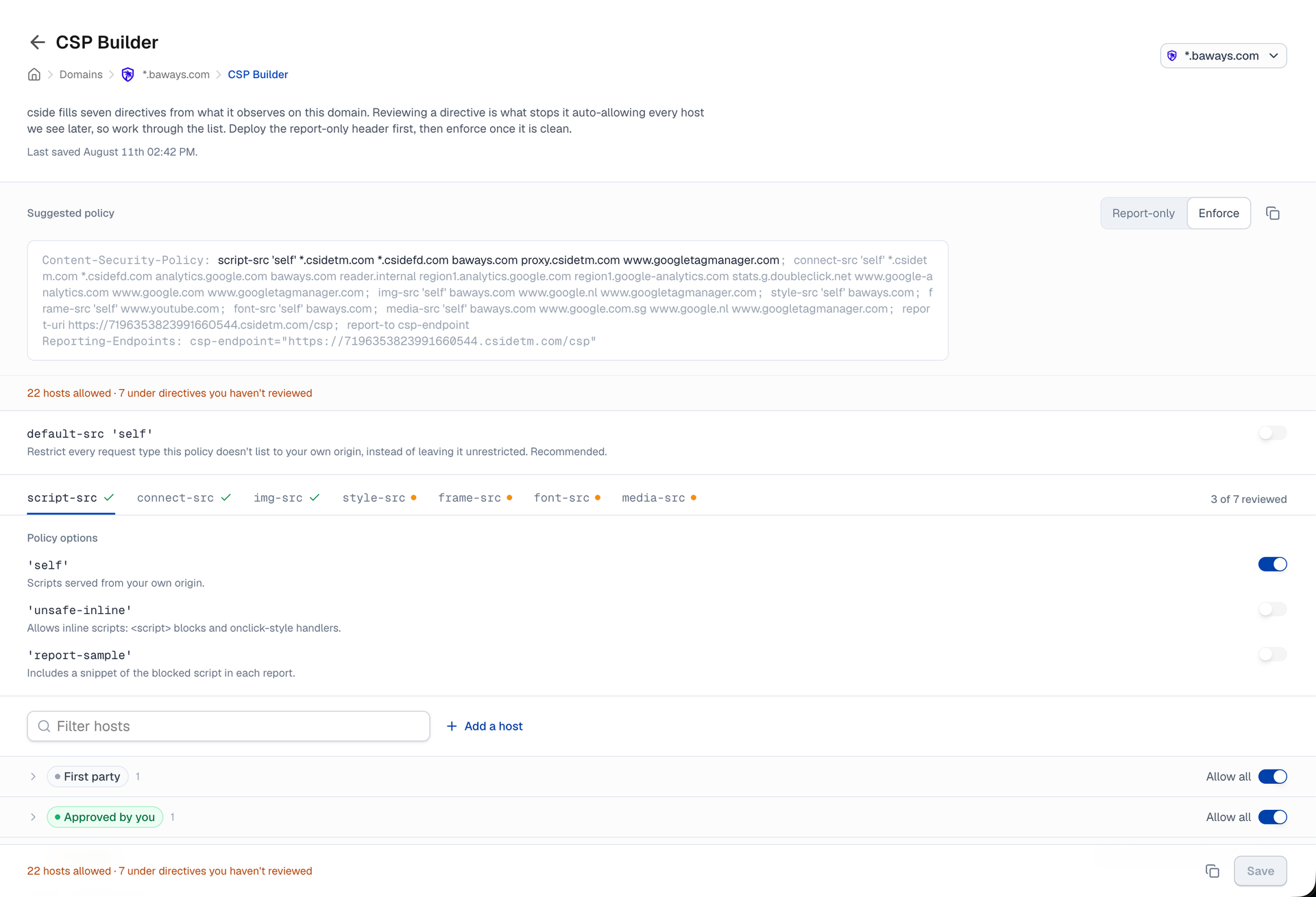 Introducing CSP Builder · seen Aug 2026
· source
· release history
- Lets you review, toggle off unexpected hosts, and add hosts not yet observed before deploying the policy. Introducing CSP Builder · seen Aug 2026 · source · release history
- Supports a report-only header workflow — deploy in report-only mode first, monitor violations in the dashboard, then switch to enforce mode once the policy is clean. Introducing CSP Builder · seen Aug 2026 · source · release history
- Adds CSP Builder capability to automatically suggest a Content-Security-Policy by grouping observed script hosts across seven directives: script-src, connect-src, img-src, style-src, frame-src, font-src and media-src Introducing CSP Builder · Aug 2026 · source · release history
Partner client management shipped Provides a unified dashboard and identity access model for channel partners to invite end customers and manage all client projects.
Also counts toward: Role-based access control
release
- Introduces a 3-tier identity access model (Organization -> Team -> Domain) for partner client management Channel partner program · Apr 2025 · source · release history
- Adds a unified dashboard for channel partners to manage all client projects in one place Channel partner program · Apr 2025 · source · release history
- Enables inviting end customers to teams within the partner's Organization structure Channel partner program · Apr 2025 · source · release history
PCI DSS compliance reporting shipped Generates and delivers PCI DSS compliance reports to enterprise customers who opt into the feature.
release
- Adds automatic weekly delivery of PCI DSS compliance reports to cside enterprise customers who opted into the PCI DSS dashboard PCI DSS compliance report · Feb 2025 · source · release history
- Adds download capability for the PCI DSS report within the PCI DSS dashboard PCI DSS compliance report · Feb 2025 · source · release history
Lines in monospace are the tool's own words: help text
parsed from its source, or an endpoint from its API document. Under
release, a line is our summary of a dated release. Under
docs, it is quoted from the tool's own documentation or
website. Each links back to the source it came from.
Screenshots
From the release notes, newest first. Click one to see it full size.Score card
-
Shipping velocity releases a month, last 12 months
-
Documentation quality release-notes rubric, 0–100
-
Breaking-change discipline how rarely a release breaks users, and notice given
-
Maintenance risk quiet time against its own cadence, maintainers
-
Innovation & surface new capabilities, API and MCP surface
Five scores for c/side, each built from the releases, notes and API history this site tracks — and, on Researcher and Business, where it stands among every measured tool in its category and how that has moved.
Score cards are part of every paid plan.
See plans → Already subscribed? Sign in →Trajectory
Blank means never measured; nothing here is a filled-in zero.
Peer standings are included with Researcher and Business. See how this tool ranks against its competitors, using data we don't publish anywhere else.
See plans →Each score is 0–100 on a published rubric, derived from data this site already shows. A dimension we cannot measure says so — it is never scored 0 and never enters a rank.
How this is scored
- Shipping velocity — releases a month over the last 12 months, on a log scale where 16 a month scores 100. Needs 3 releases in the window.
- Documentation quality — the release-notes rubric published on the analytics page, unchanged.
- Breaking-change discipline — the share of releases carrying a breaking change (none scores 100, half or more scores 0). Only projects that label breaking changes are measured: a clean record cannot be told from an unlabelled one.
- Maintenance risk — quiet time measured against the tool's own release cadence (quiet longer than 90 days and three typical gaps scores 0), plus the number of active maintainers and whether contributors are growing, where known. Higher is lower risk.
- Innovation & surface — new capabilities in the feature ledger this year, API and MCP operations added, and the share of commits that are features: the mean of whichever we hold.
- Community health (open-source tools only) — each is a direction, not a size: contributors this year against last, the bus factor now against a year ago, and issues closed per issue opened, where steady scores 50, doubled 100 and halved 0; plus the median time to a maintainer's first reply (an hour scores about 100, a month or more 0). A commercial card has no repository and carries none of the four.
- Documented delivery (commercial tools) — when a vendor's documented new capabilities have slowed against its own baseline, that counts against the overall standing as heavily as two low dimensions. Steady delivery, or too little history to judge, leaves the standing alone; it is never a sixth score.
- Open-source tools are scored on repository signals; commercial tools on their published changelog. Ranks compare tools within one category and one profile and need at least five measured peers; the overall standing needs three ranked dimensions. Best-in-breed or consolidator is a shape, not a quality, and is never scored.
Release-note detail over time
See how much detail c/side puts in its release notes, quarter by quarter, and compare it with tracked tools in the same category. This history uses up to ten retained, reviewed notes per tool; sparse or blank older quarters may reflect that limit.
Checking release-note history…
Releases
23 entries
No entries match these filters.
- August 20262
- July 20268
- May 20263
- March 20262
- January 20261
- December 20251
- July 20252
- April 20251
- February 20251
- December 20241
- July 20241
Add the badge to your README
Maintain this project? The badge links readers straight to this page, so they can follow every release here.
 Choose a badge style and copy the code →