origin auth login
git clone https://origin.cursor.com/acme/checkout.git
git remote set-url --add --push origin git@github.com:acme/checkout.git
git remote set-url --add --push origin https://origin.cursor.com/acme/checkout.git
git push origin main
curl --request GET \
  --url "https://api.cursor.com/v0/private-workers/pending-requests" \
  -u "$CURSOR_API_KEY:"
# 1. Claim the pending request
curl --request POST \
  --url "https://api.cursor.com/v0/private-workers/claim" \
  -u "$CURSOR_API_KEY:" \
  -d '{"bcId": "bc-00000000-0000-0000-0000-000000000002", "workerId": "pw_123"}'

# 2. Start the worker with the reserved id
export CURSOR_AGENT_WORKER_ID="pw_123"
agent worker --pool gpu --worker-dir /workspace start
curl --request GET \
  --url "https://api.cursor.com/v0/private-workers?status=idle&scope=team_pool&limit=50" \
  -u "$CURSOR_API_KEY:"
cursor://anysphere.cursor-deeplink/prompt?text=Research%20and%20find%20one%20bug%20in%20this%20codebase
bugbot run
/side What are the tradeoffs of using a queue here vs. direct DB writes?
/automate When a PR review comment is left, read the comment and push a commit that addresses the feedback.
/in-cloud Fix the failing integration tests in the CI pipeline and open a PR when done
/review
/review-security
Summary
Cursor is a commercial desktop application for AI-assisted software development, built around an editor where developers describe tasks in plain language and agents write, run, and test code on their behalf. It targets application developers and teams who want agent-driven coding folded into their existing workflow rather than a standalone chat assistant, and it extends beyond the desktop with an iOS app for launching and monitoring always-on cloud agents, handing sessions between laptop and phone, and reviewing or merging pull requests remotely. Teams can share configuration through a marketplace of plugins, skills, and MCPs, and automations can be triggered from Slack or GitHub events, putting it closer to a development platform than a simple code completion tool. Cursor sits in the ai-coding-agents category, and with 21 releases tracked and the latest just over a month old, it is under active development.
Cursor is an AI-powered code editor built on VS Code that helps developers write, edit, and debug code faster using artificial intelligence.
Which agent finished, needs my input, or is ready for me to review right now?
surfaces live status through push notifications and lock-screen activity, so a session started on the desktop can be checked from the phone without opening the app
Where did I discuss this decision three weeks ago, and what did the agent conclude?
builds a local search index over past agent conversations so a phrase or topic can be found across thousands of transcripts, not just by name or PR number
Can I sanity-check an alternative approach without derailing the agent already working on my task?
opens a side conversation that inherits the main thread's context but defaults to reading and answering rather than acting, so exploration doesn't commit the running agent to a pivot
Which plugins, skills, and MCPs is my team actually using, and are we all on the same ones?
a team marketplace leaderboard ranks what's installed across teammates and lets a lagging setup adopt the same one with a single install
Is a long-running fix or investigation blocking me from continuing my own work?
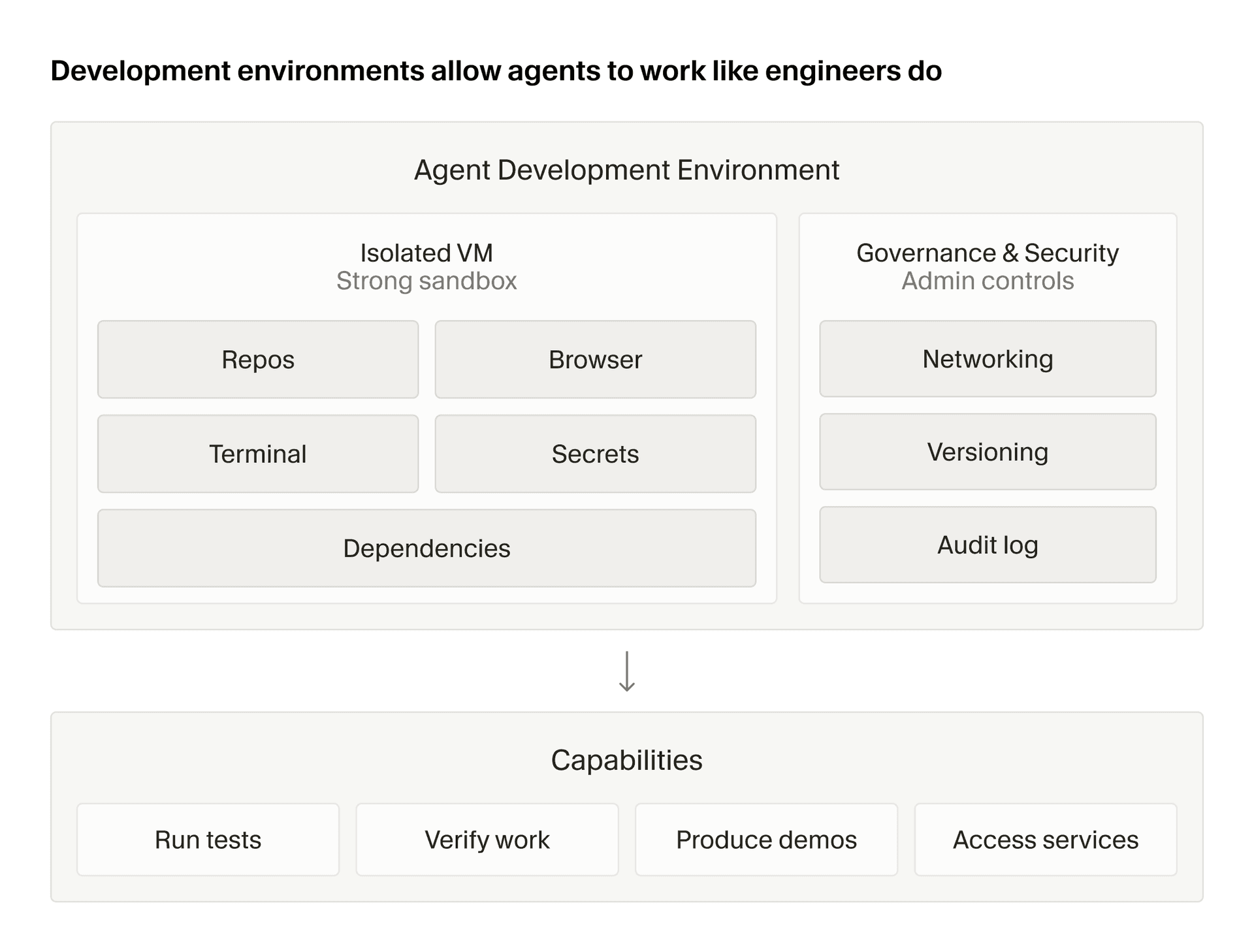
spins up a cloud subagent on its own VM and branch to run the task in the background while the local or cloud parent session keeps going independently
Will every teammate's cloud agent start from the same environment instead of drifting?
reads a committed environment definition from the repo to rebuild the same snapshot for each cloud agent start, so a config change is shared the moment it's committed
Built from Cursor's releases, docs, README and our own runs.
“Seen” marks the month we first spotted a release the vendor didn't date.
Group names and tags are our labels.
Cursor covers 1 of the 2 vulnerability management capabilities we track.
What Cursor offers you
Command-line interface2
Extension marketplace2
Plugin system2
Scheduled jobs2
Agent-based deployment1
CI/CD pipeline integration1
Import from a competing product1
MCP server1
Self-hosted deployment1
User-defined detection rules1
Show
No capabilities match.
+AI Coding Agents6 capabilitiesCursor's core function is running AI agents that write, edit, and review code on behalf of the user. Agents operate locally or in the cloud and can work autonomously across entire codebases.▸
+Cloud agentsshippedRuns AI agents in isolated cloud VMs so work continues even when the user's laptop is closed.44 releases · 17 other sources · first seen Aug 2026▸
release
44 total
Cloud agent environments now support up to 300 repositories and load 5x faster for large environments.
updated · seen Oct 2026
· source
· release history
Introduces the Environments API (beta) to programmatically create and manage the cloud environments that agents run in.︀︄︇︀︅︉︀︅︀︀︃︀︀︅︅︀︅︊︀︄︆︀︃︄
updated · seen Oct 2026
· source
· release history
Adds Cloud Agents support so a Project runs on its own cloud computer, keeping work alive when your laptop is closed, with the coordinator spinning up local agents only when on-machine testing is needed.
updated · seen Sep 2026
· source
· release history
Projects run on cloud agents with their own persistent compute, so work continues after closing your laptop, with local agents spun up on demand for machine-specific tasks.
updated · seen Sep 2026
· source
· release history
Adds follow-up steering: send a message to redirect the agent mid-run without interruption — follow-ups queue at the next tool call rather than cutting the agent off; send immediately with Send now or press ⏎ twice.
updated · seen Sep 2026
· source
· release history
Projects run cloud-by-default on their own compute so work continues when your laptop is closed, with the coordinator able to spin up a local agent when on-machine testing is needed.
announced · Sep 2026
· source
· release history
docs
9 total
identityToken Also return a claim token : a signed OIDC JWT that names the claimed agent, its owner, and . If the token can't be issued, the claim fails and the request stays unclaimed. identityToken.audience identityToken Audience your verifier checks, set as the JWT aud claim. Printable ASCII, up to 512 characters.
docs update · Oct 2026
· source
The Cloud Agents API lets you programmatically launch and manage cloud agents that work on your repositories, along with the environments they run in.
docs update · Oct 2026
· source
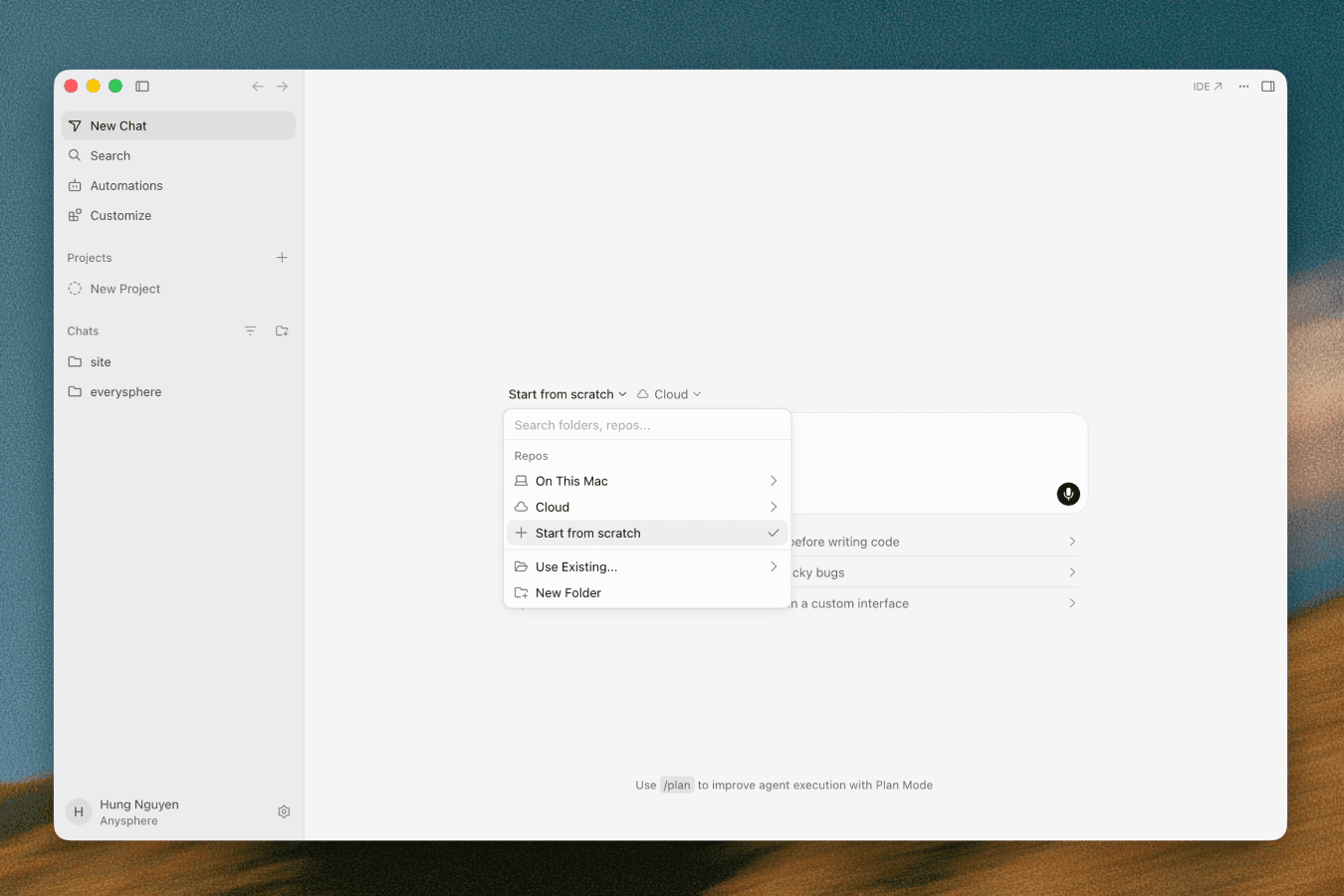
Start from scratch You can start a cloud agent without a repository or a connected source control provider. Select Start from scratch in the repository picker at cursor.com/agents or in the , then send your prompt.
docs update · Sep 2026
· source
User-level skills in stay on your machine until you sync them for Cloud Agents or publish them to your team . Cursor does not copy or unsynced local skills to Cloud Agents, Agents Window remote SSH sessions, or . On self-hosted workers, use project skills from the repo or bake skills into the worker image.
docs update · Sep 2026
· source
On a regular schedule for every environment in the Builds tab Cursor regularly checks each environment and rebuilds it when something changed.
seen Aug 2026
· source
Origin Clone, Push & Pull Origin is currently released in early beta. You can create repos, push and pull with git, mirror from GitHub, browse and search code, open and merge pull requests, and share with your Cursor team. Please submit any and all feedback to hi@cursor.com to help us make the product better.
docs update · Aug 2026
· source
example
8 total
Give a cloud agent a persistent, long-running objective — such as eliminating all flaky tests — so it keeps working toward the goal across sessions without you re-prompting.$ In a new chat, type: /goal fix all flaky tests and make CI green
updated · seen Sep 2026
· source
Give a cloud agent a persistent objective so it keeps working until CI is fully green — no repeated prompting needed.$ /goal fix all flaky tests and make CI green
Cloud Agents and Cursor Harness Improvements · Aug 2026
· source
Enable Builds on an existing Cloud Agents environment to get faster agent startup without reconfiguring from scratch.$ In the Cloud Agents dashboard, open your environment > go to the Builds tab > click 'Enable Builds'. To preview changes first, click 'Run setup agent' instead.
Cloud Agents Start 3x Faster with Builds · seen Aug 2026
· source
Enable Builds on an existing Cloud Agents environment to get faster agent starts without reconfiguring from scratch.$ In the Cloud Agents dashboard, open your environment > go to the Builds tab > click 'Enable Builds'. Optionally click 'Run setup agent' first to preview any proposed config changes before enabling.
Cloud Agents Start 3x Faster with Builds · seen Aug 2026
· source
Commit a shared cloud environment definition so every teammate's cloud agent starts from the same pre-built snapshot.$ Commit .cursor/environment.json to the repo after cloud environment setup completes
Cloud Environment Setup and Cloud Subagents in Agents Window · seen Jun 2026
· source
Spin up a cloud subagent to fix a flaky CI pipeline while you keep coding locally — the subagent runs on its own VM and branch so nothing interrupts your local session.$ /in-cloud Fix the failing integration tests in the CI pipeline and open a PR when done
Cloud Environment Setup and Cloud Subagents in Agents Window · seen Jun 2026
· source
+Security reviewshippedRuns a security-focused code review locally before a push, targeting sensitive code paths before changes reach CI.12 releases · 5 other sources · first seen Sep 2026▸
Also counts toward: User-defined detection rules
release
12 total
Draft PRs are automatically skipped by Security Review.
updated · seen Oct 2026
· source
· release history
Security Review supports team rules (Enterprise) to enforce codebase-specific policies, such as which tables are never queried from or which external calls must go through a specific client.
updated · seen Oct 2026
· source
· release history
Security Review covers injection across SQL, command, and template surfaces; authentication and authorization bypasses; secrets and credentials committed; unvalidated redirects; unsafe deserialization; and dependency changes introducing known vulnerabilities.
updated · seen Oct 2026
· source
· release history
New Security Review feature automatically reads every pull request in codebase context and posts a single review comment flagging exploitable bugs with severity, attack path, and proposed fix.
updated · seen Oct 2026
· source
· release history
Findings can be individually dismissed with a reason so Security Review will not raise the same issue again on future PRs.
updated · seen Oct 2026
· source
· release history
Security Review supports team-defined codebase rules (e.g. which client external calls must go through a specific path, or which tables are never queried from a request handler) enforced on every PR.
updated · seen Sep 2026
· source
· release history
example
Enable Security Review for a repository so every incoming PR is automatically scanned for exploitable bugs.$ In the Cursor dashboard, navigate to your repository settings and enable Security Review.
updated · seen Oct 2026
· source
Enable Security Review to automatically flag exploitable bugs (injection, auth bypasses, committed secrets, SSRF, unsafe deserialization) on every non-draft PR in selected repositories.$ In the Cursor dashboard, go to Automations tab > Enable Security Review > Select the repositories you want reviewed.
updated · seen Sep 2026
· source
Enable Security Review to automatically scan every non-draft PR for exploitable bugs and enforce team-specific codebase rules on each review.$ In the Cursor dashboard, go to the Automations tab > enable Security Review > select the repositories you want reviewed. Optionally add team rules (e.g.
updated · seen Sep 2026
· source
Enable Security Review on a repository so every merged PR is automatically checked for exploitable bugs before code ships.$ In the Cursor dashboard, go to the automations tab, select 'Security Review', choose the repositories you want reviewed, and save.
updated · seen Sep 2026
· source
Jump straight to a security-only pre-push review when you've made changes in sensitive code paths.$ /review-security
Bugbot is now over 3x faster, 22% cheaper, and finds 10% more bugs · seen Jun 2026
· source
+Bugbot code reviewshippedAutomatically reviews pull requests for bugs using AI, completing in roughly 90 seconds and avoiding duplicate reviews across GitHub and GitLab.7 releases · 5 other sources · first seen Oct 2026▸
release
7 total
Supports toggling visibility of the routed model (hidden by default), giving teams the option to surface which model handled each request.
Cursor Router · seen Jul 2026
· source
· release history
Adds incremental review mode: configure Bugbot to review only what has changed since the last review, focusing feedback on the latest updates.
Bugbot is now over 3x faster, 22% cheaper, and finds 10% more bugs · seen Jun 2026
· source
· release history
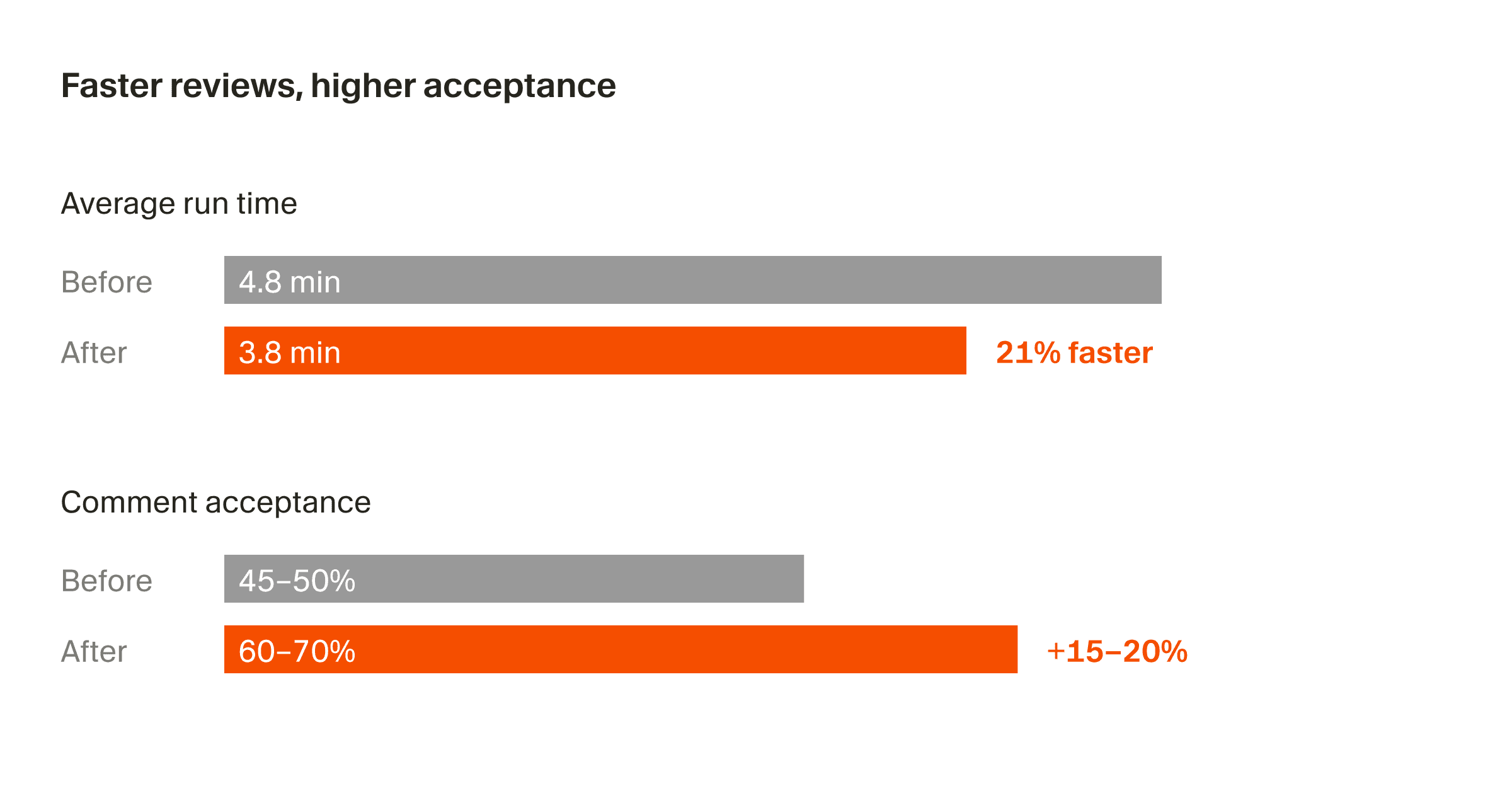
Bugbot (powered by Composer 2.5) now completes reviews in ~90 seconds (down from ~5 min), finds 10% more bugs per review, and costs ~22% less per run.
Bugbot is now over 3x faster, 22% cheaper, and finds 10% more bugs · seen Jun 2026
· source
· release history
Enables /review to sync with Bugbot on GitHub and GitLab — if a PR is opened with the same diff, Bugbot skips the duplicate review and comments that it already reviewed that diff.
Bugbot is now over 3x faster, 22% cheaper, and finds 10% more bugs · seen Jun 2026
· source
· release history
Bugbot now respects model block lists, allowing organizations to restrict which models power reviews.
Bugbot is now over 3x faster, 22% cheaper, and finds 10% more bugs · seen Jun 2026
· source
· release history
Adds /review command to run Bugbot and Security Review locally before pushing, with interactive agent selection.
Bugbot is now over 3x faster, 22% cheaper, and finds 10% more bugs · seen Jun 2026
· source
· release history
docs
Clearer error for Azure DevOps repos in the Bugbot repo update endpoint. POST /bugbot/repo/update now returns a 400 for dev.azure.com visualstudio.com repo URLs, explaining that Azure DevOps repo settings are managed from the Cursor dashboard, instead of telling you to install the Cursor GitHub or GitLab app.
docs update · Oct 2026
· source
to manage which repositories Bugbot reviews. On GitHub, connecting turns Bugbot on for the repositories you grant access to. Repositories stay off when someone who isn't a team admin connects an enterprise team, or a team that already has Bugbot on.
docs update · Oct 2026
· source
: See the Origin page For a comparison with Security Reviewer, see Security Agents source control support Repository config file You can optionally configure Bugbot from a repo-level YAML file: # .cursor/config/bugbot.yaml version: 1 triggers: drafts: false frequency: everyPush # everyPush | oncePerPr review: effort:…
docs update · Oct 2026
· source
example
Surface the routed model on each request so your team can audit which model is being used for compliance or cost-tracking purposes.$ In the Cursor dashboard, go to Admin > Cursor Router settings and set 'Routed model visibility' to displayed (visible to members).
Cursor Router · seen Jul 2026
· source
Run Bugbot and Security Review interactively before pushing — catch bugs and security issues without waiting for a CI PR comment.$ /review
Bugbot is now over 3x faster, 22% cheaper, and finds 10% more bugs · seen Jun 2026
· source
+Cloud subagentsshippedSpawns parallel background subagents in their own VMs to handle long-running or independent tasks without blocking the main session.3 releases · 5 other sources · first seen Aug 2026▸
Also counts toward: CI/CD pipeline integration
release
Enables subagents to run on their own isolated virtual machines, each with a clean copy of the project and independent cloud environment.
updated · seen Sep 2026
· source
· release history
Subagents can now run on their own isolated virtual machines, each receiving a clean copy of the project — enables swarming independent fixes or testing parent-agent changes without collisions.
Cloud Agents and Cursor Harness Improvements · Aug 2026
· source
· release history
New /babysit command (also accessible via quick-action pill) lets a cloud subagent iterate remotely on a PR to prepare it for merge without tying up the local agent session.
Cloud Environment Setup and Cloud Subagents in Agents Window · seen Jun 2026
· source
· release history
docs
Cursor includes two built-in subagents that handle context-heavy operations automatically. These subagents were designed based on analysis of agent conversations where context window limits were hit.
docs update · Oct 2026
· source
Put a PR on autopilot with /autopilot Ask a cloud subagent to take over a pull request with /autopilot
docs update · Sep 2026
· source
example
Spin up a swarm of subagents to independently test a parent agent's changes in fresh, isolated environments — useful for parallel regression or security smoke-testing without environment collisions.$ In the chat panel, prompt: run a swarm of subagents to test my app for bugs, each in its own environment
updated · seen Sep 2026
· source
Swarm independent subagents in isolated VMs to simultaneously test different parts of an app for bugs without environment collisions.$ run a swarm of subagents to test my app for bugs, each in its own environment
Cloud Agents and Cursor Harness Improvements · Aug 2026
· source
Auto-run an automation and produce a screen-recorded demo artifact when a GitHub Actions workflow run completes on a branch.$ In the Cursor Automations console, add trigger "Workflow run completed", then in the Instructions field write: "Run the relevant tests, and use the computer use tool to record a short demo of the…
Improvements to Cursor Automations · seen Jun 2026
· source
+Side chatsshippedOpens parallel agent conversations alongside the main thread, each a full durable session that can be revisited and referenced later.2 releases · 2 other sources · first seen Sep 2026▸
release
Cursor is now available on iPad for all paid plan subscribers, with a rebuilt layout featuring pinned sidebar chats for monitoring multiple agents simultaneously.
Cursor, now on iPad · seen Aug 2026
· source
· release history
New Side Chats: open parallel agent conversations via /side, /btw, or the plus button without interrupting the main agent thread — each is a durable, full agent conversation that can be revisited and @-mentioned.
Side Chats and Conversation Search · seen Jul 2026
· source
· release history
docs
Side chats Open a side chat to ask a question or investigate a tangent without interrupting the main conversation. Type /side or /btw in the chat input, optionally followed by your question, or use the plus button at the top of the chat panel. A side chat is a durable agent conversation.
docs update · Sep 2026
· source
example
Spin up a side chat to sanity-check a design decision while the main agent keeps running — without losing your place.$ In the chat panel, type /side or /btw to open a new side chat that already has context from your main conversation.
Side Chats and Conversation Search · seen Jul 2026
· source
+Cloud agent hooksshippedLets users intercept agent responses and control subagent behavior programmatically to build self-correcting agent loops.1 release · 1 other source▸
release
New cloud agent hooks (beforeSubmitPrompt, afterAgentResponse, afterAgentThought, stop, subagentStart, and more) enable observing and controlling prompts, responses, reasoning, subagents, compaction, and turn completion.
Side Chats and Conversation Search · seen Jul 2026
· source
· release history
example
Build a self-correcting agent loop by intercepting responses and controlling subagent behavior via new cloud agent hooks.$ In your cloud agent hook configuration, register handlers for beforeSubmitPrompt, afterAgentResponse, afterAgentThought, stop, and subagentStart to observe reasoning and inject corrections.
Side Chats and Conversation Search · seen Jul 2026
· source
+Cloud and Remote Infrastructure4 capabilitiesCursor lets users choose where agents run — across cloud VMs, local machines, remote servers, and team-shared compute pools — from a single unified interface. It also supports accessing and controlling sessions remotely from other devices.▸
+Remote machinesshippedProvides a single selector that surfaces cloud, local, remote machines, team pools, and remote workspaces for choosing where an agent runs.15 releases · 3 other sources · first seen Aug 2026▸
release
15 total
Adds My Machines for connecting a single laptop or VM to a personal account for individual workflows.
Self-hosted machines · Sep 2026
· source
· release history
Introduces self-hosted machines that run tool execution entirely within your own network, keeping codebases, build outputs, and secrets on internal infrastructure.
Self-hosted machines · Sep 2026
· source
· release history
Adds agent worker start subcommand in the Cursor CLI to register a machine as a self-hosted worker, opening a long-lived outbound HTTPS connection to the Cursor cloud for agent tool execution.︀︄︇︀︅︉︀︅︀︀︃︀︀︅︅︀︅︊︀︄︆︀︃︄
announced · Sep 2026
· source
· release history
Adds team pools — named queues of self-hosted workers that scale capacity dynamically as requests arrive and shrink as workers disconnect, with no repository lock-in.
Self-hosted machines · Sep 2026
· source
· release history
Adds native integrations with AWS Lambda, Cloudflare, Coder, Daytona, E2B, Modal, Namespace, and Vercel as supported sandbox providers for hosting workers without building a custom sandbox layer.
announced · Sep 2026
· source
· release history
Adds computer use (click, type, screenshot, browser control) for self-hosted workers on Linux and Mac, with live desktop observation and takeover from the Cursor UI.
Self-hosted machines · Sep 2026
· source
· release history
docs
Azure DevOps (Azure DevOps Services, limited availability): See the Azure DevOps integration page . On Azure DevOps, this appears as a status with the context cursor-bugbot/review
seen Aug 2026
· source
The Azure DevOps integration connects Azure DevOps Services repositories to and Cloud Agents clone your code, work on branches, and open pull requests. Bugbot reviews pull requests and posts its findings as comments. Bugbot autofix Set up Bugbot Bugbot on Azure DevOps is in limited availability.
docs update · Aug 2026
· source
example
Register a local machine or VM as a self-hosted worker so Cursor cloud agents execute tool calls inside your network instead of on Cursor-hosted infrastructure.$ cursor agent worker start
announced · Sep 2026
· source
+Remote ControlshippedLets a user take over a desktop agent session from a phone or keep a remote machine awake and reachable, with admin controls for Teams and Enterprise.7 releases · 3 other sources▸
release
7 total
Enterprise admins can enable remote control via Org settings > Security and identity > Remote control.
updated · seen Oct 2026
· source
· release history
Enables Keep this computer awake setting under Remote Control in Cursor's desktop settings to prevent sleep during remote agent sessions.︀︄︇︀︅︉︀︅︀︀︃︀︀︅︅︀︅︊︀︄︆︀︃︄
updated · seen Oct 2026
· source
· release history
In-app team switching lets users move between teams they belong to without leaving the app.
Cursor, now on iPad · seen Aug 2026
· source
· release history
Cursor for iOS with remote control to launch and steer agents from a mobile device.
Cursor Start · seen Aug 2026
· source
· release history
Adds Cursor for iOS with remote control to launch and steer agents from a mobile device.
Cursor Start · seen Jul 2026
· source
· release history
Remote Control mode lets you take an agent already running on your desktop and continue directing it from your phone.
Cursor Mobile App for iOS · seen Jun 2026
· source
· release history
example
Prevent your machine from sleeping while remote agents run unattended, so iOS remote control stays connected.$ In the Cursor desktop app, open Settings > Remote Control and toggle on 'Keep this computer awake'. Ensure your computer is plugged in with the lid open.
updated · seen Oct 2026
· source
Allow Enterprise team members to use remote control to monitor local agents from iOS.$ As an Enterprise admin, navigate to Org settings > Security and identity > Remote control and enable the setting.
updated · seen Oct 2026
· source
Hand off a desktop agent session to your phone so you can keep directing it while away from your desk.$ In the Cursor iOS app, tap Remote Control → select the active desktop session → continue sending instructions from your phone.
Cursor Mobile App for iOS · seen Jun 2026
· source
+Branch pickershippedOffers a branch picker that defaults to the default branch and recently used branches for faster navigation.4 releases▸
release
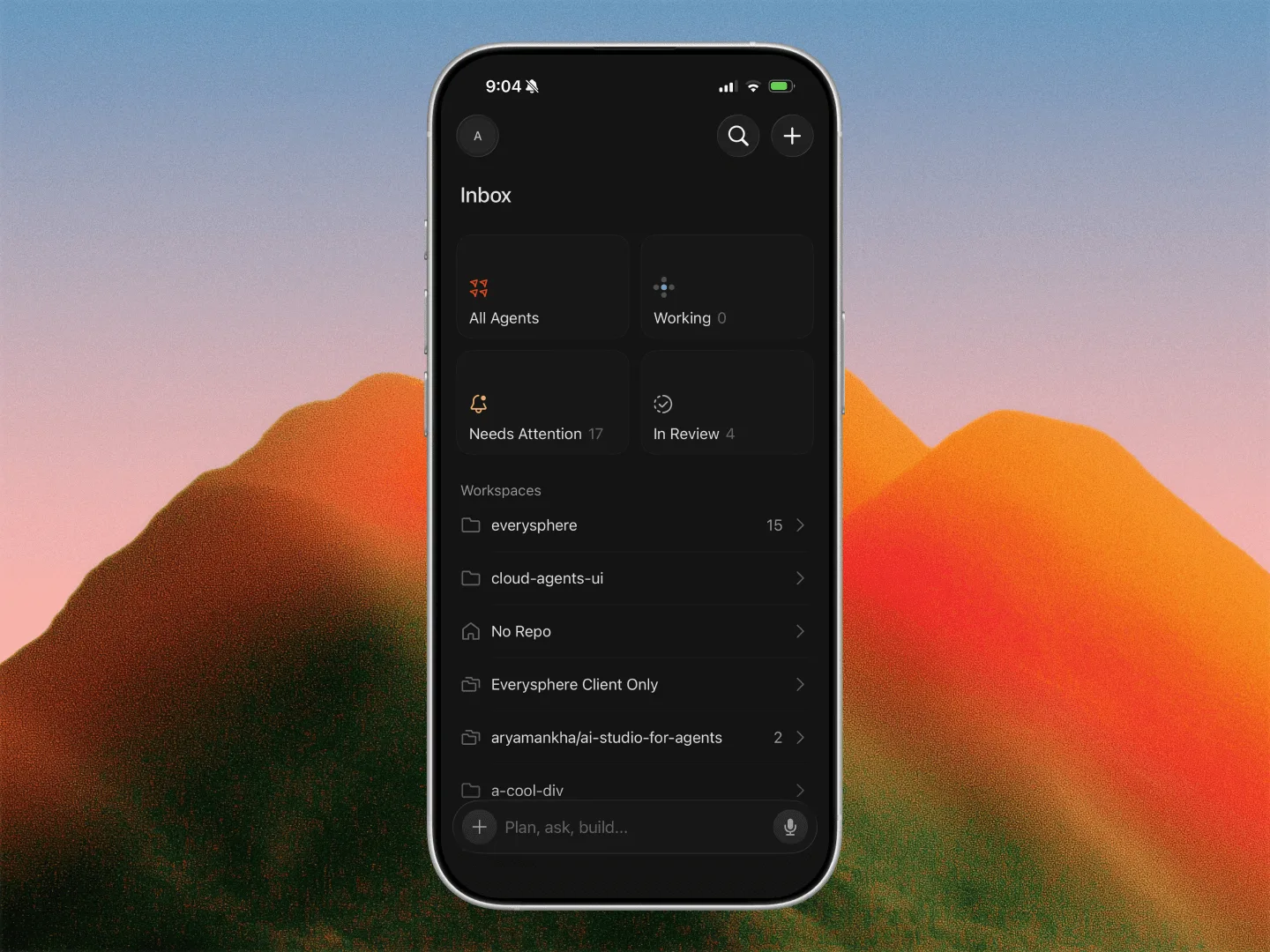
New Inbox view surfaces in-progress work, items needing attention, and PRs currently in review.
Cursor, now on iPad · seen Aug 2026
· source
· release history
Multi-PR sessions now let users open every PR created by a single chat, not just the most recent one.
Cursor, now on iPad · seen Aug 2026
· source
· release history
Split-screen mode lets users keep a PR review open alongside a chat session with full file diff rendering.
Cursor, now on iPad · seen Aug 2026
· source
· release history
Branch picker now opens on the default branch and recently used branches instead of a flat list.
Side Chats and Conversation Search · seen Jul 2026
· source
· release history
+Multi-repo and multi-root workspace setupshippedAllows users to select multiple repositories or workspace roots for a single agent session via a unified picker.3 releases · 1 other source▸
release
Supports named multi-repo environments from Slack, letting Cursor access frontend, backend, and shared code across separate repos in a single session.
Improvements to Cursor in Slack · seen Jul 2026
· source
· release history
Mid-task repo switching via a Switch repository button lets Cursor resume work after changing to a different repo or environment.
Improvements to Cursor in Slack · seen Jul 2026
· source
· release history
Adds a Select Multiple toggle inside Cloud and This Computer flyouts for multi-repo and multi-root selection, replacing the separate Set Up Workspace builder.
Side Chats and Conversation Search · seen Jul 2026
· source
· release history
example
Kick off a task that spans multiple repos so Cursor automatically targets the right multi-repo environment instead of a single default repo.$ In Slack, mention @Cursor with your request (e.g., '@Cursor update the API contract in the backend and reflect it in the frontend').
Improvements to Cursor in Slack · seen Jul 2026
· source
+Automation and Integrations2 capabilitiesCursor supports configurable automations that react to events from GitHub, GitLab, and Slack to open PRs or trigger agent tasks without manual intervention. These automations connect the AI agent loop to the tools development teams already use.▸
+AutomationsshippedLets users configure trigger-based automations in plain language that react to GitHub, GitLab, and Slack events and can open PRs automatically.9 releases · 4 other sources · first seen Aug 2026▸
release
9 total
Adds Security Review bot, enabled from the dashboard's automations tab, which posts one review comment per pull request reporting exploitable bugs — covering SQL/command/template injection, auth bypasses, committed secrets and credentials, SSRF, unvalidated redirects, unsafe deserialization, and dependency changes…
updated · seen Sep 2026
· source
· release history
Adds the /goal command to give an agent a long-lived objective to pursue until fully complete, e.g. /goal fix all flaky tests and make CI green.
updated · seen Sep 2026
· source
· release history
Adds Subscriptions for cloud agents: agents can monitor PR activity, watch a Slack thread, or run scheduled tasks, waking automatically when an event fires.
Cloud Agents and Cursor Harness Improvements · Aug 2026
· source
· release history
Adds five new GitHub triggers: issue comment, PR review comment, PR review submitted, review thread updated, and workflow run completed.
Improvements to Cursor Automations · seen Jun 2026
· source
· release history
Automations can now be saved in an incomplete state, allowing navigation away (e.g., to complete MCP auth) without losing progress.
Improvements to Cursor Automations · seen Jun 2026
· source
· release history
New Slack emoji trigger: reacting to any Slack message with a designated emoji kicks off a configured automation.
Improvements to Cursor Automations · seen Jun 2026
· source
· release history
example
Kick off a long-running CI health objective so the agent keeps working on flaky tests across sessions without needing to be re-prompted.$ /goal fix all flaky tests and make CI green
updated · seen Sep 2026
· source
Connect a Slack bug-report channel to a Project so the coordinator automatically delegates a fix each time a new bug is reported, with no manual prompting.$ In Cursor, open Projects from the left-hand nav > select your Project > open Subscriptions > connect Slack > point it at your bug-report channel.
updated · seen Sep 2026
· source
Route incoming bug reports from a Slack channel directly to the coordinator so it delegates fixes automatically, without waiting for a manual prompt.$ In Projects, open Subscriptions > Connect Slack, then point it at your bug-report channel so the coordinator delegates a fix each time a new report arrives.
updated · seen Sep 2026
· source
Instantly scaffold a new automation from your agent chat without opening the Automations UI.$ /automate When a PR review comment is left, read the comment and push a commit that addresses the feedback.
Improvements to Cursor Automations · seen Jun 2026
· source
+Slack integrationshippedTriggers automations from Slack by reacting to messages with an emoji, routing failures to the appropriate team automatically.4 releases · 2 other sources▸
release
Live status updates show each step as Cursor works through a task in Slack.
Improvements to Cursor in Slack · seen Jul 2026
· source
· release history
Cursor now shares a plan before starting a task in Slack, letting you redirect it before work begins.
Improvements to Cursor in Slack · seen Jul 2026
· source
· release history
Cross-channel workflows enable Cursor to read context from other Slack channels and threads and post updates back to the relevant channel or thread.
Improvements to Cursor in Slack · seen Jul 2026
· source
· release history
New Slack emoji trigger: reacting to any Slack message with a designated emoji kicks off a configured automation.
Improvements to Cursor Automations · seen Jun 2026
· source
· release history
example
Leverage cross-channel context so Cursor can pull information from a separate channel and post results back without manual copy-paste.$ In Slack, mention @Cursor in your thread (e.g., '@Cursor summarize the decisions from #architecture-review and draft an implementation plan here').
Improvements to Cursor in Slack · seen Jul 2026
· source
Trigger a triage automation from Slack by reacting to a failure alert, routing it to the right team automatically.$ In the Cursor Automations console, go to your automation's Triggers section, select "Slack emoji reaction", and choose the emoji (e.g. 🚨) that should fire the automation.
Improvements to Cursor Automations · seen Jun 2026
· source
+Team Administration and Governance3 capabilitiesCursor gives admins centralised control over which tools, MCP servers, plugins, and models teams can access. Access policies can be enforced at the org or directory-group level and distributed to all surfaces without manual per-user setup.▸
+Project workspace and model routingshippedRoutes each request to the most appropriate AI model based on task type and complexity, with admin controls to enforce routing policies and allow or block specific models.12 releases · 5 other sources · first seen Aug 2026▸
previously: Cursor Router, Projects
release
12 total
Introduces Projects, accessible from the left-hand nav, letting a coordinator agent plan and delegate work across thousands of parallel subagents without requiring the user to stay online.︀︄︇︀︅︉︀︅︀︀︃︀︀︅︅︀︅︊︀︄︆︀︃︄
updated · seen Sep 2026
· source
· release history
Introduces Projects, accessible from the left-hand nav, letting a coordinator agent plan and delegate work across thousands of parallel subagents without requiring the user to stay online.︀︄︇︀︅︉︀︅︀︀︃︀︀︅︅︀︅︊︀︄︆︀︃︄︀︄︇︀︅︉︀︅︀︀︃︀︀︅︅︀︅︊︀︄︆︀︃︄
updated · seen Sep 2026
· source
· release history
Adds Projects, a new beta feature accessible from the left-hand nav that runs a persistent coordinator agent directing thousands of subagents for large bodies of work spanning months.︀︄︇︀︅︉︀︅︀︀︃︀︀︅︅︀︅︊︀︄︆︀︃︄
announced · Sep 2026
· source
· release history
Adds Projects, a new beta feature accessible from the left-hand nav that runs a persistent coordinator agent directing thousands of subagents for large bodies of work spanning months.︀︄︇︀︅︉︀︅︀︀︃︀︀︅︅︀︅︊︀︄︆︀︃︄︀︄︇︀︅︉︀︅︀︀︃︀︀︅︅︀︅︊︀︄︆︀︃︄
announced · Sep 2026
· source
· release history
Adds Custom Modes: pin any skill as an always-on mode via ⌥⏎ (Mac) / Alt+Enter (Windows) or the Use as Mode option from the / skill picker.
Cloud Agents and Cursor Harness Improvements · Aug 2026
· source
· release history
Adds three optimization modes under Auto — Cost, Balance, and Intelligence — letting users trade off token spend against model capability on a per-session basis.
Cursor Router · seen Jul 2026
· source
· release history
docs
machine or pool the Project owner can reach, without asking first. When it's off, the agent asks for approval in the Project's chat before it uses a new machine or pool. It's off by default for every team.
docs update · Oct 2026
· source
Kick off a long-running security remediation task — e.g. eliminating all flaky auth tests — and let the coordinator run to completion without babysitting it.$ /goal fix all flaky tests and make CI green
updated · seen Sep 2026
· source
Keep an agent focused on a specialised workflow by pinning a skill as a Custom Mode directly from the skill picker.$ In the chat, type / to open the skill picker, select a skill, then press Alt+Enter (Windows) or Option+Return (Mac) — or choose 'Use as Mode' — to pin it as a Custom Mode.
Cloud Agents and Cursor Harness Improvements · Aug 2026
· source
+Team marketplaceshippedProvides a team-scoped marketplace for plugins and MCP servers with one-click install, leaderboard, and access control by org or SCIM directory group.7 releases · 5 other sources · first seen Sep 2026▸
Also counts toward: Extension marketplace, Plugin system
release
7 total
Includes plugins, MCP servers, hooks, and skills to extend Cursor across workflows.
Cursor Start · seen Aug 2026
· source
· release history
New plugins are browseable and installable from the Cursor Marketplace or the Customize page in Cursor.
Google Workspace Plugins · seen Aug 2026
· source
· release history
All five plugins are available to install from the Cursor Marketplace or the Customize page in Cursor.
Google Workspace Plugins · seen Aug 2026
· source
· release history
Bundles access to Grok 4.5 and Composer models alongside plugins, MCP servers, hooks, and skills.
Cursor Start · seen Jul 2026
· source
· release history
Adds organization group support for team marketplace access control, letting admins restrict marketplace visibility to specific org groups (in addition to existing SCIM directory groups).
MCPs and Organizations in Team Marketplaces · seen Jul 2026
· source
· release history
Team marketplaces now support plugin repository imports from GitLab, Bitbucket, and Azure DevOps for easier team-wide plugin distribution.
Customize Cursor · seen Jun 2026
· source
· release history
docs
Allow members to publish On the marketplace, admins control whether members can publish personal skills: Dashboard → Plugins Open the team marketplace, then Turn Allow Members to Publish on or off. The setting is on by default. When it is off, only team admins can publish new skills.
docs update · Sep 2026
· source
example
Submit your own developer tool to the Origin App Marketplace so other teams can discover and install it.$ In Origin, create an app in your namespace, build against the Origin API, then navigate to the app's page and click 'Make Public' followed by 'Submit to Marketplace', providing a slug, suggested…
updated · seen Oct 2026
· source
Restrict a team marketplace to a specific organization group rather than the entire team or a SCIM directory group.$ In the Cursor dashboard, go to Dashboard -> Plugins -> Team Marketplaces, select the marketplace, and restrict access to the desired organization group.
MCPs and Organizations in Team Marketplaces · seen Jul 2026
· source
Instantly surface the most-used team plugins and add them to your personal setup in one click.$ In the Cursor console, go to Customize > Marketplace Leaderboard, browse the top-ranked plugins and MCPs for your team, and click Add on any entry to enable it at the user level.
Customize Cursor · seen Jun 2026
· source
Distribute an internal plugin from a self-hosted GitLab repo to your entire team without leaving Cursor.$ In the Cursor console, go to Customize > Team Marketplace > Import Repository, select GitLab, and paste your repository URL to publish the plugin to your team.
Customize Cursor · seen Jun 2026
· source
+Team MCP server managementshippedLets admins configure approved MCP servers once and push them to cloud agents, the IDE, and CLI so members never need to set them up manually.2 releases · 1 other source▸
Shared capability: MCP server
Also counts toward: Command-line interface, MCP server
release
Enables admins to configure Team MCP servers once and distribute them to cloud agents, the agents window, IDE, and CLI via a team marketplace — members install approved integrations locally without manual server setup.
MCPs and Organizations in Team Marketplaces · seen Jul 2026
· source
· release history
Supports custom (bring-your-own) MCPs alongside marketplace-sourced ones.
Customize Cursor · seen Jun 2026
· source
· release history
example
Centrally publish approved MCP servers so team members can install them locally without configuring servers themselves.$ In the Cursor dashboard, go to Dashboard -> Integrations & MCP, configure your Team MCP servers, then enable them in the team marketplace so members can install from the marketplace.
MCPs and Organizations in Team Marketplaces · seen Jul 2026
· source
+Customisation and Configuration3 capabilitiesCursor consolidates plugins, skills, rules, commands, memory, and hooks into a single settings surface manageable at the user, team, or workspace level. Users can also extend the interface with prebuilt canvases for data and project views.▸
+Memory managementshippedLets users delete memory entries directly in the UI or instruct an automation to remove outdated entries at runtime.6 releases · 1 other source · first seen Aug 2026▸
release
Adds shared context per Project — a set of files that sync across every cloud and local agent — so that knowledge one agent gains (test instructions, codebase conventions, preferences) is available to every future agent in that Project.
updated · seen Sep 2026
· source
· release history
Projects maintain a shared context file set that syncs across all cloud and local agents, growing automatically as agents record codebase knowledge and working preferences.
updated · seen Sep 2026
· source
· release history
Introduces shared context files that sync across all cloud and local agents in a Project, accumulating codebase knowledge and preferences so every new subagent starts already onboarded.
announced · Sep 2026
· source
· release history
Adds /goal command — give an agent a long-lived objective it pursues across loops until fully complete; pairs with custom modes or /loop for recurring check-ins.
Cloud Agents and Cursor Harness Improvements · Aug 2026
· source
· release history
Adds mid-run steering: send a follow-up message while an agent is working via Send now or double-⏎; the message waits for the next tool call instead of interrupting mid-action.
Cloud Agents and Cursor Harness Improvements · Aug 2026
· source
· release history
Enables deletion of memory files directly in the UI or by instructing an automation to remove outdated memories at runtime.
Improvements to Cursor Automations · seen Jun 2026
· source
· release history
docs
Integrations Deeplinks Deeplinks allow you to share prompts, commands, and rules with others, enabling collaboration and knowledge sharing across teams and communities. Links can also be opened via cursor.com . Append the path and url params to the end of the url, for example: cursor.com/link/prompt?text=...
docs update · Aug 2026
· source
+Plugin canvasesshippedSurfaces prebuilt plugin canvases — such as a data visualisation canvas and an Atlassian project view — directly inside Cursor.6 releases · 1 other source▸
release
New Google Sheets plugin lets agents read ranges and find values, update cells, and create and edit spreadsheets.
Google Workspace Plugins · seen Aug 2026
· source
· release history
New Gmail plugin lets agents search and read mail, draft and send messages, apply labels, and manage threads.
Google Workspace Plugins · seen Aug 2026
· source
· release history
New Google Drive plugin lets agents search files and folders, open and download content, and create and organize files from within Cursor.
Google Workspace Plugins · seen Aug 2026
· source
· release history
New Google Calendar plugin lets agents read schedules, create and update events, and find free time.
Google Workspace Plugins · seen Aug 2026
· source
· release history
New Google Docs plugin lets agents open and read documents, write and edit text, and create new docs.
Google Workspace Plugins · seen Aug 2026
· source
· release history
Introduces prebuilt plugin canvases — including a Hex Canvas for data visualizations and an Atlassian Canvas for a real-time view of issues, projects, and documents.
Customize Cursor · seen Jun 2026
· source
· release history
example
Open a shared Atlassian Canvas to get a real-time view of all team issues, projects, and documents inside a plugin.$ In the Cursor console, go to Customize > Plugins, find the Atlassian plugin, and open the Atlassian Canvas from its canvas list.
Customize Cursor · seen Jun 2026
· source
+Custom ModesshippedProvides a single settings page where plugins, skills, MCPs, subagents, rules, commands, and hooks can all be managed at user, team, or workspace level.3 releases · 1 other source▸
previously: Customize page
Also counts toward: Plugin system
release
Adds Custom Modes, which pin any skill as an always-on mode in chat, activated via ⌥⏎ (Mac) or Alt+Enter (Windows) from the skill picker.
updated · seen Sep 2026
· source
· release history
Bundles access to Grok 4.5 and Composer models alongside plugins, MCP servers, hooks, and skills.
Cursor Start · seen Jul 2026
· source
· release history
New Customize page consolidates plugins, skills, MCPs, subagents, rules, commands, and hooks in one place, manageable at user, team, or workspace level.
Customize Cursor · seen Jun 2026
· source
· release history
example
Pin a skill as a Custom Mode so every new chat automatically follows a specific playbook — useful for always enforcing a code-review or security-audit workflow.$ In the chat panel, open the skill picker with / , select the skill you want to pin, then press Alt+Enter (Windows) or Option+Return (Mac) to activate it as a Custom Mode.
updated · seen Sep 2026
· source
+Mobile and Remote Access1 capabilityCursor's iOS app lets developers launch and monitor cloud agents, provide voice input, and review or merge PRs from their phone. Push notifications and lock-screen Live Activities keep users informed of agent progress away from their desk.▸
+Mobile app (iOS)shippedProvides an iOS app for launching, monitoring, and directing cloud agents with voice input, push notifications, and PR merge support from a phone.17 releases · 4 other sources▸
release
17 total
New Cursor iOS app lets you monitor and message local agents running on your desktop — tap a computer in the app, approve the pairing request, and interact with any listed agent.
updated · seen Oct 2026
· source
· release history
Apple Pencil support enables drawing directly on attached screenshots; tap-to-place comments let users annotate images at specific points.
Cursor, now on iPad · seen Aug 2026
· source
· release history
Full PR review surface on iPhone and iPad now covers comments, checks, approvals, reviewer management, and agent-driven resolution — through to merge.
Cursor, now on iPad · seen Aug 2026
· source
· release history
Adds Bitbucket and Azure DevOps as supported SCM providers on iOS/iPadOS.
Cursor, now on iPad · seen Aug 2026
· source
· release history
Introduces an Inbox to track in-progress work, items needing attention, and PRs currently in review.
Cursor, now on iPad · seen Jul 2026
· source
· release history
Enables Apple Pencil markup on screenshots: tap to drop a comment at a specific point or draw directly on an image.
Cursor, now on iPad · seen Jul 2026
· source
· release history
example
Open a PR review alongside an active agent chat on iPad to read diffs and prompt the agent to resolve comments without switching screens.$ In the iPad app, open a PR from the Inbox, then use Split Screen to place the review alongside your active chat. Tap a comment and prompt the agent to resolve it directly from the review panel.
Cursor, now on iPad · seen Jul 2026
· source
Annotate a screenshot with Apple Pencil to give the agent precise visual feedback on a UI issue.$ In a chat, attach a screenshot, then tap a specific point on the image to drop a comment, or draw on it with Apple Pencil before sending to the agent.
Cursor, now on iPad · seen Jul 2026
· source
Start a cloud agent on a repo from your phone so it keeps running after you close your laptop.$ In the Cursor iOS app, tap a repo → tap New Agent → select a model → describe your task (or use voice input) → tap Run in Cloud.
Cursor Mobile App for iOS · seen Jun 2026
· source
Review an agent's output and merge its PR without returning to your desk.$ In the Cursor iOS app, open the completed agent session → tap Artifacts to review diffs and screenshots → tap Merge PR to merge directly from the app.
Cursor Mobile App for iOS · seen Jun 2026
· source
+Search, Navigation, and Discoverability1 capabilityCursor provides tools for searching agent conversation history and navigating across sessions at scale. A local index supports fast full-text search across thousands of past agent transcripts.▸
+Agent conversation searchshippedLets users search full agent conversation transcripts in-conversation or via the Agents Window using a local index that scales to thousands of sessions.2 releases · 1 other source▸
release
Adds in-conversation search with Cmd+F, match counter, and jump-between-matches for long agent transcripts.
Side Chats and Conversation Search · seen Jul 2026
· source
· release history
Adds agent transcript search in the Agents Window via Cmd+K (command palette), with a local search index that scales to thousands of conversations.
Side Chats and Conversation Search · seen Jul 2026
· source
· release history
example
Find a specific past agent conversation by searching full transcripts, not just names or PR numbers.$ In the Agents Window, press Cmd+K and type keywords from the transcript content to locate the conversation.
Side Chats and Conversation Search · seen Jul 2026
· source
+Pricing and Plans1 capabilityCursor offers a subscription plan specifically priced for developers in India, payable in rupees via UPI or card. This plan is presented during onboarding for eligible users.▸
+India Start planshippedOffers a subscription plan priced in Indian rupees for developers in India, available via UPI or card during onboarding.3 releases · 1 other source▸
release
New Cursor Start plan (₹649/month, INR, tax-inclusive) available to developers in India, selectable at cursor.com/signup during onboarding or via the dashboard for existing Free users.
Cursor Start · seen Aug 2026
· source
· release history
Supports UPI and card payment for Indian billing, making local payment methods a first-class option.
Cursor Start · seen Aug 2026
· source
· release history
New Cursor Start plan (₹649/month, INR billing with UPI or card) targets developers in India with local pricing.
Cursor Start · seen Jul 2026
· source
· release history
example
Sign up as a new user in India and select the Start plan during onboarding.$ Visit cursor.com/signup and select the Start plan during onboarding to enroll at ₹649/month.
Cursor Start · seen Jul 2026
· source
+Other13 capabilities▸
+Origin RepositoriesshippedCursor-hosted Git repositories that allow users to create, clone, push, pull, browse, search code, and manage pull requests, with optional GitHub mirroring.14 releases · 9 other sources · first seen Aug 2026▸
Also counts toward: Import from a competing product
release
14 total
Apps built against the Origin API authenticate with an app JWT and installation access tokens, receive webhook events, and write back check runs, pull request comments, and reviews.
updated · seen Oct 2026
· source
· release history
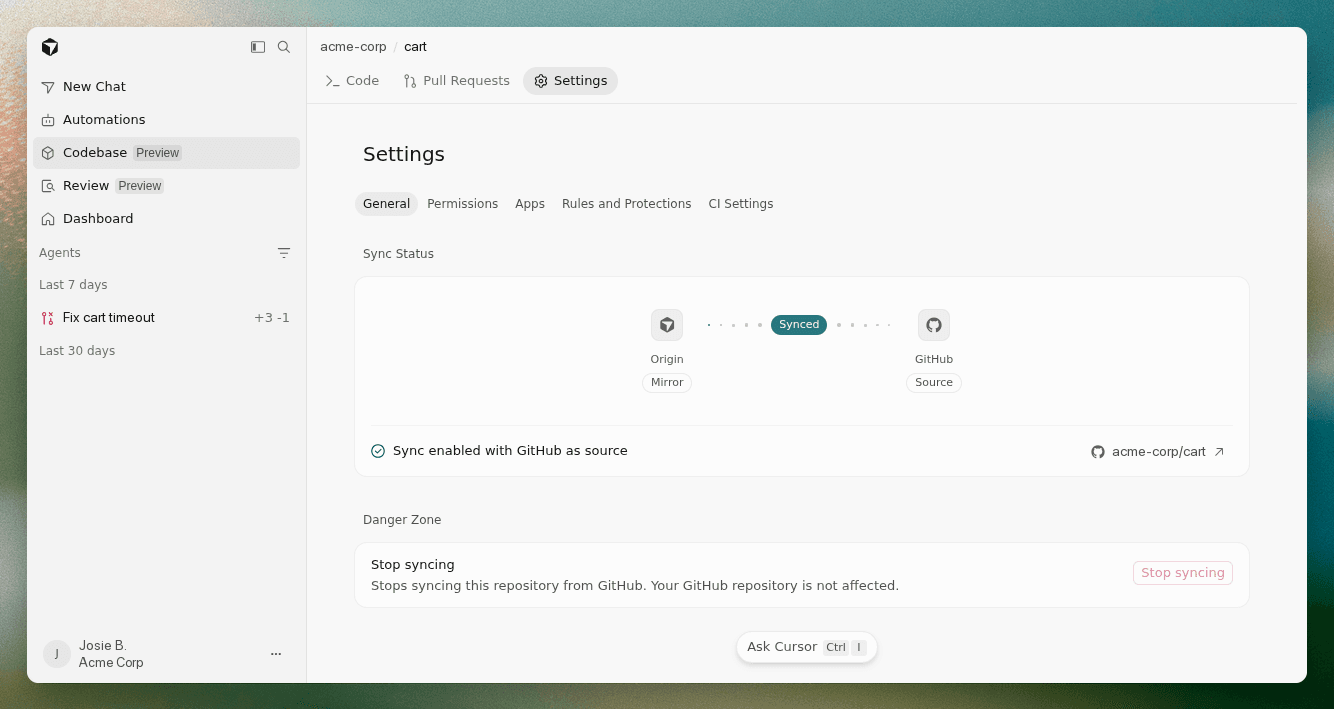
Adds per-repo Settings in Origin repos for managing GitHub sync status, access control, and connected apps.
updated · seen Sep 2026
· source
· release history
Adds pull request sync between Origin and GitHub: comments, reactions, and replies made in either surface appear in the other within seconds.
updated · seen Sep 2026
· source
· release history
Adds app extensions (Vercel, Depot, Buildkite) to Origin repos via a per-repo Apps tab, enabling preview deployments and CI integration on every PR.
updated · seen Sep 2026
· source
· release history
Allows Cloud Agents to start without a connected GitHub or third-party SCM provider via Start from scratch in the repo picker, saving work to a Cursor Origin repo.
updated · seen Sep 2026
· source
· release history
Adds the Codebase tab as the home for Origin repos, with a +New button to create repos whose names become part of every repo URL at cursor.com/codebase/<name>.
updated · seen Sep 2026
· source
· release history
docs
9 total
Origin Set up CloneKit in CI with origin repo clone-fast Origin is currently released in early beta. You can create repos, push and pull with git, mirror from GitHub, browse and search code, open and merge pull requests, and share with your Cursor team.
docs update · Sep 2026
· source
Origin Integrations Origin is currently released in early beta. You can create repos, push and pull with git, mirror from GitHub, browse and search code, open and merge pull requests, and share with your Cursor team. Please submit any and all feedback to hi@cursor.com to help us make the product better.
seen Aug 2026
· source
Origin Settings Origin is currently released in early beta. You can create repos, push and pull with git, mirror from GitHub, browse and search code, open and merge pull requests, and share with your Cursor team. Please submit any and all feedback to hi@cursor.com to help us make the product better.
docs update · Aug 2026
· source
Origin Origin Origin is currently released in early beta. You can create repos, push and pull with git, mirror from GitHub, browse and search code, open and merge pull requests, and share with your Cursor team. Please submit any and all feedback to hi@cursor.com to help us make the product better.
docs update · Aug 2026
· source
Origin Create an Origin repository Origin is currently released in early beta. You can create repos, push and pull with git, mirror from GitHub, browse and search code, open and merge pull requests, and share with your Cursor team. Please submit any and all feedback to hi@cursor.com to help us make the product better.
seen Aug 2026
· source
Origin Codebase settings Origin is currently released in early beta. You can create repos, push and pull with git, mirror from GitHub, browse and search code, open and merge pull requests, and share with your Cursor team. Please submit any and all feedback to hi@cursor.com to help us make the product better.
docs update · Aug 2026
· source
+RolloutsshippedAutomated deploy-health monitoring that attaches to every pull request, generates a monitoring plan listing risks and signals as a PR comment, and reports change health per environment by running that plan against logs, metrics, and traces via GitHub and Datadog integration.7 releases · 10 other sources · first seen Sep 2026▸
release
7 total
Rollouts generates a monitoring plan as a PR comment when a pull request opens, listing identified risks, intended effect, signals to check, and instrumentation gaps; editing the comment causes Rollouts to use the revised plan.
updated · seen Sep 2026
· source
· release history
Rollouts and Security Review are available on Teams and Enterprise plans; Teams customers receive credits for roughly 50 changes and Enterprise for roughly 500 changes during the introductory period.
updated · seen Sep 2026
· source
· release history
Adds Rollouts bot, enabled from the dashboard's automations tab, which attaches a monitor to every pull request and reports change health per environment (verified healthy, regression detected, or inconclusive) by running a generated monitoring plan against logs, metrics, and traces.︀︄︇︀︅︉︀︅︀︀︃︀︀︅︅︀︅︊︀︄︆︀︃︄
updated · seen Sep 2026
· source
· release history
Adds Rollouts bot, enabled from the dashboard's automations tab, which attaches a monitor to every pull request, writes a monitoring plan as a PR comment listing identified risks, intended effects, signals to check, and instrumentation gaps, then tracks deploy health per environment (verified healthy, regression…
updated · seen Sep 2026
· source
· release history
New Rollouts bot tracks a PR from open through production, writes a pre-merge monitoring plan, detects regressions (including per-endpoint, per-region), distinguishes intended effects from regressions, and can ping the author, pause a progressive rollout, or open a revert PR depending on…
announced · Sep 2026
· source
· release history
Integrates Rollouts with Datadog, Grafana, and Honeycomb as telemetry sources for post-deploy signal comparison against a pre-deploy baseline.
announced · Sep 2026
· source
· release history
docs
If a merged change goes live without a recorded deployment, select Run checks on the change's page. The button sits to the right of the environment tabs, and on its own in that row before the change has checks. Choose the environment and services, then start the checks.
docs update · Oct 2026
· source
If a merged change goes live without a recorded deployment, select Run checks next to No deployment recorded? on the change's page. Once the change has checks, Run checks sits to the right of the environment tabs instead. Choose the environment and services, then start the checks.
docs update · Oct 2026
· source
To manage environments from a script, use the environment endpoints in the Cloud Agents API. Automatically allow Projects to place their work – lets agents in a start work on any self-hosted machine or pool the Project owner can reach, without asking first.
docs update · Oct 2026
· source
When Rollouts detects a regression, it names the change it suspects, opens an issue, and notifies the author. It does the same when a change causes no regression but doesn't work as intended: the new code path ran, but its effect is missing, it errors, or its behavior is wrong.
docs update · Oct 2026
· source
If a merged change goes live without a recorded deployment, select Run checks next to No deployment recorded? on the change's page. Choose the environment and services, then start the checks. Rollouts treats the change's version as live in that environment and checks it on the same schedule.
docs update · Oct 2026
· source
Cloud Agents Rollouts Rollouts monitors each pull request from review to production. It writes a rollout plan when the pull request opens, checks the change against your telemetry after it deploys, and reports its health in every environment.
docs update · Sep 2026
· source
example
Enable Rollouts so every future PR in your repo gets a deploy-health monitor connected to GitHub and Datadog.$ In the Cursor dashboard, go to Automations tab > Enable Rollouts > Connect source control (Origin or GitHub), your continuous delivery system, and your telemetry provider (e.g. Datadog).
updated · seen Sep 2026
· source
Enable Rollouts for your repository to automatically monitor every PR deployment across staging and production environments.$ In the Cursor dashboard, go to the Automations tab > enable Rollouts > connect your source control (Origin or GitHub), deploy system, and telemetry provider (e.g. Datadog).
updated · seen Sep 2026
· source
Enable Rollouts to monitor a new deployment and catch regressions per environment as soon as the next PR is opened.$ In the Cursor dashboard, go to the automations tab, select 'Rollouts', connect your source control (Origin or GitHub), your continuous delivery system, and your telemetry provider (e.g.
updated · seen Sep 2026
· source
Enable Rollouts to monitor a deploy and automatically open a revert PR when a regression is detected.$ In the Cursor console, go to the automations tab and enable the Rollouts bot, then connect your source control, deploy system, and telemetry provider (Datadog, Grafana, or Honeycomb).
announced · Sep 2026
· source
+Agent SDKshippedA CLI toolkit for building, testing, and deploying Cursor-managed bots as code — with project scaffolding, templates, local dev server, validation, assertion-based evals, PR replay fixtures, and a deploy command that publishes an agent to Cursor-managed infrastructure with a URL and managed secrets.7 releases · 1 other source▸
Also counts toward: Agent-based deployment, Command-line interface
release
7 total
Agent projects are structured as code: instructions.md holds the prompt, tools/ contains typed actions, skills/ holds on-demand procedures, mcp-connections/ wires in MCP server tools, and channels/ defines message sources.
updated · seen Oct 2026
· source
· release history
Adds agent-sdk deploy to publish an agent to Cursor-managed infrastructure, giving it a URL and access to dashboard-managed secrets and integrations.
updated · seen Oct 2026
· source
· release history
Adds --template flag to agent-sdk init to scaffold from built-in starting points: security reviewer, owners-policy approver, PR autofixer, Linear triager, or Jira triager.
updated · seen Oct 2026
· source
· release history
Adds agent-sdk validate to lint an agent project and agent-sdk info to print the discovered project structure.
updated · seen Oct 2026
· source
· release history
Adds agent-sdk eval for assertion-based testing of bot behavior — checks which tools ran, with what input, and the shape of the reply — runnable locally or in CI.
updated · seen Oct 2026
· source
· release history
Introduces the @cursor/agent-sdk CLI: bootstrap a new agent project with npx @cursor/agent-sdk init ./my-bot, then iterate locally using agent-sdk dev to spin up a bot with a live playground.︀︄︇︀︅︉︀︅︀︀︃︀︀︅︅︀︅︊︀︄︆︀︃︄
updated · seen Oct 2026
· source
· release history
example
Capture a real pull request as replayable eval fixtures so you can test GitHub-triggered behavior in CI without waiting for a new push.$ agent-sdk github replay https://github.com/org/repo/pull/42 --dry-run --fixtures-dir fixtures/
updated · seen Oct 2026
· source
+Agent SubscriptionsshippedCloud agents can monitor PR activity, watch Slack threads, or run scheduled tasks, waking automatically when an event fires.6 releases · 1 other source · first seen Aug 2026▸
Also counts toward: Scheduled jobs
release
Agents can be triggered by pull request, comment, and CI events from GitHub, GitLab, and Bitbucket; Slack mentions and DMs; arbitrary webhooks; and cron schedules — with GitHub events routed through the Cursor account so no public webhook URL is required.
updated · seen Oct 2026
· source
· release history
Adds Subscriptions to the coordinator agent: tell it to watch a Slack channel, run on a schedule, or follow all your PRs so it can delegate work based on detected signals rather than waiting for a prompt.
updated · seen Sep 2026
· source
· release history
Adds Subscriptions within Projects, letting the coordinator watch a Slack channel, run on a schedule, or follow all PRs and act autonomously on detected signals.
updated · seen Sep 2026
· source
· release history
Adds Subscriptions so a Project coordinator can watch a Slack channel, run on a schedule, or follow all your PRs — acting on CI failures, opens, and merges without manual prompting.
announced · Sep 2026
· source
· release history
Adds Subscriptions for cloud agents to monitor PRs, watch Slack threads, or run scheduled tasks — agents wake on events without manual intervention.
updated · seen Sep 2026
· source
· release history
Adds Subscriptions for cloud agents: agents can monitor PR activity, watch a Slack thread, or run scheduled tasks, waking automatically when an event fires.
Cloud Agents and Cursor Harness Improvements · Aug 2026
· source
· release history
example
Set up a recurring gardening Project that watches every new PR for design-system violations and auto-applies fixes without being prompted.$ In Cursor, open the left-hand nav, select 'Projects', create a new Project, and tell the coordinator: 'Follow all new PRs, extract components that belong in the design system, and add a lint rule…
announced · Sep 2026
· source
+Browser Preview and Vercel PublishingshippedPort-forward cloud agent environments for in-browser preview and deploy to live public URLs via Vercel integration.3 releases · 1 other source · first seen Aug 2026▸
release
Adds a Publish feature for cloud agents that connects a Vercel account and produces a live URL from a built project.
updated · seen Sep 2026
· source
· release history
Port-forwards the cloud agent's live environment directly to the browser, enabling in-browser preview and design mode without extra tooling.
Start from scratch, without a repo · Aug 2026
· source
· release history
Adds Vercel account integration with a publish action that generates a live public URL for the built project.
Start from scratch, without a repo · Aug 2026
· source
· release history
example
Preview the running app in the browser and ship it to a live URL via Vercel without leaving Cursor.$ 1. With a cloud agent session running, open the in-browser preview to see the port-forwarded live environment. 2. Optionally enable design mode in the preview. 3.
Start from scratch, without a repo · Aug 2026
· source
+PR workflow managementshippedProvides an inbox for tracking in-progress work and review items, supports multi-PR sessions from a single chat, and enables split-screen PR review with file diffs alongside agent chats.3 releases▸
release
New Inbox view surfaces in-progress work, items needing attention, and PRs currently in review.
Cursor, now on iPad · seen Aug 2026
· source
· release history
Multi-PR sessions now let users open every PR created by a single chat, not just the most recent one.
Cursor, now on iPad · seen Aug 2026
· source
· release history
Split-screen mode lets users keep a PR review open alongside a chat session with full file diff rendering.
Cursor, now on iPad · seen Aug 2026
· source
· release history
+Vulnerability ScannerdocumentedScheduled security agent that scans for vulnerabilities on a configurable trigger, configurable per agent type within Automations, with each scanner running on its own schedule.2 other sources · first seen Oct 2026▸
Shared capability: Vulnerability scanning
Also counts toward: Scheduled jobs
docs
Configure Security Agents in Automations. Each agent type has its own page: Open the page in Automations to configure that agent type. Source control support Security Reviewer supports pull requests on Origin, GitHub, and GitLab.
docs update · Oct 2026
· source
Configure Security Agents in Automations. Each agent type has its own page: Open the page in Automations to configure that agent type. Each Vulnerability Scanner has one schedule. To change when it runs, edit its existing trigger. To scan on another schedule, create a separate Vulnerability Scanner.
docs update · Oct 2026
· source
+Release notes timelinedocumentedA unified timeline page that lists every Cursor product release in chronological order, showing up to 10 recent releases per product.2 other sources · first seen Oct 2026▸
docs
Release Notes Release notes Every Cursor product in one timeline, newest first, with up to 10 recent releases each.
docs update · Oct 2026
· source
Get Started Cursor Documentation Cursor is a coding agent for building ambitious software. Use it to understand your codebase, plan and build features, fix bugs, review changes, and work with the tools you already use.
seen Aug 2026
· source
+Self-hosted agent infrastructureshippedAllows users to run agents, execute tools, and store code, build outputs, and secrets entirely within their own network, with auto-scaling and hibernation for idle machines.2 releases▸
Also counts toward: Self-hosted deployment
release
Introduces self-hosted machines so tool execution, codebase, build outputs, and secrets stay entirely within your own network infrastructure.
updated · seen Sep 2026
· source
· release history
Adds dynamic pool scheduling via My Machines (single laptop/VM) and Team Pools (named queues of workers) that auto-scale and hibernate idle machines.
updated · seen Sep 2026
· source
· release history
+Local agent integration into cloud projectsdocumentedDrag-and-drop interface to attach local agent sessions to cloud project workspaces, allowing them to run as workers without losing conversation history.1 other source · first seen Oct 2026▸
docs
Showing 66 releases from every product Add local agents to cloud Projects. Drag a local agent onto a cloud Project in the sidebar, or use Add to Project, to make it a worker in that without losing its conversation.
docs update · Oct 2026
· source
+Team BotsdocumentedCreate shared bots that an entire Cursor team can chat with, accessible via team plans or supported Grok integrations.1 other source · first seen Oct 2026▸
docs
the Cursor Teams plan, through an individual SuperGrok link, or with a seat on a self-serve Grok Business plan. See On a Cursor team, Create new Team Bot makes a Bot your whole team can chat with; see Team Bots
docs update · Oct 2026
· source
+Agent-generated interactive canvasesshippedCloud agents can generate interactive canvases during workflows and share them directly with teams via links.1 release▸
release
Cloud agents can now build interactive canvases as part of their work, shareable with a team via link.
updated · seen Oct 2026
· source
· release history
+Origin App MarketplaceshippedPublic marketplace for developer tooling teams to publish and list their own Origin apps, expanding beyond the internal team marketplace.1 release▸
Also counts toward: Extension marketplace
release
Opens the Origin App Marketplace to public submissions, allowing any developer tooling team to publish and list their own Origin app.︀︄︇︀︅︉︀︅︀︀︃︀︀︅︅︀︅︊︀︄︆︀︃︄
updated · seen Oct 2026
· source
· release history
Lines in monospace are the tool's own words: help text
parsed from its source, or an endpoint from its API document. Under
release, a line is our summary of a dated release. Under
docs, it is quoted from the tool's own documentation or
website. Each links back to the source it came from.
Command line
11 commands for Cursor, each
with where it came from. This tool has no source analysis yet, so there
is no option reference and no captured run beside them.
View
Source
No command matches.
Screenshots
From the release notes, newest first. Click one to see it full size.
What the Cursor community has worked out wherever it talks: mailing lists,
forums, Q&A sites, issue trackers and discussion threads. These are the
conversations that explain a behaviour, settle a use, or flag a change you must
handle, summarised, with a link to the original.
The thread discusses Cursor's decision to replace dollar amounts with token counts on the Usage page for individual and Teams plans, a change that removes per-request cost visibility from the dashboard and standard API endpoints. Maintainers confirmed this is an intentional design shift to clarify included versus on-demand usage, noting that Enterprise plans retain dollar views while self-serve plans now rely on token metrics. Readers should expect to find billing totals in the Spending section or use the Admin API for detailed per-request cost data, as the previous dashboard columns and standard API fields no longer return dollar values.
Confirmed in the thread
On Cursor's web dashboard, the Usage page now shows token counts instead of dollar costs for individual and self-serve Team plans; only Enterprise plans still show dollar amounts on that page, and the Usage CSV export no longer contains cost figures for self-serve plans.
Applies to
Cursor web dashboard Usage page, individual and self-serve Team plans (Enterprise plans unaffected)
What to do
To see dollar costs on an individual or self-serve Team plan, check Dashboard > Spending for the On-Demand Spending total for the current cycle; Teams admins can use Dashboard > Members > On-Demand for per-user totals, or the Admin API for cost fields per usage event.
Careful
This removes per-request and per-model dollar cost visibility for individual and self-serve Team plans, making day-to-day budget and model-cost tracking harder than before.
From the thread · checked Oct 2026
There isn’t currently a setting to switch back to dollar amounts for individual plans.
Enterprise Plans will still show dollar amounts here, but individual plans will not.
Dashboard > Spending shows an On-Demand Spending figure for your current cycle.
usage trackingpricing model changeapi deprecationdashboard ui
Users reported that recent Cursor updates force the Agents view as the default startup window, causing frustration and workflow issues. A maintainer confirmed the issue and introduced a toggle in version 3.3.30 to disable this behavior, though it requires a full app restart to take effect. For terminal launches, the --classic flag remains necessary to bypass the Agents window entirely.
Shipped in 3.3.30
In Cursor, turning off the "Open Agents Window on startup" toggle in Settings > Agents makes the Editor window open by default when you launch the app from the dock or app icon.
Applies to
Cursor desktop app (Mac and Windows), toggle added in version 3.3.30, rolling out gradually
What to do
Update Cursor to 3.3.30 or later, then go to Settings > Agents and turn off "Open Agents Window on startup". You may need to fully quit the app (not just switch windows) before the change takes effect.
Careful
The toggle only affects launching from the dock/app icon. Running cursor . from the terminal still opens the Agents window regardless of the toggle; use cursor . --classic instead. The toggle rollout to Windows was reported as delayed.
From the thread · checked Oct 2026
version 3.3.30 adds a new “Open Agents Window on startup” toggle in Cursor Settings > Agents
Turn it off to launch into the Editor by default.
cursor . from terminal currently uses a separate path and opens the Agents Window regardless of the toggle.
The thread discusses a bug where the Prettier extension fails to format files in Cursor due to an Extension API incompatibility, despite working in VS Code. A maintainer confirmed this is a known limitation of Cursor's API support rather than a Prettier fault, and later updates indicated that fixes were rolled out in Cursor versions 2.4 and 2.4.22. Readers should expect the issue to be resolved in recent Cursor updates; if it persists, downgrading Prettier to v11 or using TypeScript's built-in formatter as a temporary workaround is recommended.
Confirmed in the thread
When the Prettier extension (esbenp.prettier-vscode) version 12.x is set as the default formatter in Cursor, it throws "cannot format '[filetype]'-files" errors and stops formatting on save or on manual format commands, caused by a Cursor extension-API incompatibility with VS Code's.
Applies to
Cursor IDE, Windows and macOS, Prettier VS Code extension (esbenp.prettier-vscode) version 12.1.0 used as default formatter via .vscode/settings.json and .prettierrc
What to do
Downgrade the Prettier extension (esbenp.prettier-vscode) from version 12.x to version 11.0.2 to restore formatting until Cursor's extension-API gap is fixed.
Careful
This is a version-downgrade workaround, not a fix; it reverts the extension to an older release and the underlying Cursor extension-API incompatibility remains unresolved.
From the thread · checked Oct 2026
quick fix as of now is to downgrade the prettier from v12 to v11.
its related new Prettier version i downgrade v12 to v11 its works.
This is an issue with Cursor not supporting the same Extension API as VSCode.
The thread discusses the removal of Custom Modes in Cursor 2.1.0, which caused significant user frustration as these features were critical for managing system prompts and tool access. It was determined that Custom Modes are being replaced by the Commands feature, allowing users to export their existing configurations and create new ones with greater flexibility. Readers should migrate their custom instructions to Commands via the Cursor Docs to restore similar functionality.
Shipped in 2.1.0
Custom Modes (including per-mode system prompts, tool access restrictions, and model assignment) were removed from Cursor IDE starting in version 2.1.0.
Applies to
Cursor IDE, Custom Modes feature, version 2.1.0 (VSCode 1.105.1 base), reported on Windows 10/11
What to do
If you used Custom Modes only for reusable system prompts, move that text into the new Commands feature, which is not capped at five. Export any existing Custom Modes first since they will be gone. Understand that Commands only cover the prompt text; there is no current way to restrict which tools or model a given Command can use.
Careful
This removal strips capability: per-mode tool restrictions and per-mode model assignment are gone, and there is no settings toggle to bring back the old Custom Modes behavior.
From the thread · checked Oct 2026
After updating to Cursor 2.1.0 (running on VSCode 1.105.1), all Custom Modes have disappeared.
Custom modes are being removed in 2.1. In case you need the details from custom mode there is an option to export them.
The system prompt or Custom Instruction as it was called in Custom Modes is essentially a /command that you can still create
Users reported that Cursor automatically added itself as a co-author to git commits without consent, causing frustration over privacy and workflow disruption. The issue was resolved by disabling the Attribution toggle in Cursor Settings under Agents, which prevents future automatic additions. Readers should check this setting if they prefer clean commit histories without AI attribution.
Confirmed in the thread
Cursor IDE automatically inserts a "Co-authored-by: Cursor <cursoragent@cursor.com>" trailer into git commits. A setting exists to turn this off, but it only covers the IDE's own commit flow, not the CLI, cloud agents, or the "Generate git commit message" button.
Applies to
Cursor IDE, macOS, version 2.4.21 (git commit attribution feature)
What to do
Open Cursor Settings > Agents > Attribution and toggle the co-author attribution off. If you also commit via the CLI, cloud agents, or the Generate Commit Message button, add a prepare-commit-msg git hook that strips any line containing the cursoragent@cursor.com address, since the UI toggle does not reach those paths.
Careful
Turning this off removes any built-in trace of AI-authored changes in your git history, so you lose the attribution signal the feature was meant to provide; also remember the hook workaround must be reapplied on fresh clones since .git/hooks is not version controlled.
From the thread · checked Oct 2026
You can turn this off in Cursor settings. Go to Cursor Settings > Agents > Attribution and just toggle it off.
You can only disable this in the IDE, but there’s no setting to disable this in the CLI, in Cursor cloud agents, or when using the “Generate git commit message” button.
The thread discusses Cursor's failure to support DeepSeek V4's requirement to return reasoning_content after tool calls, which causes API errors in multi-turn conversations. A community member validated a proxy workaround that fixes this by relaying the required field, while maintainers acknowledged the feedback but confirmed no active development on native BYOK support for this model. Readers should expect Cursor to currently lack native compatibility and may use the shared proxy solution as a temporary fix.
Unconfirmed
In Cursor, using DeepSeek V4 (pro/flash) models in thinking mode with multi-turn tool calls fails because Cursor does not pass the model's reasoning_content back to the DeepSeek API on follow-up requests, producing a provider error.
Applies to
Cursor IDE, BYOK DeepSeek V4 pro/flash models, thinking/reasoning mode, multi-turn tool calls; reported on macOS with Cursor version 3.2.11
What to do
If you hit the reasoning_content error with DeepSeek V4 in Cursor, know this is a known unresolved gap; a community member published an external proxy tool (deepseek-cursor-proxy) as a workaround, but Cursor staff say official BYOK support for DeepSeek is not currently being worked on.
Careful
The workaround relies on a third-party proxy outside Cursor's official support, and no one in the thread confirms it fully resolved the issue in their own use.
From the thread · checked Oct 2026
DeepSeek’s API requires the reasoning_content from the previous response to be included unmodified in subsequent requests.
Cursor’s agent loop does not preserve/relay this field, causing all follow-up requests to fail.
BYOK with Deepseek isn’t something we’re actively working on right now, but I’ve passed along the feedback to our team!
Cursor's integrated Git extension incorrectly forces core.hooksPath to a null device, causing all Source Control commits to silently skip pre-commit and other hooks. This behavior was confirmed across macOS and Windows by multiple users who identified the root cause in the bundled git extension code. Readers should expect this bug to persist until a fix is released; in the meantime, use the integrated terminal for commits to ensure hooks run correctly.
Confirmed in the thread
In Cursor IDE, committing via the Source Control panel silently skips all git hooks (pre-commit, commit-msg, Husky, etc.) because the bundled git extension injects core.hooksPath=/dev/null (or \\.\nul on Windows) into every git subprocess it spawns, including user-initiated commits. Committing the same staged changes from the integrated terminal runs hooks correctly.
Applies to
Cursor IDE bundled git extension, Source Control panel commits, versions 3.15.6 through at least 3.17.21, reproduced on macOS, Windows, and Linux/WSL2
What to do
Do not rely on the Source Control panel's commit button to enforce git hooks (linting, formatting, secret scanning, commit-message checks). Commit from the integrated terminal with git commit instead, where hooks still run normally, until Cursor ships a fix.
Careful
Using the Source Control panel's commit button silently disables all git hooks with no warning and no --no-verify flag shown, so any policy enforced by hooks (secret scanning, formatting, generated-file checks) is bypassed without the user knowing.
From the thread · checked Oct 2026
committing from the Source Control panel silently skips all git hooks
Committing the same staged changes from the integrated terminal runs the hooks correctly
Commits started there can currently skip Git hooks, including pre-commit , commit-msg , and Husky hooks
The Run and Debug controls disappear in version 2.6.20 when the activity bar orientation is set to vertical, though they remain visible in horizontal mode or if other debug panels are hidden. The issue was confirmed as a regression linked to sidebar handling with disabled title bars. To work around this, use the command palette to select Debug: Select and Start Debugging or switch the activity bar orientation back to horizontal.
Confirmed in the thread
In Cursor IDE version 2.6.20, when the setting workbench.activityBar.orientation is set to vertical, the Run and Debug panel loses its play button and configuration dropdown. Switching the setting to horizontal, or downgrading to 2.6.19, restores them.
Applies to
Cursor IDE 2.6.20, Linux and macOS, with workbench.activityBar.orientation set to vertical
What to do
If the Run and Debug play button and configuration dropdown vanish after updating to 2.6.20, change workbench.activityBar.orientation to horizontal in Settings, or downgrade to Cursor 2.6.19 until the team ships a fix. As a temporary workaround you can also start debugging via the command palette with Debug: Select and Start Debugging.
From the thread · checked Oct 2026
The run and debug play button/configuration dropdown are missing in 2.6.20. Downgrading to 2.6.19 resolves.
Can confirm that it became invisible in vertical , but in horizontal it is there.
After checkin, the issue happened if I use this setting "workbench.activityBar.orientation": "vertical"
regressionui-bugdebugging
Threads are ranked by how much they teach, not by date, from whichever source
carried them. Commands are shown as
posted, unrun, with the year they were written; a flag may have changed since.
Posters appear by role only.
Release-note detail over time
See how much detail Cursor puts in its release notes, quarter by quarter, and compare it with tracked tools in the same category. This history uses up to ten retained, reviewed notes per tool; sparse or blank older quarters may reflect that limit.