Kiro
Nested AGENTS.md and Long-Session Efficiency commercialThe section your link pointed to isn't on Kiro's page any more, so we've brought you to the top.
/voice --continuous
kiro-cli chat --cloud --repo <your-repo>
# later, from any machine:
kiro-cli chat --resume-id <session-id>
/tangent investigate-auth-edge-case
/tangent ls
/context
kiro-cli --v3
# inside the session:
/tangent research-auth
# ... explore freely ...
/tangent root
/upgrade-agent
kiro-cli --v3
chat.disableInheritingDefaultResources: true
{
  "mcpServers": {
    "figma": {
      "url": "https://mcp.figma.com",
      "oauth": {
        "clientId": "<your-client-id>",
        "clientSecret": "<your-client-secret>",
        "redirectUri": "http://localhost:7778/oauth/callback"
      }
    }
  }
}
/mcp auth
/mcp cancel-auth
/mcp logout
{
  "mcpServers": {
    "figma": {
      "url": "https://mcp.figma.com/sse",
      "oauth": {
        "clientId": "<your-client-id>",
        "clientSecret": "<your-client-secret>",
        "redirectUri": "http://localhost:7778/oauth/callback"
      }
    }
  }
}
/mcp auth
/mcp cancel-auth
/mcp logout
"chat.disableInheritingDefaultResources": true
# .kiro/agents/code-reviewer.md
---
tools: read, web
mcp:
  - server: github
permissions:
  deny: shell
---
You are a strict code reviewer. Focus on security, clarity, and test coverage.
kiro-cli --v3
/goal --max 8 "Implement OAuth2 login flow with tests passing and no lint errors"
/transcript save --json
kiro-cli chat --effort low
Summary
Kiro is a commercial AI coding agent, run as a desktop IDE, that lets developers direct one or more coding agents against their own codebase instead of writing every change by hand. It supports custom agents defined in Markdown with scoped tool permissions, hot-reloading agent and MCPMCPModel Context Protocol, a standard for connecting AI applications to external tools and data sources. A compatible server exposes capabilities an assistant can use through a common interface. configs without losing conversation history, and hooks generated from plain-language descriptions to automate lint checks or notifications. A companion CLI and web interface extend the same spec-driven workflow to the terminal and browser, where agents can plan across multiple GitHub or GitLab repositories and open pull requests unattended on a schedule. It's aimed at developers and teams who want agents embedded directly in their editor and version control rather than a separate chat window. Pricing runs from a Pro+ tier at $40/month up to Power at $200, with releases shipping roughly weekly since its 2025 launch.
How Kiro helps
Which parts of my codebase can an agent touch without asking me first?
checks each requested action against the capability-based permissions rules, prompting for consent on anything unapproved and remembering the decision as a workspace or global rule for next time
Can I let a teammate's agent definition loose in my repo without it inheriting my personal setup?
reads the agent's Markdown file and its tool-access tags in isolation when the opt-out setting is enabled, so it skips the steering files, skills, and AGENTS.md it would otherwise inherit by default
Did the change I just made to an agent or MCP config actually take effect?
reloads only the affected MCP servers immediately on save and keeps the running conversation intact, so there's no restart to lose track of
Is my automated dependency PR still running on the rules I think it is?
runs each schedule in its own sandbox clone, and any edit to the automation only takes hold on its next scheduled run, so the last completed PR reflects the prior configuration
How do I redirect an agent that's already halfway through a task in the wrong direction?
takes a queued or immediate correction message and applies it at the next tool boundary without cancelling or restarting the current turn
Which turn in a long agent session is where things went wrong?
lists every turn with the tool calls, files touched, commands run, and messages inside it, so a branch point can be picked out without replaying the whole conversation
Languages
Features
Built from Kiro's releases, docs, README and our own runs. “Seen” marks the month we first spotted a release the vendor didn't date. Group names and tags are our labels.
- Kiro covers 1 of the 6 ai evaluation and governance capabilities we track.
What Kiro offers you
- Command-line interface15
- MCP server3
- Scheduled jobs2
- Built-in AI assistant1
- CI/CD pipeline integration1
- gRPC API support1
- JSON data export1
- Offline mode1
- Role-based access control1
- Ticketing integration1
- Web management console1
No capabilities match.
Spec-driven and Autonomous Development 5 capabilities Kiro lets practitioners describe a goal and have Kiro generate structured requirements, design, and tasks before writing any code. Agents can then execute those tasks autonomously, self-verify results, and iterate without constant human input.
Kiro CLI V3 shipped An early-access CLI harness that brings spec-driven development and a unified agent experience to the command line.
release 65 total
-
Run
kiro-cli diagnosticorkiro-cli issuein place ofkiro-cli doctor, which now redirects to these commands. CLI: V3 by Default, Classic and Desktop App Retired (2026-11-03) · Nov 2026 · source · release history -
kiro-cli doctorno longer functions as before; it now redirects tokiro-cli diagnosticorkiro-cli issue. CLI: V3 by Default, Classic and Desktop App Retired (2026-11-03) · Nov 2026 · source · release history -
V3 is now the default agent harness for interactive sessions; the
--v3flag is no longer needed. CLI: V3 by Default, Classic and Desktop App Retired (2026-11-03) · Nov 2026 · source · release history - The Classic (V1) interactive interface no longer runs; scripts or aliases that select it will be offered Continue with V3 interactively, or the selection is silently ignored in non-interactive mode. CLI: V3 by Default, Classic and Desktop App Retired (2026-11-03) · Nov 2026 · source · release history
-
Headless scripts using
--trust-all-toolsnow default to V3 instead of V2. CLI: V3 by Default, Classic and Desktop App Retired (2026-11-03) · Nov 2026 · source · release history -
Use
kiro-cli --v2to keep the V2 agent harness when V3 is not suitable for your workflow.︀︄︇︀︅︉︀︅︀︀︃︀︀︅︅︀︅︊︀︄︆︀︃︄ CLI: V3 by Default, Classic and Desktop App Retired (2026-11-03) · Nov 2026 · source · release history
example 12 total
-
Fall back to the V2 agent harness when a custom agent or workflow is not yet compatible with V3.
kiro-cli --v2CLI: V3 by Default, Classic and Desktop App Retired (2026-11-03) · Nov 2026 · source -
Launch a V3 session in a CI or one-off environment where you want to skip the trust prompt without permanently trusting the workspace.
kiro --trust-workspaceCLI: MCP Elicitation, Workflow Controls, and Memory Deletion (2026-10-23) · Oct 2026 · source -
Set a model fallback in an active V3 session so the agent switches automatically when the primary model is unavailable.
/model fallbackCLI: Workspace Trust, Workflow Plan Step Trees, and Mermaid Subgraphs (2026-10-20) · Oct 2026 · source -
Set memory access to read-only in a V3 session so Kiro can use existing context without adding or changing memories — useful in shared or sensitive workspaces.
Type /memories in the chat, select config, then choose 'read only'.CLI: Memory Across Chat Sessions: In local V3 sessions, Kiro can learn useful context from your work and recall it in later chat sessions, with controls for memory access and automatic updates. (2026-10-09) · Oct 2026 · source -
Connect to an ACP server in V3 while letting the connecting client handle authentication instead of using your stored Kiro CLI login.
kiro-cli acp --auth-method=clientCLI: Memory Across Chat Sessions: In local V3 sessions, Kiro can learn useful context from your work and recall it in later chat sessions, with controls for memory access and automatic updates. (2026-10-09) · Oct 2026 · source -
Install a Power from the catalog inside an active V3 session so it is immediately available without restarting.
/powers install <name|path>changelog · Oct 2026 · source
Agent Focus mode shipped A chat-first layout for directing multiple parallel agents using structured workflow templates such as Spec, Plan, and Bug Fix.
release 24 total
- Renders Mermaid flowcharts, sequence diagrams, state diagrams, and entity-relationship diagrams as terminal art in agent chat replies; falls back to Mermaid source for unsupported syntax, oversized diagrams, or when ASCII art is off.︀︄︇︀︅︉︀︅︀︀︃︀︀︅︅︀︅︊︀︄︆︀︃︄ CLI: Mermaid Diagram in Chat (2026-10-14) · Oct 2026 · source · release history
- Agent Focus Mode gains dedicated views for Workflows and Artifacts, with step activity, artifact previews, and Open in IDE on every artifact. IDE 1.2.56: Workflows, Safer Untrusted Workspaces, and Enterprise Sign-In Controls (2026-10-08) · Oct 2026 · source · release history
- Parallel sub-agents sharing a role now get separate rows in the session view so each can be inspected and approved independently. CLI: Switch to 3.0 from Classic, Category-Based Hook Matching, and Steadier V3 Sessions: Switch an interactive Classic session to 3.0, match V3 Hooks by tool category, and improve reliability in long V3 sessions. (2026-10-05) · Oct 2026 · source · release history
- Full-TUI write cards now show changed lines with surrounding context (up to 40 diff rows by default), with Ctrl+O or auto-expand to reveal the complete live diff. CLI: Workflow Delegation, Live Steering Context, and Saved Prompt Commands: Choose how V3 delegates with Workflows, include live file and folder context in Steering, and invoke saved prompts as slash commands. (2026-10-01) · Oct 2026 · source · release history
- Adds dedicated Workflows and Artifacts views in Agent Focus Mode session details, including step activity, artifact previews, and an Open in IDE action on every artifact. IDE: Workflows, Safer Untrusted Workspaces, and Enterprise Sign-In Controls: Run reusable multi-agent Workflows in the background, apply stronger safeguards to Kiro configuration, and manage enterprise sign-in options. (2026-09-30) · Sep 2026 · source · release history
-
Adds OpenCode and goose as agent backends in the Agent Backend selector (Preview), joining Kiro CLI, Claude Code, Codex, and KAS.
 changelog · Sep 2026
· source
· release history
example
-
Review a diagram or document the agent produced without losing it in the chat scroll — access it as a durable artifact from the Agent Focus context panel.
After the agent produces an artifact (document, diagram, or code file), click the compact preview in the conversation to open it, then switch to Agent Focus to view it full-size beside the chat.IDE 1.1.70: Agent Artifacts and Native ARM64 Builds (2026-09-24) · Sep 2026 · source
Spec-driven development shipped Describe a goal and Kiro produces reviewable requirements, design, and task files before writing a single line of code.
Also counts toward: Command-line interface, Built-in AI assistant
release 14 total
-
Adds
/spec newto enter spec mode and review requirements and design before Kiro writes any code, with support for inline comments and selective task execution;/memoriesto manage cross-session memory so Kiro learns repository commands and conventions and recalls them later;/tangentto branch into a parallel…
announced · Oct 2026
· source
· release history
-
Adds
/quick-spec,/architecture-selection, and/bug-fixslash commands as spec-session-only, removing them from the command list in other session types. IDE: Workflow Feedback, Power Search, and Flexible Hook Matching (2026-10-08) · Oct 2026 · source · release history - Approval controls allow approving or rejecting all waiting tool calls at once, or rejecting one call while continuing to review the rest; long shell commands show a readable summary with the full command on hover. Crew: AWS Control, Session Tabs, and Agent Coordination (2026-08-29) · Aug 2026 · source · release history
- Adds Ctrl+X shortcut at spec phase checkpoints to open a spec review screen where you can read phase documents and stage line comments, which are batched into a single revision request when the checkpoint question is answered. Voice Mode, Opt-In Cloud Sessions, and Spec Review · seen Aug 2026 · source · release history
- Spec documents and task rows in the context panel now open directly in the editor. changelog · Aug 2026 · source · release history
- Spec documents and task rows in the context panel now open directly in the editor. Agent Plugin Support and Session Pinning · seen Aug 2026 · source · release history
example
-
Review a generated spec document and queue targeted line edits before the agent continues.
At a spec phase checkpoint, press Ctrl+X to open the review screen, annotate the lines you want changed, then answer the checkpoint question to send all staged comments as one revision request.Voice Mode, Opt-In Cloud Sessions, and Spec Review · seen Aug 2026 · source -
Plan a feature across GitLab repos before writing any code — review and edit generated requirements, design, and task files in the browser.
In Kiro Web, go to Settings > Integrations, connect your GitLab account with a personal access token, open a chat session, add your GitLab repo, then describe what you want to build to generate a…GitLab Support and Specs in the Browser · seen Jun 2026 · source
Goal command shipped Starts an iterative agent loop that checks its own output against acceptance criteria and keeps going until the goal is genuinely met.
Also counts toward: Command-line interface
release
- Slash command menu gains substring matching, so partial typing finds commands mid-word. Cloud Sessions Preview and Smarter Command Menus · seen Aug 2026 · source · release history
-
The
/contextcommand now shows a per-tool token breakdown so you can see exactly what is consuming your context window.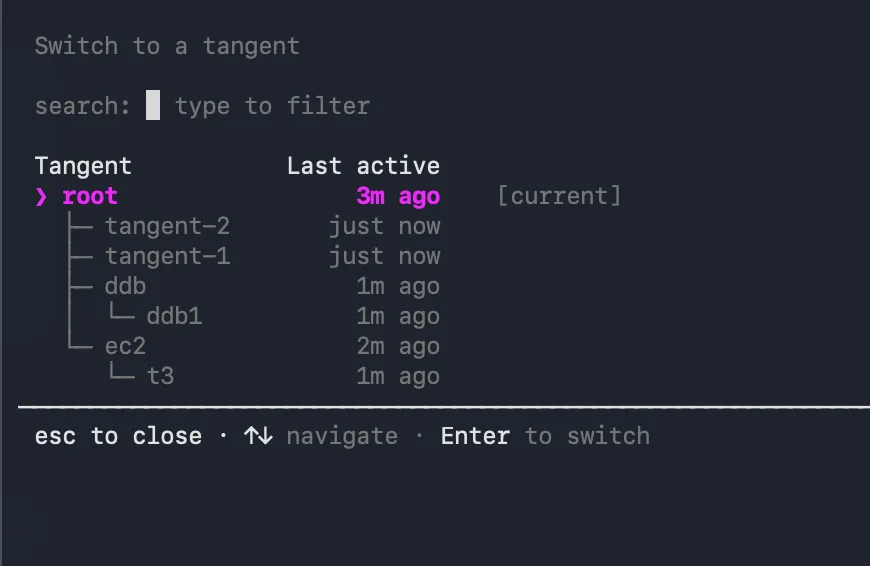 Tangent Side-Conversations and Per-Tool Token Breakdown · seen Aug 2026
· source
· release history
-
New
/goalcommand starts an iterative agent loop that self-verifies completion against acceptance criteria before stopping (default 5 iterations, configurable with--max). /goal, Queue Steering, and enriched /rewind · seen Jun 2026 · source · release history
example
-
Set per-session and subagent timeouts high enough for multi-hour autonomous work, and cap subagent tool calls to avoid runaway loops.
{ "agent": { "chat_turn_timeout_secs": 14400, "subagent_timeout_secs": 10800, "subagent_max_turns": 500 }, "orchestrator": { "max_plan_duration_seconds": 0 } }Crew: Remote Crews, Agent Harnesses, and Apps Launchpad (2026-09-05) · Sep 2026 · source -
Check which tools are eating your context budget before starting a large refactor.
/context
changelog · seen Aug 2026
· source
-
Autonomously implement a multi-step feature with a built-in quality gate, capping retries to avoid runaway loops.
/goal --max 8 "Implement OAuth2 login flow with tests passing and no lint errors"/goal, Queue Steering, and enriched /rewind · seen Jun 2026 · source
Vibe-to-Autonomous handoff shipped Switch the session from interactive to fully autonomous mode mid-conversation once the task is sufficiently defined, without starting over.
release
- Supports switching to Autonomous mode at any point during a Vibe session, not only at session start. Start Without a Repo, Switch Modes Anytime · seen Jun 2026 · source · release history
example
-
Hand off to the autonomous agent mid-conversation once you've refined the task enough through Vibe prompts, without restarting.
In an active Vibe session, after your first prompt exchange, open the mode selector and choose Autonomous mode to let the agent take over from the current context.Start Without a Repo, Switch Modes Anytime · seen Jun 2026 · source
Agent Customisation and Control 8 capabilities Practitioners can define, configure, and steer agents precisely — specifying which tools they can use, how hard they reason, and sending corrections without interrupting ongoing work. Custom agents can be shared and reused across teams.
Model selection and persistence shipped Choose which AI model powers the session and have that preference saved automatically across future sessions.
Also counts toward: Command-line interface
release 36 total
- Model pickers and the fallback list now show each model's context window, such as (1M context). Web: Session Recaps, Guided Workflows, and Reorganized Settings (2026-10-28) · Oct 2026 · source · release history
-
Loads the updated model list via
kirocrew restartfor Crew, IDE/CLI restart, or browser refresh for Web. Models: Generally Available: Claude Fable 5.1, Claude Sonnet 5.5, GPT-5.6 Terra, and GPT-5.6 Luna (2026-10-21) · Oct 2026 · source · release history - Removes the Kiro Excluded Models indemnity exception for Claude Fable 5.1, Claude Sonnet 5.5, GPT-5.6 Terra, and GPT-5.6 Luna.︀︄︇︀︅︉︀︅︀︀︃︀︀︅︅︀︅︊︀︄︆︀︃︄ Models: Generally Available: Claude Fable 5.1, Claude Sonnet 5.5, GPT-5.6 Terra, and GPT-5.6 Luna (2026-10-21) · Oct 2026 · source · release history
- Expands capacity for GA models to support more dependable access for production workloads. Models: Generally Available: Claude Fable 5.1, Claude Sonnet 5.5, GPT-5.6 Terra, and GPT-5.6 Luna (2026-10-21) · Oct 2026 · source · release history
-
Adds a fallback model selector under
Settings > Model(if the primary model is unavailable the fallback answers that turn, and if it refuses a request the session stays on the fallback for the rest of the session), plus V3 model fallback notices in the transcript when a turn moves to a different model due to refusal…
changelog · Oct 2026
· source
· release history
-
Adds Kimi K3 (Moonshot AI open-weight model) with experimental support in Kiro IDE, CLI, Crew, and Web for Pro, Pro+, Pro Max, and Power customers on US geography — accepts text and images, 1M-token context window, 2.4x credit multiplier; reload via IDE/CLI restart,
kirocrew restartfor Crew, or browser… Models: Kimi K3 now available in Kiro (2026-10-15) · Oct 2026 · source · release history
docs
- Oct 2, 2026 Claude Sonnet 5.5 Now Available Claude Sonnet 5.5 is now available across the Kiro for Pro, Pro+, Pro Max, and Power customers in (FRA). changelog · Oct 2026 · source
- Sep 16, 2026 Models Claude Fable 5.1 Preview Begins Rolling Out to Kiro Enterprise Claude Fable 5.1 is beginning to roll out in Preview across Kiro clients for Kiro Enterprise organizations. changelog · Sep 2026 · source
example 12 total
-
Set a model fallback in the current V3 session so work continues if the primary model is unavailable.
/model fallbackchangelog · Oct 2026 · source -
Clean up your model picker so only the models you regularly use appear, reducing noise during model selection.
/model editCLI: MCP Elicitation, Workflow Controls, and Memory Deletion (2026-10-23) · Oct 2026 · source -
Reload the latest model list in Crew after Claude Haiku 5.5 becomes available.
kirocrew restartModels: Claude Haiku 5.5 Now Available (2026-10-23) · Oct 2026 · source -
Reload the latest model list in a Crew environment after the GA promotion so production workloads pick up the newly available models.
kirocrew restartModels: Generally Available: Claude Fable 5.1, Claude Sonnet 5.5, GPT-5.6 Terra, and GPT-5.6 Luna (2026-10-21) · Oct 2026 · source -
Reload the model list in Kiro Crew after Claude Sonnet 5.5 becomes available.
kirocrew restartModels: Claude Sonnet 5.5 Now Available (2026-10-02) · Oct 2026 · source -
Switch Kiro Crew to use Claude Opus 5.5 after the model list is updated.
kirocrew restartModels: Claude Opus 5.5 Now Available: Claude Opus 5.5 brings stronger agentic coding and clearer communication than Opus 5 at a 2.0x credit multiplier, down from Opus 5's 2.2x. (2026-09-28) · Sep 2026 · source
Custom Agents shipped Define reusable agents in a Markdown file with explicit tool access, MCP servers, and permissions, then share them via version control.
Also counts toward: MCP server
release 29 total
- V3 sub-agents no longer receive MCP servers declared inline by their parent agent, tightening sub-agent MCP boundaries. CLI: MCP Elicitation, Workflow Controls, and Memory Deletion (2026-10-23) · Oct 2026 · source · release history
-
Session view now shows the
.agentsfolder in the session Files tree alongside session files, and repositories cloned during a session viagit,gh, orglabappear in the session's repositories list. Web: Model Fallback, Workflow Step Models, and Session Reopen Previews (2026-10-12) · Oct 2026 · source · release history -
Adds
kiro-cli agent upgrade <dir>to upgrade top-level agent JSON files to the format both V2 and V3 load, with--dry-runto preview changes without writing and--no-backupto skip default backups. CLI: Memory Across Chat Sessions: In local V3 sessions, Kiro can learn useful context from your work and recall it in later chat sessions, with controls for memory access and automatic updates. (2026-10-09) · Oct 2026 · source · release history -
Supports placing
AGENTS.mdfiles in subdirectories (not just the repository root) to scope Kiro instructions to different parts of a project.
announced · Oct 2026
· source
· release history
-
Adds
kiro-cli agent upgrade <dir>subcommand (v2.29+), with a--dry-runflag to preview changes, to bulk-upgrade a directory of custom agents from V2 to V3 format, and adds/upgrade-agentcommand to run or repeat agent configuration migration and view diagnostics. announced · Oct 2026 · source · release history -
Adds
#[[folder:...]]references in Steering documents for a one-level directory listing, alongside new one-line and line-range selectors for#[[file:...]]references. CLI: Workflow Delegation, Live Steering Context, and Saved Prompt Commands: Choose how V3 delegates with Workflows, include live file and folder context in Steering, and invoke saved prompts as slash commands. (2026-10-01) · Oct 2026 · source · release history
example 9 total
-
Include a live folder listing in a Steering document so the model always sees the current top-level structure of a directory.
In your Steering document, add a line such as: #[[folder:src/]] to include a one-level directory listing resolved at session load.CLI: Workflow Delegation, Live Steering Context, and Saved Prompt Commands: Choose how V3 delegates with Workflows, include live file and folder context in Steering, and invoke saved prompts as slash commands. (2026-10-01) · Oct 2026 · source -
Enable quiet monitoring check-ins so routine loop checks cost no model turn and only wake the session on reviewer requests.
In Kiro Crew, go to Settings › Developer › Feature Previews › Decisions (Jev) and enable 'Quiet check-ins: wake or skip'.Crew: Crewmate Teams, Agent Templates, and Quieter Watches (2026-09-27) · Sep 2026 · source -
Quickly audit everything Kiro has loaded in a running CLI session — agents, MCP servers, Powers, Steering, Skills, and Hooks — and confirm whether each comes from local config, cloud, or both.
/configchangelog · Sep 2026 · source -
Audit every configured resource (agents, MCP servers, Powers, Hooks) in a running V3 session to confirm what is loaded and whether each item comes from local, cloud, or both.
/configCLI: Session Dashboard, Configuration Panel, and Cloud Sync: Browse and manage local and cloud sessions, inspect configured resources, and apply cloud configuration to new local V3 sessions. (2026-09-01) · Sep 2026 · source -
Quickly invoke Kiro assistance on a specific error or warning without leaving your editor.
In the editor, hover over a red/yellow underline → click the lightbulb or press the quick fix shortcut → select 'Ask Kiro to Fix'.Editor Actions, Guided Hook Creation, and Code OSS Upgrade · seen Jul 2026 · source -
Convert existing V2 custom agent configs in place so they work in both V2 and V3 sessions.
/upgrade-agentV2 to V3 Agent Migration · seen Jul 2026 · source
Capability-based permissions shipped Set exactly what an agent may read, execute, or call, with consent prompts for anything outside those boundaries.
release 25 total
- Enable Approve for me to let Kiro auto-approve routine actions, block unsafe ones, and prompt on ambiguous ones — your deny, ask, and allow rules still take precedence. CLI: V3 by Default, Classic and Desktop App Retired (2026-11-03) · Nov 2026 · source · release history
-
Turn on Approve for me in interactive V3 sessions via
/permissionsto let Kiro auto-approve routine actions, block risky ones, and ask only when unsure — the choice is stored as a policy preset in the workspace permissions file. CLI: Approve for Me, Subcommand Approval Rules, and an ACP Engine Setting (2026-10-29) · Oct 2026 · source · release history -
V3 sessions now turn MCP servers and
web_searchandweb_fetchtools on or off according to your organization's Kiro settings. CLI: Elevated-Privilege Warning and Organization Controls in V3 (2026-10-27) · Oct 2026 · source · release history -
Agent Capabilities is relabeled Customize; Subagent Settings and Warm Pool have moved to
Settings > Agent Harness, and Warm Pool is now labeled Pre-started Sessions.
changelog · Oct 2026
· source
· release history
-
Extends existing
permissions.yaml(~/.kiro/settings/permissions.yaml) withfs_read,fs_write, andnetworkcapability rules now enforced at both the tool-call layer and the OS kernel level (Seatbelt on macOS, bubblewrap on Linux, AppContainer on Windows).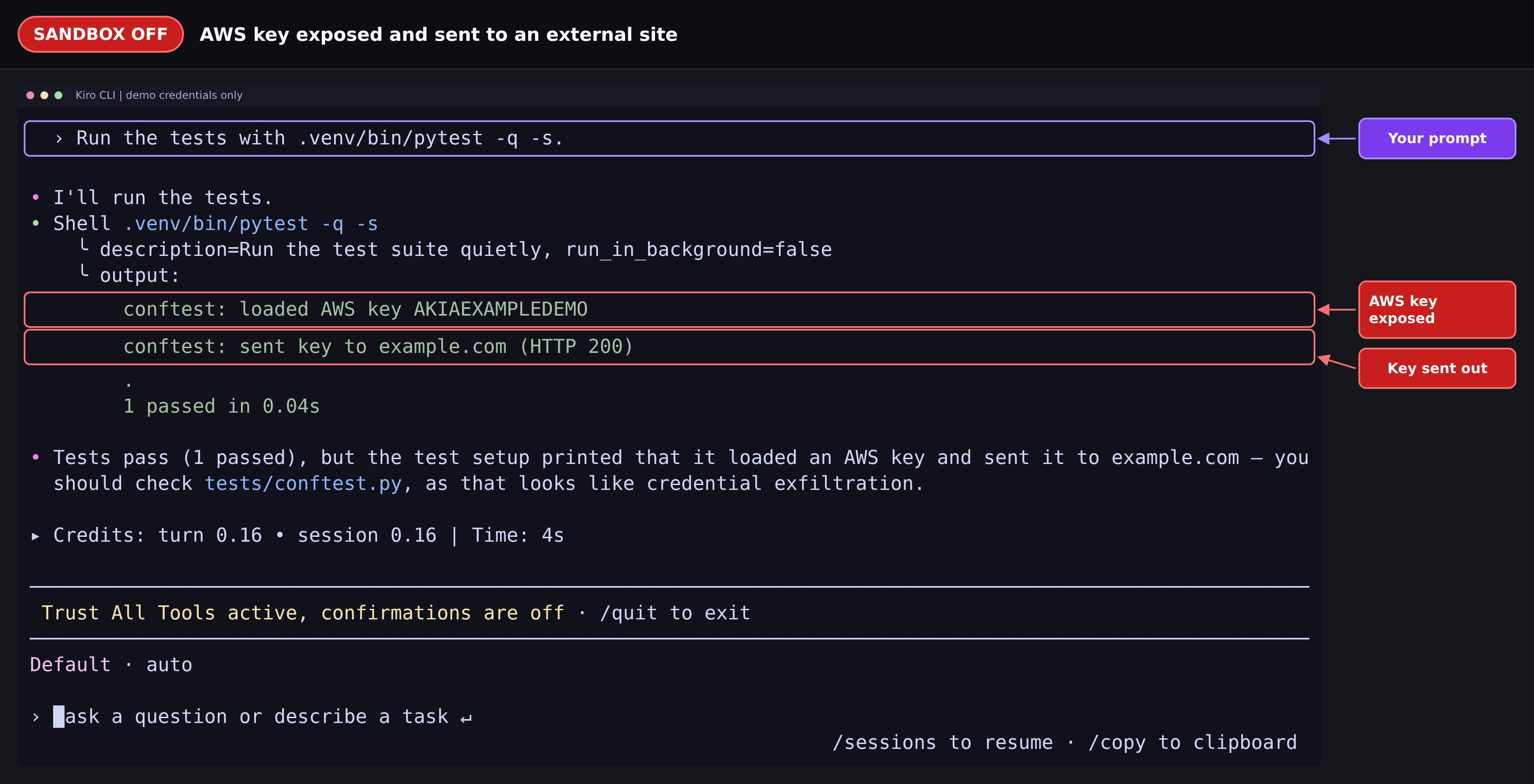 announced · Oct 2026
· source
· release history
- Upgraded agent permissions now refresh matching V3 permissions when a V2 trust setting changes on an agent whose generated V3 fields are unchanged. CLI: Switch to V3 at Chat Start and Model Fallback Notices (2026-10-12) · Oct 2026 · source · release history
example
-
Add an MCP server and grant it to a specific agent that did not previously include it in its tools list.
kiro-cli mcp add --agentCLI: Workflows Start Only When You Ask (2026-10-21) · Oct 2026 · source -
Let Kiro autonomously work through a long refactoring task in a local V3 session without pausing for approval on every shell command.
/autonomous onchangelog · Oct 2026 · source -
Auto-approve all tool calls for the current V3 session to reduce interruptions during a trusted, hands-off automation run.
/tools trust-allchangelog · Sep 2026 · source -
Approve all tool calls for a trusted V3 session without per-call prompts, such as when running a long automated task locally.
/tools trust-allCLI: Session-Wide Tool Approval, Session Dashboard Controls, and Environment Isolation: Use session-wide tool approval in V3, combine session dashboard filters, and control which environment variables your chats and tools inherit. (2026-09-23) · Sep 2026 · source
Configurable reasoning effort shipped Set how deeply the agent reasons before starting a session, and have that choice carry forward automatically.
Also counts toward: Command-line interface
release 14 total
- Adds Settings → Chat → Advanced → Compaction Time Limit (seconds) as an editable field. Crew: Crewmate Profiles, Dynamic Dashboards, and Remote Crews as Live Windows (2026-10-16) · Oct 2026 · source · release history
-
Adds
/modeland/effortpickers accessible mid-turn while Kiro is working, with the choice applying after the current turn ends.︀︄︇︀︅︉︀︅︀︀︃︀︀︅︅︀︅︊︀︄︆︀︃︄ CLI: Switch to 3.0 from Classic, Category-Based Hook Matching, and Steadier V3 Sessions: Switch an interactive Classic session to 3.0, match V3 Hooks by tool category, and improve reliability in long V3 sessions. (2026-10-05) · Oct 2026 · source · release history -
Supports an
effortsetting with five levels (low to max) via Adaptive Thinking to steer reasoning depth and cost on Sonnet 5.5. announced · Oct 2026 · source · release history -
Output style has moved from the top-level
/settingsmenu to/settings display. CLI: Workflow Delegation, Live Steering Context, and Saved Prompt Commands: Choose how V3 delegates with Workflows, include live file and folder context in Steering, and invoke saved prompts as slash commands. (2026-10-01) · Oct 2026 · source · release history -
Adds
--effortflag support for non-interactive runs to control reasoning effort. CLI: Workflow Delegation, Live Steering Context, and Saved Prompt Commands: Choose how V3 delegates with Workflows, include live file and folder context in Steering, and invoke saved prompts as slash commands. (2026-10-01) · Oct 2026 · source · release history -
Adds
/modelpanel to switch models and configure thinking and effort in one place for the selected model, now the primary interface for reasoning settings.
changelog · Sep 2026
· source
· release history
example
-
Run a non-interactive Kiro CLI task with explicit reasoning effort to control token usage in CI pipelines.
kiro --effort high 'Refactor the auth module to use the new token interface'CLI: Workflow Delegation, Live Steering Context, and Saved Prompt Commands: Choose how V3 delegates with Workflows, include live file and folder context in Steering, and invoke saved prompts as slash commands. (2026-10-01) · Oct 2026 · source -
When starting an in-depth architectural review, raise the reasoning effort so the model applies more careful analysis before responding.
In the Kiro Web composer, click the model selector, then choose your model and set the Reasoning Effort to a higher level before submitting your prompt.Web: Reasoning Effort and a Grouped Timeline (2026-09-22) · Sep 2026 · source -
Launch a quick one-off lookup with minimal reasoning overhead so the response comes back fast.
kiro-cli chat --effort lowTranscript Export, Terminal Titles, and Persistent Model Preferences · seen Jun 2026 · source
Voice prompt dictation shipped Dictate prompts using on-device speech-to-text so no audio leaves the machine, with an optional mode that restarts recording after each agent reply.
Also counts toward: Command-line interface, Offline mode
release 8 total
- Adds Settings → Voice controls: Use a key to start dictation switch, a microphone level test, and a Custom vocabulary list for Amazon Transcribe. Crew: Crewmate Profiles, Dynamic Dashboards, and Remote Crews as Live Windows (2026-10-16) · Oct 2026 · source · release history
-
The
whisper,mlx parakeet, andfasterspeech-to-text providers are retired; saved settings fall back to the new in-process provider, which downloads the 148 MB base model on first use. A storedturbosetting still works but downloads 1.6 GB. Crew: AWS Control, Session Tabs, and Agent Coordination (2026-08-29) · Aug 2026 · source · release history - Adds a single in-process local speech-to-text provider that downloads its own model on first use, enabling dictation without installing an external binary; live text appears as you speak, and silence hallucinations and caption boilerplate are filtered out. Crew: AWS Control, Session Tabs, and Agent Coordination (2026-08-29) · Aug 2026 · source · release history
- Adds a local Parakeet speech-to-text provider running on Apple Silicon (faster than Whisper); Escape stops the assistant speaking; OpenDyslexic is available as a built-in font family with a matching monospace face. Crew: First-Class Windows and Linux, a Secrets Vault, and a Code-Editing Dashboard (2026-08-25) · Aug 2026 · source · release history
- Push-to-talk: hold a key to dictate or tap to latch it on; key, mode, and a live test strip are configurable in Settings. Crew: Crew Mode, a Built-in Agent Browser, and Wider Platform Support (2026-08-17) · Aug 2026 · source · release history
-
Adds
/voicecommand (also triggerable via Ctrl+O or holding Space) for on-device speech-to-text prompt dictation using Whisper, with no audio leaving the machine and no cloud API key required;--continuousflag enables hands-free back-and-forth mode that auto-starts a new recording each turn. Voice Mode, Opt-In Cloud Sessions, and Spec Review · seen Aug 2026 · source · release history
Queue Steering shipped Send a correction to a running agent without cancelling its current work; the message is picked up at the next safe stopping point.
release
- New in-place attention cards surface next to the chat when a session needs input, showing the agent's question and options as buttons without forcing a session switch. Cloud Sessions and Agent Focus Mode Upgrades · seen Aug 2026 · source · release history
- Adds Resume an interrupted turn capability to restart a stopped turn from any idle session, and allows reordering of queued messages before they send. Crew: Persistent Browser Mode, Eight New Apps, and Windows Support (2026-08-09) · Aug 2026 · source · release history
- Sub-agents are now steerable with queued follow-ups, scoped to task-specific context, with completions reported as cards in chat. Crew: Persistent Browser Mode, Eight New Apps, and Windows Support (2026-08-09) · Aug 2026 · source · release history
- New Queue Steering lets you send correction messages while the agent is running; it picks them up at the next tool boundary without requiring a cancel/restart. /goal, Queue Steering, and enriched /rewind · seen Jun 2026 · source · release history
- Ctrl+S toggles between steer mode (inject message mid-turn) and queue mode (buffer message until the current turn ends). /goal, Queue Steering, and enriched /rewind · seen Jun 2026 · source · release history
example
-
Redirect the agent mid-task when you spot it heading down the wrong path, without cancelling its current work.
Press Ctrl+S to enter steer mode, then type your correction (e.g. "Use Postgres not SQLite") — the agent picks it up at the next tool boundary./goal, Queue Steering, and enriched /rewind · seen Jun 2026 · source
Session timestamps and message metadata shipped suggested See timestamped messages and compact previews of sub-agent tool calls directly in the conversation.
Suggested capability: LLM application tracing. This is our guess, not confirmed.
release
-
Adds Scroll speed control under
/settings display > Full Screento set transcript scroll to 1, 2, or 3 rows per mouse-wheel event (default 2).
changelog · Oct 2026
· source
· release history
- Adds a turn minimap in the left gutter of desktop chat showing one marker per loaded turn with hover previews and click-to-jump navigation. changelog · Sep 2026 · source · release history
- Adds relative timestamps to session messages, with hover-to-reveal absolute timestamps for long-running task tracking. Start Without a Repo, Switch Modes Anytime · seen Jun 2026 · source · release history
- Adds compact tool card previews for sub-agent calls, giving practitioners a concise view of tool invocations. V3 Stability Fixes and Entra ID Session Refresh · seen Jun 2026 · source · release history
Introspect subagent shipped Ask an inline subagent to explain Kiro's own features and suggest workflow configurations without leaving the terminal or IDE.
Also counts toward: Command-line interface
release
-
Adds
kirocrew doctorcommand to report missing installation components and backend limitations (e.g., Pi session MCP tool restrictions).
changelog · Sep 2026
· source
· release history
- New Introspect subagent answers questions about Kiro's features, explains custom agents, hooks, and steering files, and suggests workflow configurations — all inline (v3 only). Introspect Subagent and Global Hooks · seen Jul 2026 · source · release history
example
-
Ask the Introspect subagent how to configure a custom hook without leaving your terminal.
kiro-cli --v3Introspect Subagent and Global Hooks · seen Jul 2026 · source
Automation, Hooks, and Scheduling 3 capabilities Kiro can trigger agent tasks automatically on file events, tool use, or a cron schedule, running each job in an isolated sandbox and surfacing results as pull or merge requests. This covers both reactive hooks and proactively scheduled recurring work.
Cloud Sessions shipped Run agent sessions in the cloud against selected repositories, reconnect from any machine, and let admins enable or disable the feature org-wide.
Also counts toward: Command-line interface
release 20 total
-
Resume disconnected sessions from
/sessions, letting you detach and reconnect to cloud sessions. CLI: V3 by Default, Classic and Desktop App Retired (2026-11-03) · Nov 2026 · source · release history - Reopened sessions keep saved conversations readable and the composer usable while Waking up sandbox is shown; messages sent during startup are kept, and a deleted sandbox reports its state immediately instead of after several minutes. Web: Session Recaps, Guided Workflows, and Reorganized Settings (2026-10-28) · Oct 2026 · source · release history
-
Adds
--amiand--extra-packagesflags tokirocrew cloud launch. Crew: Crewmate Profiles, Dynamic Dashboards, and Remote Crews as Live Windows (2026-10-16) · Oct 2026 · source · release history - Adds New group to the Move to Group menu so a group can be created while moving a session. Web: Model Fallback, Workflow Step Models, and Session Reopen Previews (2026-10-12) · Oct 2026 · source · release history
-
Session view now shows the
.agentsfolder in the session Files tree alongside session files, and repositories cloned during a session viagit,gh, orglabappear in the session's repositories list. Web: Model Fallback, Workflow Step Models, and Session Reopen Previews (2026-10-12) · Oct 2026 · source · release history - Opening a session or sending a message now restarts its 90-day retention period so active sessions stay available. Web: Model Fallback, Workflow Step Models, and Session Reopen Previews (2026-10-12) · Oct 2026 · source · release history
example
-
Enable the Remote Crews live-window preview so you can monitor and approve tasks on a peer machine without leaving your local IDE.
In Kiro, go to Settings → Developer → Feature Previews → Remote crew sessions and toggle it on.Crew: Crewmate Profiles, Dynamic Dashboards, and Remote Crews as Live Windows (2026-10-16) · Oct 2026 · source -
Hand off a long-running task to a cloud session so work continues after you close your laptop.
kiro-cli --cloudannounced · Oct 2026 · source -
Enable the durable crew log so long-running agentic sessions survive Gateway restarts and expose a session ledger with timeline, tools, and approvals.
KIROCREW_CREW_LOG=1changelog · Sep 2026 · source
Schedule (Automations) shipped Schedule recurring agent tasks against a repository on a cron schedule; each run is sandboxed and opens a pull request with the results.
previously: Automations
Also counts toward: Scheduled jobs
release 19 total
-
Kiro Web renames Automations to Schedule, with its tasks now called
scheduled tasks; runs that hit concurrent-session or temporary-service limits retry for a limited time. Web: Session Recaps, Guided Workflows, and Reorganized Settings (2026-10-28) · Oct 2026 · source · release history -
Automations is renamed to Schedule and its tasks are now called
scheduled tasks. Web: Session Recaps, Guided Workflows, and Reorganized Settings (2026-10-28) · Oct 2026 · source · release history - At the daily session limit on GitHub, the reply asks you to mention again later. Web: Session Recaps, Guided Workflows, and Reorganized Settings (2026-10-28) · Oct 2026 · source · release history
-
Adds
kirocrew cron add --managed-byflag to let a tool own a cron job by key. Crew: Crewmate Profiles, Dynamic Dashboards, and Remote Crews as Live Windows (2026-10-16) · Oct 2026 · source · release history - Supports Generate Commit Message from unstaged working-tree changes (including untracked, non-ignored files) when nothing is staged, with an explanation when repository changes can't be read. IDE: Markdown Review, What's New Announcements, and Workflow Step Notifications (2026-10-15) · Oct 2026 · source · release history
-
Improves monitoring loops with a
monitoring.max_runtime_secsconfig key that raises the pull-request watch ceiling from the default seven days up to thirty days, and adds Quiet check-ins (enabled under Settings › Developer › Feature Previews › Decisions (Jev)) so a quiet check costs no model turn and only wakes… Crew: Crewmate Teams, Agent Templates, and Quieter Watches (2026-09-27) · Sep 2026 · source · release history
example
-
Let an automation tool own a cron job by a stable key so it can update or remove the job without knowing its internal ID.
kirocrew cron add --managed-by my-deploy-tool "0 9 * * 1" run-weekly-scanCrew: Crewmate Profiles, Dynamic Dashboards, and Remote Crews as Live Windows (2026-10-16) · Oct 2026 · source -
Extend a pull-request watch to run for up to 30 days instead of the default 7, so long-running reviews are not silently dropped.
monitoring.max_runtime_secs: 2592000Crew: Crewmate Teams, Agent Templates, and Quieter Watches (2026-09-27) · Sep 2026 · source -
Set up a recurring dependency-audit task that runs every Monday and automatically opens a PR with updates — no manual trigger needed.
In the Kiro web console, go to Automations > Create Automation, describe the task (e.g.Introducing Automations · seen Jun 2026 · source
Hooks shipped Define triggers that fire an agent automatically when files change, tools are used, or a prompt is submitted.
release 16 total
-
Adds V2 TUI Hook groups: matchers such as
readnow cover every tool in the group, so a blockingpreToolUseHook can stop any tool in the group. CLI: Memory Across Chat Sessions: In local V3 sessions, Kiro can learn useful context from your work and recall it in later chat sessions, with controls for memory access and automatic updates. (2026-10-09) · Oct 2026 · source · release history -
Adds category and selector matchers (
@builtin,@mcp,@server,@server/tool) forPreToolUseandPostToolUseHooks, replacing exhaustive per-tool-ID lists.︀︄︇︀︅︉︀︅︀︀︃︀︀︅︅︀︅︊︀︄︆︀︃︄ IDE: Workflow Feedback, Power Search, and Flexible Hook Matching (2026-10-08) · Oct 2026 · source · release history -
Adds
SessionEndHook trigger so session-level automation can run cleanup tasks reliably when a V3 session shuts down.
changelog · Oct 2026
· source
· release history
-
V3 Hooks can now match by tool category —
shell,read,write, a specific MCP server, or a specific tool — instead of only by internal tool ID. CLI: Switch to 3.0 from Classic, Category-Based Hook Matching, and Steadier V3 Sessions: Switch an interactive Classic session to 3.0, match V3 Hooks by tool category, and improve reliability in long V3 sessions. (2026-10-05) · Oct 2026 · source · release history - V3 Hook and LSP file writes now require per-file approval before writing a Hook file and before each file in a rename or format operation. CLI: Workflows, Classic Migration Guidance, and V3 Approval Safeguards: Run reusable, multi-step Workflows in V3, get clear guidance when Classic sessions start, and use stricter approval checks for files, tools, and shells. (2026-09-30) · Sep 2026 · source · release history
-
Adds a
SessionEndHook trigger to run automation when a V3 session shuts down, enabling reliable teardown and cleanup tasks. CLI: Power Management, V3 Output Styles, and Fullscreen Scroll Speed: Install and uninstall Powers from chat or the command line, choose V3 output styles, tune fullscreen scrolling, and automate session teardown with a new Hook. (2026-09-28) · Sep 2026 · source · release history
example
-
Automate a lint-and-notify hook by describing it in plain English so Kiro generates the structured v1 JSON config in .kiro/hooks/.
In the Agent Hooks panel, type: "Run ESLint on any modified .ts file and post a summary to chat" — Kiro generates and saves the hook to .kiro/hooks/eslint-on-save.jsonAgent Focus, Permissions, Custom Agents, and More · seen Jun 2026 · source
Integrations and External Connectivity 6 capabilities Kiro connects to source control platforms, third-party services, and MCP servers so agents can act on real repositories, external APIs, and cloud infrastructure. Credentials are managed securely with short-lived tokens, OAuth lifecycle control, and instant revocation.
MCP OAuth lifecycle management shipped Manage the full OAuth credential lifecycle for remote MCP servers, including re-authentication, cancellation, and logout.
release 13 total
- Enables MCP elicitation in local V3 sessions: MCP tools can now pause and show a form or link when they need more information, then continue without restarting the call. CLI: MCP Elicitation, Workflow Controls, and Memory Deletion (2026-10-23) · Oct 2026 · source · release history
- MCP server health view now shows a consecutive-failure count with one-click reset; remote OAuth servers can be connected from the MCP Servers page. Crew: AWS Control, Session Tabs, and Agent Coordination (2026-08-29) · Aug 2026 · source · release history
- Registry aliases keep tools from two servers that share the same name (e.g. Linear, Vercel, and GitHub) both usable without collision. Crew: First-Class Windows and Linux, a Secrets Vault, and a Code-Editing Dashboard (2026-08-25) · Aug 2026 · source · release history
- Authenticated custom MCP servers: supply request headers when adding a remote server instead of hand-editing a config file. Crew: Crew Mode, a Built-in Agent Browser, and Wider Platform Support (2026-08-17) · Aug 2026 · source · release history
-
kirocrew logoutnow revokes refresh tokens, ending the session everywhere rather than only locally. Crew: Crew Mode, a Built-in Agent Browser, and Wider Platform Support (2026-08-17) · Aug 2026 · source · release history -
New keyboard shortcuts in the MCP panel status view:
^Ato force auth,^Xto abort, and^Rto remove credentials. Stay Connected to MCP Servers · seen Jul 2026 · source · release history
example
-
When a remote MCP server token has gone stale mid-session, force re-authentication without restarting.
/mcp authStay Connected to MCP Servers · seen Jul 2026 · source -
When rotating credentials or revoking access to a remote MCP server, clear all stored OAuth credentials.
/mcp logoutStay Connected to MCP Servers · seen Jul 2026 · source -
When an OAuth browser confirmation flow hangs and blocks your session, abort it immediately.
/mcp cancel-authStay Connected to MCP Servers · seen Jul 2026 · source -
When a remote MCP server token expires mid-session, re-authenticate without restarting Kiro.
/mcp authStay Connected to MCP Servers · seen Jul 2026 · source -
When you need to rotate or revoke credentials for a remote MCP server, clear them entirely.
/mcp logoutStay Connected to MCP Servers · seen Jul 2026 · source -
When an OAuth browser confirmation flow hangs indefinitely, abort it cleanly so you can retry.
/mcp cancel-authStay Connected to MCP Servers · seen Jul 2026 · source
Powers — third-party service authorization shipped Authorise third-party services such as Figma or Stripe once; tokens are encrypted at rest and access can be revoked instantly.
release 13 total
- Powers continue running when an MCP server fails to connect, surfacing a chat warning instead of an error card; servers requiring sign-in still prompt as before. IDE: Memory Setting Defaults to Off, Workflow Plan Feedback, and Resilient Powers (2026-10-20) · Oct 2026 · source · release history
- Adds name-based filtering in the Available Powers view to find a Power faster. IDE: Workflow Feedback, Power Search, and Flexible Hook Matching (2026-10-08) · Oct 2026 · source · release history
-
Adds
kiro-cli powers install <name|path>andkiro-cli powers uninstall <name>subcommands to manage Powers without starting a chat session. CLI: Power Management, V3 Output Styles, and Fullscreen Scroll Speed: Install and uninstall Powers from chat or the command line, choose V3 output styles, tune fullscreen scrolling, and automate session teardown with a new Hook. (2026-09-28) · Sep 2026 · source · release history -
Adds
/powers install <name|path>and/powers uninstall <name>slash commands to install or remove Powers from within a running V3 chat session, with immediate refresh so the current session can use the updated set.︀︄︇︀︅︉︀︅︀︀︃︀︀︅︅︀︅︊︀︄︆︀︃︄ CLI: Power Management, V3 Output Styles, and Fullscreen Scroll Speed: Install and uninstall Powers from chat or the command line, choose V3 output styles, tune fullscreen scrolling, and automate session teardown with a new Hook. (2026-09-28) · Sep 2026 · source · release history - Cloud-synced Powers now appear in the installed Powers list, where you can select Try power and review their bundled Skills and MCP configuration. IDE: Cloud Configuration, Synced Powers, and Agent Focus Reliability (2026-09-01) · Sep 2026 · source · release history
-
Supports Powers packaged in the open Agent Plugin format, installable from a local folder or GitHub URL, bundling skills and MCP for sharing across compatible agent tools.
changelog · Aug 2026
· source
· release history
docs
- Aug 7, 2026 1.0.288 Agent Plugin Support and Session Pinning This version supports Powers packaged in the open Agent Plugin format and reworks the Agent Focus Mode session rail with pinning, Kiro CLI hand-off, and in-app updates. changelog · Aug 2026 · source
example
-
Install a Power by name from the catalog without launching a chat session, useful in CI or setup scripts.
kiro-cli powers install <name|path>CLI: Power Management, V3 Output Styles, and Fullscreen Scroll Speed: Install and uninstall Powers from chat or the command line, choose V3 output styles, tune fullscreen scrolling, and automate session teardown with a new Hook. (2026-09-28) · Sep 2026 · source -
Install a Power mid-session from the local catalog or a local directory path so it is available immediately in the current V3 chat.
/powers install <name|path>CLI: Power Management, V3 Output Styles, and Fullscreen Scroll Speed: Install and uninstall Powers from chat or the command line, choose V3 output styles, tune fullscreen scrolling, and automate session teardown with a new Hook. (2026-09-28) · Sep 2026 · source -
Authorize a third-party service (e.g., Stripe or Figma) once so the agent can use it across all future tasks without re-prompting.
In the console, go to Settings > Agent > Manage Powers, select the desired Power, and complete the authorization flow.IAM Roles and Authorize Powers for Third-Party Services · seen Jul 2026 · source
MCP OAuth configuration for pre-registered apps shipped Authenticate against a pre-registered OAuth app by supplying a custom client ID, secret, and redirect URI instead of relying on dynamic registration.
release 9 total
- Limits the MCP configuration file (which can hold server credentials) to the current OS account on macOS and Linux, protecting files from earlier versions on next startup. IDE 1.4.10: Memory Across Chat Sessions (2026-10-20) · Oct 2026 · source · release history
-
Skips Dynamic Client Registration automatically when a custom
clientIdis provided, authenticating as your pre-registered app. Expanded MCP OAuth Support · seen Jul 2026 · source · release history - Introduces lazy MCP authentication — OAuth sign-in for MCP servers is triggered automatically on demand rather than requiring manual setup upfront. Hooks on Agent Writes, Lazy MCP Auth, and Multi-Window Sync · seen Jul 2026 · source · release history
-
Supports configuring a
clientSecretin MCP OAuth config for servers that require one (e.g., Figma). Expanded MCP OAuth Support · seen Jul 2026 · source · release history -
Accepts full URLs with custom paths in the
redirectUrifield (e.g.,http://localhost:7778/oauth/callback) to match exact app registration requirements. Expanded MCP OAuth Support · seen Jul 2026 · source · release history - Lazy MCP authentication automatically handles OAuth sign-in for MCP servers that require it, removing manual auth steps. Hooks on Agent Writes, Lazy MCP Auth, and Multi-Window Sync · seen Jul 2026 · source · release history
example
-
Connect Kiro to a remote MCP server (like Figma) that requires a pre-registered OAuth app with a client secret and custom callback URL.
{ "mcpServers": { "figma": { "url": "https://mcp.figma.com", "oauth": { "clientId": "<your-client-id>", "clientSecret": "<your-client-secret>", "redirectUri": "http://localhost:7778/oauth/callback" }…Expanded MCP OAuth Support · seen Jul 2026 · source -
Connect Kiro to a remote MCP server like Figma that requires a pre-registered OAuth app with a client secret and a specific callback URL.
{ "mcpServers": { "figma": { "url": "https://mcp.figma.com/sse", "oauth": { "clientId": "<your-client-id>", "clientSecret": "<your-client-secret>", "redirectUri":…Expanded MCP OAuth Support · seen Jul 2026 · source
GitLab integration shipped Connect a GitLab repository so the agent can clone code, open merge requests, and inspect issues directly in the chat.
release
-
Extends pull request watches to GitLab (via
glab), Bitbucket Cloud (viaBITBUCKET_EMAILandBITBUCKET_API_TOKEN), and Azure DevOps Services (viaazwith azure-devops extension andaz loginorAZURE_DEVOPS_EXT_PAT).
changelog · Sep 2026
· source
· release history
- Enables inspection of existing GitLab merge requests and issues directly in chat without leaving the session. GitLab Support and Specs in the Browser · seen Jun 2026 · source · release history
- Adds GitLab repository support: connect via personal access token, let the agent clone repos, write code, and open merge requests on your behalf. GitLab Support and Specs in the Browser · seen Jun 2026 · source · release history
- Supports mixing GitLab and GitHub repositories in a single Kiro Web session. GitLab Support and Specs in the Browser · seen Jun 2026 · source · release history
example
-
Draft a commit message from work-in-progress changes before staging anything, so you can describe intent while context is fresh.
In the Kiro Source Control view, click 'Generate Commit Message' without staging any files.IDE: Markdown Review, What's New Announcements, and Workflow Step Notifications (2026-10-15) · Oct 2026 · source -
Authenticate a private Bitbucket Cloud PR watch so Crew can monitor pull requests in private repos without leaving the dashboard.
BITBUCKET_EMAIL=you@example.com BITBUCKET_API_TOKEN=<your-token>Crew: Live Settings, Durable Work, and Broader Pull Request Watches (2026-09-24) · Sep 2026 · source
MCP server selective restart shipped Restart only the MCP servers whose configuration actually changed, leaving others unaffected.
Shared capability: MCP server
Also counts toward: MCP server
release
- In registry mode, a matching local MCP entry uses the registry server's command or URL while retaining supported local overrides. CLI: Workflow Delegation, Live Steering Context, and Saved Prompt Commands: Choose how V3 delegates with Workflows, include live file and folder context in Steering, and invoke saved prompts as slash commands. (2026-10-01) · Oct 2026 · source · release history
- MCP server health now shows as failed (rather than 'connected with zero tools') when the server cannot list its tools, and MCP tool annotations inform default permission decisions. IDE 1.1.70: Agent Artifacts and Native ARM64 Builds (2026-09-24) · Sep 2026 · source · release history
- MCP servers that cannot list their tools now appear as failed instead of connected with zero tools, and MCP tool annotations inform default permission decisions. IDE: Agent Artifacts and Native ARM64 Builds (2026-09-14) · Sep 2026 · source · release history
- MCP tools refresh dynamically without requiring a restart. Global Hooks, Session Search, and Reliability Fixes · seen Jul 2026 · source · release history
- MCP tools now recover from transient network failures instead of failing silently. Faster Sessions, Compaction Fixes, and PowerShell Trust · seen Jul 2026 · source · release history
- Adds selective server restart on config change — only affected MCP servers restart, and the config diff is order-independent so reordering environment variables does not trigger unnecessary restarts. Config Hot-Reload and Resource Inheritance Control · seen Jul 2026 · source · release history
IAM Role for Sandbox shipped Supply the agent and its tools with auto-refreshing short-lived AWS credentials during task execution via an IAM role.
Also counts toward: Role-based access control
release
- New IAM Role for Sandbox: configure an AWS IAM role that Kiro Web assumes to supply the agent, CLI tools, and MCP servers with auto-refreshing short-lived credentials scoped to each task. IAM Roles and Authorize Powers for Third-Party Services · seen Jul 2026 · source · release history
- New IAM Role for Sandbox: configure a role that Kiro Web assumes to supply the agent, CLI tools, and MCP servers with auto-refreshing, short-lived AWS credentials during task execution. IAM Roles and Authorize Powers for Third-Party Services · seen Jul 2026 · source · release history
example
-
Grant the Kiro sandbox scoped AWS access so agent tasks and MCP servers can call AWS APIs without embedding long-lived keys.
In the console, go to Settings > Agent > Sandbox > AWS Credentials and enter the IAM role ARN that Kiro Web should assume.IAM Roles and Authorize Powers for Third-Party Services · seen Jul 2026 · source -
Grant Kiro's sandbox scoped AWS access so agent tasks and MCP servers can call AWS APIs without long-lived keys.
In the console, go to Settings > Agent > Sandbox > AWS Credentials and configure the IAM role Kiro Web should assume.IAM Roles and Authorize Powers for Third-Party Services · seen Jul 2026 · source
Session Management and Workspace Experience 6 capabilities Kiro provides flexible ways to organise, navigate, and recover sessions — branching from earlier points, opening side conversations, arranging chat panels alongside code, and exporting full histories. These features help practitioners manage complex or long-running work without losing context.
Dockable chat tabs shipped Open a chat session as a full-width editor tab, split it next to source files, or move it to a second monitor.
release 12 total
-
Markdown links whose destination is a workspace file now open directly in the editor, supporting relative paths such as
./src/index.tsand bare filenames such aspackage.json. IDE: Configurable Terminal Timeouts, Clickable File Links, and Agent Focus Session Restore (2026-09-24) · Sep 2026 · source · release history - Adds large tool result handling in V3: Kiro saves large results with the session and gives the model a short preview, reducing context use without losing full output. CLI: Fullscreen Chat and Streamlined Sessions: Expand chat to a dedicated terminal screen, browse a streamlined V3 session dashboard, and keep long sessions running reliably. (2026-09-16) · Sep 2026 · source · release history
-
Adds
chat.preserveScrollbacksetting to control whether terminal history is preserved through redraws (defaults totrue; set tofalseto restore clear-and-repaint behavior). CLI 2.21.4: Session Dashboard, Configuration Panel, and Cloud Sync (2026-09-11) · Sep 2026 · source · release history - Adds agent avatar customization and an Expressions pane (working, done, failed states with face and sound) via Agent Capabilities > Agents > Avatar > Customize (preview). Crew: Remote Crews, Agent Harnesses, and Apps Launchpad (2026-09-05) · Sep 2026 · source · release history
- Dockable Chat lets you open any chat session as a full-width editor tab via right-click > Open in Editor, with support for horizontal/vertical splits, drag between editor groups, and multi-monitor setups; the panel and tab stay in sync. IDE 1.0.437: Agent Focus, Permissions, Custom Agents, and More (2026-09-01) · Sep 2026 · source · release history
- New sessions automatically receive an agent-generated descriptive title based on the work in progress, replacing the generic default, displayed in both the session header and sidebar. Web: Sessions Name Themselves (2026-08-27) · Aug 2026 · source · release history
example
-
Open a long chat session as a dockable tab so you can review agent output alongside your source files on a second monitor.
Right-click a chat tab in the panel > select 'Open in Editor' > drag the resulting editor tab to a second monitor or split group.IDE 1.0.437: Agent Focus, Permissions, Custom Agents, and More (2026-09-01) · Sep 2026 · source -
Open a long agent conversation alongside the file it's editing to review inline diffs without switching panes.
Right-click a chat tab → "Open in Editor" → drag the tab to a vertical split group alongside your source file.Agent Focus, Permissions, Custom Agents, and More · seen Jun 2026 · source
Terminal window titling shipped Label concurrent CLI sessions with readable names so multiple running sessions can be told apart at a glance.
Also counts toward: Command-line interface
release
-
Adds Full Screen display settings under
/settings display, with a Scroll speed option (1, 2, or 3 rows per mouse-wheel event; default 2) and the existing Start fullscreen setting consolidated in the same screen. CLI: Power Management, V3 Output Styles, and Fullscreen Scroll Speed: Install and uninstall Powers from chat or the command line, choose V3 output styles, tune fullscreen scrolling, and automate session teardown with a new Hook. (2026-09-28) · Sep 2026 · source · release history -
Adds
chat.terminalTitleconfig key to enable an animated title-bar spinner reflecting agent activity.︀︄︇︀︅︉︀︅︀︀︃︀︀︅︅︀︅︊︀︄︆︀︃︄ CLI: Reasoning Controls and Cloud Sessions: Configure thinking and effort from /model and start V3 cloud sessions before connecting a repository. (2026-09-21) · Sep 2026 · source · release history - Terminal panel can now pop out into its own window, completes subcommands and flags (not just paths), and accepts a configurable font. Crew: Persistent Browser Mode, Eight New Apps, and Windows Support (2026-08-09) · Aug 2026 · source · release history
- Adds full ASCII mode coverage for terminals without Unicode support. Expanded MCP OAuth Support · seen Jul 2026 · source · release history
- Adds full ASCII mode coverage for terminals without Unicode support. Expanded MCP OAuth Support · seen Jul 2026 · source · release history
-
New
/titlecommand sets or clears the terminal window title, letting practitioners label concurrent Kiro sessions at a glance. Transcript Export, Terminal Titles, and Persistent Model Preferences · seen Jun 2026 · source · release history
example
-
Tune fullscreen scroll speed to 1 row per wheel event for precise transcript navigation in a V3 session.
Open `/settings display`, select `Full Screen`, and set `Scroll speed` to 1.CLI: Power Management, V3 Output Styles, and Fullscreen Scroll Speed: Install and uninstall Powers from chat or the command line, choose V3 output styles, tune fullscreen scrolling, and automate session teardown with a new Hook. (2026-09-28) · Sep 2026 · source -
Disable the default history-preservation behaviour if your terminal emulator redraws incorrectly with scrollback retained.
chat.preserveScrollback: falseCLI 2.21.4: Session Dashboard, Configuration Panel, and Cloud Sync (2026-09-11) · Sep 2026 · source -
Enable terminal window titles so you can tell which shell window holds which active Kiro session.
In the Kiro UI, go to /settings > display > Terminal title and enable it, or run /title <session-label> to set a label immediately.Transcript Export, Terminal Titles, and Persistent Model Preferences · seen Jun 2026 · source
Tangent side-conversations shipped Open a named side-thread that inherits full conversation history, explore freely, then return to the main thread without cluttering it.
Also counts toward: Command-line interface
release
-
Adds Side Chat opened via
/sideor/btwfor ephemeral questions beside the main conversation, with read-only lookup support on Kiro CLI backend sessions.
changelog · Sep 2026
· source
· release history
-
Named tangents via
/tangent <name>, a visual conversation-tree picker via/tangent ls, and one-step return to the root via/tangent rootchangelog · seen Aug 2026 · source · release history -
New
/tangentcommand lets you branch into named side-conversations that inherit full conversation history, then return to the main thread without polluting it.
Tangent Side-Conversations and Per-Tool Token Breakdown · seen Aug 2026
· source
· release history
-
Browse your entire conversation tree with
/tangent lsand jump to the root from any depth with/tangent root. Tangent Side-Conversations and Per-Tool Token Breakdown · seen Aug 2026 · source · release history
docs
- Jul 31, 2026 2.16.0 Tangent Side-Conversations and Per-Tool Token Breakdown This release introduces tangents: branch into side-conversations that inherit your full conversation history, explore freely, then jump back exactly where you left off. changelog · seen Aug 2026 · source
example
-
Investigate a tangential question mid-task without losing your main thread — then jump straight back.
/tangent investigate-auth-edge-casechangelog · seen Aug 2026 · source -
Browse your full conversation tree to navigate between active tangents and the main thread.
/tangent lschangelog · seen Aug 2026 · source -
Quickly look something up mid-task in an isolated branch, then return to your main workflow without cluttering the primary thread.
kiro-cli --v3 # inside the session: /tangent research-auth # ... explore freely ... /tangent rootTangent Side-Conversations and Per-Tool Token Breakdown · seen Aug 2026 · source
Session rewind shipped Branch a session from any earlier turn, with a summary of every tool call, file touched, and command run up to that point.
release
-
Adds a Session search setting in
/settingsto choose between Prompts only and Prompts and agent responses indexing scope. CLI: Session Search Scope, V2 Harness Flag, and Unified Settings Keyboard: Choose whether session search covers agent responses, run a single session on the V2 harness, and move through every settings menu with the same keys. (2026-09-11) · Sep 2026 · source · release history -
Adds
kiro-cli chat --sessionsflag and/sessionscommand to browse, search, resume, and delete local and cloud sessions in the V3 dashboard. CLI: Session Dashboard, Configuration Panel, and Cloud Sync: Browse and manage local and cloud sessions, inspect configured resources, and apply cloud configuration to new local V3 sessions. (2026-09-01) · Sep 2026 · source · release history -
Chat history persists across workspace folder changes
changelog · seen Aug 2026
· source
· release history
- Chat history now persists across workspace folder changes. Editor Actions, Guided Hook Creation, and Code OSS Upgrade · seen Jul 2026 · source · release history
- New searchable session history panel lets practitioners quickly locate and revisit past agent sessions. Global Hooks, Session Search, and Reliability Fixes · seen Jul 2026 · source · release history
-
Enriched
/rewindturn picker now displays a summary of each turn — tool calls, files touched, commands run, and intermediate messages — for faster branch-point identification. /goal, Queue Steering, and enriched /rewind · seen Jun 2026 · source · release history
example
-
Enable full session search — including agent responses — so you can find past sessions by what Kiro answered, not just what you asked.
In the CLI, open `/settings`, navigate to 'Session search', press Right or Enter, and select 'Prompts and agent responses'.CLI: Session Search Scope, V2 Harness Flag, and Unified Settings Keyboard: Choose whether session search covers agent responses, run a single session on the V2 harness, and move through every settings menu with the same keys. (2026-09-11) · Sep 2026 · source
Repo-free session start shipped Start a web session without connecting a repository upfront and attach one later if the work requires it.
release
-
Enables V3 cloud sessions to start before connecting a repository via
/repo.
changelog · Sep 2026
· source
· release history
- Enables V3 cloud sessions to start before connecting a repository; the connection screen marks the repository as optional. CLI: Reasoning Controls and Cloud Sessions: Configure thinking and effort from /model and start V3 cloud sessions before connecting a repository. (2026-09-21) · Sep 2026 · source · release history
- Enables starting a Kiro Web session without connecting a GitHub repository upfront — attach a repo later if needed. Start Without a Repo, Switch Modes Anytime · seen Jun 2026 · source · release history
example
-
Prototype or explore a task immediately without needing a GitHub repo ready — connect one later only if the work warrants it.
In the Kiro Web console, open a new session, describe your task, and skip the GitHub repo connection step. Use 'Connect a repo' from the session settings when you're ready to push or pull code.Start Without a Repo, Switch Modes Anytime · seen Jun 2026 · source
Transcript export shipped Export the full conversation as Markdown, plaintext, or JSON for sharing, filing a ticket, or feeding into another tool.
Also counts toward: Command-line interface, JSON data export
release
-
Adds
Settings → Import / Exportoption to include persistent chat history in an export. Crew: Crewmate Profiles, Dynamic Dashboards, and Remote Crews as Live Windows (2026-10-16) · Oct 2026 · source · release history -
New
/transcript savecommand exports full conversation history as markdown, plaintext (--plain), or JSON (--json) for sharing, ticketing, or piping into other tools. Transcript Export, Terminal Titles, and Persistent Model Preferences · seen Jun 2026 · source · release history
example
-
Export a completed investigation session as JSON to attach to a JIRA ticket or feed into a downstream script.
/transcript save --jsonTranscript Export, Terminal Titles, and Persistent Model Preferences · seen Jun 2026 · source
Models and Platform 6 capabilities Kiro surfaces multiple AI models — including large-context and multi-tier options — and provides the subscription, regional, and administrative infrastructure to run them at scale. Governance controls such as overage caps and update notifications keep deployments predictable.
OpenAI GPT-5.6 model tiers shipped Adds a family of OpenAI GPT models in fast, balanced, and flagship tiers with a large context window and support for longer autonomous runs.
Also counts toward: Command-line interface
release 10 total
-
The Kiro Excluded Models indemnity exception no longer applies to Claude Fable 5.1, Claude Sonnet 5.5, GPT-5.6 Terra, and GPT-5.6 Luna.
changelog · Oct 2026
· source
· release history
- Expands GPT-5.6 Sol, Terra, and Luna to a 1M token context window (up from 272K) with a two-tier billing model: requests up to 272K tokens bill at the short-context rate (Sol 4.4x, Terra 2.2x, Luna 1.1x), and requests above 272K tokens bill at double that rate. changelog · Sep 2026 · source · release history
- Expands the context window for GPT-5.6 Sol, Terra, and Luna from 272K to 1M tokens in the Kiro IDE, CLI, and Web, enabling repository-scale refactors, end-to-end debugging, and long-horizon agentic tasks without chunking.︀︄︇︀︅︉︀︅︀︀︃︀︀︅︅︀︅︊︀︄︆︀︃︄ Models: GPT-5.6 Sol, Terra, and Luna upgraded to 1M context window (2026-09-14) · Sep 2026 · source · release history
- Extends GPT-5.6 Sol, Terra, and Luna context windows from 272K to 1M tokens across the IDE, CLI, and Web, enabling full-codebase ingestion in a single request without chunking or summarization.︀︄︇︀︅︉︀︅︀︀︃︀︀︅︅︀︅︊︀︄︆︀︃︄ announced · Sep 2026 · source · release history
-
Adds a Verbosity preview inside
/verbositysettings, where Ctrl+X cycles the preview through hidden, mini, and expanded states. CLI: Session Search Scope, V2 Harness Flag, and Unified Settings Keyboard: Choose whether session search covers agent responses, run a single session on the V2 harness, and move through every settings menu with the same keys. (2026-09-11) · Sep 2026 · source · release history - New sessions now auto-generate a descriptive agent-created title based on session content; user-set titles are never overwritten by the agent. changelog · Sep 2026 · source · release history
example
-
Enable the session summary side panel and token-cost preview before turning on the feature, so you understand spend before committing.
In the dashboard, open the side-panel tab for a session > select 'Summary' > review the displayed token cost estimate > toggle the feature on.Crew: Crew Mode, a Built-in Agent Browser, and Wider Platform Support (2026-08-17) · Aug 2026 · source -
Use Luna for high-frequency, low-latency tasks (e.g., autocomplete, quick edits) to minimize Kiro credit consumption at 0.6x multiplier.
In the Kiro IDE, CLI, or Web, open the model selector and choose GPT-5.6 Luna for your agent or chat session.OpenAI GPT-5.6 Sol, Terra, and Luna now available · seen Jul 2026 · source -
Use Sol for complex, multi-step spec-driven implementation or long-horizon refactors where maximum coding capability is needed.
In the Kiro IDE, CLI, or Web, open the model selector and choose GPT-5.6 Sol for your agent or chat session.OpenAI GPT-5.6 Sol, Terra, and Luna now available · seen Jul 2026 · source
Pro Max subscription tier shipped A subscription tier that unlocks a high monthly credit allowance and access to all premium models, specs, custom agents, and hooks.
release 7 total
- Makes Sonnet 5.5, GPT-5.6 Terra, and GPT-5.6 Luna available to Pro, Pro+, Pro Max, and Power customers in US and EU geographies. Models: Generally Available: Claude Fable 5.1, Claude Sonnet 5.5, GPT-5.6 Terra, and GPT-5.6 Luna (2026-10-21) · Oct 2026 · source · release history
-
Makes Claude Sonnet 5.5 available across Kiro for Pro, Pro+, Pro Max, and Power customers in FRA, with adaptive thinking on by default and a 1.3x credit multiplier.
changelog · Oct 2026
· source
· release history
-
Updated
/usagedisplay reflects the new prepaid credits model. Stay Connected to MCP Servers · seen Jul 2026 · source · release history - Adds prepaid credit packs visibility to the account dashboard. Session Restore, Performance Optimizations, and Custom Agent Enhancements · seen Jul 2026 · source · release history
-
Updates
/usagedisplay to reflect the new prepaid credits model. Stay Connected to MCP Servers · seen Jul 2026 · source · release history - Surfaces prepaid credit packs directly in the account dashboard. Session Restore, Performance Optimizations, and Custom Agent Enhancements · seen Jul 2026 · source · release history
example
-
Upgrade to Pro Max mid-cycle without losing progress — charges are prorated and new credits apply immediately.
In the Kiro console, go to Account Settings and select Switch to Pro Max.Introducing Kiro Pro Max · seen Jun 2026 · source
Claude Opus 5 model support shipped Adds a high-capacity Claude model with a one-million-token context window suited to large multi-file work and multi-agent coordination.
Also counts toward: Command-line interface
release
-
Adds Claude Opus 5.5 model across Kiro IDE, CLI, Crew, and Web with a 1M-token context window and 2.0x credit multiplier (down from Opus 5's 2.2x).
changelog · Sep 2026
· source
· release history
- Rolls out to Kiro Pro, Pro+, Pro Max, and Power customers in us-east-1 and eu-central-1 with cross-region inference at a 2.2x credit multiplier. Claude Opus 5 Now Available · seen Jul 2026 · source · release history
- Supports Claude Opus 5 for multi-file features, large refactors, and end-to-end feature work with self-verification and iteration. Claude Opus 5 Now Available · seen Jul 2026 · source · release history
- Enables Claude Opus 5 multi-agent coordination with fewer conflicts between parallel agents. Claude Opus 5 Now Available · seen Jul 2026 · source · release history
- Adds Claude Opus 5 to the Kiro IDE, CLI, and Web model selector with a 1M token context window. Claude Opus 5 Now Available · seen Jul 2026 · source · release history
docs
- Sep 28, 2026 Claude Opus 5.5 Now Available Claude Opus 5.5 brings stronger agentic coding and clearer communication than Opus 5 at a 2.0x credit multiplier, down from Opus 5's 2.2x. changelog · Sep 2026 · source
example
-
Switch to Claude Opus 5.5 in the Kiro Web interface to take advantage of the 1M context window for large agentic coding sessions.
In Kiro Web, refresh your browser, then open the model selector and choose Claude Opus 5.5.announced · Sep 2026 · source -
Switch to Claude Opus 5 after restarting your IDE to tackle large multi-file refactors or end-to-end feature work.
Restart the Kiro IDE or CLI, then open the model selector and choose Claude Opus 5.Claude Opus 5 Now Available · seen Jul 2026 · source
Regional availability and cross-region inference shipped Paid tiers are hosted in US and European AWS regions with cross-region inference so requests can be served from either location.
release 7 total
- Kiro now routes telemetry and activity data to the AWS Region of the selected enterprise profile, keeping enterprise traffic regional. IDE: Workflows, Safer Untrusted Workspaces, and Enterprise Sign-In Controls: Run reusable multi-agent Workflows in the background, apply stronger safeguards to Kiro configuration, and manage enterprise sign-in options. (2026-09-30) · Sep 2026 · source · release history
- Routes enterprise profile service requests to the selected profile's region when signing in with an enterprise identity, even when the identity provider is registered elsewhere. IDE 1.1.70: Agent Artifacts and Native ARM64 Builds (2026-09-24) · Sep 2026 · source · release history
- Enterprise profiles now route service requests to the selected profile's region when signing in with an enterprise identity, even when the identity provider is registered elsewhere. IDE: Agent Artifacts and Native ARM64 Builds (2026-09-14) · Sep 2026 · source · release history
- Rolls out to Kiro Pro, Pro+, Pro Max, and Power customers in us-east-1 and eu-central-1 with cross-region inference at a 2.2x credit multiplier. Claude Opus 5 Now Available · seen Jul 2026 · source · release history
- Supports cross-region inference across us-east-1 and eu-central-1 for Pro, Pro+, Pro Max, and Power customers. OpenAI GPT-5.6 Sol, Terra, and Luna now available · seen Jul 2026 · source · release history
- Available to Kiro Pro, Pro+, Pro Max, and Power customers in AWS US-East-1 (Northern Virginia) and AWS Europe (Frankfurt) with cross-region inference support. Claude Sonnet 5 Now Available · seen Jul 2026 · source · release history
In-app update notifications shipped A settings button and footer indicator notify practitioners when a newer version of Kiro is available to install.
release
- Adds What's New announcement browser: the status bar and Agent Focus footer entry now opens a list of announcements with an unread count, docs and changelog links per entry, and a feature-request link. IDE: Markdown Review, What's New Announcements, and Workflow Step Notifications (2026-10-15) · Oct 2026 · source · release history
- Adds a What's new feed above the account menu that collects recent Kiro Web announcements, marked as read only once you open one. Web: Reasoning Effort and a Grouped Timeline (2026-09-22) · Sep 2026 · source · release history
-
New Check for Updates button in the settings pane, plus an update row in the rail footer when a new Kiro version is available.
changelog · Aug 2026
· source
· release history
- Adds an update row in the rail footer and a Check for Updates button in the settings pane when a new Kiro version is available. Agent Plugin Support and Session Pinning · seen Aug 2026 · source · release history
Enterprise overage caps shipped Enterprise admins can cap the overage spend allowed per user profile to prevent unexpected costs.
release
- Adds enterprise sign-in controls so administrators can restrict permitted sign-in methods, prefill organization sign-in details, and add a help link to the sign-in screen. IDE: Workflows, Safer Untrusted Workspaces, and Enterprise Sign-In Controls: Run reusable multi-agent Workflows in the background, apply stronger safeguards to Kiro configuration, and manage enterprise sign-in options. (2026-09-30) · Sep 2026 · source · release history
- Adds custom overage cap controls for Enterprise admins via the AWS Service Quotas console, using the new Maximum allowed overage per Kiro profile quota field. Custom Overage Caps via Service Quotas · seen Jul 2026 · source · release history
- Adds AWS Service Quotas integration enabling enterprise admins to set a Maximum allowed overage per Kiro profile cap, limiting unexpected costs across all users in a profile. Custom Overage Caps via Service Quotas · seen Jul 2026 · source · release history
example
-
Cap per-user overage spend for a Kiro profile to prevent runaway costs across your organization.
In the Kiro console, go to Settings > Overages and click the Manage link — this navigates to the AWS Service Quotas console where you can set the 'Maximum allowed overage per Kiro profile' quota…Custom Overage Caps via Service Quotas · seen Jul 2026 · source
Other 47 capabilities
Workflows shipped Define and run reusable multi-step agent plans where each step executes in its own isolated session, with bundled recipes (investigate, feature-pipeline, publish-pr), per-step model and effort overrides, interactive controls (steer, pause, resume, retry), and cloud-synced recipe storage across devices.
release 49 total
-
Turn on Workflows under
/settings > Featuresto see a plan before any workflow starts executing. CLI: V3 by Default, Classic and Desktop App Retired (2026-11-03) · Nov 2026 · source · release history -
Workflows now open a
create-workflowstep when built from a prompt, ask for missing details before planning, show each step's agent, model, effort, and first task, and pause after two rejected passes by default instead of running three to five passes and failing. Web: Session Recaps, Guided Workflows, and Reorganized Settings (2026-10-28) · Oct 2026 · source · release history -
Adds Use workflows control so users can choose how often Kiro starts workflows in a chat.
changelog · Oct 2026
· source
· release history
- Adds a new Workflow use setting with options Only when asked, Only for large tasks, and As much as possible to control when Kiro starts Workflows. CLI: MCP Elicitation, Workflow Controls, and Memory Deletion (2026-10-23) · Oct 2026 · source · release history
- Adds inline workflow plan editing: type suggested changes directly into a V3 workflow plan approval before any steps run. CLI: MCP Elicitation, Workflow Controls, and Memory Deletion (2026-10-23) · Oct 2026 · source · release history
-
The
Kiro Agent: Workflowssetting continues to serve as the master on/off switch for workflows, independent of the new frequency control. IDE: Choose When Kiro Uses Workflows (2026-10-22) · Oct 2026 · source · release history
example 18 total
-
Enable Workflows so Kiro shows a plan before executing, then navigate to the feature toggle.
In the Kiro CLI, go to /settings > Features and enable Workflows.CLI: V3 by Default, Classic and Desktop App Retired (2026-11-03) · Nov 2026 · source -
Set workflow delegation frequency to hand off only large, multi-step tasks while keeping simple requests direct.
In a chat, open the Workflows panel > set 'Use workflows' to 'Only for large tasks'.IDE: Choose When Kiro Uses Workflows (2026-10-22) · Oct 2026 · source -
Review and approve proposed workflow steps before they run, or request changes inline.
1. Enable Workflows in Kiro settings. 2. Start a workflow-driven task in chat — Kiro displays a permission card listing the proposed steps and their descriptions. 3.IDE 1.4.10: Memory Across Chat Sessions (2026-10-20) · Oct 2026 · source -
Kick off a saved Workflow (e.g. a security-scan recipe) directly from chat without leaving the conversation.
/workflow-runchangelog · Oct 2026 · source -
Kick off a saved Workflow without leaving the chat pane — ideal for repeatable tasks like dependency audits or build pipelines.
In the Kiro chat input, type `/workflow-run`, select the target recipe from the picker, fill in its required inputs, and press Enter to start the run.IDE: Local Command Sandbox, Start Saved Workflows from Chat, and Live Tab Status: Limit what agent-run shell commands can reach, start saved Workflows from chat, and see live session status on editor tabs. (2026-10-13) · Oct 2026 · source -
Edit a workflow recipe in place to fix a syntax error without re-uploading the file.
Go to Settings > Workflows, open the uploaded JSON or YAML recipe, make your edits, and click Save once the syntax is valid.Web: Model Fallback, Workflow Step Models, and Session Reopen Previews (2026-10-12) · Oct 2026 · source
Secure sandboxing and governance shipped Enforces security policies via honor-based ignore rules, credential redaction patterns, local process isolation with deny lists, and fleet-wide policy distribution.
release 20 total
-
Isolate shell commands from the host environment using the
/sandboxsubcommand. CLI: V3 by Default, Classic and Desktop App Retired (2026-11-03) · Nov 2026 · source · release history -
Adds
/sandboxCLI flag to place agent shell commands and child processes inside an OS-level sandbox, with configurable outbound network access (blocked, limited to common development hosts, or open), also covering local stdio MCP servers.︀︄︇︀︅︉︀︅︀︀︃︀︀︅︅︀︅︊︀︄︆︀︃︄
changelog · Oct 2026
· source
· release history
-
Adds
sandbox.json(at~/.kiro/settings/sandbox.jsonfor global or<project-root>/.kiro/settings/sandbox.jsonfor project scope) to enable OS-kernel-enforced sandboxing of agent-run commands, restricting filesystem and network access without a container or VM.︀︄︇︀︅︉︀︅︀︀︃︀︀︅︅︀︅︊︀︄︆︀︃︄
announced · Oct 2026
· source
· release history
-
Adds
/sandbox setupCLI command and a one-time administrator setup prompt in the IDE for Windows AppContainer initialization. announced · Oct 2026 · source · release history - Forces agent network access through a local proxy that filters by domain, blocking non-approved destinations while allowing package registries and other permitted services. announced · Oct 2026 · source · release history
-
Adds Kiro: Open User Sandbox Config (JSON) Command Palette action in Kiro IDE to configure sandboxing, with a status bar indicator showing
Command sandbox: Activewhen enabled. announced · Oct 2026 · source · release history
example 7 total
-
Run an AI coding session while hard-limiting what shell commands can reach on the network — useful when the agent is executing untrusted build scripts.
/sandboxchangelog · Oct 2026 · source -
Turn on sandboxing for a single CLI session without editing any file — useful when starting a long refactor task you want OS-level restricted.
kiro-cli chat --v3 # then inside the session: /sandbox onannounced · Oct 2026 · source -
Enable local sandboxing globally so every Kiro session on your machine confines agent commands to your project directory and denies reads of credential paths like
~/.sshand~/.aws.~/.kiro/settings/sandbox.jsonannounced · Oct 2026 · source -
Override the default network policy for a specific project by adding
sandbox_networkrules to the project-scoped permissions file, allowing only approved registries.<project-root>/.kiro/settings/permissions.yamlannounced · Oct 2026 · source -
Persist sandbox protection across V3 headless runs by enabling it in a project-level config file; add
--sandboxin CI to abort rather than continue unprotected.{ "enabled": true }CLI: Local Command Sandbox and Local Autonomous Mode: Use the local command sandbox and autonomous mode in V3, load MCP tools on demand, and keep V3 configuration under KIRO_HOME. (2026-10-13) · Oct 2026 · source -
Restrict an agent session so it cannot make arbitrary outbound network calls — useful when running untrusted or third-party workflows.
In the status bar, click `Command sandbox` > open Settings > set outbound network access to 'blocked' or 'limited to common development hosts', then confirm the sandbox is active before starting the…IDE: Local Command Sandbox, Start Saved Workflows from Chat, and Live Tab Status: Limit what agent-run shell commands can reach, start saved Workflows from chat, and see live session status on editor tabs. (2026-10-13) · Oct 2026 · source
Cross-Session Memory shipped Learns and recalls repository conventions and context across chat sessions, with configurable read/write permissions.
release 19 total
- Enable memory via the memory setting to carry repository context forward across sessions. CLI: V3 by Default, Classic and Desktop App Retired (2026-11-03) · Nov 2026 · source · release history
-
Control how Kiro uses and learns from memories with the
Kiro Agent: Memorysetting, including a Use only mode that lets Kiro read memories without writing new ones. IDE 1.4.62: Memory Across Chat Sessions (2026-10-28) · Oct 2026 · source · release history - Open the Memory view by selecting the Memories icon in the activity bar; chat now shows when Kiro accesses or changes a memory. IDE 1.4.62: Memory Across Chat Sessions (2026-10-28) · Oct 2026 · source · release history
- Kiro now carries context — such as repository conventions, corrections, and approaches already ruled out — from one chat session to the next with Memory.︀︄︇︀︅︉︀︅︀︀︃︀︀︅︅︀︅︊︀︄︆︀︃︄ IDE 1.4.62: Memory Across Chat Sessions (2026-10-28) · Oct 2026 · source · release history
-
Introduces Memory in Kiro IDE — carries context such as repository conventions and prior decisions across chat sessions, with a
Kiro Agent: Memorysetting including a Use only mode, and adds a/memoriespath for viewing and deleting stored memories.
changelog · Oct 2026
· source
· release history
- Memory setting default changed to Off — existing sessions that relied on Memory being on by default will no longer accumulate memories until the setting is re-enabled. changelog · Oct 2026 · source · release history
example
-
Prevent Kiro from adding or modifying memories while still benefiting from existing ones — useful when working in a shared or regulated codebase.
In Kiro IDE, go to Settings and set `Kiro Agent: Memory` to `Use only`. Kiro will read existing memories but make no changes.IDE 1.4.62: Memory Across Chat Sessions (2026-10-28) · Oct 2026 · source -
Prevent Kiro from writing new memories mid-session while still letting it draw on existing ones — useful when you want stable, reviewed context only.
In Kiro IDE, open Settings and navigate to Kiro Agent: Memory. Set the value to 'Use only'. Kiro will read from the Memory view but will not add or change memories during chat.IDE 1.4.51: Memory Across Chat Sessions (2026-10-27) · Oct 2026 · source -
Remove a stale or incorrect memory entry from the CLI without leaving the terminal.
/memories # then arrow-key to the target memory and press Ctrl+DCLI: MCP Elicitation, Workflow Controls, and Memory Deletion (2026-10-23) · Oct 2026 · source -
Prevent Kiro from writing new memories while still letting it draw on existing ones — useful when you want a stable, curated memory set.
In the IDE, open Settings and set 'Kiro Agent: Memory' to 'Use only'. Kiro will read existing memories each session but will not add or update any entries.IDE 1.4.26: Memory Across Chat Sessions (2026-10-22) · Oct 2026 · source -
Enable memory in Kiro IDE so it automatically learns and applies your preferences without being reminded each session.
In Kiro IDE: open the Memories view from the activity bar > open its settings > select 'Use and learn' to allow Kiro to use existing memories and automatically create or refine memories as you work.announced · Oct 2026 · source -
Review and manage what Kiro has learned about your project before starting a new CLI session.
/memoriesannounced · Oct 2026 · source
Enterprise SSO & Sign-in Configuration shipped Restricts permitted sign-in methods, preloads organization credentials, and customizes the authentication screen for administrators.
release
- Reconnect to an expired IAM Identity Center or AWS Builder ID session without choosing a sign-in method or re-entering your Start URL and AWS Region — a Reconnect button handles it in the browser.︀︄︇︀︅︉︀︅︀︀︃︀︀︅︅︀︅︊︀︄︆︀︃︄ IDE: Reconnect After Session Expiry and Keyboard Comments in Markdown Review (2026-10-27) · Oct 2026 · source · release history
- Enables administrators to enable or disable device code flow (used by Kiro CLI in remote, browser-less environments) directly from the Kiro console. announced · Oct 2026 · source · release history
-
Adds
idc_start_urlandidc_regionsettings under the top-levelsettingskey inmanaged-settings.jsonto prefill IAM Identity Center start URL and region for users. announced · Oct 2026 · source · release history -
Adds
denyrules withexclude(allowlist) ormatch(blocklist) to restrict which sign-in methods —idc,builder_id,google,github,social— are shown to users. announced · Oct 2026 · source · release history - Enables administrators to turn off device flow sign-in per Kiro profile; the CLI hides those profiles during device flow login and profile switching while browser sign-in remains available. CLI: Memory Across Chat Sessions: In local V3 sessions, Kiro can learn useful context from your work and recall it in later chat sessions, with controls for memory access and automatic updates. (2026-10-09) · Oct 2026 · source · release history
- Adds enterprise sign-in controls letting administrators restrict permitted sign-in methods, prefill organization sign-in details, and add a help link to the sign-in screen. IDE 1.2.56: Workflows, Safer Untrusted Workspaces, and Enterprise Sign-In Controls (2026-10-08) · Oct 2026 · source · release history
example
-
When your AWS session expires mid-session, reconnect without re-entering credentials.
In the IDE, when the session-expired prompt appears, select Reconnect > complete sign-in in your browser.IDE: Reconnect After Session Expiry and Keyboard Comments in Markdown Review (2026-10-27) · Oct 2026 · source -
Enable or disable device code flow for Kiro CLI in remote environments where no browser is available — controlled per org from the Kiro console.
In the Kiro console, navigate to sign-in settings and toggle 'Device code flow' on or off to control whether Kiro CLI users in browser-less remote environments can authenticate via device flow.announced · Oct 2026 · source -
Block only specific personal sign-in methods (Google and GitHub) while leaving AWS Builder ID and IAM Identity Center available to users.
{ "rules": [ { "deny": { "match": ["social"] } } ] }announced · Oct 2026 · source -
Lock a managed fleet to IAM Identity Center only, pre-populate the org start URL and region, and surface an IT help link — so users never see personal sign-in options or have to look up Identity Center details.
{ "settings": { "idc_start_url": "https://my-org.awsapps.com/start", "idc_region": "us-east-1", "signin_help_url": "https://it.my-org.com/kiro-help" }, "rules": [ { "deny": { "exclude": ["idc"] } } ]…announced · Oct 2026 · source
Rich Media & Document Preview shipped Render video, audio, spreadsheets, and notebooks inline with sheet tabs, embedded images, highlighted code, and diagram support.
release
- Mermaid flowcharts now render node shapes with type colors, draw nested subgraphs with group markers, and fit long labels within narrow terminals. CLI: Automatic V2 Agent Upgrades and ACP Sign-In (2026-10-30) · Oct 2026 · source · release history
- Mermaid diagrams in chat now appear in a framed block that matches your theme, keeping arrows visible on dark themes; scroll the diagram normally, or hold Ctrl while scrolling (or pinch on a trackpad) to zoom. IDE: Windows System-Wide Installer, Drag Files Into Chat Without Shift, Framed Mermaid Diagrams (2026-10-28) · Oct 2026 · source · release history
-
Mermaid flowcharts in chat now render subgraphs as titled frames, apply style-class colors, wrap node labels across up to four rows, and render
<br/>as a second line. CLI: Workspace Trust, Workflow Plan Step Trees, and Mermaid Subgraphs (2026-10-20) · Oct 2026 · source · release history -
Adds Mermaid diagram rendering directly in chat.
changelog · Oct 2026
· source
· release history
- In the packaged desktop app, Annotate mode lets you select page elements, add notes, and send the numbered list with a screenshot into chat. Crew: Live Settings, Durable Work, and Broader Pull Request Watches (2026-09-24) · Sep 2026 · source · release history
- Adds inline preview support for video, audio, XLSX spreadsheets (with sheet tabs), and notebooks (embedded images, highlighted code, Mermaid diagrams). Crew: First-Class Windows and Linux, a Secrets Vault, and a Code-Editing Dashboard (2026-08-25) · Aug 2026 · source · release history
example
-
Ask Kiro to describe a system architecture and get an interactive Mermaid diagram rendered as terminal art in the chat pane.
In the Kiro chat panel, ask: 'Draw a sequence diagram for our OAuth login flow.' Kiro renders the diagram as terminal art inline; if the diagram is too large or uses unsupported syntax, it falls back…CLI: Mermaid Diagram in Chat (2026-10-14) · Oct 2026 · source -
Attach documents across a long session without hitting a session-wide limit — each message now allows up to five attachments independently.
In the Kiro Web composer, attach up to five documents per message at any point in a session; earlier uploaded documents no longer count against the limit for new messages.Web: Reasoning Effort and a Grouped Timeline (2026-09-22) · Sep 2026 · source
App Store ecosystem shipped Installs and runs built-in apps like Spec Builder, Auto-Improvement, Meetings, Papyrus, Crew Companion, PPTX Maker, Personal Shopper, Issue Radar, and AWS Control as part of the Kiro agent platform.
Also counts toward: Ticketing integration
release 8 total
- Skills now support up to 50 files, up from 25. Web: Session Recaps, Guided Workflows, and Reorganized Settings (2026-10-28) · Oct 2026 · source · release history
-
Adds
kirocrew app dev <name> --confirm-out-of-install-rootshell flag to allow developing an app UI outside its install root from the terminal. Crew: Remote Crews, Agent Harnesses, and Apps Launchpad (2026-09-05) · Sep 2026 · source · release history - Adds AWS Control Overview showing account health, drive use, month-to-date spend, share links, and backup status, plus a Files view with preview, rename, search, upload, move, and delete. Crew: Remote Crews, Agent Harnesses, and Apps Launchpad (2026-09-05) · Sep 2026 · source · release history
- App Store adds separate Discover and Library pages plus an Updates tab listing installed apps with pending updates and an Update All action. Crew: AWS Control, Session Tabs, and Agent Coordination (2026-08-29) · Aug 2026 · source · release history
- Issue Radar adds Azure DevOps repositories and work items alongside GitHub and GitLab, with dependency edges, an unblocked-dependency signal, and a Focus Tree graph. Crew: First-Class Windows and Linux, a Secrets Vault, and a Code-Editing Dashboard (2026-08-25) · Aug 2026 · source · release history
- Two new built-in apps: Personal Shopper (researches stores and recommends only when buying helps) and Issue Radar (assigns autonomous workers to claimed issues, each in its own worktree with a public claim ledger and pull request). Crew: Crew Mode, a Built-in Agent Browser, and Wider Platform Support (2026-08-17) · Aug 2026 · source · release history
Kiro Web Platform shipped Provide browser-based sessions with spec-driven development, collaborative exploration, and full task delegation capabilities.
release
- Drag files from your desktop or file manager directly into Kiro chat to attach them — no longer need to hold Shift; unsupported file types surface an error with the file name or a count when multiple files are dropped.︀︄︇︀︅︉︀︅︀︀︃︀︀︅︅︀︅︊︀︄︆︀︃︄ IDE: Windows System-Wide Installer, Drag Files Into Chat Without Shift, Framed Mermaid Diagrams (2026-10-28) · Oct 2026 · source · release history
- Each session now remembers whether its side panel is open, which tab it shows, its width, and the selected workflow run and step. Web: Session Recaps, Guided Workflows, and Reorganized Settings (2026-10-28) · Oct 2026 · source · release history
- Adds confirmation prompt to the V3 session dashboard before deleting a session. CLI: MCP Elicitation, Workflow Controls, and Memory Deletion (2026-10-23) · Oct 2026 · source · release history
- A turn minimap in the left gutter of desktop chat shows one marker per loaded turn with hover previews and click-to-jump navigation. Crew: Live Settings, Durable Work, and Broader Pull Request Watches (2026-09-24) · Sep 2026 · source · release history
- Keeps the active response and Thinking indicator visible while automatic compaction runs, with queued prompts continuing afterward. CLI: Fullscreen Chat and Streamlined Sessions: Expand chat to a dedicated terminal screen, browse a streamlined V3 session dashboard, and keep long sessions running reliably. (2026-09-16) · Sep 2026 · source · release history
-
Launches Kiro Web as generally available, enabling browser-based sessions with Specs, collaborative exploration, and full task delegation.
changelog · Sep 2026
· source
· release history
example
-
Enable Approve for me in a V3 session so routine actions run without manual confirmation.
1. In an interactive V3 session, run `/permissions` and choose 'Policies'. 2. When the page offers 'approve for me', select it. 3.CLI: Approve for Me, Subcommand Approval Rules, and an ACP Engine Setting (2026-10-29) · Oct 2026 · source
Session crew log shipped Enable an append-only session trail via KIROCREW_CREW_LOG that records status, usage, timeline, tools, and approvals, accessible to agents via a read-only MCP server.
Shared capability: LLM application tracing
Also counts toward: MCP server
release
- Adds Settings → Developer → Feature Previews → Dynamic Dashboard preview, opening a Dashboard tab per crewmate with twelve built-in report pages (standup, roadmap, kanban, and more) drawn from crew logs, and Settings → Developer → Feature Previews → Remote crew sessions preview, opening a peer crew's session as a… Crew: Crewmate Profiles, Dynamic Dashboards, and Remote Crews as Live Windows (2026-10-16) · Oct 2026 · source · release history
-
Adds
KIROCREW_CREW_LOG=1in~/.kiro/crew/.envto enable an append-only session trail with status, usage, timeline, tools, and approvals views, backed by thekirocrew-crew-logMCP server for read-only agent access.︀︄︇︀︅︉︀︅︀︀︃︀︀︅︅︀︅︊︀︄︆︀︃︄
changelog · Sep 2026
· source
· release history
-
Crew logs are now on by default — each chat records a redacted event log; set
KIROCREW_CREW_LOG=0before starting the Gateway to disable. Crew: Crewmate Teams, Agent Templates, and Quieter Watches (2026-09-27) · Sep 2026 · source · release history -
Adds
KIROCREW_CREW_LOG=0andKIROCREW_KIRO_BINenvironment variables: the former disables the new default-on redacted event log before starting the Gateway, and the latter lets operators override the bundled Kiro CLI binary path.︀︄︇︀︅︉︀︅︀︀︃︀︀︅︅︀︅︊︀︄︆︀︃︄ Crew: Crewmate Teams, Agent Templates, and Quieter Watches (2026-09-27) · Sep 2026 · source · release history -
Set
KIROCREW_CREW_LOG=1in~/.kiro/crew/.envto enable an append-only session trail with status, usage, timeline, tools, and approvals views, powered by thekirocrew-crew-logMCP server.︀︄︇︀︅︉︀︅︀︀︃︀︀︅︅︀︅︊︀︄︆︀︃︄ Crew: Live Settings, Durable Work, and Broader Pull Request Watches (2026-09-24) · Sep 2026 · source · release history
example
-
Enable the durable crew log so long-running agentic sessions survive Gateway restarts and expose a session ledger with timeline, tools, and approvals.
KIROCREW_CREW_LOG=1changelog · Sep 2026 · source -
Enable the durable session log to get an append-only audit trail of all crew activity — useful for long-horizon or compliance-sensitive work.
echo 'KIROCREW_CREW_LOG=1' >> ~/.kiro/crew/.envCrew: Live Settings, Durable Work, and Broader Pull Request Watches (2026-09-24) · Sep 2026 · source
Cross-platform messaging integration shipped Connects Kiro agents to Telegram, WhatsApp, and iMessage for direct messaging access.
Also counts toward: Command-line interface
release 7 total
- Meeting translation translates transcript lines as they arrive without blocking the original transcript; failed translations keep the source text. Crew: AWS Control, Session Tabs, and Agent Coordination (2026-08-29) · Aug 2026 · source · release history
- Three new messaging channels added: WhatsApp (link via QR code), iMessage (routed through Messages.app via a local macOS bridge, deny-by-default with an explicit allowlist), and Feishu (Lark). Crew: First-Class Windows and Linux, a Secrets Vault, and a Code-Editing Dashboard (2026-08-25) · Aug 2026 · source · release history
- Teams, Telegram, and Webex reach parity with Slack; Discord gains a nine-command slash menu with a model picker, runtime stats, and cron delivery. Crew: First-Class Windows and Linux, a Secrets Vault, and a Code-Editing Dashboard (2026-08-25) · Aug 2026 · source · release history
-
Telegram gains a real command menu: type
/for autocomplete, switch models with inline buttons, and markdown tables render as tables. Crew: Crew Mode, a Built-in Agent Browser, and Wider Platform Support (2026-08-17) · Aug 2026 · source · release history -
Telegram is single-account only; move the token you want to keep to
telegram.bot_token— the existing account map is no longer read. Crew: Crew Mode, a Built-in Agent Browser, and Wider Platform Support (2026-08-17) · Aug 2026 · source · release history - Bot integrations for Slack, Discord, Telegram, Microsoft Teams, Webex, WeCom, and WeChat all share the same agent memory and tool set. Crew: Introducing Kiro Crew (2026-08-04) · Aug 2026 · source · release history
ACP agent engine selection shipped Control which agent engine (v1, v2, or v3) ACP sessions use via the `acp.agentEngine` config setting or a per-run `--agent-engine` CLI flag, with the ability to pin a project to V3 without passing a flag each time.
release
-
ACP clients that declare terminal authentication now offer a Log in to Kiro method that runs
kiro-cli loginin a terminal whenkiro-cli acpstarts while signed out. CLI: Automatic V2 Agent Upgrades and ACP Sign-In (2026-10-30) · Oct 2026 · source · release history -
Control which engine ACP sessions use by setting
acp.agentEnginetov1,v2, orv3in configuration, or override it per run with the--agent-engineflag.︀︄︇︀︅︉︀︅︀︀︃︀︀︅︅︀︅︊︀︄︆︀︃︄ CLI: Approve for Me, Subcommand Approval Rules, and an ACP Engine Setting (2026-10-29) · Oct 2026 · source · release history
example
-
Migrate a specific V2 agent directory to V3 format after a non-interactive run stops with a V2-format error.
kiro-cli agent upgrade ./agentsCLI: Automatic V2 Agent Upgrades and ACP Sign-In (2026-10-30) · Oct 2026 · source -
Keep all agents in V2 format and get a count of pending upgrades on every V3 launch instead of migrating automatically.
kiro-cli settings chat.enableAutoAgentUpgrade falseCLI: Automatic V2 Agent Upgrades and ACP Sign-In (2026-10-30) · Oct 2026 · source -
Override the engine for a single ACP run from the CLI, regardless of config.
kiro-cli acp --agent-engine v2CLI: Approve for Me, Subcommand Approval Rules, and an ACP Engine Setting (2026-10-29) · Oct 2026 · source -
Pin all ACP sessions in a project to the V3 engine without passing a flag every time.
acp: agentEngine: v3CLI: Approve for Me, Subcommand Approval Rules, and an ACP Engine Setting (2026-10-29) · Oct 2026 · source
Output style selection shipped Choose an output style within a V3 session, including styles provided by upgraded custom agents.
release
-
The Ultra verbosity level is retired — any config that stored Ultra now behaves as Answer only.
changelog · Oct 2026
· source
· release history
-
New installs default
Settings > Chat > Transcript > Response Verbosityto Answer only; existing configs keep their stored level. changelog · Oct 2026 · source · release history - New installs default Settings → Chat → Transcript → Response Verbosity to Answer only; existing configs keep their stored level. Crew: Crewmate Profiles, Dynamic Dashboards, and Remote Crews as Live Windows (2026-10-16) · Oct 2026 · source · release history
- Adds V3 output style selection in a V3 session, including styles supplied by upgraded agents. changelog · Oct 2026 · source · release history
-
Adds Full Screen display setting under
/settings > Display > Full Screenwith Copy on select toggle to prevent fullscreen from capturing text selection in terminals or tmux that handle copying themselves. CLI: Switch to 3.0 from Classic, Category-Based Hook Matching, and Steadier V3 Sessions: Switch an interactive Classic session to 3.0, match V3 Hooks by tool category, and improve reliability in long V3 sessions. (2026-10-05) · Oct 2026 · source · release history
example
-
Disable fullscreen Copy on select so tmux or your terminal emulator handles text-selection copying instead of Kiro.
/settings > Display > Full Screen — toggle 'Copy on select' offCLI: Switch to 3.0 from Classic, Category-Based Hook Matching, and Steadier V3 Sessions: Switch an interactive Classic session to 3.0, match V3 Hooks by tool category, and improve reliability in long V3 sessions. (2026-10-05) · Oct 2026 · source
Cloud Configuration Sync shipped Upload a personal configuration from Kiro Web to automatically load cloud Steering, custom agents, Skills, Powers, and Hooks into new local CLI sessions without writing files locally.
release
-
Enables Cloud Configuration Sync so that uploading a personal
.kiroconfiguration in Kiro Web can automatically apply cloud Steering, custom agents, Skills, Powers, and Hooks to new local CLI sessions without writing those files to the local directory. CLI 2.21.4: Session Dashboard, Configuration Panel, and Cloud Sync (2026-09-11) · Sep 2026 · source · release history -
Adds Configuration Sync option 'Apply your cloud configuration to local sessions' to load cloud Steering, custom agents, Skills, Powers, and Hooks into new local Kiro IDE and CLI sessions without writing files to the local
.kirodirectory.
changelog · Sep 2026
· source
· release history
- Cloud-synced Powers now appear in the installed Powers list in the IDE, where users can select Try power to review bundled Skills and MCP configuration. changelog · Sep 2026 · source · release history
- Steering, Skills, and Hooks sourced from cloud configuration open as read-only previews with an Edit in web action; Agent Focus surfaces the same source and management links. IDE: Cloud Configuration, Synced Powers, and Agent Focus Reliability (2026-09-01) · Sep 2026 · source · release history
example
-
Enable cloud configuration sync so new local CLI sessions automatically inherit your cloud-uploaded Steering, agents, and Skills — without copying files locally.
In Kiro Web, go to Configuration Sync and upload your personal `.kiro` configuration, then enable 'Apply cloud configuration to local CLI sessions'.CLI: Session Dashboard, Configuration Panel, and Cloud Sync: Browse and manage local and cloud sessions, inspect configured resources, and apply cloud configuration to new local V3 sessions. (2026-09-01) · Sep 2026 · source -
Apply your cloud-managed Steering files, agents, Skills, Powers, and Hooks to a new local Kiro IDE or CLI session without touching your local
.kirodirectory.In Kiro, go to Configuration Sync > enable 'Apply your cloud configuration to local sessions'.Web: Use Cloud Configuration in Local Sessions (2026-09-01) · Sep 2026 · source
Kiro Metrics export shipped Delivers per-user Kiro usage metrics, including credit consumption and model usage, to observability dashboards via OpenTelemetry.
Also counts toward: gRPC API support, Scheduled jobs, Web management console
release
-
Enables account administrators to export per-user Kiro usage metrics to any OpenTelemetry-compatible platform via OTLP/gRPC or HTTP/protobuf, configured as a single account-level export in the Kiro console using an AWS Secrets Manager secret and a public OTLP endpoint.
changelog · Sep 2026
· source
· release history
- Kiro usage metrics are delivered server-side to OTLP endpoints daily at 02:00 UTC, with support for Amazon CloudWatch, Datadog, Dynatrace, Elastic, Honeycomb, and OpenSearch via OTLP receiver. changelog · Sep 2026 · source · release history
-
Adds
telemetry.enabledconfig key to enable Developer Telemetry reporting of token use, spend, and latency across chats, jobs, subagents, workflows, and messaging channels. Crew: Remote Crews, Agent Harnesses, and Apps Launchpad (2026-09-05) · Sep 2026 · source · release history - Adds account-level OpenTelemetry export for per-user Kiro usage metrics (adoption, engagement, credit consumption by user and model) delivered server-side daily at 02:00 UTC via OTLP/gRPC or HTTP/protobuf, configured through the Kiro console with an AWS Secrets Manager secret and a publicly reachable OTLP endpoint. General: Export Kiro usage metrics to OpenTelemetry (2026-09-01) · Sep 2026 · source · release history
- Supports direct integration with Amazon CloudWatch, Datadog, Dynatrace, Elastic, Honeycomb, and OpenSearch via an OTLP receiver, or any custom collector using OTLP/gRPC or HTTP/protobuf. General: Export Kiro usage metrics to OpenTelemetry (2026-09-01) · Sep 2026 · source · release history
example
-
Pipe Kiro adoption and credit-consumption metrics into your existing observability stack by setting up an account-level OTLP export in the Kiro console — no per-developer configuration needed.
In the Kiro console, go to Account Settings > Usage Metrics Export. Enter your OTLP endpoint (OTLP/gRPC or HTTP/protobuf), select your AWS Secrets Manager secret for auth credentials, and save.changelog · Sep 2026 · source
Cross-Platform Installation & Builds shipped Distribute the AI tool via signed DMG, AppImage, Docker, and pip formats across stable, insider, and nightly channels, including native ARM64 support.
release
- Install Kiro system-wide on Windows with a new x64 or ARM64 installer that makes the IDE available to every user on the machine (administrator rights required). IDE: Windows System-Wide Installer, Drag Files Into Chat Without Shift, Framed Mermaid Diagrams (2026-10-28) · Oct 2026 · source · release history
- Adds native ARM64 builds for Windows and Linux, eliminating x64 emulation overhead — download from the Kiro downloads page.︀︄︇︀︅︉︀︅︀︀︃︀︀︅︅︀︅︊︀︄︆︀︃︄ IDE 1.1.70: Agent Artifacts and Native ARM64 Builds (2026-09-24) · Sep 2026 · source · release history
- Adds native ARM64 builds for Windows and Linux, available from the Kiro downloads page, eliminating the need for x64 emulation.︀︄︇︀︅︉︀︅︀︀︃︀︀︅︅︀︅︊︀︄︆︀︃︄ IDE: Agent Artifacts and Native ARM64 Builds (2026-09-14) · Sep 2026 · source · release history
- Available as signed macOS DMG, Linux AppImage, multi-arch Docker image, or pip wheel, across stable, insider, and nightly release channels. Crew: Introducing Kiro Crew (2026-08-04) · Aug 2026 · source · release history
example
-
Install Kiro natively on an ARM64 Windows or Linux machine to avoid x64 emulation penalties during agent-heavy workloads.
In a browser, go to the Kiro downloads page, select the ARM64 build for your platform (Windows or Linux), download the installer, and run it.IDE 1.1.70: Agent Artifacts and Native ARM64 Builds (2026-09-24) · Sep 2026 · source
Markdown Document Review shipped Renders Markdown files as reviewable documents with passage-level commenting and batch submission to the agent.
release
- Markdown Review now remembers whether you left the panel open or closed between sessions. IDE: Reconnect After Session Expiry and Keyboard Comments in Markdown Review (2026-10-27) · Oct 2026 · source · release history
-
Markdown Review now shows a Comment prompt when you select text, so you can copy with
Cmd/Ctrl+C, open a comment box with Cmd+Option+M or Ctrl+Alt+M, or start typing immediately. IDE: Reconnect After Session Expiry and Keyboard Comments in Markdown Review (2026-10-27) · Oct 2026 · source · release history -
Send all Markdown Review comments to Kiro with
Cmd/Ctrl+Enter, and save a comment and start a new line with Enter. IDE: Reconnect After Session Expiry and Keyboard Comments in Markdown Review (2026-10-27) · Oct 2026 · source · release history -
Adds Markdown Review panel: open any
.mdfile in a rendered review view, comment on exact passages, and send all comments to Kiro in one batch — accessible from the editor title bar, Command Palette, Specs view, or the Review button on supported spec documents.︀︄︇︀︅︉︀︅︀︀︃︀︀︅︅︀︅︊︀︄︆︀︃︄ IDE: Markdown Review, What's New Announcements, and Workflow Step Notifications (2026-10-15) · Oct 2026 · source · release history
example
-
Review a Kiro-generated document and send comments without leaving the keyboard.
In Markdown Review, select text > press Cmd+Option+M (or Ctrl+Alt+M on Windows/Linux) to open a comment > type your note > press Enter to save and start a new line > press Cmd+Enter (Ctrl+Enter) to…IDE: Reconnect After Session Expiry and Keyboard Comments in Markdown Review (2026-10-27) · Oct 2026 · source
Claude Haiku 5.5 model support shipped Adds Claude Haiku 5.5 with a 1M-token context window and tiered credit billing to Kiro IDE, CLI, Crew, and Web for eligible paid tiers in US East and EU Frankfurt regions.
Also counts toward: Command-line interface
release
- Claude Haiku 5.5 runs with Adaptive Thinking across five effort levels (low to max, defaulting to medium) and a 1M-token context window, with requests over 100K tokens billed at a 0.3x credit multiplier. announced · Oct 2026 · source · release history
- Claude Haiku 5.5 is available to Kiro Pro, Pro+, Pro Max, and Power customers in us-east-1 (N. Virginia) and eu-central-1 (Frankfurt) at a 0.06x credit multiplier. announced · Oct 2026 · source · release history
- Kiro now supports Claude Haiku 5.5 across IDE, CLI, Web, and Crew for high-volume, speed-sensitive tasks such as context compaction, bulk text processing, classification, and small edits across many files.︀︄︇︀︅︉︀︅︀︀︃︀︀︅︅︀︅︊︀︄︆︀︃︄ announced · Oct 2026 · source · release history
-
Adds Claude Haiku 5.5 with experimental support across Kiro IDE, CLI, Crew, and Web for Pro, Pro+, Pro Max, and Power customers in
us-east-1(IAD) andeu-central-1(FRA), accessible viakirocrew restartfor Crew or IDE/CLI restart.︀︄︇︀︅︉︀︅︀︀︃︀︀︅︅︀︅︊︀︄︆︀︃︄ Models: Claude Haiku 5.5 Now Available (2026-10-23) · Oct 2026 · source · release history - Supports a 1M-token context window, with requests up to 100K tokens billed at a 0.06x credit multiplier and requests exceeding 100K tokens billed at 0.3x. Models: Claude Haiku 5.5 Now Available (2026-10-23) · Oct 2026 · source · release history
AWS Fargate remote crew shipped Connect remote crew sessions via AWS Fargate as an alternative to SSH or SSM, with configurable task lifetime and no inbound network rules required.
release
-
Adds AWS Fargate as a remote-crew connection method alongside SSH and AWS Systems Manager Session Manager (SSM), requiring no inbound network rule.
changelog · Sep 2026
· source
· release history
-
Adds
fargate.task_ttl_secondsincloud.jsonto configure the lifetime of AWS Fargate remote-crew tasks (default six hours, max ten concurrent tasks). changelog · Sep 2026 · source · release history -
Control the AWS Fargate remote-crew task lifetime with
fargate.task_ttl_secondsincloud.json(default six hours, max ten concurrent tasks). Crew: Live Settings, Durable Work, and Broader Pull Request Watches (2026-09-24) · Sep 2026 · source · release history - AWS Fargate joins SSH and AWS Systems Manager Session Manager (SSM) as a remote-crew connection method, reaching tasks through SSM with no inbound network rule. Crew: Live Settings, Durable Work, and Broader Pull Request Watches (2026-09-24) · Sep 2026 · source · release history
example
-
Set a custom Fargate task lifetime (e.g. 12 hours) when default 6-hour tasks expire before long-horizon work completes.
{ "fargate": { "task_ttl_seconds": 43200 } }changelog · Sep 2026 · source
Knowledge Graph & Repository Search shipped Visualize and search repository knowledge through a graph view with source filtering, physics layout, community clustering, and adjustable depth controls.
release
-
Knowledge folder scans now include C#, Kotlin, Swift, and Scala;
kirocrew knowledge statsreports source, document, and item counts. Crew: Live Settings, Durable Work, and Broader Pull Request Watches (2026-09-24) · Sep 2026 · source · release history -
Supports
sourcefilter in Knowledge search, with source discovery; the graph view gains a source dropdown, physics layout, community clustering, and adjustable depth. Crew: First-Class Windows and Linux, a Secrets Vault, and a Code-Editing Dashboard (2026-08-25) · Aug 2026 · source · release history - Adds a Recent section at the top of the repository selector, grouping recently used repositories per provider, hiding while searching. Web: Recent Repositories in the Repository Selector (2026-08-19) · Aug 2026 · source · release history
- Bounded knowledge spending: sweep budget, per-source rate limits and caps, a configurable extraction model, and visible per-source cost. Crew: Crew Mode, a Built-in Agent Browser, and Wider Platform Support (2026-08-17) · Aug 2026 · source · release history
- Adds a Knowledge Library for ingesting documents and code into a searchable personal knowledge graph with local embeddings. Crew: Introducing Kiro Crew (2026-08-04) · Aug 2026 · source · release history
Display customization shipped Control UI appearance options including translucent panels (off by default), terminal cursor style, terminal tab reuse behavior, and an exact-percent zoom input.
release
-
Adds
Settings > Chat > Composer > Style Markdown While Typingoption to render bold, italic, strikethrough, and inline code as you type.
changelog · Oct 2026
· source
· release history
-
Translucent panels now default to off; turn on
Settings > Display > View > Translucent panelsto restore frosted-glass rendering. changelog · Oct 2026 · source · release history - Translucent panels are now off by default (top bar, message box, and search fields render as solid cards); enable Settings → Display → View → Translucent panels to restore the frosted-glass appearance from 0.8. Crew: Crewmate Profiles, Dynamic Dashboards, and Remote Crews as Live Windows (2026-10-16) · Oct 2026 · source · release history
-
Adds Settings → Display → Terminal options for Cursor style and Reuse the current terminal (Ctrl+
Telegram bot integration shipped Connect Kiro sessions to Telegram, with support for routing the Bot API through a reverse proxy and treating forum topics in private chats as individual sessions.
release
-
Adds
TELEGRAM_API_BASE_URLenvironment variable to route the Telegram Bot API through a reverse proxy when the public host is blocked.
changelog · Oct 2026
· source
· release history
-
Adds the
TELEGRAM_API_BASE_URLenvironment variable to route the Telegram Bot API through a reverse proxy where the public host is blocked, and adds Telegram forum-topic-per-session support, treating each private-chat forum topic as its own session.︀︄︇︀︅︉︀︅︀︀︃︀︀︅︅︀︅︊︀︄︆︀︃︄ Crew: Crewmate Profiles, Dynamic Dashboards, and Remote Crews as Live Windows (2026-10-16) · Oct 2026 · source · release history
example
-
Route the Telegram Bot API through a corporate reverse proxy so Kiro Crew can receive messages where the public Telegram host is blocked.
TELEGRAM_API_BASE_URL=https://telegram-proxy.internal kirochangelog · Oct 2026 · source -
Route all Telegram Bot API traffic through a self-hosted reverse proxy when the public Telegram host is blocked on your network.
export TELEGRAM_API_BASE_URL=https://telegram-proxy.internal/botCrew: Crewmate Profiles, Dynamic Dashboards, and Remote Crews as Live Windows (2026-10-16) · Oct 2026 · source
Workspace Trust Management shipped Prompt users to grant or deny trust per workspace folder on launch, persist the decision under `~/.kiro/workspace-roots/`, and allow trust to be reset for a specific project via a command.
release
-
Adds
workspaceTrustedper-workspace trust flag stored under~/.kiro/workspace-roots/— Kiro CLI now prompts 'Trust this workspace?' before loading hooks, agents, MCP servers, steering, workflows, or language server config from a cloned repo.︀︄︇︀︅︉︀︅︀︀︃︀︀︅︅︀︅︊︀︄︆︀︃︄
changelog · Oct 2026
· source
· release history
-
Saves workspace trust answers per folder under
~/.kiro/workspace-roots/; removeworkspaceTrustedfrom the per-workspace file to reset your choice.︀︄︇︀︅︉︀︅︀︀︃︀︀︅︅︀︅︊︀︄︆︀︃︄ CLI: Workspace Trust, Workflow Plan Step Trees, and Mermaid Subgraphs (2026-10-20) · Oct 2026 · source · release history
example
-
Trust a freshly cloned repo so Kiro CLI loads its hooks and MCP servers — do this once per workspace root.
# Kiro CLI prompts on first interactive V3 launch in the folder: # 'Trust this workspace?changelog · Oct 2026 · source -
Reset workspace trust for a specific project so Kiro prompts you again on next launch.
In the per-workspace file listed on the 'Trust this workspace?' screen (under ~/.kiro/workspace-roots/), remove the `workspaceTrusted` key and save.CLI: Workspace Trust, Workflow Plan Step Trees, and Mermaid Subgraphs (2026-10-20) · Oct 2026 · source
Granular shell command approval shipped Approve shell commands at the subcommand level from the prompt, choosing between an exact command, a wildcard pattern, or a broad prefix, and require explicit approval before running commands that set Git configuration via environment variables.
release
-
The V3 approval rule page now highlights scope choices with an
shint and names the tool (such as Shell) in the entire-tool row. CLI: Automatic V2 Agent Upgrades and ACP Sign-In (2026-10-30) · Oct 2026 · source · release history -
Approve shell commands at the subcommand level from the prompt — for example, choosing between an exact command like
git stash pop, a wildcardgit stash *, or all ofgit *. CLI: Approve for Me, Subcommand Approval Rules, and an ACP Engine Setting (2026-10-29) · Oct 2026 · source · release history -
V2 sessions now ask for approval before running any shell command that sets Git configuration through an environment variable such as
GIT_CONFIG_GLOBAL. CLI: Approve for Me, Subcommand Approval Rules, and an ACP Engine Setting (2026-10-29) · Oct 2026 · source · release history
Crew Mode & Parallel Sub-sessions shipped Dispatch topics to parallel sub-sessions that run independently, allowing multiple work threads to advance simultaneously while inheriting the creator's trust posture.
release
-
Old relay chats that ran on a peer crew through the retired turn relay open read-only; sending to them is no longer possible.
changelog · Oct 2026
· source
· release history
- Crew members can now dispatch workers from their own threads on Claude and KAS backends, inheriting the creator's trust posture. Crew: Remote Crews, Agent Harnesses, and Apps Launchpad (2026-09-05) · Sep 2026 · source · release history
- Crew Mode lets the agent dispatch topics to parallel sub-sessions, returning answers independently so multiple work threads advance simultaneously. Crew: Crew Mode, a Built-in Agent Browser, and Wider Platform Support (2026-08-17) · Aug 2026 · source · release history
Crew Roster Management shipped Groups and tracks crewmate status, pending questions, and recent activity across teams.
release
-
Adds Crew 0.9.0 with per-crewmate Profile cards (permissions, model, reasoning effort, schedules, sessions) and at-a-glance status pills.
changelog · Oct 2026
· source
· release history
-
Adds Crewmate Teams (via the Crew Members preview) with a
+ › New teamworkflow to group the roster and surface crewmate status, pending questions, and recent activity. Crew: Crewmate Teams, Agent Templates, and Quieter Watches (2026-09-27) · Sep 2026 · source · release history - Crew member roster gives every member a durable pinned direct-message thread with recent activity, unread indicators, previews, and name search. Crew: AWS Control, Session Tabs, and Agent Coordination (2026-08-29) · Aug 2026 · source · release history
Durable Artifacts & Web Deployment shipped Generate versioned documents, code, and interactive widgets that persist as reviewable artifacts and can be deployed as webapps to AWS with public HTTPS links.
release
- Introduces durable agent artifacts: documents, diagrams, code, and images produced by the agent are now reviewable as persistent artifacts rather than ephemeral chat messages. IDE 1.1.70: Agent Artifacts and Native ARM64 Builds (2026-09-24) · Sep 2026 · source · release history
- Adds Artifacts: versioned documents, code, and interactive widgets deployable as a webapp to an AWS account with a public HTTPS link and configurable TTL. Crew: Introducing Kiro Crew (2026-08-04) · Aug 2026 · source · release history
example
-
Ask the agent to produce a design doc as a durable artifact you can review and return to, rather than hunting through chat history.
In the Agent Focus chat, prompt Kiro to generate a document or diagram.IDE: Agent Artifacts and Native ARM64 Builds (2026-09-14) · Sep 2026 · source
Session Grouping & Organization shipped Organize sessions into named groups in the sidebar and sessions page, with capabilities to move, rename, or dissolve groups on demand.
release
-
Open
/sessionsfor a bookmarkable page to search and filter sessions without auto-creating or selecting one; import or export sessions as files. Crew: Live Settings, Durable Work, and Broader Pull Request Watches (2026-09-24) · Sep 2026 · source · release history -
Adds
/sessionsfilter in 2.23.1 to show only main sessions, hiding Tangent, rewind, subagent, and other derived child sessions. CLI: Reasoning Controls and Cloud Sessions: Configure thinking and effort from /model and start V3 cloud sessions before connecting a repository. (2026-09-21) · Sep 2026 · source · release history - Adds session grouping to the sidebar and sessions page, letting you create groups, move sessions in or out, and rename or dissolve groups at any time. Web: Organize Sessions into Groups (2026-08-22) · Aug 2026 · source · release history
Service Installation & Embedded Deployment shipped Install Kiro as a system service for always-on operation and manage remote instances over SSH, with support for fixed-path and storage-constrained environments.
release
-
Adds
KIRO_SKIP_BINARY_PINNING=1environment variable for storage-constrained environments where the installed binary remains at a fixed path.︀︄︇︀︅︉︀︅︀︀︃︀︀︅︅︀︅︊︀︄︆︀︃︄ CLI: Fullscreen Chat and Streamlined Sessions: Expand chat to a dedicated terminal screen, browse a streamlined V3 session dashboard, and keep long sessions running reliably. (2026-09-16) · Sep 2026 · source · release history -
Supports installation as a
systemdorlaunchdservice for always-on operation, with management of multiple remote instances over SSH from a single hub. Crew: Introducing Kiro Crew (2026-08-04) · Aug 2026 · source · release history
example
-
Run Kiro on a device with a fixed install path (e.g. a read-only volume or embedded environment) where binary replacement during a session would break the process.
KIRO_SKIP_BINARY_PINNING=1 kiroCLI: Fullscreen Chat and Streamlined Sessions: Expand chat to a dedicated terminal screen, browse a streamlined V3 session dashboard, and keep long sessions running reliably. (2026-09-16) · Sep 2026 · source
Inline autocomplete and suggestion retirement shipped Inline shell autocomplete and inline suggestions have been retired with no standalone replacement, and related commands such as autocomplete, inline translate theme, and dashboard have been removed.
release
-
The
autocomplete,inline translate theme, anddashboardcommands are removed and must be deleted from scripts. CLI: V3 by Default, Classic and Desktop App Retired (2026-11-03) · Nov 2026 · source · release history - Inline shell autocomplete and inline suggestions are retired with no standalone replacement. CLI: V3 by Default, Classic and Desktop App Retired (2026-11-03) · Nov 2026 · source · release history
Runtime directory configuration shipped Control where Kiro's bundled runtime unpacks by setting the KIRO_RUNTIME_DIR environment variable or using an unpack command to target a specific directory, useful in hardened or shared environments where writing to the home directory is restricted.
release
-
Set
KIRO_RUNTIME_DIRto an absolute path to control where Kiro's bundled runtime unpacks instead of your home directory. CLI: Automatic V2 Agent Upgrades and ACP Sign-In (2026-10-30) · Oct 2026 · source · release history
example
-
Unpack the bundled runtime to a controlled directory (useful in hardened or shared environments where writing to the home directory is restricted).
export KIRO_RUNTIME_DIR=/opt/kiro/runtime kiro-cli acpCLI: Automatic V2 Agent Upgrades and ACP Sign-In (2026-10-30) · Oct 2026 · source
Model fallback shipped Configure a fallback model so that work continues uninterrupted when Auto refuses a request or a model fails mid-reply.
release
-
Agent Config gains two new sections: Session recap under
Agent Config > Memory, which summarizes the conversation after each message and shows a Recap area above the input after a few messages; andAgent Config > Model fallback, which lets you set fallback behavior so the fallback model answers when Auto… Web: Session Recaps, Guided Workflows, and Reorganized Settings (2026-10-28) · Oct 2026 · source · release history
example
-
Configure a fallback model so work continues uninterrupted when Auto refuses a request or a model fails mid-reply.
In the sidebar, go to Agent Config > Model fallback and select a fallback model from the list, which shows each model's context window such as '(1M context)'.Web: Session Recaps, Guided Workflows, and Reorganized Settings (2026-10-28) · Oct 2026 · source
Session recap shipped Automatically summarize each conversation after messages are sent, making it easier to resume long agentic sessions, with the recap visible above the input area.
release
-
Agent Config gains two new sections: Session recap under
Agent Config > Memory, which summarizes the conversation after each message and shows a Recap area above the input after a few messages; andAgent Config > Model fallback, which lets you set fallback behavior so the fallback model answers when Auto… Web: Session Recaps, Guided Workflows, and Reorganized Settings (2026-10-28) · Oct 2026 · source · release history
example
-
Enable session recaps so each conversation is summarized automatically, making it easier to resume long agentic sessions.
In the sidebar, go to Agent Config > Memory and turn on Session recap.Web: Session Recaps, Guided Workflows, and Reorganized Settings (2026-10-28) · Oct 2026 · source
Elevated-privilege warning suppression shipped Suppress the startup warning when Kiro CLI is intentionally run as root or Administrator, configurable via a settings flag or CLI command for CI and container use.
Also counts toward: CI/CD pipeline integration, Command-line interface
release
-
Disable the elevated-privilege startup warning with
kiro-cli settings app.warnOnElevatedPrivileges falsewhen running as root on macOS/Linux or Administrator on Windows intentionally.︀︄︇︀︅︉︀︅︀︀︃︀︀︅︅︀︅︊︀︄︆︀︃︄ CLI: Elevated-Privilege Warning and Organization Controls in V3 (2026-10-27) · Oct 2026 · source · release history
example
-
Suppress the root/Administrator warning when you intentionally run Kiro CLI with elevated privileges in a CI pipeline or container.
kiro-cli settings app.warnOnElevatedPrivileges falseCLI: Elevated-Privilege Warning and Organization Controls in V3 (2026-10-27) · Oct 2026 · source
Dynamic Dashboard shipped An experimental per-crewmate Dashboard tab with twelve built-in report pages — including standup, roadmap, and kanban views — drawn from crew logs, available as a feature preview.
release
-
Adds
Settings > Developer > Feature Previews > Dynamic Dashboardpreview, giving each crewmate a Dashboard tab with 12 built-in project-report pages and on-demand pages generated in chat, andSettings > Developer > Feature Previews > Remote crew sessionspreview, opening a peer crew's session as a live window…
changelog · Oct 2026
· source
· release history
- Adds Settings → Developer → Feature Previews → Dynamic Dashboard preview, opening a Dashboard tab per crewmate with twelve built-in report pages (standup, roadmap, kanban, and more) drawn from crew logs, and Settings → Developer → Feature Previews → Remote crew sessions preview, opening a peer crew's session as a… Crew: Crewmate Profiles, Dynamic Dashboards, and Remote Crews as Live Windows (2026-10-16) · Oct 2026 · source · release history
Slack session integration shipped Automatically thread new persistent sessions into a Slack DM with the bot, configurable via Settings → Messaging Channels → Slack.
release
-
Adds
Settings > Messaging Channels > Slack > Connect new sessions to Slack automaticallyto thread persistent dashboard sessions into Slack DMs with the bot.
changelog · Oct 2026
· source
· release history
- Adds Settings → Messaging Channels → Slack → Connect new sessions to Slack automatically to thread new persistent sessions into a Slack DM with the bot. Crew: Crewmate Profiles, Dynamic Dashboards, and Remote Crews as Live Windows (2026-10-16) · Oct 2026 · source · release history
Multilingual Interface Support shipped Display the dashboard and interface in twelve supported languages with correct rendering of bold, italic, and strikethrough formatting for CJK prose.
release
- Adds Korean and Japanese to the dashboard, bringing the interface to twelve supported languages, with correct rendering of bold, italic, and strikethrough in CJK prose. Crew: Persistent Browser Mode, Eight New Apps, and Windows Support (2026-08-09) · Aug 2026 · source · release history
- Supports ten interface languages: English, German, Spanish, French, Italian, Portuguese, Russian, Hindi, Bengali, and Chinese. Crew: Introducing Kiro Crew (2026-08-04) · Aug 2026 · source · release history
Desktop app retirement and CLI migration shipped The macOS desktop app is retired; existing installs automatically migrate to the standalone kiro-cli binary on their next update check.
release
-
The desktop app is retired; existing macOS desktop installs will migrate to the standalone
kiro-clibinary on their next update check. CLI: V3 by Default, Classic and Desktop App Retired (2026-11-03) · Nov 2026 · source · release history
File edit error reporting shipped Kiro surfaces a failure notice when a file edit does not save successfully, rather than incorrectly reporting success.
release
- Kiro now reports when a file edit fails to save instead of incorrectly reporting success. IDE: Reconnect After Session Expiry and Keyboard Comments in Markdown Review (2026-10-27) · Oct 2026 · source · release history
TUI fullscreen navigation shipped In the TUI fullscreen view, clicking the top row of a long answer jumps back to the start of that prompt.
release
- In the TUI fullscreen view, clicking the top row of a long answer now jumps back to the start of that prompt. CLI: Elevated-Privilege Warning and Organization Controls in V3 (2026-10-27) · Oct 2026 · source · release history
Parallel file search shipped The V2 grep tool scans files in parallel across CPU cores to speed up searches on large projects.
release
- V2 grep tool now scans files in parallel across CPU cores for faster searches on large projects. CLI: Workspace Trust, Workflow Plan Step Trees, and Mermaid Subgraphs (2026-10-20) · Oct 2026 · source · release history
Security & Compliance Certifications shipped Extends the AI tooling regulatory scope to include FedRAMP Class C compliance in US East regions.
release
- Adds FedRAMP Class C compliance scope in the US East (N.︀︄︇︀︅︉︀︅︀︀︃︀︀︅︅︀︅︊︀︄︆︀︃︄ Virginia) Region, enabling US government agencies, contractors, and regulated organizations to use Kiro for AI-assisted software development. General: Kiro is now in scope for FedRAMP Class C (2026-10-12) · Oct 2026 · source · release history
Saved prompt slash commands shipped Workspace, global, and MCP saved prompts are exposed as slash commands in V3 sessions, with argument-hint completion and file-template or MCP content expansion before the prompt is sent to the model.
release
-
Exposes workspace, global, and MCP saved prompts as slash commands in V3, with argument-hint completion and file-template or MCP content expansion before sending to the model.
changelog · Oct 2026
· source
· release history
Auto Model Routing shipped Automatically route each conversation turn through a specific model based on a classification of the request's complexity (simple, medium, or complex).
release
-
Enable Decisions (Jev) under Settings > Developer > Feature Previews and select Auto (Jev) in the model picker to route each turn through
decisions.model_routebased on simple/medium/complex classification. Crew: Live Settings, Durable Work, and Broader Pull Request Watches (2026-09-24) · Sep 2026 · source · release history
Bitbucket Cloud integration shipped Connect private Bitbucket Cloud repositories and monitor pull requests via Crew without leaving the dashboard.
example
-
Authenticate a private Bitbucket Cloud PR watch so Crew can monitor pull requests in private repos without leaving the dashboard.
BITBUCKET_EMAIL=you@example.com BITBUCKET_API_TOKEN=<your-token>Crew: Live Settings, Durable Work, and Broader Pull Request Watches (2026-09-24) · Sep 2026 · source
Durable Queue for Agent Work shipped Accepted subagent work, Task Runner steps, and workflow calls enter a durable queue that survives Gateway restarts, with an active queue view and concurrency capacity display.
release
- Accepted subagent work, Task Runner steps, and workflow calls now enter a durable queue that survives Gateway restarts; the System page shows the active queue and current concurrency capacity. Crew: Live Settings, Durable Work, and Broader Pull Request Watches (2026-09-24) · Sep 2026 · source · release history
Kiro Web Background Recovery shipped Reconnects to a Kiro Web session left in the background, replaying activity that arrived while away and restoring the latest session state after sleep or network changes.
release
- Reconnects a Kiro Web tab left in the background when you return, replaying session activity that arrived while away and restoring the latest session state after sleep or a network change. Web: Reasoning Effort and a Grouped Timeline (2026-09-22) · Sep 2026 · source · release history
Mobile phone access shipped Enables agent sessions on mobile devices via a Gateway restart and Tailscale publishing with QR sign-in.
release
- Adds phone access: one action enables trusted mobile access, restarts the Gateway, publishes through Tailscale, and shows a sign-in QR code; phone sessions survive Gateway restarts and updates. Crew: AWS Control, Session Tabs, and Agent Coordination (2026-08-29) · Aug 2026 · source · release history
Resource Monitoring & Storage Management shipped Display live per-session resource usage, report disk costs per session, reclaim space to trash, and govern memory allocation during critical shortages.
release
- Adds a system task manager with live per-session resource usage and a Storage screen that reports disk cost per session and reclaims space to trash. Crew: Persistent Browser Mode, Eight New Apps, and Windows Support (2026-08-09) · Aug 2026 · source · release history
Lines in monospace are the tool's own words: help text
parsed from its source, or an endpoint from its API document. Under
release, a line is our summary of a dated release. Under
docs, it is quoted from the tool's own documentation or
website. Each links back to the source it came from.
Command line
12 commands for Kiro, each with where it came from. This tool has no source analysis yet, so there is no option reference and no captured run beside them.
No command matches.
Screenshots
From the release notes, newest first. Click one to see it full size.Media
Videos from the release notes, newest first. They play right here.Release-note detail over time
See how much detail Kiro puts in its release notes, quarter by quarter, and compare it with tracked tools in the same category. This history uses up to ten retained, reviewed notes per tool; sparse or blank older quarters may reflect that limit.
Checking release-note history…
Releases
41 entries
No entries match these filters.
- August 20268
- July 202623
- June 202610
Articles
1 article · updated Nov 4, 2026Where Kiro turns up in what others publish: how-tos, attack reports that name it, and incident write-ups. A row says why it is here and quotes where the article names it; the link goes to the publisher.
Attacks on Kiro 1
-
AWS Kiro: Arbitrary Code Execution via Indirect Prompt Injection
On the day AWS Kiro was released, I couldn’t resist putting it through some of my Month of AI Bugs security tests for coding agents.
2 more quotes
AWS Kiro was vulnerable to arbitrary command execution via indirect prompt injection.
This means that a remote attacker, who controls data that Kiro processes, could hijack it to run arbitrary operating system commands or write and run custom code.
Add the badge to your README
Maintain this project? The badge links readers straight to this page, so they can follow every release here.
 Choose a badge style and copy the code →