XFA
changelog-20261023-3c7ac9c3 commercialThe section your link pointed to isn't on XFA's page any more, so we've brought you to the top.
XFA is a framework for building and testing XML Forms Architecture documents with security and developer tooling capabilities.
nix flake update xfa
nix flake update xfa
curl -fsSL https://distribution.xfa.tech/xfa-native-desktop-application/install.sh | sh
Summary
XFA is a commercial endpoint-security platform that runs an agent on end-user devices to check their security posture and enforce policy, paired with a dashboard for admins. It covers device discovery through identity providersidentity providersA service that authenticates users and supplies identity information to other applications. It is the sign-in authority behind many single sign-on systems. like Microsoft, Google, or Okta, awareness notifications to end users via Slack or Teams, and enforcement policies that warn or block noncompliant devices, including checks like unsafe AI coding-tool permission settings or exposed remote access. This puts it in the hands of IT and security admins managing distributed fleets rather than SOCSOCA security operations center, the team or function that monitors threats, investigates alerts and coordinates incident response. Its work can be internal, outsourced or shared. analysts doing investigation. It sits in the endpoint compliance and device trust space, closer to posture management than traditional antivirus. Sixteen releases in the tracked window point to active, frequent development.
XFA is a framework for building and testing XML Forms Architecture documents with security and developer tooling capabilities.
How XFA helps
Which devices on my network have AI coding tools set to auto-approve every command?
scans configured settings for tools like Claude Code and flags any device with a permissions mode that skips confirmation on shell commands or network requests, surfaced with remediation guidance for the end user
Which of my devices allow unattended remote access?
reports this directly on the device detail view, with an explanation of what the check looks for and a link to enforce a policy against it
When will a new enforcement policy actually start warning or blocking people?
shows a threshold timeline and live timing summary as the policy is configured, so the warn and block windows are visible before anything is saved
Which devices have gone silent and stopped reporting their status?
flags them with a 'Lost connection' status, lets you filter for them in the Devices and People views, and can request re-verification from the dashboard to prompt reconnection
Where are the gaps across my discovery, awareness, and enforcement coverage?
a compliance status bar and status cards break devices down into compliant, warned, blocked, and uncovered so gaps are visible without opening individual records
Which devices are exceptions I've deliberately excused from checks right now?
snoozed devices are hidden from overviews by default but can be surfaced with a filter, showing the reason logged and whether MFA was paused along with the checks
Languages
Features
Built from XFA's releases, docs, README and our own runs. “Seen” marks the month we first spotted a release the vendor didn't date. Group names and tags are our labels.
- XFA covers 2 of the 11 endpoint investigation and controls capabilities we track.
What XFA offers you
- Command-line interface1
- Natural-language query1
No capabilities match.
Security baseline assessment 4 features Endpoint investigation and controls since 2026
Disk encryption compliance shipped XFA recognises BitLocker, VeraCrypt, and TCG OPAL self-encrypting drives as compliant disk-encryption states.
Shared capability: Security baseline assessment
release 13 total
-
Device details view, sign-in verification screen, and risk emails now surface which antivirus product is required vs. detected so users understand why a check fails.
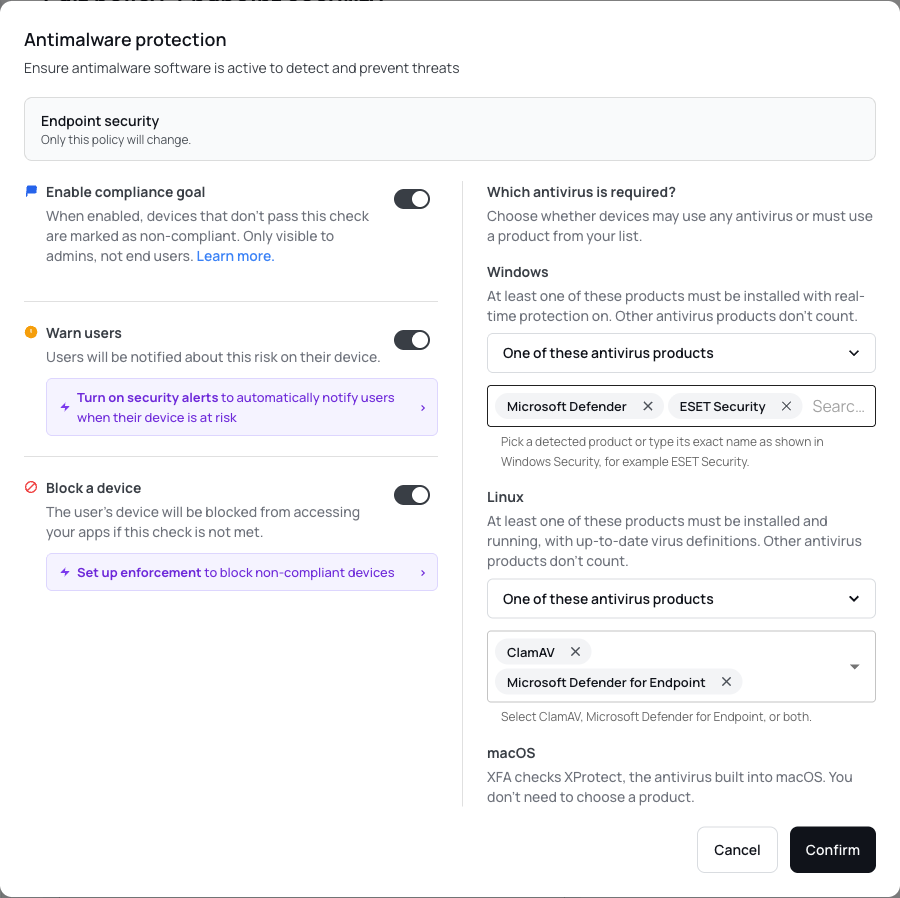 Require the antivirus products your organization uses (Beta) · Sep 2026
· source
· release history
- Adds policy configuration to require specific antivirus products on Windows (Microsoft Defender or Windows Security Center registered products) and Linux (ClamAV or Microsoft Defender for Endpoint) Require the antivirus products your organization uses (Beta) · Sep 2026 · source · release history
- Adds the ability to require specific antivirus products in device policy for Windows (Microsoft Defender or any product registered with Windows Security Center) and Linux (ClamAV or Microsoft Defender for Endpoint), with suggestions drawn from your device inventory.︀︄︇︀︅︉︀︅︀︀︃︀︀︅︅︀︅︊︀︄︆︀︃︄ Require the antivirus products your organization uses (Beta) · Sep 2026 · source · release history
- Adds Firefox DNS-over-HTTPS device check as a configurable per-organization policy. Browser privacy checks (Safe Browsing & Enhanced Tracking Protection) · seen Aug 2026 · source · release history
- Adds Chrome Safe Browsing device checks (standard and enhanced modes) as configurable per-organization policies. Browser privacy checks (Safe Browsing & Enhanced Tracking Protection) · seen Aug 2026 · source · release history
- Adds Chrome DNS-over-HTTPS device check as a configurable per-organization policy. Browser privacy checks (Safe Browsing & Enhanced Tracking Protection) · seen Aug 2026 · source · release history
End-user device security app shipped A menu-bar desktop app shows users a full overview of their device's security checks with pass/fail detail and step-by-step remediation guidance.
Shared capability: Security baseline assessment
release
- Adds per-organization views showing which checks each organization requires, kept separate from personal checks. Check your own computer, with or without an organization · Sep 2026 · source · release history
- Shows rolling-release Linux basis (last full update and local package vulnerability info) in Dashboard assessment Approve a sign-in without opening the tray menu · Aug 2026 · source · release history
- Adds direct approval/denial of MFA requests via OS system notifications instead of requiring the XFA tray menu Approve a sign-in without opening the tray menu · Aug 2026 · source · release history
- New full desktop app UI (macOS, Windows, Linux): users can open the menu-bar icon to see a complete device security overview. A New Look for the XFA Desktop App · seen Jul 2026 · source · release history
- Per-check pass/fail detail view shows every security check XFA runs with step-by-step remediation guidance for end users. A New Look for the XFA Desktop App · seen Jul 2026 · source · release history
- Adds a redesigned XFA desktop app interface available on macOS, Windows, and Linux that displays device security checks and fix steps directly from the menu-bar icon. A New Look for the XFA Desktop App · Jul 2026 · source · release history
example
-
Use to check if a specific device is passing all XFA security checks without waiting for IT.
Click the XFA icon in the menu bar on macOS, Windows, or Linux to view the full app and inspect individual check results.A New Look for the XFA Desktop App · Jul 2026 · source
Personal Device Security shipped Enables users to check their personal device security posture independently of organizational requirements, with support for self-invite onboarding and distinct view settings.
Shared capability: Security baseline assessment
release
- Enables self-invite in Awareness settings (Beta) so users can join their organization by entering a work email and confirming with a one-time code, without an admin-sent invitation.︀︄︇︀︅︉︀︅︀︀︃︀︀︅︅︀︅︊︀︄︆︀︃︄ Connect to your organization without waiting for an invitation · Sep 2026 · source · release history
- Enables adding personal checks alongside organization-required checks, with the ability to ignore individual personal findings independently of org requirements. Check your own computer, with or without an organization · Sep 2026 · source · release history
-
Adds
personalview in the XFA desktop app to check computer security without organizational connection Check your own computer, with or without an organization · Sep 2026 · source · release history - Adds a personal view in the desktop app for checking your computer's security posture without being connected to an organization.︀︄︇︀︅︉︀︅︀︀︃︀︀︅︅︀︅︊︀︄︆︀︃︄ Check your own computer, with or without an organization · Sep 2026 · source · release history
- Enables adding and ignoring personal findings alongside organization-required checks Check your own computer, with or without an organization · Sep 2026 · source · release history
Unsafe AI mode detection shipped XFA flags AI coding tools set to auto-approve all actions as unsafe and surfaces remediation guidance to the end user.
Shared capability: Security baseline assessment
release
-
Treats
bypassPermissionsas equivalent to--dangerously-skip-permissionsandautoas the same risk class — both auto-approving all tool calls including shell commands and network requests. Claude Code 'Auto' mode flagged as unsafe AI configuration · seen Jul 2026 · source · release history - Devices configured with either flagged mode now appear in the Unsafe AI Mode check with remediation guidance surfaced to end users in the in-app guide. Claude Code 'Auto' mode flagged as unsafe AI configuration · seen Jul 2026 · source · release history
-
Extends Unsafe AI Mode detection to flag Claude Code's
autoandbypassPermissionsvalues inpermissions.defaultModewithin~/.claude/settings.json(or~/.claude/settings.local.json). Claude Code 'Auto' mode flagged as unsafe AI configuration · seen Jul 2026 · source · release history
Security baseline enforcement 1 feature Endpoint investigation and controls since 2026
Device compliance policy enforcement shipped Admins define warn and block thresholds for non-compliant devices, with live previews and a compliance summary while editing policies.
Shared capability: Security baseline enforcement
release 8 total
- Enables individual platforms to have their own warning or blocking windows independent of the shared version policy Choose OS requirements for each platform · Sep 2026 · source · release history
- Adds a dedicated OS version policy for iPadOS, separate from iOS. Choose OS requirements for each platform · Sep 2026 · source · release history
- Supports per-platform OS version policies, letting you set distinct warning or blocking thresholds for Windows, macOS, Linux, Android, iOS, and iPadOS independently.︀︄︇︀︅︉︀︅︀︀︃︀︀︅︅︀︅︊︀︄︆︀︃︄ Choose OS requirements for each platform · Sep 2026 · source · release history
- Adds a compliance summary sidebar to policy detail pages, showing compliant, non-compliant, and missing-information device counts while editing policy settings. Policy Compliance Summary · seen Jul 2026 · source · release history
- Adds a threshold timeline and live timing summary to Enforcement policy editing, so you can see exactly when a device would be warned or blocked before saving. Clearer policy settings and a redesigned Discovery · seen Jul 2026 · source · release history
- New compliance status bar on the dashboard surfaces compliant, warned, blocked, and uncovered devices at a glance. Compliance Status Bar · seen Jul 2026 · source · release history
example
-
When configuring an Enforcement policy, use the live timing summary and suggestion chips to confirm warn/block windows before saving — eliminating guesswork about when devices will be affected.
In the Dashboard, go to Policies > Enforcement, create or edit a policy, and observe the threshold timeline and timing summary as you adjust warn and block windows. Select a suggestion chip (e.g.Clearer policy settings and a redesigned Discovery · seen Jul 2026 · source
Multi-factor authentication 1 feature Identity and access since 2026
Device snooze (temporary exception) shipped Admins can grant a timed exception to an individual device that pauses compliance checks and optionally MFA enforcement, with reason logging.
Shared capability: Multi-factor authentication
release
- When administrators enable the Beta self-invite option in Awareness settings, users can connect to eligible organizations with a work email and one-time code without a separate invitation. Connect to your organization without waiting for an invitation · Sep 2026 · source · release history
- Adds a setup wizard to guide users through initial configuration of personal device checks. Check your own computer, with or without an organization · Sep 2026 · source · release history
- Snoozed devices are hidden from overviews and analytics by default, with a Show snoozed devices filter to surface them on demand. Device Snooze · seen Jul 2026 · source · release history
- Adds Device Snooze to grant individual devices a temporary exception, pausing device checks and awareness notifications for a chosen preset or custom date/time window. Device Snooze · seen Jul 2026 · source · release history
- Enables explicit MFA inclusion in the snooze to also pause MFA for Enforcement sign-ins during the exception window. Device Snooze · seen Jul 2026 · source · release history
- Supports optional reason logging per snooze, and allows updating or removing a snooze from the same device action menu. Device Snooze · seen Jul 2026 · source · release history
example
-
Allow employees to onboard themselves to XFA without waiting for an admin invitation, reducing friction for large rollouts.
In the XFA admin console, go to Awareness settings and enable the 'self invite' toggle (marked Beta).Connect to your organization without waiting for an invitation · Sep 2026 · source -
Pause MFA enforcement for a device during the snooze window, in addition to pausing device checks.
In the console, go to Devices > (select device) > Action menu > Snooze device, enable 'Include MFA in snooze', set the end date/time, then click Confirm.Device Snooze · seen Jul 2026 · source -
Review all currently snoozed devices that are hidden from the default Devices overview.
In the console, go to Devices overview > enable the 'Show snoozed devices' filter.Device Snooze · seen Jul 2026 · source -
Grant a temporary exception to a device under repair so it stops triggering checks and alerts until a set date.
In the console, go to Devices > (select device) > Action menu > Snooze device, choose a preset or custom end date/time, optionally add a reason, then click Confirm.Device Snooze · seen Jul 2026 · source
Other / not yet classified 18 features Features we have not matched to a capability yet. A suggested match is marked.
Device Discovery shipped XFA connects to Microsoft, Google, or Okta to automatically discover every device in the organisation and show its status.
release
- Enables pre-installation of XFA via Microsoft Intune, Configuration Manager, or Jamf using an organization's enrollment token. Have XFA ready before the first sign-in · Aug 2026 · source · release history
- Disconnected Discovery integrations now surface a red alert and a Reconnect button on the dashboard, and count toward the Discovery badge. Guided setup, device posture at a glance, and rebuilt Statistics trends · seen Jul 2026 · source · release history
- Devices page now opens with Discovery, Awareness, and Enforcement status cards showing real-time counts (devices discovered, alerts sent, successful sign-ins) at a glance. Guided setup, device posture at a glance, and rebuilt Statistics trends · seen Jul 2026 · source · release history
- Redesigns the Discovery overview with a two-column layout and a provider picker that routes directly to a step-by-step setup page for Microsoft, Google, or Okta. Clearer policy settings and a redesigned Discovery · seen Jul 2026 · source · release history
- Devices table on the Dashboard now shows whether a device's Last Seen came from the XFA agent or from Discovery. Clearer policy settings and a redesigned Discovery · seen Jul 2026 · source · release history
- Discovery connection setup uses a new provider picker (Microsoft, Google, Okta) that opens directly into step-by-step configuration screens Clearer policy settings and a redesigned Discovery · Jul 2026 · source · release history
example
-
When onboarding Discovery for the first time, use the provider picker to connect an identity provider and start seeing all devices in your organization.
In the Dashboard, go to Discovery, click Add connection, select Microsoft, Google, or Okta from the provider picker, and follow the step-by-step setup page for the chosen provider.Clearer policy settings and a redesigned Discovery · seen Jul 2026 · source -
Use the provider picker to add an Okta discovery source without manual API key entry
In Integrations > Discovery, click Add connection, select Okta from the picker, and follow the step-by-step wizard.Clearer policy settings and a redesigned Discovery · Jul 2026 · source
Slack integration shipped XFA sends device risk alerts, enrollment invitations, and sign-in requests to users as Slack direct messages.
release
- Connects XFA to Claude, ChatGPT, or other compatible AI assistants via the Model Context Protocol (MCP) to query device, compliance, policy, and software-version data Ask questions about your devices, right in your AI assistant · Aug 2026 · source · release history
- Adds native Windows on Arm support with a dedicated binary build that eliminates x64 emulation overhead. XFA runs natively on Windows on Arm · Aug 2026 · source · release history
- Sends new-device enrollment invitations via Slack DM to streamline onboarding. Slack (awareness) connection · seen Jul 2026 · source · release history
- Connects XFA to a Slack workspace so end users receive device risk alerts as direct messages without email. Slack (awareness) connection · seen Jul 2026 · source · release history
- Delivers sign-in verification requests and safe-browsing policy notifications through Slack. Slack (awareness) connection · seen Jul 2026 · source · release history
- Slack messages are localized in English, Dutch, French, German, and Spanish. Slack (awareness) connection · seen Jul 2026 · source · release history
example
-
Enable the Slack integration so end users get device risk alerts and enrollment invites as DMs instead of email.
In the Dashboard, go to Integrations > Slack, connect your workspace, then toggle on the desired notification categories (device risk alerts, new-device enrollment, sign-in verification,…Slack (awareness) connection · seen Jul 2026 · source
Compliance posture dashboard shipped A real-time dashboard shows compliant, warned, blocked, and uncovered device counts broken down by compliance pillar.
release
- Devices page now opens with Discovery, Awareness, and Enforcement status cards showing real-time counts (devices discovered, alerts sent, successful sign-ins) at a glance. Guided setup, device posture at a glance, and rebuilt Statistics trends · seen Jul 2026 · source · release history
- New compliance status bar on the dashboard surfaces compliant, warned, blocked, and uncovered devices at a glance. Compliance Status Bar · seen Jul 2026 · source · release history
- Devices page opens with Discovery, Awareness, Enforcement status cards showing device counts Guided setup, device posture at a glance, and rebuilt Statistics trends · Jul 2026 · source · release history
example
-
Review overall policy health and spot devices needing attention without drilling into individual records.
In the XFA console, open the Dashboard and locate the Compliance Status Bar to see compliant, warned, blocked, and uncovered device counts at a glance.Compliance Status Bar · seen Jul 2026 · source -
Review your organization's posture across all three pillars after onboarding to identify which areas still need configuration.
In the XFA dashboard, go to Devices. The Discovery, Awareness, and Enforcement cards at the top of the page show current status and counts for each pillar.Guided setup, device posture at a glance, and rebuilt Statistics trends · seen Jul 2026 · source -
Check if the organization's device compliance pillars are active and how many devices are tracked.
In the dashboard, go to Devices and review the Discovery, Awareness, Enforcement cards for status and counts.Guided setup, device posture at a glance, and rebuilt Statistics trends · Jul 2026 · source
Microsoft Teams integration shipped XFA sends device risk alerts, enrollment invitations, and sign-in requests to users as Microsoft Teams direct messages.
release
- Enables disconnecting a Microsoft Teams integration from the Integrations page, matching existing Slack disconnect capability. Clearer policy settings and a redesigned Discovery · seen Jul 2026 · source · release history
- Connects XFA to a Microsoft Teams tenant so end users receive device risk alerts, new-device enrollment invitations, and sign-in verification requests as direct messages — no email required. Microsoft Teams (awareness) connection · seen Jul 2026 · source · release history
- Integrations page now supports disconnecting Microsoft Teams connections with the same workflow as Slack Clearer policy settings and a redesigned Discovery · Jul 2026 · source · release history
- Adds support for a new Microsoft Teams integration to deliver risk alerts and enrollment invitations as direct messages. Microsoft Teams (awareness) connection · Jul 2026 · source · release history
example
-
Connect your Microsoft Teams tenant to start delivering device risk and enrollment notifications directly to users.
In the XFA Dashboard, go to Integrations, select Microsoft Teams, and connect your tenant.Microsoft Teams (awareness) connection · seen Jul 2026 · source -
Disconnect a Teams integration that is no longer needed
In Integrations > Microsoft Teams, click Disconnect to remove the connection, matching the existing Slack workflow.Clearer policy settings and a redesigned Discovery · Jul 2026 · source
Localized user communications shipped User-facing messages are delivered in English, Dutch, French, German, and Spanish across all notification channels.
release
- Adds an organization-level default language setting under Settings > Organization, used for emails and messages when a user's own language cannot be detected or is not set on their profile. Set a default language for your organization · seen Aug 2026 · source · release history
- Settings → Organization now exposes a default language option for organizational emails and messages Set a default language for your organization · Aug 2026 · source · release history
- Delivers messages localized in English, Dutch, French, German, and Spanish. Microsoft Teams (awareness) connection · seen Jul 2026 · source · release history
- Supports localized messages in English, Dutch, French, German, and Spanish. Microsoft Teams (awareness) connection · Jul 2026 · source · release history
example
-
Configure fallback language for users with unknown profiles in XFA.
In the console, go to Settings > Organization and set the default language.Set a default language for your organization · Aug 2026 · source
Getting Started guided setup shipped A guided onboarding page walks admins through four setup steps from discovery to enforcement, with in-dashboard demo tours.
release
- Adds a Watch demo action in the Dashboard for Discovery and Enforcement sections, opening a guided tour without leaving the dashboard. Stronger mobile checks at sign-in, and a smoother dashboard · seen Jul 2026 · source · release history
- New Getting Started page walks through four tracked setup steps — from device discovery to compliance enforcement — so admins always know what to configure next. Guided setup, device posture at a glance, and rebuilt Statistics trends · seen Jul 2026 · source · release history
- Getting Started page lays out four tracked steps for setup progress Guided setup, device posture at a glance, and rebuilt Statistics trends · Jul 2026 · source · release history
- Dashboard Watch demo action for Discovery and Enforcement sections opens a guided tour without leaving the dashboard Stronger mobile checks at sign-in, and a smoother dashboard · Jul 2026 · source · release history
example
-
Use the new guided tour to understand Discovery and Enforcement features.
In the Dashboard, click 'Watch demo' in the Discovery or Enforcement section to start a guided tour.Stronger mobile checks at sign-in, and a smoother dashboard · Jul 2026 · source
NixOS support shipped Provides a system flake package that installs the desktop application and handles automatic updates alongside the NixOS system.
previously: NixOS flake support
release
- Adds NixOS support for the XFA Desktop Application, installable into a user's nix profile without root permissions, with auto-update and optional system-wide deployment via NixOS system configuration.︀︄︇︀︅︉︀︅︀︀︃︀︀︅︅︀︅︊︀︄︆︀︃︄ changelog · Oct 2026 · source · release history
-
Adds NixOS support for the XFA Desktop Application, installable via system flake with
nix flake update xfafetching the latest release and the running XFA switching over automatically.︀︄︇︀︅︉︀︅︀︀︃︀︀︅︅︀︅︊︀︄︆︀︃︄ XFA on NixOS · Oct 2026 · source · release history
example
-
Add XFA to a NixOS system flake so it installs and self-updates alongside the rest of the system.
nix flake update xfachangelog · Oct 2026 · source -
Add XFA to a NixOS system flake so it installs and stays up to date alongside the rest of your system.
nix flake update xfaXFA on NixOS · Oct 2026 · source
Unattended remote access detection shipped XFA detects whether a device permits unattended remote access and can enforce a block via policy, with a remediation link shown to the user.
release
- Device detail view now reports whether a device allows unattended remote access, with an explanation of what the check looks for and a link to act on it in policy. Guided setup, device posture at a glance, and rebuilt Statistics trends · seen Jul 2026 · source · release history
- Device detail view reports unattended remote access capability Guided setup, device posture at a glance, and rebuilt Statistics trends · Jul 2026 · source · release history
example
-
Check whether any enrolled devices allow unattended remote access and enforce a remediation policy against it.
In the XFA dashboard, open a device's detail view and review the 'Unattended remote access' check result, then go to your device policy to add or adjust the corresponding rule.Guided setup, device posture at a glance, and rebuilt Statistics trends · seen Jul 2026 · source -
Check if a specific device allows unattended remote access.
Open the device detail view to see the unattended remote access capability report.Guided setup, device posture at a glance, and rebuilt Statistics trends · Jul 2026 · source
Mobile device security checks shipped suggested XFA checks mobile devices for jailbreak, root, developer mode, and recent-reboot signals and can warn or block access per policy.
Suggested capability: Security baseline enforcement. This is our guess, not confirmed.
release
- Extends jailbreak, root, developer-mode, and recent-reboot signals from mobile devices into the access decision at sign-in, so risky mobile devices are warned or blocked per policy — matching existing desktop behaviour. Stronger mobile checks at sign-in, and a smoother dashboard · seen Jul 2026 · source · release history
- Mobile device risk signals (jailbroken, rooted, developer-mode, rebooted) are now evaluated in the access decision at sign-in per your policy Stronger mobile checks at sign-in, and a smoother dashboard · Jul 2026 · source · release history
example
-
If your policy already blocks or warns on jailbroken/rooted desktop devices, navigate to your device policy to confirm the same posture now applies to mobile at sign-in.
In the dashboard, go to your Device Policy settings and review the conditions for jailbroken, rooted, developer-mode, and recently-rebooted devices to ensure your desired warn/block action is set for…Stronger mobile checks at sign-in, and a smoother dashboard · seen Jul 2026 · source -
Review or configure policies to ensure mobile risk signals block access at sign-in.
In the Dashboard, go to Device Policy and verify that jailbroken/rooted/developer-mode/rebooted triggers are set to warn or block.Stronger mobile checks at sign-in, and a smoother dashboard · Jul 2026 · source
Notification configuration shipped Admins independently toggle each notification category, set delivery frequency, and send test messages before rolling out.
release
- Supports sending a test message per notification section to verify delivery before rolling out to users. Microsoft Teams (awareness) connection · seen Jul 2026 · source · release history
- Enables per-category notification toggles so admins can independently enable or disable each message type. Microsoft Teams (awareness) connection · seen Jul 2026 · source · release history
- Admins can toggle each notification category on/off and configure per-section delivery frequency from the Integrations page. Slack (awareness) connection · seen Jul 2026 · source · release history
- Enables admins to toggle individual notification categories and send test messages per section from the Integrations page in the Dashboard. Microsoft Teams (awareness) connection · Jul 2026 · source · release history
Lost connection device detection shipped XFA identifies devices where its agent has stopped reporting and provides tools to trigger re-verification.
release
- New Lost connection status highlights devices where the XFA agent has stopped reporting a verified status in the Devices overview. Lost connection status for devices · seen Jul 2026 · source · release history
- Request verification directly from the Dashboard to prompt users to reconnect the XFA app and resume device security status sharing. Lost connection status for devices · seen Jul 2026 · source · release history
- Filter by Lost connection status in both the Devices and People views to quickly identify affected endpoints. Lost connection status for devices · seen Jul 2026 · source · release history
example
-
Identify and remediate endpoints that have gone silent — filter the Devices view and trigger re-verification without leaving the dashboard.
In the console, go to Devices > filter by status 'Lost connection', select affected devices, then click 'Request verification' from the Dashboard to prompt users to reconnect the XFA app.Lost connection status for devices · seen Jul 2026 · source
Screen lock timeout enforcement shipped Admins set a maximum screen lock timeout and XFA verifies every device's configured timeout stays within that limit.
release
- Adds maximum screen lock timeout enforcement: admins can set a maximum allowed timeout duration (in minutes) in their organization's policy, and XFA verifies the device's configured timeout does not exceed it. Screen lock timeout enforcement · seen Jul 2026 · source · release history
- Combines timeout check with existing screen lock enable/disable check — both must pass for a device to be compliant. Screen lock timeout enforcement · seen Jul 2026 · source · release history
- Supports platform-specific timeout detection on macOS, Windows, and Linux. Screen lock timeout enforcement · seen Jul 2026 · source · release history
example
-
Tighten idle-device security by capping how long employees can set their screen lock timeout — useful for regulated environments requiring short inactivity windows.
In the XFA console, go to your organization's policy settings and set the maximum screen lock timeout (in minutes) under the screen lock enforcement section.Screen lock timeout enforcement · seen Jul 2026 · source
Custom onboarding and sign-in messages shipped Admins can add custom text such as policy links or runbook URLs to device onboarding and sign-in cards.
release
- Enables configuration of onboarding and sign-in messages from the Applications page in the Dashboard. Custom onboarding and sign-in messages · seen Jul 2026 · source · release history
- Adds custom text messages to the bottom of XFA's device onboarding and sign-in cards, with separate messages for each flow. Custom onboarding and sign-in messages · seen Jul 2026 · source · release history
example
-
Reinforce your acceptable-use policy or link to an internal runbook exactly where end users will see it during device onboarding or sign-in.
In the Dashboard, go to Applications > [your application] and set the onboarding message and sign-in message fields at the bottom of the card configuration.Custom onboarding and sign-in messages · seen Jul 2026 · source
Statistics and trends dashboard shipped A trends view shows compliance metrics over a chosen date range with OS filtering and multiple chart types.
release
- Statistics Trends rebuilt out of BETA: four metric tiles as tabs, unified chart with period/OS filter/chart-type controls inline, and custom date range support. Guided setup, device posture at a glance, and rebuilt Statistics trends · seen Jul 2026 · source · release history
- Statistics trends rebuilt into a single card with period, OS filter, and chart type tabs Guided setup, device posture at a glance, and rebuilt Statistics trends · Jul 2026 · source · release history
Linux one-line bootstrap installer shipped Linux devices can be enrolled using a single bootstrap command, removing the need to manually select and download a package.
Also counts toward: Command-line interface
release
- Adds a one-line bootstrap installer for Linux, eliminating the need to manually select and download a package. Easier Linux installation · seen Jul 2026 · source · release history
example
-
Install XFA on a Linux host without navigating package dropdowns — paste and run.
curl -fsSL https://distribution.xfa.tech/xfa-native-desktop-application/install.sh | shEasier Linux installation · seen Jul 2026 · source
AI Assistant Integration (MCP) shipped Connects the cyber tool to external AI assistants via the Model Context Protocol, allowing natural language queries about device security posture, compliance, and policy data.
Also counts toward: Natural-language query
example
-
Connect an external AI assistant to XFA using MCP to ask natural language questions about device security posture.
Configure your AI assistant (e.g., Claude, ChatGPT) with the Model Context Protocol (MCP) connection settings provided in the XFA dashboard.Ask questions about your devices, right in your AI assistant · Aug 2026 · source
Billing access for blocked accounts shipped Accounts blocked for billing reasons can still open Settings to download invoices and resolve the issue.
release
- Accounts blocked for billing can still open Settings to download invoices. Clearer policy settings and a redesigned Discovery · seen Jul 2026 · source · release history
Missing-information device identification shipped Admins can filter for devices that are missing information required to finalise their compliance status.
release
- Enables admins to identify devices with missing information that require verification before compliance status is finalized. Compliance Status Bar · seen Jul 2026 · source · release history
Lines in monospace are the tool's own words: help text
parsed from its source, or an endpoint from its API document. Under
release, a line is our summary of a dated release. Under
docs, it is quoted from the tool's own documentation or
website. Each links back to the source it came from.
Command line
2 commands for XFA, each with where it came from. This tool has no source analysis yet, so there is no option reference and no captured run beside them.
No command matches.
Screenshots
From the release notes, newest first. Click one to see it full size.Score card
-
Shipping velocity releases a month, last 12 months
-
Documentation quality release-notes rubric, 0–100
-
Breaking-change discipline how rarely a release breaks users, and notice given
-
Maintenance risk quiet time against its own cadence, maintainers
-
Innovation & surface new capabilities, API and MCP surface
Five scores for XFA, each built from the releases, notes and API history this site tracks — and, on Researcher and Business, where it stands among every measured tool in its category and how that has moved.
Score cards are part of every paid plan.
See plans → Already subscribed? Sign in →Trajectory
Blank means never measured; nothing here is a filled-in zero.
Peer standings are included with Researcher and Business. See how this tool ranks against its competitors, using data we don't publish anywhere else.
See plans →Each score is 0–100 on a published rubric, derived from data this site already shows. A dimension we cannot measure says so — it is never scored 0 and never enters a rank.
How this is scored
- Shipping velocity — releases a month over the last 12 months, on a log scale where 16 a month scores 100. Needs 3 releases in the window.
- Documentation quality — the release-notes rubric published on the analytics page, unchanged.
- Breaking-change discipline — the share of releases carrying a breaking change (none scores 100, half or more scores 0). Only projects that label breaking changes are measured: a clean record cannot be told from an unlabelled one.
- Maintenance risk — quiet time measured against the tool's own release cadence (quiet longer than 90 days and three typical gaps scores 0), plus the number of active maintainers and whether contributors are growing, where known. Higher is lower risk.
- Innovation & surface — new capabilities in the feature ledger this year, API and MCP operations added, and the share of commits that are features: the mean of whichever we hold.
- Community health (open-source tools only) — each is a direction, not a size: contributors this year against last, the bus factor now against a year ago, and issues closed per issue opened, where steady scores 50, doubled 100 and halved 0; plus the median time to a maintainer's first reply (an hour scores about 100, a month or more 0). A commercial card has no repository and carries none of the four.
- Documented delivery (commercial tools) — when a vendor's documented new capabilities have slowed against its own baseline, that counts against the overall standing as heavily as two low dimensions. Steady delivery, or too little history to judge, leaves the standing alone; it is never a sixth score.
- Open-source tools are scored on repository signals; commercial tools on their published changelog. Ranks compare tools within one category and one profile and need at least five measured peers; the overall standing needs three ranked dimensions. Best-in-breed or consolidator is a shape, not a quality, and is never scored.
Release-note detail over time
See how much detail XFA puts in its release notes, quarter by quarter, and compare it with tracked tools in the same category. This history uses up to ten retained, reviewed notes per tool; sparse or blank older quarters may reflect that limit.
Checking release-note history…
Coverage
Missing something? Tell us
What XFA connects to, runs on and detects, read from its release notes and docs. So far: 3 new supported platforms.
3 changes, tracked since Oct 13, 2026.
-
Oct 232026
new NixOS support for XFA Desktop Application
The XFA Desktop Application now runs on NixOS. Install it with the same command as on every other Linux: it goes into your own nix profile, without root permissions, and XFA keeps itself up to date. Admins who manage NixOS centrally can add XFA to the system configuration instead.
-
Oct 162026
new NixOS support for XFA Desktop Application
The XFA Desktop Application now runs on NixOS. Add XFA to your system flake, rebuild, and XFA is installed and kept up to date with the rest of your system
-
Oct 132026
new NixOS support for XFA Desktop Application
The XFA Desktop Application now runs on NixOS. Add XFA to your system flake, rebuild, and XFA is installed and kept up to date with the rest of your system: nix flake update xfa fetches the latest release, and the running XFA switches over by itself.
Other 1
Nothing first seen in this window. That doesn't mean XFA shipped nothing, only that we found no record of it.
How we count
Read from 4 of 37 release notes and docs updates we hold for XFA. "First seen" is the earliest note that names something; "last" is the latest. Our history may start partway through XFA's life, so an old integration can show a recent first-seen date.
Each change counts once: "added 40 checks" is one line, so the numbers measure how often coverage moves, not how big the catalogue is or how well it detects.
Releases
37 entries
No entries match these filters.
- October 20263
- September 20265
- August 20268
- July 202621
Add the badge to your README
Maintain this project? The badge links readers straight to this page, so they can follow every release here.
 Choose a badge style and copy the code →