New on the Toolchain — issue 002, October 5, 2026
 THE CYBER TOOLCHAIN
NO. 002
155 improvements to help you get more from the Toolchain. 17 tools arrived on the Toolchain this week.
ISSUE 002 · 2026-09-27 → 2026-10-04
New Features & Improvements 155
This week's improvements to the Toolchain.
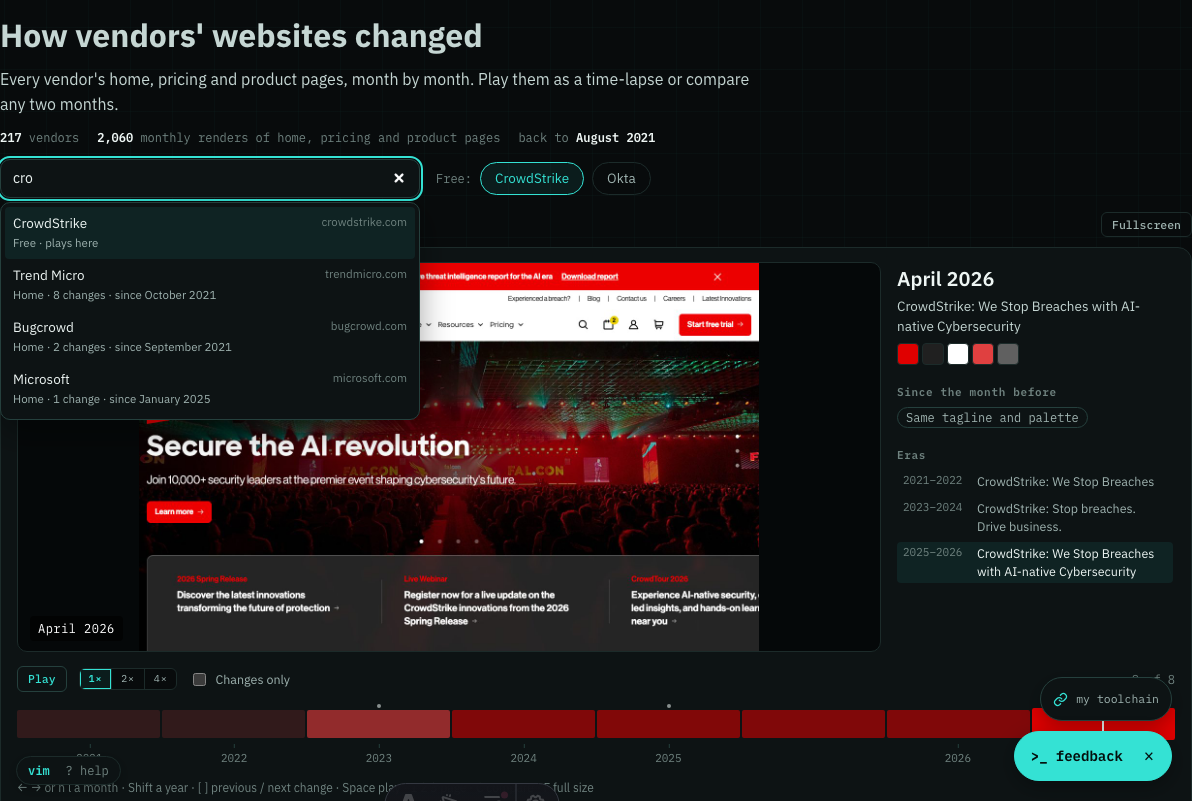
Spot changes to a vendor’s website
Website history now fits on one screen, with the month timeline right under the page, so you can watch a vendor's site change without scrolling away from it. A vendor filter at the top takes you straight to any vendor's history: type a name instead of hunting through a list.
Find tools for a defensive requirement
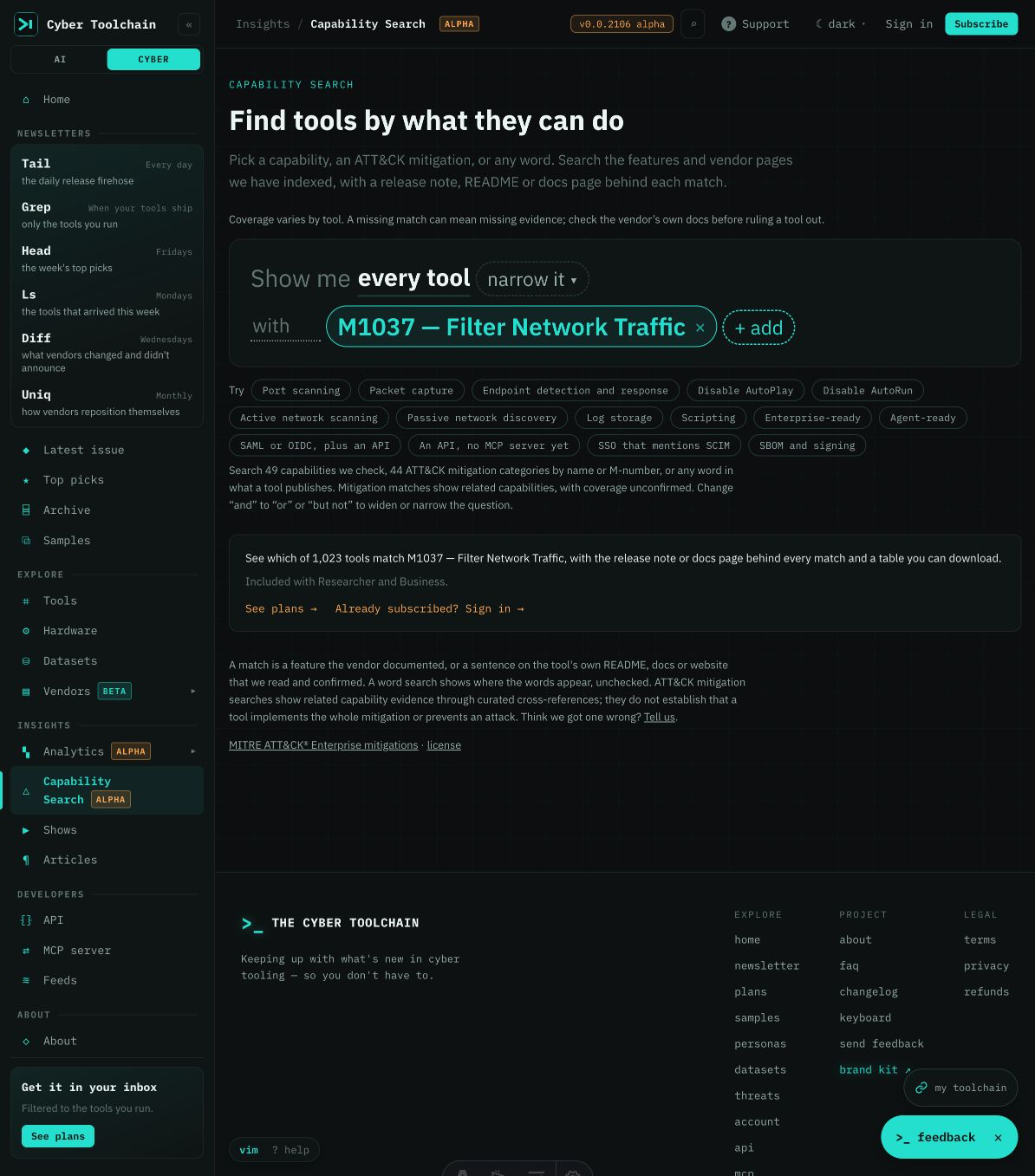
Find tools by MITRE ATT&CK mitigation, such as Vulnerability Scanning (M1016) or Filter Network Traffic (M1037). Search by name or M-number to see related documented capabilities and their sources, so you can compare products against your defensive requirements. Included with Researcher and Business.
Compare vendors in one place
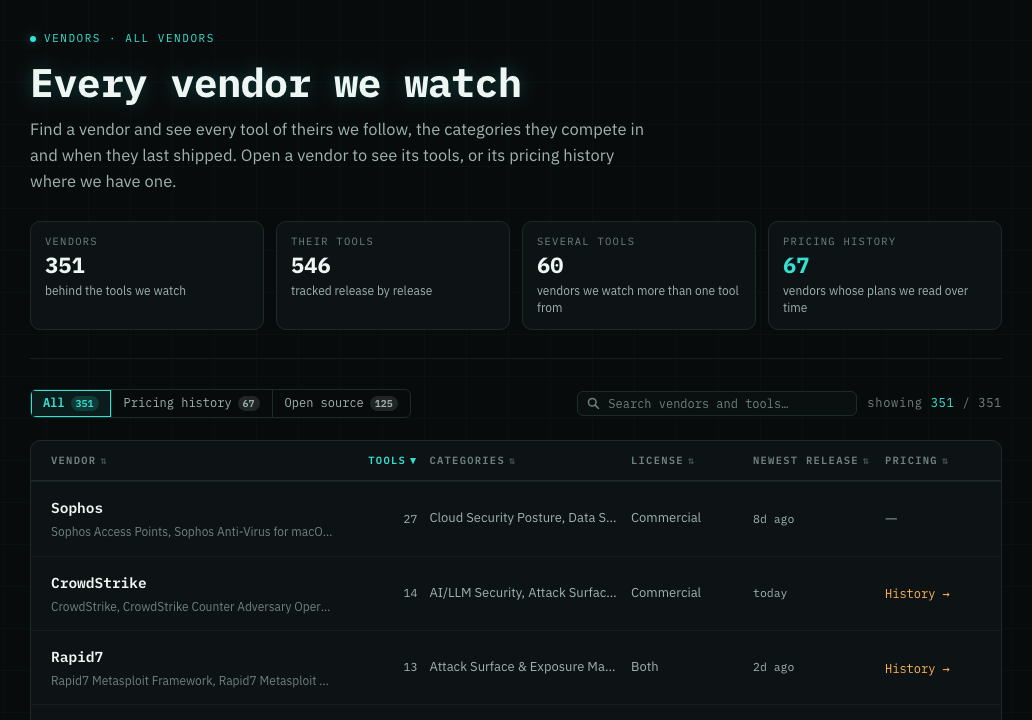
New: All vendors, under Vendors in the menu. See every vendor behind the tools we watch on one page, with how many of their tools we follow, the categories they compete in and when they last shipped, so you can size up a vendor without searching tool by tool.
More of the terms used in our issues now have short explanations, including NTLM, CIDR, PKCE and personal access tokens. Compact issue summaries also explain terms such as ACL, so you can understand an update before opening its full details. Hover, focus or tap a dotted term to read it.
More of the terms in an issue now explain themselves, including SBOM, OIDC, EPSS and eBPF. Tool-page introductions and summaries also have these short explanations, so you can understand what a tool does without leaving the page. Hover, focus with your keyboard or tap a dotted term to read it.
Vendors now has a Website history page. Pick any vendor to see how its home, pricing and product pages changed month by month, so you can spot a rebrand or a pricing change the month it landed. The CrowdStrike and Okta histories are free to step through, no account needed. Every other vendor's history is included with Researcher and Business.
Plans and samples now agree: one Grep for up to three tools is free, and paid samples take you to the plans that include them. Each product appears once in the catalog. Research pages explain what is indexed and what missing evidence means, so you can judge the coverage before subscribing.
More of the technical terms in an issue now explain themselves. Algorithms like ML-KEM and ML-DSA, and standards like FIPS 140-3, carry a dotted underline wherever they appear in a tool's summary, feature list or examples, not only in the opening paragraph. Hover or tap for a sentence on what the term is, and the explanation now stays inside the card instead of being cut off at its edge.
147 more improvements
A tool's Coverage section now opens with what changed in plain words, like "In the last year: 26 new integrations", and groups each change under Integrations, Detections or Platforms with its date and source. You no longer have to work through dropdowns, a one-bar chart and repeated quotes to learn what a tool newly supports. In each release, Coverage lists the new integrations or detections by name instead of hiding them behind a count.
Analytics now shows which tools attackers actually use, and how that is shifting, from the attacks researchers and vendors write up. So far in the second half of 2026, remote-access software like ConnectWise and AnyDesk turns up in about three attacks in ten, more than any other kind of tool, while offensive frameworks are down to fewer than one in ten. A table lists the most-used tools of the last 12 months, and a checkbox adds Windows built-ins like cmd and PowerShell.
Opening Uniq from the menu now takes you straight to your latest issue, with no sample flashing up first. The issue also opens inside the site, with the menu and your chosen theme, instead of as a bare email page.
Capability Search understands more capability names, including port scanning, packet capture, EDR, AutoPlay, AutoRun, active and passive discovery, log storage and scripting. Results distinguish confirmed capability evidence from mentions, and an unassessed capability does not count as missing.
Threat coverage uses verified techniques and checks that product-specific content applies to the threat. A report that only mentions a tool is listed separately from documented use in an attack, and response content we have not indexed is shown as unknown.
Capability search's but not now leaves a tool out when anything it publishes mentions what you asked to exclude, even unconfirmed. Tools we hold too few features for are no longer listed as if they passed, so the list you get is one you can trust to lack it.
Articles on a tool page are cleaner. A vendor's own blog or lab no longer counts as an outside article about its own tools, headlines keep their acronyms (CVE, not Cve), and an article with a date in the future shows no date rather than a wrong one.
On the score card compare page, the tool list now closes when you press Escape or click anywhere else, so the score cards you picked are right there to read instead of hidden under the list.
Billing settings now require the email address used for payment. Refunds update the account that received the subscription, even when its sign-in address differs from the billing address.
Release and documentation history is saved safely when jobs run at the same time. Interrupted email sends are held for review to prevent duplicate issues. If our scraping protection blocks you by mistake, the block page now gives you a working support address.
Website history now shows only the vendor's own site. Snapshots from before a vendor owned its domain, parked pages, bot checks and pages that failed to load are left out of the timeline and Then & Now.
Capability searches now separate MITRE D3FEND defensive techniques from general analytics methods, reducing unrelated matches. Defense references distinguish framework guidance from evidence about a specific tool.
Switching to The AI Toolchain from a newsletter issue or the vendors page now takes you to the same series or the vendors page there, instead of dropping you on the newest Tail issue or the home page.
Head test emails now link to the exact published issue, so you can move from the inbox preview to the full edition on the website.
See how every vendor's home, pricing and product pages have looked month by month since 2021, and step through the years from your keyboard. Included with Researcher and Business.
Articles on a tool page now quote the article itself. Each row shows the sentence where the article names the tool, with the name in bold, and a click on more quotes shows up to two more. You can tell what an article says about the tool before you open it.
Tool pages are easier to scan. Articles now list each one by its real headline with the date in its own column, so you can see at a glance what is recent. Threat coverage leads with three counts, and each threat shows the CVE or technique it matched and the content that covers it. On the command line view, new in next to an option is now a link that opens that release's changes.
The Supply chain page now opens with a chart of how few packages reach most of the cyber tools we track: four packages touch half of them and twelve touch 80%. Each bar is the dependency that would hit the most remaining tools if it broke, and the line counts how many are reached so far. Click a bar to list the tools that use that package.
The samples page now shows one sample at a time. Pick Tail, Head, Diff, Uniq or Charts from the tabs at the top and read just that one, instead of scrolling past every other sample to find it. Each sample has its own link, so you can send someone straight to the one you mean.
The Diff sample on the samples page now opens on the full diff, so the first thing you see is the documentation itself changing, line by line. It also has a better example: Cribl quietly documented an MCP server for Cribl AI and a new Guard recommendations feature, with no release post to announce either.
The Uniq sample now shows how vendors changed their pricing, not only how they describe themselves. You can see Dradis Framework drop its published prices for a single quote-only plan, and CrowdStrike add a free trial, each with the plans that appeared and disappeared.
New on the Toolchain issues now open as a proper page on the site, with the same masthead, edition switcher and layout as Tail and Head. Before, the page showed the email as it was mailed, so it looked out of place and was hard to read on a phone. Each pick links to its tool page, and Watch adds it to Your Tools in one click.
The samples page now shows Uniq, taken from a real issue: four identity vendors rewriting how they describe themselves, word for word, and the terms the market moved toward that month. It also appears on the Uniq page and in the plans dialog. Every sample now carries a Sample tag, so you can tell a past issue from the newest one at a glance.
Top picks now puts the winners up front instead of in a list. The newest pick of the quarter and pick of the month each get a full card with why it won, how long it held a Head spot, the rivals it beat and three things to try, with last period’s pick just below. A countdown shows how many days are left in the current quarter and how many Head picks are in the running, so you can see the next winner taking shape. Every earlier pick is one click away at the bottom.
Score card and Supply chain now sit under Analytics in the left-hand menu, with every question the charts answer listed below them: hiring, markets, shipping, code and the rest, each with how many charts it holds. Pick one and the analytics page opens filtered to just those charts, so you can go straight to the question you came with instead of scrolling the whole page. The menu opens with a click and stays open as you move around the site.
The vendors page now opens with a chart of how often cyber tool vendors change their pricing, quarter by quarter, and which way list prices move when they do. Right now that is about two in three vendors every quarter, and price changes mostly go up: 12 rises against 6 cuts. On the analytics page, two new market charts show how many vendors still put a price on every plan and which months the market reprices most, so you can time a renewal or a pricing review against what everyone else is doing.
The Tools page now opens with a chart of how much the watchlist shipped each week over the last year, so you can tell at a glance whether the latest week was busy or quiet. Hover any week to see its releases and how many tools shipped. The cards underneath compare the latest week with the four before it and show how the watchlist has grown.
The test datasets page now opens with a chart of how many datasets there are of each type, from vulnerable targets to packet captures, with the ones that contain live malware hatched. You can see what is on offer before you scroll, and click any bar to show only that type in the table. Click it again to see everything.
Click any newsletter in the left-hand menu to land where you meant to go. Tail, Head and Ls open their newest issue. Diff, Grep and Uniq open their own page, which says when each one arrives and which plan includes it, with a real sample where we have one. If your plan already includes it, you go straight to your newest issue.
Every table on the site now filters the same way: click a column heading to filter by it. On the vendors page, click Vendor to find a vendor or any of its tools. In the newsletter archive, click Issue to find an issue by name, or Inside to pick a tool and see every issue that covered it, busiest first. Each filter shows as a chip above the table, the heading turns teal while it is set, and clicking the chip clears it, just as on the tools and datasets pages.
The top of the threats page now shows two charts for the CVEs being exploited right now. Defense gap shows how many have a check, rule or module written for that exact CVE, how many have nothing at all, and where the gaps sit from discovery to detection. Time to first defense shows how long after CISA listed each one a tracked cyber tool first named it. You can see at a glance whether the tools you rely on keep up with what attackers are using, and switch both charts between the last 90 days and the last year.
The newsletters now sit at the top of the left-hand menu, always open, each with a line on what it covers and the day it arrives, so you can pick the one you want without opening a submenu. The series you are reading is highlighted, and Latest issue no longer lights up when you are on the archive or top picks.
Capability gaps is now Capability Search. Ask for the capabilities you need, or any word, join them with or and but not, and search every cyber tool we follow at once instead of one category at a time. Each match shows where the vendor says it, with a link, so you can check it yourself before you shortlist a tool. Click a row to see every piece of proof for that tool. Old capability gaps links still open your question. Included with Researcher and Business.
Open any threat on the threats page to see each control you can put in place against it, from finding where the affected product runs to detection rules, and which of those already have content built for that threat. You can tell in one glance what you can deploy today and where you are on your own. With Researcher or Business you also get the tool for each control, the rule itself and the command to run it.
Every page on the site is now listed in a menu down the left side, grouped into Newsletters, Explore, Insights, Developers and About, so you can find any page without guessing where it lives. The bar along the top shows where you are and keeps search, a Support menu for feedback and help, the theme and your account in one corner.
Press ⌘K (Ctrl-K) to see every page on one screen, each with a line on what it is for, plus quick theme and site switches. Start typing and it searches cyber tools, issues and articles the way it did before.
Looking for an older issue? The newsletter archive now opens with the newest issue of each newsletter, then lists every issue in one table. Search it by tool name, sort by issue, date or number of updates, and narrow it to Tail, Head, Diff or reconstructed issues with the labeled buttons above it. Click a month on the chart to see only that month's issues.
The tools in the homepage terminal are now links. Click one and you land on that tool in the newest issue, even if you read issues at Briefed depth, so a release that catches your eye is one click away. The terminal also lists only tools that issue actually covers, and the issue's Contents box now counts the tools it is showing.
The menu now marks pages that are still early: Analytics, Supply chain, Score card and Capability Search carry an alpha tag, and Vendors carries a beta tag. Alpha means expect rough edges and changes; beta means it works but is still being refined.
Compare score cards for up to six cyber tools side by side on the Score card page. Find tools by name, vendor or category, or start from your toolchain, and see which one leads on shipping, documentation, breaking changes, maintenance and innovation without opening each tool page. Every paid plan can compare scores. Researcher and Business also see where each tool ranks among its peers. Copy the page link to share the same comparison.
You can now find the privacy policy, terms and refund policy from site search. Type privacy, terms, refund or just policy and they come up.
The Tools page has a new Backup & Recovery category: follow restic, BorgBackup, Kopia, Velero, Veeam, Kasten, Commvault, Cohesity, Druva, Acronis and Rubrik to see whether the layer you recover from ransomware with is keeping up.
When you are signed in, the top-right corner shows one account menu with your plan, account settings, billing, appearance and sign out, so you can tell at a glance that you are signed in.
A tool that ships several releases in one issue now stays in one rolled-up section even when one of those releases adds coverage, such as new detections, checks or integrations. Before, a single coverage update split the tool back into one card per release, so you scrolled past near-identical cards to find what changed. The coverage release still shows below the section.
The tool catalog and search now list only cyber tools. A few hundred AI developer tools had slipped in from our sister site and cluttered your results, so you can find the tool you came for faster. Those tools still have their pages on aitoolchain.io.
Pick an attack type and get a short list of cyber tools that cover it together, stage by stage, starting from the tools you already run. You see what each tool adds, what the stack still leaves open, and which tools work with each other, so you can plan coverage instead of guessing. Included with Researcher and Business.
Tool pages now show how many of the last year's threats a tool has content for, so you can judge its coverage before you adopt it. With Researcher and Business you also see the threats one by one and how similar tools compare: which threats only this tool covers and which ones its peers cover instead.
Shortlisting cyber tools? Capability gaps lets you enter up to five capabilities you need, pick a category, and see which tools document each one, with a link to the feature or the sentence on the tool's own README, docs or website that says so. You can check every match yourself and download the table. Included with Researcher and Business.
See which tools help with each new KEV entry and campaign, from checking exposure to testing a fix. Every threat on the new Threats page shows how many tools have a check, test or detection for it at each stage, so you can spot the exploited CVEs nobody covers yet. Researcher and Business plans see the tool, the check and the command to run.
Vendor pricing histories now show a vendor's whole lineup, including offerings sold without a list price, like Rapid7's managed detection and response service. When an offering has its own page of plans, those plans now appear under the board, so you can compare a vendor's tiers without leaving the page.
Signing in no longer turns your email back on. If you unsubscribed, your account page now says your email is off and gives you one button to start it again. Subscribing again or buying a plan also starts it.
Tool pages now have an Articles section: tutorials that teach the tool, attack reports that name it, incident write-ups, and research on attacks against the tool itself. Each row says why it is listed and links straight to the publisher, so you can learn a tool and see how attackers use it without leaving its page.
The Vendors page now opens with the numbers that matter at a glance: how many vendors you can follow, how many changed their plans, how many relaunched their lineup outright, and how many pricing-page readings sit behind it. You see the size of the market's pricing churn before you scroll, instead of digging the figures out of a paragraph.
Ask your AI assistant which cyber tools can do something, in your own words. Through our MCP server, detect kerberoasting also finds tools that document Kerberos ticket analysis. The answer lists the other names it searched, so you can see why each tool came back.
Tool pages now list more how-to guides in their Articles section, from TecAdmin and Tecmint, so you can find a step-by-step walkthrough for tools like Fail2ban, Trivy, Kubescape and Terraform on the same page as their release history.
A plan you buy while signed in now lands on the account you are signed in to, whatever email you type at the payment form, so your newsletters and charts unlock where you already are.
If your plan has ended, your account page shows the plans again, so you can pick one up where you left off.
Paid charts now unlock on the page you are on even when the first check of your plan does not go through, instead of waiting for the next page you open.
A welcome or purchase email that did not go out the first time is sent again, with a sign-in link, so you still have a way in.
Pressing Escape in a table's search box now steps out onto the first match and keeps your filter, so j/k or the arrow keys pick a row and Enter or Space opens it.
When a sign-in email cannot be sent right away, the page now says so and asks you to try again in a moment, instead of telling you to check your inbox. The same goes for the Continue button on a sign-in link: a busy moment asks you to press again, instead of saying your link expired.
Checkout now tells you when the payment form cannot load, which an ad blocker can cause, and gives you an address to write to.
Buying a plan after saving your preferences as a free reader now turns on that plan's newsletters. Before, they stayed off until you found the switches yourself.
If you pay yearly, moving up a plan or adding the second site now keeps you on yearly billing. A partial refund no longer ends your plan.
If your sign-in runs out while your account page is open, pressing Save now gives you a button for a new sign-in link, instead of a message with nowhere to go. And if your browser blocks cookies and site data, the account page says what to allow instead of loading forever.
The Plans page no longer says the methodology is open without an account. It comes with every paid plan, and the page now says so.
The dotted arrow pointing at Subscribe on the home page now keeps moving the whole time you are on the page, instead of fading in and out.
The site's wording was rewritten to read plainly, across the home page, About, FAQ, Plans, API, analytics, Methodology, Scorecard, Samples, Personas and the post-purchase page. Plans now state the real API and MCP limit, 50,000 requests per key in any 24 hours, instead of calling it unlimited, and the paid-only charts are described as charts that only paid plans can see.
Keyboard shortcuts now work the same on every list. Filter an API page, press Enter, and j/k step through the matching endpoints; Space or Enter opens one. The same goes for vendor pricing timelines, release history, the archive, FAQ, changelog and more, where j used to just scroll. The focus ring around buttons is no longer cut off.
Tool pages now reach much further back. For hundreds more tools, the release history goes back years instead of weeks, so you can see when a capability first appeared and how a tool got to where it is today. Before, many pages only showed what shipped since we started tracking them.
Command-line tool pages that showed an empty command box now show the commands you would actually run. Before, a handful of tools told you they had a command-line interface but not how to use it; now you can copy the first command straight from the page.
While typing in a table's search box, Ctrl+N and Ctrl+P (or Ctrl+J) now step down and up through the matching rows, alongside the arrow keys, so you can filter, pick a row and press Enter without leaving the keyboard.
Methodology now comes with every paid plan. Sign in and /methodology takes you to a plain-language guide to every chart and score. It tells you what each one counts, what it misses, and how far to trust it before you quote it.
The Vendors page is now a table you can work with, like the tools catalog. Sort by plan relaunches, other changes, readings or dates. Search by vendor or product name. Narrow it to vendors that relaunched their plans or have not changed yet. Click any row to open that vendor's pricing history. You can spot who repackages most often in a few seconds instead of reading down a fixed list.
You can now choose which tools get a Grep Report. Under Monthly Reports and Quarterly Reports on your account page, Edit opens a list of the tools you named in your Greps: untick any you don't want and save. Each cadence has its own list and its own limit of 10 reports, busiest tools first, so leaving a quiet tool out makes room for another. Categories do not get reports, only named tools do.
The API keys card on your account page is easier to use. The REST API and the MCP server each get their own panel, with what it's for, a link to the docs and a button that copies the full address. Each key now shows its name, the last characters of the key, its description and when it was last used, with a clear Revoke button.
The plans page now says plainly what each plan sends you and when. Tail arrives every day, Grep, Diff, Uniq and Perf each say what you receive and on which day, and the persona editions and extra reports have their own rows, so you can pick a plan without guessing what is in it. The FAQ and your account page use the same wording.
Vim keys now work the way your fingers expect: h and l move left and right between buttons, and h j k l turn the issue view dial and browse the issue picker, which opens your pick on Enter. The keyboard help window also matches your color theme instead of flashing a dark terminal over a light page.
Cards and panels now share one shape, edge and corner across the site, and every card you can click shows a clear outline when you reach it with the keyboard. The article topic filter works again, and the home and articles pages no longer scroll sideways on a small phone.
Each monthly and quarterly top pick now opens on a card you can share, next to why we picked it. Below it, How it won lays out every Head week the pick was chosen from and traces the product through them, so you can see what it beat and how often it made the list. Each release now lists its new features one line at a time, and you open only the ones you want to read.
On the plans page, See what each persona keeps now opens a side-by-side preview instead of a page of text. Pick a persona to see a real entry as written next to how that persona's edition reads it, plus what it keeps and what it leaves out, so you can tell which edition fits you before you choose a plan.
Tables, search boxes, dropdowns, tabs, tags and pop-up windows now look and work the same on every page, so once you know one you know them all. Everything works from the keyboard: Escape closes any menu or window and puts you back where you were, search boxes clear with Escape and tell you how many results match, and sortable tables say which way they are sorted. A chart or list that fails to load now says so and offers Try again, instead of showing Loading forever.
The home page's monthly top pick now tells you why it won. You see what the product shipped and why it mattered, instead of a one-line verdict.
Small print is easier to read across the site. The top bar, the delivery table on the plans page and the captions on the weekly top picks were a shade too faint, and the light and sepia themes get slightly deeper greys and accents, so every page now meets the standard readability bar in all four themes.
You can now use the site without a mouse. Press ? on any page to see the keys that work there: in vim mode, j and k move down a list, Space stars a tool, and g then t opens Tools. Pick emacs for Control keys on a Mac, or off to leave letter keys to your browser and screen reader. The arrow keys move between buttons in every mode. Signed in, your choice follows you to every device, and you can change it under Customization on your account page.
Your monthly Uniq email now shows what changed in the cyber tools you watch, backed by each vendor's own dated release notes, with what to check before you upgrade. You can see which of your tools moved without reading every changelog yourself. Included with Practitioner, Researcher and Business.
You can now track the hardware you hack with. The new Hardware tab lists 30 devices, including Flipper Zero, HackRF One, the WiFi Pineapple and the rest of Hak5's kit, Proxmark and Chameleon RFID tools, and the boards you use to probe other hardware. Each one shows its price and stock on the vendor's store, checked daily, its spec, where it stands in availability, and the firmware releases that run on it. So you can see what a device costs and whether it is in stock before you go looking, and catch a sell-out or a price move in your daily issue.
Every row in the tools list is easier to read. The faded rss label is now a small feed icon that still copies the feed, and tools without maintenance data show a readable ○ Unknown instead of near-invisible grey. The yearly price on the plans page is clearer too.
Code samples in articles now sit in the same terminal window as the rest of the site, with a copy button, so you can paste a command straight into your shell.
Buttons now look and work the same on every page. The main action is always the filled button, and quieter actions like copy or export share one outline style, so you can tell at a glance what each button does. A few buttons that showed in the wrong font now match the rest of the site.
Tool pages now sort a tool's features into named capabilities, so you can see what a tool can actually do instead of a short list of loose areas. Wireshark went from 3 features to 53 across 20 years, grouped under headings like Protocol dissection, Display filtering and Packet capture, each with its release history.
See which cyber tools are shipping AI. A new chart on Analytics shows, quarter by quarter, how many of the open-source cyber tools we track shipped an AI or agent feature, or MCP support, in their own release notes. In 2026-Q3 it was 12.4%, up from 7.7% a year earlier and 2% in early 2023, so you can watch AI reach the rest of the market.
Top pick pages are easier to read. The headline above each write-up is now one short line in the same type as the rest of the site, instead of a thin font that could run to eight lines. The dates beside each release now match the site's type too.
Ask your AI assistant which tools can do something specific, like detect SSH key reuse or flag employees using AI services, and get every vendor that says so, with a link to the blog post or doc where they said it. Many of these capabilities appear in no release note.
The plans page, the FAQ and the site summary no longer say every analytics chart is free. The tools directory and many charts are open to read with no account, and Researcher and Business add the charts and signals published nowhere else, so you know what a plan adds before you subscribe.
The About page is shorter and easier to scan. It now opens with what we are, the technical intelligence source for cyber tooling made for practitioners first, instead of a long rundown of every newsletter. The Host section also covers Jon's product and engineering background, so you can see who is behind the picks.
Every table on the site now works from the keyboard, not just the tool list. Press j and k to move through datasets, hardware, vendors and the rest, and Enter to open a row. Filter a table, press Enter, and you step through only the matches.
Press ⌘K and type hardware, models, vendors, api or mcp to jump straight to that page. Before, the search found tools with those words but not the pages themselves.
Researcher and Business readers also get the month's wider market findings in the same email, each with its sources and caveats, so you can check the evidence before you act on it.
When none of the tools you watch changed in a way worth reporting, you get a short note that says so. When we could not check a tool, the email tells you that instead of calling the month quiet.
Tool pages now list features for 656 tools, up from 384. A feature is no longer shown as retired when only one flag or endpoint behind it was removed, so a capability that still works no longer looks discontinued.
Uniq now opens with every acquisition and partnership the vendors we track announced that month. Each comes with a short summary written from the company's own announcement and how it compares with the year's other deals, so you can see who is buying into which category without reading a stack of press releases. The market section is also easier to read.
Your Grep reports list now shows when each tool's next report is due, instead of pending. Hover a date to see what it takes: the tool has to ship something that month, and rank among your 10 busiest. A tool that had a quiet month no longer looks like a stuck send.
Ask your AI assistant which tools can do something, and each answer now says how the tool does it: where it watches (network, endpoint, identity), what data it reads (DNS logs, processes, sign-in logs) and how it collects that data. You can also ask for only the tools that work a certain way. That lets you tell a DNS-log detector from an endpoint agent before you compare them.
Samples now includes a full Head entry, the week's top pick, so you can see what the free weekly email carries. Each sample also says how many other entries were in its issue.
Conversation threads on tool pages now come with a short box that tells you what you can rely on: whether a change shipped, was merged, or is only proposed, which versions it applies to, and what to do next. Open From the thread to see the exact lines behind it, so you can act on the advice without reading the whole thread.
Head now grades each pick on novelty as well as depth and impact, weighted equally. We check every new capability against the history of all the tools we track, so features most tools already have stop crowding out the one that is actually new, and the first tool to do something gets the credit. Starting with this Friday's issue, each pick shows all three grades.
My Requests is now its own tab on your account page. Ask for a new feature, a new source, an improvement or a bug fix from one form, and follow every reply in one place, instead of hunting for a source-request card. Free accounts can now file feature, improvement, bug and other requests too; new-source requests stay with paid plans.
Compare now shows which plan opens each part, so you know what you're looking at before you read it. A key under the section buttons marks what's free, what every paid plan includes, and what needs Researcher or Business, and each section carries the same label. An empty section now says it has no data for those tools yet, so you won't mistake missing data for something locked.
Signing in is faster: type your email and press Enter to get your sign-in link, no mouse needed. And if a link has expired, the reminder in the email now takes you straight to the sign-in page instead of the subscribe form.
You can now see when a tool's examples ran from its Kali package rather than a build from source. The tool page names the package version and release tag above the examples, so if your own build prints something different, you know why. sslscan, axel and tcpflow are the first tools shown this way.
The top pick of the month and of the quarter now arrive on the 1st as their own email, with a page of their own. Both say which month or quarter the pick is for and start each release with its version or date, so you can tell a top pick from Friday's Head at a glance.
Setting and feature names in release summaries are now highlighted, like LDAP Anonymous Bind Enabled, so you can see what to look for in the product at a glance. Every issue already published shows them too.
The AI-adoption, coding-agent, language and dependency charts and the Supply chain page now cover all 574 open-source tools we analyse. They had stopped updating on August 23 and still counted tools we no longer track.
You can now subscribe free from the Samples page, under the samples.
On a phone, Plans now shows one card per plan with its price, what it includes and its button. Before, every price and button sat off the right edge of a table you had to scroll sideways. The FAQ also has a new Account and billing section, and Talk to us now shows the address to write to.
Your sign-in and confirmation links now keep working when your company's email filter opens them before you do. The link opens a short page, and you press Continue to sign in.
Open the detail panel for a tool listed under its vendor's name, like OWASP Amass, and you now get its activity chart and signals. Before, the panel came up without them.
The home page and About page now say the show is coming soon, and the Watch the show button says so at all times, on a phone too. You can tell what you can use today from what is on the way.
Unsubscribe links now ask before they act. You see exactly what will stop and confirm with one button. Before, opening the link was enough, so a mail scanner could unsubscribe you.
You can again see when each tool's code started and when it last changed, above the activity chart in its detail panel. Those dates went missing on 26 September.
The FAQ and Plans page now describe each paid plan as it is today, with features still on the way marked coming soon.
The notes under each chart now take their numbers from the chart's own data, so what you read there matches what the chart shows.
Your account page now says how many Grep reports you get: one for each tool you named that shipped something, up to 10 a month and 10 a quarter, busiest tools first.
When you sign up, your first email now asks you to confirm your subscription and tells you what arrives and when: Head on Fridays and New on the Toolchain on Mondays. Once you confirm, a short welcome shows you where to choose your newsletters and how to reach us.
You can now reply to any email we send, and a person reads your reply. Messages you send from the feedback form while signed in now reach us straight away, as well as being saved in My Requests.
When a signup or sign-in request can't go through, you now see why and when to try again. Before, the page said to check your inbox even when nothing had been sent.
Your Grep arrives even on a morning when Tail has a problem. Until now, one failed Tail delivery could hold back every reader's Grep that day.
If the mail provider asks us to slow down on a busy morning, your newsletter is retried instead of dropped.
Every page now downloads about a fifth less. The controls all pages share come from one file your browser keeps, instead of a copy inside every page, so moving from page to page is quicker.
Each tool's RSS feed now carries its newest 50 releases, so subscribing to one no longer drops years of history into your reader at once. The tool's page still has the full history.
You can now read in the privacy policy exactly what we keep and for how long: your sign-in history (kept for 400 days), delivery records, and what unsubscribing does and does not delete. It also names Cloudflare among the companies that handle your data, and it says how to delete your account: email us. That way you know what happens to your data before you ask us to delete it.
You can now put up to four tools side by side before you buy. Star the tools on your shortlist and click compare, or open My Toolchain and click compare. You see each tool's pricing and plan changes, score card, release pace, project health, features and dependencies, with the leader in each row marked. That shows you where one tool is ahead without reading four tool pages. Copy the result as a table or CSV for your buying notes. Included with every paid plan. Pricing history and category ranks are included with Researcher and Business.
Searched the Tools page for something we don't track yet? The empty result now offers a Request a tool link that opens a note with the name already filled in, so asking us to cover it takes one click instead of a hunt for the feedback form.
Analytics now tracks the security market's lifecycle. You can see which categories are gaining new companies and tools, which are losing them to closures, sunsets and acquisitions, and where vendors partner or buy instead of building. Every count links to a dated primary source, so you can check a trend yourself instead of taking a headline's word for it. Coverage starts as a small reviewed pilot, and each chart is labeled that way.
You can now choose whether your emails include Coverage: new and updated checks, detections, integrations, platform support and compliance policies. Keep it on to see how the tools you follow are growing, or turn it off in your account for shorter Tail, Head, Diff and Grep emails.
The home page now marks the show as coming soon, so you can tell what you can use today from what is on the way.
The Plans page now explains what you can read without an account, what a free Grep includes, and which benefits require a paid plan. It also clarifies how to use your paid benefits across both sites.
New on the Toolchain now appears as ls in edition strips, plan comparisons and account preferences, making the newsletter list easier to scan alongside tail, grep, head, diff and uniq.
Tool pages now have a Conversation section: the threads from a tool's mailing lists and community forums that are worth your time, summarised with a link to the original, so you can learn what the community has worked out about a behaviour, a scan or a change before you hit it yourself. Commands posted by maintainers and known contributors, or confirmed in the thread, appear with the year they were written and who vouched for them. Nmap and Zeek are first; more tools follow as their archives are collected.
The terms and privacy pages now name the company you are dealing with: Cyber Toolchain LLC, a Florida limited liability company. You know who is behind your subscription before you pay.
Tool pages now show a Coverage history as a tool's releases add, update or retire checks, detections and integrations. Each change links to the vendor's own release note, so you can check the source yourself. Issues on the site list every change, and emails keep it to a short summary.
The highlights card you download to share now says 900+ tools watched, which matches the number on the home page. It said 600+.
The plans page now tells you how many questions the MCP server is tested to answer, 16 today, with a link to the full list. You can check it covers what you want to ask before you subscribe.
The FAQ now gives Researcher's price as $20 a month, lists Uniq as a newsletter you can receive today, and points you to the plans page to subscribe.
A tool's repository link now follows the project when it moves to a new owner, so SOPS, impacket and Prowler take you to where the work happens today.
Business is arranged by email wherever the site offers a plan, including the home page and your account page, so every Business button starts the same conversation.
New tools 17
We recommend checking out these 3.
syzkaller
syzkaller is an unsupervised coverage-guided kernel fuzzer
If you need to catch kernel vulnerabilities before attackers do, syzkaller automatically finds crashes by fuzzing code paths you'd otherwise miss.
cortex-analyzers
Cortex Analyzers Repository
If you're stuck manually querying threat intel sources during an investigation, Cortex Analyzers lets you automate those lookups through one interface.
vm-packages
Chocolatey packages supporting the analysis environment projects FLARE-VM & Commando VM.
If you're building or maintaining a FLARE-VM or Commando VM setup, these Chocolatey packages save you from manually installing each analysis tool.
Backup & Recovery
We now follow restic, Kopia, BorgBackup, Velero, Acronis Cyber Protect and 6 more. When one of them ships something new, you hear about it.
// ALSO NEW 3
Add a tool to a Grep to get its releases by email, or save it to My Toolchain while signed out, and we’ll sync it to your account when you sign in.
- Add to Grep
-
Arcade — Arcade is a developer platform that provides AI agents with secure, authenticated access to tools and APIs across popular services.Add to Grep
- Add to Grep