New on the Toolchain — issue 007, November 9, 2026
 THE CYBER TOOLCHAIN
NO. 007
33 improvements to help you get more from the Toolchain. Here's what you can do now.
ISSUE 007 · 2026-11-01 → 2026-11-08
New Features & Improvements 33
This week's improvements to the Toolchain.
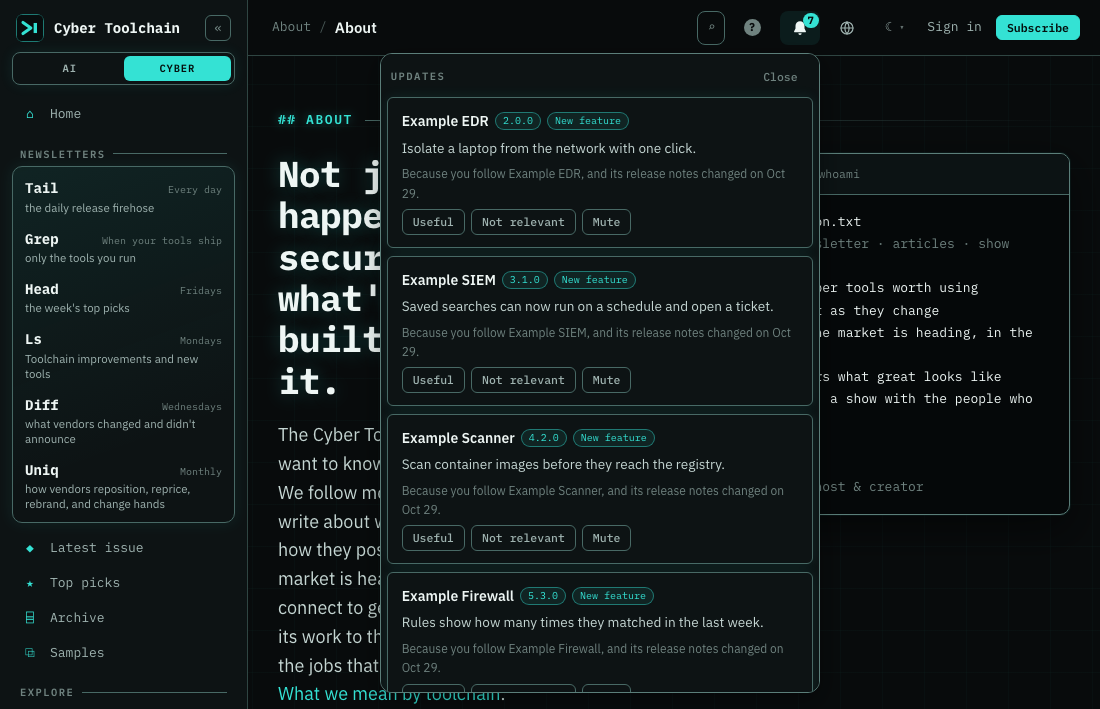
The bell in the top bar is now on for everyone. It lists what the tools you follow shipped since you last looked, and why each one is there. Sign in and you can also turn on browser notifications from your account page, so a breaking or security change in a tool you run reaches you even when the site is closed. We send at most one a day, and tool names stay off your lock screen unless you turn them on.
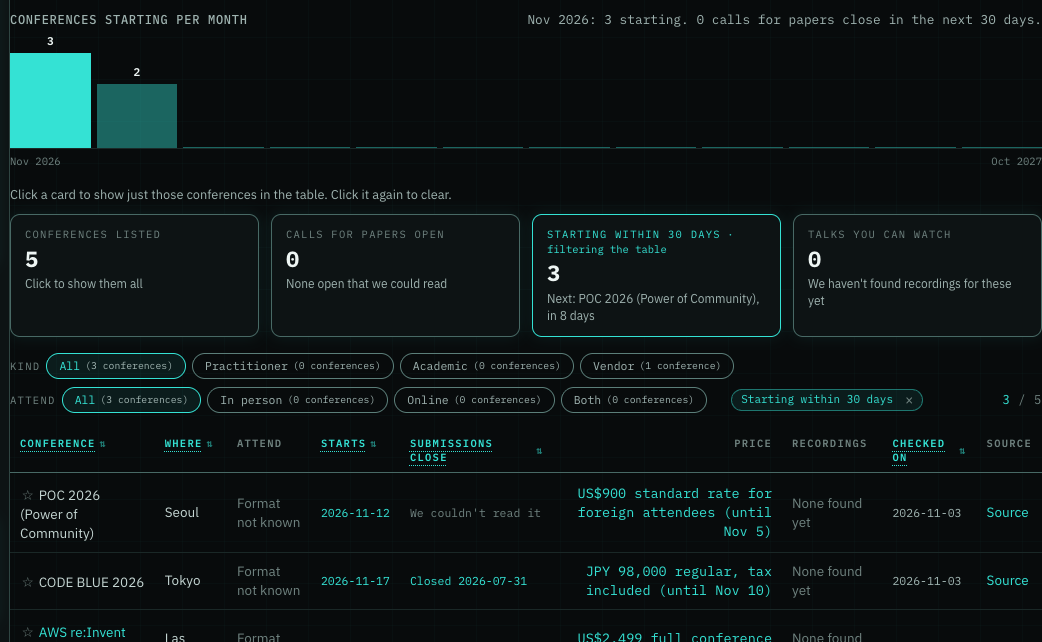
Conferences now open with a month-by-month view and cards for what's starting soon, open calls for papers and talks you can watch. Click a card to narrow the list, and click any conference to see its dates, prices, recordings and past years in one place, with a button to add it to your calendar.
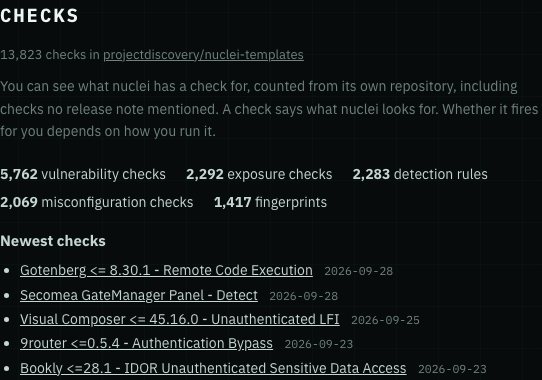
Tool pages for nuclei, Nmap, Metasploit and Sigma Rules now have a Checks section that lists what each tool looks for, counted from its own repository, with links to the newest checks. Capability search now answers a CVE id or a product name with the tools that ship a check for it, and a broad capability like vulnerability scanning also finds tools filed under its narrower kinds. You can see what a tool can detect even when no release note ever said so.
The conference list now covers every cyber conference still to come, and you can filter it by kind and by whether you can go in person, online or both. Each conference has its own page with every edition we know of, so you can see where it's held, when submissions close and what a ticket costs in one place. You can add the whole list to your calendar in one click. Each row shows the day we last checked it and links to the page we read.
My Toolchain is now one page that shows how the cyber tools you run are keeping up. Pick the version you run and the stat cards count how far behind you are, the cards up top show which releases to take first, and a click opens the release notes you haven't taken. The charts show what you've missed, whether you're catching up, and which upgrade is quick. Before, you had to open each tool and work it out yourself.
Head now tells you when something happens at a conference you starred: its call for papers opens or is about to close, tickets go on sale or a price is about to go up, its dates are announced or move, the talks are posted, recordings go online, or it's cancelled. You get at most five a week, the most pressing first, each linking to that edition's page, so you don't have to keep checking organisers' sites. Star nothing and Head shows the week's three biggest changes. Add a conference's name to a Grep and its changes show up in that Grep's mail too.
There's now a list of the conferences in the next 90 days, with when each one starts, where, and what a ticket costs. We checked every row by hand and show the date we did it, and each number links to the page it came from, so you can plan travel and talk submissions without digging through a dozen sites. Head links to it in any week with a conference coming up.
Uniq now has a Branding updates section. When we confirm that a vendor changed hands or refreshed its look, you see the before and after screenshots and what the page said, so you can judge the change yourself. The email shows the first five, ownership changes first, and links to the rest.
25 more improvements
The first State of the Cyber Toolchain is up for Q3 2026. It lists the busiest categories by releases and tells you plainly that we can't yet compare any category with its own past, so you get no direction we can't back up.
Paste a tool we don't track yet and, when you're signed in, we'll email you the day we start monitoring it, so you don't have to keep checking back.
You can now star the conferences you care about, on the conference list or on a conference's own page. Signed out, your stars stay in this browser. Signed in, they're kept on your account, so they follow you to your phone or another laptop. Starring a conference doesn't change which tools you follow.
Analytics has a new Documentation timing card that asks whether a cyber tool's docs change before its release notes, at the same time, or after. So you can see which way the industry leans, and not guess from one vendor. Until we've checked a sample of the matches by hand, the card shows how many releases we've matched so far and no shares. Paid plans also get a vendor-by-vendor table, and the timing release by release on each tool's page.
Pick a company under Speaker company on the conferences page to see every conference where its people give talks. Open a conference to see which companies its speakers work for, so you can tell where a vendor's engineers show up before you book a trip.
Company timelines now have a Business page and matching API and MCP access. They clearly show when the evidence is not yet ready; funding and activity details remain unavailable until accuracy and review requirements are met. Missing release or hiring history is shown as unknown.
My Toolchain now distinguishes unchecked Plays from a quiet day, so a missing check never looks like an all-clear. Personal actions stay held until their review checks pass, and Play answers are saved only when you opt in.
With a plan, each vendor's website history now shows how many brand changes we've confirmed, how many are waiting for review, and how much of its history we've checked. You can tell a vendor that has held still from one we've barely looked at. The market view adds the same count across every tracked vendor, by group, category and year.
Website history now lists each confirmed brand change on its own row and says what kind it was: Renamed, Now part of another company, or New logo. You can open the before and after screenshots full size, and the Rebranded column is back on Vendors for those changes. If a row looks wrong, Not a rebrand lets you tell us.
If you read both Toolchains, Ls now arrives as one email with the Cyber and AI changes side by side, starting Monday. Before, you got two Ls emails on the same morning and had to open both to see what changed.
Each chart on Analytics now says when its data was last updated, and adds how many days ago once it's more than two weeks old. You can tell a current chart from a stale one without opening anything.
Conferences now has its own place in the site menu, and each conference's page is easier to find from a web search. Search for a conference and you can land on its page, with its dates, where it's held and the latest ticket price we've read. If you have Researcher or Business, a conference page also has a price history wherever we've read a ticket price: every price we've read for it, edition by edition, with the day we read it. Where we have read a published schedule, you can also open its talks and speaker names from the conference page.
Many more cyber tool pages now link the vendor's own quickstart or getting-started page, so you can go from a tool page straight to the official first steps.
Every confirmed brand change now says who checked it: a person, or our system. Checked by our system means we confirmed it ourselves: either the vendor said so on their own site, or it's a kind of change our checks have a strong record on, and a person still checks one in ten. A person's answer replaces ours. You'll see it on the Website history rows and in the player, beside each date in Vendors' “Who rebranded recently?”, and in Uniq's Branding updates, so you know how each change was confirmed.
There is now a page that explains the bot we use to read public web pages. It says what the bot reads, that it usually visits once a day, that it follows each site's robots.txt, and which address to write to if you want it to stop. If you run a site and see AIToolchainBot in your logs, you no longer have to guess who we are. The web address that appears next to the bot's name in your logs opens this page.
The email you get when you subscribe is easier to read. It says plainly that one press of the button starts your free subscription, then lists what we'll send you and when, with each newsletter's name in orange so you can spot them at a glance. New on the Toolchain now says it brings our new features and improvements as well as the new tools.
Each analytics chart now opens on the chart itself. What we counted, the dates it covers and how much data was missing sit under Details, so the chart is easy to read and the numbers behind it are one click away.
Finding cyber tools by what they do is easier: Attack Surface Management now has its own home, separate from Vulnerability & Exposure Management, and there are new categories for AI SOC, SaaS and application security posture, deception, security awareness and mobile app security.
Your account page opens with your newsletter settings again. Since November 2 some accounts saw Could not load your preferences instead, and Try again didn't help. Nothing you'd saved was lost.
Website History keeps confirmed changes consistent with the vendor list and preserves reviewers' corrections. Rebrand shares now count each vendor once per observed year. Uniq uses before-and-after images from our own captures and keeps unrelated acquisition stories from hiding a branding update. The history timeline stays on screen when an announcement is shown.
MCP error replies now carry a standard numeric code, so strict clients read them instead of dropping the reply. The tool's own reason, such as a bad argument or a tier limit, moved into the error's data field.
Older tool descriptions now name the product up front, so cards and search results make sense on their own. Copy previously rejected by our quality checks stays filtered out.
Feature evidence keeps more distinct documentation changes instead of counting duplicate captures.
Capability Search no longer closes the list you are picking from when fresh data arrives, so the option you were about to click is still there.
Your account page loads again. If you had saved Updates settings, it was stuck on Could not load your preferences since yesterday. Your settings were never lost.
New tools
No new cyber tools ready this week.
We started watching 162 tools this week, and we're still processing their data. They should be available soon, and we'll introduce them in an upcoming issue.