The Cyber Toolchain — issue 076, September 16, 2026
THE CYBER TOOLCHAIN
NO. 076
Tail
THE DAILY RELEASE FIREHOSE
PUBLISHED SEPTEMBER 16, 2026 · EVERY DAY
EDITIONStail|grep|head|ls|diff|uniq
The daily firehose — everything the toolchain shipped today, already filtered.
We read every release from the 1309 tools on our watchlist at the source — GitHub and GitLab release notes, vendor release pages and changelogs, project blogs and feeds, vendor press releases, and the source code behind the tag. Bug-fix-only releases and non-product newsroom noise are dropped; what's left is summarized down to the new capability, how to try it, and any screenshots or videos the release itself published. Every entry links to the sources it was built from.
READ AS
Focus:What features shipped and what problems they solve, plus launches, packaging and where the market is moving.
Leaves out:Command-line flags, API-only deltas, usage examples, and releases that are only refinements.
Focus:New security controls, new APIs, and product improvements you can put to work, plus anything an upgrade breaks.
Leaves out:Launch and marketing news, governance, pricing, and documentation changes with no operational effect.
Focus:Dashboards, reporting, and anything you can quantify: metrics, coverage, risk scores, compliance impact, vendor moves.
Leaves out:Settings, flags, API and command-line detail, library bumps, and minor releases with no reporting or posture angle.
Focus:API, SDK and MCP changes, new libraries, breaking changes in what you import, and cyber tooling.
Leaves out:Governance, SOC operations, and vendor launches with no developer surface.
AMOUNT
DETAIL
ORDER
This issue came out before editions were ranked, so it shows the Standard edition in issue order.
What stands out across today's releases, grouped by what it lets you do. Every tool named links to its entry below.
protect
Contain an overdue KEV host without waiting for the patch window
Qualys TruRisk Eliminate isolates hosts with overdue CISA KEVCISA KEVA catalog maintained by the US Cybersecurity and Infrastructure Security Agency listing vulnerabilities confirmed to be actively exploited in the wild, giving cyber tools a vetted, authoritative prioritization signal. vulnerabilities without an EDREDREndpoint detection and response, monitoring computers for suspicious behavior and providing investigation and response controls, such as isolating a device. agent in the path, and scores patch reliability so the usual "will this break production" stall has evidence behind it; ring-based rollout stages the blast radius. Veracode's Pipeline Scan now takes artifacts over 200 MB, so the monolith that silently skipped scanning gets scanned.
Give an AI agent its own identity instead of a human's credential
JumpCloud Agent Identities (Public Preview) issues OAuth credentials and group-based SSOSSOSingle sign-on, using one identity provider to sign in to multiple applications. It reduces separate passwords and centralizes account and access management. access to non-human agents and authorizes them against MCPMCPModel Context Protocol, a standard for connecting AI applications to external tools and data sources. A compatible server exposes capabilities an assistant can use through a common interface. servers, so an agent's access can be scoped and revoked on its own rather than riding a service account nobody owns. Aembit adds CrowdStrike AIDR as inline allow/block/transform on MCP tool traffic, tied to the calling identity.
Let a coding agent run shell commands without trusting it with the machine
VS Code now runs agent terminal commands under OS-level file system and network isolation, which is the difference between reviewing every proposed command and letting the agent work. Docker Sandboxes adds tri-state access control on the shared skills store and namespaces MCP gateway secrets, so one sandbox's credentials stop leaking into another's.
NodeZero now sends validated exposure findings directly into CrowdStrike Falcon Next-Gen SIEMSIEMSecurity information and event management, collecting logs from many systems and correlating events to find suspicious activity. Analysts use it to investigate alerts and incidents., letting security teams correlate them with other telemetry during investigations.︀︄︇︀︅︉︀︅︀︀︃︀︀︅︅︀︅︊︀︄︆︀︃︄︀︄︇︀︅︉︀︅︀︀︃︀︀︅︅︀︅︊︀︄︆︀︃︄
Horizon3.ai enables organizations to continuously assess the security posture of their enterprise across many attack surfaces.
NodeZero now sends validated exposure findings directly into CrowdStrike Falcon Next-Gen SIEMSIEMSecurity information and event management, collecting logs from many systems and correlating events to find suspicious activity. Analysts use it to investigate alerts and incidents., letting security teams correlate them with other telemetry during investigations.︀︄︇︀︅︉︀︅︀︀︃︀︀︅︅︀︅︊︀︄︆︀︃︄︀︄︇︀︅︉︀︅︀︀︃︀︀︅︅︀︅︊︀︄︆︀︃︄
└──▷ WHAT SHIPPED ·
1 FEATURE1 OF 1 FEATUREmost completely described firstwhat's the number?
Each feature carries 0–100 for how completely the vendor documented
it — not how big or important the work is. A major capability
described in eight words scores low, and that is the finding.
depth0–40what it does and how it works or what changed
specificity0–30names real surfaces — APIs, flags, formats, limits, numbers
actionability0–30enough to go use it — a named endpoint, flag, or config key tops this; a UI path is a starting point
Code and config rank first by construction: a documented endpoint,
flag or config key scores at the top of specificity and actionability,
so it sorts above a feature described only in prose. Under
60 the notes go thin — everything below the “thinner
coverage” line is thinner documentation, not smaller work.
Hover any meter for that feature's three sub-scores.
0101
CrowdStrike Falcon Next-Gen SIEM integrationnew67how completely this was documenteddepth25/40specificity22/30actionability20/3067 / 100
NodeZero validated findings and exposure data now flow into CrowdStrike Falcon Next-Gen SIEM, available via the CrowdStrike Marketplace listing at marketplace.crowdstrike.com/listings/horizon3-ai-nodezero/.︀︄︇︀︅︉︀︅︀︀︃︀︀︅︅︀︅︊︀︄︆︀︃︄ This lets teams correlate validated exposure data with endpoint, identity, cloud, and other security telemetry during SIEM investigations, incorporating it into existing security operations workflows.︀︄︇︀︅︉︀︅︀︀︃︀︀︅︅︀︅︊︀︄︆︀︃︄
When setting up the NodeZero integration to send validated findings into Falcon Next-Gen SIEM for your organization.
📍In the CrowdStrike Marketplace, navigate to the Horizon3 AI NodeZero listing at marketplace.crowdstrike.com/listings/horizon3-ai-nodezero/, then follow the installation steps to enable the integration and begin ingesting NodeZero findings into Falcon Next-Gen SIEM.
GitGuardian Detection Engine scans code repositories to identify and alert on exposed secrets, credentials, and sensitive data.
GitGuardian's detection engine added new analyzers for Akamai and Docker Hub, expanded n8n host detection, reduced false positives for generic high-entropy secrets, and updated its GitLab, Figma, and OpenAI analyzers to track upstream API changes.︀︄︇︀︅︉︀︅︀︀︃︀︀︅︅︀︅︊︀︄︆︀︃︄︀︄︇︀︅︉︀︅︀︀︃︀︀︅︅︀︅︊︀︄︆︀︃︄
└──▷ WHAT SHIPPED ·
2 FEATURES0 OF 2 FEATURESmost completely described firstwhat's the number?
Each feature carries 0–100 for how completely the vendor documented
it — not how big or important the work is. A major capability
described in eight words scores low, and that is the finding.
depth0–40what it does and how it works or what changed
specificity0–30names real surfaces — APIs, flags, formats, limits, numbers
actionability0–30enough to go use it — a named endpoint, flag, or config key tops this; a UI path is a starting point
Code and config rank first by construction: a documented endpoint,
flag or config key scores at the top of specificity and actionability,
so it sorts above a feature described only in prose. Under
60 the notes go thin — everything below the “thinner
coverage” line is thinner documentation, not smaller work.
Hover any meter for that feature's three sub-scores.
0100
Analyzer updates for GitLab, Figma and OpenAIimproved40how completely this was documenteddepth15/40specificity20/30actionability5/3040 / 100
GitGuardian updated its GitLab secret analyzer to adapt to changes in GitLab API behavior, its Figma Personal Access Token analyzer to reflect changes in the Figma API, and its OpenAI API Key analyzer's scope checker endpoints following OpenAI API updates.︀︄︇︀︅︉︀︅︀︀︃︀︀︅︅︀︅︊︀︄︆︀︃︄︀︄︇︀︅︉︀︅︀︀︃︀︀︅︅︀︅︊︀︄︆︀︃︄
New Akamai, Docker Hub and n8n detectionnew25how completely this was documenteddepth10/40specificity15/30actionability0/3025 / 100
The detection engine added analyzers for Akamai and Docker Hub, expanded host detection for n8n, and reduced false positives for generic high-entropy secrets.
Infisical is the open-source platform for secrets, certificates, and privileged access management.
Infisical v0.165.11 introduces a credential-free agent vault preview, adds Snowflake support to PAMPAMBrokering administrator sessions through a gateway instead of handing out standing credentials. Access is granted for one session, to one target, and recorded., and rounds out the release with certificate, gateway, billing, and secrets-UI improvements.︀︄︇︀︅︉︀︅︀︀︃︀︀︅︅︀︅︊︀︄︆︀︃︄︀︄︇︀︅︉︀︅︀︀︃︀︀︅︅︀︅︊︀︄︆︀︃︄
└──▷ WHAT SHIPPED ·
7 FEATURES0 OF 7 FEATURESmost completely described firstwhat's the number?
Each feature carries 0–100 for how completely the vendor documented
it — not how big or important the work is. A major capability
described in eight words scores low, and that is the finding.
depth0–40what it does and how it works or what changed
specificity0–30names real surfaces — APIs, flags, formats, limits, numbers
actionability0–30enough to go use it — a named endpoint, flag, or config key tops this; a UI path is a starting point
Code and config rank first by construction: a documented endpoint,
flag or config key scores at the top of specificity and actionability,
so it sorts above a feature described only in prose. Under
60 the notes go thin — everything below the “thinner
coverage” line is thinner documentation, not smaller work.
Hover any meter for that feature's three sub-scores.
0100
Copy secrets workflow in UInew50how completely this was documenteddepth20/40specificity15/30actionability15/3050 / 100
Implements a copy secrets workflow in the secrets UI, enabling bulk secret copying across environments or projects.︀︄︇︀︅︉︀︅︀︀︃︀︀︅︅︀︅︊︀︄︆︀︃︄︀︄︇︀︅︉︀︅︀︀︃︀︀︅︅︀︅︊︀︄︆︀︃︄
— Names the UI location and bulk-copy behaviour clearlyv0.165.11
0200
Credential-free agent vault (preview)new45how completely this was documenteddepth20/40specificity15/30actionability10/3045 / 100
Introduces agent vault, a mode allowing Infisical agents to run without credentials; the capability is currently in preview.
— Names the feature and preview status but no config or CLI detailv0.165.11
0300
Optional relay for gateway deploymentsimproved45how completely this was documenteddepth20/40specificity15/30actionability10/3045 / 100
Makes the relay optional for gateways, reducing infrastructure requirements for gateway deployments.
— Explains the change but not the mechanism or config togglev0.165.11
0400
Snowflake account support in PAMnew40how completely this was documenteddepth15/40specificity15/30actionability10/3040 / 100
The Privileged Access ManagementPrivileged Access ManagementBrokering administrator sessions through a gateway instead of handing out standing credentials. Access is granted for one session, to one target, and recorded. module now supports Snowflake accounts as a new account type.
— Names integration and module but no setup steps givenv0.165.11
0500
Custom X.509 extensions for certificatesnew40how completely this was documenteddepth15/40specificity15/30actionability10/3040 / 100
Certificate policies and profiles now support custom X.509X.509A standard defining the format of public-key certificates, maintained by the ITU-T, used by cyber tools to authenticate identities and establish encrypted connections over TLS and similar protocols. extensions.
— Names the extension type but no field or API detailv0.165.11
0600
Self-serve plan upgrades in UInew40how completely this was documenteddepth15/40specificity10/30actionability15/3040 / 100
Adds self-serve plan upgrade capability directly from the product UI.
— Clear UI starting point but no further mechanism describedv0.165.11
0700
Time-unit secret scanning environment variablesimproved35how completely this was documenteddepth15/40specificity10/30actionability10/3035 / 100
Secret scanningSecret scanningChecking files, code or other data for exposed credentials such as passwords, API keys and tokens. Findings help teams remove the secret and revoke or rotate it. environment variables now support time-unit values, enabling human-readable duration configuration instead of raw numbers.
— No specific env var names given despite naming the surface typev0.165.11
Join the world's most widely adopted, AI-powered developer platform where millions of developers, businesses, and the largest open source community build software that advances humanity.
GitHub added enterprise-level enforcement for Advanced Security configurations and introduced a Copilot-powered suggestion feature for custom repository property values.︀︄︇︀︅︉︀︅︀︀︃︀︀︅︅︀︅︊︀︄︆︀︃︄︀︄︇︀︅︉︀︅︀︀︃︀︀︅︅︀︅︊︀︄︆︀︃︄
└──▷ WHAT SHIPPED ·
2 FEATURES0 OF 2 FEATURESmost completely described firstwhat's the number?
Each feature carries 0–100 for how completely the vendor documented
it — not how big or important the work is. A major capability
described in eight words scores low, and that is the finding.
depth0–40what it does and how it works or what changed
specificity0–30names real surfaces — APIs, flags, formats, limits, numbers
actionability0–30enough to go use it — a named endpoint, flag, or config key tops this; a UI path is a starting point
Code and config rank first by construction: a documented endpoint,
flag or config key scores at the top of specificity and actionability,
so it sorts above a feature described only in prose. Under
60 the notes go thin — everything below the “thinner
coverage” line is thinner documentation, not smaller work.
Hover any meter for that feature's three sub-scores.
0100
Copilot suggests custom property definition valuesnew70how completely this was documenteddepth25/40specificity25/30actionability20/3070 / 100
GitHub Copilot now suggests relevant allowed values when admins create custom property definitions (single-select or multi-select) for repositories, speeding up governance taxonomy setup.︀︄︇︀︅︉︀︅︀︀︃︀︀︅︅︀︅︊︀︄︆︀︃︄ A new Repository custom property suggestions Copilot policy at the enterprise and organization level controls whether this suggestion behavior is enabled, available in public preview for Business and Enterprise plans.︀︄︇︀︅︉︀︅︀︀︃︀︀︅︅︀︅︊︀︄︆︀︃︄
Enable or restrict the new suggestion feature org-wide before rolling out custom property definitions to your repository fleet.
📍In your organization (or enterprise) settings, go to Copilot › Policies and set Repository custom property suggestions to Enabled or Disabled.
Enforce Advanced Security configurations at enterprise levelnew55how completely this was documenteddepth20/40specificity20/30actionability15/3055 / 100
A new Enforce for repository and organization owners option in the Enforcement dropdown of security configurations blocks organization and repository administrators from overriding enterprise-level GitHub Advanced Security settings.
ⓘSourcesBlog / feed →1 release · 2026-09-15Blog ↗RankWhy this ranktop features scored 88, +10 product media, +6 runnable example — 104How ranking works →
Phoenix Security correlates scanner, cloud and runtime findings with exploitability and ownership, and uses AI agents to prioritise and open remediation pull requests.
Phoenix Security adds native scanner integration with Rapid7 InsightVM's SaaSSaaSSoftware delivered over the internet and run on the provider's infrastructure, so the buyer pays a subscription instead of installing or operating anything locally. platform for vulnerability ingestion.︀︄︇︀︅︉︀︅︀︀︃︀︀︅︅︀︅︊︀︄︆︀︃︄︀︄︇︀︅︉︀︅︀︀︃︀︀︅︅︀︅︊︀︄︆︀︃︄
└──▷ WHAT SHIPPED ·
1 FEATURE0 OF 1 FEATUREmost completely described firstwhat's the number?
Each feature carries 0–100 for how completely the vendor documented
it — not how big or important the work is. A major capability
described in eight words scores low, and that is the finding.
depth0–40what it does and how it works or what changed
specificity0–30names real surfaces — APIs, flags, formats, limits, numbers
actionability0–30enough to go use it — a named endpoint, flag, or config key tops this; a UI path is a starting point
Code and config rank first by construction: a documented endpoint,
flag or config key scores at the top of specificity and actionability,
so it sorts above a feature described only in prose. Under
60 the notes go thin — everything below the “thinner
coverage” line is thinner documentation, not smaller work.
Hover any meter for that feature's three sub-scores.
0100
Rapid7 InsightVM scanner integrationnew88how completely this was documenteddepth30/40specificity28/30actionability30/3088 / 100
Adds Rapid7 InsightVM (SaaS/cloud) as a new scanner integration, configurable via Integrations > Scanners > Add Scanner Integration.︀︄︇︀︅︉︀︅︀︀︃︀︀︅︅︀︅︊︀︄︆︀︃︄ Select Rapid7 Platform, then supply a Server URL in the form https://{region}.api.insight.rapid7.com/ (region codes: us, us2, us3, eu, ca, au, ap, aps2, me1), an API Username, and Password for a dedicated API user with MFAMFAMulti-factor authentication, requiring proof from different categories, such as a password and a hardware key, to sign in. It reduces reliance on a password alone. disabled, then click Create Scanner to pull vulnerability findings from monitored Sites into Phoenix environments.︀︄︇︀︅︉︀︅︀︀︃︀︀︅︅︀︅︊︀︄︆︀︃︄
Connect Phoenix Security to a Rapid7 InsightVM SaaS account so vulnerability findings from monitored Sites flow into Phoenix environments.
📍1. In the sidebar, go to Integrations › Scanners.
2. Click Add Scanner Integration.
3. Select Rapid7 Platform from the integration list and enter a name.
4. Enter your Server URL (e.g. https://us.api.insight.rapid7.com/ — replace us with your region code: us2, us3, eu, ca, au, ap, aps2, or me1).
5. Enter the API Username and Password for a dedicated API user (MFA disabled).
6. Click Create Scanner.
Veracode's Static Analysis update adds a sweeping set of new language, framework, and platform versions (Dart, Flutter, PHP, .NET, Kotlin, JDK, Go, and more), an enhanced Python scanner with deeper taint tracking, Pipeline Scan support for artifacts over 200 MB, and new veracode.json exclusion controls for Java jars and classes.︀︄︇︀︅︉︀︅︀︀︃︀︀︅︅︀︅︊︀︄︆︀︃︄︀︄︇︀︅︉︀︅︀︀︃︀︀︅︅︀︅︊︀︄︆︀︃︄
Veracode is a cloud-based application security platform that performs static, dynamic, and software composition analysis to identify vulnerabilities in code.
Veracode's Static Analysis update adds a sweeping set of new language, framework, and platform versions (Dart, Flutter, PHP, .NET, Kotlin, JDK, Go, and more), an enhanced Python scanner with deeper taint tracking, Pipeline Scan support for artifacts over 200 MB, and new veracode.json exclusion controls for Java jars and classes.︀︄︇︀︅︉︀︅︀︀︃︀︀︅︅︀︅︊︀︄︆︀︃︄︀︄︇︀︅︉︀︅︀︀︃︀︀︅︅︀︅︊︀︄︆︀︃︄
└──▷ WHAT SHIPPED ·
9 FEATURES0 OF 9 FEATURESmost completely described firstwhat's the number?
Each feature carries 0–100 for how completely the vendor documented
it — not how big or important the work is. A major capability
described in eight words scores low, and that is the finding.
depth0–40what it does and how it works or what changed
specificity0–30names real surfaces — APIs, flags, formats, limits, numbers
actionability0–30enough to go use it — a named endpoint, flag, or config key tops this; a UI path is a starting point
Code and config rank first by construction: a documented endpoint,
flag or config key scores at the top of specificity and actionability,
so it sorts above a feature described only in prose. Under
60 the notes go thin — everything below the “thinner
coverage” line is thinner documentation, not smaller work.
Hover any meter for that feature's three sub-scores.
0100
Enhanced Python scanner and taint analysisimproved75how completely this was documenteddepth30/40specificity30/30actionability15/3075 / 100
Adds an enhanced Python scanner with improved taint tracking, cross-file analysis, and pattern recognition covering PySpark, Flask, Django, and FastAPI.︀︄︇︀︅︉︀︅︀︀︃︀︀︅︅︀︅︊︀︄︆︀︃︄ Also adds send_from_directory and send_file as taint sinks for CWECWECommon Weakness Enumeration, a catalog of recurring software and hardware weakness types. It describes classes of mistakes, such as injection, rather than individual vulnerability instances.-73 detection, httplib support for detecting CWE-295 and CWE-297 SSLSSLA cryptographic protocol for encrypting network connections, now deprecated in favor of TLS but whose name persists colloquially. Cyber tools reference it when handling HTTPS or other encrypted-channel inspection and termination./TLS flaws, os.path propagation in taint analysis, and library support for google-cloud-bigquery, Psycopg 3, PyYAML, AWS Glue, and PySpark/DynamoDB/FastAPI.︀︄︇︀︅︉︀︅︀︀︃︀︀︅︅︀︅︊︀︄︆︀︃︄
.NET Semantic Kernel support and taint sinksnew75how completely this was documenteddepth30/40specificity30/30actionability15/3075 / 100
Adds .NET Semantic Kernel (SK) InvocationFilter and Filter support, SK KernelContent and Taint Injection support, and SK detection of hardcoded credentials (CWE-798) and configuration control issues (CWE-15). Also adds taint sink coverage for System.Web.UI.Page.Title and System.Web.UI.HtmlControls.HtmlHead.Title for CWE-80 detection in .NET.
veracode.json exclusion controls for Javanew65how completely this was documenteddepth20/40specificity25/30actionability20/3065 / 100
Adds veracode.json support for excluding specific Java .jar files from static analysis, and adds veracode.json support for excluding specific Java classes from Static Analysis.
Expanded language, framework, and platform version supportnew55how completely this was documenteddepth15/40specificity30/30actionability10/3055 / 100
Static Analysis adds support for numerous new language, framework, and platform versions: Dart 3.13/Flutter 3.47, Dart 3.12/Flutter 3.44, Dart 3.11/Flutter 3.41, Dart 3.10/Flutter 3.38, Dart 3.9/Flutter 3.35, Dart 3.8/Flutter 3.32, PHP 8.4 and PHP 8.5, Android 17, Next.js 16.x and 15.x, .NET 10, Kotlin 2.4 and 2.3, the CloudKit framework and Apple Security framework APIs for Apple Platforms, Xcode 26.4, JDK 26 and JDK 25 (LTS), scanning and viewing Java source code on the platform, React 19, Angular 20, Go 1.26 and Go 1.25, Apex 64 and Apex 65, Spring Boot 4/Spring Core 7/Spring Security 7, the Svelte framework, Ruby 4.0 and Rails 8.1, Swift standard library taint propagation on iOS, the Go Fiber web framework, Micronaut 4.x, Node.js 22.x, taint propagation for Apple Platforms framework APIs, initial iOS 26 support, Fast HTTP in Go, and Azure Functions v4 on .NET 9 in isolated process mode.
Expanded third-party library detectionimproved50how completely this was documenteddepth20/40specificity20/30actionability10/3050 / 100
Expands third-party library detection to include Fluxnova in Java, and expands support for pnpm modules in JavaScript to improve dependency resolution.
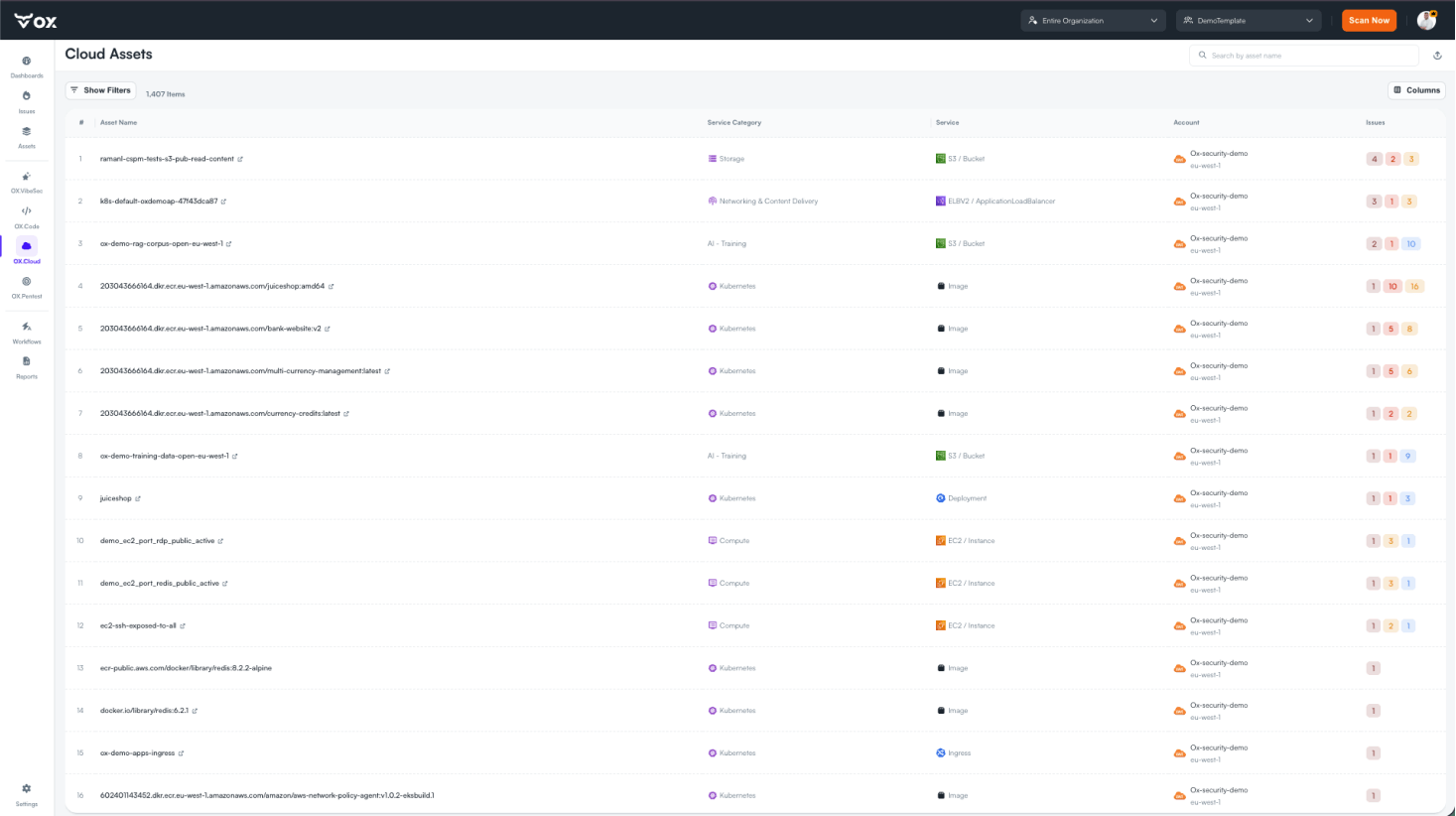
OX Security launched OX Cloud, a unified CNAPPCNAPPA cloud-native application protection platform that combines checks across cloud configuration, workloads and development. It helps teams connect risks that separate tools might report apart. platform bundling CSPMCSPMCloud security posture management, checking cloud resources for risky settings and policy violations. It helps teams find exposed services, overly broad permissions and other configuration gaps., KSPMKSPMKubernetes Security Posture Management: a category of tooling that continuously audits Kubernetes clusters against configuration best practices and compliance policies to surface misconfigurations before attackers exploit them., DSPMDSPMData security posture management, locating sensitive data and checking how it is protected and who can reach it. It helps teams prioritize risks around their data stores., runtime vulnerability detection, cloud inventory and attack-path mapping, alongside new AIDR and AASM capabilities for detecting and governing AI agents, plus reachability-based prioritization to strip unreachable findings from the backlog.︀︄︇︀︅︉︀︅︀︀︃︀︀︅︅︀︅︊︀︄︆︀︃︄
Accelerate the transition to software that secures itself. OX Security pinpoints risk to the exact line of code, eliminating security debt from AI generation to cloud runtime.
OX Security launched OX Cloud, a unified CNAPPCNAPPA cloud-native application protection platform that combines checks across cloud configuration, workloads and development. It helps teams connect risks that separate tools might report apart. platform bundling CSPMCSPMCloud security posture management, checking cloud resources for risky settings and policy violations. It helps teams find exposed services, overly broad permissions and other configuration gaps., KSPMKSPMKubernetes Security Posture Management: a category of tooling that continuously audits Kubernetes clusters against configuration best practices and compliance policies to surface misconfigurations before attackers exploit them., DSPMDSPMData security posture management, locating sensitive data and checking how it is protected and who can reach it. It helps teams prioritize risks around their data stores., runtime vulnerability detection, cloud inventory and attack-path mapping, alongside new AIDR and AASM capabilities for detecting and governing AI agents, plus reachability-based prioritization to strip unreachable findings from the backlog.︀︄︇︀︅︉︀︅︀︀︃︀︀︅︅︀︅︊︀︄︆︀︃︄
└──▷ WHAT SHIPPED ·
4 FEATURES3 OF 4 FEATURESmost completely described firstwhat's the number?
Each feature carries 0–100 for how completely the vendor documented
it — not how big or important the work is. A major capability
described in eight words scores low, and that is the finding.
depth0–40what it does and how it works or what changed
specificity0–30names real surfaces — APIs, flags, formats, limits, numbers
actionability0–30enough to go use it — a named endpoint, flag, or config key tops this; a UI path is a starting point
Code and config rank first by construction: a documented endpoint,
flag or config key scores at the top of specificity and actionability,
so it sorts above a feature described only in prose. Under
60 the notes go thin — everything below the “thinner
coverage” line is thinner documentation, not smaller work.
Hover any meter for that feature's three sub-scores.
0101
OX Cloud CNAPP platform launchnew75how completely this was documenteddepth30/40specificity30/30actionability15/3075 / 100
OX Cloud launches as a unified CNAPP covering CSPM (continuous detection of cloud misconfigurations and compliance enforcement across all cloud accounts), KSPM (Kubernetes security risk and policy-compliance monitoring), DSPM (discovery, classification and protection of sensitive data across cloud environments), Runtime Vulnerabilities (identifying vulnerabilities actively exposed in running workloads and prioritizing what is truly exploitable), Cloud Inventory (a continuously updated inventory of every workload, identity, data store, Kubernetes cluster and AI agent running in the environment, including shadow AI and unmanaged non-human identitiesnon-human identitiesA non-human identity, an account or credential used by software or a device rather than a person. Service accounts, workload identities and automation tokens need their own permissions and lifecycle controls.), Cloud Graph and Attack Path Mapping (visualizing relationships across cloud assets including lateral movementlateral movementMoving from an initially compromised system or identity to other resources in a network. Attackers often use stolen credentials or trusted connections to expand their access. paths and blast radius), and Runtime Events (investigating runtime anomalies with full context to accelerate incident detection and triage).︀︄︇︀︅︉︀︅︀︀︃︀︀︅︅︀︅︊︀︄︆︀︃︄
AIDR: AI Detection and Responsenew70how completely this was documenteddepth30/40specificity25/30actionability15/3070 / 100
AIDR (AI Detection and Response) detects and governs AI-driven usage, configuration and threats across cloud and runtime environments in real time, covering AI agents calling tools, models accessing data, and MCPMCPModel Context Protocol, a standard for connecting AI applications to external tools and data sources. A compatible server exposes capabilities an assistant can use through a common interface. servers executing autonomously. Alert detail views show who or what acted, what they touched and what else they could have reached.
AASM: Agentic Attack Surface Managementnew65how completely this was documenteddepth30/40specificity25/30actionability10/3065 / 100
Agentic Attack Surface Management (AASM), powered by the OX Agent, discovers AI agents, models, MCP servers and non-human identities and maps what they can reach, uncovering hidden backdoors and reachable exposures through agentic-level inspection.
Reachability-based risk prioritizationnew55how completely this was documenteddepth25/40specificity20/30actionability10/3055 / 100
Reachability-based prioritization filters out risks that cannot actually be reached in cloud environments, eliminating unreachable misconfigurations, vulnerable packages and supply-chain exposures from the findings backlog so that only exploitable, evidenced risks surface.
Dalfox v3.2.3 expands its scanning surface to GraphQL and XML/SOAPXML/SOAPA messaging protocol pairing XML-structured data with SOAP envelopes to call remote services over HTTP; cyber tools use it to integrate with legacy enterprise APIs that predate REST. bodies, deepens DOM-XSSDOM-XSSA cross-site scripting vulnerability where malicious JavaScript executes entirely in the browser by manipulating the DOM, never touching the server, making it invisible to server-side input filters. detection, adds a new filter-bypass technique, and reworks scan concurrency and cross-origin safety for faster, safer scans.︀︄︇︀︅︉︀︅︀︀︃︀︀︅︅︀︅︊︀︄︆︀︃︄︀︄︇︀︅︉︀︅︀︀︃︀︀︅︅︀︅︊︀︄︆︀︃︄
Dalfox is a powerful open-source XSS scanner and utility focused on automation.
Dalfox v3.2.3 expands its scanning surface to GraphQL and XML/SOAPXML/SOAPA messaging protocol pairing XML-structured data with SOAP envelopes to call remote services over HTTP; cyber tools use it to integrate with legacy enterprise APIs that predate REST. bodies, deepens DOM-XSSDOM-XSSA cross-site scripting vulnerability where malicious JavaScript executes entirely in the browser by manipulating the DOM, never touching the server, making it invisible to server-side input filters. detection, adds a new filter-bypass technique, and reworks scan concurrency and cross-origin safety for faster, safer scans.︀︄︇︀︅︉︀︅︀︀︃︀︀︅︅︀︅︊︀︄︆︀︃︄︀︄︇︀︅︉︀︅︀︀︃︀︀︅︅︀︅︊︀︄︆︀︃︄
└──▷ WHAT SHIPPED ·
5 FEATURES2 OF 5 FEATURESmost completely described firstwhat's the number?
Each feature carries 0–100 for how completely the vendor documented
it — not how big or important the work is. A major capability
described in eight words scores low, and that is the finding.
depth0–40what it does and how it works or what changed
specificity0–30names real surfaces — APIs, flags, formats, limits, numbers
actionability0–30enough to go use it — a named endpoint, flag, or config key tops this; a UI path is a starting point
Code and config rank first by construction: a documented endpoint,
flag or config key scores at the top of specificity and actionability,
so it sorts above a feature described only in prose. Under
60 the notes go thin — everything below the “thinner
coverage” line is thinner documentation, not smaller work.
Hover any meter for that feature's three sub-scores.
0101
Sub-not-gsub filter bypass detectionnew78how completely this was documenteddepth35/40specificity28/30actionability15/3078 / 100
Dalfox detects the sub-not-gsub angle filter bypass: a doubled <<svg ...>> payload opens a real tag where a one-shot str::replace only consumed the first <.︀︄︇︀︅︉︀︅︀︀︃︀︀︅︅︀︅︊︀︄︆︀︃︄︀︄︇︀︅︉︀︅︀︀︃︀︀︅︅︀︅︊︀︄︆︀︃︄
— Names exact payload and underlying replace mechanismv3.2.3
0200
Faster concurrent parameter scanningimproved70how completely this was documenteddepth30/40specificity25/30actionability15/3070 / 100
Scans now run concurrently within a parameter, ramp payload batches instead of jumping straight to a full --workers window, and exit early for endpoints that uniformly escape their echo, significantly cutting scan time.
— Describes mechanism and names the `--workers` flagv3.2.3
0300
Cross-origin form probing disabledimproved68how completely this was documenteddepth25/40specificity28/30actionability15/3068 / 100
Cross-origin <form action> targets are no longer probed during parameter discovery, preventing -H headers and --cookies from being sent to page-controlled origins.
— Names exact flags affected and the security behavior fixedv3.2.3
0400
Wider DOM-XSS AST coverageimproved65how completely this was documenteddepth30/40specificity25/30actionability10/3065 / 100
DOMDOMThe browser's in-memory tree representation of a web page's structure, standardized by the W3C, giving cyber tools a programmable interface to read or manipulate page content at runtime.-XSSXSSCross-site scripting, an attack that runs malicious script in another user's browser through a trusted site. It can steal data or perform actions using the user's session. static analysis now covers Promise combinators, optional chaining, and static bracket paths, with more sinks and sources recognized and fewer false positives reported.
— Explains scope and effect but no runnable flag givenv3.2.3
thinner coverage below
0502
GraphQL and XML/SOAP injection surfacesnew50how completely this was documenteddepth20/40specificity20/30actionability10/3050 / 100
Dalfox now treats GraphQL and XML / SOAP request bodies as new injection surfaces for XSS scanning, alongside its existing HTTP parameter targets.
— Names the surfaces but no flag or endpoint to invoke themv3.2.3
Python library to carry out DFIR analysis on the Cloud
Cloud Forensics Utils added zone control for image exports and extended container explorer support in imaging instances.︀︄︇︀︅︉︀︅︀︀︃︀︀︅︅︀︅︊︀︄︆︀︃︄︀︄︇︀︅︉︀︅︀︀︃︀︀︅︅︀︅︊︀︄︆︀︃︄
└──▷ WHAT SHIPPED ·
2 FEATURES0 OF 2 FEATURESmost completely described firstwhat's the number?
Each feature carries 0–100 for how completely the vendor documented
it — not how big or important the work is. A major capability
described in eight words scores low, and that is the finding.
depth0–40what it does and how it works or what changed
specificity0–30names real surfaces — APIs, flags, formats, limits, numbers
actionability0–30enough to go use it — a named endpoint, flag, or config key tops this; a UI path is a starting point
Code and config rank first by construction: a documented endpoint,
flag or config key scores at the top of specificity and actionability,
so it sorts above a feature described only in prose. Under
60 the notes go thin — everything below the “thinner
coverage” line is thinner documentation, not smaller work.
Hover any meter for that feature's three sub-scores.
0100
Zone parameter for ExportImagenew80how completely this was documenteddepth25/40specificity25/30actionability30/3080 / 100
The ExportImage method now accepts a zone parameter (default 'us-central1-a'), letting callers specify the zone used for Cloud Build imaging instances instead of always using the default region.︀︄︇︀︅︉︀︅︀︀︃︀︀︅︅︀︅︊︀︄︆︀︃︄︀︄︇︀︅︉︀︅︀︀︃︀︀︅︅︀︅︊︀︄︆︀︃︄
Export a GCP compute image to a specific zone rather than accepting the default us-central1-a — useful when your GCS bucket and build resources are in a different region.
Finite State Platform is a software supply chain security tool that analyzes firmware and software for vulnerabilities and compliance risks.
Finite State expanded firmware unpacking to a new device model, tightened SBOMSBOMA software bill of materials, an inventory of the components and versions inside an application. It helps teams find affected software when a dependency has a vulnerability or licensing issue. generation-context metadata, and improved detection of static-library components and Windows executable resources.︀︄︇︀︅︉︀︅︀︀︃︀︀︅︅︀︅︊︀︄︆︀︃︄︀︄︇︀︅︉︀︅︀︀︃︀︀︅︅︀︅︊︀︄︆︀︃︄
└──▷ WHAT SHIPPED ·
5 FEATURES0 OF 5 FEATURESmost completely described firstwhat's the number?
Each feature carries 0–100 for how completely the vendor documented
it — not how big or important the work is. A major capability
described in eight words scores low, and that is the finding.
depth0–40what it does and how it works or what changed
specificity0–30names real surfaces — APIs, flags, formats, limits, numbers
actionability0–30enough to go use it — a named endpoint, flag, or config key tops this; a UI path is a starting point
Code and config rank first by construction: a documented endpoint,
flag or config key scores at the top of specificity and actionability,
so it sorts above a feature described only in prose. Under
60 the notes go thin — everything below the “thinner
coverage” line is thinner documentation, not smaller work.
Hover any meter for that feature's three sub-scores.
0100
Static library component detection and scanningimproved70how completely this was documenteddepth25/40specificity30/30actionability15/3070 / 100
Additional static-library Components are now identified where there was previously no signature coverage, including picolibc, PCRE2, glib, and LLVM runtimes.︀︄︇︀︅︉︀︅︀︀︃︀︀︅︅︀︅︊︀︄︆︀︃︄ Static library archives (.a files) are now treated as a single Component and scanned directly, instead of being unpacked into hundreds of object-file rows.︀︄︇︀︅︉︀︅︀︀︃︀︀︅︅︀︅︊︀︄︆︀︃︄
SBOM generation context marked after-buildimproved60how completely this was documenteddepth20/40specificity25/30actionability15/3060 / 100
Binary scan SBOMsSBOMsA software bill of materials, an inventory of the components and versions inside an application. It helps teams find affected software when a dependency has a vulnerability or licensing issue. now record generation context as after-build, matching the CISA SBOM minimum elements.
Clearer SPDX 3.x import errorimproved55how completely this was documenteddepth20/40specificity20/30actionability15/3055 / 100
Importing an SPDX 3SPDX 3An open standard from the Linux Foundation for expressing software bill-of-materials data, letting cyber tools exchange dependency, license, and vulnerability metadata in a machine-readable, interoperable format..x SBOM now returns a clear error stating that SPDX 3.x is not yet supported, instead of a generic format-detection failure.
Phoenix Contact FL SWITCH 2000 firmware unpackingnew50how completely this was documenteddepth20/40specificity20/30actionability10/3050 / 100
Finite State now unpacks Phoenix Contact FL SWITCH 2000 firmware updates so the Linux root filesystem and its Components appear in scan results, producing a complete SBOM for the device.
Sublime Security added the ability to ingest Microsoft 365 Junk reports as user-reported phishing signal, without requiring end-users to change their reporting workflow.︀︄︇︀︅︉︀︅︀︀︃︀︀︅︅︀︅︊︀︄︆︀︃︄︀︄︇︀︅︉︀︅︀︀︃︀︀︅︅︀︅︊︀︄︆︀︃︄
Sublime Security is a cloud email security platform that detects and remediates advanced threats using AI-powered analysis.
Sublime Security added the ability to ingest Microsoft 365 Junk reports as user-reported phishing signal, without requiring end-users to change their reporting workflow.︀︄︇︀︅︉︀︅︀︀︃︀︀︅︅︀︅︊︀︄︆︀︃︄︀︄︇︀︅︉︀︅︀︀︃︀︀︅︅︀︅︊︀︄︆︀︃︄
└──▷ WHAT SHIPPED ·
1 FEATURE0 OF 1 FEATUREmost completely described firstwhat's the number?
Each feature carries 0–100 for how completely the vendor documented
it — not how big or important the work is. A major capability
described in eight words scores low, and that is the finding.
depth0–40what it does and how it works or what changed
specificity0–30names real surfaces — APIs, flags, formats, limits, numbers
actionability0–30enough to go use it — a named endpoint, flag, or config key tops this; a UI path is a starting point
Code and config rank first by construction: a documented endpoint,
flag or config key scores at the top of specificity and actionability,
so it sorts above a feature described only in prose. Under
60 the notes go thin — everything below the “thinner
coverage” line is thinner documentation, not smaller work.
Hover any meter for that feature's three sub-scores.
0100
Microsoft 365 Junk report ingestionnew67how completely this was documenteddepth25/40specificity22/30actionability20/3067 / 100
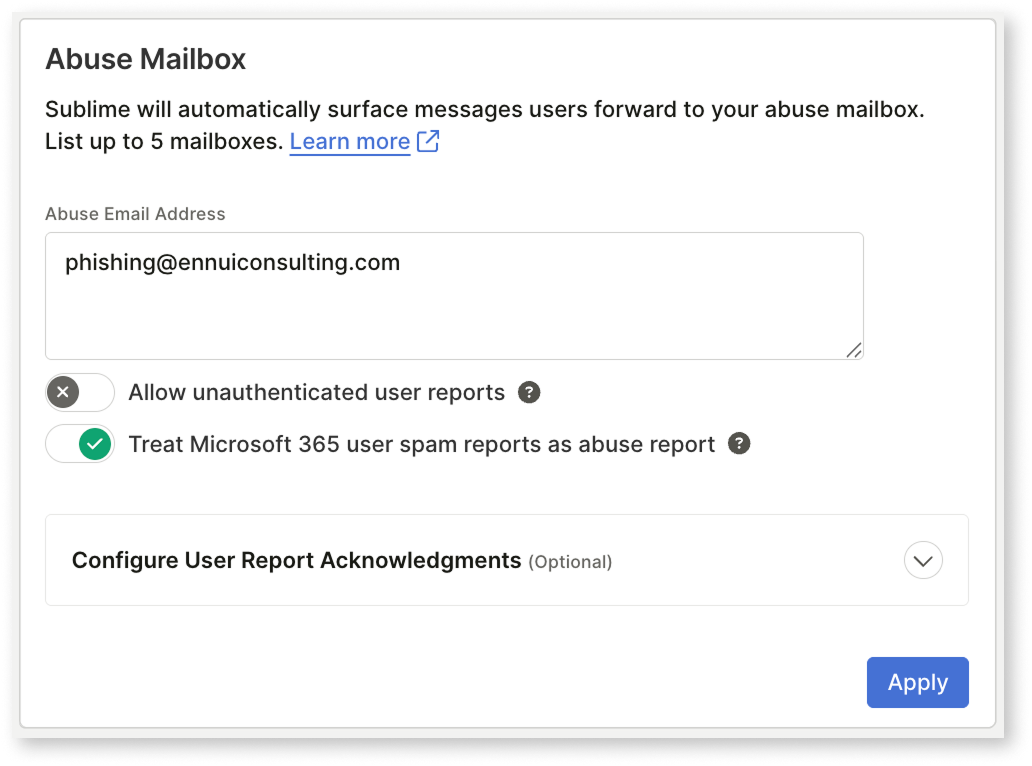
A new opt-in setting under Admin > Account > Abuse Mailbox lets Sublime ingest Outlook Junk reports as user reports for Microsoft 365 message sources, capturing phishing signal without requiring end-users to use the Report Phishing button.︀︄︇︀︅︉︀︅︀︀︃︀︀︅︅︀︅︊︀︄︆︀︃︄︀︄︇︀︅︉︀︅︀︀︃︀︀︅︅︀︅︊︀︄︆︀︃︄
Fastly's edge cloud platform delivers faster, safer, and more scalable sites and apps to customers. Elevate your edge CDN, video delivery, security, and more.
Fastly launched AI Runtime Control (ARC), a new control plane and firewall for governing LLMLLMA large language model, a neural network trained on large amounts of text to recognize patterns and generate language. Applications use it for tasks such as answering, summarizing and writing code. traffic at the edge, and extended its analytics APIs to track ARC traffic volume.︀︄︇︀︅︉︀︅︀︀︃︀︀︅︅︀︅︊︀︄︆︀︃︄︀︄︇︀︅︉︀︅︀︀︃︀︀︅︅︀︅︊︀︄︆︀︃︄
└──▷ WHAT SHIPPED ·
2 FEATURES1 OF 2 FEATURESmost completely described firstwhat's the number?
Each feature carries 0–100 for how completely the vendor documented
it — not how big or important the work is. A major capability
described in eight words scores low, and that is the finding.
depth0–40what it does and how it works or what changed
specificity0–30names real surfaces — APIs, flags, formats, limits, numbers
actionability0–30enough to go use it — a named endpoint, flag, or config key tops this; a UI path is a starting point
Code and config rank first by construction: a documented endpoint,
flag or config key scores at the top of specificity and actionability,
so it sorts above a feature described only in prose. Under
60 the notes go thin — everything below the “thinner
coverage” line is thinner documentation, not smaller work.
Hover any meter for that feature's three sub-scores.
0100
arc_requests metric in analytics APIsnew60how completely this was documenteddepth15/40specificity25/30actionability20/3060 / 100
Fastly added the arc_requests metric to the Historical Stats and Real-Time Analytics APIs to track requests received by AI Runtime Control.︀︄︇︀︅︉︀︅︀︀︃︀︀︅︅︀︅︊︀︄︆︀︃︄︀︄︇︀︅︉︀︅︀︀︃︀︀︅︅︀︅︊︀︄︆︀︃︄
AI Firewall and AI Runtime Control (ARC)new53how completely this was documenteddepth25/40specificity18/30actionability10/3053 / 100
Fastly added AI Runtime Control (ARC), a control plane that sits between applications and LLM providers to govern AI traffic, along with Fastly AI Firewall, a security module for ARC that inspects large language modellarge language modelA large language model, a neural network trained on large amounts of text to recognize patterns and generate language. Applications use it for tasks such as answering, summarizing and writing code. (LLM) requests.
— Names the two components and their role but no config or setup steps.product docs
Suricata 8.0.7 expands the firewall policy engine with new ARPARPA network protocol that maps IP addresses to MAC addresses on a local Ethernet segment, letting tools resolve layer-3 targets to layer-2 hardware addresses for packet crafting or host discovery. and default-action controls, adds subdomain matching to datasets, introduces a unified TCPTCPA network protocol that delivers a reliable, ordered stream of bytes between two endpoints. It detects lost data and retransmits it. session-matching keyword, lets app-layer-protocol match multiple protocols per rule, and brings firewall progress states to the SMTPSMTPThe application-layer protocol used to send email between servers and from clients to servers; cyber tools use it to relay alerts, phishing simulations, or exfiltrated data over standard mail infrastructure. parser.︀︄︇︀︅︉︀︅︀︀︃︀︀︅︅︀︅︊︀︄︆︀︃︄︀︄︇︀︅︉︀︅︀︀︃︀︀︅︅︀︅︊︀︄︆︀︃︄
Suricata is a network Intrusion Detection System, Intrusion Prevention System and Network Security Monitoring engine developed by the OISF and the Suricata community.
Suricata 8.0.7 expands the firewall policy engine with new ARPARPA network protocol that maps IP addresses to MAC addresses on a local Ethernet segment, letting tools resolve layer-3 targets to layer-2 hardware addresses for packet crafting or host discovery. and default-action controls, adds subdomain matching to datasets, introduces a unified TCPTCPA network protocol that delivers a reliable, ordered stream of bytes between two endpoints. It detects lost data and retransmits it. session-matching keyword, lets app-layer-protocol match multiple protocols per rule, and brings firewall progress states to the SMTPSMTPThe application-layer protocol used to send email between servers and from clients to servers; cyber tools use it to relay alerts, phishing simulations, or exfiltrated data over standard mail infrastructure. parser.︀︄︇︀︅︉︀︅︀︀︃︀︀︅︅︀︅︊︀︄︆︀︃︄︀︄︇︀︅︉︀︅︀︀︃︀︀︅︅︀︅︊︀︄︆︀︃︄
└──▷ WHAT SHIPPED ·
5 FEATURES1 OF 5 FEATURESmost completely described firstwhat's the number?
Each feature carries 0–100 for how completely the vendor documented
it — not how big or important the work is. A major capability
described in eight words scores low, and that is the finding.
depth0–40what it does and how it works or what changed
specificity0–30names real surfaces — APIs, flags, formats, limits, numbers
actionability0–30enough to go use it — a named endpoint, flag, or config key tops this; a UI path is a starting point
Code and config rank first by construction: a documented endpoint,
flag or config key scores at the top of specificity and actionability,
so it sorts above a feature described only in prose. Under
60 the notes go thin — everything below the “thinner
coverage” line is thinner documentation, not smaller work.
Hover any meter for that feature's three sub-scores.
0101
Firewall policy engine ARP and default-action optionsnew75how completely this was documenteddepth25/40specificity25/30actionability25/3075 / 100
Adds accept-arp option under firewall.policies in suricata.yaml to control whether ARP traffic is accepted by the firewall policy engine, and adds default-policy setting to specify a fallback action when no explicit policy matches any rule.︀︄︇︀︅︉︀︅︀︀︃︀︀︅︅︀︅︊︀︄︆︀︃︄︀︄︇︀︅︉︀︅︀︀︃︀︀︅︅︀︅︊︀︄︆︀︃︄
Allow ARP traffic through the firewall and set a default drop policy for unmatched flows.
yaml
firewall:
  policies:
    accept-arp: true
    default-policy: drop
— Names config keys and file with a runnable examplesuricata-8.0.7
0200
Subdomain matching in dataset keywordnew65how completely this was documenteddepth20/40specificity20/30actionability25/3065 / 100
Adds match subdomain option to the dataset keyword, enabling rules to match subdomains of entries in a dataset, such as detecting connections to any subdomain of a blocklisted domain.
Detect connections to any subdomain of a blocklisted domain set using the new match subdomain dataset option.
$ alert dns any any -> any any (msg:"Blocklisted domain hit"; dns.query; dataset:isset,bad-domains,type string,match subdomain; sid:1000002; rev:1;)
— Named keyword option with a working rule examplesuricata-8.0.7
0300
Multi-protocol matching in app-layer-protocolimproved65how completely this was documenteddepth20/40specificity20/30actionability25/3065 / 100
Extends the app-layer-protocol keyword to accept a pipe-separated list of protocol values in a single rule, allowing one rule to match multiple protocols (e.g. app-layer-protocol:dns|http).
Match DNS or HTTP traffic in a single rule using the new pipe-separated protocol list in app-layer-protocol.
$ alert tcp any any -> any any (msg:"DNS or HTTP detected"; app-layer-protocol:dns|http; sid:1000001; rev:1;)
— Named keyword with concrete example syntaxsuricata-8.0.7
thinner coverage below
0400
tcp.session keyword for TCP lifecycle matchingnew40how completely this was documenteddepth15/40specificity15/30actionability10/3040 / 100
Adds tcp.session keyword for unified TCP lifecycle matching across a session.
— Names the keyword but no example or mechanism detailsuricata-8.0.7
0500
Firewall progress states in SMTP parsernew40how completely this was documenteddepth15/40specificity15/30actionability10/3040 / 100
Adds firewall progress states to the SMTP parser, enabling policy enforcement at SMTP transaction stages.
— States the addition but no example or stage detailsuricata-8.0.7
Sysdig Secure reduced KSPMKSPMKubernetes Security Posture Management: a category of tooling that continuously audits Kubernetes clusters against configuration best practices and compliance policies to surface misconfigurations before attackers exploit them. scan overhead and significantly expanded the CLI Scanner with standalone binary detection, binary allow/deny policies, license reporting, and a new OS distribution.︀︄︇︀︅︉︀︅︀︀︃︀︀︅︅︀︅︊︀︄︆︀︃︄
Sysdig Secure is a container security platform providing runtime threat detection, forensics, and compliance monitoring for cloud-native environments.
Sysdig Secure reduced KSPMKSPMKubernetes Security Posture Management: a category of tooling that continuously audits Kubernetes clusters against configuration best practices and compliance policies to surface misconfigurations before attackers exploit them. scan overhead and significantly expanded the CLI Scanner with standalone binary detection, binary allow/deny policies, license reporting, and a new OS distribution.︀︄︇︀︅︉︀︅︀︀︃︀︀︅︅︀︅︊︀︄︆︀︃︄
└──▷ WHAT SHIPPED ·
5 FEATURES0 OF 5 FEATURESmost completely described firstwhat's the number?
Each feature carries 0–100 for how completely the vendor documented
it — not how big or important the work is. A major capability
described in eight words scores low, and that is the finding.
depth0–40what it does and how it works or what changed
specificity0–30names real surfaces — APIs, flags, formats, limits, numbers
actionability0–30enough to go use it — a named endpoint, flag, or config key tops this; a UI path is a starting point
Code and config rank first by construction: a documented endpoint,
flag or config key scores at the top of specificity and actionability,
so it sorts above a feature described only in prose. Under
60 the notes go thin — everything below the “thinner
coverage” line is thinner documentation, not smaller work.
Hover any meter for that feature's three sub-scores.
0100
Per-package license reporting in CLI Scannernew95how completely this was documenteddepth35/40specificity30/30actionability30/3095 / 100
CLI Scanner v1.30.0 adds per-package license data (including license category) to the JSON scan result under the v1 schema, available via --output json, in Technical Preview.︀︄︇︀︅︉︀︅︀︀︃︀︀︅︅︀︅︊︀︄︆︀︃︄ It also adds --show-licenses to print the ten most frequent licenses and their occurrence counts in console output, and --full-licenses-table to show every license found, both in Technical Preview.
Audit an image for license compliance by getting a full per-package license breakdown alongside vulnerability results in machine-readable JSON.
$ sysdig-cli-scanner --output json <image>
Quickly review the most common open-source licenses present in an image during a CI pipeline scan.
Standalone binary scanning in CLI Scannernew85how completely this was documenteddepth30/40specificity25/30actionability30/3085 / 100
Sysdig CLI Scanner v1.30.0 adds standalone binary scanning via --detect-unknown-executables to identify and report vulnerabilities in applications not installed by a package manager, including executables the scanner does not recognize.
Scan a container image and surface vulnerabilities in binaries that were not installed via a package manager, including unrecognized executables.
CIS Linux Benchmark filesystem scan efficiency in KSPM Analyzerimproved50how completely this was documenteddepth25/40specificity15/30actionability10/3050 / 100
KSPM Analyzer v1.49.5 improves CISCISA nonprofit that publishes consensus-based configuration benchmarks and controls for hardening operating systems, cloud environments, and software; cyber tools use it as a ready-made compliance baseline. Linux Benchmark filesystem scans by excluding kubelet pod volume mounts, reducing IOPS on nodes.
Binary Allow List and Deny List rules in CLI Scannernew45how completely this was documenteddepth20/40specificity15/30actionability10/3045 / 100
CLI Scanner v1.30.0 adds support for Binary Allow List and Binary Deny List rules, so vulnerability policies that allow or deny specific binaries are now evaluated by the CLI Scanner.
Plerion's Terraform onboarding now supports all three workload scanning deployment models, including a fully self-managed service account setup that keeps scanning infrastructure inside the customer's own organization.︀︄︇︀︅︉︀︅︀︀︃︀︀︅︅︀︅︊︀︄︆︀︃︄︀︄︇︀︅︉︀︅︀︀︃︀︀︅︅︀︅︊︀︄︆︀︃︄
Plerion is a cloud security platform that discovers and manages vulnerabilities and misconfigurations across infrastructure.
Plerion's Terraform onboarding now supports all three workload scanning deployment models, including a fully self-managed service account setup that keeps scanning infrastructure inside the customer's own organization.︀︄︇︀︅︉︀︅︀︀︃︀︀︅︅︀︅︊︀︄︆︀︃︄︀︄︇︀︅︉︀︅︀︀︃︀︀︅︅︀︅︊︀︄︆︀︃︄
└──▷ WHAT SHIPPED ·
1 FEATURE0 OF 1 FEATUREmost completely described firstwhat's the number?
Each feature carries 0–100 for how completely the vendor documented
it — not how big or important the work is. A major capability
described in eight words scores low, and that is the finding.
depth0–40what it does and how it works or what changed
specificity0–30names real surfaces — APIs, flags, formats, limits, numbers
actionability0–30enough to go use it — a named endpoint, flag, or config key tops this; a UI path is a starting point
Code and config rank first by construction: a documented endpoint,
flag or config key scores at the top of specificity and actionability,
so it sorts above a feature described only in prose. Under
60 the notes go thin — everything below the “thinner
coverage” line is thinner documentation, not smaller work.
Hover any meter for that feature's three sub-scores.
0100
Service account model for Terraform onboardingnew82how completely this was documenteddepth32/40specificity24/30actionability26/3082 / 100
Terraform onboarding now supports all three workload scanning deployment models, including a service account you own and Plerion operates, keeping scanning inside your organization without appliances in scanned accounts.︀︄︇︀︅︉︀︅︀︀︃︀︀︅︅︀︅︊︀︄︆︀︃︄ Two Terraform templates provision this setup: one grants Plerion the required access, and one deploys per-region resources (appliance network, auto-scaling scan pool, and snapshot encryption key); both register with Plerion automatically during terraform apply with no manual console steps.︀︄︇︀︅︉︀︅︀︀︃︀︀︅︅︀︅︊︀︄︆︀︃︄
ⓘSourcesBlog / feed →1 release · 2026-09-14Blog ↗RankWhy this ranktop features scored 70/60/30, +10 product media, +6 runnable example — 69.33How ranking works →
Upwind is a runtime-powered CNAPP that protects cloud workloads by combining posture, detection and response, and identity security with real-time runtime context.
Upwind Code now covers all four major version control providers by adding Azure DevOps and Bitbucket Cloud integrations, plus a generic API path for other providers and a new console page to manage scan scope.︀︄︇︀︅︉︀︅︀︀︃︀︀︅︅︀︅︊︀︄︆︀︃︄
└──▷ WHAT SHIPPED ·
3 FEATURES0 OF 3 FEATURESmost completely described firstwhat's the number?
Each feature carries 0–100 for how completely the vendor documented
it — not how big or important the work is. A major capability
described in eight words scores low, and that is the finding.
depth0–40what it does and how it works or what changed
specificity0–30names real surfaces — APIs, flags, formats, limits, numbers
actionability0–30enough to go use it — a named endpoint, flag, or config key tops this; a UI path is a starting point
Code and config rank first by construction: a documented endpoint,
flag or config key scores at the top of specificity and actionability,
so it sorts above a feature described only in prose. Under
60 the notes go thin — everything below the “thinner
coverage” line is thinner documentation, not smaller work.
Hover any meter for that feature's three sub-scores.
0100
Azure DevOps and Bitbucket Cloud integrations in Upwind Codenew70how completely this was documenteddepth30/40specificity25/30actionability15/3070 / 100
Upwind Code adds an Azure DevOps integration that connects at the organization level through Microsoft Entra IDEntra IDMicrosoft's cloud-based identity and access management service, formerly Azure Active Directory, used by cyber tools to authenticate users and enforce access policies in Microsoft 365 and Azure environments. to discover repositories and surface findings on pull requests without modifying existing CI/CD pipelines, and a Bitbucket Cloud integration that connects at the workspace level to automatically include new repositories and surface findings within pull request review workflows.︀︄︇︀︅︉︀︅︀︀︃︀︀︅︅︀︅︊︀︄︆︀︃︄ Together with existing GitHub and GitLab support, this completes coverage across all four major version control providers.
Connect an Azure DevOps or Bitbucket Cloud environment to begin repository discovery and pull request scanning.
📍In the Upwind console, go to Components → Integrations and select Azure DevOps or Bitbucket Cloud to connect your organization or workspace.
Organizations & Repositories management pagenew60how completely this was documenteddepth20/40specificity20/30actionability20/3060 / 100
Adds an Organizations & Repositories page in the Upwind console to centrally manage which organizations and repositories are scanned, keeping access and scan scope separate.
Control which organizations and repositories are actively scanned after connecting a version control provider.
📍In the Upwind console, go to Organizations & Repositories to select which connected organizations and repositories are in scope for scanning.
Chainguard added 26 new container images this week, many with FIPSFIPSA set of US federal standards published by NIST that define approved cryptographic algorithms and modules; cyber tools use it to meet compliance requirements in government and regulated environments. variants, and announced a breaking default-user change for the sonar-scanner-cli image.︀︄︇︀︅︉︀︅︀︀︃︀︀︅︅︀︅︊︀︄︆︀︃︄︀︄︇︀︅︉︀︅︀︀︃︀︀︅︅︀︅︊︀︄︆︀︃︄
Chainguard provides trusted open source artifacts for every layer of your modern software stack—containers, language libraries, and VM images.
Chainguard added 26 new container images this week, many with FIPSFIPSA set of US federal standards published by NIST that define approved cryptographic algorithms and modules; cyber tools use it to meet compliance requirements in government and regulated environments. variants, and announced a breaking default-user change for the sonar-scanner-cli image.︀︄︇︀︅︉︀︅︀︀︃︀︀︅︅︀︅︊︀︄︆︀︃︄︀︄︇︀︅︉︀︅︀︀︃︀︀︅︅︀︅︊︀︄︆︀︃︄
└──▷ WHAT SHIPPED ·
2 FEATURES1 OF 2 FEATURESmost completely described firstwhat's the number?
Each feature carries 0–100 for how completely the vendor documented
it — not how big or important the work is. A major capability
described in eight words scores low, and that is the finding.
depth0–40what it does and how it works or what changed
specificity0–30names real surfaces — APIs, flags, formats, limits, numbers
actionability0–30enough to go use it — a named endpoint, flag, or config key tops this; a UI path is a starting point
Code and config rank first by construction: a documented endpoint,
flag or config key scores at the top of specificity and actionability,
so it sorts above a feature described only in prose. Under
60 the notes go thin — everything below the “thinner
coverage” line is thinner documentation, not smaller work.
Hover any meter for that feature's three sub-scores.
0101
Sonar-scanner-cli image switches to nonroot defaultbreaking95how completely this was documenteddepth35/40specificity30/30actionability30/3095 / 100
Effective 2026-10-12, the sonar-scanner-cli image default user changes from root (UID 0) to nonroot (UID 65532), and the scanner scratch directory moves from <project>/.scannerwork to /tmp/.scannerwork, which breaks pipelines that read report-task.txt from the old location and derived images that write to system paths as root.︀︄︇︀︅︉︀︅︀︀︃︀︀︅︅︀︅︊︀︄︆︀︃︄ To restore previous behavior, run with --user 0 (Docker), USER root (Dockerfile), or runAsUser: 0 (Kubernetes), or set -Dsonar.working.directory=<project>/.scannerwork and ensure the workspace is writable by the container user.︀︄︇︀︅︉︀︅︀︀︃︀︀︅︅︀︅︊︀︄︆︀︃︄
— Exact flags, paths, UIDs and migration commands providedWeek of 2026-09-14
0200
26 new container images added, including FIPS variantsnew60how completely this was documenteddepth15/40specificity30/30actionability15/3060 / 100
— Names every image and type but gives no pull command or registry pathWeek of 2026-09-14
└──▷ BREAKING ON UPGRADE
!
Effective 2026-10-12: the sonar-scanner-cli image default user changes from root (UID 0) to nonroot (UID 65532); the scanner scratch directory moves from <project>/.scannerwork to /tmp/.scannerwork, breaking pipelines that read report-task.txt from the old location and derived images that write to system paths as root. To restore previous behavior, run with --user 0 (Docker), USER root (Dockerfile), or runAsUser: 0 (Kubernetes), or set -Dsonar.working.directory=<project>/.scannerwork and ensure the workspace is writable by the container user.
Instinct meets AI. Arctic Wolf Aurora's built-in agents operate at machine speed while human experts maintain oversight.
Arctic Wolf launched Aurora MDRMDRManaged detection and response, an outsourced service that monitors security signals, investigates threats and helps respond to incidents. It combines specialist analysts with detection tools. Connect, a new MSPMSPA managed service provider, a company that operates IT services for customers. It may manage systems, networks, backups or other ongoing technology needs.-exclusive MDR tier offering agentless deployment and broad telemetry ingestion across the attack surfaceattack surfaceThe exposed systems, interfaces and access points an attacker could try to use. It includes internet-facing services as well as identities, software and other reachable resources..︀︄︇︀︅︉︀︅︀︀︃︀︀︅︅︀︅︊︀︄︆︀︃︄︀︄︇︀︅︉︀︅︀︀︃︀︀︅︅︀︅︊︀︄︆︀︃︄
└──▷ WHAT SHIPPED ·
1 FEATURE1 OF 1 FEATUREmost completely described firstwhat's the number?
Each feature carries 0–100 for how completely the vendor documented
it — not how big or important the work is. A major capability
described in eight words scores low, and that is the finding.
depth0–40what it does and how it works or what changed
specificity0–30names real surfaces — APIs, flags, formats, limits, numbers
actionability0–30enough to go use it — a named endpoint, flag, or config key tops this; a UI path is a starting point
Code and config rank first by construction: a documented endpoint,
flag or config key scores at the top of specificity and actionability,
so it sorts above a feature described only in prose. Under
60 the notes go thin — everything below the “thinner
coverage” line is thinner documentation, not smaller work.
Hover any meter for that feature's three sub-scores.
0101
Aurora MDR Connect MSP tier launchnew45how completely this was documenteddepth20/40specificity15/30actionability10/3045 / 100
A new MSP-exclusive MDR tier with agentless deployment that ingests telemetry from endpoint, network, cloud, identity, SaaSSaaSSoftware delivered over the internet and run on the provider's infrastructure, so the buyer pays a subscription instead of installing or operating anything locally. applications, and other sources to deliver detection and response across a broader attack surface than endpoint-only approaches.︀︄︇︀︅︉︀︅︀︀︃︀︀︅︅︀︅︊︀︄︆︀︃︄︀︄︇︀︅︉︀︅︀︀︃︀︀︅︅︀︅︊︀︄︆︀︃︄
Sophos Protection for Linux is an endpoint security solution providing antivirus, anti-malware, and threat detection for Linux servers and workstations.
Sophos Protection for Linux 2026.2 and 2026.3 add tamper resiliency and Update Cache/Message Relay roles for the SPL Agent, a new diagnostic CLI tool, expanded Sophos Data Lake telemetry, and support for newer Linux kernels.︀︄︇︀︅︉︀︅︀︀︃︀︀︅︅︀︅︊︀︄︆︀︃︄︀︄︇︀︅︉︀︅︀︀︃︀︀︅︅︀︅︊︀︄︆︀︃︄
└──▷ WHAT SHIPPED ·
6 FEATURES0 OF 6 FEATURESmost completely described firstwhat's the number?
Each feature carries 0–100 for how completely the vendor documented
it — not how big or important the work is. A major capability
described in eight words scores low, and that is the finding.
depth0–40what it does and how it works or what changed
specificity0–30names real surfaces — APIs, flags, formats, limits, numbers
actionability0–30enough to go use it — a named endpoint, flag, or config key tops this; a UI path is a starting point
Code and config rank first by construction: a documented endpoint,
flag or config key scores at the top of specificity and actionability,
so it sorts above a feature described only in prose. Under
60 the notes go thin — everything below the “thinner
coverage” line is thinner documentation, not smaller work.
Hover any meter for that feature's three sub-scores.
0100
Endpoint Self Help diagnostic CLI toolnew65how completely this was documenteddepth25/40specificity20/30actionability20/3065 / 100
Adds an Endpoint Self Help command-line tool for administrators to view product health and collect diagnostic information from a Linux server.︀︄︇︀︅︉︀︅︀︀︃︀︀︅︅︀︅︊︀︄︆︀︃︄︀︄︇︀︅︉︀︅︀︀︃︀︀︅︅︀︅︊︀︄︆︀︃︄
— Names the exact CLI tool and its purpose, but no usage syntax givenVersion 2026.3New
0200
Expanded telemetry events in Sophos Data Lakenew60how completely this was documenteddepth25/40specificity25/30actionability10/3060 / 100
Expands the account_activity_linux data lake event to include account creation, deletion, and modifications to group membership. Adds DNS activity and Server Name Indication (SNISNIA TLS extension that lets a client declare which hostname it is connecting to during the handshake, allowing one server to host multiple certificates on a single IP address.) hostname events to the Sophos Data Lake for expanded network visibility, and adds container information to supported detection events in the Sophos Data Lake.
Update Cache and Message Relay roles for SPL Agentnew55how completely this was documenteddepth20/40specificity20/30actionability15/3055 / 100
Enables Linux servers running SPL Agent to be configured as Update Caches and Message Relays in Sophos Central.
— Describes the new role but not configuration stepsVersion 2026.3New
0400
Tamper Resiliency for SPL Agent filesnew40how completely this was documenteddepth20/40specificity15/30actionability5/3040 / 100
Adds automatic detection and recovery for unauthorized changes to SPL Agent files (Tamper Resiliency).
— Explains the mechanism at a high level, no configuration detailVersion 2026.3New
0500
Data lake processing performance and batching improvementsimproved30how completely this was documenteddepth15/40specificity10/30actionability5/3030 / 100
Improves event processing performance for endpoints with heavy container activity, and introduces data-lake batching updates to increase alert fidelity.
— Describes improvement direction only, no metrics or mechanismVersion 2026.2
0600
Expanded Linux kernel supportnew30how completely this was documenteddepth10/40specificity15/30actionability5/3030 / 100
Adds support for kernel 6.19/7.0, and later adds support for kernel 7.1.
Check out our full list of release notes, and stay up to date with what
Automox improved Remote Tools' Splashtop Streamer auto-install, adding automatic reinstall on re-imaged devices and automatic retry of transient failed installs.︀︄︇︀︅︉︀︅︀︀︃︀︀︅︅︀︅︊︀︄︆︀︃︄︀︄︇︀︅︉︀︅︀︀︃︀︀︅︅︀︅︊︀︄︆︀︃︄
└──▷ WHAT SHIPPED ·
1 FEATURE0 OF 1 FEATUREmost completely described firstwhat's the number?
Each feature carries 0–100 for how completely the vendor documented
it — not how big or important the work is. A major capability
described in eight words scores low, and that is the finding.
depth0–40what it does and how it works or what changed
specificity0–30names real surfaces — APIs, flags, formats, limits, numbers
actionability0–30enough to go use it — a named endpoint, flag, or config key tops this; a UI path is a starting point
Code and config rank first by construction: a documented endpoint,
flag or config key scores at the top of specificity and actionability,
so it sorts above a feature described only in prose. Under
60 the notes go thin — everything below the “thinner
coverage” line is thinner documentation, not smaller work.
Hover any meter for that feature's three sub-scores.
0100
Splashtop Streamer auto-install improvementsimproved55how completely this was documenteddepth30/40specificity15/30actionability10/3055 / 100
Re-imaged devices with auto-install enabled now have the Splashtop Streamer reinstalled automatically without manual intervention after an imaging batch.︀︄︇︀︅︉︀︅︀︀︃︀︀︅︅︀︅︊︀︄︆︀︃︄ Failed installs now retry automatically when the failure is transient (network interruption, locked file, or antivirus interference), while permanently unresolvable failures (e.g.︀︄︇︀︅︉︀︅︀︀︃︀︀︅︅︀︅︊︀︄︆︀︃︄ unsupported OS) are reported immediately.
ⓘSourcesBlog / feed →5 releases · 2026-09-15 → 2026-09-16Blog ↗RankWhy this ranktop features scored 91/77/70, +15 breaking change, +6 runnable example — 100.33How ranking works →
Trend Vision One is Trend Micro's cloud-based XDR platform providing unified security visibility and threat detection across endpoints, networks, and cloud environments.
Trend Vision One's headline change this window is centralizing pattern update scheduling under Version Control Policies ahead of the 2027 End of Life for Standard Endpoint Protection and Server & Workload Protection; it also added Outlook-based phishing simulation reporting, OpenLDAPOpenLDAPAn open-source implementation of the Lightweight Directory Access Protocol, maintained by the OpenLDAP Project, used to store and query structured identity data like users and groups over a network. identity sync for Security Awareness, and incremental hardening of Service Gateway firmware and the Private Access Connector.︀︄︇︀︅︉︀︅︀︀︃︀︀︅︅︀︅︊︀︄︆︀︃︄
└──▷ WHAT SHIPPED ·
5 FEATURES0 OF 5 FEATURESmost completely described firstwhat's the number?
Each feature carries 0–100 for how completely the vendor documented
it — not how big or important the work is. A major capability
described in eight words scores low, and that is the finding.
depth0–40what it does and how it works or what changed
specificity0–30names real surfaces — APIs, flags, formats, limits, numbers
actionability0–30enough to go use it — a named endpoint, flag, or config key tops this; a UI path is a starting point
Code and config rank first by construction: a documented endpoint,
flag or config key scores at the top of specificity and actionability,
so it sorts above a feature described only in prose. Under
60 the notes go thin — everything below the “thinner
coverage” line is thinner documentation, not smaller work.
Hover any meter for that feature's three sub-scores.
0100
Pattern update scheduling in Version Control Policiesnew91how completely this was documenteddepth35/40specificity28/30actionability28/3091 / 100
Version Control Policies gains pattern update schedule configuration, reachable via Endpoint Security → Endpoint Security Configuration → Version Control Policies, for agents on version 202609 and later.︀︄︇︀︅︉︀︅︀︀︃︀︀︅︅︀︅︊︀︄︆︀︃︄ Engine updates now follow agent software update settings when managed through Version Control Policies, consolidating previously separate controls, and enrollment into Version Control Policies now automatically enrolls all unenrolled Protection Manager instances in a single operation. Agents older than version 202609 continue to follow pattern update settings from Protection Manager rather than Version Control Policies, splitting the management path for mixed fleets.
Centralize pattern update scheduling for all Protection Manager instances before Standard Endpoint Protection and Server & Workload Protection reach End of Life in 2027.
📍In the console, go to Endpoint Security → Endpoint Security Configuration → Version Control Policies, open the enrollment workflow, and confirm enrollment to automatically enroll all unenrolled Protection Manager instances.
Outlook Add-in phishing simulation reportingnew77how completely this was documenteddepth32/40specificity25/30actionability20/3077 / 100
Trend Vision One adds a Report Phishing button via the Outlook Add-in so users can report suspicious or simulated phishing emails directly from Microsoft Outlook. Reports feed simulation analytics through a new response option added to the phishing results filter, a new user status in simulation profiles records the method used to report a phishing email, and risk scores are reduced for users who demonstrate consistent, proactive phishing reporting behavior over time.
Enable the Outlook Add-in so end users can report phishing simulation emails directly from their inbox, feeding results into simulation analytics and risk scoring.
📍In the console, go to Cyber Risk Exposure Management › Security Awareness › Phishing Simulations, then enable the Add-in for Outlook.
Service Gateway firmware 3.0.34 platform updatesnew70how completely this was documenteddepth28/40specificity28/30actionability14/3070 / 100
Service Gateway firmware 3.0.34 adds CLI commands to enable and disable MicroK8s debug logging, adds package signature verification before firmware upgrade and service installation, adds Brazil (BR) site FQDN support, extends custom CA support to the sg-apl service and Node.js-based services, upgrades the appliance OS to Rocky Linux 9.8, and enhances diagnostics collection with MicroK8s inspection reports and container image checks.
OpenLDAP identity source in Security Awarenessnew57how completely this was documenteddepth24/40specificity18/30actionability15/3057 / 100
Security Awareness adds OpenLDAP as a supported identity data source, enabling direct user import and synchronization from LDAPLDAPA protocol for querying and modifying directory services, standardized under RFC 4511, commonly used to look up users, groups, and attributes in corporate identity stores like Active Directory.-based directories for phishing simulations and training campaigns.
Connect an OpenLDAP directory so users and groups are automatically available for targeting in phishing simulations and training campaigns, replacing manual CSV uploads.
📍In the console, go to Cyber Risk Exposure Management → Security Awareness → Phishing Simulations and add OpenLDAP as an identity data source, then select users or groups to include in a campaign.
Diagnostics and telemetry improvements in Private Access Connectorimproved37how completely this was documenteddepth18/40specificity14/30actionability5/3037 / 100
Zero Trust Secure Access Private Access Connector 3.9.0.2162 improves application access visibility with richer telemetry data in Secure Access history and adds more detailed diagnostic logging for Browser Access to aid troubleshooting.
Agents older than version 202609 continue to follow pattern update settings from Protection Manager, not from Version Control Policies — mixed fleets will have split management paths after this change.
ⓘSourcesBlog / feed →1 release · 2026-09-15Blog ↗RankWhy this ranktop features scored 90/85/80, +15 breaking change, +10 product media, +6 runnable example — 116How ranking works →
Meet your business challenges head on with AI and cloud computing services from Google, including security, data management, and hybrid & multi-cloud.
Google SecOps launches Google Unified Security, bundling Chrome Enterprise Premium integration, multi-cloud CDIR via Security Command Center Enterprise, and AI Protection/Model Armor into the platform, alongside a new Grok match_all parser option and two upcoming breaking changes affecting OAuth scopes and legacy IOCIOCAn indicator of compromise, an observable clue that may point to malicious activity, such as a suspicious file hash or domain. It is evidence to investigate, rather than proof by itself. feeds.︀︄︇︀︅︉︀︅︀︀︃︀︀︅︅︀︅︊︀︄︆︀︃︄
└──▷ WHAT SHIPPED ·
6 FEATURES4 OF 6 FEATURESmost completely described firstwhat's the number?
Each feature carries 0–100 for how completely the vendor documented
it — not how big or important the work is. A major capability
described in eight words scores low, and that is the finding.
depth0–40what it does and how it works or what changed
specificity0–30names real surfaces — APIs, flags, formats, limits, numbers
actionability0–30enough to go use it — a named endpoint, flag, or config key tops this; a UI path is a starting point
Code and config rank first by construction: a documented endpoint,
flag or config key scores at the top of specificity and actionability,
so it sorts above a feature described only in prose. Under
60 the notes go thin — everything below the “thinner
coverage” line is thinner documentation, not smaller work.
Hover any meter for that feature's three sub-scores.
0101
Multi-cloud CDIR via Security Command Center Enterprisenew90how completely this was documenteddepth35/40specificity30/30actionability25/3090 / 100
Google SecOps adds Cloud Detection, Investigation, and Response (CDIR) via Security Command Center Enterprise (SCC-E) integration, covering Google Cloud, AWS, and Azure within a single converged platform.︀︄︇︀︅︉︀︅︀︀︃︀︀︅︅︀︅︊︀︄︆︀︃︄ Cloud Asset Inventory collection flows into the Google SecOps Entity Graph, enriching alerts with multi-cloud asset context (region, owner, metadata tags); ingestion of AWS CloudTrailCloudTrailAWS service that records API calls and account activity across an AWS environment, giving cyber tools an audit log to detect anomalous or malicious actions. and GuardDuty events and Azure AD activity logs enables multi-cloud SIEMSIEMSecurity information and event management, collecting logs from many systems and correlating events to find suspicious activity. Analysts use it to investigate alerts and incidents. log searching using natural language, Yara-L, or raw log syntax; and CDIR Curated Detections for Cloud Threat scenarios include enhanced privilege escalationprivilege escalationGaining permissions beyond those an account or process initially had. It can turn limited access into administrator control or access to another user's resources. alerts that automatically map to Google SecOps cases.
Activate multi-cloud CDIR in Google SecOps to surface Security Command Center threat alerts and ingest AWS and Azure logs for unified investigation.
📍1. Activate the Enterprise Tier of SCC-E using your existing Google SecOps instance.
2. Validate Security Command Center Detection Services are enabled.
3. Connect Security Command Center to AWS for Entity Graph resource data.
4. Ingest Google Cloud logs via direct ingestion and set up the Google Cloud Export Filter.
5. Ingest AWS logs into Google SecOps.
6. Ingest Azure logs into Google SecOps.
7. Enable the CDIR Curated Detections.
— Names SCC-E, log sources, and gives full activation stepsproduct docs
0200
Chrome Enterprise Premium integration in SecOpsnew85how completely this was documenteddepth35/40specificity30/30actionability20/3085 / 100
Google SecOps adds Chrome Enterprise Premium (CEP) integration with curated detections enriched with Safe Browsing and Google Threat Intelligence (GTI) for browser-based threats such as malicious extensions, credential theft, and data exfiltrationdata exfiltrationMoving data out of a system or organization without authorization. It can happen through network transfers, removable media or other channels.. It also adds dedicated dashboards for Chrome security events covering managed and BYODBYODBring Your Own Device: a policy allowing employees to use personal phones, laptops, or tablets for work, creating a network of unmanaged endpoints that cyber tools must monitor or enforce policy on. devices, and automated response playbooks for Chrome Enterprise actions including blocking malicious URLs, blocking extensions, and quarantining devices.
Onboard Chrome Enterprise Premium to Google SecOps to immediately gain browser threat visibility and enable curated detections enriched with GTI.
📍1. Configure the Chrome Enterprise Premium Reporting Connector to send data to Google SecOps.
2. Connect Chrome Enterprise Premium to Google SecOps.
3. Enable Chrome Enterprise Threats Curated Detections.
— Names sources, detection types, and playbook actions with setup stepsproduct docs
0302
chronicle.readonly OAuth scope loses write accessbreaking80how completely this was documenteddepth30/40specificity30/30actionability20/3080 / 100
Effective January 25, 2027, write permissions will be removed from the chronicle.readonly OAuth scope; any workflow performing write operations must be updated to use the chronicle OAuth scope instead.
— Exact scopes and date given but no migration commandchangelog-20260916-a3061ae6
0403
Legacy IOC feeds deprecated in favor of GTIdeprecated70how completely this was documenteddepth25/40specificity30/30actionability15/3070 / 100
The MANDIANT_ACTIVE_BREACH_IOC, MANDIANT_FUSION_IOC, and OPEN_SOURCE_INTEL_IOC feeds will be removed after March 18, 2027; affected feeds must be migrated to Google Threat Intelligence (GTI) before that date.
— Names exact feeds and deadline but no migration stepschangelog-20260916-a3061ae6
0504
AI Protection and Model Armor for AI workloadsnew65how completely this was documenteddepth30/40specificity25/30actionability10/3065 / 100
Google SecOps adds AI Protection within Security Command Center Enterprise, providing discovery and cataloging of AI assets (models, datasets, applications), virtual red-teaming to surface toxic attack pathsattack pathsA possible sequence of steps an attacker could take to reach a valuable target. It connects weaknesses, permissions and reachable systems rather than treating each finding separately., and detection and response for LLMLLMA large language model, a neural network trained on large amounts of text to recognize patterns and generate language. Applications use it for tasks such as answering, summarizing and writing code. hijacking, data poisoning, and AI-targeted threats, with response workflows integrated into Google SecOps. Model Armor protects AI workloads against data loss, brand damage, and offensive content across models and cloud environments.
— Describes mechanism and scope but gives no setup stepsproduct docs
0600
match_all option in Grok parser filternew65how completely this was documenteddepth25/40specificity25/30actionability15/3065 / 100
Google SecOps parser syntax adds a match_all option to the Grok filter, letting parsers extract all non-overlapping pattern occurrences within a field instead of only the first match.
Effective January 25, 2027, write permissions will be removed from the chronicle.readonly OAuth scope; any workflow performing write operations must be updated to use the chronicle OAuth scope instead.
!
The MANDIANT_ACTIVE_BREACH_IOC, MANDIANT_FUSION_IOC, and OPEN_SOURCE_INTEL_IOC feeds will be removed after March 18, 2027; affected feeds must be migrated to GTI before that date.
ⓘSourcesBlog / feed →5 releases · 2026-09-10 → 2026-09-15Blog ↗RankWhy this ranktop features scored 90/75/60, +10 product media, +6 runnable example — 91How ranking works →
Databricks' biggest move this window is taking OpenSharing GA for zero-copy sharing of foreign DeltaDeltaThe difference between two versions of a file or data stream; tools use deltas to transmit or store only what changed, reducing bandwidth and storage overhead. tables, alongside a beta for managed tables in Lakeflow pipelines and betas extending ABACABACAttribute-based access control, where rules evaluate facts about the user, resource and request. Access can depend on conditions such as department, data sensitivity or device status. and Data Classification to Unity Catalog views.︀︄︇︀︅︉︀︅︀︀︃︀︀︅︅︀︅︊︀︄︆︀︃︄︀︄︇︀︅︉︀︅︀︀︃︀︀︅︅︀︅︊︀︄︆︀︃︄
Databricks is a unified analytics platform for data engineering, data science, and machine learning built on Apache Spark.
Databricks' biggest move this window is taking OpenSharing GA for zero-copy sharing of foreign DeltaDeltaThe difference between two versions of a file or data stream; tools use deltas to transmit or store only what changed, reducing bandwidth and storage overhead. tables, alongside a beta for managed tables in Lakeflow pipelines and betas extending ABACABACAttribute-based access control, where rules evaluate facts about the user, resource and request. Access can depend on conditions such as department, data sensitivity or device status. and Data Classification to Unity Catalog views.︀︄︇︀︅︉︀︅︀︀︃︀︀︅︅︀︅︊︀︄︆︀︃︄︀︄︇︀︅︉︀︅︀︀︃︀︀︅︅︀︅︊︀︄︆︀︃︄
└──▷ WHAT SHIPPED ·
4 FEATURES2 OF 4 FEATURESmost completely described firstwhat's the number?
Each feature carries 0–100 for how completely the vendor documented
it — not how big or important the work is. A major capability
described in eight words scores low, and that is the finding.
depth0–40what it does and how it works or what changed
specificity0–30names real surfaces — APIs, flags, formats, limits, numbers
actionability0–30enough to go use it — a named endpoint, flag, or config key tops this; a UI path is a starting point
Code and config rank first by construction: a documented endpoint,
flag or config key scores at the top of specificity and actionability,
so it sorts above a feature described only in prose. Under
60 the notes go thin — everything below the “thinner
coverage” line is thinner documentation, not smaller work.
Hover any meter for that feature's three sub-scores.
0101
Managed tables and append flows in Lakeflow pipelinesnew90how completely this was documenteddepth35/40specificity30/30actionability25/3090 / 100
Lakeflow pipelines now support creating managed tables and writing to them via one or more append flows using append_flow (Beta).︀︄︇︀︅︉︀︅︀︀︃︀︀︅︅︀︅︊︀︄︆︀︃︄ import_checkpoint on append_flow migrates existing Structured Streaming workloads into a Lakeflow pipeline without reprocessing the source, and create_table plus CREATE TABLE ...︀︄︇︀︅︉︀︅︀︀︃︀︀︅︅︀︅︊︀︄︆︀︃︄ FLOW syntax define managed tables and flows within pipelines.
READ METADATA privilege for compliance security profile workspacesnew75how completely this was documenteddepth35/40specificity25/30actionability15/3075 / 100
The READ METADATA privilege will be available by default for workspaces with the compliance security profile enabled, granting read-only visibility into security-sensitive metadata — including privilege grants, row filters, column masks, and ABAC policies — that is not exposed by BROWSE.
Sharing foreign Delta tables via OpenSharingnew60how completely this was documenteddepth25/40specificity25/30actionability10/3060 / 100
OpenSharing now generally available for sharing foreign Delta tables from OneLakeOneLakeMicrosoft's unified data lake built into Microsoft Fabric that gives every workspace a single, tenant-wide storage layer, letting cyber tools read and write data without managing separate storage accounts., Hive metastoreHive metastoreA central metadata repository, part of the Apache Hive project, that stores schema and location information for distributed data sets so query engines can discover and read structured data without hardcoding paths., or AWS Glue without copying data into Databricks.
ABAC and Data Classification extended to Unity Catalog viewsnew60how completely this was documenteddepth25/40specificity20/30actionability15/3060 / 100
ABAC row filters and column masks now extend to views in addition to tables (Beta, DBR 19+), letting existing Unity Catalog policies automatically apply to views once the ABAC on Views preview is enabled from the account console's Previews page. Data Classification separately gains the ability to scan Unity Catalog views (Beta), classifying columns for sensitive data using the same detection engine used for tables.
Enable the ABAC on Views beta so that existing ABAC policies automatically apply to views, not just tables.
📍In the account console, go to Previews and enable ABAC on Views.
ⓘSourcesBlog / feed →1 release · 2026-09-15Blog ↗RankWhy this ranktop features scored 90/86/35, +10 product media, +6 runnable example — 86.33How ranking works →
Qualys TruRisk Eliminate gains AI-powered patch reliability scoring and automated, EDREDREndpoint detection and response, monitoring computers for suspicious behavior and providing investigation and response controls, such as isolating a device.-free host isolation for overdue CISA KEVCISA KEVA catalog maintained by the US Cybersecurity and Infrastructure Security Agency listing vulnerabilities confirmed to be actively exploited in the wild, giving cyber tools a vetted, authoritative prioritization signal. vulnerabilities, plus phased ring-based patch rollout.︀︄︇︀︅︉︀︅︀︀︃︀︀︅︅︀︅︊︀︄︆︀︃︄︀︄︇︀︅︉︀︅︀︀︃︀︀︅︅︀︅︊︀︄︆︀︃︄
Cybersecurity blog covering software, services, and risk insights. Stay updated with the latest on threat detection, compliance, and vulnerability management.
Qualys TruRisk Eliminate gains AI-powered patch reliability scoring and automated, EDREDREndpoint detection and response, monitoring computers for suspicious behavior and providing investigation and response controls, such as isolating a device.-free host isolation for overdue CISA KEVCISA KEVA catalog maintained by the US Cybersecurity and Infrastructure Security Agency listing vulnerabilities confirmed to be actively exploited in the wild, giving cyber tools a vetted, authoritative prioritization signal. vulnerabilities, plus phased ring-based patch rollout.︀︄︇︀︅︉︀︅︀︀︃︀︀︅︅︀︅︊︀︄︆︀︃︄︀︄︇︀︅︉︀︅︀︀︃︀︀︅︅︀︅︊︀︄︆︀︃︄
└──▷ WHAT SHIPPED ·
3 FEATURES3 OF 3 FEATURESmost completely described firstwhat's the number?
Each feature carries 0–100 for how completely the vendor documented
it — not how big or important the work is. A major capability
described in eight words scores low, and that is the finding.
depth0–40what it does and how it works or what changed
specificity0–30names real surfaces — APIs, flags, formats, limits, numbers
actionability0–30enough to go use it — a named endpoint, flag, or config key tops this; a UI path is a starting point
Code and config rank first by construction: a documented endpoint,
flag or config key scores at the top of specificity and actionability,
so it sorts above a feature described only in prose. Under
60 the notes go thin — everything below the “thinner
coverage” line is thinner documentation, not smaller work.
Hover any meter for that feature's three sub-scores.
0101
Automated host isolation via Cloud Agentnew90how completely this was documenteddepth34/40specificity28/30actionability28/3090 / 100
TruRisk Eliminate can now automatically isolate hosts natively through the Qualys Cloud Agent when a user-defined QQL policy is met, with no EDR integration required; the host is quarantined within seconds and a timestamped audit record captures which rule, host, and deadline triggered the action.︀︄︇︀︅︉︀︅︀︀︃︀︀︅︅︀︅︊︀︄︆︀︃︄ A built-in CISA KEVKEVCISA's Known Exploited Vulnerabilities catalog, a list of vulnerabilities with evidence of exploitation in real attacks. It helps teams prioritize fixes for problems attackers already use. isolation use case applies the QQL vulnerabilities.status:[ACTIVE,NEW,REOPENED] AND vulnerabilities.riskFactor.cisaKEVDueDate < "now-1s" AND vulnerabilities.riskFactor.cisaKnownExploits:TRUE to isolate hosts where a KEV remediation deadline has passed and the vulnerability remains open.︀︄︇︀︅︉︀︅︀︀︃︀︀︅︅︀︅︊︀︄︆︀︃︄
Automatically isolate any host where a CISA KEV remediation deadline has passed and the vulnerability is still open, preventing exploitation while patching continues.
$ vulnerabilities.status:[ACTIVE,NEW,REOPENED] AND vulnerabilities.riskFactor.cisaKEVDueDate < "now-1s" AND vulnerabilities.riskFactor.cisaKnownExploits:TRUE
— Provides exact QQL policy syntax and isolation mechanism.2026-09-15-2b585d21
0202
AI-powered Patch Reliability Scoring in Patch Managementnew86how completely this was documenteddepth32/40specificity26/30actionability28/3086 / 100
TruRisk Eliminate adds AI-Powered Patch Reliability Scoring that combines LLMLLMA large language model, a neural network trained on large amounts of text to recognize patterns and generate language. Applications use it for tasks such as answering, summarizing and writing code.-analyzed public sentiment with Qualys telemetry on patch rollback and vulnerability reopen rates to produce a pre-deployment reliability score (Low / High) for each patch. A new patch.kb QQL filter in the Patch Management app (Patches > Windows) surfaces these assessments for specific KBs; clicking Patch Reliability: Low on a result opens an AI Assessment window showing known issues and source links via Detailed Report.
Check patch reliability before deploying a Patch Tuesday update — filter to specific KBs in the Patch Management app to see whether Qualys rated them Low or High reliability before pushing to production.
📍In the Patch Management application, go to Patches › Windows and enter the QQL query: patch.kb: [KB5124008 , KB5124012] — then click Patch Reliability: Low on any result to open the AI Assessment window and review known issues and source links via Detailed Report.
Ring-based phased patch deploymentnew35how completely this was documenteddepth15/40specificity12/30actionability8/3035 / 100
TruRisk Eliminate Patch Management supports ring-based phased deployment, allowing low-reliability patches to be progressively validated through Test → Staging → Production environments before broader rollout.
— Describes rollout stages but no config or command detail.2026-09-15-2b585d21
runZero is an asset discovery and inventory platform that identifies and maps all devices on networks without credentials.
runZero added API support for suppressing and unsuppressing vulnerabilities, vulnerability groups, and findings.︀︄︇︀︅︉︀︅︀︀︃︀︀︅︅︀︅︊︀︄︆︀︃︄︀︄︇︀︅︉︀︅︀︀︃︀︀︅︅︀︅︊︀︄︆︀︃︄
└──▷ WHAT SHIPPED ·
1 FEATURE0 OF 1 FEATUREmost completely described firstwhat's the number?
Each feature carries 0–100 for how completely the vendor documented
it — not how big or important the work is. A major capability
described in eight words scores low, and that is the finding.
depth0–40what it does and how it works or what changed
specificity0–30names real surfaces — APIs, flags, formats, limits, numbers
actionability0–30enough to go use it — a named endpoint, flag, or config key tops this; a UI path is a starting point
Code and config rank first by construction: a documented endpoint,
flag or config key scores at the top of specificity and actionability,
so it sorts above a feature described only in prose. Under
60 the notes go thin — everything below the “thinner
coverage” line is thinner documentation, not smaller work.
Hover any meter for that feature's three sub-scores.
0100
API endpoints to suppress vulnerabilities and findingsnew45how completely this was documenteddepth15/40specificity15/30actionability15/3045 / 100
New API endpoints let users suppress and unsuppress vulnerabilities, vulnerability groups, and findings.︀︄︇︀︅︉︀︅︀︀︃︀︀︅︅︀︅︊︀︄︆︀︃︄︀︄︇︀︅︉︀︅︀︀︃︀︀︅︅︀︅︊︀︄︆︀︃︄
Netskope is a cloud security platform that monitors and protects data across cloud applications, web services, and private apps.
Netskope introduced Agent Action Control, a new capability in its AI Security suite that lets security teams inspect and block risky AI agent actions before they execute.︀︄︇︀︅︉︀︅︀︀︃︀︀︅︅︀︅︊︀︄︆︀︃︄︀︄︇︀︅︉︀︅︀︀︃︀︀︅︅︀︅︊︀︄︆︀︃︄
└──▷ WHAT SHIPPED ·
1 FEATURE1 OF 1 FEATUREmost completely described firstwhat's the number?
Each feature carries 0–100 for how completely the vendor documented
it — not how big or important the work is. A major capability
described in eight words scores low, and that is the finding.
depth0–40what it does and how it works or what changed
specificity0–30names real surfaces — APIs, flags, formats, limits, numbers
actionability0–30enough to go use it — a named endpoint, flag, or config key tops this; a UI path is a starting point
Code and config rank first by construction: a documented endpoint,
flag or config key scores at the top of specificity and actionability,
so it sorts above a feature described only in prose. Under
60 the notes go thin — everything below the “thinner
coverage” line is thinner documentation, not smaller work.
Hover any meter for that feature's three sub-scores.
0101
Agent Action Control for AI agentsnew40how completely this was documenteddepth15/40specificity15/30actionability10/3040 / 100
A new addition to the Netskope AI Security suite, Agent Action Control enables security teams to inspect and block risky AI agent actions before they execute.︀︄︇︀︅︉︀︅︀︀︃︀︀︅︅︀︅︊︀︄︆︀︃︄︀︄︇︀︅︉︀︅︀︀︃︀︀︅︅︀︅︊︀︄︆︀︃︄
Cisco Duo secures workforce access and defends against advanced identity threats with IAM, phishing-resistant MFA, SSO, passwordless, and device trust.
Duo Desktop's latest updates add macOS 27 support alongside new telemetry, environment, and device-posture reporting capabilities in version 7.21.︀︄︇︀︅︉︀︅︀︀︃︀︀︅︅︀︅︊︀︄︆︀︃︄︀︄︇︀︅︉︀︅︀︀︃︀︀︅︅︀︅︊︀︄︆︀︃︄
└──▷ WHAT SHIPPED ·
4 FEATURES0 OF 4 FEATURESmost completely described firstwhat's the number?
Each feature carries 0–100 for how completely the vendor documented
it — not how big or important the work is. A major capability
described in eight words scores low, and that is the finding.
depth0–40what it does and how it works or what changed
specificity0–30names real surfaces — APIs, flags, formats, limits, numbers
actionability0–30enough to go use it — a named endpoint, flag, or config key tops this; a UI path is a starting point
Code and config rank first by construction: a documented endpoint,
flag or config key scores at the top of specificity and actionability,
so it sorts above a feature described only in prose. Under
60 the notes go thin — everything below the “thinner
coverage” line is thinner documentation, not smaller work.
Hover any meter for that feature's three sub-scores.
0100
Optional telemetry consent for usage datanew60how completely this was documenteddepth25/40specificity15/30actionability20/3060 / 100
Duo Desktop now prompts users at startup to opt in to error and usage data collection.︀︄︇︀︅︉︀︅︀︀︃︀︀︅︅︀︅︊︀︄︆︀︃︄ This can be changed at any time in app preferences, or administrators can set it system-wide to bypass the per-user prompt entirely.︀︄︇︀︅︉︀︅︀︀︃︀︀︅︅︀︅︊︀︄︆︀︃︄
Suppress the telemetry consent prompt for all users on managed endpoints by setting the system-wide preference before rollout.
📍In the app's preferences, navigate to the telemetry/data collection setting and enable or disable it system-wide to bypass the per-user startup prompt.
— Describes mechanism and admin override, but no config key namedsnapshot-20260916
thinner coverage below
0200
Virtual environment detection for GCE and Azurenew30how completely this was documenteddepth10/40specificity15/30actionability5/3030 / 100
Duo Desktop can now detect Google Compute Engine and Microsoft Azure as virtual environments.
— Names two providers but no mechanism or user actionsnapshot-20260916
0300
OS update status and management agent reportingnew25how completely this was documenteddepth10/40specificity10/30actionability5/3025 / 100
Duo Desktop now reports OS automatic update status and management agent detection for Secure Access.
— States the capability but no detail on how it's surfacedsnapshot-20260916
0400
macOS 27 (Golden Gate) supportnew25how completely this was documenteddepth10/40specificity10/30actionability5/3025 / 100
Duo Desktop adds support for macOS 27 (Golden Gate).
— Bare compatibility statement with no further detailproduct docs
DNSFilter shipped a GA Model Context ProtocolModel Context ProtocolModel Context Protocol, a standard for connecting AI applications to external tools and data sources. A compatible server exposes capabilities an assistant can use through a common interface. server for connecting AI assistants to DNS and threat data, a GA Unblock Request Management workflow with CSV export, a redesigned MSPMSPA managed service provider, a company that operates IT services for customers. It may manage systems, networks, backups or other ongoing technology needs. Branding page, and iOS Roaming Client v1.4.5 with several MDMMDMMobile device management, centrally configuring and managing enrolled devices. Administrators use it to apply settings, distribute applications and enforce device security policies. configuration and device-sync fixes.︀︄︇︀︅︉︀︅︀︀︃︀︀︅︅︀︅︊︀︄︆︀︃︄
Give feedback to the DNSFilter team so we can make more informed product decisions. Powered by Canny.
DNSFilter shipped a GA Model Context ProtocolModel Context ProtocolModel Context Protocol, a standard for connecting AI applications to external tools and data sources. A compatible server exposes capabilities an assistant can use through a common interface. server for connecting AI assistants to DNS and threat data, a GA Unblock Request Management workflow with CSV export, a redesigned MSPMSPA managed service provider, a company that operates IT services for customers. It may manage systems, networks, backups or other ongoing technology needs. Branding page, and iOS Roaming Client v1.4.5 with several MDMMDMMobile device management, centrally configuring and managing enrolled devices. Administrators use it to apply settings, distribute applications and enforce device security policies. configuration and device-sync fixes.︀︄︇︀︅︉︀︅︀︀︃︀︀︅︅︀︅︊︀︄︆︀︃︄
└──▷ WHAT SHIPPED ·
5 FEATURES0 OF 5 FEATURESmost completely described firstwhat's the number?
Each feature carries 0–100 for how completely the vendor documented
it — not how big or important the work is. A major capability
described in eight words scores low, and that is the finding.
depth0–40what it does and how it works or what changed
specificity0–30names real surfaces — APIs, flags, formats, limits, numbers
actionability0–30enough to go use it — a named endpoint, flag, or config key tops this; a UI path is a starting point
Code and config rank first by construction: a documented endpoint,
flag or config key scores at the top of specificity and actionability,
so it sorts above a feature described only in prose. Under
60 the notes go thin — everything below the “thinner
coverage” line is thinner documentation, not smaller work.
Hover any meter for that feature's three sub-scores.
0100
Unblock Request Management (GA)new80how completely this was documenteddepth30/40specificity30/30actionability20/3080 / 100
Adds the Unblock Requests page to the dashboard, providing a full request queue with Allow or Deny actions, threat-category warnings on risky domains, an Investigate Mode row action that scopes directly to that domain in the Query Log, and CSV export of active and historical requests.︀︄︇︀︅︉︀︅︀︀︃︀︀︅︅︀︅︊︀︄︆︀︃︄
Review and act on pending user unblock requests, flagging risky domains before approving — useful during a morning triage workflow.
📍In the dashboard, go to Unblock Requests › select a pending request › review any threat-category warnings › click Allow or Deny. To investigate traffic context, use the Investigate Mode row action to scope directly to that domain in the Query Log. Export the full queue via the CSV export button for audit records.
MDM key behavior fixes in iOS Roaming Client v1.4.5improved80how completely this was documenteddepth30/40specificity30/30actionability20/3080 / 100
Three MDM configuration keys got behavior fixes in iOS Roaming Client v1.4.5: dns_over_tls_enabled now accepts false from first device registration and persists the setting across DNS extension restarts; changes to dhcp_dns_search_domains now take effect within one configuration refresh with no DNS extension restart required; and the userName MDM field now populates the Last Logged in User field immediately on initial device registration.
Disable DNS over TLSDNS over TLSA protocol that wraps DNS queries inside a TLS connection on port 853, preventing eavesdroppers from reading or tampering with hostname lookups. Cyber tools use it to keep reconnaissance and C2 traffic from leaking in plaintext. from your MDM payload so the setting is enforced from the moment a device first registers.
DNSFilter MCP Server for AI assistantsnew75how completely this was documenteddepth30/40specificity25/30actionability20/3075 / 100
GA launch of the DNSFilter MCP ServerMCP ServerA process that exposes tools, resources, and prompts over Anthropic's Model Context Protocol, letting an AI agent call external APIs or local services through a standardised interface. under Integrations → AI Connectors, connecting AI assistants (Claude, ChatGPT, Codex) to DNS activity, threat data, policy management, and allow/block lists via the Model Context Protocol. Users copy the server URL from the AI Connectors card and paste it into their AI client as the MCPMCPModel Context Protocol, a standard for connecting AI applications to external tools and data sources. A compatible server exposes capabilities an assistant can use through a common interface. server endpoint to complete authentication.
Connect an AI assistant to DNSFilter for natural-language policy queries and threat investigation via the MCP Server.
📍In the DNSFilter dashboard, go to Integrations → AI Connectors, open the DNSFilter MCP Server card, copy the server URL, then paste it into your AI client (Claude, ChatGPT, or Codex) as the MCP server endpoint and complete authentication.
Branding page replaces Whitelabel settingsimproved65how completely this was documenteddepth25/40specificity25/30actionability15/3065 / 100
Redesigns the Whitelabel settings page as a dedicated Branding page, exposing Logo, Favicon, Dashboard Name, and Subdomain URL as individual, first-class branding objects. New MSPsMSPsA managed service provider, a company that operates IT services for customers. It may manage systems, networks, backups or other ongoing technology needs. provisioned after September 15 get a branded subdomain (yourdomain.dnsfilter.com) configured with current branding defaults.
Device registration and sync improvements in iOS Roaming Clientimproved65how completely this was documenteddepth25/40specificity25/30actionability15/3065 / 100
The .mobileconfig file now bundles DNSFilter root certificates alongside the iOS Roaming Client configuration so a single MDM profile push installs both; reinstalling the client now reuses the existing device record instead of creating a duplicate registration entry; and registered devices now sync with the DNSFilter dashboard only on device state changes instead of every 60 seconds.
Replace your VPN with Firezone, an open-source zero trust access platform built on WireGuard®. Connect users to anything, anywhere.
Firezone's macOS/iOS client added support for device trust backed by X.509X.509A standard defining the format of public-key certificates, maintained by the ITU-T, used by cyber tools to authenticate identities and establish encrypted connections over TLS and similar protocols. certificates.︀︄︇︀︅︉︀︅︀︀︃︀︀︅︅︀︅︊︀︄︆︀︃︄︀︄︇︀︅︉︀︅︀︀︃︀︀︅︅︀︅︊︀︄︆︀︃︄
└──▷ WHAT SHIPPED ·
1 FEATURE0 OF 1 FEATUREmost completely described firstwhat's the number?
Each feature carries 0–100 for how completely the vendor documented
it — not how big or important the work is. A major capability
described in eight words scores low, and that is the finding.
depth0–40what it does and how it works or what changed
specificity0–30names real surfaces — APIs, flags, formats, limits, numbers
actionability0–30enough to go use it — a named endpoint, flag, or config key tops this; a UI path is a starting point
Code and config rank first by construction: a documented endpoint,
flag or config key scores at the top of specificity and actionability,
so it sorts above a feature described only in prose. Under
60 the notes go thin — everything below the “thinner
coverage” line is thinner documentation, not smaller work.
Hover any meter for that feature's three sub-scores.
0100
X.509 certificate-backed device trustnew25how completely this was documenteddepth10/40specificity10/30actionability5/3025 / 100
The macOS/iOS client now supports device trust backed by X.509 certificates.︀︄︇︀︅︉︀︅︀︀︃︀︀︅︅︀︅︊︀︄︆︀︃︄︀︄︇︀︅︉︀︅︀︀︃︀︀︅︅︀︅︊︀︄︆︀︃︄
ⓘSourcesBlog / feed →5 releases · 2026-09-16Blog ↗RankWhy this ranktop features scored 95/90/80, +15 breaking change, +10 product media, +6 runnable example — 119.33How ranking works →
JumpCloud makes it simple to manage Windows, Apple, Linux, and Android devices and to deliver secure access with SSO, MFA, Zero Trust, RADIUS, and more.
JumpCloud's biggest addition this window is Agent Identities (Public Preview), a non-human identitynon-human identityA non-human identity, an account or credential used by software or a device rather than a person. Service accounts, workload identities and automation tokens need their own permissions and lifecycle controls. system for AI agents with OAuth credentials, group-based SSOSSOSingle sign-on, using one identity provider to sign in to multiple applications. It reduces separate passwords and centralizes account and access management. access, and MCPMCPModel Context Protocol, a standard for connecting AI applications to external tools and data sources. A compatible server exposes capabilities an assistant can use through a common interface. server authorization; alongside it JumpCloud shipped in-place Private Repository app updates, expanded SCIMSCIMA standard for creating, updating and removing user accounts and groups across applications. It helps an identity provider keep access in sync when people join, change roles or leave. group mapping, several MFAMFAMulti-factor authentication, requiring proof from different categories, such as a password and a hardware key, to sign in. It reduces reliance on a password alone. and access-risk-detection features, breaking changes to the reactivate-user endpoint and Dynamic Groups API filters, and a round of Password Manager desktop app improvements.︀︄︇︀︅︉︀︅︀︀︃︀︀︅︅︀︅︊︀︄︆︀︃︄︀︄︇︀︅︉︀︅︀︀︃︀︀︅︅︀︅︊︀︄︆︀︃︄
└──▷ WHAT SHIPPED ·
23 FEATURES5 OF 23 FEATURESmost completely described firstwhat's the number?
Each feature carries 0–100 for how completely the vendor documented
it — not how big or important the work is. A major capability
described in eight words scores low, and that is the finding.
depth0–40what it does and how it works or what changed
specificity0–30names real surfaces — APIs, flags, formats, limits, numbers
actionability0–30enough to go use it — a named endpoint, flag, or config key tops this; a UI path is a starting point
Code and config rank first by construction: a documented endpoint,
flag or config key scores at the top of specificity and actionability,
so it sorts above a feature described only in prose. Under
60 the notes go thin — everything below the “thinner
coverage” line is thinner documentation, not smaller work.
Hover any meter for that feature's three sub-scores.
0101
Agent Identities for non-human AI agent management (Public Preview)new95how completely this was documenteddepth35/40specificity30/30actionability30/3095 / 100
Adds Agent Identities (Public Preview) under Identity Management > Agents for managing non-human identitiesnon-human identitiesA non-human identity, an account or credential used by software or a device rather than a person. Service accounts, workload identities and automation tokens need their own permissions and lifecycle controls. such as AI agents: OAuth client credentials are generated on the agent's Authentication tab for the JumpCloud AI Gateway, group-based SSO application access is granted via Identity Management > Agent Groups, and MCP server authorization is configured from the agent's Applications tab via Manage connections.︀︄︇︀︅︉︀︅︀︀︃︀︀︅︅︀︅︊︀︄︆︀︃︄︀︄︇︀︅︉︀︅︀︀︃︀︀︅︅︀︅︊︀︄︆︀︃︄
Register and configure an AI agent identity so its access to SSO applications is governed independently from human user accounts.
📍1. Go to Identity Management › Agents and click + Add.
2. Enter the agent name, owner, and company email on the Details tab.
3. On the Authentication tab, click Generate to create OAuth client credentials for the JumpCloud AI Gateway.
4. Go to Identity Management › Agent Groups, create a group, add the agent, and assign the target SSO applications.
5. On the agent's Applications tab, click Manage connections to authorize MCP servers on behalf of the agent.
Reactivate-user endpoint replacedbreaking90how completely this was documenteddepth30/40specificity30/30actionability30/3090 / 100
Deprecates GET api/systemusers/reactivate/{id}, which now returns a 404, in favor of POST https://console.jumpcloud.com/systemusers/reactivate/{id} accepting { activation_email: {email_address} } in the request body; any script or integration using the old endpoint must be updated.
Update an existing automation that reactivates a user account to use the new POST endpoint instead of the deprecated GET request.
Dynamic Groups API filter operator renamebreaking80how completely this was documenteddepth25/40specificity30/30actionability25/3080 / 100
Dynamic Groups API memberQuery filters now use $lte and $gte operators, replacing the deprecated $le and $ge syntax, aligning filter syntax across all API list endpoints; requests using the old operators must be updated.
Access Risk Detection with Slack alertingnew80how completely this was documenteddepth30/40specificity25/30actionability25/3080 / 100
Enable Access Risk Detection to monitor risk factors such as impossible travel, dormant accounts, and unfamiliar devices, tune detection thresholds, and route high-severity alerts to a configured Slack webhook based on minimum severity level.
Enable Access Risk Detection and route high-severity alerts to Slack so the security team is notified of impossible-travel or dormant-account anomalies in real time.
📍1. Go to Configure Access Risk Detection in the Admin Portal.
2. Enable Access Risk Detection and select the risk factors to monitor (e.g., impossible travel, dormant accounts, unfamiliar devices).
3. Tune thresholds to match your environment.
4. Under Notifications, add a Slack webhook and set the minimum severity level that triggers it.
In-place app version updates in Private Repositorynew75how completely this was documenteddepth30/40specificity25/30actionability20/3075 / 100
Adds an Update Version action on an application's Details tab in the Private Repository, letting admins upload a new binary for an existing custom app without creating a new application, reassigning devices, or rebinding device groups; Windows EXE updates require entering an install success exit code before deployment.
Modern TLS cipher enforcement for LDAPbreaking75how completely this was documenteddepth30/40specificity30/30actionability15/3075 / 100
Enforces modern TLS cipher suites for all LDAPLDAPA protocol for querying and modifying directory services, standardized under RFC 4511, commonly used to look up users, groups, and attributes in corporate identity stores like Active Directory. connections, limiting to TLS_ECDHE_RSA_WITH_AES_128_GCM_SHA256, TLS_ECDHE_ECDSA_WITH_AES_128_GCM_SHA256, TLS_ECDHE_RSA_WITH_AES_256_GCM_SHA384, TLS_ECDHE_ECDSA_WITH_AES_256_GCM_SHA384, and TLS_RSA_WITH_AES_128_GCM_SHA256, removing CBC-mode and SHA-1SHA-1A cryptographic hash function standardized by NIST that produces a 160-bit digest; tools use it for file integrity checks, though it is now considered cryptographically broken and unsuitable for collision-resistant applications./SHA-256SHA-256A cryptographic hash function that turns data into a fixed 256-bit fingerprint. It is used to check integrity; hashing does not encrypt the original data. suites.
macOS Ventura update delay/block policynew70how completely this was documenteddepth25/40specificity20/30actionability25/3070 / 100
New software management policy lets admins delay or block macOS Ventura upgrades fleet-wide until app compatibility is validated, configured via Device Management > Policies > New Policy > macOS > Software Update > Delay or Block macOS Ventura with a configurable deferral period bound to a target device group.
Block macOS Ventura upgrades fleet-wide until your org has validated app compatibility, using the new delay/block software management policy.
📍In the Admin Portal, go to Device Management › Policies › New Policy › macOS › Software Update, select Delay or Block macOS Ventura, configure the deferral period, and bind the policy to your target device group.
macOS Managed Login Items policynew70how completely this was documenteddepth25/40specificity20/30actionability25/3070 / 100
New policy under Device Management > Policies > macOS > Managed Login Items lets admins add the JumpCloud Agent (or other persistent management software) to a managed items list, preventing macOS 13 Ventura end users from disabling it via System Settings.
Prevent end users on macOS 13 Ventura from toggling off the JumpCloud Agent or other persistent management software via System Settings.
📍In the Admin Portal, go to Device Management › Policies › New Policy › macOS › Managed Login Items, add the JumpCloud Agent to the managed items list, and bind the policy to your macOS 13 device group.
Escaped pipe characters in API list filtersimproved70how completely this was documenteddepth20/40specificity25/30actionability25/3070 / 100
API list-endpoint filters now support a backslash escape for literal pipe characters inside in filter values, e.g. filter=department:$in:Finance \| Accounting|IT, previously impossible.
Query users whose department is Finance | Accounting or IT using a pipe literal inside an in filter — previously impossible without the new backslash escape.
Expanded SCIM group managementimproved70how completely this was documenteddepth30/40specificity25/30actionability15/3070 / 100
Adds a dedicated mapping UI for prebuilt and custom SCIM apps supporting name overrides, extended schema mapping, and side-by-side object transformation previews; custom activation validation now supports selecting custom group names and representative test users and groups instead of hard-coded defaults, with all sync rules and activities logged to Directory Insights.
Push Bombing Mitigation for MFAnew65how completely this was documenteddepth25/40specificity20/30actionability20/3065 / 100
Adds Push Bombing Mitigation settings under Security > MFA Configurations (JumpCloud Protect), including a sixty-second lockout window and configurable maximum concurrent push attempts, to counter fraudulent MFA push floods.
Enable Push Bombing Mitigation settings after a wave of fraudulent MFA push attempts — navigate to MFA Configurations to review or adjust the sixty-second lockout window.
📍In the Admin Portal, go to Security › MFA Configurations, locate the JumpCloud Protect Push Bombing settings, and adjust the maximum concurrent attempts limit or disable the mitigation as needed.
— Names the setting and lockout window but not exact defaults for all fields.Release Notes 2023 (2026-09-16)
1205
Global MFA requirement for MSP adminsnew65how completely this was documenteddepth20/40specificity20/30actionability25/3065 / 100
Multi-Tenant Portal adds a Global MFA Requirement toggle under Account > Settings to enforce MFA for all MSPMSPA managed service provider, a company that operates IT services for customers. It may manage systems, networks, backups or other ongoing technology needs. admins in a tenant.
Enforce MFA for all MSP admins in a tenant from the Multi-Tenant Portal to ensure no admin account is left unprotected.
📍In the Multi-Tenant Portal, go to Account › Settings and enable the Global MFA Requirement toggle.
MDM Certificate & Token Status Boardnew60how completely this was documenteddepth20/40specificity20/30actionability20/3060 / 100
New Multi-Tenant Portal Homepage widget shows MDMMDMMobile device management, centrally configuring and managing enrolled devices. Administrators use it to apply settings, distribute applications and enforce device security policies., SSO, and AzureAD certificate/token expiry status across all managed tenant organizations from a single dashboard.
Monitor MDM and SSO certificate expiry across all managed tenants from a single MSP dashboard to prevent auth disruptions.
📍In the Multi-Tenant Portal, navigate to the Homepage and open the MDM Certificate & Token Status Board to review expiry status for MDM, SSO, and AzureAD tokens across all tenant organizations.
— Names the dashboard and what it monitors, with clear navigation.Release Notes 2023 (2026-09-16)
1400
Webhooks for Access Requestsnew60how completely this was documenteddepth20/40specificity20/30actionability20/3060 / 100
Access Requests now support configuring a webhook (e.g. pointing to a JIRA instance) under Access Requests > Settings so each new request submission automatically creates a ticket and notifies the team in real time.
Set up a webhook so Access Requests automatically create JIRA tickets and notify your team in real time when a user submits a request.
📍In the Admin Portal, go to Access Requests › Settings, configure an approval flow assigning the relevant admins, then add a webhook pointing to your JIRA instance URL so each new request submission creates a ticket automatically.
User group exclusion for Unified MFAnew60how completely this was documenteddepth20/40specificity20/30actionability20/3060 / 100
Adds a User Group Exclusion option under MFA > JumpCloud Protect > Unified MFA settings, letting admins exclude a group from Push MFA enforcement so those users authenticate with TOTPTOTPA one-time password algorithm (RFC 6238) that generates short-lived codes from a shared secret and the current time, giving cyber tools phishing-resistant second-factor authentication without a server round-trip. only while remaining in the unified JumpCloud Protect experience.
Exclude a remote team group from Push MFA enforcement so those users authenticate with TOTP only, without losing the unified JumpCloud Protect experience.
📍In the Admin Portal, go to MFA › JumpCloud Protect › Unified MFA settings, select User Group Exclusion, and add the target group to the exclusion list.
JumpCloud Go feature-flag removed for SaaS discoveryimproved40how completely this was documenteddepth15/40specificity15/30actionability10/3040 / 100
Removes the requirement for JumpCloud Go to be enabled as a separate feature for discovering unmanaged applications in SaaS ManagementSaaS ManagementA category of software that tracks, governs, and optimises an organisation's portfolio of SaaS subscriptions, covering spend, access, and licence utilisation from a single control plane.; the JumpCloud Go browser extension alone is now sufficient.
Multiple IP addresses in RADIUS server configimproved35how completely this was documenteddepth10/40specificity15/30actionability10/3035 / 100
Adds multiple IP address support to RADIUSRADIUSA networking protocol for centralised authentication, authorisation, and accounting of users connecting to a network, maintained under IETF standards. Cyber tools use it to integrate with existing enterprise identity infrastructure. server configurations.
Automatic termination of unresponsive Remote Assist agentsimproved35how completely this was documenteddepth15/40specificity15/30actionability5/3035 / 100
Remote Assist now automatically detects and terminates unresponsive agent instances on end-user devices when an admin initiates a connection.
Frequency-based alert triggers in Insightsnew35how completely this was documenteddepth15/40specificity10/30actionability10/3035 / 100
Adds alert trigger conditions based on event frequency to Insights rules, so alerts fire only when defined criteria are met rather than on every single event.
Settings tabs UI refreshimproved25how completely this was documenteddepth10/40specificity10/30actionability5/3025 / 100
Refreshes the Organization Profile, Security, and Features tabs in Settings with shorter labels and easier-to-scan helper text.
— Purely cosmetic description with no mechanism or scope.product docs
└──▷ ALSO FROM THESE RELEASES
└──▷ BREAKING ON UPGRADE
!
The GET api/systemusers/reactivate/{id} endpoint is deprecated and now returns a 404 error; any script, automation, or integration using this request must be updated to use POST https://console.jumpcloud.com/systemusers/reactivate/{id} with { activation_email: {email_address} } in the body.
!
Dynamic Groups API memberQuery filter operators $le and $ge are deprecated and replaced by $lte and $gte; API requests using the old operators must be updated.
!
MCP servers added before this release without an associated SSO application or bookmark are now flagged in AI Gateway requiring an application assignment — access is not scoped by User Groups until one is assigned.
!
The custom app creation option has been removed from the Add MCP Server dialog; a new application must now be created via the + New App button which opens the standard Add New SSO Application wizard.
!
The .appimage Linux build is no longer supported as of April 18, 2024; users must migrate to the RPM or Debian build.
Aembit's sole release this window adds CrowdStrike AIDR as a new Content Security capability on Access Policies, giving admins inline allow/block/transform enforcement over MCPMCPModel Context Protocol, a standard for connecting AI applications to external tools and data sources. A compatible server exposes capabilities an assistant can use through a common interface. tool traffic tied to identity and policy context.︀︄︇︀︅︉︀︅︀︀︃︀︀︅︅︀︅︊︀︄︆︀︃︄︀︄︇︀︅︉︀︅︀︀︃︀︀︅︅︀︅︊︀︄︆︀︃︄
Aembit is IAM for agentic AI and workloads. Enable secretless access and real-time policy enforcement across any environment to protect data and accelerate AI adoption.
Aembit's sole release this window adds CrowdStrike AIDR as a new Content Security capability on Access Policies, giving admins inline allow/block/transform enforcement over MCPMCPModel Context Protocol, a standard for connecting AI applications to external tools and data sources. A compatible server exposes capabilities an assistant can use through a common interface. tool traffic tied to identity and policy context.︀︄︇︀︅︉︀︅︀︀︃︀︀︅︅︀︅︊︀︄︆︀︃︄︀︄︇︀︅︉︀︅︀︀︃︀︀︅︅︀︅︊︀︄︆︀︃︄
└──▷ WHAT SHIPPED ·
1 FEATURE0 OF 1 FEATUREmost completely described firstwhat's the number?
Each feature carries 0–100 for how completely the vendor documented
it — not how big or important the work is. A major capability
described in eight words scores low, and that is the finding.
depth0–40what it does and how it works or what changed
specificity0–30names real surfaces — APIs, flags, formats, limits, numbers
actionability0–30enough to go use it — a named endpoint, flag, or config key tops this; a UI path is a starting point
Code and config rank first by construction: a documented endpoint,
flag or config key scores at the top of specificity and actionability,
so it sorts above a feature described only in prose. Under
60 the notes go thin — everything below the “thinner
coverage” line is thinner documentation, not smaller work.
Hover any meter for that feature's three sub-scores.
0100
CrowdStrike AIDR Content Security on Access Policiesnew88how completely this was documenteddepth35/40specificity28/30actionability25/3088 / 100
Aembit adds Content Security as a new capability type on Aembit Access Policy objects, letting administrators attach a CrowdStrike AIDR content-security configuration to the same enforcement path that governs MCP access.︀︄︇︀︅︉︀︅︀︀︃︀︀︅︅︀︅︊︀︄︆︀︃︄ It covers three MCP inspection checkpoints per policy — tool listings, tool inputs, and tool outputs — with AIDR returning an allow, block, or transform verdict that Aembit enforces inline.︀︄︇︀︅︉︀︅︀︀︃︀︀︅︅︀︅︊︀︄︆︀︃︄ Every CrowdStrike AIDR finding is correlated with Aembit's identity and policy context (agent, target MCP server, applicable policy, Content Security decision) in a single workload event, and the integration is configurable through the Aembit UI, API, or Terraform with no changes required to existing AIDR console configuration.
Attach CrowdStrike AIDR content inspection to a specific MCP Access Policy so that tool listings, inputs, and outputs are evaluated before the agent's request is allowed through.
📍In the Aembit UI, open the target Access Policy, navigate to the Content Security section, select CrowdStrike AIDR as the provider, and enable the checkpoints (tool listings, tool inputs, tool outputs) you want evaluated. Save the policy — AIDR verdicts (allow/block/transform) will now be enforced inline for every MCP connection governed by that policy.
BeyondTrust Remote Support 26.3 adds automatic version upgrades tied to configurable update channels, with a staggered rollout schedule and an opt-out path for admins who want manual control.︀︄︇︀︅︉︀︅︀︀︃︀︀︅︅︀︅︊︀︄︆︀︃︄︀︄︇︀︅︉︀︅︀︀︃︀︀︅︅︀︅︊︀︄︆︀︃︄
BeyondTrust provides privileged access management and endpoint security solutions to control and monitor user access to critical systems.
BeyondTrust Remote Support 26.3 adds automatic version upgrades tied to configurable update channels, with a staggered rollout schedule and an opt-out path for admins who want manual control.︀︄︇︀︅︉︀︅︀︀︃︀︀︅︅︀︅︊︀︄︆︀︃︄︀︄︇︀︅︉︀︅︀︀︃︀︀︅︅︀︅︊︀︄︆︀︃︄
└──▷ WHAT SHIPPED ·
0 FEATURES1 FEATURE0 OF 1 FEATUREmost completely described firstwhat's the number?
Each feature carries 0–100 for how completely the vendor documented
it — not how big or important the work is. A major capability
described in eight words scores low, and that is the finding.
depth0–40what it does and how it works or what changed
specificity0–30names real surfaces — APIs, flags, formats, limits, numbers
actionability0–30enough to go use it — a named endpoint, flag, or config key tops this; a UI path is a starting point
Code and config rank first by construction: a documented endpoint,
flag or config key scores at the top of specificity and actionability,
so it sorts above a feature described only in prose. Under
60 the notes go thin — everything below the “thinner
coverage” line is thinner documentation, not smaller work.
Hover any meter for that feature's three sub-scores.
0100
Automatic version upgrades via update channelsnew88how completely this was documenteddepth35/40specificity28/30actionability25/3088 / 100
Remote Support can now automatically install version upgrades during a configured maintenance window via the Automatic Updates Channel setting, which offers Fast Track, Standard Track, or Enterprise Track (a setting first introduced in 25.3.1).︀︄︇︀︅︉︀︅︀︀︃︀︀︅︅︀︅︊︀︄︆︀︃︄ Rollout is staggered by channel: Fast Track sites begin upgrading to 26.3.x in mid-November 2026, Standard Track after 27.1 GA, and Enterprise Track after 27.2 GA, and no deployment is ever moved to a version older than 26.3.︀︄︇︀︅︉︀︅︀︀︃︀︀︅︅︀︅︊︀︄︆︀︃︄ Admins can opt out and keep manual updates by clearing Automatically install the latest updates during maintenance day(s) and time in the /appliance interface under Updates > Maintenance Window.
Select your upgrade cadence in the appliance admin interface so automatic version upgrades happen only in your approved window.
📍1. Log in to the /appliance administrative interface.
2. Go to Updates › Maintenance Window.
3. Set your Maintenance Window Start Time and Maintenance day(s).
4. Set Minimum days notice before installing updates.
5. Under Automatic Updates Channel, choose Fast Track, Standard Track, or Enterprise Track.
6. Click Save.
Read docs, explore use cases, learn best practices
Ping Identity's Advanced Identity Cloud gained OAuth 2.0OAuth 2.0An open authorization framework (IETF RFC 6749) that lets a service grant limited API access to a third party without sharing credentials, giving cyber tools a standard way to authenticate against external platforms. Client ID Metadata Document (CIMDCIMDA text-based Short Message Service protocol from Nokia for exchanging SMS messages between applications and SMS centers, used to build tools that send, receive, or test carrier messaging flows.) support, Rich Authorization DetailsRich Authorization DetailsAn OAuth 2.0 extension (RFC 9396) that lets a client embed fine-grained, structured permission metadata inside an authorization request, so a server can grant tokens scoped to exact actions rather than broad string-based scopes. in access tokensaccess tokensA credential that authorizes a client to use a service or API. It usually has limited permissions and a lifetime; anyone holding it may be able to use those permissions., and new OAuth provider settings for audience token introspection and DCR software-statement auditing, while PingOne added custom client IDs for imported apps, AI agent detection in Bot Detection, and a modernized Audit UI, and DaVinci began enforcing a baseline content security policycontent security policyA browser security mechanism, standardized by the W3C, that lets a web server declare via HTTP headers which sources of scripts, styles, and other resources a page is allowed to load, blocking unauthorized content injection. on production flows.︀︄︇︀︅︉︀︅︀︀︃︀︀︅︅︀︅︊︀︄︆︀︃︄
└──▷ WHAT SHIPPED ·
14 FEATURES2 OF 14 FEATURESmost completely described firstwhat's the number?
Each feature carries 0–100 for how completely the vendor documented
it — not how big or important the work is. A major capability
described in eight words scores low, and that is the finding.
depth0–40what it does and how it works or what changed
specificity0–30names real surfaces — APIs, flags, formats, limits, numbers
actionability0–30enough to go use it — a named endpoint, flag, or config key tops this; a UI path is a starting point
Code and config rank first by construction: a documented endpoint,
flag or config key scores at the top of specificity and actionability,
so it sorts above a feature described only in prose. Under
60 the notes go thin — everything below the “thinner
coverage” line is thinner documentation, not smaller work.
Hover any meter for that feature's three sub-scores.
0101
Token introspection by audience membersnew95how completely this was documenteddepth35/40specificity30/30actionability30/3095 / 100
Adds the Allow audience members to introspect tokens setting on the OAuth 2OAuth 2An open authorization framework (RFC 6749) that lets a service grant limited access to a user's resources on another service without exposing credentials, giving cyber tools a standard way to authenticate against third-party APIs..0 provider, permitting any client whose client_id appears in a token's aud claim to introspect that token without needing a dedicated scope.︀︄︇︀︅︉︀︅︀︀︃︀︀︅︅︀︅︊︀︄︆︀︃︄ Enable it in the admin console via Native Consoles > Access Management > Realms > <realm> > Services > OAuth2 Provider > Advanced (Services > OAuth 2.0 Provider in Advanced Identity Cloud), toggling Allow audience members to introspect tokens.
Enable resource servers to introspect tokens they receive via token exchangetoken exchangeAn OAuth 2.0 protocol extension (RFC 8693) that lets a service trade one token for another with different scopes, audience, or type, enabling delegation and impersonation across service boundaries without re-authenticating the user., without needing a dedicated scope — configure the new provider setting in the OAuth 2.0 provider.
📍In the admin console, go to Native Consoles › Access Management › Realms › <realm> › Services › OAuth2 Provider › Advanced, and enable Allow audience members to introspect tokens.
Enable resource servers to introspect tokens they receive via token exchange without requiring a dedicated scope — useful when deploying microservices that consume delegated tokens.
📍In the Advanced Identity Cloud admin console, go to Native Consoles › Access Management › Services › OAuth 2.0 Provider, then enable the Allow audience members to introspect tokens setting and save.
DCR software statement persistencenew95how completely this was documenteddepth35/40specificity30/30actionability30/3095 / 100
Adds the Store Software Statement setting on the OAuth 2.0 provider to persist the software statement provided during dynamic client registration (DCR) in the client configuration and return it in DCR read responses, useful for auditing which software statement a dynamically registered client used. Enable it via Native Consoles > Access Management > Services > OAuth 2.0 Provider > Dynamic Registration > Store Software Statement in OAuth2 Client.
Preserve DCR software statements in client configs so they are returned in read responses — useful for auditing which software statement a dynamically registered client used.
📍In the admin console, go to Native Consoles › Access Management › Realms › <realm> › Services › OAuth2 Provider › Dynamic Registration, and enable Store Software Statement in OAuth2 Client.
Preserve software statements across DCR lifecycle calls so downstream systems can audit the original client assertion on every read response.
📍In the Advanced Identity Cloud admin console, go to Native Consoles › Access Management › Services › OAuth 2.0 Provider, then enable the Store Software Statement in OAuth2 Client setting and save.
Configurable SAML authentication request storagenew70how completely this was documenteddepth30/40specificity25/30actionability15/3070 / 100
Adds an Authentication Request Storage option on the hosted IdPIdPA service that authenticates users and supplies identity information to other applications. It is the sign-in authority behind many single sign-on systems. to configure where SAMLSAMLA standard for passing signed identity assertions between a sign-in provider and an application. It lets a user sign in through their organization's identity provider. authentication requests are stored, enabling concurrent SAML SSOSAML SSOAn authentication protocol that lets a user log in once with an identity provider and access multiple services without re-entering credentials, by passing signed XML assertions between parties. attempts across multiple browser tabs or browsers to complete independently.
Custom redirect URI for backchannel transactionsnew65how completely this was documenteddepth25/40specificity25/30actionability15/3065 / 100
Adds redirectUrlType and customRedirectUrl parameters to the backchannel transaction initialize endpoint, enabling customization of the redirect URI returned.
AI agent detection in Bot Detectionnew65how completely this was documenteddepth30/40specificity25/30actionability10/3065 / 100
Enhances the PingOne Protect Bot Detection predictor with new rules to identify specific computer-using agent (CUA) types for more granular AI-driven activity monitoring, available in Protect (Signals) SDK 5.6.10 and later; workforce flows may also require PingID Device Trust agent version 1.2 or later. Ping Identity also released Protect (Signals) SDK version 5.6.11 for Web and PingID Device Trust agent version 1.2 with improved data collection.
— Names SDK/agent versions but gives no setup stepsproduct docs
0602
OAuth 2.0 Client ID Metadata Documents (CIMD)new60how completely this was documenteddepth25/40specificity25/30actionability10/3060 / 100
Supports OAuth 2.0 Client ID Metadata DocumentsClient ID Metadata DocumentsOAuth 2.0 documents hosted at a client's own URL that declare its identity and redirect URIs, letting authorization servers fetch and verify client metadata without manual registration. (CIMD), allowing AI agents and external clients to identify themselves via a hosted metadata document without prior or dynamic client registration.
Rich Authorization Details in access tokensnew60how completely this was documenteddepth25/40specificity25/30actionability10/3060 / 100
Enables issuance of access tokens carrying authorization_detailsauthorization_detailsA structured JSON field defined in RFC 9396 (OAuth 2.0 Rich Authorization Requests) that lets a client declare fine-grained permissions beyond simple scopes, giving cyber tools precise access control in OAuth flows. through the authorization code and refresh tokenrefresh tokenA credential used to obtain a new access token without signing in again. It is sent to the authorization service rather than used directly to call the protected API. grants, when details were granted during authorization.
Custom client ID/secret for imported appsnew60how completely this was documenteddepth25/40specificity20/30actionability15/3060 / 100
Adds support via the PingOne API for setting a custom client ID and client secret when importing OIDCOIDCOpenID Connect, a sign-in protocol built on OAuth 2.0. An application uses identity information from a trusted provider instead of maintaining a separate password for each user.-based applications and custom resources from PingFederate or third-party solutions into PingOne.
— Names the API and source systems but not the field nameproduct docs
thinner coverage below
0900
Error logging for reCAPTCHA Enterprise nodeimproved50how completely this was documenteddepth20/40specificity20/30actionability10/3050 / 100
Adds error logging to the reCAPTCHA Enterprise node when its Google project, site key, or API key secret is misconfigured.
Backchannel transaction subject persistenceimproved45how completely this was documenteddepth25/40specificity15/30actionability5/3045 / 100
Backchannel transactions now record the authenticated subject on completion even when no session is created, preserving any subject declared before authentication.
Android device binding EC key attestationnew45how completely this was documenteddepth20/40specificity20/30actionability5/3045 / 100
Supports EC key attestationEC key attestationA cryptographic proof that an elliptic-curve key pair was generated inside a specific hardware or software environment, letting a relying party verify the key's origin and that it has never been exported. for Android device binding, including compatibility with newer Google hardware attestation root certificates.
Baseline content security policy for DaVinci flowsbreaking45how completely this was documenteddepth25/40specificity15/30actionability5/3045 / 100
Enforces a baseline content security policy (CSPCSPContent Security Policy: a browser security mechanism, standardized by the W3C, that lets a web server declare which sources of scripts, styles, and other resources a page may load, blocking injection attacks.) on all flows running on a PingOne domain in production environments, rolled out in phases.
— States rollout scope but not the CSP directives or migration stepsproduct docs
1400
Modernized Audit UIimproved30how completely this was documenteddepth15/40specificity10/30actionability5/3030 / 100
Updates the Audit UI with a modernized interface and a simplified time zone selector.
— Describes the change but not what it replaces or whereproduct docs
1Password SaaSSaaSSoftware delivered over the internet and run on the provider's infrastructure, so the buyer pays a subscription instead of installing or operating anything locally. Manager rolled out a public beta AI Assistant and gave admins finer control over ChatGPT usage tracking, alongside a new Google Workspace field mapping and clearer AI spend reporting.︀︄︇︀︅︉︀︅︀︀︃︀︀︅︅︀︅︊︀︄︆︀︃︄︀︄︇︀︅︉︀︅︀︀︃︀︀︅︅︀︅︊︀︄︆︀︃︄
└──▷ WHAT SHIPPED ·
4 FEATURES0 OF 4 FEATURESmost completely described firstwhat's the number?
Each feature carries 0–100 for how completely the vendor documented
it — not how big or important the work is. A major capability
described in eight words scores low, and that is the finding.
depth0–40what it does and how it works or what changed
specificity0–30names real surfaces — APIs, flags, formats, limits, numbers
actionability0–30enough to go use it — a named endpoint, flag, or config key tops this; a UI path is a starting point
Code and config rank first by construction: a documented endpoint,
flag or config key scores at the top of specificity and actionability,
so it sorts above a feature described only in prose. Under
60 the notes go thin — everything below the “thinner
coverage” line is thinner documentation, not smaller work.
Hover any meter for that feature's three sub-scores.
0100
ChatGPT organization selection for AI usage trackingnew55how completely this was documenteddepth25/40specificity20/30actionability10/3055 / 100
Adds the ability to choose which ChatGPT organization is used for AI usage tracking when automatic detection selects the wrong organization, preventing authorization errors for customers with separate OpenAI Platform and ChatGPT organizations.︀︄︇︀︅︉︀︅︀︀︃︀︀︅︅︀︅︊︀︄︆︀︃︄︀︄︇︀︅︉︀︅︀︀︃︀︀︅︅︀︅︊︀︄︆︀︃︄
AI Spend and Consumption reporting improvementsimproved40how completely this was documenteddepth20/40specificity15/30actionability5/3040 / 100
Improves AI Spend and Consumption charts and search to display friendly product display names instead of raw product IDs, and improves error messages to clarify when usage cannot be attributed to an individual user.
Runlayer's 1.28.428 release centers on infrastructure and safety controls — Terraform-managed agents, HMACHMACA keyed hash that proves a message came from someone holding a shared secret and was not altered. Webhooks and API request signing commonly use it.-signed webhooks, and ToolGuard scan budgets with fail-open/closed handling — alongside new connector integrations, unified event triggers, expanded browser auto-deploy, and richer usage and spend reporting.︀︄︇︀︅︉︀︅︀︀︃︀︀︅︅︀︅︊︀︄︆︀︃︄︀︄︇︀︅︉︀︅︀︀︃︀︀︅︅︀︅︊︀︄︆︀︃︄
Runlayer is an MCP gateway that enforces identity-mapped permissions and detects threats across the agents and MCP servers employees use.
Runlayer's 1.28.428 release centers on infrastructure and safety controls — Terraform-managed agents, HMACHMACA keyed hash that proves a message came from someone holding a shared secret and was not altered. Webhooks and API request signing commonly use it.-signed webhooks, and ToolGuard scan budgets with fail-open/closed handling — alongside new connector integrations, unified event triggers, expanded browser auto-deploy, and richer usage and spend reporting.︀︄︇︀︅︉︀︅︀︀︃︀︀︅︅︀︅︊︀︄︆︀︃︄︀︄︇︀︅︉︀︅︀︀︃︀︀︅︅︀︅︊︀︄︆︀︃︄
└──▷ WHAT SHIPPED ·
13 FEATURES0 OF 13 FEATURESmost completely described firstwhat's the number?
Each feature carries 0–100 for how completely the vendor documented
it — not how big or important the work is. A major capability
described in eight words scores low, and that is the finding.
depth0–40what it does and how it works or what changed
specificity0–30names real surfaces — APIs, flags, formats, limits, numbers
actionability0–30enough to go use it — a named endpoint, flag, or config key tops this; a UI path is a starting point
Code and config rank first by construction: a documented endpoint,
flag or config key scores at the top of specificity and actionability,
so it sorts above a feature described only in prose. Under
60 the notes go thin — everything below the “thinner
coverage” line is thinner documentation, not smaller work.
Hover any meter for that feature's three sub-scores.
0100
Scan budgets in ToolGuardnew90how completely this was documenteddepth35/40specificity30/30actionability25/3090 / 100
Adds scan budgets to ToolGuard: configure latency and payload budgets with fail-open/fail-closed behavior, allow/truncate/block payload actions, and budget-exceeded events written to audit logs.︀︄︇︀︅︉︀︅︀︀︃︀︀︅︅︀︅︊︀︄︆︀︃︄︀︄︇︀︅︉︀︅︀︀︃︀︀︅︅︀︅︊︀︄︆︀︃︄
AI Watch browser auto-deploy expansionnew65how completely this was documenteddepth25/40specificity25/30actionability15/3065 / 100
Enables Chrome, Edge, and Firefox auto-deploy on managed Windows devices via the AI Watch browser extension, with native identity hosts per browser, and extends auto-deploy to Microsoft Edge on managed macOS devices.
Work ledger for units-of-work pricingnew65how completely this was documenteddepth30/40specificity20/30actionability15/3065 / 100
Adds a work ledger for units-of-work pricing showing how each unit's cost was attributed, with branch checkouts steering attribution and Runlayer artifacts and skills counted as outputs with in-app preview.
Google Workspace and Drive connector additionsnew60how completely this was documenteddepth15/40specificity25/30actionability20/3060 / 100
Adds get_table, delete_between_text, and delete_table tools to the Google Workspace connector, and server-side PDF text extraction to the Google Drive connector.
Usage APIs by IdP groups and departmentsnew30how completely this was documenteddepth10/40specificity10/30actionability10/3030 / 100
Adds usage APIs by IdPIdPA service that authenticates users and supplies identity information to other applications. It is the sign-in authority behind many single sign-on systems. groups and departments.
X API MCP connector addednew26how completely this was documenteddepth8/40specificity10/30actionability8/3026 / 100
Adds X API MCPMCPModel Context Protocol, a standard for connecting AI applications to external tools and data sources. A compatible server exposes capabilities an assistant can use through a common interface. to the connector catalog.
AI SAFE² CLI 0.5.0 introduces safe2 evidence diagnose for evidence-bounded failure localization across agentic AI systems, backed by new safe2.failure-source.v1 and safe2.failure-diagnosis.v1 JSON contracts, plus scanner exclusions and a portable agent delivery workflow.︀︄︇︀︅︉︀︅︀︀︃︀︀︅︅︀︅︊︀︄︆︀︃︄︀︄︇︀︅︉︀︅︀︀︃︀︀︅︅︀︅︊︀︄︆︀︃︄
Ai-Safe2-Framework provides governance, risk, and compliance controls for securing agentic AI systems and non-human identities.
AI SAFE² CLI 0.5.0 introduces safe2 evidence diagnose for evidence-bounded failure localization across agentic AI systems, backed by new safe2.failure-source.v1 and safe2.failure-diagnosis.v1 JSON contracts, plus scanner exclusions and a portable agent delivery workflow.︀︄︇︀︅︉︀︅︀︀︃︀︀︅︅︀︅︊︀︄︆︀︃︄︀︄︇︀︅︉︀︅︀︀︃︀︀︅︅︀︅︊︀︄︆︀︃︄
└──▷ WHAT SHIPPED ·
4 FEATURES0 OF 4 FEATURESmost completely described firstwhat's the number?
Each feature carries 0–100 for how completely the vendor documented
it — not how big or important the work is. A major capability
described in eight words scores low, and that is the finding.
depth0–40what it does and how it works or what changed
specificity0–30names real surfaces — APIs, flags, formats, limits, numbers
actionability0–30enough to go use it — a named endpoint, flag, or config key tops this; a UI path is a starting point
Code and config rank first by construction: a documented endpoint,
flag or config key scores at the top of specificity and actionability,
so it sorts above a feature described only in prose. Under
60 the notes go thin — everything below the “thinner
coverage” line is thinner documentation, not smaller work.
Hover any meter for that feature's three sub-scores.
0100
safe2 evidence diagnose commandnew95how completely this was documenteddepth35/40specificity30/30actionability30/3095 / 100
Adds safe2 evidence diagnose to rank evidence-supported failure locations across an identified agent system, with --system-identity, --output, --card, and --strict flags.︀︄︇︀︅︉︀︅︀︀︃︀︀︅︅︀︅︊︀︄︆︀︃︄ --strict mode returns a nonzero exit code when evidence cannot support one strong or moderate leading candidate, and --card emits a Failure Localization Card as a human-readable Markdown decision document alongside the JSON diagnosis.︀︄︇︀︅︉︀︅︀︀︃︀︀︅︅︀︅︊︀︄︆︀︃︄ Every diagnosis is bound to a complete AI SAFE² system identity manifest (harness, tool, policy, memory, evaluator identity) and classifies evidence into five levels — Strong, Moderate, Limited, Insufficient, and Contradicted — and is compatible with Codex, Claude Code, Hermes, OpenClaw, and CI systems without designating any single provider as source of truth.
Failure diagnosis JSON contractsnew75how completely this was documenteddepth25/40specificity30/30actionability20/3075 / 100
Introduces safe2.failure-source.v1, a provider-neutral schema for supplying observations and competing failure candidates to the diagnostic engine, and safe2.failure-diagnosis.v1, which returns deterministic rankings, evidence assessments, ownership, and recommended actions from a diagnosis run.
Scanner exclusions for AI SAFE² artifactsimproved40how completely this was documenteddepth15/40specificity15/30actionability10/3040 / 100
Adds scanner workspace exclusions to avoid traversing generated AI SAFE² evidence directories, named virtual environments, and uv caches during repository scans.
Portable agent delivery workflownew30how completely this was documenteddepth15/40specificity10/30actionability5/3030 / 100
Introduces a portable agent delivery workflow that guides agents through isolation, building, proof, self-assessment, independent review, and shipping with receipts.
ⓘSourcesRelease notes →1 release · 2026-09-15Notes ↗RankWhy this ranktop features scored 95/90/85, +15 breaking change, +6 runnable example — 111How ranking works →
Docker Sandboxes isolates applications in lightweight containers, providing secure, reproducible environments for development and deployment.
Docker Sandboxes shipped v0.43.0 alongside four documentation updates this window, headlined by a tri-state shared-skills-store access control system (with a breaking rename of the shareSkills config key), scoped credential management including GitHub Packages npm injection and MCPMCPModel Context Protocol, a standard for connecting AI applications to external tools and data sources. A compatible server exposes capabilities an assistant can use through a common interface. gateway secret namespacing, overflow model routing, and expanded environment-file variables, plus a long tail of CLI, diagnostics, and lifecycle refinements.︀︄︇︀︅︉︀︅︀︀︃︀︀︅︅︀︅︊︀︄︆︀︃︄
└──▷ WHAT SHIPPED ·
14 FEATURES2 OF 14 FEATURESmost completely described firstwhat's the number?
Each feature carries 0–100 for how completely the vendor documented
it — not how big or important the work is. A major capability
described in eight words scores low, and that is the finding.
depth0–40what it does and how it works or what changed
specificity0–30names real surfaces — APIs, flags, formats, limits, numbers
actionability0–30enough to go use it — a named endpoint, flag, or config key tops this; a UI path is a starting point
Code and config rank first by construction: a documented endpoint,
flag or config key scores at the top of specificity and actionability,
so it sorts above a feature described only in prose. Under
60 the notes go thin — everything below the “thinner
coverage” line is thinner documentation, not smaller work.
Hover any meter for that feature's three sub-scores.
0100
Credential scoping and injection controlsnew95how completely this was documenteddepth35/40specificity30/30actionability30/3095 / 100
sbx credential commands gain a --sandbox flag to scope a custom secret to a specific sandbox instead of the global default, and sbx secret rm --sandbox now immediately revokes the removed credential from the sandbox proxy.︀︄︇︀︅︉︀︅︀︀︃︀︀︅︅︀︅︊︀︄︆︀︃︄ A --registry-auth-endpoint flag lets sandboxes trust a separate authentication host for self-hosted registries (e.g. a self-hosted GitLab instance) using a split Registry v2 Bearer auth flow. A documented workflow using sbx credentials add custom --host npm.pkg.github.com --env NODE_AUTH_TOKEN --command 'gh auth token' plus a .npmrc entry referencing ${NODE_AUTH_TOKEN} injects GitHub Packages credentials into sandboxes for installing private npm packages without exposing the real token.
Trust a split-auth self-hosted GitLab registry so the sandbox proxy can exchange your stored PATPATA personal access token, a credential used by scripts and integrations instead of a user's password. Its permissions and expiry depend on the service issuing it. for a registry token at the advertised realm.
Inject a dynamically refreshed GitHub token so sandboxed agents can install private npm packages from GitHub Packages without embeddingembeddingLists of numbers a model produces to represent the meaning of text, images or code, so similar items sit close together. They power semantic search and RAG. the real token.
— Runnable commands and config for every named credential surfacev0.43.0
0201
Tri-state shared skills store access controlbreaking90how completely this was documenteddepth35/40specificity30/30actionability25/3090 / 100
Environment files gain a skills field (off, readonly, or readwrite, defaulting to the daemon default of readonly unless overridden by the organization) and a matching --skills flag on sbx run and sbx create to set the shared skill store mount mode per sandbox. A new skills.defaultMode setting, configurable via sbx settings set, controls the default mode for all future sandboxes, and --no-share-skills remains as a deprecated alias for --skills=off. This replaces the old shareSkills key in sbxenv.yaml, which is no longer read — the new skills key must be used instead.
Launch a sandbox completely isolated from the shared skill store to keep it outside the shared trust boundary.
$ sbx run --skills=off claude
Set the default skill store access mode to read-only for all future sandboxes so agents can consume skills but never mutate the shared store.
$ sbx settings set skills.defaultMode readonly
Grant the sandbox write access to the shared agent skills store when the agent needs to persist new skills across sessions.
yaml
skills: readwrite
— Names every flag, key and the exact breaking rename with migration pathv0.43.0
0300
Environment file path variables and sandbox name overridesnew85how completely this was documenteddepth30/40specificity30/30actionability25/3085 / 100
Environment files support ${{ env.fileDir }}, expanding to the absolute path of the directory containing the file (useful for locating scripts or assets stored alongside it), and ${{ env.projectDir }}, resolving to the absolute path of the project directory passed to the command; a shared ~/.sbxenv.yaml can use workspace: ${{ env.projectDir }} to mount each project's own directory. All sbx env subcommands (sbx env create, sbx env run, sbx env rm) now accept a --name flag to override the sandbox name set in the file or auto-generated.
Override the sandbox name at runtime so the same environment file can spin up isolated sandboxes for different branches without editing the file.
$ sbx env create --name feature-branch-test
sbx env run --name feature-branch-test -- npm test
sbx env rm --name feature-branch-test
Use ${{ env.fileDir }} in a shared environment file to run a setup script stored next to the file, regardless of which project directory invokes it.
Make a shared user-level environment automatically mount each project's own directory when launching a sandbox from any project folder.
yaml
workspace: ${{ env.projectDir }}
— All variables, flag and subcommands named with working examplesv0.43.0
0402
MCP gateway secret namespacingbreaking85how completely this was documenteddepth30/40specificity30/30actionability25/3085 / 100
Credential names starting with mcp: are reserved for the MCP gateway — these secrets stay on the host and are never injected into sandboxes, letting the gateway authenticate MCP server connections on behalf of sandboxed agents. In v0.43.0 the naming convention for MCP OAuthMCP OAuthAn authentication layer for the Model Context Protocol that lets MCP clients obtain delegated access tokens so cyber tools can call MCP servers on a user's behalf without handling raw credentials. client secrets changed from mcp:<server>.client_secret to mcp:<server>:client_secret; any secret stored under the old name must be re-set with sbx secret set mcp:<server>:client_secret.
— Explains mechanism and gives exact migration command for the renamev0.43.0
0500
MCP command headers and SSRF check controlnew75how completely this was documenteddepth25/40specificity25/30actionability25/3075 / 100
sbx mcp add gains a --header flag to send custom request headers to remote MCP servers, with values substituted from the local secret vault so tokens aren't exposed in shell history. MCP authorization also gains a --skip-ssrf-check flag for private OAuth discovery.
Connect an MCP server that requires a custom Authorization header sourced from the local secret vault, keeping the token out of shell history.
— Named flags with a working example, limited to two additionsv0.43.0
0600
Overflow and hosted model provider routingnew75how completely this was documenteddepth25/40specificity25/30actionability25/3075 / 100
sbx run --model gains --overflow-provider and --overflow-model flags to pair a local model with a hosted fallback for requests that exceed the local model's context limit. sbx run --provider now also accepts hosted models.dev providers, served through llmman.
Run a local model but automatically fall back to a hosted provider when a request exceeds the local model's context limit.
$ sbx run --model ollama/qwen2.5-coder --overflow-provider openai --overflow-model gpt-4o
— Names both flags and the provider mechanism with a runnable examplev0.43.0
0700
Time-based filtering for sandbox queries, pruning and listingnew73how completely this was documenteddepth25/40specificity28/30actionability20/3073 / 100
Sandbox queries gain an until filter accepting a duration, RFC 3339 timestamp, or Unix timestamp to scope results by when a sandbox stopped, alongside the existing since=<duration> filter. sbx prune gains the same Docker-style until filtering, and sbx ls --json output now includes a last-used timestamp field.
Restart a previously stopped local sandbox by name to resume work with its persisted files intact.
$ sbx run --name my-sandbox
— Names the filter formats and every command it now applies tov0.43.0
thinner coverage below
0800
sbx diagnose checks mkfs.erofs compatibilitynew55how completely this was documenteddepth20/40specificity20/30actionability15/3055 / 100
sbx diagnose now checks whether mkfs.erofs is usable and warns if its default block size exceeds the sandbox kernel's page size.
— Names the exact check and condition it warns onv0.43.0
0900
Windows connectivity to sandboxd via AF_UNIX socketsnew45how completely this was documenteddepth15/40specificity20/30actionability10/3045 / 100
Windows clients can now connect to sandboxd through filesystem AF_UNIX sockets.
— Names the daemon and socket type but no setup stepsv0.43.0
1000
Faster sbx version invocationimproved45how completely this was documenteddepth15/40specificity15/30actionability15/3045 / 100
Plain sbx version invocations now return embedded version information without full CLI startup.
— Names the exact command and behavior changev0.43.0
1100
Minimum sandbox memory reduced to 512 MiBimproved40how completely this was documenteddepth15/40specificity15/30actionability10/3040 / 100
The minimum sandbox memory has been decreased to 512 MiB, suitable for shell use cases.
— Gives the exact new limit but no configuration detailv0.43.0
1200
Kit installs through registry mirrors with explicit portimproved35how completely this was documenteddepth10/40specificity15/30actionability10/3035 / 100
Kits can now be installed through registry mirrors configured with an explicit port.
— One-line addition with no example or config key shownv0.43.0
1300
Mount information in inspect outputimproved30how completely this was documenteddepth10/40specificity10/30actionability10/3030 / 100
daemon inspect and inspect now show mount information for sandboxes.
— Single-line description with no further mechanism givenv0.43.0
1400
Shallow Git repository support in clone-mode sandboxesimproved30how completely this was documenteddepth10/40specificity10/30actionability10/3030 / 100
Clone-mode sandboxes now support shallow Git repositories.
— Bare one-line addition with no usage detailv0.43.0
└──▷ BREAKING ON UPGRADE
!
shareSkills in sbxenv.yaml is replaced by skills; the new key accepts off|readonly|readwrite and the old key is no longer read.
!
MCP OAuth client secrets are renamed from mcp:<server>.client_secret to mcp:<server>:client_secret; any secret stored under the old name must be re-set with sbx secret set mcp:<server>:client_secret.
WitnessAI shipped a full new AI governance suite in this window: network-level discovery of AI tools and MCPMCPModel Context Protocol, a standard for connecting AI applications to external tools and data sources. A compatible server exposes capabilities an assistant can use through a common interface. connections, agentic tool-call governance, runtime prompt/response guardrails, four-tier policy enforcement with model routing, intent-based ML classification, and data tokenization, backed by auditable records for compliance reviews.︀︄︇︀︅︉︀︅︀︀︃︀︀︅︅︀︅︊︀︄︆︀︃︄︀︄︇︀︅︉︀︅︀︀︃︀︀︅︅︀︅︊︀︄︆︀︃︄
WitnessAI sits in the network path and monitors, controls and protects employee, application and agent AI activity.
WitnessAI shipped a full new AI governance suite in this window: network-level discovery of AI tools and MCPMCPModel Context Protocol, a standard for connecting AI applications to external tools and data sources. A compatible server exposes capabilities an assistant can use through a common interface. connections, agentic tool-call governance, runtime prompt/response guardrails, four-tier policy enforcement with model routing, intent-based ML classification, and data tokenization, backed by auditable records for compliance reviews.︀︄︇︀︅︉︀︅︀︀︃︀︀︅︅︀︅︊︀︄︆︀︃︄︀︄︇︀︅︉︀︅︀︀︃︀︀︅︅︀︅︊︀︄︆︀︃︄
└──▷ WHAT SHIPPED ·
7 FEATURES0 OF 7 FEATURESmost completely described firstwhat's the number?
Each feature carries 0–100 for how completely the vendor documented
it — not how big or important the work is. A major capability
described in eight words scores low, and that is the finding.
depth0–40what it does and how it works or what changed
specificity0–30names real surfaces — APIs, flags, formats, limits, numbers
actionability0–30enough to go use it — a named endpoint, flag, or config key tops this; a UI path is a starting point
Code and config rank first by construction: a documented endpoint,
flag or config key scores at the top of specificity and actionability,
so it sorts above a feature described only in prose. Under
60 the notes go thin — everything below the “thinner
coverage” line is thinner documentation, not smaller work.
Hover any meter for that feature's three sub-scores.
0100
Agentic Control for tool-call governancenew75how completely this was documenteddepth35/40specificity25/30actionability15/3075 / 100
Adds Agentic Control to enforce approved-tool and MCP allow-lists, block unauthorized tool calls before execution, perform pre-execution checks on approved tool calls, apply runtime controls to agent activity, and maintain a full audit trail of governed agent and tool-call activity across more than 100 LLMLLMA large language model, a neural network trained on large amounts of text to recognize patterns and generate language. Applications use it for tasks such as answering, summarizing and writing code. types.︀︄︇︀︅︉︀︅︀︀︃︀︀︅︅︀︅︊︀︄︆︀︃︄︀︄︇︀︅︉︀︅︀︀︃︀︀︅︅︀︅︊︀︄︆︀︃︄
Four-tier policy control with model routingnew75how completely this was documenteddepth35/40specificity25/30actionability15/3075 / 100
Adds Control capabilities to enforce four-tier intelligent policies — allow, warn, block, and route — on AI traffic routed through the platform, enabling proportionate enforcement over prompt, upload, response, and tool-call interactions. The route action redirects sensitive queries (such as non-public drug research or financial data) from external models to approved internal models based on classified intent.
Observe module for AI tool discoverynew65how completely this was documenteddepth30/40specificity25/30actionability10/3065 / 100
Adds Observe module for network-level discovery of AI tools and MCP connections — including native apps like Windows Copilot and Microsoft 365 — cataloging thousands of AI applications without endpoint clients or browser extensions, and attributing captured agent actions to a human identity.
Data tokenization and detokenizationnew60how completely this was documenteddepth30/40specificity20/30actionability10/3060 / 100
Adds data tokenization that replaces classified sensitive values (such as SSNs) before prompts leave the enterprise and policy-enforced detokenization that restores original values for authorized users in model responses.
Protect runtime guardrails for prompts and outputsnew55how completely this was documenteddepth25/40specificity20/30actionability10/3055 / 100
Adds Protect runtime guardrails to inspect prompts and filter harmful or off-policy responses in AI interactions routed through the platform, covering both inputs and generated outputs for PIIPIIPersonally Identifiable Information — data that can identify a specific individual, such as names, email addresses, or SSNs. Cyber tools flag or redact it to limit exposure and meet privacy regulations. and sensitive data per NIST Generative AI Profile guidance.
Intent-based machine learning classificationnew50how completely this was documenteddepth30/40specificity15/30actionability5/3050 / 100
Adds intent-based machine learning classification that evaluates conversational context and purpose to detect sensitive data, suspicious behavior, and policy violations that keyword and regex matching cannot represent, with confidence scores adjusted by contextual signals.
Auditable records for AI risk reviewsnew50how completely this was documenteddepth20/40specificity20/30actionability10/3050 / 100
Produces auditable records of what employees and agents sent to which model and what came back, providing evidence for AI risk reviews under frameworks such as DORA and the EU AI ActEU AI ActEU regulation that classifies AI systems by risk level and imposes compliance obligations—documentation, transparency, human oversight—on developers and deployers, shaping how AI-based cyber tools are built and sold in Europe..
GitHub CLI's device-code login flow now copies the OAuth code to the clipboard automatically, cutting a manual step from authentication.︀︄︇︀︅︉︀︅︀︀︃︀︀︅︅︀︅︊︀︄︆︀︃︄︀︄︇︀︅︉︀︅︀︀︃︀︀︅︅︀︅︊︀︄︆︀︃︄
GitHub’s official command line tool
GitHub CLI's device-code login flow now copies the OAuth code to the clipboard automatically, cutting a manual step from authentication.︀︄︇︀︅︉︀︅︀︀︃︀︀︅︅︀︅︊︀︄︆︀︃︄︀︄︇︀︅︉︀︅︀︀︃︀︀︅︅︀︅︊︀︄︆︀︃︄
└──▷ WHAT SHIPPED ·
1 FEATURE0 OF 1 FEATUREmost completely described firstwhat's the number?
Each feature carries 0–100 for how completely the vendor documented
it — not how big or important the work is. A major capability
described in eight words scores low, and that is the finding.
depth0–40what it does and how it works or what changed
specificity0–30names real surfaces — APIs, flags, formats, limits, numbers
actionability0–30enough to go use it — a named endpoint, flag, or config key tops this; a UI path is a starting point
Code and config rank first by construction: a documented endpoint,
flag or config key scores at the top of specificity and actionability,
so it sorts above a feature described only in prose. Under
60 the notes go thin — everything below the “thinner
coverage” line is thinner documentation, not smaller work.
Hover any meter for that feature's three sub-scores.
0100
Automatic clipboard copy for OAuth device codesimproved80how completely this was documenteddepth25/40specificity25/30actionability30/3080 / 100
gh auth login and gh auth refresh now copy OAuth device codes to the clipboard by default, removing a manual copy step during authentication.︀︄︇︀︅︉︀︅︀︀︃︀︀︅︅︀︅︊︀︄︆︀︃︄ This can be turned off with gh config set clipboard disabled.︀︄︇︀︅︉︀︅︀︀︃︀︀︅︅︀︅︊︀︄︆︀︃︄
Persistently opt out of automatic clipboard copying of OAuth device codes across all future auth flows.
$ gh config set clipboard disabled
— Names exact commands and opt-out config key, minor scopev2.101.0
ⓘSourcesBlog / feed →2 releases · 2026-09-15Blog ↗RankWhy this ranktop features scored 75/70/60, +15 breaking change, +6 runnable example — 89.33How ranking works →
Obsidian 1.14.2 lets desktop users open any file from outside their vault and register the app as the OS's default Markdown viewer, while moving base font size out of synced settings, improving Kanban folder-grouped columns, always using fuzzy matching for link suggestions, and shipping new iOS 27 widgets with a Quick Capture color-scheme update.︀︄︇︀︅︉︀︅︀︀︃︀︀︅︅︀︅︊︀︄︆︀︃︄︀︄︇︀︅︉︀︅︀︀︃︀︀︅︅︀︅︊︀︄︆︀︃︄
The free and flexible app for your private thoughts.
Obsidian 1.14.2 lets desktop users open any file from outside their vault and register the app as the OS's default Markdown viewer, while moving base font size out of synced settings, improving Kanban folder-grouped columns, always using fuzzy matching for link suggestions, and shipping new iOS 27 widgets with a Quick Capture color-scheme update.︀︄︇︀︅︉︀︅︀︀︃︀︀︅︅︀︅︊︀︄︆︀︃︄︀︄︇︀︅︉︀︅︀︀︃︀︀︅︅︀︅︊︀︄︆︀︃︄
└──▷ WHAT SHIPPED ·
0 FEATURES6 FEATURES0 OF 6 FEATURESmost completely described firstwhat's the number?
Each feature carries 0–100 for how completely the vendor documented
it — not how big or important the work is. A major capability
described in eight words scores low, and that is the finding.
depth0–40what it does and how it works or what changed
specificity0–30names real surfaces — APIs, flags, formats, limits, numbers
actionability0–30enough to go use it — a named endpoint, flag, or config key tops this; a UI path is a starting point
Code and config rank first by construction: a documented endpoint,
flag or config key scores at the top of specificity and actionability,
so it sorts above a feature described only in prose. Under
60 the notes go thin — everything below the “thinner
coverage” line is thinner documentation, not smaller work.
Hover any meter for that feature's three sub-scores.
0100
Open file from outside vault commandnew75how completely this was documenteddepth25/40specificity20/30actionability30/3075 / 100
Adds the Open file from outside the vault... command to open any file on your computer in the current window (Desktop only).︀︄︇︀︅︉︀︅︀︀︃︀︀︅︅︀︅︊︀︄︆︀︃︄︀︄︇︀︅︉︀︅︀︀︃︀︀︅︅︀︅︊︀︄︆︀︃︄
Open a Markdown file outside your vault — such as a shared team doc or a file downloaded to Downloads — without moving it into the vault first.
📍In Obsidian, open the Command Palette and run 'Open file from outside the vault...', then navigate to the file on your computer and select it.
Base font size moved to local storagebreaking70how completely this was documenteddepth30/40specificity25/30actionability15/3070 / 100
Base font size is no longer saved to appearance.json — it moves to device local storage so it no longer syncs across devices via Obsidian Sync. Any previously synced appearance.json font-size values will no longer apply or propagate to other devices.
Kanban folder-grouped column handlingimproved55how completely this was documenteddepth20/40specificity20/30actionability15/3055 / 100
Kanban cards can now be moved between folder columns when grouped by file.folder, and creating a note in a Kanban column now places it in the corresponding folder when grouped by file.folder.
Quick Capture widget updates for iOSnew35how completely this was documenteddepth15/40specificity15/30actionability5/3035 / 100
Quick Capture's color scheme now matches the active vault's color scheme on iOS. New extra large Quick Capture and View Note widgets are available for iOS 27.
Base font size is removed from appearance.json and stored in device local storage — any synced appearance.json values for font size will no longer apply, and the setting will not propagate to other devices via Obsidian Sync.
A customizable and powerful penetration testing reporting platform for offensive security professionals. Simplify, customize, and automate your pentest reports with ease.
SysReptor 2026.75 introduces a structured json field type for reports, turns on the AI agent by default, and fixes Jira project pagination alongside several smaller UI and workflow improvements.︀︄︇︀︅︉︀︅︀︀︃︀︀︅︅︀︅︊︀︄︆︀︃︄
└──▷ WHAT SHIPPED ·
8 FEATURES0 OF 8 FEATURESmost completely described firstwhat's the number?
Each feature carries 0–100 for how completely the vendor documented
it — not how big or important the work is. A major capability
described in eight words scores low, and that is the finding.
depth0–40what it does and how it works or what changed
specificity0–30names real surfaces — APIs, flags, formats, limits, numbers
actionability0–30enough to go use it — a named endpoint, flag, or config key tops this; a UI path is a starting point
Code and config rank first by construction: a documented endpoint,
flag or config key scores at the top of specificity and actionability,
so it sorts above a feature described only in prose. Under
60 the notes go thin — everything below the “thinner
coverage” line is thinner documentation, not smaller work.
Hover any meter for that feature's three sub-scores.
0100
Automatic post-update tasks via update.shimproved60how completely this was documenteddepth25/40specificity15/30actionability20/3060 / 100
Runs post-update tasks automatically after updating SysReptor via update.sh, replacing any manual post-upgrade steps.︀︄︇︀︅︉︀︅︀︀︃︀︀︅︅︀︅︊︀︄︆︀︃︄
— Names the exact script and removes manual steps2026.75
thinner coverage below
0200
Jira plugin pagination for project listingimproved50how completely this was documenteddepth25/40specificity15/30actionability10/3050 / 100
The jira plugin now follows API pagination to list all available projects, removing the previous cap on visible Jira projects.
— Explains mechanism and named plugin but no config detail2026.75
0300
JSON field type for report fieldsnew45how completely this was documenteddepth20/40specificity15/30actionability10/3045 / 100
Adds a json field type for report fields, enabling structured data entry in findings and templates.
— Names the field type but not how to configure it2026.75
0400
Image uploads in shared Excalidraw notesnew35how completely this was documenteddepth15/40specificity10/30actionability10/3035 / 100
Supports image uploads in shared Excalidraw notes, allowing diagrams to include raster images in collaborative sessions.
— Describes feature but not upload mechanism or limits2026.75
0500
Improved project search result rankingimproved35how completely this was documenteddepth20/40specificity10/30actionability5/3035 / 100
Ranks project search results to prioritize name and tag matches over content matches.
— Explains ranking logic but no UI or config path2026.75
0600
AI agent enabled by defaultimproved30how completely this was documenteddepth20/40specificity5/30actionability5/3030 / 100
Enables the AI agent by default in settings, so new deployments get AI-assisted reporting without manual activation.
ⓘSourcesChangelog →1 release · 2026-09-16Changelog ↗RankWhy this ranktop features scored 90/90/80, +10 product media, +6 runnable example — 102.67How ranking works →
Connect, protect, and build everywhere.
Cloudflare shipped a wide-ranging changelog: Workflows gained real-time event streaming, AI Gateway added BYOKBYOKBring Your Own Key — a cloud deployment model where the customer supplies and controls the encryption keys rather than the provider, so sensitive data stays under the customer's cryptographic authority.-only enforcement, Workers got per-resource role-based access controls, and smaller additions touched DNS shadow-record detection, voice metrics, Python Hyperdrive, Access for Infrastructure tagging, Browser Run guardrails, and a DLPDLPData Loss Prevention: a category of controls that inspect and block sensitive data from leaving an organisation via email, web, or removable media, giving cyber tools a policy enforcement layer over data in motion and at rest. Passive Detection dashboard.︀︄︇︀︅︉︀︅︀︀︃︀︀︅︅︀︅︊︀︄︆︀︃︄︀︄︇︀︅︉︀︅︀︀︃︀︀︅︅︀︅︊︀︄︆︀︃︄
└──▷ WHAT SHIPPED ·
8 FEATURES0 OF 8 FEATURESmost completely described firstwhat's the number?
Each feature carries 0–100 for how completely the vendor documented
it — not how big or important the work is. A major capability
described in eight words scores low, and that is the finding.
depth0–40what it does and how it works or what changed
specificity0–30names real surfaces — APIs, flags, formats, limits, numbers
actionability0–30enough to go use it — a named endpoint, flag, or config key tops this; a UI path is a starting point
Code and config rank first by construction: a documented endpoint,
flag or config key scores at the top of specificity and actionability,
so it sorts above a feature described only in prose. Under
60 the notes go thin — everything below the “thinner
coverage” line is thinner documentation, not smaller work.
Hover any meter for that feature's three sub-scores.
0100
Event streaming for Workflow instancesnew90how completely this was documenteddepth30/40specificity30/30actionability30/3090 / 100
Adds WorkflowInstance.subscribe() and the GET /subscribe API endpoint to stream Workflow instance events (steps, attempts, sleeps, waits, rollbacks) without polling.︀︄︇︀︅︉︀︅︀︀︃︀︀︅︅︀︅︊︀︄︆︀︃︄ Supports a filter parameter to narrow to specific event types and a cursor parameter to resume from a specific event.︀︄︇︀︅︉︀︅︀︀︃︀︀︅︅︀︅︊︀︄︆︀︃︄
BYOK enforcement for AI Gateway requestsnew90how completely this was documenteddepth30/40specificity30/30actionability30/3090 / 100
Adds byok_only: true on the PUT gateway API request to require provider credentials for AI Gateway third-party requests and block fallback to Unified Billing, plus a per-request cf-aig-no-wholesale: true header for request-level enforcement.
Enforce BYOK credentials for all AI Gateway third-party provider requests and block fallback to Cloudflare-managed billing.
Shadow DNS record detection in API and dashboardnew70how completely this was documenteddepth25/40specificity25/30actionability20/3070 / 100
Adds include_shadow_metadata=true query parameter to the DNS records API to return shadow metadata identifying delegating NS records and glue A/AAAA records for shadowed DNS entries. The Cloudflare dashboard now also surfaces shadowed record warnings on all zones, flagging DNS records that will not be served due to subdomain delegation.
Role-based access controls per Workernew70how completely this was documenteddepth25/40specificity25/30actionability20/3070 / 100
Adds per-Worker role-based access controls with four roles — Metadata Read-Only, Content Read-Only, Editor, and Admin — configurable via the Cloudflare dashboard, API, or Terraform for teammates, agents, and CI/CD workflows.
Tag-based target criteria in Access for Infrastructurenew70how completely this was documenteddepth25/40specificity25/30actionability20/3070 / 100
Adds tagged targets and tag-based target criteria (include, require, exclude operators) to Access for Infrastructure, manageable inline or via the Resource Tagging API.
 THE CYBER TOOLCHAIN