PAGES
Subscribe Get it delivered — five to ten releases we picked each morning from the tools you run, with every release in the issue on the web. Compare plans →

The Cyber Toolchain — issue 096, October 6, 2026

THE CYBER TOOLCHAIN NO. 096
Tail
THE DAILY RELEASE FIREHOSE
PUBLISHED OCTOBER 6, 2026 · EVERY DAY
EDITIONS tail grep head ls diff uniq

The daily firehose — everything the toolchain shipped today, already filtered.

We read every release from the 1326 tools on our watchlist at the source — GitHub and GitLab release notes, vendor release pages and changelogs, project blogs and feeds, vendor press releases, and the source code behind the tag. Bug-fix-only releases and non-product newsroom noise are dropped; what's left is summarized down to the new capability, how to try it, and any screenshots or videos the release itself published. Every entry links to the sources it was built from.

VIEW
ISSUE VIEW scroll
INFORMATION DENSITY everything
ISSUE WIDTH reading width
Do you prefer scroll?
ADDITIONAL FILTERS
$ tct list   # 53 tools matched

What stands out across today's releases, grouped by what it lets you do. Every tool named links to its entry below.

Three unrelated things stand out. GitLab's Dependency Firewall can block a risky package at the proxy before it ever lands in a build, rather than flagging it after the fact. OpenSSH 10.6 adds hybrid post-quantumpost-quantumCryptography designed to stay secure against a large quantum computer, which could break today's RSA and elliptic-curve keys. NIST standardized the first algorithms in 2024 as ML-KEM, ML-DSA and SLH-DSA. host/user signatures. And Pomerium records and replays Enterprise SSH sessions, so privileged shell access leaves evidence instead of a connection log.

  • protect

    Stop a bad dependency at the door instead of filing a ticket after it builds

    GitLab's Dependency Firewall warns or blocks packages before they enter the build, and Chainguard Actions gives a hardened replacement catalog for the third-party GitHub ActionsGitHub ActionsGitHub's built-in CI/CD system that runs automated workflows triggered by repository events, letting cyber tools automate testing, building, and releasing without managing separate pipeline infrastructure. that normally run unpinned in CI with repo credentials. Mend SCASCASoftware composition analysis, identifying third-party dependencies and checking them for known vulnerabilities and license issues. It covers software a team uses rather than writes itself.'s scan-independent email action closes the other half of the gap: you hear about a newly disclosed zero-dayzero-dayA vulnerability for which defenders have had no prior opportunity to apply a fix, often because it was previously unknown. A zero-day exploit takes advantage of that gap. when it is published, not at the next scheduled scan.

    GitLab · Chainguard · Mend SCA

  • protect

    Start the post-quantum SSH migration without replacing your fleet's key material

    Hybrid ssh-mldsa44-ed25519 signatures pair ML-DSAML-DSANIST's main post-quantum digital signature standard (FIPS 204), formerly Dilithium. It is the planned replacement for RSA and ECDSA signatures on certificates and code. with Ed25519Ed25519A fast elliptic-curve signature scheme with small keys, the default for new SSH keys and common in code signing. It is not quantum-safe., so a key is no weaker than today's classical baseline even if the PQ side is later broken — the standard way to move early against harvest-now-decrypt-later. The same release turns off LZ77LZ77A lossless compression algorithm that replaces repeated byte sequences with back-references to earlier occurrences in a sliding window buffer, forming the basis of zlib, gzip, and deflate. compression, tightens username validation and limits public-key probes, trimming pre-auth attack surfaceattack surfaceThe exposed systems, interfaces and access points an attacker could try to use. It includes internet-facing services as well as identities, software and other reachable resources. on the daemon.

    OpenSSH

  • respond

    Replay what an admin actually typed in an SSH session

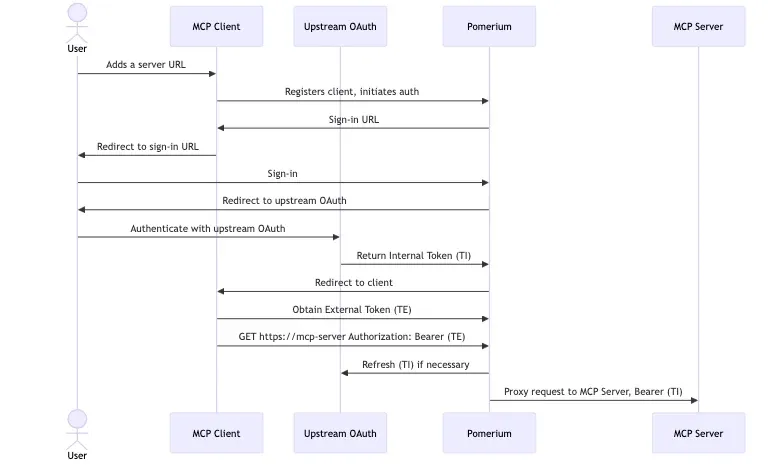
    Pomerium records and plays back Enterprise SSH sessions; JumpCloud adds auditing to its PAMPAMBrokering administrator sessions through a gateway instead of handing out standing credentials. Access is granted for one session, to one target, and recorded. Jump Server. Bastion logs normally tell you who connected and for how long, which is useless during an investigation — recording turns a privileged session into reviewable evidence for both incident scope and audit.

    Pomerium · JumpCloud

Offensive Security
◆  Exploitation & C2

Horizon3 NodeZero

Sources Release page → updated · Oct 6, 2026 Notes Rank Why this rank top features scored 65/55/55, +10 product media, +6 runnable example — 74.33 How ranking works →

Horizon3.ai enables organizations to continuously assess the security posture of their enterprise across many attack surfaces.

NodeZero's September 2026 release adds network pivoting for external pentests, new throttle controls for noisy attack techniques, and broadens Rapid Response coverage to six additional products.⁠︀︄︇︀︅︉︀︅︀︀︃︀︀︅︅︀︅︊︀︄︆︀︃︄⁠⁠︀︄︇︀︅︉︀︅︀︀︃︀︀︅︅︀︅︊︀︄︆︀︃︄⁠⁠︀︄︇︀︅︉︀︅︀︀︃︀︀︅︅︀︅︊︀︄︆︀︃︄⁠

└──▷ WHAT SHIPPED · 6 FEATURES 0 OF 6 FEATURES most completely described first
what's the number?

Each feature carries 0–100 for how completely the vendor documented it — not how big or important the work is. A major capability described in eight words scores low, and that is the finding.

  • depth0–40 what it does and how it works or what changed
  • specificity0–30 names real surfaces — APIs, flags, formats, limits, numbers
  • actionability0–30 enough to go use it — a named endpoint, flag, or config key tops this; a UI path is a starting point

Code and config rank first by construction: a documented endpoint, flag or config key scores at the top of specificity and actionability, so it sorts above a feature described only in prose. Under 60 the notes go thin — everything below the “thinner coverage” line is thinner documentation, not smaller work. Hover any meter for that feature's three sub-scores.

01 00
Network pivoting for external tests Not checked yet new 65

NodeZero can now pivot beyond the originally configured scope on an External pentest op to include additional hosts discovered during the operation.⁠︀︄︇︀︅︉︀︅︀︀︃︀︀︅︅︀︅︊︀︄︆︀︃︄⁠ Enabled via a Network Pivoting toggle in the Attack Configuration section when creating or editing an External op.⁠︀︄︇︀︅︉︀︅︀︀︃︀︀︅︅︀︅︊︀︄︆︀︃︄⁠⁠︀︄︇︀︅︉︀︅︀︀︃︀︀︅︅︀︅︊︀︄︆︀︃︄⁠

Enable network pivoting on an external pentest to automatically chase newly discovered hosts beyond the originally scoped IP range.
📍In the NodeZero console, create or edit an External pentest op, go to Attack Configuration, and enable Network Pivoting to allow the op to pivot to additional hosts discovered during the operation.
— Names exact toggle and UI location with step-by-step example snapshot-20261006
thinner coverage below
02 00
Rate-limiting controls for Password Spray, credential pivoting and post-exploitation Not checked yet new 55

Adds new on/off and rate-limiting options for Password Spray, credential pivoting, and post-exploitation, letting operators control attack surfaceattack surfaceThe exposed systems, interfaces and access points an attacker could try to use. It includes internet-facing services as well as identities, software and other reachable resources. and minimize account lockouts. The Password Spray section in Attack Configuration exposes a toggle and rate controls to set an acceptable spray rate before launching.

Tune Password Spray aggressiveness to avoid account lockouts in a target Active DirectoryActive DirectoryMicrosoft's directory service for Windows networks that centralises authentication and authorisation; cyber tools target or integrate with it because it controls identity and access across most enterprise environments. environment.
📍In the NodeZero console, open Attack Configuration for your op, locate the Password Spray section, and use the on/off toggle and rate-limiting controls to set an acceptable spray rate before launching.
— Named areas with one concrete UI path, others described only generically snapshot-20261006
03 00
Rapid Response coverage for PaperCut, GeoServer, Oracle EBS, SharePoint, NetScaler and GitLab Not checked yet new 55

Expands Rapid Response and attack coverage to include PaperCut, GeoTools and GeoServer, Oracle E-Business Suite, Microsoft SharePoint, Citrix NetScaler, and GitLab, letting operators run targeted Rapid Response tests, create tickets, or add notes for exploitable assets found in these products via the Take Action options on the Rapid Response Details page.

— Names all six products and shows UI flow but no exact commands snapshot-20261006
04 00
WebApp Pentest configuration improvements Not checked yet improved 35

WebApp Pentest configuration now supports custom login fields and longer secrets, plus clearer feedback in the console when a Runner or a read-only state limits an available action.

— Describes changes but gives no exact field names or steps snapshot-20261006
05 00
Integration Settings search, filtering and Activity Log Not checked yet improved 30

Adds expanded search, filtering, and Activity Log details to Integration Settings in the NodeZero console.

— Names the console area but no specifics on filters or log fields snapshot-20261006
06 00
ServiceNow VR integration matching fields Not checked yet improved 25

Expands the ServiceNow VR integration with additional matching fields for more-reliable interoperation between NodeZero and ServiceNow vulnerability records.

— No field names or mechanism given, generic improvement claim snapshot-20261006
Was this useful?
◆  AI-Powered Offensive Security

Keygraph shannon

Sources Release notes → v3.4.0 Notes Rank Why this rank top features scored 75/35, +6 runnable example — 61 How ranking works →

Shannon is an AI pentester for web applications and APIs. It analyzes your source code, identifies attack vectors, and executes real exploits to prove vulnerabilities before they reach production.

Shannon v3.4.0 adds preflight checks to validate authentication and confirm exploit-readiness before a pentest run, plus hyperlinked finding IDs in PDF reports for easier navigation.⁠︀︄︇︀︅︉︀︅︀︀︃︀︀︅︅︀︅︊︀︄︆︀︃︄⁠⁠︀︄︇︀︅︉︀︅︀︀︃︀︀︅︅︀︅︊︀︄︆︀︃︄⁠⁠︀︄︇︀︅︉︀︅︀︀︃︀︀︅︅︀︅︊︀︄︆︀︃︄⁠

└──▷ WHAT SHIPPED · 2 FEATURES 0 OF 2 FEATURES most completely described first
what's the number?

Each feature carries 0–100 for how completely the vendor documented it — not how big or important the work is. A major capability described in eight words scores low, and that is the finding.

  • depth0–40 what it does and how it works or what changed
  • specificity0–30 names real surfaces — APIs, flags, formats, limits, numbers
  • actionability0–30 enough to go use it — a named endpoint, flag, or config key tops this; a UI path is a starting point

Code and config rank first by construction: a documented endpoint, flag or config key scores at the top of specificity and actionability, so it sorts above a feature described only in prose. Under 60 the notes go thin — everything below the “thinner coverage” line is thinner documentation, not smaller work. Hover any meter for that feature's three sub-scores.

01 00
Auth validation and exploit-readiness preflight checks Not checked yet new 75

Adds --validate-auth mode to the preflight command to verify authentication configuration before a pentest run, and adds an exploit-readiness probe to the preflight subsystem to confirm the environment is ready to execute exploits.⁠︀︄︇︀︅︉︀︅︀︀︃︀︀︅︅︀︅︊︀︄︆︀︃︄⁠ Run with npx @keygraph/shannon@latest preflight --validate-auth.⁠︀︄︇︀︅︉︀︅︀︀︃︀︀︅︅︀︅︊︀︄︆︀︃︄⁠⁠︀︄︇︀︅︉︀︅︀︀︃︀︀︅︅︀︅︊︀︄︆︀︃︄⁠

Validate auth credentials and confirm exploit-readiness before committing to a full pentest run.
$ npx @keygraph/shannon@latest preflight --validate-auth
— Names flag and command with runnable example, but mechanism of checks unexplained v3.4.0
thinner coverage below
02 00
Hyperlinked finding IDs in PDF reports Not checked yet improved 35

Links finding IDs in the PDF report to their corresponding detail sections for faster navigation.

— States the change but no concrete UI path or detail v3.4.0
Was this useful?
◆  Hacking Hardware

GhostESP

Sources Release notes → v2.2 Notes Rank Why this rank top features scored 85/80/75, +15 breaking change — 95 How ranking works →

GhostESP v2.2 adds Meshtastic/Meshcore LoRaLoRaA cheap fine-tuning method that trains small add-on weight matrices instead of the whole model. The result is a few-megabyte adapter that can be swapped in and out of the base model. radio support, new BLEBLEBluetooth Low Energy, a wireless protocol maintained by the Bluetooth SIG for short-range communication at minimal power draw, making it useful for cyber tools that interact with IoT devices or proximity-based systems. and mDNSmDNSA zero-configuration protocol that resolves hostnames to IP addresses on a local network segment without a central DNS server, using multicast UDP on 224.0.0.1:5353. Cyber tools use it to discover hosts and services without active probing. detection commands, dual BLE+Wi-Fi wardriving, richer packet capturepacket captureA packet capture, recorded network packets that can be inspected later. Analysts use it to reconstruct communication and investigate protocol behavior or suspicious traffic. metadata, and a broad set of plugin API, hardware, and UI additions, while also enabling the lockscreen by default on fresh installs.⁠︀︄︇︀︅︉︀︅︀︀︃︀︀︅︅︀︅︊︀︄︆︀︃︄⁠⁠︀︄︇︀︅︉︀︅︀︀︃︀︀︅︅︀︅︊︀︄︆︀︃︄⁠⁠︀︄︇︀︅︉︀︅︀︀︃︀︀︅︅︀︅︊︀︄︆︀︃︄⁠

The open-source wireless research platform for ESP32.

GhostESP v2.2 adds Meshtastic/Meshcore LoRaLoRaA cheap fine-tuning method that trains small add-on weight matrices instead of the whole model. The result is a few-megabyte adapter that can be swapped in and out of the base model. radio support, new BLEBLEBluetooth Low Energy, a wireless protocol maintained by the Bluetooth SIG for short-range communication at minimal power draw, making it useful for cyber tools that interact with IoT devices or proximity-based systems. and mDNSmDNSA zero-configuration protocol that resolves hostnames to IP addresses on a local network segment without a central DNS server, using multicast UDP on 224.0.0.1:5353. Cyber tools use it to discover hosts and services without active probing. detection commands, dual BLE+Wi-Fi wardriving, richer packet capturepacket captureA packet capture, recorded network packets that can be inspected later. Analysts use it to reconstruct communication and investigate protocol behavior or suspicious traffic. metadata, and a broad set of plugin API, hardware, and UI additions, while also enabling the lockscreen by default on fresh installs.⁠︀︄︇︀︅︉︀︅︀︀︃︀︀︅︅︀︅︊︀︄︆︀︃︄⁠⁠︀︄︇︀︅︉︀︅︀︀︃︀︀︅︅︀︅︊︀︄︆︀︃︄⁠⁠︀︄︇︀︅︉︀︅︀︀︃︀︀︅︅︀︅︊︀︄︆︀︃︄⁠

└──▷ WHAT SHIPPED · 21 FEATURES 0 OF 21 FEATURES most completely described first
what's the number?

Each feature carries 0–100 for how completely the vendor documented it — not how big or important the work is. A major capability described in eight words scores low, and that is the finding.

  • depth0–40 what it does and how it works or what changed
  • specificity0–30 names real surfaces — APIs, flags, formats, limits, numbers
  • actionability0–30 enough to go use it — a named endpoint, flag, or config key tops this; a UI path is a starting point

Code and config rank first by construction: a documented endpoint, flag or config key scores at the top of specificity and actionability, so it sorts above a feature described only in prose. Under 60 the notes go thin — everything below the “thinner coverage” line is thinner documentation, not smaller work. Hover any meter for that feature's three sub-scores.

01 00
BLE device detection with `bledetect` Not checked yet new 85

Adds a bledetect CLI command and a Devices menu row that runs a BLE device detect scan with list, track, and AirTag spoof actions.⁠︀︄︇︀︅︉︀︅︀︀︃︀︀︅︅︀︅︊︀︄︆︀︃︄⁠ Detection now covers Tile, Samsung SmartTag, Chipolo, AirPods (per-model variants), Apple Watch, generic FindMy clones, Fast Pair / Find Hub accessories, hearing aids, exposure beacons, and Chameleon Ultra.⁠︀︄︇︀︅︉︀︅︀︀︃︀︀︅︅︀︅︊︀︄︆︀︃︄⁠⁠︀︄︇︀︅︉︀︅︀︀︃︀︀︅︅︀︅︊︀︄︆︀︃︄⁠

— Names command, menu path, actions and full device list v2.2
02 00
Plugin API and UI expansion Not checked yet new 80

Adds ui_obj_get_rects and ui_obj_apply_props batched plugin UI calls for faster plugin menus, a forward_back manifest option so plugin apps can handle BACK navigation themselves, and a GHOSTESP_API_HAS() macro for feature-gating plugin API fields. Also adds an embeddable native options list to the plugin API, plus widget rects, design metrics, a page stack, and raw touch state.

— Every named API surface listed, usage not shown v2.2
03 00
Dual BLE and Wi-Fi wardriving with `dualwd` Not checked yet new 75

Adds a dualwd CLI command and a GPS menu entry for simultaneous BLE + Wi-Fi coexistence wardriving on PSRAM devices.

— Command, menu entry and hardware requirement named v2.2
04 00
Meshtastic/Meshcore LoRa radio support Not checked yet new 75

Adds Meshtastic and Meshcore-compatible LoRa support for SX1262 radios, with BLE app support via the official Meshtastic and Meshcore apps. LoRa support is added to Heltec V3, LilyGo T-Deck, Elecrow CrowPanel Advance 2.4/2.8/4.3-inch, and CrowPanel Advanced P4 7/9/10.1-inch.

— Radio, protocols and all supported boards named v2.2
05 00
Passive local-name sniffing with `mdnssniff` Not checked yet new 70

Adds an mdnssniff CLI command for passive local-name sniffing across mDNS, LLMNR, SSDP, and NetBIOS per ARPARPA network protocol that maps IP addresses to MAC addresses on a local Ethernet segment, letting tools resolve layer-3 targets to layer-2 hardware addresses for packet crafting or host discovery.-discovered host.

— Runnable command, protocols named, mechanism unclear v2.2
06 00
GhostLink benchmarking with `glbench` Not checked yet new 70

Adds a glbench CLI command and a Settings > Tools row to benchmark GhostLink throughput and view link statistics.

— Command and UI path given, metrics unspecified v2.2
07 00
Custom BLE name in `blespam` Not checked yet new 70

Adds a -name <text> argument to blespam to advertise a custom device name over BLE.

— Exact flag and syntax provided v2.2
08 00
Richer capture metadata and VLAN/control frame support Not checked yet improved 65

Adds signal, channel, and rate metadata to captures so Wireshark shows per-frame radio details; adds 802.1Q802.1QAn IEEE standard that adds a 4-byte VLAN tag to Ethernet frames, letting a single physical link carry traffic for multiple isolated networks. Cyber tools use it to capture or inject traffic on specific VLANs./QinQ VLAN tag support so VLAN-tagged traffic and handshakes are recognised; and adds control frames (RTS/CTS/ACK/Block Ack) to EAPOL and Wireshark captures.

— Three concrete capture improvements, no command shown v2.2
09 00
Categorised Apps gallery folders Not checked yet new 60

Adds Tools, System, Games, Communication, Media, and Sensors folders to the Apps gallery, shared with SD apps via the manifest category field.

— Named folders and manifest field, no path detail v2.2
thinner coverage below
10 00
Game Boy / Game Boy Color emulator app Not checked yet new 50

Adds a Game Boy / Game Boy Color emulator app with save states and battery saves.

— Describes feature and persistence, no path given v2.2
11 00
Runtime IR TX/RX pin configuration Not checked yet new 50

Adds runtime IR TX/RX pin configuration through the CLI or the settings menu.

— Two access points named, no exact command v2.2
12 00
Custom channel hopping configuration Not checked yet new 45

Adds custom channel hopping configuration for attacks, AP/station scans, airspace monitor, and packet hopping.

— Surfaces listed but no config mechanism shown v2.2
13 00
Audio Player on LilyGo T-Deck Not checked yet new 45

Adds Audio Player support to the LilyGo T-Deck via its onboard MAX98357A speaker amp.

— Hardware named, usage not described v2.2
14 00
USB SD card passthrough on ESP32-S3 Not checked yet new 45

Adds USB SD card passthrough on ESP32-S3 boards with an SD card.

— Scope named, mechanism not explained v2.2
15 00
CrowPanel rotary display support Not checked yet new 45

Adds Elecrow CrowPanel 1.28-inch rotary display support with USB Audio volume/mute control.

— Device and control named, usage thin v2.2
16 00
Status bar and clock view clock options Not checked yet new 45

Adds a clock to the centre of the status bar, toggleable in Settings > Date & Time, and switchable analog and seven-segment clock faces to the Clock view.

— UI paths given, purely cosmetic feature v2.2
17 00
Subfolder navigation across saved-item lists Not checked yet improved 45

Adds subfolder navigation to IR Remotes and Universals, NFCNFCNear Field Communication, a short-range (≤4 cm) wireless standard maintained by the NFC Forum, enabling data exchange between devices; cyber tools use it to probe, emulate, or intercept contactless card and tag transactions. Saved/Write/Emulate, SubGHzSubGHzRadio frequencies below 1 GHz (typically 300–900 MHz) used by IoT devices, key fobs, and industrial sensors; cyber tools target this band to capture, replay, or analyze those wireless signals. Saved, Evil Portal, Favorites, and BadUSB.

— Every affected area named, mechanism not detailed v2.2
18 00
Country selector in Wi-Fi settings Not checked yet new 40

Adds a Country selector to Settings > Wi-Fi.

— Exact UI path given, no further mechanism v2.2
19 00
Lockscreen enabled by default Not checked yet breaking 40

The lockscreen is now enabled by default with no PIN on fresh installs.

— States before/after behaviour change, no migration step v2.2
20 00
Row Height setting for options menus Not checked yet new 25

Adds a Row Height setting for the options menus.

— Bare mention, no location or values given v2.2
21 00
T-Embed detent mode setting Not checked yet new 25

Adds a T-Embed detent mode setting.

— Bare mention, no behaviour described v2.2
└──▷ BREAKING ON UPGRADE
  • !
    The lockscreen is now enabled by default with no PIN on fresh installs.
Was this useful?

JustCallMeKoko LLC ESP32 Marauder v8

Sources Vendor store → price change · Oct 6, 2026 Store

The official handheld ESP32-C5 board for the ESP32 Marauder firmware, with a touchscreen, dual-band Wi-Fi 6, Bluetooth 5 and GPS for Wi-Fi and BLE auditing and wardriving.

Marauder v8marauder-v8
$100 was $145 down $45 · 31%
list price at justcallmekokollc.com · Oct 6, 2026
Was this useful?

Flipper Devices Flipper Zero

Sources Vendor store → price change · Oct 6, 2026 Store

A portable multi-tool for pentesters and geeks; this is its official firmware.

Flipper Zeroflipper-zero
$169 was $239 down $70 · 29%
list price at flipper.net · Oct 6, 2026
Was this useful?
◆  Reconnaissance & OSINT

OpenOSINT

Sources Release notes → v2.31.0 Notes Rank Why this rank top features scored 40/35 — 37.5 How ranking works →

AI-powered OSINT agent with interactive REPL, MCP server, and CLI. 20 tools.

OpenOSINT v2.31.0 removes two onboarding barriers: the graph store no longer needs native builds, and new users can start without supplying any API keys.⁠︀︄︇︀︅︉︀︅︀︀︃︀︀︅︅︀︅︊︀︄︆︀︃︄⁠⁠︀︄︇︀︅︉︀︅︀︀︃︀︀︅︅︀︅︊︀︄︆︀︃︄⁠

└──▷ WHAT SHIPPED · 2 FEATURES 0 OF 2 FEATURES most completely described first
what's the number?

Each feature carries 0–100 for how completely the vendor documented it — not how big or important the work is. A major capability described in eight words scores low, and that is the finding.

  • depth0–40 what it does and how it works or what changed
  • specificity0–30 names real surfaces — APIs, flags, formats, limits, numbers
  • actionability0–30 enough to go use it — a named endpoint, flag, or config key tops this; a UI path is a starting point

Code and config rank first by construction: a documented endpoint, flag or config key scores at the top of specificity and actionability, so it sorts above a feature described only in prose. Under 60 the notes go thin — everything below the “thinner coverage” line is thinner documentation, not smaller work. Hover any meter for that feature's three sub-scores.

01 00
Zero-key onboarding Not checked yet new 40

Adds zero-key onboarding so the tool can be used immediately without supplying any API keys.⁠︀︄︇︀︅︉︀︅︀︀︃︀︀︅︅︀︅︊︀︄︆︀︃︄⁠⁠︀︄︇︀︅︉︀︅︀︀︃︀︀︅︅︀︅︊︀︄︆︀︃︄⁠

— Clear benefit but no detail on how it's implemented v2.31.0
02 00
Graph store without native builds Not checked yet improved 35

The graph store can now run without native builds, removing compiled-dependency barriers that previously complicated installation.

— Describes change but no mechanism or config detail v2.31.0
Was this useful?
Application Security
◆  Web Application Security

Levo

Sources Release page → SaaS Platform Services -- 1.2.135.4 Notes Rank Why this rank top features scored 70/60/50, +15 breaking change, +6 runnable example — 81 How ranking works →

Continuous API Security Assurance — observe, detect, and protect your APIs.

Levo's latest SaaSSaaSSoftware delivered over the internet and billed by subscription, hosted and operated by the vendor so the buyer skips installation and infrastructure management. releases add bulk endpoint merging and a full review lifecycle for AI-authored tests, an audit-ready PDF export for Vulnerabilities, and a fix to the auth-key viewing flow — alongside a breaking change to the API Surface export format.⁠︀︄︇︀︅︉︀︅︀︀︃︀︀︅︅︀︅︊︀︄︆︀︃︄⁠⁠︀︄︇︀︅︉︀︅︀︀︃︀︀︅︅︀︅︊︀︄︆︀︃︄⁠

└──▷ WHAT SHIPPED · 5 FEATURES 1 OF 5 FEATURES most completely described first
what's the number?

Each feature carries 0–100 for how completely the vendor documented it — not how big or important the work is. A major capability described in eight words scores low, and that is the finding.

  • depth0–40 what it does and how it works or what changed
  • specificity0–30 names real surfaces — APIs, flags, formats, limits, numbers
  • actionability0–30 enough to go use it — a named endpoint, flag, or config key tops this; a UI path is a starting point

Code and config rank first by construction: a documented endpoint, flag or config key scores at the top of specificity and actionability, so it sorts above a feature described only in prose. Under 60 the notes go thin — everything below the “thinner coverage” line is thinner documentation, not smaller work. Hover any meter for that feature's three sub-scores.

01 00
Audit-format PDF export for Vulnerabilities Not checked yet new 70

Adds an audit-format option to the Vulnerabilities PDF export, producing a report suitable for handing to an auditor or a customer's security team.⁠︀︄︇︀︅︉︀︅︀︀︃︀︀︅︅︀︅︊︀︄︆︀︃︄⁠ In the Levo console, navigate to the Vulnerabilities section, click Export PDF, and select the audit format option before downloading.⁠︀︄︇︀︅︉︀︅︀︀︃︀︀︅︅︀︅︊︀︄︆︀︃︄⁠

Generate an audit-ready Vulnerabilities PDF to share with an auditor or a customer's security team.
📍In the Levo console, navigate to the Vulnerabilities section, click Export PDF, and select the audit format option before downloading.
— Exact UI steps to generate the export SaaS Platform Services -- 1.2.135.5
02 00
Create-validate-approve lifecycle for AI-authored tests Not checked yet new 60

Adds a full authoring lifecycle — create, validate, approve — for custom AI-authored tests, with each run bound to the exact code a human reviewed.

— Explains mechanism of binding runs to reviewed code SaaS Platform Services -- 1.2.135.4
thinner coverage below
03 00
Auth key viewing no longer redirects via IdP Not checked yet improved 50

Viewing a satellite, CLI, or test-runner auth key no longer redirects through the identity provideridentity providerA service that authenticates users and supplies identity information to other applications. It is the sign-in authority behind many single sign-on systems..

— Names affected key types but no reproduction steps SaaS Platform Services -- 1.2.135.5
04 01
API Surface export format changed Not checked yet breaking 45

The API Surface export format has changed — integrations that read the API Surface export must be updated before upgrading.

— Clear migration note but no format specifics SaaS Platform Services -- 1.2.135.4
05 00
Bulk merge for duplicate API endpoints Not checked yet new 40

Adds bulk merge for duplicate API endpoints in the API Surface, allowing consolidation of duplicates in bulk rather than one at a time.

— Names the area but no UI path or limits given SaaS Platform Services -- 1.2.135.4
└──▷ BREAKING ON UPGRADE
  • !
    The API Surface export format has changed — integrations that read the API Surface export must be updated before upgrading.
Was this useful?

Qualys Web Application Scanning

Sources Blog / feed → changelog · Oct 5, 2026 Blog Rank Why this rank top features scored 80/75/65, +10 product media — 83.33 How ranking works →

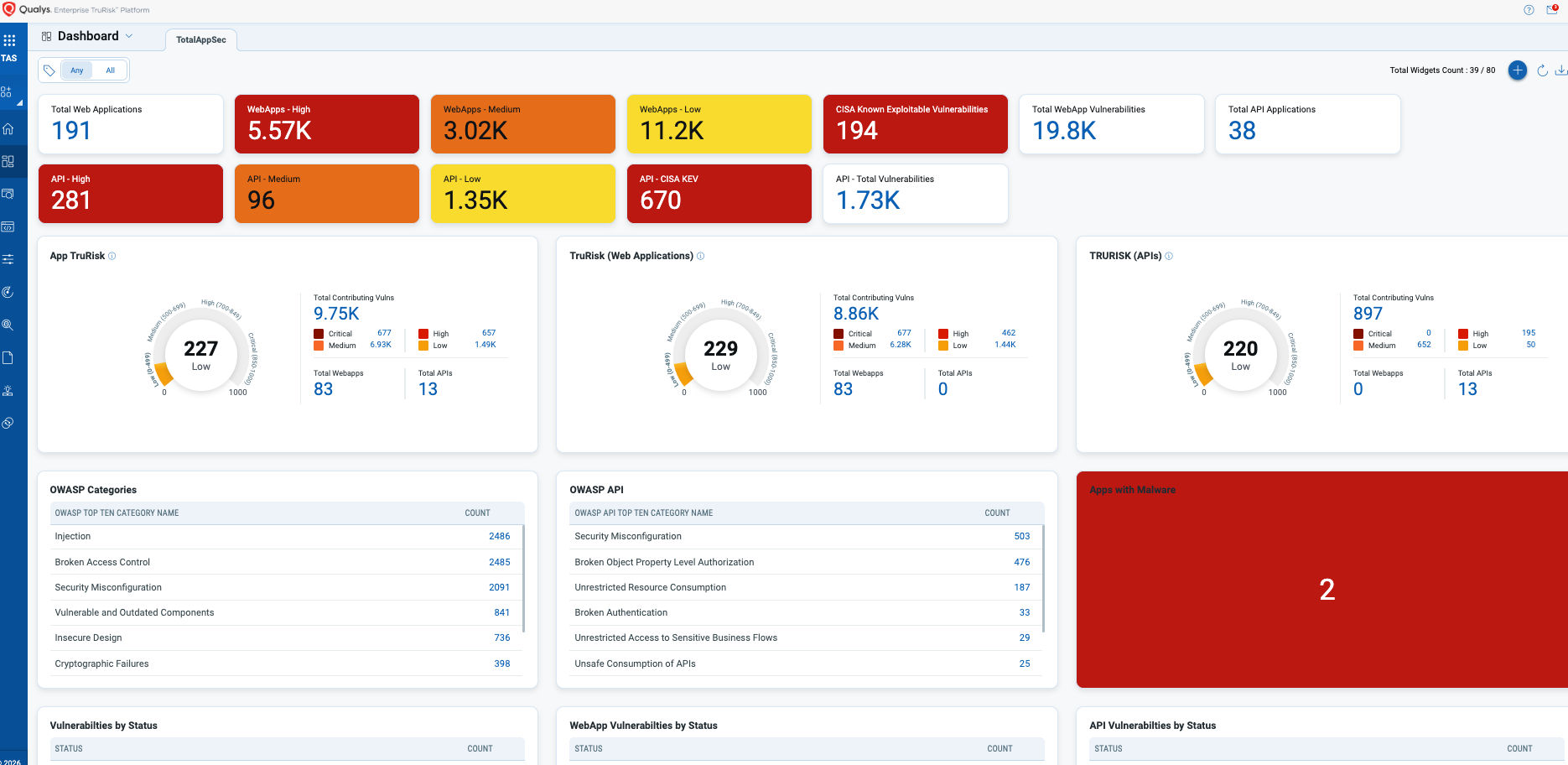
Qualys TotalAppSec earned FedRAMP HighFedRAMP HighA US federal authorization tier for cloud services, managed by GSA, certifying that a provider meets the strictest NIST 800-53 controls required to handle the most sensitive unclassified government data. authorization and expanded its discovery, authentication, and risk-prioritization capabilities, including AI-driven scan optimization and deeper authorization-flaw testing.⁠︀︄︇︀︅︉︀︅︀︀︃︀︀︅︅︀︅︊︀︄︆︀︃︄⁠⁠︀︄︇︀︅︉︀︅︀︀︃︀︀︅︅︀︅︊︀︄︆︀︃︄⁠⁠︀︄︇︀︅︉︀︅︀︀︃︀︀︅︅︀︅︊︀︄︆︀︃︄⁠

Qualys Web Application Scanning is a cloud-based security tool that identifies vulnerabilities in web applications through automated scanning and testing.

Qualys TotalAppSec earned FedRAMP HighFedRAMP HighA US federal authorization tier for cloud services, managed by GSA, certifying that a provider meets the strictest NIST 800-53 controls required to handle the most sensitive unclassified government data. authorization and expanded its discovery, authentication, and risk-prioritization capabilities, including AI-driven scan optimization and deeper authorization-flaw testing.⁠︀︄︇︀︅︉︀︅︀︀︃︀︀︅︅︀︅︊︀︄︆︀︃︄⁠⁠︀︄︇︀︅︉︀︅︀︀︃︀︀︅︅︀︅︊︀︄︆︀︃︄⁠⁠︀︄︇︀︅︉︀︅︀︀︃︀︀︅︅︀︅︊︀︄︆︀︃︄⁠

└──▷ WHAT SHIPPED · 9 FEATURES 5 OF 9 FEATURES most completely described first
what's the number?

Each feature carries 0–100 for how completely the vendor documented it — not how big or important the work is. A major capability described in eight words scores low, and that is the finding.

  • depth0–40 what it does and how it works or what changed
  • specificity0–30 names real surfaces — APIs, flags, formats, limits, numbers
  • actionability0–30 enough to go use it — a named endpoint, flag, or config key tops this; a UI path is a starting point

Code and config rank first by construction: a documented endpoint, flag or config key scores at the top of specificity and actionability, so it sorts above a feature described only in prose. Under 60 the notes go thin — everything below the “thinner coverage” line is thinner documentation, not smaller work. Hover any meter for that feature's three sub-scores.

01 01
Findings routing to CI/CD, Jira, ServiceNow with retest Not checked yet new 80

Routes findings into CI/CD pipelines, Jira, and ServiceNow, with automatic retest after remediation and scheduled evidence output for FedRAMPFedRAMPA US government program that standardizes cloud security authorization, letting vendors get a single assessment accepted across federal agencies instead of repeating the process for each one. controls SA-11, RA-5, SI-2, CM-8, and CA-7.⁠︀︄︇︀︅︉︀︅︀︀︃︀︀︅︅︀︅︊︀︄︆︀︃︄⁠⁠︀︄︇︀︅︉︀︅︀︀︃︀︀︅︅︀︅︊︀︄︆︀︃︄⁠⁠︀︄︇︀︅︉︀︅︀︀︃︀︀︅︅︀︅︊︀︄︆︀︃︄⁠

— Names integrations and exact FedRAMP control IDs 2026-10-05-5ec52740
02 02
API spec import and shadow API reconciliation Not checked yet new 75

Imports API specs from Swagger, Postman, and Burp, pulling additional endpoints from gateway and cloud connectors, then reconciles every discovered endpoint against the declared inventory to surface shadow and zombie APIs.

— Names import formats and reconciliation mechanism 2026-10-05-5ec52740
03 03
Testing for authorization flaws without CVEs Not checked yet new 65

Tests running applications and APIs for OWASPOWASPA nonprofit foundation that publishes open standards, guides, and ranked vulnerability lists—most famously the OWASP Top 10—giving cyber tools a vendor-neutral benchmark to test or report against. Top 10 risks, sensitive-data exposure, and authorization flaws — broken object level authorization (BOLABOLABroken Object Level Authorization, an API vulnerability class where a server fails to verify that the requesting user owns or may access the object ID they supply, letting attackers read or modify other users' data.), broken function level authorization (BFLABFLABroken Function Level Authorization, an API vulnerability class where an application fails to enforce access controls on specific endpoints, letting lower-privileged users call admin or restricted functions.), and broken user authentication (BUA) — that carry no CVE.

— Names specific flaw classes tested 2026-10-05-5ec52740
04 04
Authenticated scanning via OAuth, PKCE, tokens Not checked yet new 65

Authenticates test sessions with OAuth 2.0OAuth 2.0An open authorization framework (IETF RFC 6749) that lets a service grant limited API access to a third party without sharing credentials, giving cyber tools a standard way to authenticate against external platforms., Proof Key for Code ExchangeProof Key for Code ExchangeProof Key for Code Exchange, an OAuth safeguard that binds an authorization code to the client that requested it. An intercepted code cannot be redeemed without the client's matching verifier. (PKCEPKCEProof Key for Code Exchange, an OAuth safeguard that binds an authorization code to the client that requested it. An intercepted code cannot be redeemed without the client's matching verifier.), bearer tokensbearer tokensA credential that grants access to whoever presents it, without a separate proof of possession. Protecting the token matters because a stolen copy can be used by someone else., and API keys to reach everything a legitimate caller can access.

— Names exact auth protocols supported 2026-10-05-5ec52740
05 00
TruRisk prioritization and unified remediation queue Not checked yet improved 65

TruRiskTruRiskA proprietary risk-scoring methodology from Qualys that translates vulnerability and asset data into a numeric business-risk score, giving cyber tools a single prioritization signal instead of raw CVSS values. prioritization engine ranks findings by severity, exploitability, threat context, asset criticality, and business impact, and ingests results from third-party AppSecAppSecApplication security: the practice of finding and fixing vulnerabilities in software during design, development, and testing. Cyber tools build on AppSec workflows to shift vulnerability detection earlier in the development lifecycle. tools and pen tests into a single remediation queue.

— Explains ranking factors and queue consolidation 2026-10-05-5ec52740
06 05
FedRAMP High Authorization for TotalAppSec Not checked yet new 60

Qualys TotalAppSec is now FedRAMP High Authorized on the Qualys Government Platform (Class D, package FR2231052341), enabling organizations to inherit controls from an agency-accepted authorization boundary.

— Names exact package ID but no setup steps 2026-10-05-5ec52740
thinner coverage below
07 00
Continuous discovery of shadow and zombie web assets Not checked yet new 50

Continuously discovers known, unknown, shadow, zombie, and rogue web apps and APIs across cloud, on-premises, internet-facing environments, API gateways, AI-serving endpoints, and MCPMCPModel Context Protocol, a standard for connecting AI applications to external tools and data sources. A compatible server exposes capabilities an assistant can use through a common interface. servers.

— Lists asset types but no discovery mechanism 2026-10-05-5ec52740
08 00
AI-powered scan time optimization Not checked yet improved 50

AI-Powered Scan Optimization cuts scan time by up to 50 percent to make the daily scanning cadence required by FedRAMP at High impact achievable.

— Gives concrete percentage but no usage step 2026-10-05-5ec52740
09 00
Deep-learning zero-day malware detection Not checked yet new 25

Deep-learning detection catches zero-dayzero-dayA vulnerability for which defenders have had no prior opportunity to apply a fix, often because it was previously unknown. A zero-day exploit takes advantage of that gap. web malware with no existing signature.

— Thin description, no mechanism detail 2026-10-05-5ec52740
└──▷ ALSO FROM THESE RELEASES
Was this useful?
◆  Code Security

GitHub

Sources Blog / feed → Code scanning AI Scan enablement status in security overview (2026-10-06) Blog Rank Why this rank top features scored 83/82/81, +15 breaking change, +10 product media, +6 runnable example — 113 How ranking works →

GitHub is a web-based platform for version control and collaborative software development using Git repositories.

GitHub shipped AI Scan enablement visibility in the security overview, custom instructions for Copilot CLI, and two npm publishing changes tightening trusted publishing validation while expanding staged publishing to new packages.⁠︀︄︇︀︅︉︀︅︀︀︃︀︀︅︅︀︅︊︀︄︆︀︃︄⁠

└──▷ WHAT SHIPPED · 4 FEATURES 2 OF 4 FEATURES most completely described first
what's the number?

Each feature carries 0–100 for how completely the vendor documented it — not how big or important the work is. A major capability described in eight words scores low, and that is the finding.

  • depth0–40 what it does and how it works or what changed
  • specificity0–30 names real surfaces — APIs, flags, formats, limits, numbers
  • actionability0–30 enough to go use it — a named endpoint, flag, or config key tops this; a UI path is a starting point

Code and config rank first by construction: a documented endpoint, flag or config key scores at the top of specificity and actionability, so it sorts above a feature described only in prose. Under 60 the notes go thin — everything below the “thinner coverage” line is thinner documentation, not smaller work. Hover any meter for that feature's three sub-scores.

01 00
Staged publishing for new npm packages Not checked yet improved 83

npm stage publish now supports creating brand-new npm packages (public scoped, unscoped, and private scoped) without a manual first publish, usable from a local session or a granular access tokenaccess tokenA credential that authorizes a client to use a service or API. It usually has limited permissions and a lifetime; anyone holding it may be able to use those permissions. including a stage-only token.⁠︀︄︇︀︅︉︀︅︀︀︃︀︀︅︅︀︅︊︀︄︆︀︃︄⁠ First-version publishes via the staged workflow enter a queue and require a maintainer to promote before the version becomes installable; package settings and trusted publishing can be configured immediately after creation.

Bootstrap a brand-new npm package from CI without a manual first publish — the version enters the staged queue awaiting maintainer promotion.
$ npm stage publish
— Includes exact command, token types, and queue/promotion behavior npm staged publishing now supports creating …
02 00
npm trusted publishing validation expiry and event rejection Not checked yet breaking 82

Unvalidated npm trusted publishing configurations now expire 48 hours after creation and can no longer authorize publishing until a successful publish validates them; expired configurations remain visible in trusted publisher settings but don't count toward per-package limits. Changing the repository or project identity resets the trust relationship and restarts the 48-hour window, while ordinary edits do not. npm also now rejects trusted publishing tokens issued from GitHub Actions issue_comment events, so workflows must publish on push, release, or workflow_dispatch instead.

— Full mechanism and before/after, with a migration note Unvalidated npm trusted publishing configura…
03 01
AI Scan enablement status in security overview Not checked yet new 81

The security overview coverage view now shows AI Scan for pull requests enablement status per repository, with summary counts of enabled and not-enabled repos. New filter qualifiers code-scanning-ai-scan-pr-scan:enabled and code-scanning-ai-scan-pr-scan:not-enabled isolate repositories by status, and the coverage CSV export gains a Code Scanning AI Scan for pull requests column with values enabled/not-enabled.

Filter the security overview coverage view to find all repositories that have NOT yet enabled AI Scan for pull requests, so you can target rollout gaps across your org.
📍In the GitHub security overview coverage view, enter code-scanning-ai-scan-pr-scan:not-enabled in the filter bar to list all repositories where AI Scan for pull requests is not enabled.
— Names exact filter qualifiers, CSV column, and usage steps Code scanning AI Scan enablement status in s…
thinner coverage below
04 02
Custom instructions for Copilot CLI Not checked yet new 35

GitHub Copilot CLI now supports custom instructions, letting you provide project-specific context about how to build, test, and validate changes.

— Describes the feature but no config path or syntax given product docs
└──▷ BREAKING ON UPGRADE
  • !
    Trusted publishing tokens issued from GitHub Actions issue_comment events are now rejected by npm; workflows that publish on issue_comment must be moved to a permitted event (push, release, or workflow_dispatch).
  • !
    Unvalidated trusted publishing configurations older than 48 hours can no longer authorize publishing; affected configurations must be recreated to start a new 48-hour window.
Was this useful?

Endor Labs

Sources Blog / feed → Endor Labs + SpaceXAI: Securing every stage of agentic software delivery | Blog | Endor Labs (2026-10-05) Blog Rank Why this rank top features scored 60/42 — 51 How ranking works →

Endor Labs is an application security platform built for AI-generated and human-written code, helping teams prioritize and fix real risk across the SDLC.

Endor Labs added an Anthropic Compliance API integration to tie Claude Code sessions to organizational identity, and introduced per-developer attribution in Package Firewall requests.⁠︀︄︇︀︅︉︀︅︀︀︃︀︀︅︅︀︅︊︀︄︆︀︃︄⁠⁠︀︄︇︀︅︉︀︅︀︀︃︀︀︅︅︀︅︊︀︄︆︀︃︄⁠⁠︀︄︇︀︅︉︀︅︀︀︃︀︀︅︅︀︅︊︀︄︆︀︃︄⁠

└──▷ WHAT SHIPPED · 2 FEATURES 0 OF 2 FEATURES most completely described first
what's the number?

Each feature carries 0–100 for how completely the vendor documented it — not how big or important the work is. A major capability described in eight words scores low, and that is the finding.

  • depth0–40 what it does and how it works or what changed
  • specificity0–30 names real surfaces — APIs, flags, formats, limits, numbers
  • actionability0–30 enough to go use it — a named endpoint, flag, or config key tops this; a UI path is a starting point

Code and config rank first by construction: a documented endpoint, flag or config key scores at the top of specificity and actionability, so it sorts above a feature described only in prose. Under 60 the notes go thin — everything below the “thinner coverage” line is thinner documentation, not smaller work. Hover any meter for that feature's three sub-scores.

01 00
Claude Code governance via Anthropic Compliance API Not checked yet new 60

Adds a Connect the Anthropic Compliance API integration that lets teams enroll a Claude Enterprise directory so Coding Agent Governance can match Claude Code sessions to organization roles and groups.⁠︀︄︇︀︅︉︀︅︀︀︃︀︀︅︅︀︅︊︀︄︆︀︃︄⁠⁠︀︄︇︀︅︉︀︅︀︀︃︀︀︅︅︀︅︊︀︄︆︀︃︄⁠⁠︀︄︇︀︅︉︀︅︀︀︃︀︀︅︅︀︅︊︀︄︆︀︃︄⁠

— Names the integration and its purpose but no setup steps or UI path. product docs
thinner coverage below
02 00
Package Firewall user attribution Not checked yet improved 42

Package Firewall now records the developer behind each request instead of attributing it to the shared API key.

— Clear before/after but no config or endpoint named. product docs
Endor Labs + SpaceXAI: Securing every stage of agentic software delivery | Blog | Endor Labs (2026-10-05) Blog LatestStable

Endor Labs introduces AURI Agent Kit, Coding Agent Governance hooks, and an MCPMCPModel Context Protocol, a standard for connecting AI applications to external tools and data sources. A compatible server exposes capabilities an assistant can use through a common interface. server to secure agentic code delivery on Grok Build end to end.

  • Install the Endor Labs Agent Kit into Grok Build via the marketplace or by typing /add-plugin endorlabs in the agent chat to enable in-session security scanning, triage, and remediation. Not checked yet
  • Adds Coding Agent Governance, which uses deterministic hooks to record every MCP tool call, shell command, and file operation and enforce policies before each action runs — without relying on a model's judgment.
  • Adds the Endor Labs Agent Kit, bringing specialized AURI remediation agents (AI SASTSASTStatic application security testing, analyzing source code or compiled code for vulnerabilities without running the application. It helps developers find problems before deployment. Remediation and SCASCASoftware composition analysis, identifying third-party dependencies and checking them for known vulnerabilities and license issues. It covers software a team uses rather than writes itself. Remediation) directly into Grok Build sessions and CI/cloud runs via the Grok Build SDK.
  • Adds a hooks integration that scans every package an agent installs and blocks confirmed malicious packages at install time.
  • Adds an MCP server that checks for code security risks, exposed secrets, and vulnerable dependencies directly from within an agent session.

5 details in Everything

Was this useful?

Mend.io Mend SAST

Sources Release page → Version 26.9.2 (05-October-2026) Notes Rank Why this rank top features scored 69/50/43, +6 runnable example — 60 How ranking works →

Mend SAST is a static application security testing service that scans source code for vulnerabilities and helps teams prioritize remediation.

Mend SAST added automatic API endpoint detection from YAML/JSON configuration files for contract-first applications, improved Python engine detection accuracy across 11 CWECWECommon Weakness Enumeration, a catalog of recurring software and hardware weakness types. It describes classes of mistakes, such as injection, rather than individual vulnerability instances. categories, and the platform gained a per-organization toggle for zero-dayzero-dayA vulnerability for which defenders have had no prior opportunity to apply a fix, often because it was previously unknown. A zero-day exploit takes advantage of that gap. vulnerability alert emails.⁠︀︄︇︀︅︉︀︅︀︀︃︀︀︅︅︀︅︊︀︄︆︀︃︄⁠

└──▷ WHAT SHIPPED · 3 FEATURES 0 OF 3 FEATURES most completely described first
what's the number?

Each feature carries 0–100 for how completely the vendor documented it — not how big or important the work is. A major capability described in eight words scores low, and that is the finding.

  • depth0–40 what it does and how it works or what changed
  • specificity0–30 names real surfaces — APIs, flags, formats, limits, numbers
  • actionability0–30 enough to go use it — a named endpoint, flag, or config key tops this; a UI path is a starting point

Code and config rank first by construction: a documented endpoint, flag or config key scores at the top of specificity and actionability, so it sorts above a feature described only in prose. Under 60 the notes go thin — everything below the “thinner coverage” line is thinner documentation, not smaller work. Hover any meter for that feature's three sub-scores.

01 00
Automatic entry point detection from YAML/JSON configs Not checked yet new 69

Mend SAST now supports YAML and JSON configuration files as input to the entry point detection engine, enabling automatic identification of API endpoints and mapping them to their implementation classes.⁠︀︄︇︀︅︉︀︅︀︀︃︀︀︅︅︀︅︊︀︄︆︀︃︄⁠ For contract-first applications, all generated entry point parameters are automatically marked as tainted, removing the need for manual custom framework configuration.

— Mechanism explained but no exact config syntax or file name given Version 26.9.2 (05-October-2026)
thinner coverage below
02 00
Per-organization zero-day alert toggle Not checked yet new 50

Users can enable or silence zero-day vulnerability alerts for a specific organization they belong to, via My Profile → Email Notifications in the platform.

Enable or silence zero-day vulnerability alerts for a specific organization you belong to.
📍In the platform, go to My Profile → Email Notifications and toggle zero-day alerts on or off for the desired organization.
— Exact UI navigation given but mechanism behind alerts unexplained product docs
03 00
Improved Python engine detection accuracy Not checked yet improved 43

Mend SAST improves Python engine detection accuracy across 11 CWEsCWEsA community-maintained list of software and hardware weakness types, maintained by MITRE, that gives cyber tools a standard taxonomy for classifying and communicating vulnerability root causes., including Path Traversal, OS Command Injection, XSSXSSCross-site scripting, an attack that runs malicious script in another user's browser through a trusted site. It can steal data or perform actions using the user's session., SQL Injection, and Code Injection.

— Names CWE categories but no scope, metrics, or usage steps product docs
Was this useful?

StepSecurity

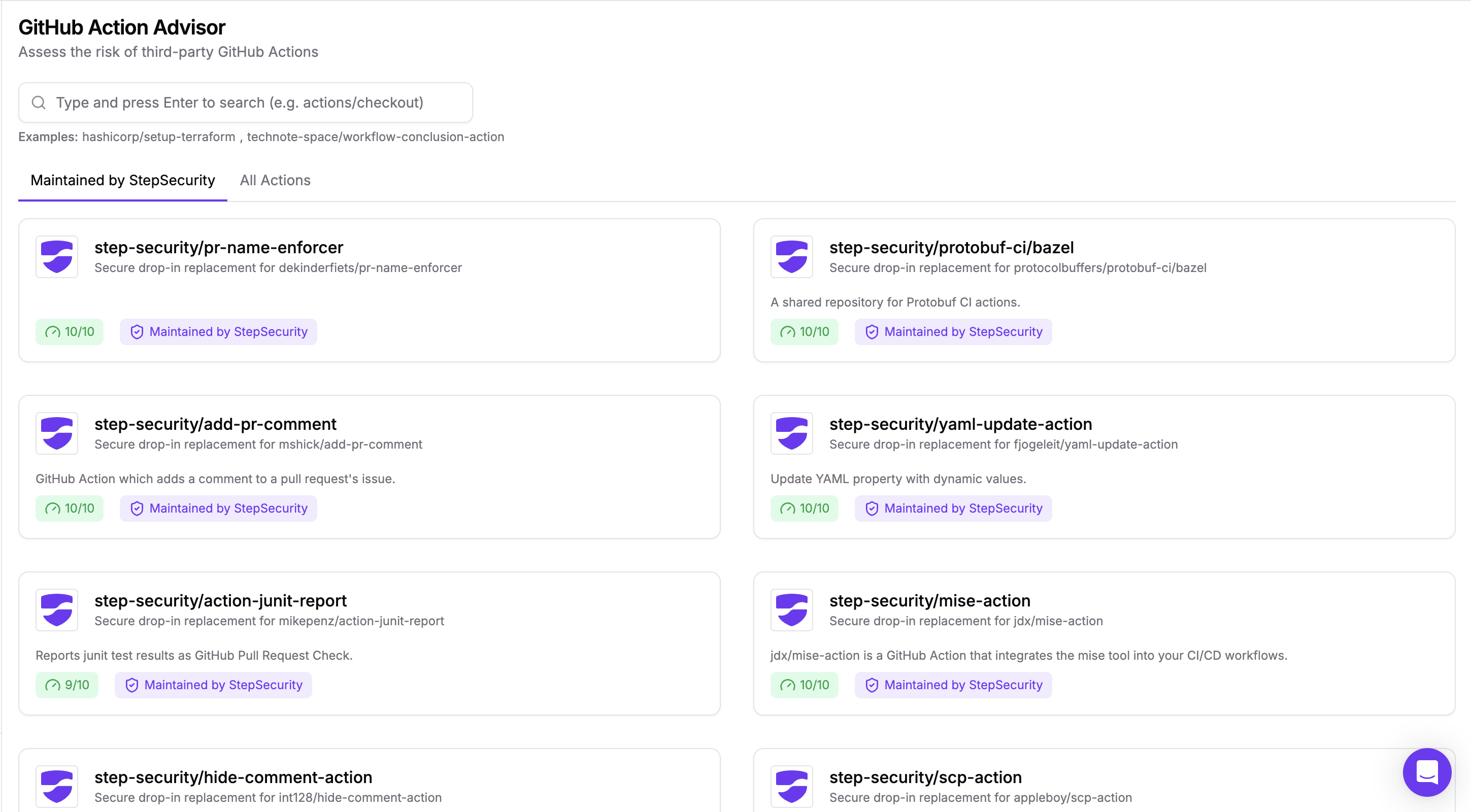
Sources Blog / feed → Agent Skills Inventory for GitHub Repositories (2026-10-05) Blog Rank Why this rank top features scored 80, +10 product media, +6 runnable example — 96 How ranking works →

StepSecurity introduced a repository-level Agent Skills inventory that catalogs AI agent skills across GitHub repos, flags risky executable content, and traces provenanceprovenanceEvidence recording where a software artifact came from and how it was built, including its source and build process. It helps a consumer check that the artifact matches a trusted build. for CLI-managed skills.⁠︀︄︇︀︅︉︀︅︀︀︃︀︀︅︅︀︅︊︀︄︆︀︃︄⁠⁠︀︄︇︀︅︉︀︅︀︀︃︀︀︅︅︀︅︊︀︄︆︀︃︄⁠⁠︀︄︇︀︅︉︀︅︀︀︃︀︀︅︅︀︅︊︀︄︆︀︃︄⁠

StepSecurity hardens CI/CD pipelines by detecting and preventing supply chain attacks through runtime security monitoring and vulnerability detection.

StepSecurity introduced a repository-level Agent Skills inventory that catalogs AI agent skills across GitHub repos, flags risky executable content, and traces provenanceprovenanceEvidence recording where a software artifact came from and how it was built, including its source and build process. It helps a consumer check that the artifact matches a trusted build. for CLI-managed skills.⁠︀︄︇︀︅︉︀︅︀︀︃︀︀︅︅︀︅︊︀︄︆︀︃︄⁠⁠︀︄︇︀︅︉︀︅︀︀︃︀︀︅︅︀︅︊︀︄︆︀︃︄⁠⁠︀︄︇︀︅︉︀︅︀︀︃︀︀︅︅︀︅︊︀︄︆︀︃︄⁠

└──▷ WHAT SHIPPED · 1 FEATURE 0 OF 1 FEATURE most completely described first
what's the number?

Each feature carries 0–100 for how completely the vendor documented it — not how big or important the work is. A major capability described in eight words scores low, and that is the finding.

  • depth0–40 what it does and how it works or what changed
  • specificity0–30 names real surfaces — APIs, flags, formats, limits, numbers
  • actionability0–30 enough to go use it — a named endpoint, flag, or config key tops this; a UI path is a starting point

Code and config rank first by construction: a documented endpoint, flag or config key scores at the top of specificity and actionability, so it sorts above a feature described only in prose. Under 60 the notes go thin — everything below the “thinner coverage” line is thinner documentation, not smaller work. Hover any meter for that feature's three sub-scores.

01 00
Agent Skills inventory for GitHub repositories Not checked yet new 80

A new Agent Skills page under GitHub Inventories lists every AI agent skill committed to the default branch of each org repository, refreshed daily, showing repository, loading agent (Claude Code, Cursor, Windsurf, or shared .agents/skills directory), path, and file/script counts.⁠︀︄︇︀︅︉︀︅︀︀︃︀︀︅︅︀︅︊︀︄︆︀︃︄⁠ It supports filtering by source, agent, repository, or flag, and searching by skill name, and flags skills with executable content markers: code (executable scripts), hooks (declared hooks block), shell (injected shell commands on skill load), invalid yaml (unparseable SKILL.md frontmatter), and symlink (skill reached through a symbolic link).⁠︀︄︇︀︅︉︀︅︀︀︃︀︀︅︅︀︅︊︀︄︆︀︃︄⁠ A details panel shows each skill's pre-approved tools (allowed-tools), who can invoke it, whether it runs in a forked context, and any model override it sets, plus provenance for skills managed by the skills.sh CLI, tracing upstream source, ref, upstream path, upstream folder hash, and the skills-lock.json installation record.⁠︀︄︇︀︅︉︀︅︀︀︃︀︀︅︅︀︅︊︀︄︆︀︃︄⁠

Review which repository skills ship executable scripts or inject shell commands before allowing agent sessions to load them.
📍In the StepSecurity console, go to GitHub Inventories › Agent Skills, then use the Flag filter to select shell or code to surface only skills with executable content.
Audit provenance of a skills.sh-managed skill to confirm its upstream source and lock file before trusting it in CI.
📍In the StepSecurity console, go to GitHub Inventories › Agent Skills, open the details panel for a skill, and check the upstream source, ref, upstream folder hash, and the skills-lock.json record shown under Provenance.
— Names exact flags, fields and config files but only gives a UI path, not a command. Agent Skills Inventory for GitHub Repositori…
Was this useful?

Retire.js

Sources Release notes → 6.1.0 Notes Rank Why this rank top features scored 65/60 — 62.5 How ranking works →

scanner detecting the use of JavaScript libraries with known vulnerabilities. Can also generate an SBOM of the libraries it finds.

Retire.js 6.1.0 focuses on CLI usability, clarifying repository validation errors and warning users who pass ignored positional arguments.⁠︀︄︇︀︅︉︀︅︀︀︃︀︀︅︅︀︅︊︀︄︆︀︃︄⁠

└──▷ WHAT SHIPPED · 2 FEATURES 0 OF 2 FEATURES most completely described first
what's the number?

Each feature carries 0–100 for how completely the vendor documented it — not how big or important the work is. A major capability described in eight words scores low, and that is the finding.

  • depth0–40 what it does and how it works or what changed
  • specificity0–30 names real surfaces — APIs, flags, formats, limits, numbers
  • actionability0–30 enough to go use it — a named endpoint, flag, or config key tops this; a UI path is a starting point

Code and config rank first by construction: a documented endpoint, flag or config key scores at the top of specificity and actionability, so it sorts above a feature described only in prose. Under 60 the notes go thin — everything below the “thinner coverage” line is thinner documentation, not smaller work. Hover any meter for that feature's three sub-scores.

01 00
Warning for ignored positional arguments Not checked yet improved 65

Positional arguments such as retire . or retire src/ now print a warning directing users to use --path <path> instead of being silently ignored.⁠︀︄︇︀︅︉︀︅︀︀︃︀︀︅︅︀︅︊︀︄︆︀︃︄⁠

— Names exact flag and old behaviour, but no sample warning text 6.1.0
02 00
Readable repository validation error output Not checked yet improved 60

Repository validation errors — for an invalid --jsrepo and from repository/validate — are now listed one per line with the location of each problem, instead of being printed as a nested JSON tree.

— Describes before/after but no example output shown 6.1.0
Was this useful?

GitLab

Sources Blog / feed → Dependency Firewall: Block risky packages before the build (2026-10-06) Blog Rank Why this rank top features scored 93/87, +10 product media, +6 runnable example — 106 How ranking works →

The intelligent orchestration platform for DevSecOps, enabling teams and agents to ship trusted software at enterprise scale.

GitLab shipped two new supply-chain controls in early access/beta: Dependency Firewall, which can warn on or block risky packages before they enter a build, and Artifact Central, a unified organization-level artifact registry with built-in build provenanceprovenanceEvidence recording where a software artifact came from and how it was built, including its source and build process. It helps a consumer check that the artifact matches a trusted build..⁠︀︄︇︀︅︉︀︅︀︀︃︀︀︅︅︀︅︊︀︄︆︀︃︄⁠

└──▷ WHAT SHIPPED · 2 FEATURES 2 OF 2 FEATURES most completely described first
what's the number?

Each feature carries 0–100 for how completely the vendor documented it — not how big or important the work is. A major capability described in eight words scores low, and that is the finding.

  • depth0–40 what it does and how it works or what changed
  • specificity0–30 names real surfaces — APIs, flags, formats, limits, numbers
  • actionability0–30 enough to go use it — a named endpoint, flag, or config key tops this; a UI path is a starting point

Code and config rank first by construction: a documented endpoint, flag or config key scores at the top of specificity and actionability, so it sorts above a feature described only in prose. Under 60 the notes go thin — everything below the “thinner coverage” line is thinner documentation, not smaller work. Hover any meter for that feature's three sub-scores.

01 01
Artifact Central unified artifact registry Not checked yet new 93

GitLab Artifact Central Beta is an organization-level registry replacing per-project package and container registries, with centralized retention rules, storage quotas, and access policies.⁠︀︄︇︀︅︉︀︅︀︀︃︀︀︅︅︀︅︊︀︄︆︀︃︄⁠ It authenticates publishing and pulling via CI_JOB_TOKEN, eliminating the need for separate service accounts, and supports three repository types — Hosted (private packages teams publish), Remote (proxy with caching for external sources like Docker Hub or Maven Central), and Virtual (single endpoint combining hosted and remote, with automatic fallback and cache). Four dedicated artifact roles — Admin, Manager, Contributor, and Viewer — are kept separate from existing project roles, the registry supports Maven, npm, Docker, and OCIOCIOpen Container Initiative standard, maintained by the Linux Foundation, defining the image format and runtime spec that container tools share so images built once run anywhere OCI-compliant. formats during beta, and it automatically attaches build provenance (pipeline, branch, commit, triggering user) to every artifact published through it. Teams can migrate gradually without bulk-copying data by adding an existing registry as a Remote repository behind a Virtual repository, then converting to Hosted when ready.

Add an existing external registry as a Remote repository behind a Virtual repo to start a gradual, zero-downtime migration without bulk-copying data.
📍In Artifact Central, go to your organization › Artifact Central › Repositories › New Repository, select Remote, enter your existing registry URL, then create a Virtual repository that includes the new remote. Update your pipeline to point at the virtual repository URL.
— Includes exact UI steps and env var for migration and auth. Every artifact your teams ship, assembled ri…
02 02
Dependency Firewall blocks risky packages before build Not checked yet new 87

GitLab Dependency Firewall (early access, Premium/Ultimate on GitLab.com and Self-Managed) adds warn and block enforcement modes — warn logs every policy match as an audit event and CI summary line without stopping the build, block halts the pipeline and records the reason. Policies can gate on malicious status (via GitLab's malware advisory database), vulnerability severity (critical, high, medium, low) with a configurable finding count, license type (allow/deny by full name, including undetermined licenses), and minimum package age before a version may enter a build, with a logged bypass mechanism letting a designated user or token push an approved package through. A GitLab CLI command checks whether a package will pass or be blocked by policy before it's added, covering npm, pip, Poetry, Maven, Gradle, and Bundler; a dashboard shows allow/warn/block activity and an immutable audit event per decision across all in-scope projects. Rules are stored as code in a security policy project with group-to-project inheritance and strictest-rule precedence on overlap, and the firewall works against GitLab Artifact Central as well as external registries from Sonatype Nexus Repository and JFrog Artifactory without requiring a separate tool deployment.

— Names flags, severity levels, registries and a CLI check, but no exact command syntax. Dependency Firewall: Block risky packages be…
Was this useful?
◆  Secrets Detection & Management

infisical

Sources Release notes → v0.165.17 Notes Rank Why this rank top features scored 70/55/55 — 60 How ranking works →

Infisical is the open-source platform for secrets, certificates, and privileged access management.

Infisical v0.165.17 adds an OCSPOCSPA protocol for checking whether a TLS certificate has been revoked, defined in RFC 6960, letting clients query a CA's responder in real time instead of downloading full CRL lists. responder for internal certificate authorities, Stripe secret rotation, automatic PAMPAMBrokering administrator sessions through a gateway instead of handing out standing credentials. Access is granted for one session, to one target, and recorded. session termination on user removal, and a new agent-vault API endpoint, alongside secrets-table UI refinements and machine-identity auth improvements.⁠︀︄︇︀︅︉︀︅︀︀︃︀︀︅︅︀︅︊︀︄︆︀︃︄⁠⁠︀︄︇︀︅︉︀︅︀︀︃︀︀︅︅︀︅︊︀︄︆︀︃︄⁠⁠︀︄︇︀︅︉︀︅︀︀︃︀︀︅︅︀︅︊︀︄︆︀︃︄⁠

└──▷ WHAT SHIPPED · 10 FEATURES 0 OF 10 FEATURES most completely described first
what's the number?

Each feature carries 0–100 for how completely the vendor documented it — not how big or important the work is. A major capability described in eight words scores low, and that is the finding.

  • depth0–40 what it does and how it works or what changed
  • specificity0–30 names real surfaces — APIs, flags, formats, limits, numbers
  • actionability0–30 enough to go use it — a named endpoint, flag, or config key tops this; a UI path is a starting point

Code and config rank first by construction: a documented endpoint, flag or config key scores at the top of specificity and actionability, so it sorts above a feature described only in prose. Under 60 the notes go thin — everything below the “thinner coverage” line is thinner documentation, not smaller work. Hover any meter for that feature's three sub-scores.

01 00
Agent-vault members/available endpoint Not checked yet new 70

Adds a members/available API endpoint on agent-vault so add-member dialogs surface only unassigned actors.⁠︀︄︇︀︅︉︀︅︀︀︃︀︀︅︅︀︅︊︀︄︆︀︃︄⁠⁠︀︄︇︀︅︉︀︅︀︀︃︀︀︅︅︀︅︊︀︄︆︀︃︄⁠⁠︀︄︇︀︅︉︀︅︀︀︃︀︀︅︅︀︅︊︀︄︆︀︃︄⁠

— Names exact endpoint and its effect on the UI v0.165.17
thinner coverage below
02 00
Stripe secret rotation Not checked yet new 55

Adds Stripe app connection and API key rotation to the secret-rotation module.

— Names the integration and rotation type, clear starting point v0.165.17
03 00
Secrets table UI improvements Not checked yet improved 55

Adds resizable columns to the secrets table, an opt-in sticky header for tables, a redesigned move-destination picker for secrets, and environment-scoped recency sorting for secrets.

— Names four UI additions, navigable in the secrets table v0.165.17
04 00
External CA issuance recording and renewal handling Not checked yet improved 50

Records external CA issued values and drops issuer-written extensions on renewal.

— Describes before/after behavior but no interface to act on v0.165.17
05 00
Automatic PAM session termination on user removal Not checked yet new 45

Terminates PAM sessions automatically when a user is removed from an org.

— Clear behavior described, no configuration surface named v0.165.17
06 00
OCSP responder for internal CAs Not checked yet new 40

Adds an OCSP responder for internal certificate authorities.

— States the addition but no usage or config detail v0.165.17
07 00
Machine identity auth improvements Not checked yet improved 40

Adds token-auth credential expiry and support for multiple alerts per machine identity.

— Names the auth features but lacks config or flag detail v0.165.17
08 00
Agent-vault access bundles and agent-friendly API Not checked yet new 25

Adds access bundle variables to agent-vault and introduces an agent-friendly API.

— Two vague additions with no mechanism or surface detail v0.165.17
09 00
Shared alerting module consolidation Not checked yet improved 25

Moves application alerts to the shared alerting module.

— Internal refactor with minimal reader-facing detail v0.165.17
10 00
Secret-sharing UX overhaul Not checked yet improved 20

Overhauled secret-sharing UX across surfaces.

— Vague overhaul with no specifics on what changed v0.165.17
Was this useful?

Truffle Security trufflehog

Sources Release notes →Source code → v3.98.1 Notes Code Rank Why this rank top features scored 80/80/70, +6 runnable example — 82.67 How ranking works →

TruffleHog v3.98.0 and v3.98.1 add a Kong Konnect credential detector, a configurable Gerrit API timeout, a flag to override ignore-tag suppression, S3 scan UX improvements, an SSRFSSRFServer-side request forgery, an attack that tricks a server into making requests chosen by an attacker. Those requests can reach internal services the attacker cannot access directly. egress guard, and a change to how verification failures are reported.⁠︀︄︇︀︅︉︀︅︀︀︃︀︀︅︅︀︅︊︀︄︆︀︃︄⁠

trufflehog discovers, classifies, and validates leaked credentials

TruffleHog v3.98.0 and v3.98.1 add a Kong Konnect credential detector, a configurable Gerrit API timeout, a flag to override ignore-tag suppression, S3 scan UX improvements, an SSRFSSRFServer-side request forgery, an attack that tricks a server into making requests chosen by an attacker. Those requests can reach internal services the attacker cannot access directly. egress guard, and a change to how verification failures are reported.⁠︀︄︇︀︅︉︀︅︀︀︃︀︀︅︅︀︅︊︀︄︆︀︃︄⁠

└──▷ WHAT SHIPPED · 6 FEATURES 1 OF 6 FEATURES most completely described first
what's the number?

Each feature carries 0–100 for how completely the vendor documented it — not how big or important the work is. A major capability described in eight words scores low, and that is the finding.

  • depth0–40 what it does and how it works or what changed
  • specificity0–30 names real surfaces — APIs, flags, formats, limits, numbers
  • actionability0–30 enough to go use it — a named endpoint, flag, or config key tops this; a UI path is a starting point

Code and config rank first by construction: a documented endpoint, flag or config key scores at the top of specificity and actionability, so it sorts above a feature described only in prose. Under 60 the notes go thin — everything below the “thinner coverage” line is thinner documentation, not smaller work. Hover any meter for that feature's three sub-scores.

01 00
Kong Konnect detector Not checked yet new 80

Adds a detector for Kong Konnect Platform (api.konghq.com), matching personal and system access tokensaccess tokensA credential that authorizes a client to use a service or API. It usually has limited permissions and a lifetime; anyone holding it may be able to use those permissions. with prefixes kpat_ or spat_ followed by 49 alphanumeric characters, with live verification against https://global.api.konghq.com/v3/organizations/me.⁠︀︄︇︀︅︉︀︅︀︀︃︀︀︅︅︀︅︊︀︄︆︀︃︄⁠

— Full match pattern and verification endpoint named v3.98.1
02 00
--no-ignore-tag flag to override suppression Not checked yet new 80

Adds --no-ignore-tag CLI flag to force reporting of secrets on lines marked trufflehog:ignore, overriding the suppression tag. Example: trufflehog git https://github.com/my-org/my-repo --no-ignore-tag --results=verified to audit whether existing ignores are still appropriate.

Surface secrets that your team suppressed with trufflehog:ignore comments — useful for auditing whether ignores are still appropriate.
$ trufflehog git https://github.com/my-org/my-repo --no-ignore-tag --results=verified
— Runnable command with flag demonstrates exact usage v3.98.0
03 00
Configurable Gerrit API timeout Not checked yet new 70

Adds api_timeout_seconds field to the Gerrit source configuration, accepting values between 0 and 3600 seconds; unset or 0 retains the existing 20 s default.

— Named config key, range and default given v3.98.1
thinner coverage below
04 01
SSRF egress guard for analyzer clients Not checked yet new 50

Adds pkg/ssrf shared egress guard applied to WithNoLocalIP and analyzer clients to block server-side request forgeryserver-side request forgeryServer-side request forgery, an attack that tricks a server into making requests chosen by an attacker. Those requests can reach internal services the attacker cannot access directly. attempts.

— Names internal package and client hooks, no user action v3.98.0
05 00
S3 scan progress and scope display Not checked yet improved 35

Shows scan progress within individual S3 buckets during active scans, and lists only the configured include prefixes during S3 scans, narrowing object enumeration to the specified scope.

— Describes UX changes but no config key or command v3.98.0
06 00
Verification decorates rather than gates findings Not checked yet improved 35

Verification now decorates findings rather than gating them — a credential is always reported even when its host DNS lookup fails, with the error attached.

— Explains behaviour change but no config surface v3.98.0
Was this useful?
Reverse Engineering, Malware & Forensics
◆  Reverse Engineering

Radare2

Sources Release notes →Source code → 6.2.4 Notes Code

UNIX-like reverse engineering framework and command-line toolset

Radare2 6.2.4 adds new commands (iw., /xs, iicl, r2pm -b), RBin plugin for project headers, Mach-O and ELFELFThe standard binary format for executables, shared libraries, and object files on Linux and most Unix-like systems, giving cyber tools a predictable structure to parse, instrument, or analyze compiled code. weak/strong symbol writes, and ARM64ARM64A 64-bit CPU architecture from ARM Holdings, used in mobile chips, Apple Silicon, and cloud servers; cyber tools target it to run natively on those platforms instead of relying on emulation. pointer-auth prelude detection.

└──▷ GET THIS VERSION
$ git clone --branch 6.2.4 https://github.com/radareorg/radare2.git
# already have the repo? check out this version:
$ git checkout 6.2.4
  • Adds iw. command to show try/catch blocks of the current function only. Not checked yet
  • Adds /xs sparse gap search command.
  • Adds iicl command to list imports by class.
  • Adds r2pm -b to install released binary packages.
  • Adds compact try/catch metadata commands (iw now shows readable try/catch regions).
+16 more show less
  • Adds fh address and JSON tree output.
  • Adds A-key pointer authentication function prelude recognition for ARM64.
  • Adds DW_OP_call_frame_cfa DWARF location kind support instead of faking a bp offset.
  • Adds an RBin plugin for binary project headers.
  • Adds Mach-O weak import writing support.
  • Adds reversible Mach-O weak dylib load operation.
  • Adds weak/strong symbol manipulation for ELF.
  • New supported platformAdds the Swift linkage name role classifier for binary analysis.
  • Adds the gettext family to the type database.
  • New supported platformAdds fpret register names in calling convention definitions.
  • Tracks stack frames larger than 8 KiB.
  • Records stack allocation, red zone, and return mechanism per calling convention.
  • Sparse gaps in pxs/xs are now tied to hex.cols and hex.gaplines config keys. Not checked yet
  • Shows all unique .comment strings in the ELF compiler field.
  • Lists symbol-less TLS module relocs in ir.
  • Lists s390 jump slot relocs named by their import.

21 details in Everything

Was this useful?
◆  Digital Forensics & Incident Response

cortex-analyzers

Sources Release notes → 3.10.1 Notes

Cortex Analyzers Repository

└──▷ GET THIS VERSION
$ git clone --branch 3.10.1 https://github.com/TheHive-Project/Cortex-Analyzers.git
# already have the repo? check out this version:
$ git checkout 3.10.1
Was this useful?

ElcomSoft

Sources Blog / feed → Elcomsoft Phone Breaker 11.05: iCloud extraction support for iOS 27 and the iPhone 18 range (2026-10-06) Blog

Try professional password recovery, data decryption, mobile and cloud forensic tools from a manufacturer with 30+ years of expertise, providing tools and training to law enforcement, financial and intelligence agencies.

Was this useful?
◆  Malware Analysis

CAPEv2

Sources Commits → changes since 2026-09-30 Code

Malware Configuration And Payload Extraction

CAPEv2 improves browser extension monitoring for URL analysis and documents the custom/parsers/ local parser override path.⁠︀︄︇︀︅︉︀︅︀︀︃︀︀︅︅︀︅︊︀︄︆︀︃︄⁠

└──▷ HOW TO FIND IT
Override or add a configuration parser locally without modifying the installed CAPE-parsers package — place your parser in custom/parsers/ and it will take precedence over any same-named installed parser.
📍custom/parsers/
  • Documents custom/parsers/ under the CAPE root as the supported location for local configuration parsers, where a custom parser takes precedence over an installed one with the same name.⁠︀︄︇︀︅︉︀︅︀︀︃︀︀︅︅︀︅︊︀︄︆︀︃︄⁠
  • Updates browsermonitor to locate the requests log written by agent >= 0.20 in a random %TEMP% folder (without the tmp prefix, named bext_<random>.json) and upload the last complete version once when analysis ends.
  • Extends firefox_ext, chromium_ext, and tor_browser package support in browsermonitor with constants EXTENSION_PACKAGES, LOG_PREFIX = 'bext_', LOG_SUFFIX = '.json', and UPLOAD_PATH = 'browser/requests.log'.
  • Makes YARA and CAPE YARA rule names visually bold in file reports using fw-bold (Bootstrap 5 compatible replacement for the no-longer-defined font-weight-bold).
  • Documents custom/parsers/ under the CAPE root as the supported location for local configuration parsers, where a custom parser takes precedence over an installed one with the same name.⁠︀︄︇︀︅︉︀︅︀︀︃︀︀︅︅︀︅︊︀︄︆︀︃︄⁠

3 more in Everything

Was this useful?
Network Security
◆  Network Analysis & Monitoring

NETRESEC

Sources Blog / feed → Stop Feeding the SOC Garbage (2026-10-06) Blog

Network forensics, packet sniffers and IT security products. Download NetworkMiner and other free software for network security analysis.

FlowCarp adds statistical network-flow analysis to identify protocols without signatures, generating alerts that integrate with existing SOCSOCA security operations center, the team or function that monitors threats, investigates alerts and coordinates incident response. Its work can be internal, outsourced or shared. monitoring workflows.

  • New detectionIntroduces FlowCarp, a protocol-identification engine that classifies application-layer protocols — including proprietary, encrypted, obfuscated, and C2 protocols — by analyzing statistical characteristics of network flows rather than static IDSIDSAn intrusion detection system, monitoring traffic or host activity for suspicious behavior and producing alerts. Detection alone does not necessarily block the activity. signatures or protocol parsers. Not checked yet
  • FlowCarp can generate alerts and integrate with existing monitoring workflows, providing a complementary detection layer alongside traditional IDS rules and port-based detections. Not checked yet
  • FlowCarp protocol models can be built from example traffic captures alone, without requiring a formal protocol specification.

3 details in Everything

Was this useful?

Netcap

Sources Release notes →Source code → v0.10.3 Notes Code Rank Why this rank top features scored 100/95/75, +15 breaking change, +6 runnable example — 111 How ranking works →

A framework for secure and scalable network traffic analysis - https://netcap.io

Netcap v0.10.3 speeds up native DPI with worker-owned nDPInDPIAn open-source deep packet inspection library maintained by ntop that classifies network traffic by protocol and application, giving cyber tools visibility into what flows are actually carrying beyond port numbers. contexts and a go-dpi v1.5.0 engine upgrade, bundles DB-IP Lite geolocation data, and rebuilds distributed capture around a new mutual-TLS 1.3 wire format with pinned agent identities — a breaking change requiring agents and collectors to be upgraded together.⁠︀︄︇︀︅︉︀︅︀︀︃︀︀︅︅︀︅︊︀︄︆︀︃︄⁠⁠︀︄︇︀︅︉︀︅︀︀︃︀︀︅︅︀︅︊︀︄︆︀︃︄⁠⁠︀︄︇︀︅︉︀︅︀︀︃︀︀︅︅︀︅︊︀︄︆︀︃︄⁠

└──▷ WHAT SHIPPED · 3 FEATURES 1 OF 3 FEATURES most completely described first
what's the number?

Each feature carries 0–100 for how completely the vendor documented it — not how big or important the work is. A major capability described in eight words scores low, and that is the finding.

  • depth0–40 what it does and how it works or what changed
  • specificity0–30 names real surfaces — APIs, flags, formats, limits, numbers
  • actionability0–30 enough to go use it — a named endpoint, flag, or config key tops this; a UI path is a starting point

Code and config rank first by construction: a documented endpoint, flag or config key scores at the top of specificity and actionability, so it sorts above a feature described only in prose. Under 60 the notes go thin — everything below the “thinner coverage” line is thinner documentation, not smaller work. Hover any meter for that feature's three sub-scores.

01 01
Mutual-TLS 1.3 agent identity and wire format Not checked yet breaking 100

net agent -gen-keypair (env NC_GEN_KEYPAIR) writes a new agent certificate and key and prints its fingerprint, replacing the former gen-config flow; -cert (env NC_CERT, default agent.crt), -key (env NC_KEY, default agent.key) and -server-fingerprint (env NC_SERVER_FINGERPRINT) pin mutual-TLS 1.3 agent identity for distributed capture, with -flush-interval (env NC_FLUSH_INTERVAL, default 5s) and -max-pending (env NC_MAX_PENDING) controlling batching over the new wire format.⁠︀︄︇︀︅︉︀︅︀︀︃︀︀︅︅︀︅︊︀︄︆︀︃︄⁠ The new TCPTCPA network protocol that delivers a reliable, ordered stream of bytes between two endpoints. It detects lost data and retransmits it./TLS 1.3 wire format is incompatible with v0.10.2 and earlier, so net agent and net collect must be upgraded together, and the old gen-config/NC_GEN_CONFIG flag is removed.⁠︀︄︇︀︅︉︀︅︀︀︃︀︀︅︅︀︅︊︀︄︆︀︃︄⁠⁠︀︄︇︀︅︉︀︅︀︀︃︀︀︅︅︀︅︊︀︄︆︀︃︄⁠

Generate a pinned TLS identity for a new distributed capture agent before connecting it to a collector.
$ net agent -gen-keypair -cert agent.crt -key agent.key
Start the agent with the collector's fingerprint pinned, flushing batches every 2 seconds.
$ net agent -cert agent.crt -key agent.key -server-fingerprint <collector-sha256> -flush-interval 2s
— Full set of flags, env vars, defaults and runnable commands given. v0.10.3
02 00
Worker-owned nDPI contexts and faster native DPI Not checked yet improved 95

The -dpi-workers flag (env NC_DPI_WORKERS) sets the number of worker-owned nDPI contexts — one context minimizes native memory, automatic mode uses up to eight — and native DPIDPIDeep Packet Inspection: a network analysis technique that examines packet payloads beyond headers, letting cyber tools classify traffic, detect patterns, or extract content at wire speed. is upgraded to go-dpi v1.5.0 with incremental per-worker flow state and a ten-observation inspection budget, cutting microbenchmark latency from 98.75 µs to 17.42 µs per flow in the 10-packet case.

Run a live capture with DPI using four worker contexts to balance throughput against native memory use.
$ sudo ./net capture -iface en0 -dpi-workers 4
— Names flag, env var and concrete before/after latency numbers. v0.10.3
03 00
Bundled DB-IP Lite geolocation provider Not checked yet improved 75

The -geoProviders flag selects among bundled geolocation providers (e.g. dbip,geolite2), and DB-IP Lite City data is now included in database downloads; upgraded installations are prompted to fetch netcap.sqlite since downloads now use the DB-IP Lite layout, replacing the previous bleve-based database sources.

— Flag and data source named but no runnable example given. v0.10.3
└──▷ BREAKING ON UPGRADE
  • !
    Distributed collection uses a new TCP/TLS 1.3 wire format incompatible with v0.10.2 and earlier — net agent and net collect must be upgraded together.
  • !
    The gen-config / NC_GEN_CONFIG agent flag is removed; use gen-keypair / NC_GEN_KEYPAIR instead, and configure pinned agent identities with -cert, -key, and -server-fingerprint.
  • !
    Upgraded installations are prompted to fetch netcap.sqlite because database downloads now use the DB-IP Lite layout, replacing the previous bleve-based database sources.
Was this useful?
◆  Firewalls & Network Defense

Fastly

Sources Blog / feed → New anomaly signal: INSECURE-DESER (2026-10-05) Blog

Fastly's edge cloud platform delivers faster, safer, and more scalable sites and apps to customers. Elevate your edge CDN, video delivery, security, and more.

Was this useful?

Acalvio Technologies Acalvio

Sources Press release → announced · Sep 14, 2026 Press Rank Why this rank top features scored 60 — 60 How ranking works →

Acalvio is a deception technology platform that deploys decoys and honeypots to detect advanced threats and insider attacks.

Acalvio brought ShadowPlex deception technology into the CrowdStrike Store, pairing decoy-based detection with new Falcon-integrated analysis capabilities.⁠︀︄︇︀︅︉︀︅︀︀︃︀︀︅︅︀︅︊︀︄︆︀︃︄⁠⁠︀︄︇︀︅︉︀︅︀︀︃︀︀︅︅︀︅︊︀︄︆︀︃︄⁠

└──▷ WHAT SHIPPED · 1 FEATURE 0 OF 1 FEATURE most completely described first
what's the number?

Each feature carries 0–100 for how completely the vendor documented it — not how big or important the work is. A major capability described in eight words scores low, and that is the finding.

  • depth0–40 what it does and how it works or what changed
  • specificity0–30 names real surfaces — APIs, flags, formats, limits, numbers
  • actionability0–30 enough to go use it — a named endpoint, flag, or config key tops this; a UI path is a starting point

Code and config rank first by construction: a documented endpoint, flag or config key scores at the top of specificity and actionability, so it sorts above a feature described only in prose. Under 60 the notes go thin — everything below the “thinner coverage” line is thinner documentation, not smaller work. Hover any meter for that feature's three sub-scores.

01 00
ShadowPlex integration with CrowdStrike Falcon platform Not checked yet new 60

Acalvio ShadowPlex is now listed as an application in the CrowdStrike Store, making it available to CrowdStrike Falcon platform customers.⁠︀︄︇︀︅︉︀︅︀︀︃︀︀︅︅︀︅︊︀︄︆︀︃︄⁠ The integration adds Adversary Traversal Analysis, which identifies hosts compromised along an attacker's path to a decoy; deception-based active threat hunting (Hypothesis testing) that uses CrowdStrike endpoint telemetry to expose latent threats; and an Adversary Indicators of Attack (IOAs) View that generates IOAs based on attack TTPsTTPsTactics, techniques and procedures, the goals, methods and specific behaviors used by an attacker. They describe how an attack works, rather than only the files or addresses it leaves behind. collected from high-interaction decoys and compromised enterprise hosts.⁠︀︄︇︀︅︉︀︅︀︀︃︀︀︅︅︀︅︊︀︄︆︀︃︄⁠

— Names integration and three capabilities but no config or API details launch-20260914-4969dd14
Was this useful?

Sublime Security

Sources Blog / feed → Platform v1.90 (Tailored Phishing Simulations and Training) (2026-10-06) Blog Rank Why this rank top features scored 40 — 40 How ranking works →

Sublime Security is a cloud email security platform that detects and remediates advanced threats using AI-powered analysis.

Sublime Security introduced Tailored Phishing Simulations and Training, converting real detected attacks into employee phishing simulations with built-in contextual training, directly inside the existing platform.⁠︀︄︇︀︅︉︀︅︀︀︃︀︀︅︅︀︅︊︀︄︆︀︃︄⁠

└──▷ WHAT SHIPPED · 1 FEATURE 0 OF 1 FEATURE most completely described first
what's the number?

Each feature carries 0–100 for how completely the vendor documented it — not how big or important the work is. A major capability described in eight words scores low, and that is the finding.

  • depth0–40 what it does and how it works or what changed
  • specificity0–30 names real surfaces — APIs, flags, formats, limits, numbers
  • actionability0–30 enough to go use it — a named endpoint, flag, or config key tops this; a UI path is a starting point

Code and config rank first by construction: a documented endpoint, flag or config key scores at the top of specificity and actionability, so it sorts above a feature described only in prose. Under 60 the notes go thin — everything below the “thinner coverage” line is thinner documentation, not smaller work. Hover any meter for that feature's three sub-scores.

01 00
Tailored Phishing Simulations and Training Not checked yet new 40

Sublime Security now converts attacks detected in your environment into phishing simulations, delivering immediate, context-aware training when an employee clicks.⁠︀︄︇︀︅︉︀︅︀︀︃︀︀︅︅︀︅︊︀︄︆︀︃︄⁠ This simulation and training capability is integrated directly into the existing Sublime platform, removing the need for a separate employee security awareness tool.

— Describes behavior but no config, UI path, or setup steps Platform v1.90 (Tailored Phishing Simulation…
Was this useful?
Cloud & Container Security
◆  CNAPP

Rapid7 InsightCloudSec

Sources Blog / feed →Product docs → changelog · Oct 6, 2026 Docs Blog Rank Why this rank top features scored 20/20 — 20 How ranking works →

Rapid7 InsightCloudSec is a cloud security platform that provides visibility, compliance monitoring, and vulnerability management across cloud infrastructures.

InsightCloudSec 26.10.6 broadens Remediation Hub access for cloud teams and ships an updated Kubernetes Scanner with performance and stability improvements.⁠︀︄︇︀︅︉︀︅︀︀︃︀︀︅︅︀︅︊︀︄︆︀︃︄⁠⁠︀︄︇︀︅︉︀︅︀︀︃︀︀︅︅︀︅︊︀︄︆︀︃︄⁠⁠︀︄︇︀︅︉︀︅︀︀︃︀︀︅︅︀︅︊︀︄︆︀︃︄⁠

└──▷ WHAT SHIPPED · 2 FEATURES 0 OF 2 FEATURES most completely described first
what's the number?

Each feature carries 0–100 for how completely the vendor documented it — not how big or important the work is. A major capability described in eight words scores low, and that is the finding.

  • depth0–40 what it does and how it works or what changed
  • specificity0–30 names real surfaces — APIs, flags, formats, limits, numbers
  • actionability0–30 enough to go use it — a named endpoint, flag, or config key tops this; a UI path is a starting point

Code and config rank first by construction: a documented endpoint, flag or config key scores at the top of specificity and actionability, so it sorts above a feature described only in prose. Under 60 the notes go thin — everything below the “thinner coverage” line is thinner documentation, not smaller work. Hover any meter for that feature's three sub-scores.

01 00
Expanded Remediation Hub access Not checked yet improved 20

Remediation Hub access has been expanded to empower cloud teams with broader remediation capabilities.⁠︀︄︇︀︅︉︀︅︀︀︃︀︀︅︅︀︅︊︀︄︆︀︃︄⁠⁠︀︄︇︀︅︉︀︅︀︀︃︀︀︅︅︀︅︊︀︄︆︀︃︄⁠⁠︀︄︇︀︅︉︀︅︀︀︃︀︀︅︅︀︅︊︀︄︆︀︃︄⁠

— No specifics on which roles or capabilities changed 2026-10-06-3790d9e1
02 00
New Kubernetes Scanner version Not checked yet improved 20

A new Kubernetes Scanner version has shipped with improved performance and stability.

— No version number or details on what changed 2026-10-06-3790d9e1
Was this useful?

Plerion

Sources Release page → Seventeen SageMaker privilege escalation checks are removed: Notes Rank Why this rank top features scored 65/65/60, +15 breaking change, +6 runnable example — 84.33 How ranking works →

Plerion adds an Agent Security module covering Amazon Bedrock AgentCore and Agents Classic agents — with image/code scanning, risky-configuration findings, and KMSKMSA managed service that creates, stores, rotates and controls access to encryption keys, usually backed by HSMs. Applications ask it to encrypt or decrypt rather than holding keys themselves. key visibility — while removing seventeen SageMaker privilege escalationprivilege escalationGaining permissions beyond those an account or process initially had. It can turn limited access into administrator control or access to another user's resources. checks from its rule set and framework mappings.⁠︀︄︇︀︅︉︀︅︀︀︃︀︀︅︅︀︅︊︀︄︆︀︃︄⁠⁠︀︄︇︀︅︉︀︅︀︀︃︀︀︅︅︀︅︊︀︄︆︀︃︄⁠⁠︀︄︇︀︅︉︀︅︀︀︃︀︀︅︅︀︅︊︀︄︆︀︃︄⁠

Plerion is a cloud security platform that discovers and manages vulnerabilities and misconfigurations across infrastructure.

Plerion adds an Agent Security module covering Amazon Bedrock AgentCore and Agents Classic agents — with image/code scanning, risky-configuration findings, and KMSKMSA managed service that creates, stores, rotates and controls access to encryption keys, usually backed by HSMs. Applications ask it to encrypt or decrypt rather than holding keys themselves. key visibility — while removing seventeen SageMaker privilege escalationprivilege escalationGaining permissions beyond those an account or process initially had. It can turn limited access into administrator control or access to another user's resources. checks from its rule set and framework mappings.⁠︀︄︇︀︅︉︀︅︀︀︃︀︀︅︅︀︅︊︀︄︆︀︃︄⁠⁠︀︄︇︀︅︉︀︅︀︀︃︀︀︅︅︀︅︊︀︄︆︀︃︄⁠⁠︀︄︇︀︅︉︀︅︀︀︃︀︀︅︅︀︅︊︀︄︆︀︃︄⁠

└──▷ WHAT SHIPPED · 5 FEATURES 1 OF 5 FEATURES most completely described first
what's the number?

Each feature carries 0–100 for how completely the vendor documented it — not how big or important the work is. A major capability described in eight words scores low, and that is the finding.

  • depth0–40 what it does and how it works or what changed
  • specificity0–30 names real surfaces — APIs, flags, formats, limits, numbers
  • actionability0–30 enough to go use it — a named endpoint, flag, or config key tops this; a UI path is a starting point

Code and config rank first by construction: a documented endpoint, flag or config key scores at the top of specificity and actionability, so it sorts above a feature described only in prose. Under 60 the notes go thin — everything below the “thinner coverage” line is thinner documentation, not smaller work. Hover any meter for that feature's three sub-scores.

01 00
KMS key visibility on Bedrock assets Not checked yet new 65

When a customer-managed KMS key blocks Plerion from reading part of an Amazon Bedrock or AgentCore resource, the asset page now names the key and lets you decide whether to grant access.⁠︀︄︇︀︅︉︀︅︀︀︃︀︀︅︅︀︅︊︀︄︆︀︃︄⁠⁠︀︄︇︀︅︉︀︅︀︀︃︀︀︅︅︀︅︊︀︄︆︀︃︄⁠⁠︀︄︇︀︅︉︀︅︀︀︃︀︀︅︅︀︅︊︀︄︆︀︃︄⁠

Identify Bedrock or AgentCore resources that Plerion cannot fully inspect because a customer-managed KMS key is blocking read access.
📍In Plerion, open any Amazon Bedrock or AgentCore asset page — if a customer-managed KMS key is restricting access, the page names the key so you can decide whether to grant Plerion read permission.
— Exact UI location given for granting access Seventeen SageMaker privilege escalation che…
02 01
Removal of SageMaker privilege escalation checks Not checked yet breaking 65

Seventeen SageMaker privilege escalation checks (PLERION-AWS-996 through PLERION-AWS-1012) are removed and no longer produce findings; these checks are also removed from the AWS Generative AI Lens, ISOISOA widely adopted international standards body that publishes technical specifications; cyber tools cite ISO standards to signal compliance with recognized benchmarks for quality, security, or interoperability./IEC 42001, NIST AI RMFNIST AI RMFA voluntary framework published by NIST that gives organizations a structured process for identifying, assessing, and managing risks introduced by AI systems, giving cyber tools a common vocabulary and governance scaffold., OWASPOWASPA nonprofit foundation that publishes open standards, guides, and ranked vulnerability lists—most famously the OWASP Top 10—giving cyber tools a vendor-neutral benchmark to test or report against. LLMLLMA large language model, a neural network trained on large amounts of text to recognize patterns and generate language. Applications use it for tasks such as answering, summarizing and writing code. and Agentic Top 10, and AWS MSPMSPA managed service provider, a company that operates IT services for customers. It may manage systems, networks, backups or other ongoing technology needs. Validation Checklist framework mappings.

— Named checks and mappings but no migration guidance Seventeen SageMaker privilege escalation che…
03 00
Agent Security inventory for Bedrock agents Not checked yet new 60

Adds an Agent Security inventory covering Amazon Bedrock AgentCore runtimes and harnesses and Amazon Bedrock Agents Classic agents, letting you navigate from an agent to its gateways, tools, memory, guardrails, and IAMIAMIdentity and Access Management — a framework of policies and services for controlling who can authenticate to systems and what resources they are authorized to use, letting cyber tools enforce least-privilege and audit access. role.

Audit an Amazon Bedrock AgentCore runtime end-to-end — from its IAM role to secrets in its container image — to understand the full blast radius if the agent is compromised.
📍In Plerion, go to Agent Security › AgentCore Runtimes, select a runtime, then click through to Gateways, Tools, Memory, Guardrails, and IAM Role to trace the attack surface.
— UI navigation path given but no API or config surface Seventeen SageMaker privilege escalation che…
04 00
Risky agent configuration findings Not checked yet new 60

Raises findings for risky agent configuration, such as a gateway reachable without credentials or a memory store open to any AWS account.

— Names two concrete risk conditions but no finding IDs Seventeen SageMaker privilege escalation che…
thinner coverage below
05 00
Container image and secret scanning in AgentCore runtimes Not checked yet new 45

Scans container images and code inside AgentCore runtimes for exploitable vulnerabilities and secrets left in the image.

Audit an Amazon Bedrock AgentCore runtime end-to-end — from its IAM role to secrets in its container image — to understand the full blast radius if the agent is compromised.
📍In Plerion, go to Agent Security › AgentCore Runtimes, select a runtime, then click through to Gateways, Tools, Memory, Guardrails, and IAM Role to trace the attack surface.
— States what is scanned, no mechanism or limits given Seventeen SageMaker privilege escalation che…
└──▷ BREAKING ON UPGRADE
  • !
    Seventeen SageMaker privilege escalation checks (PLERION-AWS-996 through PLERION-AWS-1012) are removed and no longer produce findings; these checks are also removed from the AWS Generative AI Lens, ISO/IEC 42001, NIST AI RMF, OWASP LLM and Agentic Top 10, and AWS MSP Validation Checklist framework mappings.
Was this useful?
◆  Container & Image Security

Inspektor Gadget

Sources Release notes →Source code → v0.57.0 Notes Code Rank Why this rank top features scored 90/85/75, +15 breaking change, +6 runnable example — 104.33 How ranking works →

Inspektor Gadget v0.57.0 focuses on reduced-privilege deployments, adding a flag and a rootless mode that avoid requiring CAP_SYS_ADMINCAP_SYS_ADMINA Linux capability that grants a process a broad set of privileged operations — mounting filesystems, managing namespaces, and more — without full root, letting cyber tools perform system-level tasks under tighter privilege boundaries., alongside new OCIOCIOpen Container Initiative standard, maintained by the Linux Foundation, defining the image format and runtime spec that container tools share so images built once run anywhere OCI-compliant. image store pruning, a smarter network policy advisor, and two breaking output-format changes.⁠︀︄︇︀︅︉︀︅︀︀︃︀︀︅︅︀︅︊︀︄︆︀︃︄⁠⁠︀︄︇︀︅︉︀︅︀︀︃︀︀︅︅︀︅︊︀︄︆︀︃︄⁠⁠︀︄︇︀︅︉︀︅︀︀︃︀︀︅︅︀︅︊︀︄︆︀︃︄⁠

Inspektor Gadget is a set of tools and framework for data collection and system inspection on Kubernetes clusters and Linux hosts using eBPF

Inspektor Gadget v0.57.0 focuses on reduced-privilege deployments, adding a flag and a rootless mode that avoid requiring CAP_SYS_ADMINCAP_SYS_ADMINA Linux capability that grants a process a broad set of privileged operations — mounting filesystems, managing namespaces, and more — without full root, letting cyber tools perform system-level tasks under tighter privilege boundaries., alongside new OCIOCIOpen Container Initiative standard, maintained by the Linux Foundation, defining the image format and runtime spec that container tools share so images built once run anywhere OCI-compliant. image store pruning, a smarter network policy advisor, and two breaking output-format changes.⁠︀︄︇︀︅︉︀︅︀︀︃︀︀︅︅︀︅︊︀︄︆︀︃︄⁠⁠︀︄︇︀︅︉︀︅︀︀︃︀︀︅︅︀︅︊︀︄︆︀︃︄⁠⁠︀︄︇︀︅︉︀︅︀︀︃︀︀︅︅︀︅︊︀︄︆︀︃︄⁠

└──▷ WHAT SHIPPED · 6 FEATURES 4 OF 6 FEATURES most completely described first
what's the number?

Each feature carries 0–100 for how completely the vendor documented it — not how big or important the work is. A major capability described in eight words scores low, and that is the finding.

  • depth0–40 what it does and how it works or what changed
  • specificity0–30 names real surfaces — APIs, flags, formats, limits, numbers
  • actionability0–30 enough to go use it — a named endpoint, flag, or config key tops this; a UI path is a starting point

Code and config rank first by construction: a documented endpoint, flag or config key scores at the top of specificity and actionability, so it sorts above a feature described only in prose. Under 60 the notes go thin — everything below the “thinner coverage” line is thinner documentation, not smaller work. Hover any meter for that feature's three sub-scores.

01 01
Reduced-privilege deployment flag for DaemonSet Not checked yet new 90

kubectl-gadget deploy --drop-cap-sys-admin drops CAP_SYS_ADMIN and relies on CAP_BPF and CAP_PERFMON instead, disabling fanotify-based container detection and switching to a non-fanotify hook mode (podinformer/nri/crio).⁠︀︄︇︀︅︉︀︅︀︀︃︀︀︅︅︀︅︊︀︄︆︀︃︄⁠⁠︀︄︇︀︅︉︀︅︀︀︃︀︀︅︅︀︅︊︀︄︆︀︃︄⁠⁠︀︄︇︀︅︉︀︅︀︀︃︀︀︅︅︀︅︊︀︄︆︀︃︄⁠

Deploy the Inspektor Gadget DaemonSetDaemonSetA Kubernetes object that ensures one instance of a specified pod runs on every node in a cluster, making it the standard way cyber tools deploy agents that must observe all cluster traffic or host activity. to a cluster without granting CAP_SYS_ADMIN, accepting the trade-off of podinformer/NRI-based container detection instead of fanotify.
$ kubectl gadget deploy --drop-cap-sys-admin
— Exact flag and command given with mechanism and trade-off explained. v0.57.0
02 00
Local OCI image store pruning Not checked yet new 85

ig image prune reclaims blob disk space from unreferenced manifests in the local OCI store, and unreferenced manifests are now pruned automatically from the store's index.json after pulls, builds, and removals, preventing unbounded index growth.

Reclaim local disk space accumulated by superseded gadget image blobs after repeated pulls or builds.
$ ig image prune
— Command and config file named with a runnable example. v0.57.0
03 02
Rootless `ig run` with reduced capabilities Not checked yet new 75

ig run can now operate without CAP_SYS_ADMIN, requiring only cap_bpf, cap_perfmon, and cap_sys_ptrace; when fanotify-based enrichment is unavailable it falls back to reporting events from already-running containers.

— Capabilities and fallback behavior named but no example invocation. v0.57.0
04 03
Human-readable socket state in `snapshot_socket` Not checked yet breaking 65

snapshot_socket now reports socket state as a human-readable string (e.g. ESTABLISHED, LISTEN) instead of a raw numeric enum; downstream parsing of the numeric value will break.

— Names field and before/after values but no migration command. v0.57.0
05 00
Network policy advisor excludes unmappable peers Not checked yet improved 60

advise_networkpolicy now excludes peers that cannot be reliably mapped to a pod (e.g. host-network pods) from generated rules, annotating them instead of producing incorrect policies.

— Names the gadget and behavior change, no usage example given. v0.57.0
thinner coverage below
06 04
Renamed CPU/Memory fields in `top_process` Not checked yet breaking 40

top_process renamed its CPUCPUThe main general-purpose processor in a computer. It runs application instructions and coordinates work with memory and other hardware. and Memory fields to shorter names; pipelines or scripts referencing the old field names will break.

— Field rename flagged but new field names not specified. v0.57.0
└──▷ BREAKING ON UPGRADE
  • !
    snapshot_socket now reports socket state as a human-readable string (e.g. ESTABLISHED, LISTEN) instead of a raw numeric enum — any downstream parsing of the numeric value will break.
  • !
    top_process renamed its CPU and Memory fields to shorter names — pipelines or scripts referencing the old field names will break.
Was this useful?

Chainguard

Sources Release page → Week of 2026-10-05 Notes Rank Why this rank top features scored 95/90/70, +10 product media, +6 runnable example — 101 How ranking works →

Chainguard launched Chainguard Actions, a 1,000+ hardened GitHub ActionsGitHub ActionsGitHub's built-in CI/CD system that runs automated workflows triggered by repository events, letting cyber tools automate testing, building, and releasing without managing separate pipeline infrastructure. catalog with an automated Guardener migration bot, alongside JavaScript lockfile verification, CI pull-token auth for Catalog Starter orgs, new silent Java CVE disclosures, and 37 new container images.⁠︀︄︇︀︅︉︀︅︀︀︃︀︀︅︅︀︅︊︀︄︆︀︃︄⁠

Chainguard provides trusted open source artifacts for every layer of your modern software stack—containers, language libraries, and VM images.

Chainguard launched Chainguard Actions, a 1,000+ hardened GitHub ActionsGitHub ActionsGitHub's built-in CI/CD system that runs automated workflows triggered by repository events, letting cyber tools automate testing, building, and releasing without managing separate pipeline infrastructure. catalog with an automated Guardener migration bot, alongside JavaScript lockfile verification, CI pull-token auth for Catalog Starter orgs, new silent Java CVE disclosures, and 37 new container images.⁠︀︄︇︀︅︉︀︅︀︀︃︀︀︅︅︀︅︊︀︄︆︀︃︄⁠

└──▷ WHAT SHIPPED · 5 FEATURES 1 OF 5 FEATURES most completely described first
what's the number?

Each feature carries 0–100 for how completely the vendor documented it — not how big or important the work is. A major capability described in eight words scores low, and that is the finding.

  • depth0–40 what it does and how it works or what changed
  • specificity0–30 names real surfaces — APIs, flags, formats, limits, numbers
  • actionability0–30 enough to go use it — a named endpoint, flag, or config key tops this; a UI path is a starting point

Code and config rank first by construction: a documented endpoint, flag or config key scores at the top of specificity and actionability, so it sorts above a feature described only in prose. Under 60 the notes go thin — everything below the “thinner coverage” line is thinner documentation, not smaller work. Hover any meter for that feature's three sub-scores.

01 01
Chainguard Actions hardened catalog with Guardener bot Not checked yet new 95

Introduces a catalog of more than 1,000 hardened GitHub Actions, each pulled from upstream at a pinned commit, reviewed by a static ruleset and an AI-powered analysis pass, and shipped with a signed SLSASLSASupply-chain Levels for Software Artifacts, a framework for assessing how software was built and protecting that process from tampering. Provenance records help verify where a build came from. provenanceprovenanceEvidence recording where a software artifact came from and how it was built, including its source and build process. It helps a consumer check that the artifact matches a trusted build. attestation.⁠︀︄︇︀︅︉︀︅︀︀︃︀︀︅︅︀︅︊︀︄︆︀︃︄⁠ chainctl actions discover $GIT_ORGANIZATION/$REPO --recursive scans workflows and composite actions to list all referenced actions and container images (with --timeout to cap API usage); the static pre-pass catches static-inline-injection, static-unsanitized-env-write, and invalid-yaml, while AI-powered policy checks cover unpinned-uses, script-injection, unsafe-shell, hardcoded-credentials, github-env-injection, suspicious-run-content, permissions, missing-permissions, and broad-permissions. Transitive container image dependencies are pinned to digest (image:tag@sha256:<digest>) and nested uses: references are rewritten to hardened catalog copies. chainctl guardener github link links a Chainguard org to a GitHub org, and adding .chainguard/actions.yaml with migrate.enabled: true (set at repo or org-level .github repository) activates automated migration pull requests; the beta Chainguard App inventories actions across repos and comments on PRs introducing unhardened actions.

Discover all actions and container images — including transitive dependencies — used across a repository to audit your full supply chain exposure.
$ chainctl actions discover $GIT_ORGANIZATION/$REPO --recursive
Enable Guardener automated migration PRs for a repository so Chainguard hardened equivalents are swapped in without manual effort.
yaml
enabled: true
migrate:
  enabled: true
Link your Chainguard organization to GitHub so Guardener can inventory and protect workflows across every accessible repository.
$ chainctl guardener github link
Discover all actions and container images referenced across every workflow in a repo, following composite actions transitively, to build a full dependency inventory before migration.
$ chainctl actions discover $GIT_ORGANIZATION/$REPO --recursive
Enable Guardener automated migration pull requests for a repository by adding the config file — install the Chainguard App and run chainctl guardener github link first.
yaml
enabled: true
migrate:
  enabled: true
— Full mechanism plus named commands, config key and finding types product docs
02 00
Pull-token CI authentication for Catalog Starter Not checked yet new 90

chainctl auth pull-token create --output=env generates pull-token credentials for CI pipelines in Catalog Starter organizations, setting CHAINGUARD_IDENTITY_ID and CHAINGUARD_TOKEN environment variables for use as registry secrets. Tokens support a configurable lifetime via --ttl (default 30 days, maximum --ttl=8760h for one year); since chainctl iam identity delete is unavailable in Catalog Starter, revocation instead requires chainctl iam role-bindings list to find the binding and chainctl iam role-bindings delete <role-binding-id>. Documentation notes setup-chainctl GitHub Action and OIDCOIDCOpenID Connect, a sign-in protocol built on OAuth 2.0. An application uses identity information from a trusted provider instead of maintaining a separate password for each user. federation (GitLab, CircleCI, Buildkite, Jenkins, Kubernetes) are unsupported for these orgs, which must use pull tokens instead.

Authenticate a GitHub Actions CI pipeline to cgr.dev when your org cannot create assumable identities.
$ chainctl auth pull-token create --output=env
Create a pull token with a custom lifetime (up to one year) to reduce rotation frequency in long-running pipelines.
$ chainctl auth pull-token create --output=env --ttl=8760h
Revoke a Catalog Starter pull token when role-binding deletion is the only available path.
$ chainctl iam role-bindings list
chainctl iam role-bindings delete <role-binding-id>
— Exact commands, flags, env vars and revocation steps given product docs
03 00
JavaScript lockfile verification in Chainguard Libraries Not checked yet new 70

Adds support for verifying JavaScript lockfiles directly with chainctl libraries verify package-lock.json, without requiring dependencies to be installed first, so CI can catch supply-chain issues before install.

Verify a JavaScript lockfile in CI before installing dependencies, catching supply-chain issues early in the pipeline.
$ chainctl libraries verify package-lock.json
— Runnable command but little mechanism beyond that product docs
04 00
Silent Java CVE disclosures and remediated builds Not checked yet new 60

The Athena coalition's first disclosure adds advisories for 14 silent Java vulnerabilities (1 critical, 1 high, 8 medium, 4 low) to the Chainguard Libraries VEXVEXA machine-readable statement from a vendor saying whether a CVE in a component actually affects their product. It is how a scanner is told to stop flagging a vulnerability that is not reachable. feed, surfacing previously uncategorized bugs to integrated scanners. Remediated artifact versions are provided in Chainguard Repository with a -0.cgr.N suffix for Chainguard Libraries customers, adoptable by updating a lockfile entry.

— Names counts and version suffix but no exact update steps Week of 2026-10-05
05 00
37 new container images across multiple tiers Not checked yet new 60

Adds 8 crossplane-azure-*/crossplane-aws-* images including FIPSFIPSA set of US federal standards published by NIST that define approved cryptographic algorithms and modules; cyber tools use it to meet compliance requirements in government and regulated environments. variants: crossplane-azure-compute, crossplane-azure-containerservice, crossplane-azure-eventhub, crossplane-azure-network, crossplane-azure-operationalinsights, crossplane-aws-s3vectors, crossplane-azure-cognitiveservices, crossplane-function-extra-resources. Adds 10 openstack-* images: openstack-ceph-config-helper, openstack-cinder-oshelm, openstack-client-oshelm, openstack-glance-oshelm, openstack-keystone-oshelm, openstack-neutron-oshelm, openstack-nova-oshelm, openstack-octavia-oshelm, openstack-placement-oshelm, openstack-libvirt-oshelm. Adds FIPS-tier images longhorn-engine-fips, ray-fips, elasticsearch-iamguarded-fips; AI-tier nemo-rl, kserve-llmisvc-controller (AI + FIPS), and aws-lambda-provided (application + FIPS); commercial-tier commercial-kyverno-cli and commercial-kyverno-readiness-checker; and general images playwright-chromium, pmm-server, datadog-serverless-init, floci, and livekit-sip.

— Every image named but no usage instructions given Week of 2026-10-05
Was this useful?
Detection & Response
◆  Endpoint Security (EDR/XDR)

OSSEC HIDS

Sources Release notes → 4.4.0 Notes

OSSEC is an Open Source Host-based Intrusion Detection System that performs log analysis, file integrity checking, policy monitoring, rootkit detection, real-time alerting and active response.

OSSEC 4.4.0 adds Windows FIMFIMFile Integrity Monitoring — a technique that tracks cryptographic hashes or metadata of files on disk and alerts when they change unexpectedly, giving cyber tools a way to detect tampering or unauthorized modification. check_attrs/check_acl opt-ins, GeoLite2 MMDBMMDBA binary database file format designed for fast IP-address lookups, maintained by MaxMind, used by cyber tools to resolve IPs to geolocation or ASN data without external API calls. GeoIPGeoIPA database that maps IP addresses to geographic locations; tools use it to attribute traffic or alerts to countries, cities, or ASNs without querying external services. enrichment, and JSON syslog alert forwarding via ossec-csyslogd.

└──▷ GET THIS VERSION
$ git clone --branch 4.4.0 https://github.com/ossec/ossec-hids.git
# already have the repo? check out this version:
$ git checkout 4.4.0
  • Adds opt-in check_attrs config key to Windows FIM to alert on Hidden/System/attribute changes. Not checked yet
  • Adds opt-in check_acl config key to Windows FIM to alert on NTFSNTFSThe default file system format for Windows, developed by Microsoft, storing files with rich metadata and access controls; cyber tools target it to parse artifacts like timestamps, alternate data streams, and the MFT. DACL/ACE matrix changes.
  • New detectionReplaces EOL GeoIP Legacy with libmaxminddb (GeoLite2 MMDB) for GeoIP lookups in analysisd, adding ASNASNAutonomous System Number — a globally unique identifier assigned by regional internet registries to a network operator, letting routing protocols distinguish which organization controls a block of IP addresses. and country enrichment.
  • Enables ossec-csyslogd to forward analysisd JSON alerts over syslog with agent_name as a first-class field.
  • Makes jsonout remain enabled when the XML tag is omitted, with alert rotation handled by monitord.

5 details in Everything

Was this useful?

Trend Vision One

Sources Blog / feed → Network encrypted traffic widgets for post-quantum cryptography (PQC) (2026-10-03) Blog Rank Why this rank top features scored 60, +6 runnable example — 66 How ranking works →

Trend Vision One is Trend Micro's cloud-based XDR platform providing unified security visibility and threat detection across endpoints, networks, and cloud environments.

Trend Vision One adds two new Network Overview widgets giving visibility into TLS and post-quantum cryptographypost-quantum cryptographyCryptography designed to stay secure against a large quantum computer, which could break today's RSA and elliptic-curve keys. NIST standardized the first algorithms in 2024 as ML-KEM, ML-DSA and SLH-DSA. usage across TippingPoint devices.⁠︀︄︇︀︅︉︀︅︀︀︃︀︀︅︅︀︅︊︀︄︆︀︃︄⁠⁠︀︄︇︀︅︉︀︅︀︀︃︀︀︅︅︀︅︊︀︄︆︀︃︄⁠⁠︀︄︇︀︅︉︀︅︀︀︃︀︀︅︅︀︅︊︀︄︆︀︃︄⁠

└──▷ WHAT SHIPPED · 1 FEATURE 0 OF 1 FEATURE most completely described first
what's the number?

Each feature carries 0–100 for how completely the vendor documented it — not how big or important the work is. A major capability described in eight words scores low, and that is the finding.

  • depth0–40 what it does and how it works or what changed
  • specificity0–30 names real surfaces — APIs, flags, formats, limits, numbers
  • actionability0–30 enough to go use it — a named endpoint, flag, or config key tops this; a UI path is a starting point

Code and config rank first by construction: a documented endpoint, flag or config key scores at the top of specificity and actionability, so it sorts above a feature described only in prose. Under 60 the notes go thin — everything below the “thinner coverage” line is thinner documentation, not smaller work. Hover any meter for that feature's three sub-scores.

01 00
Encrypted traffic and PQC widgets in Network Overview Not checked yet new 60

Adds the Encrypted Traffic Summary widget to Network Security → Network Overview, showing TLS version mix and post-quantumpost-quantumCryptography designed to stay secure against a large quantum computer, which could break today's RSA and elliptic-curve keys. NIST standardized the first algorithms in 2024 as ML-KEM, ML-DSA and SLH-DSA. cryptography (PQCPQCCryptography designed to stay secure against a large quantum computer, which could break today's RSA and elliptic-curve keys. NIST standardized the first algorithms in 2024 as ML-KEM, ML-DSA and SLH-DSA.) usage across encrypted connections on TippingPoint devices, and the Top Encrypted Traffic Regions widget to the same area, showing top source and destination countries for TLS-encrypted traffic on TippingPoint devices.⁠︀︄︇︀︅︉︀︅︀︀︃︀︀︅︅︀︅︊︀︄︆︀︃︄⁠⁠︀︄︇︀︅︉︀︅︀︀︃︀︀︅︅︀︅︊︀︄︆︀︃︄⁠⁠︀︄︇︀︅︉︀︅︀︀︃︀︀︅︅︀︅︊︀︄︆︀︃︄⁠

Track the proportion of traffic already using post-quantum cryptography to inform your PQC migration planning.
📍In the console, go to Network Security → Network Overview and locate the Encrypted Traffic Summary widget to review the breakdown of TLS versions and PQC usage across TippingPoint-monitored connections.
Identify the geographic footprint of your TLS-encrypted traffic to prioritise PQC rollout by region.
📍In the console, go to Network Security → Network Overview and locate the Top Encrypted Traffic Regions widget to see the top source and destination countries for encrypted traffic on TippingPoint devices.
— Names exact widgets and UI path but no deeper mechanism Network encrypted traffic widgets for post-q…
Was this useful?

Iru

Sources Release page → Iru now supports Windows 11 26H2 Notes Rank Why this rank top features scored 35/30/30, +10 product media — 41.67 How ranking works →

Iru is a device-centric platform that unifies security, IT, and compliance around devices and everything they touch.

Iru introduced a Privacy Library Item for app permission prompts, AI-assisted Windows Update security frameworks, a new Startup bundle, and added Audacity 4 as an Auto App.⁠︀︄︇︀︅︉︀︅︀︀︃︀︀︅︅︀︅︊︀︄︆︀︃︄⁠⁠︀︄︇︀︅︉︀︅︀︀︃︀︀︅︅︀︅︊︀︄︆︀︃︄⁠⁠︀︄︇︀︅︉︀︅︀︀︃︀︀︅︅︀︅︊︀︄︆︀︃︄⁠

└──▷ WHAT SHIPPED · 4 FEATURES 0 OF 4 FEATURES most completely described first
what's the number?

Each feature carries 0–100 for how completely the vendor documented it — not how big or important the work is. A major capability described in eight words scores low, and that is the finding.

  • depth0–40 what it does and how it works or what changed
  • specificity0–30 names real surfaces — APIs, flags, formats, limits, numbers
  • actionability0–30 enough to go use it — a named endpoint, flag, or config key tops this; a UI path is a starting point

Code and config rank first by construction: a documented endpoint, flag or config key scores at the top of specificity and actionability, so it sorts above a feature described only in prose. Under 60 the notes go thin — everything below the “thinner coverage” line is thinner documentation, not smaller work. Hover any meter for that feature's three sub-scores.

01 00
Privacy Library Item for app permissions Not checked yet New supported platform new 35

A new Privacy Library Item lets administrators polish the app permission prompts that end users see.⁠︀︄︇︀︅︉︀︅︀︀︃︀︀︅︅︀︅︊︀︄︆︀︃︄⁠⁠︀︄︇︀︅︉︀︅︀︀︃︀︀︅︅︀︅︊︀︄︆︀︃︄⁠⁠︀︄︇︀︅︉︀︅︀︀︃︀︀︅︅︀︅︊︀︄︆︀︃︄⁠

— Describes feature but no config details or steps What's New in Iru | October 2nd
02 00
AI-assisted Windows Update security frameworks Not checked yet new 30

Iru AI now supports defining common security frameworks when configuring Windows Updates.

— Names capability but no mechanism or settings path What's New in Iru | October 2nd
03 00
Audacity 4 Auto App Not checked yet new 30

Adds Audacity 4 as a new Auto App available in the Iru catalog for all customers.

— Names exact app and availability, no further detail Auto App: Audacity 4
04 00
Iru for Startup bundle Not checked yet new 15

Introduces the Iru for Startup bundle as an all-in-one platform offering.

— Bare product announcement, no details on contents What's New in Iru | October 2nd
Was this useful?
◆  Threat Intelligence

Lookyloo

Sources Release notes → v1.42.0 Notes Rank Why this rank top features scored 70/20/20, +10 product media, +6 runnable example — 52.67 How ranking works →

Lookyloo is a web interface that allows users to capture a website page and then display a tree of domains that call each other.

Lookyloo v1.42.0 adds optional video recording of web captures alongside smaller usability tweaks like clipboard copy buttons and a new default mobile device.⁠︀︄︇︀︅︉︀︅︀︀︃︀︀︅︅︀︅︊︀︄︆︀︃︄⁠⁠︀︄︇︀︅︉︀︅︀︀︃︀︀︅︅︀︅︊︀︄︆︀︃︄⁠⁠︀︄︇︀︅︉︀︅︀︀︃︀︀︅︅︀︅︊︀︄︆︀︃︄⁠

└──▷ WHAT SHIPPED · 3 FEATURES 0 OF 3 FEATURES most completely described first
what's the number?

Each feature carries 0–100 for how completely the vendor documented it — not how big or important the work is. A major capability described in eight words scores low, and that is the finding.

  • depth0–40 what it does and how it works or what changed
  • specificity0–30 names real surfaces — APIs, flags, formats, limits, numbers
  • actionability0–30 enough to go use it — a named endpoint, flag, or config key tops this; a UI path is a starting point

Code and config rank first by construction: a documented endpoint, flag or config key scores at the top of specificity and actionability, so it sorts above a feature described only in prose. Under 60 the notes go thin — everything below the “thinner coverage” line is thinner documentation, not smaller work. Hover any meter for that feature's three sub-scores.

01 00
Video recording of web captures Not checked yet new 70

Captures can now optionally be recorded as video, viewable after completion via Capture > Video.⁠︀︄︇︀︅︉︀︅︀︀︃︀︀︅︅︀︅︊︀︄︆︀︃︄⁠ This requires Lacus 1.27.0+ on the backend; triggering a video capture is admin-only on the public instance, but any user can watch recorded videos subject to the capture's visibility settings.⁠︀︄︇︀︅︉︀︅︀︀︃︀︀︅︅︀︅︊︀︄︆︀︃︄⁠⁠︀︄︇︀︅︉︀︅︀︀︃︀︀︅︅︀︅︊︀︄︆︀︃︄⁠

Watch a recorded video of a completed capture to visually verify what a browser rendered during the session.
📍In the Lookyloo UI, open a completed capture, then navigate to Capture › Video to play back the full recording.
— Names requirement, permission model, and exact UI path. v1.42.0
thinner coverage below
02 00
Copy-to-clipboard buttons on tables Not checked yet improved 20

Most tables in the interface now include a copy-to-clipboard button.

— Bare description, no specific tables or mechanism named. v1.42.0
03 00
New default mobile device for captures Not checked yet improved 20

The default mobile device used when performing captures has been changed, replacing the previous Blackberry default.

— Names old default only, not the new one. v1.42.0
Was this useful?
◆  SIEM

Databricks

Sources Blog / feed → Customer-managed keys for query history are now generally available (2026-10-02) Blog Rank Why this rank top features scored 60 — 60 How ranking works →

Databricks is a unified analytics platform for data engineering, data science, and machine learning built on Apache Spark.

Databricks made customer-managed keys for query history generally available, allowing decryption of sensitive fields in the system catalog.⁠︀︄︇︀︅︉︀︅︀︀︃︀︀︅︅︀︅︊︀︄︆︀︃︄⁠⁠︀︄︇︀︅︉︀︅︀︀︃︀︀︅︅︀︅︊︀︄︆︀︃︄⁠⁠︀︄︇︀︅︉︀︅︀︀︃︀︀︅︅︀︅︊︀︄︆︀︃︄⁠

└──▷ WHAT SHIPPED · 1 FEATURE 0 OF 1 FEATURE most completely described first
what's the number?

Each feature carries 0–100 for how completely the vendor documented it — not how big or important the work is. A major capability described in eight words scores low, and that is the finding.

  • depth0–40 what it does and how it works or what changed
  • specificity0–30 names real surfaces — APIs, flags, formats, limits, numbers
  • actionability0–30 enough to go use it — a named endpoint, flag, or config key tops this; a UI path is a starting point

Code and config rank first by construction: a documented endpoint, flag or config key scores at the top of specificity and actionability, so it sorts above a feature described only in prose. Under 60 the notes go thin — everything below the “thinner coverage” line is thinner documentation, not smaller work. Hover any meter for that feature's three sub-scores.

01 00
Customer-managed keys for query history GA Not checked yet new 60

Customer-managed keys can now be used on the system catalog to decrypt the statement_text and error_message fields in the query history system table, now generally available.⁠︀︄︇︀︅︉︀︅︀︀︃︀︀︅︅︀︅︊︀︄︆︀︃︄⁠⁠︀︄︇︀︅︉︀︅︀︀︃︀︀︅︅︀︅︊︀︄︆︀︃︄⁠⁠︀︄︇︀︅︉︀︅︀︀︃︀︀︅︅︀︅︊︀︄︆︀︃︄⁠

— Names exact fields and table but no setup steps. Customer-managed keys for query history are …
Was this useful?

Sumo Logic

Sources Blog / feed → Request Source Scoping for Scan Budgets (Manage) (2026-10-06) Blog Rank Why this rank top features scored 60 — 60 How ranking works →

Sumo Logic is a cloud-based platform for log management, monitoring, and security analytics of applications and infrastructure.

Sumo Logic added the ability to scope scan budgets to specific request sources and manage budget-stopping actions directly in the UI.⁠︀︄︇︀︅︉︀︅︀︀︃︀︀︅︅︀︅︊︀︄︆︀︃︄⁠⁠︀︄︇︀︅︉︀︅︀︀︃︀︀︅︅︀︅︊︀︄︆︀︃︄⁠

└──▷ WHAT SHIPPED · 1 FEATURE 0 OF 1 FEATURE most completely described first
what's the number?

Each feature carries 0–100 for how completely the vendor documented it — not how big or important the work is. A major capability described in eight words scores low, and that is the finding.

  • depth0–40 what it does and how it works or what changed
  • specificity0–30 names real surfaces — APIs, flags, formats, limits, numbers
  • actionability0–30 enough to go use it — a named endpoint, flag, or config key tops this; a UI path is a starting point

Code and config rank first by construction: a documented endpoint, flag or config key scores at the top of specificity and actionability, so it sorts above a feature described only in prose. Under 60 the notes go thin — everything below the “thinner coverage” line is thinner documentation, not smaller work. Hover any meter for that feature's three sub-scores.

01 00
Source-scoped scan budgets in Manage Not checked yet new 60

Scan budgets can now be scoped to specific request sources — Search API, AI Search (MCPMCPModel Context Protocol, a standard for connecting AI applications to external tools and data sources. A compatible server exposes capabilities an assistant can use through a common interface.), and Mobot — to control query cost per source, with full UI management of the Stop all scans action within scan budget configuration.⁠︀︄︇︀︅︉︀︅︀︀︃︀︀︅︅︀︅︊︀︄︆︀︃︄⁠⁠︀︄︇︀︅︉︀︅︀︀︃︀︀︅︅︀︅︊︀︄︆︀︃︄⁠

— Names sources and action but lacks UI path or limits. Request Source Scoping for Scan Budgets (Man…
Was this useful?
Exposure & Vulnerability Management
◆  Vulnerability & Exposure Management

Rapid7 InsightVM

Sources Blog / feed →Product docs → changelog · Oct 6, 2026 Docs Blog Rank Why this rank top features scored 35/35/30 — 33.33 How ranking works →

Rapid7 InsightVM is a vulnerability management platform that discovers, prioritizes, and remediates security risks across IT infrastructure.

InsightVM 8.62.0 adds bulk vulnerability data export via API key, new CISCISA nonprofit that publishes consensus-based configuration benchmarks and controls for hardening operating systems, cloud environments, and software; cyber tools use it as a ready-made compliance baseline. SQL Server 2025 compliance content, expanded vulnerability coverage for Oracle products, and improved NTLMNTLMA Windows authentication protocol that proves knowledge of a password through a challenge and response. Captured authentication exchanges can be abused in relay attacks when protections are absent. scan engine authentication.⁠︀︄︇︀︅︉︀︅︀︀︃︀︀︅︅︀︅︊︀︄︆︀︃︄⁠⁠︀︄︇︀︅︉︀︅︀︀︃︀︀︅︅︀︅︊︀︄︆︀︃︄⁠⁠︀︄︇︀︅︉︀︅︀︀︃︀︀︅︅︀︅︊︀︄︆︀︃︄⁠

└──▷ WHAT SHIPPED · 4 FEATURES 0 OF 4 FEATURES most completely described first
what's the number?

Each feature carries 0–100 for how completely the vendor documented it — not how big or important the work is. A major capability described in eight words scores low, and that is the finding.

  • depth0–40 what it does and how it works or what changed
  • specificity0–30 names real surfaces — APIs, flags, formats, limits, numbers
  • actionability0–30 enough to go use it — a named endpoint, flag, or config key tops this; a UI path is a starting point

Code and config rank first by construction: a documented endpoint, flag or config key scores at the top of specificity and actionability, so it sorts above a feature described only in prose. Under 60 the notes go thin — everything below the “thinner coverage” line is thinner documentation, not smaller work. Hover any meter for that feature's three sub-scores.

01 00
Bulk vulnerability data export via API key Not checked yet new 35

InsightVM now enables bulk vulnerability data export using any valid API key.⁠︀︄︇︀︅︉︀︅︀︀︃︀︀︅︅︀︅︊︀︄︆︀︃︄⁠⁠︀︄︇︀︅︉︀︅︀︀︃︀︀︅︅︀︅︊︀︄︆︀︃︄⁠⁠︀︄︇︀︅︉︀︅︀︀︃︀︀︅︅︀︅︊︀︄︆︀︃︄⁠

— Mentions API key but no endpoint or format detail 2026-10-06-32d9cbc2
02 00
CIS SQL Server 2025 policy content Not checked yet new 35

Adds new CIS SQL Server 2025 policy content for compliance checks.

— Names the policy but no scope or usage detail 2026-10-06-32d9cbc2
03 00
Expanded vulnerability coverage for Oracle HTTP Server and Oracle JRE Not checked yet improved 30

Expands vulnerability coverage for Oracle HTTP Server and Oracle JRE.

— Names products covered but no scan or CVE specifics 2026-10-06-32d9cbc2
04 00
Improved NTLM scan engine authentication Not checked yet improved 25

Improves NTLM scan engine authentication.

— Bare statement with no mechanism or scope given 2026-10-06-32d9cbc2
Was this useful?

defectdojo

Sources Release notes → 3.4.0 Notes Rank Why this rank top features scored 80/50/50, +10 product media, +6 runnable example — 76 How ranking works →

Open-Source Unified Vulnerability Management, DevSecOps & ASPM

DefectDojo 3.4.0 adds a webhook gateway service and two-way Jira sync, while also improving API v3 user data, eliminating N+1 queries on large list endpoints, and refreshing the UI theme.⁠︀︄︇︀︅︉︀︅︀︀︃︀︀︅︅︀︅︊︀︄︆︀︃︄⁠

└──▷ WHAT SHIPPED · 4 FEATURES 1 OF 4 FEATURES most completely described first
what's the number?

Each feature carries 0–100 for how completely the vendor documented it — not how big or important the work is. A major capability described in eight words scores low, and that is the finding.

  • depth0–40 what it does and how it works or what changed
  • specificity0–30 names real surfaces — APIs, flags, formats, limits, numbers
  • actionability0–30 enough to go use it — a named endpoint, flag, or config key tops this; a UI path is a starting point

Code and config rank first by construction: a documented endpoint, flag or config key scores at the top of specificity and actionability, so it sorts above a feature described only in prose. Under 60 the notes go thin — everything below the “thinner coverage” line is thinner documentation, not smaller work. Hover any meter for that feature's three sub-scores.

01 01
Webhook gateway and two-way Jira sync Not checked yet new 80

A new webhook gateway service runs in front of webhook receivers for self-hosted deployments, enabled via webhookGateway.enabled in Helm (with its own schema and database role).⁠︀︄︇︀︅︉︀︅︀︀︃︀︀︅︅︀︅︊︀︄︆︀︃︄⁠ Webhook receivers let Jira and other tools send changes back to DefectDojo, and the Jira Downstream Connector gains two-way sync plus Push Notes as Comments.

Enable the webhook gateway service in a Helm deployment so Jira can send change events back to DefectDojo.
yaml
webhookGateway:
  enabled: true
— Names config key, schema/db mechanism, and connector features product docs
thinner coverage below
02 00
Nested user shape in API v3 expand Not checked yet improved 50

API v3 expand now returns the v2 nested user shape, giving callers richer user objects without a separate lookup call.

— Names API surface but no request example 3.4.0
03 00
N+1 query elimination on list endpoints Not checked yet improved 50

N+1 queries have been eliminated on the product and asset list endpoints, enabling performant large-scale asset enumeration.

— States before/after but no endpoint path or benchmark 3.4.0
04 00
UI theme refresh Not checked yet improved 15

The DefectDojo UI theme has been refreshed to the updated DefectDojo brand.

— Cosmetic change described without specifics 3.4.0
Was this useful?
◆  Vulnerability & Exposure Management

Censys

Sources Blog / feed → October 5, 2026 (2026-10-05) Blog Rank Why this rank top features scored 80/80/75, +15 breaking change, +10 product media, +6 runnable example — 109.33 How ranking works →

Censys is a search engine for internet-connected devices that indexes certificates, websites, and network services for security research and reconnaissance.

Censys shipped a redesigned RBACRBACRole-based access control, where permissions are assigned to roles such as reader or administrator and users receive those roles. It makes access easier to manage than individual permission lists. system with six granular roles, service accounts for machine-to-machine API access, and general availability of AI Investigations backed by six new API endpoints, alongside org-wide MFAMFAMulti-factor authentication, requiring proof from different categories, such as a password and a hardware key, to sign in. It reduces reliance on a password alone. enforcement and new fingerprint/risk/advisory coverage.⁠︀︄︇︀︅︉︀︅︀︀︃︀︀︅︅︀︅︊︀︄︆︀︃︄⁠

└──▷ WHAT SHIPPED · 6 FEATURES 2 OF 6 FEATURES most completely described first
what's the number?

Each feature carries 0–100 for how completely the vendor documented it — not how big or important the work is. A major capability described in eight words scores low, and that is the finding.

  • depth0–40 what it does and how it works or what changed
  • specificity0–30 names real surfaces — APIs, flags, formats, limits, numbers
  • actionability0–30 enough to go use it — a named endpoint, flag, or config key tops this; a UI path is a starting point

Code and config rank first by construction: a documented endpoint, flag or config key scores at the top of specificity and actionability, so it sorts above a feature described only in prose. Under 60 the notes go thin — everything below the “thinner coverage” line is thinner documentation, not smaller work. Hover any meter for that feature's three sub-scores.

01 01
Redesigned Platform RBAC with six module roles Not checked yet breaking 80

Censys Platform RBAC now uses Platform Admin (billing, user and role management, audit log, AI privacy configuration, authentication settings, and account management APIs — no module seat consumed), API Access (Platform API access scoped to the user's module/role, plus Personal Access Token create/edit/delete without consuming a seat), Global Search - Analyst (default role for new members; search, collections, history, Adversary Investigation, Critical Infrastructure), Global Search - Manager (adds collection management including collection webhooks, and tag management), ASM - Analyst (base ASMASMAttack Surface Management: the continuous practice of discovering, inventorying, and monitoring an organization's externally exposed assets so that cyber tools can flag unknown or misconfigured entry points before attackers find them. workspace access without a Global Search seat), and ASM - Manager (adds ASM workspace administration).⁠︀︄︇︀︅︉︀︅︀︀︃︀︀︅︅︀︅︊︀︄︆︀︃︄⁠ Roles can be managed via the account management API, and SAML SSOSAML SSOAn authentication protocol that lets a user log in once with an identity provider and access multiple services without re-entering credentials, by passing signed XML assertions between parties. users are auto-provisioned a role on first login based on licensed products. Legacy Admin and Member roles were replaced in a September 2026 migration — admins map to Platform Admin plus module manager roles and members map to corresponding analyst roles, with no permissions lost but names changed.

— Names all six roles and migration but no exact API path October 5, 2026 (2026-10-05)
02 02
AI Investigations GA with six API endpoints Not checked yet new 80

The AI Investigations feature in the Adversary Investigation module is now generally available, analyzing indicators and surfacing related infrastructure in ranked, formatted reports via Threat Hunting > AI Investigations. Six new API endpoints support programmatic use: Investigations: Create file upload (returns a URL for uploading PDF, text, or image evidence), Investigations: Create job (accepts indicators, uploaded evidence files, or both, returning a job_id), Investigations: Get job results, Investigations: Get job status, Investigations: Get usage, and Investigations: List jobs, enabling polling and retrieval of reports and evidence as a ZIP archive.

Investigate a suspicious indicator and discover related infrastructure via the Censys platform threat-hunting interface.
📍In the Censys platform, go to Threat Hunting › AI Investigations, enter the indicator you want to analyze, and review the ranked report of related assets and findings.
— Six endpoints named with inputs/outputs but no HTTP paths October 5, 2026 (2026-10-05)
03 00
Service accounts for Platform API access Not checked yet new 75

Service accounts let applications call Censys Platform APIs without tying credentials to a personal user account. Created via Organization Settings > Service Accounts, selecting minimum required module roles, after which a Client Secret (shown once), Client ID, and Access Token URL are issued for API clients.

Create a service account scoped to the minimum required module roles so an automated pipeline can call Platform APIs without tying credentials to a personal account.
📍1. In the Censys Platform web console, go to Organization Settings › Service Accounts 2. Click + Create service account 3. Enter a name and select the minimum required module roles 4. Click Create service account 5. Copy the Client Secret immediately — it will not be shown again 6. Note the Client ID and Access Token URL for use in your API client
— Exact UI steps and generated credentials given October 5, 2026 (2026-10-05)
04 00
New fingerprints and MikroTik risk detection Not checked yet new 60

The Platform gains three new software fingerprints — ASUS Control Center, FileRun, and JFrog Artifactory — and ASM gains a new risk fingerprint for Vulnerable MikroTik RouterOS [CVE-2026-67279, CVE-2026-86060, CVE-2026-67276], detectable via risks.name.

— Named fingerprints, CVEs, and query field but no steps October 5, 2026 (2026-10-05)
thinner coverage below
05 00
Org-wide MFA enforcement and reset Not checked yet new 50

Platform Admins can require MFA for all organization users to access the Censys Platform, and can reset the MFA configuration of any individual user in their organization.

— Describes capability but no concrete config path given product docs
06 00
New ARC Rapid Response advisories Not checked yet new 45

Censys published two new ARC Rapid Response advisories covering a Citrix NetScaler ADC/Gateway Zero-Day RCERCERemote code execution, the ability to run attacker-chosen code on another system through a vulnerability. Its impact depends on the permissions and access that code receives. and a Fortinet FortiMail Path Traversal vulnerability, with accompanying Platform and ASM queries to identify exposed instances.

— Names the advisories but not the actual queries October 5, 2026 (2026-10-05)
└──▷ BREAKING ON UPGRADE
  • !
    Legacy Admin and Member roles are replaced by the new role set in a September 2026 migration; existing admins map to Platform Admin plus module manager roles, and existing members map to the corresponding analyst roles — no permissions are lost but role names change.
Was this useful?
Identity, Access & Data Protection
◆  Secure Access (VPN / SASE / ZTNA)

Pomerium

Sources Release page → updated · Oct 6, 2026 Notes Rank Why this rank top features scored 83/80/78, +10 product media, +6 runnable example — 96.33 How ranking works →

Pomerium ships SSH session recording and playback for Enterprise SSH connections, broad MCP OAuthMCP OAuthAn authentication layer for the Model Context Protocol that lets MCP clients obtain delegated access tokens so cyber tools can call MCP servers on a user's behalf without handling raw credentials. hardening including upstream OAuth support and CIMDCIMDA text-based Short Message Service protocol from Nokia for exchanging SMS messages between applications and SMS centers, used to build tools that send, receive, or test carrier messaging flows.-based inbound authorization, plus new Enterprise Console startup flags and a distroless container image variant.⁠︀︄︇︀︅︉︀︅︀︀︃︀︀︅︅︀︅︊︀︄︆︀︃︄⁠⁠︀︄︇︀︅︉︀︅︀︀︃︀︀︅︅︀︅︊︀︄︆︀︃︄⁠⁠︀︄︇︀︅︉︀︅︀︀︃︀︀︅︅︀︅︊︀︄︆︀︃︄⁠

Protect private applications and services with identity-aware access that evaluates every request from users, services, and AI agents.

Pomerium ships SSH session recording and playback for Enterprise SSH connections, broad MCP OAuthMCP OAuthAn authentication layer for the Model Context Protocol that lets MCP clients obtain delegated access tokens so cyber tools can call MCP servers on a user's behalf without handling raw credentials. hardening including upstream OAuth support and CIMDCIMDA text-based Short Message Service protocol from Nokia for exchanging SMS messages between applications and SMS centers, used to build tools that send, receive, or test carrier messaging flows.-based inbound authorization, plus new Enterprise Console startup flags and a distroless container image variant.⁠︀︄︇︀︅︉︀︅︀︀︃︀︀︅︅︀︅︊︀︄︆︀︃︄⁠⁠︀︄︇︀︅︉︀︅︀︀︃︀︀︅︅︀︅︊︀︄︆︀︃︄⁠⁠︀︄︇︀︅︉︀︅︀︀︃︀︀︅︅︀︅︊︀︄︆︀︃︄⁠

└──▷ WHAT SHIPPED · 10 FEATURES 2 OF 10 FEATURES most completely described first
what's the number?

Each feature carries 0–100 for how completely the vendor documented it — not how big or important the work is. A major capability described in eight words scores low, and that is the finding.

  • depth0–40 what it does and how it works or what changed
  • specificity0–30 names real surfaces — APIs, flags, formats, limits, numbers
  • actionability0–30 enough to go use it — a named endpoint, flag, or config key tops this; a UI path is a starting point

Code and config rank first by construction: a documented endpoint, flag or config key scores at the top of specificity and actionability, so it sorts above a feature described only in prose. Under 60 the notes go thin — everything below the “thinner coverage” line is thinner documentation, not smaller work. Hover any meter for that feature's three sub-scores.

01 01
SSH session recording and playback in Enterprise Console Not checked yet new 83

Adds SSH session recording and playback to Pomerium Enterprise, capturing every keystroke and terminal output for privileged SSH connections.⁠︀︄︇︀︅︉︀︅︀︀︃︀︀︅︅︀︅︊︀︄︆︀︃︄⁠ Recordings are stored in .asciicast (asciinema-style) format and can be written to a local on-disk directory or any S3-compatibleS3-compatibleAn object-storage API that mirrors Amazon S3's HTTP interface, so any client or cyber tool written for AWS S3 works unchanged against any compliant storage backend. bucket, configured per cluster.⁠︀︄︇︀︅︉︀︅︀︀︃︀︀︅︅︀︅︊︀︄︆︀︃︄⁠ The Enterprise Console gains a blob-URI builder for configuring this storage without hand-writing connection strings, and a Recordings UI to browse, sort, and filter recordings by route, SSH user, target host, duration, and size.⁠︀︄︇︀︅︉︀︅︀︀︃︀︀︅︅︀︅︊︀︄︆︀︃︄⁠

Navigate the Enterprise Console to review and play back an SSH session recording after an incident.
📍In the Enterprise Console, go to Recordings, filter by the target Pomerium route and SSH user, select a recording, then click Play to replay the full terminal session.
— Full mechanism, storage backends and UI navigation example given. snapshot-20261006
02 00
Enterprise Console startup flags for directory sync and routing Not checked yet new 80

Adds -directory-provider and related startup flags to the Enterprise Console, enabling full directory sync configuration without the web UI, and a -url startup flag that auto-creates the console's own Pomerium route on first boot.

Bootstrap the Enterprise Console with directory sync and auto-route creation at startup, with no web UI configuration required.
$ pomerium-console -directory-provider github -url https://console.corp.example.com
— Exact flags and a runnable bootstrap command provided. snapshot-20261006
03 02
Upstream OAuth support for MCP routes Not checked yet new 78

Adds upstream OAuth support for MCP routes: Pomerium discovers upstream OAuth metadata, completes authorization flows, caches client and token state, and injects upstream access tokensaccess tokensA credential that authorizes a client to use a service or API. It usually has limited permissions and a lifetime; anyone holding it may be able to use those permissions. into MCP traffic. Falls back to Dynamic Client Registration when needed, and auto-discovers MCP connect, disconnect, and authorize endpoints to reduce static upstream OAuth configuration.

— Mechanism and named endpoints given, no runnable example. snapshot-20261006
04 00
Inbound MCP OAuth authorization hardening Not checked yet improved 78

Adds OAuth Client ID Metadata DocumentClient ID Metadata DocumentAn OAuth 2.0 mechanism letting a client publish its own metadata (redirect URIs, grant types, contacts) at a well-known URL so authorization servers can fetch and verify it without manual registration. (CIMD) support for inbound MCP authorization, letting downstream clients such as Claude Code, ChatGPT, and MCP Inspector identify via CIMD. Adds configurable inbound Dynamic Client Registration in Pomerium Zero — off by default in Pomerium core and togglable per cluster in Zero cluster settings under the MCP section. Adds RFC 8252 §7.3-compliant loopback redirect URI matching for MCP OAuth, allowing CLI clients to request a different loopback port than originally registered. Relaxes client_id metadata URL validation to accept query strings, resolving rejections for ChatGPT's MCP connector.

— Several named mechanisms and clients, no direct command. snapshot-20261006
05 00
MCP tools library for Pomerium configuration Not checked yet new 73

Adds pkg/mcp/configapi library exposing Pomerium's ConfigService as MCP tools, with generated schemas, sensitive-field handling, and update-safety checks.

— Names package and mechanisms but no usage example. snapshot-20261006
06 00
Distroless base image for container deployments Not checked yet new 60

Adds base-nossl-debian12 as a new distroless base image variant for published Pomerium container images, structurally removing libssl3 from every deployment that uses it.

— Names image variant and removed library, no deployment steps. snapshot-20261006
thinner coverage below
07 00
Stable primary key for GitHub directory sync Not checked yet improved 50

Adds node_id as an alternative stable primary key for GitHub directory provider users, preventing policy breakage when a GitHub account is renamed.

— Names field and benefit but no config steps. snapshot-20261006
08 00
Block future authentication on session revocation Not checked yet new 45

Adds a Revoke and block future authentication option to the session revocation dialog in the Enterprise Console.

— Names UI option and location, no further mechanism. snapshot-20261006
09 00
MCP route indicators and connect controls in routes portal Not checked yet new 40

Adds MCP route indicators and connect/disconnect controls to the routes portal.

— Thin description, UI location only. snapshot-20261006
10 00
Cluster health panel returns to Enterprise Console Not checked yet improved 25

Returns the cluster health panel to the Enterprise Console in a lighter-weight implementation.

— Minimal detail on what changed internally. snapshot-20261006
└──▷ ALSO FROM THESE RELEASES
Was this useful?

Cohesive VNS3 Controller

Sources Release page → updated · Oct 6, 2026 Notes Rank Why this rank top features scored 55/50/45, +15 breaking change — 65 How ranking works →

Cohesive VNS3 Controller is a network security appliance that creates encrypted virtual networks and manages multi-cloud connectivity and segmentation.

VNS3 7.2.2 improves alerting with endpoint IDs on tunnel alerts and IAMIAMIdentity and Access Management — a framework of policies and services for controlling who can authenticate to systems and what resources they are authorized to use, letting cyber tools enforce least-privilege and audit access. role authentication for SNSSNSAmazon Simple Notification Service, a managed pub/sub messaging service from AWS that lets tools fan out alerts or events to multiple subscribers — queues, email, HTTP endpoints, or Lambda functions — without managing broker infrastructure., adds ARMARMA family of RISC processor architectures designed by Arm Holdings and licensed to chip makers worldwide; tools target it to run natively on mobile, embedded, and increasingly server and desktop hardware. plugin support, and carries forward an OpenVPN 2.6+ upgrade that may break older client reconnections.⁠︀︄︇︀︅︉︀︅︀︀︃︀︀︅︅︀︅︊︀︄︆︀︃︄⁠⁠︀︄︇︀︅︉︀︅︀︀︃︀︀︅︅︀︅︊︀︄︆︀︃︄⁠⁠︀︄︇︀︅︉︀︅︀︀︃︀︀︅︅︀︅︊︀︄︆︀︃︄⁠

└──▷ WHAT SHIPPED · 4 FEATURES 1 OF 4 FEATURES most completely described first
what's the number?

Each feature carries 0–100 for how completely the vendor documented it — not how big or important the work is. A major capability described in eight words scores low, and that is the finding.

  • depth0–40 what it does and how it works or what changed
  • specificity0–30 names real surfaces — APIs, flags, formats, limits, numbers
  • actionability0–30 enough to go use it — a named endpoint, flag, or config key tops this; a UI path is a starting point

Code and config rank first by construction: a documented endpoint, flag or config key scores at the top of specificity and actionability, so it sorts above a feature described only in prose. Under 60 the notes go thin — everything below the “thinner coverage” line is thinner documentation, not smaller work. Hover any meter for that feature's three sub-scores.

01 01
OpenVPN Server upgraded to 2.6+ Not checked yet breaking 55

OpenVPN Server upgraded to 2.6+ (since 7.0.2): OpenVPN clientpacks on hosts may require manual configuration changes — test connectivity before any production upgrade; clients running OpenVPN earlier than 2.5 may not reconnect after upgrade.⁠︀︄︇︀︅︉︀︅︀︀︃︀︀︅︅︀︅︊︀︄︆︀︃︄⁠⁠︀︄︇︀︅︉︀︅︀︀︃︀︀︅︅︀︅︊︀︄︆︀︃︄⁠⁠︀︄︇︀︅︉︀︅︀︀︃︀︀︅︅︀︅︊︀︄︆︀︃︄⁠

— Gives version thresholds and a clear migration warning snapshot-20261006
02 00
Endpoint ID included in tunnel alerts Not checked yet improved 50

Tunnel down/up alerts now include the endpoint ID, enabling direct use in follow-up API calls without additional lookups.

— Describes behavior change but no endpoint/API name given snapshot-20261006
03 00
IAM role authentication for SNS alerts Not checked yet new 45

SNS Alert type can now authenticate via AWS IAMAWS IAMAWS Identity and Access Management is Amazon's service for controlling who and what can call AWS APIs, by attaching policies that allow or deny actions on resources. Cyber tools use it to scope credentials to least privilege. role, in addition to the existing Access Key/Secret Key credential method.

— Names the auth methods but no config steps snapshot-20261006
04 00
ARM plugins in Plugin Catalog Not checked yet new 30

Plugin Catalog now supports ARM plugins when the VNS3 instance is ARM-based.

— States scope but no plugin list or setup detail snapshot-20261006
└──▷ BREAKING ON UPGRADE
  • !
    OpenVPN Server upgraded to 2.6+ (since 7.0.2): OpenVPN clientpacks on hosts may require manual configuration changes — test connectivity before any production upgrade; clients running OpenVPN earlier than 2.5 may not reconnect after upgrade.
Was this useful?

Sophos Connect

Sources Release page → Sophos Connect 2.1 - macOSReleased on 6 October, 2026 Notes Rank Why this rank top features scored 75/70/25, +6 runnable example — 62.67 How ranking works →

Sophos Connect is a VPN client that provides secure remote access to corporate networks for authorized users.

Sophos Connect 2.1 for macOS adds double-click provisioning file import, Microsoft Entra IDEntra IDMicrosoft's cloud-based identity and access management service, formerly Azure Active Directory, used by cyber tools to authenticate users and enforce access policies in Microsoft 365 and Azure environments. single sign-onsingle sign-onSingle sign-on, using one identity provider to sign in to multiple applications. It reduces separate passwords and centralizes account and access management., and native Apple Silicon support.⁠︀︄︇︀︅︉︀︅︀︀︃︀︀︅︅︀︅︊︀︄︆︀︃︄⁠

└──▷ WHAT SHIPPED · 3 FEATURES 0 OF 3 FEATURES most completely described first
what's the number?

Each feature carries 0–100 for how completely the vendor documented it — not how big or important the work is. A major capability described in eight words scores low, and that is the finding.

  • depth0–40 what it does and how it works or what changed
  • specificity0–30 names real surfaces — APIs, flags, formats, limits, numbers
  • actionability0–30 enough to go use it — a named endpoint, flag, or config key tops this; a UI path is a starting point

Code and config rank first by construction: a documented endpoint, flag or config key scores at the top of specificity and actionability, so it sorts above a feature described only in prose. Under 60 the notes go thin — everything below the “thinner coverage” line is thinner documentation, not smaller work. Hover any meter for that feature's three sub-scores.

01 00
Double-click provisioning file import on macOS Not checked yet new 75

Sophos Connect for macOS now supports importing .pro, .scx, .tgb, and .ovpn connection and provisioning files simply by double-clicking the file on the device; this adds provisioning file support to automatically import remote access SSLSSLA cryptographic protocol for encrypting network connections, now deprecated in favor of TLS but whose name persists colloquially. Cyber tools reference it when handling HTTPS or other encrypted-channel inspection and termination. VPNVPNA virtual private network, an encrypted tunnel between devices or networks. It carries traffic across another network as though the endpoints had a private connection. and IPsecIPsecA suite of IETF protocols that authenticate and encrypt IP packets at the network layer, giving cyber tools a standards-based way to build VPNs or secure host-to-host tunnels without modifying applications. VPN configurations without manual setup.⁠︀︄︇︀︅︉︀︅︀︀︃︀︀︅︅︀︅︊︀︄︆︀︃︄⁠

Distribute a pre-built SSL VPN configuration to macOS endpoints without manual setup by double-clicking the provisioning file.
📍Steps: 1. Place the provisioning file (e.g. company-vpn.pro) on the macOS endpoint. 2. Double-click the file in Finder. 3. Sophos Connect automatically imports the remote access SSL VPN or IPsec VPN configuration.
— Names exact file formats and gives step-by-step import flow Sophos Connect 2.1 - macOSReleased on 6 Octo…
02 00
Microsoft Entra ID SSO for VPN connections Not checked yet new 70

Adds Microsoft Entra ID single sign-on (SSOSSOSingle sign-on, using one identity provider to sign in to multiple applications. It reduces separate passwords and centralizes account and access management.) for remote access SSL VPN and IPsec VPN connections, with authentication performed in an embedded browser, the system browser, or a browser Sophos Connect automatically selects.

Enroll an Apple Silicon Mac into the corporate VPN using Microsoft Entra ID SSO so users authenticate without a separate VPN password.
📍Steps: 1. Ensure the connection profile is configured for Microsoft Entra ID SSO. 2. Open Sophos Connect on an Apple Silicon Mac. 3. Select the SSL VPN or IPsec VPN connection and click Connect. 4. Sophos Connect opens the Entra ID login in the embedded browser, system browser, or auto-selected browser. 5. Complete SSO authentication to establish the tunnel.
— Describes browser auth mechanism and connection steps Sophos Connect 2.1 - macOSReleased on 6 Octo…
thinner coverage below
03 00
Native Apple Silicon (ARM) support Not checked yet new 25

Adds native ARMARMA family of RISC processor architectures designed by Arm Holdings and licensed to chip makers worldwide; tools target it to run natively on mobile, embedded, and increasingly server and desktop hardware. support, enabling Sophos Connect to run on Apple Silicon Macs.

— Only a bare statement of platform support, no further detail Sophos Connect 2.1 - macOSReleased on 6 Octo…
Was this useful?

OpenSSH

Sources Release page → OpenSSH 10.6 Notes Rank Why this rank top features scored 90/85/80, +15 breaking change, +6 runnable example — 106 How ranking works →

Portable OpenSSH

OpenSSH 10.6 introduces hybrid post-quantumpost-quantumCryptography designed to stay secure against a large quantum computer, which could break today's RSA and elliptic-curve keys. NIST standardized the first algorithms in 2024 as ML-KEM, ML-DSA and SLH-DSA. ssh-mldsa44-ed25519 signatures alongside new sshd/ssh-agent controls for weak-crypto warnings, agent socket paths and public-key probe limits, plus a set of security-hardening changes including disabled LZ77LZ77A lossless compression algorithm that replaces repeated byte sequences with back-references to earlier occurrences in a sliding window buffer, forming the basis of zlib, gzip, and deflate. compression, stricter username validation and restricted forwarding on legacy platforms.⁠︀︄︇︀︅︉︀︅︀︀︃︀︀︅︅︀︅︊︀︄︆︀︃︄⁠

└──▷ WHAT SHIPPED · 16 FEATURES 1 OF 16 FEATURES most completely described first
what's the number?

Each feature carries 0–100 for how completely the vendor documented it — not how big or important the work is. A major capability described in eight words scores low, and that is the finding.

  • depth0–40 what it does and how it works or what changed
  • specificity0–30 names real surfaces — APIs, flags, formats, limits, numbers
  • actionability0–30 enough to go use it — a named endpoint, flag, or config key tops this; a UI path is a starting point

Code and config rank first by construction: a documented endpoint, flag or config key scores at the top of specificity and actionability, so it sorts above a feature described only in prose. Under 60 the notes go thin — everything below the “thinner coverage” line is thinner documentation, not smaller work. Hover any meter for that feature's three sub-scores.

01 00
max-pk-ok limit for public-key probe attempts Not checked yet new 90

Adds PubkeyOptions max-pk-ok:nnnn to sshd_config(5), letting a configurable number of PK_OK public-key probe tests proceed without counting against MaxAuthTries (default 6), allowing more keys in ssh-agent or on disk to be checked before disconnection.⁠︀︄︇︀︅︉︀︅︀︀︃︀︀︅︅︀︅︊︀︄︆︀︃︄⁠

Allow a larger agent key inventory to be probed before the server disconnects — useful when many keys are loaded in ssh-agent.
ini
PubkeyOptions max-pk-ok:20
— Exact config key, default and runnable example given OpenSSH 10.6
02 00
Configurable agent socket paths in sshd and ssh-agent Not checked yet new 85

Adds AgentSocketPath to sshd_config(5) to control the location of $SSH_AUTH_SOCK for agent forwarding, supporting user:<path> (e.g. user:.ssh/agent) and shared:<path> (e.g. shared:/tmp) styles, with shared-directory sockets created inside a subdirectory with a randomised name; adds a matching -A flag to ssh-agent(1) accepting the same user:/shared: styles.

Warn sshd operators when connecting clients negotiate non-post-quantum-safequantum-safeCryptography designed to stay secure against a large quantum computer, which could break today's RSA and elliptic-curve keys. NIST standardized the first algorithms in 2024 as ML-KEM, ML-DSA and SLH-DSA. key exchange, while also routing agent sockets to a per-user path instead of a shared directory.
ini
WarnWeakCrypto yes
AgentSocketPath user:.ssh/agent
— Config key, flag and both style syntaxes named with example OpenSSH 10.6
03 00
TCPKeepAlive all value for forwarding sockets Not checked yet improved 80

Extends TCPKeepAlive in ssh(1) and sshd(8) to accept a new all value that additionally enables keepalives on forwarding sockets, not only the main connection socket (yes/transport retain the previous behaviour).

Enable TCPTCPA network protocol that delivers a reliable, ordered stream of bytes between two endpoints. It detects lost data and retransmits it. keepalives on both the main SSH connection and any forwarding sockets to detect dead tunnels faster.
$ ssh -o TCPKeepAlive=all user@bastion
— Exact flag value and runnable command provided OpenSSH 10.6
04 00
Hexdump key export mode in ssh-keygen Not checked yet new 75

Adds hexdump key export mode to ssh-keygen(1) (e.g. ssh-keygen -em hexdump -f /key) that dumps the SSH wire-formatted key blob in hex format.

— Named mode with a runnable example command OpenSSH 10.6
05 01
Hybrid post-quantum ssh-mldsa44-ed25519 signatures Not checked yet breaking 70

Enables the hybrid post-quantum ssh-mldsa44-ed25519 signature algorithm across all components; it no longer uses the @openssh.com vendor-extension suffix, so keys generated with the previous experimental implementation must be regenerated and/or removed.

— Names algorithm and migration requirement but no command OpenSSH 10.6
06 00
Parent directory creation in sftp mkdir Not checked yet new 70

Adds -p flag to sftp(1) mkdir/lmkdir subcommands to create parent directories as needed, analogous to mkdir -p, without erroring on pre-existing directories.

— Exact flag and subcommands named OpenSSH 10.6
07 00
WarnWeakCrypto option for post-quantum key-exchange warnings Not checked yet new 65

Adds WarnWeakCrypto option to sshd_config(5), enabled by default, which logs when a connecting client uses a key-agreement scheme that is not post-quantum safe (previously this check was client-only).

Warn sshd operators when connecting clients negotiate non-post-quantum-safe key exchange, while also routing agent sockets to a per-user path instead of a shared directory.
ini
WarnWeakCrypto yes
AgentSocketPath user:.ssh/agent
— Names exact config key and default behaviour OpenSSH 10.6
thinner coverage below
08 00
Skip PIN entry for FIDO and PKCS#11 tokens Not checked yet new 55

Adds -P flag to ssh-add(1) to skip PIN entry for FIDOFIDOAn open authentication standard maintained by the FIDO Alliance that replaces passwords with public-key cryptography tied to a hardware authenticator or biometric, giving cyber tools phishing-resistant login without shared secrets. and PKCS#11PKCS#11The standard programming interface software uses to ask an HSM, smart card or token to sign or decrypt with a key it holds. Supporting it lets a tool keep its keys in hardware. tokens that do not require it.

— Flag named but no example of use OpenSSH 10.6
09 00
credProtect policy preserved for resident FIDO keys Not checked yet improved 55

Preserves user-verification (PIN or biometric) requirements for resident FIDO keys loaded from a token by checking the credential's credProtect policy in ssh-keygen(1) and ssh-add(1).

— Explains mechanism but no runnable steps OpenSSH 10.6
10 00
Command-line usernames reject $ and \ characters Not checked yet breaking 50

ssh(1) now rejects command-line usernames containing $ or \ characters; usernames specified via the User directive in config files are not affected.

— Clear scope and exception noted, no workaround given OpenSSH 10.6
11 00
Forwarding disabled on platforms lacking fd-passing Not checked yet breaking 50

On platforms that do not support file descriptor passing and require root for PTY allocation (e.g. QNX 6, SCO OpenServer 5, or builds with --disable-fd-passing), GatewayPorts and StreamLocalForwarding are forcibly disabled.

— Names affected platforms and config keys, no remediation OpenSSH 10.6
12 00
Compression dictionary coder disabled for side-channel mitigation Not checked yet breaking 45

The LZ77 dictionary coder is disabled in ssh(1) and sshd(8) to mitigate a cross-channel plaintext-recovery side-channel, making compression less effective.

— Explains cause but no mitigation steps for users OpenSSH 10.6
13 00
scp -R flag deprecated Not checked yet deprecated 45

The scp -R flag now emits a deprecation warning to standard error; it will be ignored in a future release.

— Names flag and timeline, no replacement given OpenSSH 10.6
14 00
SSH version strings in connection info display Not checked yet improved 40

Includes local and remote SSH version strings in the ~I connection information display in ssh(1).

— Names exact escape sequence, minimal detail otherwise OpenSSH 10.6
15 00
sshd sandboxing removed on newer OS X SDKs Not checked yet breaking 40

On OS X SDK >= 27, sshd(8) sandboxingsandboxingRunning code inside a restricted environment that limits what it can access or change. The isolation reduces the impact of mistakes or untrusted code, depending on the sandbox's controls. is no longer supported as the required API has been removed.

— Names affected platform version, no mitigation offered OpenSSH 10.6
16 00
Fractional-second ChannelTimeout values Not checked yet improved 35

Allows ChannelTimeout in ssh(1) and sshd(8) to accept fractional-second timeout values.

— Thin description with no example value OpenSSH 10.6
└──▷ BREAKING ON UPGRADE
  • !
    The ssh-mldsa44-ed25519 algorithm no longer uses the @openssh.com vendor extension suffix; keys generated with the previous experimental implementation must be regenerated and/or removed.
  • !
    Compression is less effective: the LZ77 dictionary coder is disabled in ssh(1) and sshd(8) to mitigate a cross-channel plaintext-recovery side-channel.
  • !
    ssh(1) now rejects command-line usernames containing $ or \ characters; usernames specified via the User directive in config files are not affected.
  • !
    On platforms that do not support file descriptor passing and require root for PTY allocation (e.g. QNX 6, SCO OpenServer 5, or builds with --disable-fd-passing), GatewayPorts and StreamLocalForwarding are forcibly disabled.
  • !
    The scp -R flag now emits a deprecation warning to standard error; it will be ignored in a future release.
  • !
    On OS X SDK >= 27, sshd(8) sandboxing is no longer supported as the required API has been removed.
Was this useful?
◆  Identity & Access Management

JumpCloud

Sources Blog / feed → Release Notes 2024 (2026-10-06) Blog Rank Why this rank top features scored 85/80/80, +15 breaking change, +10 product media, +6 runnable example — 112.67 How ranking works →

JumpCloud makes it simple to manage Windows, Apple, Linux, and Android devices and to deliver secure access with SSO, MFA, Zero Trust, RADIUS, and more.

JumpCloud's busiest window added a new Device Monitoring and Alerting subsystem, SaaS ManagementSaaS ManagementA category of software that tracks, governs, and optimises an organisation's portfolio of SaaS subscriptions, covering spend, access, and licence utilisation from a single control plane. with a Shadow AI Dashboard, GA Custom Admin Roles with a restructured RBACRBACRole-based access control, where permissions are assigned to roles such as reader or administrator and users receive those roles. It makes access easier to manage than individual permission lists. scope hierarchy, and a GA MCP ServerMCP ServerA process that exposes tools, resources, and prompts over Anthropic's Model Context Protocol, letting an AI agent call external APIs or local services through a standardised interface. bringing AI-assistant access to both admin and user portal actions — alongside PAMPAMBrokering administrator sessions through a gateway instead of handing out standing credentials. Access is granted for one session, to one target, and recorded. Jump Server auditing, a major Password Manager desktop app expansion, new Patch Management dashboards, and several breaking API, LDAP and endpoint changes.⁠︀︄︇︀︅︉︀︅︀︀︃︀︀︅︅︀︅︊︀︄︆︀︃︄⁠

└──▷ WHAT SHIPPED · 68 FEATURES 10 OF 68 FEATURES most completely described first
what's the number?

Each feature carries 0–100 for how completely the vendor documented it — not how big or important the work is. A major capability described in eight words scores low, and that is the finding.

  • depth0–40 what it does and how it works or what changed
  • specificity0–30 names real surfaces — APIs, flags, formats, limits, numbers
  • actionability0–30 enough to go use it — a named endpoint, flag, or config key tops this; a UI path is a starting point

Code and config rank first by construction: a documented endpoint, flag or config key scores at the top of specificity and actionability, so it sorts above a feature described only in prose. Under 60 the notes go thin — everything below the “thinner coverage” line is thinner documentation, not smaller work. Hover any meter for that feature's three sub-scores.

01 01
User reactivation endpoint moved to POST Not checked yet breaking 85

Replaces the deprecated GET api/systemusers/reactivate/{id} with POST https://console.jumpcloud.com/systemusers/reactivate/{id}; the old endpoint now returns a 404 error and all scripts, automations, and integrations must be updated.⁠︀︄︇︀︅︉︀︅︀︀︃︀︀︅︅︀︅︊︀︄︆︀︃︄⁠

Reactivate a user account using the new POST endpoint after migrating away from the deprecated GET request.
$ curl -s -X POST 'https://console.jumpcloud.com/systemusers/reactivate/{id}' -H 'x-api-key: <your-api-key>' -H 'Content-Type: application/json' -d '{"activation_email": "{email_address}"}'
Migrate an existing reactivation script from the deprecated GET endpoint to the required POST endpoint to avoid 404 errors after upgrade.
$ curl -s -X POST 'https://console.jumpcloud.com/systemusers/reactivate/{id}' \
  -H 'x-api-key: <api_key>' \
  -H 'Content-Type: application/json' \
  -d '{"activation_email": "user@example.com"}'
— Both endpoints and a runnable migration curl command given Release Notes 2024 (2026-10-05)Release Notes 2024 (2026-10-06)
02 00
Forced re-authentication and AMR claims for SAML/OIDC Not checked yet new 80

Supports ForceAuthn="true" in SAMLSAMLA standard for passing signed identity assertions between a sign-in provider and an application. It lets a user sign in through their organization's identity provider. and prompt=login in OIDCOIDCOpenID Connect, a sign-in protocol built on OAuth 2.0. An application uses identity information from a trusted provider instead of maintaining a separate password for each user. so applications can trigger step-up authentication without ending the user's existing session. Adds a sso_auth event to logs specifically for forced re-authentication events, and includes Authentication Methods References (AMRAMRAutonomous Mobile Robot — a self-navigating wheeled platform that maps its environment and plans its own path; cyber tools might target AMR firmware or fleet-management APIs in OT/ICS assessments.) claims in both SAML assertions and OIDC ID tokens, tagging logins with proof of factors used (e.g., password + OTPOTPOne-time password: a short-lived numeric or alphanumeric code valid for a single authentication attempt, generated via TOTP or HOTP standards, giving cyber tools phishing-resistant second-factor verification without stored shared secrets.).

Monitor forced re-authentication events in Directory Insights to audit step-up authentication for high-stakes actions.
📍In the Admin Portal, go to Directory Insights, apply a filter on event type and select sso_auth to view all forced re-authentication events.
— Names exact SAML/OIDC parameters and Directory Insights filter Release Notes 2025 (2026-10-06)Release Notes 2025 (2026-10-05)
03 00
Knowledge Base Uploads for AI Assistant Not checked yet new 80

Adds Knowledge Base Uploads for the AI Assistant, letting admins upload internal docs (PDF, TXT, DOCX, MD; 10 MB per file, 25 files per org) into a private org-scoped knowledge base that the assistant cites by source document.

— Exact formats and size/file limits given Release Notes 2026 (2026-10-05)
04 00
Patch Management Dashboards Not checked yet New supported platform new 80

Adds Patch Management Dashboards at Device Management > Patch Management, with a unified Overview tab plus dedicated Windows and Apple tabs — covering fleet patch compliance, KB-level drill-down, CVE details, bulk remediation, and CSV/JSON export.

— Exact navigation path and export formats named Release Notes 2026 (2026-10-05)
05 02
Custom Admin Roles and RBAC scope restructuring Not checked yet breaking 80

Releases Custom Admin Roles for all direct organizations, enabling admins to tailor roles based on specific responsibilities, with Service Accounts introduced for APIs not tied to individual Admin accounts. The RBAC scope hierarchy is restructured: Policy Management is renamed to Access Management, System Management to Devices, and Authentication Policies to Conditional Access Policies and IP Lists. Identity Management is split from directory/group management, now housed in a separate Directory and Groups Management scope (nesting Directory Management and Group Management); SaaS Applications and Asset Management are grouped under SaaS and Asset Management; RADIUS Authentication moves under Access Management; all User Portal APIs and operations move exclusively under Multi-Factor Authentication; CRUDCRUDThe four basic database operations — Create, Read, Update, Delete — used as shorthand for any system that manages persistent data records, giving cyber tools a standard model for interacting with stored information. operations and a No Access permission are added to Identity Management and Application Management scopes; Application Templates is included in the Applications scope; and JumpCloud Protect is not included in any scope, so roles expecting Protect coverage will not enforce it. Any custom roles or documentation referencing the old scope names must be updated.

— Exhaustively names scopes but no migration command given Release Notes 2025 (2026-10-05)Roles Based Access Release Notes 2025 (Previ…Roles Based Access Release Notes 2025 (Previ…
06 00
Shared folder management in Password Manager Not checked yet new 80

Admins can create and update shared folders, and view and assign users or user groups to any shared folder; a Move All items button relocates all items from a folder in one action; item storage capacity is raised to 13,000 items with autofill enabled or up to 30,000 items without autofill, with a single shared folder holding up to 5,000 items; and shared folder events are captured and synced with Directory Insights in the Admin Portal.

Audit shared-folder activity across your org by reviewing events captured in Directory Insights after enabling Password Manager event sync.
📍In the JumpCloud Admin Portal, go to Insights › Directory Insights, filter by Password Manager event type, and review shared folder events.
Organise a large credential set across teams by creating a shared folder and assigning a user group to it — keeping access scoped without manual per-user grants.
📍In the JumpCloud Admin Portal, go to Password Manager › Shared Folders, click Create Shared Folder, name the folder, then use Assign Users / User Groups to add the relevant group. Members will see the folder in their desktop app on next sync.
— Names exact limits and gives folder-assignment steps What’s New: Password Manager Desktop App (20…What’s New: Password Manager Desktop App (20…
07 00
Escaped pipe character in API filter search terms Not checked yet improved 75

The pipe | character can now be escaped with \ inside API in and nin filter search terms, e.g. GET /systemusers?filter=department:$in:Finance | Accounting|IT.

Search for users belonging to either the Finance | Accounting or IT department using a pipe character inside an in filter — now possible with backslash escaping.
$ curl -s -X GET 'https://console.jumpcloud.com/api/systemusers?filter=department:$in:Finance \| Accounting|IT' -H 'x-api-key: <your-api-key>'
Filter system users by department using a pipe character in an in operator — previously impossible without breaking the filter separator.
$ curl -s -H 'x-api-key: <api_key>' 'https://console.jumpcloud.com/api/systemusers?filter=department:$in:Finance+%7C+Accounting|IT'
— Exact endpoint and runnable curl example given Release Notes 2024 (2026-10-05)Release Notes 2024 (2026-10-06)
08 00
Agent OAuth client authentication type Not checked yet new 75

Adds client authentication type configuration for agent OAuth credentials (Authentication tab): Client secret basic (credentials in authorization header, default) or Client secret post (credentials in request body).

— Names exact config key, tab, and both values Release Notes 2026 (2026-10-05)
09 00
Asset Management role, file uploads, hardware fields, and cloning Not checked yet new 75

Introduces a new Asset Manager role in the Admin Portal, providing dedicated access to Asset Management without granting broader admin access. Adds File Upload functionality supporting invoices/contracts via the Invoice field under Purchase Details, including custom fields of the File Upload type; adds Disk Size to Hardware Specifications for tracking device storage capacity; adds Local Device Accounts to the Asset Detail page under Device Management for visibility into local users on a device; and adds asset cloning, automatically clearing unique fields to prevent duplicates.

— Names every field and role added but no exact navigation steps Release Notes 2025 (2026-10-05)
10 00
Device Monitoring and Alerting subsystem Not checked yet new 75

New JumpCloud Device Monitoring and Alerting subsystem to monitor device health (availability, software, uptime, disk, battery), policy/command/software management results, directory user-addition and privilege-elevation events, and custom alerts via command execution monitoring; supported on Windows, macOS, and Linux.

— Explains monitored signals across platforms, no exact nav Release Notes 2024 (2026-10-05)
11 00
macOS software update and Ventura upgrade management Not checked yet New supported platform new 70

Adds software management policies to delay or block macOS Ventura upgrades on managed devices, a Managed Login Items policy for macOS 13 Ventura to prevent users from disabling persistent software such as the JumpCloud Agent, and macOS software update scheduling from the Admin Portal including force-update of a single macOS device with configurable user delay/cancel flexibility.

Block macOS Ventura upgrades fleet-wide while you validate compatibility, using the new delay/block policy in the Admin Portal.
📍In the Admin Portal, go to Device Management › Policies › New Policy, select Delay or Block macOS Ventura, configure the deferral period, and bind the policy to your target device group.
Block macOS Ventura upgrades fleet-wide before your org is ready to support it.
📍In the Admin Portal, go to Device Management › Policies › New Policy › macOS, select the Delay or Block macOS Ventura software management policy, assign it to the relevant device group, and save.
— Exact deferral and policy-binding steps given in example Release Notes 2022 (2026-10-05)Release Notes 2022 (2026-10-06)
12 00
Disk encryption condition in Conditional Access Policies Not checked yet new 70

Adds a disk encryption device condition to Conditional AccessConditional AccessA policy enforcement framework, most commonly Microsoft's in Entra ID, that grants or blocks resource access based on signals like user identity, device state, and location — letting cyber tools trigger step-up auth or deny risky sessions. Policies, allowing or denying access based on FileVaultFileVaultApple's full-disk encryption feature built into macOS, using XTS-AES-128 to encrypt the startup volume so that data is unreadable without the user's credentials. (macOS), system drive encryption (Windows), or root disk encryption (Linux).

Gate RADIUSRADIUSA networking protocol for centralised authentication, authorisation, and accounting of users connecting to a network, maintained under IETF standards. Cyber tools use it to integrate with existing enterprise identity infrastructure. access on disk encryption status by adding an encryption device condition to a Conditional Access Policy.
📍In the Admin Portal, go to Security › Conditional Access, create or edit a policy, add a Device Condition for disk encryption enabled (FileVault on macOS, system drive encrypted on Windows, root disk encrypted on Linux), and set the access rule to Deny when encryption is disabled.
— Example shows exact policy configuration steps Release Notes 2022 (2026-10-05)Release Notes 2022 (2026-10-06)
13 00
JumpCloud Access Requests Not checked yet new 70

Launches JumpCloud Access Requests, enabling configurable approval flows, request/approval management in the JumpCloud console, Access Request event tracking in Directory Insights, and webhook integration with ticketing systems such as JIRA.

Set up an Access Requests approval flow with a JIRA webhook so every new user access request automatically creates a JIRA ticket.
📍In the Admin Portal, go to Access Requests › Configure, create an approval flow assigning specific admins, then add a webhook URL pointing to your JIRA instance to auto-create tickets on new request submission.
— Example shows exact approval-flow and webhook setup steps Release Notes 2025 (2026-10-05)
14 03
LDAP TLS cipher suite enforcement Not checked yet breaking 70

Enforces modern TLS cipher suites for all LDAPLDAPA protocol for querying and modifying directory services, standardized under RFC 4511, commonly used to look up users, groups, and attributes in corporate identity stores like Active Directory. TLS connections, removing weak suites (CBC mode, SHA-1SHA-1A cryptographic hash function standardized by NIST that produces a 160-bit digest; tools use it for file integrity checks, though it is now considered cryptographically broken and unsuitable for collision-resistant applications./SHA-256SHA-256A cryptographic hash function that turns data into a fixed 256-bit fingerprint. It is used to check integrity; hashing does not encrypt the original data. with RSARSAThe oldest widely used public-key algorithm, for both encryption and signatures, with security resting on factoring large numbers. A large quantum computer would break it. or ECDHE key exchange) and permitting only TLS_ECDHE_RSA_WITH_AES_128_GCM_SHA256, TLS_ECDHE_ECDSA_WITH_AES_128_GCM_SHA256, TLS_ECDHE_RSA_WITH_AES_256_GCM_SHA384, TLS_ECDHE_ECDSA_WITH_AES_256_GCM_SHA384, and TLS_RSA_WITH_AES_128_GCM_SHA256; clients configured with a removed suite will fail to connect.

— Lists exact permitted ciphers but no remediation command Release Notes 2025 (2026-10-06)Release Notes 2025 (2026-10-05)
15 00
RSS feed subscriptions for release notes and bug fixes Not checked yet new 70

Adds Subscribe to Support RSS Feed for any new Help Center content, Subscribe to Release Notes and Bug Fixes RSS Feed for product, agent, and bug fix content together, Subscribe to Agent Release Notes RSS Feed for agent-specific updates, and Subscribe to Bug Fixes RSS Feed for bug fix content specifically, all available from the Release Notes and Bug Fixes page.

Stay automatically notified of new JumpCloud product release notes and agent updates without manually checking the Help Center.
📍1. Go to the JumpCloud Release Notes and Bug Fixes page. 2. Click Subscribe to Release Notes and Bug Fixes RSS Feed. 3. Open your RSS reader and paste the feed URL to begin receiving updates.
Stay current on JumpCloud agent releases by subscribing to the agent-specific RSS feed in your reader.
📍Go to the Release Notes and Bug Fixes page › click Subscribe to Agent Release Notes RSS Feed › paste the feed URL into your RSS reader of choice.
— Names all four feeds with exact subscription steps Subscribe to New Feature and Product Update …Subscribe to New Feature and Product Update …
16 00
Admin-managed Password Manager deployment via command template Not checked yet new 70

Admins can install and update the Password Manager desktop app via the command template v.2.0.0 on Windows and macOS, eliminating the need for users to have admin permissions for subsequent updates.

Deploy and silently update the Password Manager desktop app to managed endpoints so users never need local admin rights for future updates.
📍In the JumpCloud Admin Portal, go to Commands and run the Install and Update JumpCloud Password Manager command template v.2.0.0 targeting your Windows or macOS device groups.
Deploy and silently update the Password Manager desktop app to managed Windows or macOS endpoints so users never need local admin rights again.
📍In the JumpCloud Admin Portal, go to Commands, select the command template v.2.0.0 for Password Manager, assign it to your target device group, and run it. After this runs once, subsequent app updates will apply without requiring admin permissions on the device.
— Names the exact command template version and run steps What’s New: Password Manager Desktop App (20…What’s New: Password Manager Desktop App (20…
17 00
Windows App Catalog Not checked yet new 70

Adds the JumpCloud App Catalog for Windows, enabling install and auto-update management of 10 popular apps: 1Password, Adobe Acrobat Reader DC, Chrome, Firefox, Google Drive, OneDrive, OpenVPN, Slack, Webex, and Zoom.

— Names all ten supported apps explicitly Release Notes 2024 (2026-10-05)
18 00
SentinelOne Agent deployment via JumpCloud Commands Not checked yet new 65

Adds SentinelOne integration via JumpCloud Commands to download and install the SentinelOne Agent on macOS, Windows, and Linux devices.

Run a SentinelOne Agent install across your mixed-OS fleet by triggering a JumpCloud Command from the Admin Portal.
📍In the Admin Portal, go to Device Management › Commands, create a new Command of type Linux, Windows, or macOS, paste the SentinelOne Agent download and install script, and bind it to the target device group to execute.
Run a SentinelOne agent install across all managed Linux devices using JumpCloud Commands without leaving the Admin Portal.
📍In the Admin Portal, go to Commands › New Command, select Linux as the device type, paste the SentinelOne Agent install script, assign the command to your Linux device group, and run.
— Example gives runnable command-creation steps Release Notes 2022 (2026-10-05)Release Notes 2022 (2026-10-06)
19 04
JumpCloud MCP Server (GA) for admins Not checked yet new 65

Introduces the JumpCloud MCP Server (GA) to connect compatible AI tools to JumpCloud using the Model Context ProtocolModel Context ProtocolModel Context Protocol, a standard for connecting AI applications to external tools and data sources. A compatible server exposes capabilities an assistant can use through a common interface., enabling interaction with org data and admin capabilities from existing AI tools and code editors.

Connect an AI assistant or code editor to JumpCloud admin capabilities using the MCP Server for natural-language device and user management.
📍In the Admin Portal, go to Get Started › JumpCloud MCP Server, copy the MCP endpoint URL, and configure it as the MCP server in your compatible AI tool or code editor.
— Example gives exact UI path to copy the MCP endpoint Release Notes 2025 (2026-10-05)
20 00
Custom Banned Password List Not checked yet new 65

Adds a Custom Banned Password List under Password Policies, letting admins enter words, terms, and phrases that JumpCloud will reject in new user passwords (e.g., to block company-name variants).

Block company-name variants and common weak phrases across your org before a password-policy audit.
📍In the Admin Portal, go to Password Policies › Custom Banned Password List and add the words, terms, and phrases you want to block from user passwords.
Block organisation-specific weak or sensitive terms from user passwords beyond the default banned-password list.
📍In the Admin Portal, navigate to Password Policies and open the Custom Banned Password List section. Enter the words, terms, or phrases your organisation wants to prohibit, then save the policy. JumpCloud will reject any new password that contains a listed term.
— Exact navigation path given, straightforward to apply Release Notes 2026 (2026-10-05)Release Notes 2026 (2026-10-06)
21 00
Device Patch Report (Windows) Not checked yet new 65

Adds Device Patch Report (Windows) under JumpCloud Reports, showing per-device KB patch status (Installed, Pending, Failed) with preview of up to 500 rows and full CSV export.

— Names exact row limit and export format Release Notes 2026 (2026-10-05)
22 00
In-place app version updates in Private Repository Not checked yet improved 65

Enables updating the binary of an existing custom application in the Private Repository via Update Version on the application's Details tab, deploying to already-associated devices without re-creating the app or reassigning device groups; Windows EXE updates require an install success exit code.

— Exact UI control named with behavioural detail Release Notes 2026 (2026-10-05)
23 00
Password Manager native builds and appimage deprecation Not checked yet New supported platform breaking 65

Adds a native ARMARMA family of RISC processor architectures designed by Arm Holdings and licensed to chip makers worldwide; tools target it to run natively on mobile, embedded, and increasingly server and desktop hardware. build for macOS devices with M-series silicon (M1 and above), available on the Downloads page with automatic update to the ARM build when the device chip is M1 or above, and an RPM build for Linux on x64 Red Hat distributions (Fedora), auto-updating and stable, in addition to the existing Debian build. The .appimage Linux build is no longer supported as of April 18, 2024; users must migrate to the RPM or Debian build.

— Names exact builds and the deprecation cutoff date What’s New: Password Manager Desktop App (20…What’s New: Password Manager Desktop App (20…
24 00
Password Manager desktop app UX and settings improvements Not checked yet improved 65

Paginates the items list to 100 items per page; adds multi-select functionality and item sorting (by nicknames and other criteria); adds ability to delete multiple folders at once; adds archiving functionality to view, delete, and restore archived items; adds a Copy button to the Password History area; adds an auto-lock schedule with a default of 15 minutes of inactivity and a maximum of 1,440 minutes, plus an Auto Lock setting that locks the app when the device is locked; adds new Settings options including Download Logs and Keyboard Shortcuts; and adds a What's New link on the Settings > General screen.

— Enumerates named UI controls but no walkthrough given What’s New: Password Manager Desktop App (20…Release Notes 2024 (2026-10-05)What’s New: Password Manager Desktop App (20…
25 00
JumpCloud Remote Assist Not checked yet improved 65

Introduces JumpCloud Remote Assist for remote desktop access and support on Windows and macOS devices, free with no limits on time or number of sessions (requires JumpCloud Agent v1.61.0 or later). Later ships two separate architecture-specific packages — ARM64ARM64A 64-bit CPU architecture from ARM Holdings, used in mobile chips, Apple Silicon, and cloud servers; cyber tools target it to run natively on those platforms instead of relying on emulation. for Apple Silicon and x86_64 for Intel — with automatic binary selection, and automatically detects and terminates unresponsive existing agent instances on the end-user device before establishing a new connection.

— Names agent version and packaging detail, no walkthrough Release Notes 2022 (2026-10-05)Release Notes 2024 (2026-10-05)
26 00
SaaS Management shadow IT discovery and app tracking Not checked yet new 60

Launches SaaSSaaSSoftware delivered over the internet and billed by subscription, hosted and operated by the vendor so the buyer skips installation and infrastructure management. Management to discover and track shadow IT SaaS app usage via the JumpCloud Go browser extension, categorize apps, restrict access with customizable warning or blocking messaging, and track licensing information. Admins can manually add applications to SaaS Management for tracking, warning, and blocking before automatic discovery occurs, and JumpCloud Go is no longer required for discovering unmanaged applications (the browser extension alone is sufficient when Go is not enabled).

— Explains mechanism but no concrete config path given Release Notes 2024 (2026-10-05)Release Notes 2024 (2026-10-06)
27 05
Dynamic Groups filter operator rename Not checked yet breaking 60

Renames Dynamic Groups memberQuery filter operators $ge and $le to $gte and $lte to align API filter syntax across all list endpoints; existing API scripts using the old operators must be updated.

— Names exact operators but no example request shown Release Notes 2024 (2026-10-05)Release Notes 2024 (2026-10-06)
28 06
AI Gateway Dashboard Not checked yet new 60

Adds an AI Gateway Dashboard tab with org-wide MCP server usage metrics, tool call volume, error rates, trend charts, and per-server drill-down.

— Names the dashboard metrics but no navigation detail Release Notes 2026 (2026-10-05)
29 00
Customer/Case Portal for support case management Not checked yet improved 60

Adds JumpCloud Case Portal centralizing all organization support cases and ideas from any administrator into a filterable list with clickable case numbers. Introduces the Customer Portal with sortable columns for Last Modified Date, Account, and Requester, plus attachment uploads and inline ticket editing, and enables MTP admins to access, view, and create support cases for all tenant organizations managed by their MTP account.

— Names columns and features but no exact navigation path Release Notes 2022 (2026-10-05)Release Notes 2025 (2026-10-05)
30 07
JumpCloud Password Manager launch Not checked yet new 60

Introduces JumpCloud Password Manager with end-to-end encrypted local sync, browser extension auto-fill, secure password sharing, and password generation — no master password required.

— Describes mechanism but no setup or activation steps Release Notes 2022 (2026-10-05)
31 00
RADIUS authentication with Azure AD credentials Not checked yet new 60

Adds RADIUS authentication with Azure AD credentials, enabling secure RADIUS access through JumpCloud without managing users outside of Azure AD.

Enable RADIUS authentication for users via their Azure AD credentials instead of managing a separate JumpCloud user directory.
📍In the Admin Portal, go to RADIUS › (select your RADIUS server) › Identity Provider, select Azure AD as the identity provider, and save.
— Example gives exact Identity Provider configuration steps Release Notes 2022 (2026-10-05)
32 00
New Windows CSP-based MDM policies Not checked yet new 60

Adds six new Windows CSP-based MDMCSP-based MDMMobile Device Management delivered by a cloud service provider rather than an on-premises server, letting cyber tools enforce device policies without the operator running dedicated MDM infrastructure. policies: Windows Wi-Fi Configuration Policy, Windows VPNVPNA virtual private network, an encrypted tunnel between devices or networks. It carries traffic across another network as though the endpoints had a private connection. Policy, Install Certificate Policy, Bluetooth Configuration Policy, Control Policy Conflict, and Windows Notification Service, plus a Windows MDMMDMMobile device management, centrally configuring and managing enrolled devices. Administrators use it to apply settings, distribute applications and enforce device security policies. policy to configure Simple Certificate Enrollment Protocol (SCEPSCEPSimple Certificate Enrollment Protocol, an IETF-standardized protocol for automating X.509 certificate issuance and renewal over HTTP, letting cyber tools request PKI certificates from a CA without manual intervention.) for Windows devices.

— Names all seven policies with no configuration walkthrough Release Notes 2024 (2026-10-05)
thinner coverage below
33 00
JumpCloud Go session auto-refresh and management Not checked yet improved 55

Enables JumpCloud Go sessions to automatically refresh when a user logs in to or unlocks their managed device, providing seamless access to JumpCloud-protected browser resources without additional verification. Adds a User Portal > Security > Multi-Factor Authentication section to manage JumpCloud Go sessions on user devices.

— Names the User Portal location but no further detail Release Notes 2024 (2026-10-06)Release Notes 2024 (2026-10-05)
34 00
New Android MDM policies Not checked yet new 55

Adds new Android policies for Display Settings, Autofill, Work Account authentication, Default App and Intent Handling, and enhanced Bluetooth Restrictions (including outbound Bluetooth file sharing and personal-profile Bluetooth sharing on company-owned devices).

— Lists five named policy types with no navigation detail Release Notes 2026 (2026-10-05)
35 00
AI Commands Builder (GA) Not checked yet new 55

Releases JumpCloud AI Commands Builder (GA) for creating and refining commands for Windows, macOS, and Linux devices using plain-English prompts within the Admin Portal.

— Explains mechanism but no exact navigation path Release Notes 2025 (2026-10-05)
36 00
Personalization policies for Windows and Mac Not checked yet new 55

Releases new Windows Personalization policies: Taskbar Customization, Screen Saver Configuration, and Desktop and Lock Screen Settings policies. Updates Mac Personalization policies for Dock Settings and Items and Lock Screen (Screen Saver) with new functionality.

— Names five policy areas but no configuration steps Release Notes 2025 (2026-10-05)
37 00
Directory Insights filter refinement Not checked yet improved 55

Refines Directory Insights filters, splitting Application Name into Application Name, Application Display Name, and Application Display Label, and Resource Name into Resource Name, Resource Display Name, and Resource Display Label.

— Names all six fields but no usage walkthrough Release Notes 2025 (2026-10-05)
38 00
Password Manager EU region support Not checked yet new 55

Adds EU region support for Password Manager; users select their region on the activation page (desktop) or pairing page (browser extension) before activating their account.

Activate a JumpCloud Password Manager account in the EU region by selecting your region on the desktop app activation page before pairing.
📍On the desktop app activation page, select EU from the region selector before entering your activation code, then complete account activation as normal.
— Example gives exact activation-page steps What’s New: Password Manager Desktop App (20…What’s New: Password Manager Desktop App (20…
39 00
Certificate-based RADIUS authentication Not checked yet new 55

Adds certificate (passwordless) based authentication to JumpCloud RADIUS, supporting certificates from any X.509X.509A standard defining the format of public-key certificates, maintained by the ITU-T, used by cyber tools to authenticate identities and establish encrypted connections over TLS and similar protocols. compliant certificate authority.

— Names the certificate standard but no setup path Release Notes 2022 (2026-10-05)
40 00
Commands queue enhancements Not checked yet new 55

Adds Command After Agent Install command type so admins can specify enrollment commands to run immediately after the JumpCloud agent is installed on new devices, and adds a Running column to the commands queue to distinguish commands waiting in the queue from commands that are actively running.

— Names both the command type and queue column Release Notes 2022 (2026-10-05)
41 00
Global MFA Requirement in Multi-Tenant Portal Not checked yet new 55

Adds a Global MFAMFAMulti-factor authentication, requiring proof from different categories, such as a password and a hardware key, to sign in. It reduces reliance on a password alone. Requirement setting under Account > Settings in the Multi-Tenant Portal, allowing Billing admins to bulk-enforce MFA for all MSPMSPA managed service provider, a company that operates IT services for customers. It may manage systems, networks, backups or other ongoing technology needs. admins.

Bulk-enforce MFA across all MSP admins in a tenant from the Multi-Tenant Portal to meet a compliance baseline without touching each admin account individually.
📍In the MTP Admin Portal, go to Account › Settings and enable the Global MFA Requirement toggle.
— Example gives exact toggle location Release Notes 2024 (2026-10-05)
42 00
Shadow AI Dashboard Not checked yet new 55

Adds Shadow AI Dashboard under the renamed JumpCloud AI & SaaS Management product, providing visibility into generative AI shadow IT usage, adoption metrics, department breakdowns, and most active users.

— Names dashboard metrics but no navigation path Release Notes 2025 (2026-10-05)
43 00
Apple Business Manager service discovery for ADUE Not checked yet new 50

Adds Apple Business Manager as a new service discovery method for Account-driven Enrollment in Apple MDM, retrieving the redirect URL directly from the configured MDM server in ABM.

— Names the mechanism but no setup steps Release Notes 2025 (2026-10-05)
44 00
MDM Upcoming Certificate Expirations widget Not checked yet new 50

Adds MDM Upcoming Certificate Expirations widget to the Admin Portal and Multi-Tenant Portal homepage for at-a-glance MDM, VPP, and Automated Device Enrollment certificate lifecycle visibility.

— Names widget scope but no interaction detail Release Notes 2022 (2026-10-05)
45 00
MTP Homepage widget with bulk report export Not checked yet new 50

Adds MTP Homepage widget showing aggregate view of reports across all tenant organizations available for download in the last 24 hours, with bulk export as JSON or CSV.

— Names export formats but no navigation path Release Notes 2022 (2026-10-05)
46 00
PAM Jump Server credential backup and auditing Not checked yet new 45

Adds Jump Server credential backup configuration, installation and update procedures, monitoring and auditing of database access through the Jump Server, monitoring and auditing of server access through the Jump Server, and the ability to connect to a resource using SSH direct to a Jump Server.

— Names the capabilities but gives no exact flags or commands product docs
47 00
User group exclusion from Protect Push enforcement Not checked yet new 45

Adds User Group Exclusion from JumpCloud Protect Unified MFA, allowing specified groups to use TOTPTOTPA one-time password algorithm (RFC 6238) that generates short-lived codes from a shared secret and the current time, giving cyber tools phishing-resistant second-factor authentication without a server round-trip. only instead of Push.

— Describes scope but no configuration path Release Notes 2025 (2026-10-06)Release Notes 2025 (2026-10-05)
48 00
SaaS License Management (GA) Not checked yet new 45

Launches SaaS License Management (GA) for automated license tracking and cost optimization across supported SaaS applications via connectors.

— Thin prose description of capability Release Notes 2025 (2026-10-05)
49 00
Universal Browser Patch Management policy Not checked yet new 45

Adds universal Browser Patch Management policy to keep Google Chrome up to date across macOS, Windows, and Linux from a single policy.

— Names the browser and OS coverage, no config steps Release Notes 2022 (2026-10-05)
50 00
OS and Browser Patch Management Policy Reports Not checked yet new 45

Adds OS Patch Management Policy Report showing which policies are applied to each device and their current patch compliance status, and Browser Patch Management Policy Report for compliance audit evidence of devices' current browser versions.

— Names two reports but no navigation or export detail Release Notes 2022 (2026-10-05)
51 00
Apple MDM: ADUE and Apple Intelligence policies Not checked yet new 45

Adds Account-Driven User Enrollment (ADUE) for BYODBYODBring Your Own Device: a policy allowing employees to use personal phones, laptops, or tablets for work, creating a network of unmanaged endpoints that cyber tools must monitor or enforce policy on. iOS/iPadOS 18+ devices in MDM (now generally available), and two new JumpCloud MDM policies to control Apple Intelligence features on iOS/iPadOS 18.1 and macOS 15.1 Sequoia.

— Names OS versions but no setup walkthrough Release Notes 2024 (2026-10-05)
52 00
IPA file support in Private Repository Not checked yet new 40

Adds IPA file support to the JumpCloud Private Repository for deploying IPA-based app packages to iOS and iPadOS devices.

— Names the format but gives no deployment steps Release Notes 2025 (2026-10-05)
53 00
Service Accounts for APIs Not checked yet new 40

Introduces Service Accounts for APIs that are not tied to individual Admin accounts, improving security and reliability of integrations.

— Describes benefit without setup detail Release Notes 2025 (2026-10-05)
54 00
Faster EAP reconnect for RADIUS Not checked yet improved 40

Adds faster reconnect time for EAP connections by allowing recently authenticated devices to skip the full security handshake using a cached session credential.

— Explains mechanism briefly with no configuration detail Release Notes 2025 (2026-10-05)
55 00
New OS platform support: Android 15, Windows 11 25H2, Fedora 37 Not checked yet new 40

Adds full Android 15 support in MDM, Windows 11 25H2 support for JumpCloud Windows management components, and JumpCloud Linux Fedora 37 support for the JumpCloud agent.

56 00
CSV export enhancement for legacy Password Manager migration Not checked yet improved 40

Enhances CSV export for the legacy Password Manager with new data fields to support migration to JumpCloud Vault.

— Thin mention with no field names or steps What’s New: Password Manager Desktop App (20…
57 00
MSP Create Custom Command Templates Not checked yet new 40

Adds MSP Create Custom Command Templates so MSP admins can create and apply device command templates across tenant organizations.

— Describes scope but no UI path given Release Notes 2022 (2026-10-05)
58 00
⌘/Ctrl+K global search shortcut Not checked yet new 40

Adds ⌘/Ctrl + K keyboard shortcut for global search and navigation in the Admin Portal.

— Exact shortcut named, immediately usable Release Notes 2024 (2026-10-05)
59 08
TOTP support for LDAP MFA Not checked yet new 35

Adds TOTP (Time-based One-time Password) as a supported MFA factor for LDAP applications, in addition to JumpCloud Protect push notifications.

— Bare feature statement, no configuration detail Release Notes 2022 (2026-10-05)
60 09
OIDC SSO support Not checked yet new 35

Adds OpenID ConnectOpenID ConnectOpenID Connect, a sign-in protocol built on OAuth 2.0. An application uses identity information from a trusted provider instead of maintaining a separate password for each user. (OIDC) Single Sign-On (SSOSSOSingle sign-on, using one identity provider to sign in to multiple applications. It reduces separate passwords and centralizes account and access management.) support for OIDC-capable web applications.

— Bare announcement with no setup steps Release Notes 2022 (2026-10-05)
61 10
Identity First Login two-screen flow Not checked yet new 35

Adds Identity First Login (two-screen login flow) to the User Portal and SSO applications, as a foundation for passwordless and federation-based authentication.

— Describes purpose but no concrete mechanism Release Notes 2022 (2026-10-05)
62 00
Multiple IP addresses in RADIUS server configuration Not checked yet improved 35

Adds support for multiple IP addresses in a single RADIUS server configuration.

— Bare config capability with no steps shown Release Notes 2024 (2026-10-05)
63 00
Password reset for unenrolled users under enforced MFA Not checked yet improved 35

Admins can now enable password reset from the User Portal when MFA is enforced but the user has not yet enrolled.

— Describes the scenario without exact setting location Release Notes 2024 (2026-10-05)
64 00
Live Chat in Admin Portal for Premium Support Not checked yet new 30

Adds Live Chat in the Admin Portal for Premium Support customers, automatically recognizing Premium Support status without a PIN.

— Single-sentence description with no further mechanism Release Notes 2022 (2026-10-06)
65 00
LDAP source IP tracking Not checked yet new 30

Introduces tracking of the source IP of incoming LDAP requests for enhanced security and traceability.

— Bare description, no location or usage given Release Notes 2025 (2026-10-05)
66 00
Linux Forbidden Services Policy Not checked yet new 30

Adds Linux Forbidden Services Policy to remove support for service types not required for everyday Linux fleet operation.

— Bare description with no service list or steps Release Notes 2022 (2026-10-05)
67 00
Microsoft 365 security group integration Not checked yet improved 25

Expands Microsoft 365 integration to include M365/Azure AD security groups.

— One-line scope expansion with no further detail Release Notes 2022 (2026-10-05)
68 00
Trial recap feature Not checked yet new 20

Adds trial recap feature summarizing feature usage during a JumpCloud trial.

— Minimal description of a minor feature Release Notes 2022 (2026-10-05)
└──▷ BREAKING ON UPGRADE
  • !
    The GET api/systemusers/reactivate/{id} endpoint is deprecated and now returns a 404 error; replace with POST https://console.jumpcloud.com/systemusers/reactivate/{id} in all scripts, automations, and integrations.
  • !
    The $le and $ge Dynamic Groups memberQuery filter operators are deprecated; replace with $lte and $gte in all API requests using Dynamic Groups filters.
  • !
    JumpCloud LDAP now removes weak TLS cipher suites (CBC mode, SHA-1/SHA-256 with RSA or ECDHE key exchange) and enforces only: TLS_ECDHE_RSA_WITH_AES_128_GCM_SHA256, TLS_ECDHE_ECDSA_WITH_AES_128_GCM_SHA256, TLS_ECDHE_RSA_WITH_AES_256_GCM_SHA384, TLS_ECDHE_ECDSA_WITH_AES_256_GCM_SHA384, TLS_RSA_WITH_AES_128_GCM_SHA256; clients configured with any removed suite will fail to connect.
  • !
    The Policy Management scope is renamed to Access Management; any custom roles or documentation referencing Policy Management must be updated.
  • !
    The System Management scope is renamed to Devices; any custom roles or documentation referencing System Management must be updated.
  • !
    The Authentication Policies scope is renamed to Conditional Access Policies and IP Lists; any custom roles or documentation referencing Authentication Policies must be updated.
  • !
    Identity Management no longer bundles directory and group management — those are now in the separate Directory and Groups Management scope; roles relying on Identity Management for directory/group access must be updated.
  • !
    SaaS Applications and Asset Management are now grouped under SaaS and Asset Management; roles referencing the former standalone scopes must be updated.
  • !
    RADIUS Authentication has moved from its previous scope to Access Management; roles that granted RADIUS access must be reviewed and updated.
  • !
    User Portal APIs and operations previously housed in other scopes are now exclusively under Multi-Factor Authentication; roles managing User Portal access must be updated.
  • !
    JumpCloud Protect is not included in any scope; roles expecting Protect coverage will not enforce it.
  • !
    The .appimage Linux build is no longer supported as of April 18, 2024; users must migrate to the RPM or Debian build.
  • !
    Dynamic Groups memberQuery API filter operators $ge and $le are deprecated and replaced by $gte and $lte; existing API scripts using the old operators must be updated.
  • !
    LDAP TLS connections now reject cipher suites using CBC mode and SHA-1/SHA-256 integrity with RSA or ECDHE key exchange; only TLS_ECDHE_RSA_WITH_AES_128_GCM_SHA256, TLS_ECDHE_ECDSA_WITH_AES_128_GCM_SHA256, TLS_ECDHE_RSA_WITH_AES_256_GCM_SHA384, TLS_ECDHE_ECDSA_WITH_AES_256_GCM_SHA384, and TLS_RSA_WITH_AES_128_GCM_SHA256 are permitted.
  • !
    Policy Management scope is renamed to Access Management.
  • !
    System Management scope is renamed to Devices.
  • !
    Authentication Policies scope is renamed to Conditional Access Policies and IP Lists.
Release Notes 2023 (2026-10-05) Blog Stable

JumpCloud 2023 introduces passwordless Go auth, Remote Assist background tools, self-service device provisioning, dynamic groups, push-bombing mitigation, and Password Manager shared folders and cloud backup.

  • Adds JumpCloud Go browser extension for hardware-protected, phishing-resistant passwordless login on managed macOS and Windows devices using Apple Touch ID and Windows HelloWindows HelloA Microsoft authentication framework built into Windows 10 and later that lets users sign in via biometrics or PIN instead of passwords, giving cyber tools a phishing-resistant credential layer to build on.. Not checked yet
  • Conditional access policies for SSOSSOSingle sign-on, using one identity provider to sign in to multiple applications. It reduces separate passwords and centralizes account and access management. apps now default to JumpCloud Go as the MFAMFAMulti-factor authentication, requiring proof from different categories, such as a password and a hardware key, to sign in. It reduces reliance on a password alone. method, with user and device verification on every application session.
  • Adds Remote Assist Background Tools with remote command line and remote file transfer capabilities for accessing end-user devices without disrupting their work. Not checked yet
  • Adds Self-Service Account Provisioning, letting new users bind their account to JumpCloud-managed macOS and Windows devices directly from the login window. Not checked yet
  • Adds MDM Certificate & Token Status Board in the Admin Portal and Multi-Tenant Portal to track expiration of MDMMDMMobile device management, centrally configuring and managing enrolled devices. Administrators use it to apply settings, distribute applications and enforce device security policies., SSO, and AzureAD tokens and certificates.
+13 more show less
  • Adds push-bombing mitigation to JumpCloud Protect, blocking more than one notification per resource within a sixty-second period; configurable in MFA Configurations.
  • Adds Cloud Backup option for JumpCloud Password Manager, enabling admins to enable a secure fallback to minimize data loss. Not checked yet
  • Adds shared folder management for JumpCloud Password Manager, allowing admins to manage assignments and permissions from the admin portal and users to manually sync individual folders.
  • Enables AWS Verified Access integration using JumpCloud Go, SAMLSAMLA standard for passing signed identity assertions between a sign-in provider and an application. It lets a user sign in through their organization's identity provider., or OIDCOIDCOpenID Connect, a sign-in protocol built on OAuth 2.0. An application uses identity information from a trusted provider instead of maintaining a separate password for each user. SSO as a VPNVPNA virtual private network, an encrypted tunnel between devices or networks. It carries traffic across another network as though the endpoints had a private connection.-less solution for remote access to corporate resources.
  • Adds support for running ad hoc commands on devices directly from the Multi-Tenant Portal and Admin Portal. Not checked yet
  • Adds Dynamic Groups for devices and users, enabling admins to automate group membership with attribute-based rules including new Vendor, Public IP Address (device), and Manager (user) attributes.
  • Adds two new Remote Assist capabilities: user switching between accounts on Windows devices and a Ctrl+Alt+Del command shortcut from the Session Options toolbar.
  • Adds ability for admins to add new users and devices, export user and device lists, and apply bulk actions from the Multi-Tenant Portal.
  • Splits WebAuthnWebAuthnA web standard that lets a browser prove possession of a passkey or hardware key to a website. It is the browser-facing part of FIDO2 sign-in. into separate credentials for Security Keys and Device authenticators during enrollment.
  • Adds Password Date as a viewable column on the Users page in the Admin Portal.
  • MFA is now enabled by default for new admin accounts in the Admin Portal.
  • Adds All Applications and Favorites tabs to the Applications area of the User Portal, with a responsive search field on both tabs.
  • Adds MSPMSPA managed service provider, a company that operates IT services for customers. It may manage systems, networks, backups or other ongoing technology needs. billing visibility for committed-user license contracts, including available and consumed user license counts and contract download.

18 details in Everything

Was this useful?

SailPoint

Sources Blog / feed → New Capability: Data Access Security - Google BigQuery Connector (2026-10-05) Blog Rank Why this rank top features scored 75, +6 runnable example — 81 How ranking works →

SailPoint is an identity governance and access management platform that automates user provisioning, access reviews, and compliance across enterprise systems.

SailPoint's Data Access Security module gained a new Atlassian Confluence Cloud connector, extending identity-first visibility, permission mapping, and content classification to Confluence spaces and pages.⁠︀︄︇︀︅︉︀︅︀︀︃︀︀︅︅︀︅︊︀︄︆︀︃︄⁠⁠︀︄︇︀︅︉︀︅︀︀︃︀︀︅︅︀︅︊︀︄︆︀︃︄⁠⁠︀︄︇︀︅︉︀︅︀︀︃︀︀︅︅︀︅︊︀︄︆︀︃︄⁠

└──▷ WHAT SHIPPED · 1 FEATURE 0 OF 1 FEATURE most completely described first
what's the number?

Each feature carries 0–100 for how completely the vendor documented it — not how big or important the work is. A major capability described in eight words scores low, and that is the finding.

  • depth0–40 what it does and how it works or what changed
  • specificity0–30 names real surfaces — APIs, flags, formats, limits, numbers
  • actionability0–30 enough to go use it — a named endpoint, flag, or config key tops this; a UI path is a starting point

Code and config rank first by construction: a documented endpoint, flag or config key scores at the top of specificity and actionability, so it sorts above a feature described only in prose. Under 60 the notes go thin — everything below the “thinner coverage” line is thinner documentation, not smaller work. Hover any meter for that feature's three sub-scores.

01 00
Confluence Cloud connector for Data Access Security Not checked yet New integration new 75

Data Access Security adds a Confluence Cloud connector that inventories Confluence spaces, pages, and attachments and maps effective permissions in enterprise identity terms.⁠︀︄︇︀︅︉︀︅︀︀︃︀︀︅︅︀︅︊︀︄︆︀︃︄⁠ It supports data classification of unstructured Confluence content using the existing DASDASDirect-Attached Storage: disks connected directly to a host machine rather than over a network, giving tools low-latency, high-throughput access to raw storage without SAN or NAS overhead. classification approach, and surfaces unresolved-principal markers when a Confluence principal cannot be matched to a known identity, making permission gaps explicit.⁠︀︄︇︀︅︉︀︅︀︀︃︀︀︅︅︀︅︊︀︄︆︀︃︄⁠⁠︀︄︇︀︅︉︀︅︀︀︃︀︀︅︅︀︅︊︀︄︆︀︃︄⁠

Onboard a Confluence Cloud site into Data Access Security to begin crawling spaces, pages, and attachments and collecting effective permissions.
📍In the DAS console, go to Applications › Add Application, select Confluence Cloud, enter your Confluence site URL and credentials with the documented Confluence permissions, then run Crawl, Permission Collection, and Classification in sequence.
— Names connector, mechanism, and classification/unresolved-principal behavior with onboarding steps. New Capability: Data Access Security - Atlas…
New Capability: Data Access Security - Google BigQuery Connector (2026-10-05) Blog LatestStable

SailPoint DASDASDirect-Attached Storage: disks connected directly to a host machine rather than over a network, giving tools low-latency, high-throughput access to raw storage without SAN or NAS overhead. gains a Google BigQueryBigQueryA serverless, cloud-hosted analytical database from Google that runs SQL queries across massive datasets without managing infrastructure, giving cyber tools scalable storage and fast querying over large volumes of log or event data. connector for warehouse inventory, effective-access explanation, and GCP classification tag ingestion; activity monitoring and remediation are not included in this launch.

  • Adds a Google BigQuery connector to Data Access Security, enabling crawl and inventory of BigQuery datasets, tables, views, and routines. Not checked yet
  • Collects effective permissions for BigQuery resources, explaining access in enterprise identity terms across users, groups, and service accounts.
  • Ingests classification tags already applied in Google Cloud onto the corresponding DAS assets, reusing existing GCP data classifications without re-classifying with the DAS engine.

3 details in Everything

Was this useful?

ConductorOne

Sources Blog / feed → October 2, 2026 (2026-10-05) Blog Rank Why this rank top features scored 83/80/75, +15 breaking change, +10 product media, +6 runnable example — 110.33 How ranking works →

ConductorOne is an identity governance platform that automates workforce access management and deploys AI agents to streamline access reviews and provisioning.

ConductorOne's biggest update is c1i v0.8.0, a CLI that adds seven new command groups spanning access reviews, findings, role mining, MCPMCPModel Context Protocol, a standard for connecting AI applications to external tools and data sources. A compatible server exposes capabilities an assistant can use through a common interface. governance and non-human identitynon-human identityA non-human identity, an account or credential used by software or a device rather than a person. Service accounts, workload identities and automation tokens need their own permissions and lifecycle controls. management, alongside new public API endpoints, shadow app discovery in Findings, and a CSV export change that inserts an AccountDisplayName column across query, grants and standing-privileges reports.⁠︀︄︇︀︅︉︀︅︀︀︃︀︀︅︅︀︅︊︀︄︆︀︃︄⁠⁠︀︄︇︀︅︉︀︅︀︀︃︀︀︅︅︀︅︊︀︄︆︀︃︄⁠⁠︀︄︇︀︅︉︀︅︀︀︃︀︀︅︅︀︅︊︀︄︆︀︃︄⁠

└──▷ WHAT SHIPPED · 9 FEATURES 2 OF 9 FEATURES most completely described first
what's the number?

Each feature carries 0–100 for how completely the vendor documented it — not how big or important the work is. A major capability described in eight words scores low, and that is the finding.

  • depth0–40 what it does and how it works or what changed
  • specificity0–30 names real surfaces — APIs, flags, formats, limits, numbers
  • actionability0–30 enough to go use it — a named endpoint, flag, or config key tops this; a UI path is a starting point

Code and config rank first by construction: a documented endpoint, flag or config key scores at the top of specificity and actionability, so it sorts above a feature described only in prose. Under 60 the notes go thin — everything below the “thinner coverage” line is thinner documentation, not smaller work. Hover any meter for that feature's three sub-scores.

01 00
AccountDisplayName column added to CSV exports Not checked yet breaking 83

Query results now have a Generate CSV button and a Download as CSV drawer for picking columns, exporting AccountUserName (the account username, not display name) plus a new AccountDisplayName column inserted before it so the export can be joined with the accounts export on AccountUserName.⁠︀︄︇︀︅︉︀︅︀︀︃︀︀︅︅︀︅︊︀︄︆︀︃︄⁠ The same AccountDisplayName insertion was applied to the Grants and Standing Privileges CSV exports; any consumer reading these exports by column position rather than header name must account for the one-column shift.⁠︀︄︇︀︅︉︀︅︀︀︃︀︀︅︅︀︅︊︀︄︆︀︃︄⁠⁠︀︄︇︀︅︉︀︅︀︀︃︀︀︅︅︀︅︊︀︄︆︀︃︄⁠

Download query results as a CSV with selected columns, then join them with the accounts export on the shared username key.
📍In the query results view, click Generate CSV, select desired columns (including AccountUserName and AccountDisplayName) in the Download as CSV drawer, then generate and download the file. Join with the accounts export on the AccountUserName column.
— Full UI path, exact column names and all three affected exports named. October 2, 2026 (2026-10-05)
02 01
c1i v0.8.0 CLI gains seven command groups Not checked yet new 80

c1i v0.8.0 adds mcp classifiers for MCP gateway AI governance, access-reviews for managing campaigns and reports, findings for public security findings and their governance rules, role-mining covering analysis through access-profile creation, entitlements proxy-bindings, and service-principals (alias sp) for managing tenant-owned non-human identitiesnon-human identitiesA non-human identity, an account or credential used by software or a device rather than a person. Service accounts, workload identities and automation tokens need their own permissions and lifecycle controls. end to end. It also extends access-profiles with full request-catalog lifecycle management — updating or soft-deleting a profile and managing its requestable and visibility entitlements and bundle automation.

— Names every new subcommand verbatim but gives no example invocation. October 2, 2026 (2026-10-05)
03 00
Scope-role bindings endpoint in public API Not checked yet new 75

Adds GET /api/v1/catalogs/{catalog_id}/scope_role_bindings to the public API to read access profile scope-role bindings, letting you audit which roles are bound to which scopes.

Fetch all scope-role bindings for an access profile catalog to audit what roles are bound to which scopes.
$ curl -H 'Authorization: Bearer <token>' 'https://your-tenant.c1.ai/api/v1/catalogs/<catalog_id>/scope_role_bindings'
List scope-role bindings for an access profile catalog to audit which roles are bound to which scopes.
$ curl -s -H 'Authorization: Bearer <token>' 'https://<tenant>.conductor.one/api/v1/catalogs/<catalog_id>/scope_role_bindings'
— Runnable curl command and exact endpoint path provided. October 2, 2026 (2026-10-05)
04 02
Shadow app findings Not checked yet new 65

Introduces shadow app findings that surface unsanctioned apps and cloud services employees sign into with company credentials. Application Administrators can view and search all findings tenant-wide and can turn shadow app detection off.

— Describes detection scope and admin controls, no exact UI path. October 2, 2026 (2026-10-05)
05 00
Findings page search and bulk filtering Not checked yet improved 65

Adds a search box on the Findings page that matches any substring in the Target or App columns, persists the query in the URL for shareable filtered views, and is respected by bulk select all matching actions.

— Names exact columns and URL-persistence behavior, lacks a worked example. October 2, 2026 (2026-10-05)
06 00
Delegate-aware CEL functions for approval routing Not checked yet new 65

Adds GetDelegates and HasDelegate CELCELCommon Expression Language, an open-source expression language maintained by Google, used to embed lightweight, safe policy evaluation logic into tools without running a full scripting engine. functions so approval policies can route requests to a user's delegate or fall back to the skip-level manager when no delegate is set.

— Named functions and fallback logic given, no sample policy snippet. October 2, 2026 (2026-10-05)
thinner coverage below
07 00
Attribute mapping CRUD endpoints in public API Not checked yet new 45

Adds full CRUDCRUDThe four basic database operations — Create, Read, Update, Delete — used as shorthand for any system that manages persistent data records, giving cyber tools a standard model for interacting with stored information. + list for user attribute mappings to the public API, including Terraform generation metadata.

— No endpoint path or example given for the new CRUD surface. October 2, 2026 (2026-10-05)
08 00
Configurable timezone and start time for campaign templates Not checked yet improved 45

Campaign templates can now be configured with a specific timezone and start time, instead of scheduled campaigns always beginning at 8 AM Pacific.

— States the before/after default but no config field or UI path. October 2, 2026 (2026-10-05)
09 00
Owned access profiles promoted to My Resources Not checked yet improved 40

Promotes Access Request Administrators' owned access profiles to the My Resources page, with adjustable columns.

— Thin one-line description with a UI location but no mechanism. October 2, 2026 (2026-10-05)
└──▷ BREAKING ON UPGRADE
  • !
    The query CSV now inserts an AccountDisplayName column before AccountUserName; code that reads columns by position rather than header name will need to account for this one-column shift.
  • !
    In the Grants and Standing Privileges CSV exports, AccountUserName now contains the account username (not display name) and a new AccountDisplayName column is inserted before it — consumers reading either export by column position rather than header name must account for this one-column shift.
  • !
    In the Grants and Standing Privileges CSV exports, the AccountUserName column now reports the account username instead of display name, and a new AccountDisplayName column was inserted before it — any consumer reading either export by column position rather than header name must account for this one-column shift.
Was this useful?

Aembit

Sources Blog / feed → Personal AI Agents Are Here, and Aembit Customers Can Secure Them Today (2026-10-05) Blog

Aembit is IAM for agentic AI and workloads. Enable secretless access and real-time policy enforcement across any environment to protect data and accelerate AI adoption.

Aembit now gives personal AI agents distinct agentic identities, just-in-time scoped credentials, a per-agent kill switch, and centralized audit logging at no extra cost.

  • New integrationUpdated integrationAssigns each personal AI agent its own distinct agentic identity — separate from the sponsoring employee's login — so credentials can be issued, scoped, and revoked independently.
  • Issues just-in-time, short-lived, scoped credentials to personal AI agents at the moment of each access request, eliminating standing credentials that can leak or be reused. Not checked yet
  • Provides a per-agent kill switch that revokes all access for a specific agent instantly across connected services without disrupting the employee. Not checked yet
  • Centralizes audit logging for every agent access decision, capturing which agent acted, on whose behalf, what it touched, and which policy permitted the request.

4 details in Everything

Was this useful?

Nudge Security

Sources Release page → Respond dynamically to evolving SaaS and AI risks with adaptive risk management Notes Rank Why this rank top features scored 55/55/50, +6 runnable example — 59.33 How ranking works →

Nudge Security is a SaaS security platform that discovers shadow IT assets, manages identity governance, and hardens security posture.

Nudge Security launched adaptive risk management for SaaSSaaSSoftware delivered over the internet and billed by subscription, hosted and operated by the vendor so the buyer skips installation and infrastructure management. and AI, combining a new Risk dashboard, automatic app tiering, always-on dynamic risk scores, and adaptive security controls.⁠︀︄︇︀︅︉︀︅︀︀︃︀︀︅︅︀︅︊︀︄︆︀︃︄⁠⁠︀︄︇︀︅︉︀︅︀︀︃︀︀︅︅︀︅︊︀︄︆︀︃︄⁠⁠︀︄︇︀︅︉︀︅︀︀︃︀︀︅︅︀︅︊︀︄︆︀︃︄⁠

└──▷ WHAT SHIPPED · 4 FEATURES 0 OF 4 FEATURES most completely described first
what's the number?

Each feature carries 0–100 for how completely the vendor documented it — not how big or important the work is. A major capability described in eight words scores low, and that is the finding.

  • depth0–40 what it does and how it works or what changed
  • specificity0–30 names real surfaces — APIs, flags, formats, limits, numbers
  • actionability0–30 enough to go use it — a named endpoint, flag, or config key tops this; a UI path is a starting point

Code and config rank first by construction: a documented endpoint, flag or config key scores at the top of specificity and actionability, so it sorts above a feature described only in prose. Under 60 the notes go thin — everything below the “thinner coverage” line is thinner documentation, not smaller work. Hover any meter for that feature's three sub-scores.

01 00
Automatic app tiering by sensitivity and adoption Not checked yet new 55

Apps are automatically tiered based on organizational adoption and the sensitivity of up to 29 inferred data types, requiring no manual entry.⁠︀︄︇︀︅︉︀︅︀︀︃︀︀︅︅︀︅︊︀︄︆︀︃︄⁠⁠︀︄︇︀︅︉︀︅︀︀︃︀︀︅︅︀︅︊︀︄︆︀︃︄⁠⁠︀︄︇︀︅︉︀︅︀︀︃︀︀︅︅︀︅︊︀︄︆︀︃︄⁠

— Mechanism and data-type count given, but no reader action Respond dynamically to evolving SaaS and AI …
02 00
Dynamic app risk scores Not checked yet new 55

Always-on dynamic app risk scores are driven by 30 internal and external factors and update automatically without requiring vendor participation.

— Factor count given but no way to configure or view detailed Respond dynamically to evolving SaaS and AI …
03 00
Risk dashboard for SaaS and AI exposure Not checked yet new 50

A new Dashboards > Risk view lets teams quickly identify where exposure is concentrated across their SaaS and AI estate and track how risk changes over time.

Review concentrated SaaS and AI risk exposure across your estate and monitor how scores shift over time as vendor conditions change.
📍In the Nudge Security console, go to Dashboards › Risk to view app tiers, dynamic risk scores, and exposure trends across your SaaS and AI portfolio.
— Names exact UI path but no scoring mechanism detailed Respond dynamically to evolving SaaS and AI …
04 00
Adaptive security controls Not checked yet new 45

Adaptive controls automatically adjust security decisions through native controls, policy-driven nudges, agent-powered workflows, guided remediation, and third-party security integrations.

— Lists mechanism types but no concrete configuration steps Respond dynamically to evolving SaaS and AI …
Was this useful?

1Password

Sources Blog / feed → 1Password CLI 2.40.0 (2026-10-01) Blog Rank Why this rank top features scored 70, +6 runnable example — 76 How ranking works →

All the latest releases from the 1Password team

1Password CLI 2.40.0 adds an on-demand trigger for Google Workspace user provisioning syncs.⁠︀︄︇︀︅︉︀︅︀︀︃︀︀︅︅︀︅︊︀︄︆︀︃︄⁠

└──▷ WHAT SHIPPED · 1 FEATURE 0 OF 1 FEATURE most completely described first
what's the number?

Each feature carries 0–100 for how completely the vendor documented it — not how big or important the work is. A major capability described in eight words scores low, and that is the finding.

  • depth0–40 what it does and how it works or what changed
  • specificity0–30 names real surfaces — APIs, flags, formats, limits, numbers
  • actionability0–30 enough to go use it — a named endpoint, flag, or config key tops this; a UI path is a starting point

Code and config rank first by construction: a documented endpoint, flag or config key scores at the top of specificity and actionability, so it sorts above a feature described only in prose. Under 60 the notes go thin — everything below the “thinner coverage” line is thinner documentation, not smaller work. Hover any meter for that feature's three sub-scores.

01 00
On-demand Google Workspace provisioning sync Not checked yet new 70

The CLI adds op provisioning google sync to trigger a Google Workspace user provisioning sync on demand, without waiting for the next scheduled run.⁠︀︄︇︀︅︉︀︅︀︀︃︀︀︅︅︀︅︊︀︄︆︀︃︄⁠

Trigger an immediate Google Workspace user provisioning sync without waiting for the next scheduled run.
$ op provisioning google sync
— Names exact subcommand but lacks deeper mechanism details 1Password CLI 2.40.0 (2026-10-01)
Was this useful?
◆  Data Security & DLP

Netskope

Sources Release page → Netskope Cloud 142.0.0 Documentation Available Now! Notes Rank Why this rank top features scored 20/20 — 20 How ranking works →

Netskope is a cloud security platform that provides visibility and threat protection for cloud applications and web traffic.

Netskope R142.0.0 ships a new Client Steering capability alongside a redesigned Netskope Client UI.⁠︀︄︇︀︅︉︀︅︀︀︃︀︀︅︅︀︅︊︀︄︆︀︃︄⁠⁠︀︄︇︀︅︉︀︅︀︀︃︀︀︅︅︀︅︊︀︄︆︀︃︄⁠⁠︀︄︇︀︅︉︀︅︀︀︃︀︀︅︅︀︅︊︀︄︆︀︃︄⁠

└──▷ WHAT SHIPPED · 2 FEATURES 0 OF 2 FEATURES most completely described first
what's the number?

Each feature carries 0–100 for how completely the vendor documented it — not how big or important the work is. A major capability described in eight words scores low, and that is the finding.

  • depth0–40 what it does and how it works or what changed
  • specificity0–30 names real surfaces — APIs, flags, formats, limits, numbers
  • actionability0–30 enough to go use it — a named endpoint, flag, or config key tops this; a UI path is a starting point

Code and config rank first by construction: a documented endpoint, flag or config key scores at the top of specificity and actionability, so it sorts above a feature described only in prose. Under 60 the notes go thin — everything below the “thinner coverage” line is thinner documentation, not smaller work. Hover any meter for that feature's three sub-scores.

01 00
Redesigned Netskope Client UI Not checked yet improved 20

The Netskope Client user interface has been redesigned in R142.0.0, though the specifics of the new design are not detailed in available material.⁠︀︄︇︀︅︉︀︅︀︀︃︀︀︅︅︀︅︊︀︄︆︀︃︄⁠⁠︀︄︇︀︅︉︀︅︀︀︃︀︀︅︅︀︅︊︀︄︆︀︃︄⁠⁠︀︄︇︀︅︉︀︅︀︀︃︀︀︅︅︀︅︊︀︄︆︀︃︄⁠

— Mentions redesign but no concrete UI details Netskope Cloud 142.0.0 Documentation Availab…
02 00
New Client Steering capability Not checked yet new 20

R142.0.0 introduces a new Client Steering capability, but no further mechanism or configuration details are provided in the source material.

— Named but undescribed capability, no mechanism given Netskope Cloud 142.0.0 Documentation Availab…
Was this useful?
Governance, Risk & Compliance
◆  Continuous Control Monitoring (CCM)

RegScale

Sources Blog / feed → CLI 6.50.0 (2026-10-06) Blog Rank Why this rank top features scored 80/50, +6 runnable example — 71 How ranking works →

RegScale is a compliance and security governance platform that automates regulatory assessment, documentation, and continuous monitoring across organizations.

RegScale's CLI adds tag-based filtering for AWS Audit Manager evidence syncs and enriches Wiz-sourced asset and vulnerability data with network details.⁠︀︄︇︀︅︉︀︅︀︀︃︀︀︅︅︀︅︊︀︄︆︀︃︄⁠

└──▷ WHAT SHIPPED · 2 FEATURES 0 OF 2 FEATURES most completely described first
what's the number?

Each feature carries 0–100 for how completely the vendor documented it — not how big or important the work is. A major capability described in eight words scores low, and that is the finding.

  • depth0–40 what it does and how it works or what changed
  • specificity0–30 names real surfaces — APIs, flags, formats, limits, numbers
  • actionability0–30 enough to go use it — a named endpoint, flag, or config key tops this; a UI path is a starting point

Code and config rank first by construction: a documented endpoint, flag or config key scores at the top of specificity and actionability, so it sorts above a feature described only in prose. Under 60 the notes go thin — everything below the “thinner coverage” line is thinner documentation, not smaller work. Hover any meter for that feature's three sub-scores.

01 00
Tag-filtered AWS Audit Manager sync Not checked yet improved 80

The AWS Audit Manager sync now supports a --tags flag to filter which assessments are scoped for evidence collection, letting teams limit a sync to assessments tagged for a specific program or environment.⁠︀︄︇︀︅︉︀︅︀︀︃︀︀︅︅︀︅︊︀︄︆︀︃︄⁠

Limit an AWS Audit Manager sync to only assessments tagged for a specific program or team, avoiding noise from unrelated assessments.
$ regscale sync aws-audit-manager --tags Environment=Production
— Names exact flag with example command CLI 6.50.0 (2026-10-06)
thinner coverage below
02 00
Wiz asset and vulnerability data enrichment Not checked yet improved 50

Wiz asset syncs now populate the public-facing FQDN, IP address, and URL fields from confirmed application endpoints, and Wiz network exposure vulnerabilities now carry port and protocol data.

— Names fields added but no usage path given CLI 6.50.0 (2026-10-06)
Was this useful?
Agent
◆  MCP Servers & Tooling

Runlayer

Sources Blog / feed → 1.28.1019 (2026-10-06) Blog Rank Why this rank top features scored 90/62/61, +15 breaking change, +6 runnable example — 92 How ranking works →

Runlayer 1.28.1019 adds live AWS Bedrock connection validation that lists only enabled models, voice input for agent chat, and approval gates for agent handoffs and conversation-driven configuration changes, alongside UI reworks to run limits, Slack notifications, and settings save confirmations.⁠︀︄︇︀︅︉︀︅︀︀︃︀︀︅︅︀︅︊︀︄︆︀︃︄⁠⁠︀︄︇︀︅︉︀︅︀︀︃︀︀︅︅︀︅︊︀︄︆︀︃︄⁠⁠︀︄︇︀︅︉︀︅︀︀︃︀︀︅︅︀︅︊︀︄︆︀︃︄⁠

Runlayer is an MCP gateway that enforces identity-mapped permissions and detects threats across the agents and MCP servers employees use.

Runlayer 1.28.1019 adds live AWS Bedrock connection validation that lists only enabled models, voice input for agent chat, and approval gates for agent handoffs and conversation-driven configuration changes, alongside UI reworks to run limits, Slack notifications, and settings save confirmations.⁠︀︄︇︀︅︉︀︅︀︀︃︀︀︅︅︀︅︊︀︄︆︀︃︄⁠⁠︀︄︇︀︅︉︀︅︀︀︃︀︀︅︅︀︅︊︀︄︆︀︃︄⁠⁠︀︄︇︀︅︉︀︅︀︀︃︀︀︅︅︀︅︊︀︄︆︀︃︄⁠

└──▷ WHAT SHIPPED · 8 FEATURES 1 OF 8 FEATURES most completely described first
what's the number?

Each feature carries 0–100 for how completely the vendor documented it — not how big or important the work is. A major capability described in eight words scores low, and that is the finding.

  • depth0–40 what it does and how it works or what changed
  • specificity0–30 names real surfaces — APIs, flags, formats, limits, numbers
  • actionability0–30 enough to go use it — a named endpoint, flag, or config key tops this; a UI path is a starting point

Code and config rank first by construction: a documented endpoint, flag or config key scores at the top of specificity and actionability, so it sorts above a feature described only in prose. Under 60 the notes go thin — everything below the “thinner coverage” line is thinner documentation, not smaller work. Hover any meter for that feature's three sub-scores.

01 00
Live Bedrock connection validation Not checked yet new 90

Adds bedrock:ListFoundationModels, bedrock:ListInferenceProfiles, and bedrock:GetFoundationModelAvailability IAMIAMIdentity and Access Management — a framework of policies and services for controlling who can authenticate to systems and what resources they are authorized to use, letting cyber tools enforce least-privilege and audit access. actions to the AWS Bedrock provider setup, enabling live connection validation that lists and checks only the models your account has enabled in that Region.⁠︀︄︇︀︅︉︀︅︀︀︃︀︀︅︅︀︅︊︀︄︆︀︃︄⁠⁠︀︄︇︀︅︉︀︅︀︀︃︀︀︅︅︀︅︊︀︄︆︀︃︄⁠⁠︀︄︇︀︅︉︀︅︀︀︃︀︀︅︅︀︅︊︀︄︆︀︃︄⁠

Grant a Bedrock IAM role the minimum permissions needed so Runlayer can validate the connection and enumerate only the models your account has actually enabled.
json
{
  "Version": "2012-10-17",
  "Statement": [
    {
      "Effect": "Allow",
      "Action": [
        "bedrock:ListFoundationModels",
        "bedrock:ListInferenceProfiles",
        "bedrock:GetFoundationModelAvailability"
      ],
      "Resource": "*"
    }
  ]
}
— Names exact IAM actions with a runnable policy example 1.28.1019 (2026-10-06)
02 01
Run limits and cost budgets moved to Monitor tab Not checked yet breaking 62

Moves run limits and cost budgets from the Settings tab to a Limits card on the Monitor tab, with an Edit limits button showing usage against each limit. The agent's Settings tab is removed as part of this change.

— Names old and new UI locations and the removed tab 1.28.1019 (2026-10-06)
03 00
Approval gate for agent handoffs Not checked yet new 61

Adds an approval gate for agent handoffs: before an agent passes work to another agent mid-conversation, the user must approve, with the target agent, its owner, and the task shown.

Approve an agent handoff mid-conversation so one agent can delegate a task to a second agent, with full visibility of the target agent, its owner, and the task being sent.
📍1. In an active agent conversation, wait for the handoff approval prompt to appear. 2. Review the target agent name, its owner, and the truncated task summary. 3. Click Approve to allow the handoff, or Deny to cancel it and continue in the current agent.
— Explains before/after behaviour with a usage walkthrough 1.28.1019 (2026-10-06)
thinner coverage below
04 00
Voice input for agent chat Not checked yet new 52

Adds voice input to agent chat: click the microphone in the message box, speak, then click stop — Runlayer transcribes the recording into the message box using your workspace's OpenAI provider.

Use voice input to query an agent when typing is impractical — useful during live investigations or hands-free triage sessions.
📍1. Open an agent's chat view. 2. Click the microphone icon in the message box and speak your query. 3. Click Stop — Runlayer transcribes the audio using your workspace's OpenAI provider. 4. Edit the transcribed text if needed, then send.
— Clear UI flow but no technical limits given 1.28.1019 (2026-10-06)
05 00
Slack notifications consolidation Not checked yet improved 50

Adds a Notifications section in the Slack app settings for agents with their own Slack app, consolidating run-result and budget-alert DMs; Run results now also controls the scheduled run failure DM.

— Names the setting and which toggle now governs which DM 1.28.1019 (2026-10-06)
06 00
View runs button on scheduled tasks Not checked yet new 48

Adds a View runs button to a scheduled task's edit dialog, opening the agent's Sessions tab filtered to runs that task started.

— Names exact button and resulting filtered view 1.28.1019 (2026-10-06)
07 00
Approval gates extended to scheduling and messaging changes Not checked yet improved 43

Extends approval gate coverage to schedule, trigger, webhook, and Slack channel monitor changes made from within a conversation.

— Names four surfaces but no mechanism detail beyond coverage 1.28.1019 (2026-10-06)
08 00
Save confirmation for agent settings Not checked yet improved 32

Adds save confirmation to agent settings changes, explaining side effects (such as Code mode turning Procedures off) and showing the actual reason when a save fails.

— One example given but no broader scope detailed 1.28.1019 (2026-10-06)
└──▷ BREAKING ON UPGRADE
  • !
    The agent's Settings tab is removed; run limits and cost budgets are now on the Monitor tab under the Limits card.
Was this useful?
Govern
◆  Model & Agent Protection

Mend.io Mend AI

Sources Release page → (05-October-2026) Notes Rank Why this rank top features scored 50/47 — 48.5 How ranking works →

Traditional application security misses AI risk. Standalone AI security tools miss your code.

Mend AI gains a standalone email alerting action for new findings, and Mend Renovate — bundled in this release window — picks up richer Gradle DSLGradle DSLGradle's domain-specific language, written in Groovy or Kotlin, for declaring build logic in Gradle projects. Cyber tools use it to define dependencies, tasks, and build pipelines in a readable, programmable way. version handling and improved Azure DevOps PR automation.⁠︀︄︇︀︅︉︀︅︀︀︃︀︀︅︅︀︅︊︀︄︆︀︃︄⁠⁠︀︄︇︀︅︉︀︅︀︀︃︀︀︅︅︀︅︊︀︄︆︀︃︄⁠⁠︀︄︇︀︅︉︀︅︀︀︃︀︀︅︅︀︅︊︀︄︆︀︃︄⁠

└──▷ WHAT SHIPPED · 2 FEATURES 0 OF 2 FEATURES most completely described first
what's the number?

Each feature carries 0–100 for how completely the vendor documented it — not how big or important the work is. A major capability described in eight words scores low, and that is the finding.

  • depth0–40 what it does and how it works or what changed
  • specificity0–30 names real surfaces — APIs, flags, formats, limits, numbers
  • actionability0–30 enough to go use it — a named endpoint, flag, or config key tops this; a UI path is a starting point

Code and config rank first by construction: a documented endpoint, flag or config key scores at the top of specificity and actionability, so it sorts above a feature described only in prose. Under 60 the notes go thin — everything below the “thinner coverage” line is thinner documentation, not smaller work. Hover any meter for that feature's three sub-scores.

01 00
Azure DevOps auto-complete re-applied to existing PRs Not checked yet improved 50

Mend Renovate now re-applies auto-complete settings to existing pull requests on the Azure DevOps platform (platform/azure).⁠︀︄︇︀︅︉︀︅︀︀︃︀︀︅︅︀︅︊︀︄︆︀︃︄⁠⁠︀︄︇︀︅︉︀︅︀︀︃︀︀︅︅︀︅︊︀︄︆︀︃︄⁠⁠︀︄︇︀︅︉︀︅︀︀︃︀︀︅︅︀︅︊︀︄︆︀︃︄⁠

— Names the exact platform key but lacks further mechanism detail product docs
02 00
Send Email workflow action for new findings Not checked yet new 47

A new Send Email workflow action notifies users of new findings — such as newly published CVEs — independent of scheduled scans, with configurable delivery frequencies.

— Names the action and trigger but no config path or UI steps product docs
Was this useful?
Platforms & Utilities
◆  General Utilities & Libraries

Obsidian

Sources Blog / feed → Obsidian 1.14 Desktop (Public) (2026-10-05) Blog Rank Why this rank top features scored 85/80/65, +15 breaking change, +6 runnable example — 97.67 How ranking works →

Obsidian 1.14 ships a kanban view for Bases, six color-coded highlights, the ability to open standalone Markdown files from outside a vault (with matching OS file-association support), and on mobile, iOS 26 Lock Screen Quick Capture plus a new preferred-text-size CSS variable.⁠︀︄︇︀︅︉︀︅︀︀︃︀︀︅︅︀︅︊︀︄︆︀︃︄⁠⁠︀︄︇︀︅︉︀︅︀︀︃︀︀︅︅︀︅︊︀︄︆︀︃︄⁠⁠︀︄︇︀︅︉︀︅︀︀︃︀︀︅︅︀︅︊︀︄︆︀︃︄⁠

The free and flexible app for your private thoughts.

Obsidian 1.14 ships a kanban view for Bases, six color-coded highlights, the ability to open standalone Markdown files from outside a vault (with matching OS file-association support), and on mobile, iOS 26 Lock Screen Quick Capture plus a new preferred-text-size CSS variable.⁠︀︄︇︀︅︉︀︅︀︀︃︀︀︅︅︀︅︊︀︄︆︀︃︄⁠⁠︀︄︇︀︅︉︀︅︀︀︃︀︀︅︅︀︅︊︀︄︆︀︃︄⁠⁠︀︄︇︀︅︉︀︅︀︀︃︀︀︅︅︀︅︊︀︄︆︀︃︄⁠

└──▷ WHAT SHIPPED · 10 FEATURES 0 OF 10 FEATURES most completely described first
what's the number?

Each feature carries 0–100 for how completely the vendor documented it — not how big or important the work is. A major capability described in eight words scores low, and that is the finding.

  • depth0–40 what it does and how it works or what changed
  • specificity0–30 names real surfaces — APIs, flags, formats, limits, numbers
  • actionability0–30 enough to go use it — a named endpoint, flag, or config key tops this; a UI path is a starting point

Code and config rank first by construction: a documented endpoint, flag or config key scores at the top of specificity and actionability, so it sorts above a feature described only in prose. Under 60 the notes go thin — everything below the “thinner coverage” line is thinner documentation, not smaller work. Hover any meter for that feature's three sub-scores.

01 00
Quick Capture from Lock Screen and widgets on iOS 26 Not checked yet new 85

Introduces Quick Capture on iOS 26, enabling instant note creation from the Lock Screen, Control Center, Home Screen widgets, or Shortcuts without waiting for the vault to load — with configurable destinations (new note, daily note, bookmarked note, or any note) and optional templates.⁠︀︄︇︀︅︉︀︅︀︀︃︀︀︅︅︀︅︊︀︄︆︀︃︄⁠⁠︀︄︇︀︅︉︀︅︀︀︃︀︀︅︅︀︅︊︀︄︆︀︃︄⁠⁠︀︄︇︀︅︉︀︅︀︀︃︀︀︅︅︀︅︊︀︄︆︀︃︄⁠

Capture a quick note to today's daily note from the iOS Lock Screen without opening the app.
📍On iOS 26: Long-press the Lock Screen › tap the Quick Capture widget › choose Daily Note as the destination › optionally select a template › type your note and save.
— Detailed entry points, destinations, and a worked example Obsidian 1.14 Mobile (Public) (2026-10-05)
02 00
`--font-preferred-size` CSS variable Not checked yet new 80

Adds --font-preferred-size CSS variable for text that should respect the system's preferred text size, combining --font-text-size with the --preferred-text-scale multiplier.

Apply the system preferred text size to a custom CSS snippet so your theme respects accessibility font scaling on mobile.
css
.my-custom-text {
  font-size: var(--font-preferred-size);
}
— Named CSS variable with runnable snippet Obsidian 1.14 Mobile (Public) (2026-10-05)
03 00
Six highlight colors with inline swatch Not checked yet new 65

Adds six highlight colors, triggered by adding a color emoji at the start of a highlight or via the formatting menu; typing == in the editor now suggests highlight colors. In Live Preview, when the cursor overlaps a highlight an inline color swatch appears that can be clicked to change the color.

Color-code a highlight in a note to flag critical findings at a glance during a review.
📍In the editor, type ==🔴 critical finding== to produce a red highlight, or type == and pick a color from the suggestion menu that appears.
— Named trigger and UI behaviour with example Obsidian 1.14 Desktop (Public) (2026-10-05)
thinner coverage below
04 00
Settings and math-block developer API additions Not checked yet new 55

Adds an optional SettingDefinitionItem#id to the Settings API for assigning a unique ID to individual settings, and each line of a math block ($$) now carries the .HyperMD-math class.

— Named API surfaces but no usage example Obsidian 1.14 Desktop (Public) (2026-10-05)
05 00
Bases toolbar and view refinements Not checked yet improved 50

Groups are now collapsible in the table, cards, and list layouts of Bases. A new Group menu was added inside the Display toolbar menu with a revised toolbar layout, and the Add view command now automatically focuses the view name input.

— Several small UI tweaks, no mechanism beyond description Obsidian 1.14 Mobile (Public) (2026-10-05)Obsidian 1.14 Desktop (Public) (2026-10-05)
06 00
Mobile UI polish: RTL gestures, settings sheet, share sheet accent, widget labels Not checked yet improved 45

Flips swipe gestures and page animations for right-to-left (RTLRTLRegister Transfer Level, a hardware design abstraction describing how data moves between registers each clock cycle; cyber tools use it to analyze or synthesize digital circuits from HDL source.) languages. Settings now open in a sheet over the app, dismissible with a swipe from anywhere. Adds Share Sheet vault accent color on iOS. The Android Open Note widget now displays the name of the note.

— Four distinct polish items described only briefly Obsidian 1.14 Mobile (Public) (2026-10-05)
07 00
Base font size no longer synced Not checked yet breaking 35

Base font size is no longer synced through Obsidian Sync and is instead saved per device — synced font-size preferences will be lost.

— States concrete before/after of sync behaviour Obsidian 1.14 Desktop (Public) (2026-10-05)
08 00
Math rendering upgraded to MathJax 4.1.3 Not checked yet improved 30

Math rendering upgrades to MathJaxMathJaxAn open-source JavaScript library that renders LaTeX and MathML math notation in web browsers, giving cyber tools a reliable way to display formatted equations without server-side processing. 4.1.3, replacing MathJax 3.

— Version numbers given, no behavioural detail Obsidian 1.14 Desktop (Public) (2026-10-05)
09 00
Fuzzy matching in link suggestions and quick switcher Not checked yet improved 25

Link suggestions and the quick switcher now use fuzzy matching in vaults of any size.

— States the change but no mechanism or example Obsidian 1.14 Desktop (Public) (2026-10-05)
10 00
Legacy formats removed from format converter Not checked yet breaking 10

Old formats have been removed from the format converter plugin.

— No specifics on which formats were removed Obsidian 1.14 Desktop (Public) (2026-10-05)
└──▷ BREAKING ON UPGRADE
  • !
    Opening individual Markdown files from outside the vault requires the latest Obsidian installer — existing installations must download and reinstall Obsidian from the website.
  • !
    Base font size is no longer synced through Obsidian Sync and is instead saved per device — synced font-size preferences will be lost.
  • !
    Format converter: old formats have been removed from the converter plugin.
Was this useful?
Saved in this browser. Sign in to sync your tools.