Dradis
New in Dradis Pro v5.4 (2026-09-22) commercialThe section your link pointed to isn't on Dradis's page any more, so we've brought you to the top.
$ cd /opt/dradispro/dradispro/current/
$ RAILS_ENV=production bin/rails runner /tmp/top10.rb 123
curl -fsSL https://get.dradis.com | /bin/bash
curl -X POST https://dradis.example.com/api/v1/personal_access_tokens -H 'Authorization: Bearer <master_token>' -d '{"name": "agent-token", "scopes": ["issues:create", "findings:read"], "expires_at": "2027-01-01"}'
dradis kit upload /path/to/kit.zip
thor -T
rake dradis:reset
rake dradis:backup
dradis --param "value with spaces"
Summary
Dradis is a commercial reporting and collaboration platform used by penetration testers and red teams to consolidate findings from multiple scanning tools into a single client-ready deliverable, run as a self-hosted or vendor-hosted service rather than a local script. It sits in the pentest reporting and engagement-management space, alongside tools teams currently use to stitch together scan output, spreadsheets, and Word templates by hand. Issues can carry ordered List fields for things like severity or remediation priority, sortable across multiple criteria at once so reports come out in the sequence a methodology demands, and a redesigned CVSSCVSSCommon Vulnerability Scoring System, a method for describing a vulnerability's characteristics and severity. Its score is not the probability that attackers will exploit it. calculator keeps scores visible while you work and copies vector strings in one click. Its ServiceNow integration now creates Vulnerable Items across the Application, Container, and Vulnerability Response modules automatically. Launched in 2007 and still active, with ten releases in the tracked window and the last one 43 days ago.
How Dradis helps
Which findings should be flagged first when I sit down to write the report?
sorts issues by several fields at once — say, category, then a remediation-priority list, then CVSS score — so the order they come out in matches the sequence your methodology demands, not just a single numeric ranking
Which module in ServiceNow does this vulnerability need to land in?
routes each Vulnerable Item automatically to the Application, Container, or Vulnerability Response module based on where the vulnerability applies, with no separate configuration per module
What's the CVSS vector string for the finding I just scored, and how do I get it into my ticket?
keeps a sticky results panel and severity badge visible while you adjust metrics, then copies the finished vector string to the clipboard in one click instead of you selecting the text by hand
Can a client see the finished report without being let into the live project?
produces an HTML or PDF deliverable straight from the project's export tab, including a print-optimised theme, without opening the Results Portal to them
Languages
Features
Built from Dradis's releases, docs, README and our own runs. “Seen” marks the month we first spotted a release the vendor didn't date. Group names and tags are our labels.
What Dradis offers you
- Ticketing integration3
- Administrative audit log1
- Agent-based deployment1
- Built-in AI assistant1
- Command-line interface1
- CSV data export1
- Multi-factor authentication1
- Plugin API support1
- Plugin system1
- REST API1
- Self-hosted deployment1
No capabilities match.
Reporting and Deliverable Export 3 capabilities Dradis organises findings into structured project reports and exports them as polished client-ready documents. It covers everything from scoring individual findings to producing the final HTML or PDF output.
CVSS Calculator shipped Scores a finding using CVSS and copies the resulting vector string in one click, with visual severity badges for quick context.
release
- Redesigned CVSS Calculator features a two-column layout with a sticky results panel, severity badges for instant visual context, and a one-click vector string copy button. New in Dradis Pro v5.2 (2026-07-09) · Jul 2026 · source · release history
- Redesigns the CVSS Calculator UI with a two-column layout, sticky results panel, severity badges, and one-click vector string copy New in Dradis Pro v5.2 (2026-07-09) · Jul 2026 · source · release history
- CVSS Calculator: Settings: show/hide the calculator in the Issues view 4.1.0 · Nov 2021 · source · release history
- Dread Calculator: Settings: show/hide the calculator in the Issues view 4.1.0 · Nov 2021 · source · release history
- Integration enhancements: CVSS Calculator: Settings: show/hide the calculator in the Issues view 4.1.0 · Nov 2021 · source · release history
- Adds metric-specific fields to the CVSS calculator 3.9 · Jan 2018 · source · release history
docs
- Dradis v5.2 touches a wide array of functionalities. List fields bring ordered value sets to Issue prioritization and sorting, the ServiceNow integration gets broader coverage across modules, and the CVSS Calculator gets a redesign built around the workflow of actually scoring a finding. Here’s what’s new! seen Oct 2026 · source
example
-
When you need to capture and paste a CVSS vector string into a ticket or report, use the redesigned calculator to score a finding and copy the vector in one click.
In Dradis Pro, open a finding and click 'CVSS Calculator'. Adjust metrics in the two-column layout — the score and severity badge update live in the sticky results panel.New in Dradis Pro v5.2 (2026-07-09) · Jul 2026 · source -
Capture granular CVSS details for a finding using the updated calculator fields.
Open the 'CVSS Calculator' field group on an Issue and input values into the newly exposed metric-specific fields.3.9 · Jan 2018 · source
Gateway HTML/PDF export shipped Exports a project directly to a formatted HTML or PDF deliverable using built-in themes, without requiring a separate portal.
release
-
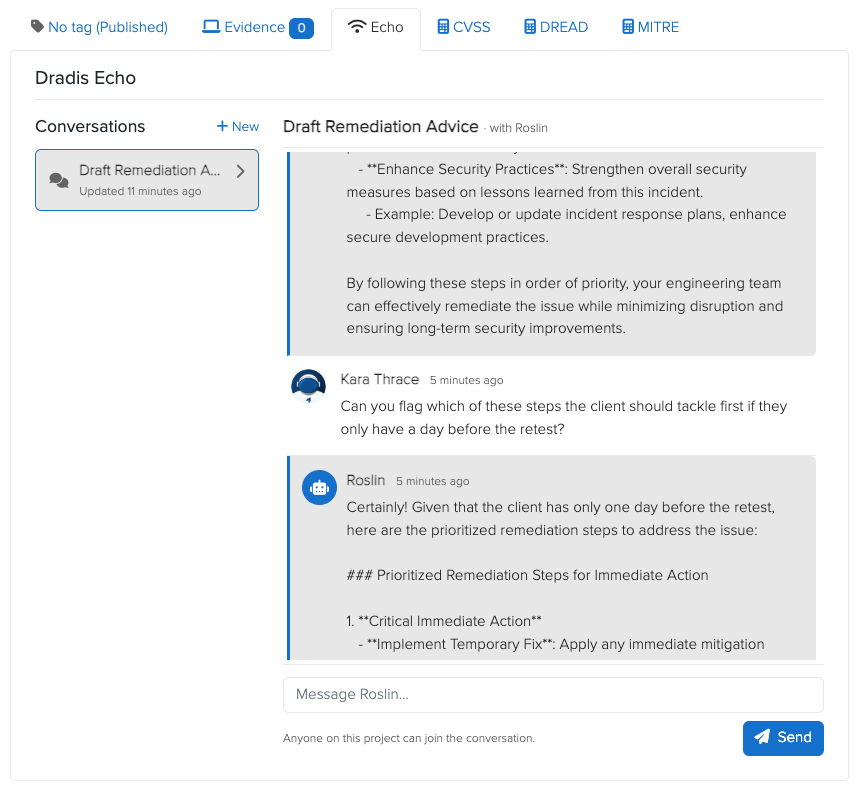
Gateway HTML and PDF exports are now available directly from your projects via the Export tab > HTML / PDF
 New in Dradis Pro v5.3 (2026-08-13) · Aug 2026
· source
· release history
- Adds Gateway HTML/PDF export directly from the project Export tab (Export → HTML / PDF → choose Gateway theme), including the print-optimised Athena theme, without requiring the Results Portal. New in Dradis Pro v5.3 (2026-08-13) · Aug 2026 · source · release history
-
HTML Export now supports
:rtpplugins for enhanced report generation 4.5.0 · Aug 2022 · source · release history - Adds ability to export Methodology details into reports 3.15 · Nov 2019 · source · release history
docs
- Dradis Pro v5.3 focuses on smoother workflows and better collaboration. Echo conversations are now shared and interactive; CSV and ServiceNow integrations gain reusable field mappings; and Gateway HTML and PDF exports are now available directly from your projects. Here’s what’s new! seen Oct 2026 · source
example
-
Generate a polished PDF deliverable from a project without sharing it through the Results Portal.
In your project, go to the Export tab, select 'HTML / PDF', and choose the 'Athena' Gateway theme.New in Dradis Pro v5.3 (2026-08-13) · Aug 2026 · source -
Generate a themed PDF report directly from the project without using the Results Portal.
Head to the Export tab, select HTML / PDF, and choose the Gateway theme you want to use (e.g. Athena for printable reports).New in Dradis Pro v5.3 (2026-08-13) · Aug 2026 · source
Issue sorting and custom field types shipped Lets users sort issues across multiple columns simultaneously and define colour-coded ordered value sets for issue fields.
release
- Adds List field type to Issue fields for defining ordered value sets (e.g., Critical > High > Medium > Low) with optional colours New in Dradis Pro v5.2 (2026-07-09) · Jul 2026 · source · release history
- Multi-column Issue sorting now lets you stack multiple List and numeric fields as ordered sort criteria, so reports emerge in exactly the priority sequence your methodology demands. New in Dradis Pro v5.2 (2026-07-09) · Jul 2026 · source · release history
- New List field type lets you define ordered value sets (e.g., Critical > High > Medium > Low) for Issue fields, complete with configurable font and cell background colours. New in Dradis Pro v5.2 (2026-07-09) · Jul 2026 · source · release history
example
-
Sort issues by a custom remediation urgency list field, then by CVSS score to prioritize high-impact bugs first.
In Issue Library: select 'Remediation Urgency' (List) then 'CVSS Score' (Numeric) as sort criteria.New in Dradis Pro v5.2 (2026-07-09) · Jul 2026 · source
Finding and Content Management 3 capabilities Dradis provides a central place to create, store, and reuse findings and content across projects. Teams can build up shared libraries and pre-packaged kits to reduce repeated effort.
Issue Library shipped Maintains a shared library of reusable issues that can be pulled into any project, landing in draft state for review before use.
release
- Adds support for multiple ordered sort fields in the Issue Library and Report Templates New in Dradis Pro v5.2 (2026-07-09) · Jul 2026 · source · release history
- Issue Library now defaults imported issue state to draft. New in Dradis Pro v5.2 (2026-07-09) · Jul 2026 · source · release history
-
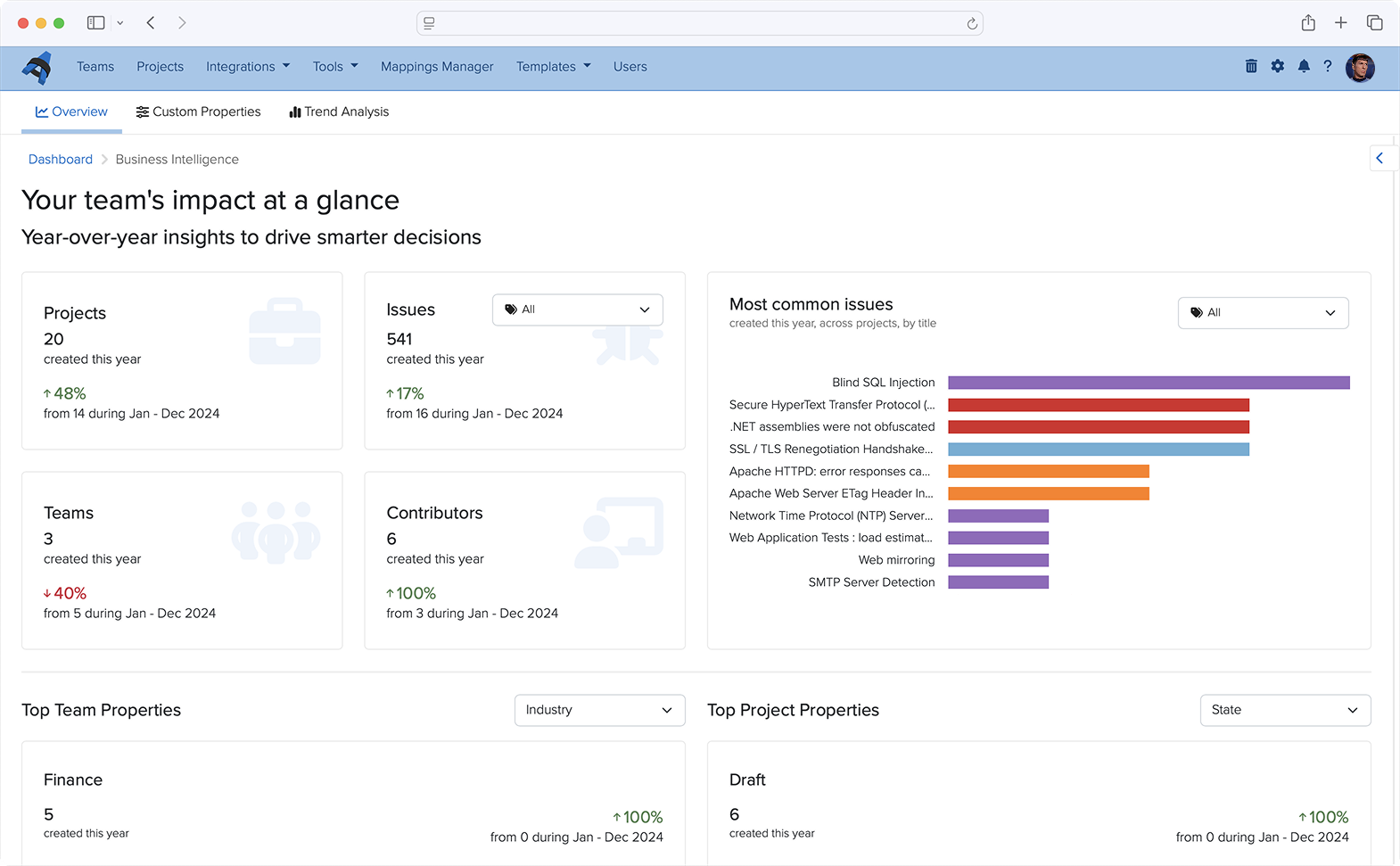
Adds CSV import capability to the Issue Library for bulk-uploading custom issues without manual copy/pasting
 ICYMI: What we shipped in 2025 🚀 (2025-12-17) · Dec 2025
· source
· release history
-
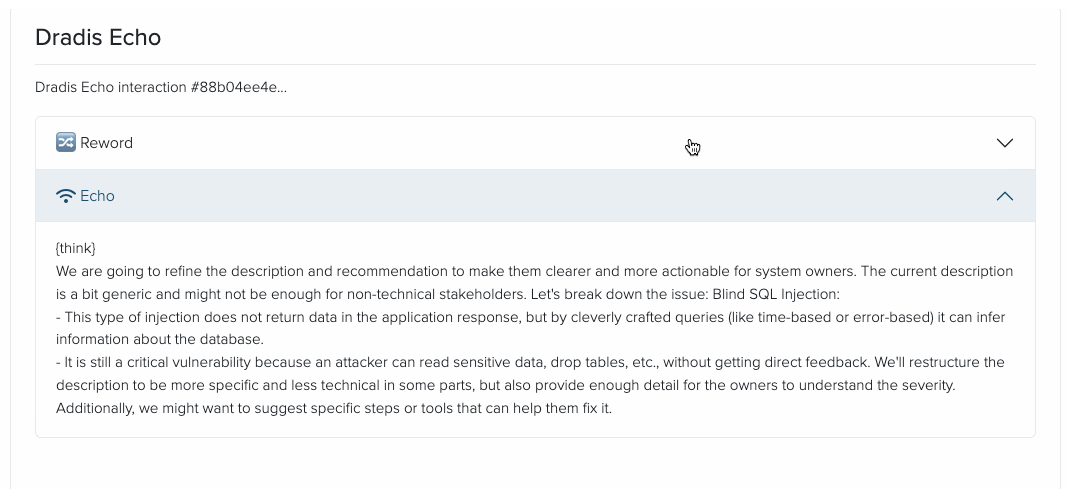
Adds CSV upload capability to the IssueLibrary for bulk-importing custom issues
 New in Dradis Pro v4.19 (2025-11-27) · Nov 2025
· source
· release history
- Adds QA status visibility when adding IssueLibrary entries to a project New in Dradis Pro v4.19 (2025-11-27) · Nov 2025 · source · release history
Kits shipped Bundles pre-packaged content into kits that can be applied to new or existing projects to give teams a consistent starting point.
release
- New default Welcome kit option added for Kits. New in Dradis Pro v5.2 (2026-07-09) · Jul 2026 · source · release history
-
Ships
OWASP Top 10:2025methodology schema, sample project, and three new report templates Claude audited Dradis, then used Dradis to report the findings (2026-04-24) · Apr 2026 · source · release history -
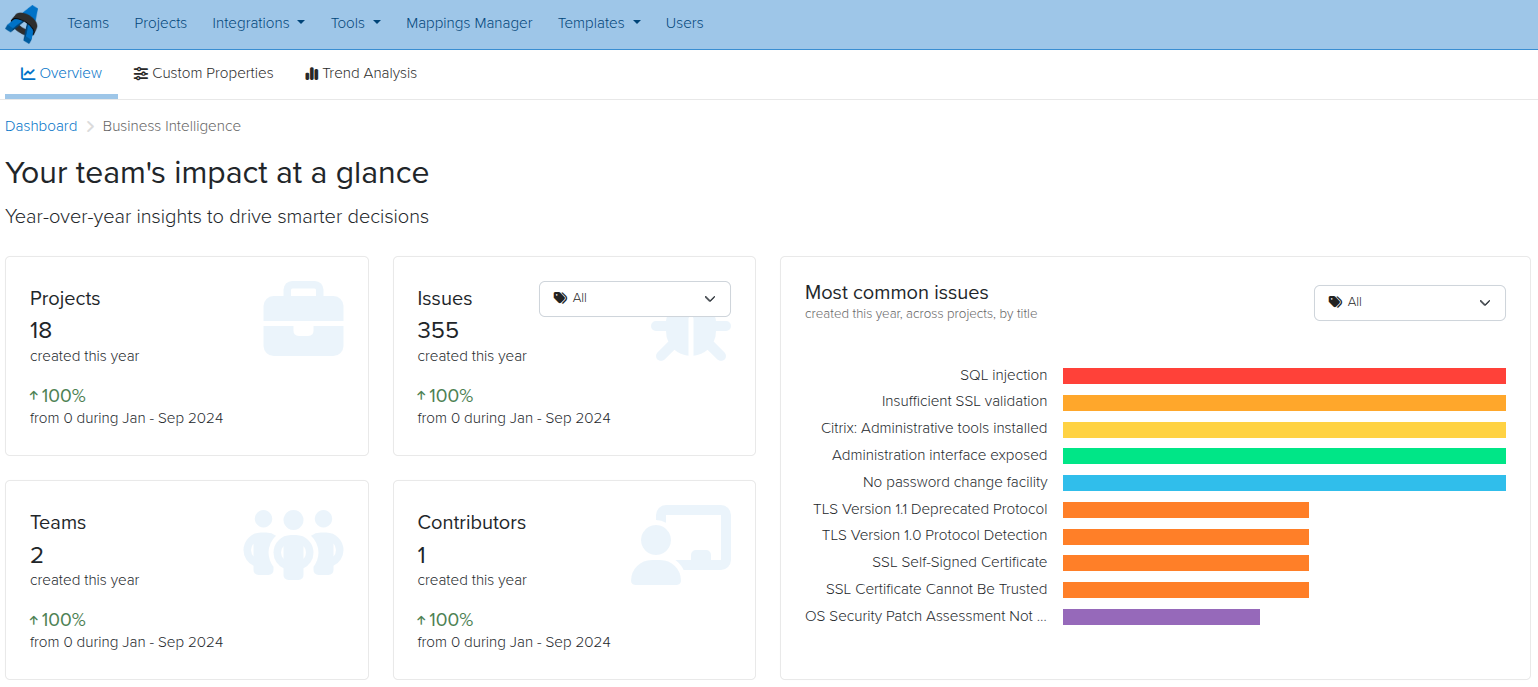
Adds Mappings Manager option to copy existing template mappings when uploading new or updated kits/templates
 New in Dradis Pro v4.18 (2025-09-30) · Sep 2025
· source
· release history
example
-
Copy existing template mappings when uploading an updated kit
In the Mappings Manager, upload a new or updated kit/template and select 'Copy existing mappings' to apply them.New in Dradis Pro v4.18 (2025-09-30) · Sep 2025 · source
CSV import with Mappings Manager shipped Imports findings from a CSV file and remembers the column-to-field mappings so future uploads with matching headers apply them automatically.
release
-
Integrates CSV imports with the Mappings Manager so column-to-field mappings are saved per Report Template and applied automatically on future uploads with matching column headers.
New in Dradis Pro v5.3 (2026-08-13) · Aug 2026
· source
· release history
- CSV Field Mappings now integrate with the Mappings Manager, allowing you to define how each CSV column maps to your Issue and Evidence fields and reuse that configuration on future uploads New in Dradis Pro v5.3 (2026-08-13) · Aug 2026 · source · release history
docs
- Dradis Pro v5.3 focuses on smoother workflows and better collaboration. Echo conversations are now shared and interactive; CSV and ServiceNow integrations gain reusable field mappings; and Gateway HTML and PDF exports are now available directly from your projects. docs update · Aug 2026 · source
Third-Party Integrations 4 capabilities Dradis connects to external cyber tools and ticketing platforms so findings can flow in from scanners and out to issue-tracking systems without manual re-entry. Field mappings are configurable once and reused on every subsequent export or import.
REST/JSON API shipped Provides a REST/JSON API for programmatic access to project data, tracking content changes in the activity log and attributing new notes and evidence to the authenticated user.
Also counts toward: REST API
release 15 total
-
Adds Evidence, Node, and Note CRUD events to Webhooks, enabling external systems to react to evidence lifecycle changes.︀︄︇︀︅︉︀︅︀︀︃︀︀︅︅︀︅︊︀︄︆︀︃︄
 New in Dradis Pro v5.4 (2026-09-22) · Sep 2026
· source
· release history
- Add Webhook events for Evidence, Node and Note CRUD operations New in Dradis Pro v5.4 (2026-09-22) · Sep 2026 · source · release history
-
Adds Recent Activity entries for Content Block edits made via the REST/JSON API.
New in Dradis Pro v5.3 (2026-08-13) · Aug 2026
· source
· release history
-
Sets the
authorfield automatically to the authenticated user when creating notes and evidence via the REST/JSON API. New in Dradis Pro v5.3 (2026-08-13) · Aug 2026 · source · release history -
Improves API by adding an endpoint for exporting/downloading reports and exposing Node Properties on the Node endpoint
ICYMI: What we shipped in 2025 🚀 (2025-12-17) · Dec 2025
· source
· release history
- Adds Webhook support in Gateway to trigger automated actions on events like contributor requests or project completions ICYMI: What we shipped in 2025 🚀 (2025-12-17) · Dec 2025 · source · release history
ServiceNow integration shipped Pushes findings to ServiceNow as Vulnerable Items across its Application, Container, and Vulnerability Response modules using saved field mappings.
Also counts toward: Ticketing integration
release
-
ServiceNow Field Mappings added to the Mappings Manager so you can define how Dradis fields map to ServiceNow fields using Liquid for content control in Application, Container, and Vulnerability Response modules
New in Dradis Pro v5.3 (2026-08-13) · Aug 2026
· source
· release history
-
Adds
ServiceNowto the Mappings Manager — define how Dradis fields map to ServiceNow fields once (via Mappings Manager → ServiceNow → New ServiceNow Mapping) and have them auto-populated on every Vulnerable Item creation; supports Liquid templating in mapped values across the Application, Container, and… New in Dradis Pro v5.3 (2026-08-13) · Aug 2026 · source · release history - Expands ServiceNow integration to create Vulnerable Items in Application, Container, and Vulnerability Response modules New in Dradis Pro v5.2 (2026-07-09) · Jul 2026 · source · release history
- ServiceNow integration now creates Vulnerable Items across the Application, Container, and Vulnerability Response modules automatically — no extra configuration required. New in Dradis Pro v5.2 (2026-07-09) · Jul 2026 · source · release history
example
-
Configure reusable field mappings for ServiceNow exports using Liquid templates.
Head to “Mappings Manager” → “ServiceNow” → “New ServiceNow Mapping” and define how your Dradis content should map to ServiceNow.New in Dradis Pro v5.3 (2026-08-13) · Aug 2026 · source
Burp Suite integration shipped Imports findings from Burp Suite directly into a project, with the finding type available as a mappable field.
release
-
Adds Type as an available Issue field for Burp integration.
New in Dradis Pro v5.3 (2026-08-13) · Aug 2026
· source
· release history
- Extends Burp integration to parse strong and code tags from findings 4.9.0 · Jun 2023 · source · release history
- Burp importer enhanced to support large base64 responses 4.7.0 · Feb 2023 · source · release history
-
Adds
element.qualys_collectionas an issue field for Qualys integration 4.2.0 · Feb 2022 · source · release history
VSTS/Azure DevOps integration shipped Pushes findings to Azure DevOps as Work Items, including any file attachments associated with those items.
Also counts toward: Ticketing integration
release
-
Adds support for Work Item attachments in the VSTS integration.
New in Dradis Pro v5.3 (2026-08-13) · Aug 2026
· source
· release history
example
-
Configure Azure DevOps integration with Microsoft Entra ID
In the Integration settings for Azure DevOps, switch the authentication method from OAuth to Microsoft Entra ID and save.
New in Dradis Pro v4.18 (2025-09-30) · Sep 2025
· source
Project and Workflow Management 2 capabilities Dradis gives teams tools to plan and track the work that surrounds an engagement, from task boards to personalised dashboards. It supports the operational side of running a project rather than just the technical findings.
Project task board (Cards) shipped Provides a Kanban-style task board where team members can create, organise, and move work items between lists.
release 7 total
-
Adds an option to move a Card task to a different list.
New in Dradis Pro v5.3 (2026-08-13) · Aug 2026
· source
· release history
- Initial REST/JSON API implementation for Boards, Lists, Cards 4.10.0 · Sep 2023 · source · release history
- Boards can be renamed and deleted through their dots menu in the UI 3.17 · May 2020 · source · release history
- Activity Feed now shows board name and link for cards 3.17 · May 2020 · source · release history
- Form data for Card, Evidence, Issue, and Note is preserved even if not saved explicitly 3.17 · May 2020 · source · release history
- Adds revision history for cards to track changes over time 3.16 · Feb 2020 · source · release history
Author dashboard shipped Gives each author a personalised home screen with project widgets, a news feed, and an onboarding view when no active projects are present.
release
-
Redesigns the author dashboard with contextual widget panels, a What's New feed, CTA cards, and an onboarding view for authors without active projects.
New in Dradis Pro v5.3 (2026-08-13) · Aug 2026
· source
· release history
AI Assistance 1 capability Dradis includes an AI assistant embedded directly in the issue-writing workflow. It supports real-time collaboration so multiple team members can contribute to the same AI conversation simultaneously.
Echo AI assistant shipped Provides an AI assistant inside Issues that lets the whole team send messages and see responses stream live to everyone viewing the same issue.
Also counts toward: Built-in AI assistant
release
-
Echo conversations are now shared and interactive; users can start a conversation with Roslin from a saved prompt on an Issue and continue with follow-up messages
New in Dradis Pro v5.3 (2026-08-13) · Aug 2026
· source
· release history
- Enables multiplayer Echo chat on Issues — start a conversation from a saved prompt, send follow-up messages, and watch Roslin's reply stream live to all project members viewing the same Issue. New in Dradis Pro v5.3 (2026-08-13) · Aug 2026 · source · release history
docs
-
Introducing Dradis Echo Now AI integration is available (and entirely optional!) for Dradis. With Dradis Echo, you can deploy your preferred LLM in Ollama – a framework that lets you run LLMs locally, no external connections at all necessary – to work with Dradis.
docs update · Oct 2026
· source
- Dradis Pro v5.3 focuses on smoother workflows and better collaboration. Echo conversations are now shared and interactive; CSV and ServiceNow integrations gain reusable field mappings; and Gateway HTML and PDF exports are now available directly from your projects. docs update · Aug 2026 · source
example
-
Collaborate with teammates by continuing an AI Echo conversation on a specific Issue in real time.
In the Dradis UI, open an Issue, head to the Echo tab, choose a saved prompt, and start the conversation with follow-up messages.New in Dradis Pro v5.3 (2026-08-13) · Aug 2026 · source -
Connect a cloud LLM provider like OpenAI for AI-assisted writing in Echo
In the console, go to Tools → Echo → Providers, click 'Add Provider', select 'OpenAI', and enter your API key and default model.New in Dradis Pro v5.1 (2026-06-09) · Jun 2026 · source
Administration and User Management 2 capabilities Dradis provides admin controls to configure the platform, manage users, and support team onboarding. It also includes interface options that affect the day-to-day experience for all users.
User onboarding and training controls shipped Gives administrators controls to onboard new users, including the ability to request one-to-one training on their behalf.
release
-
Adds an Admin control to request 1:1 training for new users.
New in Dradis Pro v5.3 (2026-08-13) · Aug 2026
· source
· release history
Dark mode shipped Displays the login and setup wizard pages in dark mode for users who prefer a lower-brightness interface.
release
- Dark mode support added to the login and setup wizard pages. New in Dradis Pro v5.2 (2026-07-09) · Jul 2026 · source · release history
Other 35 capabilities
Plugin-Based Data Import/Export shipped Supports importing and exporting various data formats through a pluggable architecture, including file attachments and project backups.
Also counts toward: Plugin API support, Plugin system
release 22 total
-
Adds Docker deployment via
curl -fsSL https://get.dradis.com | /bin/bashwith pre-installed add-ons New in Dradis Pro v5.0 (2026-04-20) · Apr 2026 · source · release history - Adds Request/Response Evidence fields for Web Application Scans (WAS) in Qualys integration 4.9.0 · Jun 2023 · source · release history
- Extends Acunetix integration to parse inline code in addition to code blocks 4.9.0 · Jun 2023 · source · release history
- Adds subsequent file upload support for existing scanners without re-selection 4.3.0 · Apr 2022 · source · release history
- Adds support for Qualys Web Application Scanner (WAS) imports 4.2.0 · Feb 2022 · source · release history
- Adds Nipper integration for importing findings. 3.20.0 · Jan 2021 · source · release history
example
-
Deploy Dradis Pro using the new Docker method for easy setup.
curl -fsSL https://get.dradis.com | /bin/bashNew in Dradis Pro v5.0 (2026-04-20) · Apr 2026 · source -
Import findings from a new Qualys Web Application Scanner scan into your Dradis project.
Use the Import Wizard and select 'Qualys Web Application Scanner' as the source.4.2.0 · Feb 2022 · source -
Attach a report artifact directly to a Finding without intermediate staging steps.
Steps: Navigate to an Issue (Finding). Click the attachment icon or use the context menu to upload a file directly. No staging area interaction required.3.19.0 · Sep 2020 · source -
Review past versions of a note or finding within the Dradis interface.
Open any card in the new Tylium layout and select the revision history tab to view previous iterations.3.16 · Feb 2020 · source
Evidence QA states shipped Evidence items carry QA states so teams can track which pieces of evidence have been reviewed during the reporting process.
release
-
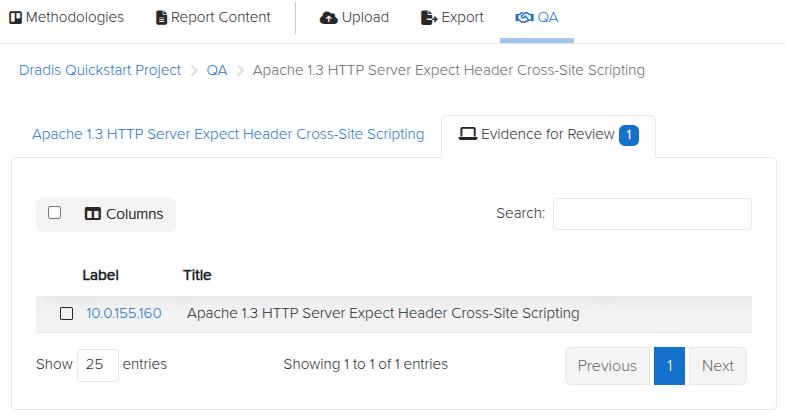
Adds QA states to Evidence so teams can track review status and gate client-facing deliverables — Excel and Word exports now only include published Evidence.
New in Dradis Pro v5.4 (2026-09-22) · Sep 2026
· source
· release history
- Add QA states to Evidence so teams can track review status and control what is included in exports New in Dradis Pro v5.4 (2026-09-22) · Sep 2026 · source · release history
- Shows state changes in the QA activity feed 4.9.0 · Jun 2023 · source · release history
docs
- Dradis Pro v5.4 focuses faster editing and improved QA. Evidence now carries QA states so your team can track what has been reviewed; Roslin can draft report sections for Content Blocks straight from your project’s full content; and List fields render as selects, so the values you have defined for a field persist as… seen Oct 2026 · source
-
Dradis Pro v5.4 focuses faster editing and improved QA. Evidence now carries QA states so your team can track what has been reviewed; Roslin can draft report sections for Content Blocks straight from your project’s full content; and List fields render as selects, so the values you have defined for a field persist as…
docs update · Sep 2026
· source
- Dradis Pro v5.4 focuses faster editing and improved QA. Evidence now carries QA states so your team can track what has been reviewed; Roslin can draft report sections for Content Blocks straight from your project’s full content; and List fields render as selects, so the values you have defined for a field persist as… docs update · Sep 2026 · source
- Dradis Pro v5.4 focuses faster editing and improved QA. Evidence now carries QA states so your team can track what has been reviewed; Roslin can draft report sections for Content Blocks straight from your project’s full content; and List fields render as selects, so the values you have defined for a field persist as… docs update · Sep 2026 · source
- Dradis Pro v5.4 focuses faster editing and improved QA. Evidence now carries QA states so your team can track what has been reviewed; Roslin can draft report sections for Content Blocks straight from your project’s full content; and List fields render as selects, so the values you have defined for a field persist as… docs update · Sep 2026 · source
- Dradis Pro v5.4 focuses faster editing and improved QA. Evidence now carries QA states so your team can track what has been reviewed; Roslin can draft report sections for Content Blocks straight from your project’s full content; and List fields render as selects, so the values you have defined for a field persist as… docs update · Sep 2026 · source
example
-
Track review status for a specific piece of evidence before it goes into the client report.
1. Open the Evidence item 2. Locate the QA state selector in the Evidence view 3. Change the state to 'Published'New in Dradis Pro v5.4 (2026-09-22) · Sep 2026 · source -
Track Evidence review status before sending a report to a client, keeping unreviewed material out of exported deliverables.
In a project, open a piece of Evidence, then set its QA state from the Evidence view. Only Evidence marked as published will appear in Excel and Word exports.announced · Sep 2026 · source
Scanner Plugin Updates shipped Keeps the Nessus and Nmap upload plugins current to support newer data formats like .nessus v2.
release 10 total
-
Nessus importer now supports the
issue.classification_owasp2021field for OWASP 2021 classifications 4.7.0 · Feb 2023 · source · release history -
Adds Nikto issue field
referencesfor imported vulnerabilities 4.4.0 · Jun 2022 · source · release history -
Updates Openvas integration Node label parsing to include
:hostnameand:asset_idproperties 4.3.0 · Apr 2022 · source · release history -
Nessus: Add
product_coverage&cvss3_impact_scoreas available Issue fields 4.1.0 · Nov 2021 · source · release history - Zed Attack Proxy upload plugin 2.9.0 · Feb 2012 · source · release history
- Retina Network Security Scanner upload plugin 2.9.0 · Feb 2012 · source · release history
Business Intelligence Dashboard shipped A dashboard that surfaces year-over-year activity trends, custom property trends, and lists of the most common issues across projects.
release
- Adds a dedicated date field type for Business Intelligence custom properties to store structured engagement dates New in Dradis Pro v5.1 (2026-06-09) · Jun 2026 · source · release history
- Adds Business Intelligence data access for Read-only Contributor users on assigned projects New in Dradis Pro v5.0 (2026-04-20) · Apr 2026 · source · release history
-
Adds the
Tools > Business Intelligencemenu entry for the new dashboard UI. Turn Your Pentests Into Insights: The New Business Intelligence Dashboard (2026-02-06) · Feb 2026 · source · release history -
Adds Business Intelligence Dashboard views showing year-over-year activity trends and common issue lists
New in Dradis Pro v4.18 (2025-09-30) · Sep 2025
· source
· release history
docs
- Business Intelligence Dashboard updates We get many feature requests about the Business Intelligence Dashboard, and now the first batch is ready! You can now see year-over-year trends of activities and custom properties, and lists of your most common issues across projects. docs update · Oct 2026 · source
example
-
Create a structured date property in Business Intelligence for tracking remediation deadlines
In the BI settings, create a new custom property and select 'Date' as the field type.New in Dradis Pro v5.1 (2026-06-09) · Jun 2026 · source -
View year-over-year activity trends and common issues in the BI Dashboard
In the Dradis Pro web console, navigate to Business Intelligence > Dashboard to view YoY insights.New in Dradis Pro v4.18 (2025-09-30) · Sep 2025 · source
Roslin AI drafting for Content Blocks shipped Roslin can draft report sections for Content Blocks using the full content available in a project.
release
-
Add a Roslin agent tab inside Content Blocks to draft report sections from full project content
New in Dradis Pro v5.4 (2026-09-22) · Sep 2026
· source
· release history
- Adds a Roslin agent tab to Content Blocks to draft report sections (executive summaries, methodology, scope notes) from the full project content including Issues and Evidence. New in Dradis Pro v5.4 (2026-09-22) · Sep 2026 · source · release history
docs
- Dradis Pro v5.4 focuses faster editing and improved QA. Evidence now carries QA states so your team can track what has been reviewed; Roslin can draft report sections for Content Blocks straight from your project’s full content; and List fields render as selects, so the values you have defined for a field persist as… seen Oct 2026 · source
example
-
Draft an executive summary for a report section using project-wide context without leaving the content editor.
1. Open a Content Block 2. Click the Roslin agent tab 3. Ask: 'Draft an executive summary based on this project'New in Dradis Pro v5.4 (2026-09-22) · Sep 2026 · source -
Draft an executive summary for a recurring Content Block without leaving Dradis, using the full project context (Issues and Evidence) as source material.
Open a Content Block > click the 'Roslin' tab > type a prompt such as 'Draft an executive summary based on the issues and evidence in this project' > review and accept the drafted section.New in Dradis Pro v5.4 (2026-09-22) · Sep 2026 · source -
Draft a recurring report section such as an executive summary or methodology note without leaving the Content Block.
Open a Content Block, navigate to the Roslin tab, and ask Roslin to draft the section — it draws on the full project content including Issues and Evidence.announced · Sep 2026 · source
Command-line Interface (CLI) shipped A command-line interface powered by Thor allows users to manage the tool programmatically via terminal commands.
Also counts toward: Command-line interface
release
-
Adds Docker Hub deployment options for Dradis CE with a new command-line interface for remote server streamlining
ICYMI: What we shipped in 2025 🚀 (2025-12-17) · Dec 2025
· source
· release history
-
Adds
issue.authorto liquid issue drop for sidebar templates 4.10.0 · Sep 2023 · source · release history -
Adds
kit uploadCLI command update for managing kits 3.22.0 · Apr 2021 · source · release history -
Improves the command-line API with Thor; use thor
-Tto view commands. 2.7 · Apr 2011 · source · release history
Note Collaboration shipped Allows users to add comments, subscriptions, and notifications to notes within a project.
release
- Loads subscriptions feed asynchronously to improve performance 3.22.0 · Apr 2021 · source · release history
- Notes now support direct attachments independently of the staging area 3.19.0 · Sep 2020 · source · release history
- Editor allows drag & drop, copy & paste, and direct image uploading for attachments 3.19.0 · Sep 2020 · source · release history
- Side-by-side editor preview auto-updates while editing notes or issues 3.17 · May 2020 · source · release history
-
notesnow supportcomments,subscriptionsandnotifications3.11 · Nov 2018 · source · release history
example
-
Upload an image directly into a note's editor without moving files through a staging queue.
Steps: Open any Note in the Dradis UI. Drag and drop an image file (e.g., screenshot.png) directly into the text area. The image is embedded immediately.3.19.0 · Sep 2020 · source
UI Layout Improvements shipped Enhances the visual structure of the interface with cleaner, multi-column layouts for better content display.
release
-
Introduces Hera unified layout with main/secondary navigation bars and left/right sidebars replacing complex legacy navigation
ICYMI: What we shipped in 2025 🚀 (2025-12-17) · Dec 2025
· source
· release history
- Uploads layout adjusted to show the output console with more visibility 3.17 · May 2020 · source · release history
- Upgrades the application to the new Tylium layout 3.16 · Feb 2020 · source · release history
- Updates the CE theme with a green palette 3.9 · Jan 2018 · source · release history
- Adds a cleaner three-column layout to the UI 2.8.0 · Oct 2011 · source · release history
Issue Collaboration shipped Allows users to comment on issues and subscribe to updates within a specific project scope.
release
- Updates content in real-time while creating evidence records at the issue-level 4.2.0 · Feb 2022 · source · release history
- Enables multi-deletion of evidence records at the issue level via the UI 4.2.0 · Feb 2022 · source · release history
- Evidence: Create a new issue (optionally) when creating new evidence 4.1.0 · Nov 2021 · source · release history
- Adds subscriptions for issues within a specific project scope 3.10 · Aug 2018 · source · release history
- Adds the ability to add comments to issues 3.10 · Aug 2018 · source · release history
Echo AI automation shipped An optional local LLM integration that summarizes scanner output, rewrites notes, and enhances remediation advice via context-aware automation.
release
- Adds OpenAI, Anthropic, and Google Gemini as new LLM provider options for Echo alongside existing Ollama support New in Dradis Pro v5.1 (2026-06-09) · Jun 2026 · source · release history
- Adds configurable, reusable prompts for Dradis Echo to connect a local LLM to Dradis New in Dradis Pro v5.0 (2026-04-20) · Apr 2026 · source · release history
-
Adds Echo context-aware automation for Dradis to deploy a local LLM for improving issue write-ups and summarizing scanner output
ICYMI: What we shipped in 2025 🚀 (2025-12-17) · Dec 2025
· source
· release history
-
Adds
dradis-echooptional LLM integration to summarize scanner output, rewrite notes, and enhance remediation advice
New in Dradis Pro v4.19 (2025-11-27) · Nov 2025
· source
· release history
White-labeling shipped Admins can apply a custom logo and brand color to the Dradis UI so that contributors see a white-labeled experience reflecting their organization's identity.
release
-
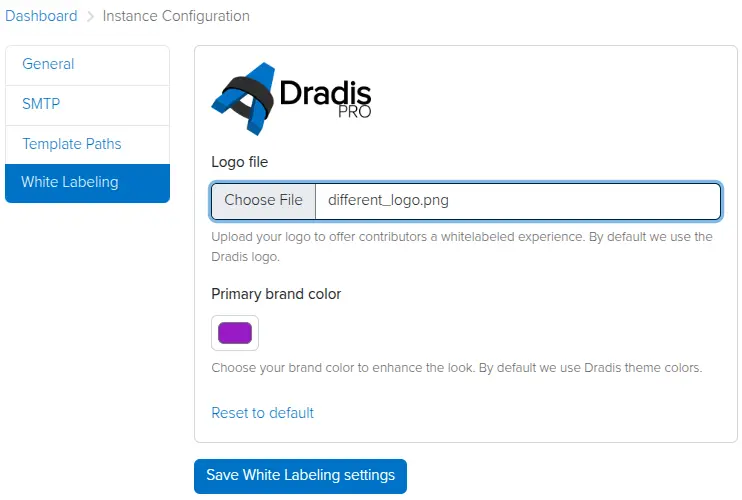
Adds Whitelabling capability allowing admins to set a custom logo and brand color visible throughout the Dradis UI
ICYMI: What we shipped in 2025 🚀 (2025-12-17) · Dec 2025
· source
· release history
- Introduces a New Configuration Manager for managing application settings 2.7 · Apr 2011 · source · release history
docs
-
White-labeling Admin testers can now add a custom logo and brand color in the Instance Settings view. Contributors will see this logo and color in the Dradis UI, providing a white-labeled experience that reflects your brand identity.
 docs update · Oct 2026
· source
User Authentication shipped Enforces user authentication for accessing the service.
Also counts toward: Multi-factor authentication
release
- Adds Personal Access Token strategy for authenticated API access with scope and expiration controls Claude audited Dradis, then used Dradis to report the findings (2026-04-24) · Apr 2026 · source · release history
-
Adds Dradis OTP as a built-in multi-factor authentication integration allowing QR code generation with standard authenticator apps
ICYMI: What we shipped in 2025 🚀 (2025-12-17) · Dec 2025
· source
· release history
- Adds user authentication required for accessing the service 2.0 · Jan 2009 · source · release history
Evidence Node View shipped Adds an evidence tab to the node view for viewing attached evidence files directly within a finding's details.
release
- Loads evidence tab content asynchronously to improve table performance on large projects 4.2.0 · Feb 2022 · source · release history
-
Adds
evidencetab to the node view 3.9 · Jan 2018 · source · release history
example
-
View attached evidence files directly within a specific finding's node details.
Navigate to Findings > Nodes in the web UI and select a node to access the new Evidence tab.3.9 · Jan 2018 · source
Enhanced Client UX shipped Improves the user interface with auto-expanding columns and manual refresh capabilities.
release
- Improves search efficiency for faster issue discovery within Dradis instances 3.6 · Mar 2017 · source · release history
- Adds refresh buttons to the tree view and notes list for manual UI updates 2.2 · Jun 2009 · source · release history
- Enables autoExpandColumn functionality on Internet Explorer in the client component 2.2 · Jun 2009 · source · release history
Encrypted Transport shipped Secure client-server communication via SSL transport.
release
- Improves error handling for REST web service communication errors 2.2 · Jun 2009 · source · release history
-
Simplifies REST credentials configuration via .
/conf/dradis.xml 2.2 · Jun 2009 · source · release history - Adds SSL transport for encrypted communication between client and server 2.0 · Jan 2009 · source · release history
List fields as dropdowns shipped Renders List fields as selects (dropdowns) when editing existing Issues, Evidence, and Content Blocks to enforce consistent field values across a project.
release
-
Render List fields as selects (dropdowns) when editing existing Issues, Evidence, and Content blocks
New in Dradis Pro v5.4 (2026-09-22) · Sep 2026
· source
· release history
- Renders List fields as selects (dropdowns) when editing existing Issues, Evidence, and Content Blocks, enforcing consistent field values across a project. New in Dradis Pro v5.4 (2026-09-22) · Sep 2026 · source · release history
Self-hosted Grammar Checking via Roslin shipped Allows users to connect a self-hosted or local LanguageTool instance for inline grammar, spelling, and style checking in the findings editor.
Also counts toward: Agent-based deployment, Self-hosted deployment
release
- Adds Roslin Echo Agent to connect a self-hosted or local LanguageTool instance for inline grammar, spelling, and style checking in the findings editor New in Dradis Pro v5.1 (2026-06-09) · Jun 2026 · source · release history
example
-
Enable self-hosted grammar checking for findings by configuring the Roslin agent in the UI
In the console, go to Tools → Echo → Agents, click Edit next to 'Roslin', and configure the LanguageTool connection.New in Dradis Pro v5.1 (2026-06-09) · Jun 2026 · source
Instance-wide Audit Logging shipped Comprehensive audit logging across the instance with CSV export capability to support security and compliance accountability.
Also counts toward: Administrative audit log, CSV data export
release
- ActivityTracking is removed for Issues in favor of EventPublisher New in Dradis Pro v5.0 (2026-04-20) · Apr 2026 · source · release history
-
Adds instance-wide Audit Logging feature with CSV export capability for security and compliance accountability
ICYMI: What we shipped in 2025 🚀 (2025-12-17) · Dec 2025
· source
· release history
Evidence Collaboration shipped Allows users to comment on evidence items and subscribe to updates, with comments included in project exports.
release
- Comments display the author's name instead of email in the update feed 3.17 · May 2020 · source · release history
-
evidenceitems now supportcomments,subscriptionsandnotifications3.11 · Nov 2018 · source · release history
Azure DevOps field enhancements shipped Adds support for numeric (integer and double) Work Item fields and required fields in the DevOps integration.
release
-
Adds support for numeric (integer and double) Work Item fields and required fields in the DevOps integration.
New in Dradis Pro v5.4 (2026-09-22) · Sep 2026
· source
· release history
Evidence publishing status shipped Allows users to mark evidence as published so it is included in Word or Excel report exports, while automatically excluding unpublished evidence.
example
-
After completing review of a piece of evidence, mark it as published so it is included in the Word or Excel report export — unpublished evidence is now excluded automatically.
In the project, open a piece of Evidence > set its QA state to 'Published' from the Evidence view > generate the Word or Excel export — only published Evidence will appear in the deliverable.
New in Dradis Pro v5.4 (2026-09-22) · Sep 2026
· source
Jira custom field support shipped Adds support for float custom fields and multiselect custom fields when sending issues to Jira.
Also counts toward: Ticketing integration
release
-
Adds support for float custom fields and multiselect custom fields when sending issues to Jira.
New in Dradis Pro v5.4 (2026-09-22) · Sep 2026
· source
· release history
Dark mode scope expansion shipped Extends dark mode support to the sidebar toggle and QA scheduler in addition to the login and setup wizard pages.
release
-
Adds support for Dark Mode (
light,dark,auto) in the sidebar toggle and QA scheduler New in Dradis Pro v5.0 (2026-04-20) · Apr 2026 · source · release history
Gateway Services for project generation shipped A services section in the Gateway portal that allows creating questionnaires to automatically generate new projects from responses.
release
-
Adds Services section in Dradis Gateway portal to create questionnaires that can automatically generate new projects from responses
ICYMI: What we shipped in 2025 🚀 (2025-12-17) · Dec 2025
· source
· release history
Project QA states in BI shipped Access to overall Project QA states within Business Intelligence analytics to track project readiness across the instance.
release
-
Adds Project QA overall states accessible in BI analytics to track project readiness across the instance
ICYMI: What we shipped in 2025 🚀 (2025-12-17) · Dec 2025
· source
· release history
Issue Library management shipped Management capabilities for the Issue Library including bulk deletion of entries.
release
-
Adds bulk-delete action for entries in the IssueLibrary view
New in Dradis Pro v4.19 (2025-11-27) · Nov 2025
· source
· release history
Collapsed Node Creation shipped Users can create nodes in a collapsed state directly from the main sidebar to streamline project structuring.
release
- Allows adding nodes directly in a collapsed state via the main sidebar. 3.20.0 · Jan 2021 · source · release history
UI Layout and Navigation Adjustments shipped The interface moves the navbar dropdown off-screen edges and supports UI layout improvements for better content display.
release
- Moves the navbar dropdown menu off the right edge of the browser window. 3.20.0 · Jan 2021 · source · release history
Unread Notification Badge shipped The browser tab displays a badge indicator when there are unread notifications in the system.
release
- Browser tab displays a notification badge when there are unread notifications 3.19.0 · Sep 2020 · source · release history
Nexpose Integration shipped Integration with Nexpose that improves cipher wrapping coverage for vulnerability data.
release
- Nexpose integration: better cipher wrapping coverage 3.17 · May 2020 · source · release history
Project Navigation Persistence shipped The project navigation sidebar can be pinned open to persist across different views.
release
- Navigation sidebar in projects can be kept open across views 3.17 · May 2020 · source · release history
Note History shipped Users can review past versions of notes and findings directly within the interface.
example
-
Review past versions of a note or finding within the Dradis interface.
Open any card in the new Tylium layout and select the revision history tab to view previous iterations.3.16 · Feb 2020 · source
User notification settings shipped Users can configure email notification frequency to control how often they receive alerts about project updates.
release
- Adds email notification settings to control frequency of alerts 3.15 · Nov 2019 · source · release history
Node creation content priority shipped When creating nodes, the tool prioritizes user-provided content over default local fields to ensure data fidelity.
release
- Prioritizes user-provided content over default local fields in node creation. 3.13 · Jun 2019 · source · release history
Web Exploitation Framework Plugin Support shipped Supports uploading data from the Web Exploitation Framework (wXf) via a dedicated plugin.
release
- Adds Web Exploitation Framework (wXf) upload plugin support 2.7 · Apr 2011 · source · release history
Lines in monospace are the tool's own words: help text
parsed from its source, or an endpoint from its API document. Under
release, a line is our summary of a dated release. Under
docs, it is quoted from the tool's own documentation or
website. Each links back to the source it came from.
Command line
7 commands for Dradis, each with where it came from. This tool has no source analysis yet, so there is no option reference and no captured run beside them.
No command matches.
Screenshots
From the release notes, newest first. Click one to see it full size.Media
Videos from the release notes, newest first. They play right here.Score card
-
Shipping velocity releases a month, last 12 months
-
Documentation quality release-notes rubric, 0–100
-
Breaking-change discipline how rarely a release breaks users, and notice given
-
Maintenance risk quiet time against its own cadence, maintainers
-
Innovation & surface new capabilities, API and MCP surface
Five scores for Dradis, each built from the releases, notes and API history this site tracks — and, on Researcher and Business, where it stands among every measured tool in its category and how that has moved.
Score cards are part of every paid plan.
See plans → Already subscribed? Sign in →Trajectory
Blank means never measured; nothing here is a filled-in zero.
Peer standings are included with Researcher and Business. See how this tool ranks against its competitors, using data we don't publish anywhere else.
See plans →Each score is 0–100 on a published rubric, derived from data this site already shows. A dimension we cannot measure says so — it is never scored 0 and never enters a rank.
How this is scored
- Shipping velocity — releases a month over the last 12 months, on a log scale where 16 a month scores 100. Needs 3 releases in the window.
- Documentation quality — the release-notes rubric published on the analytics page, unchanged.
- Breaking-change discipline — the share of releases carrying a breaking change (none scores 100, half or more scores 0). Only projects that label breaking changes are measured: a clean record cannot be told from an unlabelled one.
- Maintenance risk — quiet time measured against the tool's own release cadence (quiet longer than 90 days and three typical gaps scores 0), plus the number of active maintainers and whether contributors are growing, where known. Higher is lower risk.
- Innovation & surface — new capabilities in the feature ledger this year, API and MCP operations added, and the share of commits that are features: the mean of whichever we hold.
- Community health (open-source tools only) — each is a direction, not a size: contributors this year against last, the bus factor now against a year ago, and issues closed per issue opened, where steady scores 50, doubled 100 and halved 0; plus the median time to a maintainer's first reply (an hour scores about 100, a month or more 0). A commercial card has no repository and carries none of the four.
- Documented delivery (commercial tools) — when a vendor's documented new capabilities have slowed against its own baseline, that counts against the overall standing as heavily as two low dimensions. Steady delivery, or too little history to judge, leaves the standing alone; it is never a sixth score.
- Open-source tools are scored on repository signals; commercial tools on their published changelog. Ranks compare tools within one category and one profile and need at least five measured peers; the overall standing needs three ranked dimensions. Best-in-breed or consolidator is a shape, not a quality, and is never scored.
Release-note detail over time
See how much detail Dradis puts in its release notes, quarter by quarter, and compare it with tracked tools in the same category. This history uses up to ten retained, reviewed notes per tool; sparse or blank older quarters may reflect that limit.
Checking release-note history…
Website history
dradis.com, every changeDradis Framework's home page and 40 more pages as they looked each month from December 2021 to October 2026: 51 renders, 6 changes of tagline or palette. Step through them, play them, or put any two months side by side.
Website history is included with Researcher and Business.
See plans → Already subscribed? Sign in →← → or h l a month · Shift a year · [ ] previous / next change · Space play · 1 2 3 page · T whole page · C compare · F full size
← → or h l the right month · Shift the left · S swap · W wipe · T whole page · Esc back
Rebranding timeline
Dates bound when a change appeared between captures. Possible rebrands are AI suggestions; a redesign alone does not establish a rebrand.
Coverage
Missing something? Tell us
What Dradis connects to, runs on and detects, read from its release notes and docs. So far: 1 new integration.
1 change, tracked since Oct 8, 2026.
-
Oct 82026
new Gateway Webhooks integration
With Slack, Jira, Azure DevOps, ServiceNow
You can now use Webhooks to carry out actions based on events in Gateway. Contributor requests, remediation progress, and project completions can trigger automated actions across your security stack. For example, kick off an onboarding flow when a client submits a project through Gateway, post Slack updates on new events in Gateway projects, or sync your ticket status across Jira, Azure DevOps, or ServiceNow.
Source control & CI/CD 1
Chat & collaboration 1
Ticketing & ITSM 2
Nothing first seen in this window. That doesn't mean Dradis shipped nothing, only that we found no record of it.
How we count
Read from 4 of 62 release notes and docs updates we hold for Dradis. "First seen" is the earliest note that names something; "last" is the latest. Our history may start partway through Dradis's life, so an old integration can show a recent first-seen date.
Each change counts once: "added 40 checks" is one line, so the numbers measure how often coverage moves, not how big the catalogue is or how well it detects.
Releases
62 entries
No entries match these filters.
- October 20269
- September 20268
- August 20267
- July 20261
- June 20261
- April 20262
- February 20261
- December 20251
- November 20251
- September 20251
- September 20231
- June 20231
- February 20231
- August 20221
- June 20221
- April 20221
- February 20221
- November 20211
- July 20211
- April 20211
- January 20211
- September 20201
- May 20201
- February 20201
- November 20191
- June 20191
- November 20181
- August 20181
- January 20181
- March 20171
- February 20121
- October 20111
- April 20111
- February 20101
- September 20091
- August 20091
- June 20091
- April 20091
- February 20091
- January 20091
Articles
1 article · updated Nov 4, 2026Where Dradis turns up in what others publish: how-tos, attack reports that name it, and incident write-ups. A row says why it is here and quotes where the article names it; the link goes to the publisher.
Tutorials & guides 1
-
Dradis: Reporting and Collaboration Tool
There are many tools that help in report writing but in this tutorial, we are going to use “Dradis”.
2 more quotes
Table of content Introduction to Report Writing What is Dradis?
Working with Dradis Conclusion Introduction to Report Writing Penetration testing report is the core deliverable in any security valuation action.
Add the badge to your README
Maintain this project? The badge links readers straight to this page, so they can follow every release here.
 Choose a badge style and copy the code →