The section your link pointed to isn't on Flipper One's page any more, so we've brought you to the top.
Firmware for the Flipper One's low-power RP2350RP2350A microcontroller from Raspberry Pi, released in 2024, with dual Arm Cortex-M33 cores and optional RISC-V cores; cyber tools use it for low-cost, programmable hardware implants and signal processing. co-processor, controlling the LCD, buttons, battery, and power states.
sudo qmicli -d /dev/cdc-wdm0 -p --wda-set-loopback-configuration="state=enabled,replication-factor=1"
ping -c 3 -I wwu1u4i4 1.1.1.1
# ~0.3 ms round trip confirms loopback is active
# When done:
sudo qmicli -d /dev/cdc-wdm0 -p --wda-set-loopback-configuration="state=disabled,replication-factor=1"
sudo sysctl -w net.core.netdev_max_backlog=10000
echo 4 | sudo tee /proc/irq/32/smp_affinity_list
echo e0 | sudo tee /sys/class/net/wwu1u4i4/queues/rx-0/rps_cpus
nmcli connection down cellular-vodafone-uk
mmcli --inhibit-device=/sys/devices/platform/soc/23400000.usb/xhci-hcd.0.auto/usb2/2-1/2-1.4 &
ip link set wwu1u4i4 down
qmicli -d /dev/cdc-wdm0 -p --wda-set-data-format="link-layer-protocol=raw-ip,ul-protocol=qmap,dl-protocol=qmap,dl-datagram-max-size=31744,dl-max-datagrams=32,ep-type=hsusb,ep-iface-number=4"
ip link set wwu1u4i4 mtu 31745
echo 1 > /sys/class/net/wwu1u4i4/qmi/add_mux
nmcli device set qmimux0 managed no
ip link set wwu1u4i4 up
ip link set qmimux0 up
What you can do now
Checking Plays…
Plays4. PlaysWhat you can do nowTo doDoneDismissedDeadlinesSince you lookedChecking Plays…Plays could not be checked. This does not mean there is nothing to do.Plays are held while the actionability and safety checks are measured.Personal Plays are held until the measured rollout checks pass.Deadline reminders are held until the measured rollout checks pass.Sign in to see Plays for your saved tools.Personal Plays and Deadlines are included with Practitioner, Researcher and Business.Sign inSee plansRetrySave a tool in Your stack to see Plays for it.We have not checked every saved tool yet. There is no all-clear to report.No new action was found in the checked release sources. Checked as ofNo published Plays for this tool in the last 90 days. This is not an all-clear for the version you run.No Plays in this view.No dated Plays for your saved tools.Why it mattersDo thisBefore you startEstimated effortEffort has not been measured.Read the sourceSource evidenceAct before it breaksNot for meRemind me next weekHidden from To do until next week.That change was not saved. Try again.Keep my Play answers in my accountOptional: save Done, Not for me and reminders privately in your account. Your tools are matched in this browser. No answers are sent until you opt in.Erase my Play answersYour Play answers and private calendar link have been erased.Create a private calendar linkReplace calendar linkRevoke calendar linkAnyone with this link can read generic deadline events. It contains no tool names, versions or answers. Revoke it any time.Private calendar feedWithin 30 daysWithin 7 daysPast the published dateMore than 30 days awayAct byNo earlier visit saved for this tool.breakingtotal Plays since your last reviewReview this toolMark this tool reviewedReview dates stay in this browser. Opening this list does not mark a tool reviewed.Category moves this monthThere is not enough documented history to call a category move this month.Category history is unavailable. No monthly comparison can be made.Category moves are held until the measured rollout checks pass.The documented monthly history shows no category move.What we got wrongThere are too few reviewed Plays to report a correction rate.Play corrections have not been measured for this month.Plays reviewedcorrectedPublished in the last 90 days. Breaking changes come first.Saved tools are matched in this browser; your versions are not sent.Your Plays{count} PlaysWhat you can do with the tools you runRelease sources for {checked} of {total} saved tools checked; no new plays match this edition.Add your toolsRead the details on the webIn {count} daysWe corrected {wrong} of {count} reviewed Plays.
Summary
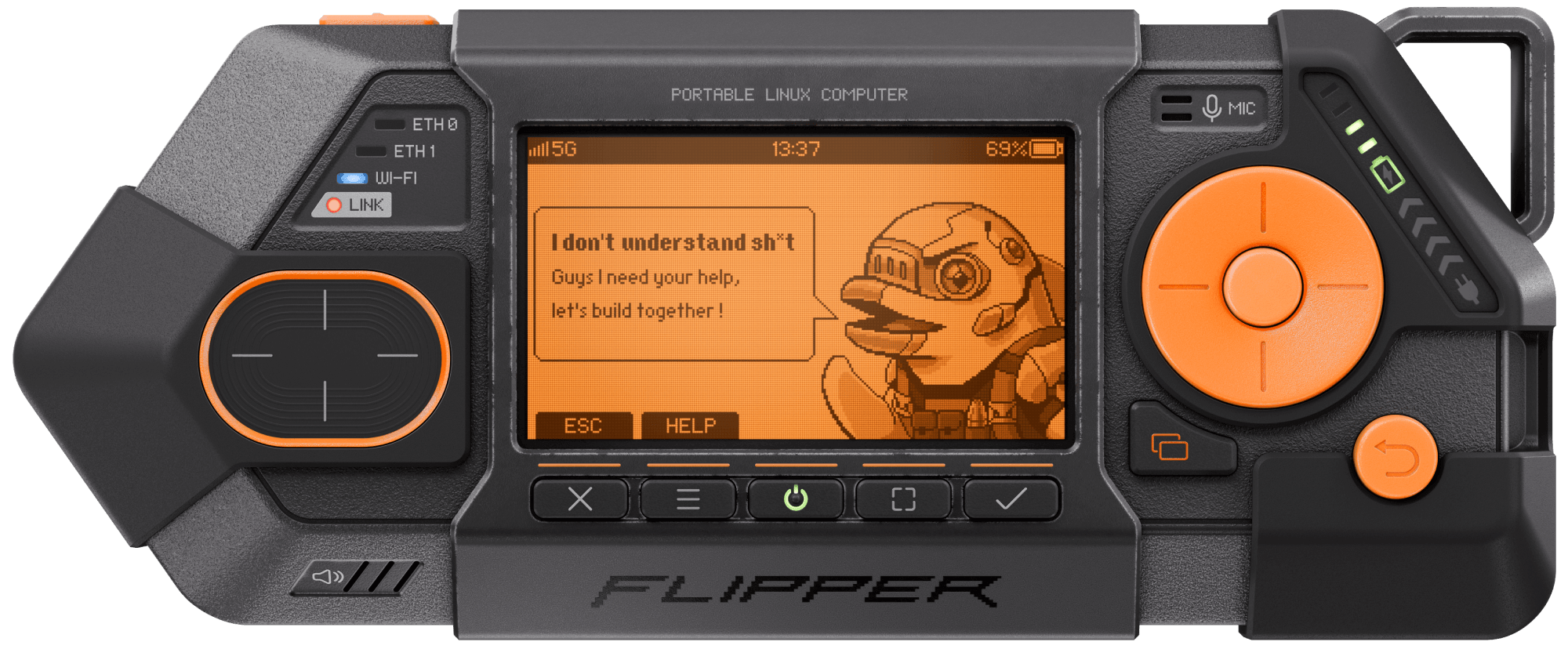
Flipper One is an open-source hardware project building a portable Linux multi-tool for hackers, developed in the open with the community rather than sold as a finished product today. It runs on a dual-processor architecture: an RP2350 low-power co-processor handling buttons, LCD, touchpad, and battery, paired with an RK3576RK3576A mid-range ARM Cortex-A72/A53 octa-core SoC made by Rockchip, offering NPU acceleration and multiple I/O interfaces, making it attractive for embedded cyber tools needing local compute without cloud dependency. chip running Linux for USB, HDMI, Wi-Fi, Ethernet, and audio, with firmware built via CMake and the Pico SDK and flashed to the RP2350 using picotool. It's aimed at engineers, developers, and hardware hackers willing to build and contribute rather than at end users looking for a shipped device. It sits in the hacking-hardware category alongside tools like the Flipper Zero, extending that portable-hacking-device concept into a Linux-capable platform. Firmware builds run automatically on every push, pull request, and tag, and the project is tagged as actively in development with public issue tracking and weekly community updates.
Firmware for the Flipper One's low-power RP2350 co-processor, controlling the LCD, buttons, battery, and power states.
A slip is called out here the day the vendor's own delivery estimate moves past the promised window.
A "coming" milestone is the vendor's own wording, read off the page it links to — never a date we inferred.
Flipper Devices announced Flipper One and opened its development process to community contributors.
Features
15 capabilities
Built from Flipper One's releases, docs, README and our own runs.
“Seen” marks the month we first spotted a release the vendor didn't date.
Group names and tags are our labels.
+RP2350 co-processor firmwareshippedFirmware for the Flipper One's RP2350 co-processor that manages the LCD, buttons, battery, and power states.9 other sources▸
docs
7 total
This page explains the structure of the MCU Firmware sub-project, provides links to all the resources and explains how to contribute to the sub-project. Flipper One has two processors. The low-power MCU (RP2350) manages power, the display, button and touchpad input, and Power Bank mode.
seen Oct 2026
· source
This page explains how to build the MCU firmware file ( .UF2 ) from source code. The resulting file can be uploaded to the MCU of Flipper One via USB. To build the MCU firmware locally: Install Visual Studio Code Python , and git Open a terminal in the folder where you want to store the firmware source code.
seen Oct 2026
· source
Flipper One is a portable device powered by an internal 2-cell Li-ion battery, which can be charged from a USB PD charger via the USB-C1 port. For flexible power management, the device employs controllable DC/DC converters and power switches managed by the Raspberry Pi RP2350 MCU.
seen Oct 2026
· source
This page explains how to flash the MCU firmware file ( .UF2 ) to the Flipper One MCU via USB. The process differs depending on the Flipper One hardware revision. Identify the hardware revision You can identify Flipper One hardware revision by checking the following: Difference Rev. F0B0C1 Rev.
seen Oct 2026
· source
Flipper One uses a dual-processor architecture with a high-performance CPU (Rockchip RK3576) and a low-power MCU (Raspberry Pi RP2350) .
seen Oct 2026
· source
The interconnect between the MCU and CPU consists of: UART (Universal Asynchronous Receiver-Transmitter) connects Linux console serial port to the RP2350. SPI (Serial Peripheral Interface) for transferring frame buffer from the Linux side to the RP2350 side for output to the display.
seen Oct 2026
· source
example
Configure CMake build with Pico SDK$ PICO_SDK_PATH=../../pico-sdk cmake .. -DCMAKE_BUILD_TYPE=Release
Flash firmware to RP2350 via picotool$ picotool load -x build/flipperone-mcu-firmware.uf2
+Flipper OSshippedA Linux-based operating system built for Flipper One that runs on the Rockchip RK3576 SoC and can also be installed on other compatible RK3576-based boards.1 release · 5 other sources · first seen Jul 2026▸
release
Adds NVM get and NVM wipe CLI commands for non-volatile memory access
0.1.0 · Jul 2026
· source
· release history
docs
This page explains the structure of the Linux (CPU Software) sub-project, provides links to all the repositories, and explains how they are used to build Flipper One's official Linux operating system. Flipper One has two processors.
seen Oct 2026
· source
A build system is a framework for producing full OS disk images for various supported hardware platforms. It consists of build scripts and several GitHub repositories containing OS components such as the bootloader, Linux kernel, patches, packages, and more.
seen Oct 2026
· source
is a Linux-based operating system we are developing for the Flipper One. This page outlines the core concept behind Flipper OS and explains how we aim to solve common challenges users face when using a Linux computer as an all-in-one multitool.
docs update · Oct 2026
· source
Flipper OS can be installed on many Rockchip RK3576-based boards, including commercially available ones (see supported boards page).
docs update · Oct 2026
· source
This page provides a list of boards that support installing Flipper OS using images built by the official build system. For each board, it also lists the target name, notes, hardware-defined boot priority, and instructions for switching to MaskROM mode for flashing via USB.
docs update · Oct 2026
· source
+M.2 internal expansion slotdocumentedAn internal M.2 B-key port allows users to install off-the-shelf modules such as cellular modems, Wi-Fi cards, SDR modules, NVMe SSDs, GNSS receivers, and AI accelerators.4 other sources · first seen Oct 2026▸
docs
n78, 100 MHz, Vodafone UK. About 930 Mbit/s download with receive tuning, see Download throughput Download speed about 500 Mbit/s on stock settings, about 930 Mbit/s with receive tuning, see Download throughput Stock Linux limits download speed to about 500 Mbit/s.
docs update · Nov 2026
· source
M.2 modules This section covers M.2 expansion modules testsing. Flipper One has M.2 Key-B (S3), has USB and PCIe interfaces in M.2 port.
seen Oct 2026
· source
The M.2 port is an internal expansion slot for cellular modems, Wi-Fi, SDR, NVMe SSDs, GNSS modules, AI accelerators, and similar off-the-shelf M.2 modules. It sits at the back of the device, under the Back Plate.
docs update · Oct 2026
· source
Flipper One features a module mounting system with two types of modules: M.2 module — a standardized internal expansion module that connects to the device’s M.2 B-key port, providing access to high-speed interfaces, SIM/eSIM connectivity, and several GPIO pins.
docs update · Oct 2026
· source
+Hardware testing and validationdocumentedA dedicated testing sub-project provides checks for RK3576-based boards covering network interfaces, graphics output, general system boot, and other hardware validation scenarios.4 other sources · first seen Oct 2026▸
docs
This section covers testing and validation of all network interfaces on Flipper One: wireless, wired, cellular, and satellite. Test categories — built-in Wi-Fi 6E module. Access point, client, concurrency, and dual-band test modes. Ethernet Ethernet — wired networking over USB and other adapters.
seen Oct 2026
· source
This page explains the structure of the Testing sub-project, provides links to public testing resources, and describes how to contribute to the sub-project. The Testing sub-project covers checks for RK3576-based boards used in Flipper One development.
seen Oct 2026
· source
Graphics Integrity Tests This section covers graphics and video output testing procedures for Flipper One. GPU driver performance Boot device in Default boot target with 4k@120 monitor connected to HDMI Check screen resolution and frame rate automatically configured.
seen Oct 2026
· source
General system tests This section covers general system tests, such as boot target, testing equipment, etc. Flipper RnD Debian For development and testing purposes, we use our own Linux builds based on Debian.
docs update · Oct 2026
· source
+Open community developmentdocumentedFlipper One is developed publicly with shared source repositories, open contribution workflows across hardware, firmware, OS, mechanics, UI, and testing sub-projects, and community help-wanted tasks.4 other sources▸
docs
Community Flipper One has an active community of developers building tools, libraries, integrations, and guides around it. This page lists community-driven projects related to Flipper One development. Community projects are independent of Flipper Devices.
seen Oct 2026
· source
Flipper One is a community-driven project that aims to develop a portable Linux multi-tool for hackers. We develop Flipper One publicly, sharing the entire process, challenges we face, and collaborating with the community on solutions. Why build openly? 🎓 Share knowledge.
seen Oct 2026
· source
This page highlights open tasks across all Flipper One sub-project repositories that need community help or feedback. Each task corresponds to an issue labeled help wanted in its respective GitHub repository.
seen Oct 2026
· source
Guide for the community on how to join Flipper One development This page explains the overall structure of the Flipper One project, the sub-projects it consists of, and how you can contribute to its development. Flipper One is currently in active development.
seen Oct 2026
· source
+Device operating modesshippedFlipper One operates across several distinct hardware and software modes — including Power OFF, and various active states — indicated by the display and LED.2 releases · 1 other source · first seen Jul 2026▸
Also counts toward: Command-line interface
release
Adds input emulation capability through the CLI interface
0.1.0 · Jul 2026
· source
· release history
Adds display emulation mode accessible via the CLI
0.1.0 · Jul 2026
· source
· release history
docs
Flipper One operates in several modes depending on its hardware state and the type of software loaded. The display and LED indicate the current mode. Power OFF The device is completely powered down. The main CPU and MCU are fully off, and the display is not active.
seen Oct 2026
· source
+GPIO expansion portshippedAn external GPIO connector exposes 3.3 V and 5 V power rails, USB 2.0 data lines, and configurable MCU and CPU GPIO pins supporting I²C, UART, SPI, CAN, PWM, I²S, SPDIF, ADC, and PIO.2 releases · 1 other source · first seen Jul 2026▸
release
Adds dmesg CLI command to view system debug logs
0.1.0 · Jul 2026
· source
· release history
Adds i2ctransfer CLI utility for reading or writing data to an arbitrary I2C bus and device
0.1.0 · Jul 2026
· source
· release history
docs
The GPIO port is an expansion connector for external hardware modules. It exposes 3.3 V and 5 V power rails (both EFUSE-protected up to 2 A), USB 2.0 data lines, and a mix of MCU and CPU GPIO pins, which can be configured as pins for I²C, UART, SPI, CAN, PWM, I²S, SPDIF, and ADC inputs, as well as PIO (Programmable…
seen Oct 2026
· source
+MaskROM mode and SoC flashingshippedFlipper One's Rockchip SoC supports MaskROM mode, providing USB access to RAM and connected storage for low-level flashing and recovery.1 release · 2 other sources · first seen Jul 2026▸
release
Adds Maskrom mode support for hardware recovery operations
0.1.0 · Jul 2026
· source
· release history
docs
This page explains Rockchip MaskROM mode and how the SoC selects a boot device after power-on. MaskROM mode Rockchip SoCs have a built-in MaskROM mode that provides USB access to the SoC's RAM and connected storage devices (SPI/eMMC/UFS flash chips).
seen Oct 2026
· source
This section contains technical resources and documentation for the Rockchip RK3576 processor used in Flipper One. Maskrom In maskrom mode, when the miniloader is not loaded in RAM, the device does not print anything in the UART.
seen Oct 2026
· source
+Power management and meteringshippedFlipper One uses controllable DC/DC converters managed by the RP2350 MCU and includes a built-in power meter for real-time monitoring of charging, discharging, and USB power supply state.1 release · 2 other sources · first seen Jul 2026▸
Also counts toward: Command-line interface
release
Enables OTG enable/disable and voltage/current control via power CLI commands
0.1.0 · Jul 2026
· source
· release history
docs
On the front right side of Flipper One, there is a power meter that enables real-time monitoring of the device’s power subsystem. It helps understand what is happening under the hood: whether the system is idle or active, charging or discharging, and how much power the connected USB power source is supplying.
seen Oct 2026
· source
Flipper One is a portable device powered by an internal 2-cell Li-ion battery, which can be charged from a USB PD charger via the USB-C1 port. For flexible power management, the device employs controllable DC/DC converters and power switches managed by the Raspberry Pi RP2350 MCU.
seen Oct 2026
· source
+Wi-Fi 6E and Bluetooth connectivityshippedFlipper One includes a built-in Wi-Fi 6E and Bluetooth 5.2 module, with additional Wi-Fi expansion available via USB or the M.2 slot.1 release · 2 other sources · first seen Jul 2026▸
release
Adds cli_vcp command to communicate via the virtual COM port interface
0.1.0 · Jul 2026
· source
· release history
docs
This section covers testing and validation of all network interfaces on Flipper One: wireless, wired, cellular, and satellite. Test categories — built-in Wi-Fi 6E module. Access point, client, concurrency, and dual-band test modes. Ethernet Ethernet — wired networking over USB and other adapters.
seen Oct 2026
· source
The Flipper One includes a built-in Wi-Fi 6E and Bluetooth 5.2 module. In addition, users can expand connectivity by attaching an external Wi-Fi module via USB or installing one through the M.2 slot using an M.2 E-key to M.2 B-key adapter.
seen Oct 2026
· source
+Network routing and hotspotdocumentedFlipper One can act as a classic Wi-Fi router with NAT and a built-in DHCP server, as well as bridge Ethernet to Wi-Fi and serve as a hotspot.2 other sources · first seen Oct 2026▸
docs
User stories are scenarios that describe how a real user interacts with the device. They differ from unit or integration tests in that they describe the user experience as a complete, end-to-end story. TV Media Box Router Ethernet to Wi-Fi hotspot Ethernet to Wi-Fi hotspot
seen Oct 2026
· source
This page covers high-level product features expressed as user stories. Each feature describes a practical benefit for the user and a real use case. Network Features related to IP networking, internet access, sharing, and filtering. Classic Wi-Fi router A basic Wi-Fi router with NAT and a built-in DHCP server.
docs update · Oct 2026
· source
+RK3576 application processordocumentedFlipper One uses the Rockchip RK3576 SoC as its main application processor, providing quad-core Cortex-A72 and quad-core Cortex-A53 CPU cores, a Mali-G52 GPU, a 6-TOPS NPU, and a wide range of built-in peripheral interfaces.2 other sources · first seen Oct 2026▸
docs
This page describes the full technical specifications of the Flipper One. Since the device is under active development, specifications may change. Size and weight ⚠ Final weight is pending — value below is a placeholder.
seen Oct 2026
· source
RK3576 on the Flipper One mainboard We use the Rockchip RK3576 system-on-chip for our main application processor, which includes CPU cores (4x ARM Cortex-A72 and 4x ARM Cortex-A53), GPU (ARM Mali-G52 MC3), 6 TOPS NPU, as well as a wide assortment of built-in peripheral interfaces and controllers (storage, network,…
docs update · Oct 2026
· source
+OS image build systemdocumentedA build framework that produces full Linux OS disk images for Flipper One and other supported hardware platforms from composable OS components.2 other sources▸
docs
A build system is a framework for producing full OS disk images for various supported hardware platforms. It consists of build scripts and several GitHub repositories containing OS components such as the bootloader, Linux kernel, patches, packages, and more.
seen Oct 2026
· source
This page describes how to build an OS image locally on your computer. This is useful for testing your changes in the OS components on Flipper One or any of the supported boards supported boards before submitting pull request to the repository.
seen Oct 2026
· source
+Debug probe for Flipper OnedocumentedA dedicated RP2350-based debug probe connects via ribbon cable to Flipper One's debug port, enabling hardware debugging without fully disassembling the device.1 other source · first seen Oct 2026▸
docs
The Flipper One Debug Probe enables debugging of Flipper One without fully disassembling the device. It connects via a ribbon cable to the debug port located behind the back plate of Flipper One. Debug Probe Connection to Flipper One The Flipper One Debug Probe is based on the RP2350 microcontroller.
docs update · Oct 2026
· source
+FlipCTL GUI frameworkdocumentedFlipCTL is a lightweight GUI framework for embedded and headless Linux systems, designed as a modern replacement for traditional HMI solutions.1 other source▸
docs
Flipper's Universal Control Interface FlipCTL is a lightweight GUI framework for embedded and headless Linux systems , designed as a modern replacement for traditional HMI (Human-Machine Interface) solutions.
seen Oct 2026
· source
Lines in monospace are the tool's own words: help text
parsed from its source, or an endpoint from its API document. Under
release, a line is our summary of a dated release. Under
docs, it is quoted from the tool's own documentation or
website. Each links back to the source it came from.
Command line
View
load a captured run
composed command
No matchesTry a different search, or clear a filter to see more.
option surface across analysed releases
options at that releaseadded, per releaseremoved, per release
option
found in
since
description
No matchesTry a different search, or clear a filter to see more.
option changes per release — drag across the rail to set a range
→
Values are placeholders taken from each option’s declared default.
Nothing is executed here — the output shown is a recording of a run
that already happened.
Score card
Shipping velocityreleases a month, last 12 months
Documentation qualityrelease-notes rubric, 0–100
Breaking-change disciplinehow rarely a release breaks users, and notice given
Maintenance riskquiet time against its own cadence, maintainers
Innovation & surfacenew capabilities, API and MCP surface
Community health
Contributor trenddistinct committers, this year against last
Maintainer concentrationbus factor now against a year ago
Issue backlog trendissues closed per issue opened, 12 months
Responsivenessmedian time to a maintainer’s first reply
Nine scores for Flipper One, each built from the releases, notes and API history this site tracks — and, on Researcher and Business, where it stands among every measured tool in its category and how that has moved.
Each score is 0–100 on a published rubric, derived from data this site already shows.
A dimension we cannot measure says so — it is never scored 0 and never enters a rank.
How this is scored
Shipping velocity — releases a month over the last 12 months, on a log scale where 16 a month scores 100. Needs 3 releases in the window.
Documentation quality — the release-notes rubric published on the analytics page, unchanged.
Breaking-change discipline — the share of releases carrying a breaking change (none scores 100, half or more scores 0). Only projects that label breaking changes are measured: a clean record cannot be told from an unlabelled one.
Maintenance risk — quiet time measured against the tool's own release cadence (quiet longer than 90 days and three typical gaps scores 0), plus the number of active maintainers and whether contributors are growing, where known. Higher is lower risk.
Innovation & surface — new capabilities in the feature ledger this year, API and MCP operations added, and the share of commits that are features: the mean of whichever we hold.
Community health (open-source tools only) — each is a direction, not a size: contributors this year against last, the bus factor now against a year ago, and issues closed per issue opened, where steady scores 50, doubled 100 and halved 0; plus the median time to a maintainer's first reply (an hour scores about 100, a month or more 0). A commercial card has no repository and carries none of the four.
Documented delivery (commercial tools) — when a vendor's documented new capabilities have slowed against its own baseline, that counts against the overall standing as heavily as two low dimensions. Steady delivery, or too little history to judge, leaves the standing alone; it is never a sixth score.
Open-source tools are scored on repository signals; commercial tools on their published changelog. Ranks compare tools within one category and one profile and need at least five measured peers; the overall standing needs three ranked dimensions. Best-in-breed or consolidator is a shape, not a quality, and is never scored.
Release-note detail over time
See how much detail Flipper One puts in its release notes, quarter by quarter, and compare it with tracked tools in the same category. This history uses up to ten retained, reviewed notes per tool; sparse or blank older quarters may reflect that limit.
Flipper Devices's product page and 8 more pages as they looked each month from May 2026 to November 2026: 11 renders, 0 changes of tagline or palette. Step through them, play them, or put any two months side by side.
Website history is included with Researcher and Business.
← → or h l a month · Shift a year · [ ] previous / next change · Space play · 1 2 3 page · T whole page · C compare · F full size
← → or h l the right month · Shift the left · S swap · W wipe · T whole page · Esc back
Brand changes
Each row is a name, owner or logo change we've confirmed. The dates are the last capture before it and the first one after. A new page design on its own isn't counted. Spot one that's wrong? Use “Not a rebrand” on its row.
We spotted these but haven't confirmed them yet, so they aren't counted above.
Documentation timing
See whether Flipper One's docs change before or after its release notes, release by release.
Documentation timing is included with Practitioner, Researcher and Business. When the docs come first, you can read about a change before it's announced.
We check each docs page on a fixed schedule, so every gap is a range rather than one number.
A release we can't place on either side is shown as "Can't tell".
newRK3576 mainline Linux, U-boot, and TF-A support status documentation
With TF-A (BL31), OP-TEE (BL32)
Mainline Linux mostly works on RK3576, except NPU, video encoding, CSI camera, PCIe suspend, and some niche peripherals
Mainline U-boot fully works with a couple of in-progress patches
TF-A (BL31): basic functions work well (clock scaling, suspend/resume)
OP-TEE (BL32): no support for RK3576
Nothing first seen in this window. That doesn't mean Flipper One shipped nothing, only that we found no record of it.
Changes per month New Updated Retired
2026-10
3
How we count
Read from 9 of 19 release notes and docs updates we hold for Flipper One. "First seen" is the earliest note that names something; "last" is the latest. Our history may start partway through Flipper One's life, so an old integration can show a recent first-seen date.
Each change counts once: "added 40 checks" is one line, so the numbers measure how often coverage moves, not how big the catalogue is or how well it detects.
Releases
Show
Coverage in all entries
19 entries
No entries match these filters.
November 20261
October 202617
July 20261
Project health
Issue, contributor and maintainer activity in flipperdevices/flipperone-mcu-firmware, 2023-12 – 2026-11,
as of 2026-11-03. Twelve-month figures first; the trend lines run
the whole window.
Contributors14+12 vs prior 12 months
Maintainers2+1 joined · −0 left, last 12 months
Bus factor1committers behind half the commits
Community-filed13%of issues opened, last 12 months
Median time to close6.7 daysfirst maintainer reply 3.8 days
Open backlog23of 93 issues ever filed
Issues opened / month0 · 0communitymaintainers
Open backlog23
Contributors / month0
Commits / month0
Starsnot measured
Issue themes, last 12 months
bugs 2%
features 1%
other 97%
Counts from the project's public repository and git history; no individuals
are identified. Maintainers are the committers covering 80% of the last year's
commits. how we measure this
Libraries its release ships
What its latest release locks, checked against known advisories.
None of its release's images build from a lockfile we can read.
Add the badge to your README
Maintain this project? The badge links readers straight to this page, so they can
follow every release here.
 Choose a badge style and copy the code →