Twingate
changelog-20261020-982f698d commercialThe section your link pointed to isn't on Twingate's page any more, so we've brought you to the top.
Twingate is a zero-trust network access platform that securely connects remote users and devices to private resources without VPNVPNA virtual private network, an encrypted tunnel between devices or networks. It carries traffic across another network as though the endpoints had a private connection..
Summary
Twingate is a commercial secure-access platform, delivered as a cloud-managed service with lightweight Connectors deployed into private networks or homelab environments, that brokers access to internal applications, infrastructure, and SaaSSaaSSoftware delivered over the internet and run on the provider's infrastructure, so the buyer pays a subscription instead of installing or operating anything locally. without exposing a network perimeter. It targets IT and network administrators who manage remote access and compliance for distributed teams, offering role-based admin controls, JITJITA runtime compilation strategy where code is translated from an intermediate form to native machine instructions at execution time, giving tools the speed of compiled code without sacrificing dynamic flexibility. access requests with approval workflows, SSH resource support without key distribution, and audit logging that exports to SIEMSIEMSecurity information and event management, collecting logs from many systems and correlating events to find suspicious activity. Analysts use it to investigate alerts and incidents. tools. Its documentation frames it explicitly as a VPN replacement, positioning Zero Trust access control against traditional network-level VPNsVPNsA virtual private network, an encrypted tunnel between devices or networks. It carries traffic across another network as though the endpoints had a private connection.. Deployment guides cover platforms from Ubuntu to Ubiquiti, ZimaOS, and CasaOS, and clients run across macOS, Windows, iOS, with Linux support catching up. Launched in 2020 and still shipping regularly, with a release just 37 days old, the project shows active, ongoing development.
Twingate is a zero-trust network access platform that securely connects remote users and devices to private resources without VPN.
How Twingate helps
Who accessed a sensitive production resource, and did they authenticate correctly along the way?
Authentication Audit Logs record per-event success and failure data for client logins, resource access attempts, and MFA setup, and can be exported to a SIEM for correlation with the rest of the incident timeline.
Can a user get into this resource right now without me handing out standing access?
JIT Access Request workflows grant time-limited access from one hour to seven days, either gated behind explicit admin approval or auto-approved with the attempt still logged for audit.
Who is allowed to approve access to this resource, and does it have to be me?
Resource Approvers can be set as one or more Groups on a per-resource basis, so the owning team clears its own requests without being handed full Admin rights.
Who connected to this server over SSH, and can I prove what they did there?
SSH Resources route sessions through identity-provider authentication and certificate-based access at the gateway, with every session recorded to stdout in asciicast format for SIEM forwarding or playback.
Which parts of my network are seeing errors or unusual traffic drops right now?
Connector Health Metrics and downloadable Network Health Summary reports show data transferred, error rates, and per-user connectivity over a chosen timeframe.
Did someone quietly change how traffic for a resource gets routed?
every routing-mode change, including per-address bypasses that send traffic straight through the local OS instead of the Connector, is written to the audit log with the resource it applied to.
Languages
Features
Built from Twingate's releases, docs, README and our own runs. “Seen” marks the month we first spotted a release the vendor didn't date. Group names and tags are our labels.
What Twingate offers you
- Web management console6
- CI/CD pipeline integration2
- Role-based access control2
- SIEM forwarding2
- Administrative audit log1
- CSV data export1
- GraphQL API support1
- Kubernetes-native deployment1
- Multi-factor authentication1
- REST API1
- Self-hosted deployment1
No capabilities match.
Zero Trust Network Access 4 capabilities Twingate's core function is controlling which users and devices can reach private resources, replacing broad network access with resource-level enforcement. Access is brokered through Connectors and a relay without exposing resources directly to the internet.
Just-in-Time (JIT) Access Requests shipped Grants users time-limited access to specific resources on demand, with admin approval or auto-approve modes available.
release 20 total
- Enables delegation of JIT Access Request approvals to designated Groups on a per-Resource basis, without granting full Admin privileges. Resource Approvers · seen Jul 2026 · source · release history
- Supports two approval modes: require explicit admin approval or auto-approve for audit-only tracking. JIT Access Requests · seen Jul 2026 · source · release history
- Enables break glass incident response protocols by controlling and logging access to sensitive Resources. JIT Access Requests · seen Jul 2026 · source · release history
- New JIT Access Request workflows let admins grant users on-demand, time-limited access to Resources (1 hour to 7 days). JIT Access Requests · seen Jul 2026 · source · release history
- Supports configuring one or more Groups as Resource Approvers, letting resource-owning teams manage their own access requests. Resource Approvers · seen Jul 2026 · source · release history
- Adds the ability to configure one or more Groups as Resource Approvers for any Resource, enabling non-Admin users to review and approve JIT Access Requests. Resource Approvers · Dec 2025 · source · release history
example
-
Enable a JIT workflow requiring admin approval for a sensitive Resource — ideal for production databases or critical infrastructure in incident response scenarios.
In the Admin Console, go to the target Resource > Access > Enable Just-in-Time Access, set approval mode to 'Require Admin Approval', and configure the maximum access duration (e.g., 4 hours).JIT Access Requests · seen Jul 2026 · source -
Delegate JIT access approvals for a sensitive resource to its owning team so Admins aren't a bottleneck.
In the Admin Console, go to Resources > select a Resource > Access > Resource Approvers, then add one or more Groups whose members should review and approve Access Requests for that Resource.Resource Approvers · seen Jul 2026 · source -
Configure auto-approved JIT access for a Resource where access needs to be audited but not gated — useful for low-risk Resources where logging is the primary goal.
In the Admin Console, go to the target Resource > Access > Enable Just-in-Time Access, set approval mode to 'Auto-Approve', and set the maximum access duration (e.g., 1 day).JIT Access Requests · seen Jul 2026 · source
Resource and Client Status Visibility shipped Lets users see which resources they are permitted to reach and check whether their Twingate client is currently connected.
release
- Adds Resource Authentication State view in the client showing current auth status and time-to-expiry for each resource Resource authentication states in clients · Sep 2022 · source · release history
- Enables manual authentication trigger for a specific resource directly from the client interface Resource authentication states in clients · Sep 2022 · source · release history
- Adds device support to the Admin API, including updating device trusted status Service Accounts & Headless Clients · Sep 2021 · source · release history
example
-
Show Resources available to the authenticated user (read-only).
twingate resources -
Show current Twingate client connection status (read-only).
twingate status
Per-Address Bypass Routing shipped Lets admins route specific addresses directly through the local OS instead of through Twingate, with all routing changes logged.
Also counts toward: Administrative audit log
release
- Audit-logs every routing-mode change on a Resource, making bypass decisions explicit and traceable rather than invisible gaps. Resource Exclusions · seen Jul 2026 · source · release history
- Enables per-address bypass routing so specific addresses within a broader Resource scope (e.g., a public subdomain under a wildcarded corporate domain) go directly via the local OS, skipping Twingate Connectors and Relay. Resource Exclusions · seen Jul 2026 · source · release history
HTTP Proxy Mode shipped Routes access to protected resources over standard HTTP/HTTPS connections where direct tunnelling is not possible.
release
- New HTTP Proxy Mode enables secure access to Twingate-protected resources over standard HTTP/HTTPS connections. Userspace Networking · seen Jul 2026 · source · release history
SSH Access and Session Security 2 capabilities Twingate registers servers as SSH resources and handles certificate-based authentication so users can connect without managing keys. Every session is recorded in a replayable format for audit or SIEM ingestion.
SSH Session Recording shipped Records the full output of every SSH session in asciicast format, which can be replayed or forwarded to a SIEM.
Also counts toward: SIEM forwarding
release
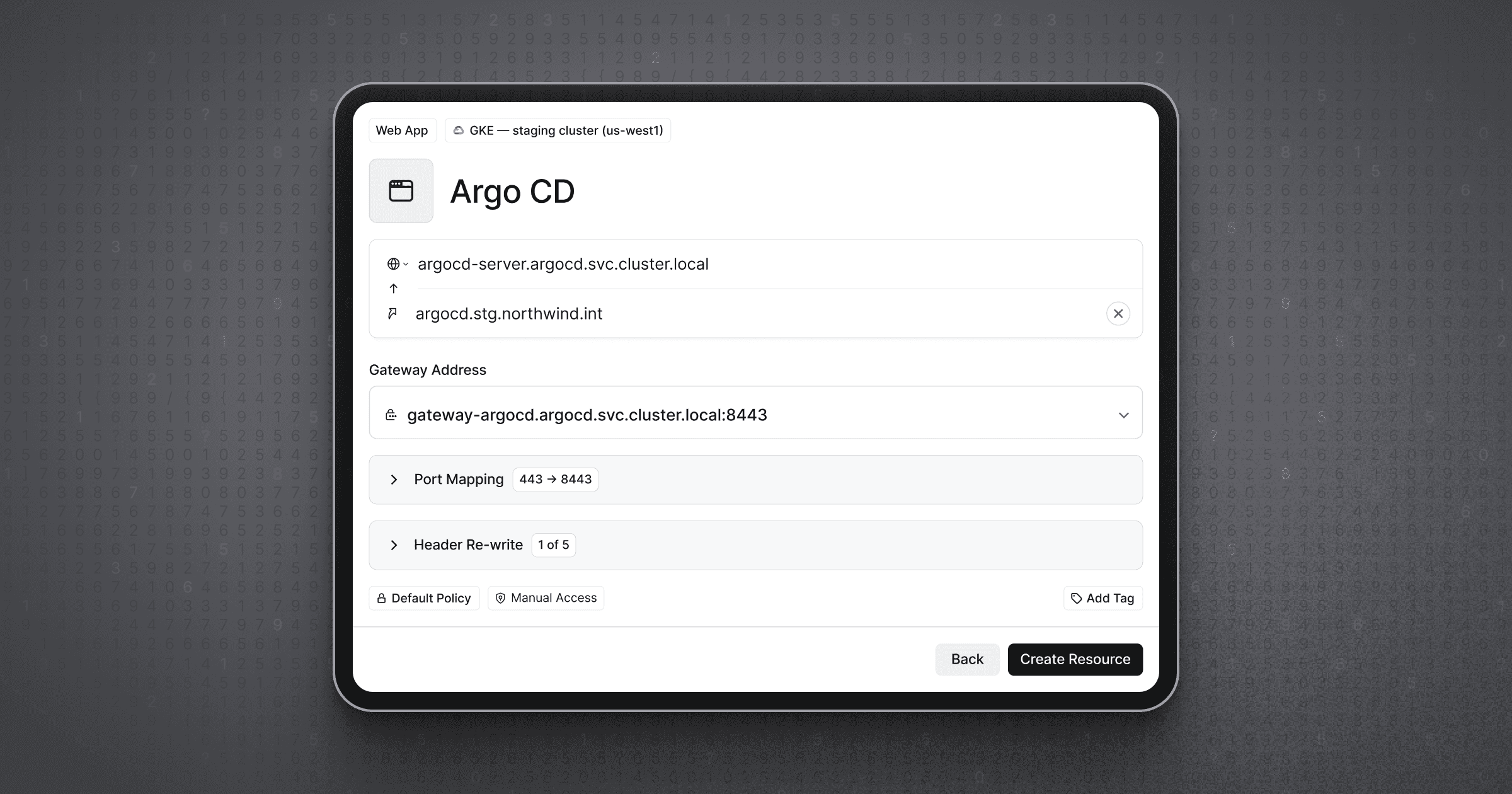
- Twingate injects a JWT identifying the user plus custom headers carrying user and group attributes into requests to protected web apps, enabling integration with both legacy and modern apps without requiring re-authentication at the app layer. changelog · Aug 2026 · source · release history
-
Enables passing user-identifying JWTs to protected web applications
 Privileged Access for Web Apps · Aug 2026
· source
· release history
- Enables passing custom headers containing user and group attributes to protected web applications Privileged Access for Web Apps · Aug 2026 · source · release history
- Records every SSH session to stdout in asciicast format, ready to forward to a SIEM or replay for audit review. Privileged Access for SSH · seen Jul 2026 · source · release history
example
-
Enable SSH Resource session recording output for forwarding to a SIEM — navigate in the Twingate Admin Console to configure the SSH Resource.
In the Admin Console, go to Resources > Add Resource, select SSH as the resource type, specify your server address, and enable session recording to capture asciicast output for SIEM forwarding.Privileged Access for SSH · seen Jul 2026 · source
SSH Resource Access shipped Brokers SSH connections to registered servers using certificate-based authentication, removing the need to distribute SSH keys to users.
release
- Enables identity-provider authentication for SSH sessions through the Twingate Identity Firewall, eliminating credential sprawl and bastion hosts. Privileged Access for SSH · seen Jul 2026 · source · release history
- Adds SSH Resources: register servers and VMs in Twingate and let users connect via existing SSH tools without managing or distributing SSH keys. Privileged Access for SSH · seen Jul 2026 · source · release history
- Gateway handles certificate-based authentication to target servers on behalf of users, removing the need for per-user SSH key management. Privileged Access for SSH · seen Jul 2026 · source · release history
- Adds the ability to register servers and VMs as SSH Resources in Twingate Privileged Access for SSH · May 2026 · source · release history
Monitoring, Logging, and Reporting 3 capabilities The tool surfaces authentication events, network health metrics, and connector performance data to support compliance auditing and operational troubleshooting. Logs and reports can be exported or synced to external SIEMs.
Network Health Reporting shipped Produces downloadable network health reports showing data transferred, error rates, and connection efficiency across chosen timeframes.
release 13 total
- New downloadable Network Health Summary reports surface metrics such as data transferred and errors across configurable timeframes. Network Health Summaries · seen Jul 2026 · source · release history
- Extends existing active user reports with per-user network health data points, enabling admin-level visibility into individual user connectivity. Network Health Summaries · seen Jul 2026 · source · release history
- Adds downloadable Network Health Summaries report containing metrics like data transferred and errors over specified timeframes. Network Health Summaries · Dec 2025 · source · release history
- Extends existing active user reports to provide similar network health data points on a per-user level. Network Health Summaries · Dec 2025 · source · release history
- Displays total count of currently connected devices on the Devices page Connected state for devices · Sep 2022 · source · release history
- Adds visible device connectivity state across Device and User pages in the Admin Console Connected state for devices · Sep 2022 · source · release history
example
-
Download a network health summary to review error rates and data transfer volumes across your Twingate network for a given period.
In the Admin Console, go to Reports > Network Health Summaries, select your desired timeframe, and click Download to export the report.Network Health Summaries · seen Jul 2026 · source
Authentication Audit Logs shipped Records success and failure events for logins, resource access attempts, and MFA setup, with export and SIEM sync options.
Shared capability: Multi-factor authentication
Also counts toward: SIEM forwarding
release 8 total
- New Authentication Audit Logs surface per-event success and failure data for Client logins, Resource access attempts, and MFA setup. Authentication Audit Logs · seen Jul 2026 · source · release history
- Enables export and sync of authentication event data for SIEM ingestion, compliance auditing, and troubleshooting workflows. Authentication Audit Logs · seen Jul 2026 · source · release history
- Adds Authentication Audit Logs to track success and failure events for Client logins, Resource access attempts, MFA setup, and more Authentication Audit Logs · Mar 2026 · source · release history
- Adds Authentication Audit Logs for Client logins, Resource access attempts, and MFA setups Authentication Audit Logs · Mar 2026 · source · release history
- Sends admin notifications about when and why users accessed sensitive auto-locked resources Automatic approval for usage-based auto-lock · Mar 2025 · source · release history
- Configures Twingate to send audit logs in JSON format to a selected AWS S3 bucket every 5 minutes. Export Audit Logs to AWS S3 · Nov 2023 · source · release history
Connector Health Metrics shipped Shows admins real-time traffic patterns and connection efficiency metrics at the individual Connector level.
release
- New Connector Health Metrics provide admins visibility into network traffic patterns and connection efficiency via real-time data. Connector Health Metrics · seen Jul 2026 · source · release history
Administration and Access Control 5 capabilities Admins manage the platform through a console that supports scoped roles, API key lifecycle management, and flexible search across users, resources, and devices. Controls are designed to limit blast radius during incidents and to delegate responsibilities appropriately.
Role-Based Admin Access shipped Provides scoped admin roles so that billing access, for example, can be granted without exposing the rest of the Admin Console.
Also counts toward: Role-based access control
release 8 total
-
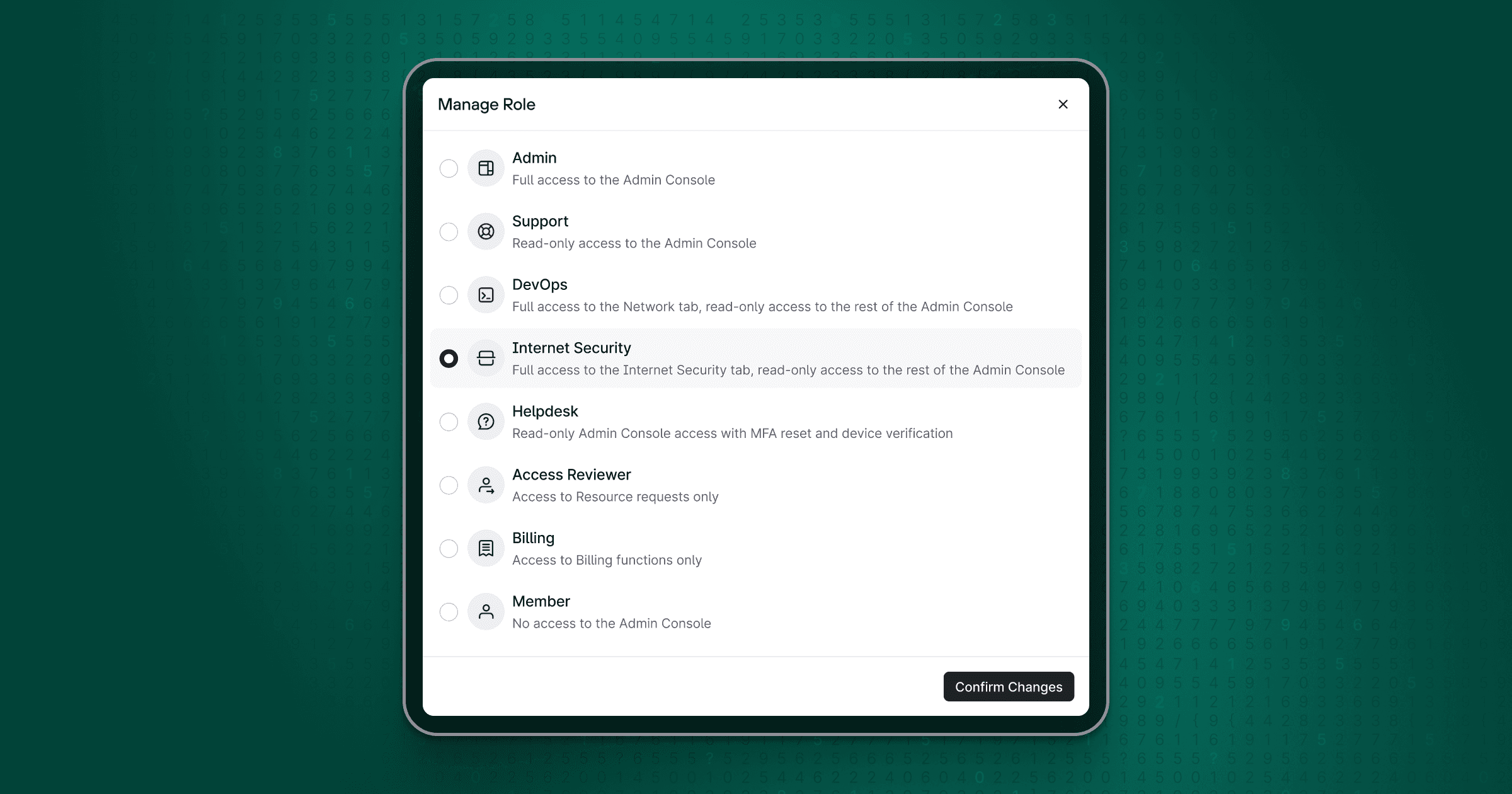
Adds an Internet Security role that lets admins delegate DNS filtering and Exit Network management, Internet Security analytics, and report creation to users without granting full administrative access.︀︄︇︀︅︉︀︅︀︀︃︀︀︅︅︀︅︊︀︄︆︀︃︄
 Internet Security role · Oct 2026
· source
· release history
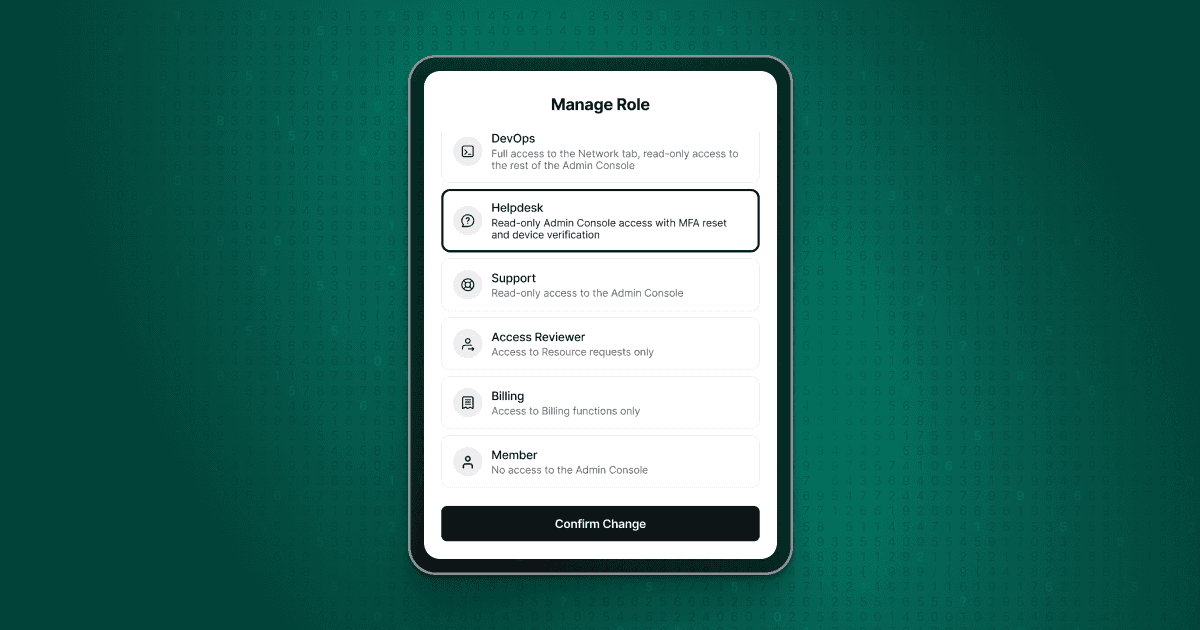
- Adds a Helpdesk role assignable to support staff, granting read-only access to select Admin Console areas plus scoped support actions: resetting MFA, verifying and unverifying devices, and managing trusted serial numbers. changelog · Aug 2026 · source · release history
-
Helpdesk role holders receive read-only access to selected Admin Console areas, scoping their visibility to what is needed for troubleshooting.
 Helpdesk Admin Role · seen Aug 2026
· source
· release history
- Introduces the Helpdesk Admin role, allowing administrators to grant support staff limited access without full administrative privileges Helpdesk Admin Role · Aug 2026 · source · release history
- New Billing Admin role lets admins grant billing-only access to users who need to manage plans and payments without exposing the rest of the Admin Console. Billing Admin Role · seen Jul 2026 · source · release history
- Restricts Billing admins to the Billing page, preventing access to other Admin Console settings Billing Admin Role · Jul 2026 · source · release history
docs
-
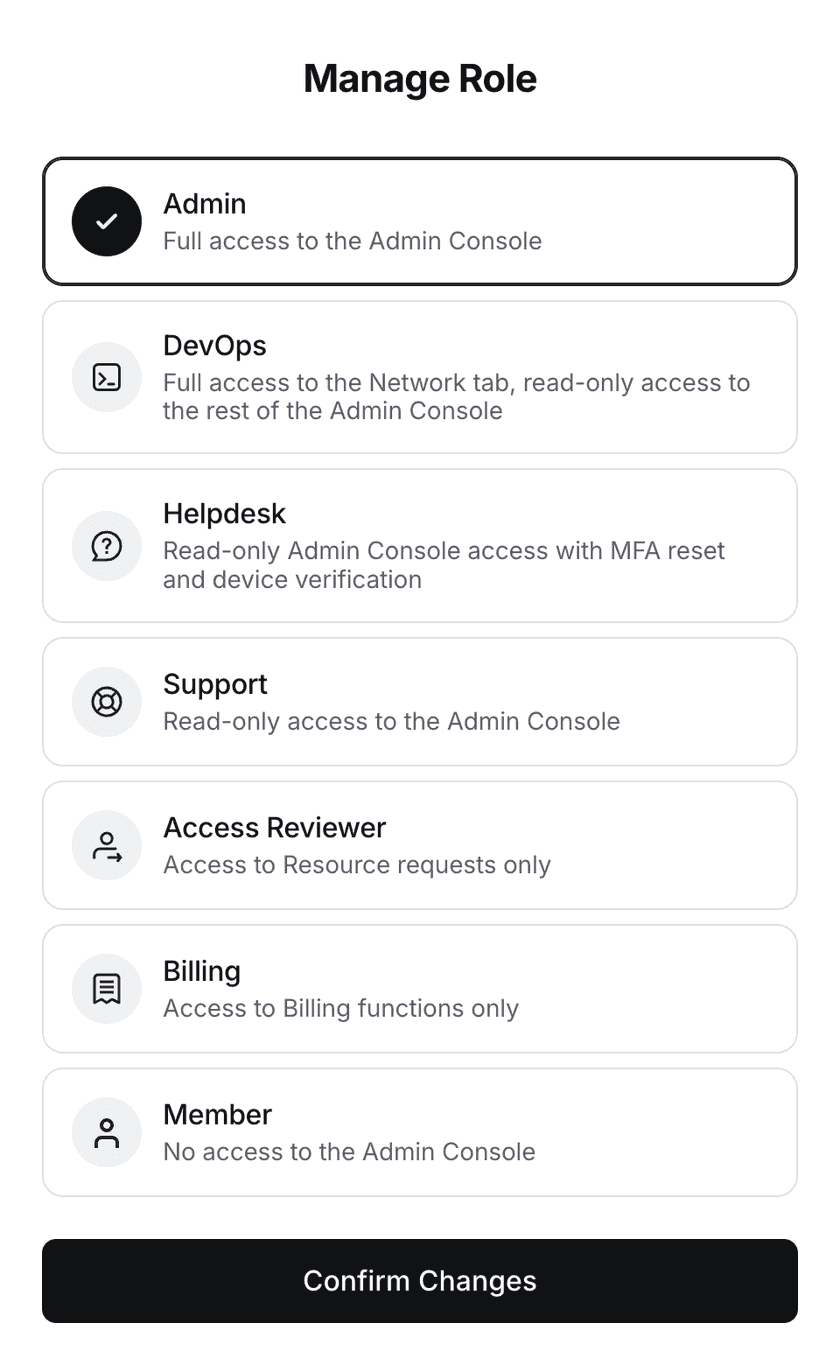
Upcoming role changes During the week of October 19, 2026, the Support role will be renamed to Viewer, and the Support and DevOps roles will no longer be able to view some pages.
 seen Oct 2026
· source
-
Twingate supports several admin roles, each providing different permissions across the Twingate Admin Console. users have read-only permissions across the entire Admin Console. Internet Security users have read and write capabilities in the Internet Security tab of the Admin Console.
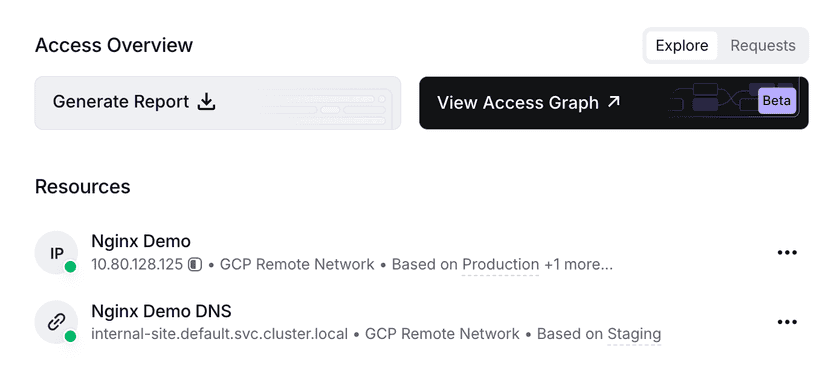 docs update · Oct 2026
· source
example
-
Restrict a finance team member to billing management only, keeping them out of network and access settings.
In the Admin Console, go to Team > Users, select the user, and assign the Billing Admin role under their role settings.Billing Admin Role · seen Jul 2026 · source
Admin Console Search shipped Supports multi-term and exact-phrase search across users, resources, and devices within the Admin Console.
release 7 total
- Supports multi-term search across users, Resources, and devices in the Admin Console. Granular Admin Console search · seen Jul 2026 · source · release history
- Enables exact-phrase matching by wrapping search terms in double quotation marks (e.g., Grafana Dashboard). Granular Admin Console search · seen Jul 2026 · source · release history
- Admin Console search now supports multi-term queries across users, Resources, and devices Granular Admin Console search · Dec 2025 · source · release history
- Adds support for double-quoted phrases (e.g., Grafana Dashboard) to perform exact-match searches in the Admin Console Granular Admin Console search · Dec 2025 · source · release history
- Adds support for multiple search terms in Admin Console searches across users, Resources, and devices Granular Admin Console search · Dec 2025 · source · release history
- Admin Console search now supports exact-match phrases by wrapping text in double quotation marks Granular Admin Console search · Dec 2025 · source · release history
example
-
Quickly locate a specific resource by its full name when a broad search returns too many results.
In the Admin Console, navigate to Resources and enter "Grafana Dashboard" (with double quotes) in the search bar to return only exact matches.Granular Admin Console search · seen Jul 2026 · source -
Find users or resources with multiple keywords in the Admin Console search bar.
type: admin user grafana dashboardGranular Admin Console search · Dec 2025 · source -
Perform an exact-match search for a specific phrase like Grafana Dashboard in the Admin Console.
type: "Grafana Dashboard"Granular Admin Console search · Dec 2025 · source
Connector Deployment Guides shipped Provides step-by-step deployment guides for Connectors across a range of environments, accessible directly from the Admin Console.
Also counts toward: Self-hosted deployment
release
- Improves Connector Deployment page UX to make it easier to find the right deployment method for your environment. Connector Deployment Page Improvements · seen Jul 2026 · source · release history
- Adds step-by-step Connector deployment guides for Ubiquiti, ZimaOS, and CasaOS environments in the Admin Console. Connector Deployment Page Improvements · seen Jul 2026 · source · release history
-
Adds
stepsUI guidance for deploying Connectors on Ubiquiti, ZimaOS, and CasaOS Connector Deployment Page Improvements · Jun 2026 · source · release history -
Adds ability to deploy Twingate Connectors via the Kubernetes Operator in version
v0.2.0. Kubernetes Operator v0.2.0 · Jan 2024 · source · release history - Enables automatic update management for deployed Connectors within the Kubernetes cluster. Kubernetes Operator v0.2.0 · Jan 2024 · source · release history
- Allows installation of the Twingate macOS Client via direct download without requiring the Mac App Store or an Apple ID Standalone macOS Client · Sep 2023 · source · release history
example
-
Deploy a Twingate Connector into a ZimaOS or CasaOS homelab environment using the new guided workflow.
In the Admin Console, go to the Connector Deployment page, select your target environment (Ubiquiti, ZimaOS, or CasaOS), and follow the step-by-step deployment guide.Connector Deployment Page Improvements · seen Jul 2026 · source -
Follow the new in-console guide to deploy a Twingate Connector on a home lab running CasaOS.
In the Admin Console, go to Connectors > Deploy and select 'CasaOS' from the environment dropdownConnector Deployment Page Improvements · Jun 2026 · source
API Key Management shipped Lets admins create, rename, adjust permissions, and temporarily disable API keys without needing to rotate or replace them.
release
- Enables editing of existing API keys to rename them, update their permissions, or disable/enable them without generating new keys. API key modification · seen Jul 2026 · source · release history
- Adds the ability to modify existing API keys: rename them, change their associated permissions, and disable/enable them without regeneration. API key modification · Dec 2025 · source · release history
- Adds ability to modify permissions on existing API keys API key modification · Dec 2025 · source · release history
- Adds ability to rename API keys after creation API key modification · Dec 2025 · source · release history
- Adds ability to disable/enable existing API keys API key modification · Dec 2025 · source · release history
- Enables temporary pausing of API keys via in-place disabling, streamlining post-creation management workflows. API key modification · Dec 2025 · source · release history
example
-
Temporarily pause an API key during an incident response without rotating credentials — re-enable it once the situation is resolved.
In the Twingate Admin Console, go to Settings > API > API Keys, select the key, and toggle Disable/Enable or update its permissions.API key modification · seen Jul 2026 · source -
Use UI steps to manage key lifecycle without regeneration.
Navigate to the Twingate Console API Keys section, select a key, and use the 'Rename', 'Permissions', or 'Disable/Enable' controls.API key modification · Dec 2025 · source
Admin Console Table Customisation shipped Lets admins resize and reset Admin Console table columns, with each user's preferences saved individually.
Also counts toward: Web management console
release
- Admins can resize table column widths in the Admin Console by hovering over a column edge and dragging, with sizing saved per-user and a reset-to-default option available. changelog · Aug 2026 · source · release history
docs
- Admin Console Adjustable Column Widths Aug 5, 2026 Admins can now resize table column widths in the Admin Console to fit their workflow. Hover over a column's edge, then click and drag to set the width you want. Reset to the default column width sizing anytime. changelog · Aug 2026 · source
example
-
Customize the Admin Console table layout to prioritize key identifiers like Network ID or Resource Name.
In the Admin Console, hover over a column header's right edge until the resize cursor appears, then click and drag to adjust width. Refreshes will remember this layout.Admin Console Adjustable Column Widths · Aug 2026 · source
Client Flexibility and Deployment 2 capabilities The Twingate client is designed to run in constrained and automated environments as well as standard user workstations. Users can be signed into multiple accounts simultaneously and manage connections without logging out.
Linux Client Userspace Networking shipped Runs the Linux client in userspace without elevated privileges, making it usable inside containers, CI/CD pipelines, and restricted environments.
Also counts toward: CI/CD pipeline integration
release
- Supports headless and restricted environments, enabling use in CI/CD pipelines, Docker containers, and developer workstations without admin access. Userspace Networking · seen Jul 2026 · source · release history
- New userspace networking mode for the Twingate Linux Client eliminates the need for root or elevated privileges. Userspace Networking · seen Jul 2026 · source · release history
- New userspace networking mode for the Linux client allows deployment in restricted environments without root privileges. Userspace Networking · Dec 2025 · source · release history
- Adds support for Virtualized Linux environments on ARM-based Apple Silicon devices Linux ARM · Sep 2022 · source · release history
-
Adds
Linux Client v1.0.68with native ARM64 architecture support for Raspberry Pi and IoT devices Linux ARM · Sep 2022 · source · release history
docs
- How to Secure CI/CD Pipelines (CircleCI & GitHub Actions) How to Enable Secure Access to Resources from GitHub Codespaces 7 days ago seen Oct 2026 · source
- How to Secure CI/CD Pipelines (CircleCI & GitHub Actions) How to Enable Secure Access to Resources from GitHub Codespaces 5 days ago seen Oct 2026 · source
- How to Secure CI/CD Pipelines (CircleCI & GitHub Actions) How to Enable Secure Access to Resources from GitHub Codespaces 6 days ago seen Oct 2026 · source
- How to Secure CI/CD Pipelines (CircleCI & GitHub Actions) How to Enable Secure Access to Resources from GitHub Codespaces 3 days ago seen Oct 2026 · source
- How to Secure CI/CD Pipelines (CircleCI & GitHub Actions) How to Enable Secure Access to Resources from GitHub Codespaces 14 minutes ago seen Oct 2026 · source
example
-
Interactively configure the Linux client.
sudo twingate setup
Multi-Account Client Support shipped Allows users to be signed into multiple Twingate accounts at the same time and pause individual account connections independently.
release
- Enables simultaneous sign-in to multiple Twingate accounts (e.g., home, work, or multiple admin accounts) from a single client session. Multi-Account Support · seen Jul 2026 · source · release history
- Supports per-account connection pausing without requiring logout or quitting the client. Multi-Account Support · seen Jul 2026 · source · release history
- Multi-account support available on macOS, iOS, and Windows clients, with Android and Linux coming soon. Multi-Account Support · seen Jul 2026 · source · release history
- Adds simultaneous multi-account sign-in to Twingate Clients on macOS, iOS, and Windows Multi-Account Support · Sep 2025 · source · release history
- Adds ability to pause connections for specific accounts without logging out or quitting Multi-Account Support · Sep 2025 · source · release history
example
-
Switch between a personal and a corporate Twingate account simultaneously without logging out — useful for admins managing multiple tenant networks.
In the Twingate client (macOS, iOS, or Windows), open the account menu and select 'Add Account', then sign in with a second set of credentials.Multi-Account Support · seen Jul 2026 · source
Other 46 capabilities
AI Usage Overview shipped Surfaces AI service activity in DNS filtering logs, allowing admins to identify specific services and export per-device data for policy or license review.
Also counts toward: CSV data export
release 7 total
- The AI Usage Overview includes an AI Usage by Date chart showing daily AI service activity, an AI Exposure metric showing AI requests as a share of all DNS requests or the share of covered devices making AI requests, and a Top AI Services list rankable by Devices or Queries. announced · Nov 2026 · source · release history
- Export device-level AI service activity as a CSV for follow-up investigation of unfamiliar or high-risk services.︀︄︇︀︅︉︀︅︀︀︃︀︀︅︅︀︅︊︀︄︆︀︃︄ announced · Nov 2026 · source · release history
- Expand any service row in the Top AI Services list to see the matched domains and per-domain request counts, and use the Days Active column to distinguish one-off access from recurring patterns. announced · Nov 2026 · source · release history
- Twingate adds an AI Usage Overview view inside Secure DNS analytics in the Admin Console, available to all DNS Filtering customers at no extra charge, showing which AI tools (including ChatGPT, Claude, Cursor, and Granola) employees access via DNS lookups. announced · Nov 2026 · source · release history
-
Adds an AI Usage Overview section to DNS filtering that surfaces which AI services appear in device DNS activity, with per-device CSV export for policy and license review follow-up.︀︄︇︀︅︉︀︅︀︀︃︀︀︅︅︀︅︊︀︄︆︀︃︄
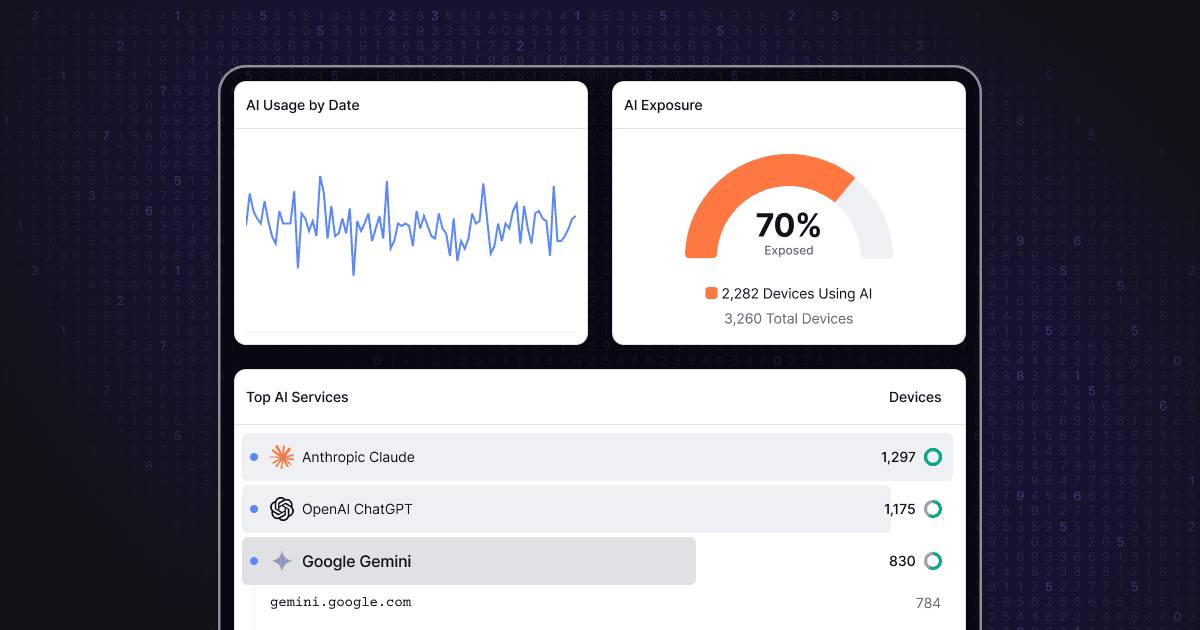 AI Usage Overview · Sep 2026
· source
· release history
- Supports per-device CSV export from the AI Usage Overview for policy discussions and license reviews AI Usage Overview · Sep 2026 · source · release history
example
-
Investigate device-level activity for an unfamiliar AI service flagged in the overview by exporting a CSV for team follow-up.
In the Twingate Admin Console, go to Secure DNS > AI Usage Overview. Expand the row for the service under investigation, then export device-level activity as a CSV.announced · Nov 2026 · source -
Discover which AI services employees are accessing across DNS-filtered devices and check for unfamiliar tools.
In the Twingate Admin Console, go to Secure DNS > AI Usage Overview. Select a time window and profile, then review the Top AI Services list.announced · Nov 2026 · source
Privileged Access for Web Apps shipped Extends Twingate Identity Firewall to protect internal HTTP web applications by injecting user-identifying JWTs and custom headers with group attributes, enabling authenticated access without app-layer re-authentication.
Also counts toward: Multi-factor authentication
release
-
Eliminates browser Not Secure warnings and secondary sign-in prompts for internal HTTPS web apps accessed through the Twingate tunnel.
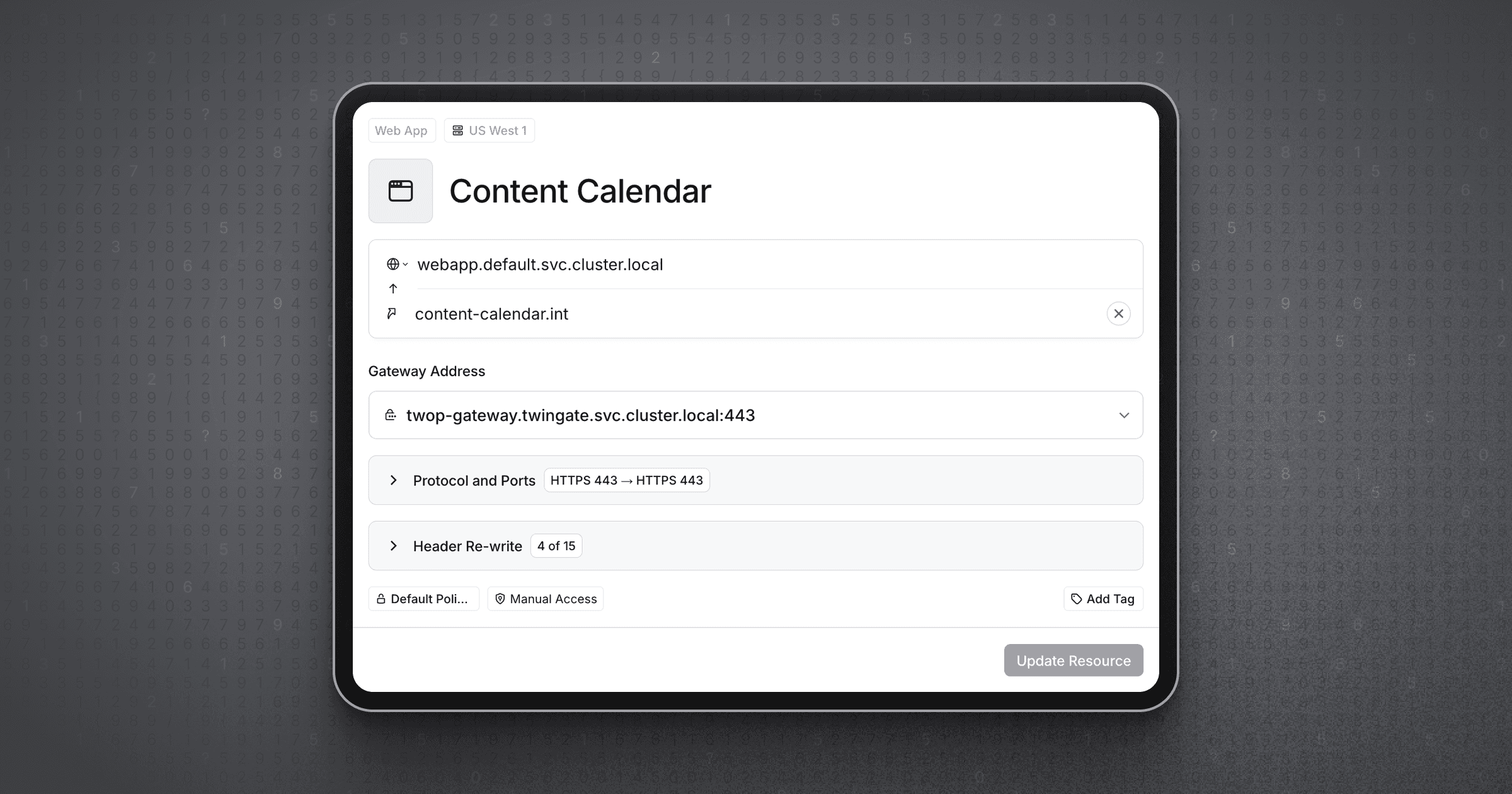 Privileged Access for Web Apps: HTTPS · Oct 2026
· source
· release history
- Extends Privileged Access for Web Apps to support HTTPS-served internal web apps, covering every leg of the user's path including the final hop to the origin.︀︄︇︀︅︉︀︅︀︀︃︀︀︅︅︀︅︊︀︄︆︀︃︄ Privileged Access for Web Apps: HTTPS · Oct 2026 · source · release history
- Supports both public and private CAs for internal HTTPS web apps, with group-driven access control and no per-app certificate management required. Privileged Access for Web Apps: HTTPS · Oct 2026 · source · release history
-
Twingate Identity Firewall now supports HTTP web apps, enabling protection of internal web apps, data portals, CI/CD infrastructure, and AI-coded business apps.
Privileged Access for Web Apps · seen Aug 2026
· source
· release history
- Authenticates users at the Twingate layer — supporting MFA, JIT access, security policies, and access logging — so users reach internal web apps already authenticated. Privileged Access for Web Apps · seen Aug 2026 · source · release history
docs
- Privileged Access for Web Apps Aug 14, 2026 Twingate Identity Firewall now supports HTTP web apps, allowing you to protect internal web apps, data portals, CI/CD infrastructure, and internally created AI-coded business apps with Twingate. changelog · Aug 2026 · source
-
Twingate supports six admin roles, each of which has different levels of access to the Twingate Admin Console: Network tab only, including: ⢠Creating and editing Resources, Connectors, and Remote Networks ⢠Adding Groups to a Resource ⢠Managing Access Requests All pages except: ⢠Internet Security > Secure…
docs update · Aug 2026
· source
DNS Security Configuration shipped Allows admins to configure DNS security settings, including enabling DoH for clients and selecting trusted or custom DoH resolvers.
Also counts toward: Web management console
release
- Shows a block page when a site is blocked by DNS filtering, identifying the reason for the block DNS Filtering Block Pages · Jul 2024 · source · release history
- Admins can now enable DNS filtering for specific Groups to progressively roll out the feature. Enrolled Groups for DNS Filtering · Apr 2024 · source · release history
- Adds DNS Security section in the Admin Console Settings page to toggle DoH for macOS, Windows, and Linux users DNS Security & DoH · Jul 2022 · source · release history
- Enables transparent DNS proxy in the Twingate Client to automatically encrypt all foreground and background DNS traffic DNS Security & DoH · Jul 2022 · source · release history
- Allows selection of trusted DoH resolvers or configuration of a custom DoH provider via the new settings DNS Security & DoH · Jul 2022 · source · release history
Identity Provider Management documented Lets admins manage identity provider configuration, including safeguards that require assigning a new admin when removing an identity provider would otherwise leave the account without one.
docs
- If removing the identity provider would remove all admins on the account, you will be required to input an email address of a new user that will be set as the admin. This user must be able to log in via one of the supported social login options (Google, Microsoft, GitHub, or LinkedIn). 7 days ago seen Oct 2026 · source
- If removing the identity provider would remove all admins on the account, you will be required to input an email address of a new user that will be set as the admin. This user must be able to log in via one of the supported social login options (Google, Microsoft, GitHub, or LinkedIn). 5 days ago seen Oct 2026 · source
- If removing the identity provider would remove all admins on the account, you will be required to input an email address of a new user that will be set as the admin. This user must be able to log in via one of the supported social login options (Google, Microsoft, GitHub, or LinkedIn). 6 days ago seen Oct 2026 · source
- If removing the identity provider would remove all admins on the account, you will be required to input an email address of a new user that will be set as the admin. This user must be able to log in via one of the supported social login options (Google, Microsoft, GitHub, or LinkedIn). 3 days ago seen Oct 2026 · source
- If removing the identity provider would remove all admins on the account, you will be required to input an email address of a new user that will be set as the admin. This user must be able to log in via one of the supported social login options (Google, Microsoft, GitHub, or LinkedIn). 15 minutes ago seen Oct 2026 · source
Trusted Device Resource Policies shipped Restricts resource access to devices marked as 'Trusted' or running specific operating systems.
release
- Expands macOS posture checks to require an enabled firewall and, for users of the standalone macOS Client, hard-drive encryption. macOS device posture check updates · Sep 2023 · source · release history
- Enables configuration of Resource Policies to allow access only from devices marked as Trusted Devices or running specific platforms. Device Requirements in Resource Policies · Nov 2021 · source · release history
- Adds device requirements to Resource Policies, allowing resources to be restricted by operating system or Trusted Device status. Device Requirements in Resource Policies · Nov 2021 · source · release history
Resource Port Scope Definitions shipped Allows resource definitions to specify exact ports and ranges with pre-routing enforcement logic.
release
- Adds protocol restriction indicators (allowed, restricted, or blocked for TCP, UDP, and ICMP) to all Resource views in the Admin Console. Display Protocol Restrictions · Nov 2022 · source · release history
-
Adds
DENY_ALLshorthand for port restrictions intwingate_resourceTerraform Provider Updates · Jun 2022 · source · release history - Adds support for specifying ports and ranges in resource definitions, with pre-routing enforcement logic. Universal 2FA & Identity-indexed network flow logs · Feb 2021 · source · release history
Service Account Identity Support shipped Enables the creation of service account identities for automated workflows and CI/CD pipelines.
Also counts toward: CI/CD pipeline integration, GraphQL API support, Web management console
release
- Service Accounts can be created programmatically to enable automation Service Account API · Apr 2022 · source · release history
- The public GraphQL Admin API now includes create, update, and management actions for Service Accounts Service Account API · Apr 2022 · source · release history
- Adds Service accounts to the Admin console for creating identities used in CI/CD pipelines Service Accounts & Headless Clients · Sep 2021 · source · release history
User Offboarding shipped Provides workflows for removing user access across resources as part of offboarding.
release
- Adds an AI Usage Overview section to DNS filtering to show which AI services appear in device DNS activity AI Usage Overview · Sep 2026 · source · release history
docs
- Effective offboarding of users is a critical aspect of maintaining security and managing access within your organization. seen Oct 2026 · source
Helpdesk Admin Role shipped Provides a scoped admin role for support staff to perform specific tasks like resetting MFA and managing trusted serial numbers, with read-only access to the rest of the Admin Console.
Also counts toward: Role-based access control
release
-
New Helpdesk role lets admins delegate support tasks — resetting MFA, verifying/unverifying devices, and managing trusted serial numbers — without granting full administrative access.
Helpdesk Admin Role · seen Aug 2026
· source
· release history
- Introduces a Helpdesk Admin role allowing read-only Admin Console access and support actions like resetting MFA and managing trusted serial numbers. Helpdesk Admin Role · Aug 2026 · source · release history
Multi-Domain Identity Provider Support shipped Supports configuring multiple identity providers and sign-in options, including mixing social logins with supported IdPs to handle complex environments.
release
- Enables mixing social logins and supported IdPs to handle complex environments like migrations or acquisitions. Multiple identity providers · Jul 2025 · source · release history
- Allows configuring multiple identity providers and sign-in options for the Twingate Network. Multiple identity providers · Jul 2025 · source · release history
Browser Security shipped Enables administrators to limit which browsers can access sensitive resources.
release
- Browser Security is now in beta, enabling administrators to limit which browsers can access sensitive Resources. Twingate Browser Security · Dec 2024 · source · release history
- Initial support includes Chrome browsers on macOS and Windows. Twingate Browser Security · Dec 2024 · source · release history
DNS Filtering for Signed-out Devices shipped Enables DNS security features and logs hostname/device information for users who are signed out.
release
- Signed out devices using DNS filtering now transmit hostname and device information to Twingate logs Signed out device names for DNS Filtering · Dec 2024 · source · release history
- Adds Machine Key generation and distribution to enforce Internet Security features (e.g., DNS filtering) when users are signed out. Internet Security Client Configuration · Feb 2024 · source · release history
Device Security Integration shipped Integrates with verified device security providers like Kandji to support posture checks.
release
- Adds support for configuring Twingate Security Policies that prevent unmanaged Linux devices from signing in or accessing protected Resources unless they are managed by CrowdStrike Falcon Crowdstrike Integration for Linux · Feb 2024 · source · release history
- Adds Kandji as a verified Device Security integration provider. Kandji Integration · Feb 2023 · source · release history
Dynamic Billing Calculation shipped Automates billing based on total license usage of users and service accounts at each renewal date.
release
- Automates billing at each renewal date based on licenses used at the end of the previous billing cycle. A New Billing Experience · Dec 2023 · source · release history
- Adds a new billing experience where license usage is calculated based on the total number of Users and Service Accounts. A New Billing Experience · Dec 2023 · source · release history
Device Lifecycle Management shipped Automates the archival of inactive devices after 90 days and allows manual restoration via the Admin Console or API.
Also counts toward: REST API, Web management console
release
- Enables manual unarchiving of devices via the Admin Console or API. Auto-archiving devices · Jul 2023 · source · release history
- Adds automatic archival of devices with no sign-in or resource access for 90 consecutive days. Auto-archiving devices · Jul 2023 · source · release history
Google Workspace OU Sync shipped Supports mapping Organizational Units to Twingate groups within the Google Workspace integration.
release
- Enables syncing users from an identity provider directory while simultaneously allowing admins to manually add social login users (e.g., Google, LinkedIn) Add Identity Provider and Social Login Users · Mar 2023 · source · release history
- Adds Organizational Unit (OU) sync capability to the Google Workspace integration, allowing OUs to be mapped to Twingate groups alongside existing Google Groups. Google Workspace Updates · Nov 2021 · source · release history
Resource Organization and Visibility Controls shipped Provides controls for organizing resources, such as hiding specific resources in a background menu to declutter the user interface.
release
- Adds ability to archive devices, hiding them from the Admin Console for decommissioned hardware Archiving and Blocking Devices · Jan 2023 · source · release history
- Hides specific Resources from the main list in end user Clients by moving them into a Background Resources sub-menu Client Resource Visibility · Dec 2022 · source · release history
Local Network Optimization documented Enables direct connections between clients and connectors on the same local network by prioritizing local addresses over public ones, improving performance where NAT hairpinning is supported.
docs
- ) Each peer also shares its local network address as an additional candidate, used when the Client and Connector are on the same local network. When the Client and Connector are on the same local network, Twingate prefers a direct local connection over a public one. seen Sep 2026 · source
- Direct connections on the same local network Not every NAT device supports hairpinning - the ability to route traffic addressed to your public IP address back to another device on the same local network. seen Sep 2026 · source
Admin Console Event Feed Filtering shipped Provides filtering options (by date, Resource, user, activity type) for the Event Feed in the Admin Console.
release
- Adds filtering options (date, Resource, user, activity type) to the Event Feed in the Admin Console Event Feed Filtering · Aug 2025 · source · release history
Resource Tagging shipped Enables the application of key-value metadata tags to Resources for improved organization and management via the Admin Console or API.
release
-
Adds support for
tags(key-value metadata) on Resources, enabling better organization and management via the Admin Console or API Resource tags · Apr 2025 · source · release history
Resource Location-Based Access Control shipped Allows administrators to restrict access to Resources based on a device’s physical location within Resource policies.
release
- Adds ability to restrict access to Resources based on a device’s location in Resource policy. Geoblocking · Jan 2025 · source · release history
Group-based Exit Networks Routing shipped Allows admins to select which Groups may route traffic through Exit Networks.
release
- Allows admins to select which Groups may route traffic through Exit Networks. Exit Networks group selection · Dec 2024 · source · release history
DNS Filtering Log Correlation shipped Correlates signed out devices with previously signed in devices or surfaces hostname when no match exists in DNS filtering logs.
release
- DNS filtering logs now correlate signed out devices with previously signed in devices or surface the device's hostname when no match exists Signed out device names for DNS Filtering · Dec 2024 · source · release history
Exit Networks shipped Allows end users to route all traffic through deployed Connectors for full encryption.
release
- Adds the Exit Networks capability for Enterprise plans, allowing end users to route all traffic through deployed Connectors for full encryption. Route all traffic through Twingate with Exit Networks · Oct 2024 · source · release history
1Password Verification Support shipped Allows using 1Password as a verification method for creating Trusted Profiles.
release
-
Adds
1Passwordas a verification method for creating Trusted Profiles in the Twingate Admin Console 1Password integration · Oct 2024 · source · release history
Device Verification Sync shipped Automatically syncs device verification status for Windows, macOS, and Linux devices at regular intervals.
release
- Automatically syncs device verification status every five minutes for Windows, macOS, and Linux devices 1Password integration · Oct 2024 · source · release history
Access Graph Visualization shipped Provides a graphical interface for viewing detailed permission paths and applied policies for users or resources.
release
- Adds a graphical Access Graph for viewing detailed permission paths and applied policies for users or resources Access Graph · Oct 2024 · source · release history
DNS Filtering Block Pages shipped Displays a block page identifying the reason when a site is blocked by DNS filtering.
release
- Shows a block page when a site is blocked by DNS filtering, identifying the reason for the block DNS Filtering Block Pages · Jul 2024 · source · release history
AWS CloudFormation Connector Support shipped Adds native CloudFormation template support for deploying Twingate Connectors into AWS.
release
- Adds native CloudFormation template support for deploying Twingate Connectors into AWS. Connector deployment with CloudFormation · Jun 2024 · source · release history
OpenTofu Resource Management shipped Enables Twingate resource management via OpenTofu using the Terraform provider.
release
- Enables Twingate resource management via OpenTofu, supported starting from Terraform provider version 3.0.4 Pulumi and OpenTofu support · Jun 2024 · source · release history
Pulumi Provider Support shipped Adds an official Pulumi provider for managing Twingate resources with feature parity to Terraform.
release
- Adds an official Twingate Pulumi provider with feature parity to the existing Terraform provider Pulumi and OpenTofu support · Jun 2024 · source · release history
Import Existing Resources to Operator shipped Enables importing existing Twingate Resources into the operator by specifying their external ID.
release
- Enables importing existing Twingate Resources into the operator by specifying their external ID, allowing management of resources created outside the operator. Kubernetes Operator v0.10.0 · Apr 2024 · source · release history
Kubernetes Service Exposure as Resources shipped Allows Kubernetes Service objects to be exposed as Twingate Resources via annotations.
release
-
Allows Kubernetes Service objects to be exposed as Twingate Resources by annotating them instead of manually creating a
TwingateResource. Kubernetes Operator v0.10.0 · Apr 2024 · source · release history
Managed Service Provider (MSP) Network Deletion shipped Allows MSPs to delete Customer Networks via the MSP Portal UI.
release
- Adds the ability to delete Customer Networks via the MSP Portal UI for Managed Service Providers. Delete Customer Networks in MSP Portal · Apr 2024 · source · release history
Connector Configuration Mutation shipped Enables mutation of pod and container extra fields in the connector configuration for advanced customization.
release
-
Enables mutation of
podExtraandcontainerExtrafields in the connector configuration Kubernetes Operator v0.7.0 · Mar 2024 · source · release history
Container Environment Variables shipped Allows defining extra pod environment variables through the container configuration.
release
-
Allows defining extra pod environment variables through the
containerExtrafield Kubernetes Operator v0.7.0 · Mar 2024 · source · release history
Customer-defined Pod Annotations shipped Allows defining custom pod annotations via the connector configuration.
release
-
Adds support for customer-defined pod annotations via the
podAnnotationfield Kubernetes Operator v0.7.0 · Mar 2024 · source · release history
Resource Access Principal Refinement shipped Updates ResourceAccess to allow referencing a Group or ServiceAccount principal by name.
release
-
Updates
TwingateResourceAccessto allow referencing a Group or ServiceAccount principal byname. Kubernetes Operator v0.7.0 · Mar 2024 · source · release history
Stricter Image Policy Validation shipped Adds stricter validation when using imagePolicy with the google provider in Kubernetes deployments.
release
-
Adds stricter validation when using
imagePolicywith thegoogleprovider Kubernetes Operator v0.7.0 · Mar 2024 · source · release history
Kubernetes Operator Deployment shipped Supports deploying and managing Twingate Connectors within Kubernetes clusters using an operator.
Also counts toward: Kubernetes-native deployment
release
-
Adds ability to deploy Twingate Connectors via the Kubernetes Operator in version
v0.2.0. Kubernetes Operator v0.2.0 · Jan 2024 · source · release history
Network Activity Overview shipped Provides a high-level snapshot of network status and recent activity through a dedicated tab in the Network page.
release
- Adds an Overview tab to the Network page for high-level network snapshots and recent activity Network Overview Page · Nov 2023 · source · release history
Billing License Visibility shipped Displays current and upcoming license counts for users and service accounts on the Billing page.
Also counts toward: Web management console
release
- Adds display of current and upcoming license counts (users and service accounts) to the Billing page in the Admin Console Updated Billing Page · Oct 2023 · source · release history
Connector Connectivity Email Notifications shipped Sends email alerts to admins when Connectors go offline or come back online.
release
- Adds email notifications to alert admins when Connectors go offline or come back online. Connector Downtime Notifications · Dec 2021 · source · release history
Multi-Domain Google Workspace Support shipped Extends identity provider support to sync users from multiple secondary domains within a single Google Workspace account.
release
- Extends Google Workspace identity provider support to allow syncing users from multiple secondary domains within a single Google Workspace account. Google Workspace Updates · Nov 2021 · source · release history
Headless Client Authorization shipped Allows Windows and Linux clients to authorize access via service keys in headless mode.
release
- Enables headless mode in Windows and Linux clients (v1.0.30+ connectors required) to authorize access via service keys Service Accounts & Headless Clients · Sep 2021 · source · release history
Connector Version and Metadata Display shipped Displays current version, update status, and custom metadata for Connectors in the Admin Console.
Also counts toward: Web management console
release
- Augments the Admin console Connector detail page to display current version, available update status, and custom metadata Connector Real-time Logs & Metadata · Sep 2021 · source · release history
Lines in monospace are the tool's own words: help text
parsed from its source, or an endpoint from its API document. Under
release, a line is our summary of a dated release. Under
docs, it is quoted from the tool's own documentation or
website. Each links back to the source it came from.
Command line
3 commands for Twingate, each with where it came from. This tool has no source analysis yet, so there is no option reference and no captured run beside them.
No command matches.
Screenshots
From the release notes, newest first. Click one to see it full size.Score card
-
Shipping velocity releases a month, last 12 months
-
Documentation quality release-notes rubric, 0–100
-
Breaking-change discipline how rarely a release breaks users, and notice given
-
Maintenance risk quiet time against its own cadence, maintainers
-
Innovation & surface new capabilities, API and MCP surface
Five scores for Twingate, each built from the releases, notes and API history this site tracks — and, on Researcher and Business, where it stands among every measured tool in its category and how that has moved.
Score cards are part of every paid plan.
See plans → Already subscribed? Sign in →Trajectory
Blank means never measured; nothing here is a filled-in zero.
Peer standings are included with Researcher and Business. See how this tool ranks against its competitors, using data we don't publish anywhere else.
See plans →Each score is 0–100 on a published rubric, derived from data this site already shows. A dimension we cannot measure says so — it is never scored 0 and never enters a rank.
How this is scored
- Shipping velocity — releases a month over the last 12 months, on a log scale where 16 a month scores 100. Needs 3 releases in the window.
- Documentation quality — the release-notes rubric published on the analytics page, unchanged.
- Breaking-change discipline — the share of releases carrying a breaking change (none scores 100, half or more scores 0). Only projects that label breaking changes are measured: a clean record cannot be told from an unlabelled one.
- Maintenance risk — quiet time measured against the tool's own release cadence (quiet longer than 90 days and three typical gaps scores 0), plus the number of active maintainers and whether contributors are growing, where known. Higher is lower risk.
- Innovation & surface — new capabilities in the feature ledger this year, API and MCP operations added, and the share of commits that are features: the mean of whichever we hold.
- Community health (open-source tools only) — each is a direction, not a size: contributors this year against last, the bus factor now against a year ago, and issues closed per issue opened, where steady scores 50, doubled 100 and halved 0; plus the median time to a maintainer's first reply (an hour scores about 100, a month or more 0). A commercial card has no repository and carries none of the four.
- Documented delivery (commercial tools) — when a vendor's documented new capabilities have slowed against its own baseline, that counts against the overall standing as heavily as two low dimensions. Steady delivery, or too little history to judge, leaves the standing alone; it is never a sixth score.
- Open-source tools are scored on repository signals; commercial tools on their published changelog. Ranks compare tools within one category and one profile and need at least five measured peers; the overall standing needs three ranked dimensions. Best-in-breed or consolidator is a shape, not a quality, and is never scored.
Release-note detail over time
See how much detail Twingate puts in its release notes, quarter by quarter, and compare it with tracked tools in the same category. This history uses up to ten retained, reviewed notes per tool; sparse or blank older quarters may reflect that limit.
Checking release-note history…
Website history
twingate.com, every changeTwingate's 40 pages as they looked each month from October 2026 to October 2026: 40 renders, 0 changes of tagline or palette. Step through them, play them, or put any two months side by side.
Website history is included with Researcher and Business.
See plans → Already subscribed? Sign in →← → or h l a month · Shift a year · [ ] previous / next change · Space play · 1 2 3 page · T whole page · C compare · F full size
← → or h l the right month · Shift the left · S swap · W wipe · T whole page · Esc back
Rebranding timeline
Dates bound when a change appeared between captures. Possible rebrands are AI suggestions; a redesign alone does not establish a rebrand.
Releases
108 entries
No entries match these filters.
- November 20261
- October 20264
- September 20264
- August 20268
- July 202614
- June 20262
- May 20261
- March 20261
- December 20255
- October 20251
- September 20251
- August 20251
- July 20251
- April 20251
- March 20252
- January 20251
- December 20243
- October 20243
- July 20241
- June 20242
- April 20244
- March 20242
- February 20243
- January 20241
- December 20231
- November 20232
- October 20232
- September 20232
- July 20231
- April 20231
- March 20231
- February 20232
- January 20231
- December 20221
- November 20224
- October 20222
- September 20224
- August 20221
- July 20222
- June 20221
- April 20221
- February 20221
- January 20221
- December 20211
- November 20213
- October 20211
- September 20212
- May 20211
- April 20211
- February 20211
Add the badge to your README
Maintain this project? The badge links readers straight to this page, so they can follow every release here.
 Choose a badge style and copy the code →