WiFi Pineapple
2.1.2-stable commercialFree plan: not checked yet
The section your link pointed to isn't on WiFi Pineapple's page any more, so we've brought you to the top.
WiFi Pineapple is a Hak5 device for WiFi penetration testing that performs rogue access point attacks, reconnaissance, and automated audits with actionable reports.
What you can do now
Summary
WiFi Pineapple is a commercial hacking hardware platform, sold as the Mark VII device, that sets up rogue wireless access points to intercept and manipulate WiFi traffic for man-in-the-middle testing. It runs as standalone hardware with its own firmware, managed through a web interface rather than installed as software on an existing laptop, and it ships with documentation covering setup and operation of the 2.x firmware series. Hak5 markets it directly at red teams running wireless penetration tests, positioning it as the standard platform for that work rather than a general-purpose scanner. It sits squarely in the rogue-AP and wireless MITM category of pentest hardware, alongside other dedicated wireless attack tools rather than software-only options. The documentation reflects an actively maintained product, with the current Mark VII firmware superseding an older 1.x line still available as an archived PDF.
WiFi Pineapple is a Hak5 device for WiFi penetration testing that performs rogue access point attacks, reconnaissance, and automated audits with actionable reports.
How WiFi Pineapple helps
Which of my nearby devices will connect to a network they think they already trust?
broadcasts as a rogue access point matching known network names so client devices auto-associate, revealing which ones will join without prompting a user
What is actually passing over the air between a client and the network it thinks it joined?
sits as the access point itself in a man-in-the-middle position, so traffic between the connected client and the internet routes through it for inspection
Which wireless clients in range are worth targeting during an engagement?
runs as standalone hardware managed over a web interface, surveying and presenting nearby wireless clients and access points for the operator to choose from during a test
Would a red team's rogue-AP scenario actually fool the people or devices in this building?
stands in for a real access point during the test, so the outcome (who connects, what crosses it) is the evidence delivered back to the engagement rather than a simulation of one
Languages
Device
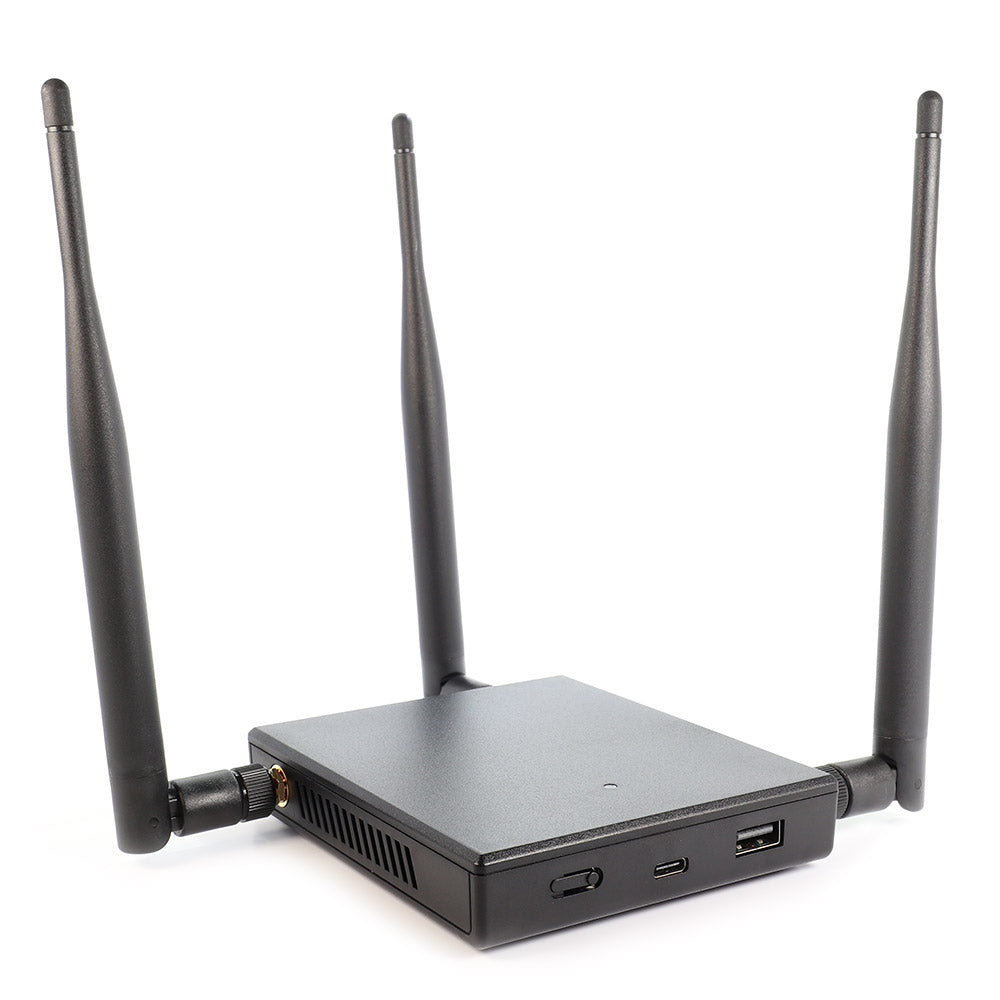
Spec · shipping WiFi Pineapple Mark VII
- frequency range
- 2.4 GHz 802.11 b/g/n (5 GHz/ac with module)
- radios
- Three dedicated role-based radios with three high gain antennas
- processor
- Single core MIPS network SoC
- storage
- 256 MB RAM, 2 GB eMMC
- interfaces
- USB-C power/Ethernet port, USB 2.0 host port, single RGB LED
- power
- USB-C
from the vendor's spec page ↗
Availability
A slip is called out here the day the vendor's own delivery estimate moves past the promised window. A "coming" milestone is the vendor's own wording, read off the page it links to — never a date we inferred.
Price
| configuration | generation | launch | today | status | source |
|---|---|---|---|---|---|
| Mark VII Basic | WiFi Pineapple Mark VII | — | $250 in stock | shipping | list |
| Mark VII+AC | WiFi Pineapple Mark VII | — | $300 sold out | shipping | list |
Device history
-
WiFi Pineapple Mark VII back_in_stock
no further detail captured
-
WiFi Pineapple Mark VII sold_out
no further detail captured
-
WiFi Pineapple Mark VII sold_out
no further detail captured
-
WiFi Pineapple Mark VII announced
Darren Kitchen introduces the WiFi Pineapple Mark VII on the Hak5 forums.
Score card
-
Shipping velocity releases a month, last 12 months
-
Documentation quality release-notes rubric, 0–100
-
Breaking-change discipline how rarely a release breaks users, and notice given
-
Maintenance risk quiet time against its own cadence, maintainers
-
Innovation & surface new capabilities, API and MCP surface
Five scores for WiFi Pineapple, each built from the releases, notes and API history this site tracks — and, on Researcher and Business, where it stands among every measured tool in its category and how that has moved.
Score cards are part of every paid plan.
See plans → Already subscribed? Sign in →Trajectory
Blank means never measured; nothing here is a filled-in zero.
Peer standings are included with Researcher and Business. See how this tool ranks against its competitors, using data we don't publish anywhere else.
See plans →Each score is 0–100 on a published rubric, derived from data this site already shows. A dimension we cannot measure says so — it is never scored 0 and never enters a rank.
How this is scored
- Shipping velocity — releases a month over the last 12 months, on a log scale where 16 a month scores 100. Needs 3 releases in the window.
- Documentation quality — the release-notes rubric published on the analytics page, unchanged.
- Breaking-change discipline — the share of releases carrying a breaking change (none scores 100, half or more scores 0). Only projects that label breaking changes are measured: a clean record cannot be told from an unlabelled one.
- Maintenance risk — quiet time measured against the tool's own release cadence (quiet longer than 90 days and three typical gaps scores 0), plus the number of active maintainers and whether contributors are growing, where known. Higher is lower risk.
- Innovation & surface — new capabilities in the feature ledger this year, API and MCP operations added, and the share of commits that are features: the mean of whichever we hold.
- Community health (open-source tools only) — each is a direction, not a size: contributors this year against last, the bus factor now against a year ago, and issues closed per issue opened, where steady scores 50, doubled 100 and halved 0; plus the median time to a maintainer's first reply (an hour scores about 100, a month or more 0). A commercial card has no repository and carries none of the four.
- Documented delivery (commercial tools) — when a vendor's documented new capabilities have slowed against its own baseline, that counts against the overall standing as heavily as two low dimensions. Steady delivery, or too little history to judge, leaves the standing alone; it is never a sixth score.
- Open-source tools are scored on repository signals; commercial tools on their published changelog. Ranks compare tools within one category and one profile and need at least five measured peers; the overall standing needs three ranked dimensions. Best-in-breed or consolidator is a shape, not a quality, and is never scored.
Release-note detail over time
See how much detail WiFi Pineapple puts in its release notes, quarter by quarter, and compare it with tracked tools in the same category. This history uses up to ten retained, reviewed notes per tool; sparse or blank older quarters may reflect that limit.
Checking release-note history…
Website history
hak5.org, every changeHak5's home and pricing pages and 42 more pages as they looked each month from October 2021 to November 2026: 55 renders, 4 changes of tagline or palette. Step through them, play them, or put any two months side by side.
Website history is included with Researcher and Business.
See plans → Already subscribed? Sign in →← → or h l a month · Shift a year · [ ] previous / next change · Space play · 1 2 3 page · T whole page · C compare · F full size
← → or h l the right month · Shift the left · S swap · W wipe · T whole page · Esc back
Brand changes
Each row is a name, owner or logo change we've confirmed. The dates are the last capture before it and the first one after. A new page design on its own isn't counted. Spot one that's wrong? Use “Not a rebrand” on its row.
We spotted these but haven't confirmed them yet, so they aren't counted above.
Releases
8 entries
No entries match these filters.
- October 20262
- September 20221
- August 20222
- July 20221
- August 20211
- January 20211
Add the badge to your README
Maintain this project? The badge links readers straight to this page, so they can follow every release here.
 Choose a badge style and copy the code →