Automox
End of Support and Upcoming End of Life for Windows Server 2012 R2 (2026-11-03) commercialThe section your link pointed to isn't on Automox's page any more, so we've brought you to the top.
Summary
Automox is a commercial patch management and endpoint remediation platform delivered as a cloud service with an agent installed on managed devices. It targets IT operations and security teams who patch and troubleshoot fleets of Windows and macOS endpoints without disrupting end users, offering background remote command execution, file transfer, and system tools like Task Manager or Registry Editor alongside standard patching. Risk-based prioritization pulls in CISA's KEVKEVCISA's Known Exploited Vulnerabilities catalog, a list of vulnerabilities with evidence of exploitation in real attacks. It helps teams prioritize fixes for problems attackers already use. list and EPSSEPSSExploit Prediction Scoring System, an estimate of the probability that a published vulnerability will be exploited in the next 30 days. It helps prioritize investigation and patching. scores so Windows CVE remediation can be targeted automatically inside patch policies rather than triaged by hand, and policy run results now report partial success at the package level with plain-language failure reasons. It sits in the endpoint-security space alongside patch and remote-support tooling, and with 16 releases tracked and the latest just 21 days ago, since launching in 2015, it is under active development.
How Automox helps
Which devices in last night's patch run only partially succeeded, and why?
reports a per-package Partial status in the device table with plain-language failure reasons like an application still running or a pending restart, so you can filter the Policy Results Report for Partial outcomes and expand a device to see the exact package that failed
Can I get a shell or move files to a managed device without disrupting the person using it?
opens an interactive command session or pushes and pulls files and scripts in the background, leaving the end user's screen and active session untouched
Which Windows devices are still running the legacy Slack installer that will stop getting updates?
detects existing Slack MSI/EXE installs under the existing Slack catalog title and offers a single controlled action to remove the legacy install and provision the current MSIX package, on both x64 and ARM64 endpoints
Did a scheduled scan actually run on this device last night?
tags a suppressed scan with a Scan Blocked status and a yellow warning icon, names the active Exclusion Window responsible, and logs a timestamped entry to the Device Activity Log
Will my exclusion window fire at the right local time for endpoints in different time zones?
lets the window be scheduled in each device's local time or UTC and previews the equivalent wall-clock time, so a 2:00 AM window fires at 2:00 AM wherever the endpoint sits without manual offset math
Languages
Features
Built from Automox's releases, docs, README and our own runs. “Seen” marks the month we first spotted a release the vendor didn't date. Group names and tags are our labels.
What Automox offers you
- Role-based access control2
- Administrative audit log1
- Command-line interface1
- MCP server1
- Outbound webhooks (the product notifies you)1
- Scheduled jobs1
- REST API
No capabilities match.
All capabilities 25 capabilities
Remote Tools hub shipped Provides a unified remote support hub consolidating Remote Control, an interactive background shell (Remote Command), and File Transfer for managed Windows and macOS devices.
Also counts toward: Command-line interface
release 32 total
-
Adds an organization-level default consent setting for Remote Control sessions, inherited automatically by all devices including newly added ones, found at Settings > Remote Tools.︀︄︇︀︅︉︀︅︀︀︃︀︀︅︅︀︅︊︀︄︆︀︃︄
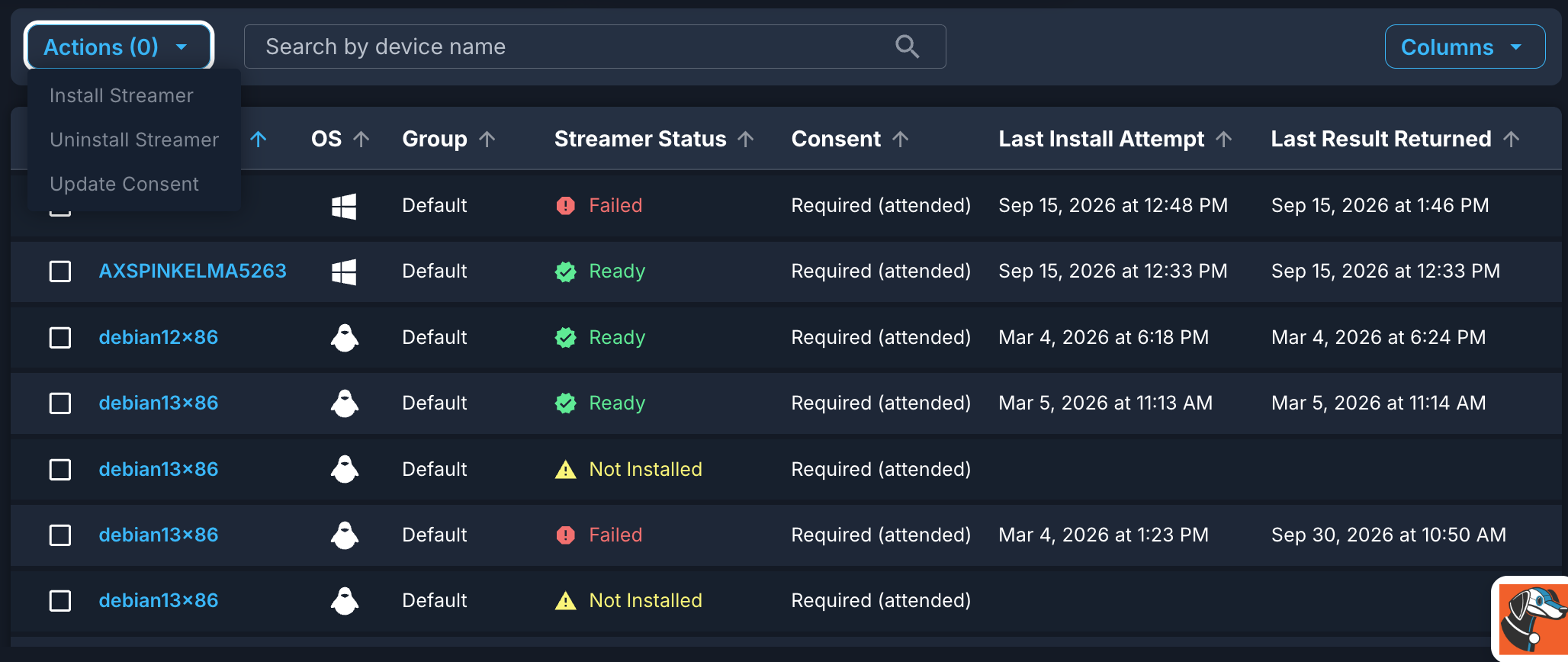 Set Remote Control consent once for your whole organization (2026-10-02) · Oct 2026
· source
· release history
- Adds organization-level default for Remote Control end-user consent behavior. Set Remote Control consent once for your whole organization (2026-10-02) · Oct 2026 · source · release history
- Adds automatic retry logic for failed Streamer installs caused by temporary issues like network interruptions or antivirus interference. Remote Tools — Splashtop Streamer auto-install improvements · Sep 2026 · source · release history
- Streamer reinstalls automatically on re-imaged devices when auto-install is enabled Remote Tools — Splashtop Streamer auto-install improvements (2026-09-15) · Sep 2026 · source · release history
- Re-imaged devices with auto-install enabled now have the Splashtop Streamer reinstalled automatically, without manual intervention after an imaging batch.︀︄︇︀︅︉︀︅︀︀︃︀︀︅︅︀︅︊︀︄︆︀︃︄ Remote Tools — Splashtop Streamer auto-install improvements (2026-09-15) · Sep 2026 · source · release history
- Failed Streamer installs now retry automatically for temporary failures like network interruptions or antivirus interference Remote Tools — Splashtop Streamer auto-install improvements (2026-09-15) · Sep 2026 · source · release history
example
-
Set the organization-wide default for Remote Control consent to Allow or Deny.
Go to Settings > Remote Tools and select your standard Consent behavior.Set Remote Control consent once for your whole organization (2026-10-02) · Oct 2026 · source -
Enable daily enforcement so Remote Control consent stays locked to the org default across the fleet without anyone auditing overrides by hand.
In the Automox console, go to Settings > Remote Tools, set your organization default consent behavior, then enable 'Enforce Organization Default Daily'.Set Remote Control consent once for your whole organization (2026-10-02) · Oct 2026 · source -
Run a diagnostic command on a managed endpoint during an incident without interrupting the end user's active session.
In the Automox console, navigate to a managed device > Remote Tools > Remote Command, open an interactive shell session, and run your diagnostic commands in real time.Introducing Remote Tools: Remote Command & File Transfer (2026-06-29) · Jun 2026 · source -
Push a remediation script or pull back logs from a device without starting a full screen-sharing session.
In the Automox console, navigate to a managed device > Remote Tools > File Transfer, then upload a script or download log files as a targeted action.Introducing Remote Tools: Remote Command & File Transfer (2026-06-29) · Jun 2026 · source
Exploit-based patch prioritization shipped Surfaces and filters vulnerabilities by KEV status and EPSS score across Windows OS and third-party software so practitioners can target patches most likely to be exploited.
release 22 total
-
Automatically extends existing KEV and EPSS policy targeting to include macOS devices without configuration changes
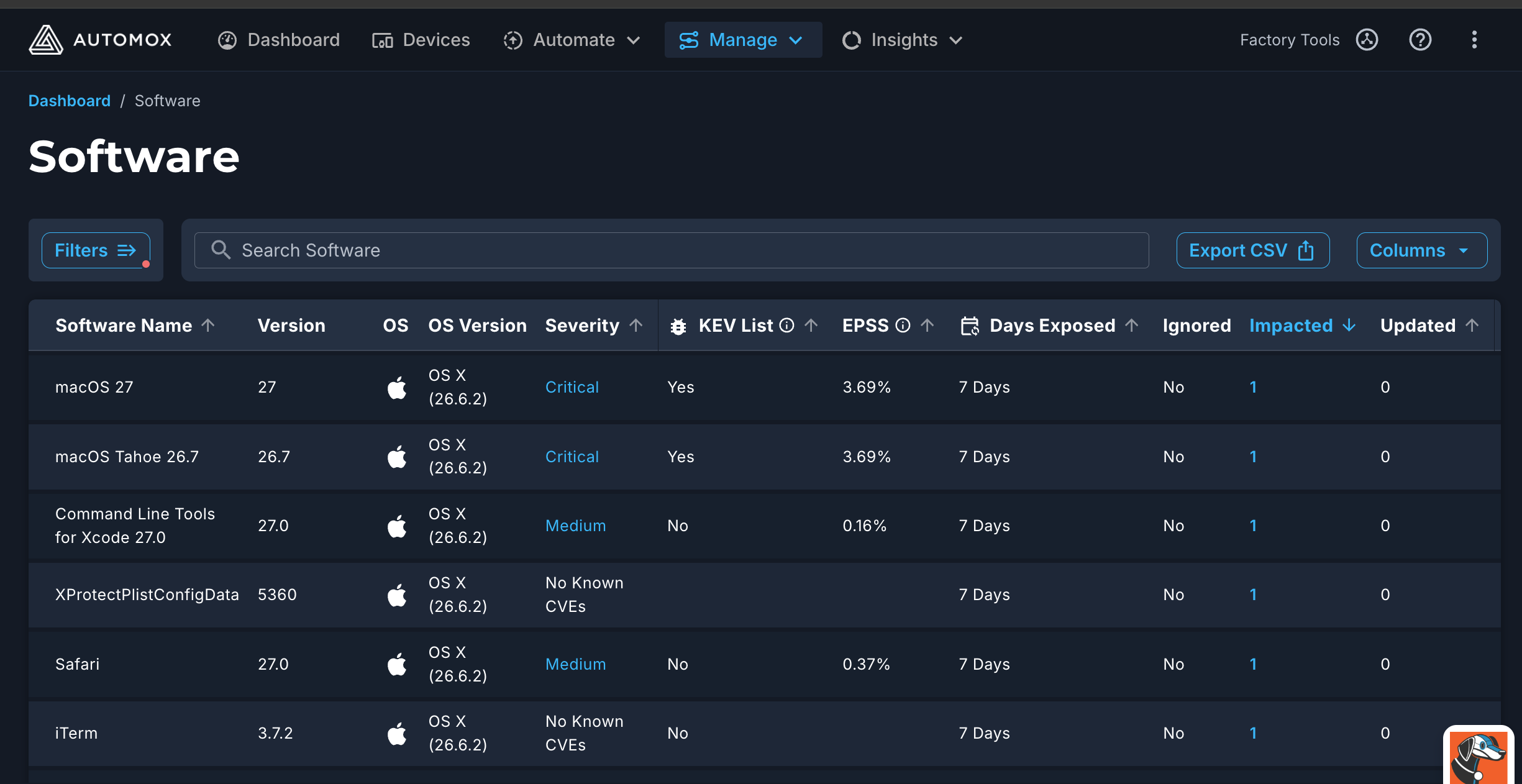 Improved macOS Vulnerability Severity Data (2026-09-25) · Sep 2026
· source
· release history
- Extends existing KEV- and EPSS-targeted policies to automatically include macOS devices with no policy configuration changes required.︀︄︇︀︅︉︀︅︀︀︃︀︀︅︅︀︅︊︀︄︆︀︃︄ Improved macOS Vulnerability Severity Data (2026-09-25) · Sep 2026 · source · release history
- Existing KEV- and EPSS-targeted policies will now include macOS devices automatically, without any configuration change. Improved macOS Vulnerability Severity Data (2026-09-25) · Sep 2026 · source · release history
- Adds MacOS - Mitigations - Block Unauthenticated Docker Remote API TCP Port 2375 Worklet 6 New Mitigation Worklets · Sep 2026 · source · release history
- Severity-based policies may behave differently on macOS, with patches falling in or out of scope depending on targeted severities Improved macOS Vulnerability Severity Data · Sep 2026 · source · release history
- Severity-based policies may behave differently on macOS — macOS patches may now fall in or out of scope depending on the severity levels a policy targets. Improved macOS Vulnerability Severity Data (2026-09-25) · Sep 2026 · source · release history
example
-
Prioritize Windows OS patches most likely to be exploited in the next 30 days by filtering on EPSS score within an Advanced Patch policy.
In the Automox console, go to Policies > Advanced Patch > create or edit a policy, then under Patch Filters enable 'EPSS' and set a probability threshold to automatically target high-risk Windows OS…Target patching by real-world risk: KEV & EPSS now on Windows OS and in Advanced Patch policies (2026-06-16) · Jun 2026 · source -
Automatically patch Windows OS CVEs that are actively exploited in the wild without manual triage, by targeting KEV-flagged vulnerabilities in an Advanced Patch policy.
In the Automox console, go to Policies > Advanced Patch > create or edit a policy, then under Patch Filters enable 'KEV' to scope patching to CISA Known Exploited Vulnerabilities on Windows OS…Target patching by real-world risk: KEV & EPSS now on Windows OS and in Advanced Patch policies (2026-06-16) · Jun 2026 · source
Exclusion window scheduling and device-level assignment shipped Allows creation of one-time or recurring exclusion windows to manage patching schedules for specific server groups.
previously: Exclusion window scheduling
release 20 total
- The following public API endpoints are being updated or deprecated as exclusion management moves to the device level: Create a New Scheduled Window, Get a Scheduled Window, Update a Scheduled Window, Delete a Scheduled Window, List Scheduled Windows (search), 'Check Whether a Scheduled Window is Currently… COMING SOON: Manage Exclusion Windows Directly by Device (2026-10-29) · Oct 2026 · source · release history
- Moving a device between groups will no longer add or remove its exclusion window — any group-based scripts or onboarding flows that rely on group placement to apply or remove exclusion windows must be updated to manage exclusion windows as a separate, independent step. COMING SOON: Manage Exclusion Windows Directly by Device (2026-10-29) · Oct 2026 · source · release history
- Updated device tables and Device Details pages now display which exclusion windows apply to each specific device. COMING SOON: Manage Exclusion Windows Directly by Device (2026-10-29) · Oct 2026 · source · release history
- New per-device exclusion window API endpoints replace the group-scoped scheduled window endpoints for programmatic management. COMING SOON: Manage Exclusion Windows Directly by Device (2026-10-29) · Oct 2026 · source · release history
- Assign and manage exclusion windows directly to individual devices via a new Edit Devices action in the Automox console, replacing the group-association workflow.︀︄︇︀︅︉︀︅︀︀︃︀︀︅︅︀︅︊︀︄︆︀︃︄ COMING SOON: Manage Exclusion Windows Directly by Device (2026-10-29) · Oct 2026 · source · release history
-
Adds a Scan Blocked status to the Scan Result Tile with a yellow warning shield icon and an info tooltip naming the active Exclusion Window when a scheduled scan is suppressed.
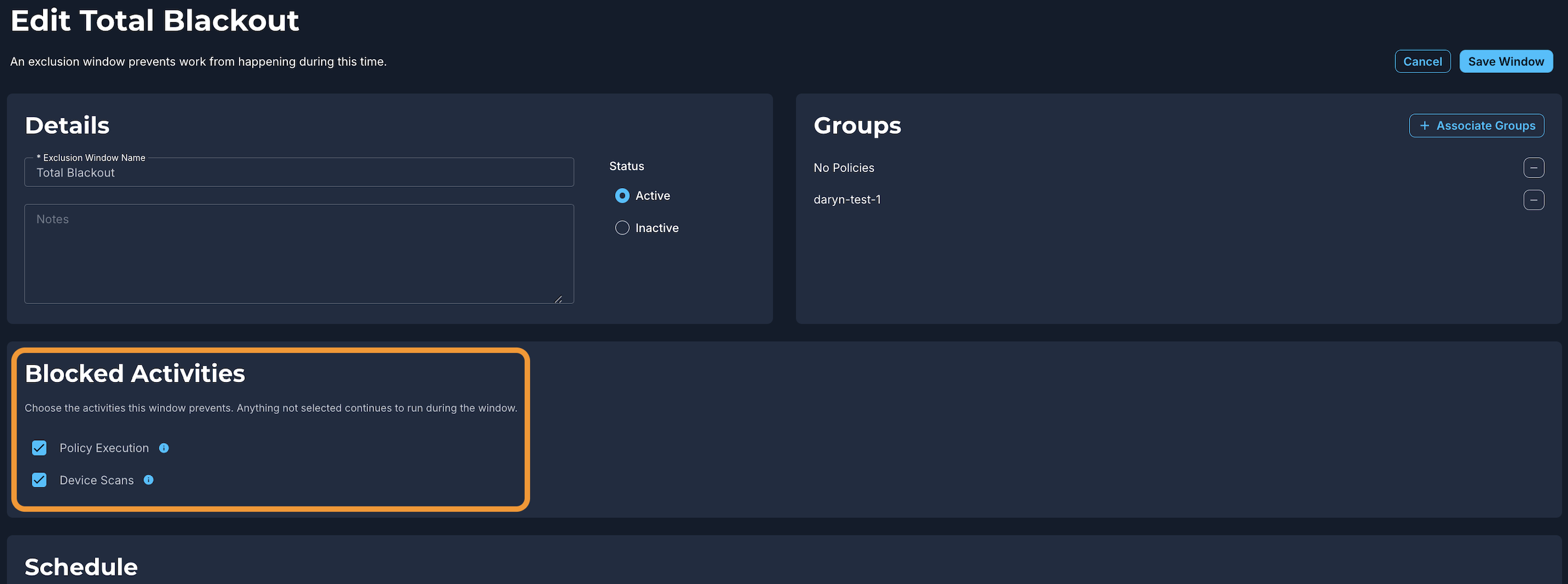 New Exclusion Window Blocked Activities Section: Policy Execution & Device Scans (2026-09-10) · Sep 2026
· source
· release history
example
-
Verify exclusion window assignments for a device after migration by reviewing the Device Details page in the Automox console.
In the Automox console, go to Devices > select a device > Device Details page, and review the exclusion windows listed for that device to confirm expected coverage post-migration.COMING SOON: Manage Exclusion Windows Directly by Device (2026-10-29) · Oct 2026 · source -
Suppress device scans during a maintenance window without halting policy executions — configure the scope via the Exclusion Window UI.
In the Automox Console, open or create an Exclusion Window, locate the 'Blocked Activities' section, check 'Device Scans' only (uncheck 'Policy Execution'), then save the window.New Exclusion Window Blocked Activities Section: Policy Execution & Device Scans (2026-09-10) · Sep 2026 · source -
Set a maintenance exclusion window to run at 2:00 AM in each device's local time zone, so globally distributed endpoints all get their local off-hours window without calculating per-region UTC offsets.
In the Automox console, go to Manage > Exclusion Windows > New Exclusion Window, set your start time to 2:00 AM, then toggle the time zone selector to 'Local time of device' before saving.Local Exclusion Window Scheduling & Targeted Warnings (2026-09-01) · Sep 2026 · source
On-device diagnostics shipped Runs a read-only compatibility check on a managed endpoint to gather diagnostic information without modifying the device.
release 13 total
- Adds automatic retry logic for failed Streamer installs caused by temporary issues like network interruptions or antivirus interference. Remote Tools — Splashtop Streamer auto-install improvements · Sep 2026 · source · release history
- Streamer reinstalls automatically on re-imaged devices when auto-install is enabled Remote Tools — Splashtop Streamer auto-install improvements (2026-09-15) · Sep 2026 · source · release history
- Re-imaged devices with auto-install enabled now have the Splashtop Streamer reinstalled automatically, without manual intervention after an imaging batch.︀︄︇︀︅︉︀︅︀︀︃︀︀︅︅︀︅︊︀︄︆︀︃︄ Remote Tools — Splashtop Streamer auto-install improvements (2026-09-15) · Sep 2026 · source · release history
- Failed Streamer installs now retry automatically for temporary failures like network interruptions or antivirus interference Remote Tools — Splashtop Streamer auto-install improvements (2026-09-15) · Sep 2026 · source · release history
- Enables automatic Splashtop Streamer reinstallation on devices that have been re-imaged when auto-install is enabled. Remote Tools — Splashtop Streamer auto-install improvements · Sep 2026 · source · release history
- Failed Splashtop Streamer installs now retry automatically when the failure is transient (network interruption, locked file, or antivirus interference), while permanently unresolvable failures (e.g. unsupported OS) are reported immediately. Remote Tools — Splashtop Streamer auto-install improvements (2026-09-15) · Sep 2026 · source · release history
example
-
Run an on-device compatibility check (read-only diagnostic).
sudo /opt/amagent/amagent --checkcompat
Per-device consent management shipped suggested Lets practitioners view, set, and enforce device-level consent settings — individually or in bulk — with a dedicated device-table column showing inherited vs. overridden states, bulk override management, and an optional daily reset that enforces the organization default fleet-wide.
Suggested capability: Security baseline enforcement. This is our guess, not confirmed.
Also counts toward: Scheduled jobs
release 10 total
-
Adds per-device consent overrides — individually or in bulk from the device table — that persist independently of organization default changes.
Set Remote Control consent once for your whole organization (2026-10-02) · Oct 2026
· source
· release history
- Adds a new Consent column in the device table with inheritance/override indicators and filtering. Set Remote Control consent once for your whole organization (2026-10-02) · Oct 2026 · source · release history
- Adds an Enforce Organization Default Daily setting that resets every device to the organization default once per day and clears all per-device overrides, for fleet-wide consent consistency without manual checks. Set Remote Control consent once for your whole organization (2026-10-02) · Oct 2026 · source · release history
- Adds per-device or bulk override capability for Remote Control consent from the device table. Set Remote Control consent once for your whole organization (2026-10-02) · Oct 2026 · source · release history
- Adds Enforce Organization Default Daily setting to reset devices to org default and clear overrides. Set Remote Control consent once for your whole organization (2026-10-02) · Oct 2026 · source · release history
- Adds a Consent column to the device table showing each device's current consent setting and whether it is inherited or an override, with filtering on both states. Set Remote Control consent once for your whole organization (2026-10-02) · Oct 2026 · source · release history
example
-
Identify devices whose consent differs from the org default and decide in bulk whether to clear their overrides or keep them as exceptions.
In the Automox console, go to the device table, open the 'Consent' column, filter by 'override', select the devices you want to realign, and apply the organization default from the bulk action menu.Set Remote Control consent once for your whole organization (2026-10-02) · Oct 2026 · source -
Enable daily enforcement to ensure all devices respect the org default and clear stale overrides.
In Settings > Remote Tools, turn on 'Enforce Organization Default Daily'.Set Remote Control consent once for your whole organization (2026-10-02) · Oct 2026 · source -
Override consent for a specific device via the UI without affecting others.
In the Device Table, filter or locate the target device, edit its Consent setting to an override value.Set Remote Control consent once for your whole organization (2026-10-02) · Oct 2026 · source
Slack MSIX migration and patching shipped Detects, patches, and migrates Windows Slack installations from legacy MSI/EXE formats to MSIX on both x64 and ARM64 devices, including a bundled Worklet for one-step migration.
release 11 total
- Provides base Worklet Windows - Software Lifecycle - Migrate Slack to MSIX available to all customers Slack for Windows has moved to MSIX - how Automox supports the transition · Jun 2026 · source · release history
- Introduces the base Worklet Windows - Software Lifecycle - Migrate Slack to MSIX, available to all customers (including non-Worklet Catalog subscribers), to remove legacy MSI/EXE installs and provision the current MSIX package in a single controlled action. Slack for Windows has moved to MSIX - how Automox supports the transition (2026-06-19) · Jun 2026 · source · release history
- Adds native detection and patching support for the Slack MSIX package under the standard Slack title Slack for Windows has moved to MSIX - how Automox supports the transition · Jun 2026 · source · release history
- Includes Windows arm64 support for Slack MSIX deployments Slack for Windows has moved to MSIX - how Automox supports the transition · Jun 2026 · source · release history
- Adds native detection and patching support for Slack MSIX packages on Windows, reported under the existing Slack catalog title with no policy reconfiguration required. Slack for Windows has moved to MSIX - how Automox supports the transition (2026-06-19) · Jun 2026 · source · release history
- Supports Slack MSIX on both x64 and ARM64 Windows devices. Slack for Windows has moved to MSIX - how Automox supports the transition (2026-06-19) · Jun 2026 · source · release history
example
-
Migrate Windows endpoints from legacy Slack MSI or EXE installations to MSIX in a single controlled action without waiting for a scheduled patch window.
In the Automox console, go to Worklets, search for 'Windows - Software Lifecycle - Migrate Slack to MSIX', assign it to the target device group, then click Run Now.Slack for Windows has moved to MSIX - how Automox supports the transition (2026-06-19) · Jun 2026 · source
Policy run results reporting shipped Shows per-package patch outcomes — including a Partial status, plain-language failure reasons, and raw log access — so practitioners can quickly identify and investigate runs that need attention.
release 9 total
- Adds per-package breakdowns in the device table for Successful, Failed, or Partial runs, showing plain-language failure reasons (e.g., The application is currently running, Pending system restart). Now live: Partial Policy Success and Per-Package Visibility in the Policy Results Report (2026-07-20) · Jul 2026 · source · release history
- Raw logs for individual packages now open in a side panel via View Raw Logs, keeping detail accessible without cluttering the table. Now live: Partial Policy Success and Per-Package Visibility in the Policy Results Report (2026-07-20) · Jul 2026 · source · release history
- Adds Partial as a new policy run result status when some patches succeed and others encounter errors, replacing a single pass/fail outcome. Now live: Partial Policy Success and Per-Package Visibility in the Policy Results Report (2026-07-20) · Jul 2026 · source · release history
- Adds Partial result status for policy runs where some patches applied successfully while others encountered errors, replacing the previous collapsed pass/fail view. Now live: Partial Policy Success and Per-Package Visibility in the Policy Results Report · Jul 2026 · source · release history
- Enables expandable device rows in the Policy Results Report to show per-package breakdowns with plain-language failure reasons (e.g., The application is currently running). Now live: Partial Policy Success and Per-Package Visibility in the Policy Results Report · Jul 2026 · source · release history
- Replaces the stacked bar chart and legend in the Results column with a direct count of each status, with definitions moved to filter tooltips. Now live: Partial Policy Success and Per-Package Visibility in the Policy Results Report (2026-07-20) · Jul 2026 · source · release history
example
-
Spot runs that need attention after a patch cycle by filtering the Policy Results Report for Partial outcomes, then expanding a device row to see which package failed and why.
In the Policy Results Report, use the Results filter and select 'Partial' to isolate mixed-outcome runs. Expand any device row to view per-package results and failure reasons.Now live: Partial Policy Success and Per-Package Visibility in the Policy Results Report (2026-07-20) · Jul 2026 · source
Policy Catalog shipped Provides a browsable catalog of curated best-practice policy templates that can be used to one-click create policies with auto-populated configuration logic.
release 7 total
-
Existing KEV- and EPSS-targeted policies will now include macOS devices automatically, without any configuration change.
Improved macOS Vulnerability Severity Data (2026-09-25) · Sep 2026
· source
· release history
- Severity-based policies may behave differently on macOS, with patches falling in or out of scope depending on targeted severities Improved macOS Vulnerability Severity Data · Sep 2026 · source · release history
- Severity-based policies may behave differently on macOS — macOS patches may now fall in or out of scope depending on the severity levels a policy targets. Improved macOS Vulnerability Severity Data (2026-09-25) · Sep 2026 · source · release history
- Impact Severity-based policies may behave differently on macOS as patches now fall in or out of scope depending on target severities Improved macOS Vulnerability Severity Data (2026-09-25) · Sep 2026 · source · release history
- CVE counts and severity levels for macOS may differ due to expanded and refined vulnerability data Improved macOS Vulnerability Severity Data · Sep 2026 · source · release history
- Adds the Policy Catalog tab in the Automox console under Policies for browsing curated best-practice policy templates New Policy Catalog: Create Best-Practice Policies in Seconds · Mar 2026 · source · release history
Remote session security and configuration shipped Adds role-based access controls, audit logging for remote sessions, attended/unattended access modes, file transfer, chat, multi-monitor support, and session recording capabilities.
Also counts toward: Administrative audit log, Role-based access control
release
- Adds a new Consent column in the device table showing inherited vs override status for Remote Control sessions Set Remote Control consent once for your whole organization · Oct 2026 · source · release history
- Adds organization-level Auto-record all sessions and Lock Recording settings to the Remote Tools Settings tab for controlling Remote Control session recording. Remote Tools: System Tools & Screen Recording Controls · Aug 2026 · source · release history
- Adds role-based access controls and audit logging for remote sessions Automox Resolve powered by Splashtop — Now Generally Available · Jan 2026 · source · release history
- Unlocks advanced features like file transfer, chat, multi-monitor support, and session recording via the Premium add-on Automox Resolve powered by Splashtop — Now Generally Available · Jan 2026 · source · release history
- Supports attended and unattended remote access modes Automox Resolve powered by Splashtop — Now Generally Available · Jan 2026 · source · release history
example
-
Ensure every Remote Control session is recorded and cannot be stopped by technicians, to satisfy audit requirements.
In the Automox console, go to Remote Tools Settings tab > enable 'Auto-record all sessions' > enable 'Lock Recording'.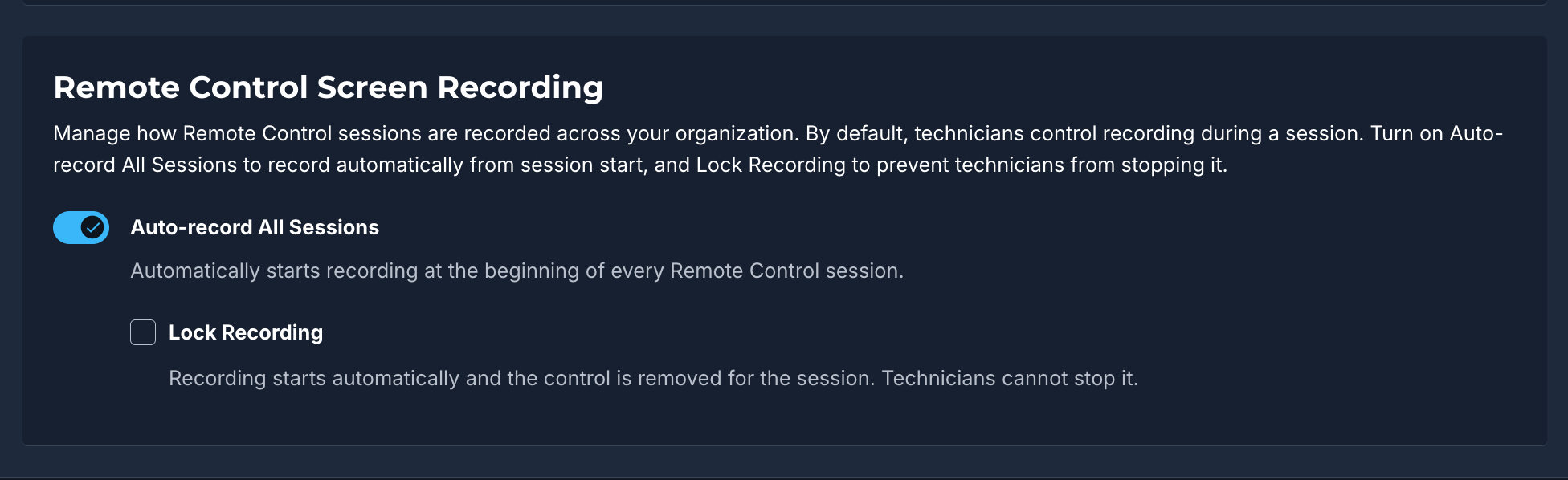 Remote Tools: System Tools & Screen Recording Controls (2026-08-19) · Aug 2026
· source
Automated Worklet mitigations for Windows, macOS, and Linux shipped Provides pre-built worklets to apply specific security mitigations across operating systems, including disabling Apache Tomcat examples, blocking unauthenticated Docker API access, blacklisting kernel modules, and restricting cPanel ports.
release
- Adds Windows - Mitigations - Disable Apache Tomcat Examples Web Application Worklet 6 New Mitigation Worklets · Sep 2026 · source · release history
- Adds Linux - Mitigations - Audit LibRaw Security Update Status Worklet 6 New Mitigation Worklets · Sep 2026 · source · release history
- Adds 'Linux - Mitigations - Blacklist squashfs Kernel Module to Prevent Automatic Loading' Worklet 6 New Mitigation Worklets · Sep 2026 · source · release history
- Adds 'Windows - Mitigations - Disable ActiveX Controls in Office 2007 via Registry Policy' Worklet 6 New Mitigation Worklets · Sep 2026 · source · release history
- Adds MacOS - Mitigations - Block Unauthenticated Docker Remote API TCP Port 2375 Worklet 6 New Mitigation Worklets · Sep 2026 · source · release history
- Adds 'Linux - Mitigations - Block cPanel & WHM TCP Ports 2083 and 2087 via Host Firewall' Worklet 6 New Mitigation Worklets · Sep 2026 · source · release history
Consolidated endpoint notification tray shipped Merges multiple active policy notifications on a device into a single tray view showing all pending packages, the nearest deadline, and one unified restart action, with custom install or restart messages taking priority over defaults.
release
- Agent combines restart commands across overlapping policies to minimize end-user interruption by performing a single restart after patching Upcoming Improvements to Policy Execution Logic · Sep 2026 · source · release history
-
Automox Agent v2.7consolidates multiple active notification-enabled policies on an endpoint into a single Tray view showing the complete package list, nearest deadline, and one restart action. Upcoming Improvements to Policy Execution Logic (2026-09-28) · Sep 2026 · source · release history - Tray Install Updates now applies patching for all active overlapping policies simultaneously instead of one at a time Upcoming Improvements to Policy Execution Logic · Sep 2026 · source · release history
- Tray prioritizes custom Install or Restart messages over default ones when merging overlapping policy notifications. Upcoming Improvements to Policy Execution Logic (2026-09-28) · Sep 2026 · source · release history
- Agent and Tray in v2.7 consolidate multiple notification-enabled policies into a single view showing all packages, versions, and the nearest deadline Upcoming Improvements to Policy Execution Logic · Sep 2026 · source · release history
macOS operating system compatibility and data expansion shipped Extends supported macOS versions to include macOS 27 (Golden Gate) and expands the underlying vulnerability data for macOS, affecting CVE counts and severity levels in reports.
release
-
Console views, Analytics, and reports for macOS may show different CVE counts and severity levels due to expanded vulnerability data
Improved macOS Vulnerability Severity Data (2026-09-25) · Sep 2026
· source
· release history
- CVE counts and severity levels for macOS in console views, Analytics, and reports may change as vulnerability data has been expanded and refined. Improved macOS Vulnerability Severity Data (2026-09-25) · Sep 2026 · source · release history
- Updates console views, Analytics, and reports to reflect CVE counts and severity levels for macOS based on the expanded vulnerability data. Improved macOS Vulnerability Severity Data (2026-09-25) · Sep 2026 · source · release history
- Adds support for macOS 27 (Golden Gate), verified with Agent 2.6.53.︀︄︇︀︅︉︀︅︀︀︃︀︀︅︅︀︅︊︀︄︆︀︃︄ New Automox Supported Operating System - macOS 27 (Golden Gate) (2026-09-16) · Sep 2026 · source · release history
- Adds macOS 27 (Golden Gate) as a supported operating system for Automox-managed devices.︀︄︇︀︅︉︀︅︀︀︃︀︀︅︅︀︅︊︀︄︆︀︃︄ announced · Sep 2026 · source · release history
Remote System Tools shipped Allows technicians to open in-tab system utilities such as Task Manager, Registry Editor, and Service Manager on Windows, or Activity Monitor on macOS, without desktop takeover.
release
- Adds System Tools (Task Manager, Registry Editor, Device Manager, Service Manager on Windows; Activity Monitor on macOS) that open in a new tab without desktop takeover, accessible via the Remote Tools button on Device Details. Remote Tools: System Tools & Screen Recording Controls · Aug 2026 · source · release history
-
On macOS, System Tools surfaces Activity Monitor as the native equivalent of Task Manager for background process triage.
Remote Tools: System Tools & Screen Recording Controls (2026-08-19) · Aug 2026
· source
· release history
- New System Tools option under the Remote Tools button on Device Details opens Task Manager, Registry Editor, Device Manager, and Service Manager on managed Windows devices in a background session — no desktop takeover required. Remote Tools: System Tools & Screen Recording Controls (2026-08-19) · Aug 2026 · source · release history
example
-
Restart a stalled Windows service on an end user's device without taking over their screen.
In the Automox console, open Device Details for the target device > click 'Remote Tools' > select 'System Tools' — Service Manager opens in a new tab, running in the background.Remote Tools: System Tools & Screen Recording Controls (2026-08-19) · Aug 2026 · source
Webhook event delivery shipped Enables subscribing to specific event types with real-time HTTP POST notifications, featuring HMAC-SHA256 signature verification, exponential backoff retries, and 14-day message replay.
Also counts toward: Outbound webhooks (the product notifies you)
release
- Supports subscribing to specific event types including policy evaluations, device status changes, and user updates Automox Webhooks: Real-Time Event Notifications are Now Available via API · Feb 2026 · source · release history
- Adds webhook delivery that pushes real-time HTTP POST notifications to custom endpoints instead of polling the API Automox Webhooks: Real-Time Event Notifications are Now Available via API · Feb 2026 · source · release history
- Provides reliable delivery via exponential backoff retry mechanism and 14-day message replay capability Automox Webhooks: Real-Time Event Notifications are Now Available via API · Feb 2026 · source · release history
- Ensures data authenticity with HMAC-SHA256 signature verification on every payload Automox Webhooks: Real-Time Event Notifications are Now Available via API · Feb 2026 · source · release history
JAMF integration base worklets shipped Adds specialized base worklets to initiate macOS updates via JAMF MDM workflows and list executed software update plans.
release
-
Adds
Intune Deploy macOS Automox Agentbase worklet for automated device syncing and policy assignment New Base Worklets: Intune Install OS Updates & Intune Deploy macOS Automox Agent · Jan 2026 · source · release history - Introduces Intune Install OS Updates base worklet to initiate macOS first-party updates via Intune DDM with escrowed Bootstrap Token New Base Worklets: Intune Install OS Updates & Intune Deploy macOS Automox Agent · Jan 2026 · source · release history
- Adds the JAMF Install OS Updates base worklet that initiates first-party macOS updates via JAMF's MDM workflow using an escrowed Bootstrap Token, bypassing local Secure Token requirements New Base Worklets: JAMF List Software Plans and JAMF Install OS Updates · Dec 2025 · source · release history
- Adds the JAMF List Software Plans base worklet to list executed JAMF software update plans for validation and visibility New Base Worklets: JAMF List Software Plans and JAMF Install OS Updates · Dec 2025 · source · release history
Windows Server and OS compatibility updates shipped Expands supported operating systems to include Windows Server 2025, CentOS Stream 10, and Windows 11 ARM, alongside agent compatibility updates.
release
- Adds official support for the Windows 11 ARM operating system to Automox. New Automox Supported Operating System - Windows 11 ARM · Aug 2025 · source · release history
- Updates agent compatibility to include Windows Server 2025 Core New Automox Supported Operating System - Windows Server 2025 Core · Jul 2025 · source · release history
- Adds support for Windows Server 2025 Core as a supported operating system New Automox Supported Operating System - Windows Server 2025 Core · Jul 2025 · source · release history
- Adds official support for Windows Server 2025 New Automox Supported Operating Systems · May 2025 · source · release history
Device management actions shipped Enables applying tags, removing tags, assigning devices to groups, and deleting devices directly from the search results table.
release
-
Adds
delete_devicetool for irreversible single-device deletion, gated byAUTOMOX_MCP_ALLOW_DELETE_DEVICE. Automox MCP Server 2.0.0: Per-Tool Safety Gates, Device Deletion, and File Uploads · Jun 2026 · source · release history -
Adds
update_devicetool to set name, group, tags, exception state, or IP addresses for a single device. Automox MCP Server 2.0.0: Per-Tool Safety Gates, Device Deletion, and File Uploads · Jun 2026 · source · release history - Adds ability to apply tags, remove tags, 'assign to a group' and delete a device directly from the results table The Rollout has Officially Started for our New and Improved Device Explorer! · Dec 2025 · source · release history
Organization metadata updates shipped Updates organization ID labeling to use UUIDs for clarity and exposes Account IDs in the organization table.
release
- Renames the Organization ID column label in the Setup & Configuration > Organizations tab to Organization UUID. Organization Table Verbiage Consistency Update · Nov 2025 · source · release history
- Renames the Legacy ID column label in the Setup & Configuration > Organizations tab to Organization ID. Organization Table Verbiage Consistency Update · Nov 2025 · source · release history
- Account ID and Global Organization ID now appear as new columns in the Setup & Configuration > Organization table. Two New Columns Added to the Organization Table · Aug 2025 · source · release history
Windows Server 2012 R2 end-of-support and end-of-life lifecycle shipped Defines the support and life timeline for Windows Server 2012 R2: end of testing and standard support on October 13, 2026, and full end of life on January 31, 2027 (Agent v2.8+), after which patching is no longer guaranteed and devices may lose connectivity or experience degraded functionality.
release
- Automox ends support for Windows Server 2012 R2 on October 13, 2026 — no further testing, bug fixes, or standard technical support for these devices. End of Support and Upcoming End of Life for Windows Server 2012 R2 (2026-11-03) · Nov 2026 · source · release history
- Automox ends life for Windows Server 2012 R2 on January 31, 2027 (Agent v2.8+) — patching is no longer guaranteed and devices may lose connectivity or experience degraded functionality. End of Support and Upcoming End of Life for Windows Server 2012 R2 (2026-11-03) · Nov 2026 · source · release history
Pending restart and application restart status tracking shipped Displays a Pending Application Restart status for Windows packages that have been installed but require the application to restart before the update is finalized.
release
- Adds Pending Application Restart status to the Software Table on the Device Details page. New Software Status for a Device: "Pending Application Restart" · Aug 2026 · source · release history
- Adds a new Pending Application Restart status in the Device Details > Software Table Status column for Windows devices where a package was installed but the application has not yet restarted to finalize the update — currently supported for Google Chrome, Microsoft Edge, and OBS Studio. New Software Status for a Device: "Pending Application Restart" (2026-08-11) · Aug 2026 · source · release history
Deadline policy simplification shipped Replaces multiple deferral and snooze fields with a single Deadline field in the policy creation interface for agents running version 2.1.x or newer, with a new default value of 9 hours.
release
- Replaces multiple deferral and snooze fields with a single Deadline field in the policy creation interface for agents running version 2.1.x or newer Streamlined Deadline-Based Interface Update for Policies · Jan 2026 · source · release history
-
Sets the default deadline value to
9 hoursfor new policies (previously48 hours) Streamlined Deadline-Based Interface Update for Policies · Jan 2026 · source · release history
Intune macOS integration shipped Provides base worklets to automate device syncing, policy assignment, and first-party OS updates on macOS devices via Intune DDM with an escrowed Bootstrap Token.
release
-
Adds
Intune Deploy macOS Automox Agentbase worklet for automated device syncing and policy assignment New Base Worklets: Intune Install OS Updates & Intune Deploy macOS Automox Agent · Jan 2026 · source · release history - Introduces Intune Install OS Updates base worklet to initiate macOS first-party updates via Intune DDM with escrowed Bootstrap Token New Base Worklets: Intune Install OS Updates & Intune Deploy macOS Automox Agent · Jan 2026 · source · release history
Patch naming convention alignment shipped Updates internal metadata to use Microsoft's standard naming conventions for Windows updates, requiring policy adjustments.
release
- Updates displayed in the Automox console now use Microsoft's updated naming convention for Windows updates (e.g., Security Update instead of Cumulative Update). Windows Update Title Changes · Dec 2025 · source · release history
- Patch policies relying on name-based criteria may require adjustment to accommodate the new metadata format. Windows Update Title Changes · Dec 2025 · source · release history
Query capability and permissions shipped Introduces specific read and manage permissions for query capabilities, requiring custom role updates for access.
Also counts toward: Role-based access control
release
- Existing device explorer queries will not be migrated and will be removed with the enablement of the new enhancements The Rollout has Officially Started for our New and Improved Device Explorer! · Dec 2025 · source · release history
- Custom roles created prior to the release need to be manually updated to include the new query permissions if desired The Rollout has Officially Started for our New and Improved Device Explorer! · Dec 2025 · source · release history
MCP Server integration documented Provides an Automox MCP Server that exposes platform capabilities to MCP-compatible clients, enabling programmatic interaction with the Automox cyber toolchain.
Also counts toward: MCP server
docs
- Automox MCP Server 3.0 | Customer Setup Guide api-docs-4a042873b954 · Oct 2026 · source
Lines in monospace are the tool's own words: help text
parsed from its source, or an endpoint from its API document. Under
release, a line is our summary of a dated release. Under
docs, it is quoted from the tool's own documentation or
website. Each links back to the source it came from.
Command line
2 commands for Automox, each with where it came from. This tool has no source analysis yet, so there is no option reference and no captured run beside them.
No command matches.
Screenshots
From the release notes, newest first. Click one to see it full size.Score card
-
Shipping velocity releases a month, last 12 months
-
Documentation quality release-notes rubric, 0–100
-
Breaking-change discipline how rarely a release breaks users, and notice given
-
Maintenance risk quiet time against its own cadence, maintainers
-
Innovation & surface new capabilities, API and MCP surface
Five scores for Automox, each built from the releases, notes and API history this site tracks — and, on Researcher and Business, where it stands among every measured tool in its category and how that has moved.
Score cards are part of every paid plan.
See plans → Already subscribed? Sign in →Trajectory
Blank means never measured; nothing here is a filled-in zero.
Peer standings are included with Researcher and Business. See how this tool ranks against its competitors, using data we don't publish anywhere else.
See plans →Each score is 0–100 on a published rubric, derived from data this site already shows. A dimension we cannot measure says so — it is never scored 0 and never enters a rank.
How this is scored
- Shipping velocity — releases a month over the last 12 months, on a log scale where 16 a month scores 100. Needs 3 releases in the window.
- Documentation quality — the release-notes rubric published on the analytics page, unchanged.
- Breaking-change discipline — the share of releases carrying a breaking change (none scores 100, half or more scores 0). Only projects that label breaking changes are measured: a clean record cannot be told from an unlabelled one.
- Maintenance risk — quiet time measured against the tool's own release cadence (quiet longer than 90 days and three typical gaps scores 0), plus the number of active maintainers and whether contributors are growing, where known. Higher is lower risk.
- Innovation & surface — new capabilities in the feature ledger this year, API and MCP operations added, and the share of commits that are features: the mean of whichever we hold.
- Community health (open-source tools only) — each is a direction, not a size: contributors this year against last, the bus factor now against a year ago, and issues closed per issue opened, where steady scores 50, doubled 100 and halved 0; plus the median time to a maintainer's first reply (an hour scores about 100, a month or more 0). A commercial card has no repository and carries none of the four.
- Documented delivery (commercial tools) — when a vendor's documented new capabilities have slowed against its own baseline, that counts against the overall standing as heavily as two low dimensions. Steady delivery, or too little history to judge, leaves the standing alone; it is never a sixth score.
- Open-source tools are scored on repository signals; commercial tools on their published changelog. Ranks compare tools within one category and one profile and need at least five measured peers; the overall standing needs three ranked dimensions. Best-in-breed or consolidator is a shape, not a quality, and is never scored.
Release-note detail over time
See how much detail Automox puts in its release notes, quarter by quarter, and compare it with tracked tools in the same category. This history uses up to ten retained, reviewed notes per tool; sparse or blank older quarters may reflect that limit.
Checking release-note history…
Commercials
pricing & packaging history · Automox vendor page35 readings of Automox's pricing page since Oct 2021, with 7 relaunches of its plan lineup and 7 changes to what its plans include — each one dated, compared with the reading before it, and explained for someone buying the tool.
Pricing and packaging history is included with Researcher and Business. See how every vendor we track sells, and how that has changed over time, using data we don't publish anywhere else.
See plans → Already subscribed? Sign in →Plans by offering
Each offering on the pricing page links to its own page of plans, read at its latest capture.
Plan relaunches
Plans, prices and descriptions are quoted from the vendor's own pricing page as we read it on each date. A plan missing from a later reading is shown as no longer listed on the page — a statement about the page, not the product. Readings that failed to show any plans are left out rather than read as a change.
Website history
automox.com, every changeAutomox's home and pricing pages and 15 more pages as they looked each month from September 2021 to October 2026: 40 renders, 8 changes of tagline or palette. Step through them, play them, or put any two months side by side.
Website history is included with Researcher and Business.
See plans → Already subscribed? Sign in →← → or h l a month · Shift a year · [ ] previous / next change · Space play · 1 2 3 page · T whole page · C compare · F full size
← → or h l the right month · Shift the left · S swap · W wipe · T whole page · Esc back
Rebranding timeline
Dates bound when a change appeared between captures. Possible rebrands are AI suggestions; a redesign alone does not establish a rebrand.
Coverage
Missing something? Tell us
What Automox connects to, runs on and detects, read from its release notes and docs. So far: 1 retired supported platform.
1 change, tracked since Nov 3, 2026.
-
Nov 32026
retired Windows Server 2012 R2 support retirement
Automox End of Support (EOS): October 13, 2026 Automox End of Life (EOL): January 31, 2027 (Agent v2.8+)
Operating systems 1
Nothing first seen in this window. That doesn't mean Automox shipped nothing, only that we found no record of it.
How we count
Read from 4 of 68 release notes and docs updates we hold for Automox. "First seen" is the earliest note that names something; "last" is the latest. Our history may start partway through Automox's life, so an old integration can show a recent first-seen date.
Each change counts once: "added 40 checks" is one line, so the numbers measure how often coverage moves, not how big the catalogue is or how well it detects.
Releases
68 entries
No entries match these filters.
- November 20261
- October 20264
- September 202613
- August 20264
- July 20262
- June 20266
- May 20263
- April 20262
- March 20262
- February 20263
- January 20264
- December 20253
- November 20253
- October 20251
- September 20253
- August 20255
- July 20253
- June 20251
- May 20255
Add the badge to your README
Maintain this project? The badge links readers straight to this page, so they can follow every release here.
 Choose a badge style and copy the code →