Castle
Identify AI agents commercialThe section your link pointed to isn't on Castle's page any more, so we've brought you to the top.
Castle is a fraud detection platform that monitors user behavior and device signals to detect account takeovers, fake accounts, and other abuse.
{
  "agent": {
    "name": "ChatGPT agent",
    "operator": "openai",
    "category": "ai_agent",
    "identified_by": ["web_bot_auth"]
  }
}
curl -X GET 'https://api.castle.io/v1/ip-intelligence/203.0.113.42' \
  -H 'Authorization: Bearer <api_key>'
GET /v1/events?filter[email.registered_domain]=example.com
Summary
Castle is a commercial fraud and risk-detection platform delivered as a hosted API and dashboard, aimed at engineering and trust-and-safety teams building account security into their own applications rather than security analysts running a console. It works by scoring events sent through its Risk Assessment API, drawing on signals like fraudulent email domains, residential proxy and VPNVPNA virtual private network, an encrypted tunnel between devices or networks. It carries traffic across another network as though the endpoints had a private connection. detection, IP tunnel intelligence, and phone-call state during sensitive actions such as login or checkout, alongside newer authentication method types for proof-of-personhood and payment-based verification. Access is managed through multiple publishable keys and API secrets that can be labeled, rotated, and isolated per integration or webhook, which suggests a team running several production integrations at once. Its Lists, Events, IP Intelligence, and Privacy endpoints support GDPRGDPREU regulation enacted in 2018 that governs how organizations collect, store, and process personal data of EU residents, giving cyber tools legal obligations around data handling and breach notification. access and deletion requests alongside ongoing risk queries.
Castle is a fraud detection platform that monitors user behavior and device signals to detect account takeovers, fake accounts, and other abuse.
How Castle helps
Is a login or transaction attempt actually coming from the person it claims to be?
scores the event through the Risk Assessment API against signals like fraudulent email domains, residential proxy and VPN detection, and IP tunnel intelligence, returning a risk score and policy evaluation
Is a user being coached or coerced through a sensitive action right now?
flags when the user is on a phone call during login or transaction flows and exposes the call state as fields on the event, surfacing potential social engineering in progress
Which of my IPs are hiding behind consumer networks instead of obvious datacenter proxies?
flags traffic routed through real residential ISPs as a distinct signal from traditional datacenter-proxy and Tor detection, alongside expanded tunnel context
Which of my API keys or webhook secrets would be exposed if one integration were compromised?
keys and secrets are created and labeled per integration, so a compromised key can be rotated or revoked, and a webhook can be reassigned its own secret, without touching other integrations' traffic
How do I migrate a production integration to a new key without downtime?
supports creating a new key, shifting traffic to it gradually, and deleting the old one once migration finishes
How do I answer a user's request to see or delete their data under GDPR?
the Privacy endpoints expose access and deletion calls tied to Article 15 and Article 17, letting a stored user's records be pulled or removed on request
Languages
Features
Built from Castle's releases, docs, README and our own runs. “Seen” marks the month we first spotted a release the vendor didn't date. Group names and tags are our labels.
What Castle offers you
- REST API2
- CSV data export1
No capabilities match.
Risk Assessment and Fraud Detection 6 capabilities Castle evaluates user actions in real time, scoring risk and applying policies to flag or block suspicious behaviour. It draws on device, network, email, and behavioural signals to surface fraud patterns as they happen.
VPN and proxy IP detection shipped Identifies traffic routed through VPNs, residential proxies, and IP tunnels, going beyond basic datacenter proxy lists.
release 7 total
- Enables standalone detection of residential proxies without sending a user event IP Intelligence API · Aug 2026 · source · release history
- Detects VPN traffic using new IP intelligence, extending existing tunnel and residential proxy detection capabilities. Detect VPN traffic with new IP intelligence · seen Jul 2026 · source · release history
- Expanded IP tunnel intelligence provides richer context alongside existing Proxy IP and Tor IP signals. Detect residential proxies with new IP intelligence · seen Jul 2026 · source · release history
- New Residential Proxy IP signal detects traffic routed through real consumer ISPs, catching proxies invisible to traditional datacenter-based detection. Detect residential proxies with new IP intelligence · seen Jul 2026 · source · release history
- Extends IP tunnel intelligence to identify VPN traffic. Detect VPN traffic with new IP intelligence · Jun 2026 · source · release history
- Enriches existing proxy/Tor signals with broader IP tunnel intelligence Detect residential proxies with new IP intelligence · May 2026 · source · release history
example
-
Check if an IP is associated with a residential proxy network before processing a login.
curl -X GET 'https://api.castle.io/v1/ip-intelligence/203.0.113.42' \ -H 'Authorization: Bearer <api_key>'IP Intelligence API · Aug 2026 · source
Risk assessment and policy evaluation verified Scores risk and runs policy rules against a live event payload to produce an immediate allow, challenge, or deny decision.
release
-
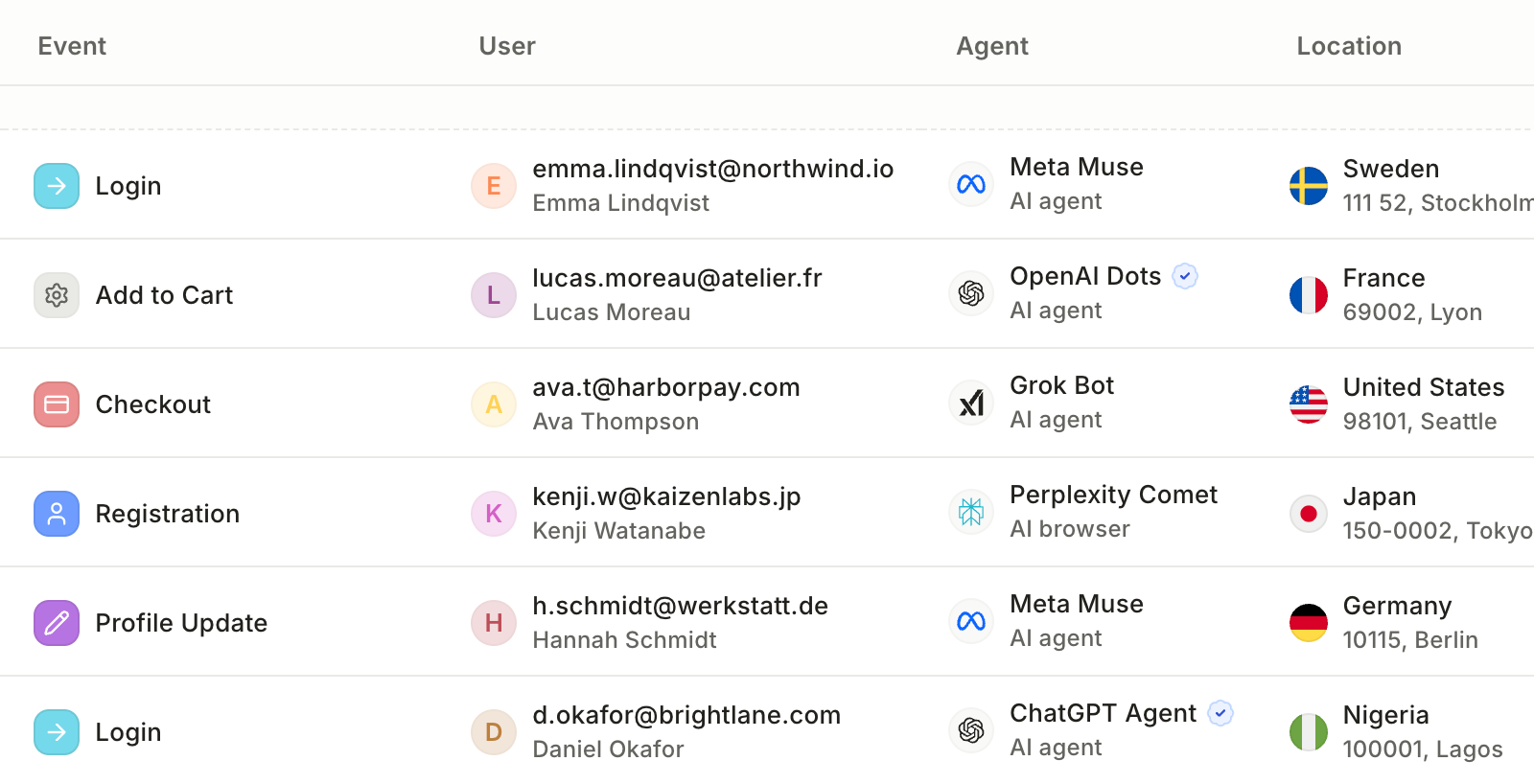
Enables agent-specific policies to allow, restrict, or require additional verification for specific agents or agent categories based on the operation being performed.
 announced · Oct 2026
· source
· release history
- Risk Assessment (2 endpoints) — Castle Risk Assessment APIs will calculate a risk score as well as evaluate policies based on the provided payload. 1 · seen Aug 2026 · source · release history
api
-
POST /risk· source · full API surface -
POST /filter· source · full API surface
Registered email domain field shipped Normalises any email address to its registered domain so analysts can spot fraud patterns that rotate across subdomains.
release
-
Adds
email.registered_domainevent field that strips subdomains down to the registered domain using the public suffix list, making it easier to detect fraud patterns that rotate across subdomains. New event field: `email.registered_domain` · seen Jul 2026 · source · release history -
Adds new event field
email.registered_domainthat reduces an email's full domain to its registered part using the public suffix list New event field: `email.registered_domain` · Jun 2026 · source · release history
example
-
Detect if multiple suspicious sign-ups are using subdomains of the same disposable provider by grouping on
email.registered_domain.GET /v1/events?filter[email.registered_domain]=example.comNew event field: `email.registered_domain` · Jun 2026 · source
Device signal collection shipped Collects signals from the user's device to improve detection of fraud and automated bot activity.
release
- Collects additional device signals for broader fraud and bot detection coverage. IOS SDK 4.0.0 Release · seen Jul 2026 · source · release history
- Adds SDK protection capabilities. IOS SDK 4.0.0 Release · seen Jul 2026 · source · release history
Phone-call state detection shipped Detects whether a user is on a phone call during a sensitive action, helping identify social engineering attempts in progress.
release
- Exposes three new fields for phone call state in Castle events. Phone call detection · seen Jul 2026 · source · release history
- Detects when a user is on a phone call during sensitive actions (e.g., login, transactions) to identify potential social engineering attacks. Phone call detection · seen Jul 2026 · source · release history
Fraudulent email domain detection shipped Flags email domains that are known to be actively used in fraud and abuse campaigns, separate from disposable address detection.
release
- New Fraudulent Email Domain signal detects email domains confirmed as actively used in fraud and abuse campaigns, distinct from disposable email services like Mailinator or TempMail. Fraudulent Email Domain signal · seen Jul 2026 · source · release history
IP and Network Intelligence 1 capability Castle provides detailed metadata and tunnel observations for individual IP addresses and bulk datasets. This intelligence feeds directly into risk decisions and can also be queried or downloaded independently.
IP intelligence lookup and bulk download verified Looks up metadata and tunnel history for a single IP or a batch, and lets users download bulk intelligence datasets in compressed format.
release
-
Adds
GET /api/ip-intelligence/{ip}endpoint to query raw intelligence signals directly IP Intelligence API · Aug 2026 · source · release history -
POST
/ips/query: request body changed 1 · seen Aug 2026 · source · release history -
New endpoint GET
/ips/downloads/{dataset}/{window}.{format}.gz 1 · seen Aug 2026 · source · release history -
GET
/ips/{value}: response schema changed 1 · seen Aug 2026 · source · release history -
New endpoint HEAD
/ips/downloads/{dataset}/{window}.{format}.gz 1 · seen Aug 2026 · source · release history - IP Intelligence (2 endpoints) — Look up Castle's IP intelligence data (address metadata + tunnel observations) for a single IP or a batch. 1 · seen Aug 2026 · source · release history
api
-
HEAD /ips/downloads/{dataset}/{window}.{format}.gz· source · full API surface -
GET /ips/downloads/{dataset}/{window}.{format}.gz· source · full API surface
Authentication Signal Enrichment 2 capabilities Castle extends its event model to capture the method by which a user authenticated or verified their identity. These method types give analysts richer context when reviewing suspicious login or transaction events.
Payment authentication method shipped Records when an action is tied to a payment method such as a card, bank account, or wallet, so payment-linked events carry that context in Castle.
release
- Adds Payment authentication method type for events tied to a payment method or provider (e.g., card, bank, wallet variants). Additional Authentication Method types · seen Jul 2026 · source · release history
Proof-of-Personhood authentication method shipped Records when an action was verified through a Proof-of-Personhood provider such as Worldcoin or Humanode, making that context available on the event.
release
-
Adds Proof-of-Personhood (
pop) authentication method type for events verified through PoP providers (e.g., Worldcoin, Humanode, etc.). Additional Authentication Method types · seen Jul 2026 · source · release history
Lists and Event Data Management 2 capabilities Castle lets teams build and maintain named lists of entities used inside risk policies, and query the event history collected through the risk APIs. Together these capabilities support ongoing tuning of detection rules and investigation of past activity.
Lists management shipped Creates and manages named lists of users, IPs, transactions, or custom properties that policies can reference when evaluating risk.
Also counts toward: REST API
release
- Lists (6 endpoints) — Lists represents a generic collection of items, such as Users, IPs, Transactions or any custom property. 1 · seen Aug 2026 · source · release history
- List Items (8 endpoints) — List Items represents entries in a List. 1 · seen Aug 2026 · source · release history
- Adds CSV export for List entries — click Export in the list toolbar to download; large lists run in the background and deliver a link via email. CSV export for Lists · seen Jul 2026 · source · release history
example
-
Download all entries from a Castle List for offline analysis or reporting.
In the Castle console, open the target List, then click Export in the list toolbar to download the CSV (large lists will be emailed as a download link when ready).CSV export for Lists · seen Jul 2026 · source
Event querying and aggregation verified Queries, filters, and aggregates the stream of events sent to Castle so teams can investigate activity or measure trends over time.
release
-
Enables filtering and investigating events by agent identity in Castle's event dashboard to see which users, accounts, and operations are associated with a particular agent.
announced · Oct 2026
· source
· release history
- Events (3 endpoints) — Castle Events APIs allow you to query and aggregate Events that have been sent to the Castle Risk Assessment APIs. 1 · seen Aug 2026 · source · release history
api
-
GET /events/schema· source · full API surface
API Credential and Webhook Security 2 capabilities Castle gives teams fine-grained control over API keys and webhook secrets so each integration is isolated and credentials can be rotated without disrupting others. This limits the blast radius of any single compromised credential.
Multi-key API credential management shipped Lets teams create, label, rotate, and revoke multiple API key pairs within one account so each integration is tracked and managed separately.
release
- Label each key by purpose (e.g., Production Web, Mobile iOS) for clear per-integration tracking. Multiple API keys · seen Jul 2026 · source · release history
- Rotate or revoke individual keys without disrupting other active integrations. Multiple API keys · seen Jul 2026 · source · release history
- Create multiple Publishable API Keys and API Secrets within a single Castle account. Multiple API keys · seen Jul 2026 · source · release history
- Supports gradual traffic migration: create a new key, shift traffic incrementally, then delete the old one. Multiple API keys · seen Jul 2026 · source · release history
example
-
When rotating a compromised or expiring key, create a new one in the dashboard, label it by purpose, migrate traffic gradually, then delete the old key — all without downtime.
In the Castle console, go to Settings > API Keys, click 'Create new key', enter a label (e.g.Multiple API keys · seen Jul 2026 · source
Per-webhook API Secret signing shipped Assigns a separate API secret to each webhook endpoint so one endpoint's secret can be rotated without affecting any other.
Shared capability: Outbound webhooks (the product notifies you)
release
- Enables per-webhook API Secret selection for signing, so integrations can be isolated and secrets rotated independently (Enterprise plans). Webhook API Key selection · seen Jul 2026 · source · release history
example
-
Assign a specific API Secret to a webhook endpoint to isolate it from other integrations and rotate its secret without affecting others.
In the Castle dashboard, navigate to your Webhook configuration, select the endpoint, and choose the desired API Secret from the signing key selector.Webhook API Key selection · seen Jul 2026 · source
Compliance and Privacy 2 capabilities Castle provides dedicated APIs and export tools to meet data privacy obligations and support access reviews. These capabilities cover both regulatory data rights for end users and internal audit requirements for teams.
Team roster export shipped Exports the full team member roster to CSV, including role and two-factor authentication status, for use in access reviews or audits.
Also counts toward: CSV data export
release
- Export team members list to CSV from the Team Settings page, including name, email, user role, 2FA status, and member-since date. Export team members to CSV · seen Jul 2026 · source · release history
- Adds the ability to export team member data to a CSV file via the Team settings page in the UI. Export team members to CSV · Jun 2026 · source · release history
example
-
Pull an offline team roster for a periodic access review or compliance audit.
In the Castle console, go to Settings > Team, then click the Export to CSV button to download all visible columns (name, email, user role, 2FA status, member since).Export team members to CSV · seen Jul 2026 · source -
Export an offline record of current access for compliance audits or access reviews.
Navigate to Team settings > Export team members > Select CSV formatExport team members to CSV · Jun 2026 · source
GDPR privacy compliance shipped Offers dedicated API endpoints to retrieve or permanently delete a user's data in response to GDPR Article 15 or Article 17 requests.
Also counts toward: REST API
release
- Privacy (4 endpoints) — APIs intended to help adhere to GDPR Compliance and specifically assist in supporting Article 15: Right of access by the data subject and Article 17: Right to be forgotten. 1 · seen Aug 2026 · source · release history
Dashboard and Usability 1 capability Castle's dashboard supports light and dark display modes to suit different working environments and personal preferences. Users can follow their system setting or override it manually.
Dark mode and theme control shipped Lets users switch the dashboard between Light, Dark, or System-controlled colour themes to suit their environment.
release
- Adds dark mode support: the interface automatically adapts to the system color scheme, with a manual Light/Dark/System override available in the user menu. Dark mode · seen Jul 2026 · source · release history
- Enables background execution for large List exports with email delivery of a download link CSV export for Lists · Apr 2026 · source · release history
- Adds the Export button in the list toolbar to download List entries as CSV CSV export for Lists · Apr 2026 · source · release history
example
-
Manually switch between Light, Dark, or System (auto) display modes without relying on OS preference.
In the Castle console, open the user menu and select your preferred appearance: Light, Dark, or System (auto).Dark mode · seen Jul 2026 · source -
Export a large list of entries to CSV for offline analysis without blocking the UI.
In the Castle console, navigate to your List view. Click Export in the list toolbar and wait for the email with the download link.CSV export for Lists · Apr 2026 · source
Other 2 capabilities
AI agent and browser automation detection shipped Detects AI agents and browser automation tools via verified Web Bot Auth signatures and other signals, returning a structured object identifying the agent's name, operator, category, and detection method.
release
-
Adds a top-level
agentobject to the Castle API response with fieldsname,operator,category, andidentified_by(supporting valuesweb_bot_auth,fingerprint, anduser_agent).︀︄︇︀︅︉︀︅︀︀︃︀︀︅︅︀︅︊︀︄︆︀︃︄
announced · Oct 2026
· source
· release history
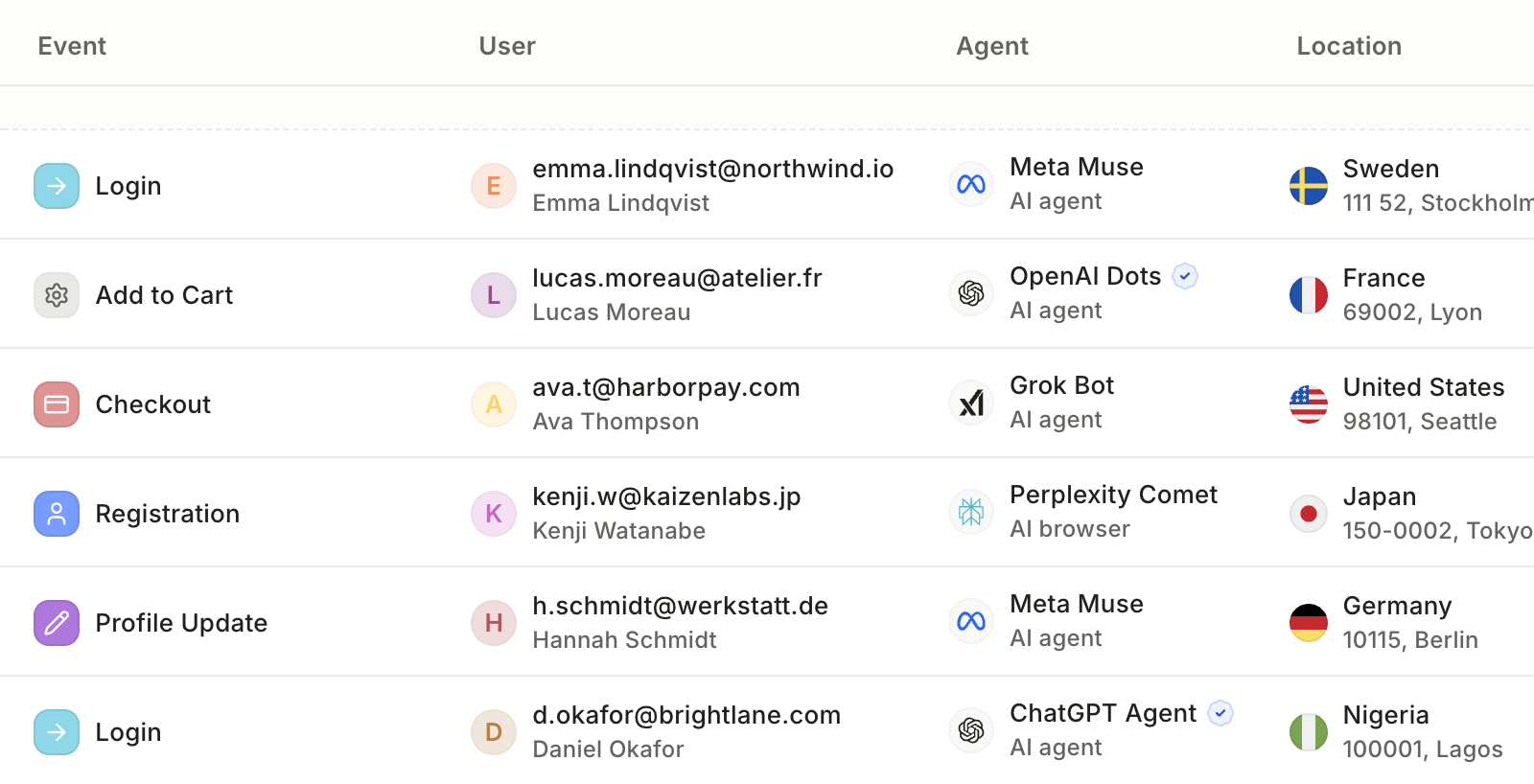
- Identifies named AI agents and browsers — including Meta Muse, OpenAI Dots, Grok Bot, ChatGPT agent, Instinct, and Perplexity Comet — using Web Bot Auth cryptographic signing, fingerprinting, and user-agent string analysis. announced · Oct 2026 · source · release history
-
Supports
categoryvaluesai_agent,ai_browser, andbrowser_automationto distinguish agent types in API responses. announced · Oct 2026 · source · release history -
Supports detection via verified Web Bot Auth signatures for AI agent identification.
 Identify AI agents · Oct 2026
· source
· release history
- Adds a new top-level object in Castle's response identifying AI agents and browser automation tools, including the agent's name, operator, category, and how it was identified.︀︄︇︀︅︉︀︅︀︀︃︀︀︅︅︀︅︊︀︄︆︀︃︄ Identify AI agents · Oct 2026 · source · release history
example
-
Inspect which AI agent triggered a Castle event — and how it was identified — to decide whether to allow, challenge, or block the request.
{ "agent": { "name": "ChatGPT agent", "operator": "openai", "category": "ai_agent", "identified_by": ["web_bot_auth"] } }announced · Oct 2026 · source
SDK version tracking shipped Centralizes SDK integration information and identifies outdated versions to ensure full detection model coverage.
release
-
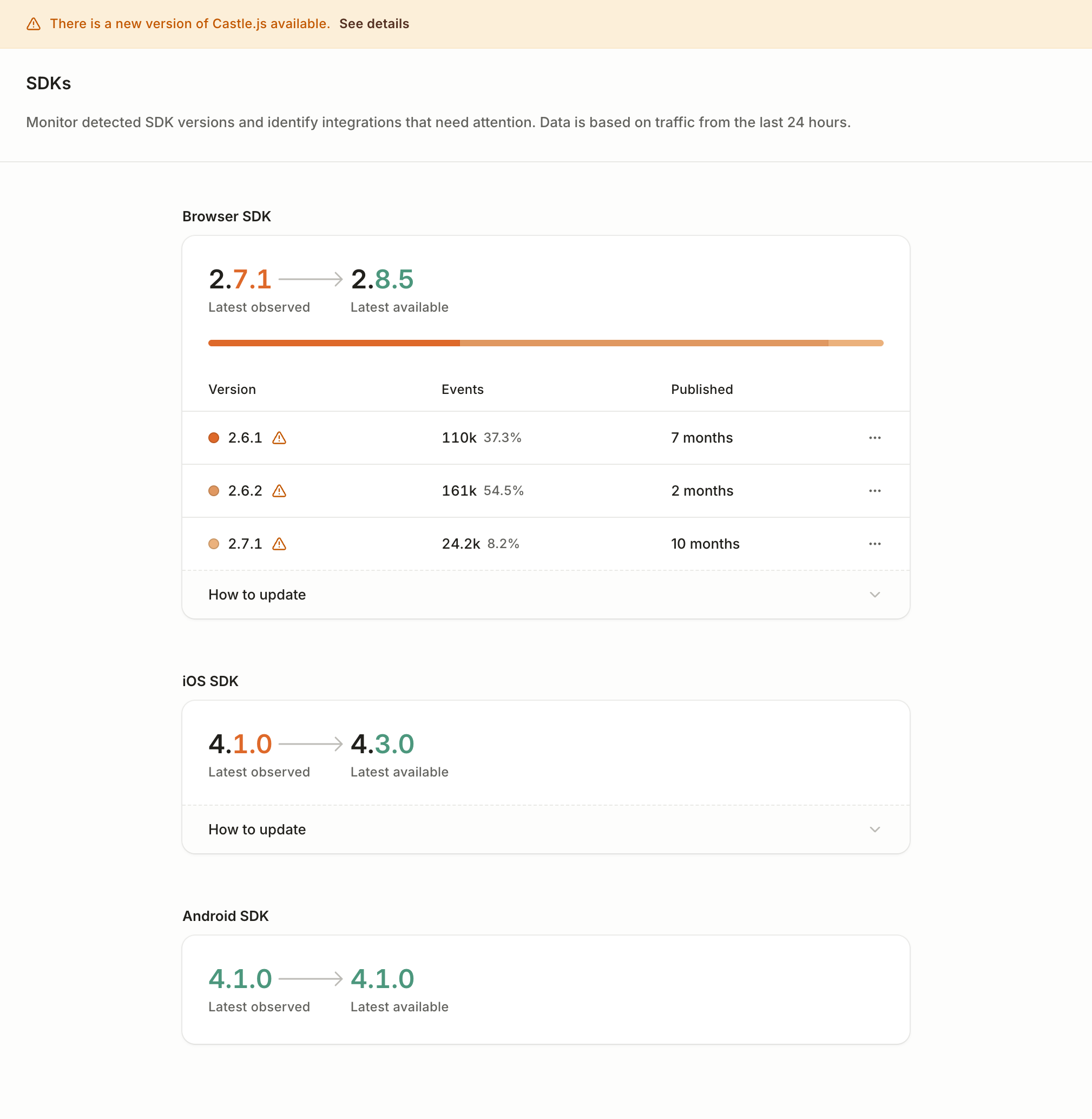
New SDKs page provides a centralized view of all SDK integrations, showing which are outdated so teams can quickly identify where to upgrade.
 SDKs page · Sep 2026
· source
· release history
example
-
Check which of your SDK integrations are behind the latest release to ensure full detection model coverage.
In the Castle dashboard, navigate to the SDKs page to see the version status of each integrated SDK and identify any that need updating.SDKs page · Sep 2026 · source
Lines in monospace are the tool's own words: help text
parsed from its source, or an endpoint from its API document. Under
release, a line is our summary of a dated release. Under
docs, it is quoted from the tool's own documentation or
website. Each links back to the source it came from.
Command line
1 command for Castle, each with where it came from. This tool has no source analysis yet, so there is no option reference and no captured run beside them.
No command matches.
Screenshots
From the release notes, newest first. Click one to see it full size.Score card
-
Shipping velocity releases a month, last 12 months
-
Documentation quality release-notes rubric, 0–100
-
Breaking-change discipline how rarely a release breaks users, and notice given
-
Maintenance risk quiet time against its own cadence, maintainers
-
Innovation & surface new capabilities, API and MCP surface
Five scores for Castle, each built from the releases, notes and API history this site tracks — and, on Researcher and Business, where it stands among every measured tool in its category and how that has moved.
Score cards are part of every paid plan.
See plans → Already subscribed? Sign in →Trajectory
Blank means never measured; nothing here is a filled-in zero.
Peer standings are included with Researcher and Business. See how this tool ranks against its competitors, using data we don't publish anywhere else.
See plans →Each score is 0–100 on a published rubric, derived from data this site already shows. A dimension we cannot measure says so — it is never scored 0 and never enters a rank.
How this is scored
- Shipping velocity — releases a month over the last 12 months, on a log scale where 16 a month scores 100. Needs 3 releases in the window.
- Documentation quality — the release-notes rubric published on the analytics page, unchanged.
- Breaking-change discipline — the share of releases carrying a breaking change (none scores 100, half or more scores 0). Only projects that label breaking changes are measured: a clean record cannot be told from an unlabelled one.
- Maintenance risk — quiet time measured against the tool's own release cadence (quiet longer than 90 days and three typical gaps scores 0), plus the number of active maintainers and whether contributors are growing, where known. Higher is lower risk.
- Innovation & surface — new capabilities in the feature ledger this year, API and MCP operations added, and the share of commits that are features: the mean of whichever we hold.
- Community health (open-source tools only) — each is a direction, not a size: contributors this year against last, the bus factor now against a year ago, and issues closed per issue opened, where steady scores 50, doubled 100 and halved 0; plus the median time to a maintainer's first reply (an hour scores about 100, a month or more 0). A commercial card has no repository and carries none of the four.
- Documented delivery (commercial tools) — when a vendor's documented new capabilities have slowed against its own baseline, that counts against the overall standing as heavily as two low dimensions. Steady delivery, or too little history to judge, leaves the standing alone; it is never a sixth score.
- Open-source tools are scored on repository signals; commercial tools on their published changelog. Ranks compare tools within one category and one profile and need at least five measured peers; the overall standing needs three ranked dimensions. Best-in-breed or consolidator is a shape, not a quality, and is never scored.
Release-note detail over time
See how much detail Castle puts in its release notes, quarter by quarter, and compare it with tracked tools in the same category. This history uses up to ten retained, reviewed notes per tool; sparse or blank older quarters may reflect that limit.
Checking release-note history…
Releases
23 entries
No entries match these filters.
- October 20262
- September 20261
- August 20263
- July 202612
- June 20263
- May 20261
- April 20261
Add the badge to your README
Maintain this project? The badge links readers straight to this page, so they can follow every release here.
 Choose a badge style and copy the code →