Conveyor
changelog-20261012-2c72fcf5 commercialThe section your link pointed to isn't on Conveyor's page any more, so we've brought you to the top.
Conveyor delivers AI for high-stakes customer requests like security reviews, vendor assessments, and requests for proposal (RFP).
curl -X GET 'https://app.conveyor.com/api/v2/exchange/gate_document_signatures/<gate_document_signature_id>' \
  -H 'Authorization: Bearer <api_token>'
curl -H "Authorization: Bearer <your_api_key>" "https://app.conveyor.com/api/v2/vendor_subscriptions"
Summary
Conveyor is a commercial third-party-risk platform run as a SaaSSaaSSoftware delivered over the internet and run on the provider's infrastructure, so the buyer pays a subscription instead of installing or operating anything locally. service, used to manage security questionnaires, Trust Center access, and compliance documentation exchanged with customers and vendors. It's built for trust, security, and sales teams who handle inbound due-diligence requests rather than for engineers securing infrastructure. Capabilities span generating self-dating bridge letters for SOCSOCA security operations center, the team or function that monitors threats, investigates alerts and coordinates incident response. Its work can be internal, outsourced or shared. coverage gaps, auto-approving Trust Center access through an Ironclad contract match, routing unanswered questionnaire items to the right SME group, and syncing knowledge bases from Google Drive or SharePoint so ConveyorAI answers stay current. An AI Connector exposes questionnaire data and approved answers to Claude, ChatGPT, Gemini, and other MCPMCPModel Context Protocol, a standard for connecting AI applications to external tools and data sources. A compatible server exposes capabilities an assistant can use through a common interface.-compatible assistants, with permissions preserved per user. Recent release history shows 18 releases in the tracked window, indicating active, ongoing development.
Conveyor delivers AI for high-stakes customer requests like security reviews, vendor assessments, and requests for proposal (RFP).
How Conveyor helps
Which questionnaire questions have gone unanswered long enough to put a deal at risk?
flags unassigned or unanswered items and routes them automatically to the matched SME group such as Legal or Product, notifying that team regardless of whether the questionnaire arrived via Salesforce, Slack, or direct submission
Does this requester already have a signed contract that should waive our standard NDA gate?
checks the requester's email or domain against Ironclad contract records and auto-approves Trust Center access when a match is found, writing the signed NDA back to Ironclad as a new record
Which bridge letters are stale and need re-signing for a SOC coverage gap?
generates a fresh, signed, and dated letter from a template automatically each time a visitor downloads it, so the document is never out of date
Can a questionnaire be closed out without an analyst reviewing it?
checks each submission against configured thresholds like minimum answered rate and no flagged items, then returns it to the source system automatically when it qualifies
Are ConveyorAI's answers on sensitive topics safe to send to a customer unreviewed?
applies per-topic guardrails set by Knowledge Editors or Admins that force verbatim answers, restrict sourcing, or flag the response whenever a defined legal or financial topic comes up
Is the compliance answer an AI assistant just gave pulled from an outdated policy document?
draws from the live synced version of the document in Google Drive or SharePoint rather than a previously exported copy, so answers reflect the current file automatically
Languages
Features
Built from Conveyor's releases, docs, README and our own runs. “Seen” marks the month we first spotted a release the vendor didn't date. Group names and tags are our labels.
What Conveyor offers you
- MCP server2
- REST API2
- Built-in AI assistant1
- Natural-language query1
- Scripting API1
- Web management console1
No capabilities match.
Trust Center management 4 capabilities Conveyor's Trust Center is where prospects and customers access security information, request documents, and sign NDAs. These capabilities cover how admins build, gate, and maintain that public-facing experience.
Trust Center draft and preview mode shipped Admins can stage and preview Trust Center changes privately before publishing them to the live site.
release 35 total
-
Tracks document previews and downloads as separate actions in Trust Center analytics and reporting, replacing the previous behavior where previewing a PDF counted as a download.︀︄︇︀︅︉︀︅︀︀︃︀︀︅︅︀︅︊︀︄︆︀︃︄
 🔧 Small Upgrades: Legacy Role Guidance, Preview vs Download Analytics, NDA Alerts in Slack · Sep 2026
· source
· release history
- Access to the new endpoint and MCP tool is governed by the Trust Center Designer permission set. 🔌 Trust Center Feedback Data Now in the API and MCP · seen Aug 2026 · source · release history
- Adds draft mode for Trust Center: stage layout and content changes privately, preview with a shareable link, and publish without touching the live site. 📝 Draft Changes to Your Trust Center Before They Go Live · seen Jul 2026 · source · release history
- Updates the Announcements workflow in the Trust Center UI to allow setting a specific date and time for subscriber notifications. 📣 Send Trust Center Announcements the Moment You Post · Jul 2026 · source · release history
- Enables users to choose between immediate sending and scheduled timing when posting an announcement in the Trust Center. 📣 Send Trust Center Announcements the Moment You Post · Jul 2026 · source · release history
- Connects multiple intake questionnaires sources (such as Salesforce and Jira) to a single organization for unified triage. 📥 Intake Questionnaires from Multiple Sources at Once · Jun 2026 · source · release history
example
-
Preview and publish Trust Center changes without taking the live site offline.
In the Trust Center designer, open your Trust Center, select 'Create a draft', make layout or content changes, share the preview link for internal review, then publish when ready.📝 Draft Changes to Your Trust Center Before They Go Live · seen Jul 2026 · source
Smart Documents shipped Admins create templated documents that Conveyor auto-generates with a current date and signature each time a visitor downloads them.
release
- Built-in preview lets admins verify the generated output before making a Smart Document live. 📄 Auto-Generate Bridge Letters in Your Trust Center with Smart Documents · seen Jul 2026 · source · release history
- Adds Smart Documents: admins create a template with a date placeholder and Conveyor auto-generates a fresh, signed, and dated bridge letter each time a visitor downloads it. 📄 Auto-Generate Bridge Letters in Your Trust Center with Smart Documents · seen Jul 2026 · source · release history
- Supports folder organization, access controls, and other existing document settings for Smart Documents. 📄 Auto-Generate Bridge Letters in Your Trust Center with Smart Documents · seen Jul 2026 · source · release history
-
Enables template-based document creation with date placeholders, previewing, and standard folder/access controls.
📄 Auto-Generate Bridge Letters in Your Trust Center with Smart Documents · Jul 2026
· source
· release history
- Fine-grained permissions allowing API keys scoped to specific resources and actions Conveyor updates: 2026-05-26 · May 2026 · source · release history
example
-
Set up a bridge letter that self-dates on every download, eliminating manual paperwork for SOC 1/SOC 2 coverage gaps.
In the Trust Center console, go to Documents > Add Documents, then select 'Smart Document', paste your bridge letter template with a date placeholder, and save.📄 Auto-Generate Bridge Letters in Your Trust Center with Smart Documents · seen Jul 2026 · source
Signed NDA PDF retrieval shipped Signed NDA PDFs and their signature records can be retrieved automatically via API for use in external systems.
Also counts toward: Scripting API
release
-
New
GET /api/v2/exchange/gate_document_signatures/{id}endpoint returns a signature record and a one-hour temporary download link for signed NDA PDFs, enabling automated retrieval into external systems. 📄 Download Signed NDAs Through the API · seen Jul 2026 · source · release history -
Adds
GET /api/v2/exchange/gate_document_signatures/{id}endpoint that returns a temporary link to download the signed NDA as a PDF.
Conveyor updates: 2026-07-28 · Jul 2026
· source
· release history
example
-
Pull a signed NDA PDF download link into your system after an authorization is completed — requires enabling the Signed Documents permission under Settings > Integrations > API Keys > Edit permissions first.
curl -X GET 'https://app.conveyor.com/api/v2/exchange/gate_document_signatures/<gate_document_signature_id>' \ -H 'Authorization: Bearer <api_token>'📄 Download Signed NDAs Through the API · seen Jul 2026 · source
Trust Center subscriber management shipped Teams can view and audit the full list of subscribers receiving subprocessor change notifications through the UI or API.
Also counts toward: REST API
release
-
New
GET /api/v2/vendor_subscriptionsendpoint exposes the full list of subscribers receiving Trust Center subprocessor change notifications.
🔍 Search Your Knowledge Library and See Your Trust Center Subscribers via API · seen Jul 2026
· source
· release history
-
Adds
GET /api/v2/vendor_subscriptionsto list subscribers of Trust Center subprocessor change notifications 🔍 Search Your Knowledge Library and See Your Trust Center Subscribers via API · Jul 2026 · source · release history
example
-
Retrieve the full list of Trust Center subscribers to audit who will be notified when your subprocessor list changes.
curl -H "Authorization: Bearer <your_api_key>" "https://app.conveyor.com/api/v2/vendor_subscriptions"🔍 Search Your Knowledge Library and See Your Trust Center Subscribers via API · seen Jul 2026 · source
Questionnaire automation 4 capabilities Conveyor helps security and trust teams complete incoming security questionnaires faster by routing them to the right people and returning finished responses without manual intervention. These capabilities reduce the time analysts spend on triage and sign-off.
Questionnaires API shipped Questions can be assigned to individual users or teams and answers written or updated through the API, with a full edit history kept.
release 18 total
-
Adds end-to-end translation workflow for non-English Word questionnaires: import, work in English, then export in the original language or English via the Questionnaires module.︀︄︇︀︅︉︀︅︀︀︃︀︀︅︅︀︅︊︀︄︆︀︃︄
🌐 Work on Non-English Word Questionnaires in English · Sep 2026
· source
· release history
- Supports importing non-English Word questionnaires with automatic English translation for review. 🌐 Work on Non-English Word Questionnaires in English · Sep 2026 · source · release history
- Assigns questions to individual users or teams via the v2 questionnaires API, individually or in bulk. 🔌 Assign Questions and Write Answers Through the API · seen Jul 2026 · source · release history
- Writes and updates questionnaire answers through a new API endpoint, with full edit history preserved. 🔌 Assign Questions and Write Answers Through the API · seen Jul 2026 · source · release history
-
The
v2 questionnaires APInow exposes new endpoints for assigning questions to users or teams in bulk 🔌 Assign Questions and Write Answers Through the API · Jun 2026 · source · release history - Adds v2 questionnaires API endpoints to assign questions to users or teams in bulk and write/update answers, requiring the Questionnaires and Questionnaire Requests write permission Conveyor updates: 2026-06-29 · Jun 2026 · source · release history
example
-
When you receive a security questionnaire in a foreign language, import it through the Questionnaires module to work on it entirely in English, then export back in the original language for the requester.
1. Go to the Questionnaires module. 2. Upload your non-English Word questionnaire as you normally would. 3. Review and answer all questions in the English-translated view. 4.🌐 Work on Non-English Word Questionnaires in English · Sep 2026 · source -
Enable the required API permission before making calls to the new endpoint.
In the console, go to Settings > Integrations > API Keys > Edit permissions and enable 'Signed Documents'.📄 Download Signed NDAs Through the API · seen Jul 2026 · source
Intake questionnaire auto-return shipped Completed questionnaires are sent back to their source system automatically when configurable criteria are met, removing the need for an analyst to manually approve and return them.
release
-
Enables the Slack approval workflow per program under Settings > Self-Serve via Slack for existing customers.
💬 Approve Questionnaire Answers Straight from Slack · Sep 2026
· source
· release history
- Adds Slack-native questionnaire review: assigned reviewers receive a rich Slack notification with the draft answer and buttons to approve or edit in-channel, with the result synced back to Conveyor.︀︄︇︀︅︉︀︅︀︀︃︀︀︅︅︀︅︊︀︄︆︀︃︄ 💬 Approve Questionnaire Answers Straight from Slack · Sep 2026 · source · release history
- Adds Slack notifications with approve/edit buttons when a reviewer is assigned to a questionnaire item 💬 Approve Questionnaire Answers Straight from Slack · Sep 2026 · source · release history
- Portal questionnaires that pass auto-complete criteria now automatically export answers back into the portal, eliminating the manual Export step — enabled via Check auto-complete rules under Post answering in Settings > Sales Self-Serve > Automation Rules. 🤖 Portals Now Auto-Export When Answers Meet Your Auto-Complete Rules · seen Aug 2026 · source · release history
- Adds auto-return for Intake questionnaires: set criteria such as minimum answered rate or no flagged/unanswered questions, and Conveyor returns the questionnaire to the source system without manual review. 🤖 Auto-Return Completed Questionnaires, No Human Touch Required · seen Jul 2026 · source · release history
- Adds auto-return capability to the Intake workflow for questionnaires meeting defined criteria 🤖 Auto-Return Completed Questionnaires, No Human Touch Required · Jun 2026 · source · release history
example
-
Eliminate analyst sign-off on already-complete questionnaires by configuring auto-return thresholds in your Intake workflow.
In the Conveyor console, go to your Intake workflow settings and set your return criteria (e.g., minimum answered rate, no flagged or unanswered questions) to enable automatic return.🤖 Auto-Return Completed Questionnaires, No Human Touch Required · seen Jul 2026 · source
Automatic SME group routing shipped Incoming questionnaires are automatically assigned to the right subject-matter-expert group across all intake sources so no question sits in a queue waiting for manual triage.
release
- Automatic SME group assignment now works for questionnaires arriving via Salesforce, Slack, or direct team submission. 🎯 Auto-Assign Questions to the Right SME Group on Every Questionnaire · seen Aug 2026 · source · release history
- Expands the Assign the suggested group automatically setting in Settings > Workflow Automation > Team Routing to cover all questionnaire types, not just intake questionnaires — unanswered or flagged questions are automatically routed to the matched SME group (e.g. Legal, Product) and that group is notified. 🎯 Auto-Assign Questions to the Right SME Group on Every Questionnaire · seen Aug 2026 · source · release history
example
-
Enable automatic SME routing for all incoming questionnaires so no question stalls waiting for manual triage.
In the Conveyor console, go to Settings > Workflow Automation > Team Routing, configure your SME groups, then enable 'Assign the suggested group automatically'.🎯 Auto-Assign Questions to the Right SME Group on Every Questionnaire · seen Aug 2026 · source -
Enable automatic routing for non-intake questionnaires via the Settings UI.
In Settings, go to Workflow Automation > Team Routing and toggle on 'Assign the suggested group automatically'.🎯 Auto-Assign Questions to the Right SME Group on Every Questionnaire · Aug 2026 · source
MCP-exposed questionnaire workflows shipped AI agents can take part in questionnaire workflows directly by assigning questions and writing answers through the MCP interface.
Also counts toward: MCP server
release
-
Both endpoints are also available as MCP tools, allowing agents connected via the Conveyor AI Connector to call them directly.
🔍 Search Your Knowledge Library and See Your Trust Center Subscribers via API · seen Jul 2026
· source
· release history
- Exposes questionnaire assignment and answer-writing through the MCP interface for AI agent workflows (e.g., Claude). 🔌 Assign Questions and Write Answers Through the API · seen Jul 2026 · source · release history
-
Adds
OAuth 2.1sign-in support for the Conveyor MCP Server alongside existing API keys Conveyor updates: 2026-05-26 · May 2026 · source · release history
AI-assisted knowledge and answering 5 capabilities ConveyorAI draws on the organisation's curated knowledge base to draft and return answers to security questions. These capabilities let teams control how the AI behaves, improve its accuracy over time, and expose it to external AI tools.
Knowledge base search API shipped A keyword search API lets agents and integrations pull from curated Q&As and past questionnaire answers to reuse approved language.
Also counts toward: REST API
release 14 total
-
New
GET /api/v2/knowledge_base/searchendpoint enables keyword search across curated Q&As and past questionnaire answers, letting agents pull from existing approved language.
🔍 Search Your Knowledge Library and See Your Trust Center Subscribers via API · seen Jul 2026
· source
· release history
-
Adds
GET /api/v2/knowledge_base/searchto run keyword searches across curated Q&As and past questionnaire answers 🔍 Search Your Knowledge Library and See Your Trust Center Subscribers via API · Jul 2026 · source · release history - Automated post-visit email surveys extend feedback loops beyond active sessions by following up with approved visitors. Visitor Feedback: Post-Visit Email Surveys · Mar 2026 · source · release history
- Adds an in-app visitor feedback feature allowing rating (1-5) and optional comments from the Trust Center header. Visitor Feedback · Feb 2026 · source · release history
- Default Q&A prompt no longer forces word-for-word reuse of context Shorter, More Concise Default Answers · Dec 2025 · source · release history
- Allows users to choose whether to overwrite existing answers with AI or keep imported answers Better Handling of Questionnaires that Contain Pre-filled Answers · Dec 2025 · source · release history
SharePoint knowledge base integration shipped SharePoint documents and folders sync into Conveyor as a live knowledge source, including new files and nested subfolders, so ConveyorAI answers draw on current policy documents.
release
- ConveyorAI answers draw from the live SharePoint version of a policy document rather than a stale exported copy, keeping compliance responses current without manual re-uploads. 🔗 New Integration: Sync SharePoint Docs Into Your Knowledge Base · seen Aug 2026 · source · release history
- Adds Microsoft SharePoint as a knowledge base integration, syncing documents and folders into Conveyor the same way Google Drive already does — including automatic ingestion of new files and nested subfolders for folder-level syncs. 🔗 New Integration: Sync SharePoint Docs Into Your Knowledge Base · seen Aug 2026 · source · release history
-
Adds Microsoft SharePoint integration to sync documents and folders into the Conveyor knowledge base.
🔗 New Integration: Sync SharePoint Docs Into Your Knowledge Base · Aug 2026
· source
· release history
- Import Notion pages into the knowledge base. Import Notion Content as an AI Source · Jul 2025 · source · release history
- Adds the ability to select individual Confluence pages when adding content to the knowledge base in ConveyorAI May Roundup · May 2025 · source · release history
example
-
Connect SharePoint so updated compliance policies are automatically reflected in ConveyorAI answers.
In Conveyor, go to Integration Settings > Add Integration > SharePoint, then choose a folder to sync — new files added to that folder (including nested subfolders) will be pulled in automatically.🔗 New Integration: Sync SharePoint Docs Into Your Knowledge Base · seen Aug 2026 · source
AI Connector shipped Conveyor connects to Claude, ChatGPT, Gemini, and any MCP-compatible AI assistant so users can query security answers and update knowledge directly from their AI tool while respecting Conveyor permissions.
Also counts toward: Natural-language query
release
- New AI Connector integrates Conveyor with Claude, ChatGPT, Gemini, and any MCP-compatible AI assistant via a custom connector endpoint. 🤖 Bring Your Customer Trust Program To Any AI Assistant with the AI Connector · seen Jul 2026 · source · release history
- Enables sales and trust teams to query approved security answers, pull analytics, and update knowledge in plain language directly from their AI tool. 🤖 Bring Your Customer Trust Program To Any AI Assistant with the AI Connector · seen Jul 2026 · source · release history
- Preserves per-user Conveyor permissions through OAuth, so the AI assistant only surfaces data each user is already authorized to see. 🤖 Bring Your Customer Trust Program To Any AI Assistant with the AI Connector · seen Jul 2026 · source · release history
-
mcp.conveyor.com/mcpendpoint allows integration of Conveyor's trust program data into any MCP-compatible AI assistant including Claude and ChatGPT.
🤖 Bring Your Customer Trust Program To Any AI Assistant with the AI Connector · Jul 2026
· source
· release history
example
-
Connect Conveyor to your MCP-compatible AI assistant so sales can self-serve approved security answers without leaving their AI tool.
Add https://mcp.conveyor.com/mcp as a custom connector in your AI assistant (Claude, ChatGPT, Gemini, etc.) and authenticate via OAuth with your Conveyor credentials.🤖 Bring Your Customer Trust Program To Any AI Assistant with the AI Connector · seen Jul 2026 · source
ConveyorAI topic guardrails and preferences shipped Admins and Knowledge Editors set per-topic rules that govern how ConveyorAI responds, including blocking generic answers on sensitive subjects like legal or financial topics.
previously: ConveyorAI topic guardrails
release
- New Topic Preferences feature lets Knowledge Editors, Admins, and Superadmins define per-topic guardrails for ConveyorAI, with actions such as answering verbatim, using specified sources, or flagging whenever a topic surfaces. 🛡️ Topic Preferences: Set Guardrails for How ConveyorAI Answers Sensitive Topics · seen Jul 2026 · source · release history
-
Adds a new Topics section in the Knowledge Library to create and manage Topic Preferences.
🛡️ Topic Preferences: Set Guardrails for How ConveyorAI Answers Sensitive Topics · Jun 2026
· source
· release history
- Users can still enable verbatim wording via custom prompts Shorter, More Concise Default Answers · Dec 2025 · source · release history
example
-
Restrict ConveyorAI from giving generic answers on legal or financial topics by creating a guardrailed topic that flags or overrides responses whenever those subjects come up.
In the Conveyor console, go to Knowledge Library > Topics and click Create Topic.🛡️ Topic Preferences: Set Guardrails for How ConveyorAI Answers Sensitive Topics · seen Jul 2026 · source
Ask ConveyorAI shipped Users can provide detailed downvote feedback on any ConveyorAI answer to generate finer-grained quality signals for improvement.
previously: ConveyorAI answer feedback
release
- Richer downvote feedback is now available on any ConveyorAI answer, independent of Topic Preferences, enabling more granular quality signals. 🛡️ Topic Preferences: Set Guardrails for How ConveyorAI Answers Sensitive Topics · seen Jul 2026 · source · release history
Integrations and API access 2 capabilities Conveyor connects to contract systems, CRMs, and external platforms so data flows between tools without manual copying. These capabilities let buyers embed Conveyor into existing workflows through both native integrations and open APIs.
Ironclad contract integration shipped Conveyor connects to Ironclad so that NDA gates are checked against existing contract records and signed NDAs are written back to Ironclad with their PDFs attached.
release 15 total
-
Sends a Slack message when a visitor signs your NDA, surfacing the buying signal without requiring a manual app check.
🔧 Small Upgrades: Legacy Role Guidance, Preview vs Download Analytics, NDA Alerts in Slack · Sep 2026
· source
· release history
-
Enforces existing access groups, NDA gates, and gating rules against the authenticating visitor email even when access is agent-driven, preserving all existing access controls.
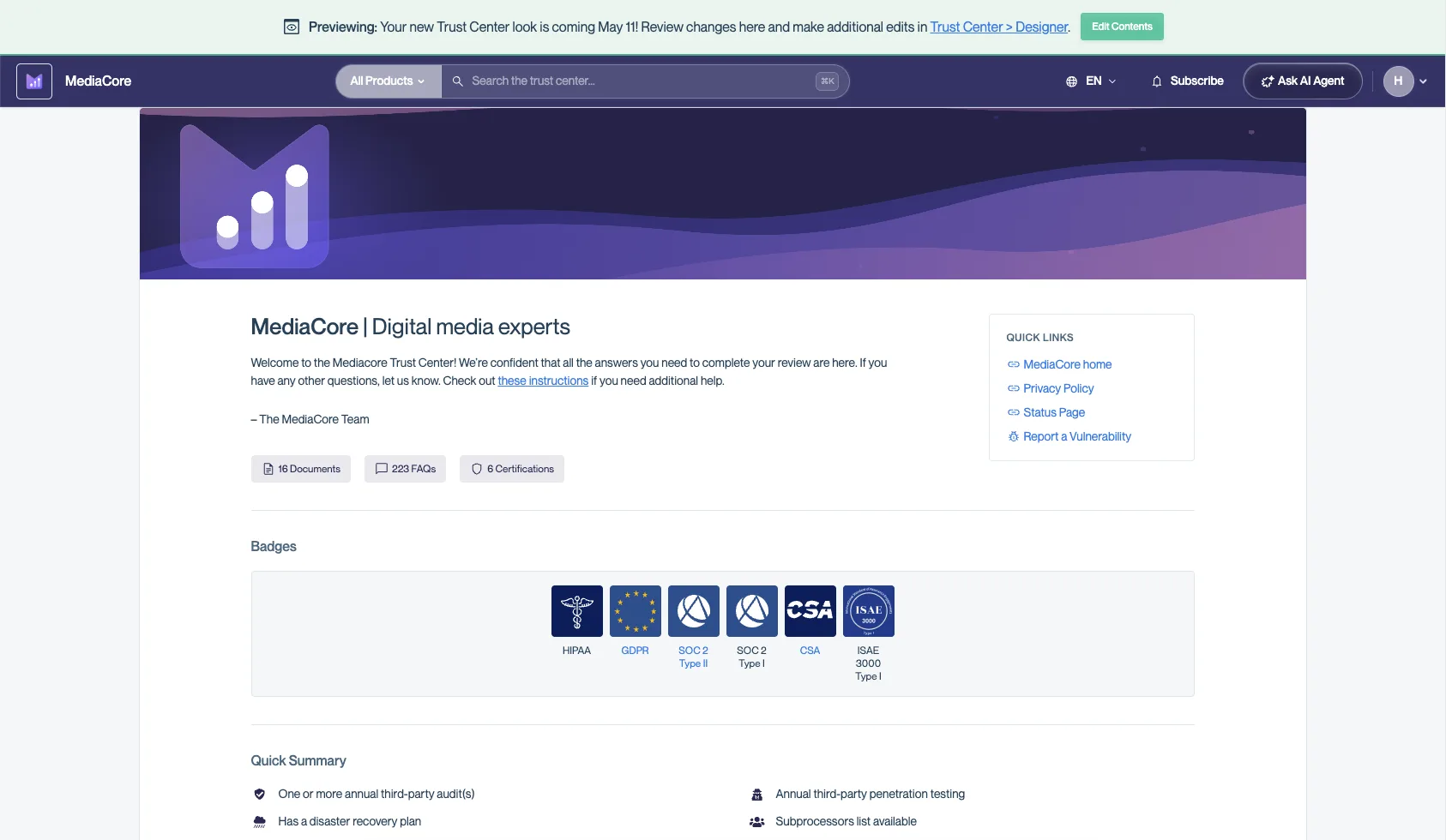 🤖 Trust Center AI Connector: Let Your Customers' AI Agents Run Their Own Vendor Review · seen Aug 2026
· source
· release history
- New Ironclad integration: auto-approve Trust Center access requests when a requester's email or domain matches an existing Ironclad contract record. 📜 New Integration: Automate Trust Center Access with Ironclad · seen Jul 2026 · source · release history
- Writes signed clickwrap NDAs back to Ironclad as new records with the PDF attached, keeping contract history in sync. 📜 New Integration: Automate Trust Center Access with Ironclad · seen Jul 2026 · source · release history
- Enables automatic NDA gate bypass for counterparties with a signed NDA already on file in Ironclad. 📜 New Integration: Automate Trust Center Access with Ironclad · seen Jul 2026 · source · release history
- Adds Ironclad integration to Trust Center to auto-approve access requests based on email/domain matches and write signed clickwrap NDAs back as records with PDF attachments Conveyor updates: 2026-06-29 · Jun 2026 · source · release history
example
-
Enable the Ironclad integration to start automating Trust Center access decisions based on existing contract records.
In the Conveyor console, go to Trust Center > Integration Settings and connect Ironclad.📜 New Integration: Automate Trust Center Access with Ironclad · seen Jul 2026 · source
One-click login token authentication shipped Login token emails include a button that opens Conveyor with the authentication code pre-filled, so users do not need to copy and paste it manually.
release
-
Adds a one-click button in login token emails that opens Conveyor with the authentication code pre-filled, removing manual copy-paste.
🔐 Refreshed Login and Sign Up, Now with One-Click Access from Email · seen Jul 2026
· source
· release history
- Refreshes login and sign-up UI pages with a one-click button in token emails that auto-fills the authentication code. Conveyor updates: 2026-07-28 · Jul 2026 · source · release history
- Adds a clickable button in login token emails that opens Conveyor with the authentication code already filled in 🔐 Refreshed Login and Sign Up, Now with One-Click Access from Email · Jul 2026 · source · release history
Administration and user management 1 capability These capabilities cover how organisations set up and manage Conveyor at scale, from registering all users under a single admin to controlling access across the platform.
Enterprise org-wide admin registration shipped A single admin setup can register and cover all users across an enterprise organisation without configuring each user separately.
release
-
Adds a banner and inline help links to the Roles page prompting admins to migrate users off legacy roles to customized roles.
🔧 Small Upgrades: Legacy Role Guidance, Preview vs Download Analytics, NDA Alerts in Slack · Sep 2026
· source
· release history
- Adds a banner and inline help links on the Roles page to guide migration from legacy roles. 🔧 Small Upgrades: Legacy Role Guidance, Preview vs Download Analytics, NDA Alerts in Slack · Sep 2026 · source · release history
- Supports org-wide admin registration for enterprise clients, allowing a single setup to cover all users. 🤖 Bring Your Customer Trust Program To Any AI Assistant with the AI Connector · seen Jul 2026 · source · release history
Other 9 capabilities
RFP and questionnaire collaboration platform shipped Provides a unified workspace for managing RFPs and security questionnaires with an agentic answering engine, end-to-end translation for non-English documents, and automated assignment to SME groups.
Also counts toward: Built-in AI assistant
release 14 total
- Introduces a unified proposal workspace that runs RFPs and security questionnaires from a single Conveyor knowledge base. 🏆 ConveyorAI for RFPs: The Whole Product, Rebuilt · Sep 2026 · source · release history
- Adds a rebuilt Word document experience with improved loading, parsing, and export for RFP proposals. 🏆 ConveyorAI for RFPs: The Whole Product, Rebuilt · Sep 2026 · source · release history
-
Adds an
agenticanswering engine for Proposal questions in RFP projects 🏆 ConveyorAI for RFPs: The Whole Product, Rebuilt · Sep 2026 · source · release history -
Enables existing customers to turn on per-program self-serve integration via Settings
💬 Approve Questionnaire Answers Straight from Slack · Sep 2026
· source
· release history
- Enables the new agentic answering engine for RFP projects via Settings > Answering > Custom Instructions.︀︄︇︀︅︉︀︅︀︀︃︀︀︅︅︀︅︊︀︄︆︀︃︄ 🏆 ConveyorAI for RFPs: The Whole Product, Rebuilt · Sep 2026 · source · release history
-
Enables security questionnaire teams to trial the agentic engine by creating a Test project (currently in Labs).︀︄︇︀︅︉︀︅︀︀︃︀︀︅︅︀︅︊︀︄︆︀︃︄
 🤖 New Agentic Answer Engine, Now Opt-In for Proposal Questions · Sep 2026
· source
· release history
example
-
Activate the new agentic answering engine so your team gets higher-quality, AI-driven answers on RFP proposal questions.
In the Conveyor console, go to Settings > Answering > Custom Instructions and enable the new agentic engine.🏆 ConveyorAI for RFPs: The Whole Product, Rebuilt · Sep 2026 · source -
Enable the new agentic response capability via UI navigation for RFP proposals.
In Settings, go to Answering > Custom Instructions and toggle on the agentic engine🏆 ConveyorAI for RFPs: The Whole Product, Rebuilt · Sep 2026 · source -
Switch your RFP projects to the deeper agentic pipeline to reduce weak answers on high-stakes proposals.
1. Log in as an Admin. 2. Go to Settings > Answering > Custom Instructions. 3. Open the pipeline dropdown and select 'Agentic'. 4. Save. All new proposal questions will now use the agentic pipeline.🤖 New Agentic Answer Engine, Now Opt-In for Proposal Questions · Sep 2026 · source
Dockable interface navigation shipped Adds a dockable navigation panel and an improved command palette to reclaim screen space and streamline product switching.
release 7 total
-
Rearranges Add Questionnaire and Add RFP buttons to be more prominent on the Launchpad
✨ Refreshed Launchpad: Jump back into your work in one click · Sep 2026
· source
· release history
- Adds Dockable nav to the main interface, allowing users to reclaim screen space by docking the navigation panel. 🧭 Easier wayfinding: Dockable nav, a simpler cmd+k, and Ask ConveyorAI · Sep 2026 · source · release history
- Adds a dockable navigation panel to reclaim screen space while working.︀︄︇︀︅︉︀︅︀︀︃︀︀︅︅︀︅︊︀︄︆︀︃︄ 🧭 Easier wayfinding: Dockable nav, a simpler cmd+k, and Ask ConveyorAI · Sep 2026 · source · release history
- Adds consistent headers and breadcrumbs across the app. 🧭 Easier wayfinding: Dockable nav, a simpler cmd+k, and Ask ConveyorAI · Sep 2026 · source · release history
-
Simplifies
cmd+kcommand palette layout and adds a products picker that matches the launchpad 🧭 Easier wayfinding: Dockable nav, a simpler cmd+k, and Ask ConveyorAI · Sep 2026 · source · release history -
Improves the
cmd+kcommand palette with a cleaner layout, a products picker matching the launchpad, and guidance in the empty state. 🧭 Easier wayfinding: Dockable nav, a simpler cmd+k, and Ask ConveyorAI · Sep 2026 · source · release history
example
-
Use the updated command palette to quickly switch products or search.
Press cmd+k, select a product from the picker, or type a query in the now-guided empty state.🧭 Easier wayfinding: Dockable nav, a simpler cmd+k, and Ask ConveyorAI · Sep 2026 · source -
Dock the navigation panel to maximize workspace area in the browser.
In the UI, locate the dock button on the nav sidebar and click it to dock the view.🧭 Easier wayfinding: Dockable nav, a simpler cmd+k, and Ask ConveyorAI · Sep 2026 · source -
Dock the navigation panel to give yourself more horizontal workspace when reviewing questionnaires or trust pages.
In the Conveyor app, click the pin/dock icon on the left navigation panel to lock it in place, then continue working without it collapsing on mouse-out.🧭 Easier wayfinding: Dockable nav, a simpler cmd+k, and Ask ConveyorAI · Sep 2026 · source
Slack-native questionnaire workflow shipped Enables the full intake, reviewing, and approval lifecycle for questionnaires within Slack, including context-aware AI follow-ups, automated delegation, and in-channel approval buttons.
release
-
Slack updates now include a message when a visitor signs your NDA
🔧 Small Upgrades: Legacy Role Guidance, Preview vs Download Analytics, NDA Alerts in Slack · Sep 2026
· source
· release history
- ConveyorAI retains full conversation history within a Slack thread so follow-up questions carry the product line and prior answers forward without restarting context — enabled by default for every Slack integration and can be turned off in Organization Settings. 💬 Follow-Up Questions in Slack Threads: Keep the Conversation Going · seen Aug 2026 · source · release history
- ConveyorAI remembers the full conversation in a Slack thread, allowing follow-ups to carry previous context 💬 Follow-Up Questions in Slack Threads: Keep the Conversation Going · Aug 2026 · source · release history
example
-
Existing customers turning on Slack approvals for a specific questionnaire program.
1. In Conveyor, go to Settings. 2. Select the questionnaire program you want to enable. 3. Open 'Self-Serve via Slack' and toggle the feature on. 4.💬 Approve Questionnaire Answers Straight from Slack · Sep 2026 · source -
Tune your Slack intake workflow — adjust which content is in scope, how many questions are handled, and what gets returned on completion — without waiting on support.
Go to Settings > Workflow Automation > Automation Rules, then edit Content In Scope, Number of Questions, Update Requests, Answer Status Check, or Return complete materials to source in place.⚙️ Edit Your Own Automation Rules, No Ticket Required · Sep 2026 · source -
Ask a contextual follow-up question within an existing ConveyorAI Slack thread without re-providing initial context.
In the Slack channel, type '@ConveyorAI what about in the EU?' continuing a previous prompt💬 Follow-Up Questions in Slack Threads: Keep the Conversation Going · Aug 2026 · source
Trust Center analytics and reporting shipped Provides API access to Trust Center feedback surveys and detailed tracking of document engagement metrics.
release
-
Preview and Download are tracked as separate actions in analytics and reporting
🔧 Small Upgrades: Legacy Role Guidance, Preview vs Download Analytics, NDA Alerts in Slack · Sep 2026
· source
· release history
- Exposes Trust Center feedback data as an MCP tool so AI agents can read survey responses directly. 🔌 Trust Center Feedback Data Now in the API and MCP · seen Aug 2026 · source · release history
-
Adds
GET /api/v2/trust_center/feedbacksendpoint returning Trust Center survey responses, including ratings, comments, and source, with filtering by source, rating, and date range plus standard pagination. 🔌 Trust Center Feedback Data Now in the API and MCP · seen Aug 2026 · source · release history -
Logs every agent login, document access, and question the same as a human visit, and supports scheduled reassessments by the customer's agent.
🤖 Trust Center AI Connector: Let Your Customers' AI Agents Run Their Own Vendor Review · seen Aug 2026
· source
· release history
-
Adds
GET /api/v2/trust_center/feedbacksendpoint to retrieve survey responses with filtering by source, rating, and date range Conveyor updates: 2026-08-14 · Aug 2026 · source · release history - Enables Visitor Feedback collection via Trust Center → Designer → Visitor Feedback Conveyor updates: 2026-02-27 · Feb 2026 · source · release history
Customizable access request form shipped Allows admins to edit the description and placeholder text of the Trust Center access request form to collect custom information from visitors.
release
-
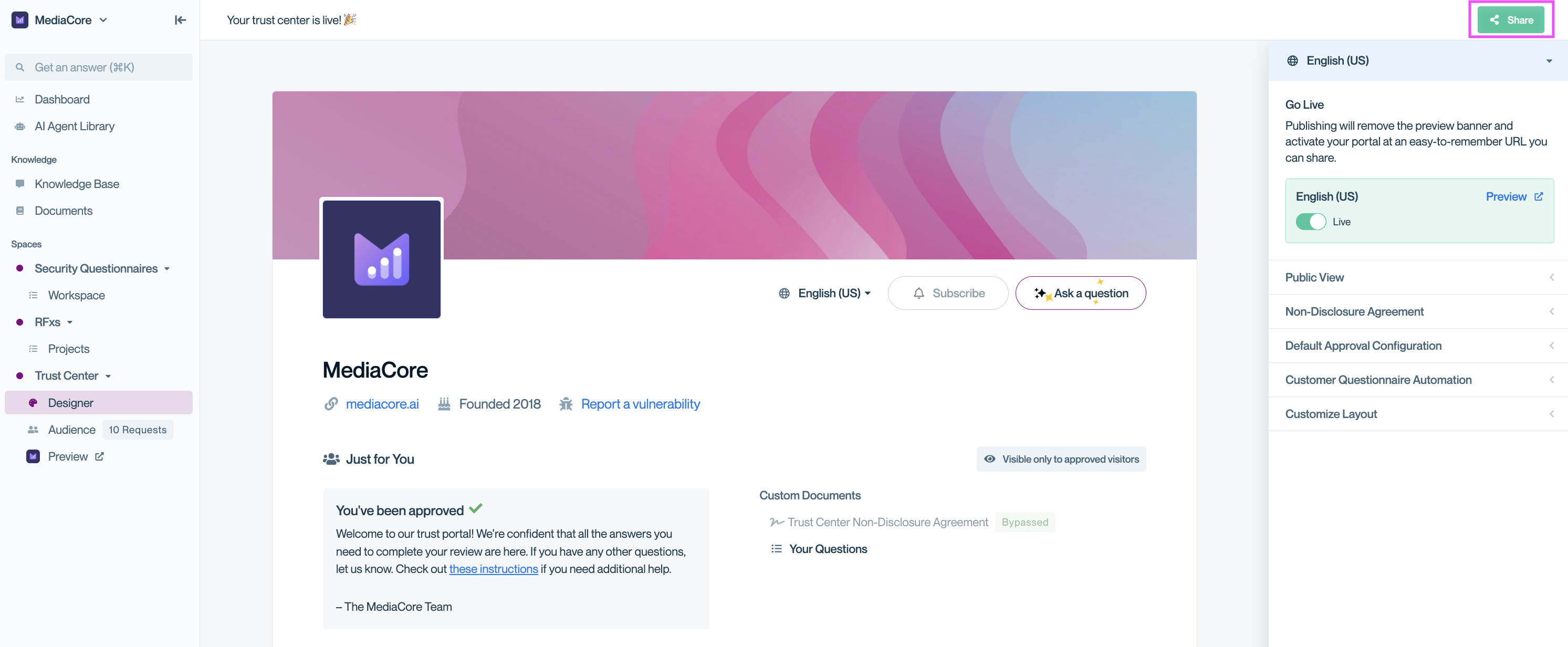
Enables rewriting the access request form's description and placeholder text to collect custom information from visitors upfront.
 🏷️ Product lines on the Trust Center access request form: Know what visitors want before you approve · Sep 2026
· source
· release history
- Adds product line selection to the Trust Center access request form 🏷️ Product lines on the Trust Center access request form: Know what visitors want before you approve · Sep 2026 · source · release history
- Enables opt-in product line display via Settings > Trust Center > NDA & Access. 🏷️ Product lines on the Trust Center access request form: Know what visitors want before you approve · Sep 2026 · source · release history
-
Supports markdown in custom legal text.
📄 Customize the Legal Text Visitors See on Your Trust Center · Jun 2026
· source
· release history
example
-
Enable product lines on the public-facing Access Request Form via Settings.
In the console, go to Settings > Trust Center > NDA & Access and enable Product Lines.🏷️ Product lines on the Trust Center access request form: Know what visitors want before you approve · Sep 2026 · source
Trust Center Agent shipped Enables AI-driven questionnaire answering and company philosophy queries directly within the Trust Center, automatically drawing from Knowledge Library and Trust Center sections like Subprocessors and Certifications.
Also counts toward: MCP server
release
-
Adds a new MCP server for Trust Centers, enabled via the Enable visitors to connect via MCP toggle in Settings > Trust Center > Trust Center Agent, letting visitor AI agents pull documents and ask questions without human involvement.
🤖 Trust Center AI Connector: Let Your Customers' AI Agents Run Their Own Vendor Review · seen Aug 2026
· source
· release history
-
Adds a new MCP server for the Trust Center, enabling customer AI agents to programmatically pull documents and answer questions
Conveyor updates: 2026-08-17 · Aug 2026
· source
· release history
- Visitors can now get answers about company philosophy and security certifications directly from the agent instead of seeing blank responses. Trust Center Agent: Expanded Knowledge Sources · Feb 2026 · source · release history
- Adds Trust Center Agent to automatically analyze uploaded security questionnaires and generate answers from your Knowledge Library without requiring additional credits Touchless Questionnaires are Here · Jan 2026 · source · release history
example
-
Enable the MCP server so your customers' AI agents can programmatically run vendor risk reviews against your Trust Center.
In the Conveyor console, go to Settings > Trust Center > Trust Center Agent and flip on 'Enable visitors to connect via MCP'.🤖 Trust Center AI Connector: Let Your Customers' AI Agents Run Their Own Vendor Review · seen Aug 2026 · source
AI answer audit and tracing shipped Provides tools for security teams to review, verify, and step through the reasoning and source matching behind ConveyorAI-generated answers before they are sent.
release
-
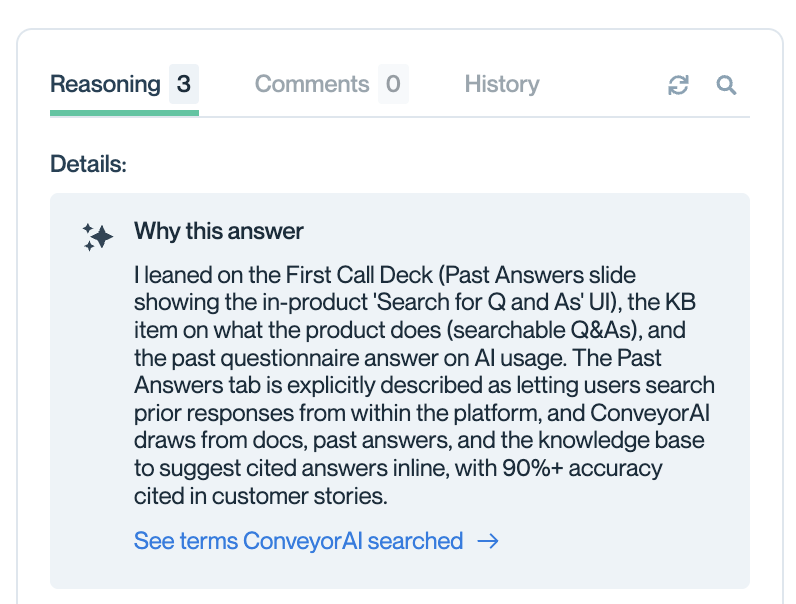
Adds an How this answer was put together audit panel in Cmd+K to review which knowledge the agent used and how it reached its answer after the fact.
changelog · Oct 2026
· source
· release history
- Adds live step-by-step reasoning display to Cmd+K ConveyorAI agentic search, showing matched sources, narrowing logic, and answer drafting in real time.︀︄︇︀︅︉︀︅︀︀︃︀︀︅︅︀︅︊︀︄︆︀︃︄ changelog · Oct 2026 · source · release history
example
-
Audit an AI-generated answer to a vendor security question — useful when validating that the agent pulled from the right knowledge sources before sending a response.
1. Press Cmd+K to open ConveyorAI search. 2. Type your security question and select the agentic search mode. 3.changelog · Oct 2026 · source
Questionnaire review and approval automation shipped Allows admins to edit automation rule settings such as content scope, answer status checks, and return targets directly via the UI without filing a support request.
Also counts toward: Web management console
release
-
Enables admins to edit automation rule settings — including Content In Scope, Number of Questions, Update Requests, Answer Status Check, and Return complete materials to source — directly on the Automation Rules page without filing a support request.︀︄︇︀︅︉︀︅︀︀︃︀︀︅︅︀︅︊︀︄︆︀︃︄
⚙️ Edit Your Own Automation Rules, No Ticket Required · Sep 2026
· source
· release history
- Admins can now edit automation rule settings themselves via a toggle on the Automation Rules page, including Content In Scope, Number of Questions, Update Requests, Answer Status Check, and Return complete materials to source. Conveyor updates: 2026-09-02 · Sep 2026 · source · release history
Trust Center responsive rendering shipped Enables the Trust Center to adapt to mobile and tablet screens, ensuring full layout functionality and access across all device types.
release
-
Trust Center now supports proper mobile rendering for responsive access across devices.
Conveyor updates: 2026-05-13 · May 2026
· source
· release history
- Adds proper mobile support to the redesigned Trust Center landing experience 💅 Trust Center Glow Up: A cleaner, more self-serve experience · May 2026 · source · release history
Lines in monospace are the tool's own words: help text
parsed from its source, or an endpoint from its API document. Under
release, a line is our summary of a dated release. Under
docs, it is quoted from the tool's own documentation or
website. Each links back to the source it came from.
Command line
1 command for Conveyor, each with where it came from. This tool has no source analysis yet, so there is no option reference and no captured run beside them.
No command matches.
Screenshots
From the release notes, newest first. Click one to see it full size.Score card
-
Shipping velocity releases a month, last 12 months
-
Documentation quality release-notes rubric, 0–100
-
Breaking-change discipline how rarely a release breaks users, and notice given
-
Maintenance risk quiet time against its own cadence, maintainers
-
Innovation & surface new capabilities, API and MCP surface
Five scores for Conveyor, each built from the releases, notes and API history this site tracks — and, on Researcher and Business, where it stands among every measured tool in its category and how that has moved.
Score cards are part of every paid plan.
See plans → Already subscribed? Sign in →Trajectory
Blank means never measured; nothing here is a filled-in zero.
Peer standings are included with Researcher and Business. See how this tool ranks against its competitors, using data we don't publish anywhere else.
See plans →Each score is 0–100 on a published rubric, derived from data this site already shows. A dimension we cannot measure says so — it is never scored 0 and never enters a rank.
How this is scored
- Shipping velocity — releases a month over the last 12 months, on a log scale where 16 a month scores 100. Needs 3 releases in the window.
- Documentation quality — the release-notes rubric published on the analytics page, unchanged.
- Breaking-change discipline — the share of releases carrying a breaking change (none scores 100, half or more scores 0). Only projects that label breaking changes are measured: a clean record cannot be told from an unlabelled one.
- Maintenance risk — quiet time measured against the tool's own release cadence (quiet longer than 90 days and three typical gaps scores 0), plus the number of active maintainers and whether contributors are growing, where known. Higher is lower risk.
- Innovation & surface — new capabilities in the feature ledger this year, API and MCP operations added, and the share of commits that are features: the mean of whichever we hold.
- Community health (open-source tools only) — each is a direction, not a size: contributors this year against last, the bus factor now against a year ago, and issues closed per issue opened, where steady scores 50, doubled 100 and halved 0; plus the median time to a maintainer's first reply (an hour scores about 100, a month or more 0). A commercial card has no repository and carries none of the four.
- Documented delivery (commercial tools) — when a vendor's documented new capabilities have slowed against its own baseline, that counts against the overall standing as heavily as two low dimensions. Steady delivery, or too little history to judge, leaves the standing alone; it is never a sixth score.
- Open-source tools are scored on repository signals; commercial tools on their published changelog. Ranks compare tools within one category and one profile and need at least five measured peers; the overall standing needs three ranked dimensions. Best-in-breed or consolidator is a shape, not a quality, and is never scored.
Release-note detail over time
See how much detail Conveyor puts in its release notes, quarter by quarter, and compare it with tracked tools in the same category. This history uses up to ten retained, reviewed notes per tool; sparse or blank older quarters may reflect that limit.
Checking release-note history…
Releases
109 entries
No entries match these filters.
- October 20261
- September 202610
- August 202613
- July 202618
- June 202613
- May 202614
- April 20266
- March 20263
- February 20263
- January 20262
- December 20254
- November 20252
- October 20251
- September 20253
- August 20251
- July 20252
- June 20253
- May 20254
- April 20254
- March 20252
Add the badge to your README
Maintain this project? The badge links readers straight to this page, so they can follow every release here.
 Choose a badge style and copy the code →