blue5ctl fetch -r
_pineap SSIDPOOL LIST format=json
What you can do now
Checking Plays…
Plays4. PlaysWhat you can do nowTo doDoneDismissedDeadlinesSince you lookedChecking Plays…Plays could not be checked. This does not mean there is nothing to do.Plays are held while the actionability and safety checks are measured.Personal Plays are held until the measured rollout checks pass.Deadline reminders are held until the measured rollout checks pass.Sign in to see Plays for your saved tools.Personal Plays and Deadlines are included with Practitioner, Researcher and Business.Sign inSee plansRetrySave a tool in Your stack to see Plays for it.We have not checked every saved tool yet. There is no all-clear to report.No new action was found in the checked release sources. Checked as ofNo published Plays for this tool in the last 90 days. This is not an all-clear for the version you run.No Plays in this view.No dated Plays for your saved tools.Why it mattersDo thisBefore you startEstimated effortEffort has not been measured.Read the sourceSource evidenceAct before it breaksNot for meRemind me next weekHidden from To do until next week.That change was not saved. Try again.Keep my Play answers in my accountOptional: save Done, Not for me and reminders privately in your account. Your tools are matched in this browser. No answers are sent until you opt in.Erase my Play answersYour Play answers and private calendar link have been erased.Create a private calendar linkReplace calendar linkRevoke calendar linkAnyone with this link can read generic deadline events. It contains no tool names, versions or answers. Revoke it any time.Private calendar feedWithin 30 daysWithin 7 daysPast the published dateMore than 30 days awayAct byNo earlier visit saved for this tool.breakingtotal Plays since your last reviewReview this toolMark this tool reviewedReview dates stay in this browser. Opening this list does not mark a tool reviewed.Category moves this monthThere is not enough documented history to call a category move this month.Category history is unavailable. No monthly comparison can be made.Category moves are held until the measured rollout checks pass.The documented monthly history shows no category move.What we got wrongThere are too few reviewed Plays to report a correction rate.Play corrections have not been measured for this month.Plays reviewedcorrectedPublished in the last 90 days. Breaking changes come first.Saved tools are matched in this browser; your versions are not sent.Your Plays{count} PlaysWhat you can do with the tools you runRelease sources for {checked} of {total} saved tools checked; no new plays match this edition.Add your toolsRead the details on the webIn {count} daysWe corrected {wrong} of {count} reviewed Plays.
Summary
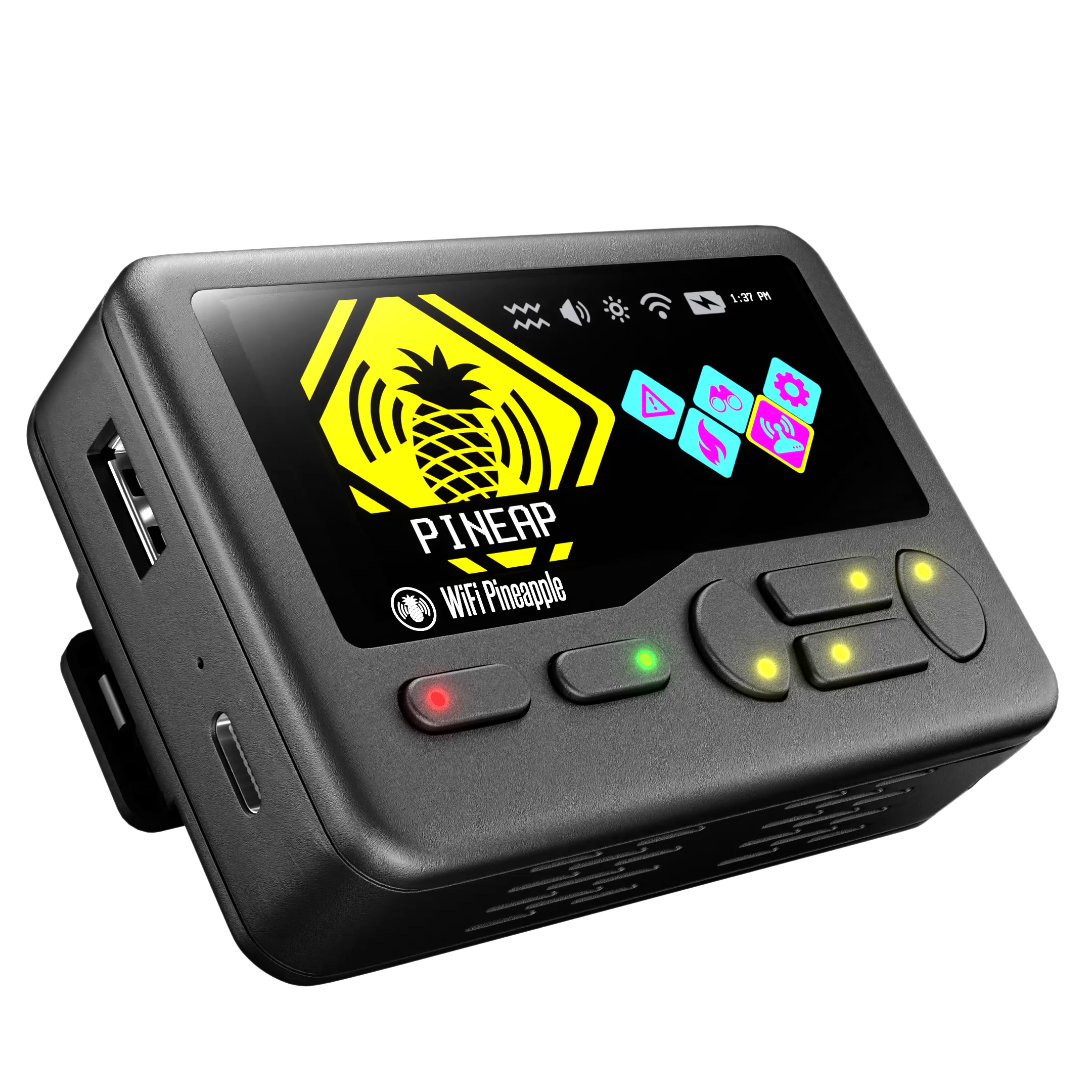
WiFi Pineapple Pager is a commercial handheld hacking-hardware device that brings WiFi auditing and rogue-access-point testing into a pocket-sized, standalone form factor. It runs as physical hardware rather than software you install, built around the PineAP rogue-AP engine and DuckyScriptDuckyScriptA scripting language for Hak5's USB Rubber Ducky that encodes keystrokes and delays into payloads a device executes when plugged into a target machine, letting tools automate keyboard-injection attacks. payloads familiar to Hak5's existing Pineapple line, with its own onboard interface rather than a laptop tether. It is aimed at penetration testers and red teamers who need to run WiFi engagements in the field without carrying a full laptop rig. Hak5's documentation frames it as the industry-standard WiFi pentesting toolset made mobile, positioning it as a companion to, rather than a replacement for, the broader WiFi Pineapple platform. Launched in 2025 with two releases so far and the most recent just nine days old, it's an actively developing product with documentation the vendor describes as still catching up to the hardware.
A pocket sized WiFi Pineapple built for those on the go.
Which nearby access points are impersonating a trusted network right now?
scans the surrounding airspace with the PineAP engine and surfaces rogue or lookalike access points directly on the device's own screen, without a laptop tether
Which devices nearby are probing for networks they have previously connected to?
listens for client probe requests over the air and lists the networks devices are advertising, letting the operator spot targets for association testing
How do I repeat the same rogue-AP or keystroke-injection routine across multiple engagements?
stores DuckyScript payloads on the device so a scripted sequence of actions can be replayed on demand instead of driven by hand each time
A slip is called out here the day the vendor's own delivery estimate moves past the promised window.
A "coming" milestone is the vendor's own wording, read off the page it links to — never a date we inferred.
Price · last checked Nov 2, 2026
configuration
generation
launch
today
status
source
Pager (Black)
WiFi Pineapple Pager
—
$300in stock
shipping
promo
Pager (Yellow)
WiFi Pineapple Pager
—
$300in stock
shipping
promo
List price of every configuration · Oct 1, 2026 → Nov 2, 2026pager-blackpager-yellowprice eventwayback capture
58 live captures
Device history
WiFi Pineapple Pagerannounced
Aug 5, 2025 ·
source ↗live
Store listing for the WiFi Pineapple Pager published (published_at in the store product JSON).
Features
18 capabilities
Built from WiFi Pineapple Pager's releases, docs, README and our own runs.
“Seen” marks the month we first spotted a release the vendor didn't date.
Group names and tags are our labels.
+GPS monitoringshippedAllows real-time monitoring and display of geographic coordinates via settings or command interfaces.3 releases · 1 other source · first seen Dec 2025▸
Also counts toward: Command-line interface
release
Configure gpsd settings — service toggle, serial device, baud rate, and restart — from the new Settings > GPS > Advanced page or via the hak5-commands GPS commands.
2.0.0-stable · Oct 2026
· source
· release history
Native GPS is now built into PineAP and enabled by default on new installs and upgrades; plugging in a GPS device configures it automatically.
2.0.0-stable · Oct 2026
· source
· release history
Added Live View of LAT/LON in Settings > GPS for real-time coordinate monitoring.
1.0.4-stable · Dec 2025
· source
· release history
example
Monitor GPS coordinates in real-time without external tools.$ Settings > GPS
1.0.4-stable · Dec 2025
· source
+Recon configuration optionsshippedAdds censor mode toggle and MFP detection to the reconnaissance settings.4 releases · first seen Dec 2025▸
release
Every settings menu — Display, General, Network, Ringtone, System, Bluetooth, PineAP, Filters, and GPS — now has a built-in help page accessible by pressing right on any item.
2.0.0-stable · Oct 2026
· source
· release history
Adds censor mode toggle to the recon settings menu.
1.1.1-stable · Sep 2026
· source
· release history
Adds MFP (Management Frame Protection) detection to PineAP recon result models.
1.1.1-stable · Sep 2026
· source
· release history
Add Recon Settings > Radio Settings to allow user to change bands within recon dashboards
1.0.1 · Dec 2025
· source
· release history
+Payload display commandsshippedAdds DuckyScript commands (PROMPT_QR, PROMPT_IMAGE, UI_TAKEOVER/UI_RELEASE) to control screen output and input capture during payload execution.3 releases · 1 other source · first seen Dec 2025▸
Also counts toward: Scripting language support
release
Adds UI_TAKEOVER and UI_RELEASE DuckyScript commands to let a payload or application take over the framebuffer (display) and consume input (button presses) without shutting down the pineapplepager service.︀︄︇︀︅︉︀︅︀︀︃︀︀︅︅︀︅︊︀︄︆︀︃︄
1.1.2-stable · Sep 2026
· source
· release history
Adds PROMPT_QR DuckyScript command to generate and display a QR code with a message to the user.︀︄︇︀︅︉︀︅︀︀︃︀︀︅︅︀︅︊︀︄︆︀︃︄
1.1.1-stable · Sep 2026
· source
· release history
Adds PROMPT_IMAGE DuckyScript command to show an image on the screen.
1.1.1-stable · Sep 2026
· source
· release history
example
Enable custom terminal input keys on the virtual keyboard.$ Edit theme button map to use 'target' in generic menu component
1.0.4-stable · Dec 2025
· source
+Pager Portal InterfaceshippedProvides a complete web interface for payload download, update, and management via a pager service.2 releases · 1 other source · first seen Aug 2026▸
Also counts toward: Web management console
release
Enable SSH and Virtual Pager access over a Client Mode network (such as a phone hotspot) with the new Client Access setting under Settings > System > Virtual Pager (off by default).
2.0.0-stable · Oct 2026
· source
· release history
Adds Pager Portal as a complete web interface for payload download, update, and management
1.1.0-stable · Aug 2026
· source
· release history
example
Allow a phone hotspot to reach the Virtual Pager and SSH while keeping PineAP APs blocked, useful for field access without a dedicated management device.$ In the Virtual Pager, go to Settings > System, scroll to 'Virtual Pager', and enable 'Client Access'.
2.0.0-stable · Oct 2026
· source
+SSID Pool ManagementshippedImports SSID pool definitions from an external file for dynamic target configuration.2 releases · 1 other source · first seen Jan 2026▸
Also counts toward: Command-line interface, JSON data export
release
Get JSON output from _pineap CLI commands INTERFACE LIST and SSIDPOOL LIST using format=json or format=mjson.
2.0.0-stable · Oct 2026
· source
· release history
Adds PINEAPPLE_SSID_POOL_ADD_FILE command for importing SSID pool definitions from a file
1.0.6-stable · Jan 2026
· source
· release history
example
Get machine-readable JSON from the PineAP SSID pool for piping into a parsing script.$ _pineap SSIDPOOL LIST format=json
2.0.0-stable · Oct 2026
· source
+Status bar and quick settings UIshippedAdds a WiFi Client Mode indicator to the status bars and introduces a Quick Settings menu as a replacement for the first Power Menu item.3 releases · first seen Dec 2025▸
release
Adds WiFi Client Mode indicator to the default status bar and Network Status Bar.︀︄︇︀︅︉︀︅︀︀︃︀︀︅︅︀︅︊︀︄︆︀︃︄
1.1.3-stable · Oct 2026
· source
· release history
Adds Quick Settings menu, replacing the first Power Menu item.
1.1.3-stable · Oct 2026
· source
· release history
Add 2.4/5/6 status bar indicator to the Status Bar within Settings > Network
1.0.1 · Dec 2025
· source
· release history
+Deauthentication capabilitiesshippedAdds support for CSA deauthentication and provides a workflow for selecting deauthentication methods.3 releases · first seen Dec 2025▸
release
Adds CSA (Channel Switch Announcement) Deauthentication method, effective against some clients even when connected via WPA3.
1.1.1-stable · Sep 2026
· source
· release history
Adds deauth mode selection workflow, allowing operators to choose between deauth methods.
1.1.1-stable · Sep 2026
· source
· release history
Convert Evil WPA configuration to a configuration wizard and add encryption type to options
1.0.2-stable · Dec 2025
· source
· release history
+Recon dashboardshippedDisplays a unified recon overview with Wi-Fi and Bluetooth totals, live packet and event graphs, breakdowns by encryption, band, channel, and Bluetooth device type, and searchable, filterable, sortable device tables including AP client lists.1 release · 1 other source · first seen Oct 2026▸
release
The Recon page now shows an All radios pane with Wi-Fi and Bluetooth totals, a two-minute packets-and-events graph, breakdowns by encryption, band, channel, and Bluetooth device type, and live searchable, filterable, sortable device tables including AP client lists.
2.0.0-stable · Oct 2026
· source
· release history
example
Strip BLE random-address churn from Bluetooth recon output so only stable, identifiable devices appear in results.$ blue5ctl fetch -r
2.0.0-stable · Oct 2026
· source
+Power management UXshippedAdds a safe shutdown procedure based on battery level and changes the power button behavior to sleep/wake.2 releases · first seen Sep 2026▸
release
Adds safe shutdown procedure triggered on last-percent battery detection instead of allowing improper shutdown.
1.1.1-stable · Sep 2026
· source
· release history
Changes power button behavior to single-press sleep and wake, rather than requiring selection from the power menu.
1.1.1-stable · Sep 2026
· source
· release history
+Device Filter ManagementshippedImports device filter rules from an external file for MAC address filtering.2 releases · first seen Jan 2026▸
Also counts toward: Command-line interface
release
Adds PINEAPPLE_DEVICE_FILTER_ADD_FILE command for importing device filter rules from a file
1.0.6-stable · Jan 2026
· source
· release history
The PINEAPPLE_MAC_FILTER_x environment variable is renamed to PINEAPPLE_DEVICE_FILTER_x
1.0.6-stable · Jan 2026
· source
· release history
+Bluetooth scanningshippedScans BLE and Classic Bluetooth devices using the blue5 scanner, identifies devices from built-in company and service databases, logs results to WiGLE and a local SQLite database, and provides a live results list with an events-per-second dashboard.1 release · first seen Oct 2026▸
release
Scan BLE and Classic Bluetooth with blue5, a new scanner with a live results list, device identification from built-in company and service databases, an events-per-second dashboard with audio, and logging to WiGLE and a SQLite blue5.db database tracking up to 25,000 devices in RAM.︀︄︇︀︅︉︀︅︀︀︃︀︀︅︅︀︅︊︀︄︆︀︃︄
2.0.0-stable · Oct 2026
· source
· release history
+File managershippedProvides a web-based interface for browsing, previewing, editing, uploading, renaming, moving, deleting, and downloading loot, payloads, and storage locations, with drag-and-drop upload and whole-folder zip downloads.1 release · first seen Oct 2026▸
Also counts toward: Web management console
release
Browse, preview, edit, upload, rename, move, delete, and download loot, payloads, /mmc/root, and a mounted USB drive from the new Files page under Manage Data > Files, with drag-and-drop upload and whole-folder zip downloads.
2.0.0-stable · Oct 2026
· source
· release history
+Offline map viewershippedDisplays WiGLE logs on an offline map using saved tile sets alongside a searchable device list and a devices-over-time chart.1 release · first seen Oct 2026▸
Also counts toward: Offline mode
release
View WiGLE logs on an offline map — using saved OpenStreetMap, OpenTopoMap, or other tile sets (capped at 500 MB) — alongside a searchable device list and a devices-over-time chart on the new WiGLE Logs page.
2.0.0-stable · Oct 2026
· source
· release history
+Virtual Pager UIshippedProvides a responsive web interface for the Virtual Pager with large touch buttons, keyboard shortcuts, a pinnable shell, and flexible pane layouts that can be minimized, maximized, or opened in a new window.1 release · first seen Oct 2026▸
release
The Virtual Pager now scales to any screen size with large touch buttons, keyboard shortcuts (press ? to list them), pin-to-every-page shell (press ), and side-by-side or stacked Pager and shell panes that can be minimized, maximized, or opened in a new window.
2.0.0-stable · Oct 2026
· source
· release history
+List Picker InputshippedPrompts the user to select an option from a customizable list during payload execution.1 release · first seen Apr 2026▸
release
Add LIST_PICKER command to prompt user to choose from a list of options
1.0.8-stable · Apr 2026
· source
· release history
+Automated Recon ArchivingshippedAutomatically triggers reconnaissance sessions, Wigle logs, and PCAP captures upon loot archiving.1 release · first seen Feb 2026▸
Also counts toward: Command-line interface
release
Adds PINEAPPLE_LOOT_ARCHIVE command to automatically trigger recon sessions, Wigle logs, and PCAPs upon archiving loot
1.0.7-stable · Feb 2026
· source
· release history
+SSID Pool Hopping ControlshippedAllows payload scripts to start and stop SSID pool hopping sequences.1 release · first seen Feb 2026▸
release
Adds PINEAPPLE_HOPPING_START and PINEAPPLE_HOPPING_STOP commands to payloads for controlling SSID pool hops
1.0.7-stable · Feb 2026
· source
· release history
+Network Filter ManagementshippedImports network filter rules from an external file for dynamic rule application.1 release · first seen Jan 2026▸
Also counts toward: Command-line interface
release
Adds PINEAPPLE_NETWORK_FILTER_ADD_FILE command for importing network filter rules from a file
1.0.6-stable · Jan 2026
· source
· release history
Lines in monospace are the tool's own words: help text
parsed from its source, or an endpoint from its API document. Under
release, a line is our summary of a dated release. Under
docs, it is quoted from the tool's own documentation or
website. Each links back to the source it came from.
Command line
2 commands for WiFi Pineapple Pager, each
with where it came from. This tool has no source analysis yet, so there
is no option reference and no captured run beside them.
View
Source
No command matches.
Score card
Shipping velocityreleases a month, last 12 months
Documentation qualityrelease-notes rubric, 0–100
Breaking-change disciplinehow rarely a release breaks users, and notice given
Maintenance riskquiet time against its own cadence, maintainers
Innovation & surfacenew capabilities, API and MCP surface
Five scores for WiFi Pineapple Pager, each built from the releases, notes and API history this site tracks — and, on Researcher and Business, where it stands among every measured tool in its category and how that has moved.
Each score is 0–100 on a published rubric, derived from data this site already shows.
A dimension we cannot measure says so — it is never scored 0 and never enters a rank.
How this is scored
Shipping velocity — releases a month over the last 12 months, on a log scale where 16 a month scores 100. Needs 3 releases in the window.
Documentation quality — the release-notes rubric published on the analytics page, unchanged.
Breaking-change discipline — the share of releases carrying a breaking change (none scores 100, half or more scores 0). Only projects that label breaking changes are measured: a clean record cannot be told from an unlabelled one.
Maintenance risk — quiet time measured against the tool's own release cadence (quiet longer than 90 days and three typical gaps scores 0), plus the number of active maintainers and whether contributors are growing, where known. Higher is lower risk.
Innovation & surface — new capabilities in the feature ledger this year, API and MCP operations added, and the share of commits that are features: the mean of whichever we hold.
Community health (open-source tools only) — each is a direction, not a size: contributors this year against last, the bus factor now against a year ago, and issues closed per issue opened, where steady scores 50, doubled 100 and halved 0; plus the median time to a maintainer's first reply (an hour scores about 100, a month or more 0). A commercial card has no repository and carries none of the four.
Documented delivery (commercial tools) — when a vendor's documented new capabilities have slowed against its own baseline, that counts against the overall standing as heavily as two low dimensions. Steady delivery, or too little history to judge, leaves the standing alone; it is never a sixth score.
Open-source tools are scored on repository signals; commercial tools on their published changelog. Ranks compare tools within one category and one profile and need at least five measured peers; the overall standing needs three ranked dimensions. Best-in-breed or consolidator is a shape, not a quality, and is never scored.
Release-note detail over time
See how much detail WiFi Pineapple Pager puts in its release notes, quarter by quarter, and compare it with tracked tools in the same category. This history uses up to ten retained, reviewed notes per tool; sparse or blank older quarters may reflect that limit.
Hak5's home and pricing pages and 42 more pages as they looked each month from October 2021 to November 2026: 55 renders, 4 changes of tagline or palette. Step through them, play them, or put any two months side by side.
Website history is included with Researcher and Business.
← → or h l a month · Shift a year · [ ] previous / next change · Space play · 1 2 3 page · T whole page · C compare · F full size
← → or h l the right month · Shift the left · S swap · W wipe · T whole page · Esc back
Brand changes
Each row is a name, owner or logo change we've confirmed. The dates are the last capture before it and the first one after. A new page design on its own isn't counted. Spot one that's wrong? Use “Not a rebrand” on its row.
We spotted these but haven't confirmed them yet, so they aren't counted above.
Documentation timing
See whether WiFi Pineapple Pager's docs change before or after its release notes, release by release.
Documentation timing is included with Practitioner, Researcher and Business. When the docs come first, you can read about a change before it's announced.
We check each docs page on a fixed schedule, so every gap is a range rather than one number.
A release we can't place on either side is shown as "Can't tell".
Releases
Show
13 entries
No entries match these filters.
November 20261
October 20263
September 20262
August 20261
April 20261
February 20261
January 20261
December 20253
Add the badge to your README
Maintain this project? The badge links readers straight to this page, so they can
follow every release here.
 Choose a badge style and copy the code →