DigiCert CertCentral
changelog-20261030-373314c3 commercialThe section your link pointed to isn't on DigiCert CertCentral's page any more, so we've brought you to the top.
DigiCert CertCentral is a certificate lifecycle management platform that allows organizations to issue, manage, renew, and automate SSLSSLA cryptographic protocol for encrypting network connections, now deprecated in favor of TLS but whose name persists colloquially. Cyber tools reference it when handling HTTPS or other encrypted-channel inspection and termination./TLS and other digital certificates.
// Example Services API response fragment for a pending order
{
  "dcv_method": "dns-txt-token",
  "dcv_token": {
    "token": "{{dcv_token}}",
    "status": "pending",
    "expiration_date": "2022-02-24T16:25:52+00:00"
  },
  "dcv_polling_status": true,
  "dcv_polling_last_checked": "2026-07-09T22:07:24Z"
}
curl -X GET 'https://www.digicert.com/services/v2/domain/<domain_id>' \
  -H 'X-DC-DEVKEY: <api_key>' \
  -H 'Content-Type: application/json'
# Look for dcv_polling_status and dcv_polling_last_checked in the response
Summary
DigiCert CertCentral is a commercial PKIPKIA framework of policies, roles, and cryptographic standards for issuing and managing digital certificates that bind public keys to identities, letting tools verify authenticity and encrypt communications without pre-shared secrets. platform, run as a hosted service, for managing digital certificate lifecycles across TLS/SSL, code signing, document signing, client, and S/MIMES/MIMEAn email encryption and signing standard that uses X.509 certificates to authenticate senders and protect message contents; cyber tools use it to verify identity and enforce confidentiality over standard mail protocols. certificate types, centralizing requests, approvals, renewals, validation, and reporting in one console. It suits certificate administrators and PKI teams inside larger organizations who need to enforce validity policies, delegate approvals, and control API key scope rather than manage certificates order by order. Recent controls include capping TLS validity periods, restricting API keys to domain-only actions, and delegating authorized representative approval for bulk issuance, alongside enforced Certificate TransparencyCertificate TransparencyA public, append-only log system maintained by various operators (Google runs several) that records every TLS certificate issued, letting anyone audit CAs for misissued or rogue certificates. logging and stricter multi-perspective domain validation ahead of CA/Browser Forum requirements.
DigiCert CertCentral is a certificate lifecycle management platform that allows organizations to issue, manage, renew, and automate SSL/TLS and other digital certificates.
How DigiCert CertCentral helps
Which of our TLS certificate requests will be rejected under the new validity caps before we submit them?
checks the requested certificate validity against the account's allowed validity periods setting, now capped at 199 days, and flags any configured periods that exceed it for automatic removal
Which of our existing TLS certificates are not yet logged to Certificate Transparency logs ahead of the enforcement deadline?
the Report Library lists existing certificates and their CT logging status so gaps can be found before the opt-out removal date
Can an API key used by this automation pipeline do anything beyond managing domains?
the Domains restriction scope limits a key to add, submit, validate, and revalidate actions only, with no certificate ordering or account access, so scope creep shows up as a denied action rather than a silent success
Is a domain's automatic revalidation still working, or does it need a manual check?
the domain info and order validation status endpoints expose whether DCV polling is active and when it last ran, so a stale timestamp points to a domain needing manual attention
Whose approval is bottlenecking bulk certificate issuance, and can it be delegated?
authorized representative delegation lets administrators, managers, or service users be set up once to auto-approve subsequent orders, removing per-order manual sign-off from the workflow
Will our automations keep running after an employee who owned the API key or ACME URL leaves?
ownership of API keys and ACME Directory URLs can be transferred to another user or service user, decoupling the credential from the departing individual without rotating it
Languages
Features
Built from DigiCert CertCentral's releases, docs, README and our own runs. “Seen” marks the month we first spotted a release the vendor didn't date. Group names and tags are our labels.
- DigiCert CertCentral covers 1 of the 2 secrets and credential hygiene capabilities we track.
What DigiCert CertCentral offers you
- Web management console4
- Administrative audit log1
- MCP server1
- Outbound webhooks (the product notifies you)1
- REST API1
- Role-based access control1
No capabilities match.
Certificate Issuance and Validity Management 4 capabilities CertCentral controls how TLS certificates are requested, validated, and issued, enforcing validity limits and coverage options that align with current CA/Browser Forum requirements. This is the core function the tool exists to perform.
Authorized Representative Delegation for automated certificate approval shipped Lets an account assign a one-time delegated approver so that supported certificate types are issued automatically without manual approval on each order.
Also counts toward: Web management console
release 14 total
-
Simplifies the delegation request workflow by removing the organization selection step — a single delegation request now applies to all organizations the selected approver represents and all certificate products they are authorized to approve.
 changelog · Aug 2026
· source
· release history
- Simplifies delegation request workflow by removing the organization selection step — a single delegation request now applies to all organizations the approver represents across all authorized certificate products. changelog · seen Jul 2026 · source · release history
- Extends automated delegation approval support in CertCentral Europe to a broader set of PKIo and EU Qualified certificate products. changelog · seen Jul 2026 · source · release history
- Adds automated certificate issuance for EV TLS, EV Code Signing, Code Signing, Verified Mark, and Common Mark products in CertCentral Global after delegation approval July 29, 2026 · Jul 2026 · source · release history
- Extends automated delegation approval to EV TLS, EV Code Signing, Code Signing, Verified Mark, and Common Mark certificates in CertCentral global and Europe. July 29, 2026 · Jul 2026 · source · release history
- Adds automated delegation approval support for a broad set of CertCentral Europe products including EU Qualified eSeal (PSD2), EU Qualified Website Authentication Certificate (PSD2), PKIo Personal Organisation, PKIo Qualified eSeal, PKIo Private Person, and multiple PKIo Authentication/Encryption and Private Services… July 29, 2026 · Jul 2026 · source · release history
example
-
Delegate approval authority to a CertCentral user so future EV TLS or EV Code Signing orders are issued automatically without manual intervention.
In CertCentral, go to Account > Users. Select the target user. On the user details page, under Order approval delegation, select Request delegation.July 29, 2026 · Jul 2026 · source -
Set up authorized representative delegation for a service user so PKIo Private Services Server certificate orders are auto-approved without repeated manual sign-offs.
In CertCentral Europe, go to Account > Users. Select the target user. Under Authorized representative delegation, select Request authority delegation.May 12, 2026 · seen Jul 2026 · source
TLS certificate validity period controls shipped Caps certificate validity at 199 days and automatically removes any requested periods that exceed that limit.
release 11 total
-
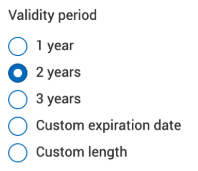
Extends X9 PKI for TLS certificate validity options from 397-day maximum to selectable 1-, 2-, or 3-year terms (custom validity capped at 1,095 days), available on the Dashboard under Request a Certificate > Request X9 PKI for TLS Certificate > Certificate Settings > Validity period.
changelog · Aug 2026
· source
· release history
-
Extends X9 PKI for TLS certificate validity options from a maximum of 397 days to selectable 1-, 2-, or 3-year terms (custom validity capped at 1,095 days), available in the Validity period section of the Request X9 PKI for TLS Certificate page.
 August 18, 2026 · Aug 2026
· source
· release history
- Adds 2- and 3-year validity options for X9 PKI for TLS certificates August 18, 2026 · Aug 2026 · source · release history
- Moves public TLS certificate maximum validity to 199 days and public code signing certificate maximum validity to 459 days, per CA/Browser Forum requirements. changelog · Aug 2026 · source · release history
- Allowed validity periods setting for TLS products now controls certificate validity instead of order validity, capped at the 199-day maximum. July 7, 2026 · seen Jul 2026 · source · release history
- For non-Annual/non-Multi-year Plan TLS requests, certificate validity and order validity are now unified (e.g., a 47-day cert creates a 47-day order). July 7, 2026 · seen Jul 2026 · source · release history
example
-
Restrict which certificate validity durations your team can select when ordering Basic OV TLS certificates.
In the CertCentral console, go to Settings > Product Settings, select Basic OV in the Product column, configure Allowed validity periods under Product Settings, then click Save Settings.July 7, 2026 · seen Jul 2026 · source
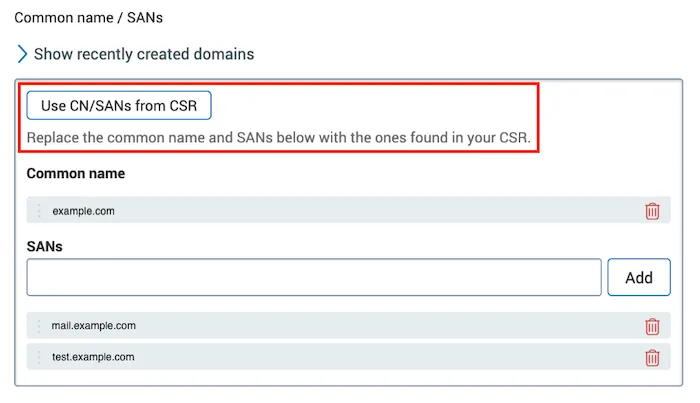
CSR-driven Common Name and SAN population shipped Populates the Common Name and SAN fields directly from an uploaded CSR, with an option to undo and restore previous values.
release
-
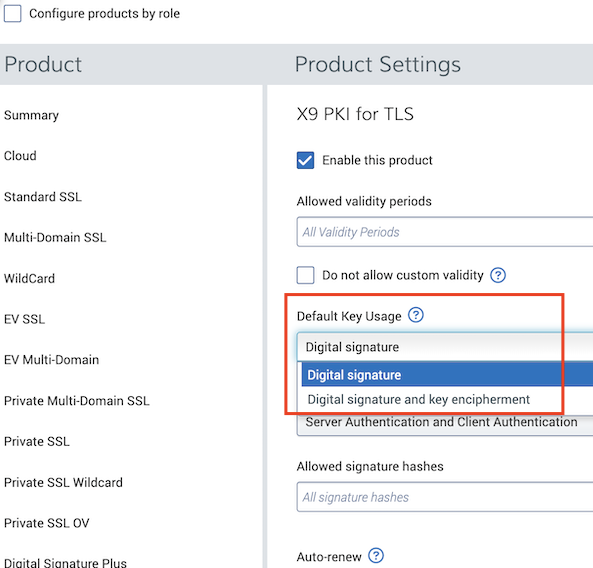
Adds a configurable Default Key Usage setting on the X9 PKI for TLS Product Settings page, letting CertCentral Administrators choose whether Digital signature or Digital signature and key encipherment is pre-selected on the X9 PKI for TLS certificate request form.
changelog · Aug 2026
· source
· release history
- Adds a Use CN/SANs from CSR option on certificate request forms (DV, OV, EV TLS; QWAC and QWAC PSD2; X9 PKI for TLS; Private TLS) to replace existing Common Name and SANs fields with values from the uploaded CSR, with an Undo option to revert. changelog · Aug 2026 · source · release history
- Adds a Use CN/SANs from CSR button on DV, OV, and EV TLS, QWAC, X9 PKI for TLS, and Private TLS request forms to replace existing Common name and SANs fields with values from the uploaded certificate signing request. August 11, 2026 · Aug 2026 · source · release history
- Adds Use CN/SANs from CSR option on certificate request forms to overwrite existing Common name and SANs fields with values parsed directly from the uploaded CSR, with an Undo option to restore previous values — available on DV, OV, and EV TLS; QWAC and QWAC PSD2; X9 PKI for TLS; and Private TLS request forms. August 11, 2026 · Aug 2026 · source · release history
example
-
Automatically populate certificate details during an EV TLS order by syncing with your CSR file instead of manual entry.
1. Upload your CSR file in the DV, OV, or EV TLS request form. 2. Click 'Use CN/SANs from CSR' to replace the fields. 3. Verify values and submit the order.August 11, 2026 · Aug 2026 · source
Annual and Multi-year Plan TLS coverage selection shipped Presents Annual and Multi-year Plan orders in whole-year increments, removing custom validity options that fall outside supported ranges.
release
- Annual plan and Multi-year Plan TLS request forms now show coverage options in years (1-, 2-, 3-year) with custom order validity options removed. July 7, 2026 · seen Jul 2026 · source · release history
- Customized order validity options have been removed from Annual plan and Multi-year Plan TLS certificate request forms; coverage options now appear only in years (1-, 2-, or 3-year). July 7, 2026 · seen Jul 2026 · source · release history
example
-
Request a 3-year X9 PKI for TLS certificate for a long-lived internal system to reduce renewal overhead.
In CertCentral, go to Dashboard > Request a Certificate > Request X9 PKI for TLS Certificate, then under Certificate Settings > Validity period, select the 3-year option and complete the order.
changelog · Aug 2026
· source
Domain Control Validation 4 capabilities CertCentral provides multiple mechanisms for proving and re-proving ownership of domains before certificates can be issued. It also exposes the status of automated validation checks so teams can monitor progress without manual inspection.
Persistent DNS TXT Record domain control validation (DCV) shipped Allows a single persistent DNS TXT record to satisfy domain revalidation repeatedly, so teams do not need to create new records on each renewal cycle.
release 18 total
- Persistent DNS TXT domain validation is reusable for nine days before revalidation is required, with the automatic process eliminating the need to manually resubmit domains before expiry. September 22, 2026 · Sep 2026 · source · release history
- Adds automatic domain revalidation using the Persistent DNS TXT Record DCV method, where DigiCert checks and revalidates domains every five days as long as the Persistent DNS TXT record with the correct persistent URI value (Account or Unique) remains in place.︀︄︇︀︅︉︀︅︀︀︃︀︀︅︅︀︅︊︀︄︆︀︃︄ September 22, 2026 · Sep 2026 · source · release history
- Enables automatic domain revalidation every five days for domains validated via the Persistent DNS TXT DCV method September 22, 2026 · Sep 2026 · source · release history
- Supports automatic revalidation for OV and EV TLS, Qualified Website Authentication Certificates (QWAC), QWAC PSD2, PKIo Private Services Server, and X9 PKI for TLS certificate types — with validated domains added to the Domains page where revalidation runs. September 22, 2026 · Sep 2026 · source · release history
- Monitors domain validation status and automatically refreshes DNS records before validation expires, eliminating manual DCV work between certificate renewals. announced · Sep 2026 · source · release history
- Automatically removes dangling DNS records after validation completes. announced · Sep 2026 · source · release history
docs
- August 18, 2026 CertCentral: Bulk domain revalidation support for the Persistent DNS TXT record method CertCentral: Enhancing the X9 PKI for TLS certificate offering CertCentral ACME Directory URLs: Update issuing intermediate CA certificate CertCentral: Bulk domain revalidation support for the Persistent DNS TXT… changelog · Aug 2026 · source
example 8 total
-
Set up Persistent DNS TXT automatic domain revalidation in CertCentral so domains stay continuously validated without manual intervention.
In CertCentral, go to Domains, select the domain you want to prevalidate, choose the 'Persistent DNS TXT Record' DCV method, place the persistent URI TXT record in your DNS zone, and submit for…changelog · Sep 2026 · source -
Set up the Persistent DNS TXT record so CertCentral can automatically revalidate your domain every five days without manual intervention.
In CertCentral, go to Domains, select your domain, choose 'Persistent DNS TXT Record' as the DCV method, add the displayed TXT record to your DNS zone, and submit for initial validation.changelog · Sep 2026 · source -
Set up Persistent DNS TXT automatic domain revalidation so domains stay continuously validated without manual intervention — useful for teams issuing OV/EV TLS certificates on recurring schedules.
In CertCentral, go to Domains, select the domain you want to keep continuously validated, choose 'Persistent DNS TXT Record' as the DCV method, complete the initial validation, then leave the…changelog · Sep 2026 · source -
Enroll a domain in automatic 5-day revalidation so certificate issuance is never delayed by an expired domain validation — do this once via the CertCentral Domains page.
In CertCentral, go to Domains, add or select your domain, choose 'Persistent DNS TXT Record' as the DCV method, complete the initial validation, then leave the DNS TXT record with the correct…September 22, 2026 · Sep 2026 · source -
Automate DV, OV, EV TLS, QWAC and other certificate domain validation to avoid expired records delaying issuance.
Add a Persistent DNS TXT record with the correct Account or Unique URI value to your domain's zone file; CertCentral will automatically revalidate every five days.September 22, 2026 · Sep 2026 · source -
Revalidate a batch of domains using the Persistent DNS TXT record method so the same DNS record can be reused on every future revalidation cycle.
In CertCentral, go to Certificates > Domains. Select the domains to revalidate, open the 'Submit domains for revalidation' menu, and choose 'Revalidation by Persistent DNS TXT record'.August 18, 2026 · Aug 2026 · source
DCV polling status visibility shipped Exposes via API whether automatic DCV polling is active for a domain and when it last ran.
release 7 total
-
Adds
dcv_polling_statusanddcv_polling_last_checkedfields to the Services API responses for certificate requests and DNS name validations, surfacing whether DigiCert's automatic DCV polling is active and when it last ran.
changelog · Aug 2026
· source
· release history
-
Adds
dcv_polling_statusanddcv_polling_last_checkedfields to the Domain info and Order validation status API endpoints, exposing whether automatic DCV polling is active and when it last ran. July 28, 2026 · Jul 2026 · source · release history -
Domain info API response gains
dcv_polling_status(boolean) anddcv_polling_last_checked(string) fields. July 28, 2026 · Jul 2026 · source · release history -
Order validation status API response includes
dcv_polling_statusanddcv_polling_last_checkedin each object of thedns_name_validationsarray. July 28, 2026 · Jul 2026 · source · release history - Adds Validation expires SC-081 field to domain detail pages for viewing shortened domain revalidation timelines. January 13, 2026 · Jan 2026 · source · release history
- Adds Validation expires SC-081 column to the Domains page for comparing original vs. new domain expiration dates. January 13, 2026 · Jan 2026 · source · release history
example
-
Check whether DCV polling is active and when it last ran for a pending certificate order, to decide whether to trigger a manual validation check.
// Example Services API response fragment for a pending order { "dcv_method": "dns-txt-token", "dcv_token": { "token": "{{dcv_token}}", "status": "pending", "expiration_date":…changelog · Aug 2026 · source -
Check whether automatic DCV polling is still active for a domain, so you know if a manual validation check is needed.
curl -X GET 'https://www.digicert.com/services/v2/domain/<domain_id>' \ -H 'X-DC-DEVKEY: <api_key>' \ -H 'Content-Type: application/json' # Look for dcv_polling_status and dcv_polling_last_checked in…July 28, 2026 · Jul 2026 · source
Certificate Transparency (CT) logging enforcement shipped Automatically logs every newly issued public TLS certificate to Certificate Transparency logs, with no opt-out available.
release 7 total
-
The
disable_ctparameter is ignored as of this change: requests that setdisable_cttotrueto suppress CT logging will no longer have that effect — certificates will be logged to CT logs unconditionally.
changelog · Oct 2026
· source
· release history
-
The
disable_ctparameter on certificate order requests (including Order Basic OV) is deprecated; CertCentral now ignores it and always logs issued TLS certificates to CT logs regardless of the value passed. changelog · Oct 2026 · source · release history - Removes CT logging opt out options from CertCentral, enforcing CT logging on all public TLS certificates (DV, OV, EV, QWAC, QWAC PSD2) across all DigiCert brands. changelog · Aug 2026 · source · release history
- Enforces Certificate Transparency (CT) logging for all newly issued public TLS certificates (DV, OV, EV, QWAC, QWAC PSD2) across all DigiCert brands — opt-out is no longer available. June 1, 2026 · seen Jul 2026 · source · release history
- The CT logging opt-out options are being removed from CertCentral, meaning any workflow or configuration that relied on keeping public TLS certificates out of CT logs will no longer function for certificates issued on or after June 1, 2026. June 1, 2026 · seen Jul 2026 · source · release history
- All public TLS certificates (DV, OV, EV, EU QWAC, EU QWAC PSD2) across all DigiCert brands will be logged to CT logs starting June 1, 2026, removing the ability to opt out of CT logging for newly issued, reissued, or duplicate public TLS certificates. June 1, 2026 · seen Jul 2026 · source · release history
example
-
Check whether your existing TLS certificates are logged to CT logs before the enforcement deadline using CertCentral's Report Library.
In CertCentral, go to Reports > Report Library, then generate or run a TLS certificate report and filter by CT log status to identify any certificates currently excluded from CT logs.June 1, 2026 · seen Jul 2026 · source
Multi-Perspective Issuance Corroboration (MPIC) shipped Confirms domain control from at least four geographically distributed network locations across two or more RIR regions before a certificate is issued.
release
-
MPIC enforcement as of December 1, 2026 requires that DNS queries and website traffic be reachable from six remote network perspectives across at least two RIR regions — environments that restrict traffic by IP address, region, query volume, or rate may block validation and must be reconfigured.
changelog · Sep 2026
· source
· release history
- MPIC now requires six remote network perspectives and four corroborations per domain query; customers restricting DNS queries or website traffic by IP address, region, query volume, or rate must verify their configurations support MPIC traffic from six remote perspectives. changelog · Sep 2026 · source · release history
- Enforces six remote MPIC network perspectives across at least two RIR regions for domain control verification and CAA checks, requiring four corroborations per domain query, in compliance with the CA/Browser Forum MPIC requirements effective December 15, 2026. changelog · Sep 2026 · source · release history
- MPIC enforcement as of December 1, 2026 increases to six remote network perspectives requiring four corroborations — environments that restrict DNS queries or website traffic by IP address, region, query volume, or rate must verify their configurations support MPIC traffic from six remote perspectives or certificate… changelog · Sep 2026 · source · release history
- Updates Multi-Perspective Issuance Corroboration (MPIC) to require corroboration from at least four remote network locations across at least two different Regional Internet Registry regions. changelog · Aug 2026 · source · release history
- Upgrades Multi-Perspective Issuance Corroboration (MPIC) to require corroboration from at least four remote network locations spanning at least two different Regional Internet Registry (RIR) regions, aligning with CA/Browser Forum Phase 4 requirements. June 1, 2026 · seen Jul 2026 · source · release history
docs
- December 1, 2026 MPIC: Enforcing corroboration using six remote network perspectives December 1, 2026 , DigiCert will enforce the next phase of Multi-Perspective Issuance Corroboration (MPIC) and use six remote network perspectives across at least two Regional Internet Registry (RIR) regions. changelog · Sep 2026 · source
Certificate Revocation and Status Distribution 1 capability CertCentral manages how revocation information is packaged and distributed to relying parties. Splitting revocation data into smaller partitioned lists reduces the size burden on clients checking certificate status.
Partitioned CRL distribution shipped Points newly issued certificates to smaller partitioned CRL files rather than a single large revocation list, keeping individual files around 9.5 MB.
release
- All newly issued public DigiCert TLS certificates include CRLDP URLs pointing to partitioned CRLs (~9.5 MB each) instead of a single monolithic revocation list. September 15, 2026 · seen Jul 2026 · source · release history
Access Control and Credential Management 4 capabilities CertCentral gives administrators fine-grained control over who and what can perform actions within the account, including restricting API keys, transferring ownership, and managing non-human service identities. These controls help organisations limit blast radius when staff change or integrations evolve.
Service User identity management shipped Allows service users to be created with custom names and those names to be updated later, making it easier to identify which team or integration the account belongs to.
Also counts toward: REST API, Web management console
release
-
Enables updating a Service User's first and last names in CertCentral, making it easier to distinguish Service Users and assign them to teams or operational roles.
changelog · Aug 2026
· source
· release history
- Enables updating a Service User's first and last name in CertCentral or via the Services API, making it easier to identify API key ownership and assign users to teams or roles. June 10, 2026 · seen Jul 2026 · source · release history
- Enables custom first and last name assignment when creating a Service User, replacing the generic Service/'User' defaults to reflect team, integration, or role context. June 30, 2026 · seen Jul 2026 · source · release history
example
-
When creating a Service User for a specific integration, set meaningful names so admins can instantly identify the key's purpose in the API Keys list.
In CertCentral, go to Automation > API Keys > Add API Key. In the Add API Key window, select 'Create new service user' from the User menu, then replace the default 'Service' and 'User' values in the…June 30, 2026 · seen Jul 2026 · source -
Rename a Service User via the CertCentral console to reflect its operational role or owning team.
In CertCentral, go to Account > Service Users, select a Service User, update the First name and Last name fields under User details, then select Update user.June 10, 2026 · seen Jul 2026 · source
API key ownership transfer shipped Lets an administrator transfer an API key to another user or service user so integrations keep working after the original owner leaves.
Shared capability: Secrets management
release
-
Enables Administrators to transfer API key ownership to another CertCentral user or Service User, keeping transferred keys valid until revoked or deactivated.
changelog · seen Jul 2026
· source
· release history
- Enables transferring API key ownership to another CertCentral user or Service User, allowing integrations to survive user departures without credential rotation. July 28, 2026 · Jul 2026 · source · release history
example
-
Transfer an API key tied to a departing user to a Service User before deleting the account, keeping integrations uninterrupted.
In CertCentral, go to the API Keys page, find the API key and select its link. In the Update API Key window, use the owner menu to select the target Service User, then click Update API Key.changelog · seen Jul 2026 · source -
Transfer an API key to a Service User before deleting a user whose key is embedded in active integrations.
In CertCentral, go to Automation > API Keys. Find the API key and select its link.July 28, 2026 · Jul 2026 · source
Domain-scoped API key restrictions shipped Restricts an API key to domain management actions only, blocking it from ordering certificates or touching account settings.
release
- New Domains API key restriction scope lets CertCentral API keys be limited exclusively to domain management actions (add, submit, validate, revalidate domains) with no access to certificate ordering or account management. June 16, 2026 · seen Jul 2026 · source · release history
- Adds new Domains API key restriction option in the Automation > API Keys UI June 16, 2026 · Jun 2026 · source · release history
example
-
Create a least-privilege API key scoped only to domain management — ideal for automation pipelines that manage domain validation without needing certificate ordering access.
In CertCentral, go to Automation > API Keys > Add API Key. Enter a Description, select the target User, then in the 'API key restrictions (optional)' menu select 'Domains', and click Add API key.June 16, 2026 · seen Jul 2026 · source
Manager role organization prevalidation workflow shipped Lets users with the Manager role add organisations and submit them for validation directly from the Organisations page, without needing to attach the action to a certificate request.
Also counts toward: Role-based access control
release
- Expands Manager role permissions to include the full organization prevalidation workflow: access the Organizations page, view all organizations, add organizations, and submit them for validation independently of a certificate request. June 16, 2026 · seen Jul 2026 · source · release history
- Expands Manager permissions to include the organization prevalidation workflow (access Organizations page, view/add/submit organizations) June 16, 2026 · Jun 2026 · source · release history
ACME and Automation Workflow Management 1 capability CertCentral supports automated certificate lifecycle operations through ACME, providing tools to create, edit, and reassign the directory URLs and credentials that drive those workflows. This reduces manual intervention and ties automation accounts to roles rather than individuals.
ACME Directory URL management shipped Lets administrators create, edit, and transfer ACME Directory URLs between users or service users so automated issuance is not tied to a single person's credentials.
release 12 total
-
Enables updating the issuing intermediate CA (ICA) certificate on an existing ACME Directory URL without creating a new URL — accessible via the ACME Directory URL Restrictions panel using the 'Intermediate chains [Intermediate CA] > [Root CA]' menu.
changelog · Aug 2026
· source
· release history
-
Adds Update ACME Directory URL action with Intermediate chains selection in Automation > ACME Directory URLs
August 18, 2026 · Aug 2026
· source
· release history
- Enables updating the issuing intermediate CA (ICA) certificate on an existing ACME Directory URL via Automation > ACME Directory URLs > Actions > Update ACME Directory URL, replacing the previous requirement to create a new ACME Directory URL to change the certificate chain. August 18, 2026 · Aug 2026 · source · release history
- Enables creating ACME Directory URLs on behalf of another CertCentral user, Service User, or new Service User — no longer limited to self-service only. July 28, 2026 · Jul 2026 · source · release history
- Enables transferring ACME Directory URL ownership to another CertCentral user or Service User, decoupling credentials from individual accounts. July 28, 2026 · Jul 2026 · source · release history
- Enables editing of domain (SAN) and order limit restrictions on existing ACME Directory URLs — add/remove allowed SANs, adjust order caps, or restore unlimited status without creating a new URL. May 12, 2026 · seen Jul 2026 · source · release history
example
-
Switch an existing ACME Directory URL to a different intermediate CA chain without recreating it — useful when rotating ICA certificates.
In CertCentral, open the ACME Directory URL settings, then navigate to ACME Directory URL Restrictions > Intermediate chains [Intermediate CA] > [Root CA] menu, select the desired certificate chain,…changelog · Aug 2026 · source -
Update the issuing intermediate CA certificate chain for an existing ACME Directory URL without creating a new URL.
In CertCentral, go to Automation > ACME Directory URLs . On the ACME Directory URLs page, in the Actions menu for the URL, select Update ACME Directory URL .August 18, 2026 · Aug 2026 · source -
Switch an existing ACME Directory URL to a different intermediate CA chain without creating a new URL — useful when rotating ICA certificates across automated issuance pipelines.
In CertCentral, go to Automation > ACME Directory URLs. In the Actions menu for the target URL, select 'Update ACME Directory URL'.August 18, 2026 · Aug 2026 · source -
Create an ACME Directory URL for a new Service User so ACME credentials are not tied to an individual employee account.
In CertCentral, go to the ACME Directory URLs page, select Add ACME Directory URL, enter a Name for the URL, choose a product from the product menu, add the new Service User's details, and finish…changelog · seen Jul 2026 · source -
Transfer an ACME Directory URL to a Service User before offboarding an employee, so automations keep running without re-issuing credentials.
In CertCentral, go to Automation > ACME Directory URLs. Find the URL, open its Actions menu, and select Update ACME Directory URL.July 28, 2026 · Jul 2026 · source -
Modify an existing ACME Directory URL's allowed domains and order cap instead of creating a new one — useful when onboarding new subdomains or scaling automation quotas.
In CertCentral, go to Automation > ACME Directory URLs. In the Actions menu for the target URL, select Update ACME Directory URL. Under Allowed SANs (optional), add or remove domains.May 12, 2026 · seen Jul 2026 · source
Trust Indicators and Accessibility 1 capability CertCentral provides site seal and smart seal assets that websites can display to indicate their certificate status to visitors. These assets meet WCAG 2.1 accessibility standards so they work for users relying on keyboards or screen readers.
Smart Seal and Site Seal accessibility shipped Delivers site seal and Smart Seal assets that support keyboard navigation, visible focus indicators, alt text, and screen-reader labels in line with WCAG 2.1.
release
- Improved DigiCert Smart Seal and Site Seal keyboard accessibility: users can now tab to the seal, activate it with Enter or Space, and receive a visible focus ring — giving keyboard-only users the same hover information as mouse users. June 16, 2026 · seen Jul 2026 · source · release history
- Smart Seal and Site Seal now meet WCAG 2.1 criteria (SC 1.1.1, SC 2.1.1, SC 4.1.2): descriptive alt text added to PNG and SVG seal variants, seals identified as interactive buttons to assistive technologies, and screen readers receive the label 'Verify DigiCert TLS certificate for this site'. June 16, 2026 · seen Jul 2026 · source · release history
- Improves DigiCert Smart Seal and Site Seal accessibility with WCAG 2.1 compliant keyboard navigation and ARIA labels June 16, 2026 · Jun 2026 · source · release history
Other 17 capabilities
G5 root hierarchy migration for TLS certificate issuance shipped Switches default TLS certificate issuance for all DV, OV, and EV orders across DigiCert brands to the G5 root hierarchies, with updated Apache bundle contents, and requires trust stores and automation to be updated accordingly.
release 16 total
-
Starting November 12, 2026, new browser-trusted TLS orders, renewals, reissues, and duplicates will default to G5 root hierarchies; accounts relying on Global G2 or G3 intermediate chains must explicitly select those chains via the Default intermediate chain menu or the
ca_cert_idAPI parameter before that date.
changelog · Oct 2026
· source
· release history
-
Adds DigiCert default (recommended) option to the Default intermediate chain product menu so operators can distinguish a DigiCert-chosen chain from one they explicitly selected; the
ca_cert_idAPI parameter continues to override this setting per-request.︀︄︇︀︅︉︀︅︀︀︃︀︀︅︅︀︅︊︀︄︆︀︃︄ changelog · Oct 2026 · source · release history -
Scripts that remove a certificate by position in the Apache
DigiCertCA.crtfile, or that expect a specific number of certificates in the file, will break after October 20, 2026 — update scripts to remove the self-signed root only if present and always retain the cross-signed root. changelog · Oct 2026 · source · release history -
Apache download (
DigiCertCA.crt) for G5 and G2 TLS certificates will no longer include the unneeded self-signed root — only the cross-signed root remains, removing the need for manual post-download cleanup scripts. changelog · Oct 2026 · source · release history - Applies to all browser-trusted DV, OV, and EV TLS certificates for all public TLS customers; certificate chains may include server, intermediate CA, and cross-signed root certificates. November 12, 2026 · Oct 2026 · source · release history
-
All newly issued, renewed, reissued, and duplicate TLS certificates will chain to
DigiCert TLS RSA4096 Root G5orDigiCert TLS ECC P384 Root G5starting November 12, 2026 — any trust store, pinned root, or hard-coded intermediate CA certificate that does not include the G5 roots and ICAs will fail validation and… November 12, 2026 · Oct 2026 · source · release history
example
-
Select a specific default intermediate chain for a product in CertCentral so all new orders use it without requiring
ca_cert_idin every API call.1. In CertCentral, go to the product settings page and select the certificate product you want to configure. 2. In the 'Default intermediate chain' menu, choose the specific intermediate chain (e.g.changelog · Oct 2026 · source -
Verify your product is pinned to a specific intermediate chain — not the rolling DigiCert default — before the November 12, 2026 G5 migration changes it.
In CertCentral, go to Settings > Product Settings. Select the certificate product. In the 'Default intermediate chain' menu, check whether it shows 'DigiCert default (recommended)'.October 20, 2026 · Oct 2026 · source -
Preview the updated Apache bundle content for a G5-issued order directly in CertCentral before updating automation.
In CertCentral, go to Certificates > Orders, select the order number of a TLS certificate issued from a G5 intermediate CA, then in the 'Download certificate as' menu select '.crt (best for Apache /…October 15, 2026 · seen Oct 2026 · source
Public Key Certificate Validity Period Controls shipped Enforces maximum validity periods for TLS (199 days) and code signing (459 days) certificates, aligning order and certificate validity with industry standards.
release 8 total
-
TLS certificate validity is capped at 199 days and code signing certificate validity at 459 days; orders requesting longer validity periods will be rejected or truncated.
changelog · Aug 2026
· source
· release history
- The Allowed validity periods setting no longer controls order validity; it now controls certificate validity. July 7, 2026 · Jul 2026 · source · release history
- Customized order validity options removed from Annual plan and Multi-year Plan request forms. July 7, 2026 · Jul 2026 · source · release history
- Shortens domain validation reuse period to 199 days for all existing and new validations February 24, 2026 · Feb 2026 · source · release history
- All public code signing certificates issued on or after February 24, 2026 can't exceed the new 459-day maximum validity February 24, 2026 · Feb 2026 · source · release history
- Enforces 459-day maximum validity for public code signing certificates issued on or after February 24, 2026 February 24, 2026 · Feb 2026 · source · release history
ICA chain selection with key-type matching shipped In CertCentral Europe, practitioners can select an intermediate CA chain on the certificate request form, with automatic key-type matching when the default is set to 'DigiCert default', a mismatch warning when the selected chain's key type differs from the CSR, and admin visibility into ICA selection status and default chain per product via Product Settings.
Also counts toward: Web management console
release
-
When ordering through the CertCentral Europe Services API (
https://certcentral.digicert.eu/services/v2), omitting the optionalca_cert_idparameter on a product set to the DigiCert default ICA chain triggers automatic key-type matching between the ICA chain and the CSR.
changelog · Oct 2026
· source
· release history
-
CertCentral Europe shows a key-type mismatch warning on the request form when a specific ICA chain is selected whose key type differs from the CSR key type, while still allowing order submission with a mixed chain (e.g. ECC certificate with RSA ICA chain).
 October 27, 2026 · Oct 2026
· source
· release history
-
Administrators can verify ICA selection status and default chain per product via
Settings > Product Settingsand the Allowed intermediate chains and Default intermediate chain menus in CertCentral Europe. October 27, 2026 · Oct 2026 · source · release history -
The
Intermediate chains [Intermediate CA] > [Root CA]menu on the request form lets practitioners select a matching ICA chain or proceed with a mixed chain when a mismatch warning appears. October 27, 2026 · Oct 2026 · source · release history - CertCentral Europe automatically selects an ICA chain whose key type matches the CSR key type when a product's default ICA chain is set to DigiCert default, for products with ICA selection enabled that support both RSA and ECC.︀︄︇︀︅︉︀︅︀︀︃︀︀︅︅︀︅︊︀︄︆︀︃︄ October 27, 2026 · Oct 2026 · source · release history
example
-
Verify whether ICA selection is enabled for a specific product and check its default chain before ordering, to know whether automatic key-type matching will apply.
In CertCentral Europe, go to Settings > Product Settings. Select the product (e.g. 'Basic OV'). Look for the 'Allowed intermediate chains [Intermediate CA] > [Root CA]' menu.October 27, 2026 · Oct 2026 · source
Legacy ACME Service Retirement and Migration shipped Retires the legacy CertCentral ACME service, warns users of deprecated credentials, and requires migration to new ACME Directory URLs for automation.
release
-
Retires the legacy CertCentral ACME service, with legacy ACME credential warnings shown in the ACME credentials table and requests to legacy ACME URLs failing to issue certificates after the retirement date.
changelog · Aug 2026
· source
· release history
- Requests to legacy ACME URLs will fail to issue a certificate after the legacy CertCentral ACME service retirement date; legacy credentials must be replaced with new CertCentral ACME credentials. changelog · Aug 2026 · source · release history
- Requests to legacy ACME URLs will fail to issue a certificate starting February 24, 2026 February 24, 2026 · Feb 2026 · source · release history
- Adds warning icon to identify legacy ACME credentials in the CertCentral UI on the Automation > ACME Directory URLs page February 24, 2026 · Feb 2026 · source · release history
- Retires the legacy CertCentral ACME service, requiring new credential creation for automation workflows February 24, 2026 · Feb 2026 · source · release history
Client Authentication EKU Removal for Public TLS shipped Removes the Client Authentication Extended Key Usage from public TLS certificates by default, requiring explicit opt-in for clients that still depend on it.
release
-
Public TLS certificates will no longer be issued with the Client Authentication EKU; existing workflows that depend on this EKU on newly issued certificates will break.
changelog · Aug 2026
· source
· release history
- Public TLS certificates issued on or after March 1, 2027 will no longer include the Client Authentication EKU by default. March 1, 2027 · May 2026 · source · release history
-
CertCentralpublic TLS/SSL certificate request forms now include two new Extended Key Usage (EKU) options to retain Client Authentication capability after March 1, 2027. March 1, 2027 · May 2026 · source · release history
docs
- , DigiCert will stop issuing public TLS certificates with the Client Authentication extended key usage (EKU). Per Google Chrome’s root program requirements, we’ll issue all public TLS certificates with the Server Authentication EKU. , we’ll issue it without the Client Authentication EKU. changelog · Aug 2026 · source
Domain and Organization Validation Lifecycle Visibility shipped Provides detailed views and export capabilities for domain and organization validation expiration dates to manage revalidation timelines.
release
- Adds Validation expires SC-081 field to domain detail pages for viewing shortened domain revalidation timelines. January 13, 2026 · Jan 2026 · source · release history
- Adds Validation expires SC-081 column to the Domains page for comparing original vs. new domain expiration dates. January 13, 2026 · Jan 2026 · source · release history
-
Adds second OV organization expiration date (
Expires on {{date}}per SC-081) to organization detail pages. January 13, 2026 · Jan 2026 · source · release history - Adds Download Filtered Records option under Domains for exporting filtered domains (limit 1,000 records). January 13, 2026 · Jan 2026 · source · release history
Certificate Authority Authorization (CAA) and DNSSEC Enforcement shipped Enforces DNSSEC validation during domain control verification and CAA checks, blocking issuance for domains with configuration issues.
release
-
Begins DNSSEC validation during domain control validation and DNS CAA checks, returning DNSSEC-specific error and status messages in CertCentral order details pages and via the Services API when issues are detected.
changelog · Aug 2026
· source
· release history
- DNSSEC validation is now enforced during DCV and CAA checks — domains with misconfigured DNSSEC will block certificate issuance until the configuration is resolved. changelog · Aug 2026 · source · release history
- Validates DNSSEC during domain control verification and CAA checks February 24, 2026 · Feb 2026 · source · release history
Authorized Representative Delegation Expansion shipped Simplifies and expands the delegation workflow for automated certificate approval, allowing broader role support and removing organization selection steps.
Also counts toward: Web management console
release
- Simplifies delegation workflow by removing the organization selection step; a single request now applies to all organizations the approver represents July 29, 2026 · Jul 2026 · source · release history
- Enables authorized representatives (Administrators, Managers, Service users) to delegate their approval authority to other Users within CertCentral Europe. May 12, 2026 · May 2026 · source · release history
- Adds Request authority delegation action in the CertCentral Europe UI under Account > Users > [User Details] > Authorized representative delegation. January 15, 2026 · Jan 2026 · source · release history
X9 PKI for TLS issuance shipped Issues X9 PKI for TLS certificates with configurable Key Usage defaults and extended validity periods up to 1,095 days.
docs
-
August 25, 2026 CertCentral: A new product setting for X9 PKI for TLS certificates DigiCert enhanced X9 PKI for TLS certificates by adding a new product setting, which allows you to configure the Key Usage selected by default when you open the X9 PKI for TLS certificate request form.
changelog · Aug 2026
· source
example
-
Order an X9 PKI for TLS certificate with a longer validity period.
On the CertCentral Dashboard , in the Request a Certificate menu, select X9 PKI for TLS .
August 18, 2026 · Aug 2026
· source
Discovery and Managed Automation Service Retirement shipped Retires the CertCentral Discovery and Managed Automation services, moving capabilities to DigiCert Trust Lifecycle Manager.
release
-
Announces retirement of CertCentral Discovery and Managed Automation services on October 1, 2026, with capabilities moving to DigiCert Trust Lifecycle Manager.
changelog · Aug 2026
· source
· release history
- CertCentral Discovery and Managed Automation services retire on October 1, 2026 — integrations relying on these services will stop working. changelog · Aug 2026 · source · release history
Order Approval Webhook Notifications shipped Sends webhook events to notify external systems when approval emails are sent and when orders are approved.
Also counts toward: Outbound webhooks (the product notifies you)
release
-
order_approval_email_sentwebhook event fires when the approval email has been sent to all specified recipients. March 24, 2026 · Mar 2026 · source · release history -
order_approval_completewebhook event fires when a recipient approves the order. March 24, 2026 · Mar 2026 · source · release history
AI agent kill switch shipped Provides a policy-based, AI Passport-driven kill switch that lets customers immediately stop any agent across organizational boundaries for any reason.
release
- Adds a policy-based, automated, enforceable kill switch — powered by AI Passport identity — that lets customers stop any agent for any reason across organizational boundaries. announced · Sep 2026 · source · release history
AI Bill of Materials (AIBOM) signing and scanning shipped Signs and scans agents, models, and MCP servers with an AI Bill of Materials before a sandbox launches them, establishing a verifiable record of components.
release
- Adds signing and scanning of agents, models, and MCP servers with an AI Bill of Materials (AIBOM) before a sandbox launches them. announced · Sep 2026 · source · release history
AI Passport identity for agents, models, and MCP servers shipped Issues PKI-rooted cryptographic identities (AI Passports) to every agent, model, and MCP server — including those running inside NVIDIA OpenShell sandboxes — enabling policy engines to act on verified identity rather than configuration names.
Also counts toward: MCP server
release
- Adds AI Passport issuance for every agent, model, and MCP server running inside an NVIDIA OpenShell sandbox, providing cryptographic PKI-rooted identity that OpenShell policy can act on instead of a name in a config file.︀︄︇︀︅︉︀︅︀︀︃︀︀︅︅︀︅︊︀︄︆︀︃︄ announced · Sep 2026 · source · release history
Auditable AI decision logging with confidential-compute attestation shipped Creates signed, auditable records anchored to the DigiCert AI Root of Trust for every sandbox allow/deny decision, with confidential-compute attestation attached where available.
Also counts toward: Administrative audit log
release
- Adds signed, auditable records anchored to the DigiCert AI Root of Trust for every OpenShell allow/deny decision, with confidential-compute attestation attached where applicable. announced · Sep 2026 · source · release history
DigiCert Continuous Validation shipped Automates DNS-based domain control validation by monitoring and refreshing records before expiration.
release
- New DigiCert Continuous Validation service connects DigiCert Trust Lifecycle Manager to customers' DNS environments through DigiCert UltraDNS to automate continuous DNS-based Domain Control Validation (DCV). announced · Sep 2026 · source · release history
TLS Certificate Issuance Hierarchy Transition shipped Transitions public TLS certificate issuance from the G5 root hierarchy to DigiCert's X9 PKI hierarchies.
release
-
Transitions TLS certificate issuance to DigiCert's X9 PKI hierarchies.
changelog · Aug 2026
· source
· release history
Lines in monospace are the tool's own words: help text
parsed from its source, or an endpoint from its API document. Under
release, a line is our summary of a dated release. Under
docs, it is quoted from the tool's own documentation or
website. Each links back to the source it came from.
Screenshots
From the release notes, newest first. Click one to see it full size.Score card
-
Shipping velocity releases a month, last 12 months
-
Documentation quality release-notes rubric, 0–100
-
Breaking-change discipline how rarely a release breaks users, and notice given
-
Maintenance risk quiet time against its own cadence, maintainers
-
Innovation & surface new capabilities, API and MCP surface
Five scores for DigiCert CertCentral, each built from the releases, notes and API history this site tracks — and, on Researcher and Business, where it stands among every measured tool in its category and how that has moved.
Score cards are part of every paid plan.
See plans → Already subscribed? Sign in →Trajectory
Blank means never measured; nothing here is a filled-in zero.
Peer standings are included with Researcher and Business. See how this tool ranks against its competitors, using data we don't publish anywhere else.
See plans →Each score is 0–100 on a published rubric, derived from data this site already shows. A dimension we cannot measure says so — it is never scored 0 and never enters a rank.
How this is scored
- Shipping velocity — releases a month over the last 12 months, on a log scale where 16 a month scores 100. Needs 3 releases in the window.
- Documentation quality — the release-notes rubric published on the analytics page, unchanged.
- Breaking-change discipline — the share of releases carrying a breaking change (none scores 100, half or more scores 0). Only projects that label breaking changes are measured: a clean record cannot be told from an unlabelled one.
- Maintenance risk — quiet time measured against the tool's own release cadence (quiet longer than 90 days and three typical gaps scores 0), plus the number of active maintainers and whether contributors are growing, where known. Higher is lower risk.
- Innovation & surface — new capabilities in the feature ledger this year, API and MCP operations added, and the share of commits that are features: the mean of whichever we hold.
- Community health (open-source tools only) — each is a direction, not a size: contributors this year against last, the bus factor now against a year ago, and issues closed per issue opened, where steady scores 50, doubled 100 and halved 0; plus the median time to a maintainer's first reply (an hour scores about 100, a month or more 0). A commercial card has no repository and carries none of the four.
- Documented delivery (commercial tools) — when a vendor's documented new capabilities have slowed against its own baseline, that counts against the overall standing as heavily as two low dimensions. Steady delivery, or too little history to judge, leaves the standing alone; it is never a sixth score.
- Open-source tools are scored on repository signals; commercial tools on their published changelog. Ranks compare tools within one category and one profile and need at least five measured peers; the overall standing needs three ranked dimensions. Best-in-breed or consolidator is a shape, not a quality, and is never scored.
Release-note detail over time
See how much detail DigiCert CertCentral puts in its release notes, quarter by quarter, and compare it with tracked tools in the same category. This history uses up to ten retained, reviewed notes per tool; sparse or blank older quarters may reflect that limit.
Checking release-note history…
Website history
digicert.com, every changeDigiCert's home page as it looked each month from September 2021 to September 2026: 10 renders, 2 changes of tagline or palette. Step through them, play them, or put any two months side by side.
Website history is included with Researcher and Business.
See plans → Already subscribed? Sign in →← → or h l a month · Shift a year · [ ] previous / next change · Space play · 1 2 3 page · T whole page · C compare · F full size
← → or h l the right month · Shift the left · S swap · W wipe · T whole page · Esc back
Rebranding timeline
Dates bound when a change appeared between captures. Possible rebrands are AI suggestions; a redesign alone does not establish a rebrand.
Coverage
Missing something? Tell us
What DigiCert CertCentral connects to, runs on and detects, read from its release notes and docs. So far: 1 new supported platform.
1 change, tracked since Oct 20, 2026.
-
Oct 202026
new G5 TLS root hierarchy transition
With G5 root hierarchies, DigiCert Global Root G2
November 12, 2026, DigiCert will start issuing browser-trusted TLS certificates, including new orders, renewals, reissues, and duplicates, from our G5 root hierarchies by default.
Identity & access 1
Other 1
Nothing first seen in this window. That doesn't mean DigiCert CertCentral shipped nothing, only that we found no record of it.
How we count
Read from 6 of 39 release notes and docs updates we hold for DigiCert CertCentral. "First seen" is the earliest note that names something; "last" is the latest. Our history may start partway through DigiCert CertCentral's life, so an old integration can show a recent first-seen date.
Each change counts once: "added 40 checks" is one line, so the numbers measure how often coverage moves, not how big the catalogue is or how well it detects.
Releases
39 entries
No entries match these filters.
- October 20267
- September 20266
- August 20265
- July 202612
- June 20261
- May 20262
- March 20263
- February 20261
- January 20262
Add the badge to your README
Maintain this project? The badge links readers straight to this page, so they can follow every release here.
 Choose a badge style and copy the code →