joplin
v3.7.22 open-sourceThe section your link pointed to isn't on joplin's page any more, so we've brought you to the top.
Joplin - the privacy-focused note taking app with sync capabilities for Windows, macOS, Linux, Android and iOS.
joplin://x-callback-url/getCurrentNote?x-success=hook%3A%2F%2Fx-callback-url%2FsetCurrentNode&x-error=hook%3A%2F%2Fx-callback-url%2Ferror
joplin://x-callback-url/createNote?title=Incident%20Report&body=Summary%20here&x-success=editorial%3A%2F%2Fworkflow-callback&x-error=editorial%3A%2F%2Fworkflow-error
open 'joplin://x-callback-url/getCurrentNote'
const files = await joplin.fs.archiveExtract(filePath, '/tmp/extract');
DELETE /notes/<note_id>/revisions/<revision_id>
await plugin.Clipboard.write('some text');
await joplin.commands.execute('copyToClipboard', { text: 'Hello world' });
const menu = webviewApi.menuPopupFromTemplate([{ label: 'Copy', action: 'copy' }]); menu.show();
const allSettings = await joplin.settings.values();
joplin.plugins.register({
  id: 'my-plugin',
  content_script: {
    js: ['script.js']
  }
});

joplin.workspace.on('syncStart', () => {
  console.log('Sync started');
});
// Inside content_script.js
joplin.registerContentScript('markdown-it', {
  commands: [{
    id: 'my-notebook-cmd',
    label: 'Do something with notebook'
  }]
});

joplin.plugins.onContextMenu('notebooks', (event, context) => {
  // handle context menu click
});
```mermaid
sequenceDiagram
    Alice->>Bob: Hello Bob, how are you?
    Bob-->>Alice: Fine, thank you!
```
GET /notes/:note_id/resources
Insert ```mermaid graph TD; A[Note A] --> B[Note B]; ``` code block into a note view.
joplin search --title Q4
Einstein's equation: $E=mc^2$
Summary
Joplin is a free, open-source note-taking and to-do application that organises notes into searchable notebooks, stored as Markdown and synchronised across devices with end-to-end encryption via services like Nextcloud, Dropbox, OneDrive or Joplin Cloud. It runs as a desktop and mobile application rather than a web service, and is offline first so notes stay accessible without a connection. It suits individuals and teams who want a private, portable alternative to proprietary note apps like Evernote, from which it can directly import content; Joplin Server Business extends this to self-hosted organisational use. Recent work adds AI chat, semantic searchsemantic searchSearching by meaning rather than requiring the same words. It commonly compares vector representations to find related content, even when the wording differs., an MCPMCPModel Context Protocol, a standard for connecting AI applications to external tools and data sources. A compatible server exposes capabilities an assistant can use through a common interface. server for AI tool integration, and post-quantumpost-quantumCryptography designed to stay secure against a large quantum computer, which could break today's RSA and elliptic-curve keys. NIST standardized the first algorithms in 2024 as ML-KEM, ML-DSA and SLH-DSA. encryption for sync traffic. With 841 contributors and nearly 2,000 commits in the past year, it is actively maintained.
Joplin - the privacy-focused note taking app with sync capabilities for Windows, macOS, Linux, Android and iOS.
How joplin helps
Where did I put the note I wrote last week, and can I find it without remembering the exact words?
full-text search runs across every notebook and note body, so a note surfaces from a partial phrase or a tag even if the title is forgotten
Can I keep using my notes if I stop paying for a sync provider or that provider shuts down?
notes are stored locally as plain Markdown files first, with sync to Nextcloud, Dropbox, OneDrive or Joplin Cloud layered on top, so the notebook remains readable and usable with no provider at all
Is anyone able to read my notes while they're syncing through a cloud account I don't fully trust?
sync traffic is end-to-end encrypted before it leaves the device, so the storage provider only ever holds ciphertext
Can I bring years of Evernote notes over without losing attachments or dates?
importing an Evernote export converts the formatted content to Markdown while carrying over resources like images and attachments plus metadata such as geolocation and created/updated timestamps
Can a note I ask about by meaning turn up even if I don't remember the exact wording I used?
the embeddings indexer scans note titles and content in the background and semantic search matches against that index by meaning rather than exact keywords
Can an external AI tool like Claude read or update my notes directly?
the built-in MCP server exposes notes over a standard protocol so an MCP-capable tool can read from and write to them without a custom integration
Languages
Features
Built from joplin's releases, docs, README and our own runs. “Seen” marks the month we first spotted a release the vendor didn't date. Group names and tags are our labels.
What joplin offers you
- Plugin API support8
- Command-line interface2
- Plugin system2
- Built-in AI assistant1
- Extension marketplace1
- Import from a competing product1
- MCP server1
- REST API1
- Scripting API1
No capabilities match.
All capabilities 68 capabilities
Synchronization shipped Syncs notes across devices, supporting modern protocols and handling large attachments or redirects.
release 32 total
-
Faster encryption and decryption on mobile after a refactor of the native crypto module.
 announced · Aug 2026
· source
· release history
- Enables browser-based MFA flow for Joplin Cloud authentication in the login screen. 3.0.2 · Mar 2024 · source · release history
- Faster Joplin Server built-in sync locks improve sync performance and reduce contention (sync lock support #5662). 2.6.2 · Nov 2021 · source · release history
- Improve accepting a folder share v2.4.9 · Sep 2021 · source · release history
- Adds a Sync Wizard dialog to guide users through synchronization setup 2.4.1 · Aug 2021 · source · release history
- Improved End-to-End Encryption (E2EE) usability by making its state a property of the sync target 2.3.3 · Aug 2021 · source · release history
docs
- android-v3.7.10 - 2026-09-10T17:52:30Z Fixed: Fix WebDAV sync error Protocol https: not supported on servers that redirect (#16488) (#16486) android-v3.7.9 - 2026-09-10T15:15:18Z Improved: Remove sync wizard button from config screen (#16458) (#16442 by Fixed: Fix WebDAV sync failing with 409 errors after 3.7… seen Sep 2026 · source
- android-v3.6.22 - 2026-08-20T18:18:17Z Improved: Support syncing with Joplin v3.7 (#15889) (#15753 by android-v3.7.6 - 2026-08-18T14:29:57Z New: Add shadows to the new note and note actions menus (#16067 by Improved: Dialogs: Bold and add margin below titles (#16113) (#16107 by Improved: Implement redesigned new note… seen Aug 2026 · source
example
Note management shipped Create, lock, and act on notes with an action menu that supports visual configuration such as icons and shadows.
release 25 total
- Persists AI Chat conversation history across sessions and adds a chat switcher to manage multiple conversations.︀︄︇︀︅︉︀︅︀︀︃︀︀︅︅︀︅︊︀︄︆︀︃︄ v3.7.21 · Sep 2026 · source · release history
- Supports large attachments during OneNote import. v3.6.11 · May 2026 · source · release history
- Imports created/updated timestamps and supports special characters in note titles when importing from OneNote. v3.6.11 · May 2026 · source · release history
- Converts ink-related OneNote import errors to non-fatal warnings, allowing imports to proceed. v3.6.11 · May 2026 · source · release history
- Disables in-editor Markdown rendering by default (can be re-enabled in Settings > Note). v3.4.10 · Sep 2025 · source · release history
- Adds a highlight active line setting in the editor for improved focus while writing. v3.4.10 · Sep 2025 · source · release history
docs
- android-v3.7.10 - 2026-09-10T17:52:30Z Fixed: Fix WebDAV sync error Protocol https: not supported on servers that redirect (#16488) (#16486) android-v3.7.9 - 2026-09-10T15:15:18Z Improved: Remove sync wizard button from config screen (#16458) (#16442 by Fixed: Fix WebDAV sync failing with 409 errors after 3.7… seen Sep 2026 · source
- android-v3.7.8 - 2026-09-05T10:10:01Z Fixed: Fix additional space present below new note menu on some devices (#16361 by seen Sep 2026 · source
- android-v3.7.7 - 2026-08-28T18:05:26Z Improved: Implement readonly state for mobile RTE and disable the MDE interactive table editor for readonly notes (#16231 by Improved: Markdown editor: Support opening same-note links to elements with id="..." attributes (#16287 by Improved: Sync: Enable new notebook sharing key… docs update · Sep 2026 · source
- android-v3.7.4 - 2026-07-28T12:43:17Z New: Add shadow to note actions menu (#16053 by Improved: Add note lock configuration section (#15963) (#15853 by Improved: Consider tags and smart filters when opening the last open location on app start (#16058 by Improved: Note action menu: Vertically align icons (#15996 by… docs update · Jul 2026 · source
example
-
Use the native drag-and-drop UI feature to quickly create a reference from one note to another without typing markdown syntax.
Click and hold a note title in the sidebar list, drag it into the editing pane of another note, and release.v1.0.111 · Sep 2018 · source -
Quickly categorize an existing note by associating it with a tag without opening edit menus.
In the Joplin sidebar, click and drag a note from your list directly onto a folder or tag node.v1.0.105 · Sep 2018 · source
Note text search shipped Enables searching for specific terms within the body of a single active note.
release 28 total
-
Adds
settings.globalValuemethod to the Plugin API 1.3.18 · Nov 2020 · source · release history - Adds the openProfileDirectory command and menu item. 1.3.18 · Nov 2020 · source · release history
- Adds support for plugins packaged as JS bundles 1.3.18 · Nov 2020 · source · release history
-
Adds the
openProfileDirectorycommand and corresponding menu item v1.3.15 · Nov 2020 · source · release history - Adds support for plugins packaged as JS bundles v1.3.15 · Nov 2020 · source · release history
- Adds application plugins via a new Plugins menu system v1.3.15 · Nov 2020 · source · release history
Plugin management and installation shipped Allows users to search for, install, update, and manage plugins directly from the application interface, providing APIs for plugin data storage, module requirements, and UI integration.
Also counts toward: Extension marketplace, Plugin API support, Plugin system
release 26 total
- Adds Cmd+Option+N shortcut and menu command to open a note in a new window 3.3.1 · Feb 2025 · source · release history
-
Adds the
joplin.versionInfomethod to the plugin API for accessing version metadata 2.9.1 · Jul 2022 · source · release history -
Adds
fileanddirectoryoptions to the Settings API for plugin configuration UI elements 2.8.5 · Apr 2022 · source · release history - Adds joplin.data.resourcePath() utility function in the Plugin API 2.7.6 · Jan 2022 · source · release history
-
Adds
ModelTypetype to the Plugin API 2.7.6 · Jan 2022 · source · release history -
Adds
revealResourceFilecommand for Plugins 2.7.6 · Jan 2022 · source · release history
WYSIWYG editor support shipped Provides a WYSIWYG editing mode for notes with features like code blocks, scroll restore, localization, and switching to Markdown view.
release 17 total
- Applies Markdown formatting commands per-line instead of on the full selection 3.6.10 · Apr 2026 · source · release history
- Adds Paste as Markdown command for the Markdown editor 3.6.4 · Mar 2026 · source · release history
- Add support for FrontMatter block rendering in notes 3.6.3 · Mar 2026 · source · release history
- Add context menu to non-image resources in Markdown editor 3.6.3 · Mar 2026 · source · release history
- Adds new keyboard shortcut to toggle between Rich Text and Markdown editors 3.4.5 · Aug 2025 · source · release history
-
Adds
katexto the list of supported auto-replacements in the Rich Text Editor, allowing LaTeX equations to be rendered automatically. 3.3.5 · Apr 2025 · source · release history
example
-
Restore default window and panel arrangement if custom changes cause confusion.
Open the menu and select the option to reset the application layout.2.10.6 · Feb 2023 · source
Notebook publishing shipped Publishes entire notebooks as public websites with preserved internal links.
release 13 total
-
Joplin Cloud users can now publish an entire notebook as a public website with preserved inter-note links, not just individual notes.
announced · Aug 2026
· source
· release history
- Add support for unpublishing notebooks 3.7.13 · Aug 2026 · source · release history
-
KeymapServiceenables programmatic management of keyboard shortcuts v1.0.241 · Sep 2020 · source · release history - Added KeymapService to manage keyboard shortcuts 1.0.236 · Aug 2020 · source · release history
-
Adds
KeymapServiceto manage keyboard shortcuts 1.0.235 · Aug 2020 · source · release history - Code View button added to switch between WYSIWYG and Markdown editors v1.0.216 · May 2020 · source · release history
example
-
Unpublish a shared notebook to stop syncing or sharing without deleting it.
Steps: In the notebooks list, right-click a published notebook and select 'Unpublish'.3.7.13 · Aug 2026 · source -
Export notes in JEX format for sharing or backup compatibility with other Joplin users.
In the UI: File > Export > Select 'JEX' format.v1.0.70 · Feb 2018 · source
Image and media attachment shipped Allows attaching image files to notes via drag-and-drop, clipboard paste, or context menu, and displaying them in a viewer.
release 11 total
- Add attach file option to the menu bar 1.0.239 · Sep 2020 · source · release history
- Added attach file to menu bar 1.0.237 · Aug 2020 · source · release history
- Added attach file to menu bar 1.0.236 · Aug 2020 · source · release history
- Adds attach file option to the menu bar 1.0.235 · Aug 2020 · source · release history
- Added attach file to menu bar 1.0.234 · Aug 2020 · source · release history
-
Allow loading image resources in IMG HTML tags using the
:/protocol v1.0.109 · Sep 2018 · source · release history
example
-
Paste an image from your clipboard directly into a note body.
Copy an image to your clipboard, click in the Joplin editor, and press Ctrl+V (or Cmd+V on macOS).v1.0.91 · May 2018 · source
Command-line interface verified Runs the tool from the command line with configurable parameters including required and optional arguments.
Also counts toward: Command-line interface
release
- Adds an option to renew the API token 1.8.2 · Apr 2021 · source · release history
-
Adds
openProfileDirectorycommand to the CLI and menu system v1.3.18 · Nov 2020 · source · release history - Api: Added service to access resource external editing 1.3.17 · Nov 2020 · source · release history
- Adds resource external editing service via the plugin API 1.3.18 · Nov 2020 · source · release history
- Adds a service to access resource external editing via the API v1.3.15 · Nov 2020 · source · release history
- Added service to access resource external editing via the API 1.3.11 · Oct 2020 · source · release history
docs
-
Commands that return a result Two desktop-only commands send a result back to the calling application, using the x-callback-url convention: joplin:/
/x-callback-url/getCurrentNote?x-success=<url>&x-error=<url> returns the currently selected note… docs update · Sep 2026 · source
command line
-
--args — Requiredv3.4.12 · Sep 2025 · command-line history -
--param2v3.4.12 · Sep 2025 · command-line history -
--param1v3.4.12 · Sep 2025 · command-line history -
--param3v3.4.12 · Sep 2025 · command-line history
Semantic search shipped Searches notes by meaning using a background embeddings indexer, mixed with standard full-text results.
release 9 total
-
Semantic search (Beta) available in the sidebar and Go To Anything matches notes by meaning rather than exact keywords, backed by a new background note embeddings indexer covering both titles and content.
announced · Aug 2026
· source
· release history
- Add joplin.ai.getEmbeddings() plugin API for raw vector access 3.7.8 · Jul 2026 · source · release history
- Add joplin.ai.getIndexStatus() plugin API 3.7.8 · Jul 2026 · source · release history
- Adds a note embeddings indexer to vectorize note content for AI features 3.7.3 · Jun 2026 · source · release history
-
Adds
joplin.ai.searchplugin API for semantic search in plugins 3.7.3 · Jun 2026 · source · release history - Adds ability to add or remove tags for multiple notes at once 1.0.187 · Mar 2020 · source · release history
docs
- When enabled, semantic search results are included in Joplin's built-in search UI. Semantic search results are mixed with the default full-text search matches Semantic search is also exposed to: What it's good at (and what it isn't) Semantic search works by turning text into a numerical representation of its , so it's… seen Aug 2026 · source
example
-
Bulk manage tags by selecting multiple notes in the list and using the 'add or remove tags' interface.
Steps: In the note list, select multiple notes > Right-click (or use menu) > Select 'Add/Remove Tags'.v1.0.193 · Mar 2020 · source
Plugin API for command and dialog integration shipped Exposes internal application commands like 'gotoAnything' to plugins and allows plugins to create custom dialogs that fit the application window.
Also counts toward: Plugin API support
release 11 total
- Plugin Clipboard API gains a write() method 3.5.4 · Oct 2025 · source · release history
-
copyToClipboardcommand is now available in Joplin plugins 3.4.1 · May 2025 · source · release history - Adds openItem command for Plugins 2.7.6 · Jan 2022 · source · release history
-
Adds
joplin.workspace.filterEditorContextMenuAPI to dynamically set editor menu items based on context 2.7.6 · Jan 2022 · source · release history - Adds ability for plugins to make dialogs fit the application window 2.2.4 · Aug 2021 · source · release history
-
Adds support for the
gotoAnythingcommand so that it can be called from plugins 2.2.1 · Jul 2021 · source · release history
Import from OneNote shipped Imports content from OneNote, handling timestamps, special characters, and ink data.
release 9 total
- Supports large attachments during OneNote import. v3.6.11 · May 2026 · source · release history
- Imports created/updated timestamps and supports special characters in note titles when importing from OneNote. v3.6.11 · May 2026 · source · release history
- Converts ink-related OneNote import errors to non-fatal warnings, allowing imports to proceed. v3.6.11 · May 2026 · source · release history
- Allow importing certain corrupted ENEX files v2.4.9 · Sep 2021 · source · release history
- table captions added when importing ENEX files v1.5.11 · Dec 2020 · source · release history
- Adds table captions when importing ENEX files 1.5.10 · Dec 2020 · source · release history
example
-
Import an entire directory of Markdown files into Joplin in one operation.
Use the File > Import > Markdown folder option and ensure recursive import is enabled (if prompted via UI steps).v1.0.107 · Sep 2018 · source
Note export shipped Exports notes and notebooks to external formats such as PDF, JEX, or RAW for archiving or sharing.
release 8 total
-
Default filename is now used for
jexexports 1.0.221 · Jun 2020 · source · release history - Supports export of multiple notes to PDF files 1.0.187 · Mar 2020 · source · release history
- Adds the ability to export individual notes as HTML files 1.0.177 · Dec 2019 · source · release history
-
Shows note title in
pdf exportoutput v1.0.115 · Nov 2018 · source · release history -
Allows exporting notes to
JSONformat v1.0.115 · Nov 2018 · source · release history - Adds Export to PDF and print option v1.0.77 · Mar 2018 · source · release history
example
-
Export notes as PDFs with screen-reader friendly metadata.
In the main window, go to File > Export and select 'PDF' from the format dropdown. The exported file will now include accessibility information.3.6.2 · Jan 2026 · source -
Export a note to PDF for archiving or sharing.
Use the 'File' > 'Export to PDF' menu option in the GUI.v1.0.77 · Mar 2018 · source
AI chat shipped Provides an in-app panel for AI conversations, summarization, and editing, with conversation history persistence.
Also counts toward: Built-in AI assistant
release 8 total
-
Adds
hide.ai.chat.toolbar.buttonconfig key to hide the AI Chat toolbar button v3.7.21 · Sep 2026 · source · release history - Persists AI Chat conversation history across sessions and adds a chat switcher to manage multiple conversations.︀︄︇︀︅︉︀︅︀︀︃︀︀︅︅︀︅︊︀︄︆︀︃︄ v3.7.21 · Sep 2026 · source · release history
- Treats private network AI providers as local and makes their API key optional. v3.7.18 · Sep 2026 · source · release history
- Returns HTTP 202 for MCP notification requests. v3.7.18 · Sep 2026 · source · release history
-
New AI chat panel (Beta) sits alongside the current note and can answer questions, summarise, edit, and read images — powered by Joplin Cloud AI (no API key required if already syncing with Joplin Cloud), or by a user-supplied OpenAI or Anthropic key, or a local model.
announced · Aug 2026
· source
· release history
- Add AI chat panel for the active note 3.7.8 · Jul 2026 · source · release history
Advanced synchronization controls shipped Provides users with detailed control over synchronization, including clear local state, sync wizards, retry mechanisms for failed uploads, and disabling local sync.
Also counts toward: Plugin API support
release 7 total
- Sync: Apply changes to proxy settings immediately 3.7.13 · Aug 2026 · source · release history
- Provides more detailed error information when a profile is corrupted 3.6.1 · Jan 2026 · source · release history
-
Adds
trashfolder to the sync protocol for soft-deleted notes recovery. 3.0.2 · Mar 2024 · source · release history - Improves synchronisation by making delta call return whole items 2.14.6 · Jan 2024 · source · release history
-
Adds support for
joplin.plugins.installationDirAPI function to access external files packaged with the plugin v1.7.10 · Jan 2021 · source · release history -
Adds support for
plugins.dataDirfunction to provide a path for plugin data storage v1.7.10 · Jan 2021 · source · release history
example
-
Update proxy configuration in the app and have it take effect instantly without restarting.
Steps: Go to Settings > Sync > [Your Service] and update the Proxy fields; changes apply immediately.3.7.13 · Aug 2026 · source
Diagram rendering shipped Renders Mermaid diagrams within notes to visualize workflows and system architecture.
release 7 total
- Allows saving a Mermaid graph as PNG or SVG via context menu in the editor. 2.8.2 · Apr 2022 · source · release history
- Add Mermaid diagrams support in notes v1.0.193 · Mar 2020 · source · release history
- Adds support for Mermaid diagrams in notes 1.0.187 · Mar 2020 · source · release history
- Updates KaTeX to version 0.11.1. 1.0.177 · Dec 2019 · source · release history
- New: Experimental support for Mermaid graphs (not yet supported on mobile) 1.0.135 · Feb 2019 · source · release history
- Adds Experimental support for Mermaid graphs (desktop only). v1.0.135 · Feb 2019 · source · release history
example
-
Visualize relationships between notes using Mermaid syntax in the editor.
Insert ```mermaid graph TD; A[Note A] --> B[Note B]; ``` code block into a note view.v1.0.135 · Feb 2019 · source
Note history shipped Maintains and allows recovery of previous versions of notes through a dedicated UI interface.
release 8 total
- Enables disabling any master key, including the default or active one, via the settings interface 2.4.5 · Sep 2021 · source · release history
- Adds support for plugins to load application chrome and note CSS 2.2.4 · Aug 2021 · source · release history
- Adds support for safe mode, which temporarily disables note rendering and plugins 1.8.2 · Apr 2021 · source · release history
- Adds button to copy note ID in Note Properties dialog 1.8.2 · Apr 2021 · source · release history
- Adds plugin support for hiding and showing panels. 1.6.2 · Jan 2021 · source · release history
- New: Support for note history (#1415) (#712) v1.0.152 · May 2019 · source · release history
Web clipping shipped Captures web content from browser extensions directly into the cyber tooling notes.
release
- Adds support for application plugins packaged as JS bundles 1.3.7 · Oct 2020 · source · release history
- Allow setting note geolocation attributes via API ( #3884 ) 1.3.3 · Oct 2020 · source · release history
-
Add
<kbd>tag support in rendered notes v1.0.173 · Nov 2019 · source · release history - Web Clipper now allows adding tags to notes via UI controls v1.0.109 · Sep 2018 · source · release history
- Web Clipper now supports the author property for clipped content v1.0.104 · Jun 2018 · source · release history
-
Introduces
Options > Web Clipper Optionsto enable the new web clipper feature. v1.0.95 · May 2018 · source · release history
example
-
Capture web clips with the source author's name embedded in the metadata.
Use the Joplin Web Clipper on any page; the 'author' field will now be populated.v1.0.104 · Jun 2018 · source -
Access settings to configure the web clipping behavior.
Navigate to Options > Web Clipper Options in the application menu.v1.0.95 · May 2018 · source
Spell checking shipped Provides spell checking support for Rich Text and Markdown editors with toolbar buttons to switch languages.
release 7 total
- Add fail-closed guardrails for locked notes 3.7.13 · Aug 2026 · source · release history
- Adds multi-language spell checking support in the editor 2.9.11 · Oct 2022 · source · release history
-
Add
toggleSpellCheckoption in the application config screen to enable/disable spellchecking for the markdown editor v1.4.12 · Nov 2020 · source · release history - Add spell checker support for Rich Text editor v1.4.12 · Nov 2020 · source · release history
- Add toolbar button to switch spell checker language for the markdown editor v1.4.12 · Nov 2020 · source · release history
-
New: Adds spell checker support for Rich Text editor1.4.10 · Nov 2020 · source · release history
Optical character recognition (OCR) shipped Extracts text from image attachments and makes it searchable or viewable.
release
- Adds Search in OCR text option to enable or disable indexing of extracted text from images 3.4.5 · Aug 2025 · source · release history
- Enables OCR processing by default 3.3.1 · Feb 2025 · source · release history
-
Adds
view OCR textitem to the attachment context menu to reveal underlying OCR content. 3.0.6 · Apr 2024 · source · release history - Make OCR results available to search immediately after completion 2.14.13 · Feb 2024 · source · release history
- Adds support for OCR to extract text from images 2.14.6 · Jan 2024 · source · release history
example
-
Control whether Joplin searches inside the text extracted from scanned images in OCR notebooks.
Open Settings > Search > Toggle 'Search in OCR text'3.4.5 · Aug 2025 · source -
View the extracted text from an image attachment without downloading it separately.
Right-click on any attached image in a note, then select 'view OCR text' from the context menu.3.0.6 · Apr 2024 · source
External text editor integration shipped Opens and edits notes using a user-specified external text editor.
release
- Adds service to access resource external editing functionality in the Plugin API v1.3.18 · Nov 2020 · source · release history
- Allows editing multiple notes in an external editor v1.0.117 · Nov 2018 · source · release history
- Allows specifying the text editor path and arguments in settings. 1.0.104 · Jun 2018 · source · release history
- Allow specifying the text editor path and arguments via a new setting v1.0.104 · Jun 2018 · source · release history
-
Allows opening and editing notes in an external editor via
--editorflag or related config v1.0.103 · Jun 2018 · source · release history
example
-
Edit multiple notes simultaneously in your preferred external editor.
In the Note list, select multiple notes and choose 'Open in External Editor'.v1.0.117 · Nov 2018 · source -
Configure Joplin to open external links in a specific editor like VS Code instead of the default.
Go to Settings > Text Editor and set the path/arguments field (e.g., `code -w`)v1.0.104 · Jun 2018 · source
Import from Obsidian shipped Imports an existing Obsidian vault on desktop and via the command line.
Also counts toward: Command-line interface, Import from a competing product
release
-
Adds support for importing an Obsidian vault on desktop and CLI.
announced · Aug 2026
· source
· release history
- Add support to import notes from Obsidian 3.7.13 · Aug 2026 · source · release history
- Import Evernote notes as HTML to migrate content from Evernote directly into Joplin v1.0.168 · Sep 2019 · source · release history
-
importing TXT files with markdownto treat plain text files as Markdown sources v1.0.168 · Sep 2019 · source · release history - Import feature now accepts JEX, RAW formats, and entire Markdown directories v1.0.70 · Feb 2018 · source · release history
example
-
Import a directory of Markdown files directly into your cyber tooling instance.
In the UI: File > Import > Select 'Markdown' > Choose directory path.v1.0.70 · Feb 2018 · source
Synchronization status display shipped Provides a dedicated UI screen to view detailed synchronization progress and errors.
release
- Adds sync status icon and collapsible sync report panel in the sidebar 3.6.10 · Apr 2026 · source · release history
- Adds a toggle button to hide/show the sync panel 3.6.6 · Mar 2026 · source · release history
- Changes default behavior to start sync when the app opens or resumes 3.6.6 · Mar 2026 · source · release history
- Improves loading speed of notes when switching between them (2-3 times faster). 1.0.126 · Feb 2019 · source · release history
- Added Synchronisation Status screen v0.10.37 · Dec 2017 · source · release history
example
-
View detailed sync progress and errors via the new UI screen.
Go to View > Synchronisation Status (or look for a new status icon/menu entry in the toolbar)v0.10.37 · Dec 2017 · source
Keyboard navigation modes shipped Supports Vim and Emacs style keyboard shortcuts for note editing and navigation.
release
- Implements improved note list keyboard and screen reader accessibility 3.1.6 · Sep 2024 · source · release history
- New KeymapService to manage keyboard shortcuts 1.0.239 · Sep 2020 · source · release history
- Enables CodeMirror keybindings 1.0.235 · Aug 2020 · source · release history
-
Add
+key access for Zoom In via numpad 1.0.207 · May 2020 · source · release history -
Add
vimandemacskeyboard modes to the note editor v1.0.173 · Nov 2019 · source · release history
example
-
Configure the editor to use Vim-style keystrokes for navigation and editing.
Open Settings > Editor > Keyboard mode and select 'vim'v1.0.173 · Nov 2019 · source
Security and encryption usability improvements shipped Enhances security features by making E2EE state tied to the sync target, allowing master key disabling, and supporting API version negotiation headers.
release
- Encrypted notebooks can now be synced with Joplin Server, enabling per-notebook encryption (Joplin Server feature #5529). 2.6.2 · Nov 2021 · source · release history
- Enables disabling any master key, including the default or active one, via the settings interface 2.4.5 · Sep 2021 · source · release history
- Improved End-to-End Encryption (E2EE) usability by making its state a property of the sync target 2.3.3 · Aug 2021 · source · release history
-
Adds support for the
X-API-MIN-VERSIONheader when communicating with Joplin Server 2.1.7 · Jun 2021 · source · release history - Changed default encryption method to CCM 1.0.192 · Mar 2020 · source · release history
- Adds new, more secure encryption methods that can be switched to at a later time. v1.0.179 · Jan 2020 · source · release history
Note duplication shipped Creates a copy of an existing note, including its content and attachments.
release
-
Adds
openNote,openFolder, andopenTagcommands for plugins 1.3.18 · Nov 2020 · source · release history -
Adds
openNote,openFolder, andopenTagcommands to the Plugin API v1.3.15 · Nov 2020 · source · release history -
Added
openNote,openFolderandopenTagcommands to the Plugin API 1.3.11 · Oct 2020 · source · release history - Adds note duplication capability via the interface 1.0.104 · Jun 2018 · source · release history
example
-
Review previous versions of a note via the UI.
In the client, open a note and look for the 'History' option in the menu or sidebar to view past edits.v1.0.152 · May 2019 · source -
Recover a previous version of a note using the new history feature via the UI.
Open a note, then click the 'Note history' button in the toolbar to view and restore past versions.v1.0.150 · May 2019 · source
Development tools integration shipped Provides access to the underlying browser engine's developer tools for debugging and CSS theme creation.
release
- Add version info to the error screen 1.0.239 · Sep 2020 · source · release history
- Add version info to error screen 1.0.236 · Aug 2020 · source · release history
- Adds version info display on the error screen 1.0.235 · Aug 2020 · source · release history
- Add version info to error screen 1.0.234 · Aug 2020 · source · release history
- Added option to open development tools, to make it easier to create custom CSS v1.0.159 · Jun 2019 · source · release history
example
-
Access the underlying browser engine for debugging or writing CSS themes via the UI.
In the menu, select View > Toggle Developer Toolsv1.0.159 · Jun 2019 · source
Whiteboard shipped Provides an infinite canvas on desktop for arranging notes, files, and free-form cards with connections.
release
- Adds ability to double-click an empty whiteboard canvas to create a note. v3.7.18 · Sep 2026 · source · release history
-
New whiteboards feature on desktop lets you arrange notes, files, and free-form cards on an infinite canvas and connect them with labelled arrows; cards and groups can be coloured and files dragged onto the canvas.
announced · Aug 2026
· source
· release history
- Whiteboard: Add support for colors 3.7.8 · Jul 2026 · source · release history
- Adds drag-and-drop support for files onto whiteboards 3.7.3 · Jun 2026 · source · release history
example
-
Export notes as PDFs with screen-reader friendly metadata.
In the main window, go to File > Export and select 'PDF' from the format dropdown. The exported file will now include accessibility information.3.6.2 · Jan 2026 · source
Custom CSS styling shipped Allows users to apply custom CSS files to the desktop application UI for visual customization.
release
- Adds CSS classes to Markdown editor code blocks, enabling custom styling v2.3.5 · Aug 2021 · source · release history
-
Allows setting a max width for the editor content via
editor.maxWidthconfig key in.joplin-desktop/config.jsonv2.3.5 · Aug 2021 · source · release history - Adds classnames to DOM elements for theming purposes 2.0.2 · May 2021 · source · release history
- Adds Fountain screenwriting language support to the editor. v1.0.165 · Aug 2019 · source · release history
example
-
Apply a custom CSS file to the desktop app by placing it in the profile's
custom.cssfile.Open Joplin Desktop > Settings > Editor > Custom CSS path: /path/to/custom.cssv1.0.115 · Nov 2018 · source
Model Context Protocol (MCP) integration shipped Exposes note reading and searching capabilities via the Model Context Protocol, with section-aware navigation to reduce token consumption, and treats private network AI providers as local for connectivity purposes.
Also counts toward: MCP server
release
- Treat private network AI providers as local for connectivity and trust purposes. v3.7.22 · Oct 2026 · source · release history
- Reduce token consumption when reading notes via MCP with outline and section navigation. v3.7.22 · Oct 2026 · source · release history
-
The
search_notesMCP tool now returns the enclosing section alongside each result. v3.7.22 · Oct 2026 · source · release history -
Adds
read_notesMCP tool for reading notes via the Model Context Protocol.︀︄︇︀︅︉︀︅︀︀︃︀︀︅︅︀︅︊︀︄︆︀︃︄ v3.7.22 · Oct 2026 · source · release history
Configuration search shipped Filters settings across all sections using a dedicated search box in the configuration screen.
release
-
New settings search box in the configuration screen lets you type to filter and surface matching settings across all sections.
announced · Aug 2026
· source
· release history
- Adds proxy configuration support for network requests within the desktop application 2.9.1 · Jul 2022 · source · release history
- Enables saving user settings to a JSON file format 1.8.1 · Mar 2021 · source · release history
- Adds Persian language translation to the application interface (#1539) v1.0.157 · May 2019 · source · release history
Update channel management shipped Allows users to switch between stable and pre-release update channels for testing upcoming versions.
release
-
seamless-updates: Added flow for automatic updates for releases 3.1.3 · Aug 2024 · source · release history -
Generate
latest-mac.ymlfile for seamless macOS updates 3.1.2 · Aug 2024 · source · release history - Adds an option in settings to subscribe to pre-release updates v1.0.125 · Jan 2019 · source · release history
example
-
Enable testing of upcoming releases by switching update channel preference.
Open Settings > General > Update channel and select 'Pre-release'.v1.0.125 · Jan 2019 · source
Notebook and sort order customization shipped Allows assigning icons to notebooks and controlling note sorting order at the individual notebook level rather than globally.
release
-
Add date format
YYYY/MM/DDto allow custom date display formats in notes. 2.6.4 · Dec 2021 · source · release history - Sort Order Buttons and Per-Notebook Sort Order allow users to control how notes are sorted within individual notebooks rather than globally. 2.6.2 · Nov 2021 · source · release history
-
Support for
notebook iconsallows assigning visual identifiers to notebooks in the UI. 2.6.2 · Nov 2021 · source · release history - Supports sorting notebooks by title or last modified via the UI v1.0.140 · Mar 2019 · source · release history
Rich text editor formatting enhancements shipped Expands the WYSIWYG editor capabilities to include text highlighting, strikethrough, subscripts, superscripts, monospace font enforcement, and duplicate line commands.
release
-
Adds
duplicate linecommand in Markdown editor 1.8.2 · Apr 2021 · source · release history - Adds highlighting support for text selected in the Rich Text editor 1.8.1 · Mar 2021 · source · release history
- Adds strikethrough, subscripts, superscripts, and insert formatting support in the Rich Text editor 1.8.1 · Mar 2021 · source · release history
- Adds monospace font enforcement for specific Markdown editor elements 1.8.1 · Mar 2021 · source · release history
Post-quantum cryptography support shipped Protects sync traffic using post-quantum TLS to defend against future decryption attacks.
release
-
Desktop app now supports post-quantum cryptography (PQC) for TLS connections to protect sync traffic against harvest-now-decrypt-later attacks.
announced · Aug 2026
· source
· release history
- Adds options to specify custom TLS certificates for secure connections v1.0.103 · Jun 2018 · source · release history
- Adds options to ignore TLS certificate errors, enabling self-signed certificate support on desktop and CLI v1.0.103 · Jun 2018 · source · release history
Structured Note Metadata Rendering shipped Renders Front Matter blocks within notes to display structured metadata such as tags, dates, or custom fields.
release
- Add support for FrontMatter block rendering in notes 3.6.3 · Mar 2026 · source · release history
-
Add new date format
YYYY.MM.DDv1.0.193 · Mar 2020 · source · release history -
Adds new date format
YYYY.MM.DD1.0.187 · Mar 2020 · source · release history
Dark Mode shipped Provides a dark color scheme option for the Joplin desktop user interface.
release
- Add dialog to select a note and link to it 3.3.3 · Mar 2025 · source · release history
- System theme auto-switching support (#2665) v1.0.216 · May 2020 · source · release history
- Adds Dark Mode to the Joplin desktop UI v1.0.115 · Nov 2018 · source · release history
Mermaid export capabilities shipped Allows users to export Mermaid diagrams directly from notes as PNG or SVG files via the context menu.
release
- Improved: Added export graph button for Mermaid 2.11.3 · May 2023 · source · release history
- Allows saving a Mermaid graph as PNG or SVG via context menu in the editor. 2.8.2 · Apr 2022 · source · release history
example
-
Export a complex flowchart from your note for documentation or presentations.
Right-click the Mermaid diagram > Save As > PNG/SVG2.8.2 · Apr 2022 · source
PDF viewer enhancements shipped Provides improved PDF viewing capabilities including full-screen mode, zoom controls, and configurable behavior settings.
release
-
Adds
full screenviewing mode for PDF documents 2.9.11 · Oct 2022 · source · release history - Adds zoom controls to the PDF viewer interface 2.9.11 · Oct 2022 · source · release history
- Adds new options for configuring the PDF viewer behavior 2.9.11 · Oct 2022 · source · release history
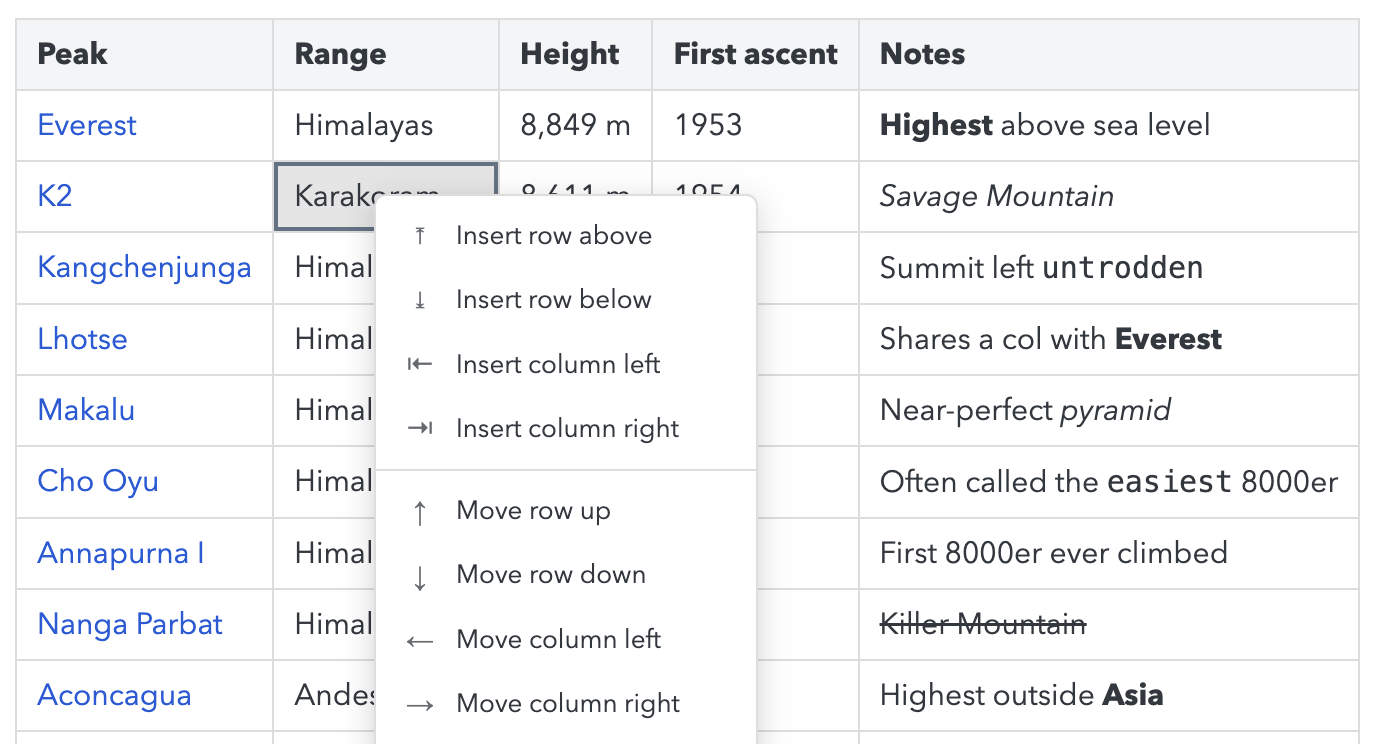
Interactive table editor shipped Allows editing Markdown tables directly within the editor with a context menu for row and column management.
release
-
New interactive table editor in the Markdown editor (desktop and mobile) with a context menu to add and delete rows and columns.
announced · Aug 2026
· source
· release history
docs
- android-v3.7.7 - 2026-08-28T18:05:26Z Improved: Implement readonly state for mobile RTE and disable the MDE interactive table editor for readonly notes (#16231 by Improved: Markdown editor: Support opening same-note links to elements with id="..." attributes (#16287 by Improved: Sync: Enable new notebook sharing key… docs update · Sep 2026 · source
Notebook Unpublishing shipped Stops syncing or sharing a previously published notebook without deleting the notebook itself.
release
- Add support for unpublishing notebooks 3.7.13 · Aug 2026 · source · release history
example
-
Unpublish a shared notebook to stop syncing or sharing without deleting it.
Steps: In the notebooks list, right-click a published notebook and select 'Unpublish'.3.7.13 · Aug 2026 · source
Note Creation via External URLs shipped Enables creating or retrieving notes from external scripts or URLs using x-callback-url commands.
release
-
Adds
getCurrentNoteandcreateNoteto the x-callback-url command set 3.7.10 · Jul 2026 · source · release history
example
-
Trigger Joplin to retrieve or create notes via external shell scripts or URLs.
open 'joplin://x-callback-url/getCurrentNote'3.7.10 · Jul 2026 · source
Enhanced Whiteboard Object Management shipped Adds support for grouping whiteboard objects and configuring their colors within the whiteboard canvas.
release
- Whiteboard: Add support for colors 3.7.8 · Jul 2026 · source · release history
- Adds groups support to whiteboard objects 3.7.3 · Jun 2026 · source · release history
Archive Extraction Plugin API shipped Provides a plugin method to programmatically extract archive contents within the cyber tooling environment.
Also counts toward: Plugin API support, Scripting API
release
-
Adds support for
joplin.fs.archiveExtractplugin method 3.6.4 · Mar 2026 · source · release history
example
-
Extract archive contents programmatically via plugin code.
const files = await joplin.fs.archiveExtract(filePath, '/tmp/extract');3.6.4 · Mar 2026 · source
Note Revision Deletion API shipped Allows deleting specific historical revisions for a note to manage storage or data hygiene.
Also counts toward: REST API
release
- Api: Add a delete revisions for note API 3.6.3 · Mar 2026 · source · release history
example
-
Delete specific historical revisions for a note via the REST API to manage storage or data hygiene.
DELETE /notes/<note_id>/revisions/<revision_id>3.6.3 · Mar 2026 · source
Media viewer shipped Displays media files, including those with local file URLs.
release
- Adds support for external embeds such as YouTube videos 3.6.1 · Jan 2026 · source · release history
- Re-enables media with local file URLs in the note viewer. v3.1.22 · Nov 2024 · source · release history
Inline note search shipped Allows searching for notes while remaining in the current note's reading view.
release
- Allow searching when only the note viewer is visible and sync search with editor 3.1.2 · Aug 2024 · source · release history
example
-
Search notes without leaving the current note's reading view
In Joplin, press Ctrl+K (or Cmd+K on macOS) while viewing a note to open the unified search bar.3.1.2 · Aug 2024 · source
Customizable sidebar layout shipped Allows users to interactively resize and adjust the width of sidebar columns within the application interface.
release
- Allow customising application layout 1.4.10 · Nov 2020 · source · release history
- Adds ability to resize sidebar columns with a new UI interaction. v1.0.135 · Feb 2019 · source · release history
Word count shipped Counts the number of words in the active note body.
release
-
Add
word counterfeature to notes v1.0.193 · Mar 2020 · source · release history - Adds a word counter feature to notes 1.0.187 · Mar 2020 · source · release history
Theme selection shipped Allows users to select from pre-defined color themes such as Dracula and Nord.
release
- Add Nord color theme v1.0.173 · Nov 2019 · source · release history
- New: Added Dracula theme (#1924) (#1863) v1.0.170 · Oct 2019 · source · release history
Resource download configuration shipped Configures how attachments are downloaded, allowing them to be fetched automatically or on-demand.
release
- Adds the ability to download attachments automatically or only when needed via a new setting v1.0.157 · May 2019 · source · release history
example
-
Configure how note attachments are handled to save space or improve sync speed.
Go to Tools > Options > Synchronization > Advanced and adjust the attachment download policy setting.v1.0.157 · May 2019 · source
Todo list management shipped Manages to-do items with options to hide completed tasks.
release
-
hide_completed_todosoption added to hide completed todos from the list view. v1.0.91 · May 2018 · source · release history
example
-
Hide completed tasks to reduce clutter in the todo list view.
Go to Settings > General > Editor and enable 'Hide completed todos'.v1.0.91 · May 2018 · source
Resource cleanup shipped Automatically detects and removes attached files that are no longer linked to any note.
release
- New: Unused resources are automatically deleted after approximately 24h v1.0.77 · Mar 2018 · source · release history
example
-
Clean up notes by automatically removing attached files that are no longer linked.
This happens automatically after 24h; no configuration is required.v1.0.77 · Mar 2018 · source
Installation directory configuration shipped Allows users to specify a custom location for application files during the Windows setup process.
release
- Allow setting installation directory in Windows v0.10.37 · Dec 2017 · source · release history
example
-
Choose a custom location for Joplin installation files during Windows setup.
During the Windows installer wizard, select 'Custom Installation' and specify the desired path before proceedingv0.10.37 · Dec 2017 · source
Mobile notebook management shipped Configures how notebooks are sorted on mobile devices.
release
-
New notebook sort options on mobile: alphabetically or by most-recently-updated, in either direction, configurable from the configuration screen.
announced · Aug 2026
· source
· release history
AI Embedding Vector Access API shipped Exposes a plugin API to retrieve raw vector embeddings for notes, enabling advanced AI integrations.
Also counts toward: Plugin API support
release
- Add joplin.ai.getEmbeddings() plugin API for raw vector access 3.7.8 · Jul 2026 · source · release history
Global Window Control Shortcut shipped Provides a global keyboard shortcut to show or hide the main application window from outside the app context.
release
- Adds a global keyboard shortcut to show or hide the Joplin main window 3.6.10 · Apr 2026 · source · release history
Markdown editor plugins shipped Provides an interface for third-party extensions to interact with the Markdown editor and render markup.
Also counts toward: Plugin API support, Plugin system
release
-
Editor Plugins: Added a plugin interface allowing third-party extensions to interact with the Markdown editor, including a new
renderMarkupcommand for converting MD/HTML to HTML output. 3.2.1 · Nov 2024 · source · release history
Overwrite mode shipped Enables a toggle for cursor-based text replacement in the Markdown editor.
release
- Added Overwrite Mode toggle in the Markdown editor settings, enabling cursor-based text replacement instead of insertion. 3.2.1 · Nov 2024 · source · release history
Note source tracking shipped Tracks and exposes the origin of a note via a source property.
release
- Api: Add support for note.source property 3.0.8 · May 2024 · source · release history
Multi-column note list shipped Displays notes in a split-pane or multi-column layout for browsing.
release
-
Adds
multi_columns_note_listUI feature allowing split-pane note browsing. 3.0.2 · Mar 2024 · source · release history
Plugin API for native file dialogs shipped Exposes the `showOpenDialog` method to plugins, enabling them to open native operating system file picker dialogs.
Also counts toward: Plugin API support
release
-
Adds
showOpenDialogmethod to the plugin API enabling plugins to open native file picker dialogs 2.13.5 · Nov 2023 · source · release history
Plugin icon support shipped Adds support for defining and displaying custom icons within plugin interfaces.
release
- Improved: Adding support for plugin icons 2.12.10 · Jul 2023 · source · release history
Plugin user data storage shipped Allows plugins to store and access user-specific data via the `plugin.userData` property.
Also counts toward: Plugin API support
release
-
Add support for plugin user data (
plugin.userData) 2.11.11 · Jun 2023 · source · release history
Resource duplication handling shipped Automatically duplicates attached resources, such as media assets, when a note is duplicated to ensure content integrity.
release
- Duplicate resources when duplicating a note to ensure media assets are copied alongside the note content. 2.6.4 · Dec 2021 · source · release history
Synchronization reliability improvements shipped Enhances sync stability and error handling, specifically for S3 storage backends through SDK upgrades.
release
- Improved S3 sync error handling and reliability, including an upgraded S3 SDK. 2.6.4 · Dec 2021 · source · release history
Note templates shipped Allows creating and using reusable note templates to streamline note creation.
release
- Adds support for note templates. v1.0.165 · Aug 2019 · source · release history
Note history display details shipped Displays detailed change metrics such as added and removed character counts in the revision history view.
release
- Enhances revision history display by showing the exact count of added and removed characters v1.0.157 · May 2019 · source · release history
Portable execution mode shipped Allows running the cyber tool from a portable executable without installing it on the system.
release
-
Adds
JoplinPortable.exeto enable running Joplin from a USB drive without installation v1.0.93 · May 2018 · source · release history
Lines in monospace are the tool's own words: help text
parsed from its source, or an endpoint from its API document. Under
release, a line is our summary of a dated release. Under
docs, it is quoted from the tool's own documentation or
website. Each links back to the source it came from.
Command line
No command matches.
| option | found in | since | description |
|---|
Values are placeholders taken from each option’s declared default. Nothing is executed here — the output shown is a recording of a run that already happened.
Screenshots
From the release notes, newest first. Click one to see it full size.Media
Videos from the release notes, newest first. They play right here.Score card
-
Shipping velocity releases a month, last 12 months
-
Documentation quality release-notes rubric, 0–100
-
Breaking-change discipline how rarely a release breaks users, and notice given
-
Maintenance risk quiet time against its own cadence, maintainers
-
Innovation & surface new capabilities, API and MCP surface
- Community health
-
Contributor trend distinct committers, this year against last
-
Maintainer concentration bus factor now against a year ago
-
Issue backlog trend issues closed per issue opened, 12 months
-
Responsiveness median time to a maintainer’s first reply
Nine scores for joplin, each built from the releases, notes and API history this site tracks — and, on Researcher and Business, where it stands among every measured tool in its category and how that has moved.
Score cards are part of every paid plan.
See plans → Already subscribed? Sign in →Trajectory
Blank means never measured; nothing here is a filled-in zero.
Peer standings are included with Researcher and Business. See how this tool ranks against its competitors, using data we don't publish anywhere else.
See plans →Each score is 0–100 on a published rubric, derived from data this site already shows. A dimension we cannot measure says so — it is never scored 0 and never enters a rank.
How this is scored
- Shipping velocity — releases a month over the last 12 months, on a log scale where 16 a month scores 100. Needs 3 releases in the window.
- Documentation quality — the release-notes rubric published on the analytics page, unchanged.
- Breaking-change discipline — the share of releases carrying a breaking change (none scores 100, half or more scores 0). Only projects that label breaking changes are measured: a clean record cannot be told from an unlabelled one.
- Maintenance risk — quiet time measured against the tool's own release cadence (quiet longer than 90 days and three typical gaps scores 0), plus the number of active maintainers and whether contributors are growing, where known. Higher is lower risk.
- Innovation & surface — new capabilities in the feature ledger this year, API and MCP operations added, and the share of commits that are features: the mean of whichever we hold.
- Community health (open-source tools only) — each is a direction, not a size: contributors this year against last, the bus factor now against a year ago, and issues closed per issue opened, where steady scores 50, doubled 100 and halved 0; plus the median time to a maintainer's first reply (an hour scores about 100, a month or more 0). A commercial card has no repository and carries none of the four.
- Documented delivery (commercial tools) — when a vendor's documented new capabilities have slowed against its own baseline, that counts against the overall standing as heavily as two low dimensions. Steady delivery, or too little history to judge, leaves the standing alone; it is never a sixth score.
- Open-source tools are scored on repository signals; commercial tools on their published changelog. Ranks compare tools within one category and one profile and need at least five measured peers; the overall standing needs three ranked dimensions. Best-in-breed or consolidator is a shape, not a quality, and is never scored.
Release-note detail over time
See how much detail joplin puts in its release notes, quarter by quarter, and compare it with tracked tools in the same category. This history uses up to ten retained, reviewed notes per tool; sparse or blank older quarters may reflect that limit.
Checking release-note history…
Releases
210 entries
No entries match these filters.
- October 20261
- September 202620
- August 20262
- July 20263
- June 20261
- May 20263
- April 20261
- March 20263
- January 20262
- November 20251
- October 20251
- September 20251
- August 20251
- July 20251
- May 20251
- April 20253
- March 20251
- February 20252
- January 20252
- December 20241
- November 20244
- October 20241
- September 20242
- August 20242
- June 20241
- May 20241
- April 20241
- March 20241
- February 20241
- January 20243
- November 20231
- September 20231
- July 20231
- June 20231
- May 20231
- February 20231
- October 20221
- July 20221
- April 20222
- February 20221
- January 20221
- December 20211
- November 20211
- September 20214
- August 20214
- July 20211
- June 20214
- May 20213
- April 20211
- March 20211
- January 20216
- December 20204
- November 20208
- October 20209
- September 20204
- August 20205
- July 20202
- June 20202
- May 20206
- April 20201
- March 20206
- January 20202
- December 20191
- November 20191
- October 20191
- September 20193
- August 20191
- June 20192
- May 20195
- April 20192
- March 20191
- February 20195
- January 20193
- December 20181
- November 20182
- September 20184
- June 20184
- May 20187
- March 20183
- February 20184
- January 20183
- December 20172
Project health
Issue, contributor and maintainer activity in laurent22/joplin, 2023-10 – 2026-09, as of 2026-09-25. Twelve-month figures first; the trend lines run the whole window.
- Contributors 134 +47 vs prior 12 months
- Maintainers 4 +1 joined · −0 left, last 12 months
- Bus factor 2 committers behind half the commits
- Community-filed 65% of issues opened, last 12 months
- Median time to close 24 days first maintainer reply 27 hours
- Open backlog 621 of 8,373 issues ever filed
- Issues opened / month 82 · 19 communitymaintainers
- Open backlog 621
- Contributors / month 17
- Commits / month 108
- Stars 56,435
- bugs 75%
- features 7%
- docs 0%
- other 18%
Counts from the project's public repository and git history; no individuals are identified. Maintainers are the committers covering 80% of the last year's commits. how we measure this
Add the badge to your README
Maintain this project? The badge links readers straight to this page, so they can follow every release here.
 Choose a badge style and copy the code →