Sysdig Secure
changelog-20261029-21dc9b7d commercialThe section your link pointed to isn't on Sysdig Secure's page any more, so we've brought you to the top.
Sysdig Secure is a container security platform providing runtime threat detection, forensics, and compliance monitoring for cloud-native environments.
sysdig-cli-scanner --detect-unknown-executables <image>
sysdig-cli-scanner --show-licenses <image>
sysdig-cli-scanner --detect-unknown-executables <image>
sysdig-cli-scanner --output json <image>
sysdig-cli-scanner --show-licenses <image>
sysdig-cli-scanner <image> --json-scan-result result.json && jq '.info.resultDetails.packages[] | select(.lifecycle.status == "end-of-life")' result.json
Summary
Sysdig Secure is a commercial cloud-native application protection platform run as a SaaSSaaSSoftware delivered over the internet and run on the provider's infrastructure, so the buyer pays a subscription instead of installing or operating anything locally. service, covering threat detection, vulnerability management, posture, and identity risk across cloud, container, and Kubernetes workloads. It uses the open-source Falco engine for runtime threat detection, adds agentless snapshot scanning for hosts and containers across Windows, Fedora, Bottlerocket, and Container-Optimized OS, and lets teams trigger containment or investigation actions directly from a resource view, with a history panel to audit or roll back what automations did. It is built for cloud security and platform teams responsible for runtime risk and incident response rather than for source-code-level application security review.
Sysdig Secure is a container security platform providing runtime threat detection, forensics, and compliance monitoring for cloud-native environments.
How Sysdig Secure helps
Which of my running hosts and containers have vulnerabilities I don't know about?
scans Windows, Fedora, Bottlerocket, and Container-Optimized OS hosts agentlessly via snapshot, plus running containers, and returns a prioritized report so teams fix the most critical issues first
What is actually happening on my containers and clusters right now that looks malicious?
runs Falco rules continuously against runtime activity and fires real-time alerts when a predefined or custom policy matches, so active threats surface as they occur rather than after the fact
Who did what on this workload before, during, and after this incident?
reconstructs an audit trail of user and system activity, showing which files were accessed or modified, what commands ran, and who performed each action
Can I stop or investigate this workload without leaving the page I'm looking at?
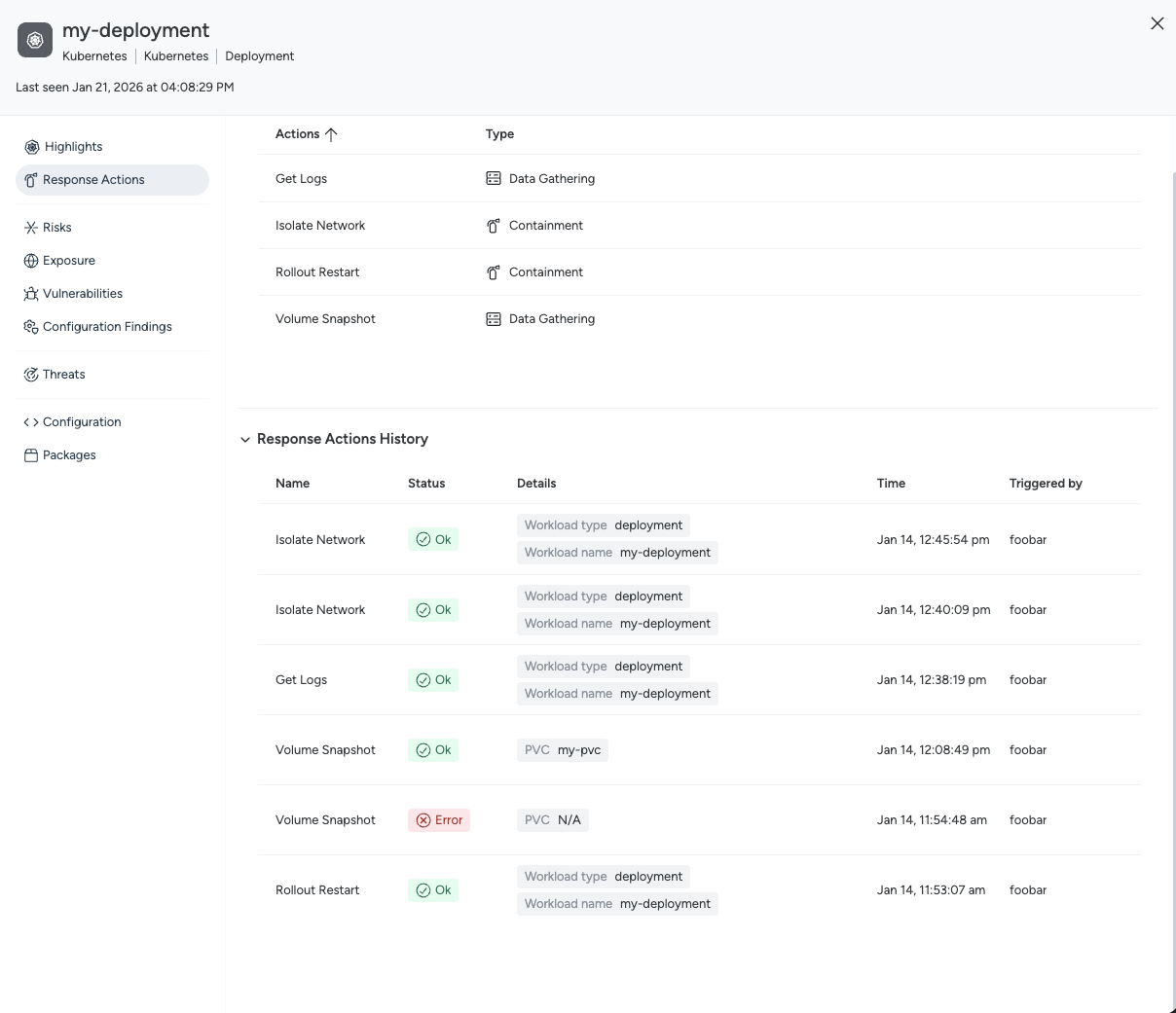
triggers containment or investigation Response Actions directly from the resource drawer for hosts, Kubernetes workloads, and AWS resources, provided the relevant Shield or Response Actions component is deployed
Did an automation or a teammate take an action I need to review or undo?
the Response History panel and centralized Response History page record every action taken manually, by automation, or via API, including target, timing, actor, and execution status, and let you retrieve artifacts or reverse a wrongly triggered containment
Which of my components are running on software the vendor no longer supports?
flags operating systems, the Go runtime, and other components as end-of-life or nearing their EOL date across the Resource Details, Components, and CVE Details views, and can fail a pipeline build when a Component Lifecycle rule matches
Languages
Features
Built from Sysdig Secure's releases, docs, README and our own runs. “Seen” marks the month we first spotted a release the vendor didn't date. Group names and tags are our labels.
- Sysdig Secure covers 3 of the 8 vulnerability assessment methods capabilities we track.
- Sysdig Secure covers 1 of the 11 logs and telemetry capabilities we track.
What Sysdig Secure offers you
- Command-line interface3
- JSON data export2
- SIEM forwarding2
- Administrative audit log1
- Agentless deployment1
- CI/CD pipeline integration1
- Scripting API1
- Web management console1
- REST API
No capabilities match.
Container image vulnerability scanning 4 features Vulnerability assessment methods since 2026
Container image vulnerability scanning shipped Scans container images for vulnerabilities, supporting a wide range of image formats and multi-architecture builds.
Shared capability: Container image vulnerability scanning
Also counts toward: Command-line interface
release 11 total
-
Registry Scanner v0.13.0 standalone binary scanning may surface new findings on images (distroless, scratch) that previously showed none — review results after upgrading.
 changelog · Oct 2026
· source
· release history
- Registry Scanner v0.13.0 now adds standalone binary scanning, identifying applications not installed by a package manager — including PHP compiled from source — so distroless and scratch images can surface new findings after upgrade. changelog · Oct 2026 · source · release history
-
The
--skiptlsverifyflag is deprecated in favor of the new--api-skiptlsverifyand--registry-skiptlsverifyflags. February 10, 2026 · Feb 2026 · source · release history -
Added flag
--registry-insecureto support pulling images from HTTP registries in Sysdig CLI Scanner v1.25.0 February 10, 2026 · Feb 2026 · source · release history -
Added flag
--api-skiptlsverifyto disable TLS certificate verification for interactions with the Sysdig backend in Sysdig CLI Scanner v1.25.0 February 10, 2026 · Feb 2026 · source · release history -
Added flag
--registry-skiptlsverifyto disable TLS certificate verification when pulling images from registries in Sysdig CLI Scanner v1.25.0 February 10, 2026 · Feb 2026 · source · release history
example
-
Scan a container image for vulnerabilities including binaries not tracked by any package manager, and flag unrecognized executables too.
sysdig-cli-scanner --detect-unknown-executables <image>changelog · Sep 2026 · source -
Scan a container image and surface vulnerabilities in binaries that were not installed via a package manager, including unrecognized executables.
sysdig-cli-scanner --detect-unknown-executables <image>Secure SaaS - September 16, 2026 · source -
Scan a container image for vulnerabilities
sysdig-cli-scanner --apiurl https://secure.sysdig.com nginx:latest -
Scan an image locally without the Sysdig backend
sysdig-cli-scanner --standalone nginx:latest
Vulnerability policy scoping and base image rules shipped Allows flexible include/exclude patterns in vulnerability policy scopes and evaluates base image supply chain rules directly in the CLI scanner.
Shared capability: Container image vulnerability scanning
release 8 total
-
Extend risk acceptance to every component type in CLI Scanner v1.31.0, so accepted risks now apply to vulnerabilities in standalone binaries and other components that are not packages.︀︄︇︀︅︉︀︅︀︀︃︀︀︅︅︀︅︊︀︄︆︀︃︄
changelog · Oct 2026
· source
· release history
- Binary Allow List and Binary Deny List rules are now evaluated by the CLI Scanner for vulnerability policy enforcement. September 16, 2026 · Sep 2026 · source · release history
- Sysdig CLI Scanner v1.29.0 adds support for Base Image Allow List and Base Image Deny List image configuration rules, so vulnerability policies governing base images are now evaluated by the CLI Scanner. changelog · Aug 2026 · source · release history
- Adds Base Image Allow List and Base Image Deny List image configuration rules to the CLI Scanner for evaluating vulnerability policies on base images August 11, 2026 · Aug 2026 · source · release history
- Vulnerability policy scopes for the Admission Control and Runtime stages now let you use the same attribute in more than one condition August 3, 2026 · Aug 2026 · source · release history
- Vulnerability policy scopes for the Admission Control and Runtime stages now support using the same attribute in more than one condition, enabling include and exclude patterns on a single attribute (e.g., all non-production clusters except one), with conditions joined by AND. Secure SaaS - August 3, 2026 · source · release history
docs
- Pipeline scopes support only one Image Reference condition. Registry scopes support only one Image Reference condition. You can use the same scope attribute, including Image Reference , in more than one condition. Because conditions are joined with , you can define include and exclude patterns on a single attribute. seen Aug 2026 · source
Package and OS detection in vulnerability scans shipped Detects packages from a broad range of Linux ecosystems and package managers during vulnerability scans, including file-level attribution for Ruby gems.
Shared capability: Container image vulnerability scanning
release
-
Support for Hummingbird OS distribution is added.
September 16, 2026 · Sep 2026
· source
· release history
-
--detect-unknown-executablesflag enables identification and reporting of vulnerabilities in applications not installed via a package manager. September 16, 2026 · Sep 2026 · source · release history - Adds detection of Arch Linux packages in the CLI Scanner. Secure SaaS - July 29, 2026 · source · release history
-
Adds detection of NixOS (
nix) packages in the CLI Scanner. Secure SaaS - July 29, 2026 · source · release history -
Improves Ruby package detection: Host Scanner tracks source
.rbfiles within installed gems, enabling more precise file-level vulnerability attribution. Secure SaaS - July 9, 2026 · source · release history -
Adds
dnfandmicrodnfto the package manager detection policy rule. Secure SaaS - July 29, 2026 · source · release history
docs
-
September 16, 2026 Sysdig CLI Scanner v1.30.0 Added standalone binary scanning, so the CLI Scanner identifies applications that no package manager installed and reports their vulnerabilities. Use
--detect-unknown-executablesto also report the executables it does not recognize. changelog · Sep 2026 · source - July 29, 2026 Sysdig CLI Scanner v1.28.0 Added support for detecting NixOS ( nix ) and Arch Linux packages. dnf microdnf to the package manager detection policy rule. Resolved an issue which could cause the CLI Scanner to report incorrect Java package versions when a JAR manifest does not contain pom.properties . changelog · Jul 2026 · source
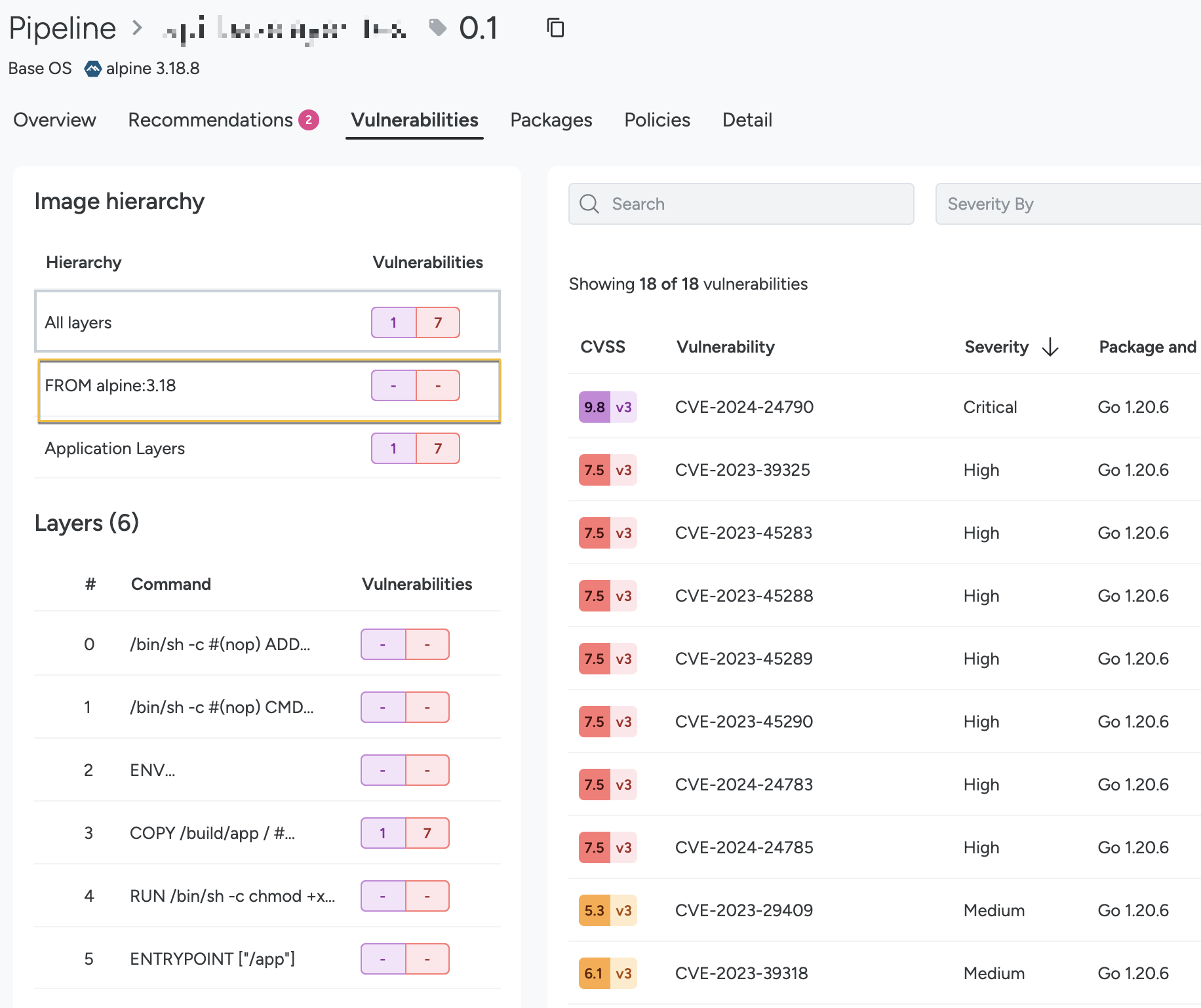
Container image layer analysis shipped Provides a layers tab in resource details to visualize the container image stack, Dockerfile instructions, and vulnerability counts by severity per layer, along with filters to slice findings by specific layers.
Shared capability: Container image vulnerability scanning
release
-
Adds a Layers tab to the Resource Details drawer for container image resources, showing the image layer stack grouped by base image or Application Layers, with the Dockerfile instruction and per-severity vulnerability counts per layer.
changelog · Aug 2026
· source
· release history
- Adds a Layer filter to the CVE list in Vulnerability Findings so practitioners can slice findings directly by image layer. changelog · Aug 2026 · source · release history
-
Adds Layers tab in the Resource Details drawer for container image resources showing the image layer stack grouped under base images, Dockerfile instructions, and vulnerability counts by severity
 August 13, 2026 · Aug 2026
· source
· release history
- Adds Layer filter to the CVE list view for slicing vulnerabilities directly by layer August 13, 2026 · Aug 2026 · source · release history
- Adds Vulnerability Policies tab in the Resource Details drawer for vulnerability findings to show policy evaluation results and create exceptions without leaving the drawer August 13, 2026 · Aug 2026 · source · release history
- Adds a Layers tab in the Resource Details drawer for container image resources, displaying the full image layer stack grouped by base image or Application Layers, with per-layer Dockerfile instruction and vulnerability counts by severity — select a layer to filter the Vulnerabilities tab, or use the new Layer… Secure SaaS - August 13, 2026 · source · release history
docs
-
The base image shown in the instruction in the Dockerfile, as they might differ. All Layers shows the total number of vulnerabilities in the final image composition, including vulnerabilities from both the application layers and base image layers.
 docs update · Aug 2026
· source
-
Layer Number 7 The index of the image layer that introduced the affected component. Shown when Sysdig can attribute the finding to a layer. Layer Command RUN apt-get install
-ycurl The Dockerfile instruction that created that layer, so you can see what introduced the component. docs update · Aug 2026 · source
Log routing 2 features Logs and telemetry since 2026
SIEM integration (Microsoft Sentinel) shipped Forwards Sysdig events to Microsoft Sentinel using the current Azure Monitor Logs Ingestion API.
Shared capability: Log routing
Also counts toward: SIEM forwarding
release 9 total
- Supports the Azure Monitor Logs Ingestion API as a new authentication method for Microsoft Sentinel SIEM integration June 26, 2026 · Jun 2026 · source · release history
- Adds support for streaming Sysdig data to Amazon Kinesis Firehose via the UI under Integrations > SIEM & Data Platforms. February 17, 2026 · Feb 2026 · source · release history
- Adds support for streaming Sysdig data to Amazon Kinesis Data Streams via the UI under Integrations > SIEM & Data Platforms. February 17, 2026 · Feb 2026 · source · release history
- Supports the Azure Monitor Logs Ingestion API for Microsoft Sentinel SIEM integration, replacing the deprecated HTTP Data Collector API. Secure SaaS - June 26, 2026 · source · release history
-
The Data to Send field in SIEM & Data Platforms integrations is replaced by forwarding rules; existing configurations using that field will need to be migrated to the new rules model.
Secure SaaS - October 14, 2026
· source
· release history
- Adds forwarding rules to SIEM & Data Platforms integrations, replacing the Data to Send field, with per-rule filters including severity and policy name for Runtime Policy Events and type for Activity Audit.︀︄︇︀︅︉︀︅︀︀︃︀︀︅︅︀︅︊︀︄︆︀︃︄ Secure SaaS - October 14, 2026 · source · release history
example
-
Switch Sysdig Secure Sentinel forwarding from the legacy HTTP Data Collector API to the supported Azure Monitor Logs Ingestion API.
In the console, go to Settings > Integrations > Microsoft Sentinel and select 'Azure Monitor Logs Ingestion API' as the authentication method.June 26, 2026 · Jun 2026 · source -
Stream security telemetry from your cluster to Kinesis for real-time processing or custom S3 storage.
In the Sysdig Secure dashboard, navigate to Integrations > SIEM & Data Platforms and select 'Forwarding to Amazon Kinesis Data Streams'.February 17, 2026 · Feb 2026 · source -
Switch your Sentinel forwarding integration to the new Azure Monitor Logs Ingestion API before Microsoft's HTTP Data Collector API reaches end of life.
In Sysdig Secure, go to Integrations > Forwarding, select your Microsoft Sentinel destination, and choose the Azure Monitor Logs Ingestion API authentication method, then save.Secure SaaS - June 26, 2026 · source -
Reduce SIEM noise by forwarding only high-severity Runtime Policy Events from a specific policy, rather than all events.
In Sysdig Secure, go to Integrations > SIEM & Data Platforms, select your integration, and add a forwarding rule with data type 'Runtime Policy Events', filter by severity (e.g.Secure SaaS - October 14, 2026 · source
SIEM forwarding rules shipped Replace the flat 'Data to Send' field with per-integration forwarding rules that specify a data type and optional filters (e.g., severity, policy name, activity audit type) so only matching data is forwarded to each SIEM or data platform integration.
Shared capability: Log routing
Also counts toward: SIEM forwarding
release
-
The Data to Send field in SIEM & Data Platforms integrations is replaced by forwarding rules; existing integrations relying on that field will need to be reconfigured with the new rules model.
changelog · Oct 2026
· source
· release history
- Adds SIEM forwarding rules to replace the Data to Send field, letting you attach one or more rules to each integration with a data type and optional filters — such as severity or policy name for Runtime Policy Events, or type for Activity Audit — so only matching data is forwarded.︀︄︇︀︅︉︀︅︀︀︃︀︀︅︅︀︅︊︀︄︆︀︃︄ changelog · Oct 2026 · source · release history
- Adds a Rules column to the integrations list showing the number of forwarding rules configured per integration. changelog · Oct 2026 · source · release history
example
-
Reduce SIEM noise by forwarding only high-severity Runtime Policy Events to your SIEM integration, rather than all data.
In Sysdig Secure, go to Integrations > SIEM & Data Platforms, select your integration, then under Forwarding Rules add a rule: set data type to 'Runtime Policy Events' and filter by severity 'High'…changelog · Oct 2026 · source
Infrastructure-as-code security scanning 1 feature Vulnerability assessment methods
Infrastructure-as-code scanning shipped Scans infrastructure-as-code files for misconfigurations using the CLI scanner.
Shared capability: Infrastructure-as-code security scanning
example
-
Scan infrastructure-as-code files in a directory
sysdig-cli-scanner --iac --apiurl https://secure.sysdig.com ./
Vulnerability prioritization 1 feature Vulnerability assessment methods
Exploit intelligence enrichment in vulnerability output shipped Adds real-world exploitability context to vulnerability findings using Flashpoint threat intelligence and adjusted CVSS scores.
Shared capability: Vulnerability prioritization
release
- Adds Flashpoint KEV (Known Exploited Vulnerabilities) tag to CLI Scanner vulnerability output for faster exploit-aware triage. Secure SaaS - May 26, 2026 · source · release history
- Adds Flashpoint CVSSv3 Temporal score to CLI Scanner vulnerability output, surfacing real-world exploitability context alongside base scores. Secure SaaS - May 26, 2026 · source · release history
Other / not yet classified 13 features Features we have not matched to a capability yet. A suggested match is marked.
Host vulnerability scanning shipped suggested Scans hosts for vulnerabilities using agentless or agent-based methods across major Linux distributions, Windows, and ARM architectures.
Suggested capability: Container image vulnerability scanning. This is our guess, not confirmed.
Also counts toward: Agentless deployment
release 16 total
-
Agentless Host Scanning now identifies PHP in standalone binary scanning, including PHP compiled from source such as the official Docker Hub
phpimages, with no new deployment steps required.
changelog · Oct 2026
· source
· release history
- Agentless Host Scanning now supports AWS Bottlerocket hosts (host and container vulnerability scanning from snapshots) April 15, 2026 · Apr 2026 · source · release history
- Agentless Host Scanning now supports Fedora hosts (host and container vulnerability scanning from snapshots) April 15, 2026 · Apr 2026 · source · release history
- Agentless Host Scanning now supports Windows hosts (vulnerability scanning from snapshots) April 15, 2026 · Apr 2026 · source · release history
- Host Scanner v0.16.2 now supports Talos Linux OS with vulnerability matching for non-OS packages March 25, 2026 · Mar 2026 · source · release history
- Sorts vulnerability findings by default to highlight critical, exploitable, and recently discovered items February 3, 2026 · Feb 2026 · source · release history
example
-
Look up a CVE across all tracked assets — even before it surfaces as a finding — to assess scope and exploitability before a patch ships.
In Sysdig Secure, go to Vulnerability Catalog, enter a CVE ID in the search box, then filter by Severity and Exploit to open the CVE Details drawer and check whether the CVE affects your environment.changelog · Oct 2026 · source -
Scan hosts using LVM for multi-partition root volumes
Initiate agentless host scan; ensure /etc/fstab is accessible to reconstruct mount points like /, /usr, /var, /home.January 24, 2026 · Jan 2026 · source -
Review license and end-of-life supply chain findings for runtime resources, grouped by image, to prioritize remediation in production.
In Sysdig Secure, go to Attack Surface > Supply Chain Findings. Set the Stage filter to 'runtime', the Finding Type filter to 'end-of-life', then use the Group By control to group by 'image'.Secure SaaS - October 01, 2026 · source
Threat detection and investigation shipped suggested Surfaces threat signals per resource with full event history, bulk actioning on grouped findings, and automatic CIS Kubernetes Benchmark evaluation based on detected CNI plugins.
Suggested capability: Security event correlation. This is our guess, not confirmed.
release 11 total
-
Adds an Evaluation column to the Threats page (requires Secure AI entitlement) ranging from Malicious to Benign with Suspicious in between, sortable and filterable, plus a confidence level in the Threats Detail panel.
changelog · Oct 2026
· source
· release history
- Adds automated detection of Container Network Interface (CNI) plugins on Kubernetes nodes to automatically evaluate CIS Kubernetes Benchmark v2.0.0 recommendation 5.3.1. August 12, 2026 · Aug 2026 · source · release history
- Adds occurrence tabs to review previous or last threat occurrences from the same threat June 26, 2026 · Jun 2026 · source · release history
- Adds detection rules for Codex, Gemini CLI, and Claude Code installation, unauthorized access, config directory access, risky CLI arguments, and sensitive file access March 17, 2026 · Mar 2026 · source · release history
- Cloud Detection and Response (CDR) is renamed to Threat Detection across UI and documentation. February 26, 2026 · Feb 2026 · source · release history
- Added support for Kubernetes versions 1.29 through 1.32 with new compliance audits January 27, 2026 · Jan 2026 · source · release history
docs
- "probeCommand ": " <command to reach endpoints> ", " ": " OpenSSH ", " ": " p ", " applicationConfidence" seen Sep 2026 · source
example
-
Filter the Threats list to focus only on high-priority malicious activity.
In the Threats view, use the filter control to select `Evaluation` > `Malicious`September 29, 2026 · Sep 2026 · source -
Review historical context for a detected threat by switching between its occurrences.
In the Threats experience, open a specific threat and use the occurrence tabs to switch between 'Last' and previous occurrences.June 26, 2026 · Jun 2026 · source -
Enable monitoring for suspicious AI coding agent behavior via the UI.
In the console, go to Policies > Runtime Policies and enable `Sysdig AI Runtime Notable Events`March 17, 2026 · Mar 2026 · source
Component lifecycle (EOL) visibility and policy enforcement shipped Surfaces end-of-life status for operating systems and runtimes alongside vulnerability data, and lets teams block pipelines when components are EOL or approaching it.
Also counts toward: CI/CD pipeline integration, Command-line interface, JSON data export
release 10 total
-
Adds a Supply Chain Findings page (Technical Preview) listing license and end-of-life findings across pipeline, registry, and runtime resources, with filtering by severity, stage, finding type, license category, or license name, and grouping by package, image, or runtime resource
changelog · Oct 2026
· source
· release history
-
Attack Surface > Supply Chain Findingspage (Technical Preview) lists license and end-of-life findings on pipeline, registry, and runtime resources. October 01, 2026 · Oct 2026 · source · release history - Adds a new Component Lifecycle rule type to Rule Bundles that can fail policy evaluations when a component is EOL or within 90 days of it June 9, 2026 · Jun 2026 · source · release history
- Adds lifecycle metadata to CLI scanner JSON output and scan results API for pipeline integration June 9, 2026 · Jun 2026 · source · release history
- Adds a new Lifecycle column and filter in the Components tab of Sysdig Vulnerability Management to identify unsupported components alongside vulnerability data June 9, 2026 · Jun 2026 · source · release history
- New Component Lifecycle rule type in Rule Bundles enables policy evaluations to fail when a component has reached its EOL date or is within 90 days of it. Secure SaaS - June 9, 2026 · source · release history
example
-
Enforce a pipeline gate that fails builds when any scanned component is end-of-life or within 90 days of EOL — configured via a Component Lifecycle rule in a Rule Bundle.
In the Sysdig Secure console, go to Policies > Rule Bundles, create or edit a bundle, add a new rule of type "Component Lifecycle", and set the condition to fail when a component has reached its…Secure SaaS - June 9, 2026 · source -
Consume lifecycle metadata from the CLI scanner JSON output in a CI pipeline to programmatically detect EOL components without a UI.
sysdig-cli-scanner <image> --json-scan-result result.json && jq '.info.resultDetails.packages[] | select(.lifecycle.status == "end-of-life")' result.jsonSecure SaaS - June 9, 2026 · source
Custom Storage (multi-bucket S3) shipped suggested Connects multiple S3 or S3-compatible storage buckets for use with captures and response actions, with support for role delegation, custom endpoints, and per-bucket failure tracking.
Suggested capability: Log storage. This is our guess, not confirmed.
release 7 total
-
Adds Custom Storage: connect multiple S3 or S3-compatible buckets (MinIO, Google Cloud Storage, etc.) for use across Captures, Response Actions, and Rapid Response — replacing the previous single shared S3 Capture Storage configuration.
changelog · Jul 2026
· source
· release history
- The previous single shared S3 Capture Storage configuration is replaced by the new Custom Storage system; existing Capture Storage settings will need to be reconfigured under Data Sources > Storage. changelog · Jul 2026 · source · release history
- Supports AWS access keys, AWS role delegation (AssumeRole), and S3-compatible endpoints for bucket authentication, with connection testing on save and per-bucket failure history. changelog · Jul 2026 · source · release history
- Adds support for multiple S3 or S3-compatible buckets (MinIO, Google Cloud Storage) via Integrations > Data Sources > Storage July 16, 2026 · Jul 2026 · source · release history
- New Custom Storage configuration supports AWS access keys, AWS role delegation (AssumeRole), and S3-compatible endpoints, with connection testing on save and per-bucket failure history. Secure SaaS - July 16, 2026 · source · release history
- The previous single shared S3 Capture Storage configuration is replaced by Custom Storage; existing setups must be migrated to the new multi-bucket configuration under Integrations > Data Sources > Storage. Secure SaaS - July 16, 2026 · source · release history
docs
- July 16, 2026 Custom Storage: Major Update Sysdig Secure now supports Custom Storage : connect multiple S3 or S3-compatible buckets (MinIO, Google Cloud Storage, and others) and use them across Captures, Response Actions, and Rapid Response. changelog · Jul 2026 · source
example
-
Configure a MinIO bucket for use with Captures and Rapid Response via the new Custom Storage settings.
In Sysdig Secure, go to Data Sources > Storage, click Add Bucket, select S3-compatible endpoint, enter your MinIO endpoint URL and credentials, then click Test Connection and Save.changelog · Jul 2026 · source -
Configure a MinIO bucket for storing capture data and response artifacts in the SaaS console.
Navigate to Integrations > Data Sources > Storage and add an S3-compatible endpoint.July 16, 2026 · Jul 2026 · source -
Connect a MinIO bucket to use as storage for Captures and Rapid Response sessions.
In the console, go to Integrations > Data Sources > Storage, click Add Bucket, select S3-compatible endpoint, enter your MinIO endpoint URL and credentials, then click Test Connection and Save.Secure SaaS - July 16, 2026 · source
CVE lookup and exposure research shipped suggested Look up any CVE — including ones with no active findings in the environment — to understand potential exposure before it appears in a scan.
Suggested capability: Vulnerability prioritization. This is our guess, not confirmed.
Also counts toward: Scripting API
release
-
Falls back to NVD score when GitHub has no score available
October 05, 2026 · Oct 2026
· source
· release history
- Uses GitHub Advisory Database severity and CVSS scores for Java, JavaScript, Python, Go, Rust, PHP, Ruby, .NET, Erlang, Dart, and Swift package vulnerabilities October 05, 2026 · Oct 2026 · source · release history
- Adds a new Vulnerability Catalog feature allowing users to look up any tracked CVE even with no environment findings via the Policies > Vulnerability Catalog UI or the CVE Catalog API October 02, 2026 · Oct 2026 · source · release history
- Adds the CVE Details drawer, opened by selecting a CVE in the Vulnerability Catalog, showing CVE metadata and whether the CVE affects your environment. Secure SaaS - October 02, 2026 · source · release history
- Adds the CVE Catalog API to programmatically retrieve CVE metadata and environment-impact data, available on SaaS now and on-premises from version 7.10.︀︄︇︀︅︉︀︅︀︀︃︀︀︅︅︀︅︊︀︄︆︀︃︄ Secure SaaS - October 02, 2026 · source · release history
docs
- October 02, 2026 Vulnerability Management: Vulnerability Catalog In the new Vulnerability Catalog, you can look up any CVE that Sysdig tracks, even when it has no findings in your environment. Select Vulnerability Catalog , search by CVE ID, and filter by severity, fix, and exploit. changelog · Oct 2026 · source
example
-
Look up a CVE that has no active findings in your environment to understand exposure before it appears in a scan
Steps: In Sysdig Secure, select 'Vulnerability Catalog', search by CVE ID, and filter by severity, fix, or exploit status.changelog · Oct 2026 · source -
Navigate to the new Vulnerability Catalog to filter CVEs by exploit status.
Policies > Vulnerability CatalogOctober 02, 2026 · Oct 2026 · source -
Look up a CVE your team is investigating to see its severity, fix availability, exploit status, and whether it affects your environment — even if no findings exist yet.
In Sysdig Secure, go to Policies > Vulnerability Catalog, enter a CVE ID in the search bar, and apply filters for severity, fix, or exploit. Select the CVE to open the CVE Details drawer.Secure SaaS - October 02, 2026 · source
Response Actions shipped Lets teams run threat-hunting and containment actions against hosts, containers, Kubernetes workloads, and cloud resources from the UI, automations, or APIs.
release 7 total
- Enables performing Response Actions (Host, Container, File, Kubernetes, AWS) directly from the resource drawer without leaving the view May 15, 2026 · May 2026 · source · release history
- Adds Cloud Response Actions for AWS, allowing containment and investigative actions directly from the Events feed. February 26, 2026 · Feb 2026 · source · release history
- Adds Kill Process, File acquire, File quarantine, Kubernetes Rollout restart, Kubernetes Volume snapshot, Kubernetes Get Logs, and Kubernetes Network isolate as new Runtime Actions in Automations January 19, 2026 · Jan 2026 · source · release history
- Supports host, container, and file Response Actions for hosts when Host Shield is configured. Secure SaaS - May 15, 2026 · source · release history
- Enables Response Actions (threat hunting, incident containment) directly from the resource drawer without navigating away from the resource view. Secure SaaS - May 15, 2026 · source · release history
- Supports Cloud Response Actions for AWS resources when Cloud Response Actions are deployed. Secure SaaS - May 15, 2026 · source · release history
docs
- If you experience slowness with the Kubernetes API server and you have Cluster Shield’s Audit feature enabled, the issue could be connectivity problems between the Kubernetes control plane and the audit webhook endpoint. seen Sep 2026 · source
example
-
Contain an active incident on a Kubernetes workload without leaving the resource view — inspect the workload in the resource drawer, then trigger a Response Action inline.
In Sysdig Secure, navigate to the resource drawer for a Kubernetes workload > select the Response Actions tab > choose a compatible Kubernetes action and execute it.Secure SaaS - May 15, 2026 · source
AI-powered threat evaluation shipped Automatically scores each threat on a Malicious-to-Benign scale with a confidence level, allowing analysts to prioritize the most likely malicious events first.
release
-
Enables filtering by Evaluation in the Threats UI
September 29, 2026 · Sep 2026
· source
· release history
- Includes threat evaluation and confidence level details in the Threats Detail panel September 29, 2026 · Sep 2026 · source · release history
- Adds the Evaluation column to the Threats list view, categorizing threats as Malicious, Suspicious, or Benign September 29, 2026 · Sep 2026 · source · release history
- Adds a confidence level indicator in the Threat Detail panel alongside the Evaluation score, reflecting the amount of context available for each threat — requires the Secure AI entitlement. Secure SaaS - September 29, 2026 · source · release history
docs
-
Threat Evaluation Sysdig evaluates each Threat to help you decide which ones to review first. The evaluation ranges from Malicious to Benign , with Suspicious in between.
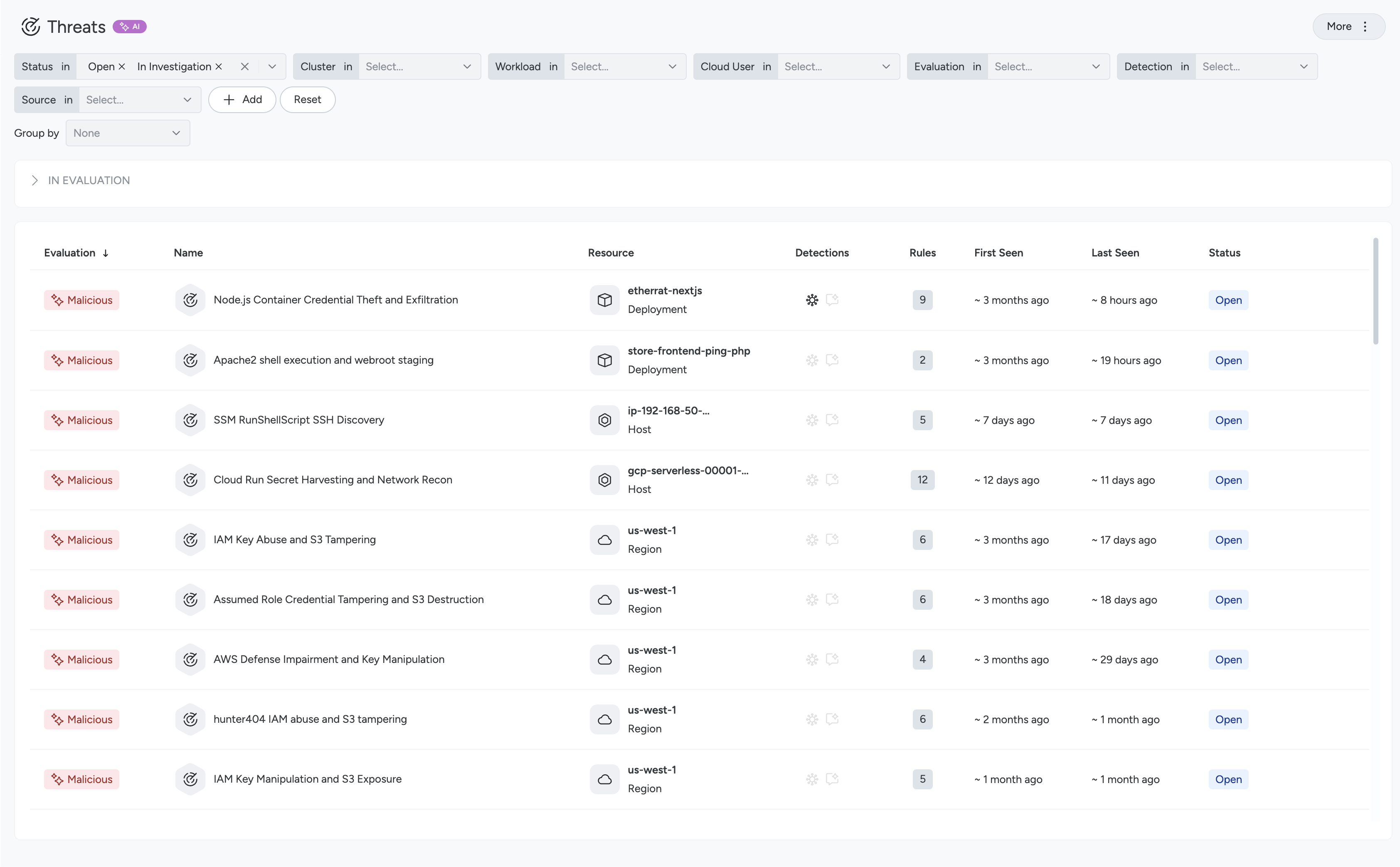 docs update · Sep 2026
· source
example
-
Prioritise real threats by sorting the Threats page by AI evaluation score to surface the most malicious activity first
Steps: In Sysdig Secure, navigate to 'Threats', sort by the 'Evaluation' column (Malicious > Suspicious > Benign), or use the 'Evaluation' filter.changelog · Oct 2026 · source -
Triage active threats quickly by surfacing the most likely malicious events first using AI-powered evaluation.
In Sysdig Secure, go to Threats, click the Evaluation column header to sort descending (Malicious first), then use the Evaluation filter to narrow to 'Malicious' and review confidence levels in the…changelog · Oct 2026 · source -
Triage the highest-priority threats first by sorting the Threats page by AI evaluation score.
In Sysdig Secure, go to Threats > Threats page, click the 'Evaluation' column header to sort by evaluation (Malicious first), then use the 'Filter by Evaluation' control to narrow the view to…Secure SaaS - September 29, 2026 · source
Posture Overview and Findings workspace shipped Provides a posture overview with compliance scores, 30-day trends, and a findings workspace for filtering, grouping, and assigning remediation work.
release 7 total
-
Introduces a new Posture Overview page surfacing passing scores, 30-day trends, and hotspots across weakest categories, resources, and high-severity controls.
changelog · Jul 2026
· source
· release history
- Introduces a new Posture Findings workspace with filtering, grouping, and remediation assignment to drive faster issue resolution. changelog · Jul 2026 · source · release history
-
Added
v2format for CSV output in Sysdig CLI Scanner v1.25.0, which includes non-package components such as Application, OS, and Container Image February 10, 2026 · Feb 2026 · source · release history - Adds Posture Overview page showing passing scores, 30-day trends, and hotspots for weakest categories, resources, and high-severity controls February 3, 2026 · Feb 2026 · source · release history
- Adds Findings workspace for filtering, grouping, and assigning remediation in Posture management February 3, 2026 · Feb 2026 · source · release history
- Expands Program Dashboards to view risk trends by namespaces, cloud accounts, images, and repositories February 3, 2026 · Feb 2026 · source · release history
example
-
Identify the weakest posture areas and assign remediation to platform teams using the new Findings workspace.
In Sysdig Secure, navigate to Posture > Findings, apply filters for high-severity controls, group results by resource or category, and use the Assign Remediation action to route issues to the…changelog · Jul 2026 · source
Response History and audit shipped Records all response actions in a centralised history log showing what was done, where, by whom, and allows artifact retrieval and reversal of containment actions.
Also counts toward: Administrative audit log
release
- Allows reviewing Response History for a resource to inspect execution status, target information, and configuration details May 15, 2026 · May 2026 · source · release history
- Adds the Response History page to visualize when, where, and by whom response actions were taken. May 5, 2026 · May 2026 · source · release history
- New Response History page centralizes all Response Actions taken manually, via Automations, or through APIs — showing what was done, where, when, and by whom. Secure SaaS - May 5, 2026 · source · release history
- Adds a Response History panel in the resource drawer to review past actions, execution status, target info, and configuration. Secure SaaS - May 15, 2026 · source · release history
- Enables retrieval of collected artifacts and reversal of containment actions performed in error from a single audit view. Secure SaaS - May 5, 2026 · source · release history
example
-
Review and roll back a containment action that was triggered incorrectly by an automation rule.
In Sysdig Secure, go to Response History, locate the containment action by timestamp or actor, review the collected artifacts, and select Revert to undo the action.Secure SaaS - May 5, 2026 · source -
Audit past containment decisions on an AWS resource by reviewing execution status and configuration history in one place.
In Sysdig Secure, open the resource drawer for an AWS resource > select the Response History tab > inspect each action's execution status, target information, and configuration.Secure SaaS - May 15, 2026 · source
Supply Chain Findings and License Compliance shipped Surfaces license compliance, end-of-life status, and other supply chain metadata alongside vulnerabilities, with UI pages, JSON output, and CLI flags for visibility and remediation prioritization.
Also counts toward: Command-line interface, JSON data export, Web management console
release
-
Registry Scanner v0.13.0 adds license detection for packages in scanned images, available in Technical Preview, under License Classification.
changelog · Oct 2026
· source
· release history
- Adds a Supply Chain Findings tab to the Resource Details drawer and the Component Details drawer. Secure SaaS - October 01, 2026 · source · release history
-
Adds the
Attack Surface > Supply Chain Findingspage (Technical Preview) listing license and end-of-life findings across pipeline, registry, and runtime resources, with filtering by severity, stage, finding type, license category, or license name, and grouping by package, image, or runtime… Secure SaaS - October 01, 2026 · source · release history -
Adds per-package license data (including license category) to the JSON scan result under the v1 schema, available via
--output json, in Technical Preview. Secure SaaS - September 16, 2026 · source · release history
example
-
Audit an image for license compliance by getting a full per-package license breakdown alongside vulnerability results in machine-readable JSON.
sysdig-cli-scanner --output json <image>Secure SaaS - September 16, 2026 · source -
Quickly review the most common open-source licenses present in an image during a CI pipeline scan.
sysdig-cli-scanner --show-licenses <image>Secure SaaS - September 16, 2026 · source
Vulnerability Management Findings reporting shipped Generates Vulnerability Management Findings reports with customisable, reorderable columns suited to different team workflows.
release
-
JSON scan results (v1 schema, default) include each detected package's license and its category.
September 16, 2026 · Sep 2026
· source
· release history
-
--show-licensesflag displays the ten most frequent licenses in console output;--full-licenses-tableshows all licenses found. September 16, 2026 · Sep 2026 · source · release history - Enables selection and reordering of columns in newly created Vulnerability Management Findings reports. Secure SaaS - July 14, 2026 · source · release history
example
-
Get a quick license summary for the ten most common licenses found in an image — useful for a fast compliance spot-check in CI.
sysdig-cli-scanner --show-licenses <image>changelog · Sep 2026 · source -
Tailor a new Vulnerability Management Findings report to surface only the columns your team cares about, in the order that fits your workflow.
In the console, go to Vulnerabilities > Reporting, create a new report, and use the Column Customization option to select and reorder the columns to include.Secure SaaS - July 14, 2026 · source
Base image policy enforcement shipped Adds base image allow and deny list rules under rule bundles to govern approved or blocked base image pull strings, supporting supply chain security controls.
release
-
Adds Base Image Allow List and Base Image Deny List rules under Image Configuration in rule bundles to govern approved or blocked base image pull strings
August 13, 2026 · Aug 2026
· source
· release history
- Adds Base Image Allow List and Base Image Deny List rules under Image Configuration in rule bundles, accepting base image pull strings to approve or block entire registries or namespaces in a single entry. Secure SaaS - August 13, 2026 · source · release history
Binary Allow/Deny List Policy Evaluation shipped Evaluates CLI scanner vulnerability policies against specific binary allow and deny list rules.
release
-
Adds support for Binary Allow List and Binary Deny List rules, so vulnerability policies that allow or deny specific binaries are now evaluated by the CLI Scanner.
Secure SaaS - September 16, 2026
· source
· release history
Lines in monospace are the tool's own words: help text
parsed from its source, or an endpoint from its API document. Under
release, a line is our summary of a dated release. Under
docs, it is quoted from the tool's own documentation or
website. Each links back to the source it came from.
Command line
7 commands for Sysdig Secure, each with where it came from. This tool has no source analysis yet, so there is no option reference and no captured run beside them.
No command matches.
Screenshots
From the release notes, newest first. Click one to see it full size.Score card
-
Shipping velocity releases a month, last 12 months
-
Documentation quality release-notes rubric, 0–100
-
Breaking-change discipline how rarely a release breaks users, and notice given
-
Maintenance risk quiet time against its own cadence, maintainers
-
Innovation & surface new capabilities, API and MCP surface
Five scores for Sysdig Secure, each built from the releases, notes and API history this site tracks — and, on Researcher and Business, where it stands among every measured tool in its category and how that has moved.
Score cards are part of every paid plan.
See plans → Already subscribed? Sign in →Trajectory
Blank means never measured; nothing here is a filled-in zero.
Peer standings are included with Researcher and Business. See how this tool ranks against its competitors, using data we don't publish anywhere else.
See plans →Each score is 0–100 on a published rubric, derived from data this site already shows. A dimension we cannot measure says so — it is never scored 0 and never enters a rank.
How this is scored
- Shipping velocity — releases a month over the last 12 months, on a log scale where 16 a month scores 100. Needs 3 releases in the window.
- Documentation quality — the release-notes rubric published on the analytics page, unchanged.
- Breaking-change discipline — the share of releases carrying a breaking change (none scores 100, half or more scores 0). Only projects that label breaking changes are measured: a clean record cannot be told from an unlabelled one.
- Maintenance risk — quiet time measured against the tool's own release cadence (quiet longer than 90 days and three typical gaps scores 0), plus the number of active maintainers and whether contributors are growing, where known. Higher is lower risk.
- Innovation & surface — new capabilities in the feature ledger this year, API and MCP operations added, and the share of commits that are features: the mean of whichever we hold.
- Community health (open-source tools only) — each is a direction, not a size: contributors this year against last, the bus factor now against a year ago, and issues closed per issue opened, where steady scores 50, doubled 100 and halved 0; plus the median time to a maintainer's first reply (an hour scores about 100, a month or more 0). A commercial card has no repository and carries none of the four.
- Documented delivery (commercial tools) — when a vendor's documented new capabilities have slowed against its own baseline, that counts against the overall standing as heavily as two low dimensions. Steady delivery, or too little history to judge, leaves the standing alone; it is never a sixth score.
- Open-source tools are scored on repository signals; commercial tools on their published changelog. Ranks compare tools within one category and one profile and need at least five measured peers; the overall standing needs three ranked dimensions. Best-in-breed or consolidator is a shape, not a quality, and is never scored.
Release-note detail over time
See how much detail Sysdig Secure puts in its release notes, quarter by quarter, and compare it with tracked tools in the same category. This history uses up to ten retained, reviewed notes per tool; sparse or blank older quarters may reflect that limit.
Checking release-note history…
Website history
sysdig.com, every changeSysdig's home and pricing pages and 22 more pages as they looked each month from September 2021 to October 2026: 35 renders, 6 changes of tagline or palette. Step through them, play them, or put any two months side by side.
Website history is included with Researcher and Business.
See plans → Already subscribed? Sign in →← → or h l a month · Shift a year · [ ] previous / next change · Space play · 1 2 3 page · T whole page · C compare · F full size
← → or h l the right month · Shift the left · S swap · W wipe · T whole page · Esc back
Rebranding timeline
Dates bound when a change appeared between captures. Possible rebrands are AI suggestions; a redesign alone does not establish a rebrand.
Coverage
Missing something? Tell us
What Sysdig Secure connects to, runs on and detects, read from its release notes and docs.
5 changes.
-
Date unknown
new CIS Kubernetes Benchmark v2.1.0 control 1.2.1 node audit
With AuthenticationConfiguration
Added node audits for CIS Kubernetes Benchmark v2.1.0 control 1.2.1, which checks the API server's anonymous authentication settings, including restrictions configured through AuthenticationConfiguration . Nodes on earlier versions are not evaluated against this control and show no findings for it.
-
Date unknown
new CIS Kubernetes Benchmark v2.1.0 control 4.1.11 node audit
Added node audits for CIS Kubernetes Benchmark v2.1.0 control 4.1.11, which checks the permissions and ownership of the kubelet drop-in configuration directory and its .conf files. Nodes on earlier versions are not evaluated against this control and show no findings for it.
-
Date unknown
new PHP standalone binary detection in CLI Scanner
Added PHP to the applications that standalone binary scanning identifies, including PHP compiled from source, such as in the official Docker Hub php images.
-
Date unknown
new PHP standalone binary detection in Registry Scanner
Added standalone binary scanning, so the Registry Scanner identifies applications that no package manager installed, including PHP compiled from source, such as in the official Docker Hub php images.
-
Date unknown
new License detection for Registry Scanner scanned images
With License Classification
Added license detection for the packages in scanned images, in Technical Preview.
Languages & runtimes 1
Nothing first seen in this window. That doesn't mean Sysdig Secure shipped nothing, only that we found no record of it.
How we count
Read from 5 of 61 release notes and docs updates we hold for Sysdig Secure. "First seen" is the earliest note that names something; "last" is the latest. Our history may start partway through Sysdig Secure's life, so an old integration can show a recent first-seen date.
Each change counts once: "added 40 checks" is one line, so the numbers measure how often coverage moves, not how big the catalogue is or how well it detects. 5 changes have no date and show only under Any time.
Releases
61 entries
No entries match these filters.
- October 20267
- September 20265
- August 20267
- July 20263
- June 20262
- May 20262
- April 20261
- March 20262
- February 20264
- January 20263
- Undated25
Add the badge to your README
Maintain this project? The badge links readers straight to this page, so they can follow every release here.
 Choose a badge style and copy the code →