Hunter
2.0.0 commercialThe section your link pointed to isn't on Hunter's page any more, so we've brought you to the top.
Hunter is a platform that finds and verifies professional email addresses, enables cold email outreach via Sequences, and discovers B2B leads.
{
  "mcpServers": {
    "hunter": {
      "url": "https://mcp.hunter.io/mcp"
    }
  }
}
curl -L https://logos.hunter.io/stripe.com
curl -s 'https://logos.hunter.io/example.com'
Summary
Hunter is a commercial reconnaissance platform, run as SaaSSaaSSoftware delivered over the internet and run on the provider's infrastructure, so the buyer pays a subscription instead of installing or operating anything locally., for finding and reaching business contacts as part of cold outreach and lead generation. It covers the workflow end to end: Discover uses an AI Assistant to turn plain-language audience descriptions into contact searches, while Sequences handles sending, with Progressive Sending and an Inbox Protection warm-up add-on to build sender reputation on new or dormant accounts and a Global Health Score to monitor deliverability across connected domains. It's aimed at sales and marketing teams running outbound email campaigns rather than at security practitioners, despite the reconnaissance label. It also exposes a free logo-lookup endpoint for CRM and dashboard enrichment. No comparable product is named in its own material, and 8 releases in the tracked window point to active, ongoing development.
Hunter is a platform that finds and verifies professional email addresses, enables cold email outreach via Sequences, and discovers B2B leads.
How Hunter helps
Which decision-makers match a target audience I can only describe in plain language?
the AI Assistant turns a plain-language description into a lead search, jumps straight to named contacts when job titles are mentioned, and offers one-click suggestions to narrow or expand results afterward
Is a new or dormant sending account safe to use for outreach yet?
the Inbox Protection add-on runs a 30-day warm-up using real replies and engagement, tracked on a dashboard showing interactions, open rates, reply rates and spam placement, then switches automatically to maintenance mode
How healthy is my sending reputation across every connected domain right now?
the Global Health Score aggregates authentication, reputation and account-level factors into a single 0-100 score per domain, with health checks run automatically on new connections and rerunnable on demand
Which subject line or email content actually performs better with my audience?
A/B testing splits recipients across variants per step, reports opens, clicks, replies and bounces per variant, and can auto-promote the winner to remaining scheduled sends
Am I about to send more volume than a new inbox can safely handle?
Progressive Sending raises the daily cap automatically toward a target limit, but only when the prior day's limit was fully used and bounce rate stayed healthy
Which companies in my search results are ones I haven't already saved as leads?
a filter in Discover excludes companies already in Leads so results only ever show new opportunities
Languages
Features
Built from Hunter's releases, docs, README and our own runs. “Seen” marks the month we first spotted a release the vendor didn't date. Group names and tags are our labels.
What Hunter offers you
- Natural-language query2
- Built-in AI assistant1
- CSV data export1
- MCP server1
- REST API1
No capabilities match.
Lead Discovery and Search 3 capabilities Hunter lets users find and filter leads through a search interface that accepts plain-language input and maps it to specific contacts and companies. It removes already-saved companies from results and handles partial reveals when credits run short.
AI Assistant in Discover verified Converts a plain-language description of an audience or value proposition into a ready-to-run lead search, with one-click refinement suggestions after each result.
Also counts toward: Built-in AI assistant, Natural-language query
release 9 total
-
GET
/lookalikes: param domain (query) added; param company_list_id (query) now optional︀︄︇︀︅︉︀︅︀︀︃︀︀︅︅︀︅︊︀︄︆︀︃︄ 2.0.0 · Oct 2026 · source · release history -
Introduces a company selector at the top of the search page to batch-select results (e.g., selecting the first 100).
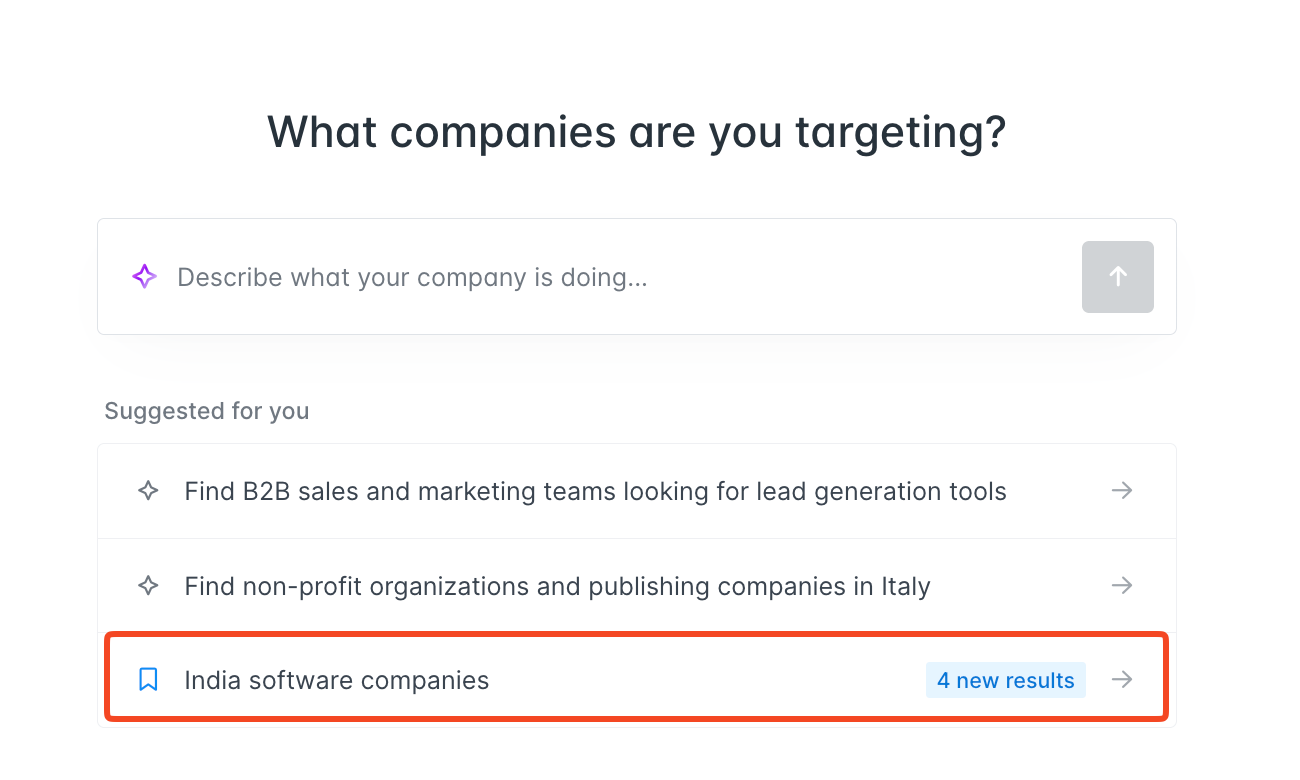 Saved searches tell you what's new · Sep 2026
· source
· release history
- Adds visual indicators for new matches in saved searches on the Discover homepage, displaying the exact count of new results. Saved searches tell you what's new · Sep 2026 · source · release history
- Saved searches with new matches now appear on the Discover homepage showing the exact count of new results since your last visit.︀︄︇︀︅︉︀︅︀︀︃︀︀︅︅︀︅︊︀︄︆︀︃︄ Saved searches tell you what's new · Sep 2026 · source · release history
- Pre-selects and positions newly matched companies at the top of the search results list for immediate interaction. Saved searches tell you what's new · Sep 2026 · source · release history
- AI Assistant now jumps from company results to specific contacts when job titles are mentioned in the search query. Discover: smarter AI Assistant & saved companies filter · seen Jul 2026 · source · release history
example
-
Monitor saved searches in Discover for new matching companies via visual highlights and pre-selection.
Navigate to the 'Discover' tab and click on a saved search with 'new matches'Saved searches tell you what's new · Sep 2026 · source -
Check which new companies matched your saved ICP search and bulk-save the first 100 without manual selection.
In Hunter Discover: 1. Go to the Discover homepage and open a saved search showing new matches. 2. New companies appear pre-selected at the top. 3. Use the bulk selector to choose the first 100. 4.Saved searches tell you what's new · Sep 2026 · source -
Prospect from your value proposition rather than a target persona — useful when you know your offer but not yet the exact buyer profile.
In Discover, open the AI Assistant and type: "I am a Founder of a small engineering company helping with waste management in the United Kingdom"Discover: smarter AI Assistant & saved companies filter · seen Jul 2026 · source -
Find decision-maker contacts at matching companies without touching a single filter — describe your audience and let the Assistant do the rest.
In Discover, open the AI Assistant and type: "Sales Managers at SaaS companies in Germany"Discover: smarter AI Assistant & saved companies filter · seen Jul 2026 · source
api
-
POST /multi-domain-search· source · full API surface -
POST /discover/people· source · full API surface -
GET /discover/people· source · full API surface -
GET /people/find· source · full API surface -
GET /lookalikes· source · full API surface
Partial lead reveal in Discover verified Reveals as many leads as the available credit balance allows when a search returns more results than credits on hand, and prompts the user to continue with the partial set or top up.
release
- Enables partial lead reveals in Discover's people-finding workflow, revealing up to the exact number of leads your current credit balance allows rather than blocking the full dataset. Reveal emails in Discover based on remaining credits · seen Jul 2026 · source · release history
- Adds a prompt in Discover to either proceed with the partial reveal or obtain more credits (upgrade or buy an extra credits pack) when a dataset exceeds available credits. Reveal emails in Discover based on remaining credits · seen Jul 2026 · source · release history
- Enables revealing first X leads when dataset size exceeds available credits Reveal emails in Discover based on remaining credits · Feb 2026 · source · release history
api
-
GET /leads· source · full API surface -
POST /leads· source · full API surface -
PATCH /leads/{id}· source · full API surface -
PUT /leads· source · full API surface -
GET /discover/views· source · full API surface -
POST /leads-imports· source · full API surface
Discover deduplication filter shipped Hides companies already saved to Leads from search results so users only see contacts they have not yet captured.
release
-
New matching companies are automatically pre-selected at the top of results when you open a saved search, enabling immediate reveal or save actions.
Saved searches tell you what's new · Sep 2026
· source
· release history
- New filter in Discover to exclude companies already saved to Leads, ensuring only new opportunities appear in search results. Discover: smarter AI Assistant & saved companies filter · seen Jul 2026 · source · release history
- New filter to exclude companies already saved to Leads from search results in Discover Discover: smarter AI Assistant & saved companies filter · Mar 2026 · source · release history
example
-
Keep your Discover results fresh by hiding companies you've already added to your lead lists, so you never scroll past duplicates.
In Discover, enable the 'Exclude saved companies' filter to hide any company already saved to Leads from your search results.Discover: smarter AI Assistant & saved companies filter · seen Jul 2026 · source
Email Deliverability and Sender Health 3 capabilities Hunter monitors and protects the sending reputation of connected email accounts by aggregating health signals across authentication, reputation, and account-level factors. It automates warm-up for new accounts and surfaces warnings before they affect deliverability.
Deliverability Guard and Global Health Score verified Scores overall sending health across all connected accounts by combining authentication, reputation, and account factors into a single view with per-domain reports and warnings.
release
- New Domains tab provides per-domain health scores and detailed domain reports. Email Accounts Center & Sender Health · seen Jul 2026 · source · release history
- Overview bar surfaces Global Health Score, overall sending limits, and active Deliverability Guard warnings at a glance. Email Accounts Center & Sender Health · seen Jul 2026 · source · release history
- Health checks now run automatically when a new account is connected, with on-demand re-runs available from the accounts table. Email Accounts Center & Sender Health · seen Jul 2026 · source · release history
- New Global Health Score (out of 100) aggregates sending health across all connected accounts, covering Authentication (SPF, DKIM, DMARC), Reputation (blacklists, domain age, website signals), and Email Account factors. Email Accounts Center & Sender Health · seen Jul 2026 · source · release history
- Adds Global Health score feature with breakdowns for Authentication (SPF, DKIM, DMARC), Reputation, and Email account health Email Accounts Center & Sender Health · Mar 2026 · source · release history
example
-
Check your overall sender health and act on Deliverability Guard warnings before launching a new outreach sequence.
In Hunter Sequences, go to the Sequences navigation panel > Email Accounts Center.Email Accounts Center & Sender Health · seen Jul 2026 · source -
View the overall sender health status and access specific fix links from the overview bar.
In the Sequences navigation panel, open Email Accounts Center and view the Global Health Score at the top.Email Accounts Center & Sender Health · Mar 2026 · source
api 7 total
-
POST /webhooks· source · full API surface -
DELETE /webhooks· source · full API surface -
GET /email-accounts/capacities· source · full API surface -
PUT /webhooks/{id}· source · full API surface -
GET /email-accounts/{id}/health-report· source · full API surface -
GET /webhooks/{id}· source · full API surface
Progressive Sending verified Automatically increases daily email volume in a Sequence toward a user-set cap, stepping up only when the previous day's limit was hit and bounce rate is acceptable.
release
- Volume progression is conditional: the daily cap only increases when the previous day's limit was hit and bounce rate remains healthy. Progressive Sending: gradually scale your outbound volume · seen Jul 2026 · source · release history
- New Progressive Sending feature automatically and gradually increases daily email volume in Sequences until a user-defined target limit is reached. Progressive Sending: gradually scale your outbound volume · seen Jul 2026 · source · release history
- Adds Progressive Sending automation for newly connected or inactive email accounts in Sequences to gradually increase daily sending limits until a target is reached. Progressive Sending: gradually scale your outbound volume · Mar 2026 · source · release history
example
-
Enable Progressive Sending for a newly connected inbox to safely ramp up to 50 emails/day without touching settings again.
In Hunter, go to your email account settings, select a newly connected inbox, enable Progressive Sending, and set your target daily sending limit (e.g. 50 emails/day).Progressive Sending: gradually scale your outbound volume · seen Jul 2026 · source -
Automatically ramp up daily sending volume for a new inbox connected to Sequences without manual intervention.
Navigate to email account settings and enable 'Progressive Sending' for the target inbox.Progressive Sending: gradually scale your outbound volume · Mar 2026 · source
api
-
GET /campaigns· source · full API surface -
POST /sequences· source · full API surface -
GET /sequences· source · full API surface -
GET /sequences/{id}· source · full API surface
Inbox Protection warm-up verified Runs an automated 30-day warm-up for new or dormant accounts by gradually increasing sending volume through real engagement, then shifts to ongoing maintenance mode.
release
- Supports newly connected email accounts and accounts inactive for 30+ days, covering the most deliverability-vulnerable ramp-up phase. Progressive Sending: gradually scale your outbound volume · seen Jul 2026 · source · release history
- New Inbox Protection add-on automates a 30-day email warm-up, progressively increasing sending volume via real replies and positive engagement signals. Buy domains, create email accounts, and protect your sender reputation · seen Jul 2026 · source · release history
- Inbox Protection dashboard tracks warm-up progress including interactions, open rates, reply rates, and spam placement. Buy domains, create email accounts, and protect your sender reputation · seen Jul 2026 · source · release history
- After warm-up completes, Inbox Protection automatically switches to maintenance mode for continuous sender reputation protection. Buy domains, create email accounts, and protect your sender reputation · seen Jul 2026 · source · release history
- Adds Inbox Protection to automate progressive email warm-up over 30 days, tracking open rates, reply rates, and spam placement. Buy domains, create email accounts, and protect your sender reputation · Apr 2026 · source · release history
example
-
Protect deliverability on a new or inactive account before sending outreach by enabling the Inbox Protection warm-up add-on.
In the Hunter console, go to Email accounts center, select a connected email account, and enable Inbox Protection as an add-on to begin the 30-day automated warm-up.Buy domains, create email accounts, and protect your sender reputation · seen Jul 2026 · source -
Activate Inbox Protection for a new email account to initiate the 30-day warm-up period and monitor engagement signals in the dashboard.
In the Email accounts center, select an active account and toggle 'Inbox Protection' as an add-on; track progress via open rates, reply rates, and spam placement metrics.Buy domains, create email accounts, and protect your sender reputation · Apr 2026 · source
api
-
GET /email-accounts/{id}/warmup-report· source · full API surface
Email Account Management 2 capabilities Hunter provides a central place to set up, view, and manage all sender accounts used for outreach. Users can purchase domains, create pre-configured accounts, and take bulk actions across the full account inventory from one screen.
Email Accounts Center verified Shows all connected sender accounts in one view with sending status, daily progress, health score, and Inbox Protection state, with bulk actions for managing many accounts at once.
release 11 total
- New Email Accounts Center consolidates all connected sender accounts in Sequences into a single view with status, daily sending progress, scheduled emails, health score, and Inbox Protection status. Email Accounts Center & Sender Health · seen Jul 2026 · source · release history
- Adds bulk actions across multiple accounts: run health checks, edit sending limits, update sender names, enable Inbox Protection, or disconnect accounts simultaneously. Email Accounts Center & Sender Health · seen Jul 2026 · source · release history
- Adds the Email Accounts Center page to manage all connected sender accounts in one place Email Accounts Center & Sender Health · Mar 2026 · source · release history
- Enables bulk actions across multiple accounts: run health checks, edit sending limits, update sender names, enable Inbox Protection, or disconnect Email Accounts Center & Sender Health · Mar 2026 · source · release history
- Adds Email, Mention, and Removed source labels to clarify email provenance More transparent email sources · Jan 2026 · source · release history
- Shows Source URLs even for sources that have been removed More transparent email sources · Jan 2026 · source · release history
example
-
Bulk-enable Inbox Protection and update sending limits across multiple sender accounts at once to tighten deliverability controls.
In Hunter Sequences, go to Email Accounts Center > select multiple accounts using the checkboxes > choose 'Enable Inbox Protection' or 'Edit sending limits' from the bulk actions menu.Email Accounts Center & Sender Health · seen Jul 2026 · source -
Execute bulk maintenance tasks like updating sender names or disconnecting multiple accounts simultaneously.
In Email Accounts Center, select multiple accounts and choose 'Edit sending limits', 'Update sender names', or 'Disconnect' from the bulk actions menu.Email Accounts Center & Sender Health · Mar 2026 · source -
Filter accounts by status to quickly identify issues across your sender setup.
In Email Accounts Center, use the search and filter options to view accounts by email address or health status.Email Accounts Center & Sender Health · Mar 2026 · source -
Filter leads by interaction date range in the UI.
In Leads section > Filter > 'Last activity at' > Set Date RangeSmarter lead management: new filters, features, and fixes · Dec 2024 · source
api 13 total
-
PUT /email-accounts/{id}· source · full API surface -
GET /account· source · full API surface -
GET /email-accounts/{id}· source · full API surface -
GET /messages· source · full API surface -
GET /usage/history· source · full API surface -
GET /team/members· source · full API surface
Managed domain and email account provisioning verified Lets users buy outreach domains and create email accounts with SPF, DKIM, and DMARC configured automatically, ready to send within about an hour.
release
- Adds managed email account provisioning: buy domains and create pre-configured email accounts (with SPF, DKIM, and DMARC) directly within Hunter, ready within ~1 hour. Buy domains, create email accounts, and protect your sender reputation · seen Jul 2026 · source · release history
- Provisioned accounts marked Active are immediately available for use in Hunter Sequences. Buy domains, create email accounts, and protect your sender reputation · seen Jul 2026 · source · release history
- Enables buying domains and creating pre-configured email accounts directly within Hunter with SPF, DKIM, and DMARC automatically set up. Buy domains, create email accounts, and protect your sender reputation · Apr 2026 · source · release history
example
-
Set up a new outreach domain end-to-end without leaving Hunter — useful when launching a cold outreach campaign from a fresh domain.
In the Hunter console, go to Email accounts center > Buy a domain, choose your domain name, sender name(s), and number of accounts per sender.Buy domains, create email accounts, and protect your sender reputation · seen Jul 2026 · source -
Use the UI to purchase a new domain and provision an email account with automated DNS configuration for immediate use in outreach sequences.
In the Email accounts center, select 'Buy Domain' and follow the setup wizard to configure sender name(s) and create accounts with SPF/DKIM/DMARC auto-applied.Buy domains, create email accounts, and protect your sender reputation · Apr 2026 · source
api 11 total
-
GET /email-insight· source · full API surface -
GET /domain-search· source · full API surface -
GET /email-count· source · full API surface -
GET /domain-count· source · full API surface -
POST /domain-search· source · full API surface -
GET /email-finder/found· source · full API surface
Outreach Sequences and Testing 3 capabilities Hunter's Sequences let users build and run automated multi-step email campaigns with built-in A/B testing and recipient-level engagement tracking. These features are available on the free plan.
A/B testing in Sequences verified Tests different subject lines or email body variants at any sequence step across split recipient groups, tracks performance per step, and promotes the winning variant to remaining sends automatically.
release 7 total
- New A/B Results tab in Sequences Reporting summarizes variant performance across all steps. Sequences: A/B testing is here · seen Jul 2026 · source · release history
- Adds A/B testing for each step in Sequences, letting you test subject line and email content variants against split recipient groups. Sequences: A/B testing is here · seen Jul 2026 · source · release history
- Enables automatic promotion of the winning variant to all remaining scheduled sends once a winner is selected. Sequences: A/B testing is here · seen Jul 2026 · source · release history
- New step-level metrics surface opens, clicks, replies, and bounces per variant for direct comparison. Sequences: A/B testing is here · seen Jul 2026 · source · release history
- Introduces step-level metrics showing opens, clicks, replies, and bounces per variant Sequences: A/B testing is here · Mar 2026 · source · release history
- Adds A/B testing options for each step in your sequences to test subject lines and email content variants Sequences: A/B testing is here · Mar 2026 · source · release history
example
-
When launching a new cold outreach sequence and unsure which subject line resonates, enable A/B testing on a step to let Hunter split recipients and surface the top performer automatically.
In the console, open Sequences > select or create a sequence > edit a step > enable A/B Testing > define Variant A and Variant B (subject line and/or body) > save.Sequences: A/B testing is here · seen Jul 2026 · source
api 8 total
-
PUT /sequences/{id}· source · full API surface -
POST /sequences/{sequence_id}/archive· source · full API surface -
GET /sequences/{id}/follow-ups/{follow_up_id}· source · full API surface -
PATCH /sequences/{id}/follow-ups/{follow_up_id}· source · full API surface -
POST /sequences/{id}/follow-ups· source · full API surface -
PUT /sequences/{id}/follow-ups/{follow_up_id}· source · full API surface
Sequences available on free plan verified Makes Sequences and A/B testing features fully available on the free plan, with no paid tier required to start running outreach campaigns.
release
- Available on all All-in-One Outreach plans, including free tier. Progressive Sending: gradually scale your outbound volume · seen Jul 2026 · source · release history
- Adds new API endpoint to start an email campaign via Campaigns for automation. More insights & automation at your fingertips · Feb 2025 · source · release history
- Introduces the Scale plan to bridge the gap between Growth and Business tiers. New Scale plan and subscription credits over quota update · Jan 2025 · source · release history
- Adds the Cancel button in the UI to stop a running Bulk Email Verifier task at any time. Cancel running Bulk Email Verifier tasks · Dec 2024 · source · release history
example
-
Stop a long-running bulk verification job early to save credits without losing progress on already verified emails.
In the Bulk Email Verifier interface, locate the running task and click 'Cancel'.Cancel running Bulk Email Verifier tasks · Dec 2024 · source
api 8 total
-
POST /leads/bulk/move· source · full API surface -
GET /leads/bulk/exist· source · full API surface -
DELETE /companies/{id}/tags/{tag_id}· source · full API surface -
DELETE /company-tags/{id}· source · full API surface -
DELETE /leads/{id}/tags/{tag_id}· source · full API surface -
POST /leads/bulk/delete· source · full API surface
Recipient-based engagement rates in Sequences shipped Reports open, click, reply, and unsubscribe rates as counts of distinct recipients who engaged, visible across the sequences list, stats pages, exports, API, and reporting tabs.
Also counts toward: CSV data export
release 10 total
- Recipient-based rates surface across all reporting surfaces: Sequences list, sequence stats, CSV export, reporting overview and detail tabs, the API, and MCP tools. Engagement rates are now recipient-based · seen Jul 2026 · source · release history
- For API users: per-step counts no longer sum to the recipient-based totals at the sequence level — any downstream logic that aggregated step-level counts to derive sequence-level rates will now produce incorrect results. Engagement rates are now recipient-based · seen Jul 2026 · source · release history
- Open, click, reply, and unsubscribe rates in Sequences now count distinct recipients who engaged divided by recipients who received, reflecting true audience reach. Engagement rates are now recipient-based · seen Jul 2026 · source · release history
- Recipient-based engagement metrics are available via the API and MCP tools Engagement rates are now recipient-based · Jun 2026 · source · release history
- Unsubscribe rate calculation is now recipient-based Engagement rates are now recipient-based · Jun 2026 · source · release history
- Opens, clicks, and reply rates in Sequences now measure distinct recipients rather than individual emails Engagement rates are now recipient-based · Jun 2026 · source · release history
example
-
Generate a personalized cold email draft quickly in Hunter Campaigns
In the console, go to Campaigns > Create new campaign and toggle on the AI Writing Assistant.✨ New: AI writing assistant in Campaigns · Aug 2025 · source
Data Enrichment and Integrations 1 capability Hunter exposes a free public endpoint that returns company logos by domain, covering over 16 million companies for use in external tools. This supports CRM enrichment, dashboards, and reporting without requiring authentication.
Company logo API shipped Returns a company logo by domain through a free, unauthenticated API endpoint, covering more than 16 million companies for use in CRM records, dashboards, or reports.
release
-
New free endpoint
https://logos.hunter.io/{domain}retrieves a company logo via plain GET — no signup, no API key, no setup required. Company Logo API (free) · seen Jul 2026 · source · release history - Covers 16M+ company logos, enabling CRM enrichment, dashboard branding, and report generation without adding a separate provider. Company Logo API (free) · seen Jul 2026 · source · release history
-
Exposes
16M+company logos in the new logo service with no API key or signup required. Company Logo API (free) · Feb 2026 · source · release history -
Adds
GET https://logos.hunter.io/{domain}as a new free endpoint for retrieving company logos by domain. Company Logo API (free) · Feb 2026 · source · release history - Enables bulk copy or move of saved companies between lists via the Company Lists UI. Smarter lead management: new filters, features, and fixes · Dec 2024 · source · release history
example
-
Fetch a company logo by domain to enrich a CRM record or populate a dashboard — no authentication needed.
curl -L https://logos.hunter.io/stripe.comCompany Logo API (free) · seen Jul 2026 · source -
Fetch a company logo URL directly via HTTP to enrich CRM records or dashboards.
curl -s 'https://logos.hunter.io/example.com'Company Logo API (free) · Feb 2026 · source -
Bulk move companies between lists in Company Lists.
Select companies in Company Lists > Action: Move to list <list_name>Smarter lead management: new filters, features, and fixes · Dec 2024 · source
Other 5 capabilities
Company list management verified Allows users to manage groups of saved companies by sorting, filtering, and moving them between lists via the UI.
release
- Adds full CRUD APIs for companies, company lists, and company tags, including bulk copy, deletion, move, tagging, list membership, folders, and favorites. 2.0.0 · Sep 2026 · source · release history
- Adds a Saved leads column to Company Lists that supports sorting, filtering, and hiding/showing based on lead count. Smarter lead management: new filters, features, and fixes · Dec 2024 · source · release history
- Enables bulk copy or move of saved companies between lists via the Company Lists UI. Smarter lead management: new filters, features, and fixes · Dec 2024 · source · release history
example
-
Bulk move companies between lists in Company Lists.
Select companies in Company Lists > Action: Move to list <list_name>Smarter lead management: new filters, features, and fixes · Dec 2024 · source
api 52 total
-
GET /company-lists/{id}· source · full API surface -
GET /company-tags/{id}· source · full API surface -
DELETE /company-lists/{id}· source · full API surface -
PUT /leads_custom_attributes/{id}· source · full API surface -
POST /leads_lists· source · full API surface -
DELETE /leads/{id}· source · full API surface
AI assistant integrations verified Connects Hunter to Claude, ChatGPT, Gemini, Perplexity, and Grok via native OAuth apps and a hosted MCP server, exposing company search, email verification, lead management, and sequence launching in plain language from inside each assistant.
Also counts toward: MCP server, Natural-language query
release 13 total
-
Use Hunter's MCP with Claude, ChatGPT, Gemini, Perplexity, Claude Code, Cursor, Codex, and any other MCP-compatible client, included on every Hunter plan including Free.
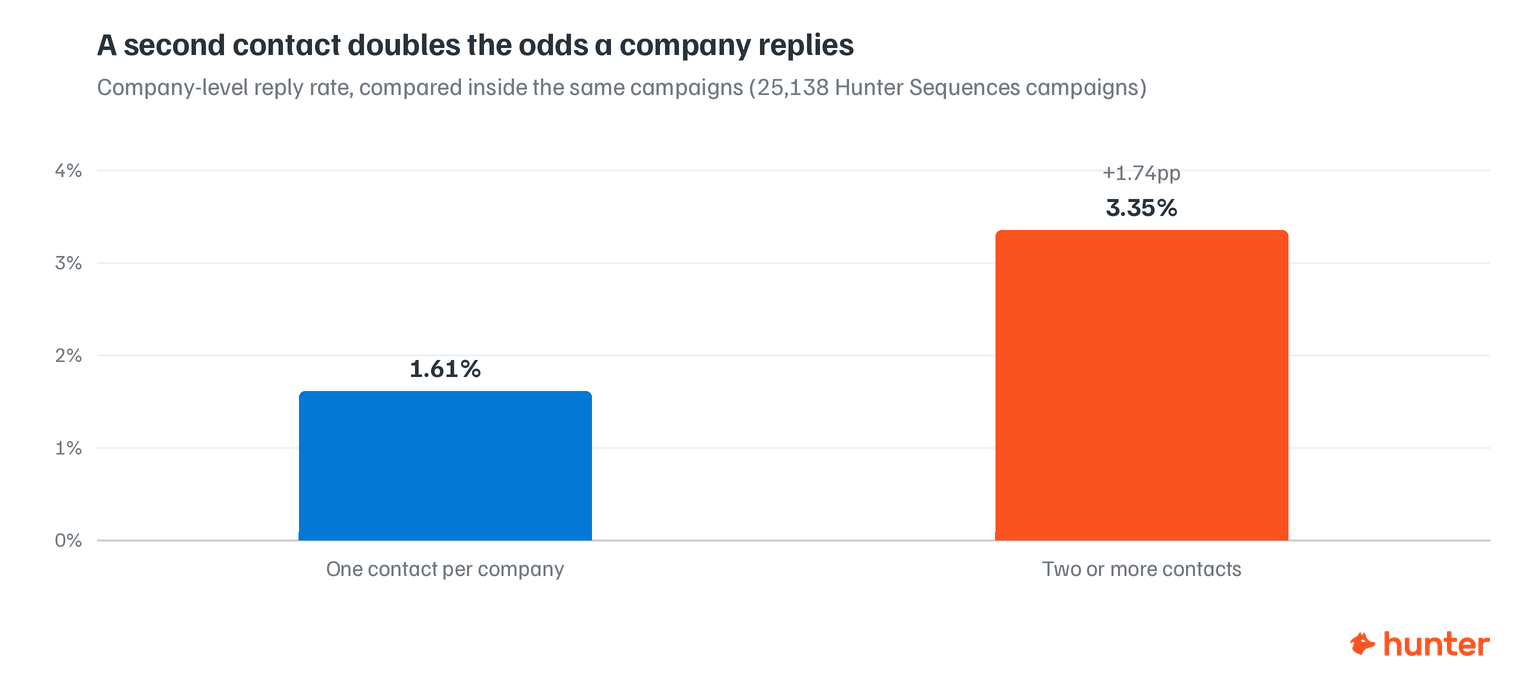 announced · Oct 2026
· source
· release history
-
Hunter now offers an MCP server at
https://mcp.hunter.io/mcp, exposing over 100 tools covering email finding, verification, enrichment, sequences, saved searches, company lists, and CRM sync to any MCP-compatible AI client.︀︄︇︀︅︉︀︅︀︀︃︀︀︅︅︀︅︊︀︄︆︀︃︄ announced · Oct 2026 · source · release history - Connect AI assistants to Hunter via a one-click OAuth flow that passes your Hunter API key in an X-API-Key header — no manual API key configuration required. announced · Oct 2026 · source · release history
-
Exposes Hunter's official MCP server with OAuth to ChatGPT and other AI assistants like Claude, Gemini, and Grok
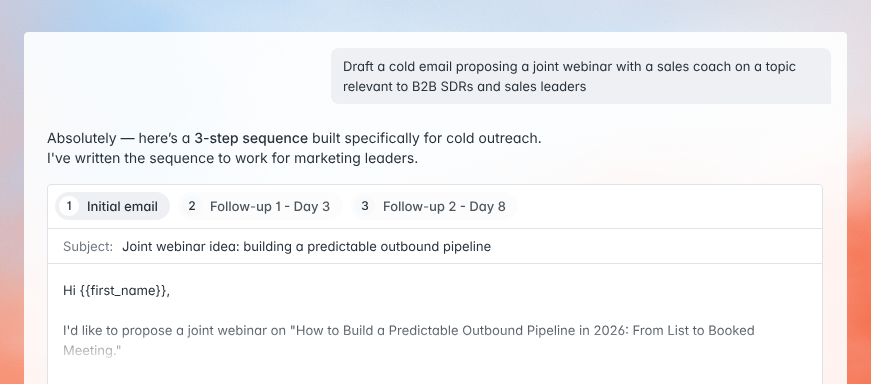 Hunter is now available in ChatGPT · Sep 2026
· source
· release history
-
Adds native one-click OAuth integrations with Claude (plugin), ChatGPT (app), Gemini (app), and Perplexity, enabling company search, email verification, sequence sending, and lead management from inside each assistant.
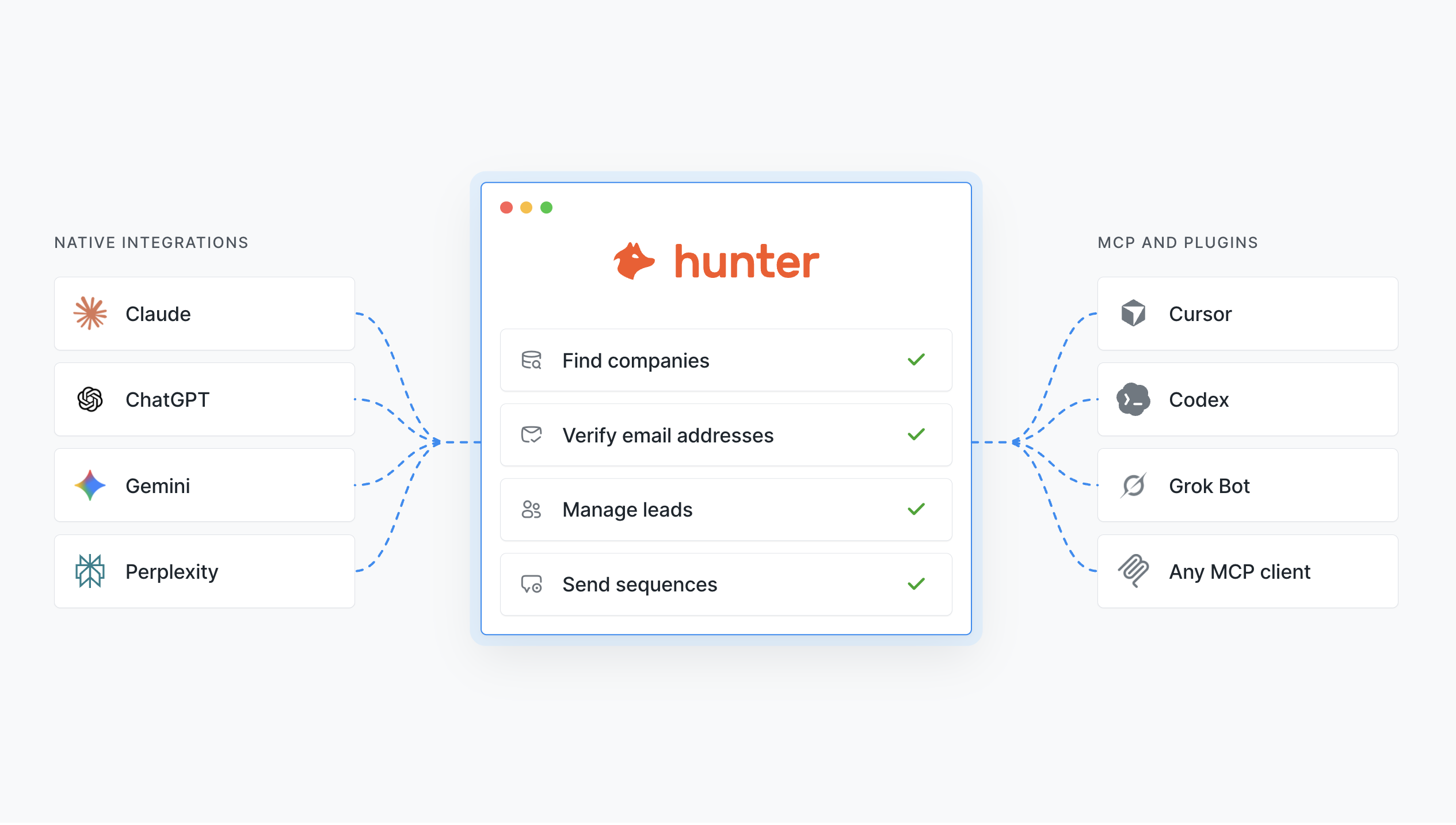 Hunter works in the main AI tools · Sep 2026
· source
· release history
-
Adds hosted
MCPserver athttps://mcp.hunter.io/mcpto support Cursor, VS Code, Windsurf, Codex, Grok Bot, and other MCP-compatible clients. Hunter works in the main AI tools · Sep 2026 · source · release history
example
-
Register the Hunter MCP server in a Claude or compatible client config so your AI assistant can call Hunter tools directly.
{ "mcpServers": { "hunter": { "url": "https://mcp.hunter.io/mcp" } } }announced · Oct 2026 · source -
Connect Hunter to an AI assistant via the MCP protocol for programmatic access within your IDE or agent environment.
curl https://mcp.hunter.io/mcpHunter works in the main AI tools · Sep 2026 · source -
Access the integrated prompts library to paste prospecting workflows directly into your AI assistant.
Visit the Prompts library in the Hunter UI.Hunter works in the main AI tools · Sep 2026 · source -
Build a targeted prospect list and launch a sequence without leaving ChatGPT — useful for SDRs working an ICP-driven outbound motion.
Find 30 companies matching my ICP, identify and verify contacts in founder or growth roles at each, save them to a new Hunter Leads list, and prepare a sequence.Hunter is now available in ChatGPT · Sep 2026 · source -
Connect Cursor (or any MCP client) to Hunter so you can run prospecting queries without leaving your editor.
In Cursor, open MCP settings and add the Hunter server URL: https://mcp.hunter.io/mcp — then authenticate and start using Hunter commands from the Cursor agent panel.Hunter works in the main AI tools · Sep 2026 · source -
Connect the tool to enable prospecting workflows inside your chat interface
Add the Hunter app in ChatGPT and sign in with your Hunter account.Hunter is now available in ChatGPT · Sep 2026 · source
api 7 total
-
GET /api-keys· source · full API surface -
PUT /api-keys/{id}· source · full API surface -
POST /api-keys· source · full API surface -
DELETE /api-keys/{id}· source · full API surface -
PATCH /api-keys/{id}· source · full API surface -
PUT /leads/bulk· source · full API surface
Discover partial credit reveal verified Reveals as many leads as the current credit balance allows when a dataset exceeds available credits, prompting users to proceed with the partial set or obtain more credits.
release
- Adds partial credit reveal capability in Discover's people finding workflow Reveal emails in Discover based on remaining credits · Feb 2026 · source · release history
example
-
Reveal a partial list of discovered emails when account credits are insufficient for full export
In Discover, initiate a people search and click the reveal prompt to view leads covered by current creditsReveal emails in Discover based on remaining credits · Feb 2026 · source
api
-
POST /leads/{id}/enrich· source · full API surface -
GET /leads/{id}· source · full API surface -
POST /companies/bulk/copy· source · full API surface -
GET /leads/exist· source · full API surface -
POST /multi-domain-search/reveal· source · full API surface -
GET /companies/find· source · full API surface
Domain search provenance filtering via API shipped Adds a provenance parameter to domain search API endpoints, allowing callers to filter results by the source or origin of discovered email addresses.
release
-
POST
/domain-search: param provenance (query) added 2.0.0 · Oct 2026 · source · release history -
GET
/domain-search: param provenance (query) added︀︄︇︀︅︉︀︅︀︀︃︀︀︅︅︀︅︊︀︄︆︀︃︄ 2.0.0 · Oct 2026 · source · release history
Lead search and filtering via API shipped Exposes full-text querying and sorting of saved leads through the REST API, enabling programmatic retrieval and ordering of lead records.
Also counts toward: REST API
release
-
GET
/leads: param query (query) added; param sort (query) added 2.0.0 · Oct 2026 · source · release history
Lines in monospace are the tool's own words: help text
parsed from its source, or an endpoint from its API document. Under
release, a line is our summary of a dated release. Under
docs, it is quoted from the tool's own documentation or
website. Each links back to the source it came from.
Command line
2 commands for Hunter, each with where it came from. This tool has no source analysis yet, so there is no option reference and no captured run beside them.
No command matches.
Screenshots
From the release notes, newest first. Click one to see it full size.Score card
-
Shipping velocity releases a month, last 12 months
-
Documentation quality release-notes rubric, 0–100
-
Breaking-change discipline how rarely a release breaks users, and notice given
-
Maintenance risk quiet time against its own cadence, maintainers
-
Innovation & surface new capabilities, API and MCP surface
Five scores for Hunter, each built from the releases, notes and API history this site tracks — and, on Researcher and Business, where it stands among every measured tool in its category and how that has moved.
Score cards are part of every paid plan.
See plans → Already subscribed? Sign in →Trajectory
Blank means never measured; nothing here is a filled-in zero.
Peer standings are included with Researcher and Business. See how this tool ranks against its competitors, using data we don't publish anywhere else.
See plans →Each score is 0–100 on a published rubric, derived from data this site already shows. A dimension we cannot measure says so — it is never scored 0 and never enters a rank.
How this is scored
- Shipping velocity — releases a month over the last 12 months, on a log scale where 16 a month scores 100. Needs 3 releases in the window.
- Documentation quality — the release-notes rubric published on the analytics page, unchanged.
- Breaking-change discipline — the share of releases carrying a breaking change (none scores 100, half or more scores 0). Only projects that label breaking changes are measured: a clean record cannot be told from an unlabelled one.
- Maintenance risk — quiet time measured against the tool's own release cadence (quiet longer than 90 days and three typical gaps scores 0), plus the number of active maintainers and whether contributors are growing, where known. Higher is lower risk.
- Innovation & surface — new capabilities in the feature ledger this year, API and MCP operations added, and the share of commits that are features: the mean of whichever we hold.
- Community health (open-source tools only) — each is a direction, not a size: contributors this year against last, the bus factor now against a year ago, and issues closed per issue opened, where steady scores 50, doubled 100 and halved 0; plus the median time to a maintainer's first reply (an hour scores about 100, a month or more 0). A commercial card has no repository and carries none of the four.
- Documented delivery (commercial tools) — when a vendor's documented new capabilities have slowed against its own baseline, that counts against the overall standing as heavily as two low dimensions. Steady delivery, or too little history to judge, leaves the standing alone; it is never a sixth score.
- Open-source tools are scored on repository signals; commercial tools on their published changelog. Ranks compare tools within one category and one profile and need at least five measured peers; the overall standing needs three ranked dimensions. Best-in-breed or consolidator is a shape, not a quality, and is never scored.
Release-note detail over time
See how much detail Hunter puts in its release notes, quarter by quarter, and compare it with tracked tools in the same category. This history uses up to ten retained, reviewed notes per tool; sparse or blank older quarters may reflect that limit.
Checking release-note history…
Releases
49 entries
No entries match these filters.
- October 20263
- September 202613
- July 20268
- June 20261
- April 20261
- March 20264
- February 20262
- January 20261
- November 20251
- October 20251
- September 20251
- August 20251
- June 20251
- May 20252
- February 20251
- January 20255
- December 20243
Add the badge to your README
Maintain this project? The badge links readers straight to this page, so they can follow every release here.
 Choose a badge style and copy the code →