The section your link pointed to isn't on ConductorOne's page any more, so we've brought you to the top.
ConductorOne is an identity governance platform that automates workforce access management and deploys AI agents to streamline access reviews and provisioning.
ConductorOne is a commercial identity security platform delivered as a SaaSSaaSSoftware delivered over the internet and run on the provider's infrastructure, so the buyer pays a subscription instead of installing or operating anything locally. service that governs access across human, non-human, and AI identities. It connects to an organization's applications through connectors and manages entitlements with policies and automations, covering provisioning, self-service and just-in-time access requests, and user access review campaigns, with a bridge-client agent available to extend governance to MCPMCPModel Context Protocol, a standard for connecting AI applications to external tools and data sources. A compatible server exposes capabilities an assistant can use through a common interface. servers running on-prem or behind firewalls. It's aimed at IT and security teams responsible for access governance and compliance audits rather than developers building access controls into their own applications.
ConductorOne is an identity governance platform that automates workforce access management and deploys AI agents to streamline access reviews and provisioning.
Which accounts hold sensitive access without the compensating entitlement that's supposed to accompany it?
conflict monitors check each account's entitlements against a group-pair rule with an "is not in" condition, flagging accounts that hold one without the other
Which of my AI agents and MCP tools touched what, and when?
the agentic conversations view logs agent activity separately for web and Slack surfaces, so every tool invocation can be traced back to the agent and the entitlement it used
Can I govern an MCP server that sits behind my firewall without opening it to the internet?
a bridge-client agent runs next to the private server and holds an outbound connection to the platform, so requests, approvals, and reviews reach it without any inbound rule or public exposure
Which of my service accounts have credentials about to expire?
system owners get a daily digest listing service principal credentials expiring within 30 days or already expired, each with a countdown and a direct link to rotate it
Did last week's access review actually remove what it was supposed to?
task lists can be filtered by outcome — granted, denied, revoked, certified, error, canceled, timed out — so completed and stalled reviews are easy to separate
Which role or group actually grants access to a resource someone is requesting?
the request catalog searches entitlement contents, not just names, and surfaces the underlying role, team, or group that grants a matching resource even when its label doesn't match the search term
41 capabilities
across 2 capability groups
· 22 backed by code, an API document or a real run
Built from ConductorOne's releases, docs, README and our own runs.
“Seen” marks the month we first spotted a release the vendor didn't date.
Group names and tags are our labels.
+MCP server3 featuresInterfaces and integrationssince 2026▸
+MCP server authenticationverifiedSupports per-user authentication to external MCP servers via OAuth2, bearer token, JWT, custom header, or basic auth, rather than a shared admin credential.6 releases · 11 other sources · first seen Jul 2026▸
Shared capability: MCP server
Also counts toward: MCP server
release
Supports per-user authentication on external MCP servers (OAuth2, bearer token, custom header, or basic auth), replacing the shared admin credential model.
changelog · Jul 2026
· source
· release history
Admins can now require per-user authentication (OAuth2, bearer token, custom header, or basic auth) for external MCP servers instead of sharing a single admin credential.
July 24, 2026 (2026-07-27) · Jul 2026
· source
· release history
Per-user authentication for external MCP servers now supports OAuth2, bearer token, custom header, or basic auth — replacing shared admin credentials.
July 24, 2026 (2026-07-25) · Jul 2026
· source
· release history
Admins can now register MCP servers that fail relaxable OAuth discovery checks (e.g. issuer mismatch, cross-host authorization server) by reviewing and acknowledging flagged findings.
July 24, 2026 (2026-07-25) · Jul 2026
· source
· release history
MCP servers supporting OAuth Dynamic Client Registration can now be connected without entering a client ID or secret.
July 10, 2026 (2026-07-10) · Jul 2026
· source
· release history
Adds per-user authentication for external MCP servers, supporting OAuth2, bearer token, custom header, or basic auth instead of a shared admin credential.
July 10, 2026 (2026-07-10) · Jul 2026
· source
· release history
docs
Before registering, C1 runs a discovery check against the server’s authorization server. If discovery finds an issue that can be relaxed — such as an issuer mismatch or an authorization server on a different host — C1 shows you the finding and asks you to acknowledge it before registration continues.
docs update · Jul 2026
· source
Require each user to authenticate with their own credential when connecting to an external MCP server instead of sharing an admin credential.$ In the console, open the MCP server's Configure server settings panel, enable per-user authentication, and select the credential type (OAuth2, bearer token, custom header, or basic auth).
changelog · Jul 2026
· source
Connect an MCP server without managing client credentials when the server supports OAuth Dynamic Client Registration.$ In the C1 console, go to AI > MCP, add a new hosted or external MCP server, and enable "Use dynamic client registration" — C1 will handle OAuth registration automatically with no client ID or secret…
July 10, 2026 (2026-07-10) · Jul 2026
· source
+MCP server catalog and setup guidesverifiedProvides step-by-step setup guides for catalog MCP servers, covering credential creation, authentication, and tool discovery.5 releases · 3 other sources · first seen Jun 2026▸
Shared capability: MCP server
Also counts toward: MCP server
release
Admins can now assign automatic tool access per MCP server by choosing a preset (Read tools, All tools) or creating a named toolset, and can connect external MCP servers manually by choosing Configure manually to supply custom OAuth client credentials or use a public client.
October 30, 2026 (2026-10-31) · Oct 2026
· source
· release history
Hosted MCP servers without an admin-set tool prefix now default to the prefix declared by the connector itself, keeping tool names recognizable to AI clients.
July 24, 2026 (2026-07-25) · Jul 2026
· source
· release history
Toolset contents are now visible on hover in the task view, without navigating to entitlement detail pages.
July 10, 2026 (2026-07-10) · Jul 2026
· source
· release history
Publishes step-by-step setup guides for 38 catalog MCP servers, covering credential creation, authentication, and tool discovery.
June 26, 2026 (2026-06-26) · Jun 2026
· source
· release history
Enables sorting of the MCP server Tools table by tool name, visibility, classification, state, and last updated.
June 26, 2026 (2026-06-26) · Jun 2026
· source
· release history
docs
Setup spans two products, and some stages depend on someone other than you, so line those up before you start. Stages 1 through 6 are for the administrator who connects the MCP server, and end with you confirming the connection works. Stage 7 then gives other people access to use it.
docs update · Oct 2026
· source
Copilot Studio — See Connect Copilot Studio to C1 , which also covers publishing the agent to Microsoft 365 Copilot. ChatGPT / Cursor
docs update · Aug 2026
· source
+Private MCP server connectivityshippedConnects on-prem, air-gapped, or firewall-protected MCP servers to ConductorOne via a lightweight outbound bridge agent, without requiring inbound firewall rules.2 releases · 1 other source · first seen Jun 2026▸
Shared capability: MCP server
Also counts toward: Agent-based deployment, Administrative audit log
release
Enables full C1 entitlement governance (access requests, approvals, reviews, and auditing) for MCP tools running on-prem, in air-gapped clusters, or behind firewalls.
Private bridge for MCP servers (2026-06-26) · Jun 2026
· source
· release history
Adds private MCP server connectivity via a lightweight bridge-client agent that maintains an outbound connection to C1, eliminating the need to open inbound firewall rules or expose servers to the public internet.
Private bridge for MCP servers (2026-06-26) · Jun 2026
· source
· release history
example
Deploy the bridge agent next to a private MCP server so its tools are governed by C1 without exposing inbound network access.$ In the C1 console, ensure AI access management is enabled for your tenant, then follow Settings > Connect a private MCP server through a bridge to deploy the bridge-client agent alongside your…
Private bridge for MCP servers (2026-06-26) · Jun 2026
· source
+Outbound webhooks (the product notifies you)1 featureInterfaces and integrationssince 2026▸
+Customizable table columns and CSV exportverifiedExtends a reorderable, per-session column configurator and targeted CSV export across more than 23 pages, including Apps, Entitlements, Findings, and Automations.6 releases · 8 other sources · first seen Jun 2026▸
Shared capability: Outbound webhooks (the product notifies you)
Also counts toward: CSV data export
release
In the Grants and Standing Privileges CSV exports, the AccountUserName column now reports the account username instead of display name, and a new AccountDisplayName column was inserted before it — any consumer reading either export by column position rather than header name must account for this one-column shift.
October 2, 2026 (2026-10-05) · Oct 2026
· source
· release history
Changes the AccountUserName column in Grants and Standing Privileges CSV exports to report the account's username instead of display name, adding a preceding AccountDisplayName column
October 2, 2026 (2026-10-05) · Oct 2026
· source
· release history
The AccountUserName column in Grants and Standing Privileges CSV exports now reports the account's username instead of its display name, and a new AccountDisplayName column has been added before it, shifting column positions for any tools reading by position rather than header name.
October 2, 2026 (2026-10-05) · Oct 2026
· source
· release history
Column configurator extended to 23 additional pages — including Findings, Automations, Policies, MCP Servers, Secrets, and Webhooks — with preferences saved across sessions.
July 10, 2026 (2026-07-10) · Jul 2026
· source
· release history
Entitlements table and CSV export now include an Owners column per application.
July 10, 2026 (2026-07-10) · Jul 2026
· source
· release history
Introduces customizable, reorderable columns (saved per table) and targeted CSV export for the Apps, App accounts, Entitlements, and Resources tables.
June 26, 2026 (2026-06-26) · Jun 2026
· source
· release history
docs
Download query results Click Generate CSV above a query’s results to download them. Choose which columns to include in the Download as CSV drawer, then generate the file.
docs update · Oct 2026
· source
GET /api/v1/search/apps/{app_id}/entitlements/users/{app_user_id}
· source
· full API surface
GET /api/v1/apps/{app_id}/entitlements/{app_entitlement_id}/users/{identity_user_id}/grants
· source
· full API surface
GET /api/v1/apps/{app_id}/entitlements/{app_entitlement_id}/users
· source
· full API surface
+Other / not yet classified37 featuresFeatures we have not matched to a capability yet. A suggested match is marked.▸
+Access request and approval workflowsverifiedHandles end-to-end access requests with configurable approval chains, durations, and revocation flows for entitlements, groups, and MCP tools.28 releases · 60 other sources · first seen Jun 2026▸
release
28 total
Type /c1 in Slack to open the access request form directly, the same as /c1 request.
October 30, 2026 (2026-10-31) · Oct 2026
· source
· release history
Route approvals by compliance framework or app annotation — policies, approver steps, entitlement routing rules, account provisioning, and forms can now check compliance frameworks and app annotations.
October 30, 2026 (2026-10-31) · Oct 2026
· source
· release history
Start an access request from anywhere in C1 using the new sidebar New request button, which opens a right-side panel without leaving the current view.
October 30, 2026 (2026-10-31) · Oct 2026
· source
· release history
Access request links (including older auto-submit links from Copilot or Jira) no longer submit requests automatically — they now only prefill the form. Jira templates, runbooks, or automations that expected a link to create a request must be updated to expect an explicit user submit.
changelog · Oct 2026
· source
· release history
Adds optional character-limit setting on Text and Text area fields in request forms, preventing submission of values that exceed the limit.
changelog · Oct 2026
· source
· release history
One-click access request links (such as those from Copilot or Jira) no longer submit requests automatically — they now only prefill the form, requiring an explicit user submit. Jira templates, runbooks, or automations that expected auto-submit behaviour must be updated.
October 16, 2026 (2026-10-17) · Oct 2026
· source
· release history
docs
: This option creates a provisioning link between two entitlements, so that when one is granted, the user automatically receives access to the second entitlement as well. This in effect delegates the provisioning method to the linked entitlement.
docs update · Oct 2026
· source
If this task exists because connector provisioning failed for a technical reason — for example, the app was linked to a broken group — fix the underlying issue, then click Retry failed provisioning in the menu to have C1 retry the original connector action.
docs update · Jul 2026
· source
example
Route SOX-tagged access requests through a dedicated approval step using the new compliance framework condition in a policy.$ In the Policy editor, add an approver step, open its conditions, select 'Compliance framework' as the attribute, choose 'SOX', and assign the dedicated SOX approver group.
October 30, 2026 (2026-10-31) · Oct 2026
· source
Quickly open an access request in Slack without switching to the browser.$ /c1
October 30, 2026 (2026-10-31) · Oct 2026
· source
Surface all denied or errored tasks in a large campaign without paging through the full task list.$ In the console, go to Campaigns > [your campaign] > Tasks, then open the Outcome filter and select Denied or Error to isolate tasks that need follow-up.
June 26, 2026 (2026-06-26) · Jun 2026
· source
List/search access-request tasks by state (read-only).$ cone task search --state open
+App owner and connector ownership managementverifiedReplaces inline owner entry with a searchable modal when creating apps and introduces dedicated Terraform resources for connector ownership.8 releases · 44 other sources · first seen Jun 2026▸
Also counts toward: Terraform provider, Web management console
release
8 total
Turn on Use resource descriptions in an app's Entitlement management settings to show source-system descriptions instead of connector-generated text.
October 30, 2026 (2026-10-31) · Oct 2026
· source
· release history
Adds DELETE /api/v1/apps/{app_id}/resource_types/{resource_type_id}/resources/{id} now returns an error for connector-synced resources and exposes a read-only isManuallyManaged field on app resources returned by the API.︀︄︇︀︅︉︀︅︀︀︃︀︀︅︅︀︅︊︀︄︆︀︃︄
changelog · Oct 2026
· source
· release history
DELETE /api/v1/apps/{app_id}/resource_types/{resource_type_id}/resources/{id} now returns an error when called on connector-synced resources; previously it deleted them and they reappeared on the next sync. Any automation that depended on this deletion succeeding must be updated.
changelog · Oct 2026
· source
· release history
The DELETE /api/v1/apps/{app_id}/resource_types/{resource_type_id}/resources/{id} endpoint now returns an error for connector-synced resources instead of silently deleting them, and app resources returned by the API now include a read-only isManuallyManaged field.
October 16, 2026 (2026-10-17) · Oct 2026
· source
· release history
DELETE /api/v1/apps/{app_id}/resource_types/{resource_type_id}/resources/{id} now returns an error when called on connector-synced resources; previously it deleted them and they reappeared on the next sync.
October 16, 2026 (2026-10-17) · Oct 2026
· source
· release history
Breaking change: Terraform provider v1.4.0 introduces two new resources — conductorone_connector_owner_user and conductorone_connector_owner_entitlement — to replace the deprecated user_ids field on all conductorone_integration_* resources; existing user_ids configs will cause drift.
July 10, 2026 (2026-07-10) · Jul 2026
· source
· release history
example
Safely delete only manually managed app resources via API — connector-synced resources will now return an error instead of being silently removed.$ curl -X DELETE 'https://<tenant>.conductor.one/api/v1/apps/<app_id>/resource_types/<resource_type_id>/resources/<id>' \ -H 'Authorization: Bearer <token>'
changelog · Oct 2026
· source
Migrate connector ownership in Terraform to avoid drift after the user_ids field is dropped from conductorone_integration_* resources.$ resource "conductorone_connector_owner_user" "example" { connector_id = conductorone_integration_aws.example.connector_id user_id = "<user-id>" } resource "conductorone_connector_owner_entitlement"…
July 10, 2026 (2026-07-10) · Jul 2026
· source
+Access certification campaignsverifiedRuns reviewer-driven certification campaigns where reviewers can filter tasks by outcome and edit decisions directly in the UI.26 releases · 11 other sources · first seen Jun 2026▸
release
26 total
C1 groups gain new capabilities: review C1 group memberships — including automated groups — inside access review campaigns, and create a C1 group from an existing group or entitlement, with C1 proposing a membership rule, inclusion and exclusion lists, and flagging anyone who cannot be adopted.
October 30, 2026 (2026-10-31) · Oct 2026
· source
· release history
Exclude specific entitlements or everything matching a custom selector from campaigns and templates.
October 30, 2026 (2026-10-31) · Oct 2026
· source
· release history
Access review campaign filtering has been improved: campaigns can be filtered on resource attributes and entitlement annotations using custom selectors, combinable with app, resource type, risk level, and compliance framework filters, and grant usage filters can now be set to Used in the last [timeframe] or 'Unused…
October 30, 2026 (2026-10-31) · Oct 2026
· source
· release history
Start access review campaigns scoped to specific people — by user list, selection criteria, or CEL expression — using the new By users review scope type, which also works on campaign templates to trigger reviews when a user changes roles or leaves.︀︄︇︀︅︉︀︅︀︀︃︀︀︅︅︀︅︊︀︄︆︀︃︄
changelog · Oct 2026
· source
· release history
Extends By users scope to campaign templates, enabling automations to trigger a review of a user's current access on role change or departure.
Campaign scope by users (2026-10-23) · Oct 2026
· source
· release history
Supports excluding entitlements and narrowing which accounts and grants are in scope within a By users campaign.
Campaign scope by users (2026-10-23) · Oct 2026
· source
· release history
docs
All accounts granted a role designated with no expiration on the grant, including accounts not linked to an identity user (their User and email cells are blank).
docs update · Oct 2026
· source
— Select specific entitlements, apps, or entitlement types to review. This is the standard approach and works for any app in C1.
docs update · Aug 2026
· source
If you’d like to automatically create draft instances of this campaign, either once on a date in the future or regularly on a set schedule, go to the template’s tab, find the Automated scheduling section, and click Automated scheduling Set Next campaign creation to the date you want the first draft instance of this…
docs update · Jul 2026
· source
If the resource has attributes attached — for example, an AWS IAM policy document — you’ll find them in the details drawer. An attribute that carries a policy document shows a View policy button that opens it as a readable, collapsible JSON tree instead of raw text.
docs update · Jul 2026
· source
Add attribute Grant type section. By default, campaigns review grants held by users. Click Change selection if you want to review grants held by other kinds of principals instead: Users only (default) — Review access grants held directly by users.
docs update · Jul 2026
· source
example
Trigger an access review automatically when a user changes roles or leaves, using a campaign template with By users scope paired with an automation.$ In the ConductorOne console, go to Access Reviews > Campaign Templates, open or create a template, set the Scope type to 'By users', configure user criteria or a CEL expression to match the…
Campaign scope by users (2026-10-23) · Oct 2026
· source
Run a quarterly access review that covers group and role grants, not just individual user grants, to satisfy broader compliance requirements.$ In the console, go to Access Reviews > Create Campaign, open the Scope tab, find the Grant types selector, choose 'Users and resources', set a custom recurrence interval (e.g., every three months),…
July 24, 2026 (2026-07-27) · Jul 2026
· source
Include groups and roles in a quarterly access review campaign to catch over-provisioned shared identities alongside user grants.$ In the console, go to Access Reviews > Campaigns > Create Campaign, open the Scope tab, and set the Grant types selector to 'Users and resources' before launching.
July 24, 2026 (2026-07-25) · Jul 2026
· source
+Role mining and access profile managementverifiedProvides a single-page role mining experience with token-based filtering and inline cohort refinements for creating or updating access profiles without navigating away.14 releases · 13 other sources · first seen Jun 2026▸
Also counts toward: Role-based access control, REST API
release
14 total
Any earlier role mining analysis can be resumed from the start page.
Role mining suggestions (2026-10-29) · Oct 2026
· source
· release history
ConductorOne now shows Role Mining Suggestions on the Role Mining page — select the refresh icon to populate a list of groups worth analyzing, ranked by confidence score and grouped by department, job title, or manager's team.︀︄︇︀︅︉︀︅︀︀︃︀︀︅︅︀︅︊︀︄︆︀︃︄
announced · Oct 2026
· source
· release history
Turn on membership automation for a role so users who match the group's filters — including new hires — receive the role's access automatically.
Role mining suggestions (2026-10-29) · Oct 2026
· source
· release history
ConductorOne now surfaces role mining suggestions showing each group's size, shared entitlements, and confidence score based on attributes such as department, job title, or manager, so analysts have a starting point instead of a blank filter bar.︀︄︇︀︅︉︀︅︀︀︃︀︀︅︅︀︅︊︀︄︆︀︃︄
Role mining suggestions (2026-10-29) · Oct 2026
· source
· release history
Selecting a suggestion opens the analysis page with the group's filters pre-filled, letting reviewers filter by user attribute or by access held and limit the scope to specific apps.
Role mining suggestions (2026-10-29) · Oct 2026
· source
· release history
Each suggestion in the suggestions list displays user count, shared entitlements, and a confidence score so admins know which groups to prioritize before building an access profile.
announced · Oct 2026
· source
· release history
example
When onboarding a new team, use Role Mining Suggestions to find shared access patterns and create an access profile without manually auditing entitlements.$ 1. Open the Role Mining page in ConductorOne. 2. Select the refresh icon to populate the suggestions list. 3.
announced · Oct 2026
· source
When onboarding a new department, use a role mining suggestion to quickly create a role that auto-enrolls future hires.$ 1. Go to Role Mining in the C1 console. 2. Review the suggestions list — each entry shows group size, shared entitlements, and confidence score. 3.
Role mining suggestions (2026-10-29) · Oct 2026
· source
Fetch all scope-role bindings for an access profile catalog to audit what roles are bound to which scopes.$ curl -H 'Authorization: Bearer <token>' 'https://your-tenant.c1.ai/api/v1/catalogs/<catalog_id>/scope_role_bindings'
October 2, 2026 (2026-10-05) · Oct 2026
· source
+Conflict and anomaly detectionverifiedDetects access conflicts and membership-removal anomalies using configurable conditions and a rolling-hour detector with an adjustable threshold.3 releases · 23 other sources · first seen Jul 2026▸
release
Conflict monitors now support an Is not in condition for Group B, enabling detection of sensitive access held without a required compensating entitlement.
July 10, 2026 (2026-07-10) · Jul 2026
· source
· release history
New System management setting lets admins disable connector anomaly pauses across all connectors tenant-wide.
July 10, 2026 (2026-07-10) · Jul 2026
· source
· release history
New rolling-hour anomaly detector for membership removals, with a viewable and adjustable threshold in automation settings.
July 10, 2026 (2026-07-10) · Jul 2026
· source
· release history
GET /api/v1/apps/{app_id}/entitlements/{app_entitlement_id}/automation/exclusions
· source
· full API surface
+Policy management and exportverifiedLets admins view, filter, and export policy rules to CSV, and provides a pre-written 'Access was inappropriate' reason for removal and certification comments.5 releases · 19 other sources · first seen Jun 2026▸
Also counts toward: CSV data export
release
Policies are now limited to 16 conditional rules — existing policies above the limit remain editable but cannot grow beyond their current size.
October 30, 2026 (2026-10-31) · Oct 2026
· source
· release history
Enables creation of local approval policies scoped to a single app or entitlement directly from the policy menu, keeping them out of the global policy library.
October 16, 2026 (2026-10-17) · Oct 2026
· source
· release history
Adds findings command group to c1i v0.8.0 for public security findings and their governance rules.
October 2, 2026 (2026-10-05) · Oct 2026
· source
· release history
Adds an Access was inappropriate pre-written reason to access removal, revocation, and certification comment dialogs.
June 26, 2026 (2026-06-26) · Jun 2026
· source
· release history
Adds CSV export of policy rules directly from a policy's detail page or the policy list page for easier auditing.
June 26, 2026 (2026-06-26) · Jun 2026
· source
· release history
docs
Local policies Most policies are global, which means you can reuse them across apps and entitlements. A local policy is for a special case: it applies to only one app or one entitlement, and it doesn’t appear in the global policy library.
docs update · Oct 2026
· source
example
Produce a clean, auditor-ready policy export containing only the columns your compliance team needs.$ In the console, navigate to a policy's detail page or the policy list page and click Export to CSV to download the policy rules directly.
June 26, 2026 (2026-06-26) · Jun 2026
· source
+Request catalog searchverifiedHelps users find what they need in the request catalog by surfacing the role, team, or group that grants access even when the name does not match the search term.4 releases · 16 other sources · first seen Jul 2026▸
release
Extends request catalog search to surface an Entitlements matching section — showing entitlements that indirectly grant access to the searched resource — plus a View access graph link showing the full grant chain.
changelog · Jul 2026
· source
· release history
Request catalog search now includes an Entitlements matching section showing entitlements that indirectly grant access to a searched resource (e.g., a GitHub team whose repo permissions include the target repo), with a View access graph link showing the full grant chain.
July 24, 2026 (2026-07-27) · Jul 2026
· source
· release history
Extends request catalog search to surface entitlements that indirectly grant access to a searched resource, with a View access graph link showing the full grant chain.
July 24, 2026 (2026-07-25) · Jul 2026
· source
· release history
Request catalog now surfaces the role, team, or group that grants access to a searched resource, even when the entitlement name doesn't match the search term.
July 10, 2026 (2026-07-10) · Jul 2026
· source
· release history
+AI-generated reports and data lineageverifiedGenerates access reports with a Data Lineage view that shows the exact queries behind each reported number and lets users copy lineage for audit workpapers.6 releases · 13 other sources · first seen Jul 2026▸
release
Adds View lineage to AI-generated reports, exposing the exact queries behind each number, verification against the execution log, and a copy action for audit workpapers.
changelog · Jul 2026
· source
· release history
Renders multiple AI-requested charts as an aligned grid with per-chart export and sources; supports composed reports combining stat cards, trend charts, and data tables in a single response.
changelog · Jul 2026
· source
· release history
C1 AI now renders multiple requested charts as an aligned grid with individual export and source links, and can respond with composed reports combining stat cards, a trend chart, and a data table.
July 24, 2026 (2026-07-27) · Jul 2026
· source
· release history
C1 AI assistant reports now include a View lineage button showing the exact queries behind each number, verified against the execution log, and copyable for audit workpapers.
July 24, 2026 (2026-07-27) · Jul 2026
· source
· release history
New Data lineage view for AI-generated reports shows exact queries behind each number and lets users copy lineage for audit workpapers.
July 24, 2026 (2026-07-25) · Jul 2026
· source
· release history
C1 AI now renders multiple requested charts as an aligned grid and can produce composed reports combining stat cards, trend charts, and data tables in one response.
July 24, 2026 (2026-07-25) · Jul 2026
· source
· release history
docs
Generate visual reports Ask a reporting question and C1AI can respond with charts, stat cards, and tables instead of just a file download.
docs update · Jul 2026
· source
+AI assistant (Ask C1AI)shippedProvides a floating chat panel on every page where practitioners can query access data, take action on findings, and get context-aware answers based on what they are currently viewing.7 releases · 11 other sources · first seen Jun 2026▸
Also counts toward: Built-in AI assistant, Natural-language query
release
7 total
Adds C1AI assistant natively in Slack with rich interactive responses — buttons, forms, and pickers — so users can complete tasks without leaving the conversation.
changelog · Oct 2026
· source
· release history
Adds a Remediate with AI button on findings that opens C1AI with the finding's type and target pre-filled and follows a built-in remediation playbook for unowned service accounts, non-human identities, shadow apps, and connector sync failures, plus a new Findings tab on application detail pages listing open and…
changelog · Oct 2026
· source
· release history
Adds Remediate with AI on findings, opening C1AI with the finding's type and target pre-filled and following built-in playbooks for unowned service accounts, non-human identities, shadow apps, and connector sync failures.
October 16, 2026 (2026-10-17) · Oct 2026
· source
· release history
Agentic AI Conversations page adds separate Web and Slack tabs for full cross-surface agent activity visibility.
July 10, 2026 (2026-07-10) · Jul 2026
· source
· release history
C1 AI assistant in Slack now sends rich interactive responses — buttons, forms, and pickers — enabling task completion without leaving Slack.
July 10, 2026 (2026-07-10) · Jul 2026
· source
· release history
AI assistant ingests page context — the application, entitlements, or policy currently in view — to deliver more precise answers, with a toggle to include or exclude that context per conversation.
Ask C1AI (2026-06-24) · Jun 2026
· source
· release history
docs
9 total
Use the C1AI assistant
docs update · Oct 2026
· source
C1AI assistant — the integration that lets an external AI client like Claude Desktop or Cursor query C1’s own data over the Model Context Protocol — is read-only: it can answer questions about access, but it can’t file a request on its own.
seen Oct 2026
· source
The C1AI assistant is available to all C1 users. Ask C1AI questions or tell it what you want to do, and it responds in the same language you write in. You can interact with the C1AI assistant in two places:
seen Oct 2026
· source
Product digest: October 16, 2026 Remediate findings with AI Working out how to fix a finding used to mean piecing together the steps yourself. Remediate with AI now opens C1AI from a finding with the finding’s type and target already filled in, so you can start fixing it right away.
docs update · Oct 2026
· source
: Ask the C1AI assistant in the C1 app for Slack what actions are available to you. If your company uses Slack and an admin has set up the C1 app for Slack, you can discover and request actions directly from the C1AI assistant, without navigating to the Actions catalog.
docs update · Oct 2026
· source
Remediate with AI — opens C1AI with the finding’s details already filled in, so you can get step-by-step help fixing it. Trigger Remediate with AI from the finding’s row menu or the bottom of the finding details drawer.
docs update · Oct 2026
· source
example
Start AI-guided remediation for a finding such as an unowned service account without manually looking up remediation steps.$ In the Findings list, open a finding (e.g. an unowned service account), then click 'Remediate with AI'.
October 16, 2026 (2026-10-17) · Oct 2026
· source
While reviewing a policy page, open Ask C1AI to interrogate entitlements in context and act on findings without leaving the page.$ In C1, navigate to any page (e.g. an application or policy view) > click 'Ask C1AI' in the bottom-right corner > use the context toggle to include the current page context > type your question about…
Ask C1AI (2026-06-24) · Jun 2026
· source
+API key scopingverifiedAllows personal API keys to be scoped to read-only so reporting scripts can use them without receiving full account access.4 releases · 12 other sources · first seen Jul 2026▸
release
Updating a personal API key's roles or allowed source IPs through the API now returns an error for fields that cannot be changed, instead of silently ignoring them.
October 30, 2026 (2026-10-31) · Oct 2026
· source
· release history
Allows any user to restrict a personal API key to a narrower role (e.g., read-only) via the Limit Scopes selector at creation time, without requiring Super Admin access.
changelog · Jul 2026
· source
· release history
Any user can now restrict a personal API key to a narrower role (e.g., read-only) using the Limit Scopes selector at key creation, without requiring Super Admin access.
July 24, 2026 (2026-07-27) · Jul 2026
· source
· release history
Any user can now use the Limit Scopes selector when creating a personal API key to restrict it to a narrower role (e.g. read-only), without requiring Super Admin access.
July 24, 2026 (2026-07-25) · Jul 2026
· source
· release history
example
Restrict a new personal API key to read-only access so it can be shared with a reporting script without granting full account permissions.$ In the console, go to your personal API key creation screen and use the Limit Scopes selector to select a read-only role before saving the key.
changelog · Jul 2026
· source
Scope a personal API key to read-only to limit blast radius when integrating with a third-party reporting tool.$ In the console, go to Settings > Personal API Keys > Create API Key, open the Limit Scopes selector, choose the read-only role, and generate the key.
July 24, 2026 (2026-07-27) · Jul 2026
· source
Scope a personal API key to read-only to safely hand credentials to a reporting script without granting full account access.$ In the console, go to your profile > API Keys > Create API Key, then open the Limit Scopes selector and choose the read-only role before saving.
July 24, 2026 (2026-07-25) · Jul 2026
· source
Show the currently authenticated user (read-only).$ cone whoami
+AI agent policy stepsverifiedLets a workflow step be assigned to the C1 AI agent, which evaluates each request against built-in and custom guidance and logs every evaluation to the audit trail.4 releases · 8 other sources · first seen Jul 2026▸
Also counts toward: Administrative audit log, Built-in AI assistant
release
Adds C1AI as an assignable workflow step in request and review policies, letting the agent evaluate each request using C1's built-in guidance plus custom instructions.
changelog · Oct 2026
· source
· release history
Assigns AI agent (C1 AI) to workflow steps in request or review policies, with custom instructions, audit-log attribution to a C1 System identity, and reviewable evaluation conversations.
changelog · Jul 2026
· source
· release history
Assign a workflow step in a request or review policy to the C1 AI agent, which evaluates each request using built-in guidance plus custom instructions; every evaluation is attributed to the C1 System agent identity, labeled as an AI-agent action in the audit log, and recorded as a reviewable conversation.
July 24, 2026 (2026-07-27) · Jul 2026
· source
· release history
Adds AI Agent steps to request and review policies — configure agent mode (comment-only, full control, or policy-step changes), failure action (reassign or skip), and free-text approval instructions; evaluations appear in audit log and AI > Conversations.
July 24, 2026 (2026-07-25) · Jul 2026
· source
· release history
docs
Product digest: July 24, 2026 Assign policy steps to an agent You can now assign a workflow step in a request or review policy to C1 AI. The agent evaluates each request that reaches the step using C1’s built-in guidance plus any custom instructions you provide.
changelog · Jul 2026
· source
You can now assign a workflow step in a request or review policy to C1 AI. The agent evaluates each request that reaches the step using C1’s built-in guidance plus any custom instructions you provide. agent identity and labeled as an AI-agent action in the audit log.
docs update · Jul 2026
· source
Product digest: July 24, 2026 Assign policy steps to an agent You can now assign a workflow step in a request or review policy to an Agent . The agent evaluates each request that reaches the step using C1’s built-in guidance plus any custom instructions you provide.
docs update · Jul 2026
· source
example
Assign C1AI as an automated evaluator step in a review policy so the agent screens every request that reaches it before a human approver is involved.$ In the C1 console, go to Policies > select or create a review policy > Add step > Assignee: C1AI > optionally enter custom instructions > Save.
changelog · Oct 2026
· source
Delegate a policy step to the C1 AI agent so it automatically evaluates access requests and logs each decision for audit — no human reviewer needed for routine approvals.$ In the console, go to Policies > [your policy] > Edit, add or select a workflow step, choose Assign to agent, enter any custom instructions, and save.
July 24, 2026 (2026-07-27) · Jul 2026
· source
Set up an AI agent step in a policy to auto-evaluate low-risk access requests and reassign to super admins if it can't decide.$ In the console, go to Policies > [your policy] > Edit, add a new step, select Agent as the step type, set Agent mode to 'Full control', set Agent failure action to 'Reassign to super admins', and…
July 24, 2026 (2026-07-25) · Jul 2026
· source
+Bulk user and role managementverifiedLets admins assign or change roles for multiple users at once from the Users page instead of editing each profile individually.2 releases · 9 other sources · first seen Jun 2026▸
Also counts toward: REST API, Web management console
release
Application Administrators who do not own an app can no longer change an entitlement's owners, automations, or manual membership unless they are also Super Administrators; Basic Users can no longer list or download app population reports; only Super Administrators and Read-Only Administrators can read email provider…
October 30, 2026 (2026-10-31) · Oct 2026
· source
· release history
Enables bulk role assignment — select multiple users on the Users page and apply a role change to all of them at once.
June 26, 2026 (2026-06-26) · Jun 2026
· source
· release history
example
Onboard a new team by assigning the same C1 role to many users at once instead of editing each profile individually.$ In the console, go to Settings > Users, select the checkboxes for each new team member, and choose the bulk Change role action to assign their role in one step.
June 26, 2026 (2026-06-26) · Jun 2026
· source
+CEL expression editorverifiedConverts a plain-English description into a CEL expression in one step, without requiring iterative AI chat.4 releases · 7 other sources · first seen Jul 2026▸
release
TypeScript typing and autocomplete for @c1/functions-sdk and @c1/test now available in the function editor, surfacing misspelled methods and wrong argument types at edit time rather than runtime.
changelog · Aug 2026
· source
· release history
Adds a Generate action in the CEL editor that converts a plain-English description directly into a CEL expression.
changelog · Jul 2026
· source
· release history
A new Generate action in the CEL editor converts a plain-English description directly into a CEL condition expression in one step.
July 24, 2026 (2026-07-27) · Jul 2026
· source
· release history
New Generate action in the CEL editor converts plain-English descriptions directly into CEL expressions without requiring iterative AI chat.
July 24, 2026 (2026-07-25) · Jul 2026
· source
· release history
+AI agent access governanceshippedGoverns AI agent access to MCP servers using short-lived scoped tokens and the same request, approval, review, and revocation workflows applied to all other access.9 releases · 1 other source · first seen Jun 2026▸
Also counts toward: Administrative audit log
release
9 total
MCP gateway visibility and error reporting have been improved: AI agents connected through the MCP gateway now see every MCP server available to them, with access status and toolsets listed per server, and MCP gateway error responses now report whether a rejected token expired, was revoked, or is malformed, returning…
October 30, 2026 (2026-10-31) · Oct 2026
· source
· release history
System log entries for failed token requests now record the real failure reason, and MCP tool calls refused by authorization are recorded as denied instead of a generic failure with code 500 — update SIEM rules or alerts that matched the old status details.
October 30, 2026 (2026-10-31) · Oct 2026
· source
· release history
Adds per-MCP-server tool enablement settings, letting admins configure whether tools require manual enablement or are auto-enabled independently of the tenant-wide AI governance default.
changelog · Jul 2026
· source
· release history
Tool enablement settings (require enablement or auto-enable) can now be configured per MCP server, independently of the tenant-wide AI governance default.
July 24, 2026 (2026-07-27) · Jul 2026
· source
· release history
Tool enablement (require enablement vs. auto-enable) can now be set per MCP server, independent of the tenant-wide AI governance default.
July 24, 2026 (2026-07-25) · Jul 2026
· source
· release history
Built on the open Cross-App Access (XAA) standard for interoperability.
Enterprise-managed authorization (2026-06-18) · Jun 2026
· source
· release history
docs
Discovering and classifying the tools and resources each server exposes Governing resource access at a granular level — admins review, approve, or disable each static resource and URI template; C1 checks its linked read entitlement on every read Provisioning end-user and agent tool access through the standard C1…
docs update · Oct 2026
· source
+Non-human identity (NHI) dashboardverifiedProvides a dashboard that surfaces all non-human identities — including both ConductorOne-managed and app-discovered AI agents — with context on where they reside.6 releases · 3 other sources · first seen Aug 2026▸
Also counts toward: CSV data export, Web management console
release
Get AI-suggested owners for unowned non-human identity findings via Remediate with AI, which shows up to three candidates with confidence levels.
October 30, 2026 (2026-10-31) · Oct 2026
· source
· release history
Adds entitlements proxy-bindings command group to c1i v0.8.0.
October 2, 2026 (2026-10-05) · Oct 2026
· source
· release history
Adds service-principals (alias sp) command group to c1i v0.8.0 for managing tenant-owned non-human identities end to end.
October 2, 2026 (2026-10-05) · Oct 2026
· source
· release history
New Identities & NHI dashboard (under the main navigation) provides a unified, filterable, searchable, and exportable inventory of human users, service accounts, API secrets, agents, and other non-human identities across all connected apps, with credential-to-identity linking and unowned NHI flagging.
changelog · Aug 2026
· source
· release history
AI agents (both ConductorOne-managed and app-discovered) now appear as a first-class category in the NHI dashboard, with context on where they live.
August 7, 2026 (2026-08-08) · Aug 2026
· source
· release history
New Identities & NHI dashboard (under Identity security) provides a unified, filterable, searchable, exportable inventory of human users, service accounts, API secrets, agents, and other non-human identities across all connected apps — with credentials automatically linked to their owning identity and unlinked…
August 7, 2026 (2026-08-08) · Aug 2026
· source
· release history
docs
Product digest: August 7, 2026 See all your identities, human and non-human, in one place Non-human identities — service accounts, API secrets, agents, and other machine identities — tend to sprawl across apps with no clear owner and no single place to check on them.
changelog · Aug 2026
· source
Product digest: August 7, 2026 See all your identities, human and non-human, in one place Non-human identities — service accounts, API secrets, agents, and other machine identities — tend to sprawl across apps with no clear owner and no single place to check on them.
docs update · Aug 2026
· source
+Access profile typesshippedLets admins create and manage access profiles as one of three explicit types — Hybrid (entitlements requestable or auto-granted on a condition), Role (all-or-nothing automatic provisioning based on a membership condition, requestable and revocable like any entitlement), or Catalog (a collection of entitlements users can self-service request) — with a type-selection prompt on creation and the ability to change the type later from the profile's details page.5 releases · 3 other sources · first seen Oct 2026▸
release
Access profiles now come in three types: Catalog (self-service requestable), Role (automatic all-or-nothing grants with explicit membership), and Hybrid (the previous behavior — requestable or condition-based); all existing profiles become Hybrid automatically.
changelog · Oct 2026
· source
· release history
Introduces Hybrid access profile type: the original C1 behaviour — entitlements requestable or auto-granted on a condition — now explicitly named; all existing profiles migrate to this type automatically.
Access profile types (2026-10-20) · Oct 2026
· source
· release history
Introduces Role access profile type: grants entitlements automatically based on a membership condition, with membership that can be granted, revoked, and requested like other entitlements — access is all-or-nothing with no piecemeal grants.
Access profile types (2026-10-20) · Oct 2026
· source
· release history
Prompts users to choose a profile type on creation and allows changing the type later from the profile's details page.
Access profile types (2026-10-20) · Oct 2026
· source
· release history
Introduces Catalog access profile type: a collection of entitlements users can self-service request from the catalog.︀︄︇︀︅︉︀︅︀︀︃︀︀︅︅︀︅︊︀︄︆︀︃︄
Access profile types (2026-10-20) · Oct 2026
· source
· release history
example
Convert a new access profile to a Role profile so that access is granted automatically and all-or-nothing based on membership, rather than being self-service requestable.$ In ConductorOne, go to Access Profiles > New Profile, when prompted select the 'Role' type, define the membership condition, and save; membership can then be granted, revoked, or requested like any…
changelog · Oct 2026
· source
Convert an existing Hybrid profile to a Catalog profile so employees can self-service request only the specific entitlements they need.$ In the C1 console, open the Access Profile's details page, click 'Edit', change the type from 'Hybrid' to 'Catalog', and save.
Access profile types (2026-10-20) · Oct 2026
· source
Create a Role profile to automatically provision all entitlements for a job function — no piecemeal access, membership can be requested or revoked like any other entitlement.$ In the C1 console, go to Access Profiles > Create Profile, select 'Role' as the type, define a membership condition (e.g. department = Engineering), and assign the entitlements the role should grant.
Access profile types (2026-10-20) · Oct 2026
· source
+Browse page for requestable accessshippedA dedicated Browse page consolidates all requestable access — including AI tools, roles, and entitlements — in one place with tabs for different access types, automatic redirects from old Requests page links, and a manager view to browse on behalf of another user.5 releases · 3 other sources · first seen Oct 2026▸
release
A new Browse page consolidates everything a user can request in one place, with a dedicated AI tools tab, while the Requests page now holds only task queues.
changelog · Oct 2026
· source
· release history
Moves app accounts to My resources > Accounts, out of the Requests page.︀︄︇︀︅︉︀︅︀︀︃︀︀︅︅︀︅︊︀︄︆︀︃︄
Browse page (2026-10-21) · Oct 2026
· source
· release history
Managers can still browse on behalf of another user via the existing Manage view.
Browse page (2026-10-21) · Oct 2026
· source
· release history
Requestable access (previously on the Requests page) has moved to the new Browse page; existing bookmarks and links to the old Requests tabs are redirected automatically.
Browse page (2026-10-21) · Oct 2026
· source
· release history
Refocuses the Requests page to task queues only: Assigned to me, My requests, and Temporary, opening by default on Assigned to me.
Browse page (2026-10-21) · Oct 2026
· source
· release history
docs
A new Browse page for everything you can request Finding access used to mean hopping between tabs on the page. We’ve moved requestable access to a new page, so you can find everything you can request in one place. (new) — has tabs for AI tools . Managers can still use Manage for to browse on behalf of someone else.
docs update · Oct 2026
· source
Browse page tab of the Browse Request from the Browse page To browse the access that’s assigned to you or available for you to request, click Browse . The Browse page has tabs for AI tools , and Browse tab of the Browse page:
seen Oct 2026
· source
example
Locate and request access to an AI tool without switching between tabs.$ In the ConductorOne console, navigate to Browse > AI tools, find the tool you need, and submit an access request from that page.
Browse page (2026-10-21) · Oct 2026
· source
+MCP traffic and client controlsverifiedGives admins system-level controls to disable MCP traffic and manage which MCP clients can connect.2 releases · 6 other sources · first seen Jul 2026▸
Also counts toward: REST API
release
Adds mcp classifiers command group to c1i v0.8.0 for MCP gateway AI governance.
October 2, 2026 (2026-10-05) · Oct 2026
· source
· release history
Paused MCP servers now show an inline Resume button in the MCP servers list, replacing the overflow-menu sync action.
August 7, 2026 (2026-08-08) · Aug 2026
· source
· release history
docs
MCP clients Disable system features Disable MCP traffic
docs update · Jul 2026
· source
+Webhook managementverifiedDisplays the complete inbound webhook URL ready to copy in the trigger drawer, removing the need to construct it manually from a listener ID.1 release · 7 other sources · first seen Jun 2026▸
release
Shows the complete inbound webhook URL in the trigger drawer, ready to copy, eliminating manual URL construction from a listener ID.
June 26, 2026 (2026-06-26) · Jun 2026
· source
· release history
+Directory source import filteringverifiedProvides a visual condition builder with a live data preview to control which directory source accounts are imported into ConductorOne, replacing raw CEL expressions.1 release · 6 other sources · first seen Jul 2026▸
release
New visual condition builder for Directory source import filters replaces raw CEL expressions, with a built-in Data Preview to verify match counts before saving.
July 10, 2026 (2026-07-10) · Jul 2026
· source
· release history
example
Filter which Directory source accounts are imported into C1 using the visual condition builder with a live preview before saving.$ In the C1 console, go to Directory sources settings, open the three-dot menu next to your directory, select Condition, build your import filter visually, then click Preview to verify the match count…
July 10, 2026 (2026-07-10) · Jul 2026
· source
+Shadow app findingsshippedSurfaces unsanctioned apps and cloud services that employees sign into with company credentials, with tenant-wide visibility and search for Application Administrators and an option to disable detection.4 releases · 2 other sources · first seen Oct 2026▸
release
Adds shadow apps as triageable findings, enabling assign, snooze, suppress, accept risk, reopen, and Remediate with AI actions from the Shadow apps page.
changelog · Oct 2026
· source
· release history
Shadow apps are now surfaced as findings, enabling assign, snooze, suppress, accept-risk, reopen, and Remediate with AI actions on discovered apps.
October 16, 2026 (2026-10-17) · Oct 2026
· source
· release history
Introduces shadow app findings, surfacing unsanctioned apps and cloud services employees sign into with company credentials; Application Administrators can view and search all findings tenant-wide and can turn detection off.
October 2, 2026 (2026-10-05) · Oct 2026
· source
· release history
Adds shadow app findings surface to view and search unsanctioned cloud apps signed into with company credentials
October 2, 2026 (2026-10-05) · Oct 2026
· source
· release history
docs
Product digest: October 2, 2026 Shadow app findings Shadow app findings surface the apps and cloud services your employees sign into with company credentials that IT never approved or even knows about — unsanctioned software your connectors wouldn’t otherwise catch.
docs update · Oct 2026
· source
Shadow app A discovered shadow app that hasn’t been authorized or ignored yet. Application Administrators can view and search every Shadow app finding across the whole tenant, not just the ones tied to apps they own — unlike most other finding types, which an Application Administrator only sees for apps or connectors…
seen Oct 2026
· source
+Navigation and UI structureshippedIntroduces top-level 'AI' and 'Identity security' navigation sections, row-by-row drawer navigation, and Markdown support in requestable form field helper text.5 releases · first seen Jul 2026▸
Also counts toward: MCP server
release
Reviewers can open entitlement or resource details in a drawer from within an access review table without leaving the review.
October 16, 2026 (2026-10-17) · Oct 2026
· source
· release history
Row-by-row drawer navigation adds next/previous controls so users can move through list-view rows without reopening drawers.
July 10, 2026 (2026-07-10) · Jul 2026
· source
· release history
Markdown (links, bold, lists) now supported in requestable form field helper text.
July 10, 2026 (2026-07-10) · Jul 2026
· source
· release history
In the C1 navigation, User data sources in the Directory section is renamed to Directory sources and Groups is renamed to Dynamic groups; Inventory has moved from Explore to the new top-level Identity security section; MCP server configuration and C1 Gateway settings have moved under the new top-level…
July 10, 2026 (2026-07-10) · Jul 2026
· source
· release history
New top-level navigation sections: AI (with MCP server config and C1 Gateway) and Identity security (with Inventory).
July 10, 2026 (2026-07-10) · Jul 2026
· source
· release history
+C1 AppHubshippedA self-hosted internal application platform that connects each new app to ConductorOne identity, authorization, credential vending, network access, and model access, adds apps to the identity graph with owners for access reviews and offboarding, and includes a skills file that teaches coding agents the organization's governed development patterns.5 releases · first seen Sep 2026▸
Also counts toward: Self-hosted deployment, Single sign-on
release
Adds C1 AppHub, an internal deployment platform that connects apps to identity, authorization, credentials, network access, and model routing via C1.ai, with a skills file that teaches coding agents the company's governed patterns from the first commit.︀︄︇︀︅︉︀︅︀︀︃︀︀︅︅︀︅︊︀︄︆︀︃︄
announced · Oct 2026
· source
· release history
AppHub apps are added to C1.ai's identity graph alongside every other connected system, each with an assigned owner, enabling inclusion in access reviews and offboarding workflows.
announced · Sep 2026
· source
· release history
Supports a skills file that teaches coding agents the company's approved development pattern — directing them to use C1.ai for sign-in, authorization, credential and token vending, network access, and model access as the app is built.
announced · Sep 2026
· source
· release history
Available as a public repository so teams can inspect the architecture, run it in their own environment, and adapt the integration pattern to their needs.
announced · Sep 2026
· source
· release history
Introduces C1 AppHub, a self-hosted internal application platform that wires each new app to ConductorOne identity, authorization, credential/token vending, network access, and model access without per-app custom integrations.︀︄︇︀︅︉︀︅︀︀︃︀︀︅︅︀︅︊︀︄︆︀︃︄
announced · Sep 2026
· source
· release history
+AWS IAM Account Access Manager integrationshippedSyncs AWS IAM Account Access Manager roles and account assignments into ConductorOne's identity graph alongside existing IAM Identity Center data, surfaces unowned or risky roles through the detection engine, and enables time-bound JIT access requests with automatic revocation on expiration.4 releases · first seen Oct 2026▸
Also counts toward: Role-based access control
release
Includes AWS IAM Account Access Manager-synced roles in ConductorOne's identity graph alongside SaaS, other cloud platforms, and on-premises infrastructure access.
announced · Oct 2026
· source
· release history
Enables bidirectional just-in-time (JIT) provisioning so employees can request time-bound access to an AWS account or IAM role through ConductorOne, with automatic revocation on expiration.
announced · Oct 2026
· source
· release history
Surfaces AWS IAM Account Access Manager-assigned roles that are unowned, orphaned, or otherwise risky through ConductorOne's detection engine.
announced · Oct 2026
· source
· release history
Adds a new AWS IAM Account Access Manager integration that syncs IAM roles and account assignments into ConductorOne alongside existing IAM Identity Center data.︀︄︇︀︅︉︀︅︀︀︃︀︀︅︅︀︅︊︀︄︆︀︃︄
announced · Oct 2026
· source
· release history
+C1 LLM GatewayshippedRoutes model traffic by identity, data sensitivity, performance, and cost policy; attributes each inference call and its cost to a specific caller, application, department, or agent; manages model access and budgets as entitlements with approval paths and end dates; and keeps provider secrets out of application code via managed credential paths.4 releases · first seen Oct 2026▸
release
Adds C1 LLM Gateway, which routes model traffic by identity, data sensitivity, performance, and cost policy; attributes each inference call to a caller, a model, and a spend figure; and manages model access and budgets as entitlements with approval paths and end dates.
announced · Oct 2026
· source
· release history
Enables configurable routing rules based on provider, model, deployment, region, and data-handling requirements to determine eligible routes per workload.︀︄︇︀︅︉︀︅︀︀︃︀︀︅︅︀︅︊︀︄︆︀︃︄
announced · Oct 2026
· source
· release history
Supports managed credential paths to keep provider secrets out of application code when connecting to approved routes.
announced · Oct 2026
· source
· release history
Attributes inference usage and cost to the responsible caller — person, application, workload, or agent — with reporting broken down by app, department, person, or model, including cost per million tokens.
announced · Oct 2026
· source
· release history
+OIDC provider and real-time authorizationshippedActs as a standard OIDC provider that federates authentication to an existing identity provider, making app access a C1.ai entitlement, and exposes an OpenID AuthZEN authorization endpoint so apps can query ConductorOne for real-time per-request access decisions, with denials triggering an in-app access request workflow.4 releases · first seen Sep 2026▸
Also counts toward: Single sign-on, OIDC SSO
release
Adds an authorization endpoint built on OpenID AuthZEN that lets apps query in real time whether a person can perform an action on a resource, with denials triggering an in-app access request workflow.
announced · Oct 2026
· source
· release history
Adds C1.ai as a standard OIDC provider that federates authentication to an existing identity provider, making app access a C1.ai entitlement subject to request, approval, review, certification, and revocation.
announced · Oct 2026
· source
· release history
Adds an OpenID AuthZEN authorization endpoint so AI-built apps can query ConductorOne for real-time, per-request access decisions instead of relying on stale local role snapshots.︀︄︇︀︅︉︀︅︀︀︃︀︀︅︅︀︅︊︀︄︆︀︃︄
announced · Sep 2026
· source
· release history
Acts as a standard OIDC provider for AI-built applications, federating authentication to the company's existing identity provider without requiring a separate user table or login page.
announced · Sep 2026
· source
· release history
+Custom email providerverifiedLets organizations send ConductorOne notifications from their own domain by configuring a custom email provider such as Google Workspace, AWS SES, Microsoft 365, or SendGrid.2 releases · 2 other sources · first seen Jun 2026▸
Also counts toward: REST API
release
Notification settings updated: 'your access request was created' confirmation is now toggleable per channel (email, Slack, Teams), on by default; provisioning notifications moved under a dedicated section; always-on system notifications no longer shown as a toggle.
changelog · Aug 2026
· source
· release history
Adds early-access custom email provider support (Google Workspace, AWS SES, Microsoft 365, SendGrid) so C1 notifications send from your own domain instead of no-reply@conductorone.com.
June 26, 2026 (2026-06-26) · Jun 2026
· source
· release history
+Bulk entitlement revocationverifiedEnables admins to revoke specific entitlements or all access from one or more accounts in a single action from the App Accounts page.1 release · 3 other sources · first seen Jul 2026▸
release
Enables bulk revoke of entitlements directly from the App Accounts page — select one or more accounts and remove specific entitlements or all access at once.
July 10, 2026 (2026-07-10) · Jul 2026
· source
· release history
api
POST /api/v1/apps/{app_id}/entitlements/{app_entitlement_id}/users/{app_user_id}/remove-grant-duration
· source
· full API surface
DELETE /api/v1/apps/{app_id}/entitlements/{app_entitlement_id}/remove-membership
· source
· full API surface
+Service principal credential expiry alertsverifiedIncludes service principal credentials expiring within 30 days — or already expired — in the daily digest email sent to System Owners, with a direct link to act.2 releases · 1 other source · first seen Jul 2026▸
release
Reading, updating, or creating a credential for a deleted service principal now returns not found instead of succeeding — update any scripts or Terraform that relied on the old behavior.
October 30, 2026 (2026-10-31) · Oct 2026
· source
· release history
System Owners now see service principal credentials expiring within 30 days (or already expired) in the daily digest email, with a countdown and direct link.
July 10, 2026 (2026-07-10) · Jul 2026
· source
· release history
api
GET /api/v1/apps/{app_id}/app_users/{app_user_id}/credentials
· source
· full API surface
+Findings search and filteringshippedAdds a substring search box on the Findings page that matches the Target or App columns, persists the filter in the URL for shareable views, and applies it to bulk select-all actions.3 releases · first seen Oct 2026▸
release
Adds a Remediate with AI button on findings that opens C1AI with the finding's type and target pre-filled and follows a built-in remediation playbook for unowned service accounts, non-human identities, shadow apps, and connector sync failures, plus a new Findings tab on application detail pages listing open and…
changelog · Oct 2026
· source
· release history
Adds a Findings tab to application detail pages, listing open and in-progress findings with target, assignee, and filters for severity, type, and assignee.
October 16, 2026 (2026-10-17) · Oct 2026
· source
· release history
Adds a search box on the Findings page that matches any substring in the Target or App columns, persists in the URL for shareable filtered views, and is respected by bulk select all matching actions.
October 2, 2026 (2026-10-05) · Oct 2026
· source
· release history
+C1 Egress governed proxyshippedA governed egress proxy that sits between an internal app or AI agent and the network, injecting real credentials into outbound requests only when policy allows the destination, blocking internal addresses and cloud metadata endpoints by default, and logging every call with its source, destination, and policy decision without recording the secret.3 releases · first seen Sep 2026▸
release
Adds C1 Egress, a governed egress proxy that injects real credentials into outbound requests only when policy allows the destination, blocks internal addresses and cloud metadata endpoints by default, and logs every call without recording the secret.
announced · Oct 2026
· source
· release history
Adds C1 Egress, a governed proxy that sits between an internal app or AI agent and the network, injecting the real credential onto a request only when the destination is allowed by policy.
announced · Sep 2026
· source
· release history
Logs every outbound call with its source, destination, and policy decision without ever recording the secret itself.
announced · Sep 2026
· source
· release history
+Credential vendingshippedMints scoped, time-limited credentials at workload runtime for AI agents, contractors, and CI/CD pipelines, restricts them to approved IP ranges, delivers them through a vault, supports instant revocation, and provides a central audit inventory of every issuance, use, and revocation.3 releases · first seen Sep 2026▸
Also counts toward: Administrative audit log, CI/CD pipeline integration
release
Adds credential vending that mints scoped, time-limited credentials at workload runtime, restricts them to approved IP ranges, delivers them through a vault, and provides a central audit inventory of every issuance, use, and revocation.
announced · Oct 2026
· source
· release history
Supports instant revocation that takes effect on the next call rather than requiring a new deployment.
announced · Sep 2026
· source
· release history
Enables per-task credential issuance for AI agents, contractors, and CI/CD pipelines governed by the same policy engine used for employee access.
announced · Sep 2026
· source
· release history
+Breaking-change and API deprecation noticesshippedDocuments removed or changed API behaviors — such as the retired email-capabilities gRPC method, the unified invalid_client error response for failed token requests, and the not-found response for credentials on deleted service principals — that require callers to update integrations.2 releases · first seen Oct 2026▸
release
The email capabilities gRPC method on the provider service is removed — clients must move to the capabilities service (GET /api/v1/settings/email-capabilities is unchanged).
October 30, 2026 (2026-10-31) · Oct 2026
· source
· release history
Failed client credentials token requests now always return invalid_client instead of a specific reason — scripts or SIEMs matching on invalid_grant to detect deleted, disabled, or expired credentials must match invalid_client instead.
October 30, 2026 (2026-10-31) · Oct 2026
· source
· release history
+Local (app- and entitlement-scoped) policiesshippedAllows policies to be created directly from the policy menu on a specific app or entitlement and kept bound to that single resource, outside the global policy library.1 release · first seen Oct 2026▸
release
Adds local policies that can be created directly from the policy menu on an app or entitlement and remain bound to that single app or entitlement, outside the global policy library.
changelog · Oct 2026
· source
· release history
+Secure secrets sharingshippedLets users share sensitive content directly from C1 with end-to-end browser-side encryption, recipient authentication via SSO or one-time magic link, and tenant-wide metadata and audit logs for administrators.1 release · first seen Oct 2026▸
Also counts toward: Administrative audit log
release
Adds secure secrets-sharing directly from C1: content is encrypted in-browser before upload, recipients authenticate via SSO or a one-time magic link, and administrators can view metadata and audit logs for all secrets across the tenant.
changelog · Oct 2026
· source
· release history
+Notification channel preferencesshippedLets users toggle per-channel delivery (email, Slack, Teams) for individual notification types, with provisioning notifications grouped in a dedicated section.1 release · first seen Aug 2026▸
release
Notification settings updated: 'your access request was created' confirmation is now toggleable per channel (email, Slack, Teams), on by default; provisioning notifications moved under a dedicated section; always-on system notifications no longer shown as a toggle.
changelog · Aug 2026
· source
· release history
+CLI authentication and tenant accessshippedProvides a CLI command to authenticate a user to their ConductorOne tenant, enabling programmatic and scripted access to the platform.1 other source▸
Also counts toward: Command-line interface
example
Authenticate to your ConductorOne tenant.$ cone login acme-corp
Lines in monospace are the tool's own words: help text
parsed from its source, or an endpoint from its API document. Under
release, a line is our summary of a dated release. Under
docs, it is quoted from the tool's own documentation or
website. Each links back to the source it came from.
Command line
18 commands for ConductorOne, each
with where it came from. This tool has no source analysis yet, so there
is no option reference and no captured run beside them.
View
Source
No command matches.
Screenshots
From the release notes, newest first. Click one to see it full size.
Breaking-change disciplinehow rarely a release breaks users, and notice given
Maintenance riskquiet time against its own cadence, maintainers
Innovation & surfacenew capabilities, API and MCP surface
Five scores for ConductorOne, each built from the releases, notes and API history this site tracks — and, on Researcher and Business, where it stands among every measured tool in its category and how that has moved.
Each score is 0–100 on a published rubric, derived from data this site already shows.
A dimension we cannot measure says so — it is never scored 0 and never enters a rank.
How this is scored
Shipping velocity — releases a month over the last 12 months, on a log scale where 16 a month scores 100. Needs 3 releases in the window.
Documentation quality — the release-notes rubric published on the analytics page, unchanged.
Breaking-change discipline — the share of releases carrying a breaking change (none scores 100, half or more scores 0). Only projects that label breaking changes are measured: a clean record cannot be told from an unlabelled one.
Maintenance risk — quiet time measured against the tool's own release cadence (quiet longer than 90 days and three typical gaps scores 0), plus the number of active maintainers and whether contributors are growing, where known. Higher is lower risk.
Innovation & surface — new capabilities in the feature ledger this year, API and MCP operations added, and the share of commits that are features: the mean of whichever we hold.
Community health (open-source tools only) — each is a direction, not a size: contributors this year against last, the bus factor now against a year ago, and issues closed per issue opened, where steady scores 50, doubled 100 and halved 0; plus the median time to a maintainer's first reply (an hour scores about 100, a month or more 0). A commercial card has no repository and carries none of the four.
Documented delivery (commercial tools) — when a vendor's documented new capabilities have slowed against its own baseline, that counts against the overall standing as heavily as two low dimensions. Steady delivery, or too little history to judge, leaves the standing alone; it is never a sixth score.
Open-source tools are scored on repository signals; commercial tools on their published changelog. Ranks compare tools within one category and one profile and need at least five measured peers; the overall standing needs three ranked dimensions. Best-in-breed or consolidator is a shape, not a quality, and is never scored.
Release-note detail over time
See how much detail ConductorOne puts in its release notes, quarter by quarter, and compare it with tracked tools in the same category. This history uses up to ten retained, reviewed notes per tool; sparse or blank older quarters may reflect that limit.
ConductorOne's home page and 18 more pages as they looked each month from September 2021 to October 2026: 29 renders, 7 changes of tagline or palette. Step through them, play them, or put any two months side by side.
Website history is included with Researcher and Business.
What ConductorOne connects to, runs on and detects, read from its release notes and docs. So far: 2 new integrations.
Show
2 changes, tracked since Sep 29, 2026.
Sep 292026
newOIDC provider for AI-built applications
With OpenID Connect (OIDC)
C1.ai acts as a standard OpenID Connect (OIDC) provider for AI-built applications. An app connects to C1.ai, which federates authentication to the identity provider (IDP) the company already uses.
C1.ai exposes an authorization endpoint built on OpenID AuthZEN, an open standard for externalized authorization. The application asks whether a specific person can perform a specific action on a specific resource.
Nothing first seen in this window. That doesn't mean ConductorOne shipped nothing, only that we found no record of it.
Changes per month New Updated Retired
2026-09
2
How we count
Read from 22 of 138 release notes and docs updates we hold for ConductorOne. "First seen" is the earliest note that names something; "last" is the latest. Our history may start partway through ConductorOne's life, so an old integration can show a recent first-seen date.
Each change counts once: "added 40 checks" is one line, so the numbers measure how often coverage moves, not how big the catalogue is or how well it detects.
Releases
Show
Coverage in all entries
138 entries
No entries match these filters.
October 202626
September 202638
August 202630
July 202632
June 202612
Add the badge to your README
Maintain this project? The badge links readers straight to this page, so they can
follow every release here.
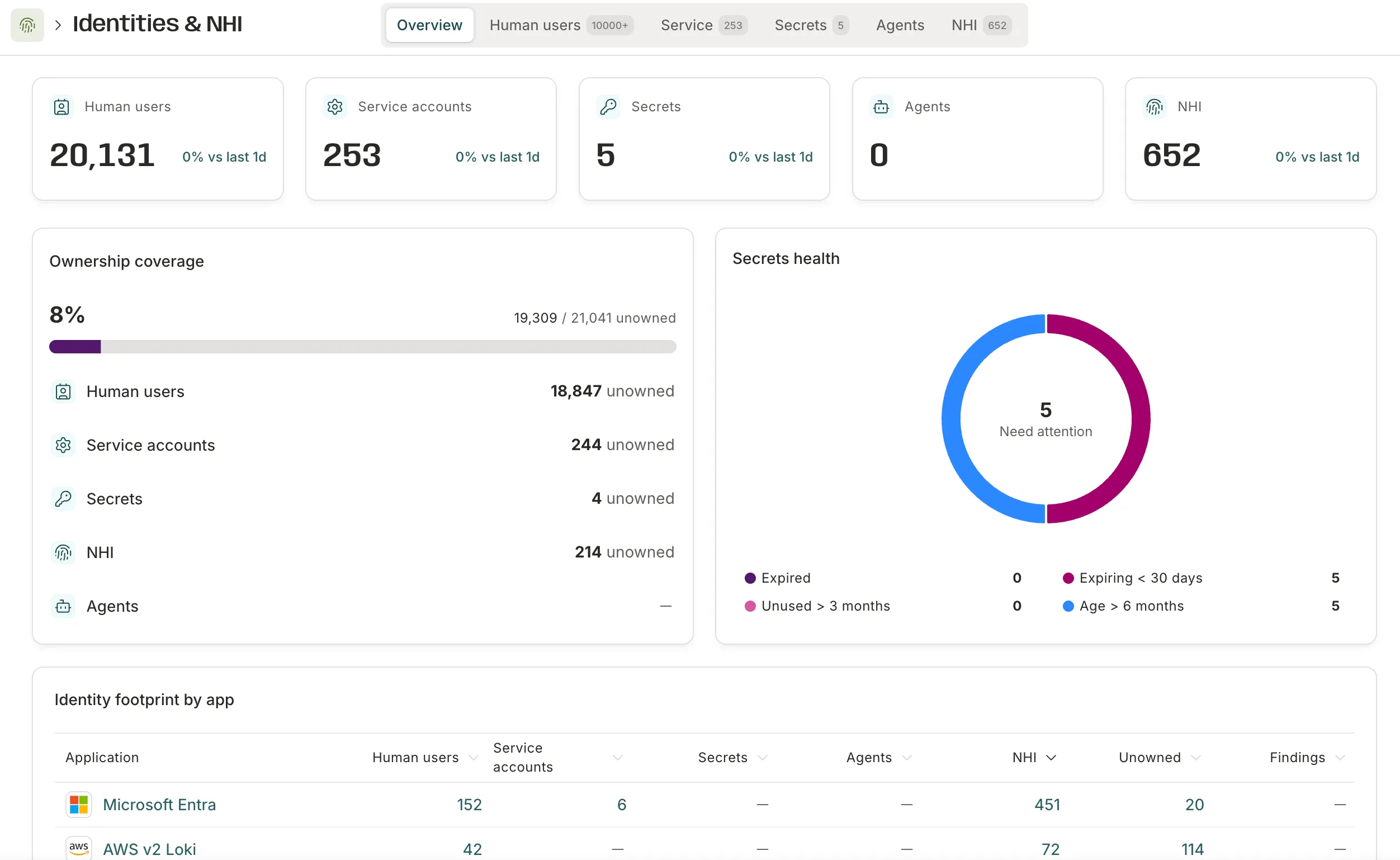 changelog · Jul 2026
· source
· release history
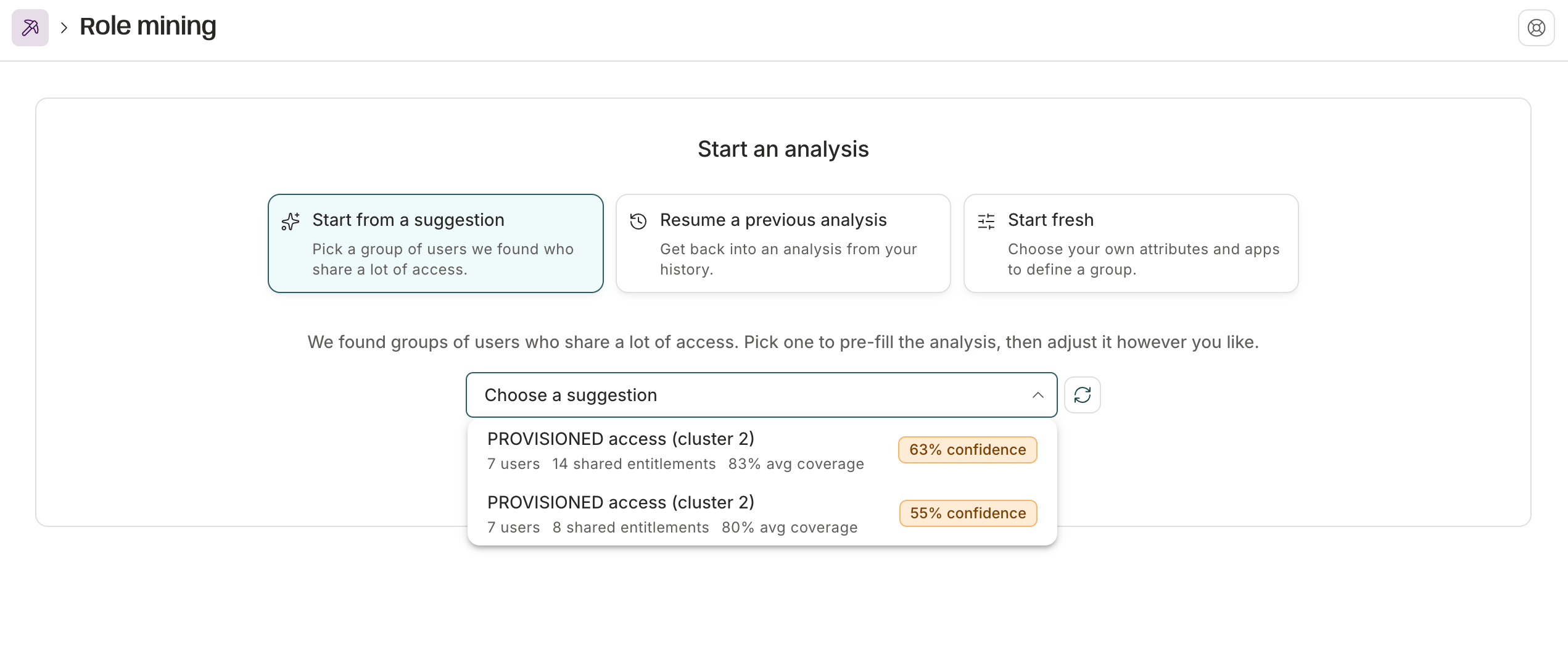 October 30, 2026 (2026-10-31) · Oct 2026
· source
· release history
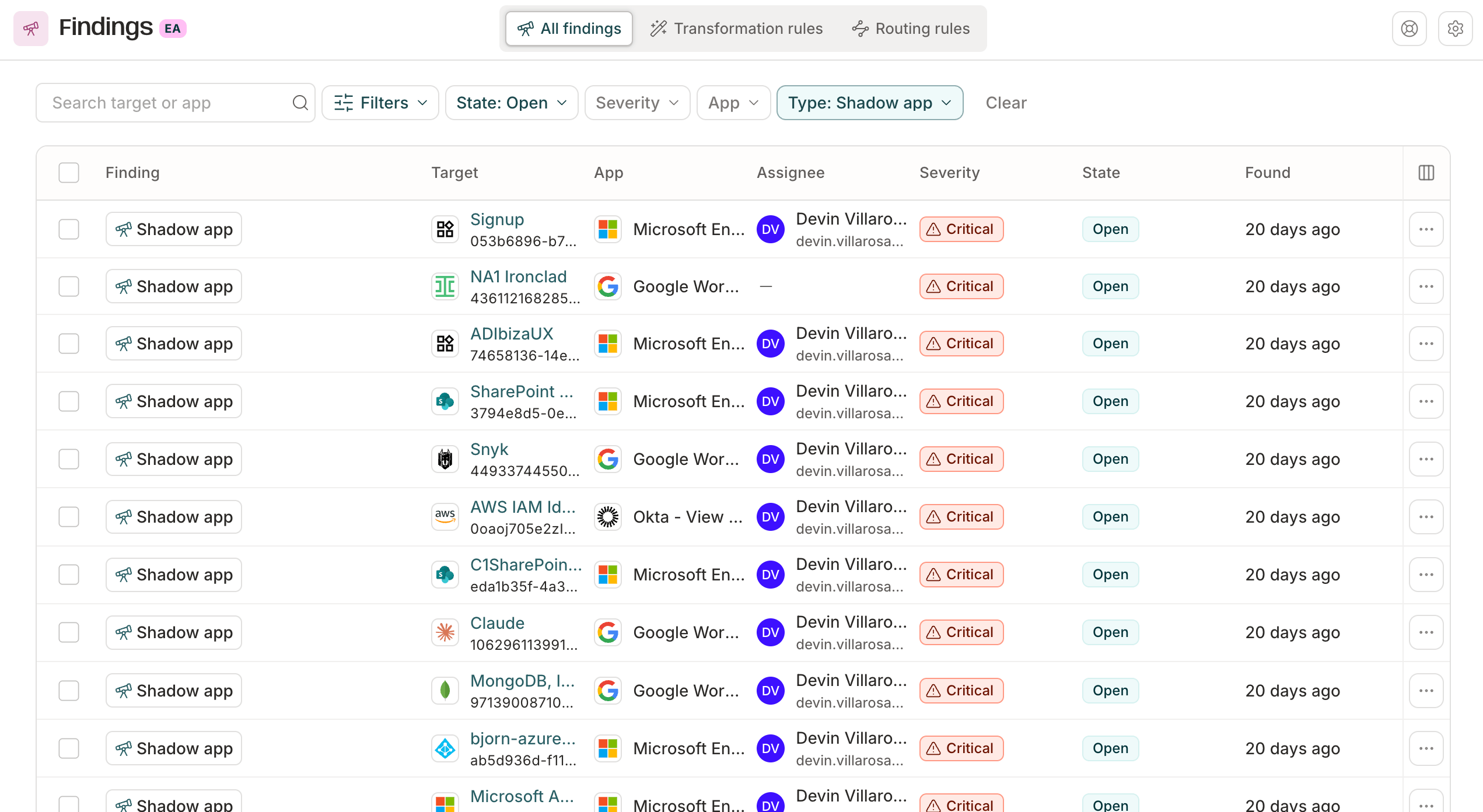 October 2, 2026 (2026-10-05) · Oct 2026
· source
· release history
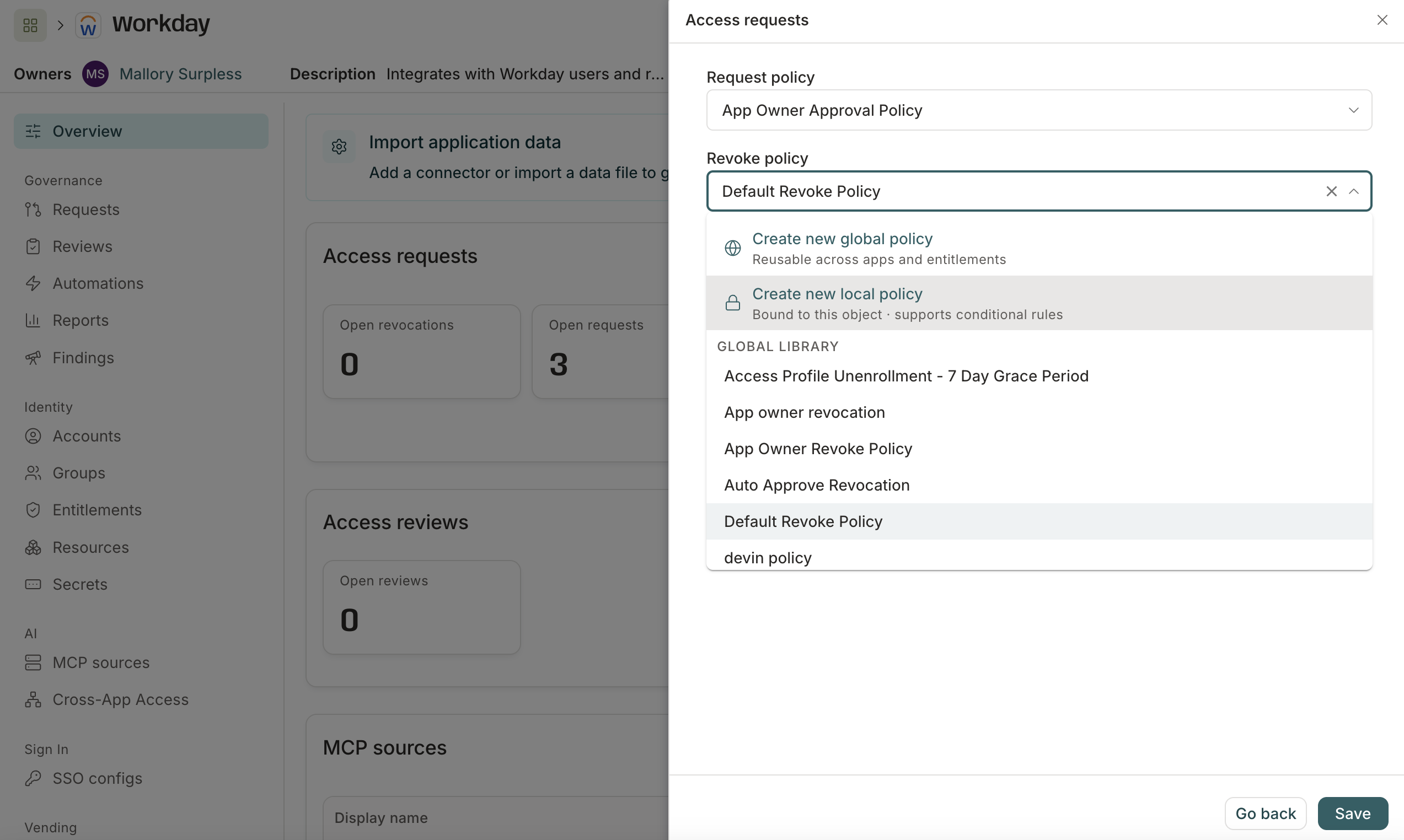 October 16, 2026 (2026-10-17) · Oct 2026
· source
· release history
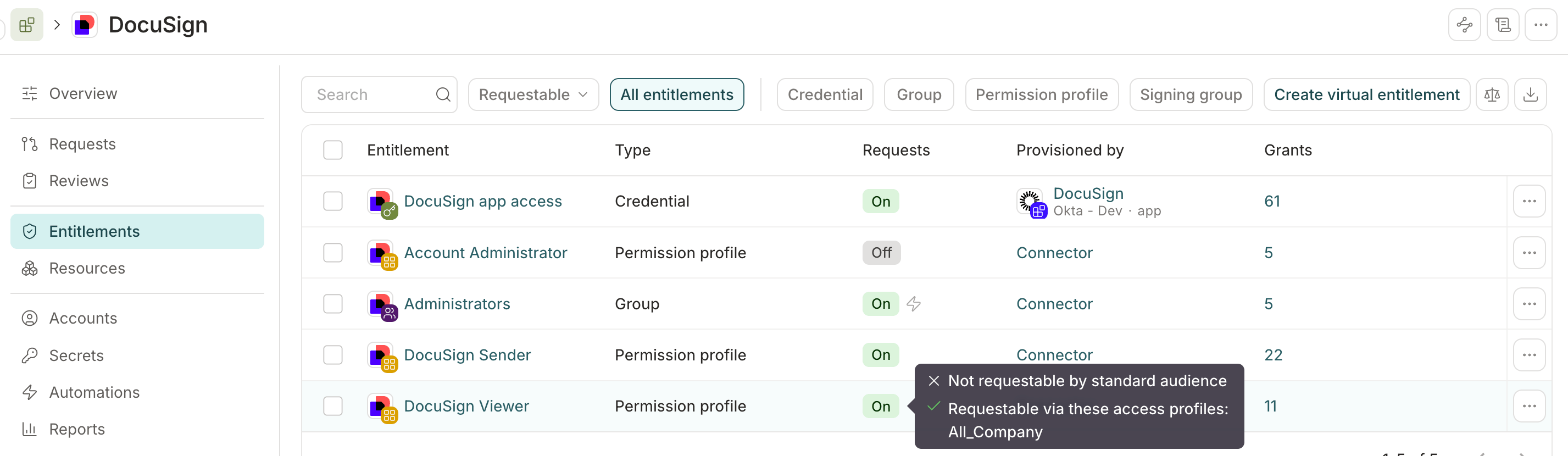 docs update · Oct 2026
· source
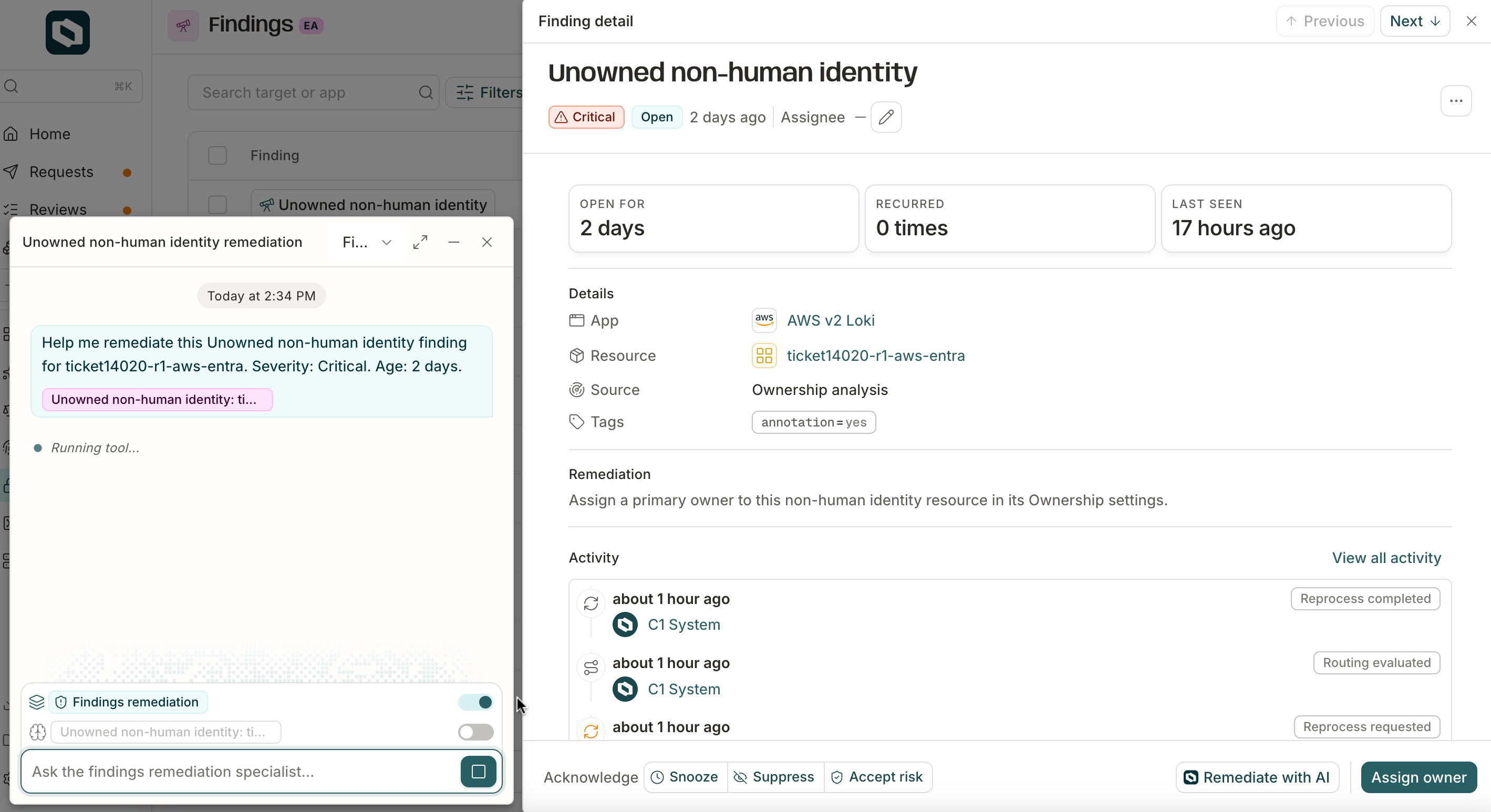 Campaign scope by users (2026-10-23) · Oct 2026
· source
· release history
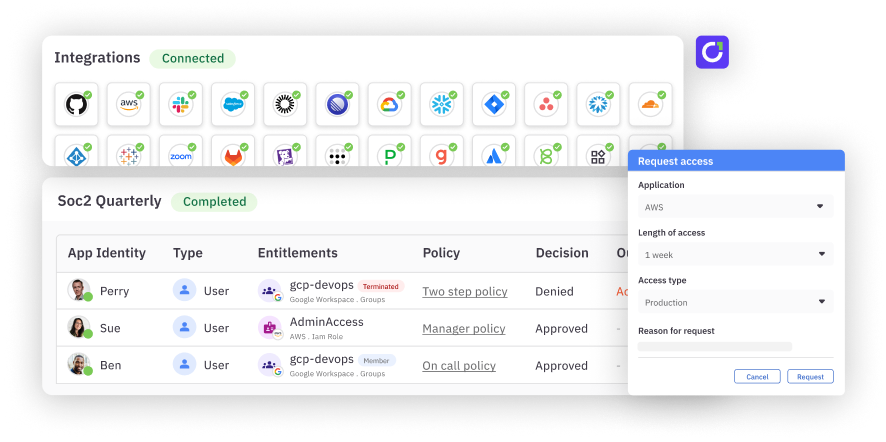 announced · Oct 2026
· source
· release history
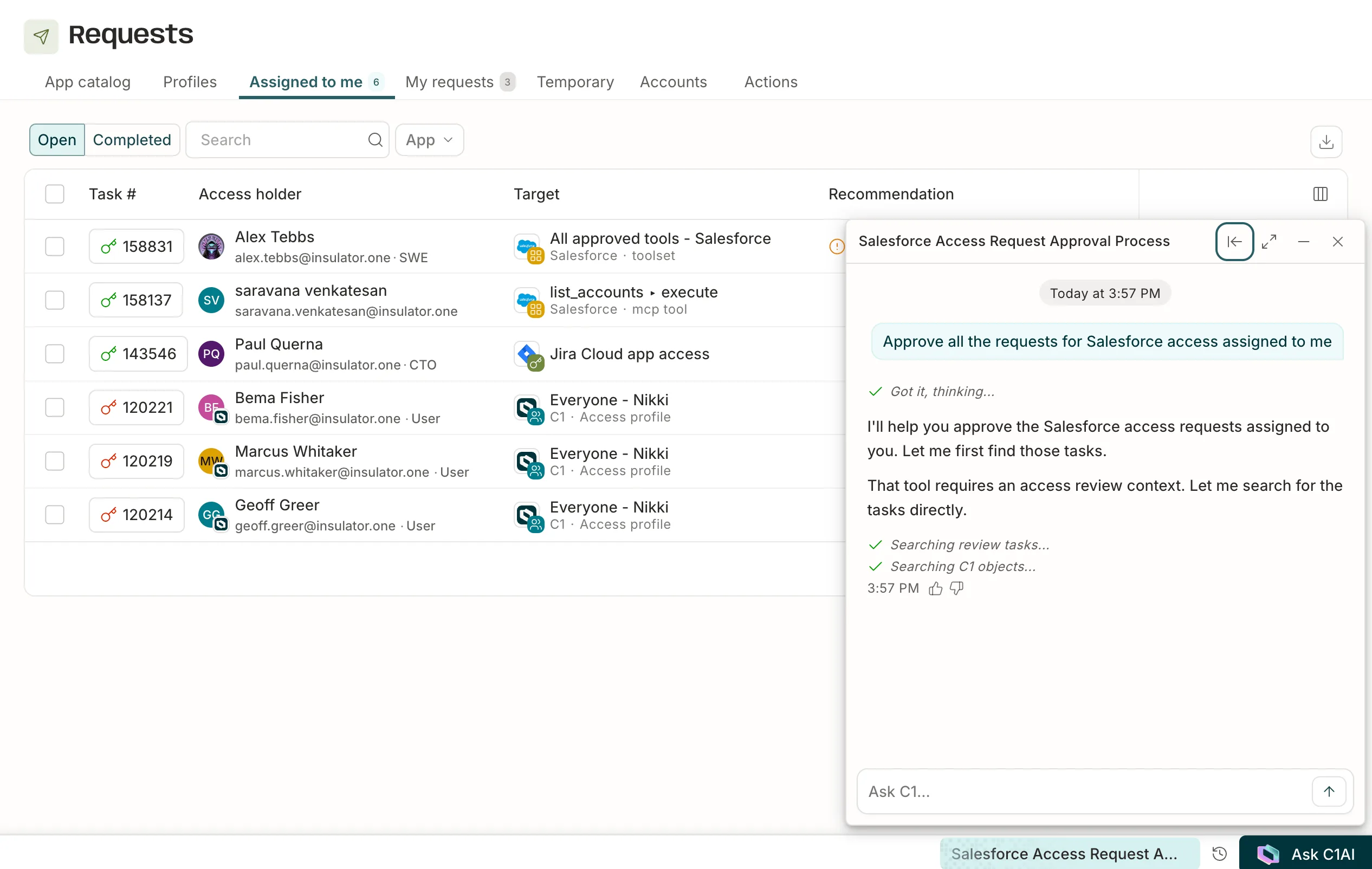 docs update · Jul 2026
· source
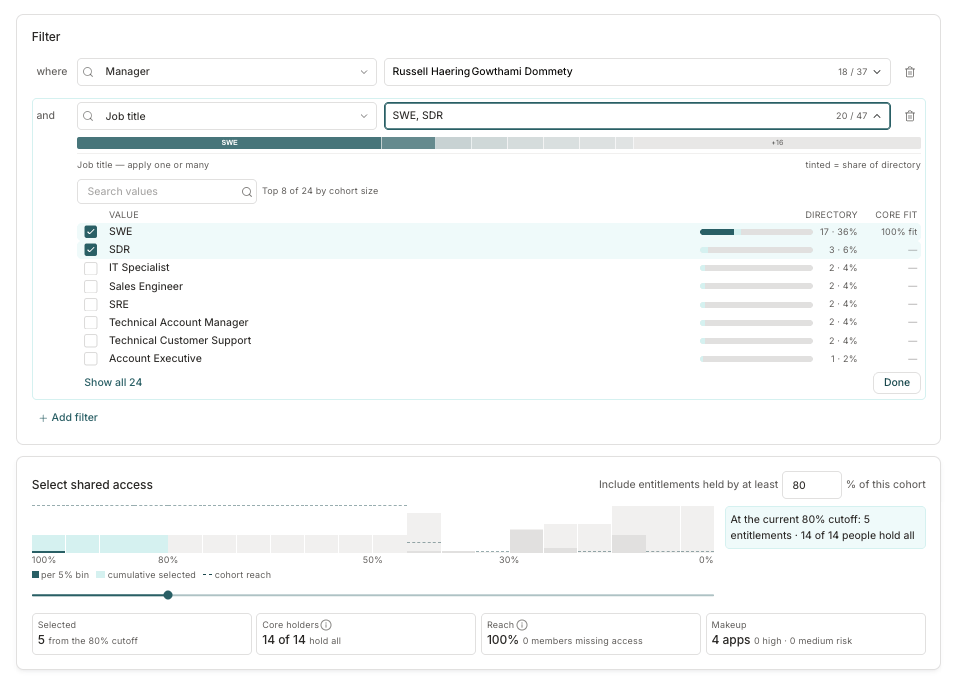 docs update · Oct 2026
· source
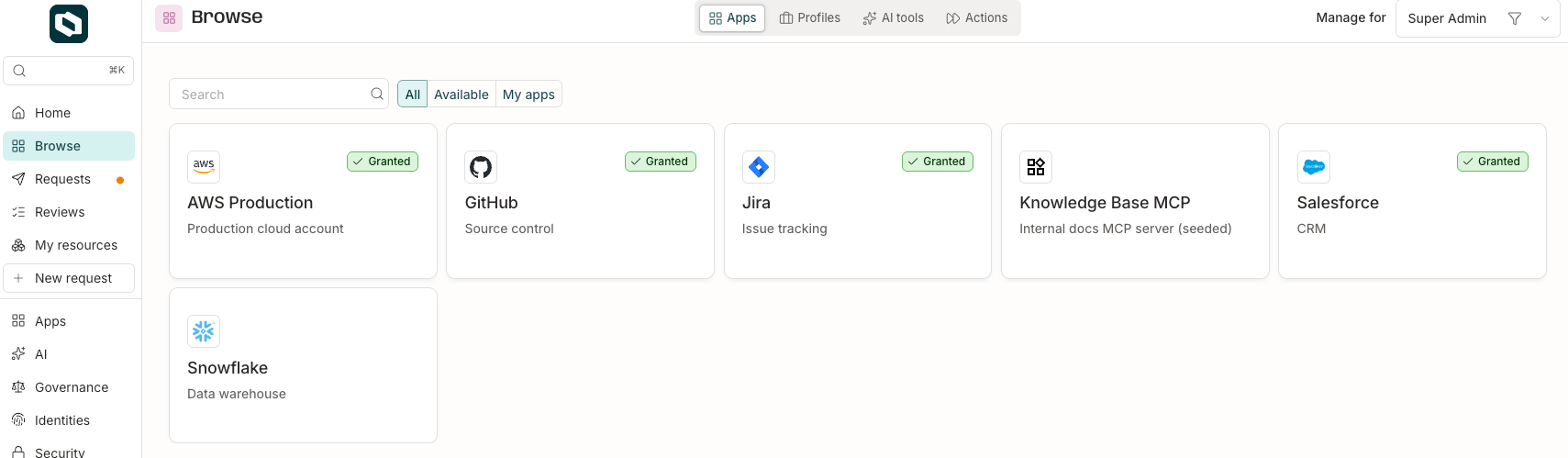 Access profile types (2026-10-20) · Oct 2026
· source
· release history
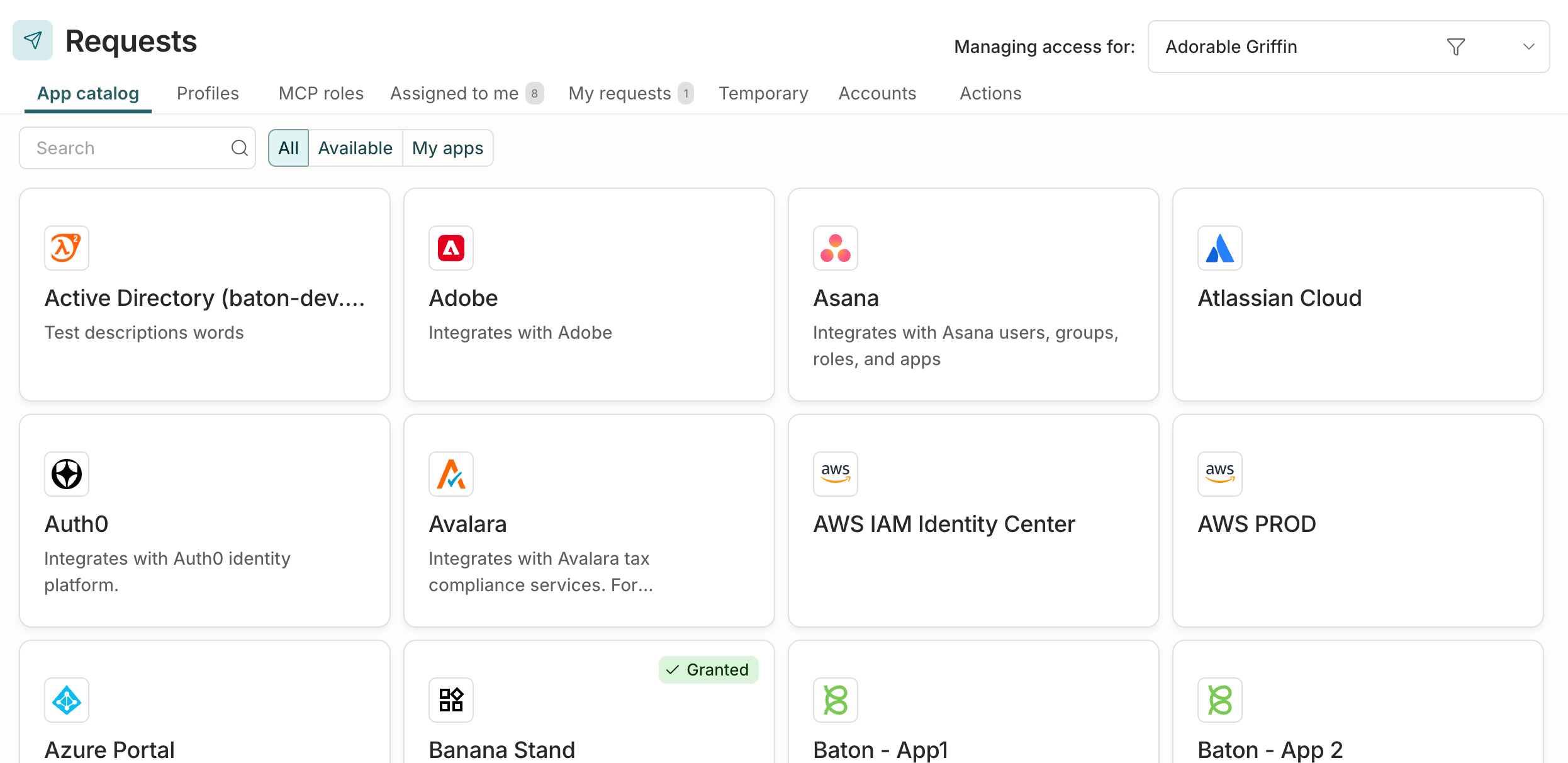 seen Oct 2026
· source
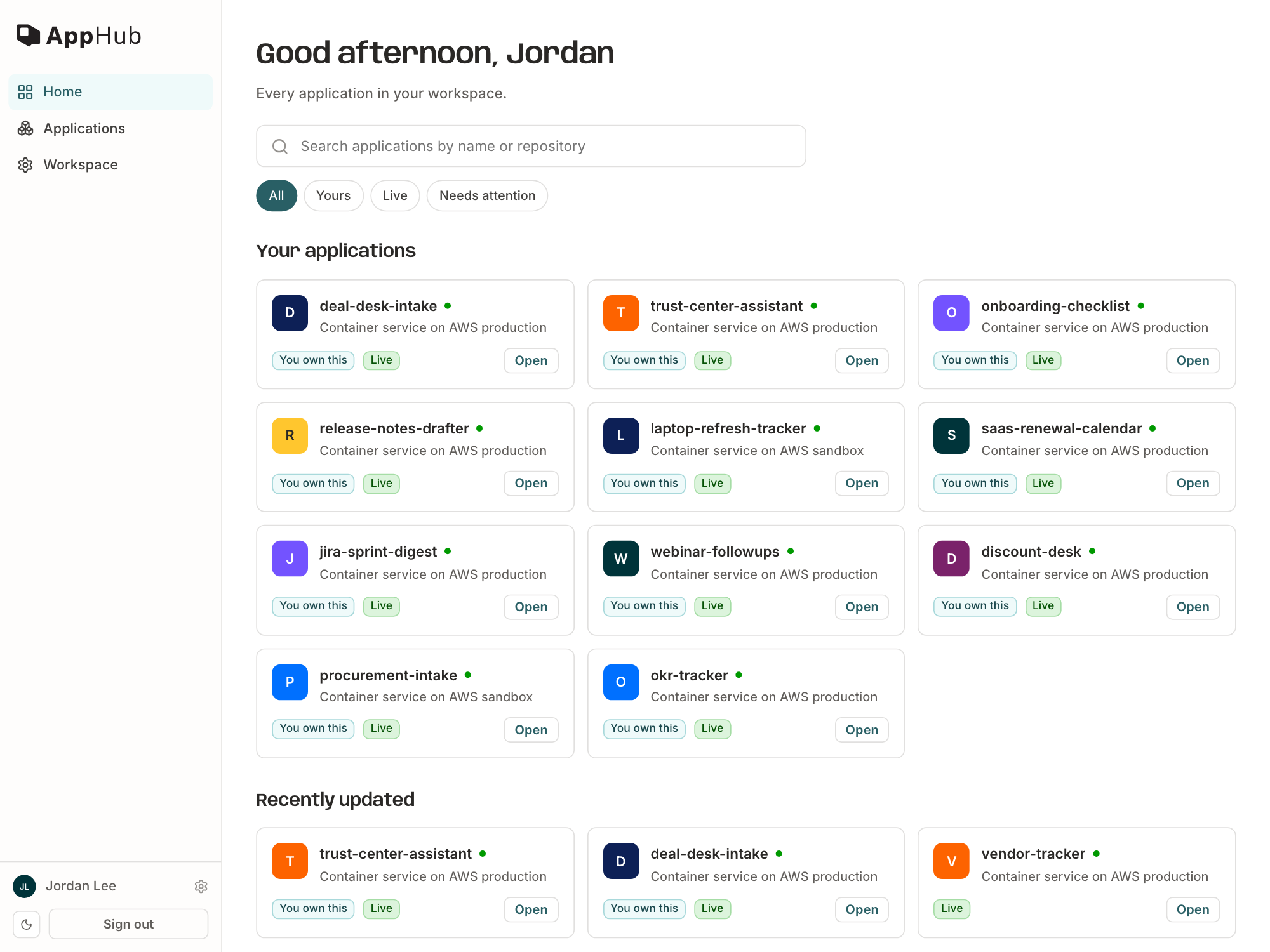 announced · Sep 2026
· source
· release history
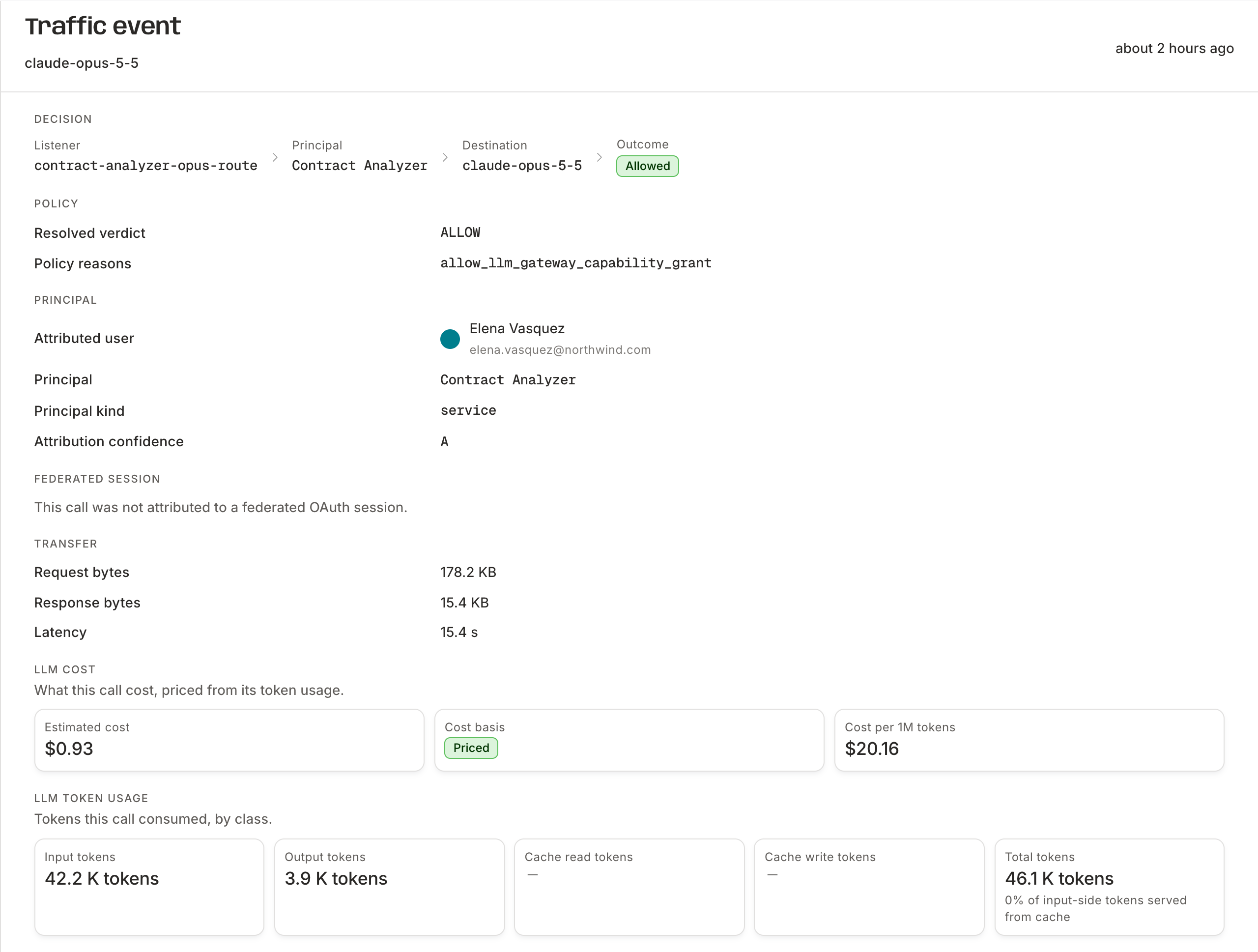 announced · Oct 2026
· source
· release history
 Choose a badge style and copy the code →