chat.useCustomizationsInParentRepositories: true
chat.customizations.marketplace.enabled: true
chat.customizations.marketplace.sources.publicFeed.enabled: true
"github.copilot.chat.claudeAgent.allowDangerouslySkipPermissions": true
"chat.agent.sandbox.enabled": true
/rubber-duck What edge cases are missing?
/remote on
chat.automations.cloud.enabled: true
// In VS Code settings (settings.json)
{
  "chat.agentHost.shellTool.initScript.enabled": true
}
// In VS Code settings (settings.json)
{
  "chat.agentHost.shellTool.initScript.enabled": true,
  "python-envs.terminal.autoActivationType": "shellStartup"
}
/create-canvas
// In VS Code Insiders settings (settings.json)
{
  "sessions.useWorktree": true
}
// In VS Code settings (settings.json)
{
  "git.worktreeSymlinkFolders": ["node_modules"]
}
// In VS Code settings (settings.json)
{
  "chat.automations.cloud.enabled": true
}
// In VS Code settings (settings.json)
{
  "chat.remoteAgentHostsEnabled": true,
  "chat.remoteSessions.tools.enabled": true
}
// In VS Code settings (settings.json)
{
  "sessions.chat.unifiedWorkspacePicker.enabled": true
}
"chat.tools.terminal.outputReflow": false
chat.experimental.persistentProgress: Draw
chat.experimental.persistentProgressVerbosity: Verbose
{
  "sessions.chat.unifiedWorkspacePicker.enabled": true,
  "sessions.chat.experimental.newSessionComposerLayout": true
}
{
  "sessions.chat.experimental.welcomePhrases": true,
  "sessions.chat.experimental.welcomeName": "Alex"
}
{
  "accessibility.verbosity.newSessionWelcome": false
}
chat.agentHost.devContainer.idleTimeout: 0
// In VS Code settings (settings.json)
"chat.tools.terminal.outputReflow": false
"chat.experimental.persistentProgress": "Draw",
"chat.experimental.persistentProgressVerbosity": "Verbose"
chat.agentHost.devContainer.idleTimeout: 0
{
  "chat.remoteAgentHostsEnabled": true,
  "chat.remoteSessions.tools.enabled": true
}
"chat.tools.terminal.outputReflow": false
"chat.experimental.persistentProgress": "Draw",
"chat.experimental.persistentProgressVerbosity": "Verbose"
// In VS Code settings (JSON)
{
  "sessions.chat.experimental.welcomePhrases": true,
  "sessions.chat.experimental.welcomeName": "Alex"
}
// In VS Code settings (JSON)
{
  "sessions.chat.unifiedWorkspacePicker.enabled": true,
  "sessions.chat.experimental.newSessionComposerLayout": true
}
// In VS Code settings (JSON)
{
  "accessibility.verbosity.newSessionWelcome": false
}
"chat.agentHost.devContainer.idleTimeout": 0
# .github/agents/codebase-researcher.agent.md
---
description: Find relevant code and explain existing patterns
user-invocable: false
subagent: true
---
Research the requested topic without changing files.
Return relevant file paths, existing patterns, and unanswered questions.
sessions.showApplicationBadge: true
{
  "chat.agent.sandbox.enabled": true,
  "chat.agent.sandbox.fileSystem.linux": {
    "allowRead": ["/home/me/.config/myapp"],
    "denyRead": ["/home/me/.ssh"]
  },
  "chat.agent.sandbox.allowNetwork": false,
  "chat.agent.allowedNetworkDomains": ["api.github.com"],
  "chat.agent.deniedNetworkDomains": []
}
/sandbox-policy
{
  "chat.agent.sandbox.enabled": true,
  "chat.agent.sandbox.allowAutoApprove": false,
  "chat.agent.sandbox.allowUnsandboxedCommands": false
}
/plan Add pagination to this project's product-list API. Follow the existing API conventions and preserve the behavior of requests that don't specify pagination. Include tests for invalid parameters, empty results, and compatibility with existing clients. Identify decisions I need to make before implementation.
github.copilot.chat.switchAgent.enabled: true
! npm test
sessions.editor.wordWrap: on
In VS Code settings (or your org device policy), set:
chat.editor.preferCopilotHarness: true
In VS Code Insiders settings, set:
sessions.useWorktree: true
chat.agentHost.devContainer.enabled: true
[personal coding standards](~/copilot/coding-standards.md)
sessions.diffEditor.wordWrap: on
{
  "chat.agent.sandbox.enabled": true,
  "chat.agent.sandbox.fileSystem.linux": {
    "allowRead": ["/home/me/.config/myapp"],
    "denyRead": ["/home/me/.ssh"]
  },
  "chat.agent.sandbox.allowNetwork": false,
  "chat.agent.allowedNetworkDomains": ["api.github.com"],
  "chat.agent.deniedNetworkDomains": []
}
{
  "chat.agent.sandbox.enabled": true,
  "chat.agent.sandbox.allowNetwork": false,
  "chat.agent.sandbox.retryWithAllowNetworkRequests": false,
  "chat.agent.sandbox.allowUnsandboxedCommands": false,
  "chat.agent.sandbox.allowAutoApprove": false
}
// In VS Code settings (settings.json)
{
  "chat.agentSessions.autoMarkAsDoneMergedSessionsAfterDays": 7,
  "chat.agentSessions.autoDeleteArchivedMergedSessionsAfterDays": 7
}
// In VS Code settings (settings.json)
{
  "sessions.showApplicationBadge": false
}
{
  "chat.agent.sandbox.enabled": true,
  "chat.agent.sandbox.allowNetwork": false,
  "chat.agent.allowedNetworkDomains": ["api.github.com"],
  "chat.agent.deniedNetworkDomains": ["example.com"]
}
{
  "chat.agent.sandbox.enabled": true,
  "chat.agent.sandbox.fileSystem.linux": {
    "allowRead": ["/home/me/.config/myapp"],
    "denyRead": ["/home/me/.ssh"]
  }
}
{
  "chat.agent.sandbox.enabled": true,
  "chat.agent.sandbox.allowAutoApprove": false,
  "chat.agent.sandbox.allowUnsandboxedCommands": false
}
code agent host
chat.customizations.locationsMigration.enabled: true
{
  "extensions.supportAgentsWindow": {
    "myextension.id": true
  }
}
{
  "sessions.layout.singlePaneDetailPanel": true
}
{
  "chat.agentHost.allowSignedOutWhenUsable": true,
  "chat.agentHost.byokModels.enabled": true
}
"chat.agentHost.shellTool.initScript.enabled": true,
"python-envs.terminal.autoActivationType": "shellStartup"
{
  "chat.agentHost.copilotAgent.multiRootEnabled": true
}
{
  "chat.agentHost.claudeAgent.multiRootEnabled": true
}
code agent host
"chat.agentSessions.showExternal": "Last 24 Hours"
// In VS Code settings, enable the setting, then open the Agents window account menu and choose 'Sign in to ChatGPT'
"chat.agentHost.codexAgent.enabled": true
code --add-mcp "{\"name\":\"mcp-fetch\",\"command\":\"uvx\",\"args\":[\"mcp-server-fetch\"]}"
{
  "servers": {
    "myServer": {
      "type": "stdio",
      "command": "npx",
      "args": ["-y", "@example/mcp-server"],
      "sandboxEnabled": true
    }
  },
  "sandbox": {
    "filesystem": {
      "allowWrite": ["${workspaceFolder}"]
    },
    "network": {
      "allowedDomains": ["api.example.com"]
    }
  }
}
{
  "servers": {
    "github": {
      "type": "http",
      "url": "https://api.githubcopilot.com/mcp"
    },
    "playwright": {
      "command": "npx",
      "args": ["-y", "@microsoft/mcp-server-playwright"]
    }
  }
}
// chatLanguageModels.json
[
  {
    "name": "Anthropic",
    "vendor": "customendpoint",
    "apiKey": "${input:anthropicApiKey}",
    "apiType": "messages",
    "models": [
      {
        "id": "claude-sonnet-4-6",
        "name": "Claude Sonnet 4.6",
        "toolCalling": true,
        "vision": true
      }
    ]
  }
]
// settings.json
{
  "chat.agentHost.byokModels.enabled": true
}
// chatLanguageModels.json
[
  {
    "name": "Azure",
    "vendor": "azure",
    "models": [
      {
        "id": "<my-deployment-name>",
        "name": "GPT-5.5",
        "url": "https://<my-endpoint>.openai.azure.com",
        "toolCalling": true,
        "vision": true,
        "maxInputTokens": 200000,
        "maxOutputTokens": 64000
      }
    ]
  }
]
---
name: Planner
description: Generate an implementation plan for new features or refactoring existing code.
tools: ['web/fetch', 'search/codebase', 'search/usages']
model: ['Claude Opus 4.5', 'GPT-5.2']
handoffs:
  - label: Implement Plan
    agent: implementer
    prompt: Implement the plan outlined above.
    send: false
---

You are in planning mode. Generate a detailed implementation plan. Do not make any code edits.
---
name: Feature Builder
description: Build features by researching first, then implementing
tools: ['agent']
agents: ['Researcher', 'Implementer']
---

You are a feature builder. For each task:
1. Use the Researcher agent to gather context and find relevant patterns in the codebase
2. Use the Implementer agent to make the actual code changes based on research findings
# .github/skills/webapp-testing/SKILL.md
---
name: webapp-testing
description: Guide for testing web applications using Playwright. Use this when asked to create or run browser-based tests.
---
# Web Application Testing with Playwright
Use Playwright locators and the [test template](./test-template.js) to create atomic, role-based tests in the `tests/` directory.
# .github/skills/review-pr/SKILL.md
---
name: review-pr
description: Review a pull request for code quality, style, and correctness. Use when asked to review a PR.
context: fork
---
# PR Review
Follow these steps to review the pull request...
/create-skill a skill for running and debugging integration tests
# .github/copilot-instructions.md
# Project general coding standards

## Naming Conventions
- Use PascalCase for component names, interfaces, and type aliases
- Use camelCase for variables, functions, and methods
- Use ALL_CAPS for constants

## Error Handling
- Use try/catch blocks for async operations
- Always log errors with contextual information
---
name: 'Python Standards'
description: 'Coding conventions for Python files'
applyTo: '**/*.py'
---
# Python coding standards
- Follow the PEP 8 style guide.
- Use type hints for all function signatures.
- Write docstrings for public functions.
"chat.instructionsFilesLocations": {
  ".github/instructions": true,
  ".claude/rules": true,
  "~/.copilot/instructions": false,
  "~/.claude/rules": false
}
// In VS Code settings (settings.json)
{
  "chat.useCustomizationsInParentRepositories": true
}
// .vscode/settings.json
{
  "chat.sessionSync.excludeRepositories": [
    "my-org/private-repo",
    "my-org/secret-*"
  ]
}
/chronicle:standup
/chronicle:search payments API
// settings.json
{
  "github.copilot.chat.summarizeAgentConversationHistory.enabled": false
}
/compact focus on the database schema decisions
/btw why did the agent choose a LEFT JOIN here instead of an INNER JOIN?
---
name: TDD
tools: ['agent']
agents: ['Red', 'Green', 'Refactor']
---
Implement the following feature using test-driven development. Use subagents to guide the following steps:
1. Use the Red agent to write failing tests
2. Use the Green agent to implement code to pass the tests
3. Use the Refactor agent to improve the code quality
---
name: internal-helper
user-invocable: false
---
This agent can only be invoked as a subagent.
---
name: document-feature
tools: ['agent', 'read', 'search', 'edit']
---
Run a subagent to research the new feature implementation details and return only information relevant for user documentation.
Then update the docs/ folder with the new documentation.
{
  "chat.artifacts.enabled": true,
  "chat.artifacts.rules.byFilePath": {
    "**/*.html": { "groupName": "Web Pages" }
  }
}
{
  "chat.artifacts.rules.byMimeType": {},
  "chat.artifacts.rules.byFilePath": {},
  "chat.artifacts.rules.byMemoryFilePath": {}
}
// in settings.json
"chat.tools.edits.autoApprove": {
  "**/*": true,
  "**/.vscode/*.json": false,
  "**/.env": false
}
// in settings.json
"chat.checkpoints.enabled": true,
"chat.checkpoints.showFileChanges": true
// in settings.json
"sessions.changes.openSingleFileDiff": true
// in settings.json
{
  "chat.tools.urls.autoApprove": {
    "https://*.contoso.com/*": {
      "approveRequest": true,
      "approveResponse": false
    }
  }
}
// settings.json
{
  "workbench.browser.enableChatTools": true
}
// In VS Code settings (settings.json)
{
  "chat.agent.thinking.collapsedTools": "off"
}
// In VS Code settings (settings.json)
{
  "chat.tools.terminal.outputLocation": "inline"
}
// In VS Code settings (settings.json)
{
  "chat.tools.terminal.terminalProfile.windows": "PowerShell"
}
// In VS Code settings.json
{
  "git.worktreeIncludeFiles": [".env", "node_modules"]
}
/remote on
// ~/.claude/settings.json
{
  "env": {
    "ANTHROPIC_API_KEY": "<your-key>"
  }
}
code --agents
// .vscode/settings.json or user settings
{
  "chat.agentHost.allowSignedOutWhenUsable": true
}
// .vscode/settings.json or user settings
{
  "sessions.list.showEmptyDefaultGroups": false
}
// In VS Code settings (settings.json)
{
  "chat.agent.sandbox.enabled": "on",
  "chat.agent.sandbox.allowNetwork": false,
  "chat.agent.networkFilter": true,
  "chat.agent.allowedNetworkDomains": ["registry.npmjs.org", "api.github.com"],
  "chat.agent.deniedNetworkDomains": []
}
sudo apt-get install bubblewrap socat
code agent host --tunnel
{
  "chat.agentHost.enabled": true
}
Settings > 'git.manageUnsafeRepositories': true
Settings > 'notebook.audioCues': true
Summary
code-oss is an open-source code editor, released under the MIT licence, that developers install as a desktop application on Windows, macOS, or Linux to write, navigate, and debug code. It is aimed at application developers rather than security teams, though its extension model and policy controls make it relevant to platform and IT teams managing developer environments at scale. Distributed by Microsoft as the upstream of Visual Studio Code, it has grown well beyond a text editor: recent work adds agent orchestration, background and cloud agent sessions, terminal sandboxingsandboxingRunning code inside a restricted environment that limits what it can access or change. The isolation reduces the impact of mistakes or untrusted code, depending on the sandbox's controls. with auto-approval rules, and an integrated browser for agents to test and fix web apps autonomously. Its README frames it as the open-source base for VS Code itself, distinguishing the two by licensing rather than functionality. With over 3,000 contributors, tens of thousands of commits in the past year, and a release only 16 days ago, it is under continuous, active development.
Open-source code editor combining editing, debugging, and extensibility for developers across Windows, macOS, and Linux.
94 capabilities
across 6 areas
· 1 backed by code, an API document or a real run
Built from code-oss's releases, docs, README and our own runs.
“Seen” marks the month we first spotted a release the vendor didn't date.
Group names and tags are our labels.
+AI Coding Agents6 capabilitiesCode-oss provides a full agent runtime for running AI coding agents that autonomously plan, execute, and revise multi-file changes across a codebase. Users can launch, monitor, and manage multiple agent sessions in parallel from a dedicated Agents window.▸
+Agent harness selectiondocumentedLets users choose which agent harness coordinates a session — controlling tool calls, context, and code changes — and where that harness runs.22 other sources · first seen Aug 2026▸
docs
22 total
determines where it works on code. Depending on the harness, a session can use a workspace on your machine or a connected host. It can also work inside a Dev Container in either location. A container changes the development environment, not how the session organizes the conversation and task.
docs update · Oct 2026
· source
With a harness that supports multiple chats, such as Copilot or Claude, a session can contain a main chat and additional peer chats. In the . Available choices depend on your account, installed providers, and organization policies.
seen Oct 2026
· source
The agent starts generating the app. The Copilot harness applies and saves edits directly to your project files and might request approval to run terminal commands or use other tools. 10/14/2026
seen Oct 2026
· source
compare agent harnesses select one for a session command isn't available in Local harness sessions, cloud sessions, or extension-based agent integrations. Use the integrated terminal to run commands yourself instead. Choose an agent harness 10/14/2026
seen Oct 2026
· source
to explore code, plan changes, implement features, and run tests. The harness uses a shared runtime for core capabilities and more consistent behavior across VS Code, GitHub Copilot CLI, and the GitHub Copilot app.
seen Oct 2026
· source
Uses the Copilot agent harness to run the session on your machine. For some changes, you might prefer a code-first approach, where your focus is on writing code and Copilot assists you in the process. For example, you might want to add a theme switcher and fine-tune the styles as you go.
seen Oct 2026
· source
+Agents windowshippedProvides a dedicated window where users assign high-level tasks, run multiple agents in parallel, and review multi-file changes across all workspaces.1 release · 16 other sources · first seen Feb 2021▸
release
search.defaultViewMode setting controls whether the Search view or a new Search editor opens by default
1.53.0 · Feb 2021
· source
· release history
docs
16 total
VS Code 1.143 release Get the Copilot harness by default, compare model results in the Agents window, and try experimental worktree cleanup, and a multi-diff file list. Modernizing the VS Code UI
seen Oct 2026
· source
You can switch between these surfaces after you start a session. To compare all agent interfaces, see For Local harness sessions: Continue the session in the Chat view in an editor window. These sessions aren't available in the Agents window. Sessions from the OpenAI Codex extension are also editor-only.
docs update · Oct 2026
· source
The Agents window uses the accounts and model credentials available in VS Code: : configure a Claude API key or another supported bring-your-own-key (BYOK) option for Claude. to make it available in the desktop Agents window.
seen Oct 2026
· source
to use Claude without GitHub sign-in (Experimental). to use Codex without GitHub sign-in (Experimental). configured for use in the Agents window. to make BYOK models available in the Agents window. before you open the window. This setting is off by default.
docs update · Oct 2026
· source
View as Markdown Ask in VS Code Ask in VS Code Insiders In this tutorial, you build a personal portfolio page with AI agents in Visual Studio Code. You describe what you want in natural language, and an agent creates and edits files. You then review and test the result.
seen Oct 2026
· source
Configure the Agents window View as Markdown Ask in VS Code Ask in VS Code Insiders Configure the new-session experience Personalize the welcome heading (Experimental) Enable sessions.chat.experimental.welcomePhrases to show a rotating welcome phrase above the new-session composer in the Agents window.
docs update · Oct 2026
· source
+Agent Host architectureverifiedRuns AI coding agents in a dedicated process that operates independently of the editor display, with its own session ownership and debug logging.11 releases · 5 other sources · first seen Jun 2020▸
release
11 total
Adds background and cloud agent session management with the ability to delegate and resume tasks.
1.109.0 · Feb 2026
· source
· release history
Background agents run tasks in isolated workspaces managed automatically by VS Code.
1.107.0 · Dec 2025
· source
· release history
Integrates GitHub Copilot Coding Agent assignment and tracking directly within VS Code.
1.101.0 · Jun 2025
· source
· release history
New advanced codebase search in Copilot Chat lets Copilot find relevant files across the repo to ground chat responses.
1.98.0 · Mar 2025
· source
· release history
Adds more extensions available for vscode.dev
1.63.0 · Dec 2021
· source
· release history
Adds vscode.dev as a new browser-based cyber tooling environment
1.62.0 · Nov 2021
· source
· release history
docs
Sandbox Copilot Agent Host sessions View as Markdown Ask in VS Code Ask in VS Code Insiders Copilot Agent Host sessions can run terminal commands and start language or tool servers on your local machine or a connected remote host.
seen Oct 2026
· source
Use this article to turn on sandboxing for Local sessions and Copilot Agent Host sessions , check the restrictions that apply, and handle commands that need additional access. Important Turning on sandboxing does not block network access by default. defaults to , so commands can still contact external services.
docs update · Oct 2026
· source
In the Agent Host on your machine, on a remote host, or in a Dev Container Current folder, an isolated Git worktree, or a Dev Container workspace Runtime-specific customizations, including hooks , follow the selected harness. Running multiple harnesses in Agent Host does not give them a shared hook schema.
docs update · Sep 2026
· source
VS Code Agent Host architecture VS Code runs AI coding agents in a dedicated process called the Agent Host, which it communicates with through the Agent Host Protocol (AHP). The host owns agent sessions independently of the clients that display and control them.
docs update · Aug 2026
· source
command line
archive — Path to an Agent Host debug log zip.
1.129.0 · Jul 2026
· command-line history
+Agent sessions managementshippedCreates and tracks agent sessions, each recording the full sequence of prompts, responses, context, and associated files for a given task.2 releases · 11 other sources · first seen Mar 2023▸
release
New Copilot Edits mode lets you iterate on large code changes spanning multiple files in a single session.
1.95.0 · Oct 2024
· source
· release history
Adds 'expanded GitHub Copilot integration' with a preview of inline chat and a full AI chat view
1.77.0 · Mar 2023
· source
· release history
docs
11 total
Understand sessions and chats View as Markdown Ask in VS Code Ask in VS Code Insiders A session is the unit of work with an agent in Visual Studio Code. It brings together the workspace and code changes for a task.
seen Oct 2026
· source
View as Markdown Ask in VS Code Ask in VS Code Insiders is the unit of work with an agent in Visual Studio Code. It brings together the workspace, code changes, and one or more chats for a task. Each chat has its own conversation history and context.
docs update · Oct 2026
· source
Understand sessions and chats A session is the unit of work with an agent in Visual Studio Code. It brings together the workspace and code changes for a task. A chat is a conversation within that session, and a session can contain multiple chats when the harness supports them.
seen Oct 2026
· source
is the unit of work with an agent in Visual Studio Code. It brings together the workspace, code changes, and one or more chats for a task. Each chat has its own conversation history and context.
docs update · Oct 2026
· source
Switch chats within a session A supported Agent Host session can contain a main chat and additional peer chats. In the Sessions view, expand the main chat row and select a peer to open its conversation in the Chat view. You can continue peer chats created in the Agents window without starting a new session.
docs update · Oct 2026
· source
Configure word wrap for code editors Control how code editors in the Agents window wrap long lines with sessions.editor.wordWrap . This setting has the following values: inherit (default): Follow the editor.wordWrap setting. on : Wrap lines at the editor viewport width. off : Never wrap lines.
docs update · Sep 2026
· source
+Remote agent sessionsshippedConnects to remote machines over SSH, dev tunnels, or a browser so users can start or check in on agent sessions without being locally present.2 releases · 7 other sources · first seen Oct 2019▸
release
Adds Remote-Tunnels to connect to any machine without SSH.
1.74.0 · Dec 2022
· source
· release history
Adds Remote Explorer support for displaying WSL distributions and repository containers in the sidebar.
1.39.0 · Oct 2019
· source
· release history
docs
The agent works with files and development tools on the remote machine, not the machine where you connect to the session. When you connect, the Agents window automatically installs and starts the VS Code CLI on the remote machine. Keep the remote machine powered on and the session running.
docs update · Oct 2026
· source
View as Markdown Ask in VS Code Ask in VS Code Insiders Start a chat without a workspace on a remote host Use a chat without a workspace when a task needs the resources or environment of a remote host but doesn't need a repository.
docs update · Oct 2026
· source
Start a chat without a workspace on a remote host Use a chat without a workspace when a task needs the resources or environment of a remote host but doesn't need a repository. First, enable sessions.chat.unifiedWorkspacePicker.enabled and connect the host over SSH or a dev tunnel.
docs update · Oct 2026
· source
Run a session in a remote Dev Container Run agents inside your remote project's Dev Container to use its configured tools and dependencies without installing them directly on the host. Starting in VS Code 1.139, this is supported for SSH, Tunnel, and WSL hosts in the desktop Agents window.
docs update · Sep 2026
· source
Remote agent sessions The Agents window lets you connect to remote machines to start agent sessions or check in on existing ones. You can connect over SSH, through a dev tunnel, or use the Agents window directly in a browser from any device.
docs update · Aug 2026
· source
example
Connect to a remote Agent Host from the browser to review and manage a session running on another machine.$ 1. On the remote machine, start VS Code with your workspace and begin an agent session. 2. In the Agents window, connect to the remote Agent Host (configured via SSH or dev tunnel). 3.
announced · Aug 2026
· source
Connect to a remote machine without configuring SSH keys or ports$ Command Palette > 'Remote Tunnels: Create Tunnel'
1.74.0 · Dec 2022
· source
+SubagentsshippedLets the main agent delegate focused subtasks — such as researching a topic or reviewing changes — to independent subagents that report results back.1 release · 7 other sources · first seen Feb 2026▸
release
Enables agent orchestration so users can build custom multi-agent workflows.
1.109.0 · Feb 2026
· source
· release history
docs
7 total
This article shows how to delegate a task and follow its progress in VS Code. Use the guidance for your harness , then learn how to determines how subagents run and which configuration options they support. Select a harness before you submit the first prompt. harness manages delegation to built-in or custom subagents.
seen Oct 2026
· source
View as Markdown Ask in VS Code Ask in VS Code Insiders Local subagents select a model in this order: Auto, when is enabled and the conditions for using Auto apply. Use Auto for subagents If Auto is unavailable, the subagent uses the main conversation's model.
seen Oct 2026
· source
Local subagents select a model in this order: Auto, when is enabled and the conditions for using Auto apply. Use Auto for subagents If Auto is unavailable, the subagent uses the main conversation's model. The presentation depends on both the harness and the interface.
seen Oct 2026
· source
Use AI in Visual Studio Code to understand unfamiliar code, fix bugs, and build features. For a task that spans files and tools, an agent can find relevant code, make changes, and run checks without you directing each search, edit, and test run. You describe the outcome, review the changes, and verify the result.
seen Oct 2026
· source
Use subagents to research a topic, compare approaches, or review code without filling your main conversation with intermediate work. A subagent works in its own context and returns a focused result to the main agent.
docs update · Sep 2026
· source
Subagents in Visual Studio Code When working on complex tasks, you can delegate subtasks to subagents. A subagent is an independent AI agent that performs focused work, such as researching a topic, analyzing code, or reviewing changes, and reports the results back to the main agent.
docs update · Aug 2026
· source
+Agent Tools and Integrations3 capabilitiesCode-oss extends agent capabilities through built-in tools, Model Context Protocol servers, extension-contributed tools, and a browser integration for web development workflows. This lets agents interact with the terminal, search code, fetch web content, and visually test running applications.▸
+Agent tools (built-in, MCP, and extension)shippedExtends agents with specialized functionality — code search, terminal commands, web fetching, and external APIs — through built-in tools, MCP servers, and extension-contributed tools.2 releases · 12 other sources · first seen Feb 2026▸
Also counts toward: MCP server
release
Introduces MCP Apps for rich, structured chat interactions.
1.109.0 · Feb 2026
· source
· release history
Supports external indexing for faster code search in agent workflows.
1.109.0 · Feb 2026
· source
· release history
docs
12 total
For Copilot harness sessions, your tool selection persists in the active . Learn how to manage available tools Note For Local harness sessions: The tool selection applies to one chat request rather than persisting across requests. 10/14/2026
seen Oct 2026
· source
Note For Local harness sessions: Manage available tools For Copilot harness sessions, manage tools from the Agent Customizations editor. Your selection persists in the active , rather than applying to only one request: Select or deselect tools to control which ones are available to the agent.
docs update · Oct 2026
· source
View as Markdown Ask in VS Code Ask in VS Code Insiders Agents can change workspace files through editing tools, terminal commands, scripts, and MCP tools .
seen Oct 2026
· source
View as Markdown Ask in VS Code Ask in VS Code Insiders to restrict domains for the fetch tool and integrated browser. Sandbox network controls apply separately to terminal commands. Agent sandboxing uses operating system-level isolation to restrict what terminal commands can access on your machine.
seen Oct 2026
· source
View as Markdown Ask in VS Code Ask in VS Code Insiders Tools let an agent inspect your project and check results instead of only suggesting code or commands for you to apply. For example, it can read the implementation behind a failing test, make a change, and run the test to check whether the change works.
docs update · Oct 2026
· source
View as Markdown Ask in VS Code Ask in VS Code Insiders Use AI in Visual Studio Code to understand unfamiliar code, fix bugs, and build features. For a task that spans files and tools, an agent can find relevant code, make changes, and run checks without you directing each search, edit, and test run.
seen Oct 2026
· source
+AI language model selectionshippedProvides access to multiple language models optimised for different tasks, with the ability to switch models per use case or add models via a personal API key.7 releases · 7 other sources · first seen Feb 2023▸
release
7 total
Upgrades GitHub Copilot Chat to OpenAI GPT-4o.
1.92.0 · Aug 2024
· source
· release history
Introduces Copilot-powered rename suggestions for symbol renaming
1.87.0 · Feb 2024
· source
· release history
Adds Side-by-side preview refactoring using the multi-diff editor to preview code changes before applying them
1.87.0 · Feb 2024
· source
· release history
config: Set workbench.profile.icon in your user or workspace settings JSON to display a custom icon for a profile.
1.83.0 · Oct 2023
· source
· release history
Introduces partial profiles in VS Code Profiles, allowing Apply to all profiles options for finer configuration control
1.81.0 · Aug 2023
· source
· release history
Active profile badge and quick switch via Command Palette for managing multiple configuration sets.
1.76.0 · Mar 2023
· source
· release history
docs
VS Code 1.144 release Continue agent work across environments, let Copilot Fusion choose models, and try image generation (Preview). VS Code Wrapped: GitHub Universe 2026 Catch up on a year of VS Code, from parallel agents to continuous work across apps and environments.
seen Oct 2026
· source
View as Markdown Ask in VS Code Ask in VS Code Insiders Access to an AI model through a supported setup: For models provided by GitHub Copilot, set up GitHub Copilot in VS Code To use Anthropic Claude, OpenAI Codex, or your own model credentials for supported workflows, review the agent harness authentication options…
docs update · Oct 2026
· source
View as Markdown Ask in VS Code Ask in VS Code Insiders to learn the basics, use the to build an app from a natural-language prompt, or choose an AI feature for a smaller task. On a managed device, your organization might control installation and available AI features.
seen Oct 2026
· source
Access to an AI model through a supported setup: For models provided by GitHub Copilot, set up GitHub Copilot in VS Code To use Anthropic Claude, OpenAI Codex, or your own model credentials for supported workflows, review the agent harness authentication options and language model setup : at the bottom, where you type…
docs update · Oct 2026
· source
Claude API key or another supported bring-your-own-key (BYOK) configuration On Windows, right-click the VS Code taskbar icon and select Agents Window from the Tasks jump list. Claude configured with an API key or another supported Claude BYOK option. Add Context Issue... Pull Request... .
docs update · Sep 2026
· source
AI language models in VS Code Visual Studio Code gives you access to multiple built-in language models, each optimized for different tasks. You can switch models for chat, inline suggestions, and utility tasks, and you can add more models by bringing your own API key.
docs update · Aug 2026
· source
example
Share a custom development environment profile with team members.$ Code > Profiles > Create Profile...
1.75.0 · Feb 2023
· source
+Browser tools for agentsshippedGives agents an integrated browser to run a web application, interact with it, inspect results, and fix problems in a visual feedback loop.2 releases · 6 other sources · first seen Aug 2023▸
release
Introduces an integrated browser for testing web apps without leaving the editor.
1.109.0 · Feb 2026
· source
· release history
Introduces iterative /fix command improvements in the Preview GitHub Copilot UX Quick Chat
1.81.0 · Aug 2023
· source
· release history
docs
View as Markdown Ask in VS Code Ask in VS Code Insiders In this quickstart, you use an AI agent in Visual Studio Code to build a small web app from a natural-language prompt. You then review the generated code, let the agent validate the app with browser tools, and verify the result yourself.
seen Oct 2026
· source
View as Markdown Ask in VS Code Ask in VS Code Insiders to restrict domains for the fetch tool and integrated browser. Sandbox network controls apply separately to terminal commands. The Local terminal sandbox is in Preview on macOS, Linux, and WSL2, and Experimental on Windows.
docs update · Oct 2026
· source
In this quickstart, you use an AI agent in Visual Studio Code to build a small web app from a natural-language prompt. You then review the generated code, let the agent validate the app with browser tools, and verify the result yourself.
seen Oct 2026
· source
Use browser tools with agents Browser tools give agents a visual and interactive feedback loop for web development. An agent can change your code, run the application, interact with it in the integrated browser, inspect the result, and fix problems it finds.
docs update · Aug 2026
· source
Build and validate web apps : give an agent a visual and interactive feedback loop with browser tools . The agent can run your app, exercise user flows in the integrated browser, inspect the result, fix problems, and verify its changes. AI features are built into VS Code.
docs update · Aug 2026
· source
example
Use the new iterative /fix command in GitHub Copilot Chat to resolve issues iteratively.$ In the Copilot Chat panel, type '/fix' followed by a description of the error context to trigger automated fixes.
1.81.0 · Aug 2023
· source
+Agent Customisation and Memory5 capabilitiesCode-oss allows agents to be tailored to specific development roles, coding standards, and team workflows through custom personas, instruction sets, and reusable skill folders. Agents can also retain context across conversations, building up knowledge about user preferences and the codebase over time.▸
+Agent customizationsdocumentedAdapts agents to a project's coding standards, workflows, and development systems, with controls to restrict customisations to eligible plugin customisations only.6 other sources · first seen Aug 2026▸
docs
Create and manage agent customizations View as Markdown Ask in VS Code Ask in VS Code Insiders Agent customizations adapt agents to your coding standards, workflows, and development systems. This article explains how to create, manage, evaluate, and troubleshoot customizations in Visual Studio Code.
docs update · Oct 2026
· source
View as Markdown Ask in VS Code Ask in VS Code Insiders . Customizations stored only in your VS Code profile user data are a legacy location that the Copilot agent doesn't read. Learn how to migrate agent customizations 10/7/2026
seen Oct 2026
· source
View as Markdown Ask in VS Code Ask in VS Code Insiders Start from an observed problem instead of adding customization by default. Define a representative task and its expected outcome. If the result already meets your needs, stop. Otherwise, try the smallest change that addresses the repeated problem.
seen Oct 2026
· source
Start from an observed problem instead of adding customization by default. Define a representative task and its expected outcome. If the result already meets your needs, stop. Otherwise, try the smallest change that addresses the repeated problem.
seen Oct 2026
· source
Create and manage agent customizations Agent customizations adapt agents to your coding standards, workflows, and development systems. This article explains how to create, manage, evaluate, and troubleshoot customizations in Visual Studio Code.
docs update · Aug 2026
· source
sessions.chat.claudeAgent.enabled ChatStrictPluginOnlyCustomization Blocks standalone user and workspace skills, agents, hooks, instructions, and MCP servers while keeping eligible plugin customizations available.
docs update · Aug 2026
· source
+Agent memoryshippedRetains context across conversations so agents can recall user preferences, apply lessons from earlier tasks, and accumulate knowledge about the codebase.1 release · 3 other sources · first seen May 2024▸
release
Adds contentExclusions configuration key to exclude specific files from Copilot's context analysis
1.89.0 · May 2024
· source
· release history
docs
View as Markdown Ask in VS Code Ask in VS Code Insiders Memory or shared project guidance All memory scopes on this page are stored locally. Use memory for personal preferences, temporary task context, or emerging project knowledge that your team hasn't reviewed.
seen Oct 2026
· source
Memory or shared project guidance All memory scopes on this page are stored locally. Use memory for personal preferences, temporary task context, or emerging project knowledge that your team hasn't reviewed. Repository memory is associated with the current workspace, but it isn't a shared project file.
seen Oct 2026
· source
Memory in VS Code agents Agents in Visual Studio Code use memory to retain context across conversations. Rather than starting from scratch each session, agents recall your preferences, apply lessons from previous tasks, and build up knowledge about your codebase over time.
docs update · Aug 2026
· source
+Custom instructionsshippedDefines common guidelines and rules that automatically shape how the AI generates code and handles development tasks across all interactions.2 releases · 1 other source · first seen Oct 2024▸
release
Experimental support for AGENTS.md files automatically injects project-level context into chat sessions.
1.104.0 · Sep 2025
· source
· release history
Pylance can now generate docstring templates for Python classes and methods.
1.95.0 · Oct 2024
· source
· release history
docs
Use custom instructions in VS Code Custom instructions enable you to define common guidelines and rules that automatically influence how AI generates code and handles other development tasks.
docs update · Aug 2026
· source
+Agent skillsshippedLoads folders of instructions, scripts, and resources that an agent can activate when relevant to perform specialised tasks.1 release · 1 other source · first seen Oct 2024▸
release
New Copilot code review capability offers both a quick review pass and a deeper review of uncommitted changes.
1.95.0 · Oct 2024
· source
· release history
docs
Use Agent Skills in VS Code Agent Skills are folders of instructions, scripts, and resources that GitHub Copilot can load when relevant to perform specialized tasks.
docs update · Aug 2026
· source
+Custom agentsdocumentedConfigures the AI to adopt a specific persona — such as security reviewer, planner, or solution architect — suited to a particular development role.1 other source · first seen Aug 2026▸
docs
Custom agents in VS Code Custom agents enable you to configure the AI to adopt different personas tailored to specific development roles and tasks. For example, you might create agents for a security reviewer, planner, solution architect, or other specialized roles.
docs update · Aug 2026
· source
+Review, Control, and Safety4 capabilitiesCode-oss keeps users in control of AI-generated output through approval workflows, permission restrictions, and tools for inspecting and reverting agent-made changes before they reach the codebase. These mechanisms ensure no files are modified or commands run without the user's explicit or configured consent.▸
+Review and revert agent changesshippedLets users inspect, revise, integrate, or discard AI-generated file changes directly in the Chat view or the Agents window.2 releases · 4 other sources · first seen Sep 2022▸
release
Markdown links update automatically on file or image rename/move
1.73.0 · Nov 2022
· source
· release history
Pressing F2 in the Explorer now offers selection options for filename, whole name, or file extension via File: Rename Selection.
1.71.0 · Sep 2022
· source
· release history
docs
The available review controls depend primarily on the agent harness: Session How changes are tracked Review workflow Copilot, Claude, and Codex harness sessions Edits are saved directly in the session's folder or isolated Git worktree. They don't wait in a pending review state.
docs update · Oct 2026
· source
View as Markdown Ask in VS Code Ask in VS Code Insiders For keyboard and screen reader access to a diff, use the Accessible Diff Viewer , which presents changes in a unified patch format. 9/30/2026
seen Oct 2026
· source
For keyboard and screen reader access to a diff, use the Accessible Diff Viewer , which presents changes in a unified patch format. 9/30/2026
seen Oct 2026
· source
Review and revert agent changes When you work with an agent in Visual Studio Code, it can change multiple files in your project. This article explains how to inspect, revise, integrate, or discard these AI-generated changes. Note You can review AI-generated changes in both the Chat view and the Agents window .
docs update · Aug 2026
· source
+Trust and safety controlsshippedProvides approval workflows, permission restrictions, and documented AI limitations to keep users in control of AI output reaching their codebase.1 release · 4 other sources · first seen Jun 2021▸
release
Adds Workspace Trust to restrict code execution in untrusted workspaces
1.57.0 · Jun 2021
· source
· release history
docs
in Copilot harness sessions, actions that aren't covered by your approval settings require confirmation. File edits might be auto-approved. Configure Agent sandboxing uses operating system-level isolation to restrict what terminal commands can access on the machine where they run.
seen Oct 2026
· source
View as Markdown Ask in VS Code Ask in VS Code Insiders Use agent sandboxing and configure network access. On a supported platform, turn on agent sandboxing to restrict file system access for agent-executed shell commands and child processes.
seen Oct 2026
· source
View as Markdown Ask in VS Code Ask in VS Code Insiders Use this article to turn on sandboxing for Local sessions and Copilot Agent Host sessions , check the restrictions that apply, and handle commands that need additional access. Important Turning on sandboxing does not block network access by default.
docs update · Oct 2026
· source
Trust and safety AI-generated output requires review. Visual Studio Code includes multiple mechanisms to keep you in control of what changes reach your codebase. This article explains the control mechanisms, AI limitations, and security considerations you should be aware of.
docs update · Aug 2026
· source
+Agent approvals and permissionsdocumentedPrompts users for approval before agents modify files, run commands, or access external resources, with options to reduce interruptions through assisted approvals.3 other sources · first seen Jul 2026▸
docs
: Sessions that use the Copilot, Claude, or Codex harness can work in a separate Git worktree, preventing conflicts with your active workspace. : In a Copilot harness session, use the to choose how tool calls are approved. uses your configured approval settings. auto-approves all tool calls.
docs update · Oct 2026
· source
Manage approvals and permissions Agents in Visual Studio Code can run tools and terminal commands to complete tasks. To keep you in control, VS Code asks for your approval before the agent runs actions that modify files, run commands, or access external resources.
docs update · Aug 2026
· source
VS Code 1.130 release Run sessions in a dedicated process, reduce approval interruptions with assisted tool approvals, review multi-file changes faster in the Agents window, and open files directly from Git diffs in the terminal.
docs update · Jul 2026
· source
+Agent artifacts panelshippedSurfaces important agent-produced resources — such as screenshots, plans, and documents — in a collapsible panel alongside the chat conversation.2 releases · 1 other source · first seen Feb 2025▸
release
New Terminal IntelliSense (preview) provides rich, context-aware completions inside the integrated terminal.
1.98.0 · Mar 2025
· source
· release history
Adds compound logs view to combine multiple log sources into a single aggregated Output panel.
1.97.0 · Feb 2025
· source
· release history
docs
Agent artifacts (Preview) The artifacts panel in Visual Studio Code surfaces important resources, such as screenshots, plans, and documents, alongside the chat conversation. Artifacts can come from multiple sources simultaneously and are displayed in a collapsible tree control, grouped by origin.
docs update · Aug 2026
· source
+Session History, Observability, and Workspace3 capabilitiesCode-oss maintains a searchable, synced history of Copilot sessions and exposes chat telemetry via OpenTelemetry for teams that need visibility into AI interactions. Workspace-level settings round out the environment by controlling how the editor and browser panels are arranged.▸
+Session history sync and searchshippedMaintains a searchable history of Copilot sessions that syncs to a GitHub account, making past sessions accessible across devices and shareable with others.2 releases · 2 other sources · first seen Aug 2020▸
release
Adds terminal command sandboxing and auto-approval rules for safer agent-driven terminal use.
1.109.0 · Feb 2026
· source
· release history
Brings Settings Sync to the stable channel for cross-machine config backup
1.48.0 · Aug 2020
· source
· release history
docs
VS Code maintains a searchable history of your Copilot harness sessions. By default, it syncs local agent sessions to your GitHub account so you can access them across devices, share selected sessions, and query work from VS Code, Copilot CLI, cloud agent, code review, and the GitHub Copilot Desktop app. 10/14/2026
docs update · Oct 2026
· source
Sync and query session history VS Code maintains a searchable history of your Copilot sessions. By default, it syncs local agent sessions to your GitHub account so you can access them across devices, share selected sessions, and query work from VS Code, Copilot CLI, coding agent, code review, and the GitHub Copilot…
docs update · Aug 2026
· source
+Tab placement controldocumentedControls where new browser tabs open relative to code editors, letting users arrange their workspace to suit their workflow.1 other source · first seen Aug 2026▸
docs
Tab placement workbench.browser.newTabPlacement setting to control where new browser tabs open, so you can keep browser tabs separate from your code editors. The setting supports the following values: Value activeGroup Browser tabs open in the active editor group. This is the default.
docs update · Aug 2026
· source
+OpenTelemetry observability for chatdocumentedExports chat telemetry via OTLP so teams can monitor AI interactions through their own observability infrastructure.1 other source · first seen Jul 2026▸
+Notebook supportshippedProvides native support for opening, editing, navigating, and debugging Jupyter Notebooks directly within the editor.11 releases · first seen Feb 2021▸
release
11 total
Introduces attributable test coverage, enabling filtering of code covered by a specific test.
1.96.0 · Dec 2024
· source
· release history
Supports running Python tests with coverage and displays rich results inline in the editor.
1.94.0 · Oct 2024
· source
· release history
Adds automated test framework setup assistance to help configure a test environment for a workspace.
1.94.0 · Oct 2024
· source
· release history
Adds Copilot inline chat and code completions inside the Python Native REPL.
1.94.0 · Oct 2024
· source
· release history
Improves Notebook UI by enabling search within Markdown and output cells
1.64.0 · Feb 2022
· source
· release history
Jupyter Notebook support gains a Table of Contents view for easier navigation within notebooks.
1.61.0 · Oct 2021
· source
· release history
+Terminal sandboxing for agentsshippedRuns Agent Host sessions in a cross-platform terminal sandbox to restrict the commands agents can execute on the local machine or a connected remote host.2 releases · 8 other sources · first seen Jul 2025▸
release
New terminal auto-approve setting lets AI agents run terminal commands within defined safe rules without per-command prompts.
1.104.0 · Sep 2025
· source
· release history
Enables automatic approval of selected terminal commands (experimental).
1.102.0 · Jul 2025
· source
· release history
docs
8 total
Sandbox Copilot agent sessions Copilot sessions can run terminal commands and start language or tool servers on your machine or a connected remote machine. Agent sandboxing confines these processes to the file system and network access that you configure on the machine where they run.
seen Oct 2026
· source
chat.agent.sandbox.enabled The levels below describe Copilot harness sessions. For other harnesses, see Claude permission modes Codex approval presets . An organization can set a different managed default for Copilot harness sessions.
docs update · Oct 2026
· source
VS Code 1.141 release Use cross-platform terminal sandboxing, arrange sessions in a grid, and continue Copilot and Codex conversations.
seen Oct 2026
· source
Sandbox Copilot Agent Host sessions View as Markdown Ask in VS Code Ask in VS Code Insiders Copilot Agent Host sessions can run terminal commands and start language or tool servers on your local machine or a connected remote host.
seen Oct 2026
· source
Use agent sandboxing. On a supported platform, turn on agent sandboxing to restrict file system and network access for agent-executed terminal commands. Learn more about configuring agent terminal sandboxing Review repository MCP configuration before you trust a workspace.
docs update · Sep 2026
· source
Platform-specific Agent sandboxing is in Preview on macOS, Linux, and WSL2, and Experimental on Windows. Agent sandboxing restricts file system and network access for terminal commands.
docs update · Sep 2026
· source
+Command Center navigationshippedProvides a central UI for searching files, running commands, and navigating cursor history.7 releases · 2 other sources · first seen Jul 2022▸
release
7 total
New drag-and-drop support for Peek References lets you open a reference directly in a new editor by dragging it.
1.98.0 · Mar 2025
· source
· release history
Enables repositioning of the Command Palette and Quick Inputs by dragging them to a new position on screen.
1.97.0 · Feb 2025
· source
· release history
Adds preview of Terminal inline chat via Copilot to start conversations directly from the terminal.
1.88.0 · Apr 2024
· source
· release history
Adds Go to Definition from return values in JavaScript/TypeScript.
1.74.0 · Dec 2022
· source
· release history
Allows hiding Activity bar and Panel badges per view container.
1.74.0 · Dec 2022
· source
· release history
Command Center mode shortcuts display common modes before recent files
1.73.0 · Nov 2022
· source
· release history
docs
Open-source code editor combining editing, debugging, and extensibility for developers across Windows, macOS, and Linux.
example
View common modes in Command Center without navigating menus$ Hover over or click the Command Center bar at the top of the window to see mode shortcuts.
1.73.0 · Nov 2022
· source
+Debugging enhancements and profilingshippedAdds advanced debugging features including step-into-target, sourcemap toggling, and JavaScript heap/memory profiling.8 releases · first seen Feb 2022▸
release
8 total
Adds filter and search on values in the Debug Variables panel to quickly locate specific runtime values.
1.97.0 · Feb 2025
· source
· release history
Adds Python no-config debug mode to immediately debug a Python script or module without any launch configuration setup.
1.97.0 · Feb 2025
· source
· release history
Introduces the copilot-debug terminal command to start a Copilot-assisted debugging session.
1.96.0 · Dec 2024
· source
· release history
Adds Triggered Breakpoints allowing breakpoint dependencies during debugging
1.86.0 · Feb 2024
· source
· release history
Adds Debug Step Into Target support to step directly into functions when paused
1.69.0 · Jul 2022
· source
· release history
Supports JavaScript sourcemap toggling to switch debugging between compiled and source code
1.69.0 · Jul 2022
· source
· release history
+In-browser debuggingshippedEnables debugging of browser pages directly within the editor without requiring launch file configuration.7 releases · 1 other source · first seen Aug 2020▸
release
7 total
Adds Terminals in the editor allowing users to create or move terminal instances directly into the editor area
1.58.0 · Jul 2021
· source
· release history
Adds terminal tabs to manage multiple open terminals within a single window
1.57.0 · Jun 2021
· source
· release history
Adds terminal.tabs view for managing open terminal sessions
1.56.0 · May 2021
· source
· release history
Adds terminal.defaultProfile setting to create a custom default terminal profile
1.56.0 · May 2021
· source
· release history
Enables editor.inlineValues to display variable values during debugging sessions
1.56.0 · May 2021
· source
· release history
Adds terminal.integrated.profiles configuration key to define named shell profiles for the integrated terminal
1.55.0 · Mar 2021
· source
· release history
example
Start debugging a browser page without configuring a launch file.$ Debug: Open In Browser
1.48.0 · Aug 2020
· source
+Terminal command status and quick fixesshippedDisplays command execution status in the terminal, suggests corrections for typos, and supports shell integration for multiple shells.7 releases · first seen Feb 2022▸
release
7 total
Adds ligature support in the integrated terminal.
1.96.0 · Dec 2024
· source
· release history
Adds Terminal Quick Fixes to suggest corrections for command typos and upstream remote setup
1.72.0 · Oct 2022
· source
· release history
terminal.integrated.shellIntegration.args now supports fish and Git Bash shells for enhanced shell integration.
1.71.0 · Sep 2022
· source
· release history
New smooth scrolling behavior added to the terminal UI.
1.71.0 · Sep 2022
· source
· release history
Adds Terminal shell integration to display command status and run recent commands
1.69.0 · Jul 2022
· source
· release history
Preview Terminal shell integration for rerunning terminal commands with status decorations
1.65.0 · Mar 2022
· source
· release history
+Model Context Protocol supportshippedEnables integration with MCP servers to extend tool capabilities, including server management, authentication, and development debugging.5 releases · first seen Apr 2025▸
Also counts toward: MCP server
release
New MCP marketplace preview lets users browse and install MCP servers directly from within the editor.
1.105.0 · Oct 2025
· source
· release history
Supports fully-qualified tool names to avoid conflicts when multiple MCP servers expose identically named tools.
1.105.0 · Oct 2025
· source
· release history
Revamps the MCP tool picker experience with improved tool selection UI.
1.103.0 · Aug 2025
· source
· release history
Adds MCP support for prompts, resources, and sampling to expand agent coding workflows.
1.101.0 · Jun 2025
· source
· release history
Adds Model Context Protocol (MCP) server support to extend agent mode with external tools.
1.99.0 · Apr 2025
· source
· release history
+Agent mode automationshippedEnables autonomous, multi-step task execution for coding tasks without manual per-step prompting.4 releases · 1 other source · first seen Mar 2025▸
release
Adds instant remote workspace indexing for faster and more accurate workspace searches in chat.
1.99.0 · Apr 2025
· source
· release history
Introduces a unified chat experience with easy switching between ask, edit, and agent mode.
1.99.0 · Apr 2025
· source
· release history
Enables agent mode in VS Code Stable via chat.agent.enabled:true setting.
1.99.0 · Apr 2025
· source
· release history
New Agent mode (preview): Copilot autonomously completes multi-step tasks without manual prompting for each step.
1.98.0 · Mar 2025
· source
· release history
docs
In the , select from the Session Target UI control, select the role, and keep Switch to agent mode and implement from the plan. Include tests or expected outputs so the agent can verify its own work.
seen Oct 2026
· source
+Profile managementshippedAllows users to create, view, and switch between named profiles that group settings, extensions, and environments for different development contexts.5 releases · first seen May 2023▸
release
New Profiles editor lets you switch and manage all profiles from a single consolidated view.
1.93.0 · Sep 2024
· source
· release history
Adds option to position the Panel section at the top of the workbench.
1.92.0 · Aug 2024
· source
· release history
Adds Preview: Profiles Editor for managing profiles in a single place
1.91.0 · Jul 2024
· source
· release history
Adds profiles feature to open new windows with a preferred profile configuration
1.90.0 · Jun 2024
· source
· release history
Adds profile templates for Python, Java, Data Science to streamline workspace setup
1.78.0 · May 2023
· source
· release history
+Next edit predictionsshippedProvides AI-powered suggestions for the next likely code edit in the editor.4 releases · first seen Feb 2025▸
release
Adds configurable eagerness for GitHub Copilot inline suggestions with three modes — low, medium, and high — controlling how proactively Copilot offers suggestions and the size of proposed edits.︀︄︇︀︅︉︀︅︀︀︃︀︀︅︅︀︅︊︀︄︆︀︃︄
announced · Oct 2026
· source
· release history
Next Edit Suggestions (AI-powered next-edit predictions) is now generally available.
1.99.0 · Apr 2025
· source
· release history
New Next Edit Suggestions (preview): Copilot predicts and surfaces the next edit you are likely to make in your code.
1.98.0 · Mar 2025
· source
· release history
Adds Copilot Next Edit Suggestions (preview): AI predicts and surfaces the next edit you are likely to make in the editor.
1.97.0 · Feb 2025
· source
· release history
+Development container toolingshippedProvides command-line and integration capabilities to manage development containers, including remote SSH workflows.3 releases · 1 other source · first seen Aug 2021▸
Also counts toward: Command-line interface
release
Allows requesting GPU resources when creating a Dev Container.
1.74.0 · Dec 2022
· source
· release history
Adds Remote-SSH: Reopen in Container command to work in a container on an SSH server
1.63.0 · Dec 2021
· source
· release history
Adds devcontainer CLI to manage development containers from the command line.
1.59.0 · Aug 2021
· source
· release history
docs
Run a session in a Dev Container Run an Agent Host session in a Dev Container to give the agent access to the tools, dependencies, and environment defined by the project.
docs update · Sep 2026
· source
+Model selection and performanceshippedProvides access to additional language models including GPT-5 variants and improves chat response times via caching.4 releases · first seen Apr 2025▸
release
Supports GPT-5 mini as a selectable model in Copilot Chat.
1.103.1 · Aug 2025
· source
· release history
Adds GPT-5 prompt improvements for enhanced Copilot Chat interactions.
1.103.1 · Aug 2025
· source
· release history
Adds GPT-5 model availability for use in VS Code chat.
1.103.0 · Aug 2025
· source
· release history
Adds Bring Your Own Key (BYOK) preview, letting users supply their own API keys to access additional language models in chat.
1.99.0 · Apr 2025
· source
· release history
+Source control enhancementsshippedAdds Git worktree support, soft-delete for untracked files, and detailed commit history views.4 releases · first seen Feb 2022▸
release
Adds Git worktree support to check out multiple branches simultaneously.
1.103.0 · Aug 2025
· source
· release history
New Source Control History Item Details view for browsing files changed in a commit.
1.101.0 · Jun 2025
· source
· release history
Soft-delete for untracked files in source control: discarding untracked changes now moves files to the system trash instead of permanently deleting them.
1.98.0 · Mar 2025
· source
· release history
Adds support for signed GitHub commits in vscode.dev and github.dev environments
1.64.0 · Feb 2022
· source
· release history
+Dev container template managementshippedAllows creating and managing development containers from existing templates or features.3 releases · 1 other source · first seen Oct 2022▸
release
Adds filtering for the Output panel, letting you search and narrow log contents inline.
1.97.0 · Feb 2025
· source
· release history
Dev Container Templates let you create new containers from existing templates
1.73.0 · Nov 2022
· source
· release history
Improves Dev Containers experience with new Features management for adding and sharing container functionality
1.72.0 · Oct 2022
· source
· release history
example
Create a Dev Container from a template when starting remote development$ Open the Command Palette (`Ctrl+Shift+P` / `Cmd+Shift+P`) and run 'Dev Containers: Create Dev Container from Template'.
1.73.0 · Nov 2022
· source
+Local file history trackingshippedTracks local file changes independent of source control to allow viewing history and restoring previous versions.2 releases · 2 other sources · first seen Mar 2022▸
release
Adds audio cues for Jupyter notebook execution results and diff view line changes.
1.74.0 · Dec 2022
· source
· release history
Adds Local History to track file changes independent of source control
1.66.0 · Mar 2022
· source
· release history
example
Enable audio feedback during notebook execution and diff review$ Settings > 'notebook.audioCues': true
1.74.0 · Dec 2022
· source
View local file history to restore previous versions of a file without using source control.$ Open Command Palette (Ctrl+Shift+P) and search for 'Local History: Show History' or navigate via the Explorer view's context menu on a file.
1.66.0 · Mar 2022
· source
+Automated Recurring Agent TasksdocumentedAllows users to automate recurring agent tasks from a saved prompt, session configuration, and schedule for work such as summarizing repository changes.3 other sources · first seen Sep 2026▸
Also counts toward: Scheduled jobs
docs
Run an automation locally when the task needs your development environment. Run it in GitHub's cloud Cloud automations is experimental and might change or be removed. Share feedback about Cloud automations (opens in new tab) when you want recurring repository work to continue while VS Code and your computer are off.
docs update · Oct 2026
· source
Create and manage agent automations Automations run agent tasks from a saved prompt, session configuration, and schedule. Use them for work such as summarizing repository changes or triaging issues without starting each session manually. Run an automation on demand or on a recurring schedule.
docs update · Sep 2026
· source
Automate recurring agent tasks Automations run recurring agent tasks from a saved prompt, session configuration, and schedule. Use them for work such as summarizing repository changes or triaging issues without starting each session manually.
docs update · Sep 2026
· source
+Chat sessions viewshippedOffers a dedicated view for managing and monitoring coding agent sessions.2 releases · 1 other source · first seen Aug 2025▸
release
Adds OS-level notifications for task completion and chat responses so you can context-switch freely.
1.105.0 · Oct 2025
· source
· release history
Adds a dedicated Chat Sessions view (experimental) for managing coding agent sessions.
1.103.0 · Aug 2025
· source
· release history
docs
to start and monitor sessions across workspaces, attach related projects or GitHub items, or start from an existing pull request.
docs update · Sep 2026
· source
+Agent Host Protocol (AHP)shippedProvides an open, URI-addressable protocol for coordinating multiple independent clients and external applications around a single long-running agent session via dedicated channels.3 releases · first seen Aug 2026▸
Also counts toward: Client SDKs
release
Introduces the open Agent Host Protocol (AHP) for coordinating multiple independent clients around the same long-running agent session via URI-addressable channels (sessions, chats, terminals, changesets).
announced · seen Sep 2026
· source
· release history
Ships AHP client libraries in Rust (ahp, ahp-types, ahp-ws), TypeScript (@microsoft/agent-host-protocol), Kotlin (com.microsoft.agenthostprotocol:agent-host-protocol), Go (github.com/microsoft/agent-host-protocol/clients/go), and Swift (Swift Package Manager: microsoft/agent-host-protocol).
announced · Aug 2026
· source
· release history
Introduces the Agent Host Protocol (AHP), an open, URI-addressable protocol for coordinating multiple clients around the same long-running agent session, with channels for sessions, chats, terminals, and changesets.
announced · Aug 2026
· source
· release history
+Conversation managementshippedProvides tools for managing chat history including checkpoints, summaries, and resubmission of previous requests.3 releases · first seen May 2025▸
release
Adds chat checkpoints to restore a conversation to a previous good state.
1.103.0 · Aug 2025
· source
· release history
Allows editing and resubmitting previous chat requests (experimental).
1.102.0 · Jul 2025
· source
· release history
Introduces conversation summary and prompt caching to deliver faster responses on repeat Chat requests.
1.100.0 · May 2025
· source
· release history
+Custom chat modesshippedAllows tailoring of Chat behavior to specific tasks such as planning or research via custom instructions and reusable prompts.3 releases · first seen May 2025▸
release
Adds custom chat modes for tailoring chat to tasks like planning or research.
1.102.0 · Jul 2025
· source
· release history
Generates custom instructions that reflect a project's conventions.
1.102.0 · Jul 2025
· source
· release history
Adds custom instructions and reusable prompt files for Chat, enabling repeatable, shareable AI workflows.
1.100.0 · May 2025
· source
· release history
+Voice interactionshippedEnables hands-free input and output via voice dictation and text-to-speech integration within the editor and chat interfaces.2 releases · 1 other source · first seen Feb 2024▸
release
Adds Voice dictation in editor to type directly via speech input
1.87.0 · Feb 2024
· source
· release history
Adds Hey Code voice command to start a chat session via voice
1.86.0 · Feb 2024
· source
· release history
example
Activate the new voice dictation mode in the editor to input text hands-free.$ Open Command Palette (Ctrl+Shift+P), type 'Dictation', and select 'Toggle Voice Dictation'.
1.87.0 · Feb 2024
· source
+Editor search and selection capabilitiesshippedEnhances search functionality with multi-select results, tree view filtering, and folder include/exclude configuration.2 releases · 1 other source · first seen Aug 2022▸
release
Adds search multi-select capability to select and act on multiple search results simultaneously
1.70.0 · Aug 2022
· source
· release history
Adds tree view search and filtering (tree-find-control) for views like the Find Explorer
1.70.0 · Aug 2022
· source
· release history
example
Configure search folders to include/exclude specific directories$ In the Search view tree, right-click a folder and select 'Add to Include/Exclude List'.
1.73.0 · Nov 2022
· source
+Markdown link validation and updatesshippedValidates headers, file, and image links in Markdown documents and automatically updates them during rename or move operations.3 releases · first seen Feb 2022▸
release
Markdown links update automatically on file or image rename/move
1.73.0 · Nov 2022
· source
· release history
Adds automatic header, file, and image link validation in Markdown files
1.72.0 · Oct 2022
· source
· release history
Adds Markdown path suggestions (IntelliSense) to quickly insert relative file paths and header links
1.64.0 · Feb 2022
· source
· release history
+Unified source control viewshippedDisplays pending changes for multiple repositories in a single, grouped tree view with sorting capabilities.3 releases · first seen Jul 2020▸
release
Source Control view gains a nested Repositories section displaying pending changes grouped by repository when multiple repos are open
1.49.0 · Sep 2020
· source
· release history
Introduces a unified Source Control view displaying all repositories in a single UI pane
1.47.0 · Jul 2020
· source
· release history
Enables sorting pending changes by name, path, or status within the unified source control tree
1.47.0 · Jul 2020
· source
· release history
+Agent Permission ManagementshippedGives users granular control over the specific actions AI agents are allowed to perform, such as file modification or command execution.1 release · 1 other source · first seen Mar 2026▸
release
Introduces agent permissions, giving users control over what actions AI agents are allowed to perform.
1.111.0 · Mar 2026
· source
· release history
docs
VS Code 1.142 release Use visual and interactive canvases, move chats without losing context, work in the expanded Markdown editor, and apply more granular enterprise controls.
docs update · Oct 2026
· source
+Plan agent for complex tasksshippedDeploys a specialized planning agent to coordinate and execute complex multi-step coding workflows with background monitoring.1 release · 1 other source · first seen Nov 2025▸
Also counts toward: Agent-based deployment
release
New plan agent enables planning and coordinating complex multi-step coding tasks, with a session monitor for background agents.
1.106.0 · Nov 2025
· source
· release history
docs
planning in a Local harness session The following steps use the Copilot harness. Learn more about UI control. Research before planning (Preview) When you need a detailed Markdown report with citations before choosing an approach, use the built-in research agent in a Copilot harness session .
docs update · Oct 2026
· source
+Plan Session MemoryshippedPersists plans and guidance across conversation turns so agents maintain context and coherence in longer-running tasks.1 release · 1 other source · first seen Mar 2026▸
release
Adds Session Memory for plans: persists plans and guidance across conversation turns so agents maintain context in longer-running tasks.
1.110 · Mar 2026
· source
· release history
docs
Planning helps you clarify requirements, compare approaches, and identify risks before an agent changes your code. Use a separate planning step when the approach is uncertain or a change spans multiple parts of your project. For a small, well-defined edit, you can ask an agent to implement it directly.
docs update · Sep 2026
· source
+Agent Debugging PanelshippedProvides real-time visibility into agent events, tool calls, and loaded customizations to diagnose agent behavior and troubleshoot sessions.2 releases · first seen Mar 2026▸
release
Improves agent debugging and troubleshooting tooling for diagnosing agent behavior.
1.111.0 · Mar 2026
· source
· release history
Adds Agent Debug Panel (preview): provides real-time visibility into agent events, tool calls, and loaded customizations.
1.110 · Mar 2026
· source
· release history
+Code review capabilityshippedOffers quick and deep reviews of uncommitted changes.2 releases · first seen Oct 2024▸
Also counts toward: Built-in AI assistant
release
Improved changed-files experience in chat reduces visual noise when reviewing AI-driven file edits.
1.104.0 · Sep 2025
· source
· release history
New Copilot code review capability offers both a quick review pass and a deeper review of uncommitted changes.
1.95.0 · Oct 2024
· source
· release history
+Notebook AI assistanceshippedExtends Copilot editing and agent capabilities to Jupyter notebooks for code creation and revision.2 releases · first seen Mar 2025▸
release
Extends edit and agent mode to notebook editing, enabling AI-assisted creation and editing of notebooks.
1.99.0 · Apr 2025
· source
· release history
New Copilot Edits support for Jupyter notebooks, enabling iterative AI-assisted edits directly in notebook cells.
1.98.0 · Mar 2025
· source
· release history
+GitHub pull request automationshippedAutomates common GitHub workflow tasks, such as creating revert pull requests for merged changes and managing incoming/outgoing change visualization.2 releases · first seen Jul 2024▸
release
Adds one-click revert PR creation for merged GitHub Pull Requests.
1.92.0 · Aug 2024
· source
· release history
Introduces source control visualization of incoming and outgoing changes
1.91.0 · Jul 2024
· source
· release history
+Task output decorationsshippedHighlights task success or failure exit codes in the terminal output.2 releases · first seen Jul 2022▸
release
Adds VS Code Speech integration to automatically read out Copilot Chat responses via text-to-speech
1.90.0 · Jun 2024
· source
· release history
Highlights task success or failure exit codes with Task output decorations
1.69.0 · Jul 2022
· source
· release history
+Multi-file diff viewingshippedProvides a side-by-side editor view to review and accept code changes across multiple files simultaneously during refactoring or patch application.1 release · 1 other source · first seen Feb 2024▸
release
Enables Multi-file diff editor to review diffs across multiple files simultaneously
1.86.0 · Feb 2024
· source
· release history
example
Preview refactoring changes across multiple files using the new side-by-side multi-diff editor.$ Initiate a refactor, then select 'Preview in Multi-Diff Editor' to review changes before applying.
1.87.0 · Feb 2024
· source
+Remote repository browsingshippedEnables browsing and editing code in remote repositories without requiring local cloning.2 releases · first seen Jun 2021▸
release
Adds automatic copying of external media files into the workspace on drag or paste for Markdown.
1.79.0 · Jun 2023
· source
· release history
Adds support for browsing and editing code in remote repositories without cloning locally
1.57.0 · Jun 2021
· source
· release history
+Editor color picker and drag-and-drop controlsshippedProvides a color picker dialog for inserting or modifying text colors and a drop selector UI to control how dragged items are inserted into the editor.2 releases · first seen May 2023▸
release
Adds standalone color picker dialog for inserting or modifying color formats in text
1.78.0 · May 2023
· source
· release history
Adds DropSelector UI to control how dragged items (links, files) are inserted into the editor
1.78.0 · May 2023
· source
· release history
+Locked editor groupsshippedAllows users to lock specific editor groups or editor types to prevent accidental switching or layout changes.2 releases · first seen Sep 2021▸
release
Locked editor groups feature lets you select specific editor types to auto-lock within a group, preventing accidental swaps.
1.61.0 · Oct 2021
· source
· release history
Adds the ability to lock an editor group to preserve layout
1.60.0 · Sep 2021
· source
· release history
+Workspace trust controlsshippedAllows users to restrict code execution in untrusted workspaces and customize the associated security settings.2 releases · first seen Jun 2021▸
release
Introduces Workspace Trust controls with options to customize settings and disable the Restricted Mode banner
1.58.0 · Jul 2021
· source
· release history
Adds Workspace Trust to restrict code execution in untrusted workspaces
1.57.0 · Jun 2021
· source
· release history
+GitHub repository publishingshippedAllows users to publish the current workspace to a new or existing GitHub repository with public or private visibility.1 release · 1 other source · first seen Aug 2020▸
release
Adds GitHub: Publish to Repository... with options for public or private repositories
1.48.0 · Aug 2020
· source
· release history
example
Push the current workspace to GitHub and choose visibility.$ GitHub: Publish to Repository...
1.48.0 · Aug 2020
· source
+GitHub issue queriesshippedAllows users to run GitHub issue queries and display results in custom Notebook views.1 release · 1 other source · first seen Jun 2020▸
release
Introduces GitHub Issue Notebooks allowing users to run GitHub issue queries and display results in a custom Notebook
1.46.0 · Jun 2020
· source
· release history
example
Run a query for open GitHub issues and view the results in a notebook cell.$ Create a new Notebook file (.ipynb) and add a GitHub Issue Query cell to execute your search.
1.46.0 · Jun 2020
· source
+Accessible Diff ViewershippedPresents AI-generated or other diffs in a unified patch format optimised for keyboard and screen reader access.1 release · 1 other source · first seen Oct 2019▸
release
Adds a Source Control: Change in Diff command (and corresponding tree-view UI) to display pending changes as a tree alongside the existing list view.
1.39.0 · Oct 2019
· source
· release history
docs
View as Markdown Ask in VS Code Ask in VS Code Insiders For keyboard and screen reader access to a diff, use the Accessible Diff Viewer , which presents changes in a unified patch format. 10/7/2026
seen Oct 2026
· source
+Agent-scoped HooksshippedEnables lifecycle callbacks tied to individual agent sessions for customized session handling and automation.1 release · first seen Mar 2026▸
release
Adds agent-scoped hooks, enabling lifecycle callbacks tied to individual agent sessions.
1.111.0 · Mar 2026
· source
· release history
+Agent PluginsshippedAllows users to install prepackaged bundles of skills, tools, and hooks from the Extensions view to extend agent capabilities.1 release · first seen Mar 2026▸
Also counts toward: Plugin system
release
Adds Agent Plugins (experimental): install prepackaged bundles of skills, tools, and hooks from the Extensions view to extend agent capabilities.
1.110 · Mar 2026
· source
· release history
+Chat Session ForkingshippedEnables users to create a new, independent session from an existing one, inheriting conversation history to explore alternative approaches without losing prior context.1 release · first seen Mar 2026▸
release
Adds Fork a Chat Session: creates a new, independent session that inherits conversation history, enabling exploration of alternative approaches without losing prior context.
1.110 · Mar 2026
· source
· release history
+Chat-to-Customization GenerationshippedAutomatically generates prompts, skills, agents, and hooks directly from a conversation to streamline the creation of customizations.1 release · first seen Mar 2026▸
release
Adds Create Agent Customizations from Chat: generates prompts, skills, agents, and hooks directly from a conversation.
1.110 · Mar 2026
· source
· release history
+Context CompactionshippedAllows users to manually compact conversation history to free up context window space and maintain performance during long-running sessions.1 release · first seen Mar 2026▸
release
Adds Context Compaction: manually compact conversation history to free up context window space during long sessions.
1.110 · Mar 2026
· source
· release history
+Kitty Graphics Protocol SupportshippedSupports the Kitty graphics protocol in the integrated terminal to render high-fidelity images inline.1 release · first seen Mar 2026▸
release
Adds Kitty graphics protocol support in the integrated terminal: renders high-fidelity images inline in the terminal.
1.110 · Mar 2026
· source
· release history
+Agent HQ hubshippedProvides a central interface to monitor and run multiple coding agents (background, cloud, or local) simultaneously alongside Copilot.1 release · first seen Dec 2025▸
release
New Agent HQ hub lets you run multiple coding agents (background, cloud, or local) simultaneously alongside GitHub Copilot.
1.107.0 · Dec 2025
· source
· release history
+Organization-level custom agentsshippedEnables organizations to define, manage, and share custom agent configurations across the entire team.1 release · first seen Dec 2025▸
release
Organizations can now define and share custom agents across the team at the org level.
1.107.0 · Dec 2025
· source
· release history
+Custom MCP registry managementshippedAllows organizations to configure and restrict access to specific Model Context Protocol server registries.1 release · first seen Nov 2025▸
release
Adds custom MCP registry support so organizations can manage and restrict MCP server access.
1.106.0 · Nov 2025
· source
· release history
+AI-assisted merge conflict resolutionshippedUses AI to automatically analyze and resolve code conflicts in the editor.1 release · first seen Oct 2025▸
release
Adds AI-assisted merge conflict resolution to help automatically resolve conflicts in the editor.
1.105.0 · Oct 2025
· source
· release history
+MCP server marketplaceshippedAllows users to browse and install Model Context Protocol servers directly from within the editor interface.1 release · first seen Oct 2025▸
release
New MCP marketplace preview lets users browse and install MCP servers directly from within the editor.
1.105.0 · Oct 2025
· source
· release history
+Recent chat resumeshippedProvides a panel to quickly locate and resume previous chat sessions from their last state.1 release · first seen Oct 2025▸
release
New recent chats panel lets users resume previous chat sessions from where they left off (experimental).
1.105.0 · Oct 2025
· source
· release history
+Automated model selectionshippedAutomatically selects the optimal AI language model for each request without manual user intervention.1 release · first seen Sep 2025▸
release
Adds auto-model selection (preview): VS Code automatically picks the best available AI model for each request.
1.104.0 · Sep 2025
· source
· release history
+Sensitive file modification protectionshippedPrompts users for approval before agents modify files identified as security-sensitive or critical.1 release · first seen Sep 2025▸
release
New confirm-edits-to-sensitive-files prompt requires user approval before AI agents modify security-sensitive files.
1.104.0 · Sep 2025
· source
· release history
+Unified source control history viewshippedDisplays detailed information about files changed in a specific commit.1 release · first seen Jun 2025▸
release
New Source Control History Item Details view for browsing files changed in a commit.
1.101.0 · Jun 2025
· source
· release history
+Attributable test coverageshippedEnables filtering of code covered by a specific test.1 release · first seen Dec 2024▸
release
Introduces attributable test coverage, enabling filtering of code covered by a specific test.
1.96.0 · Dec 2024
· source
· release history
+Context selection in CopilotshippedEnables adding symbols and folders as context in Copilot Chat and Edits.1 release · first seen Dec 2024▸
release
Supports adding symbols and folders as context in Copilot Chat and Edits.
1.96.0 · Dec 2024
· source
· release history
+Extension allow listshippedAllows organizations to configure which extensions are permitted to be installed.1 release · first seen Dec 2024▸
release
Adds an extension allow list feature so organizations can configure which extensions are permitted to be installed.
1.96.0 · Dec 2024
· source
· release history
+Copilot Edits modeshippedLets users iterate on large code changes spanning multiple files in a single session.1 release · first seen Oct 2024▸
release
New Copilot Edits mode lets you iterate on large code changes spanning multiple files in a single session.
1.95.0 · Oct 2024
· source
· release history
+Developer profile separationshippedAllows users to restrict extension accounts and specify which identity an extension should use, separating personal and work profiles.1 release · first seen Oct 2024▸
release
Enables per-extension account preference, letting users specify which account an extension should use.
1.94.0 · Oct 2024
· source
· release history
+Notebook diff reviewshippedAllows users to collapse unchanged cells in Jupyter notebooks to streamline the review of differences between notebook versions.1 release · first seen Sep 2024▸
release
Notebook diff viewer can collapse unchanged cells to streamline change review.
1.93.0 · Sep 2024
· source
· release history
+Workspace extension managementshippedEnables configuring extensions locally within the workspace configuration file for consistent team environments and easier sharing.1 release · first seen May 2024▸
release
Adds support for Local workspace extensions that are included and installed directly within the .vscode/extensions.json workspace configuration file
1.89.0 · May 2024
· source
· release history
+Source control history and submodule supportshippedDisplays pending changes for repositories and detects nested Git submodules.1 release · first seen Oct 2022▸
release
Adds support for detecting and displaying nested Git submodules in the source control view
1.72.0 · Oct 2022
· source
· release history
+Jupyter notebook inline media supportshippedEnables pasting and previewing image files directly within Markdown cells of Jupyter notebooks.1 release · first seen Sep 2022▸
release
Jupyter notebooks now support pasting image files directly into Markdown cells with inline preview.
1.71.0 · Sep 2022
· source
· release history
+Audible editor feedbackshippedConfigures audio cues to alert users when the cursor moves to folded regions, errors, or breakpoints.1 release · first seen Feb 2022▸
release
Adds Audio cues configuration keys to hear alerts when the cursor moves to folded regions, errors, and breakpoints
1.64.0 · Feb 2022
· source
· release history
+Settings editor search refinementshippedPrioritizes whole-word matches over partial matches to improve accuracy when searching settings.1 release · first seen Feb 2022▸
release
Improves Settings editor search to prioritize whole-word matches over partial matches
1.64.0 · Feb 2022
· source
· release history
+Side panel multi-view layoutshippedDisplays multiple developer views simultaneously in a customizable side panel alongside the main editor area.1 release · first seen Feb 2022▸
release
Adds a Side Panel that displays multiple views simultaneously alongside the main editor area
1.64.0 · Feb 2022
· source
· release history
+Snippet surround editingshippedInserts selected code inside existing snippets with full language support for JavaScript and TypeScript.1 release · first seen Feb 2022▸
Also counts toward: JavaScript scripting support, Scripting language support
release
Adds JS/TS support for surround with snippets to insert selected code inside snippets
1.64.0 · Feb 2022
· source
· release history
+Unicode-aware syntax highlightingshippedImproves character highlighting logic to prevent false positives for specific Unicode characters in supported languages.1 release · first seen Feb 2022▸
release
Adds Unicode highlighting improvements to avoid highlighting certain characters in supported languages
1.64.0 · Feb 2022
· source
· release history
+Testing API and Test ExplorershippedProvides a native Test Explorer view and API to discover, run, and manage tests within the IDE.1 release · first seen Aug 2021▸
release
Introduces the final Testing API with a native Test Explorer view.
1.59.0 · Aug 2021
· source
· release history
+Browser debugging integrationshippedIntegrates Microsoft Edge Developer Tools into the editor to enable direct debugging of browser pages.1 release · first seen Jun 2021▸
release
Integrates Microsoft Edge Developer Tools into VS Code for browser debugging
1.57.0 · Jun 2021
· source
· release history
+Extension bisect workflowshippedProvides a command-line interface to identify problematic extensions by performing a binary search on installed extensions.1 other source · first seen Dec 2020▸
example
Launch the extension bisect workflow from the Command Palette$ >Extension: Start Extension Bisect
1.52.0 · Dec 2020
· source
+Session grid layoutdocumentedLets users arrange multiple agent or Copilot sessions in a grid view for simultaneous monitoring.1 other source▸
docs
VS Code 1.141 release Use cross-platform terminal sandboxing, arrange sessions in a grid, and continue Copilot and Codex conversations.
seen Oct 2026
· source
Lines in monospace are the tool's own words: help text
parsed from its source, or an endpoint from its API document. Under
release, a line is our summary of a dated release. Under
docs, it is quoted from the tool's own documentation or
website. Each links back to the source it came from.
Command line
View
Source
No command matches.
load a captured run
composed command
No matchesTry a different search, or clear a filter to see more.
option surface across analysed releases
options at that releaseadded, per releaseremoved, per release
option
found in
since
description
No matchesTry a different search, or clear a filter to see more.
option changes per release — drag across the rail to set a range
→
Values are placeholders taken from each option’s declared default.
Nothing is executed here — the output shown is a recording of a run
that already happened.
Screenshots
From the release notes, newest first. Click one to see it full size.
Breaking-change disciplinehow rarely a release breaks users, and notice given
Maintenance riskquiet time against its own cadence, maintainers
Innovation & surfacenew capabilities, API and MCP surface
Community health
Contributor trenddistinct committers, this year against last
Maintainer concentrationbus factor now against a year ago
Issue backlog trendissues closed per issue opened, 12 months
Responsivenessmedian time to a maintainer’s first reply
Nine scores for code-oss, each built from the releases, notes and API history this site tracks — and, on Researcher and Business, where it stands among every measured tool in its category and how that has moved.
Each score is 0–100 on a published rubric, derived from data this site already shows.
A dimension we cannot measure says so — it is never scored 0 and never enters a rank.
How this is scored
Shipping velocity — releases a month over the last 12 months, on a log scale where 16 a month scores 100. Needs 3 releases in the window.
Documentation quality — the release-notes rubric published on the analytics page, unchanged.
Breaking-change discipline — the share of releases carrying a breaking change (none scores 100, half or more scores 0). Only projects that label breaking changes are measured: a clean record cannot be told from an unlabelled one.
Maintenance risk — quiet time measured against the tool's own release cadence (quiet longer than 90 days and three typical gaps scores 0), plus the number of active maintainers and whether contributors are growing, where known. Higher is lower risk.
Innovation & surface — new capabilities in the feature ledger this year, API and MCP operations added, and the share of commits that are features: the mean of whichever we hold.
Community health (open-source tools only) — each is a direction, not a size: contributors this year against last, the bus factor now against a year ago, and issues closed per issue opened, where steady scores 50, doubled 100 and halved 0; plus the median time to a maintainer's first reply (an hour scores about 100, a month or more 0). A commercial card has no repository and carries none of the four.
Documented delivery (commercial tools) — when a vendor's documented new capabilities have slowed against its own baseline, that counts against the overall standing as heavily as two low dimensions. Steady delivery, or too little history to judge, leaves the standing alone; it is never a sixth score.
Open-source tools are scored on repository signals; commercial tools on their published changelog. Ranks compare tools within one category and one profile and need at least five measured peers; the overall standing needs three ranked dimensions. Best-in-breed or consolidator is a shape, not a quality, and is never scored.
Release-note detail over time
See how much detail code-oss puts in its release notes, quarter by quarter, and compare it with tracked tools in the same category. This history uses up to ten retained, reviewed notes per tool; sparse or blank older quarters may reflect that limit.
16 readings of Microsoft's pricing page since Mar 2022, with 3 relaunches of its plan lineup — each one dated, compared with the reading before it, and explained for someone buying the tool.
Pricing and packaging history is included with Researcher and Business. See how every vendor we track sells, and how that has changed over time, using data we don't publish anywhere else.
Each offering on the pricing page links to its own page of plans, read at its latest capture.
Plan relaunches
Plans, prices and descriptions are quoted from the vendor's own pricing page as we read it on each date.
A plan missing from a later reading is shown as no longer listed on the page — a statement about the page, not the product.
Readings that failed to show any plans are left out rather than read as a change.
Website history
microsoft.com, every change
Microsoft's home page and 40 more pages as they looked each month from October 2021 to October 2026: 1520 renders, 335 changes of tagline or palette. Step through them, play them, or put any two months side by side.
Website history is included with Researcher and Business.
← → or h l a month · Shift a year · [ ] previous / next change · Space play · 1 2 3 page · T whole page · C compare · F full size
← → or h l the right month · Shift the left · S swap · W wipe · T whole page · Esc back
Rebranding timeline
Dates bound when a change appeared between captures. Possible rebrands are AI suggestions; a redesign alone does not establish a rebrand.
Releases
Show
187 entries
No entries match these filters.
October 202642
September 202643
August 202629
July 20265
April 20261
March 20262
February 20261
December 20251
November 20251
October 20251
September 20251
August 20252
July 20251
June 20251
May 20251
April 20251
March 20251
February 20251
December 20241
October 20242
September 20241
August 20241
July 20241
June 20241
May 20241
April 20241
February 20242
December 20231
November 20231
October 20231
September 20231
August 20231
July 20231
June 20231
May 20231
March 20232
February 20231
December 20221
November 20221
October 20221
September 20221
August 20221
July 20221
June 20221
May 20221
March 20222
February 20221
December 20211
November 20211
October 20211
September 20211
August 20211
July 20211
June 20211
May 20211
March 20212
February 20211
December 20201
October 20201
September 20201
August 20201
July 20201
June 20202
October 20191
Project health
Issue, contributor and maintainer activity in microsoft/vscode, 2023-10 – 2026-09,
as of 2026-09-25. Twelve-month figures first; the trend lines run
the whole window.
Contributors491+128 vs prior 12 months
Maintainers34+21 joined · −10 left, last 12 months
Bus factor16committers behind half the commits
Community-filed82%of issues opened, last 12 months
Median time to close2.8 daysfirst maintainer reply 29 hours
Open backlog9,977of 31,987 issues ever filed
Issues opened / month833 · 352communitymaintainers
Open backlog9,977
Contributors / month101
Commits / month1,511
Stars192,703
Issue themes, last 12 months
bugs 18%
features 7%
questions 0%
docs 0%
other 75%
Counts from the project's public repository and git history; no individuals
are identified. Maintainers are the committers covering 80% of the last year's
commits. how we measure this
Add the badge to your README
Maintain this project? The badge links readers straight to this page, so they can
follow every release here.
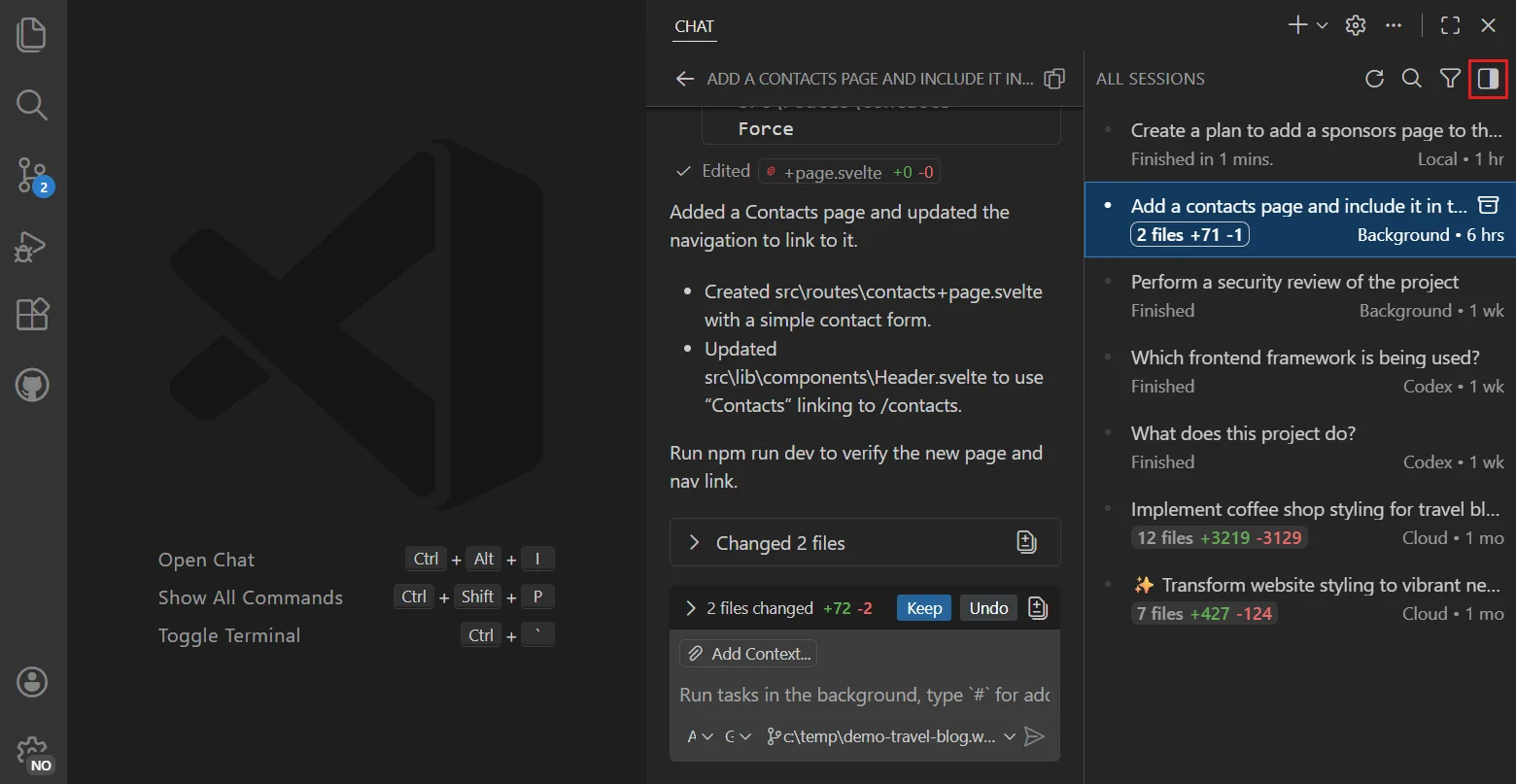 seen Oct 2026
· source
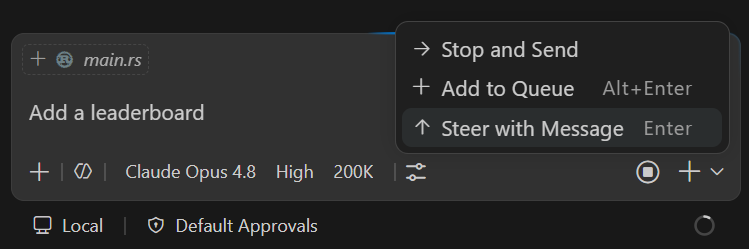 seen Oct 2026
· source
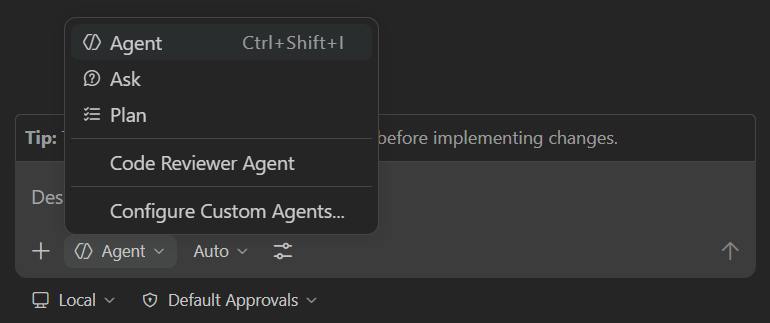 seen Oct 2026
· source
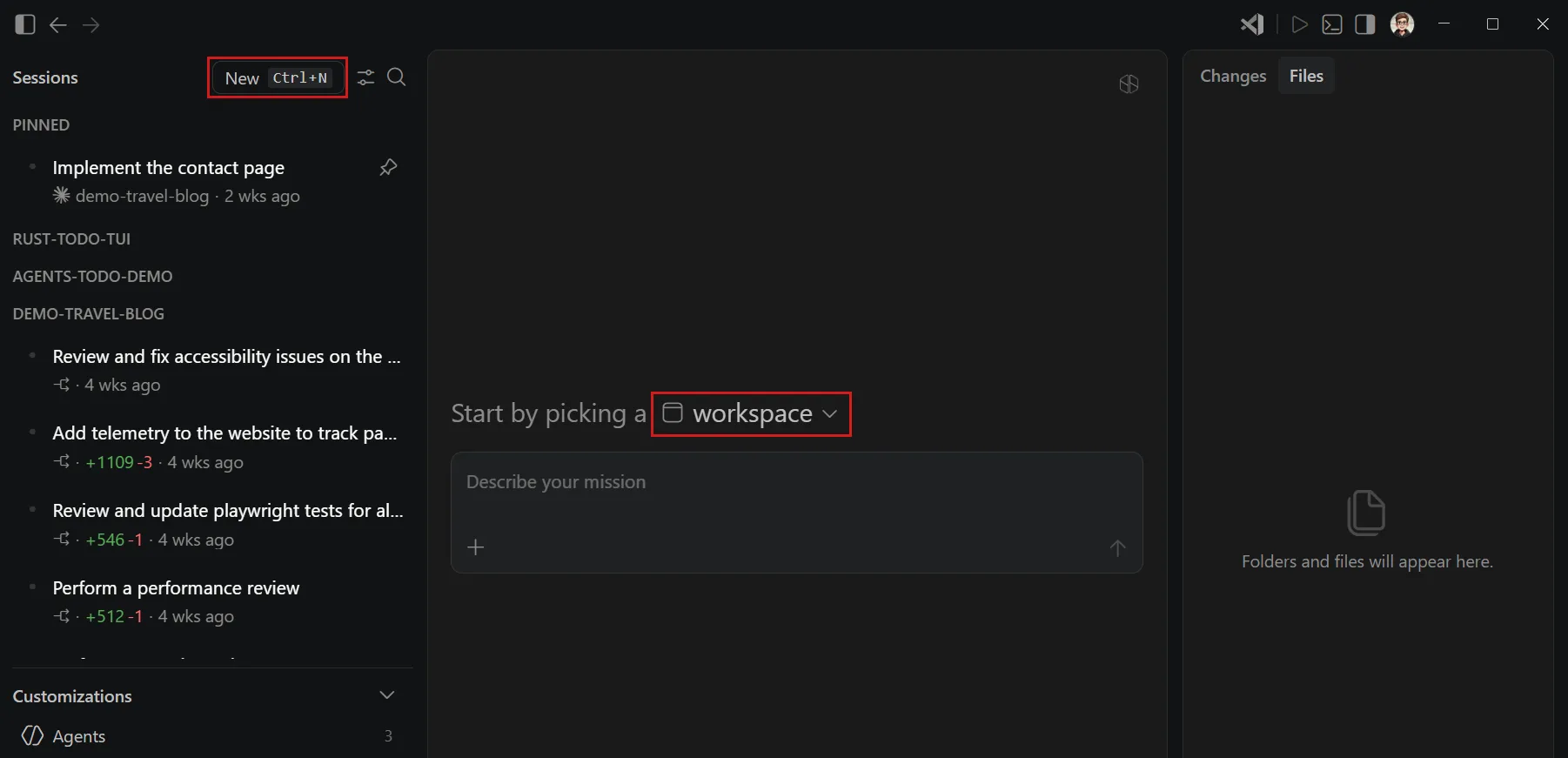 docs update · Oct 2026
· source
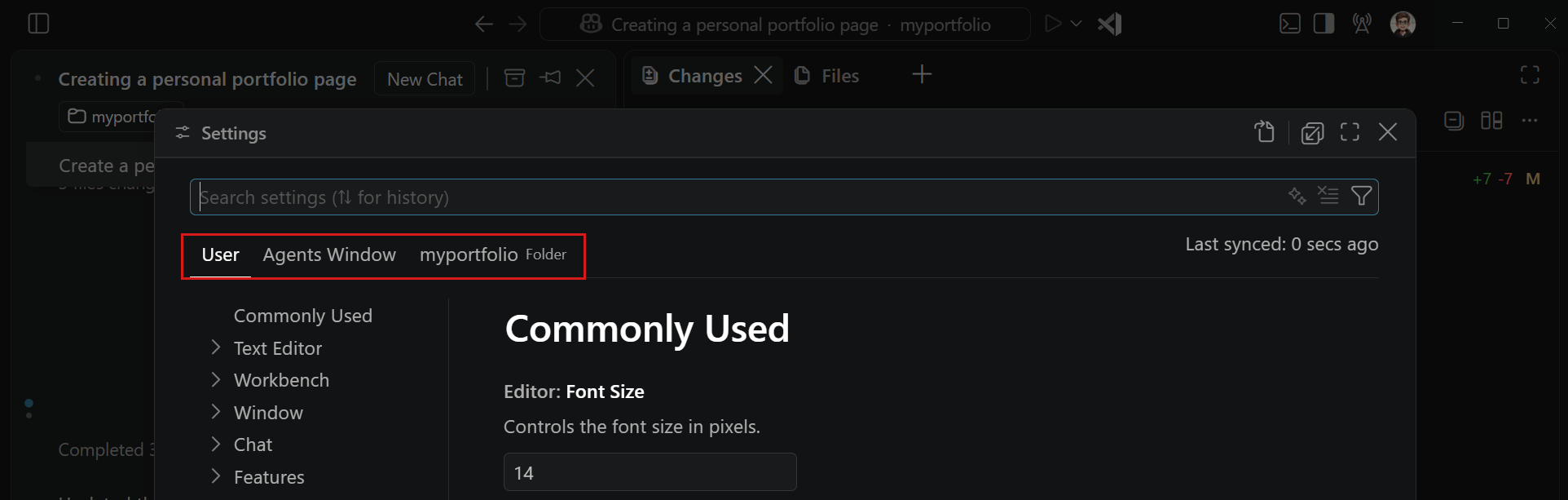 seen Oct 2026
· source
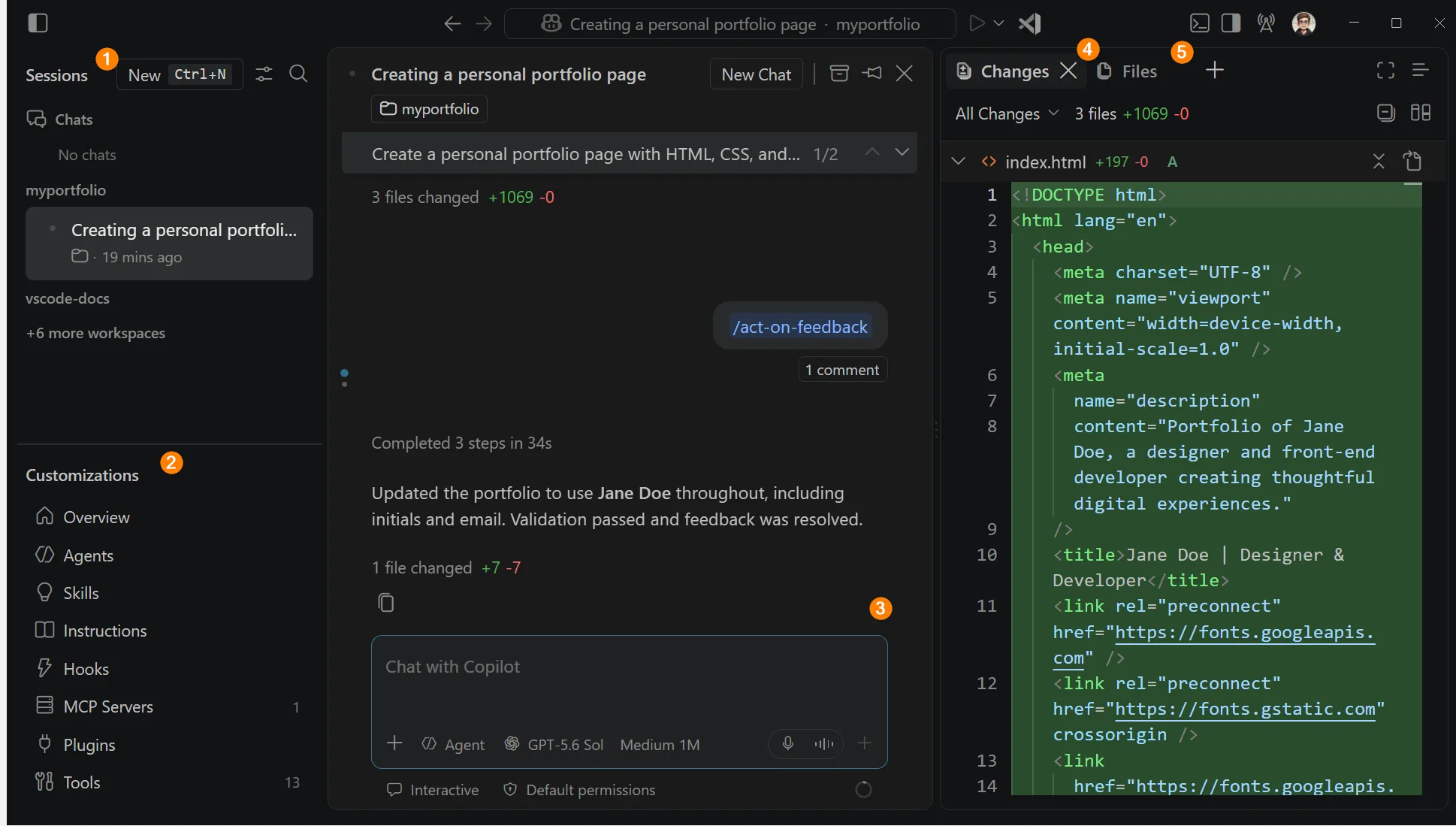 docs update · Oct 2026
· source
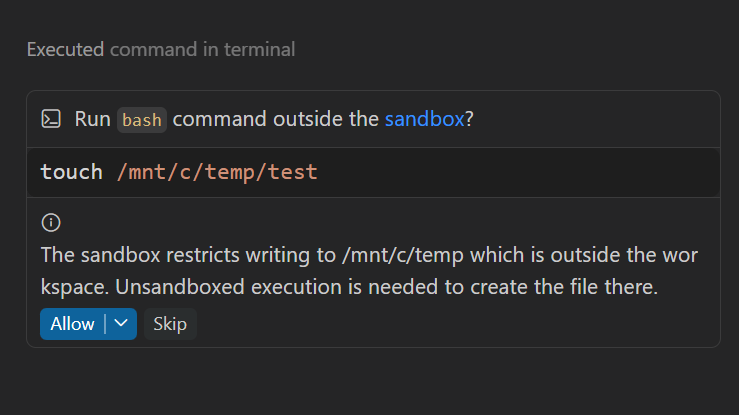 seen Oct 2026
· source
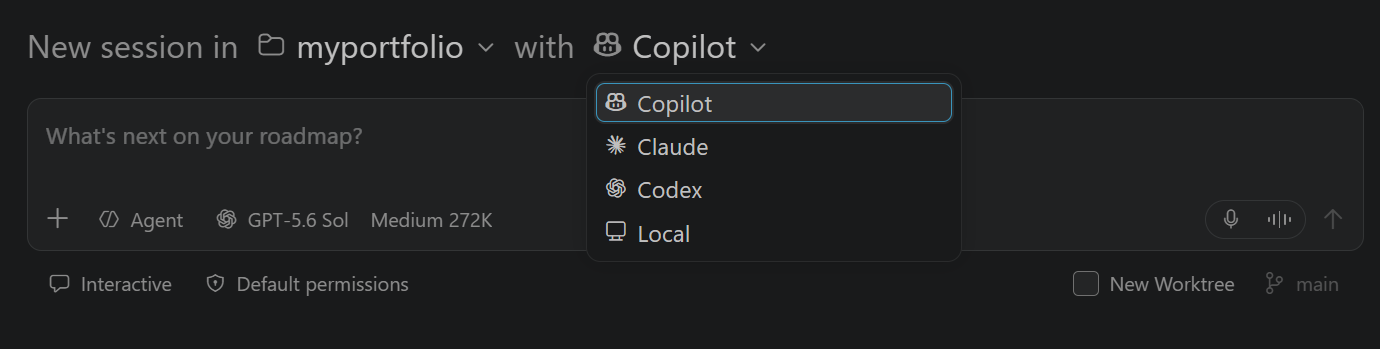 docs update · Sep 2026
· source
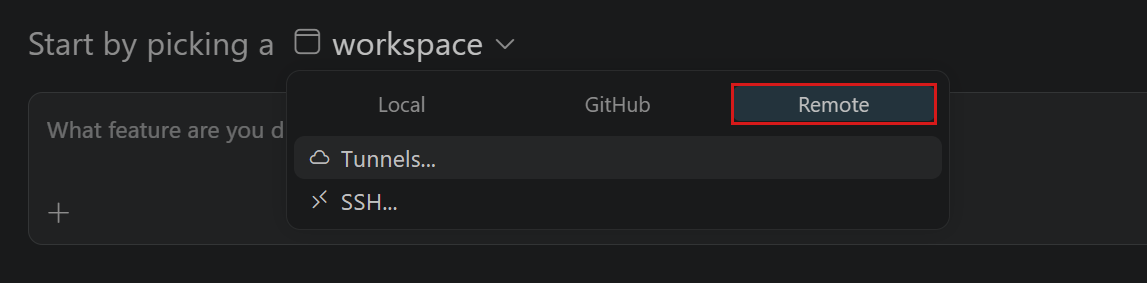 docs update · Oct 2026
· source
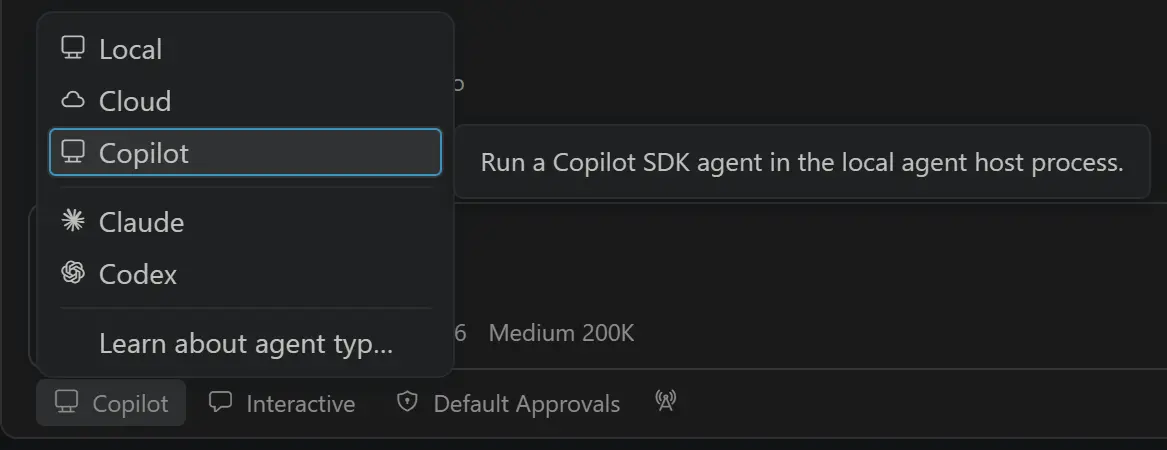 announced · Aug 2026
· source
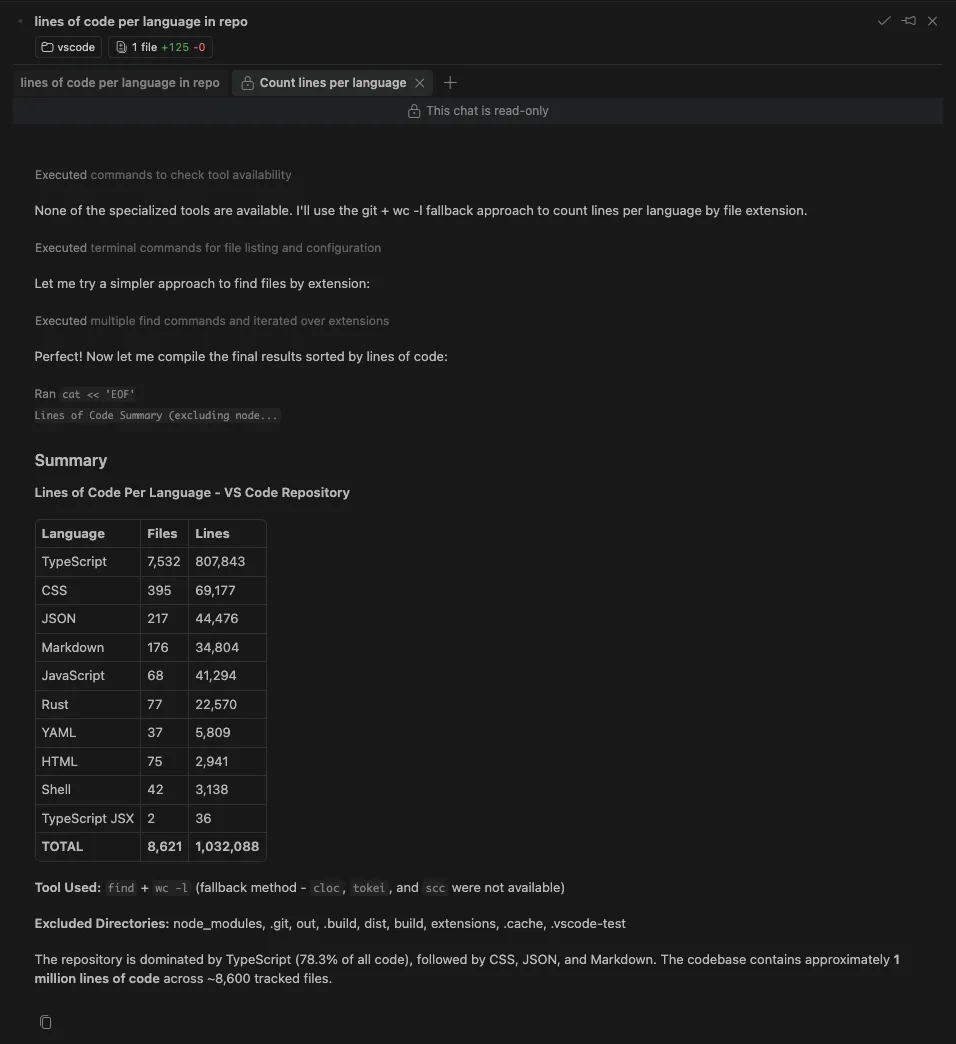 seen Oct 2026
· source
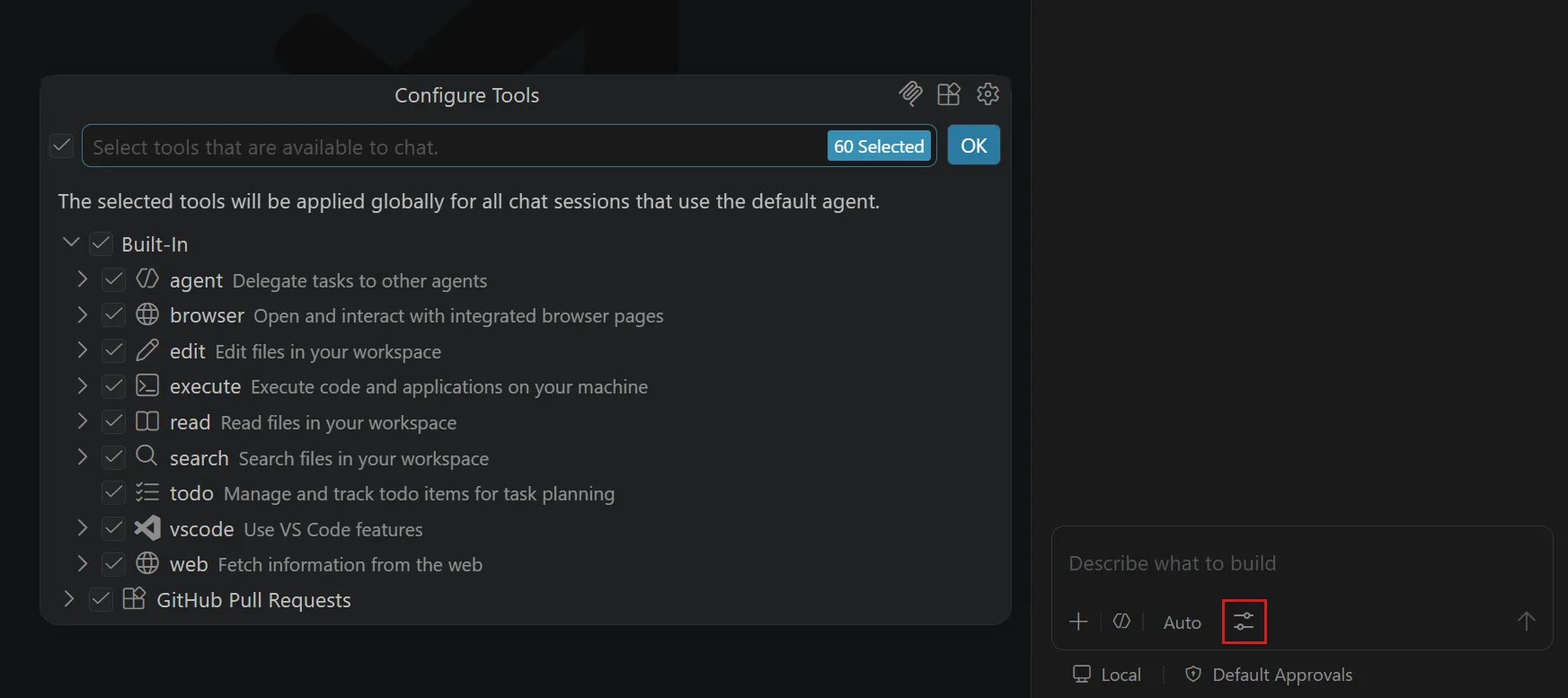 docs update · Oct 2026
· source
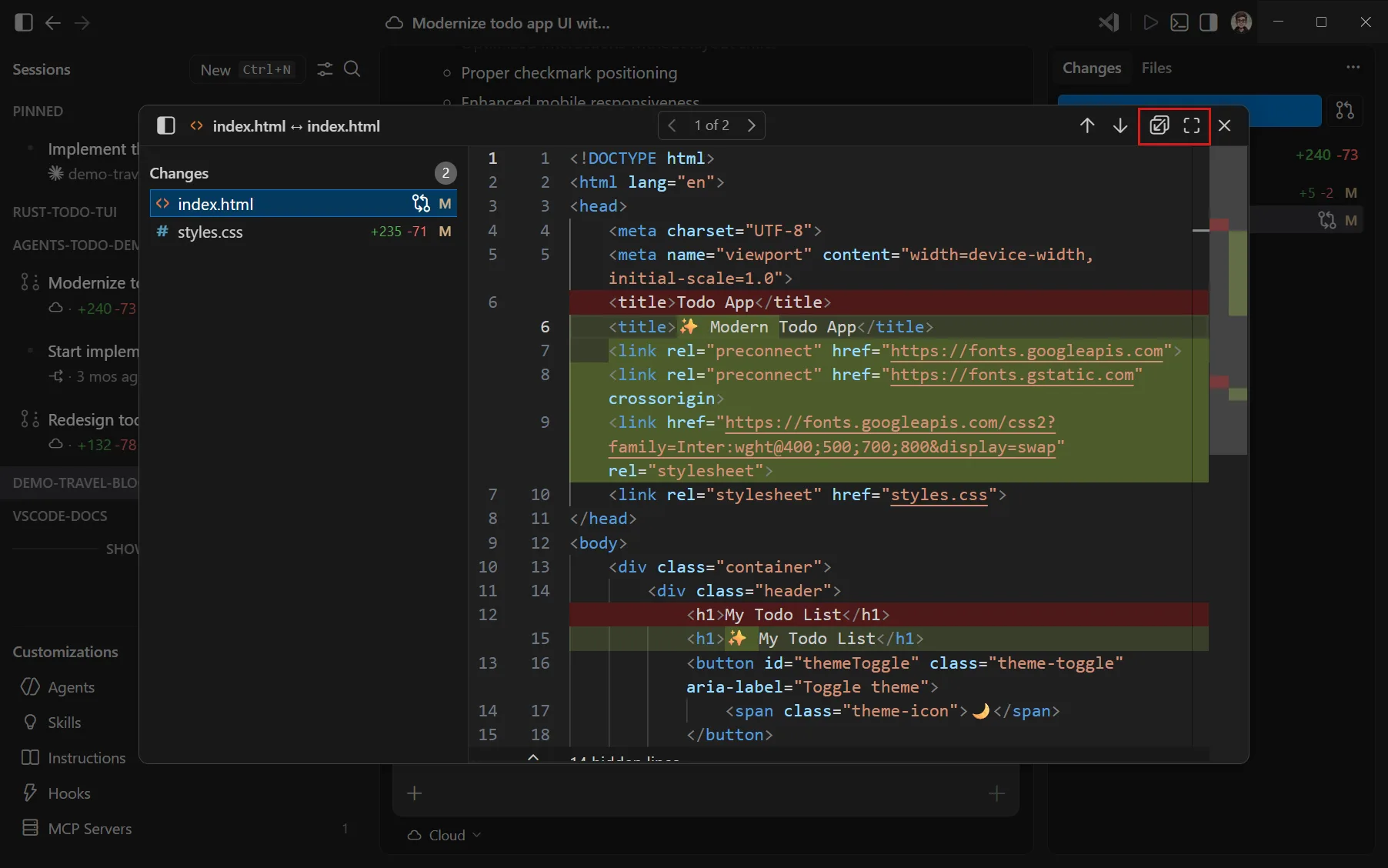 seen Oct 2026
· source
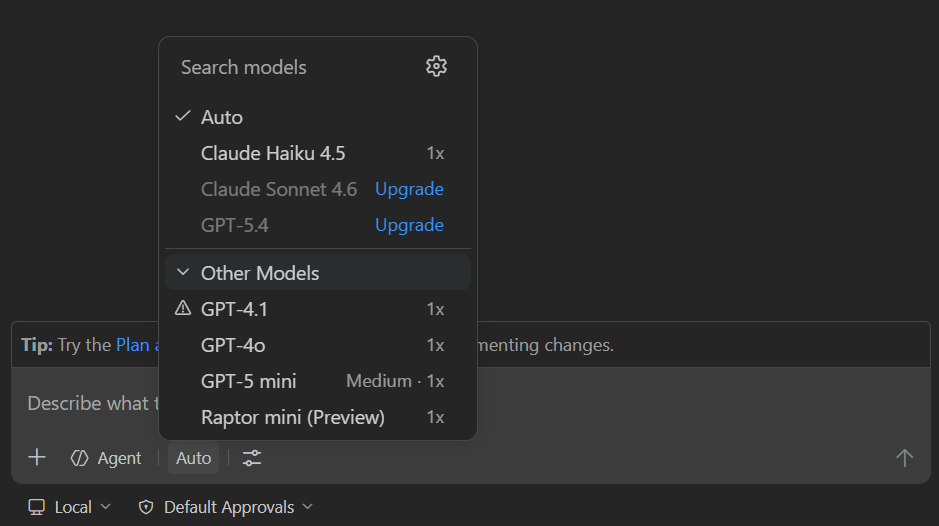 docs update · Aug 2026
· source
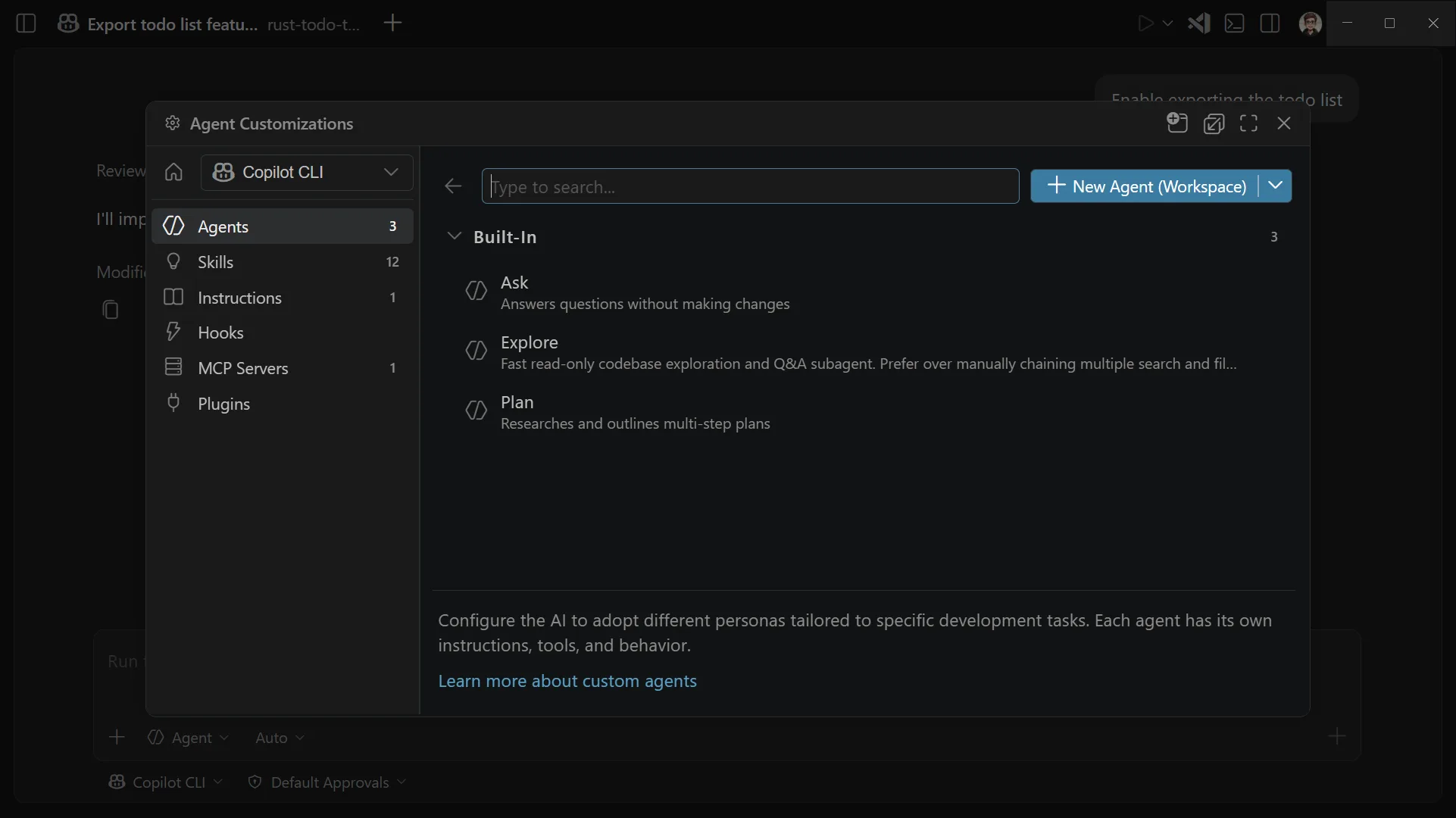 docs update · Oct 2026
· source
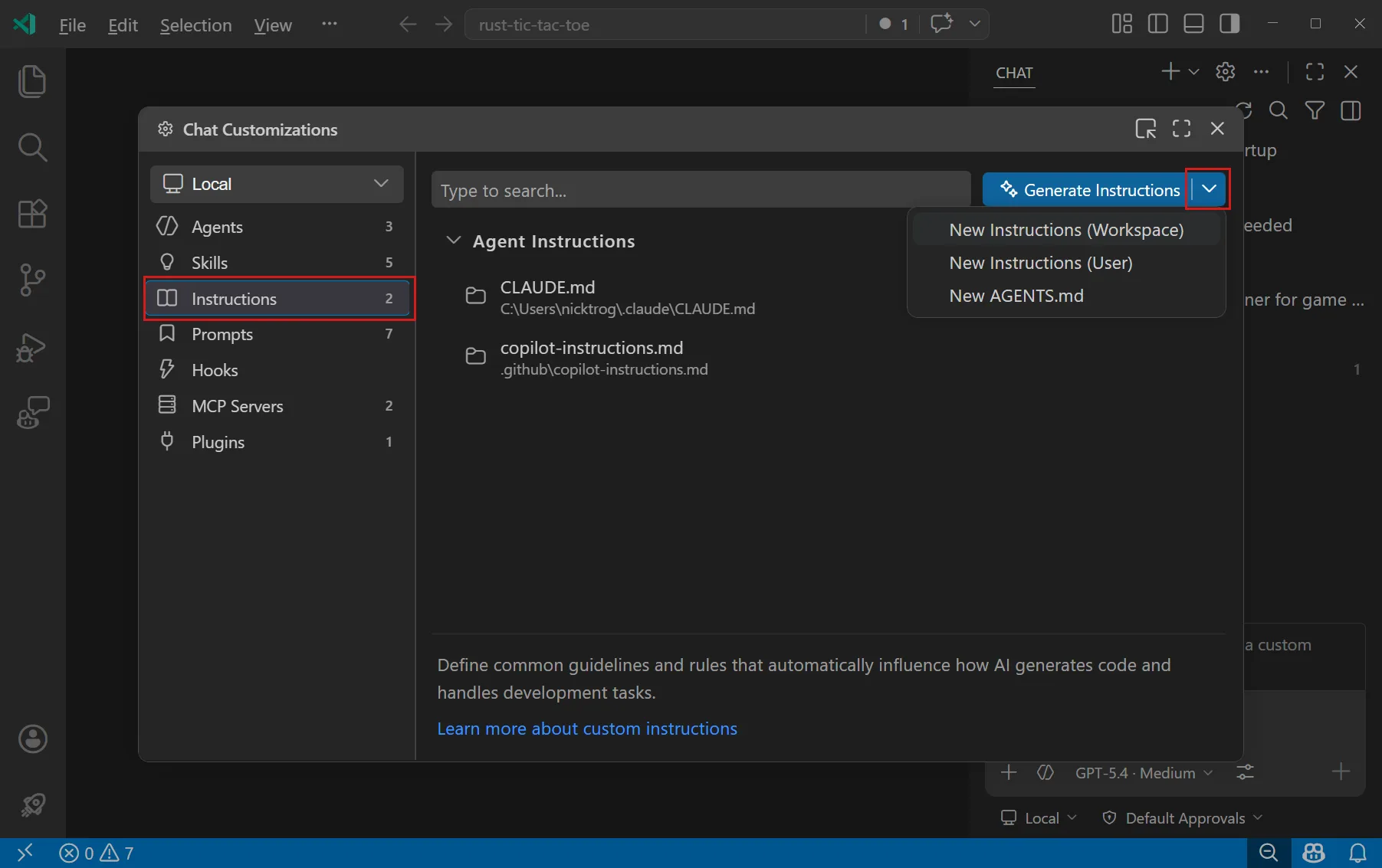 docs update · Aug 2026
· source
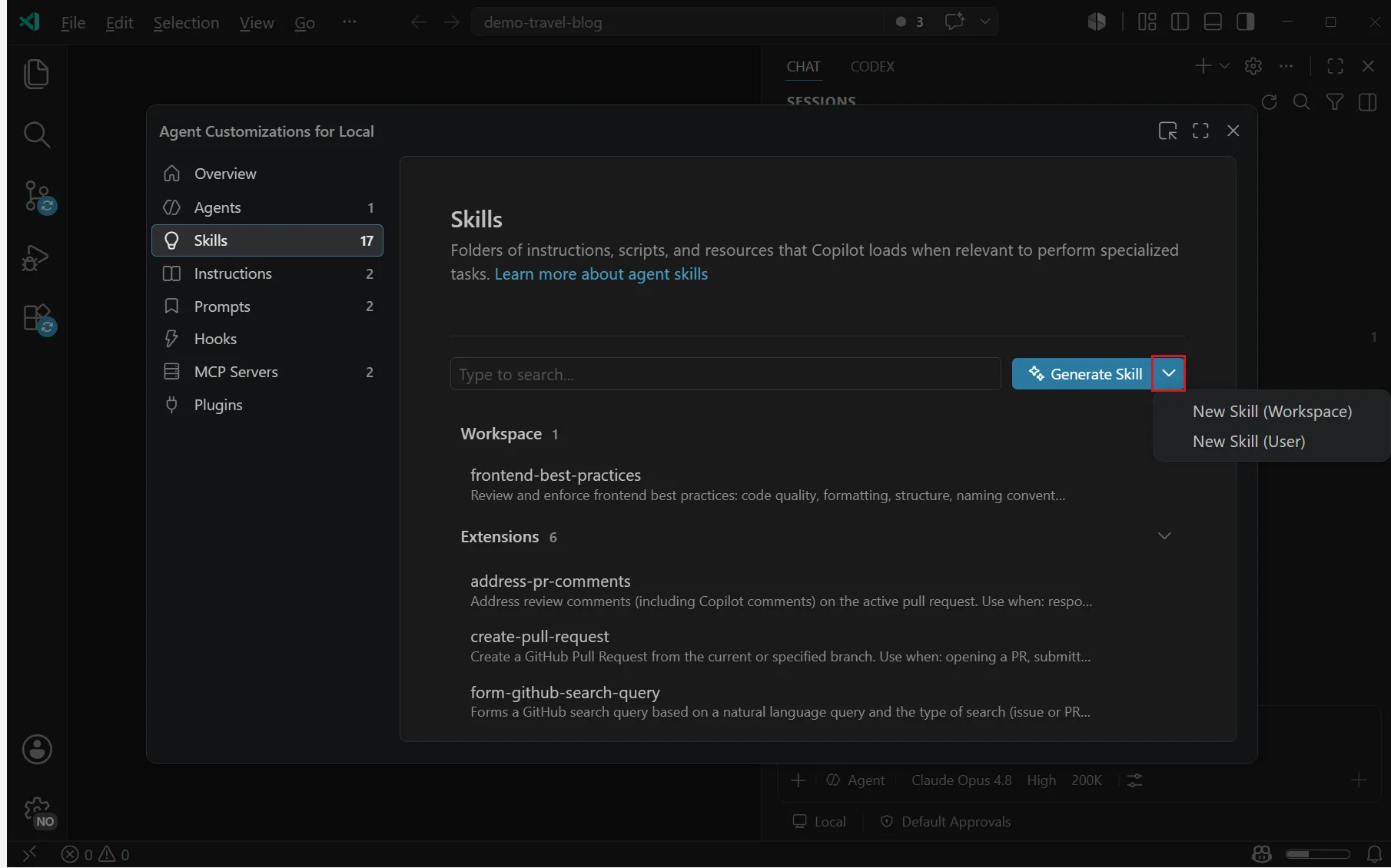 docs update · Aug 2026
· source
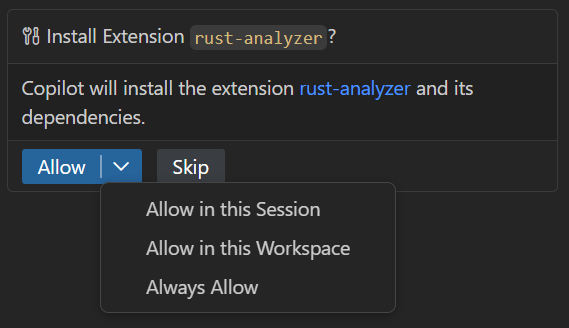 docs update · Aug 2026
· source
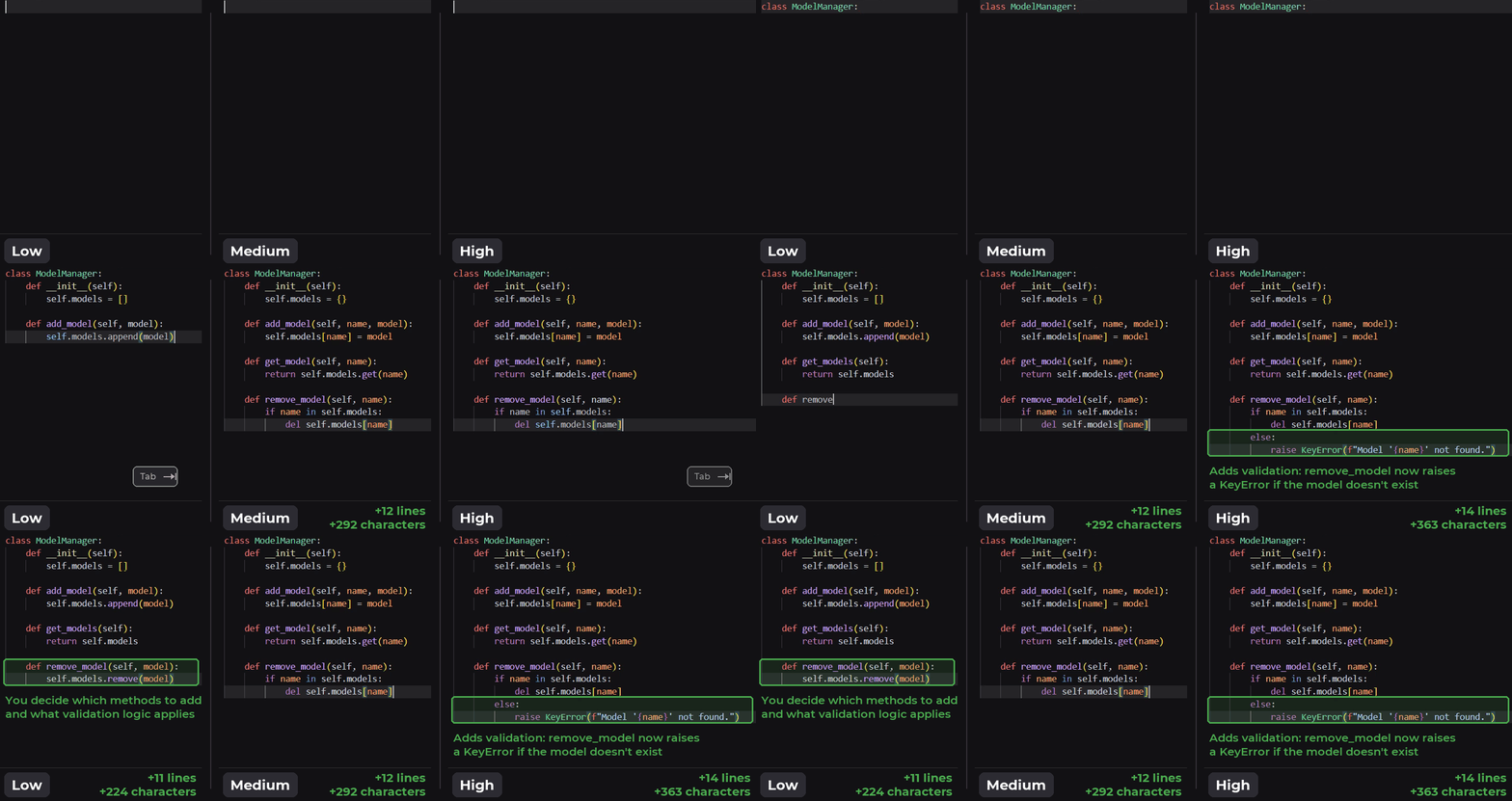 announced · Oct 2026
· source
· release history
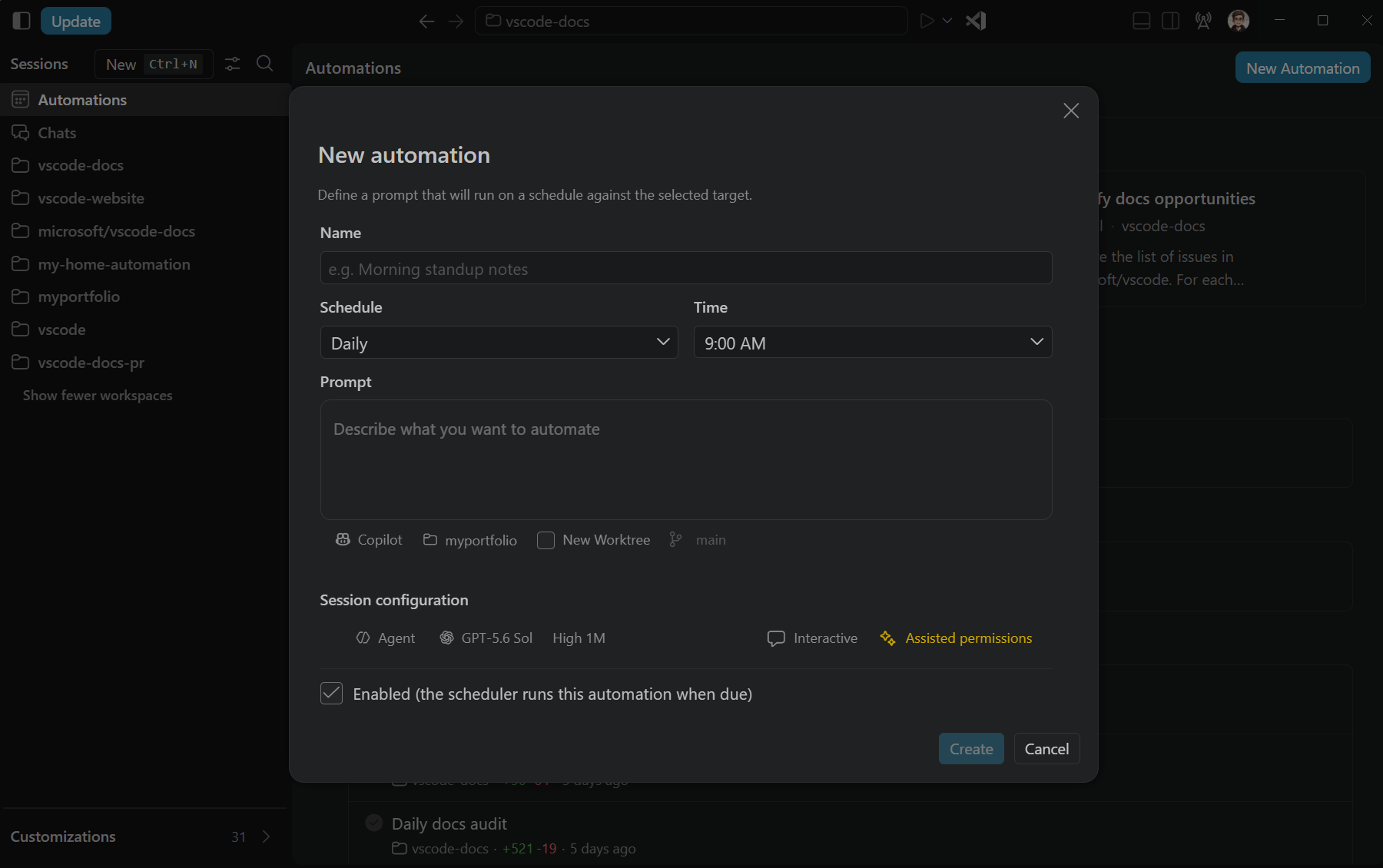 docs update · Oct 2026
· source
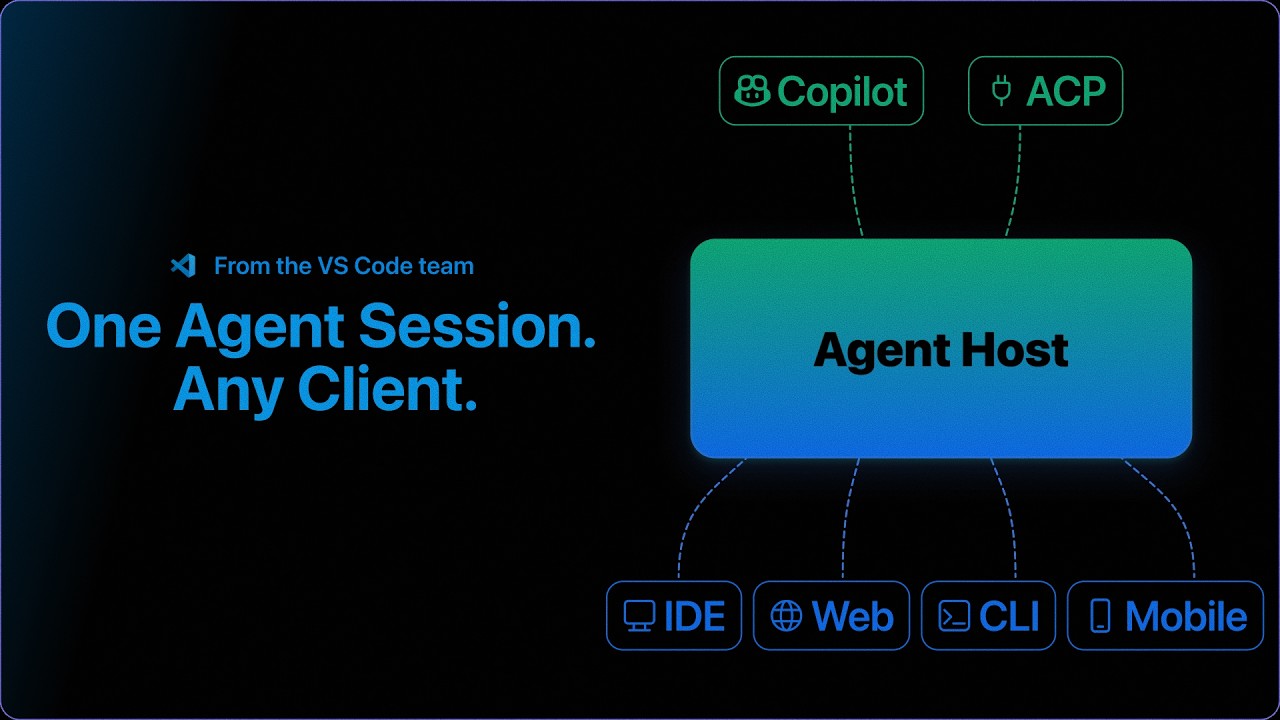 announced · seen Sep 2026
· source
· release history
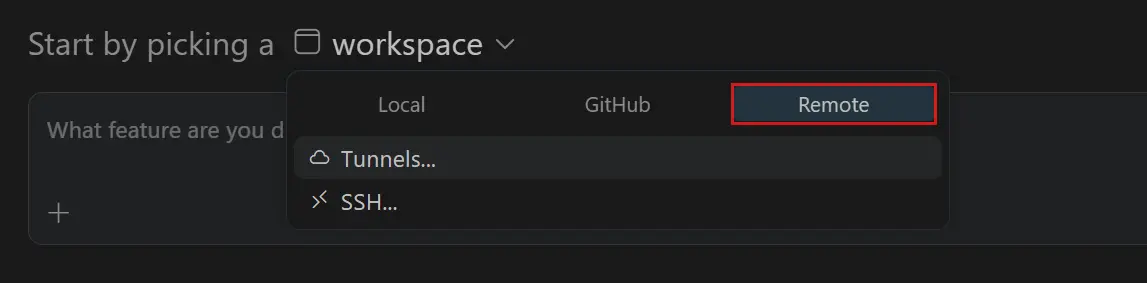 announced · Aug 2026
· source
· release history
 Choose a badge style and copy the code →