No entries match these filters. Clear filters
JumpCloud adds Access Certification Access Certification A periodic review process in which managers or system owners confirm or revoke which users should retain access to systems and data, reducing privilege creep over time.
└──▷ HOW TO FIND IT
Trigger follow-up automation — such as ticket creation or Slack notification — whenever a reviewer records a Revoke decision in a campaign.
📍 In JumpCloud Workflows, create a new workflow and set the trigger to the Access Certification event in Directory Insights, then add your follow-up action steps (e.g., call an external webhook or send a notification).
Directory Insights can emit an Access Certification event to trigger downstream automation via JumpCloud Workflows after a review concludes, and retains governance events for 90 days, so required audit evidence should be exported before that window expires.︀︄︇︀︅︉︀︅︀︀︃︀︀︅︅︀︅︊︀︄︆︀︃︄ JumpCloud adds Access Certification, a native identity governance and administration (IGA IGA Identity Governance and Administration: a framework for managing user access rights, roles, and lifecycle across systems, giving cyber tools a structured data source for detecting privilege abuse or access anomalies. Access Certification campaigns can target SSO SSO Single sign-on, using one identity provider to sign in to multiple applications. It reduces separate passwords and centralizes account and access management. Non-admin reviewers complete assignments in the JumpCloud User Portal, recording Keep or Revoke decisions individually or in bulk, with optional reassignment. Export tamper-evident PDF reports documenting access review decisions, attestations, and administrator sign-off to support SOC 2 SOC 2 An auditing framework from the American Institute of CPAs that certifies a service organization's controls around security, availability, and data handling, giving buyers assurance that a vendor meets baseline trust criteria. ISO ISO A widely adopted international standards body that publishes technical specifications; cyber tools cite ISO standards to signal compliance with recognized benchmarks for quality, security, or interoperability.
+1 more
show less
The JumpCloud Admin Queue consolidates pending review and remediation tasks assigned to an administrator.
6 details in Everything
Release Notes 2026 (2026-11-02)
Nov 2, 2026
·
issue 128
JumpCloud: Ingest identity events into external SIEMs SIEMs Security Information and Event Management platforms that collect, normalize, and correlate log data across an infrastructure so cyber tools can detect threats and trigger alerts from a central point. OCSF OCSF An open schema standard, maintained by the OCSF community under CISA and industry backing, that defines a common event format so cyber tools can share and ingest log data without per-source normalization work.
└──▷ HOW TO FIND IT
Retrieve a device's maintenance token to authorize agent uninstall on a specific managed device during maintenance.
📍 In the Admin Portal, go to Device Management › Devices, select the device, open device details, and under Settings › Agent Uninstall Protection, click View Maintenance Token.
Enable REST APIs REST APIs A convention for building HTTP-based interfaces where resources are addressed by URL and manipulated with standard verbs like GET, POST, and DELETE, giving cyber tools a predictable way to integrate with external services. Block unauthorized JumpCloud agent removal with Agent Uninstall Protection, on by default for agent v2.179.2 or later, requiring a per-device maintenance token on macOS, Windows, and Linux; manage exemptions using the Disable Agent Uninstall Protection policy and view protection status (On , Off , or Failed ) from the device details or Devices list. Create login dialogs and announcement banners for users in the User Portal, targeted by user group, with configurable severity and message type, via the new Custom Messaging feature under Settings > User Portal > Custom Messaging. Block specific words, terms, and phrases from user passwords with a new Custom Banned Password List in Password Policies. Adds two new Windows user-level policies: the User Level Custom Windows MDM MDM Mobile device management, centrally configuring and managing enrolled devices. Administrators use it to apply settings, distribute applications and enforce device security policies. OMA-URI) Policy for configuring custom MDM settings on a user's profile, assignable to users or user groups on MDM-enrolled devices, and the User Level Windows Custom Registry Keys Policy for managing specific Windows registry values for an assigned user's profile under HKEY_CURRENT_USER at sign-in, requiring no MDM enrollment or device restart.
+2 more
show less
Let users create personal folders to organize assigned applications on the All Applications page in the User Portal, accessible at All Applications > Folders. Improves JumpCloud Go by automatically registering managed Windows, macOS, and Linux devices after user sign-in, with admin control over device eligibility via device exclusion groups, and by enabling browser discovery deployment for AI and SaaS Management SaaS Management A category of software that tracks, governs, and optimises an organisation's portfolio of SaaS subscriptions, covering spend, access, and licence utilisation from a single control plane.
Enable REST APIs REST APIs A convention for building HTTP-based interfaces where resources are addressed by URL and manipulated with standard verbs like GET, POST, and DELETE, giving cyber tools a predictable way to integrate with external services. Block unauthorized JumpCloud agent removal with Agent Uninstall Protection, on by default for agent v2.179.2 or later, requiring a per-device maintenance token on macOS, Windows, and Linux; manage exemptions using the Disable Agent Uninstall Protection policy and view protection status (On , Off , or Failed ) from the device details or Devices list. Create login dialogs and announcement banners for users in the User Portal, targeted by user group, with configurable severity and message type, via the new Custom Messaging feature under Settings > User Portal > Custom Messaging. Block specific words, terms, and phrases from user passwords with a new Custom Banned Password List in Password Policies. Adds two new Windows user-level policies: the User Level Custom Windows MDM MDM Mobile device management, centrally configuring and managing enrolled devices. Administrators use it to apply settings, distribute applications and enforce device security policies. OMA-URI) Policy for configuring custom MDM settings on a user's profile, assignable to users or user groups on MDM-enrolled devices, and the User Level Windows Custom Registry Keys Policy for managing specific Windows registry values for an assigned user's profile under HKEY_CURRENT_USER at sign-in, requiring no MDM enrollment or device restart.
+1 more
show less
Let users create personal folders to organize assigned applications on the All Applications page in the User Portal, accessible at All Applications > Folders.
1 more in Everything
Release Notes 2026 (2026-10-30)
Oct 30, 2026
·
issue 126
JumpCloud adds SIEM SIEM Security information and event management, collecting logs from many systems and correlating events to find suspicious activity. Analysts use it to investigate alerts and incidents. OCSF OCSF An open schema standard, maintained by the OCSF community under CISA and industry backing, that defines a common event format so cyber tools can share and ingest log data without per-source normalization work. MCP MCP Model Context Protocol, a standard for connecting AI applications to external tools and data sources. A compatible server exposes capabilities an assistant can use through a common interface.
└──▷ HOW TO FIND IT
Retrieve a device maintenance token to authorize agent uninstallation on a device where Agent Uninstall Protection is enabled.
📍 In the Admin Portal, go to Device Management › Devices, select the device, open device details, and locate the maintenance token under Agent Uninstall Protection.
Create, modify, duplicate, and troubleshoot JumpCloud Workflows from any MCP-enabled AI client using natural language, including triggering workflows and reviewing per-node outcomes, through the existing JumpCloud MCP Server MCP Server A process that exposes tools, resources, and prompts over Anthropic's Model Context Protocol, letting an AI agent call external APIs or local services through a standardised interface. Workflow connectors now support OAuth 2.0 OAuth 2.0 An open authorization framework (IETF RFC 6749) that lets a service grant limited API access to a third party without sharing credentials, giving cyber tools a standard way to authenticate against external platforms. PKCE PKCE Proof Key for Code Exchange, an OAuth safeguard that binds an authorization code to the client that requested it. An intercepted code cannot be redeemed without the client's matching verifier. access tokens access tokens A credential that authorizes a client to use a service or API. It usually has limited permissions and a lifetime; anyone holding it may be able to use those permissions. Use new Workflow templates for automation scenarios including auto-suspending inactive users, blocking newly discovered generative AI apps, revoking Mac admin privileges on enrollment, detecting sensitive software installs, and managing pre-hire user groups. Control App Catalog update notifications by selecting Disable end user update notifications when adding or editing an application, and allow users to start Required app updates from the Self Service App Catalog.
4 more in Everything
JumpCloud adds SIEM SIEM Security information and event management, collecting logs from many systems and correlating events to find suspicious activity. Analysts use it to investigate alerts and incidents. MDM MDM Mobile device management, centrally configuring and managing enrolled devices. Administrators use it to apply settings, distribute applications and enforce device security policies.
└──▷ HOW TO FIND IT
Pull JumpCloud identity events continuously into a SIEM collector in OCSF OCSF An open schema standard, maintained by the OCSF community under CISA and industry backing, that defines a common event format so cyber tools can share and ingest log data without per-source normalization work.
📍 In Directory Insights, go to SIEM Integration and configure a continuous Events API Pull using your existing API key, selecting OCSF as the format.
Ingest JumpCloud identity events into a SIEM collector using an existing API key, with continuous pull supporting RAW and OCSF-normalized formats.︀︄︇︀︅︉︀︅︀︀︃︀︀︅︅︀︅︊︀︄︆︀︃︄ Export event data as JSON or CSV files in RAW or OCSF schemas, with email notification on completion. Access a public event catalog covering field definitions, JumpCloud-to-OCSF mappings, and sample payloads. Device Lock MDM command for macOS now automatically generates and escrows the lock PIN, retrievable from Admin Portal under Highlights > Device Lock > View PIN. Show a message and phone number on the Lock Screen for Mac, iPhone, and iPad via Device Lock MDM command.
+1 more
show less
Track whether a Mac is locked or unlocked from the Devices list using the new macOS Lock Status column.
Ingest JumpCloud identity events into a SIEM collector using an existing API key, with continuous pull supporting RAW and OCSF-normalized formats.︀︄︇︀︅︉︀︅︀︀︃︀︀︅︅︀︅︊︀︄︆︀︃︄ Export event data as JSON or CSV files in RAW or OCSF schemas, with email notification on completion. Access a public event catalog covering field definitions, JumpCloud-to-OCSF mappings, and sample payloads.
3 more in Everything
JumpCloud adds a Scrut Automation integration to turn live access and device controls into continuous audit evidence across 70+ compliance frameworks︀︄︇︀︅︉︀︅︀︀︃︀︀︅︅︀︅︊︀︄︆︀︃︄
JumpCloud now integrates with Scrut Automation so that active identity and device settings are automatically collected and mapped to compliance framework requirements, removing the need for manual screenshot-gathering during audits.︀︄︇︀︅︉︀︅︀︀︃︀︀︅︅︀︅︊︀︄︆︀︃︄ Device compliance monitoring for Windows, Mac, and Linux endpoints managed in JumpCloud is now automated through the Scrut integration. JumpCloud's AI agent tracking — ownership and access controls for AI agents — now feeds into Scrut to produce auditor-ready evidence that agents follow required safety rules. The integration covers 70+ compliance frameworks, giving lean IT teams continuous proof that security controls are working without rebuilding evidence for each review.
4 details in Everything
Release Notes 2026 (2026-10-28)
Oct 28, 2026
·
issue 124
JumpCloud adds SIEM SIEM Security information and event management, collecting logs from many systems and correlating events to find suspicious activity. Analysts use it to investigate alerts and incidents. MCP Server MCP Server A process that exposes tools, resources, and prompts over Anthropic's Model Context Protocol, letting an AI agent call external APIs or local services through a standardised interface.
└──▷ HOW TO FIND IT
Exempt a device from Agent Uninstall Protection during imaging or maintenance without requiring a maintenance token.
📍 Go to Device Management › Devices › Settings › Agent Uninstall Protection, then assign the Disable Agent Uninstall Protection policy to the target device or device group.
Enable the MCP Server for Users so staff can perform User Portal tasks from their AI clients without switching tools.
📍 Go to Settings › JumpCloud AI and toggle on MCP Server for Users . Users can then view and revoke their own active sessions at Security › JumpCloud MCP in the User Portal.
Enable a SIEM integration in Directory Insights to continuously pull JumpCloud identity events into external SIEM platforms using an existing API key, with support for RAW and OCSF OCSF An open schema standard, maintained by the OCSF community under CISA and industry backing, that defines a common event format so cyber tools can share and ingest log data without per-source normalization work. Protect against unauthorized agent removal with Agent Uninstall Protection, on by default for devices running JumpCloud agent v2.179.2 or later, requiring a per-device maintenance token to uninstall on macOS, Windows, and Linux; manage it at Device Management > Devices > Settings > Agent Uninstall Protection and use the Disable Agent Uninstall Protection policy to exempt specific devices. Automate AI Agent identity management via new REST APIs REST APIs A convention for building HTTP-based interfaces where resources are addressed by URL and manipulated with standard verbs like GET, POST, and DELETE, giving cyber tools a predictable way to integrate with external services. Create login dialogs and announcement banners for User Portal users with Custom Messaging, scoped by user group and severity; available at Settings > User Portal > Custom Messaging. Block specific words, terms, and phrases from user passwords with a Custom Banned Password List in Password Policies.
+5 more
show less
Connect AI clients directly to User Portal capabilities via the new JumpCloud MCP Server for Users, using OAuth sessions; enable it at Settings > JumpCloud AI and allow users to manage their own sessions at Security > JumpCloud MCP in the User Portal. Tailor risk detection for Admin Portal, User Portal, device, and SSO SSO Single sign-on, using one identity provider to sign in to multiple applications. It reduces separate passwords and centralizes account and access management. Let end users organize assigned applications into personal folders on the User Portal's All Applications > Folders tab. Give end users visibility into their assigned assets in the User Portal and let admins request acknowledgement on assignment or reassignment; enable at Device Management > Asset Management > Settings and Fields > General Settings. Apply App Settings Privacy policies for Apple MDM MDM Mobile device management, centrally configuring and managing enrolled devices. Administrators use it to apply settings, distribute applications and enforce device security policies.
10 details in Everything
JumpCloud adds AI agent identity governance, automated compliance reporting, and privileged access management privileged access management Brokering administrator sessions through a gateway instead of handing out standing credentials. Access is granted for one session, to one target, and recorded.
Agentic IAM IAM Identity and Access Management — a framework of policies and services for controlling who can authenticate to systems and what resources they are authorized to use, letting cyber tools enforce least-privilege and audit access. non-human identities non-human identities A non-human identity, an account or credential used by software or a device rather than a person. Service accounts, workload identities and automation tokens need their own permissions and lifecycle controls. Continuous audit trails now link every human and non-human action to a verified identity to support SOC 2 SOC 2 An auditing framework from the American Institute of CPAs that certifies a service organization's controls around security, availability, and data handling, giving buyers assurance that a vendor meets baseline trust criteria. ISO ISO A widely adopted international standards body that publishes technical specifications; cyber tools cite ISO standards to signal compliance with recognized benchmarks for quality, security, or interoperability. HIPAA HIPAA A US federal law enacted in 1996 that sets privacy and security requirements for protected health information, giving cyber tools a compliance baseline to enforce or audit against. NIS2 NIS2 EU directive that expands mandatory cybersecurity requirements to more sectors and member states than its predecessor, giving cyber tools a compliance framework to map controls and reporting obligations against. Risk detection flags risky sign-ins, non-human behavior, and unapproved access changes in real time. Device trust now blocks unmanaged or unhealthy devices from accessing company data using Conditional Access Conditional Access A policy enforcement framework, most commonly Microsoft's in Entra ID, that grants or blocks resource access based on signals like user identity, device state, and location — letting cyber tools trigger step-up auth or deny risky sessions. Workflows automation now automates lifecycle processes, offboarding, and policy remediation across all identities and devices.
+1 more
show less
Privileged access management (PAM PAM Brokering administrator sessions through a gateway instead of handing out standing credentials. Access is granted for one session, to one target, and recorded.
Agentic IAM IAM Identity and Access Management — a framework of policies and services for controlling who can authenticate to systems and what resources they are authorized to use, letting cyber tools enforce least-privilege and audit access. non-human identities non-human identities A non-human identity, an account or credential used by software or a device rather than a person. Service accounts, workload identities and automation tokens need their own permissions and lifecycle controls. Continuous audit trails now link every human and non-human action to a verified identity to support SOC 2 SOC 2 An auditing framework from the American Institute of CPAs that certifies a service organization's controls around security, availability, and data handling, giving buyers assurance that a vendor meets baseline trust criteria. ISO ISO A widely adopted international standards body that publishes technical specifications; cyber tools cite ISO standards to signal compliance with recognized benchmarks for quality, security, or interoperability. HIPAA HIPAA A US federal law enacted in 1996 that sets privacy and security requirements for protected health information, giving cyber tools a compliance baseline to enforce or audit against. NIS2 NIS2 EU directive that expands mandatory cybersecurity requirements to more sectors and member states than its predecessor, giving cyber tools a compliance framework to map controls and reporting obligations against. Risk detection flags risky sign-ins, non-human behavior, and unapproved access changes in real time. Privileged access management (PAM PAM Brokering administrator sessions through a gateway instead of handing out standing credentials. Access is granted for one session, to one target, and recorded.
2 more in Everything
Release Notes 2026 (2026-10-26)
Oct 26, 2026
·
issue 121
JumpCloud adds SIEM SIEM Security information and event management, collecting logs from many systems and correlating events to find suspicious activity. Analysts use it to investigate alerts and incidents. OCSF OCSF An open schema standard, maintained by the OCSF community under CISA and industry backing, that defines a common event format so cyber tools can share and ingest log data without per-source normalization work. MCP Server MCP Server A process that exposes tools, resources, and prompts over Anthropic's Model Context Protocol, letting an AI agent call external APIs or local services through a standardised interface.
└──▷ HOW TO FIND IT
Enable the JumpCloud MCP Server for Users so staff can perform User Portal tasks from their AI clients without leaving their tooling.
📍 In the Admin Portal, go to Settings › JumpCloud AI and toggle on MCP Server for Users. Optionally configure an automatic session expiration window. Users can then view and revoke their own sessions at Security › JumpCloud MCP in the User Portal.
Exempt a specific device from Agent Uninstall Protection during imaging without disrupting protection on the rest of the fleet.
📍 In the Admin Portal, go to Device Management › Devices › Settings › Agent Uninstall Protection and assign the Disable Agent Uninstall Protection policy for macOS, Windows, or Linux to the target device or device group.
Adds SIEM Integration in Directory Insights supporting continuous API pull ingestion using an existing API key in RAW or OCSF-normalized formats, plus asynchronous historical export jobs for up to 7-day windows across a 13-month retention lookback delivered as JSON or CSV files with email notification.︀︄︇︀︅︉︀︅︀︀︃︀︀︅︅︀︅︊︀︄︆︀︃︄ Adds Agent Uninstall Protection, enabled by default for all devices running JumpCloud agent v2.179.2 or later on macOS, Windows, and Linux, requiring a per-device maintenance token to uninstall (tokens rotate 60 minutes after being viewed, with Directory Insights logging failed uninstall attempts, successful uninstalls, and exemption policy changes), plus a Disable Agent Uninstall Protection policy to exempt specific devices during maintenance, troubleshooting, or imaging. Adds REST APIs REST APIs A convention for building HTTP-based interfaces where resources are addressed by URL and manipulated with standard verbs like GET, POST, and DELETE, giving cyber tools a predictable way to integrate with external services. Agents API and Agent Groups API — enabling programmatic registration, credential management, group membership, and application assignment. Adds Custom Messaging feature in User Portal (Settings > User Portal > Custom Messaging) to create login dialogs and announcement banners scoped by user group with configurable severity/message type. Adds JumpCloud MCP Server for Users, enabling OAuth-based connections from AI clients to User Portal capabilities; admins enable it at Settings > JumpCloud AI and can configure automatic session expiration or revoke sessions manually.
+5 more
show less
Adds Custom Risk Policies (Access Risk ) to tailor risk detection for Admin Portal, User Portal, device, and SSO SSO Single sign-on, using one identity provider to sign in to multiple applications. It reduces separate passwords and centralizes account and access management. Adds Custom Banned Password List to Password Policies, allowing admins to block specific words, terms, and phrases from user passwords. Adds User Portal Folders so end users can organize assigned applications into private personal folders on the All Applications page. Adds User Portal Asset Visibility and Acknowledgement under Device Management > Asset Management > Settings and Fields > General Settings, giving users visibility into assigned assets and letting admins request acknowledgement recorded in Asset History. Adds App Settings Privacy policies for Apple MDM MDM Mobile device management, centrally configuring and managing enrolled devices. Administrators use it to apply settings, distribute applications and enforce device security policies. User Level macOS App Settings Privacy (macOS 27+, supervised Macs, supports Accessibility, Bluetooth, Camera, Dictation, Local network, Location, Microphone) and Device Level iOS and iPadOS App Settings Privacy (iOS/iPadOS 27+, supports Bluetooth, Camera, Dictation, Local Network, Location, Location Accuracy, Microphone).
10 details in Everything
JumpCloud launches an End User MCP Server MCP Server A process that exposes tools, resources, and prompts over Anthropic's Model Context Protocol, letting an AI agent call external APIs or local services through a standardised interface.
└──▷ HOW TO FIND IT
Enable the End User MCP Server for your org so employees can start connecting AI clients to their User Portal accounts.
📍 In the Admin Portal, go to Settings › JumpCloud AI and enable the End User MCP Server. Set the session duration to control how long connections remain active before automatic revocation.
Audit and revoke suspicious or stale end-user AI client connections across the organization.
📍 In the Admin Portal, go to Settings › JumpCloud AI. Review the list of active user sessions (client name, client ID, redirect URI, employee, last-used date, expiry). Select one or more sessions and choose Revoke to terminate them immediately.
Let an employee disconnect an AI client they no longer use without involving IT.
📍 In the User Portal, go to Security › JumpCloud MCP. Locate the session for the client to disconnect and select Revoke.
Adds the JumpCloud End User MCP Server, enabling employees to perform User Portal self-service (profile updates, SSO SSO Single sign-on, using one identity provider to sign in to multiple applications. It reduces separate passwords and centralizes account and access management. MFA MFA Multi-factor authentication, requiring proof from different categories, such as a password and a hardware key, to sign in. It reduces reliance on a password alone. Model Context Protocol Model Context Protocol Model Context Protocol, a standard for connecting AI applications to external tools and data sources. A compatible server exposes capabilities an assistant can use through a common interface. Enables the End User MCP Server org-wide from Settings > JumpCloud AI in the Admin Portal, with controls for session duration and automatic revocation. Lets IT view and bulk-revoke active End User MCP sessions — including connected client, client ID, redirect URI, employee, creation time, last-used time, and expiry — from the same Settings > JumpCloud AI area. Lets employees view and individually revoke their own active MCP sessions from Security > JumpCloud MCP in the User Portal. Supports OAuth authentication only for End User MCP connections (no API-key authentication), with each session scoped to the connecting employee's existing JumpCloud permissions.
+1 more
show less
Keeps sensitive credential actions (password reset or change, MFA enrollment/removal, SSH key management, device enrollment) explicitly outside the End User MCP Server scope, available only through the User Portal.
6 details in Everything
JumpCloud adds Agent Uninstall Protection with maintenance tokens, third-party MDM MDM Mobile device management, centrally configuring and managing enrolled devices. Administrators use it to apply settings, distribute applications and enforce device security policies.
└──▷ HOW TO FIND IT
Block an unauthorized macOS agent uninstall on a managed device by requiring the per-device maintenance token first.
📍 In the Admin Portal, go to Devices › select the device › Device Details › view the Maintenance Token. Provide this token to the technician before they attempt to uninstall the JumpCloud agent. The token expires and rotates 60 minutes after being viewed.
Exempt a device from Agent Uninstall Protection during imaging or agent maintenance without requiring a token.
📍 In the Admin Portal, go to Devices › Device Policies › + Add New › Device Policy, select macOS (or Windows or Linux), and choose Disable Agent Uninstall Protection . Assign it to the target device before beginning maintenance.
Prevent macOS 27 Golden Gate from being installed on managed Macs before IT has validated the upgrade.
📍 In the Admin Portal, go to Devices › Device Policies › + Add New › Device Policy, select macOS, and choose the Block macOS Golden Gate Installer policy. Assign it to the relevant Mac device group.
Adds the Block macOS Golden Gate Installer policy to prevent the macOS 27 Golden Gate installer from launching on MDM-enrolled Macs, automatically terminating the installer on launch.
1 detail in Everything
Browser discovery now starts from JumpCloud-managed devices or third-party MDM MDM Mobile device management, centrally configuring and managing enrolled devices. Administrators use it to apply settings, distribute applications and enforce device security policies. SaaS SaaS Software delivered over the internet and run on the provider's infrastructure, so the buyer pays a subscription instead of installing or operating anything locally.
└──▷ HOW TO FIND IT
Deploy the JumpCloud Go extension through a third-party MDM to start browser-based SaaS discovery without full JumpCloud device management.
📍 In your third-party MDM console: 1. Go to AI & SaaS Management › Browser Discovery in the JumpCloud Admin Portal and copy the Client ID and Client secret . 2. Paste those values into the JumpCloud Go extension distribution policy in your MDM provider. 3. Deploy the policy. Discovery begins after the extension installs and the user signs in to the User Portal or a JumpCloud SSO application.
Enables Browser Discovery in AI & SaaS Management SaaS Management A category of software that tracks, governs, and optimises an organisation's portfolio of SaaS subscriptions, covering spend, access, and licence utilisation from a single control plane. Client ID and Client secret added to the JumpCloud Go extension distribution policy.︀︄︇︀︅︉︀︅︀︀︃︀︀︅︅︀︅︊︀︄︆︀︃︄ Refreshes the Customize Email and Automation Variables tabs in Settings with shorter labels and improved helper text for easier navigation.
Enables Browser Discovery in AI & SaaS Management SaaS Management A category of software that tracks, governs, and optimises an organisation's portfolio of SaaS subscriptions, covering spend, access, and licence utilisation from a single control plane. Client ID and Client secret added to the JumpCloud Go extension distribution policy.︀︄︇︀︅︉︀︅︀︀︃︀︀︅︅︀︅︊︀︄︆︀︃︄
1 more in Everything
Release Notes 2026 (2026-10-21)
Oct 21, 2026
·
issue 116
JumpCloud: Adds new Android policies for Display Settings, Autofill, Work Account authentication, and Bluetooth file sharing controls.
└──▷ HOW TO FIND IT
Enable MCP Server MCP Server A process that exposes tools, resources, and prompts over Anthropic's Model Context Protocol, letting an AI agent call external APIs or local services through a standardised interface.
📍 Steps:
1. In the Admin Portal, go to Settings › JumpCloud AI.
2. Toggle on MCP Server for Users .
3. To review active client sessions, remain on the same page — sessions appear in the list below the toggle.
4. To revoke a session, select it and click Revoke.
5. To set automatic expiration, configure the expiration window on the same screen.
Protect a managed device from unauthorized agent removal by retrieving its maintenance token before planned maintenance.
📍 Steps:
1. In the Admin Portal, go to Device Management › Devices.
2. Select the device you need to uninstall the agent from.
3. Open Settings › Agent Uninstall Protection.
4. Copy the maintenance token (it auto-rotates 60 minutes after viewing if the agent is still installed).
5. On the device, run the standard uninstall method and supply the token when prompted.
JumpCloud App Catalog gains per-app update notification control and user-initiated Required app updates in Self Service.︀︄︇︀︅︉︀︅︀︀︃︀︀︅︅︀︅︊︀︄︆︀︃︄
Adds Disable end user update notifications setting when adding or editing an App Catalog application, applying to Auto and Self Service delivery (existing apps keep notifications enabled; Auto-Update still forces updates after seven days).︀︄︇︀︅︉︀︅︀︀︃︀︀︅︅︀︅︊︀︄︆︀︃︄ Enables users to start available updates for Required applications directly from the Updates section in the Self Service App Catalog, regardless of the Auto-Update setting.
Adds Disable end user update notifications setting when adding or editing an App Catalog application, applying to Auto and Self Service delivery (existing apps keep notifications enabled; Auto-Update still forces updates after seven days).︀︄︇︀︅︉︀︅︀︀︃︀︀︅︅︀︅︊︀︄︆︀︃︄
1 more in Everything
JumpCloud adds MFA MFA Multi-factor authentication, requiring proof from different categories, such as a password and a hardware key, to sign in. It reduces reliance on a password alone. Conditional Access Conditional Access A policy enforcement framework, most commonly Microsoft's in Entra ID, that grants or blocks resource access based on signals like user identity, device state, and location — letting cyber tools trigger step-up auth or deny risky sessions.
Release Notes 2026 (2026-10-16)
Oct 16, 2026
·
issue 115
JumpCloud adds Agent Uninstall Protection, MCP Server MCP Server A process that exposes tools, resources, and prompts over Anthropic's Model Context Protocol, letting an AI agent call external APIs or local services through a standardised interface.
└──▷ HOW TO FIND IT
Retrieve a maintenance token for a specific device before manually uninstalling the JumpCloud agent, so the removal is authorized without network connectivity.
📍 In the Admin Portal, go to Device Management › Devices, open the target device's details, and copy the maintenance token from Agent Uninstall Protection. Present the token when prompted during the uninstall.
Enable the MCP MCP Model Context Protocol, a standard for connecting AI applications to external tools and data sources. A compatible server exposes capabilities an assistant can use through a common interface.
📍 In the Admin Portal, go to Settings › JumpCloud AI and toggle on MCP Server for Users. Optionally configure an automatic session expiration window and review active OAuth client sessions.
Adds Disable Agent Uninstall Protection policy for macOS, Windows, and Linux to exempt specific devices from the maintenance-token requirement during maintenance, troubleshooting, or imaging, and enables Agent Uninstall Protection on by default for all devices running JumpCloud agent v2.179.2 or later, requiring a per-device maintenance token to uninstall via standard methods on macOS, Windows, and Linux.︀︄︇︀︅︉︀︅︀︀︃︀︀︅︅︀︅︊︀︄︆︀︃︄ Adds REST APIs REST APIs A convention for building HTTP-based interfaces where resources are addressed by URL and manipulated with standard verbs like GET, POST, and DELETE, giving cyber tools a predictable way to integrate with external services. Adds MCP Server for Users toggle under Settings > JumpCloud AI, letting users connect AI clients to User Portal capabilities via OAuth sessions, with admin controls to review and revoke active sessions. Adds Custom Banned Password List, allowing organization administrators to block specific words, terms, and phrases from user passwords. Adds Asset Visibility and Asset Acknowledgement settings under Device Management > Asset Management > Settings and Fields > General Settings to give end users visibility into assigned assets and record acknowledgements in Asset History.
+5 more
show less
Adds Custom Risk Policies for Admin Portal, User Portal, device, and SSO SSO Single sign-on, using one identity provider to sign in to multiple applications. It reduces separate passwords and centralizes account and access management. Adds Custom Messaging feature under Settings > User Portal > Custom Messaging to create login dialogs and announcement banners in the User Portal, targetable by user group with configurable severity. Adds Patch Management Dashboards in the Admin Portal under Device Management > Patch Management, with unified Overview, Windows, and Apple tabs — including KB-level CVE details, severity filtering, bulk remediation, and CSV/JSON export. Adds User Portal Folders, letting end users organize assigned applications into private personal folders on the All Applications page via the Folders tab. Adds App Settings Privacy policies for Apple MDM MDM Mobile device management, centrally configuring and managing enrolled devices. Administrators use it to apply settings, distribute applications and enforce device security policies. User Level macOS App Settings Privacy (macOS 27+, supervised Macs, assignable to users or user groups) and Device Level iOS and iPadOS App Settings Privacy (iOS/iPadOS 27+, supervised devices, assignable to devices or device groups), supporting permissions including Accessibility, Bluetooth, Camera, Dictation, Local Network, Location, and Microphone.
10 details in Everything
JumpCloud PKI PKI A framework of policies, roles, and cryptographic standards for issuing and managing digital certificates that bind public keys to identities, letting tools verify authenticity and encrypt communications without pre-shared secrets. EAP-TLS EAP-TLS An authentication protocol that uses mutual TLS certificate exchange inside the Extensible Authentication Protocol framework to verify both client and server identity on a network, eliminating password-based credential risk. RADIUS RADIUS A networking protocol for centralised authentication, authorisation, and accounting of users connecting to a network, maintained under IETF standards. Cyber tools use it to integrate with existing enterprise identity infrastructure. VPN VPN A virtual private network, an encrypted tunnel between devices or networks. It carries traffic across another network as though the endpoints had a private connection. mTLS mTLS Mutual TLS, an encrypted connection where both client and server present certificates to prove their identity. It helps services verify who they are communicating with.
Adds JumpCloud PKI: a cloud-hosted private Root CA managed natively in the JumpCloud Admin Portal — no dedicated CA servers required.︀︄︇︀︅︉︀︅︀︀︃︀︀︅︅︀︅︊︀︄︆︀︃︄ Adds EAP-TLS Wi-Fi authentication by pairing JumpCloud PKI certificates with JumpCloud Cloud RADIUS for 802.1X passwordless network access. Supports client certificate deployment to compatible VPN gateways (such as FortiGate) and mutual TLS mutual TLS Mutual TLS, an encrypted connection where both client and server present certificates to prove their identity. It helps services verify who they are communicating with. Adds automated certificate delivery and renewal via integrated SCEP SCEP Simple Certificate Enrollment Protocol, an IETF-standardized protocol for automating X.509 certificate issuance and renewal over HTTP, letting cyber tools request PKI certificates from a CA without manual intervention. MDM MDM Mobile device management, centrally configuring and managing enrolled devices. Administrators use it to apply settings, distribute applications and enforce device security policies. Adds a centralized certificate inventory dashboard with expiration tracking and one-click revocation, integrated with JumpCloud Directory Insights for audit logging of certificate issuance, RADIUS events, and revocations.
5 details in Everything
JumpCloud adds REST APIs REST APIs A convention for building HTTP-based interfaces where resources are addressed by URL and manipulated with standard verbs like GET, POST, and DELETE, giving cyber tools a predictable way to integrate with external services.
└──▷ HOW TO FIND IT
Display a high-severity maintenance announcement banner to a specific user group before a change window.
📍 In the Admin Portal, go to Custom Messaging › Create Message, set Type to Announcement Banner , choose the target User Group, set Severity, enter your message text, then click Publish.
Adds REST APIs (Agents API and Agent Groups API) to register, retrieve, update, suspend, activate, and delete AI Agent identities, manage agent credentials, manage Agent Groups, and handle group memberships and application assignments programmatically.︀︄︇︀︅︉︀︅︀︀︃︀︀︅︅︀︅︊︀︄︆︀︃︄
1 detail in Everything
Release Notes 2022 (2026-10-13)
Oct 13, 2026
·
issue 107
JumpCloud 2022 adds certificate-based RADIUS RADIUS A networking protocol for centralised authentication, authorisation, and accounting of users connecting to a network, maintained under IETF standards. Cyber tools use it to integrate with existing enterprise identity infrastructure. TOTP TOTP A one-time password algorithm (RFC 6238) that generates short-lived codes from a shared secret and the current time, giving cyber tools phishing-resistant second-factor authentication without a server round-trip. LDAP LDAP A protocol for querying and modifying directory services, standardized under RFC 4511, commonly used to look up users, groups, and attributes in corporate identity stores like Active Directory. MFA MFA Multi-factor authentication, requiring proof from different categories, such as a password and a hardware key, to sign in. It reduces reliance on a password alone. OIDC OIDC OpenID Connect, a sign-in protocol built on OAuth 2.0. An application uses identity information from a trusted provider instead of maintaining a separate password for each user.
New integration Adds certificate-based (passwordless) authentication to JumpCloud RADIUS, supporting any X.509 X.509 A standard defining the format of public-key certificates, maintained by the ITU-T, used by cyber tools to authenticate identities and establish encrypted connections over TLS and similar protocols. Adds TOTP as a supported MFA factor for LDAP applications, alongside JumpCloud Protect push notifications. Adds OpenID Connect OpenID Connect OpenID Connect, a sign-in protocol built on OAuth 2.0. An application uses identity information from a trusted provider instead of maintaining a separate password for each user. Adds the Command After Agent Install command type for automated enrollment scripting on new devices. Adds a Running column to the commands queue.
+16 more
show less
Adds a Linux Forbidden Services policy to reduce attack surface attack surface The exposed systems, interfaces and access points an attacker could try to use. It includes internet-facing services as well as identities, software and other reachable resources. Adds a Managed Login Items policy for macOS 13 Ventura to prevent users from disabling persistent software. Adds new macOS software management policies to delay or block macOS Ventura upgrades. Adds JumpCloud Remote Assist for free, unlimited remote desktop access and support. Adds JumpCloud Password Manager with end-to-end encrypted sync, browser extension auto-fill, and secure password sharing. New supported platform Adds a universal Google Chrome Browser Patch Management policy covering macOS, Windows, and Linux.Adds a Browser Patch Management Policy Report for compliance audits. Adds an OS Patch Management Policy Report for device patch compliance tracking. Adds disk-encryption status as a new device condition in Conditional Access Conditional Access A policy enforcement framework, most commonly Microsoft's in Entra ID, that grants or blocks resource access based on signals like user identity, device state, and location — letting cyber tools trigger step-up auth or deny risky sessions. Adds an MDM MDM Mobile device management, centrally configuring and managing enrolled devices. Administrators use it to apply settings, distribute applications and enforce device security policies. Adds a Multi-Tenant Portal homepage widget with aggregate report downloads and bulk JSON/CSV export. Adds per-device macOS software update scheduling with configurable deferral options. Adds MSP MSP A managed service provider, a company that operates IT services for customers. It may manage systems, networks, backups or other ongoing technology needs. Adds Identity First Login for the User Portal and SSO SSO Single sign-on, using one identity provider to sign in to multiple applications. It reduces separate passwords and centralizes account and access management. Adds the JumpCloud Case Portal for centralized support case management. Adds Premium Support live chat inside the Admin Portal.
21 details in Everything
Release Notes 2023 (2026-10-13)
Oct 13, 2026
·
issue 107
JumpCloud 2023 adds passwordless Go auth, Android zero-touch EMM EMM Enterprise Mobility Management: a category of software for enforcing policies on mobile devices, apps, and data, giving cyber tools a hook to monitor or control endpoints without managing the full OS.
└──▷ HOW TO FIND IT
Enable JumpCloud Go as the required MFA MFA Multi-factor authentication, requiring proof from different categories, such as a password and a hardware key, to sign in. It reduces reliance on a password alone. SSO SSO Single sign-on, using one identity provider to sign in to multiple applications. It reduces separate passwords and centralizes account and access management.
📍 In the Admin Portal, go to SSO Applications › select your app › Conditional Access › set MFA Method to JumpCloud Go , then save.
Automate Android device group membership so newly enrolled zero-touch devices with a specific vendor are added without manual intervention.
📍 In the Admin Portal, go to Device Groups › New Group › Enable Dynamic › Add Rule: Vendor equals <your_vendor_name>, then save.
Protect admin accounts against push bombing by reviewing or tightening the sixty-second concurrent push limit in MFA Configurations.
📍 In the Admin Portal, go to Security › MFA Configurations › JumpCloud Protect › Push Bombing Mitigation › adjust Maximum Concurrent Attempts or toggle off as needed.
Adds JumpCloud Go, a hardware-protected, phishing-resistant passwordless login method using Apple Touch ID and Windows Hello Windows Hello A Microsoft authentication framework built into Windows 10 and later that lets users sign in via biometrics or PIN instead of passwords, giving cyber tools a phishing-resistant credential layer to build on. Adds Android zero-touch enrollment support for fully managed, dedicated, and company-owned Android devices with a work profile, plus streamlined enrollment token creation. Adds Remote Assist Background Tools enabling admins to use a remote command line and remote file transfer to access and troubleshoot end-user devices without disrupting the user's work. Adds Self-Service Account Provisioning, letting new users bind their account to JumpCloud-managed macOS and Windows devices from the login window, including a new macOS login window with wireless connectivity controls. Adds MDM MDM Mobile device management, centrally configuring and managing enrolled devices. Administrators use it to apply settings, distribute applications and enforce device security policies. MSP MSP A managed service provider, a company that operates IT services for customers. It may manage systems, networks, backups or other ongoing technology needs.
+5 more
show less
Adds Dynamic Device Groups and Dynamic User Groups, allowing admins to automate group membership via attribute-based rules with an optional review step before changes take effect. Adds Password Manager Shared Folders management from the Admin Portal with manual per-folder sync from the Password Manager desktop application, and Cloud Backup for JumpCloud Password Manager providing a secure fallback to minimize data loss risk. Adds Push Bombing Mitigation to JumpCloud Protect, blocking more than one push notification per resource within a sixty-second period, configurable in MFA Configurations. Adds Duo Universal Prompt support for JumpCloud MFA. Adds an AWS Verified Access integration using JumpCloud Go, SAML SAML A standard for passing signed identity assertions between a sign-in provider and an application. It lets a user sign in through their organization's identity provider. OIDC OIDC OpenID Connect, a sign-in protocol built on OAuth 2.0. An application uses identity information from a trusted provider instead of maintaining a separate password for each user. VPN VPN A virtual private network, an encrypted tunnel between devices or networks. It carries traffic across another network as though the endpoints had a private connection.
10 details in Everything
└──▷ BREAKING ON UPGRADE
! MFA is now enabled by default for all new admin accounts — new admins will be required to complete a second factor on every Admin Portal login.! Conditional access policies for SSO apps now default to JumpCloud Go as the MFA method, which may change the authentication flow for existing SSO app policies.! Duo is ending support for the traditional Duo two-factor prompt on March 30, 2024; organizations using the legacy Duo prompt with JumpCloud MFA must migrate to the Duo Universal Prompt.
Release Notes 2024 (2026-10-13)
Oct 13, 2026
·
issue 107
JumpCloud 2024 adds Device Monitoring & Alerting, SaaS Management SaaS Management A category of software that tracks, governs, and optimises an organisation's portfolio of SaaS subscriptions, covering spend, access, and licence utilisation from a single control plane. BYOD BYOD Bring Your Own Device: a policy allowing employees to use personal phones, laptops, or tablets for work, creating a network of unmanaged endpoints that cyber tools must monitor or enforce policy on. MDM MDM Mobile device management, centrally configuring and managing enrolled devices. Administrators use it to apply settings, distribute applications and enforce device security policies. CSP-based CSP-based Content Security Policy, a W3C browser standard that restricts which scripts, styles, and resources a page may load, letting cyber tools enforce or audit site defenses against injection attacks.
└──▷ TRY IT
Query users across departments that contain a pipe character in their name, using the new backslash escape in API filter expressions.
copy
$ curl -s -X GET 'https://console.jumpcloud.com/api/systemusers?filter=department:$in:Finance | Accounting|IT' -H 'x-api-key: <your-api-key>' Migrate a reactivation script from the deprecated GET endpoint to the required POST endpoint.
copy
$ curl -s -X POST 'https://console.jumpcloud.com/systemusers/reactivate/{id}' -H 'x-api-key: <your-api-key>' -H 'Content-Type: application/json' -d '{"activation_email": "user@example.com"}' Enable the Global MFA MFA Multi-factor authentication, requiring proof from different categories, such as a password and a hardware key, to sign in. It reduces reliance on a password alone. MSP MSP A managed service provider, a company that operates IT services for customers. It may manage systems, networks, backups or other ongoing technology needs.
📍 In the Admin Portal, go to Account › Settings, then enable the toggle under Global MFA Requirement .
Adds pipe | escape support via backslash \ in API in and nin filter operators, enabling pipe characters within search terms for requests like GET /systemusers?filter=department:$in:Finance | Accounting|IT.︀︄︇︀︅︉︀︅︀︀︃︀︀︅︅︀︅︊︀︄︆︀︃︄ Replaces deprecated GET api/systemusers/reactivate/{id} with POST https://console.jumpcloud.com/systemusers/reactivate/{id} accepting an activation_email body field. Replaces deprecated $ge and $le Dynamic Groups memberQuery filter operators with $gte and $lte to align filter syntax across API list endpoints. Introduces JumpCloud Device Monitoring and Alerting with customizable alerts for device health (availability, software, uptime, disk, battery), policy/command/software management results, directory user-addition and privilege-elevation events, and command execution monitoring, supporting Windows, macOS, and Linux endpoints. Adds a new Windows MDM policy to configure Simple Certificate Enrollment Protocol (SCEP SCEP Simple Certificate Enrollment Protocol, an IETF-standardized protocol for automating X.509 certificate issuance and renewal over HTTP, letting cyber tools request PKI certificates from a CA without manual intervention. Create a Windows SCEP Profiles Policy .
+5 more
show less
Introduces a Windows MDM CSP CSP Content Security Policy: a browser security mechanism, standardized by the W3C, that lets a web server declare which sources of scripts, styles, and other resources a page may load, blocking injection attacks. VPN VPN A virtual private network, an encrypted tunnel between devices or networks. It carries traffic across another network as though the endpoints had a private connection. Adds Global MFA Requirement setting under Account > Settings in the Multi-Tenant Portal, allowing admins with Billing to bulk-enforce MFA for all MSP admins. Supports BYOD enrollments of iOS/iPadOS 18+ devices in MDM via Account-Driven User Enrollment (ADUE), now in general availability. Adds two new JumpCloud MDM policies to restrict Apple Intelligence features on iOS/iPadOS 18.1 and macOS 15.1 Sequoia devices. Fully supports Android 15 in MDM.
Adds pipe | escape support via backslash \ in API in and nin filter operators, enabling pipe characters within search terms for requests like GET /systemusers?filter=department:$in:Finance | Accounting|IT.︀︄︇︀︅︉︀︅︀︀︃︀︀︅︅︀︅︊︀︄︆︀︃︄ Introduces JumpCloud Device Monitoring and Alerting with customizable alerts for device health (availability, software, uptime, disk, battery), policy/command/software management results, directory user-addition and privilege-elevation events, and command execution monitoring, supporting Windows, macOS, and Linux endpoints. Adds a new Windows MDM policy to configure Simple Certificate Enrollment Protocol (SCEP SCEP Simple Certificate Enrollment Protocol, an IETF-standardized protocol for automating X.509 certificate issuance and renewal over HTTP, letting cyber tools request PKI certificates from a CA without manual intervention. Create a Windows SCEP Profiles Policy . Introduces a Windows MDM CSP CSP Content Security Policy: a browser security mechanism, standardized by the W3C, that lets a web server declare which sources of scripts, styles, and other resources a page may load, blocking injection attacks. VPN VPN A virtual private network, an encrypted tunnel between devices or networks. It carries traffic across another network as though the endpoints had a private connection. Adds Global MFA Requirement setting under Account > Settings in the Multi-Tenant Portal, allowing admins with Billing to bulk-enforce MFA for all MSP admins.
+3 more
show less
Supports BYOD enrollments of iOS/iPadOS 18+ devices in MDM via Account-Driven User Enrollment (ADUE), now in general availability. Adds two new JumpCloud MDM policies to restrict Apple Intelligence features on iOS/iPadOS 18.1 and macOS 15.1 Sequoia devices. Fully supports Android 15 in MDM.
2 more in Everything
└──▷ BREAKING ON UPGRADE
! The GET api/systemusers/reactivate/{id} endpoint is deprecated and now returns a 404 error; replace with POST https://console.jumpcloud.com/systemusers/reactivate/{id} with activation_email in the request body in any script, automation, or integration.! Dynamic Groups memberQuery filter operators $ge and $le are deprecated and replaced with $gte and $lte; API requests using the old operators must be updated.
Release Notes 2025 (2026-10-13)
Oct 13, 2026
·
issue 107
JumpCloud adds Access Requests, MCP Server MCP Server A process that exposes tools, resources, and prompts over Anthropic's Model Context Protocol, letting an AI agent call external APIs or local services through a standardised interface. SSO SSO Single sign-on, using one identity provider to sign in to multiple applications. It reduces separate passwords and centralizes account and access management.
└──▷ HOW TO FIND IT
Set up Access Request webhooks to auto-create JIRA tickets whenever users submit an access request, enabling real-time ticketing without manual intervention.
📍 In the Admin Portal, go to Access Requests › Settings, add a webhook URL pointing to your JIRA instance, and configure the approval flow to assign the appropriate admins or users as approvers.
Connect an AI tool or code editor to JumpCloud via the MCP MCP Model Context Protocol, a standard for connecting AI applications to external tools and data sources. A compatible server exposes capabilities an assistant can use through a common interface.
📍 In the Admin Portal, go to Get Started: JumpCloud MCP Server, generate your MCP Server credentials, then configure your AI tool or editor to connect to the JumpCloud MCP Server endpoint using those credentials.
Create a service account for an API integration so credentials are not tied to an individual admin, reducing risk from staff turnover or account changes.
📍 In the Admin Portal, go to Service Account for APIs, create a new service account, assign the required API scopes, and generate an API key to use in your integration in place of a personal admin credential.
Adds sso_auth event to logs for forced re-authentication, supporting ForceAuthn="true" in SAML SAML A standard for passing signed identity assertions between a sign-in provider and an application. It lets a user sign in through their organization's identity provider. prompt=login in OIDC OIDC OpenID Connect, a sign-in protocol built on OAuth 2.0. An application uses identity information from a trusted provider instead of maintaining a separate password for each user. IdP IdP A service that authenticates users and supplies identity information to other applications. It is the sign-in authority behind many single sign-on systems. Includes Authentication Methods References (AMR AMR Autonomous Mobile Robot — a self-navigating wheeled platform that maps its environment and plans its own path; cyber tools might target AMR firmware or fleet-management APIs in OT/ICS assessments. OTP OTP One-time password: a short-lived numeric or alphanumeric code valid for a single authentication attempt, generated via TOTP or HOTP standards, giving cyber tools phishing-resistant second-factor verification without stored shared secrets. Introduces JumpCloud MCP Server (GA) to connect compatible AI tools and code editors to JumpCloud via the Model Context Protocol Model Context Protocol Model Context Protocol, a standard for connecting AI applications to external tools and data sources. A compatible server exposes capabilities an assistant can use through a common interface. Launches JumpCloud Access Requests with configurable approval flows, request management in the Admin Portal and User Portal, Directory Insights tracking, and webhook integration with ticketing systems such as JIRA. Adds IPA file support to the JumpCloud Private Repository for uploading and deploying iOS and iPadOS app packages.
+5 more
show less
Introduces the Shadow AI Dashboard under the renamed JumpCloud AI & SaaS Management SaaS Management A category of software that tracks, governs, and optimises an organisation's portfolio of SaaS subscriptions, covering spend, access, and licence utilisation from a single control plane. Releases Custom Admin Roles for all direct organizations, enabling granular role tailoring based on specific responsibilities. Introduces Service Account for APIs — service accounts not tied to individual Admin accounts — for more secure and maintainable API integrations. Adds AI Commands Builder (GA) inside the Admin Portal to generate and refine commands for Windows, macOS, and Linux devices using plain-English prompts. Adds a new Asset Manager role in the Admin Portal granting dedicated access to Asset Management without broader Admin Portal permissions.
10 details in Everything
Release Notes 2026 (2026-10-13)
Oct 13, 2026
·
issue 107
JumpCloud adds MCP Server MCP Server A process that exposes tools, resources, and prompts over Anthropic's Model Context Protocol, letting an AI agent call external APIs or local services through a standardised interface.
└──▷ HOW TO FIND IT
Enable the MCP MCP Model Context Protocol, a standard for connecting AI applications to external tools and data sources. A compatible server exposes capabilities an assistant can use through a common interface.
📍 In the Admin Portal, go to Settings › JumpCloud AI and toggle on MCP Server for Users. To review or revoke active client sessions, stay on the same page. Users can view and revoke their own sessions at Security › JumpCloud MCP in the User Portal.
Adds MCP Server for Users (enabled at Settings > JumpCloud AI), letting JumpCloud users connect AI clients to User Portal capabilities over OAuth; admins can review and revoke active sessions or set an automatic expiration window, and users can self-manage sessions at Security > JumpCloud MCP in the User Portal.︀︄︇︀︅︉︀︅︀︀︃︀︀︅︅︀︅︊︀︄︆︀︃︄ Adds Custom Risk Policies (at Access Risk ) to tailor risk detection for Admin Portal, User Portal, device, and SSO SSO Single sign-on, using one identity provider to sign in to multiple applications. It reduces separate passwords and centralizes account and access management. Adds unified Patch Management dashboards at Device Management > Patch Management — an Overview tab for cross-platform Windows and Apple compliance, a Windows KB-centric view with CSV and JSON export, and an Apple Compliance Dashboard tracking OS rollout progress against active update policies — alongside a new Device Patch Report (Windows) under JumpCloud Reports showing per-device KB patch status (Installed, Pending, Failed) with Admin Portal preview of up to 500 rows and full CSV download. Adds Custom Banned Password List to Password Policies, letting organization admins block specific words, terms, and phrases from user passwords. Adds App Settings Privacy policies for Apple MDM MDM Mobile device management, centrally configuring and managing enrolled devices. Administrators use it to apply settings, distribute applications and enforce device security policies. User Level macOS App Settings Privacy (macOS 27+, supervised Macs, assignable to users or user groups) and Device Level iOS and iPadOS App Settings Privacy (iOS/iPadOS 27+, supervised devices, assignable to devices or device groups), supporting permissions including Accessibility, Bluetooth, Camera, Dictation, Local Network, Location, and Microphone.
+5 more
show less
Adds Asset Visibility and Asset Acknowledgement in User Portal, enabled at Device Management > Asset Management > Settings and Fields > General Settings; acknowledgement requests and responses are recorded in Asset History with email notifications. Adds User Portal Folders at All Applications > Folders, letting end users organize assigned applications into private personal folders. Adds Custom Messaging for the User Portal at Settings > User Portal > Custom Messaging, supporting login dialogs and announcement banners scoped by user group with configurable severity and publish controls. Adds internal knowledge-base uploads for AI Assistant: supports PDF, TXT, DOCX, and MD files (10 MB maximum per file, 25 files maximum per org), with source attribution in chat responses. Adds new Android policies for display settings, autofill, work account authentication, default app and intent handling, and enhanced Bluetooth controls (including outbound Bluetooth file sharing and personal-profile Bluetooth restrictions on company-owned devices with a work profile).
10 details in Everything
Roles Based Access Release Notes 2025 (Preview) (2026-10-13)
Oct 13, 2026
·
issue 107
JumpCloud RBAC RBAC Role-based access control, where permissions are assigned to roles such as reader or administrator and users receive those roles. It makes access easier to manage than individual permission lists. CRUD CRUD The four basic database operations — Create, Read, Update, Delete — used as shorthand for any system that manages persistent data records, giving cyber tools a standard model for interacting with stored information.
Adds CRUD operations and No Access permission to the Identity Management and Application Management scopes, enabling more granular per-scope admin permissions instead of bundled access.︀︄︇︀︅︉︀︅︀︀︃︀︀︅︅︀︅︊︀︄︆︀︃︄ Splits Identity Management and Directory and Groups Management into separate, independently assignable scopes. Groups Directory Management and Group Management scopes under a unified Directory and Groups Management permission. Groups SaaS Applications and Asset Management scopes under a unified SaaS and Asset Management permission. Moves RADIUS Authentication under the Access Management scope.
+2 more
show less
Includes Application Templates within the Applications scope. Includes existing User Portal APIs and all User Portal operations within the Multi-Factor Authentication scope.
Adds CRUD operations and No Access permission to the Identity Management and Application Management scopes, enabling more granular per-scope admin permissions instead of bundled access.︀︄︇︀︅︉︀︅︀︀︃︀︀︅︅︀︅︊︀︄︆︀︃︄
6 more in Everything
└──▷ BREAKING ON UPGRADE
! The Policy Management scope is renamed to Access Management .! The System Management scope is renamed to Devices .! The Authentication Policies scope is renamed to Conditional Access Policies and IP Lists .! Identity Management no longer bundles directory and group scopes — Directory and Groups Management is now a separate scope requiring its own permission assignment.! JumpCloud Protect is not included in any scope and has no assignable permission.
Subscribe to New Feature and Product Update Announcements (2026-10-13)
Oct 13, 2026
·
issue 107
JumpCloud adds RSS feed subscriptions for release notes, agent updates, and bug fix announcements via the Help Center.︀︄︇︀︅︉︀︅︀︀︃︀︀︅︅︀︅︊︀︄︆︀︃︄
└──▷ HOW TO FIND IT
Subscribe to JumpCloud product and agent release notes via RSS so your team is automatically notified of new capabilities without checking the portal manually.
📍 1. Go to the JumpCloud Release Notes and Bug Fixes page.
2. Click Subscribe to Release Notes and Bug Fixes RSS Feed .
3. Open the RSS feed URL in your RSS reader of choice (most browsers have built-in support; Chrome users can install RSS Feed Reader ).
Adds Subscribe to Support RSS Feed option on the Release Notes and Bug Fixes page to receive notifications for any new Help Center content.︀︄︇︀︅︉︀︅︀︀︃︀︀︅︅︀︅︊︀︄︆︀︃︄ Adds Subscribe to Release Notes and Bug Fixes RSS Feed option to receive product release notes, agent release notes, and bug fix reports. Adds Subscribe to Agent Release Notes RSS Feed option to receive agent-specific release note notifications. Adds Subscribe to Bug Fixes RSS Feed option to receive bug-fix-only notifications.
4 details in Everything
What’s New: Password Manager Desktop App (2026-10-13)
Oct 13, 2026
·
issue 107
JumpCloud Password Manager Desktop App adds EU region support, ARM ARM A family of RISC processor architectures designed by Arm Holdings and licensed to chip makers worldwide; tools target it to run natively on mobile, embedded, and increasingly server and desktop hardware.
Supports EU region for Password Manager; users select their region on the activation page (desktop) or pairing page (browser extension) before activating their account.︀︄︇︀︅︉︀︅︀︀︃︀︀︅︅︀︅︊︀︄︆︀︃︄ Adds a native ARM build for macOS devices with M1 and above silicon, available on the Downloads page, with automatic update to the ARM build when the chip is detected; and adds an RPM build for Linux (x64 Red Hat distributions such as Fedora) with auto-update support, in addition to the existing Debian build. Scales item storage capacity to up to 30,000 items (without autofill) or 13,000 items (with autofill), and up to 5,000 items per shared folder; adds the ability to sort items by nicknames; and paginates the items list, displaying 100 items per page. Adds a Move All items button to move all items from a shared folder at once; enables admins to create and update shared folders, and view and assign users or user groups to any shared folder; adds capture of shared folder events to sync with Directory Insights in the JumpCloud Admin Portal; and enables users to multi-select items in shared folders for bulk management. Introduces auto-lock schedule with a default of 15 minutes of inactivity and a configurable maximum of 1,440 minutes (24 hours).
+5 more
show less
Adds an Auto Lock setting that locks the Password Manager app when the device is locked. Enables admins to install and update the Password Manager desktop app via a new command template v.2.0.0 on Windows and macOS, removing the need for users to have admin permissions for subsequent updates. Adds multi-delete capability for folders, allowing multiple folders to be deleted at once. Adds item archiving functionality, letting users view, delete, and restore archived items. Adds a Copy button to the Password History area.
Supports EU region for Password Manager; users select their region on the activation page (desktop) or pairing page (browser extension) before activating their account.︀︄︇︀︅︉︀︅︀︀︃︀︀︅︅︀︅︊︀︄︆︀︃︄ Adds a native ARM build for macOS devices with M1 and above silicon, available on the Downloads page, with automatic update to the ARM build when the chip is detected; and adds an RPM build for Linux (x64 Red Hat distributions such as Fedora) with auto-update support, in addition to the existing Debian build. Adds a Move All items button to move all items from a shared folder at once; enables admins to create and update shared folders, and view and assign users or user groups to any shared folder; adds capture of shared folder events to sync with Directory Insights in the JumpCloud Admin Portal; and enables users to multi-select items in shared folders for bulk management. Adds an Auto Lock setting that locks the Password Manager app when the device is locked. Enables admins to install and update the Password Manager desktop app via a new command template v.2.0.0 on Windows and macOS, removing the need for users to have admin permissions for subsequent updates.
+1 more
show less
Adds item archiving functionality, letting users view, delete, and restore archived items.
4 more in Everything
└──▷ BREAKING ON UPGRADE
! The .appimage Linux build is no longer supported as of April 18, 2024; users must migrate to the RPM or Debian build.
JumpCloud PAM PAM Brokering administrator sessions through a gateway instead of handing out standing credentials. Access is granted for one session, to one target, and recorded.
Adds Jump Server credential backup configuration for PAM deployments.︀︄︇︀︅︉︀︅︀︀︃︀︀︅︅︀︅︊︀︄︆︀︃︄ Adds PAM Jump Server installation and update procedures. Adds monitoring and auditing of database access through the Jump Server. Adds monitoring and auditing of server access through the Jump Server. Adds the ability to connect to a resource using SSH direct to a Jump Server.
5 details in Everything
Release Notes 2022 (2026-10-06)
Oct 6, 2026
·
issue 096
JumpCloud: Adds Live Chat in the Admin Portal for Premium Support customers, automatically recognizing Premium Support status without a PIN.
└──▷ HOW TO FIND IT
Block macOS Ventura upgrades fleet-wide while you validate compatibility, using the new delay/block policy in the Admin Portal.
📍 In the Admin Portal, go to Device Management › Policies › New Policy, select Delay or Block macOS Ventura , configure the deferral period, and bind the policy to your target device group.
Gate RADIUS RADIUS A networking protocol for centralised authentication, authorisation, and accounting of users connecting to a network, maintained under IETF standards. Cyber tools use it to integrate with existing enterprise identity infrastructure. Conditional Access Conditional Access A policy enforcement framework, most commonly Microsoft's in Entra ID, that grants or blocks resource access based on signals like user identity, device state, and location — letting cyber tools trigger step-up auth or deny risky sessions.
📍 In the Admin Portal, go to Security › Conditional Access, create or edit a policy, add a Device Condition for disk encryption enabled (FileVault on macOS, system drive encrypted on Windows, root disk encrypted on Linux), and set the access rule to Deny when encryption is disabled.
Run a SentinelOne Agent install across your mixed-OS fleet by triggering a JumpCloud Command from the Admin Portal.
📍 In the Admin Portal, go to Device Management › Commands, create a new Command of type Linux , Windows , or macOS , paste the SentinelOne Agent download and install script, and bind it to the target device group to execute.
Release Notes 2023 (2026-10-06)
Oct 6, 2026
·
issue 096
JumpCloud 2023 delivers passwordless hardware-backed SSO SSO Single sign-on, using one identity provider to sign in to multiple applications. It reduces separate passwords and centralizes account and access management. MSP MSP A managed service provider, a company that operates IT services for customers. It may manage systems, networks, backups or other ongoing technology needs.
Adds JumpCloud Go browser extension for hardware-protected, phishing-resistant passwordless login using Apple Touch ID and Windows Hello Windows Hello A Microsoft authentication framework built into Windows 10 and later that lets users sign in via biometrics or PIN instead of passwords, giving cyber tools a phishing-resistant credential layer to build on. New supported platform Adds conditional access policies for SSO apps defaulting to JumpCloud Go as the MFA MFA Multi-factor authentication, requiring proof from different categories, such as a password and a hardware key, to sign in. It reduces reliance on a password alone. Adds Background Tools remote command line and remote file transfer capabilities for admins to access end-user devices without disrupting the user. Adds Self-Service Account Provisioning for new users to bind accounts to JumpCloud-managed macOS and Windows devices from the login window, with wireless connectivity controls. Adds MDM Certificate & Token Status Board in the Admin Portal and MTP showing expiry status for MDM MDM Mobile device management, centrally configuring and managing enrolled devices. Administrators use it to apply settings, distribute applications and enforce device security policies.
+13 more
show less
Adds Dynamic Device Groups and Dynamic User Groups automation with new Vendor , Public IP Address , and Manager attributes for attribute-based membership rules. New supported platform Adds admin management of shared folder assignments and permissions from the Admin Portal in JumpCloud Password Manager, with manual per-folder sync from the desktop application.Adds Cloud Backup for JumpCloud Password Manager as a secure fallback to minimize data loss. Adds ability to run ad hoc commands on devices from both the Multi-Tenant Portal and the Admin Portal. Adds MSP billing visibility for committed user licenses with available/consumed counts and JumpCloud contract download. Adds ability for MSP admins to add users and devices directly from the MTP, export lists, and apply bulk actions. New supported platform Adds Remote Assist support for admins to interact with the initial Windows Server login screen.Adds user switching during Remote Assist sessions on Windows devices and a Ctrl+Alt+Del shortcut from the Session Options toolbar. Enables MFA by default for all new admin accounts in the Admin Portal. Adds Password Date as a viewable column on the Users page in the Admin Portal. Splits User Portal Applications into All Applications and Favorites tabs with a responsive search field. Adds Push Bombing Mitigation to JumpCloud Protect, blocking excess concurrent push notifications, configurable in MFA Configurations, with blocked events logged in Directory Insights. Splits WebAuthn WebAuthn A web standard that lets a browser prove possession of a passkey or hardware key to a website. It is the browser-facing part of FIDO2 sign-in.
18 details in Everything
Release Notes 2024 (2026-10-06)
Oct 6, 2026
·
issue 096
JumpCloud: Adds full Android 15 support in MDM MDM Mobile device management, centrally configuring and managing enrolled devices. Administrators use it to apply settings, distribute applications and enforce device security policies.
└──▷ TRY IT
Search for users belonging to either the Finance | Accounting or IT department using a pipe character inside an in filter — now possible with backslash escaping.
copy
$ curl -s -X GET 'https://console.jumpcloud.com/api/systemusers?filter=department:$in:Finance \| Accounting|IT' -H 'x-api-key: <your-api-key>' Reactivate a user account using the new POST endpoint after migrating away from the deprecated GET request.
copy
$ curl -s -X POST 'https://console.jumpcloud.com/systemusers/reactivate/{id}' -H 'x-api-key: <your-api-key>' -H 'Content-Type: application/json' -d '{"activation_email": "{email_address}"}'
Allows admins to manually add applications to SaaS Management SaaS Management A category of software that tracks, governs, and optimises an organisation's portfolio of SaaS subscriptions, covering spend, access, and licence utilisation from a single control plane. Enables JumpCloud Go sessions to automatically refresh when a user logs in to or unlocks their managed device.
2 more in Everything
└──▷ BREAKING ON UPGRADE
! The GET api/systemusers/reactivate/{id} endpoint is deprecated and now returns a 404 error; replace with POST https://console.jumpcloud.com/systemusers/reactivate/{id} in all scripts, automations, and integrations.! The $le and $ge Dynamic Groups memberQuery filter operators are deprecated; replace with $lte and $gte in all API requests using Dynamic Groups filters.
Release Notes 2025 (2026-10-06)
Oct 6, 2026
·
issue 096
JumpCloud: Adds ForceAuthn="true" (SAML SAML A standard for passing signed identity assertions between a sign-in provider and an application. It lets a user sign in through their organization's identity provider. prompt=login (OIDC OIDC OpenID Connect, a sign-in protocol built on OAuth 2.0. An application uses identity information from a trusted provider instead of maintaining a separate password for each user. identity provider identity provider A service that authenticates users and supplies identity information to other applications. It is the sign-in authority behind many single sign-on systems.
└──▷ HOW TO FIND IT
Monitor forced re-authentication events in Directory Insights to audit step-up authentication for high-stakes actions.
📍 In the Admin Portal, go to Directory Insights, apply a filter on event type and select sso_auth to view all forced re-authentication events.
Connect an AI assistant or code editor to JumpCloud admin capabilities using the MCP Server MCP Server A process that exposes tools, resources, and prompts over Anthropic's Model Context Protocol, letting an AI agent call external APIs or local services through a standardised interface.
📍 In the Admin Portal, go to Get Started › JumpCloud MCP Server, copy the MCP endpoint URL, and configure it as the MCP server in your compatible AI tool or code editor.
Set up an Access Requests approval flow with a JIRA webhook so every new user access request automatically creates a JIRA ticket.
📍 In the Admin Portal, go to Access Requests › Configure, create an approval flow assigning specific admins, then add a webhook URL pointing to your JIRA instance to auto-create tickets on new request submission.
Adds User Group Exclusion from JumpCloud Protect Unified MFA MFA Multi-factor authentication, requiring proof from different categories, such as a password and a hardware key, to sign in. It reduces reliance on a password alone. TOTP TOTP A one-time password algorithm (RFC 6238) that generates short-lived codes from a shared secret and the current time, giving cyber tools phishing-resistant second-factor authentication without a server round-trip.
1 more in Everything
└──▷ BREAKING ON UPGRADE
! JumpCloud LDAP LDAP A protocol for querying and modifying directory services, standardized under RFC 4511, commonly used to look up users, groups, and attributes in corporate identity stores like Active Directory. SHA-1 SHA-1 A cryptographic hash function standardized by NIST that produces a 160-bit digest; tools use it for file integrity checks, though it is now considered cryptographically broken and unsuitable for collision-resistant applications. SHA-256 SHA-256 A cryptographic hash function that turns data into a fixed 256-bit fingerprint. It is used to check integrity; hashing does not encrypt the original data. RSA RSA The oldest widely used public-key algorithm, for both encryption and signatures, with security resting on factoring large numbers. A large quantum computer would break it. TLS_ECDHE_RSA_WITH_AES_128_GCM_SHA256, TLS_ECDHE_ECDSA_WITH_AES_128_GCM_SHA256, TLS_ECDHE_RSA_WITH_AES_256_GCM_SHA384, TLS_ECDHE_ECDSA_WITH_AES_256_GCM_SHA384, TLS_RSA_WITH_AES_128_GCM_SHA256; clients configured with any removed suite will fail to connect.
Release Notes 2026 (2026-10-06)
Oct 6, 2026
·
issue 096
└──▷ HOW TO FIND IT
Enable the MCP Server MCP Server A process that exposes tools, resources, and prompts over Anthropic's Model Context Protocol, letting an AI agent call external APIs or local services through a standardised interface.
📍 In the Admin Portal, go to Settings › JumpCloud AI and toggle on MCP Server for Users. To cap session lifetime, configure the automatic expiration window on the same page.
Block company-name variants and common weak phrases across your org before a password-policy audit.
📍 In the Admin Portal, go to Password Policies › Custom Banned Password List and add the words, terms, and phrases you want to block from user passwords.
Scope a stricter risk policy to your finance SSO SSO Single sign-on, using one identity provider to sign in to multiple applications. It reduces separate passwords and centralizes account and access management.
📍 In the Admin Portal, go to Access Risk › Custom Risk Policies, create a new policy targeting your finance SSO applications, select the risk factors to monitor and adjust their score contributions, then set its precedence above the Default Policy.
Roles Based Access Release Notes 2025 (Preview) (2026-10-06)
Oct 6, 2026
·
issue 096
JumpCloud: Restructures RBAC RBAC Role-based access control, where permissions are assigned to roles such as reader or administrator and users receive those roles. It makes access easier to manage than individual permission lists. Policy Management renamed to Access Management , System Management to Devices , and Authentication Policies
└──▷ BREAKING ON UPGRADE
! The Policy Management scope is renamed to Access Management ; any custom roles or documentation referencing Policy Management must be updated.! The System Management scope is renamed to Devices ; any custom roles or documentation referencing System Management must be updated.! The Authentication Policies scope is renamed to Conditional Access Policies and IP Lists ; any custom roles or documentation referencing Authentication Policies must be updated.! Identity Management no longer bundles directory and group management — those are now in the separate Directory and Groups Management scope; roles relying on Identity Management for directory/group access must be updated.! SaaS Applications and Asset Management are now grouped under SaaS and Asset Management; roles referencing the former standalone scopes must be updated.! RADIUS Authentication has moved from its previous scope to Access Management ; roles that granted RADIUS RADIUS A networking protocol for centralised authentication, authorisation, and accounting of users connecting to a network, maintained under IETF standards. Cyber tools use it to integrate with existing enterprise identity infrastructure. ! User Portal APIs and operations previously housed in other scopes are now exclusively under Multi-Factor Authentication ; roles managing User Portal access must be updated.! JumpCloud Protect is not included in any scope; roles expecting Protect coverage will not enforce it.
Subscribe to New Feature and Product Update Announcements (2026-10-06)
Oct 6, 2026
·
issue 096
JumpCloud: Adds RSS feed subscriptions via the Help Center to track What's New content, product release notes, agent release notes, and bug fix reports.︀︄︇︀︅︉︀︅︀︀︃︀︀︅︅︀︅︊︀︄︆︀︃︄
└──▷ HOW TO FIND IT
Stay automatically notified of new JumpCloud product release notes and agent updates without manually checking the Help Center.
📍 1. Go to the JumpCloud Release Notes and Bug Fixes page.
2. Click Subscribe to Release Notes and Bug Fixes RSS Feed .
3. Open your RSS reader and paste the feed URL to begin receiving updates.
What’s New: Password Manager Desktop App (2026-10-06)
Oct 6, 2026
·
issue 096
JumpCloud: Paginates the items list to display 100 items per page for improved navigation of large vaults.
└──▷ HOW TO FIND IT
Activate a JumpCloud Password Manager account in the EU region by selecting your region on the desktop app activation page before pairing.
📍 On the desktop app activation page, select EU from the region selector before entering your activation code, then complete account activation as normal.
Deploy and silently update the Password Manager desktop app to managed endpoints so users never need local admin rights for future updates.
📍 In the JumpCloud Admin Portal, go to Commands and run the Install and Update JumpCloud Password Manager command template v.2.0.0 targeting your Windows or macOS device groups.
Audit shared-folder activity across your org by reviewing events captured in Directory Insights after enabling Password Manager event sync.
📍 In the JumpCloud Admin Portal, go to Insights › Directory Insights, filter by Password Manager event type, and review shared folder events.
└──▷ BREAKING ON UPGRADE
! The .appimage Linux build is no longer supported as of April 18, 2024; users must migrate to the RPM or Debian build.
Release Notes 2022 (2026-10-05)
Oct 5, 2026
·
issue 096
JumpCloud 2022 adds certificate-based RADIUS RADIUS A networking protocol for centralised authentication, authorisation, and accounting of users connecting to a network, maintained under IETF standards. Cyber tools use it to integrate with existing enterprise identity infrastructure. TOTP TOTP A one-time password algorithm (RFC 6238) that generates short-lived codes from a shared secret and the current time, giving cyber tools phishing-resistant second-factor authentication without a server round-trip. LDAP LDAP A protocol for querying and modifying directory services, standardized under RFC 4511, commonly used to look up users, groups, and attributes in corporate identity stores like Active Directory. OIDC OIDC OpenID Connect, a sign-in protocol built on OAuth 2.0. An application uses identity information from a trusted provider instead of maintaining a separate password for each user. SSO SSO Single sign-on, using one identity provider to sign in to multiple applications. It reduces separate passwords and centralizes account and access management.
└──▷ HOW TO FIND IT
Enable RADIUS authentication for users via their Azure AD credentials instead of managing a separate JumpCloud user directory.
📍 In the Admin Portal, go to RADIUS › (select your RADIUS server) › Identity Provider, select Azure AD as the identity provider, and save.
Block macOS Ventura upgrades fleet-wide before your org is ready to support it.
📍 In the Admin Portal, go to Device Management › Policies › New Policy › macOS, select the Delay or Block macOS Ventura software management policy, assign it to the relevant device group, and save.
Run a SentinelOne agent install across all managed Linux devices using JumpCloud Commands without leaving the Admin Portal.
📍 In the Admin Portal, go to Commands › New Command, select Linux as the device type, paste the SentinelOne Agent install script, assign the command to your Linux device group, and run.
Adds Command After Agent Install command type so admins can specify enrollment commands to run immediately after the JumpCloud agent is installed on new devices.︀︄︇︀︅︉︀︅︀︀︃︀︀︅︅︀︅︊︀︄︆︀︃︄ Adds Running column to the commands queue to distinguish commands waiting in the queue from commands that are actively running. Adds certificate (passwordless) based authentication to JumpCloud RADIUS, supporting certificates from any X.509 X.509 A standard defining the format of public-key certificates, maintained by the ITU-T, used by cyber tools to authenticate identities and establish encrypted connections over TLS and similar protocols. Adds TOTP (Time-based One-time Password) as a supported MFA MFA Multi-factor authentication, requiring proof from different categories, such as a password and a hardware key, to sign in. It reduces reliance on a password alone. Adds disk encryption device condition to Conditional Access Conditional Access A policy enforcement framework, most commonly Microsoft's in Entra ID, that grants or blocks resource access based on signals like user identity, device state, and location — letting cyber tools trigger step-up auth or deny risky sessions. FileVault FileVault Apple's full-disk encryption feature built into macOS, using XTS-AES-128 to encrypt the startup volume so that data is unreadable without the user's credentials.
+20 more
show less
Adds OpenID Connect OpenID Connect OpenID Connect, a sign-in protocol built on OAuth 2.0. An application uses identity information from a trusted provider instead of maintaining a separate password for each user. Introduces JumpCloud Remote Assist for remote desktop access and support on Windows and macOS devices, free with no limits on time or number of sessions (requires JumpCloud Agent v1.61.0 or later). Introduces JumpCloud Password Manager with end-to-end encrypted local sync, browser extension auto-fill, secure password sharing, and password generation — no master password required. Adds MSP MSP A managed service provider, a company that operates IT services for customers. It may manage systems, networks, backups or other ongoing technology needs. Adds universal Browser Patch Management policy to keep Google Chrome up to date across macOS, Windows, and Linux from a single policy. Adds RADIUS authentication with Azure AD credentials, enabling secure RADIUS access through JumpCloud without managing users outside of Azure AD. Adds Linux Forbidden Services Policy to remove support for service types not required for everyday Linux fleet operation. Adds SentinelOne integration via JumpCloud Commands to download and install the SentinelOne Agent on macOS, Windows, and Linux devices. Adds OS Patch Management Policy Report showing which policies are applied to each device and their current patch compliance status. Adds Browser Patch Management Policy Report for compliance audit evidence of devices' current browser versions. Adds MDM MDM Mobile device management, centrally configuring and managing enrolled devices. Administrators use it to apply settings, distribute applications and enforce device security policies. Adds macOS software update scheduling from the Admin Portal, including force-update of a single macOS device with configurable user delay/cancel flexibility. Adds new software management policies to delay or block macOS Ventura upgrades on managed devices. Adds Managed Login Items policy for macOS 13 Ventura to prevent users from disabling persistent software such as the JumpCloud Agent. Adds MTP Homepage widget showing aggregate view of reports across all tenant organizations available for download in the last 24 hours, with bulk export as JSON or CSV. Adds Identity First Login (two-screen login flow) to the User Portal and SSO applications, as a foundation for passwordless and federation-based authentication. Adds JumpCloud Case Portal centralizing all organization support cases and ideas from any administrator into a filterable list with clickable case numbers. Adds JumpCloud Linux Fedora 37 support for the JumpCloud agent. Expands Microsoft 365 integration to include M365/Azure AD security groups. Adds trial recap feature summarizing feature usage during a JumpCloud trial.
Adds Command After Agent Install command type so admins can specify enrollment commands to run immediately after the JumpCloud agent is installed on new devices.︀︄︇︀︅︉︀︅︀︀︃︀︀︅︅︀︅︊︀︄︆︀︃︄ Adds certificate (passwordless) based authentication to JumpCloud RADIUS, supporting certificates from any X.509 X.509 A standard defining the format of public-key certificates, maintained by the ITU-T, used by cyber tools to authenticate identities and establish encrypted connections over TLS and similar protocols. Adds TOTP (Time-based One-time Password) as a supported MFA MFA Multi-factor authentication, requiring proof from different categories, such as a password and a hardware key, to sign in. It reduces reliance on a password alone. Adds OpenID Connect OpenID Connect OpenID Connect, a sign-in protocol built on OAuth 2.0. An application uses identity information from a trusted provider instead of maintaining a separate password for each user. Introduces JumpCloud Remote Assist for remote desktop access and support on Windows and macOS devices, free with no limits on time or number of sessions (requires JumpCloud Agent v1.61.0 or later).
+16 more
show less
Introduces JumpCloud Password Manager with end-to-end encrypted local sync, browser extension auto-fill, secure password sharing, and password generation — no master password required. Adds MSP MSP A managed service provider, a company that operates IT services for customers. It may manage systems, networks, backups or other ongoing technology needs. Adds universal Browser Patch Management policy to keep Google Chrome up to date across macOS, Windows, and Linux from a single policy. Adds RADIUS authentication with Azure AD credentials, enabling secure RADIUS access through JumpCloud without managing users outside of Azure AD. Adds Linux Forbidden Services Policy to remove support for service types not required for everyday Linux fleet operation. Adds SentinelOne integration via JumpCloud Commands to download and install the SentinelOne Agent on macOS, Windows, and Linux devices. Adds OS Patch Management Policy Report showing which policies are applied to each device and their current patch compliance status. Adds Browser Patch Management Policy Report for compliance audit evidence of devices' current browser versions. Adds MDM MDM Mobile device management, centrally configuring and managing enrolled devices. Administrators use it to apply settings, distribute applications and enforce device security policies. Adds macOS software update scheduling from the Admin Portal, including force-update of a single macOS device with configurable user delay/cancel flexibility. Adds new software management policies to delay or block macOS Ventura upgrades on managed devices. Adds Managed Login Items policy for macOS 13 Ventura to prevent users from disabling persistent software such as the JumpCloud Agent. Adds MTP Homepage widget showing aggregate view of reports across all tenant organizations available for download in the last 24 hours, with bulk export as JSON or CSV. Adds Identity First Login (two-screen login flow) to the User Portal and SSO applications, as a foundation for passwordless and federation-based authentication. Adds JumpCloud Case Portal centralizing all organization support cases and ideas from any administrator into a filterable list with clickable case numbers. Adds trial recap feature summarizing feature usage during a JumpCloud trial.
4 more in Everything
Release Notes 2023 (2026-10-05)
Oct 5, 2026
·
issue 096
JumpCloud 2023 introduces passwordless Go auth, Remote Assist background tools, self-service device provisioning, dynamic groups, push-bombing mitigation, and Password Manager shared folders and cloud backup.
Adds JumpCloud Go browser extension for hardware-protected, phishing-resistant passwordless login on managed macOS and Windows devices using Apple Touch ID and Windows Hello Windows Hello A Microsoft authentication framework built into Windows 10 and later that lets users sign in via biometrics or PIN instead of passwords, giving cyber tools a phishing-resistant credential layer to build on. New supported platform Conditional access policies for SSO SSO Single sign-on, using one identity provider to sign in to multiple applications. It reduces separate passwords and centralizes account and access management. JumpCloud Go as the MFA MFA Multi-factor authentication, requiring proof from different categories, such as a password and a hardware key, to sign in. It reduces reliance on a password alone. Adds Remote Assist Background Tools with remote command line and remote file transfer capabilities for accessing end-user devices without disrupting their work. Adds Self-Service Account Provisioning, letting new users bind their account to JumpCloud-managed macOS and Windows devices directly from the login window. Adds MDM Certificate & Token Status Board in the Admin Portal and Multi-Tenant Portal to track expiration of MDM MDM Mobile device management, centrally configuring and managing enrolled devices. Administrators use it to apply settings, distribute applications and enforce device security policies.
+13 more
show less
Adds push-bombing mitigation to JumpCloud Protect, blocking more than one notification per resource within a sixty-second period; configurable in MFA Configurations . New supported platform Adds Cloud Backup option for JumpCloud Password Manager, enabling admins to enable a secure fallback to minimize data loss.Adds shared folder management for JumpCloud Password Manager, allowing admins to manage assignments and permissions from the admin portal and users to manually sync individual folders. New integration Enables AWS Verified Access integration using JumpCloud Go, SAML SAML A standard for passing signed identity assertions between a sign-in provider and an application. It lets a user sign in through their organization's identity provider. OIDC OIDC OpenID Connect, a sign-in protocol built on OAuth 2.0. An application uses identity information from a trusted provider instead of maintaining a separate password for each user. VPN VPN A virtual private network, an encrypted tunnel between devices or networks. It carries traffic across another network as though the endpoints had a private connection. Adds support for running ad hoc commands on devices directly from the Multi-Tenant Portal and Admin Portal. Adds Dynamic Groups for devices and users, enabling admins to automate group membership with attribute-based rules including new Vendor , Public IP Address (device), and Manager (user) attributes. Adds two new Remote Assist capabilities: user switching between accounts on Windows devices and a Ctrl+Alt+Del command shortcut from the Session Options toolbar. Adds ability for admins to add new users and devices, export user and device lists, and apply bulk actions from the Multi-Tenant Portal. Splits WebAuthn WebAuthn A web standard that lets a browser prove possession of a passkey or hardware key to a website. It is the browser-facing part of FIDO2 sign-in. Adds Password Date as a viewable column on the Users page in the Admin Portal. MFA is now enabled by default for new admin accounts in the Admin Portal. Adds All Applications and Favorites tabs to the Applications area of the User Portal, with a responsive search field on both tabs. Adds MSP MSP A managed service provider, a company that operates IT services for customers. It may manage systems, networks, backups or other ongoing technology needs.
18 details in Everything
Release Notes 2024 (2026-10-05)
Oct 5, 2026
·
issue 096
JumpCloud 2024 adds Device Monitoring & Alerting, Windows App Catalog, SaaS Management SaaS Management A category of software that tracks, governs, and optimises an organisation's portfolio of SaaS subscriptions, covering spend, access, and licence utilisation from a single control plane. CSP-based MDM CSP-based MDM Mobile Device Management delivered by a cloud service provider rather than an on-premises server, letting cyber tools enforce device policies without the operator running dedicated MDM infrastructure. RADIUS RADIUS A networking protocol for centralised authentication, authorisation, and accounting of users connecting to a network, maintained under IETF standards. Cyber tools use it to integrate with existing enterprise identity infrastructure.
└──▷ TRY IT
Filter system users by department using a pipe character in an in operator — previously impossible without breaking the filter separator.
copy
$ curl -s -H 'x-api-key: <api_key>' 'https://console.jumpcloud.com/api/systemusers?filter=department:$in:Finance+%7C+Accounting|IT' Migrate an existing reactivation script from the deprecated GET endpoint to the required POST endpoint to avoid 404 errors after upgrade.
copy
$ curl -s -X POST 'https://console.jumpcloud.com/systemusers/reactivate/{id}' \
  -H 'x-api-key: <api_key>' \
  -H 'Content-Type: application/json' \
  -d '{"activation_email": "user@example.com"}'
Bulk-enforce MFA MFA Multi-factor authentication, requiring proof from different categories, such as a password and a hardware key, to sign in. It reduces reliance on a password alone. MSP MSP A managed service provider, a company that operates IT services for customers. It may manage systems, networks, backups or other ongoing technology needs.
📍 In the MTP Admin Portal, go to Account › Settings and enable the Global MFA Requirement toggle.
Adds GET /systemusers?filter=department:$in:Finance | Accounting|IT support — the pipe | character can now be escaped with \ inside API in and nin filter search terms.︀︄︇︀︅︉︀︅︀︀︃︀︀︅︅︀︅︊︀︄︆︀︃︄ Replaces deprecated GET api/systemusers/reactivate/{id} with POST https://console.jumpcloud.com/systemusers/reactivate/{id} (old endpoint now returns 404). Renames Dynamic Groups memberQuery filter operators $ge and $le to $gte and $lte to align API filter syntax across all list endpoints. Adds six new Windows CSP-based CSP-based Content Security Policy, a W3C browser standard that restricts which scripts, styles, and resources a page may load, letting cyber tools enforce or audit site defenses against injection attacks. MDM MDM Mobile device management, centrally configuring and managing enrolled devices. Administrators use it to apply settings, distribute applications and enforce device security policies. VPN VPN A virtual private network, an encrypted tunnel between devices or networks. It carries traffic across another network as though the endpoints had a private connection. Adds a Windows MDM policy to configure Simple Certificate Enrollment Protocol (SCEPSCEP Simple Certificate Enrollment Protocol, an IETF-standardized protocol for automating X.509 certificate issuance and renewal over HTTP, letting cyber tools request PKI certificates from a CA without manual intervention.
+16 more
show less
New JumpCloud Device Monitoring and Alerting subsystem — monitor device health (availability, software, uptime, disk, battery), policy/command/software management results, directory user-addition and privilege-elevation events, and custom alerts via command execution monitoring; supported on Windows, macOS, and Linux. Adds the JumpCloud App Catalog for Windows, enabling install and auto-update management of 10 popular apps: 1Password, Adobe Acrobat Reader DC, Chrome, Firefox, Google Drive, OneDrive, OpenVPN, Slack, Webex, and Zoom. Adds support for multiple IP addresses in a single RADIUS server configuration. Adds Account-Driven User Enrollment (ADUE) for BYOD BYOD Bring Your Own Device: a policy allowing employees to use personal phones, laptops, or tablets for work, creating a network of unmanaged endpoints that cyber tools must monitor or enforce policy on. Adds two new JumpCloud MDM policies to control Apple Intelligence features on iOS/iPadOS 18.1 and macOS 15.1 Sequoia. New SaaS SaaS Software delivered over the internet and run on the provider's infrastructure, so the buyer pays a subscription instead of installing or operating anything locally. Adds manual app addition to SaaS Management, allowing admins to track, warn, and block access to applications before automatic discovery. Extends SaaS Management so JumpCloud Go is no longer required for discovering unmanaged applications (browser extension alone is sufficient when Go is not enabled). Adds ⌘/Ctrl + K keyboard shortcut for global search and navigation in the Admin Portal. Adds a User Portal > Security > Multi-Factor Authentication section to manage JumpCloud Go sessions on user devices. Adds JumpCloud Go session auto-refresh on device login or unlock, enabling seamless access to JumpCloud-protected browser resources without additional verification. Adds a Global MFA Requirement setting under Account > Settings in the Multi-Tenant Portal, allowing Billing admins to bulk-enforce MFA for all MSP admins. Remote Assist now ships two separate architecture-specific packages — ARM64 ARM64 The 64-bit instruction set architecture from ARM Holdings, used in modern mobile chips, Apple Silicon, and cloud server CPUs; tools target it to run natively on those platforms without emulation overhead. Remote Assist now automatically detects and terminates unresponsive existing agent instances on the end-user device before establishing a new connection. Password Manager Desktop App adds multi-select functionality, item sorting, and new Settings options including Download Logs and Keyboard Shortcuts . Admins can now enable password reset from the User Portal when MFA is enforced but the user has not yet enrolled.
Adds GET /systemusers?filter=department:$in:Finance | Accounting|IT support — the pipe | character can now be escaped with \ inside API in and nin filter search terms.︀︄︇︀︅︉︀︅︀︀︃︀︀︅︅︀︅︊︀︄︆︀︃︄ Adds six new Windows CSP-based CSP-based Content Security Policy, a W3C browser standard that restricts which scripts, styles, and resources a page may load, letting cyber tools enforce or audit site defenses against injection attacks. MDM MDM Mobile device management, centrally configuring and managing enrolled devices. Administrators use it to apply settings, distribute applications and enforce device security policies. VPN VPN A virtual private network, an encrypted tunnel between devices or networks. It carries traffic across another network as though the endpoints had a private connection. Adds a Windows MDM policy to configure Simple Certificate Enrollment Protocol (SCEPSCEP Simple Certificate Enrollment Protocol, an IETF-standardized protocol for automating X.509 certificate issuance and renewal over HTTP, letting cyber tools request PKI certificates from a CA without manual intervention. New JumpCloud Device Monitoring and Alerting subsystem — monitor device health (availability, software, uptime, disk, battery), policy/command/software management results, directory user-addition and privilege-elevation events, and custom alerts via command execution monitoring; supported on Windows, macOS, and Linux. Adds the JumpCloud App Catalog for Windows, enabling install and auto-update management of 10 popular apps: 1Password, Adobe Acrobat Reader DC, Chrome, Firefox, Google Drive, OneDrive, OpenVPN, Slack, Webex, and Zoom.
+6 more
show less
Adds Account-Driven User Enrollment (ADUE) for BYOD BYOD Bring Your Own Device: a policy allowing employees to use personal phones, laptops, or tablets for work, creating a network of unmanaged endpoints that cyber tools must monitor or enforce policy on. Adds two new JumpCloud MDM policies to control Apple Intelligence features on iOS/iPadOS 18.1 and macOS 15.1 Sequoia. New SaaS SaaS Software delivered over the internet and run on the provider's infrastructure, so the buyer pays a subscription instead of installing or operating anything locally. Adds ⌘/Ctrl + K keyboard shortcut for global search and navigation in the Admin Portal. Adds a User Portal > Security > Multi-Factor Authentication section to manage JumpCloud Go sessions on user devices. Adds a Global MFA Requirement setting under Account > Settings in the Multi-Tenant Portal, allowing Billing admins to bulk-enforce MFA for all MSP admins.
10 more in Everything
└──▷ BREAKING ON UPGRADE
! The GET api/systemusers/reactivate/{id} endpoint is deprecated and now returns a 404 error; replace with POST https://console.jumpcloud.com/systemusers/reactivate/{id} in all scripts, automations, and integrations.! Dynamic Groups memberQuery API filter operators $ge and $le are deprecated and replaced by $gte and $lte; existing API scripts using the old operators must be updated.
Release Notes 2025 (2026-10-05)
Oct 5, 2026
·
issue 096
JumpCloud adds MCP Server MCP Server A process that exposes tools, resources, and prompts over Anthropic's Model Context Protocol, letting an AI agent call external APIs or local services through a standardised interface. SAML SAML A standard for passing signed identity assertions between a sign-in provider and an application. It lets a user sign in through their organization's identity provider. OIDC OIDC OpenID Connect, a sign-in protocol built on OAuth 2.0. An application uses identity information from a trusted provider instead of maintaining a separate password for each user. AMR claims AMR claims Assertions made by a CPU about its own current operating mode and privilege level, used by attestation systems to verify that code is running in a trusted execution environment.
Adds sso_auth event to logs specifically for forced re-authentication events, providing visibility for compliance and security reviews.︀︄︇︀︅︉︀︅︀︀︃︀︀︅︅︀︅︊︀︄︆︀︃︄ Supports ForceAuthn="true" in SAML and prompt=login in OIDC so applications can trigger step-up authentication without ending the user's existing session. Includes Authentication Methods References (AMR AMR Autonomous Mobile Robot — a self-navigating wheeled platform that maps its environment and plans its own path; cyber tools might target AMR firmware or fleet-management APIs in OT/ICS assessments. OTP OTP One-time password: a short-lived numeric or alphanumeric code valid for a single authentication attempt, generated via TOTP or HOTP standards, giving cyber tools phishing-resistant second-factor verification without stored shared secrets. Introduces the JumpCloud MCP Server (GA) to connect compatible AI tools to JumpCloud using the Model Context Protocol Model Context Protocol Model Context Protocol, a standard for connecting AI applications to external tools and data sources. A compatible server exposes capabilities an assistant can use through a common interface. Launches JumpCloud Access Requests, enabling configurable approval flows, request/approval management in the JumpCloud console, Access Request event tracking in Directory Insights, and webhook integration with ticketing systems such as JIRA.
+22 more
show less
Adds Shadow AI Dashboard under the renamed JumpCloud AI & SaaS Management SaaS Management A category of software that tracks, governs, and optimises an organisation's portfolio of SaaS subscriptions, covering spend, access, and licence utilisation from a single control plane. Releases Custom Admin Roles for all direct organizations, enabling admins to tailor roles based on specific responsibilities. Introduces Service Accounts for APIs that are not tied to individual Admin accounts, improving security and reliability of integrations. Adds Apple Business Manager as a new service discovery method for Account-driven Enrollment in Apple MDM MDM Mobile device management, centrally configuring and managing enrolled devices. Administrators use it to apply settings, distribute applications and enforce device security policies. Introduces a new Asset Manager role in the Admin Portal, providing dedicated access to Asset Management without granting broader admin access. Adds File Upload functionality to Asset Management, supporting invoices/contracts via the Invoice field under Purchase Details , including custom fields of the File Upload type. Adds Disk Size to Hardware Specifications in Asset Management for tracking device storage capacity. Adds Local Device Accounts to the Asset Detail page under Device Management for visibility into local users on a device. Adds asset cloning in Asset Management, automatically clearing unique fields to prevent duplicates. Adds IPA file support to the JumpCloud Private Repository for deploying IPA-based app packages to iOS and iPadOS devices. Introduces tracking of the source IP of incoming LDAP LDAP A protocol for querying and modifying directory services, standardized under RFC 4511, commonly used to look up users, groups, and attributes in corporate identity stores like Active Directory. Releases JumpCloud AI Commands Builder (GA) for creating and refining commands for Windows, macOS, and Linux devices using plain-English prompts within the Admin Portal. Allows excluding specific user groups from JumpCloud Protect Push enforcement, permitting those users to use TOTP TOTP A one-time password algorithm (RFC 6238) that generates short-lived codes from a shared secret and the current time, giving cyber tools phishing-resistant second-factor authentication without a server round-trip. Adds faster reconnect time for EAP connections by allowing recently authenticated devices to skip the full security handshake using a cached session credential. Releases new Windows Personalization policies: Taskbar Customization, Screen Saver Configuration, and Desktop and Lock Screen Settings policies. Updates Mac Personalization policies for Dock Settings and Items and Lock Screen (Screen Saver) with new functionality. Enforces modern TLS cipher suites for all LDAP TLS connections, permitting only TLS_ECDHE_RSA_WITH_AES_128_GCM_SHA256, TLS_ECDHE_ECDSA_WITH_AES_128_GCM_SHA256, TLS_ECDHE_RSA_WITH_AES_256_GCM_SHA384, TLS_ECDHE_ECDSA_WITH_AES_256_GCM_SHA384, and TLS_RSA_WITH_AES_128_GCM_SHA256. Launches SaaS SaaS Software delivered over the internet and run on the provider's infrastructure, so the buyer pays a subscription instead of installing or operating anything locally. Refines Directory Insights filters, splitting Application Name into Application Name , Application Display Name , and Application Display Label , and Resource Name into Resource Name , Resource Display Name , and Resource Display Label . Adds Windows 11 25H2 support for JumpCloud Windows management components. Introduces the Customer Portal for tracking and managing support cases, including sortable columns for Last Modified Date , Account , and Requester , plus attachment uploads and inline ticket editing. Enables MTP admins to access, view, and create support cases for all tenant organizations managed by their MTP account.
Adds sso_auth event to logs specifically for forced re-authentication events, providing visibility for compliance and security reviews.︀︄︇︀︅︉︀︅︀︀︃︀︀︅︅︀︅︊︀︄︆︀︃︄ Introduces the JumpCloud MCP Server (GA) to connect compatible AI tools to JumpCloud using the Model Context Protocol Model Context Protocol Model Context Protocol, a standard for connecting AI applications to external tools and data sources. A compatible server exposes capabilities an assistant can use through a common interface. Launches JumpCloud Access Requests, enabling configurable approval flows, request/approval management in the JumpCloud console, Access Request event tracking in Directory Insights, and webhook integration with ticketing systems such as JIRA. Adds Shadow AI Dashboard under the renamed JumpCloud AI & SaaS Management SaaS Management A category of software that tracks, governs, and optimises an organisation's portfolio of SaaS subscriptions, covering spend, access, and licence utilisation from a single control plane. Releases Custom Admin Roles for all direct organizations, enabling admins to tailor roles based on specific responsibilities.
+8 more
show less
Introduces Service Accounts for APIs that are not tied to individual Admin accounts, improving security and reliability of integrations. Introduces a new Asset Manager role in the Admin Portal, providing dedicated access to Asset Management without granting broader admin access. Adds IPA file support to the JumpCloud Private Repository for deploying IPA-based app packages to iOS and iPadOS devices. Introduces tracking of the source IP of incoming LDAP LDAP A protocol for querying and modifying directory services, standardized under RFC 4511, commonly used to look up users, groups, and attributes in corporate identity stores like Active Directory. Releases JumpCloud AI Commands Builder (GA) for creating and refining commands for Windows, macOS, and Linux devices using plain-English prompts within the Admin Portal. Releases new Windows Personalization policies: Taskbar Customization, Screen Saver Configuration, and Desktop and Lock Screen Settings policies. Launches SaaS SaaS Software delivered over the internet and run on the provider's infrastructure, so the buyer pays a subscription instead of installing or operating anything locally. Introduces the Customer Portal for tracking and managing support cases, including sortable columns for Last Modified Date , Account , and Requester , plus attachment uploads and inline ticket editing.
14 more in Everything
└──▷ BREAKING ON UPGRADE
! LDAP TLS connections now reject cipher suites using CBC mode and SHA-1 SHA-1 A cryptographic hash function standardized by NIST that produces a 160-bit digest; tools use it for file integrity checks, though it is now considered cryptographically broken and unsuitable for collision-resistant applications. SHA-256 SHA-256 A cryptographic hash function that turns data into a fixed 256-bit fingerprint. It is used to check integrity; hashing does not encrypt the original data. RSA RSA The oldest widely used public-key algorithm, for both encryption and signatures, with security resting on factoring large numbers. A large quantum computer would break it. TLS_ECDHE_RSA_WITH_AES_128_GCM_SHA256, TLS_ECDHE_ECDSA_WITH_AES_128_GCM_SHA256, TLS_ECDHE_RSA_WITH_AES_256_GCM_SHA384, TLS_ECDHE_ECDSA_WITH_AES_256_GCM_SHA384, and TLS_RSA_WITH_AES_128_GCM_SHA256 are permitted.
Release Notes 2026 (2026-10-05)
Oct 5, 2026
·
issue 096
JumpCloud adds MCP Server MCP Server A process that exposes tools, resources, and prompts over Anthropic's Model Context Protocol, letting an AI agent call external APIs or local services through a standardised interface. MDM MDM Mobile device management, centrally configuring and managing enrolled devices. Administrators use it to apply settings, distribute applications and enforce device security policies.
└──▷ HOW TO FIND IT
Enable the MCP MCP Model Context Protocol, a standard for connecting AI applications to external tools and data sources. A compatible server exposes capabilities an assistant can use through a common interface.
📍 In the Admin Portal, go to Settings › JumpCloud AI and toggle on MCP Server for Users. To set an automatic session expiration, configure the expiration window in the same panel. Users can then view or revoke their own active sessions at Security › JumpCloud MCP in the User Portal.
Block organisation-specific weak or sensitive terms from user passwords beyond the default banned-password list.
📍 In the Admin Portal, navigate to Password Policies and open the Custom Banned Password List section. Enter the words, terms, or phrases your organisation wants to prohibit, then save the policy. JumpCloud will reject any new password that contains a listed term.
Create a custom risk policy that raises the score for dormant-application access only for a high-privilege SSO SSO Single sign-on, using one identity provider to sign in to multiple applications. It reduces separate passwords and centralizes account and access management.
📍 In the Admin Portal, go to Access Risk › Custom Risk Policies and create a new policy scoped to the target SSO application. Enable the Dormant Application Access risk factor, adjust its score contribution, and set policy precedence above the Default Policy. Configure the dormant application threshold at Access Risk › Configuration.
Adds Patch Management Dashboards at Device Management > Patch Management, with a unified Overview tab plus dedicated Windows and Apple tabs — covering fleet patch compliance, KB-level drill-down, CVE details, bulk remediation, and CSV/JSON export. Adds Device Patch Report (Windows) under JumpCloud Reports, showing per-device KB patch status (Installed, Pending, Failed) with preview of up to 500 rows and full CSV export. Adds Knowledge Base Uploads for AI Assistant, letting admins upload internal docs (PDF, TXT, DOCX, MD; 10 MB per file, 25 files per org) into a private org-scoped knowledge base that the assistant cites by source document. Adds new Android policies for Display Settings, Autofill, Work Account authentication, Default App and Intent Handling, and enhanced Bluetooth Restrictions (including outbound Bluetooth file sharing and personal-profile Bluetooth sharing on company-owned devices). Adds AI Gateway Dashboard tab with org-wide MCP server usage metrics, tool call volume, error rates, trend charts, and per-server drill-down.
+3 more
show less
Adds client authentication type configuration for agent OAuth credentials (Authentication tab): Client secret basic (credentials in authorization header, default) or Client secret post (credentials in request body). Enhances Dormant Application Access detection so it triggers when a user signs back into an SSO application after a configurable inactivity threshold (set in Access Risk > Configuration) rather than on first-time access, reducing noise from newly provisioned apps. Enables updating the binary of an existing custom application in the Private Repository via Update Version on the application's Details tab, deploying to already-associated devices without re-creating the app or reassigning device groups; Windows EXE updates require an install success exit code.
Adds Patch Management Dashboards at Device Management > Patch Management, with a unified Overview tab plus dedicated Windows and Apple tabs — covering fleet patch compliance, KB-level drill-down, CVE details, bulk remediation, and CSV/JSON export. Adds Device Patch Report (Windows) under JumpCloud Reports, showing per-device KB patch status (Installed, Pending, Failed) with preview of up to 500 rows and full CSV export. Adds Knowledge Base Uploads for AI Assistant, letting admins upload internal docs (PDF, TXT, DOCX, MD; 10 MB per file, 25 files per org) into a private org-scoped knowledge base that the assistant cites by source document. Adds new Android policies for Display Settings, Autofill, Work Account authentication, Default App and Intent Handling, and enhanced Bluetooth Restrictions (including outbound Bluetooth file sharing and personal-profile Bluetooth sharing on company-owned devices).
4 more in Everything
Roles Based Access Release Notes 2025 (Preview) (2026-10-05)
Oct 5, 2026
·
issue 096
JumpCloud RBAC RBAC Role-based access control, where permissions are assigned to roles such as reader or administrator and users receive those roles. It makes access easier to manage than individual permission lists. CRUD CRUD The four basic database operations — Create, Read, Update, Delete — used as shorthand for any system that manages persistent data records, giving cyber tools a standard model for interacting with stored information.
Adds CRUD operations and No Access permission to Identity Management and Application Management scopes for more granular admin role assignments.︀︄︇︀︅︉︀︅︀︀︃︀︀︅︅︀︅︊︀︄︆︀︃︄ Splits Identity Management and Directory and Groups Management into separate scopes, with Directory Management and Group Management nested under Directory and Groups Management . Groups SaaS Applications and Asset Management scopes under a unified SaaS and Asset Management permissions category. Moves RADIUS Authentication under the Access Management scope. Includes Application Templates in the Applications scope.
+1 more
show less
Moves all User Portal operations and existing User Portal APIs into the Multi-Factor Authentication scope.
Adds CRUD operations and No Access permission to Identity Management and Application Management scopes for more granular admin role assignments.︀︄︇︀︅︉︀︅︀︀︃︀︀︅︅︀︅︊︀︄︆︀︃︄
5 more in Everything
└──▷ BREAKING ON UPGRADE
! Policy Management scope is renamed to Access Management .! System Management scope is renamed to Devices .! Authentication Policies scope is renamed to Conditional Access Policies and IP Lists .
Subscribe to New Feature and Product Update Announcements (2026-10-05)
Oct 5, 2026
·
issue 096
JumpCloud adds RSS feed subscriptions for release notes, agent updates, and bug fix announcements.︀︄︇︀︅︉︀︅︀︀︃︀︀︅︅︀︅︊︀︄︆︀︃︄
└──▷ HOW TO FIND IT
Stay current on JumpCloud agent releases by subscribing to the agent-specific RSS feed in your reader.
📍 Go to the Release Notes and Bug Fixes page › click Subscribe to Agent Release Notes RSS Feed › paste the feed URL into your RSS reader of choice.
Adds Subscribe to Support RSS Feed option on the Release Notes and Bug Fixes page to receive notifications for any new Help Center content.︀︄︇︀︅︉︀︅︀︀︃︀︀︅︅︀︅︊︀︄︆︀︃︄ Adds Subscribe to Release Notes and Bug Fixes RSS Feed option to receive targeted notifications for product release notes, agent release notes, and bug fix reports. Adds Subscribe to Agent Release Notes RSS Feed option to receive notifications specifically for agent release notes. Adds Subscribe to Bug Fixes RSS Feed option to receive notifications specifically for bug fix content.
4 details in Everything
What’s New: Password Manager Desktop App (2026-10-05)
Oct 5, 2026
·
issue 096
JumpCloud Password Manager Desktop App adds EU region support, 30K-item capacity, ARM ARM A family of RISC processor architectures designed by Arm Holdings and licensed to chip makers worldwide; tools target it to run natively on mobile, embedded, and increasingly server and desktop hardware.
└──▷ HOW TO FIND IT
Deploy and silently update the Password Manager desktop app to managed Windows or macOS endpoints so users never need local admin rights again.
📍 In the JumpCloud Admin Portal, go to Commands, select the command template v.2.0.0 for Password Manager, assign it to your target device group, and run it. After this runs once, subsequent app updates will apply without requiring admin permissions on the device.
Organise a large credential set across teams by creating a shared folder and assigning a user group to it — keeping access scoped without manual per-user grants.
📍 In the JumpCloud Admin Portal, go to Password Manager › Shared Folders, click Create Shared Folder , name the folder, then use Assign Users / User Groups to add the relevant group. Members will see the folder in their desktop app on next sync.
Adds EU region support for Password Manager; users select their region on the activation page (desktop) or pairing page (browser extension) before activating their account.︀︄︇︀︅︉︀︅︀︀︃︀︀︅︅︀︅︊︀︄︆︀︃︄ Raises item storage capacity to 13,000 items with autofill enabled, or up to 30,000 items when autofill is not used; a single shared folder can hold up to 5,000 items. Introduces a Move All items button in shared folders to relocate all items from a folder in one action. Adds an auto-lock schedule with a default of 15 minutes of inactivity and a maximum of 1,440 minutes (24 hours). Admins can install and update the Password Manager desktop app via the new command template v.2.0.0 on Windows and macOS, eliminating the need for users to have admin permissions for subsequent updates.
+14 more
show less
Items list is now paginated, displaying 100 items per page. Adds ability for users to sort items by nicknames. Admins can create and update shared folders, and view and assign users or user groups to any shared folder. Adds native ARM build for macOS devices with M-series silicon (M1 and above), available on the Downloads page, with automatic update to the ARM build when the device chip is M1 or above. Adds an Auto Lock setting that locks the Password Manager app when the device is locked. Adds ability to delete multiple folders at once. Adds RPM build for Linux on x64 Red Hat distributions (Fedora), auto-updating and stable, in addition to the existing Debian build. Adds archiving functionality; users can view, delete, and restore archived items. Adds a Copy button to the Password History area. Adds capture of shared folder events to sync with Directory Insights in the JumpCloud Admin Portal. Enhances CSV export for the legacy Password Manager with new data fields to support migration to JumpCloud Vault. Users can multi-select items to manage them in bulk. Users can sort items according to various criteria. Adds a What's New link on the Settings > General screen for access to a running list of desktop app updates.
Adds EU region support for Password Manager; users select their region on the activation page (desktop) or pairing page (browser extension) before activating their account.︀︄︇︀︅︉︀︅︀︀︃︀︀︅︅︀︅︊︀︄︆︀︃︄ Introduces a Move All items button in shared folders to relocate all items from a folder in one action. Adds an auto-lock schedule with a default of 15 minutes of inactivity and a maximum of 1,440 minutes (24 hours). Admins can install and update the Password Manager desktop app via the new command template v.2.0.0 on Windows and macOS, eliminating the need for users to have admin permissions for subsequent updates. Admins can create and update shared folders, and view and assign users or user groups to any shared folder.
+10 more
show less
Adds native ARM build for macOS devices with M-series silicon (M1 and above), available on the Downloads page, with automatic update to the ARM build when the device chip is M1 or above. Adds an Auto Lock setting that locks the Password Manager app when the device is locked. Adds ability to delete multiple folders at once. Adds RPM build for Linux on x64 Red Hat distributions (Fedora), auto-updating and stable, in addition to the existing Debian build. Adds archiving functionality; users can view, delete, and restore archived items. Adds a Copy button to the Password History area. Adds capture of shared folder events to sync with Directory Insights in the JumpCloud Admin Portal. Users can multi-select items to manage them in bulk. Users can sort items according to various criteria. Adds a What's New link on the Settings > General screen for access to a running list of desktop app updates.
4 more in Everything
└──▷ BREAKING ON UPGRADE
! The .appimage Linux build is no longer supported as of April 18, 2024; users must migrate to the RPM or Debian build.
└──▷ HOW TO FIND IT
Enable asset visibility and acknowledgement prompts so end users see their assigned assets in the User Portal and admins receive a recorded response each time an asset is assigned.
📍 In the Admin Portal, go to Device Management › Asset Management › Settings and Fields › General Settings. In the User Portal section, toggle on Asset Visibility and Asset Acknowledgement.
Create a tailored risk policy that monitors only specific risk factors for a high-privilege user group, separate from the organisation-wide Default Policy.
📍 In the Admin Portal, go to Configure Custom Risk Policies, select the target user group or SSO application, choose which risk factors to monitor, adjust their score contributions, and set the policy precedence above the Default Policy.
Deploy a User Level macOS App Settings Privacy policy to recommend camera and microphone permission defaults for a managed app on supervised Macs before users launch it.
📍 In the Admin Portal, go to New Apple Policies › Create a User Level macOS App Settings Privacy Policy. Specify the matching application, select Camera and Microphone permissions, add your organisation justification, and assign the policy to the target user group. Requires supervised Macs running macOS 27 or later.
JumpCloud adds MCP Server MCP Server A process that exposes tools, resources, and prompts over Anthropic's Model Context Protocol, letting an AI agent call external APIs or local services through a standardised interface. MDM MDM Mobile device management, centrally configuring and managing enrolled devices. Administrators use it to apply settings, distribute applications and enforce device security policies.
└──▷ HOW TO FIND IT
Enable asset visibility and acknowledgement prompts so users see IT-assigned assets and admins get a recorded response on every assignment.
📍 In the Admin Portal, go to Device Management › Asset Management › Settings and Fields › General Settings. In the User Portal section, enable Asset Visibility and Asset Acknowledgement.
Turn on the MCP MCP Model Context Protocol, a standard for connecting AI applications to external tools and data sources. A compatible server exposes capabilities an assistant can use through a common interface.
📍 In the Admin Portal, navigate to the MCP Server for Users settings page and toggle on MCP Server for Users. To cap session lifetime, configure the automatic expiration window. Users can then view or revoke their own active sessions under JumpCloud MCP in the User Portal.
Block company-specific terms (e.g. the org name or product names) from appearing in user passwords to satisfy your password policy requirements.
📍 In the Admin Portal, open Password Policies and navigate to the Custom Banned Password List section. Add the words, terms, or phrases you want to prohibit, then save the policy.
Enables Asset Visibility and Asset Acknowledgement via Device Management > Asset Management > Settings and Fields > General Settings so end users see assigned assets in the User Portal and admins can request acknowledgement recorded in Asset History .︀︄︇︀︅︉︀︅︀︀︃︀︀︅︅︀︅︊︀︄︆︀︃︄ Adds JumpCloud MCP Server for Users, letting users connect AI clients to User Portal capabilities over OAuth; admins toggle it on and can configure automatic session expiration or manually revoke sessions, and users manage their own sessions under JumpCloud MCP in the User Portal. Adds Custom Risk Policies for Admin Portal, User Portal, device, and SSO SSO Single sign-on, using one identity provider to sign in to multiple applications. It reduces separate passwords and centralizes account and access management. Adds App Settings Privacy policies for Apple MDM: a User Level macOS policy (supervised Macs running macOS 27+, assignable to users or user groups, covering Accessibility, Bluetooth, Camera, Dictation, Local Network, Location, and Microphone) and a Device Level iOS/iPadOS policy (supervised iPhones and iPads running iOS 27+ or iPadOS 27+, assignable to devices or device groups, covering Bluetooth, Camera, Dictation, Local Network, Location, Location Accuracy, and Microphone). Adds a Custom Banned Password List to Password Policies, letting organization administrators block specific words, terms, and phrases from user passwords.
+2 more
show less
Adds JumpCloud Go automatic device registration for managed Windows, macOS, and Linux devices; admins control eligibility via device exclusion groups and can fall back to manual registration. Adds User Portal Folders so end users can organize assigned applications into private personal folders from the Folders tab on the All Applications page.
Enables Asset Visibility and Asset Acknowledgement via Device Management > Asset Management > Settings and Fields > General Settings so end users see assigned assets in the User Portal and admins can request acknowledgement recorded in Asset History .︀︄︇︀︅︉︀︅︀︀︃︀︀︅︅︀︅︊︀︄︆︀︃︄ Adds JumpCloud MCP Server for Users, letting users connect AI clients to User Portal capabilities over OAuth; admins toggle it on and can configure automatic session expiration or manually revoke sessions, and users manage their own sessions under JumpCloud MCP in the User Portal. Adds Custom Risk Policies for Admin Portal, User Portal, device, and SSO SSO Single sign-on, using one identity provider to sign in to multiple applications. It reduces separate passwords and centralizes account and access management. Adds App Settings Privacy policies for Apple MDM: a User Level macOS policy (supervised Macs running macOS 27+, assignable to users or user groups, covering Accessibility, Bluetooth, Camera, Dictation, Local Network, Location, and Microphone) and a Device Level iOS/iPadOS policy (supervised iPhones and iPads running iOS 27+ or iPadOS 27+, assignable to devices or device groups, covering Bluetooth, Camera, Dictation, Local Network, Location, Location Accuracy, and Microphone). Adds a Custom Banned Password List to Password Policies, letting organization administrators block specific words, terms, and phrases from user passwords.
+1 more
show less
Adds User Portal Folders so end users can organize assigned applications into private personal folders from the Folders tab on the All Applications page.
1 more in Everything
api-docs-50e26f15fb3d
Oct 3, 2026
·
issue 093
JumpCloud Events API now supports OCSF OCSF An open schema standard, maintained by the OCSF community under CISA and industry backing, that defines a common event format so cyber tools can share and ingest log data without per-source normalization work. SIEMs SIEMs Security Information and Event Management platforms that collect, normalize, and correlate log data across an infrastructure so cyber tools can detect threats and trigger alerts from a central point.
Release Notes 2022 (2026-10-02)
Oct 2, 2026
·
issue 093
JumpCloud: Adds M365/Azure AD security group support to JumpCloud's Microsoft 365 directory integration.
└──▷ HOW TO FIND IT
Require disk encryption as a device condition in a Conditional Access Conditional Access A policy enforcement framework, most commonly Microsoft's in Entra ID, that grants or blocks resource access based on signals like user identity, device state, and location — letting cyber tools trigger step-up auth or deny risky sessions.
📍 In the Admin Portal, go to Security › Conditional Access Policies › (select or create a policy) › Conditions › Device, then add the disk encryption condition and set the action to Deny when encryption is disabled.
Adds MDM MDM Mobile device management, centrally configuring and managing enrolled devices. Administrators use it to apply settings, distribute applications and enforce device security policies. Adds trial recap view summarising feature usage during a JumpCloud feature trial.
2 details in Everything
Release Notes 2023 (2026-10-02)
Oct 2, 2026
·
issue 093
JumpCloud: Adds Remote Assist support for admins to view and interact with the initial login screen for Windows servers.
└──▷ HOW TO FIND IT
Enable passwordless login for a managed device fleet so users authenticate to SSO SSO Single sign-on, using one identity provider to sign in to multiple applications. It reduces separate passwords and centralizes account and access management. Windows Hello Windows Hello A Microsoft authentication framework built into Windows 10 and later that lets users sign in via biometrics or PIN instead of passwords, giving cyber tools a phishing-resistant credential layer to build on.
📍 In the Admin Portal, go to Security › MFA Configurations, set the default MFA method for SSO conditional access policies to JumpCloud Go , then distribute the JumpCloud Go browser extension to managed macOS and Windows devices.
Auto-populate a device group with all devices on a specific public IP range or vendor to scope policies without manual membership management.
📍 In the Admin Portal, go to Device Groups, create or edit a group, enable Dynamic , and add attribute rules using the Vendor or Public IP Address attributes introduced in 2023.
Protect admin accounts against push bombing attacks by reviewing and tightening the concurrent push attempt limit in MFA MFA Multi-factor authentication, requiring proof from different categories, such as a password and a hardware key, to sign in. It reduces reliance on a password alone.
📍 In the Admin Portal, go to Security › MFA Configurations, locate the Push Bombing Mitigation section, and adjust the maximum concurrent attempts limit or toggle the feature on/off as appropriate for your environment.
Adds Active Directory Active Directory Microsoft's directory service for Windows networks that centralises authentication and authorisation; cyber tools target or integrate with it because it controls identity and access across most enterprise environments.
1 more in Everything
Release Notes 2024 (2026-10-02)
Oct 2, 2026
·
issue 093
JumpCloud: Adds POST https://console.jumpcloud.com/systemusers/reactivate/{id} endpoint to replace the now-defunct GET variant for reactivating system users.
└──▷ TRY IT
Reactivate a user account using the new POST endpoint after migrating away from the deprecated GET call.
copy
$ curl -X POST https://console.jumpcloud.com/systemusers/reactivate/{id} -H 'Content-Type: application/json' -d '{"activation_email": "user@example.com"}'
Adds SaaS Management SaaS Management A category of software that tracks, governs, and optimises an organisation's portfolio of SaaS subscriptions, covering spend, access, and licence utilisation from a single control plane. SaaS SaaS Software delivered over the internet and run on the provider's infrastructure, so the buyer pays a subscription instead of installing or operating anything locally. Adds support for multiple IP addresses in a single RADIUS RADIUS A networking protocol for centralised authentication, authorisation, and accounting of users connecting to a network, maintained under IETF standards. Cyber tools use it to integrate with existing enterprise identity infrastructure. Adds Android 15 support in MDM MDM Mobile device management, centrally configuring and managing enrolled devices. Administrators use it to apply settings, distribute applications and enforce device security policies. Enables SaaS Management app discovery without requiring JumpCloud Go to be enabled as a feature (browser extension still required when JumpCloud Go is not enabled). JumpCloud Go sessions now automatically refresh on device login or unlock, removing additional browser verification challenges.
Adds SaaS Management SaaS Management A category of software that tracks, governs, and optimises an organisation's portfolio of SaaS subscriptions, covering spend, access, and licence utilisation from a single control plane. SaaS SaaS Software delivered over the internet and run on the provider's infrastructure, so the buyer pays a subscription instead of installing or operating anything locally.
4 more in Everything
└──▷ BREAKING ON UPGRADE
! The GET request for api/systemusers/reactivate/{id} is deprecated and now returns a 404 error; replace with POST https://console.jumpcloud.com/systemusers/reactivate/{id} with activation_email in the request body.! Dynamic Groups memberQuery API filter operators $le and $ge are deprecated and replaced by $lte and $gte; existing API scripts using $le or $ge must be updated.
Release Notes 2025 (2026-10-02)
Oct 2, 2026
·
issue 093
JumpCloud adds Access Requests, MCP Server MCP Server A process that exposes tools, resources, and prompts over Anthropic's Model Context Protocol, letting an AI agent call external APIs or local services through a standardised interface. SSO SSO Single sign-on, using one identity provider to sign in to multiple applications. It reduces separate passwords and centralizes account and access management. MFA MFA Multi-factor authentication, requiring proof from different categories, such as a password and a hardware key, to sign in. It reduces reliance on a password alone.
└──▷ HOW TO FIND IT
Audit which users triggered forced re-authentication events — useful for compliance reviews of high-stakes actions.
📍 In Directory Insights, filter events by type sso_auth to see all forced re-authentication events with user, application, and timestamp details.
Gate access to a sensitive app so it always prompts for fresh credentials, even with an active session, by relying on your SP sending the correct SAML SAML A standard for passing signed identity assertions between a sign-in provider and an application. It lets a user sign in through their organization's identity provider. ForceAuthn="true" in its SAML AuthnRequest or prompt=login in its OIDC OIDC OpenID Connect, a sign-in protocol built on OAuth 2.0. An application uses identity information from a trusted provider instead of maintaining a separate password for each user.
📍 In the JumpCloud Admin Portal, go to SSO Applications › select your app › confirm the SP is configured to send ForceAuthn="true" (SAML) or prompt=login (OIDC); JumpCloud will then prompt users for credentials on every access regardless of session state.
Set up an Access Request approval flow so users request access from the User Portal and a ticket is auto-created in JIRA on submission.
📍 In the JumpCloud Admin Portal, go to Access Requests › Create Approval Flow, assign approvers, then under Webhooks configure the JIRA webhook URL to receive real-time notifications and auto-create tickets when a request is submitted.
Adds sso_auth event to logs for forced re-authentication events, providing audit visibility for compliance reviews.︀︄︇︀︅︉︀︅︀︀︃︀︀︅︅︀︅︊︀︄︆︀︃︄ IdP IdP A service that authenticates users and supplies identity information to other applications. It is the sign-in authority behind many single sign-on systems. ForceAuthn="true" in SAML and prompt=login in OIDC, enabling step-up authentication without ending the user session.Includes Authentication Methods References (AMR AMR Autonomous Mobile Robot — a self-navigating wheeled platform that maps its environment and plans its own path; cyber tools might target AMR firmware or fleet-management APIs in OT/ICS assessments. OTP OTP One-time password: a short-lived numeric or alphanumeric code valid for a single authentication attempt, generated via TOTP or HOTP standards, giving cyber tools phishing-resistant second-factor verification without stored shared secrets. Introduces JumpCloud MCP MCP Model Context Protocol, a standard for connecting AI applications to external tools and data sources. A compatible server exposes capabilities an assistant can use through a common interface. Model Context Protocol Model Context Protocol Model Context Protocol, a standard for connecting AI applications to external tools and data sources. A compatible server exposes capabilities an assistant can use through a common interface. Introduces JumpCloud Access Requests — configure approval flows, manage access requests from the User Portal, and track events in Directory Insights.
+4 more
show less
Supports webhook integration for Access Requests to create tickets and receive real-time notifications in external systems such as JIRA. Adds asset cloning in Asset Management to streamline creation of assets with shared hardware configurations. Expands macOS Personalization policies with updated Dock Settings and Items and Lock Screen (Screen Saver) policies. Adds Windows 11 25H2 support to JumpCloud's Windows management components.
Adds sso_auth event to logs for forced re-authentication events, providing audit visibility for compliance reviews.︀︄︇︀︅︉︀︅︀︀︃︀︀︅︅︀︅︊︀︄︆︀︃︄ Includes Authentication Methods References (AMR AMR Autonomous Mobile Robot — a self-navigating wheeled platform that maps its environment and plans its own path; cyber tools might target AMR firmware or fleet-management APIs in OT/ICS assessments. OTP OTP One-time password: a short-lived numeric or alphanumeric code valid for a single authentication attempt, generated via TOTP or HOTP standards, giving cyber tools phishing-resistant second-factor verification without stored shared secrets. Introduces JumpCloud MCP MCP Model Context Protocol, a standard for connecting AI applications to external tools and data sources. A compatible server exposes capabilities an assistant can use through a common interface. Model Context Protocol Model Context Protocol Model Context Protocol, a standard for connecting AI applications to external tools and data sources. A compatible server exposes capabilities an assistant can use through a common interface. Introduces JumpCloud Access Requests — configure approval flows, manage access requests from the User Portal, and track events in Directory Insights. Supports webhook integration for Access Requests to create tickets and receive real-time notifications in external systems such as JIRA.
+1 more
show less
Adds asset cloning in Asset Management to streamline creation of assets with shared hardware configurations.
3 more in Everything
Release Notes 2026 (2026-10-02)
Oct 2, 2026
·
issue 093
JumpCloud: Adds Custom Banned Password List to Password Policies, letting admins block specific words, terms, and phrases from user passwords.
└──▷ HOW TO FIND IT
Enable the MCP Server MCP Server A process that exposes tools, resources, and prompts over Anthropic's Model Context Protocol, letting an AI agent call external APIs or local services through a standardised interface.
📍 In the Admin Portal: Go to Settings › JumpCloud AI and toggle on MCP Server for Users. To review or revoke active client sessions, stay on that page. To set an automatic expiration window, configure the expiration field before saving.
Turn on Asset Visibility and Acknowledgement so end users can see their assigned hardware and admins receive confirmation receipts on every assignment.
📍 In the Admin Portal: Go to Device Management › Asset Management › Settings and Fields › General Settings. In the User Portal section, enable Asset Visibility and enable Asset Acknowledgement, then save.
Adds unified Patch Management dashboards under Device Management > Patch Management, including cross-platform Overview, Windows KB-centric Patch List (with CSV and JSON export), and Apple OS Compliance views. Refines Dormant Application Access detection in Access Risk to flag re-access after inactivity above the configured threshold (set in Access Risk > Configuration) rather than flagging all first-time access.
Adds unified Patch Management dashboards under Device Management > Patch Management, including cross-platform Overview, Windows KB-centric Patch List (with CSV and JSON export), and Apple OS Compliance views.
1 more in Everything
Roles Based Access Release Notes 2025 (Preview) (2026-10-02)
Oct 2, 2026
·
issue 093
└──▷ HOW TO FIND IT
Assign a custom admin role with granular CRUD CRUD The four basic database operations — Create, Read, Update, Delete — used as shorthand for any system that manages persistent data records, giving cyber tools a standard model for interacting with stored information.
📍 In the JumpCloud Admin Console, go to Roles › Custom Roles › select or create a role › Permissions › Identity Management › set the permission level to Read, Create, Update, Delete, or No Access.
└──▷ BREAKING ON UPGRADE
! The Policy Management scope is renamed to Access Management.! The System Management scope is renamed to Devices.! The Authentication Policies scope is renamed to Conditional Access Conditional Access A policy enforcement framework, most commonly Microsoft's in Entra ID, that grants or blocks resource access based on signals like user identity, device state, and location — letting cyber tools trigger step-up auth or deny risky sessions.
Subscribe to New Feature and Product Update Announcements (2026-10-02)
Oct 2, 2026
·
issue 093
└──▷ HOW TO FIND IT
Stay automatically informed of JumpCloud agent updates without polling the Help Center manually.
📍 1. Go to the JumpCloud Release Notes and Bug Fixes page.
2. Click Subscribe to Agent Release Notes RSS Feed .
3. Open your RSS reader and paste or confirm the feed URL to begin receiving agent release note updates.
What’s New: Password Manager Desktop App (2026-10-02)
Oct 2, 2026
·
issue 093
JumpCloud: Adds the ability to sort items by nicknames.
└──▷ HOW TO FIND IT
Deploy and maintain the Password Manager desktop app org-wide without requiring end-users to have admin rights, using the new command template.
📍 In the JumpCloud Admin Portal, go to Commands, create a new command using the Install and Update JumpCloud Password Manager App command template v.2.0.0, and target your Windows or macOS device groups. After the command runs once, users can update the app without admin permissions.
Enforce automatic vault locking for idle sessions to reduce credential exposure on shared or unattended workstations.
📍 In the Password Manager desktop app, go to Settings › Auto Lock, enable the auto-lock schedule, and set the idle timeout (default: 15 minutes; maximum: 1,440 minutes).
Migrate all credentials from a legacy shared folder in bulk rather than item-by-item.
📍 Open the shared folder in the Password Manager desktop app, click the Move All button, and select the destination folder to move all items at once.
Enables users to multi-select items for bulk management.
1 detail in Everything
└──▷ BREAKING ON UPGRADE
! The .appimage Linux build is no longer supported as of version 2.2.197 (April 18, 2024); users must migrate to the RPM or Debian build.
JumpCloud AI Gateway gains 12 new integrations including Stripe, Shopify, and PagerDuty, plus an MCP Server MCP Server A process that exposes tools, resources, and prompts over Anthropic's Model Context Protocol, letting an AI agent call external APIs or local services through a standardised interface.
Adds Airtable as a configurable integration for the AI Gateway. Adds Attio as a configurable integration for the AI Gateway. Adds BigQuery BigQuery A serverless, cloud-hosted analytical database from Google that runs SQL queries across massive datasets without managing infrastructure, giving cyber tools scalable storage and fast querying over large volumes of log or event data. Adds Calendly as a configurable integration for the AI Gateway. Adds Databricks as a configurable integration for the AI Gateway.
+7 more
show less
Adds Granola as a configurable integration for the AI Gateway. Adds Lucid as a configurable integration for the AI Gateway. Adds monday.com as a configurable integration for the AI Gateway. Adds PagerDuty as a configurable integration for the AI Gateway. Adds PayPal as a configurable integration for the AI Gateway. Adds Shopify as a configurable integration for the AI Gateway. Adds Stripe as a configurable integration for the AI Gateway.
12 details in Everything
Roles Based Access Release Notes 2025 (Preview) (2026-10-01)
Oct 1, 2026
·
issue 092
JumpCloud RBAC RBAC Role-based access control, where permissions are assigned to roles such as reader or administrator and users receive those roles. It makes access easier to manage than individual permission lists. CRUD CRUD The four basic database operations — Create, Read, Update, Delete — used as shorthand for any system that manages persistent data records, giving cyber tools a standard model for interacting with stored information.
└──▷ HOW TO FIND IT
Configure a custom admin role with granular CRUD vs. read-only separation for user management and application management after the new scope split.
📍 In the JumpCloud Admin Portal, go to Roles › Custom Roles › (select or create a role) › Permissions, then set Identity Management to the desired CRUD level and Application Management to No Access or a specific CRUD level as appropriate for that admin.
Adds CRUD operations and No Access permission to the Identity Management and Application Management scopes, enabling more granular admin permissions for users and applications.︀︄︇︀︅︉︀︅︀︀︃︀︀︅︅︀︅︊︀︄︆︀︃︄ Renames Policy Management to Access Management , System Management to Devices , and Authentication Policies to Conditional Access Policies and IP Lists . Splits Identity Management so it hosts user-related scopes only, with Directory and Groups Management now available as a separate scope. Moves Directory Management and Group Management scopes under a unified Directory and Groups Management permissions category. Moves SaaS SaaS Software delivered over the internet and run on the provider's infrastructure, so the buyer pays a subscription instead of installing or operating anything locally. SaaS and Asset Management permissions category.
+3 more
show less
Moves RADIUS RADIUS A networking protocol for centralised authentication, authorisation, and accounting of users connecting to a network, maintained under IETF standards. Cyber tools use it to integrate with existing enterprise identity infrastructure. Includes Application Templates in the Applications scope. Includes all User Portal-related APIs and operations under the Multi-Factor Authentication scope.
Adds CRUD operations and No Access permission to the Identity Management and Application Management scopes, enabling more granular admin permissions for users and applications.︀︄︇︀︅︉︀︅︀︀︃︀︀︅︅︀︅︊︀︄︆︀︃︄
7 more in Everything
└──▷ BREAKING ON UPGRADE
! The Policy Management scope is renamed to Access Management — any custom roles or documentation referencing Policy Management must be updated.! The System Management scope is renamed to Devices — any custom roles or documentation referencing System Management must be updated.! The Authentication Policies scope is renamed to Conditional Access Policies and IP Lists — any custom roles or documentation referencing Authentication Policies must be updated.! Identity Management no longer bundles all identity-related scopes; Directory and Groups Management is now a separate scope requiring explicit assignment in custom roles.! Directory Management and Group Management scopes have moved under Directory and Groups Management — existing role assignments may need to be reviewed.! SaaS Applications and Asset Management scopes have moved under SaaS and Asset Management — existing role assignments may need to be reviewed.! RADIUS Authentication has moved under Access Management — existing role assignments scoped to its previous location may need to be updated.! User Portal APIs and operations are now under the Multi-Factor Authentication scope — roles that previously controlled User Portal access may need reassignment.
└──▷ HOW TO FIND IT
Enable asset visibility and acknowledgement so users see their assigned assets in the User Portal and admins get a recorded acknowledgement on every assignment.
📍 In the Admin Portal, go to Device Management › Asset Management › Settings and Fields › General Settings. In the User Portal section, enable Asset Visibility and Asset Acknowledgement.
Enable the MCP Server MCP Server A process that exposes tools, resources, and prompts over Anthropic's Model Context Protocol, letting an AI agent call external APIs or local services through a standardised interface.
📍 In the Admin Portal, navigate to the MCP Server for Users settings and toggle on MCP Server for Users. To audit active sessions, review the active client sessions list and revoke any as needed, or set an automatic expiration window.
Lock down weak passwords org-wide by blocking company-specific terms (product names, office locations, team names) that users predictably choose.
📍 In the Admin Portal, open Password Policies, select or create a policy, and add specific words, terms, and phrases to the Custom Banned Password List.
JumpCloud adds Access Posture, a new security management capability for evaluating device and user access standing.︀︄︇︀︅︉︀︅︀︀︃︀︀︅︅︀︅︊︀︄︆︀︃︄
Adds Access Posture, a new security management feature with a dedicated Get Started guide under JumpCloud's Security Management category.︀︄︇︀︅︉︀︅︀︀︃︀︀︅︅︀︅︊︀︄︆︀︃︄
1 detail in Everything
JumpCloud PAM PAM Brokering administrator sessions through a gateway instead of handing out standing credentials. Access is granted for one session, to one target, and recorded.
Adds PAM Jump Server installation support, enabling privileged access management privileged access management Brokering administrator sessions through a gateway instead of handing out standing credentials. Access is granted for one session, to one target, and recorded. Adds credential backup configuration for PAM Jump Server to protect stored privileged credentials. Adds PAM Jump Server update capability to keep the jump server component current.
Adds PAM Jump Server installation support, enabling privileged access management privileged access management Brokering administrator sessions through a gateway instead of handing out standing credentials. Access is granted for one session, to one target, and recorded. Adds credential backup configuration for PAM Jump Server to protect stored privileged credentials.
1 more in Everything
Release Notes 2022 (2026-10-01)
Oct 1, 2026
·
issue 091
JumpCloud 2022 adds certificate-based RADIUS RADIUS A networking protocol for centralised authentication, authorisation, and accounting of users connecting to a network, maintained under IETF standards. Cyber tools use it to integrate with existing enterprise identity infrastructure. TOTP TOTP A one-time password algorithm (RFC 6238) that generates short-lived codes from a shared secret and the current time, giving cyber tools phishing-resistant second-factor authentication without a server round-trip. LDAP LDAP A protocol for querying and modifying directory services, standardized under RFC 4511, commonly used to look up users, groups, and attributes in corporate identity stores like Active Directory. OIDC OIDC OpenID Connect, a sign-in protocol built on OAuth 2.0. An application uses identity information from a trusted provider instead of maintaining a separate password for each user. SSO SSO Single sign-on, using one identity provider to sign in to multiple applications. It reduces separate passwords and centralizes account and access management.
└──▷ HOW TO FIND IT
Block macOS Ventura upgrades fleet-wide while your org validates compatibility with the new OS.
📍 In the Admin Portal, go to Device Management › Policies, create a new policy using the macOS software management policy for Delay or Block MacOS Ventura , apply it to the target device group, and save.
Deny access to resources from unencrypted devices by adding a disk-encryption condition to a Conditional Access Conditional Access A policy enforcement framework, most commonly Microsoft's in Entra ID, that grants or blocks resource access based on signals like user identity, device state, and location — letting cyber tools trigger step-up auth or deny risky sessions.
📍 In the Admin Portal, go to Security › Conditional Access, create or edit a policy, add the device condition 'disk encryption is disabled', set the action to Deny, and assign the policy to the target user group.
Adds Command After Agent Install command type so admins can specify enrollment commands to run immediately after the JumpCloud agent is installed on new devices.︀︄︇︀︅︉︀︅︀︀︃︀︀︅︅︀︅︊︀︄︆︀︃︄ Adds a Running column to the commands queue to distinguish commands waiting in queue from those actively running. Adds certificate (passwordless) based authentication to JumpCloud RADIUS, supporting any X.509 X.509 A standard defining the format of public-key certificates, maintained by the ITU-T, used by cyber tools to authenticate identities and establish encrypted connections over TLS and similar protocols. Adds Time-based One-time Password (TOTP) as a supported MFA MFA Multi-factor authentication, requiring proof from different categories, such as a password and a hardware key, to sign in. It reduces reliance on a password alone. Adds MSP MSP A managed service provider, a company that operates IT services for customers. It may manage systems, networks, backups or other ongoing technology needs.
+18 more
show less
Adds the ability to update or force-update a single macOS device from the Admin Portal, with configurable update timeframes and user deferral settings. Adds Identity First Login two-screen flow for the User Portal and SSO applications, separating username entry from password entry as a foundation for passwordless and federation workflows. Adds JumpCloud Case Portal to centralize support cases and ideas from all admins in a filterable, clickable list. Adds disk encryption as a new device condition in Conditional Access Policies (FileVault FileVault Apple's full-disk encryption feature built into macOS, using XTS-AES-128 to encrypt the startup volume so that data is unreadable without the user's credentials. Adds OpenID Connect OpenID Connect OpenID Connect, a sign-in protocol built on OAuth 2.0. An application uses identity information from a trusted provider instead of maintaining a separate password for each user. Adds JumpCloud agent support for Linux Fedora 37. Adds Create Custom Command Templates for MSP admins to save and reuse commands across tenant organizations. Adds universal Google Chrome Browser Patch Management policy covering macOS, Windows, and Linux from a single policy. Adds JumpCloud Password Manager with end-to-end encrypted local storage, browser extension auto-fill, secure password sharing, and password generation. Adds JumpCloud Remote Assist for free remote desktop access on Windows and macOS devices (requires JumpCloud Agent v1.61.0 or later), with no limits on session time or session count. Adds new macOS software management policies to delay or block upgrades to macOS Ventura. Adds Managed Login Items policy for macOS 13 Ventura to prevent end users from disabling persistent software such as the JumpCloud Agent. Adds RADIUS authentication with Azure AD as the identity provider identity provider A service that authenticates users and supplies identity information to other applications. It is the sign-in authority behind many single sign-on systems. Adds Linux Forbidden Services policy to remove support for unnecessary service types across a Linux fleet. Adds SentinelOne integration, enabling installation of the SentinelOne Agent on macOS, Windows, and Linux devices via JumpCloud Commands. Adds OS Patch Management Policy Report showing which policies are applied to each device and their current compliance status. Adds Browser Patch Management Policy Report for compliance audit evidence on device browser versions. Adds real-time Live Chat in the Admin Portal for Premium Support customers, replacing chat on the JumpCloud Support site.
Adds Command After Agent Install command type so admins can specify enrollment commands to run immediately after the JumpCloud agent is installed on new devices.︀︄︇︀︅︉︀︅︀︀︃︀︀︅︅︀︅︊︀︄︆︀︃︄ Adds certificate (passwordless) based authentication to JumpCloud RADIUS, supporting any X.509 X.509 A standard defining the format of public-key certificates, maintained by the ITU-T, used by cyber tools to authenticate identities and establish encrypted connections over TLS and similar protocols. Adds MSP MSP A managed service provider, a company that operates IT services for customers. It may manage systems, networks, backups or other ongoing technology needs. Adds Identity First Login two-screen flow for the User Portal and SSO applications, separating username entry from password entry as a foundation for passwordless and federation workflows. Adds JumpCloud Case Portal to centralize support cases and ideas from all admins in a filterable, clickable list.
+12 more
show less
Adds OpenID Connect OpenID Connect OpenID Connect, a sign-in protocol built on OAuth 2.0. An application uses identity information from a trusted provider instead of maintaining a separate password for each user. Adds Create Custom Command Templates for MSP admins to save and reuse commands across tenant organizations. Adds universal Google Chrome Browser Patch Management policy covering macOS, Windows, and Linux from a single policy. Adds JumpCloud Password Manager with end-to-end encrypted local storage, browser extension auto-fill, secure password sharing, and password generation. Adds JumpCloud Remote Assist for free remote desktop access on Windows and macOS devices (requires JumpCloud Agent v1.61.0 or later), with no limits on session time or session count. Adds new macOS software management policies to delay or block upgrades to macOS Ventura. Adds Managed Login Items policy for macOS 13 Ventura to prevent end users from disabling persistent software such as the JumpCloud Agent. Adds RADIUS authentication with Azure AD as the identity provider identity provider A service that authenticates users and supplies identity information to other applications. It is the sign-in authority behind many single sign-on systems. Adds Linux Forbidden Services policy to remove support for unnecessary service types across a Linux fleet. Adds SentinelOne integration, enabling installation of the SentinelOne Agent on macOS, Windows, and Linux devices via JumpCloud Commands. Adds OS Patch Management Policy Report showing which policies are applied to each device and their current compliance status. Adds Browser Patch Management Policy Report for compliance audit evidence on device browser versions.
6 more in Everything
Release Notes 2023 (2026-10-01)
Oct 1, 2026
·
issue 091
JumpCloud 2023 adds passwordless Go auth, Android zero-touch enrollment, remote Background Tools, dynamic groups, and self-service device provisioning.︀︄︇︀︅︉︀︅︀︀︃︀︀︅︅︀︅︊︀︄︆︀︃︄
└──▷ HOW TO FIND IT
Protect admin accounts from push bombing attacks by reviewing the default sixty-second block window and tightening concurrent attempt limits in MFA MFA Multi-factor authentication, requiring proof from different categories, such as a password and a hardware key, to sign in. It reduces reliance on a password alone.
📍 In Admin Portal, go to Security › MFA Configurations, locate the Push Bombing Mitigation section, and adjust the maximum concurrent attempts limit or toggle the protection off for specific use cases.
Automate device group membership for all macOS devices from a specific vendor to apply targeted policies without manual curation.
📍 In Admin Portal, go to Device Groups › New Group › enable Dynamic, add a rule for Vendor equals the target vendor name, then optionally enable 'Review membership changes before they take effect'.
Adds JumpCloud Go browser extension for hardware-protected, phishing-resistant passwordless login using Apple Touch ID and Windows Hello Windows Hello A Microsoft authentication framework built into Windows 10 and later that lets users sign in via biometrics or PIN instead of passwords, giving cyber tools a phishing-resistant credential layer to build on. Adds JumpCloud Go as the default MFA method for conditional access policies on SSO SSO Single sign-on, using one identity provider to sign in to multiple applications. It reduces separate passwords and centralizes account and access management. Supports Android zero-touch enrollment for fully managed, dedicated, and company-owned Android devices with a work profile. Adds Background Tools remote command line and remote file transfer capabilities, letting admins access end-user devices and transfer files without disrupting the user. Adds Self-Service Account Provisioning, letting new users bind their account to JumpCloud-managed macOS and Windows devices directly from the login window, including a new macOS login window with wireless connectivity controls.
+21 more
show less
Adds MDM MDM Mobile device management, centrally configuring and managing enrolled devices. Administrators use it to apply settings, distribute applications and enforce device security policies. MSP MSP A managed service provider, a company that operates IT services for customers. It may manage systems, networks, backups or other ongoing technology needs. Enables automation of device and user group membership via Dynamic Groups with attribute-based rules, including new Vendor , Public IP Address (device), and Manager (user) attributes. Adds the Deel SSO Connector integration for JumpCloud. Integrates with AWS Verified Access using JumpCloud Go, SAML SAML A standard for passing signed identity assertions between a sign-in provider and an application. It lets a user sign in through their organization's identity provider. OIDC OIDC OpenID Connect, a sign-in protocol built on OAuth 2.0. An application uses identity information from a trusted provider instead of maintaining a separate password for each user. VPN VPN A virtual private network, an encrypted tunnel between devices or networks. It carries traffic across another network as though the endpoints had a private connection. Adds admin management of Password Manager shared folder assignments and permissions from the Admin Portal, plus manual per-folder sync from the desktop application. Enables Cloud Backup for JumpCloud Password Manager as a secure fallback to minimize data loss. Adds ad hoc command execution on devices directly from the Multi-Tenant Portal and Admin Portal. Adds user and device management to the Multi-Tenant Portal, including adding new users and devices, exporting lists, and bulk actions. Supports Duo Universal Prompt for JumpCloud MFA. Splits WebAuthn WebAuthn A web standard that lets a browser prove possession of a passkey or hardware key to a website. It is the browser-facing part of FIDO2 sign-in. Security Keys and Device credentials for enrollment, visible to both admins and users. Enables MFA by default for all new admin accounts in the Admin Portal. Adds Push Bombing Mitigation to JumpCloud Protect, blocking more than one push notification per resource within a sixty-second period, with admin controls in MFA Configurations and blocked events surfaced in Directory Insights. Adds Password Date (last time a user's password was set) as a viewable column on the Users page in Admin Portal. Adds user-switching between accounts during Remote Assist sessions on Windows devices. Adds Ctrl+Alt+Del command shortcut from the Session Options toolbar during remote sessions. Supports Remote Assist for Windows server initial login screens, allowing credential entry and user login. Adds 7 new Android EMM EMM Enterprise Mobility Management: a category of software for enforcing policies on mobile devices, apps, and data, giving cyber tools a hook to monitor or control endpoints without managing the full OS. Adds All Applications and Favorites tabs to the Applications area of the User Portal, with application starring and a responsive search field. Adds MSP billing visibility for committed user licenses, including available/consumed license counts and JumpCloud contract download. Adds a new Password Manager Desktop App build for Linux (Debian/Ubuntu x86) with improved security and automatic updates. Supports push notification approval and denial from the device lock screen in JumpCloud Protect (long-press on iOS, expand on Android).
Adds JumpCloud Go browser extension for hardware-protected, phishing-resistant passwordless login using Apple Touch ID and Windows Hello Windows Hello A Microsoft authentication framework built into Windows 10 and later that lets users sign in via biometrics or PIN instead of passwords, giving cyber tools a phishing-resistant credential layer to build on. Supports Android zero-touch enrollment for fully managed, dedicated, and company-owned Android devices with a work profile. Adds Background Tools remote command line and remote file transfer capabilities, letting admins access end-user devices and transfer files without disrupting the user. Adds Self-Service Account Provisioning, letting new users bind their account to JumpCloud-managed macOS and Windows devices directly from the login window, including a new macOS login window with wireless connectivity controls. Adds MDM MDM Mobile device management, centrally configuring and managing enrolled devices. Administrators use it to apply settings, distribute applications and enforce device security policies. MSP MSP A managed service provider, a company that operates IT services for customers. It may manage systems, networks, backups or other ongoing technology needs.
+11 more
show less
Enables automation of device and user group membership via Dynamic Groups with attribute-based rules, including new Vendor , Public IP Address (device), and Manager (user) attributes. Adds the Deel SSO Connector integration for JumpCloud. Integrates with AWS Verified Access using JumpCloud Go, SAML SAML A standard for passing signed identity assertions between a sign-in provider and an application. It lets a user sign in through their organization's identity provider. OIDC OIDC OpenID Connect, a sign-in protocol built on OAuth 2.0. An application uses identity information from a trusted provider instead of maintaining a separate password for each user. VPN VPN A virtual private network, an encrypted tunnel between devices or networks. It carries traffic across another network as though the endpoints had a private connection. Enables Cloud Backup for JumpCloud Password Manager as a secure fallback to minimize data loss. Adds ad hoc command execution on devices directly from the Multi-Tenant Portal and Admin Portal. Adds user and device management to the Multi-Tenant Portal, including adding new users and devices, exporting lists, and bulk actions. Supports Duo Universal Prompt for JumpCloud MFA. Adds Push Bombing Mitigation to JumpCloud Protect, blocking more than one push notification per resource within a sixty-second period, with admin controls in MFA Configurations and blocked events surfaced in Directory Insights. Adds 7 new Android EMM EMM Enterprise Mobility Management: a category of software for enforcing policies on mobile devices, apps, and data, giving cyber tools a hook to monitor or control endpoints without managing the full OS. Adds MSP billing visibility for committed user licenses, including available/consumed license counts and JumpCloud contract download. Adds a new Password Manager Desktop App build for Linux (Debian/Ubuntu x86) with improved security and automatic updates.
10 more in Everything
Release Notes 2024 (2026-10-01)
Oct 1, 2026
·
issue 091
JumpCloud 2024 adds Device Monitoring & Alerting, Windows App Catalog, SaaS Management SaaS Management A category of software that tracks, governs, and optimises an organisation's portfolio of SaaS subscriptions, covering spend, access, and licence utilisation from a single control plane. CSP-based MDM CSP-based MDM Mobile Device Management delivered by a cloud service provider rather than an on-premises server, letting cyber tools enforce device policies without the operator running dedicated MDM infrastructure. MFA MFA Multi-factor authentication, requiring proof from different categories, such as a password and a hardware key, to sign in. It reduces reliance on a password alone.
└──▷ TRY IT
Query users belonging to any of several departments that contain a pipe character in their name, using the new pipe-escape in API filter syntax.
copy
$ curl -s -X GET 'https://console.jumpcloud.com/api/systemusers?filter=department:$in:Finance | Accounting|IT' \
  -H 'x-api-key: <your-api-key>' \
  -H 'Content-Type: application/json'
Reactivate a user account using the new POST endpoint after removing any existing GET-based automation.
copy
$ curl -s -X POST 'https://console.jumpcloud.com/systemusers/reactivate/{id}' \
  -H 'x-api-key: <your-api-key>' \
  -H 'Content-Type: application/json' \
  -d '{ "activation_email": "{email_address}" }'
Enforce MFA for all MSP MSP A managed service provider, a company that operates IT services for customers. It may manage systems, networks, backups or other ongoing technology needs.
📍 In the Admin Portal, go to Account › Settings and enable the Global MFA Requirement toggle.
Adds GET /systemusers?filter=department:$in:Finance | Accounting|IT pipe-escape support — the | character can now be escaped with \ inside in and nin API filter operators, enabling pipe characters within search terms.︀︄︇︀︅︉︀︅︀︀︃︀︀︅︅︀︅︊︀︄︆︀︃︄ Adds $lte and $gte filter operators for Dynamic Groups memberQuery filters via the API, replacing the deprecated $le and $ge operators. Replaces the deprecated GET api/systemusers/reactivate/{id} endpoint with POST https://console.jumpcloud.com/systemusers/reactivate/{id} accepting { activation_email: {email_address} } in the request body. Introduces JumpCloud Device Monitoring and Alerting — monitor device health (availability, software, uptime, disk, battery), policy/command/software management results, directory user addition and privilege elevation events, and custom alerts via command execution monitoring, across Windows, macOS, and Linux endpoints. Launches the JumpCloud App Catalog for Windows with 10 pre-packaged apps (1Password, Adobe Acrobat Reader DC, Chrome, Firefox, Google Drive, OneDrive, OpenVPN, Slack, Webex, Zoom) and auto-update support.
+18 more
show less
Adds Cmd/Ctrl + K keyboard shortcut to the Admin Portal for fast cross-area navigation and search. Supports BYOD BYOD Bring Your Own Device: a policy allowing employees to use personal phones, laptops, or tablets for work, creating a network of unmanaged endpoints that cyber tools must monitor or enforce policy on. Adds two new JumpCloud MDM MDM Mobile device management, centrally configuring and managing enrolled devices. Administrators use it to apply settings, distribute applications and enforce device security policies. Adds a new Windows MDM policy to configure Simple Certificate Enrollment Protocol (SCEP SCEP Simple Certificate Enrollment Protocol, an IETF-standardized protocol for automating X.509 certificate issuance and renewal over HTTP, letting cyber tools request PKI certificates from a CA without manual intervention. Introduces a new Windows MDM Policy Management framework using Configuration Service Providers (CSPs), adding six new policies: Windows Wi-Fi Configuration, Windows VPN VPN A virtual private network, an encrypted tunnel between devices or networks. It carries traffic across another network as though the endpoints had a private connection. Launches SaaS SaaS Software delivered over the internet and run on the provider's infrastructure, so the buyer pays a subscription instead of installing or operating anything locally. SSO SSO Single sign-on, using one identity provider to sign in to multiple applications. It reduces separate passwords and centralizes account and access management. Allows admins to manually add applications to SaaS Management for tracking, warning, and blocking even before automatic discovery. Removes the requirement for JumpCloud Go to be enabled org-wide for unmanaged application discovery in SaaS Management — the JumpCloud Go browser extension alone is now sufficient. Adds a User Portal > Security > Multi-Factor Authentication section to manage JumpCloud Go sessions on user devices. Adds automatic session refresh for JumpCloud Go when a user logs in to or unlocks their managed device. Adds Global MFA Requirement setting under Account > Settings in the Multi-Tenant Portal, enabling Billing admins to bulk enforce MFA across all MSP admins in a tenant. Enables admins to allow users to reset passwords from the User Portal when MFA is enforced but not yet enrolled. Ships JumpCloud Remote Assist as two separate architecture-specific packages — ARM64 ARM64 The 64-bit instruction set architecture from ARM Holdings, used in modern mobile chips, Apple Silicon, and cloud server CPUs; tools target it to run natively on those platforms without emulation overhead. Adds inactivity timer to Remote Assist. Enhances Remote Assist to automatically detect and terminate unresponsive existing agent instances on end-user devices when an admin initiates a connection. Adds Download Logs and Keyboard Shortcuts options under Settings in the Password Manager desktop app. Adds multi-select functionality and item sorting to the Password Manager desktop app. Renames the Discover page to Get Started in the Admin Portal, featuring personalized onboarding suggestions and guided support.
Adds GET /systemusers?filter=department:$in:Finance | Accounting|IT pipe-escape support — the | character can now be escaped with \ inside in and nin API filter operators, enabling pipe characters within search terms.︀︄︇︀︅︉︀︅︀︀︃︀︀︅︅︀︅︊︀︄︆︀︃︄ Introduces JumpCloud Device Monitoring and Alerting — monitor device health (availability, software, uptime, disk, battery), policy/command/software management results, directory user addition and privilege elevation events, and custom alerts via command execution monitoring, across Windows, macOS, and Linux endpoints. Launches the JumpCloud App Catalog for Windows with 10 pre-packaged apps (1Password, Adobe Acrobat Reader DC, Chrome, Firefox, Google Drive, OneDrive, OpenVPN, Slack, Webex, Zoom) and auto-update support. Adds Cmd/Ctrl + K keyboard shortcut to the Admin Portal for fast cross-area navigation and search. Supports BYOD BYOD Bring Your Own Device: a policy allowing employees to use personal phones, laptops, or tablets for work, creating a network of unmanaged endpoints that cyber tools must monitor or enforce policy on.
+5 more
show less
Adds two new JumpCloud MDM MDM Mobile device management, centrally configuring and managing enrolled devices. Administrators use it to apply settings, distribute applications and enforce device security policies. Adds a new Windows MDM policy to configure Simple Certificate Enrollment Protocol (SCEP SCEP Simple Certificate Enrollment Protocol, an IETF-standardized protocol for automating X.509 certificate issuance and renewal over HTTP, letting cyber tools request PKI certificates from a CA without manual intervention. Introduces a new Windows MDM Policy Management framework using Configuration Service Providers (CSPs), adding six new policies: Windows Wi-Fi Configuration, Windows VPN VPN A virtual private network, an encrypted tunnel between devices or networks. It carries traffic across another network as though the endpoints had a private connection. Launches SaaS SaaS Software delivered over the internet and run on the provider's infrastructure, so the buyer pays a subscription instead of installing or operating anything locally. SSO SSO Single sign-on, using one identity provider to sign in to multiple applications. It reduces separate passwords and centralizes account and access management. Adds Global MFA Requirement setting under Account > Settings in the Multi-Tenant Portal, enabling Billing admins to bulk enforce MFA across all MSP admins in a tenant.
13 more in Everything
└──▷ BREAKING ON UPGRADE
! The GET api/systemusers/reactivate/{id} endpoint is deprecated and now returns a 404 error; replace it with POST https://console.jumpcloud.com/systemusers/reactivate/{id} with { activation_email: {email_address} } in any script, automation, or integration.! The $le and $ge filter operators for Dynamic Groups memberQuery API filters are deprecated; API requests must use $lte and $gte instead.
Release Notes 2025 (2026-10-01)
Oct 1, 2026
·
issue 091
JumpCloud: Launches JumpCloud MCP Server MCP Server A process that exposes tools, resources, and prompts over Anthropic's Model Context Protocol, letting an AI agent call external APIs or local services through a standardised interface. Model Context Protocol Model Context Protocol Model Context Protocol, a standard for connecting AI applications to external tools and data sources. A compatible server exposes capabilities an assistant can use through a common interface.
└──▷ HOW TO FIND IT
Configure an Access Requests approval flow with a JIRA webhook so a ticket is auto-created whenever a user submits an access request.
📍 In the Admin Portal, go to Access Requests › Configure Approval Flows, create a flow assigning specific admins as approvers, then under Webhooks add your JIRA webhook URL to receive real-time notifications on new submissions.
Exclude a remote-region user group from Push MFA MFA Multi-factor authentication, requiring proof from different categories, such as a password and a hardware key, to sign in. It reduces reliance on a password alone. TOTP TOTP A one-time password algorithm (RFC 6238) that generates short-lived codes from a shared secret and the current time, giving cyber tools phishing-resistant second-factor authentication without a server round-trip.
📍 In the Admin Portal, go to JumpCloud Protect › Unified MFA Settings › User Group Exclusions, select the group of users in regions where Push enrollment is unavailable, and save.
Introduces JumpCloud Access Requests, enabling approval flows, access request management, and webhook integration with ticketing systems such as JIRA. Adds Shadow AI Dashboard under the renamed JumpCloud AI & SaaS Management SaaS Management A category of software that tracks, governs, and optimises an organisation's portfolio of SaaS subscriptions, covering spend, access, and licence utilisation from a single control plane. Releases Custom Admin Roles GA for all direct organizations, allowing admins to tailor roles based on specific responsibilities. Introduces Service Accounts for APIs that are not tied to individual Admin accounts, improving security and reliability of integrations. Adds Asset Manager role in the Admin Portal, providing dedicated access to Asset Management without granting broader admin access.
+15 more
show less
Adds file upload support to Asset Management via the Invoice field under Purchase Details, with support for custom fields of the File Upload type. Adds Disk Size to Hardware Specifications in Asset Management for tracking device storage capacity. Adds Local Device Accounts to the Asset Detail page under Device Management, showing local users on a device. Adds cloning of existing assets in Asset Management, automatically clearing unique fields to prevent duplicates. Adds IPA file support to the JumpCloud Private Repository for uploading and deploying iOS and iPadOS app packages. Adds Apple Business Manager as a new service discovery method for Account-driven Enrollment in Apple MDM MDM Mobile device management, centrally configuring and managing enrolled devices. Administrators use it to apply settings, distribute applications and enforce device security policies. Adds source IP tracking for incoming LDAP LDAP A protocol for querying and modifying directory services, standardized under RFC 4511, commonly used to look up users, groups, and attributes in corporate identity stores like Active Directory. Adds User Group Exclusion from JumpCloud Protect Unified MFA, allowing specific groups to use TOTP only instead of Push. Introduces AI Commands Builder GA, enabling natural-language creation and refinement of commands for Windows, macOS, and Linux devices within the Admin Portal. Releases three new Windows Personalization policies: Taskbar Customization, Screen Saver Configuration, and Desktop and Lock Screen Settings. Adds faster reconnect for EAP connections using a secure cached session credential to skip the full security handshake on reconnect. Expands Directory Insights Application Name filter into Application Name , Application Display Name , and Application Display Label , and Resource Name into Resource Name , Resource Display Name , and Resource Display Label . Extends the Customer Portal with sortable columns for Last Modified Date , Account , and Requester , plus attachment upload and ticket editing on the case page. Adds MTP admin support in the Customer Portal to access, view, and create support cases for all tenant organizations. Launches SaaS SaaS Software delivered over the internet and run on the provider's infrastructure, so the buyer pays a subscription instead of installing or operating anything locally.
Introduces JumpCloud Access Requests, enabling approval flows, access request management, and webhook integration with ticketing systems such as JIRA. Adds Shadow AI Dashboard under the renamed JumpCloud AI & SaaS Management SaaS Management A category of software that tracks, governs, and optimises an organisation's portfolio of SaaS subscriptions, covering spend, access, and licence utilisation from a single control plane. Releases Custom Admin Roles GA for all direct organizations, allowing admins to tailor roles based on specific responsibilities. Introduces Service Accounts for APIs that are not tied to individual Admin accounts, improving security and reliability of integrations. Adds Asset Manager role in the Admin Portal, providing dedicated access to Asset Management without granting broader admin access.
+7 more
show less
Adds cloning of existing assets in Asset Management, automatically clearing unique fields to prevent duplicates. Adds IPA file support to the JumpCloud Private Repository for uploading and deploying iOS and iPadOS app packages. Adds source IP tracking for incoming LDAP LDAP A protocol for querying and modifying directory services, standardized under RFC 4511, commonly used to look up users, groups, and attributes in corporate identity stores like Active Directory. Introduces AI Commands Builder GA, enabling natural-language creation and refinement of commands for Windows, macOS, and Linux devices within the Admin Portal. Releases three new Windows Personalization policies: Taskbar Customization, Screen Saver Configuration, and Desktop and Lock Screen Settings. Adds MTP admin support in the Customer Portal to access, view, and create support cases for all tenant organizations. Launches SaaS SaaS Software delivered over the internet and run on the provider's infrastructure, so the buyer pays a subscription instead of installing or operating anything locally.
8 more in Everything
└──▷ BREAKING ON UPGRADE
! LDAP TLS no longer accepts connections using CBC-mode or SHA-1 SHA-1 A cryptographic hash function standardized by NIST that produces a 160-bit digest; tools use it for file integrity checks, though it is now considered cryptographically broken and unsuitable for collision-resistant applications. SHA-256 SHA-256 A cryptographic hash function that turns data into a fixed 256-bit fingerprint. It is used to check integrity; hashing does not encrypt the original data. RSA RSA The oldest widely used public-key algorithm, for both encryption and signatures, with security resting on factoring large numbers. A large quantum computer would break it.
Release Notes 2026 (2026-10-01)
Oct 1, 2026
·
issue 091
JumpCloud's October 2026 release adds MCP Server MCP Server A process that exposes tools, resources, and prompts over Anthropic's Model Context Protocol, letting an AI agent call external APIs or local services through a standardised interface.
└──▷ HOW TO FIND IT
Enable MCP MCP Model Context Protocol, a standard for connecting AI applications to external tools and data sources. A compatible server exposes capabilities an assistant can use through a common interface.
📍 In the Admin Portal, go to Settings › JumpCloud AI and toggle on MCP Server for Users . Optionally configure an automatic session expiration window. Users then connect their AI client via OAuth and can view or revoke their own sessions at Security › JumpCloud MCP in the User Portal.
Block common weak or company-specific terms across your org to strengthen password hygiene without writing regex rules.
📍 In the Admin Portal, navigate to Password Policies and open the Custom Banned Password List setting. Add the specific words, terms, and phrases you want to prohibit from user passwords, then save the policy.
Tune dormant-app access risk scoring so newly provisioned apps do not flood analysts with noise on first login.
📍 In the Admin Portal, go to Access Risk › Configuration and set the dormant application inactivity threshold. The factor now fires only on re-access after the threshold period, not on a user's first-ever sign-in to an SSO application.
Adds MCP Server for Users (Model Context Protocol Model Context Protocol Model Context Protocol, a standard for connecting AI applications to external tools and data sources. A compatible server exposes capabilities an assistant can use through a common interface. Settings > JumpCloud AI and can set automatic session expiration or revoke sessions manually.︀︄︇︀︅︉︀︅︀︀︃︀︀︅︅︀︅︊︀︄︆︀︃︄ Adds Custom Risk Policies under Access Risk to tailor risk detection for Admin Portal, User Portal, device, and SSO SSO Single sign-on, using one identity provider to sign in to multiple applications. It reduces separate passwords and centralizes account and access management. Adds App Settings Privacy policies for Apple MDM MDM Mobile device management, centrally configuring and managing enrolled devices. Administrators use it to apply settings, distribute applications and enforce device security policies. macOS App Settings Privacy policy (macOS 27+, supervised Macs) and a device-level iOS and iPadOS App Settings Privacy policy (iOS/iPadOS 27+) to recommend privacy permission defaults for Accessibility, Bluetooth, Camera, Dictation, Local Network, Location, Location Accuracy, and Microphone. Adds User Portal Folders so end users can organise assigned applications into private personal folders on the All Applications page; folders are invisible to other users and admins. Adds Asset Visibility and Asset Acknowledgement in the User Portal, enabled at Device Management > Asset Management > Settings and Fields > General Settings; acknowledgement requests and responses are recorded in Asset History with email notifications.
+7 more
show less
Adds Knowledge Base Uploads for AI Assistant: upload PDF, TXT, DOCX, and MD files (up to 10 MB each, 25 files per org) into a private org-scoped knowledge base; responses citing uploaded docs attribute the source document. Adds Device Patch Report (Windows) in JumpCloud Reports, showing per-device Installed, Pending, and Failed KB status; exportable as CSV with up to 500-row portal preview. Adds new Android policies for Display Settings, Autofill, Work Account authentication, Default App and Intent Handling, and enhanced Bluetooth Restrictions (including outbound file sharing and personal-profile Bluetooth controls on company-owned devices). Adds automatic device registration for JumpCloud Go on managed Windows, macOS, and Linux devices; admins control eligibility via device exclusion groups with fallback to manual registration. Adds an AI Gateway Dashboard tab with org-wide MCP server usage metrics, tool call volume, error rates, trend charts, and per-server drill-down. Adds configurable client authentication type for agent OAuth credentials (Client secret basic or Client secret post ) on an agent's Authentication tab. Enables updating the binary of an existing custom application in the Private Repository via Update Version on the application's Details tab, including exit-code confirmation for Windows EXE updates.
Adds MCP Server for Users (Model Context Protocol Model Context Protocol Model Context Protocol, a standard for connecting AI applications to external tools and data sources. A compatible server exposes capabilities an assistant can use through a common interface. Settings > JumpCloud AI and can set automatic session expiration or revoke sessions manually.︀︄︇︀︅︉︀︅︀︀︃︀︀︅︅︀︅︊︀︄︆︀︃︄ Adds Custom Risk Policies under Access Risk to tailor risk detection for Admin Portal, User Portal, device, and SSO SSO Single sign-on, using one identity provider to sign in to multiple applications. It reduces separate passwords and centralizes account and access management. Adds App Settings Privacy policies for Apple MDM MDM Mobile device management, centrally configuring and managing enrolled devices. Administrators use it to apply settings, distribute applications and enforce device security policies. macOS App Settings Privacy policy (macOS 27+, supervised Macs) and a device-level iOS and iPadOS App Settings Privacy policy (iOS/iPadOS 27+) to recommend privacy permission defaults for Accessibility, Bluetooth, Camera, Dictation, Local Network, Location, Location Accuracy, and Microphone. Adds User Portal Folders so end users can organise assigned applications into private personal folders on the All Applications page; folders are invisible to other users and admins. Adds Asset Visibility and Asset Acknowledgement in the User Portal, enabled at Device Management > Asset Management > Settings and Fields > General Settings; acknowledgement requests and responses are recorded in Asset History with email notifications.
+3 more
show less
Adds Knowledge Base Uploads for AI Assistant: upload PDF, TXT, DOCX, and MD files (up to 10 MB each, 25 files per org) into a private org-scoped knowledge base; responses citing uploaded docs attribute the source document. Adds Device Patch Report (Windows) in JumpCloud Reports, showing per-device Installed, Pending, and Failed KB status; exportable as CSV with up to 500-row portal preview. Adds new Android policies for Display Settings, Autofill, Work Account authentication, Default App and Intent Handling, and enhanced Bluetooth Restrictions (including outbound file sharing and personal-profile Bluetooth controls on company-owned devices).
4 more in Everything
Subscribe to New Feature and Product Update Announcements (2026-10-01)
Oct 1, 2026
·
issue 091
JumpCloud adds RSS feed subscriptions for release notes, agent updates, and bug fix announcements.︀︄︇︀︅︉︀︅︀︀︃︀︀︅︅︀︅︊︀︄︆︀︃︄
Adds Subscribe to Support RSS Feed option on the Release Notes and Bug Fixes page to receive notifications for any new Help Center content.︀︄︇︀︅︉︀︅︀︀︃︀︀︅︅︀︅︊︀︄︆︀︃︄ Adds Subscribe to Release Notes and Bug Fixes RSS Feed option to receive product release notes, agent release notes, and bug fix reports. Adds Subscribe to Agent Release Notes RSS Feed option to receive agent-specific release note notifications. Adds Subscribe to Bug Fixes RSS Feed option to receive bug fix content notifications only.
4 details in Everything
What’s New: Password Manager Desktop App (2026-10-01)
Oct 1, 2026
·
issue 091
JumpCloud Password Manager Desktop App gains EU region support, 30,000-item capacity, ARM ARM A family of RISC processor architectures designed by Arm Holdings and licensed to chip makers worldwide; tools target it to run natively on mobile, embedded, and increasingly server and desktop hardware.
└──▷ HOW TO FIND IT
Assign a user group to a newly created shared folder so the whole team gets access without per-user configuration.
📍 In the JumpCloud Admin Portal, go to Password Manager › Shared Folders, select or create a folder, then choose Assign Users or User Groups and add the target group.
Push a silent install of the Password Manager desktop app to all managed macOS endpoints so users never need to self-install or hold admin rights for future updates.
📍 In the JumpCloud Admin Portal, go to Commands, create a new command from the Install and Update JumpCloud Password Manager template v.2.0.0, select your macOS device group, and run it.
Supports EU region selection before account activation — available on the activation page for the desktop app and on the pairing page for the browser extension.︀︄︇︀︅︉︀︅︀︀︃︀︀︅︅︀︅︊︀︄︆︀︃︄ Scales item storage capacity to 13,000 items with autofill enabled, or up to 30,000 items without autofill; one shared folder can hold up to 5,000 items. Introduces an auto-lock schedule with a default of 15 minutes of inactivity and a configurable maximum of 1440 minutes (24 hours). Adds a Move All items button in shared folders to relocate all items from a folder in a single action. Paginates the items list, displaying 100 items per page.
+11 more
show less
Enables admins to install and update the Password Manager desktop app via a new command template v.2.0.0 on Windows and macOS devices, removing the need for per-user admin permissions after the initial run. Allows admins to create and update shared folders, and to view and assign users or user groups to any shared folder. Makes the ARM build for macOS M-series devices (M1 and above) available on the Downloads page, with automatic migration from x64 to ARM on eligible hardware. Adds an Auto Lock setting that locks the Password Manager app whenever the device itself is locked. Adds bulk deletion of multiple folders at once. Publishes an RPM build for Linux (x64 Red Hat distributions such as Fedora) with auto-update support, alongside the existing Debian build. Adds archiving functionality: users can view, delete, and restore archived items. Adds a Copy button in the Password History area. Captures shared folder events and syncs them to Directory Insights in the JumpCloud Admin Portal. Enhances the CSV export for the legacy Password Manager with new data fields to support migration into JumpCloud Vault. Adds a What's New link under Settings > General so users can access a running list of desktop app updates.
Supports EU region selection before account activation — available on the activation page for the desktop app and on the pairing page for the browser extension.︀︄︇︀︅︉︀︅︀︀︃︀︀︅︅︀︅︊︀︄︆︀︃︄ Introduces an auto-lock schedule with a default of 15 minutes of inactivity and a configurable maximum of 1440 minutes (24 hours). Adds a Move All items button in shared folders to relocate all items from a folder in a single action. Allows admins to create and update shared folders, and to view and assign users or user groups to any shared folder. Makes the ARM build for macOS M-series devices (M1 and above) available on the Downloads page, with automatic migration from x64 to ARM on eligible hardware.
+7 more
show less
Adds an Auto Lock setting that locks the Password Manager app whenever the device itself is locked. Adds bulk deletion of multiple folders at once. Publishes an RPM build for Linux (x64 Red Hat distributions such as Fedora) with auto-update support, alongside the existing Debian build. Adds archiving functionality: users can view, delete, and restore archived items. Adds a Copy button in the Password History area. Captures shared folder events and syncs them to Directory Insights in the JumpCloud Admin Portal. Adds a What's New link under Settings > General so users can access a running list of desktop app updates.
4 more in Everything
└──▷ BREAKING ON UPGRADE
! The .appimage Linux build is no longer supported as of April 18, 2024; users must migrate to the RPM or Debian build.
JumpCloud Asset Management adds User Portal Asset Visibility and Asset Acknowledgment so employees can view and confirm assigned devices.︀︄︇︀︅︉︀︅︀︀︃︀︀︅︅︀︅︊︀︄︆︀︃︄
└──▷ HOW TO FIND IT
Enable employee asset visibility and acknowledgment for an existing organization that already uses Asset Management.
📍 In the JumpCloud Admin Portal, go to Asset Management › Settings, then enable User Portal Asset Visibility and Asset Acknowledgment .
Send a receipt-confirmation request to an asset owner and track their response for an audit.
📍 In Asset Management, open the Asset Detail view for the target device, verify the correct Owner is assigned, then click Send Acknowledgment Request . Monitor the response status and full history under Asset History.
Adds User Portal Asset Visibility setting to Asset Management, letting employees see their assigned assets (name, serial number, status, ownership type) directly in the JumpCloud User Portal.︀︄︇︀︅︉︀︅︀︀︃︀︀︅︅︀︅︊︀︄︆︀︃︄ Adds Asset Acknowledgment setting so admins can send receipt-confirmation requests to an asset's current Owner from the Asset Detail view; employees respond via Tasks > Requests in the User Portal. Logs every acknowledgment request and response in Asset History , providing an audit trail of who was asked, who responded, and when. Supports resending acknowledgment requests to the current Owner at any time, enabling periodic audits or re-confirmation after ownership changes without building recurring campaigns. Both settings are disabled by default for existing Asset Management organizations; new organizations have both enabled by default.
Adds User Portal Asset Visibility setting to Asset Management, letting employees see their assigned assets (name, serial number, status, ownership type) directly in the JumpCloud User Portal.︀︄︇︀︅︉︀︅︀︀︃︀︀︅︅︀︅︊︀︄︆︀︃︄ Adds Asset Acknowledgment setting so admins can send receipt-confirmation requests to an asset's current Owner from the Asset Detail view; employees respond via Tasks > Requests in the User Portal. Logs every acknowledgment request and response in Asset History , providing an audit trail of who was asked, who responded, and when. Both settings are disabled by default for existing Asset Management organizations; new organizations have both enabled by default.
1 more in Everything
Release Notes 2022 (2026-09-30)
Sep 30, 2026
·
issue 090
JumpCloud: Adds MDM MDM Mobile device management, centrally configuring and managing enrolled devices. Administrators use it to apply settings, distribute applications and enforce device security policies.
└──▷ HOW TO FIND IT
Block a managed macOS fleet from auto-upgrading to Ventura by applying JumpCloud's new delay/block software management policies in the Admin Portal.
📍 In the Admin Portal, go to Device Management › Policies › New Policy, select macOS and choose the Delay or Block MacOS Ventura software management policy, configure the delay period, then bind it to the target device group.
Harden a Linux fleet by stripping unnecessary services using the new Linux Forbidden Services policy.
📍 In the Admin Portal, go to Device Management › Policies › New Policy, select Linux , choose Linux Forbidden Services Policy , add the service names to forbid, and bind the policy to your Linux device group.
Enable certificate-based passwordless RADIUS RADIUS A networking protocol for centralised authentication, authorisation, and accounting of users connecting to a network, maintained under IETF standards. Cyber tools use it to integrate with existing enterprise identity infrastructure. X.509 X.509 A standard defining the format of public-key certificates, maintained by the ITU-T, used by cyber tools to authenticate identities and establish encrypted connections over TLS and similar protocols.
📍 In the Admin Portal, go to User Authentication › RADIUS Servers, select your RADIUS server, enable Certificate Based Authentication , then import your X.509 CA certificate under Certificate Authorities to allow cert-authenticated clients.
Release Notes 2023 (2026-09-30)
Sep 30, 2026
·
issue 090
└──▷ HOW TO FIND IT
Review and triage pending MDM MDM Mobile device management, centrally configuring and managing enrolled devices. Administrators use it to apply settings, distribute applications and enforce device security policies. SSO SSO Single sign-on, using one identity provider to sign in to multiple applications. It reduces separate passwords and centralizes account and access management. MSPs MSPs A managed service provider, a company that operates IT services for customers. It may manage systems, networks, backups or other ongoing technology needs.
📍 In Admin Portal, go to Homepage › MDM Certificate & Token Status Board to view expiry status for all MDM, SSO, and AzureAD tokens and certificates. MSP admins can see the aggregate view across all tenant organizations in the Multi-Tenant Portal.
Tune push-bombing protection thresholds to match your org's MFA MFA Multi-factor authentication, requiring proof from different categories, such as a password and a hardware key, to sign in. It reduces reliance on a password alone.
📍 In Admin Portal, go to Security › MFA Configurations › JumpCloud Protect › Push Bombing Mitigation, then adjust the maximum concurrent attempts limit or toggle the sixty-second block window off for high-volume environments.
Automate device group membership using the new Vendor and Public IP Address attributes so remote vs. on-prem devices are grouped without manual curation.
📍 In Admin Portal, go to Device Groups › Create Group › Set as Dynamic, add an attribute rule for Vendor equals Apple or Public IP Address matches your corporate IP range, then enable 'Review membership changes before they take effect' to preview before applying.
Release Notes 2024 (2026-09-30)
Sep 30, 2026
·
issue 090
JumpCloud: Introduces SaaS Management SaaS Management A category of software that tracks, governs, and optimises an organisation's portfolio of SaaS subscriptions, covering spend, access, and licence utilisation from a single control plane.
└──▷ TRY IT
Query users whose department contains a pipe character using the newly supported \ escape in API filter terms.
copy
$ curl -s -H 'x-api-key: <api_key>' 'https://console.jumpcloud.com/api/systemusers?filter=department:$in:Finance \| Accounting|IT' Reactivate a user account using the new POST endpoint after removing any scripts that called the old GET form.
copy
$ curl -s -X POST 'https://console.jumpcloud.com/api/systemusers/reactivate/<id>' -H 'x-api-key: <api_key>' -H 'Content-Type: application/json' -d '{"activation_email": "<email_address>"}' Enforce MFA MFA Multi-factor authentication, requiring proof from different categories, such as a password and a hardware key, to sign in. It reduces reliance on a password alone. MSP MSP A managed service provider, a company that operates IT services for customers. It may manage systems, networks, backups or other ongoing technology needs.
📍 In the Admin Portal, go to Account › Settings and enable Global MFA Requirement under the Global MFA Requirement section.
Changes the default behavior for password policy changes so users are required to comply at their next password change rather than immediately.
1 more in Everything
└──▷ BREAKING ON UPGRADE
! The GET api/systemusers/reactivate/{id} endpoint is deprecated and now returns a 404 error; replace it with POST https://console.jumpcloud.com/systemusers/reactivate/{id} with activation_email in the request body.! Dynamic Groups memberQuery filter operators $le and $ge are deprecated and replaced by $lte and $gte; update any API scripts or automations using the old operators.
Release Notes 2025 (2026-09-30)
Sep 30, 2026
·
issue 090
└──▷ HOW TO FIND IT
Configure an Access Requests approval flow with a JIRA webhook so that every new access request auto-creates a ticket and notifies your team in real time.
📍 In the Admin Portal, go to Get Started: Access Requests, create an approval flow assigning specific admins as approvers, then configure a webhook with your JIRA instance URL to receive real-time notifications on new request submissions.
Release Notes 2026 (2026-09-30)
Sep 30, 2026
·
issue 090
JumpCloud: Adds Password Vault to the User Portal, allowing users to manage and share credentials, configure non-SSO SSO Single sign-on, using one identity provider to sign in to multiple applications. It reduces separate passwords and centralizes account and access management.
└──▷ HOW TO FIND IT
Set up AI Assistant with your internal runbooks so it can answer org-specific questions without exposing data to a shared model.
📍 In the Admin Portal, go to AI Assistant › Knowledge Base, click Upload, and select one or more PDF, TXT, DOCX, or MD files (up to 10 MB each, 25 files per org). Once indexed, the assistant will attribute answers to the source document in chat.
Drill into Windows KB compliance fleet-wide and bulk-remediate critical missing patches without touching each device individually.
📍 In the Admin Portal, go to Device Management › Patch Management › Windows, use the global severity filter to isolate Critical patches, review CVE details per KB, then click Install missing critical patches to trigger immediate remediation or schedule it via the active policy.
Govern an AI agent with OAuth credentials that match Amazon Bedrock AgentCore's expected token request format.
📍 In the Admin Portal, open the agent record, go to the Authentication tab, and under Client authentication type select Client secret post so credentials are sent in the request body when requesting a token from JumpCloud.
Subscribe to New Feature and Product Update Announcements (2026-09-30)
Sep 30, 2026
·
issue 090
└──▷ HOW TO FIND IT
Subscribe to only the agent release notes feed so your RSS reader alerts you whenever a JumpCloud agent update ships.
📍 Go to the Release Notes and Bug Fixes page › click Subscribe to Agent Release Notes RSS Feed › paste the resulting URL into your RSS reader.
What’s New: Password Manager Desktop App (2026-09-30)
Sep 30, 2026
·
issue 090
JumpCloud: Adds multi-select for items to enable bulk management.
└──▷ HOW TO FIND IT
Enable auto-lock so the Password Manager locks immediately when a managed device is locked — useful for enforcing idle-session policy without waiting for the inactivity timer.
📍 In the Password Manager desktop app, go to Settings › Auto Lock and enable the Lock when device is locked toggle.
Adds item sorting by nicknames and other criteria.
1 detail in Everything
└──▷ BREAKING ON UPGRADE
! The .appimage Linux build is no longer supported as of April 18, 2024; users must migrate to the RPM or Debian build.
JumpCloud adds automated Go registration, MCP MCP Model Context Protocol, a standard for connecting AI applications to external tools and data sources. A compatible server exposes capabilities an assistant can use through a common interface.
Device exclusion groups and automatic fallback for JumpCloud Go device registration after user sign-inCustom Banned Password List to block specific words in passwords via Password Policies User Portal Folders feature allowing end users to organize applications via the Folders tab on All Applications App Settings Privacy policies for Apple MDM MDM Mobile device management, centrally configuring and managing enrolled devices. Administrators use it to apply settings, distribute applications and enforce device security policies. Asset Visibility and Asset Acknowledgement in User Portal, enabled under Device Management > Asset Management > Settings and Fields > General Settings
+2 more
show less
JumpCloud MCP Server MCP Server A process that exposes tools, resources, and prompts over Anthropic's Model Context Protocol, letting an AI agent call external APIs or local services through a standardised interface. Settings > JumpCloud AI Custom Risk Policies feature for tailoring risk detection on Admin Portal, User Portal, device, and SSO SSO Single sign-on, using one identity provider to sign in to multiple applications. It reduces separate passwords and centralizes account and access management.
7 details in Everything
JumpCloud adds MFA MFA Multi-factor authentication, requiring proof from different categories, such as a password and a hardware key, to sign in. It reduces reliance on a password alone. Conditional Access Conditional Access A policy enforcement framework, most commonly Microsoft's in Entra ID, that grants or blocks resource access based on signals like user identity, device state, and location — letting cyber tools trigger step-up auth or deny risky sessions.
Adds MFA Frequency Controls to Conditional Access Policies (Preview), letting admins define how often users must re-authenticate with MFA.︀︄︇︀︅︉︀︅︀︀︃︀︀︅︅︀︅︊︀︄︆︀︃︄ Adds Custom Banned Password List support, enabling organizations to block organization-specific weak or prohibited passwords.
2 details in Everything
Release Notes 2022 (2026-09-29)
Sep 29, 2026
·
issue 089
JumpCloud: Adds new macOS software management policies to delay or block upgrades to macOS 13 Ventura on managed devices.
└──▷ HOW TO FIND IT
Deploy the SentinelOne Agent across your Linux fleet from the JumpCloud Admin Portal using the Commands feature — no manual distribution needed.
📍 In the Admin Portal, go to Commands › New Command, select the target OS (macOS, Windows, or Linux), paste the SentinelOne Agent installation script, and run it against your device group.
Block macOS 13 Ventura upgrades on managed devices while your team validates app compatibility.
📍 In the Admin Portal, go to Device Management › Policies › New Policy, select macOS and choose the Ventura delay/block software management policy, then bind it to the relevant device group.
Enforce disk-encryption-based Conditional Access Conditional Access A policy enforcement framework, most commonly Microsoft's in Entra ID, that grants or blocks resource access based on signals like user identity, device state, and location — letting cyber tools trigger step-up auth or deny risky sessions. SSO SSO Single sign-on, using one identity provider to sign in to multiple applications. It reduces separate passwords and centralizes account and access management.
📍 In the Admin Portal, go to Security › Conditional Access › New Policy, add a Device Condition for Disk Encryption set to Enabled , and apply the policy to the target SSO application.
Adds Microsoft 365 integration support for M365/Azure AD security groups. Adds MDM MDM Mobile device management, centrally configuring and managing enrolled devices. Administrators use it to apply settings, distribute applications and enforce device security policies. Adds trial recap feature summarizing feature usage during a JumpCloud trial.
Adds MDM MDM Mobile device management, centrally configuring and managing enrolled devices. Administrators use it to apply settings, distribute applications and enforce device security policies. Adds trial recap feature summarizing feature usage during a JumpCloud trial.
1 more in Everything
Release Notes 2023 (2026-09-29)
Sep 29, 2026
·
issue 089
JumpCloud: Adds billing visibility for MSP MSP A managed service provider, a company that operates IT services for customers. It may manage systems, networks, backups or other ongoing technology needs.
└──▷ HOW TO FIND IT
Enable Push Bombing Mitigation limits or turn them off for high-volume MFA MFA Multi-factor authentication, requiring proof from different categories, such as a password and a hardware key, to sign in. It reduces reliance on a password alone.
📍 In the Admin Portal, go to Security › MFA Configurations, locate the JumpCloud Protect Push Bombing settings, and adjust the maximum concurrent attempts limit or disable the mitigation toggle.
Automate device group membership so newly enrolled Linux endpoints are added without manual intervention.
📍 In the Admin Portal, go to Device Groups › (select or create a group) › Group Details › Set as Dynamic, then add attribute rules such as OS = Linux and Vendor = Dell to automatically include matching devices.
Enable Cloud Backup for the Password Manager to give users a secure recovery path if their local vault is lost.
📍 In the Admin Portal, go to Password Manager › Settings and enable the Cloud Backup toggle for your organization.
Release Notes 2024 (2026-09-29)
Sep 29, 2026
·
issue 089
JumpCloud: Adds POST https://console.jumpcloud.com/systemusers/reactivate/{id} endpoint to replace the deprecated GET api/systemusers/reactivate/{id}.
└──▷ TRY IT
Reactivate a user account using the new POST endpoint after removing the deprecated GET call from scripts or automations.
copy
$ curl -s -X POST 'https://console.jumpcloud.com/systemusers/reactivate/<user_id>' -H 'x-api-key: <your-api-key>' -H 'Content-Type: application/json' -d '{"activation_email": "user@example.com"}' Enforce MFA MFA Multi-factor authentication, requiring proof from different categories, such as a password and a hardware key, to sign in. It reduces reliance on a password alone. MSP MSP A managed service provider, a company that operates IT services for customers. It may manage systems, networks, backups or other ongoing technology needs.
📍 In the Admin Portal, go to Account › Settings, then locate Global MFA Requirement and enable the setting.
Adds full Android 15 support in MDM MDM Mobile device management, centrally configuring and managing enrolled devices. Administrators use it to apply settings, distribute applications and enforce device security policies. Adds multiple IP address support to RADIUS RADIUS A networking protocol for centralised authentication, authorisation, and accounting of users connecting to a network, maintained under IETF standards. Cyber tools use it to integrate with existing enterprise identity infrastructure.
2 more in Everything
└──▷ BREAKING ON UPGRADE
! The GET api/systemusers/reactivate/{id} endpoint is deprecated and now returns a 404 error; replace all usages with POST https://console.jumpcloud.com/systemusers/reactivate/{id} with activation_email in the request body.! The $le and $ge filter operators in Dynamic Groups memberQuery API filters are deprecated; replace with $lte and $gte respectively in all API requests.
Release Notes 2025 (2026-09-29)
Sep 29, 2026
·
issue 089
JumpCloud adds Access Requests, MCP Server MCP Server A process that exposes tools, resources, and prompts over Anthropic's Model Context Protocol, letting an AI agent call external APIs or local services through a standardised interface. SSO SSO Single sign-on, using one identity provider to sign in to multiple applications. It reduces separate passwords and centralizes account and access management. MFA MFA Multi-factor authentication, requiring proof from different categories, such as a password and a hardware key, to sign in. It reduces reliance on a password alone.
└──▷ HOW TO FIND IT
Configure an Access Request approval flow so users must request and receive admin approval before gaining access to a sensitive application, with automatic JIRA ticket creation.
📍 In the JumpCloud Admin Portal, go to Access Requests › Create Approval Flow, assign approvers, enable webhook integration, and enter your JIRA webhook URL so tickets are created automatically on each new request submission.
Adds sso_auth event to logs for forced re-authentication events, providing audit visibility for compliance and security reviews.︀︄︇︀︅︉︀︅︀︀︃︀︀︅︅︀︅︊︀︄︆︀︃︄ Adds ForceAuthn='true' (SAML SAML A standard for passing signed identity assertions between a sign-in provider and an application. It lets a user sign in through their organization's identity provider. prompt=login (OIDC OIDC OpenID Connect, a sign-in protocol built on OAuth 2.0. An application uses identity information from a trusted provider instead of maintaining a separate password for each user. Includes Authentication Methods References (AMR AMR Autonomous Mobile Robot — a self-navigating wheeled platform that maps its environment and plans its own path; cyber tools might target AMR firmware or fleet-management APIs in OT/ICS assessments. OTP OTP One-time password: a short-lived numeric or alphanumeric code valid for a single authentication attempt, generated via TOTP or HOTP standards, giving cyber tools phishing-resistant second-factor verification without stored shared secrets. Extends Mac Personalization policies with updates to Dock Settings and Items and Lock Screen (Screen Saver) policies. Adds Windows 11 25H2 support for JumpCloud Windows management components.
+1 more
show less
Restricts LDAP LDAP A protocol for querying and modifying directory services, standardized under RFC 4511, commonly used to look up users, groups, and attributes in corporate identity stores like Active Directory. TLS_ECDHE_RSA_WITH_AES_128_GCM_SHA256, TLS_ECDHE_ECDSA_WITH_AES_128_GCM_SHA256, TLS_ECDHE_RSA_WITH_AES_256_GCM_SHA384, TLS_ECDHE_ECDSA_WITH_AES_256_GCM_SHA384, and TLS_RSA_WITH_AES_128_GCM_SHA256, removing weak CBC-mode and SHA-1 SHA-1 A cryptographic hash function standardized by NIST that produces a 160-bit digest; tools use it for file integrity checks, though it is now considered cryptographically broken and unsuitable for collision-resistant applications. SHA-256 SHA-256 A cryptographic hash function that turns data into a fixed 256-bit fingerprint. It is used to check integrity; hashing does not encrypt the original data.
Adds sso_auth event to logs for forced re-authentication events, providing audit visibility for compliance and security reviews.︀︄︇︀︅︉︀︅︀︀︃︀︀︅︅︀︅︊︀︄︆︀︃︄ Adds ForceAuthn='true' (SAML SAML A standard for passing signed identity assertions between a sign-in provider and an application. It lets a user sign in through their organization's identity provider. prompt=login (OIDC OIDC OpenID Connect, a sign-in protocol built on OAuth 2.0. An application uses identity information from a trusted provider instead of maintaining a separate password for each user. Includes Authentication Methods References (AMR AMR Autonomous Mobile Robot — a self-navigating wheeled platform that maps its environment and plans its own path; cyber tools might target AMR firmware or fleet-management APIs in OT/ICS assessments. OTP OTP One-time password: a short-lived numeric or alphanumeric code valid for a single authentication attempt, generated via TOTP or HOTP standards, giving cyber tools phishing-resistant second-factor verification without stored shared secrets.
3 more in Everything
└──▷ BREAKING ON UPGRADE
! LDAP TLS connections that used CBC-mode or SHA-1/SHA-256 cipher suites (including those with RSA RSA The oldest widely used public-key algorithm, for both encryption and signatures, with security resting on factoring large numbers. A large quantum computer would break it. TLS_ECDHE_RSA_WITH_AES_128_GCM_SHA256, TLS_ECDHE_ECDSA_WITH_AES_128_GCM_SHA256, TLS_ECDHE_RSA_WITH_AES_256_GCM_SHA384, TLS_ECDHE_ECDSA_WITH_AES_256_GCM_SHA384, and TLS_RSA_WITH_AES_128_GCM_SHA256 are permitted.
Release Notes 2026 (2026-09-29)
Sep 29, 2026
·
issue 089
JumpCloud: Adds Password Vault in the User Portal (accessible from left navigation after login), supporting credential creation, sharing, personal and shared folders, and bulk import via CSV or Excel file.
└──▷ HOW TO FIND IT
Upload an internal runbook to the AI Assistant knowledge base so the assistant can answer org-specific process questions.
📍 In the Admin Portal, navigate to AI Assistant › Knowledge Base, click Upload, select a PDF, TXT, DOCX, or MD file (up to 10 MB), and confirm. Repeat for up to 25 files per org.
Configure an AI agent to authenticate with Amazon Bedrock AgentCore, which requires credentials in the request body rather than the header.
📍 In the Admin Portal, open the agent, go to the Authentication tab, and set the client authentication type to Client secret post so the client ID and secret are sent in the request body when requesting a token.
Immediately remediate critical missing patches across non-compliant Windows devices without waiting for the next policy window.
📍 In the Admin Portal, go to Device Management › Patch Management › Windows, apply the Critical severity filter, then select affected devices and choose Install missing critical patches to trigger immediate remediation.
Adds a unified Patch Management dashboard under Device Management > Patch Management with Overview , Apple , and Windows tabs, severity filters, KB search, CVE detail review, CSV/JSON export of KB list, and bulk remediation. Improves Dormant Application Access detection in Access Risk > Configuration to trigger only on re-access after inactivity (not first-time access), reducing noise from newly provisioned apps.
Adds a unified Patch Management dashboard under Device Management > Patch Management with Overview , Apple , and Windows tabs, severity filters, KB search, CVE detail review, CSV/JSON export of KB list, and bulk remediation.
1 more in Everything
Subscribe to New Feature and Product Update Announcements (2026-09-29)
Sep 29, 2026
·
issue 089
└──▷ HOW TO FIND IT
Subscribe to JumpCloud product and agent release note feeds so your RSS reader automatically surfaces new capability announcements.
📍 1. Go to the Release Notes and Bug Fixes page in the JumpCloud Help Center.
2. Click Subscribe to Release Notes and Bug Fixes RSS Feed to receive product release notes, agent release notes, and bug fix reports.
3. (Optional) Click Subscribe to Agent Release Notes RSS Feed for agent-only updates.
4. Open your RSS reader and add the feed URL to begin receiving updates automatically.
What’s New: Password Manager Desktop App (2026-09-29)
Sep 29, 2026
·
issue 089
JumpCloud: Adds item sorting by nicknames.
└──▷ HOW TO FIND IT
Configure the EU region at first launch so that credentials are stored and activated within the EU region.
📍 On the Password Manager desktop app activation page, select EU from the region selector before entering your activation code; for the browser extension, select EU on the pairing page before pairing.
└──▷ BREAKING ON UPGRADE
! The .appimage Linux build is no longer supported as of April 18, 2024 (v. 2.2.197); switch to the RPM or Debian build.
JumpCloud adds Android display, autofill, work account, default app policies and Bluetooth restrictions
└──▷ HOW TO FIND IT
Lock down autofill services on managed Android devices to prevent data leakage via third-party keyboards.
📍 In the console, go to Android Policies › Autofill and disable autofill for all managed devices.
Enforce a specific app to handle all web links on corporate-owned Android devices to ensure use of approved browsers.
📍 In the console, go to Android Policies › Default App and Intent Handling and set <approved_app_package> as default for intent type android.intent.action.VIEW.
Adds Display Settings policy to control screen brightness and timeout on managed Android devices. Adds Autofill policy to allow or disable system autofill for apps and websites on Android 8.0+. Adds Work Account policy to require Google authenticated enterprise account or specific email during setup. Adds Default App and Intent Handling policy to set approved managed app as default handler for activities like web links. Adds outbound Bluetooth file sharing control in the Enhanced Android Policy .
5 details in Everything
Release Notes 2022 (2026-09-28)
Sep 28, 2026
·
issue 088
JumpCloud 2022 adds certificate-based RADIUS RADIUS A networking protocol for centralised authentication, authorisation, and accounting of users connecting to a network, maintained under IETF standards. Cyber tools use it to integrate with existing enterprise identity infrastructure. TOTP TOTP A one-time password algorithm (RFC 6238) that generates short-lived codes from a shared secret and the current time, giving cyber tools phishing-resistant second-factor authentication without a server round-trip. LDAP LDAP A protocol for querying and modifying directory services, standardized under RFC 4511, commonly used to look up users, groups, and attributes in corporate identity stores like Active Directory. MSP MSP A managed service provider, a company that operates IT services for customers. It may manage systems, networks, backups or other ongoing technology needs.
└──▷ HOW TO FIND IT
Enable passwordless RADIUS authentication using an existing X.509 X.509 A standard defining the format of public-key certificates, maintained by the ITU-T, used by cyber tools to authenticate identities and establish encrypted connections over TLS and similar protocols.
📍 In the Admin Portal, go to RADIUS › (select your RADIUS server) › Authentication, enable Certificate Based Authentication , then import your X.509 CA certificate under Certificate Authorities.
Block unintended macOS Ventura upgrades on your fleet before users trigger them via Apple's delta update mechanism.
📍 In the Admin Portal, go to Device Management › Policies › New Policy, select macOS, choose the Delay or Block macOS Ventura software management policy, configure the deferral window, and bind it to the target device group.
Run a SentinelOne agent deployment across all managed endpoints by reusing a JumpCloud command, avoiding manual per-device installs.
📍 In the Admin Portal, go to Commands › New Command, select the target OS (macOS, Windows, or Linux), paste the SentinelOne Agent install script, and bind the command to the relevant device group to trigger installation.
Adds Command After Agent Install command type so admins can specify enrollment commands to run immediately after the JumpCloud agent is installed on new devices.︀︄︇︀︅︉︀︅︀︀︃︀︀︅︅︀︅︊︀︄︆︀︃︄ Adds Running column to the commands queue to distinguish commands waiting in the queue from commands that are actively running. Adds certificate (passwordless) based authentication to JumpCloud RADIUS, supporting certificates from any X.509 compliant certificate authority. Adds TOTP as a supported MFA MFA Multi-factor authentication, requiring proof from different categories, such as a password and a hardware key, to sign in. It reduces reliance on a password alone. Adds disk encryption as a new device condition in Conditional Access Conditional Access A policy enforcement framework, most commonly Microsoft's in Entra ID, that grants or blocks resource access based on signals like user identity, device state, and location — letting cyber tools trigger step-up auth or deny risky sessions. FileVault FileVault Apple's full-disk encryption feature built into macOS, using XTS-AES-128 to encrypt the startup volume so that data is unreadable without the user's credentials.
+18 more
show less
Adds OpenID Connect OpenID Connect OpenID Connect, a sign-in protocol built on OAuth 2.0. An application uses identity information from a trusted provider instead of maintaining a separate password for each user. OIDC OIDC OpenID Connect, a sign-in protocol built on OAuth 2.0. An application uses identity information from a trusted provider instead of maintaining a separate password for each user. Adds JumpCloud agent support for Linux Fedora 37. Adds MSP command templates so MSP Admins can create, save, and apply custom commands across tenant organizations. Adds a universal browser patch management policy for Google Chrome across macOS, Windows, and Linux from a single policy. Introduces JumpCloud Password Manager with end-to-end encrypted local sync, browser extension for auto-fill, secure password sharing, and password generation. Introduces JumpCloud Remote Assist for remote desktop access on Windows and macOS devices, free and unlimited, requiring JumpCloud Agent version 1.61.0 or later. Adds RADIUS authentication via Azure AD credentials, enabling organizations to use Azure AD as the identity provider identity provider A service that authenticates users and supplies identity information to other applications. It is the sign-in authority behind many single sign-on systems. Adds Linux Forbidden Services policy for removing unsupported or unnecessary service types from Linux fleets. Adds SentinelOne integration via the JumpCloud Commands feature to download and install the SentinelOne Agent on macOS, Windows, and Linux devices. Adds OS Patch Management Policy Report showing which policies are applied to each device and their current compliance status. Adds Browser Patch Management Policy Report for compliance audit evidence of devices' current browser versions. Adds MSP homepage widget showing aggregate reports across all tenant organizations available for download in the last 24 hours, with bulk export as JSON or CSV. Adds MDM MDM Mobile device management, centrally configuring and managing enrolled devices. Administrators use it to apply settings, distribute applications and enforce device security policies. Adds single macOS device software update scheduling from the Admin Portal, including forced update and user delay/cancel flexibility options. Adds identity-first (two-screen) login flow for the User Portal and SSO SSO Single sign-on, using one identity provider to sign in to multiple applications. It reduces separate passwords and centralizes account and access management. Adds JumpCloud Case Portal for viewing and filtering support cases and ideas submitted by any administrator in the organization. Adds Managed Login Items policy for macOS 13 Ventura to prevent users from disabling persistent software such as the JumpCloud Agent. Adds live chat support directly in the Admin Portal for Premium Support customers, with automatic Premium Support status recognition.
Adds Command After Agent Install command type so admins can specify enrollment commands to run immediately after the JumpCloud agent is installed on new devices.︀︄︇︀︅︉︀︅︀︀︃︀︀︅︅︀︅︊︀︄︆︀︃︄ Adds certificate (passwordless) based authentication to JumpCloud RADIUS, supporting certificates from any X.509 compliant certificate authority. Adds TOTP as a supported MFA MFA Multi-factor authentication, requiring proof from different categories, such as a password and a hardware key, to sign in. It reduces reliance on a password alone. Adds disk encryption as a new device condition in Conditional Access Conditional Access A policy enforcement framework, most commonly Microsoft's in Entra ID, that grants or blocks resource access based on signals like user identity, device state, and location — letting cyber tools trigger step-up auth or deny risky sessions. FileVault FileVault Apple's full-disk encryption feature built into macOS, using XTS-AES-128 to encrypt the startup volume so that data is unreadable without the user's credentials. Adds OpenID Connect OpenID Connect OpenID Connect, a sign-in protocol built on OAuth 2.0. An application uses identity information from a trusted provider instead of maintaining a separate password for each user. OIDC OIDC OpenID Connect, a sign-in protocol built on OAuth 2.0. An application uses identity information from a trusted provider instead of maintaining a separate password for each user.
+14 more
show less
Adds MSP command templates so MSP Admins can create, save, and apply custom commands across tenant organizations. Adds a universal browser patch management policy for Google Chrome across macOS, Windows, and Linux from a single policy. Introduces JumpCloud Password Manager with end-to-end encrypted local sync, browser extension for auto-fill, secure password sharing, and password generation. Introduces JumpCloud Remote Assist for remote desktop access on Windows and macOS devices, free and unlimited, requiring JumpCloud Agent version 1.61.0 or later. Adds RADIUS authentication via Azure AD credentials, enabling organizations to use Azure AD as the identity provider identity provider A service that authenticates users and supplies identity information to other applications. It is the sign-in authority behind many single sign-on systems. Adds Linux Forbidden Services policy for removing unsupported or unnecessary service types from Linux fleets. Adds SentinelOne integration via the JumpCloud Commands feature to download and install the SentinelOne Agent on macOS, Windows, and Linux devices. Adds OS Patch Management Policy Report showing which policies are applied to each device and their current compliance status. Adds Browser Patch Management Policy Report for compliance audit evidence of devices' current browser versions. Adds MSP homepage widget showing aggregate reports across all tenant organizations available for download in the last 24 hours, with bulk export as JSON or CSV. Adds MDM MDM Mobile device management, centrally configuring and managing enrolled devices. Administrators use it to apply settings, distribute applications and enforce device security policies. Adds identity-first (two-screen) login flow for the User Portal and SSO SSO Single sign-on, using one identity provider to sign in to multiple applications. It reduces separate passwords and centralizes account and access management. Adds JumpCloud Case Portal for viewing and filtering support cases and ideas submitted by any administrator in the organization. Adds Managed Login Items policy for macOS 13 Ventura to prevent users from disabling persistent software such as the JumpCloud Agent.
4 more in Everything
Release Notes 2023 (2026-09-28)
Sep 28, 2026
·
issue 088
JumpCloud 2023 adds passwordless Go SSO SSO Single sign-on, using one identity provider to sign in to multiple applications. It reduces separate passwords and centralizes account and access management.
└──▷ HOW TO FIND IT
Enable Android zero-touch enrollment for corporate-owned devices so new hardware automatically enrolls into JumpCloud EMM EMM Enterprise Mobility Management: a category of software for enforcing policies on mobile devices, apps, and data, giving cyber tools a hook to monitor or control endpoints without managing the full OS.
📍 In the Admin Portal, go to Device Management › Mobile Device Management › Android EMM, select your enrollment configuration, and enable Zero-Touch Enrollment for fully managed, dedicated, or company-owned work-profile devices.
Configure Push Bombing Mitigation thresholds to balance security and usability for high-velocity login environments.
📍 In the Admin Portal, go to Security › MFA Configurations, locate JumpCloud Protect Push Bombing Mitigation , and adjust the maximum concurrent attempts limit or disable the feature for your organization.
Add Vendor and Public IP Address attributes to a dynamic device group to automatically scope remote-access policies to devices on a known corporate network.
📍 In the Admin Portal, go to Device Groups › (select or create a Dynamic group) › Attribute Rules, add a rule for Vendor equals your hardware vendor and Public IP Address matches your egress IP range, then save.
Adds Password Date as a viewable column on the Users page in Admin Portal, showing when a user's password was last set.︀︄︇︀︅︉︀︅︀︀︃︀︀︅︅︀︅︊︀︄︆︀︃︄ Strengthens JumpCloud Go SSO with user and device verification on every application session, and sets JumpCloud Go as the default MFA MFA Multi-factor authentication, requiring proof from different categories, such as a password and a hardware key, to sign in. It reduces reliance on a password alone. Adds support for Active Directory Active Directory Microsoft's directory service for Windows networks that centralises authentication and authorisation; cyber tools target or integrate with it because it controls identity and access across most enterprise environments. Adds a Deel SSO Connector for integrating JumpCloud with Deel. Splits the Applications area of the User Portal into All Applications and Favorites tabs, with per-app starring and a responsive search field on both tabs.
+23 more
show less
Expands dynamic device group attributes with Vendor and Public IP Address , and adds Manager as a new dynamic user group attribute. Adds integration with AWS Verified Access using JumpCloud Go, SAML SAML A standard for passing signed identity assertions between a sign-in provider and an application. It lets a user sign in through their organization's identity provider. OIDC OIDC OpenID Connect, a sign-in protocol built on OAuth 2.0. An application uses identity information from a trusted provider instead of maintaining a separate password for each user. VPN VPN A virtual private network, an encrypted tunnel between devices or networks. It carries traffic across another network as though the endpoints had a private connection. Enables admin management of shared folder assignments and permissions for JumpCloud Password Manager from the Admin Portal, plus manual per-folder sync from the desktop app. Adds Android zero-touch enrollment support for fully managed, dedicated, and company-owned Android devices with a work profile. Adds remote command line and remote file transfer capabilities via Background Tools, allowing admins to access and troubleshoot end-user devices without interrupting their work. Enables MFA by default for all new admin accounts in the Admin Portal. Adds Self-Service Account Provisioning, letting new users bind their account to JumpCloud-managed macOS and Windows devices directly from the login window, with wireless connectivity controls on the new macOS login window. Adds an MDM MDM Mobile device management, centrally configuring and managing enrolled devices. Administrators use it to apply settings, distribute applications and enforce device security policies. MSP MSP A managed service provider, a company that operates IT services for customers. It may manage systems, networks, backups or other ongoing technology needs. Introduces JumpCloud Go, enabling hardware-protected, phishing-resistant passwordless login to JumpCloud-protected web resources using Apple Touch ID or Windows Hello Windows Hello A Microsoft authentication framework built into Windows 10 and later that lets users sign in via biometrics or PIN instead of passwords, giving cyber tools a phishing-resistant credential layer to build on. Adds Dynamic Groups for both devices and users, automating group membership via attribute-based rules with an optional review step before changes take effect. Adds user-account switching during Remote Assist sessions on Windows devices. Adds a Ctrl+Alt+Del command shortcut in the Remote Assist Session Options toolbar for Windows remote sessions. Makes Android EMM for fully managed and dedicated devices generally available, adding 7 new policies including Factory Reset Protection, Kiosk Mode, and System Updates. Adds Cloud Backup for JumpCloud Password Manager, providing a secure fallback to minimize data loss. Enables approving or denying JumpCloud Protect push notifications directly from the device lock screen via long-press (iOS) or notification expand (Android). Adds the ability to run ad hoc commands on devices from both the Multi-Tenant Portal and the Admin Portal, with visibility into which commands are bound to specific devices. Adds JumpCloud Password Manager Desktop App support for Linux (Debian/Ubuntu x86) with automatic updates. Adds Remote Assist support for viewing and interacting with the Windows Server initial login screen, including credential entry. Adds support for the Duo Universal Prompt for MFA. Enables adding new users and devices directly from the Multi-Tenant Portal, with user/device list export and bulk actions on users. Adds enrollment and management of company-owned and personal Android mobile devices via Android EMM with work profile support. Adds Push Bombing Mitigation to JumpCloud Protect, blocking more than one MFA push notification per resource within a 60-second window, configurable in MFA Configurations with the blocked event logged in Directory Insights. Splits WebAuthn WebAuthn A web standard that lets a browser prove possession of a passkey or hardware key to a website. It is the browser-facing part of FIDO2 sign-in.
Adds Password Date as a viewable column on the Users page in Admin Portal, showing when a user's password was last set.︀︄︇︀︅︉︀︅︀︀︃︀︀︅︅︀︅︊︀︄︆︀︃︄ Adds a Deel SSO Connector for integrating JumpCloud with Deel. Adds integration with AWS Verified Access using JumpCloud Go, SAML SAML A standard for passing signed identity assertions between a sign-in provider and an application. It lets a user sign in through their organization's identity provider. OIDC OIDC OpenID Connect, a sign-in protocol built on OAuth 2.0. An application uses identity information from a trusted provider instead of maintaining a separate password for each user. VPN VPN A virtual private network, an encrypted tunnel between devices or networks. It carries traffic across another network as though the endpoints had a private connection. Adds Android zero-touch enrollment support for fully managed, dedicated, and company-owned Android devices with a work profile. Adds remote command line and remote file transfer capabilities via Background Tools, allowing admins to access and troubleshoot end-user devices without interrupting their work.
+12 more
show less
Adds Self-Service Account Provisioning, letting new users bind their account to JumpCloud-managed macOS and Windows devices directly from the login window, with wireless connectivity controls on the new macOS login window. Adds an MDM MDM Mobile device management, centrally configuring and managing enrolled devices. Administrators use it to apply settings, distribute applications and enforce device security policies. MSP MSP A managed service provider, a company that operates IT services for customers. It may manage systems, networks, backups or other ongoing technology needs. Introduces JumpCloud Go, enabling hardware-protected, phishing-resistant passwordless login to JumpCloud-protected web resources using Apple Touch ID or Windows Hello Windows Hello A Microsoft authentication framework built into Windows 10 and later that lets users sign in via biometrics or PIN instead of passwords, giving cyber tools a phishing-resistant credential layer to build on. Adds Dynamic Groups for both devices and users, automating group membership via attribute-based rules with an optional review step before changes take effect. Adds user-account switching during Remote Assist sessions on Windows devices. Adds a Ctrl+Alt+Del command shortcut in the Remote Assist Session Options toolbar for Windows remote sessions. Adds Cloud Backup for JumpCloud Password Manager, providing a secure fallback to minimize data loss. Adds the ability to run ad hoc commands on devices from both the Multi-Tenant Portal and the Admin Portal, with visibility into which commands are bound to specific devices. Adds JumpCloud Password Manager Desktop App support for Linux (Debian/Ubuntu x86) with automatic updates. Adds support for the Duo Universal Prompt for MFA. Adds enrollment and management of company-owned and personal Android mobile devices via Android EMM with work profile support. Adds Push Bombing Mitigation to JumpCloud Protect, blocking more than one MFA push notification per resource within a 60-second window, configurable in MFA Configurations with the blocked event logged in Directory Insights.
11 more in Everything
Release Notes 2024 (2026-09-28)
Sep 28, 2026
·
issue 088
JumpCloud 2024 adds Device Monitoring & Alerting, SaaS Management SaaS Management A category of software that tracks, governs, and optimises an organisation's portfolio of SaaS subscriptions, covering spend, access, and licence utilisation from a single control plane. BYOD BYOD Bring Your Own Device: a policy allowing employees to use personal phones, laptops, or tablets for work, creating a network of unmanaged endpoints that cyber tools must monitor or enforce policy on. MDM MDM Mobile device management, centrally configuring and managing enrolled devices. Administrators use it to apply settings, distribute applications and enforce device security policies. CSP CSP Content Security Policy: a browser security mechanism, standardized by the W3C, that lets a web server declare which sources of scripts, styles, and other resources a page may load, blocking injection attacks.
└──▷ TRY IT
Query users whose department contains a pipe character (e.g. Finance | Accounting ) alongside other departments using the in filter operator.
copy
$ curl -s -H 'x-api-key: <api_key>' 'https://console.jumpcloud.com/api/systemusers?filter=department:$in:Finance \| Accounting|IT' Reactivate a user account after migrating off the deprecated GET endpoint — send the activation email via the new POST endpoint.
copy
$ curl -s -X POST -H 'x-api-key: <api_key>' -H 'Content-Type: application/json' -d '{"activation_email": "user@example.com"}' 'https://console.jumpcloud.com/api/systemusers/reactivate/<id>' Enforce MFA MFA Multi-factor authentication, requiring proof from different categories, such as a password and a hardware key, to sign in. It reduces reliance on a password alone. MSP MSP A managed service provider, a company that operates IT services for customers. It may manage systems, networks, backups or other ongoing technology needs.
📍 In the Admin Portal, go to Account › Settings, locate Global MFA Requirement , and enable the setting to bulk-enforce MFA across all MSP administrators.
Adds GET /systemusers?filter=department:$in:Finance | Accounting|IT API filter support for the pipe | character escaped with \ inside in and nin filter operators, enabling pipe characters within search terms.︀︄︇︀︅︉︀︅︀︀︃︀︀︅︅︀︅︊︀︄︆︀︃︄ Replaces the deprecated GET api/systemusers/reactivate/{id} endpoint with POST https://console.jumpcloud.com/systemusers/reactivate/{id} carrying activation_email in the request body. Updates Dynamic Groups API memberQuery filters to use $lte and $gte operators in place of the deprecated $le and $ge operators for alignment with other API list endpoints. Introduces JumpCloud Device Monitoring and Alerting, enabling customizable alerts for device health (availability, software, uptime, disk, battery), policy/command/software management results, directory user-addition and privilege-elevation events, and command-execution monitoring across Windows, macOS, and Linux endpoints. Launches SaaS SaaS Software delivered over the internet and run on the provider's infrastructure, so the buyer pays a subscription instead of installing or operating anything locally. SSO SSO Single sign-on, using one identity provider to sign in to multiple applications. It reduces separate passwords and centralizes account and access management.
+15 more
show less
Releases the JumpCloud App Catalog for Windows, supporting auto-updating installation of 1Password, Adobe Acrobat Reader DC, Chrome, Firefox, Google Drive, OneDrive, OpenVPN, Slack, Webex, and Zoom. Supports BYOD enrollments of iOS/iPadOS 18+ devices in MDM via Account-Driven User Enrollment (ADUE), now in general availability. Adds two new JumpCloud MDM policies to restrict Apple Intelligence features on iOS/iPadOS 18.1 and macOS 15.1 Sequoia devices. Introduces a new Windows MDM policy framework using Configuration Service Providers (CSP), with six new policies: Windows Wi-Fi Configuration Policy, Windows VPN VPN A virtual private network, an encrypted tunnel between devices or networks. It carries traffic across another network as though the endpoints had a private connection. Adds a new Windows MDM policy to configure Simple Certificate Enrollment Protocol (SCEP SCEP Simple Certificate Enrollment Protocol, an IETF-standardized protocol for automating X.509 certificate issuance and renewal over HTTP, letting cyber tools request PKI certificates from a CA without manual intervention. Allows admins to manually add applications to SaaS Management for tracking, warning, and blocking before automatic discovery. Adds a ⌘/Ctrl + K keyboard shortcut in the Admin Portal for quick navigation and search. Adds a section in User Portal > Security > Multi-Factor Authentication to manage JumpCloud Go sessions on user devices. Enables JumpCloud Go sessions to automatically refresh when a user logs in to or unlocks their managed device. Ships JumpCloud Remote Assist as two separate architecture-specific packages — ARM64 ARM64 The 64-bit instruction set architecture from ARM Holdings, used in modern mobile chips, Apple Silicon, and cloud server CPUs; tools target it to run natively on those platforms without emulation overhead. Removes the JumpCloud Go requirement for discovering unmanaged applications in SaaS Management (browser extension alone is now sufficient). Adds Global MFA Requirement setting under Account > Settings in the Multi-Tenant Portal, enabling bulk MFA enforcement across all MSP admins. Adds multi-select, item sorting, Download Logs, and Keyboard Shortcuts options to the Password Manager Desktop App. Enables users to reset passwords from the User Portal when MFA is enforced but not yet enrolled. Enhances Remote Assist to automatically detect and terminate unresponsive agent instances on end-user devices when an admin initiates a connection.
Adds GET /systemusers?filter=department:$in:Finance | Accounting|IT API filter support for the pipe | character escaped with \ inside in and nin filter operators, enabling pipe characters within search terms.︀︄︇︀︅︉︀︅︀︀︃︀︀︅︅︀︅︊︀︄︆︀︃︄ Introduces JumpCloud Device Monitoring and Alerting, enabling customizable alerts for device health (availability, software, uptime, disk, battery), policy/command/software management results, directory user-addition and privilege-elevation events, and command-execution monitoring across Windows, macOS, and Linux endpoints. Launches SaaS SaaS Software delivered over the internet and run on the provider's infrastructure, so the buyer pays a subscription instead of installing or operating anything locally. SSO SSO Single sign-on, using one identity provider to sign in to multiple applications. It reduces separate passwords and centralizes account and access management. Releases the JumpCloud App Catalog for Windows, supporting auto-updating installation of 1Password, Adobe Acrobat Reader DC, Chrome, Firefox, Google Drive, OneDrive, OpenVPN, Slack, Webex, and Zoom. Supports BYOD enrollments of iOS/iPadOS 18+ devices in MDM via Account-Driven User Enrollment (ADUE), now in general availability.
+6 more
show less
Adds two new JumpCloud MDM policies to restrict Apple Intelligence features on iOS/iPadOS 18.1 and macOS 15.1 Sequoia devices. Introduces a new Windows MDM policy framework using Configuration Service Providers (CSP), with six new policies: Windows Wi-Fi Configuration Policy, Windows VPN VPN A virtual private network, an encrypted tunnel between devices or networks. It carries traffic across another network as though the endpoints had a private connection. Adds a new Windows MDM policy to configure Simple Certificate Enrollment Protocol (SCEP SCEP Simple Certificate Enrollment Protocol, an IETF-standardized protocol for automating X.509 certificate issuance and renewal over HTTP, letting cyber tools request PKI certificates from a CA without manual intervention. Adds a ⌘/Ctrl + K keyboard shortcut in the Admin Portal for quick navigation and search. Adds a section in User Portal > Security > Multi-Factor Authentication to manage JumpCloud Go sessions on user devices. Adds Global MFA Requirement setting under Account > Settings in the Multi-Tenant Portal, enabling bulk MFA enforcement across all MSP admins.
9 more in Everything
└──▷ BREAKING ON UPGRADE
! The GET api/systemusers/reactivate/{id} endpoint is deprecated and now returns a 404 error; all callers must migrate to POST https://console.jumpcloud.com/systemusers/reactivate/{id} with activation_email in the request body.! Dynamic Groups API memberQuery filter operators $le and $ge are deprecated and replaced by $lte and $gte; existing API requests using the old operators must be updated.
Release Notes 2025 (2026-09-28)
Sep 28, 2026
·
issue 088
JumpCloud: Includes Authentication Methods References (AMR AMR Autonomous Mobile Robot — a self-navigating wheeled platform that maps its environment and plans its own path; cyber tools might target AMR firmware or fleet-management APIs in OT/ICS assessments. SAML SAML A standard for passing signed identity assertions between a sign-in provider and an application. It lets a user sign in through their organization's identity provider. OIDC OIDC OpenID Connect, a sign-in protocol built on OAuth 2.0. An application uses identity information from a trusted provider instead of maintaining a separate password for each user. MFA MFA Multi-factor authentication, requiring proof from different categories, such as a password and a hardware key, to sign in. It reduces reliance on a password alone. OTP OTP One-time password: a short-lived numeric or alphanumeric code valid for a single authentication attempt, generated via TOTP or HOTP standards, giving cyber tools phishing-resistant second-factor verification without stored shared secrets.
└──▷ HOW TO FIND IT
Route new Access Requests to your JIRA instance automatically so your team never misses an approval request.
📍 In the Admin Portal, go to Access Requests › Webhooks, add your JIRA webhook URL, and configure an approval flow assigning the relevant admin as approver — new requests will create JIRA tickets in real time.
Create a scoped Admin account for asset procurement teams without granting access to the broader Admin Portal.
📍 In the Admin Portal, go to Administrators › Roles, select Asset Manager , and assign it to the procurement team admin account.
New JumpCloud Access Requests feature enables configurable approval flows, with webhook integration to external ticketing systems such as JIRA for automatic ticket creation and real-time notifications. Adds tracking of Access Request events in Directory Insights. JumpCloud MCP Server MCP Server A process that exposes tools, resources, and prompts over Anthropic's Model Context Protocol, letting an AI agent call external APIs or local services through a standardised interface. Model Context Protocol Model Context Protocol Model Context Protocol, a standard for connecting AI applications to external tools and data sources. A compatible server exposes capabilities an assistant can use through a common interface. JumpCloud AI Commands Builder is now GA, enabling natural-language creation and refinement of commands for Windows, macOS, and Linux devices in the Admin Portal. New Shadow AI Dashboard provides dedicated UI for managing generative AI app usage, with visibility into AI adoption, usage by department, and most active users — including proactive approval and restriction controls.
+17 more
show less
Introduces Service Account for APIs , allowing API service accounts not tied to individual Admin accounts for more secure and maintainable integrations. Adds Asset Manager role in the Admin Portal, providing scoped access to Asset Management without broader Admin Portal permissions. Adds Invoice file-upload field under Purchase Details in Asset Management, supporting upload of invoices or contracts directly to an asset record; custom File Upload type fields also supported. Adds Disk Size field under Hardware Specifications in Asset Management to track device storage capacity. Adds Local Device Accounts section to the Asset Detail page under Device Management for visibility into local users on a device. Adds asset cloning capability in Asset Management, auto-clearing unique fields to prevent duplicate records. Adds source IP tracking for incoming LDAP LDAP A protocol for querying and modifying directory services, standardized under RFC 4511, commonly used to look up users, groups, and attributes in corporate identity stores like Active Directory. Adds Apple Business Manager as a new service discovery method for Account-driven Enrollment in Apple MDM MDM Mobile device management, centrally configuring and managing enrolled devices. Administrators use it to apply settings, distribute applications and enforce device security policies. New Windows Personalization policies added: Taskbar Customization, Screen Saver Configuration, and Desktop and Lock Screen Settings for managed Windows devices. Adds User Group Exclusion from JumpCloud Protect Unified MFA Push enforcement, allowing excluded groups to use TOTP TOTP A one-time password algorithm (RFC 6238) that generates short-lived codes from a shared secret and the current time, giving cyber tools phishing-resistant second-factor authentication without a server round-trip. Private Repository now supports uploading and deploying IPA-based app packages to iOS and iPadOS devices. SaaS SaaS Software delivered over the internet and run on the provider's infrastructure, so the buyer pays a subscription instead of installing or operating anything locally. Releases Custom Admin Roles for all direct organizations, enabling granular role customization based on specific admin responsibilities. Directory Insights Application Name filter is split into Application Name , Application Display Name , and Application Display Label ; Resource Name filter is split into Resource Name , Resource Display Name , and Resource Display Label . Faster reconnect for EAP connections by allowing recently authenticated devices to skip the full security handshake using a cached session credential. Introduces Customer Portal for tracking and managing support cases, with sortable columns for Last Modified Date , Account , and Requester , plus attachment uploads and inline ticket editing. MTP Admins can now access, view, and create support cases for all tenant organizations managed by their MTP account.
New JumpCloud Access Requests feature enables configurable approval flows, with webhook integration to external ticketing systems such as JIRA for automatic ticket creation and real-time notifications. Adds tracking of Access Request events in Directory Insights. JumpCloud MCP Server MCP Server A process that exposes tools, resources, and prompts over Anthropic's Model Context Protocol, letting an AI agent call external APIs or local services through a standardised interface. Model Context Protocol Model Context Protocol Model Context Protocol, a standard for connecting AI applications to external tools and data sources. A compatible server exposes capabilities an assistant can use through a common interface. JumpCloud AI Commands Builder is now GA, enabling natural-language creation and refinement of commands for Windows, macOS, and Linux devices in the Admin Portal. New Shadow AI Dashboard provides dedicated UI for managing generative AI app usage, with visibility into AI adoption, usage by department, and most active users — including proactive approval and restriction controls.
+8 more
show less
Introduces Service Account for APIs , allowing API service accounts not tied to individual Admin accounts for more secure and maintainable integrations. Adds Asset Manager role in the Admin Portal, providing scoped access to Asset Management without broader Admin Portal permissions. Adds source IP tracking for incoming LDAP LDAP A protocol for querying and modifying directory services, standardized under RFC 4511, commonly used to look up users, groups, and attributes in corporate identity stores like Active Directory. New Windows Personalization policies added: Taskbar Customization, Screen Saver Configuration, and Desktop and Lock Screen Settings for managed Windows devices. Private Repository now supports uploading and deploying IPA-based app packages to iOS and iPadOS devices. SaaS SaaS Software delivered over the internet and run on the provider's infrastructure, so the buyer pays a subscription instead of installing or operating anything locally. Releases Custom Admin Roles for all direct organizations, enabling granular role customization based on specific admin responsibilities. Introduces Customer Portal for tracking and managing support cases, with sortable columns for Last Modified Date , Account , and Requester , plus attachment uploads and inline ticket editing.
9 more in Everything
Release Notes 2026 (2026-09-28)
Sep 28, 2026
·
issue 088
JumpCloud gains Password Vault, Patch Management dashboards, Agent Identities, Android policy expansion, and an AI Assistant knowledge base in 2026-09.︀︄︇︀︅︉︀︅︀︀︃︀︀︅︅︀︅︊︀︄︆︀︃︄
└──▷ HOW TO FIND IT
Set the dormant application inactivity threshold so Access Risk flags re-access after 90 days of silence rather than on first access.
📍 In the Admin Portal, go to Access Risk › Configuration and set the dormant application threshold to your desired inactivity period (e.g., 90 days). Save the configuration. First-time access to a new app will no longer trigger an alert.
Upload an internal runbook so the AI Assistant can answer org-specific questions about incident response procedures.
📍 In the Admin Portal, navigate to AI Assistant › Knowledge Base and upload your runbook file (PDF, TXT, DOCX, or MD, up to 10 MB). The assistant will cite the source document in chat responses that draw from it.
Configure an agent to use Client secret post so its OAuth token requests are compatible with Amazon Bedrock AgentCore.
📍 In the Admin Portal, open the agent record, select the Authentication tab, and under client authentication type choose Client secret post . Save the agent. JumpCloud will now send the client ID and secret in the request body when requesting a token.
Adds Client secret basic and Client secret post client authentication type options on an agent's Authentication tab so agent OAuth credentials match the exact method required by external platforms such as Amazon Bedrock AgentCore.︀︄︇︀︅︉︀︅︀︀︃︀︀︅︅︀︅︊︀︄︆︀︃︄ Adds Knowledge Base Uploads for AI Assistant, accepting PDF, TXT, DOCX, and MD files (10 MB max per file, 25 files max per org) into a private, org-scoped knowledge base so the assistant can answer questions about internal runbooks, SOPs, and policies, with source attribution in chat. Adds a Dashboard tab to AI Gateway showing org-wide MCP MCP Model Context Protocol, a standard for connecting AI applications to external tools and data sources. A compatible server exposes capabilities an assistant can use through a common interface. Adds Device Patch Report (Windows) in JumpCloud Reports with per-device KB installation status (Installed, Pending, Failed), Admin Portal preview of up to 500 rows, and full CSV export. Adds Password Vault to the JumpCloud Protect mobile app, enabling users to view, autofill, and launch credentials — including items in shared folders — from the same app used for Push and TOTP TOTP A one-time password algorithm (RFC 6238) that generates short-lived codes from a shared secret and the current time, giving cyber tools phishing-resistant second-factor authentication without a server round-trip. MFA MFA Multi-factor authentication, requiring proof from different categories, such as a password and a hardware key, to sign in. It reduces reliance on a password alone.
+6 more
show less
Adds Password Vault to the Admin Portal, enabling admins to enable the vault, assign access to users and user groups, create and share organizational credentials and websites, monitor password health from an Overview dashboard, and view audit logs in Directory Insights. Adds Password Vault autofill via the JumpCloud Go browser extension, supporting autofill of non-SSO SSO Single sign-on, using one identity provider to sign in to multiple applications. It reduces separate passwords and centralizes account and access management. Adds Agent Identities (Public Preview) for non-human identity non-human identity A non-human identity, an account or credential used by software or a device rather than a person. Service accounts, workload identities and automation tokens need their own permissions and lifecycle controls. Adds Apple Compliance Dashboard within Patch Management to track macOS, iOS, and iPadOS OS rollout progress against active update policies, with filtering by platform, release date, severity, and device status. Adds new Android policies for Display Settings, Autofill, Work Account authentication, Default App and Intent Handling, and enhanced Bluetooth Restrictions including outbound file-sharing control and personal-profile Bluetooth restrictions on company-owned devices with a work profile. Enables in-place binary updates for existing applications in the Private Repository via Update Version on the application's Details tab, including an install success exit code field for Windows EXE updates, eliminating the need to recreate the application or reassign devices.
Adds Client secret basic and Client secret post client authentication type options on an agent's Authentication tab so agent OAuth credentials match the exact method required by external platforms such as Amazon Bedrock AgentCore.︀︄︇︀︅︉︀︅︀︀︃︀︀︅︅︀︅︊︀︄︆︀︃︄ Adds Knowledge Base Uploads for AI Assistant, accepting PDF, TXT, DOCX, and MD files (10 MB max per file, 25 files max per org) into a private, org-scoped knowledge base so the assistant can answer questions about internal runbooks, SOPs, and policies, with source attribution in chat. Adds Device Patch Report (Windows) in JumpCloud Reports with per-device KB installation status (Installed, Pending, Failed), Admin Portal preview of up to 500 rows, and full CSV export. Adds Password Vault to the JumpCloud Protect mobile app, enabling users to view, autofill, and launch credentials — including items in shared folders — from the same app used for Push and TOTP TOTP A one-time password algorithm (RFC 6238) that generates short-lived codes from a shared secret and the current time, giving cyber tools phishing-resistant second-factor authentication without a server round-trip. MFA MFA Multi-factor authentication, requiring proof from different categories, such as a password and a hardware key, to sign in. It reduces reliance on a password alone. Adds Password Vault to the Admin Portal, enabling admins to enable the vault, assign access to users and user groups, create and share organizational credentials and websites, monitor password health from an Overview dashboard, and view audit logs in Directory Insights.
+4 more
show less
Adds Password Vault autofill via the JumpCloud Go browser extension, supporting autofill of non-SSO SSO Single sign-on, using one identity provider to sign in to multiple applications. It reduces separate passwords and centralizes account and access management. Adds Agent Identities (Public Preview) for non-human identity non-human identity A non-human identity, an account or credential used by software or a device rather than a person. Service accounts, workload identities and automation tokens need their own permissions and lifecycle controls. Adds Apple Compliance Dashboard within Patch Management to track macOS, iOS, and iPadOS OS rollout progress against active update policies, with filtering by platform, release date, severity, and device status. Adds new Android policies for Display Settings, Autofill, Work Account authentication, Default App and Intent Handling, and enhanced Bluetooth Restrictions including outbound file-sharing control and personal-profile Bluetooth restrictions on company-owned devices with a work profile.
2 more in Everything
Subscribe to New Feature and Product Update Announcements (2026-09-28)
Sep 28, 2026
·
issue 088
JumpCloud adds RSS feed subscriptions for release notes, agent updates, and bug fix announcements.︀︄︇︀︅︉︀︅︀︀︃︀︀︅︅︀︅︊︀︄︆︀︃︄
└──▷ HOW TO FIND IT
Subscribe your RSS reader to JumpCloud agent release notes so your team is automatically alerted when a new agent version ships.
📍 1. Navigate to the JumpCloud Release Notes and Bug Fixes page.
2. Click Subscribe to Agent Release Notes RSS Feed .
3. Copy the resulting RSS feed URL into your RSS reader (e.g., RSS Feed Reader extension in Chrome, or any browser with a built-in reader).
What’s New: Password Manager Desktop App (2026-09-28)
Sep 28, 2026
·
issue 088
JumpCloud Password Manager Desktop App adds EU region support, raised storage limits, ARM ARM A family of RISC processor architectures designed by Arm Holdings and licensed to chip makers worldwide; tools target it to run natively on mobile, embedded, and increasingly server and desktop hardware.
└──▷ HOW TO FIND IT
Select the EU region when activating a new Password Manager account on a desktop that must stay within EU data boundaries.
📍 On the desktop app activation page, select EU as your region before entering your activation code. For the browser extension, select EU on the pairing page before pairing.
Adds EU region support; users can select their region on the activation page (desktop app) or pairing page (browser extension) before activating their account.︀︄︇︀︅︉︀︅︀︀︃︀︀︅︅︀︅︊︀︄︆︀︃︄ Raises item storage limits to 13,000 items with autofill enabled, up to 5,000 items per shared folder, and up to 30,000 items when autofill is not used. Introduces a Move All items button in shared folders to move all items from a folder at once. Introduces an auto-lock schedule with a default of 15 minutes of inactivity and a maximum of 1,440 minutes (24 hours). Admins can install and update the Password Manager desktop app using the new command template v.2.0.0 on Windows and macOS devices, after which users no longer need admin permissions to perform updates.
+12 more
show less
Adds an ARM build for macOS devices with M-series silicon (M1 and above), available on the Downloads page with automatic update to the ARM build when applicable. Adds an Auto Lock setting that locks the Password Manager app when the device is locked. Admins can now create and update shared folders, and view and assign users or user groups to any shared folder. Adds ability to delete multiple folders at once. Adds an RPM build for Linux (x64 Red Hat distributions such as Fedora), in addition to the existing Debian build; both auto-update. Adds archiving functionality: users can view, delete, and restore archived items. Items list is now paginated, displaying 100 items per page. Adds a Copy button to the Password History area. Adds capture of shared folder events to sync with Directory Insights in the JumpCloud Admin Portal. Adds a What's New link on the Settings > General screen for access to a running list of desktop app updates. Users can now sort items by nicknames. Enhances CSV export for the legacy Password Manager with new data fields to support migration into JumpCloud Vault.
Adds EU region support; users can select their region on the activation page (desktop app) or pairing page (browser extension) before activating their account.︀︄︇︀︅︉︀︅︀︀︃︀︀︅︅︀︅︊︀︄︆︀︃︄ Introduces a Move All items button in shared folders to move all items from a folder at once. Introduces an auto-lock schedule with a default of 15 minutes of inactivity and a maximum of 1,440 minutes (24 hours). Adds an ARM build for macOS devices with M-series silicon (M1 and above), available on the Downloads page with automatic update to the ARM build when applicable. Adds an Auto Lock setting that locks the Password Manager app when the device is locked.
+6 more
show less
Adds ability to delete multiple folders at once. Adds an RPM build for Linux (x64 Red Hat distributions such as Fedora), in addition to the existing Debian build; both auto-update. Adds archiving functionality: users can view, delete, and restore archived items. Adds a Copy button to the Password History area. Adds capture of shared folder events to sync with Directory Insights in the JumpCloud Admin Portal. Adds a What's New link on the Settings > General screen for access to a running list of desktop app updates.
6 more in Everything
└──▷ BREAKING ON UPGRADE
! The .appimage Linux build is no longer supported as of v2.2.197 (April 18, 2024).
JumpCloud: Adds Knowledge Base Uploads for AI Assistant, letting admins upload internal documentation in PDF, TXT, DOCX, and MD formats (10 MB max per file, 25 files max per org) to an org-scoped knowledge base the assistant references when answering questions.
└──▷ HOW TO FIND IT
Adjust the dormant application inactivity threshold so Access Risk only alerts when a user returns to an SSO SSO Single sign-on, using one identity provider to sign in to multiple applications. It reduces separate passwords and centralizes account and access management.
📍 In the Admin Portal, go to Access Risk › Configuration and set the dormant application threshold to your desired inactivity period (e.g. 90 days).
Upload a runbook or SOP so AI Assistant can answer org-specific questions without exposing data outside your org.
📍 In the Admin Portal, go to AI Assistant › Knowledge Base and upload your internal documentation file (PDF, TXT, DOCX, or MD; 10 MB max per file, 25 files max per org).
Match the OAuth client authentication method required by Amazon Bedrock AgentCore or another external platform for an AI agent.
📍 In the Admin Portal, open the agent › Authentication tab, and under client authentication type select Client secret post to send the client ID and secret in the request body instead of the authorization header.
JumpCloud: Expands the Android Bluetooth Restrictions policy to include outbound Bluetooth file sharing control, and adds personal-profile Bluetooth sharing restrictions for company-owned devices with a work profile via the Work & Personal Usage policy.
└──▷ HOW TO FIND IT
Identify Windows devices missing critical patches and trigger immediate remediation without waiting for the next policy window.
📍 In the Admin Portal, go to Patch Management › Windows, apply the Global Severity filter to Critical , review the KB list for missing patches, select affected devices, and choose Install Now under Bulk Remediation.
Export a full per-device Windows KB patch status report for audit or ticketing workflows.
📍 In the Admin Portal, go to Patch Management › Device Patch Report (Windows), preview up to 500 rows inline, then click Export to download the complete organization result set as CSV.
Reduce Access Risk noise from newly provisioned SSO SSO Single sign-on, using one identity provider to sign in to multiple applications. It reduces separate passwords and centralizes account and access management.
📍 In the Admin Portal, go to Access Risk › Configuration and set the dormant application threshold to your desired inactivity period; the factor will now trigger only on sign-in after inactivity, not on first-time access.
Release Notes 2022 (2026-09-25)
Sep 25, 2026
·
issue 086
JumpCloud: Adds SentinelOne integration via JumpCloud Commands to download and install the SentinelOne Agent on macOS, Windows, and Linux devices.
└──▷ HOW TO FIND IT
Block unauthorized macOS Ventura upgrades across managed devices before users trigger them unintentionally.
📍 In the Admin Portal, go to Device Management › Policies › New Policy, select macOS, and apply the Delay or Block MacOS Ventura software management policy to the target device group.
Adds Microsoft 365 integration support for M365/Azure AD security groups. Adds new macOS software management policies to delay or block unwanted upgrades to macOS 13 Ventura. Adds interactive as-you-type password complexity dialog with mobile-responsive, WCAG-compliant design for setting policy-compliant passwords.
Adds new macOS software management policies to delay or block unwanted upgrades to macOS 13 Ventura.
2 more in Everything
Release Notes 2023 (2026-09-25)
Sep 25, 2026
·
issue 086
JumpCloud: Adds Dynamic Device Groups and Dynamic User Groups allowing admins to automate group membership via attribute-based rules, with an optional review step before changes take effect.
└──▷ HOW TO FIND IT
Automatically scope a device group to all Windows endpoints on a specific public IP range without manual membership management.
📍 In the Admin Portal, go to Device Groups › create or edit a group › enable Dynamic › add a rule for Public IP Address matching your corporate egress range, then optionally enable membership review before changes apply.
Protect admin accounts against MFA MFA Multi-factor authentication, requiring proof from different categories, such as a password and a hardware key, to sign in. It reduces reliance on a password alone.
📍 In the Admin Portal, go to Security › MFA Configurations › JumpCloud Protect, confirm push bombing mitigation is enabled (default: max 1 notification per resource per 60 seconds), then review blocked events under Insights › Directory Insights.
Adds MSP MSP A managed service provider, a company that operates IT services for customers. It may manage systems, networks, backups or other ongoing technology needs. Enables Remote Assist access to the initial Windows Server login screen, allowing admins to authenticate and interact before desktop load.
Adds MSP MSP A managed service provider, a company that operates IT services for customers. It may manage systems, networks, backups or other ongoing technology needs.
1 more in Everything
Release Notes 2024 (2026-09-25)
Sep 25, 2026
·
issue 086
JumpCloud: Replaces deprecated GET api/systemusers/reactivate/{id} with POST https://console.jumpcloud.com/systemusers/reactivate/{id} (the GET now returns 404).
└──▷ TRY IT
Filter system users whose department is Finance | Accounting or IT , using a backslash to escape the literal pipe character inside the search term.
copy
$ GET https://console.jumpcloud.com/api/systemusers?filter=department:$in:Finance \| Accounting|IT Reactivate a user account using the new POST endpoint after migrating away from the deprecated GET request.
copy
$ curl -X POST 'https://console.jumpcloud.com/systemusers/reactivate/{id}' -H 'x-api-key: <api_key>' -H 'Content-Type: application/json' -d '{"activation_email": "user@example.com"}' Enforce MFA MFA Multi-factor authentication, requiring proof from different categories, such as a password and a hardware key, to sign in. It reduces reliance on a password alone. MSP MSP A managed service provider, a company that operates IT services for customers. It may manage systems, networks, backups or other ongoing technology needs.
📍 In the Admin Portal, go to Account › Settings and enable Global MFA Requirement .
Supports Android 15 in MDM MDM Mobile device management, centrally configuring and managing enrolled devices. Administrators use it to apply settings, distribute applications and enforce device security policies. Launches SaaS Management SaaS Management A category of software that tracks, governs, and optimises an organisation's portfolio of SaaS subscriptions, covering spend, access, and licence utilisation from a single control plane. SaaS SaaS Software delivered over the internet and run on the provider's infrastructure, so the buyer pays a subscription instead of installing or operating anything locally. SSO SSO Single sign-on, using one identity provider to sign in to multiple applications. It reduces separate passwords and centralizes account and access management. Adds multiple IP address support to RADIUS RADIUS A networking protocol for centralised authentication, authorisation, and accounting of users connecting to a network, maintained under IETF standards. Cyber tools use it to integrate with existing enterprise identity infrastructure.
Launches SaaS Management SaaS Management A category of software that tracks, governs, and optimises an organisation's portfolio of SaaS subscriptions, covering spend, access, and licence utilisation from a single control plane. SaaS SaaS Software delivered over the internet and run on the provider's infrastructure, so the buyer pays a subscription instead of installing or operating anything locally. SSO SSO Single sign-on, using one identity provider to sign in to multiple applications. It reduces separate passwords and centralizes account and access management.
2 more in Everything
└──▷ BREAKING ON UPGRADE
! The GET api/systemusers/reactivate/{id} endpoint is deprecated and now returns a 404 error; any script, automation, or integration using it must be updated to use POST https://console.jumpcloud.com/systemusers/reactivate/{id} with activation_email in the request body.! The $le and $ge memberQuery filter operators in the Dynamic Groups API are deprecated and replaced by $lte and $gte; API requests using the old operators must be updated.
Release Notes 2025 (2026-09-25)
Sep 25, 2026
·
issue 086
JumpCloud adds Access Requests, MCP Server MCP Server A process that exposes tools, resources, and prompts over Anthropic's Model Context Protocol, letting an AI agent call external APIs or local services through a standardised interface. SSO SSO Single sign-on, using one identity provider to sign in to multiple applications. It reduces separate passwords and centralizes account and access management. MFA MFA Multi-factor authentication, requiring proof from different categories, such as a password and a hardware key, to sign in. It reduces reliance on a password alone.
└──▷ HOW TO FIND IT
Audit which users triggered forced re-authentication events across your SAML SAML A standard for passing signed identity assertions between a sign-in provider and an application. It lets a user sign in through their organization's identity provider. OIDC OIDC OpenID Connect, a sign-in protocol built on OAuth 2.0. An application uses identity information from a trusted provider instead of maintaining a separate password for each user.
📍 In Directory Insights, filter events by type sso_auth to view all forced re-authentication events with associated user, application, and timestamp details.
Exclude a remote region user group from Push MFA enforcement so those users can authenticate using TOTP TOTP A one-time password algorithm (RFC 6238) that generates short-lived codes from a shared secret and the current time, giving cyber tools phishing-resistant second-factor authentication without a server round-trip.
📍 In the Admin Portal, go to Security › MFA › JumpCloud Protect, open User Group Exclusions , and add the target user group to exclude it from Push enforcement.
JumpCloud Identity Provider now honors ForceAuthn="true" in SAML and prompt=login in OpenID Connect OpenID Connect OpenID Connect, a sign-in protocol built on OAuth 2.0. An application uses identity information from a trusted provider instead of maintaining a separate password for each user. Tracks Access Request events in Directory Insights and supports webhooks for real-time ticket creation in external systems.
Tracks Access Request events in Directory Insights and supports webhooks for real-time ticket creation in external systems.
1 more in Everything
└──▷ BREAKING ON UPGRADE
! LDAP LDAP A protocol for querying and modifying directory services, standardized under RFC 4511, commonly used to look up users, groups, and attributes in corporate identity stores like Active Directory. SHA-1 SHA-1 A cryptographic hash function standardized by NIST that produces a 160-bit digest; tools use it for file integrity checks, though it is now considered cryptographically broken and unsuitable for collision-resistant applications. SHA-256 SHA-256 A cryptographic hash function that turns data into a fixed 256-bit fingerprint. It is used to check integrity; hashing does not encrypt the original data. RSA RSA The oldest widely used public-key algorithm, for both encryption and signatures, with security resting on factoring large numbers. A large quantum computer would break it. TLS_ECDHE_RSA_WITH_AES_128_GCM_SHA256, TLS_ECDHE_ECDSA_WITH_AES_128_GCM_SHA256, TLS_ECDHE_RSA_WITH_AES_256_GCM_SHA384, TLS_ECDHE_ECDSA_WITH_AES_256_GCM_SHA384, and TLS_RSA_WITH_AES_128_GCM_SHA256 are now permitted.
Release Notes 2026 (2026-09-25)
Sep 25, 2026
·
issue 086
JumpCloud: Adds Client secret basic and Client secret post client authentication type options on an agent's Authentication tab for OAuth credential configuration.
└──▷ HOW TO FIND IT
Tune dormant app detection to flag re-access after 90 days of inactivity without generating noise from newly provisioned users.
📍 In the Admin Portal, go to Access Risk › Configuration, locate the Dormant Application Access threshold setting, and set your inactivity period (e.g. 90 days). First-time logins will not trigger the factor; only return logins after the threshold will.
Identify Windows devices missing critical patches across the fleet and bulk-remediate them immediately from one view.
📍 In the Admin Portal, go to Device Management › Patch Management, open the Windows tab, use the Global Severity filter to select Critical , review the KB list for missing patches, then select affected devices and choose Install missing critical patches to remediate immediately.
Upload an internal runbook so AI Assistant can answer org-specific process questions without exposing it to external models.
📍 In the Admin Portal, open AI Assistant › Knowledge Base, click Upload, and select your runbook file (PDF, TXT, DOCX, or MD, up to 10 MB). The assistant will cite the source document when it draws on the uploaded content in responses.
Adds Password Vault in the User Portal with bulk import via CSV or Excel, credential sharing with granular permissions, and personal/shared folder organization. Adds unified Patch Management dashboards under Device Management > Patch Management with Overview, Windows, and Apple tabs; supports CSV and JSON export of the KB list. Enables Dormant Application Access Detection in Access Risk > Configuration to alert only when a user signs back into an SSO SSO Single sign-on, using one identity provider to sign in to multiple applications. It reduces separate passwords and centralizes account and access management.
Adds Password Vault in the User Portal with bulk import via CSV or Excel, credential sharing with granular permissions, and personal/shared folder organization. Adds unified Patch Management dashboards under Device Management > Patch Management with Overview, Windows, and Apple tabs; supports CSV and JSON export of the KB list.
1 more in Everything
Subscribe to New Feature and Product Update Announcements (2026-09-25)
Sep 25, 2026
·
issue 086
└──▷ HOW TO FIND IT
Subscribe to JumpCloud product release note and agent update notifications in your RSS reader to stay current without manual polling.
📍 1. Go to the JumpCloud Release Notes and Bug Fixes page.
2. Click Subscribe to Release Notes and Bug Fixes RSS Feed .
3. Open the resulting RSS URL in your RSS reader (most browsers have a built-in reader; Chrome users can install the RSS Feed Reader extension).
What’s New: Password Manager Desktop App (2026-09-25)
Sep 25, 2026
·
issue 086
JumpCloud: Adds an ARM ARM A family of RISC processor architectures designed by Arm Holdings and licensed to chip makers worldwide; tools target it to run natively on mobile, embedded, and increasingly server and desktop hardware.
└──▷ HOW TO FIND IT
When rolling out Password Manager to a fleet without requiring users to have admin rights for future updates, deploy via the JumpCloud command template.
📍 In the JumpCloud Admin Portal, go to Commands and run the Install and Update The JumpCloud Password Manager App command template v.2.0.0 targeting Windows or macOS devices.
Introduces item sorting by nickname.
1 more in Everything
└──▷ BREAKING ON UPGRADE
! The .appimage Linux build is no longer supported as of v2.2.197 (April 18, 2024); users must switch to the RPM or Debian build.
JumpCloud adds unified Patch Management dashboards, Android policy expansion, AI knowledge base uploads, and AI Gateway analytics in September 2026.︀︄︇︀︅︉︀︅︀︀︃︀︀︅︅︀︅︊︀︄︆︀︃︄
└──▷ HOW TO FIND IT
Upload an internal runbook so AI Assistant can answer org-specific questions about your incident response process without exposing data to a shared model.
📍 In the Admin Portal, navigate to AI Assistant › Knowledge Base and select Upload File . Choose a PDF, TXT, DOCX, or MD file up to 10 MB. Repeat for up to 25 files per org. Once uploaded, AI Assistant will cite the source document when its responses draw on your content.
Switch an agent integration to send OAuth credentials in the request body to satisfy Amazon Bedrock AgentCore's token endpoint requirements.
📍 In the Admin Portal, open the agent › Authentication tab › Client Authentication Type and select Client secret post (sends client ID and secret in the request body) instead of the default Client secret basic .
Replace a deployed custom Windows EXE in the Private Repository without reassigning device groups, and confirm successful installation via exit code.
📍 In the Admin Portal, go to the application's Details tab › Update Version, upload the new EXE via Upload File , enter the install success exit code, then save. JumpCloud deploys the update to all devices already associated with the application.
Adds bulk remediation in the Windows Patch dashboard to install missing critical patches or non-compliant device updates immediately or on the policy schedule. Adds a Device Patch Report (Windows) in the Admin Portal showing per-device Installed, Pending, and Failed status for each KB, with preview of up to 500 rows and full CSV export. Adds a unified Patch Management dashboard in the Admin Portal with an Overview tab for cross-platform Windows and Apple patch compliance, plus dedicated Apple and Windows tabs switchable from one page. Adds configurable OAuth client authentication type for agent credentials in the Authentication tab — Client secret basic (credentials in authorization header, default) or Client secret post (credentials in request body) — to match external platforms such as Amazon Bedrock AgentCore.
4 details in Everything
JumpCloud adds dormant SSO SSO Single sign-on, using one identity provider to sign in to multiple applications. It reduces separate passwords and centralizes account and access management.
└──▷ HOW TO FIND IT
Configure the inactivity window for dormant SSO apps via UI to reduce noise from new provisions.
📍 In the JumpCloud Admin Console, navigate to Access Risk › Configuration and set the Dormant Application Threshold.
Adds Dormant Application Access factor that triggers when a user signs back into an SSO application after an inactivity period exceeding the configured threshold, rather than on first-time access. New Dormant Application Threshold setting in Access Risk > Configuration to define the required period of inactivity.
2 details in Everything
JumpCloud: Adds a unified Patch Management dashboard in the Admin Portal with Overview , Windows , and Apple tabs for cross-platform patch compliance, severity filtering, and bulk remediation.︀︄︇︀︅︉︀︅︀︀︃︀︀︅︅︀︅︊︀︄︆︀︃︄
└──▷ HOW TO FIND IT
Surface Windows KB patch gaps across your fleet — filter the dashboard to Critical severity, then bulk-install missing patches immediately instead of waiting for the next policy window.
📍 In the Admin Portal, go to Patch Management › Windows, set the Global severity filter to Critical , select non-compliant devices, and choose Install missing critical patches › Install immediately .
Push an updated application binary to already-enrolled devices without reassigning device groups or recreating the app entry in the Private Repository.
📍 In the Admin Portal, go to the application's Details tab in the Private Repository, click Update Version , upload the new file via the Upload File flow, enter an install success exit code (for EXE), and confirm deployment.
Ground AI Assistant in org-specific runbooks and SOPs so it can answer questions about internal processes, with answers attributed to the source document.
📍 In the Admin Portal, navigate to AI Assistant › Knowledge Base, click Upload , and add your internal PDF, TXT, DOCX, or MD files (up to 10 MB each, 25 files per org).
Adds Windows-specific patch dashboard with KB-centric controls: search/filter KBs, review CVE details, approve awaiting updates, retry failed installations, and export the KB list as CSV or JSON. Adds Apple Compliance Dashboard tracking macOS, iOS, and iPadOS OS rollout progress against active update policies, with filtering by platform, release date, severity, and device status. Adds Update Version action on an existing application's Details tab in the Private Repository, enabling binary updates without re-creating the application or reassigning devices. Adds new Android EMM EMM Enterprise Mobility Management: a category of software for enforcing policies on mobile devices, apps, and data, giving cyber tools a hook to monitor or control endpoints without managing the full OS.
4 details in Everything
JumpCloud ADI gains Windows Server 2022 support, HA sync agents, new Directory Insights events, and flexible agent installation across 2023 releases︀︄︇︀︅︉︀︅︀︀︃︀︀︅︅︀︅︊︀︄︆︀︃︄
Adds a new JSON configuration file for the AD sync agent with settings for domain controller address and a flag for allowing insecure connections (use of LDAP LDAP A protocol for querying and modifying directory services, standardized under RFC 4511, commonly used to look up users, groups, and attributes in corporate identity stores like Active Directory. Supports high availability configurations for AD sync agents — multiple agents can be installed, with one designated primary by the ADI service; if the primary becomes unavailable, another active agent is automatically promoted. Adds new user_update_password_provision Directory Insights event, logged by the AD sync agent when password attribute changes are made or attempted in AD. Adds new activedirectory_agent_activate Directory Insights event, logged when an AD sync agent comes online and running in the Domain Agents tab. Adds new idsource_create Directory Insights event, logged when an import agent appears online and running in the Domain Agents tab.
+17 more
show less
Updates the existing activedirectory_agent_create Directory Insights event with more information in the event listing and event summary. Supports Windows Server 2022 as an officially supported OS for the ADI integration. Enables the AD sync agent to be installed independently of the AD import agent, reducing the number of agents and services that need to be managed. Enables the AD import agent to be installed on one or more member servers instead of all DCs when JumpCloud is the password authority, reducing required agent deployments. Enables the AD sync agent to be installed on one or more member servers instead of DCs for all use cases, removing the requirement to install on all DCs. Automatically creates new security groups in AD from JumpCloud in the Root User Container specified for the integration, enabling complete security group management in AD from JumpCloud. Adds LDAP domain name formatting validation to the domain creation modal to prevent integration failures and unexpected behavior. Adds new ADI Directory Insights events for increased visibility into changes made and attempted by the AD import agent, with more information for self-remediation of errors. Moves AD Import Service Account credentials (username and password) to the Windows registry instead of the AD import agent configuration file. Moves the ADI API key to the Windows registry. Masks the connect key value in the registry when the JumpCloud AD Integration Sync service starts. Consolidates all AD import related files and configs under C:\Program Files\JumpCloud\AD Integration\JumpCloud AD Import. Consolidates all AD sync related files, logs, and config under C:\Program Files\JumpCloud\AD Integration\JumpCloud AD Sync. Allows the AD import agent installer to detect existing installations and update in place, eliminating the previous requirement to uninstall and reinstall for new versions. Staged users in JumpCloud are no longer provisioned to AD — users are only created in AD when their state is changed to active. Shows the count of each type of agent installed (sync and import) in the configuration sections of the Admin Portal Details tab. Saves the configuration selection checked on the Details tab so it persists after closing and reopening the ADI domain instance configuration.
Adds a new JSON configuration file for the AD sync agent with settings for domain controller address and a flag for allowing insecure connections (use of LDAP LDAP A protocol for querying and modifying directory services, standardized under RFC 4511, commonly used to look up users, groups, and attributes in corporate identity stores like Active Directory. Supports high availability configurations for AD sync agents — multiple agents can be installed, with one designated primary by the ADI service; if the primary becomes unavailable, another active agent is automatically promoted. Adds new user_update_password_provision Directory Insights event, logged by the AD sync agent when password attribute changes are made or attempted in AD. Adds new activedirectory_agent_activate Directory Insights event, logged when an AD sync agent comes online and running in the Domain Agents tab. Adds new idsource_create Directory Insights event, logged when an import agent appears online and running in the Domain Agents tab.
+3 more
show less
Supports Windows Server 2022 as an officially supported OS for the ADI integration. Enables the AD sync agent to be installed independently of the AD import agent, reducing the number of agents and services that need to be managed. Automatically creates new security groups in AD from JumpCloud in the Root User Container specified for the integration, enabling complete security group management in AD from JumpCloud.
14 more in Everything
└──▷ BREAKING ON UPGRADE
! Staged users in JumpCloud are no longer provisioned to AD — users that were previously created in AD from the staged state will no longer be created until their state is changed to active.
JumpCloud adds direct SSH access to Privileged Access Management Privileged Access Management Brokering administrator sessions through a gateway instead of handing out standing credentials. Access is granted for one session, to one target, and recorded.
Release Notes 2022 (2026-09-24)
Sep 24, 2026
·
issue 084
JumpCloud 2022 adds passwordless RADIUS RADIUS A networking protocol for centralised authentication, authorisation, and accounting of users connecting to a network, maintained under IETF standards. Cyber tools use it to integrate with existing enterprise identity infrastructure. TOTP TOTP A one-time password algorithm (RFC 6238) that generates short-lived codes from a shared secret and the current time, giving cyber tools phishing-resistant second-factor authentication without a server round-trip. LDAP LDAP A protocol for querying and modifying directory services, standardized under RFC 4511, commonly used to look up users, groups, and attributes in corporate identity stores like Active Directory. MSP MSP A managed service provider, a company that operates IT services for customers. It may manage systems, networks, backups or other ongoing technology needs.
└──▷ HOW TO FIND IT
Block device access via a Conditional Access Conditional Access A policy enforcement framework, most commonly Microsoft's in Entra ID, that grants or blocks resource access based on signals like user identity, device state, and location — letting cyber tools trigger step-up auth or deny risky sessions. FileVault FileVault Apple's full-disk encryption feature built into macOS, using XTS-AES-128 to encrypt the startup volume so that data is unreadable without the user's credentials. BitLocker BitLocker A full-disk encryption feature built into Windows, maintained by Microsoft, that protects data at rest by encrypting entire volumes; cyber tools use it to audit encryption status or recover keys from managed endpoints.
📍 In the Admin Portal, go to Security › Conditional Access › New Policy, add a Device Condition, select Disk Encryption , set the condition to disabled , and set the policy action to Deny .
Adds Command After Agent Install command type so admins can specify enrollment commands to run immediately after the JumpCloud agent is installed on new devices.︀︄︇︀︅︉︀︅︀︀︃︀︀︅︅︀︅︊︀︄︆︀︃︄ Adds certificate (passwordless) based authentication to JumpCloud RADIUS, supporting certificates from any X.509 X.509 A standard defining the format of public-key certificates, maintained by the ITU-T, used by cyber tools to authenticate identities and establish encrypted connections over TLS and similar protocols. Adds TOTP as a supported MFA MFA Multi-factor authentication, requiring proof from different categories, such as a password and a hardware key, to sign in. It reduces reliance on a password alone. Adds a disk-encryption device condition to Conditional Access Policies, allowing or denying access based on FileVault (macOS), system drive encryption (Windows), or root disk encryption (Linux). Adds OpenID Connect OpenID Connect OpenID Connect, a sign-in protocol built on OAuth 2.0. An application uses identity information from a trusted provider instead of maintaining a separate password for each user. OIDC OIDC OpenID Connect, a sign-in protocol built on OAuth 2.0. An application uses identity information from a trusted provider instead of maintaining a separate password for each user.
+17 more
show less
Adds RADIUS authentication with Azure AD as the identity provider identity provider A service that authenticates users and supplies identity information to other applications. It is the sign-in authority behind many single sign-on systems. Adds JumpCloud Remote Assist for remote desktop access and support on Windows and macOS, free and unlimited in sessions and time, available to customers running JumpCloud Agent v1.61.0 or later. Adds JumpCloud Password Manager with end-to-end encrypted local sync, browser extension auto-fill, secure password sharing, and password generation. Adds Create Custom Command Templates for MSP admins to save and reuse commands across tenant organizations in the Multi-Tenant Portal. Adds a universal Browser Patch Management policy to keep Google Chrome up to date across macOS, Windows, and Linux from a single policy. Adds Linux Forbidden Services Policy to remove unsupported service types from Linux fleets for enhanced security posture. Adds OS Patch Management Policy Report showing which policies are applied to each device and their current compliance status. Adds Browser Patch Management Policy Report for compliance audit evidence covering devices' current browser versions. Adds Managed Login Items policy for macOS 13 Ventura to prevent users from disabling persistent software such as the JumpCloud Agent. Adds macOS software update scheduling for individual devices from the Admin Portal, including forced updates and user delay/cancel controls. Adds JumpCloud Agent support for Linux Fedora 37. Adds a Running column to the commands queue to distinguish queued commands from actively running ones. Adds Identity First Login flow for the User Portal and SSO SSO Single sign-on, using one identity provider to sign in to multiple applications. It reduces separate passwords and centralizes account and access management. Adds MDM MDM Mobile device management, centrally configuring and managing enrolled devices. Administrators use it to apply settings, distribute applications and enforce device security policies. Adds Homepage widget in the Multi-Tenant Portal showing aggregate reports available across all tenant organizations in the last 24 hours, with bulk export to JSON or CSV. Adds JumpCloud Case Portal to centralize support cases and ideas from all administrators in a filterable, clickable list. Adds trial recap summary giving insight into feature usage during JumpCloud trials.
Adds Command After Agent Install command type so admins can specify enrollment commands to run immediately after the JumpCloud agent is installed on new devices.︀︄︇︀︅︉︀︅︀︀︃︀︀︅︅︀︅︊︀︄︆︀︃︄ Adds certificate (passwordless) based authentication to JumpCloud RADIUS, supporting certificates from any X.509 X.509 A standard defining the format of public-key certificates, maintained by the ITU-T, used by cyber tools to authenticate identities and establish encrypted connections over TLS and similar protocols. Adds TOTP as a supported MFA MFA Multi-factor authentication, requiring proof from different categories, such as a password and a hardware key, to sign in. It reduces reliance on a password alone. Adds OpenID Connect OpenID Connect OpenID Connect, a sign-in protocol built on OAuth 2.0. An application uses identity information from a trusted provider instead of maintaining a separate password for each user. OIDC OIDC OpenID Connect, a sign-in protocol built on OAuth 2.0. An application uses identity information from a trusted provider instead of maintaining a separate password for each user. Adds RADIUS authentication with Azure AD as the identity provider identity provider A service that authenticates users and supplies identity information to other applications. It is the sign-in authority behind many single sign-on systems.
+14 more
show less
Adds JumpCloud Remote Assist for remote desktop access and support on Windows and macOS, free and unlimited in sessions and time, available to customers running JumpCloud Agent v1.61.0 or later. Adds JumpCloud Password Manager with end-to-end encrypted local sync, browser extension auto-fill, secure password sharing, and password generation. Adds Create Custom Command Templates for MSP admins to save and reuse commands across tenant organizations in the Multi-Tenant Portal. Adds a universal Browser Patch Management policy to keep Google Chrome up to date across macOS, Windows, and Linux from a single policy. Adds Linux Forbidden Services Policy to remove unsupported service types from Linux fleets for enhanced security posture. Adds OS Patch Management Policy Report showing which policies are applied to each device and their current compliance status. Adds Browser Patch Management Policy Report for compliance audit evidence covering devices' current browser versions. Adds Managed Login Items policy for macOS 13 Ventura to prevent users from disabling persistent software such as the JumpCloud Agent. Adds macOS software update scheduling for individual devices from the Admin Portal, including forced updates and user delay/cancel controls. Adds Identity First Login flow for the User Portal and SSO SSO Single sign-on, using one identity provider to sign in to multiple applications. It reduces separate passwords and centralizes account and access management. Adds MDM MDM Mobile device management, centrally configuring and managing enrolled devices. Administrators use it to apply settings, distribute applications and enforce device security policies. Adds Homepage widget in the Multi-Tenant Portal showing aggregate reports available across all tenant organizations in the last 24 hours, with bulk export to JSON or CSV. Adds JumpCloud Case Portal to centralize support cases and ideas from all administrators in a filterable, clickable list. Adds trial recap summary giving insight into feature usage during JumpCloud trials.
3 more in Everything
Release Notes 2023 (2026-09-24)
Sep 24, 2026
·
issue 084
JumpCloud 2023 adds passwordless Go auth, Android zero-touch enrollment, Remote Assist background tools, dynamic groups, and Push Bombing mitigation.︀︄︇︀︅︉︀︅︀︀︃︀︀︅︅︀︅︊︀︄︆︀︃︄
└──▷ HOW TO FIND IT
Tighten admin-portal access by verifying that MFA MFA Multi-factor authentication, requiring proof from different categories, such as a password and a hardware key, to sign in. It reduces reliance on a password alone.
📍 In the Admin Portal, go to Security › MFA Configurations, confirm Push Bombing mitigation is enabled, and set the maximum concurrent push attempts appropriate for your org.
Automate device group membership so newly enrolled corporate laptops running a specific OS version are added to the right policy group without manual review.
📍 In the Admin Portal, go to Device Groups › select or create a group › enable Dynamic › add attribute rules (e.g., Vendor = Apple , OS Major Version = 14 ) › save to activate automatic membership updates.
Remotely troubleshoot an end-user machine during an incident without interrupting the user's active session, using Background Tools command line.
📍 In the Admin Portal, go to Devices › select the target device › Background Tools › Remote Command Line, then run your diagnostic commands without launching a visible Remote Assist session.
Adds JumpCloud Go browser extension enabling hardware-protected, phishing-resistant passwordless login to JumpCloud-protected web resources on managed macOS and Windows devices via Apple Touch ID and Windows Hello Windows Hello A Microsoft authentication framework built into Windows 10 and later that lets users sign in via biometrics or PIN instead of passwords, giving cyber tools a phishing-resistant credential layer to build on. Adds JumpCloud Go as the default MFA method for conditional access policies on SSO SSO Single sign-on, using one identity provider to sign in to multiple applications. It reduces separate passwords and centralizes account and access management. Adds Android zero-touch enrollment support for fully managed, dedicated, and company-owned Android devices with a work profile. Adds Remote Assist Background Tools enabling admins to use remote command line and remote file transfer to access end-user devices without disrupting active sessions. Adds Self-Service Account Provisioning allowing new users to bind their account to JumpCloud-managed macOS and Windows devices directly from the login window, with a new macOS login window featuring wireless connectivity controls.
+21 more
show less
Adds Push Bombing mitigation blocking more than one MFA push notification per resource within a sixty-second period; admins can adjust the limit or disable it in MFA Configurations, and blocked events appear in Directory Insights. Adds MDM MDM Mobile device management, centrally configuring and managing enrolled devices. Administrators use it to apply settings, distribute applications and enforce device security policies. MSP MSP A managed service provider, a company that operates IT services for customers. It may manage systems, networks, backups or other ongoing technology needs. Adds support for running ad hoc commands on devices directly from the Multi-Tenant Portal and Admin Portal. Adds Cloud Backup for JumpCloud Password Manager as a secure fallback to minimize data loss. Adds shared folder management for JumpCloud Password Manager, allowing admins to control assignments and permissions from the Admin Portal and users to manually sync individual folders from the desktop app. Adds ability for MSP admins to add new users and devices directly from the Multi-Tenant Portal, export users and devices lists, and apply bulk actions to users. Adds Android EMM EMM Enterprise Mobility Management: a category of software for enforcing policies on mobile devices, apps, and data, giving cyber tools a hook to monitor or control endpoints without managing the full OS. Adds fully managed and dedicated Android device support (Phase 2) with 7 new policies including Factory Reset Protection, Kiosk Mode, and System Updates. Adds integration with AWS Verified Access using JumpCloud Go, SAML SAML A standard for passing signed identity assertions between a sign-in provider and an application. It lets a user sign in through their organization's identity provider. OIDC OIDC OpenID Connect, a sign-in protocol built on OAuth 2.0. An application uses identity information from a trusted provider instead of maintaining a separate password for each user. VPN VPN A virtual private network, an encrypted tunnel between devices or networks. It carries traffic across another network as though the endpoints had a private connection. Adds Deel SSO Connector integration with JumpCloud. Adds Dynamic Groups for both devices and users, automating group membership via attribute-based rules; new device attributes include Vendor and Public IP Address, and a new user attribute Manager is available. Adds Active Directory Active Directory Microsoft's directory service for Windows networks that centralises authentication and authorisation; cyber tools target or integrate with it because it controls identity and access across most enterprise environments. Adds Password Manager Desktop App Linux build (Debian/Ubuntu x86) with improved security and automatic update support, replacing the previous .appimage build. Adds Remote Assist support for viewing and interacting with the initial Windows Server login screen. Adds Remote Assist user switching between accounts during sessions on Windows devices. Adds Ctrl+Alt+Del command shortcut in the Remote Assist Session Options toolbar. Adds User Portal Applications area split into All Applications and Favorites tabs with starring and responsive search. Adds Password Date (last password set time) as a viewable column on the Users page in Admin Portal. Splits WebAuthn WebAuthn A web standard that lets a browser prove possession of a passkey or hardware key to a website. It is the browser-facing part of FIDO2 sign-in. Enables MFA by default for all new admin accounts logging in to the Admin Portal. Adds lock-screen approval/denial of JumpCloud Protect push notifications via long-press (iOS) or notification expansion (Android).
Adds JumpCloud Go browser extension enabling hardware-protected, phishing-resistant passwordless login to JumpCloud-protected web resources on managed macOS and Windows devices via Apple Touch ID and Windows Hello Windows Hello A Microsoft authentication framework built into Windows 10 and later that lets users sign in via biometrics or PIN instead of passwords, giving cyber tools a phishing-resistant credential layer to build on. Adds Android zero-touch enrollment support for fully managed, dedicated, and company-owned Android devices with a work profile. Adds Remote Assist Background Tools enabling admins to use remote command line and remote file transfer to access end-user devices without disrupting active sessions. Adds Self-Service Account Provisioning allowing new users to bind their account to JumpCloud-managed macOS and Windows devices directly from the login window, with a new macOS login window featuring wireless connectivity controls. Adds Push Bombing mitigation blocking more than one MFA push notification per resource within a sixty-second period; admins can adjust the limit or disable it in MFA Configurations, and blocked events appear in Directory Insights.
+8 more
show less
Adds MDM MDM Mobile device management, centrally configuring and managing enrolled devices. Administrators use it to apply settings, distribute applications and enforce device security policies. MSP MSP A managed service provider, a company that operates IT services for customers. It may manage systems, networks, backups or other ongoing technology needs. Adds support for running ad hoc commands on devices directly from the Multi-Tenant Portal and Admin Portal. Adds Cloud Backup for JumpCloud Password Manager as a secure fallback to minimize data loss. Adds shared folder management for JumpCloud Password Manager, allowing admins to control assignments and permissions from the Admin Portal and users to manually sync individual folders from the desktop app. Adds Android EMM EMM Enterprise Mobility Management: a category of software for enforcing policies on mobile devices, apps, and data, giving cyber tools a hook to monitor or control endpoints without managing the full OS. Adds integration with AWS Verified Access using JumpCloud Go, SAML SAML A standard for passing signed identity assertions between a sign-in provider and an application. It lets a user sign in through their organization's identity provider. OIDC OIDC OpenID Connect, a sign-in protocol built on OAuth 2.0. An application uses identity information from a trusted provider instead of maintaining a separate password for each user. VPN VPN A virtual private network, an encrypted tunnel between devices or networks. It carries traffic across another network as though the endpoints had a private connection. Adds Deel SSO Connector integration with JumpCloud. Adds Dynamic Groups for both devices and users, automating group membership via attribute-based rules; new device attributes include Vendor and Public IP Address, and a new user attribute Manager is available.
13 more in Everything
Release Notes 2024 (2026-09-24)
Sep 24, 2026
·
issue 084
JumpCloud 2024 adds Device Monitoring & Alerting, Windows App Catalog, SaaS Management SaaS Management A category of software that tracks, governs, and optimises an organisation's portfolio of SaaS subscriptions, covering spend, access, and licence utilisation from a single control plane. CSP-based MDM CSP-based MDM Mobile Device Management delivered by a cloud service provider rather than an on-premises server, letting cyber tools enforce device policies without the operator running dedicated MDM infrastructure. MFA MFA Multi-factor authentication, requiring proof from different categories, such as a password and a hardware key, to sign in. It reduces reliance on a password alone.
└──▷ TRY IT
Filter users whose department is Finance | Accounting or IT using the newly escapable pipe character in API filter search terms.
copy
$ curl -s -X GET 'https://console.jumpcloud.com/api/systemusers?filter=department:$in:Finance \| Accounting|IT' \
  -H 'x-api-key: <your-api-key>' \
  -H 'Content-Type: application/json'
Migrate an automation that reactivates a user account from the deprecated GET endpoint to the new POST endpoint.
copy
$ curl -s -X POST 'https://console.jumpcloud.com/systemusers/reactivate/{id}' \
  -H 'x-api-key: <your-api-key>' \
  -H 'Content-Type: application/json' \
  -d '{"activation_email": "user@example.com"}'
Enforce MFA for all MSP MSP A managed service provider, a company that operates IT services for customers. It may manage systems, networks, backups or other ongoing technology needs.
📍 In the Admin Portal, go to Account › Settings and enable the Global MFA Requirement toggle.
Adds GET /systemusers?filter=department:$in:Finance | Accounting|IT support: the pipe | character can now be escaped with \ inside in and nin API filter operator search terms.︀︄︇︀︅︉︀︅︀︀︃︀︀︅︅︀︅︊︀︄︆︀︃︄ Adds six new Windows MDM MDM Mobile device management, centrally configuring and managing enrolled devices. Administrators use it to apply settings, distribute applications and enforce device security policies. CSP CSP Content Security Policy: a browser security mechanism, standardized by the W3C, that lets a web server declare which sources of scripts, styles, and other resources a page may load, blocking injection attacks. VPN VPN A virtual private network, an encrypted tunnel between devices or networks. It carries traffic across another network as though the endpoints had a private connection. Adds a new Windows MDM policy to configure Simple Certificate Enrollment Protocol (SCEPSCEP Simple Certificate Enrollment Protocol, an IETF-standardized protocol for automating X.509 certificate issuance and renewal over HTTP, letting cyber tools request PKI certificates from a CA without manual intervention. Adds $lte and $gte filter operators for Dynamic Groups API memberQuery filters, replacing the deprecated $le and $ge operators. Adds POST https://console.jumpcloud.com/systemusers/reactivate/{id} endpoint to replace the deprecated GET api/systemusers/reactivate/{id} request (which now returns 404).
+16 more
show less
Adds Device Monitoring and Alerting for Windows, macOS, and Linux endpoints: monitors availability, software, uptime, disk, battery, policy/command/software management results, user addition, and privilege elevation events, with custom alerts via command execution monitoring. Adds the JumpCloud App Catalog for Windows with ten pre-built apps (1Password, Adobe Acrobat Reader DC, Chrome, Firefox, Google Drive, OneDrive, OpenVPN, Slack, Webex, Zoom) including auto-update support. Adds SaaS SaaS Software delivered over the internet and run on the provider's infrastructure, so the buyer pays a subscription instead of installing or operating anything locally. SSO SSO Single sign-on, using one identity provider to sign in to multiple applications. It reduces separate passwords and centralizes account and access management. Adds ability for SaaS Management admins to manually add applications for tracking, warning, and blocking before automatic discovery. Adds Global MFA Requirement setting under Account > Settings in the Multi-Tenant Portal, allowing Billing admins to bulk enforce MFA across all MSP admins. Adds support for BYOD BYOD Bring Your Own Device: a policy allowing employees to use personal phones, laptops, or tablets for work, creating a network of unmanaged endpoints that cyber tools must monitor or enforce policy on. Adds two new JumpCloud MDM policies to restrict Apple Intelligence features on iOS/iPadOS 18.1 and macOS 15.1 Sequoia. Adds full Android 15 support in MDM. Adds ⌘/Ctrl + K keyboard shortcut for fast navigation across the Admin Portal. Adds a User Portal > Security > Multi-Factor Authentication section to manage JumpCloud Go sessions on user devices. Enables SaaS Management discovery of unmanaged applications without requiring JumpCloud Go (the browser extension alone is sufficient when JumpCloud Go is not enabled as a feature). Adds Remote Assist architecture-specific packages: ARM64 ARM64 The 64-bit instruction set architecture from ARM Holdings, used in modern mobile chips, Apple Silicon, and cloud server CPUs; tools target it to run natively on those platforms without emulation overhead. Adds automatic detection and termination of existing Remote Assist agent instances on end-user devices when an admin initiates a connection. Adds automatic session refresh for JumpCloud Go when a user logs in to or unlocks their managed device. Adds the ability for admins to let users reset passwords from the User Portal when MFA is enforced but not yet enrolled. Changes default password policy behavior so that policy changes take effect at next password change rather than immediately, with optional firm compliance date.
Adds GET /systemusers?filter=department:$in:Finance | Accounting|IT support: the pipe | character can now be escaped with \ inside in and nin API filter operator search terms.︀︄︇︀︅︉︀︅︀︀︃︀︀︅︅︀︅︊︀︄︆︀︃︄ Adds six new Windows MDM MDM Mobile device management, centrally configuring and managing enrolled devices. Administrators use it to apply settings, distribute applications and enforce device security policies. CSP CSP Content Security Policy: a browser security mechanism, standardized by the W3C, that lets a web server declare which sources of scripts, styles, and other resources a page may load, blocking injection attacks. VPN VPN A virtual private network, an encrypted tunnel between devices or networks. It carries traffic across another network as though the endpoints had a private connection. Adds a new Windows MDM policy to configure Simple Certificate Enrollment Protocol (SCEPSCEP Simple Certificate Enrollment Protocol, an IETF-standardized protocol for automating X.509 certificate issuance and renewal over HTTP, letting cyber tools request PKI certificates from a CA without manual intervention. Adds Device Monitoring and Alerting for Windows, macOS, and Linux endpoints: monitors availability, software, uptime, disk, battery, policy/command/software management results, user addition, and privilege elevation events, with custom alerts via command execution monitoring. Adds the JumpCloud App Catalog for Windows with ten pre-built apps (1Password, Adobe Acrobat Reader DC, Chrome, Firefox, Google Drive, OneDrive, OpenVPN, Slack, Webex, Zoom) including auto-update support.
+6 more
show less
Adds SaaS SaaS Software delivered over the internet and run on the provider's infrastructure, so the buyer pays a subscription instead of installing or operating anything locally. SSO SSO Single sign-on, using one identity provider to sign in to multiple applications. It reduces separate passwords and centralizes account and access management. Adds Global MFA Requirement setting under Account > Settings in the Multi-Tenant Portal, allowing Billing admins to bulk enforce MFA across all MSP admins. Adds support for BYOD BYOD Bring Your Own Device: a policy allowing employees to use personal phones, laptops, or tablets for work, creating a network of unmanaged endpoints that cyber tools must monitor or enforce policy on. Adds two new JumpCloud MDM policies to restrict Apple Intelligence features on iOS/iPadOS 18.1 and macOS 15.1 Sequoia. Adds ⌘/Ctrl + K keyboard shortcut for fast navigation across the Admin Portal. Adds a User Portal > Security > Multi-Factor Authentication section to manage JumpCloud Go sessions on user devices.
10 more in Everything
└──▷ BREAKING ON UPGRADE
! The GET api/systemusers/reactivate/{id} endpoint is deprecated and now returns a 404 error; replace with POST https://console.jumpcloud.com/systemusers/reactivate/{id} with activation_email in the request body.! Dynamic Groups API memberQuery filter operators $le and $ge are deprecated and replaced by $lte and $gte; existing API scripts using $le/$ge must be updated.
Release Notes 2025 (2026-09-24)
Sep 24, 2026
·
issue 084
JumpCloud ships Access Requests with webhook/JIRA integration, MCP Server MCP Server A process that exposes tools, resources, and prompts over Anthropic's Model Context Protocol, letting an AI agent call external APIs or local services through a standardised interface. SAML SAML A standard for passing signed identity assertions between a sign-in provider and an application. It lets a user sign in through their organization's identity provider. OIDC OIDC OpenID Connect, a sign-in protocol built on OAuth 2.0. An application uses identity information from a trusted provider instead of maintaining a separate password for each user.
└──▷ HOW TO FIND IT
Integrate Access Requests with JIRA so a ticket is automatically created whenever a user submits an access request, enabling your existing approval workflow.
📍 In the JumpCloud Admin Portal, go to Access Requests › Settings, create an approval flow, and configure a webhook pointing to your JIRA project's issue creation endpoint to receive real-time notifications on new requests.
Restrict a group of remote users in regions without Push support to TOTP TOTP A one-time password algorithm (RFC 6238) that generates short-lived codes from a shared secret and the current time, giving cyber tools phishing-resistant second-factor authentication without a server round-trip. MFA MFA Multi-factor authentication, requiring proof from different categories, such as a password and a hardware key, to sign in. It reduces reliance on a password alone.
📍 In the JumpCloud Admin Portal, go to MFA › JumpCloud Protect › Unified MFA settings, and add the target user group to the Push exclusion list.
Adds sso_auth event to logs to capture forced re-authentication events for compliance and security auditing.︀︄︇︀︅︉︀︅︀︀︃︀︀︅︅︀︅︊︀︄︆︀︃︄ Adds ForceAuthn='true' (SAML) and prompt=login (OIDC) support so that service providers can trigger step-up authentication without ending the user's existing session. Includes Authentication Methods References (AMR AMR Autonomous Mobile Robot — a self-navigating wheeled platform that maps its environment and plans its own path; cyber tools might target AMR firmware or fleet-management APIs in OT/ICS assessments. Introduces JumpCloud Access Requests, enabling configurable approval flows that users submit from the JumpCloud User Portal and admins manage in the console. Launches the JumpCloud MCP Server (GA), allowing compatible AI tools and code editors to interact with organizational data and administrative capabilities via the Model Context Protocol Model Context Protocol Model Context Protocol, a standard for connecting AI applications to external tools and data sources. A compatible server exposes capabilities an assistant can use through a common interface.
+22 more
show less
Launches JumpCloud AI Commands Builder (GA) to generate and refine commands for Windows, macOS, and Linux devices from plain-English prompts within the Admin Portal. Introduces the Shadow AI Dashboard, giving a dedicated UI for visibility into generative AI app adoption, usage by department, and most active users, with the ability to set approvals or restrictions. Renames JumpCloud SaaS Management SaaS Management A category of software that tracks, governs, and optimises an organisation's portfolio of SaaS subscriptions, covering spend, access, and licence utilisation from a single control plane. Releases Custom Admin Roles for all direct organizations, enabling granular role tailoring based on specific responsibilities. Introduces Service Accounts for APIs that are not tied to individual Admin accounts, improving security and reliability of integrations. Adds ability to exclude specific user groups from JumpCloud Protect Push enforcement, allowing those users to authenticate with TOTP only. Adds file upload capability (via the Invoice field under Purchase Details) to Asset Management records, with support for custom fields of the File Upload type. Adds Disk Size to Hardware Specifications in Asset Management for tracking device storage capacity. Adds Local Device Accounts display to the Asset Detail page under the Device Management section. Introduces a new Asset Manager role in the Admin Portal for dedicated Asset Management access without broader admin permissions. Adds asset cloning in Asset Management, automatically clearing unique fields to prevent duplicates. Adds tracking of the source IP of incoming LDAP LDAP A protocol for querying and modifying directory services, standardized under RFC 4511, commonly used to look up users, groups, and attributes in corporate identity stores like Active Directory. Adds Apple Business Manager as a new service discovery method for Account-driven Enrollment in Apple MDM MDM Mobile device management, centrally configuring and managing enrolled devices. Administrators use it to apply settings, distribute applications and enforce device security policies. Adds faster EAP reconnect using cached session credentials to skip the full security handshake for recently authenticated devices. Adds new Windows Personalization policies: Taskbar Customization, Screen Saver Configuration, and Desktop and Lock Screen Settings. Enforces only modern TLS cipher suites (TLS_ECDHE_RSA_WITH_AES_128_GCM_SHA256, TLS_ECDHE_ECDSA_WITH_AES_128_GCM_SHA256, TLS_ECDHE_RSA_WITH_AES_256_GCM_SHA384, TLS_ECDHE_ECDSA_WITH_AES_256_GCM_SHA384, TLS_RSA_WITH_AES_128_GCM_SHA256) for all LDAP TLS connections, removing CBC-mode and SHA-1 SHA-1 A cryptographic hash function standardized by NIST that produces a 160-bit digest; tools use it for file integrity checks, though it is now considered cryptographically broken and unsuitable for collision-resistant applications. SHA-256 SHA-256 A cryptographic hash function that turns data into a fixed 256-bit fingerprint. It is used to check integrity; hashing does not encrypt the original data. Adds IPA file package support to the JumpCloud Private Repository for deploying iOS and iPadOS apps. Launches SaaS SaaS Software delivered over the internet and run on the provider's infrastructure, so the buyer pays a subscription instead of installing or operating anything locally. Introduces a new Customer Portal with sortable columns for Last Modified Date , Account , and Requester , plus improved search, filter, attachment uploads, and editable ticket fields (System ID , steps to reproduce). Extends Customer Portal support so MTP admins can access, view, and create support cases for all managed tenant organizations. Adds Windows 11 25H2 support across JumpCloud's Windows management components. Refines Directory Insights Application Name filter into sub-categories (Application Name , Application Display Name , Application Display Label ) and Resource Name into (Resource Name , Resource Display Name , Resource Display Label ).
Adds sso_auth event to logs to capture forced re-authentication events for compliance and security auditing.︀︄︇︀︅︉︀︅︀︀︃︀︀︅︅︀︅︊︀︄︆︀︃︄ Adds ForceAuthn='true' (SAML) and prompt=login (OIDC) support so that service providers can trigger step-up authentication without ending the user's existing session. Includes Authentication Methods References (AMR AMR Autonomous Mobile Robot — a self-navigating wheeled platform that maps its environment and plans its own path; cyber tools might target AMR firmware or fleet-management APIs in OT/ICS assessments. Introduces JumpCloud Access Requests, enabling configurable approval flows that users submit from the JumpCloud User Portal and admins manage in the console. Launches the JumpCloud MCP Server (GA), allowing compatible AI tools and code editors to interact with organizational data and administrative capabilities via the Model Context Protocol Model Context Protocol Model Context Protocol, a standard for connecting AI applications to external tools and data sources. A compatible server exposes capabilities an assistant can use through a common interface.
+11 more
show less
Launches JumpCloud AI Commands Builder (GA) to generate and refine commands for Windows, macOS, and Linux devices from plain-English prompts within the Admin Portal. Introduces the Shadow AI Dashboard, giving a dedicated UI for visibility into generative AI app adoption, usage by department, and most active users, with the ability to set approvals or restrictions. Releases Custom Admin Roles for all direct organizations, enabling granular role tailoring based on specific responsibilities. Introduces Service Accounts for APIs that are not tied to individual Admin accounts, improving security and reliability of integrations. Introduces a new Asset Manager role in the Admin Portal for dedicated Asset Management access without broader admin permissions. Adds asset cloning in Asset Management, automatically clearing unique fields to prevent duplicates. Adds tracking of the source IP of incoming LDAP LDAP A protocol for querying and modifying directory services, standardized under RFC 4511, commonly used to look up users, groups, and attributes in corporate identity stores like Active Directory. Adds new Windows Personalization policies: Taskbar Customization, Screen Saver Configuration, and Desktop and Lock Screen Settings. Adds IPA file package support to the JumpCloud Private Repository for deploying iOS and iPadOS apps. Launches SaaS SaaS Software delivered over the internet and run on the provider's infrastructure, so the buyer pays a subscription instead of installing or operating anything locally. Introduces a new Customer Portal with sortable columns for Last Modified Date , Account , and Requester , plus improved search, filter, attachment uploads, and editable ticket fields (System ID , steps to reproduce).
11 more in Everything
Release Notes 2026 (2026-09-24)
Sep 24, 2026
·
issue 084
JumpCloud adds Password Vault (admin, user, mobile, browser), Agent Identities, MCP MCP Model Context Protocol, a standard for connecting AI applications to external tools and data sources. A compatible server exposes capabilities an assistant can use through a common interface.
└──▷ HOW TO FIND IT
Surface AI agents deployed in your environment and connect a newly discovered MCP server to AI Gateway for centralized access control.
📍 In the Admin Portal, go to Access › AI & SaaS Management › Applications. Check the MCP Connection column for any app showing Discovered , click the status, review the listed MCP servers, then click Add MCP Server to register it in AI Gateway.
Register a new AI agent identity and issue it OAuth credentials scoped only to the SSO SSO Single sign-on, using one identity provider to sign in to multiple applications. It reduces separate passwords and centralizes account and access management.
📍 In the Admin Portal, go to Identity Management › Agents and click + Add. Fill in the agent name, owner, and company email on the Details tab. On the Authentication tab, generate OAuth client credentials and set the client authentication type to Client secret post if the target platform (e.g. Amazon Bedrock AgentCore) requires credentials in the request body. Then go to Identity Management › Agent Groups, create a group, add the agent, and assign the required SSO applications.
Audit Windows patch compliance across all managed devices without any manual data collection — download the full result set for offline analysis or ticketing.
📍 In the Admin Portal, navigate to JumpCloud Reports › Device Patch Report (Windows). Preview up to 500 rows to spot devices with Failed or Pending KB status, then click Download to export the complete organization result set as CSV.
Adds Access > AI & SaaS Management > Applications view with an MCP Connection column showing Discovered , Connected , or Not Available status for each app, plus an Add MCP Server action to connect discovered MCP servers to AI Gateway without switching tools.︀︄︇︀︅︉︀︅︀︀︃︀︀︅︅︀︅︊︀︄︆︀︃︄ Adds Identity Management > Agents section (Public Preview) to register and govern non-human AI agent identities with OAuth-based credentials, group-based application access, and lifecycle management independent of human accounts. Adds Password Vault to the JumpCloud Admin Portal, enabling admins to enable the vault, assign access to users and user groups, create and share credentials and websites with Connect , View , Edit , and Manage permissions, and view audit logs in Directory Insights. Adds Password Vault to the JumpCloud User Portal (left navigation), letting users manage and share credentials and websites, bulk-import credentials via CSV or Excel, and organize items in personal and shared folders. Adds Password Vault to the JumpCloud Protect mobile app so users can view secrets, autofill credentials into mobile apps, and launch websites with autofill — authentication retrieves credentials from JumpCloud while TOTP TOTP A one-time password algorithm (RFC 6238) that generates short-lived codes from a shared secret and the current time, giving cyber tools phishing-resistant second-factor authentication without a server round-trip.
+3 more
show less
Adds Password Vault autofill support to the JumpCloud Go browser extension, enabling launch-and-autofill for non-SSO website passwords and 2FA codes, secret viewing, and save-on-login/update/signup — without requiring device registration. Adds an org-scoped knowledge base upload feature to AI Assistant supporting PDF, TXT, DOCX, and MD files (10 MB maximum per file, 25 files maximum per org), with source attribution in chat responses. Adds a Dashboard tab to AI Gateway showing org-wide MCP server usage, tool call volume, error rates, summary cards, trend charts, and per-server drill-down metrics.
Adds Access > AI & SaaS Management > Applications view with an MCP Connection column showing Discovered , Connected , or Not Available status for each app, plus an Add MCP Server action to connect discovered MCP servers to AI Gateway without switching tools.︀︄︇︀︅︉︀︅︀︀︃︀︀︅︅︀︅︊︀︄︆︀︃︄ Adds Identity Management > Agents section (Public Preview) to register and govern non-human AI agent identities with OAuth-based credentials, group-based application access, and lifecycle management independent of human accounts. Adds Password Vault to the JumpCloud Admin Portal, enabling admins to enable the vault, assign access to users and user groups, create and share credentials and websites with Connect , View , Edit , and Manage permissions, and view audit logs in Directory Insights. Adds Password Vault to the JumpCloud User Portal (left navigation), letting users manage and share credentials and websites, bulk-import credentials via CSV or Excel, and organize items in personal and shared folders. Adds Password Vault to the JumpCloud Protect mobile app so users can view secrets, autofill credentials into mobile apps, and launch websites with autofill — authentication retrieves credentials from JumpCloud while TOTP TOTP A one-time password algorithm (RFC 6238) that generates short-lived codes from a shared secret and the current time, giving cyber tools phishing-resistant second-factor authentication without a server round-trip.
+2 more
show less
Adds Password Vault autofill support to the JumpCloud Go browser extension, enabling launch-and-autofill for non-SSO website passwords and 2FA codes, secret viewing, and save-on-login/update/signup — without requiring device registration. Adds an org-scoped knowledge base upload feature to AI Assistant supporting PDF, TXT, DOCX, and MD files (10 MB maximum per file, 25 files maximum per org), with source attribution in chat responses.
1 more in Everything
Subscribe to New Feature and Product Update Announcements (2026-09-24)
Sep 24, 2026
·
issue 084
JumpCloud adds RSS feed subscriptions for release notes, agent updates, and bug fix announcements.︀︄︇︀︅︉︀︅︀︀︃︀︀︅︅︀︅︊︀︄︆︀︃︄
└──▷ HOW TO FIND IT
Subscribe to only agent release notes to track JumpCloud agent changes without noise from other Help Center content.
📍 1. Go to the JumpCloud Release Notes and Bug Fixes page.
2. Click Subscribe to Agent Release Notes RSS Feed .
3. Copy the feed URL into your RSS reader of choice (e.g., Feedly, or a browser extension like RSS Feed Reader for Chrome).
What’s New: Password Manager Desktop App (2026-09-24)
Sep 24, 2026
·
issue 084
JumpCloud Password Manager Desktop App adds EU region support, ARM ARM A family of RISC processor architectures designed by Arm Holdings and licensed to chip makers worldwide; tools target it to run natively on mobile, embedded, and increasingly server and desktop hardware.
└──▷ HOW TO FIND IT
Lock down unattended workstations by enabling auto-lock so the Password Manager vault locks whenever the device itself locks or sleeps.
📍 In the Password Manager desktop app, go to Settings › Auto Lock and enable the Auto Lock toggle to lock the app when the device is locked.
Supports EU region selection before account activation — choose your region on the activation page (desktop app) or pairing page (browser extension).︀︄︇︀︅︉︀︅︀︀︃︀︀︅︅︀︅︊︀︄︆︀︃︄ Introduces auto-lock schedule with a default of 15 minutes of inactivity and a configurable maximum of 1,440 minutes (24 hours). Raises item storage capacity to 13,000 items with autofill enabled, or up to 30,000 items without autofill; a single shared folder can hold up to 5,000 items. Adds Move All button in shared folders to move all items from a folder in one action. Paginates the items list at 100 items per page for improved navigation at scale.
+14 more
show less
Admins can install and update the Password Manager desktop app via a new command template v.2.0.0 on Windows and macOS, eliminating the need for users to have admin permissions for subsequent updates. Adds an Auto Lock setting that locks the Password Manager app automatically when the device is locked. Provides a native ARM build for macOS devices with M-series silicon (M1 and above), with automatic migration from x64 builds. Adds the ability for admins to create, update, and manage shared folders, including viewing and assigning users or user groups to any shared folder. Adds sorting of items by nicknames. Adds ability to delete multiple folders at once. Adds item archiving functionality — users can view, restore, and delete archived items. Adds an RPM build for Linux (x64 Red Hat distributions such as Fedora), with auto-update support, alongside the existing Debian build. Adds a Copy button in the Password History area. Captures shared folder events and syncs them with Directory Insights in the JumpCloud Admin Portal. Adds multi-select for items to enable bulk management operations. Adds Download Logs and Keyboard Shortcuts options under Settings. Adds a What's New link on the Settings > General screen for in-app access to a running list of desktop app updates. Enhances CSV export for the legacy Password Manager with new data fields to support migration into JumpCloud Vault.
Supports EU region selection before account activation — choose your region on the activation page (desktop app) or pairing page (browser extension).︀︄︇︀︅︉︀︅︀︀︃︀︀︅︅︀︅︊︀︄︆︀︃︄ Introduces auto-lock schedule with a default of 15 minutes of inactivity and a configurable maximum of 1,440 minutes (24 hours). Adds Move All button in shared folders to move all items from a folder in one action. Admins can install and update the Password Manager desktop app via a new command template v.2.0.0 on Windows and macOS, eliminating the need for users to have admin permissions for subsequent updates. Adds an Auto Lock setting that locks the Password Manager app automatically when the device is locked.
+8 more
show less
Provides a native ARM build for macOS devices with M-series silicon (M1 and above), with automatic migration from x64 builds. Adds the ability for admins to create, update, and manage shared folders, including viewing and assigning users or user groups to any shared folder. Adds item archiving functionality — users can view, restore, and delete archived items. Adds an RPM build for Linux (x64 Red Hat distributions such as Fedora), with auto-update support, alongside the existing Debian build. Captures shared folder events and syncs them with Directory Insights in the JumpCloud Admin Portal. Adds multi-select for items to enable bulk management operations. Adds Download Logs and Keyboard Shortcuts options under Settings. Adds a What's New link on the Settings > General screen for in-app access to a running list of desktop app updates.
6 more in Everything
└──▷ BREAKING ON UPGRADE
! The .appimage Linux build is no longer supported as of April 18, 2024; users must migrate to the RPM or Debian build.
JumpCloud adds unified Patch Management dashboards with platform switcher and bulk remediation capabilities.
└──▷ HOW TO FIND IT
Export the KB list for external analysis in a machine-readable format.
📍 In Admin Portal › Device Management › Patch Management, click Export on the KB list and select JSON.
Monitor fleet-wide update posture across Windows and Apple devices in a single view.
📍 Navigate to Device Management › Patch Management, then use the Platform Switcher to toggle between Overview, Apple, and Windows tabs.
Adds Unified Patch Dashboard Overview tab for cross-platform compliance view Adds Platform Switcher to move between Overview, Apple, and Windows tabs in one page Adds Global severity filter to focus dashboard and KB list on specific severities Adds ability to export the KB list as CSV or JSON Adds Bulk remediation action to install missing critical patches immediately or on schedule
5 details in Everything
JumpCloud: Adds new Android Display Settings policy to control screen brightness and screen timeout, with options to allow user configuration or enforce fixed values.
└──▷ HOW TO FIND IT
Export the full Windows KB patch status for your org to CSV for audit or compliance review.
📍 In the JumpCloud Admin Portal, navigate to Device Patch Report (Windows), review per-device Installed / Pending / Failed KB status in the preview (up to 500 rows), then click Download to export the complete result set as CSV.
Adds new Android Autofill policy to allow users to choose an autofill service or disable and lock autofill system-wide on Android 8.0 and later. Adds new Android Work Account policy to require a Google authenticated enterprise account for device management and optionally enforce a specific Google Account email during setup. Adds new Android Default App and Intent Handling policy to set a managed app as the default handler for selected Android activities such as opening web links or dialing phone numbers. Enhances Android Bluetooth Restrictions policy with outbound Bluetooth file sharing control, and adds personal-profile Bluetooth sharing restrictions for company-owned devices with a work profile via the Work & Personal Usage policy.
Adds new Android Autofill policy to allow users to choose an autofill service or disable and lock autofill system-wide on Android 8.0 and later. Adds new Android Work Account policy to require a Google authenticated enterprise account for device management and optionally enforce a specific Google Account email during setup. Adds new Android Default App and Intent Handling policy to set a managed app as the default handler for selected Android activities such as opening web links or dialing phone numbers.
1 more in Everything
Release Notes 2022 (2026-09-23)
Sep 23, 2026
·
issue 083
JumpCloud: Launches JumpCloud Case Portal for centralized view of support cases and ideas submitted by any admin in the organization, with filtered search and clickable case detail.
└──▷ HOW TO FIND IT
Block macOS Ventura upgrades fleet-wide while you validate compatibility — configure the delay/block policy before devices auto-upgrade.
📍 In the Admin Portal, go to Device Management › Policies, create a new macOS policy, and select Delay or Block MacOS Ventura to set the enforcement window across your managed macOS devices.
Enforce a Conditional Access Conditional Access A policy enforcement framework, most commonly Microsoft's in Entra ID, that grants or blocks resource access based on signals like user identity, device state, and location — letting cyber tools trigger step-up auth or deny risky sessions.
📍 In the Admin Portal, go to Security › Conditional Access, create or edit a policy, add a Device Condition, and set the disk encryption requirement to Enabled (FileVault for macOS, system drive for Windows, root disk for Linux).
Integrates SentinelOne agent deployment via JumpCloud Commands for macOS, Windows, and Linux endpoint protection. Extends the Microsoft 365 integration to include M365/Azure AD security groups.
Integrates SentinelOne agent deployment via JumpCloud Commands for macOS, Windows, and Linux endpoint protection.
1 more in Everything
Release Notes 2023 (2026-09-23)
Sep 23, 2026
·
issue 083
└──▷ HOW TO FIND IT
When you suspect push-bombing attacks against admin accounts, verify that Push Bombing Mitigation is active and review blocked attempts in Directory Insights.
📍 In Admin Portal, go to Security › MFA Configurations, confirm Push Bombing Mitigation is enabled (blocks >1 push per resource per 60 seconds), then open Directory Insights and filter for blocked push events to review fraudulent attempts.
Automatically manage device group membership by vendor so newly enrolled devices are grouped without manual intervention.
📍 In Admin Portal, go to Device Groups › select or create a group › set Type to Dynamic › add a rule where Vendor equals the target value (e.g. Apple ) › optionally enable membership review before changes apply.
Monitor MDM MDM Mobile device management, centrally configuring and managing enrolled devices. Administrators use it to apply settings, distribute applications and enforce device security policies. SSO SSO Single sign-on, using one identity provider to sign in to multiple applications. It reduces separate passwords and centralizes account and access management.
📍 In the Multi-Tenant Portal, go to the Admin Portal Homepage and open the MDM Certificate & Token Status Board to review expiry status for each tenant's tokens and certificates in aggregate.
Release Notes 2024 (2026-09-23)
Sep 23, 2026
·
issue 083
JumpCloud: Releases SaaS Management SaaS Management A category of software that tracks, governs, and optimises an organisation's portfolio of SaaS subscriptions, covering spend, access, and licence utilisation from a single control plane. SaaS SaaS Software delivered over the internet and run on the provider's infrastructure, so the buyer pays a subscription instead of installing or operating anything locally.
└──▷ TRY IT
Migrate an existing user reactivation call from the deprecated GET endpoint to the new POST endpoint to avoid 404 errors.
copy
$ POST https://console.jumpcloud.com/systemusers/reactivate/{id}
Content-Type: application/json

{"activation_email": "user@example.com"}
Enforce MFA MFA Multi-factor authentication, requiring proof from different categories, such as a password and a hardware key, to sign in. It reduces reliance on a password alone. MSP MSP A managed service provider, a company that operates IT services for customers. It may manage systems, networks, backups or other ongoing technology needs.
📍 In the Admin Portal, go to Account › Settings, then enable Global MFA Requirement under the Global MFA Requirement section.
└──▷ BREAKING ON UPGRADE
! The GET api/systemusers/reactivate/{id} endpoint is deprecated and now returns a 404 error; all scripts, automations, and integrations must be updated to use POST https://console.jumpcloud.com/systemusers/reactivate/{id} with activation_email in the request body.! The $le and $ge memberQuery filter operators in the Dynamic Groups API are deprecated and replaced by $lte and $gte; any API requests using the old operators must be updated.
Release Notes 2025 (2026-09-23)
Sep 23, 2026
·
issue 083
JumpCloud: Introduces JumpCloud Access Requests, enabling approval flows for access requests submitted from the JumpCloud User Portal and managed in the admin console.
└──▷ HOW TO FIND IT
Exclude a remote-region user group from Push MFA MFA Multi-factor authentication, requiring proof from different categories, such as a password and a hardware key, to sign in. It reduces reliance on a password alone. TOTP TOTP A one-time password algorithm (RFC 6238) that generates short-lived codes from a shared secret and the current time, giving cyber tools phishing-resistant second-factor authentication without a server round-trip.
📍 In the JumpCloud Admin Portal, go to Security › MFA › JumpCloud Protect › Unified MFA, open User Group Exclusions, and add the target group to the exclusion list.
Create a privileged-access approval flow tied to a JIRA project so that every access request auto-creates a ticket and notifies approvers in real time.
📍 In the JumpCloud Admin Portal, go to Access Requests › Approval Flows, create a new flow, assign approver admins, then under Integrations configure a webhook pointing to your JIRA project URL to receive new-request events.
Supports webhook configuration in Access Requests to integrate with ticketing systems such as JIRA, automatically creating tickets and sending real-time notifications on new requests. Tracks Access Request events in Directory Insights. Releases SaaS SaaS Software delivered over the internet and run on the provider's infrastructure, so the buyer pays a subscription instead of installing or operating anything locally. Adds MTP admin support for creating and managing support cases across all tenant organizations from within the MTP account.
Supports webhook configuration in Access Requests to integrate with ticketing systems such as JIRA, automatically creating tickets and sending real-time notifications on new requests. Releases SaaS SaaS Software delivered over the internet and run on the provider's infrastructure, so the buyer pays a subscription instead of installing or operating anything locally.
2 more in Everything
Release Notes 2026 (2026-09-23)
Sep 23, 2026
·
issue 083
JumpCloud: Adds new Android policies for Display Settings (screen brightness and timeout), Autofill (system autofill control on Android 8.0+), Work Account (Google enterprise account requirement), Default App and Intent Handling (managed app as default handler for activities), and enhanced Bluetooth restrictions including outbound Bluetooth file sharing and personal-profile Bluetooth sharing controls via the Work & Personal Usage policy.
└──▷ HOW TO FIND IT
Register and configure a new AI agent identity with OAuth credentials so it can access AI Gateway MCP MCP Model Context Protocol, a standard for connecting AI applications to external tools and data sources. A compatible server exposes capabilities an assistant can use through a common interface.
📍 In the Admin Portal: go to Identity Management › Agents and click + Add. Enter the agent name, owner, and company email on the Details tab. On the Authentication tab, generate OAuth client credentials and set the client authentication type to Client secret post if your external platform (e.g. Amazon Bedrock AgentCore) sends credentials in the request body. Under Identity Management › Agent Groups, create an Agent Group, add the agent, and assign SSO applications. On the agent's Applications tab, use Manage connections to authorize MCP servers on behalf of the agent.
Surface Windows patch compliance gaps across managed devices — without any manual data collection — and export the full result set for audit or ticketing.
📍 In the Admin Portal: go to Reports › Device Patch Report (Windows). Review per-device Installed, Pending, and Failed KB status in the portal preview (up to 500 rows), then click Download to export the complete organization result set as CSV.
Ground AI Assistant answers in org-specific runbooks and SOPs by uploading internal documentation into the private knowledge base.
📍 In the Admin Portal: go to AI Assistant › Knowledge Base and upload your internal documentation files (PDF, TXT, DOCX, or MD; max 10 MB per file, 25 files per org). AI Assistant will attribute the source document in any chat response that draws on your uploaded content.
Subscribe to New Feature and Product Update Announcements (2026-09-23)
Sep 23, 2026
·
issue 083
└──▷ HOW TO FIND IT
Subscribe to JumpCloud product release note and agent update notifications so changes surface automatically in your RSS reader.
📍 1. Go to the JumpCloud Release Notes and Bug Fixes page.
2. Click Subscribe to Release Notes and Bug Fixes RSS Feed .
3. Open your RSS reader and add the feed URL it provides to receive Product release notes, Agent release notes, and bug fix reports automatically.
What’s New: Password Manager Desktop App (2026-09-23)
Sep 23, 2026
·
issue 083
└──▷ BREAKING ON UPGRADE
! The .appimage Linux build is no longer supported as of April 18, 2024; users must migrate to the RPM or Debian build.
JumpCloud: Adds Client secret basic and Client secret post client authentication type options on the agent's Authentication tab, letting agents match the exact OAuth credential-delivery method required by external platforms such as Amazon Bedrock AgentCore.︀︄︇︀︅︉︀︅︀︀︃︀︀︅︅︀︅︊︀︄︆︀︃︄
└──▷ HOW TO FIND IT
Push an updated application binary to all associated devices without rebuilding the app record or reassigning device groups.
📍 In the JumpCloud Admin Portal, go to Software Management › Private Repository, open the application's Details tab, click Update Version , upload the new file via the Upload File flow, and (for EXE) enter the install success exit code before deploying.
Configure an agent to send OAuth credentials in the request body when the external platform (e.g. Amazon Bedrock AgentCore) requires client_secret_post rather than the default header-based method.
📍 In the JumpCloud Admin Portal, open the agent record, go to the Authentication tab, and under Client Authentication Type select Client secret post instead of the default Client secret basic .
Requires an install success exit code when deploying Windows EXE updates via the Private Repository so JumpCloud can confirm installation succeeded.
1 more in Everything
JumpCloud: Adds a required install success exit code field when deploying Windows EXE updates via the Private Repository, so JumpCloud can confirm installation succeeded.
└──▷ HOW TO FIND IT
Investigate patch compliance for a specific Windows device by previewing KB status in the portal, then downloading the full org dataset for reporting.
📍 In the Admin Portal, go to Device Patch Report (Windows), review the Installed, Pending, and Failed KB status per device (up to 500 rows in preview), then click Download to export the complete result set as CSV.
Match an agent's OAuth flow to Amazon Bedrock AgentCore, which requires credentials in the request body rather than the authorization header.
📍 In the Admin Portal, open the agent's Authentication tab, and under client authentication type select Client secret post so credentials are sent in the request body when requesting a token from JumpCloud.
Ground AI Assistant in org-specific runbooks and SOPs so it can answer policy questions with attributed sources.
📍 In the Admin Portal, navigate to AI Assistant, open the Knowledge Base section, and upload up to 25 internal documents (PDF, TXT, DOCX, or MD, max 10 MB each) — AI Assistant will cite the source document in any response that draws on uploaded content.
Adds Client secret basic and Client secret post client authentication type options on an agent's Authentication tab, controlling how the agent platform sends the client ID and secret when requesting an OAuth token from JumpCloud.
1 detail in Everything
JumpCloud adds a Device Patch Report for Windows with per-device KB patch status, preview, and CSV export.︀︄︇︀︅︉︀︅︀︀︃︀︀︅︅︀︅︊︀︄︆︀︃︄
Release Notes 2022 (2026-09-22)
Sep 22, 2026
·
issue 082
JumpCloud: Introduces a Linux Forbidden Services policy to remove unsupported service types and reduce security risk on Linux fleets.
└──▷ HOW TO FIND IT
Enforce Chrome security patches across every OS in your fleet with a single policy instead of per-OS rules.
📍 In the Admin Portal, go to Device Management › Policies › New Policy, select Browser Patch Management and choose the Universal (macOS, Windows, Linux) policy type, configure the update schedule, and save.
Harden Linux fleets by disabling risky or unnecessary system services across all managed Linux devices.
📍 In the Admin Portal, go to Device Management › Policies › New Policy, select Linux Forbidden Services , add the service names to block, assign the policy to the relevant Linux device group, and save.
Block macOS Ventura upgrades on managed devices until your org is ready to certify compatibility.
📍 In the Admin Portal, go to Device Management › Policies › New Policy, select the macOS software management policy to Delay or Block macOS Ventura , assign it to your macOS device groups, and save.
Adds Premium Support Live Chat directly in the Admin Portal, automatically recognizing Premium Support status without requiring a PIN.
1 more in Everything
Release Notes 2023 (2026-09-22)
Sep 22, 2026
·
issue 082
JumpCloud: Enables admins to manage shared folder assignments and permissions from the Admin Portal in JumpCloud Password Manager, and lets users manually sync individual folders from the desktop app.
└──▷ HOW TO FIND IT
Automatically keep a Remote Workers device group current without manual intervention by scoping membership to devices with a known public IP range.
📍 In the Admin Portal, go to Device Groups › Create Group › set Type to Dynamic, add a rule for Public IP Address matching your corporate egress range, then enable 'Review membership changes before they take effect' to preview before applying.
Run an ad hoc remediation command on a specific managed device without pre-binding it to a command object.
📍 In the Admin Portal, go to Devices › select a device › Commands › Run Ad Hoc Command, enter your shell command, and click Run to execute immediately and view output in the results panel.
Adds billing visibility for MSP MSP A managed service provider, a company that operates IT services for customers. It may manage systems, networks, backups or other ongoing technology needs.
1 detail in Everything
Release Notes 2024 (2026-09-22)
Sep 22, 2026
·
issue 082
JumpCloud: Adds manual application entry to SaaS Management SaaS Management A category of software that tracks, governs, and optimises an organisation's portfolio of SaaS subscriptions, covering spend, access, and licence utilisation from a single control plane.
└──▷ TRY IT
Reactivate a user account using the new POST endpoint after migrating away from the deprecated GET request.
copy
$ curl -s -X POST 'https://console.jumpcloud.com/systemusers/reactivate/<id>' \
  -H 'x-api-key: <api_key>' \
  -H 'Content-Type: application/json' \
  -d '{"activation_email": "user@example.com"}'
Enforce Global MFA MFA Multi-factor authentication, requiring proof from different categories, such as a password and a hardware key, to sign in. It reduces reliance on a password alone. MSP MSP A managed service provider, a company that operates IT services for customers. It may manage systems, networks, backups or other ongoing technology needs.
📍 In the Admin Portal, go to Account › Settings and enable the Global MFA Requirement toggle under the Global MFA Requirement section.
Launches SaaS SaaS Software delivered over the internet and run on the provider's infrastructure, so the buyer pays a subscription instead of installing or operating anything locally. Enables JumpCloud Go sessions to automatically refresh on device login or unlock, removing additional verification prompts for JumpCloud-protected browser resources. Adds inactivity timer to Remote Assist app. Adds multi-select functionality and item sorting to the Password Manager desktop app. JumpCloud Go is no longer required at the organization level for SaaS Management app discovery; the JumpCloud Go browser extension alone suffices for end users.
Launches SaaS SaaS Software delivered over the internet and run on the provider's infrastructure, so the buyer pays a subscription instead of installing or operating anything locally.
4 more in Everything
└──▷ BREAKING ON UPGRADE
! The GET api/systemusers/reactivate/{id} endpoint is deprecated and now returns 404; all scripts, automations, and integrations must switch to POST https://console.jumpcloud.com/systemusers/reactivate/{id} with activation_email in the request body.! Dynamic Groups API memberQuery filter operators $le and $ge are deprecated; API requests must use $lte and $gte respectively (Admin Portal-managed Dynamic Groups are not affected).
Release Notes 2025 (2026-09-22)
Sep 22, 2026
·
issue 082
JumpCloud: Adds MTP support in the Customer Portal — MTP Admins can access, view, and create support cases across all managed tenant organizations.
Supports Forced Re-authentication via ForceAuthn='true' in SAML SAML A standard for passing signed identity assertions between a sign-in provider and an application. It lets a user sign in through their organization's identity provider. prompt=login in OIDC OIDC OpenID Connect, a sign-in protocol built on OAuth 2.0. An application uses identity information from a trusted provider instead of maintaining a separate password for each user. Adds macOS Dock Settings and Items policy updates and Lock Screen (Screen Saver) policy enhancements for managed macOS devices.
Supports Forced Re-authentication via ForceAuthn='true' in SAML SAML A standard for passing signed identity assertions between a sign-in provider and an application. It lets a user sign in through their organization's identity provider. prompt=login in OIDC OIDC OpenID Connect, a sign-in protocol built on OAuth 2.0. An application uses identity information from a trusted provider instead of maintaining a separate password for each user.
1 more in Everything
Release Notes 2026 (2026-09-22)
Sep 22, 2026
·
issue 082
JumpCloud: Adds Client secret basic and Client secret post client authentication type options on an agent's Authentication tab, controlling how OAuth client credentials are sent when requesting tokens from JumpCloud.
└──▷ HOW TO FIND IT
Register an AI agent and configure it with OAuth credentials so it can access SSO SSO Single sign-on, using one identity provider to sign in to multiple applications. It reduces separate passwords and centralizes account and access management.
📍 1. Go to Identity Management › Agents and click + Add.
2. Enter the agent name, owner, and company email on the Details tab.
3. On the Authentication tab, generate OAuth client credentials; set client authentication type to Client secret post if your external platform (e.g. Amazon Bedrock AgentCore) sends credentials in the request body.
4. Under Identity Management › Agent Groups, create an Agent Group, add the agent, and assign SSO applications.
5. On the agent Applications tab, use Manage connections to authorize MCP servers on behalf of the agent.
Check which managed applications have MCP MCP Model Context Protocol, a standard for connecting AI applications to external tools and data sources. A compatible server exposes capabilities an assistant can use through a common interface. SaaS SaaS Software delivered over the internet and run on the provider's infrastructure, so the buyer pays a subscription instead of installing or operating anything locally.
📍 1. Go to Access › AI & SaaS Management › Applications.
2. Locate the MCP Connection column; look for apps showing Discovered .
3. Click the Discovered status to review the discovered MCP servers.
4. Click Add MCP Server to register the server in AI Gateway.
5. To review details later, select the application and click View next to MCP Connection in the right-hand menu.
Introduces the Device Patch Report (Windows) in JumpCloud Reports, providing per-device visibility into KB patch installation status (Installed , Pending , Failed ) with preview of up to 500 rows and full CSV export. Adds in-place version updating for custom applications in the Private Repository via Update Version on the application's Details tab, including EXE install success exit code configuration for Windows.
Introduces the Device Patch Report (Windows) in JumpCloud Reports, providing per-device visibility into KB patch installation status (Installed , Pending , Failed ) with preview of up to 500 rows and full CSV export.
1 more in Everything
Subscribe to New Feature and Product Update Announcements (2026-09-22)
Sep 22, 2026
·
issue 082
└──▷ HOW TO FIND IT
Subscribe to only agent release notes and bug fix reports to keep a dedicated RSS reader channel scoped to operational changes.
📍 1. Go to the JumpCloud Release Notes and Bug Fixes page.
2. Click Subscribe to Agent Release Notes RSS Feed to receive agent-specific updates.
3. Click Subscribe to Bug Fixes RSS Feed to receive bug fix reports.
4. Open your RSS reader and add the resulting feed URLs to begin receiving notifications automatically.
What’s New: Password Manager Desktop App (2026-09-22)
Sep 22, 2026
·
issue 082
└──▷ HOW TO FIND IT
Activate Password Manager in the EU region to ensure credentials are stored and synced within EU infrastructure.
📍 On the desktop app activation page, select EU as your region before entering your activation code. For the browser extension, select EU on the pairing page before pairing.
└──▷ BREAKING ON UPGRADE
! The .appimage Linux build is no longer supported as of April 18, 2024; users must migrate to the RPM or Debian build.
JumpCloud AI Gateway gains six new SaaS SaaS Software delivered over the internet and run on the provider's infrastructure, so the buyer pays a subscription instead of installing or operating anything locally.
Adds AI Gateway integration support for Miro, Mixpanel, Netlify, Supabase, Vercel, and Zoho.︀︄︇︀︅︉︀︅︀︀︃︀︀︅︅︀︅︊︀︄︆︀︃︄ Adds user-facing AI Gateway connector for Antigravity. Adds user-facing AI Gateway connector for Claude Code.
3 details in Everything
Release Notes 2022 (2026-09-21)
Sep 21, 2026
·
issue 081
JumpCloud 2022 adds certificate-based RADIUS RADIUS A networking protocol for centralised authentication, authorisation, and accounting of users connecting to a network, maintained under IETF standards. Cyber tools use it to integrate with existing enterprise identity infrastructure. TOTP TOTP A one-time password algorithm (RFC 6238) that generates short-lived codes from a shared secret and the current time, giving cyber tools phishing-resistant second-factor authentication without a server round-trip. LDAP LDAP A protocol for querying and modifying directory services, standardized under RFC 4511, commonly used to look up users, groups, and attributes in corporate identity stores like Active Directory. MFA MFA Multi-factor authentication, requiring proof from different categories, such as a password and a hardware key, to sign in. It reduces reliance on a password alone.
└──▷ HOW TO FIND IT
Run a bootstrap script on every new device the moment the JumpCloud agent is installed, without waiting for the device to fully enroll.
📍 In the Admin Portal, go to Commands › New Command › select command type Command After Agent Install , then write your onboarding script and save.
Block unintended macOS Ventura upgrades across a managed fleet until your org is ready to migrate.
📍 In the Admin Portal, go to Device Management › Policies › New Policy › macOS › select Delay or Block macOS Ventura , configure the deferral period, and bind it to the target device group.
Adds Command After Agent Install command type so admins can specify enrollment commands to run immediately after the JumpCloud agent is installed on new devices.︀︄︇︀︅︉︀︅︀︀︃︀︀︅︅︀︅︊︀︄︆︀︃︄ Adds a Running column to the commands queue to distinguish commands waiting in the queue from those actively running. Supports certificate (passwordless) based authentication for JumpCloud RADIUS, accepting certificates from any X.509 X.509 A standard defining the format of public-key certificates, maintained by the ITU-T, used by cyber tools to authenticate identities and establish encrypted connections over TLS and similar protocols. Adds Time-based One-time Password (TOTP) as a supported MFA factor for LDAP applications, in addition to JumpCloud Protect push notifications. Introduces JumpCloud Remote Assist for remote desktop access and support on Windows and macOS devices, available to all customers running JumpCloud Agent v1.61.0 or later, with no limits on time or number of sessions.
+20 more
show less
Launches JumpCloud Password Manager with end-to-end encrypted local sync, browser extension auto-fill, secure password sharing, and password generation — no master password required. Adds RADIUS authentication using Azure AD as the identity provider identity provider A service that authenticates users and supplies identity information to other applications. It is the sign-in authority behind many single sign-on systems. Adds a Linux Forbidden Services policy to remove support for service types not required for everyday Linux fleet operation. Adds a Managed Login Items policy for macOS 13 Ventura to prevent end users from disabling persistent software such as the JumpCloud Agent. Adds new software management policies to delay or block macOS Ventura upgrades on managed devices. Adds a new device condition in Conditional Access Conditional Access A policy enforcement framework, most commonly Microsoft's in Entra ID, that grants or blocks resource access based on signals like user identity, device state, and location — letting cyber tools trigger step-up auth or deny risky sessions. FileVault FileVault Apple's full-disk encryption feature built into macOS, using XTS-AES-128 to encrypt the startup volume so that data is unreadable without the user's credentials. Supports OpenID Connect OpenID Connect OpenID Connect, a sign-in protocol built on OAuth 2.0. An application uses identity information from a trusted provider instead of maintaining a separate password for each user. OIDC OIDC OpenID Connect, a sign-in protocol built on OAuth 2.0. An application uses identity information from a trusted provider instead of maintaining a separate password for each user. Adds JumpCloud agent support for Linux Fedora 37. Adds MSP MSP A managed service provider, a company that operates IT services for customers. It may manage systems, networks, backups or other ongoing technology needs. Adds a universal Google Chrome Browser Patch Management policy covering macOS, Windows, and Linux devices from a single policy. Introduces an Identity First Login flow for the User Portal and SSO SSO Single sign-on, using one identity provider to sign in to multiple applications. It reduces separate passwords and centralizes account and access management. Adds SentinelOne integration via the Commands feature, enabling download and installation of the SentinelOne Agent on macOS, Windows, and Linux devices. Adds the OS Patch Management Policy Report showing which policies are applied to each device and their current compliance status. Adds the Browser Patch Management Policy Report for evidence during compliance audits, showing devices' current browser versions. Adds the MDM MDM Mobile device management, centrally configuring and managing enrolled devices. Administrators use it to apply settings, distribute applications and enforce device security policies. Adds MTP Homepage widget showing aggregate reports available to download across all tenant organizations in the last 24 hours, with bulk JSON or CSV export. Adds ability to schedule macOS software updates for a single device from the Admin Portal, including configurable install timeframe and user deferral options. Adds the JumpCloud Case Portal to centralize support cases and ideas from all administrators in one filterable, searchable view. Adds JumpCloud Trials recap summarizing feature usage at the end of a trial. Adds M365/Azure AD security groups support to the JumpCloud Microsoft 365 directory integration.
Adds Command After Agent Install command type so admins can specify enrollment commands to run immediately after the JumpCloud agent is installed on new devices.︀︄︇︀︅︉︀︅︀︀︃︀︀︅︅︀︅︊︀︄︆︀︃︄ Supports certificate (passwordless) based authentication for JumpCloud RADIUS, accepting certificates from any X.509 X.509 A standard defining the format of public-key certificates, maintained by the ITU-T, used by cyber tools to authenticate identities and establish encrypted connections over TLS and similar protocols. Adds Time-based One-time Password (TOTP) as a supported MFA factor for LDAP applications, in addition to JumpCloud Protect push notifications. Introduces JumpCloud Remote Assist for remote desktop access and support on Windows and macOS devices, available to all customers running JumpCloud Agent v1.61.0 or later, with no limits on time or number of sessions. Launches JumpCloud Password Manager with end-to-end encrypted local sync, browser extension auto-fill, secure password sharing, and password generation — no master password required.
+15 more
show less
Adds RADIUS authentication using Azure AD as the identity provider identity provider A service that authenticates users and supplies identity information to other applications. It is the sign-in authority behind many single sign-on systems. Adds a Linux Forbidden Services policy to remove support for service types not required for everyday Linux fleet operation. Adds a Managed Login Items policy for macOS 13 Ventura to prevent end users from disabling persistent software such as the JumpCloud Agent. Adds new software management policies to delay or block macOS Ventura upgrades on managed devices. Supports OpenID Connect OpenID Connect OpenID Connect, a sign-in protocol built on OAuth 2.0. An application uses identity information from a trusted provider instead of maintaining a separate password for each user. OIDC OIDC OpenID Connect, a sign-in protocol built on OAuth 2.0. An application uses identity information from a trusted provider instead of maintaining a separate password for each user. Adds MSP MSP A managed service provider, a company that operates IT services for customers. It may manage systems, networks, backups or other ongoing technology needs. Adds a universal Google Chrome Browser Patch Management policy covering macOS, Windows, and Linux devices from a single policy. Introduces an Identity First Login flow for the User Portal and SSO SSO Single sign-on, using one identity provider to sign in to multiple applications. It reduces separate passwords and centralizes account and access management. Adds SentinelOne integration via the Commands feature, enabling download and installation of the SentinelOne Agent on macOS, Windows, and Linux devices. Adds the OS Patch Management Policy Report showing which policies are applied to each device and their current compliance status. Adds the Browser Patch Management Policy Report for evidence during compliance audits, showing devices' current browser versions. Adds the MDM MDM Mobile device management, centrally configuring and managing enrolled devices. Administrators use it to apply settings, distribute applications and enforce device security policies. Adds MTP Homepage widget showing aggregate reports available to download across all tenant organizations in the last 24 hours, with bulk JSON or CSV export. Adds the JumpCloud Case Portal to centralize support cases and ideas from all administrators in one filterable, searchable view. Adds JumpCloud Trials recap summarizing feature usage at the end of a trial.
5 more in Everything
Release Notes 2023 (2026-09-21)
Sep 21, 2026
·
issue 081
JumpCloud 2023 adds passwordless Go auth, Android zero-touch enrollment, remote Background Tools, dynamic groups, and Duo Universal Prompt support.︀︄︇︀︅︉︀︅︀︀︃︀︀︅︅︀︅︊︀︄︆︀︃︄
└──▷ HOW TO FIND IT
Enable the Push Bombing Mitigation limit or disable it entirely for high-volume MFA MFA Multi-factor authentication, requiring proof from different categories, such as a password and a hardware key, to sign in. It reduces reliance on a password alone.
📍 In Admin Portal, go to Security › MFA Configurations, then adjust Maximum concurrent push attempts or toggle Push Bombing Mitigation off.
Set up a dynamic device group that automatically includes all devices with a known public IP range, removing manual membership updates.
📍 In Admin Portal, go to Device Groups › New Group, enable Dynamic, and add a rule using the Public IP Address attribute with your target value.
Adds JumpCloud Go browser extension enabling hardware-protected, phishing-resistant passwordless login on managed macOS and Windows devices using Apple Touch ID and Windows Hello Windows Hello A Microsoft authentication framework built into Windows 10 and later that lets users sign in via biometrics or PIN instead of passwords, giving cyber tools a phishing-resistant credential layer to build on. Adds JumpCloud Go as the default MFA method for conditional access policies on SSO SSO Single sign-on, using one identity provider to sign in to multiple applications. It reduces separate passwords and centralizes account and access management. Adds AWS Verified Access integration supporting JumpCloud Go, SAML SAML A standard for passing signed identity assertions between a sign-in provider and an application. It lets a user sign in through their organization's identity provider. OIDC OIDC OpenID Connect, a sign-in protocol built on OAuth 2.0. An application uses identity information from a trusted provider instead of maintaining a separate password for each user. VPN VPN A virtual private network, an encrypted tunnel between devices or networks. It carries traffic across another network as though the endpoints had a private connection. Adds Android zero-touch enrollment support for fully managed, dedicated, and company-owned Android devices with a work profile. Adds Background Tools remote command line and remote file transfer capabilities, letting admins access and troubleshoot end-user devices without interrupting active sessions.
+23 more
show less
Adds Self-Service Account Provisioning allowing new users to bind their account to JumpCloud-managed macOS and Windows devices from the login window, including wireless connectivity controls. Adds MDM Certificate & Token Status Board in the Admin Portal and Multi-Tenant Portal, providing expiry status for MDM MDM Mobile device management, centrally configuring and managing enrolled devices. Administrators use it to apply settings, distribute applications and enforce device security policies. MSP MSP A managed service provider, a company that operates IT services for customers. It may manage systems, networks, backups or other ongoing technology needs. Adds Dynamic Device Groups and Dynamic User Groups with attribute-based rules automating group membership, with an optional review step before changes take effect. Adds Vendor and Public IP Address as new attributes for dynamic device group rules. Adds Manager as a new attribute for dynamic user group rules. Adds Password Manager Shared Folders management in the admin portal, with per-folder manual sync and improved folder creation workflow in the desktop application. Adds JumpCloud Password Manager Cloud Backups giving admins a secure fallback to minimize vault data loss. Adds Push Bombing Mitigation to JumpCloud Protect, blocking more than one MFA push per resource within a sixty-second window; admins can adjust the limit or disable the restriction in MFA Configurations. Adds Duo Universal Prompt support for JumpCloud MFA, ahead of Duo's March 30, 2024 deprecation of the traditional prompt. Adds ability for admins to run ad hoc commands on devices directly from the Multi-Tenant Portal and Admin Portal. Adds user and device management to the Multi-Tenant Portal, including creating new users and devices, exporting user and device lists, and bulk actions on users. Adds ADI support for Windows Server 2022 domain controllers and member servers without workarounds or reduced functionality. Adds Deel SSO Connector integration with JumpCloud. Adds Password Manager Desktop App Debian (Ubuntu x86) build for Linux with automatic update support. Adds support for Remote Assist on Windows Server initial login screens, allowing admins to enter credentials and interact with the login window. Adds Ctrl+Alt+Del shortcut from the Session Options toolbar during Remote Assist sessions on Windows devices. Adds user-switching capability between accounts during Remote Assist sessions on Windows devices. Adds Android EMM EMM Enterprise Mobility Management: a category of software for enforcing policies on mobile devices, apps, and data, giving cyber tools a hook to monitor or control endpoints without managing the full OS. Adds Password Date (last password set date) as a viewable column on the Users page in Admin Portal. Splits WebAuthn WebAuthn A web standard that lets a browser prove possession of a passkey or hardware key to a website. It is the browser-facing part of FIDO2 sign-in. Adds All Applications and Favorites tabs to the Applications area of the User Portal, with starring and responsive search on both tabs. Enables MFA by default for all new admin accounts logging into the Admin Portal. Adds lock-screen push notification approval and denial in JumpCloud Protect (long-press on iOS, expand on Android) when User Verification biometrics is not required.
Adds JumpCloud Go browser extension enabling hardware-protected, phishing-resistant passwordless login on managed macOS and Windows devices using Apple Touch ID and Windows Hello Windows Hello A Microsoft authentication framework built into Windows 10 and later that lets users sign in via biometrics or PIN instead of passwords, giving cyber tools a phishing-resistant credential layer to build on. Adds AWS Verified Access integration supporting JumpCloud Go, SAML SAML A standard for passing signed identity assertions between a sign-in provider and an application. It lets a user sign in through their organization's identity provider. OIDC OIDC OpenID Connect, a sign-in protocol built on OAuth 2.0. An application uses identity information from a trusted provider instead of maintaining a separate password for each user. VPN VPN A virtual private network, an encrypted tunnel between devices or networks. It carries traffic across another network as though the endpoints had a private connection. Adds Android zero-touch enrollment support for fully managed, dedicated, and company-owned Android devices with a work profile. Adds Background Tools remote command line and remote file transfer capabilities, letting admins access and troubleshoot end-user devices without interrupting active sessions. Adds Self-Service Account Provisioning allowing new users to bind their account to JumpCloud-managed macOS and Windows devices from the login window, including wireless connectivity controls.
+11 more
show less
Adds MDM Certificate & Token Status Board in the Admin Portal and Multi-Tenant Portal, providing expiry status for MDM MDM Mobile device management, centrally configuring and managing enrolled devices. Administrators use it to apply settings, distribute applications and enforce device security policies. MSP MSP A managed service provider, a company that operates IT services for customers. It may manage systems, networks, backups or other ongoing technology needs. Adds Dynamic Device Groups and Dynamic User Groups with attribute-based rules automating group membership, with an optional review step before changes take effect. Adds Password Manager Shared Folders management in the admin portal, with per-folder manual sync and improved folder creation workflow in the desktop application. Adds JumpCloud Password Manager Cloud Backups giving admins a secure fallback to minimize vault data loss. Adds Push Bombing Mitigation to JumpCloud Protect, blocking more than one MFA push per resource within a sixty-second window; admins can adjust the limit or disable the restriction in MFA Configurations. Adds Duo Universal Prompt support for JumpCloud MFA, ahead of Duo's March 30, 2024 deprecation of the traditional prompt. Adds ability for admins to run ad hoc commands on devices directly from the Multi-Tenant Portal and Admin Portal. Adds Deel SSO Connector integration with JumpCloud. Adds Ctrl+Alt+Del shortcut from the Session Options toolbar during Remote Assist sessions on Windows devices. Adds user-switching capability between accounts during Remote Assist sessions on Windows devices. Adds Password Date (last password set date) as a viewable column on the Users page in Admin Portal.
12 more in Everything
Release Notes 2024 (2026-09-21)
Sep 21, 2026
·
issue 081
JumpCloud 2024 adds Device Monitoring & Alerting, Windows App Catalog, SaaS Management SaaS Management A category of software that tracks, governs, and optimises an organisation's portfolio of SaaS subscriptions, covering spend, access, and licence utilisation from a single control plane. BYOD BYOD Bring Your Own Device: a policy allowing employees to use personal phones, laptops, or tablets for work, creating a network of unmanaged endpoints that cyber tools must monitor or enforce policy on. MDM MDM Mobile device management, centrally configuring and managing enrolled devices. Administrators use it to apply settings, distribute applications and enforce device security policies. CSP CSP Content Security Policy: a browser security mechanism, standardized by the W3C, that lets a web server declare which sources of scripts, styles, and other resources a page may load, blocking injection attacks.
└──▷ TRY IT
Reactivate a user account after migrating scripts from the deprecated GET endpoint to the new POST endpoint.
copy
$ POST https://console.jumpcloud.com/systemusers/reactivate/{id}
{
  "activation_email": "{email_address}"
}
Adds GET /systemusers?filter=department:$in:... support for escaping the pipe | character with backslash \ inside in and nin API filter search terms.︀︄︇︀︅︉︀︅︀︀︃︀︀︅︅︀︅︊︀︄︆︀︃︄ Adds six new Windows MDM CSP-based CSP-based Content Security Policy, a W3C browser standard that restricts which scripts, styles, and resources a page may load, letting cyber tools enforce or audit site defenses against injection attacks. VPN VPN A virtual private network, an encrypted tunnel between devices or networks. It carries traffic across another network as though the endpoints had a private connection. Adds a new Windows MDM policy to configure Simple Certificate Enrollment Protocol (SCEPSCEP Simple Certificate Enrollment Protocol, an IETF-standardized protocol for automating X.509 certificate issuance and renewal over HTTP, letting cyber tools request PKI certificates from a CA without manual intervention. Create a Windows SCEP Profiles Policy . Replaces the deprecated GET api/systemusers/reactivate/{id} endpoint with POST https://console.jumpcloud.com/systemusers/reactivate/{id} accepting activation_email in the request body. Replaces deprecated $le and $ge Dynamic Groups memberQuery filter operators with $lte and $gte to align with the rest of the API list endpoints.
+18 more
show less
Introduces JumpCloud Device Monitoring and Alerting, enabling customizable alerts for device health (availability, software, uptime, disk, battery), policy/command/software management results, user addition and privilege elevation directory events, and command execution monitoring across Windows, macOS, and Linux endpoints. Introduces the JumpCloud App Catalog for Windows with 10 apps (1Password, Adobe Acrobat Reader DC, Chrome, Firefox, Google Drive, OneDrive, OpenVPN, Slack, Webex, Zoom) and auto-update support. Introduces SaaS SaaS Software delivered over the internet and run on the provider's infrastructure, so the buyer pays a subscription instead of installing or operating anything locally. Supports BYOD enrollments of iOS/iPadOS 18+ devices via Account-Driven User Enrollment (ADUE), now in general availability. Adds two new JumpCloud MDM policies to control Apple Intelligence features on iOS/iPadOS 18.1 and macOS 15.1 Sequoia. Adds full Android 15 MDM support. Adds a new Windows MDM CSP framework allowing IT admins to configure any company policies using a Configuration Service Provider (CSP). Adds support for multiple IP addresses on a single RADIUS RADIUS A networking protocol for centralised authentication, authorisation, and accounting of users connecting to a network, maintained under IETF standards. Cyber tools use it to integrate with existing enterprise identity infrastructure. Enables SaaS Management app discovery without requiring JumpCloud Go to be enabled as a feature (browser extension still required if JumpCloud Go is not enabled). Allows admins to manually add applications to SaaS Management for tracking, warning, and blocking before automatic discovery occurs. Adds a Cmd/Ctrl + K keyboard shortcut in the Admin Portal for fast search and navigation between areas. Adds a User Portal > Security > Multi-Factor Authentication section for managing JumpCloud Go sessions on user devices. Adds Global MFA MFA Multi-factor authentication, requiring proof from different categories, such as a password and a hardware key, to sign in. It reduces reliance on a password alone. Account > Settings in the Multi-Tenant Portal, enabling bulk MFA enforcement for all MSP MSP A managed service provider, a company that operates IT services for customers. It may manage systems, networks, backups or other ongoing technology needs. Changes the default password policy compliance behavior so users are forced to comply on their next password change rather than immediately. Enables admins to allow users to reset passwords from the User Portal when MFA is enforced but not yet enrolled. JumpCloud Go sessions now automatically refresh when a user logs in to or unlocks their managed device. Remote Assist now ships as two separate architecture-specific packages: ARM64 ARM64 The 64-bit instruction set architecture from ARM Holdings, used in modern mobile chips, Apple Silicon, and cloud server CPUs; tools target it to run natively on those platforms without emulation overhead. Remote Assist now automatically detects and terminates existing unresponsive agent instances on the end-user device before establishing a new connection.
Adds GET /systemusers?filter=department:$in:... support for escaping the pipe | character with backslash \ inside in and nin API filter search terms.︀︄︇︀︅︉︀︅︀︀︃︀︀︅︅︀︅︊︀︄︆︀︃︄ Adds six new Windows MDM CSP-based CSP-based Content Security Policy, a W3C browser standard that restricts which scripts, styles, and resources a page may load, letting cyber tools enforce or audit site defenses against injection attacks. VPN VPN A virtual private network, an encrypted tunnel between devices or networks. It carries traffic across another network as though the endpoints had a private connection. Adds a new Windows MDM policy to configure Simple Certificate Enrollment Protocol (SCEPSCEP Simple Certificate Enrollment Protocol, an IETF-standardized protocol for automating X.509 certificate issuance and renewal over HTTP, letting cyber tools request PKI certificates from a CA without manual intervention. Create a Windows SCEP Profiles Policy . Introduces JumpCloud Device Monitoring and Alerting, enabling customizable alerts for device health (availability, software, uptime, disk, battery), policy/command/software management results, user addition and privilege elevation directory events, and command execution monitoring across Windows, macOS, and Linux endpoints. Introduces the JumpCloud App Catalog for Windows with 10 apps (1Password, Adobe Acrobat Reader DC, Chrome, Firefox, Google Drive, OneDrive, OpenVPN, Slack, Webex, Zoom) and auto-update support.
+7 more
show less
Introduces SaaS SaaS Software delivered over the internet and run on the provider's infrastructure, so the buyer pays a subscription instead of installing or operating anything locally. Supports BYOD enrollments of iOS/iPadOS 18+ devices via Account-Driven User Enrollment (ADUE), now in general availability. Adds two new JumpCloud MDM policies to control Apple Intelligence features on iOS/iPadOS 18.1 and macOS 15.1 Sequoia. Adds a new Windows MDM CSP framework allowing IT admins to configure any company policies using a Configuration Service Provider (CSP). Adds a Cmd/Ctrl + K keyboard shortcut in the Admin Portal for fast search and navigation between areas. Adds a User Portal > Security > Multi-Factor Authentication section for managing JumpCloud Go sessions on user devices. Adds Global MFA MFA Multi-factor authentication, requiring proof from different categories, such as a password and a hardware key, to sign in. It reduces reliance on a password alone. Account > Settings in the Multi-Tenant Portal, enabling bulk MFA enforcement for all MSP MSP A managed service provider, a company that operates IT services for customers. It may manage systems, networks, backups or other ongoing technology needs.
11 more in Everything
└──▷ BREAKING ON UPGRADE
! The GET api/systemusers/reactivate/{id} endpoint is deprecated and now returns a 404 error; all callers must switch to POST https://console.jumpcloud.com/systemusers/reactivate/{id} with activation_email in the request body.! Dynamic Groups memberQuery filter operators $le and $ge are deprecated in favor of $lte and $gte; existing API scripts using $le or $ge must be updated (Admin Portal-managed Dynamic Groups are not affected).
Release Notes 2025 (2026-09-21)
Sep 21, 2026
·
issue 081
JumpCloud adds Access Requests, MCP Server MCP Server A process that exposes tools, resources, and prompts over Anthropic's Model Context Protocol, letting an AI agent call external APIs or local services through a standardised interface. AMR claims AMR claims Assertions made by a CPU about its own current operating mode and privilege level, used by attestation systems to verify that code is running in a trusted execution environment.
└──▷ HOW TO FIND IT
Audit which authentication factors were used during an SSO SSO Single sign-on, using one identity provider to sign in to multiple applications. It reduces separate passwords and centralizes account and access management. OIDC OIDC OpenID Connect, a sign-in protocol built on OAuth 2.0. An application uses identity information from a trusted provider instead of maintaining a separate password for each user.
📍 In the Admin Portal, go to Directory Insights and filter by event type sso_auth to view forced re-authentication events and confirm AMR tags (e.g., password + OTP) for each login.
Detect unauthorized or unmanaged generative AI app usage across your org before it becomes a shadow IT risk.
📍 In the Admin Portal, go to AI & SaaS Management › Shadow AI Dashboard to review AI adoption by department, set approval or restriction policies on discovered AI apps, and identify most active users.
Grant a procurement team member access to Asset Management without exposing other Admin Portal capabilities.
📍 In the Admin Portal, go to Administrators › Roles, assign the built-in Asset Manager role to the user, then confirm the user can access Asset Management but not other admin areas.
Adds sso_auth event to logs specifically for forced re-authentication events in SAML SAML A standard for passing signed identity assertions between a sign-in provider and an application. It lets a user sign in through their organization's identity provider. Adds JumpCloud MCP MCP Model Context Protocol, a standard for connecting AI applications to external tools and data sources. A compatible server exposes capabilities an assistant can use through a common interface. Model Context Protocol Model Context Protocol Model Context Protocol, a standard for connecting AI applications to external tools and data sources. A compatible server exposes capabilities an assistant can use through a common interface. Adds JumpCloud Access Requests with configurable approval flows, request management in the Admin Portal, tracking via Directory Insights, and webhook integration with ticketing systems such as JIRA. Adds Shadow AI Dashboard — a dedicated UI for managing generative AI app usage, with insights into AI adoption, usage by department, and most active users — under the renamed AI & SaaS Management SaaS Management A category of software that tracks, governs, and optimises an organisation's portfolio of SaaS subscriptions, covering spend, access, and licence utilisation from a single control plane. Adds Asset Manager role in the Admin Portal, providing dedicated access to Asset Management without granting broader Admin Portal access.
+19 more
show less
Adds support for uploading and deploying IPA-based app packages to iOS and iPadOS devices via the JumpCloud Private Repository. Adds Service Account for APIs, enabling API service accounts that are not tied to individual Admin accounts. Adds Custom Admin Roles for direct organizations, enabling granular role configuration based on specific responsibilities. Adds AI Commands Builder (GA) to create and refine commands for Windows, macOS, and Linux devices using natural-language prompts within the Admin Portal. Adds ForceAuthn=true (SAML) and prompt=login (OIDC) support so applications can trigger step-up authentication without ending the user's existing session. Adds Authentication Methods References (AMR) in SAML assertions and OIDC ID tokens to supply MFA MFA Multi-factor authentication, requiring proof from different categories, such as a password and a hardware key, to sign in. It reduces reliance on a password alone. Adds Apple Business Manager as a new service discovery method for Account-driven Enrollment in Apple MDM MDM Mobile device management, centrally configuring and managing enrolled devices. Administrators use it to apply settings, distribute applications and enforce device security policies. Adds source IP tracking for incoming LDAP LDAP A protocol for querying and modifying directory services, standardized under RFC 4511, commonly used to look up users, groups, and attributes in corporate identity stores like Active Directory. Adds file upload capability (Invoice field) and File Upload custom field type to Asset Management asset records. Adds Disk Size field under Hardware Specifications and Local Device Accounts under Device Management in the Asset Detail page. Adds asset cloning to streamline creation of assets with shared hardware configurations, automatically clearing unique fields to prevent duplicates. Adds User Group Exclusion from JumpCloud Protect Unified MFA Push enforcement, allowing excluded groups to use TOTP TOTP A one-time password algorithm (RFC 6238) that generates short-lived codes from a shared secret and the current time, giving cyber tools phishing-resistant second-factor authentication without a server round-trip. Adds new Windows Personalization policies: Taskbar Customization, Screen Saver Configuration, and Desktop and Lock Screen Settings. Adds faster reconnect for EAP connections by allowing recently authenticated devices to skip the full security handshake using a secure cached session credential. Restricts JumpCloud LDAP TLS to five modern cipher suites: TLS_ECDHE_RSA_WITH_AES_128_GCM_SHA256, TLS_ECDHE_ECDSA_WITH_AES_128_GCM_SHA256, TLS_ECDHE_RSA_WITH_AES_256_GCM_SHA384, TLS_ECDHE_ECDSA_WITH_AES_256_GCM_SHA384, and TLS_RSA_WITH_AES_128_GCM_SHA256, removing CBC-mode and SHA-1 SHA-1 A cryptographic hash function standardized by NIST that produces a 160-bit digest; tools use it for file integrity checks, though it is now considered cryptographically broken and unsuitable for collision-resistant applications. SHA-256 SHA-256 A cryptographic hash function that turns data into a fixed 256-bit fingerprint. It is used to check integrity; hashing does not encrypt the original data. Adds SaaS SaaS Software delivered over the internet and run on the provider's infrastructure, so the buyer pays a subscription instead of installing or operating anything locally. Adds Customer Portal for tracking and managing support cases, including sortable columns for Last Modified Date, Account, and Requester, plus attachment uploads and inline ticket editing. Expands Directory Insights Application Name and Resource Name filters into sub-categories: Application Display Name, Application Display Label, Resource Display Name, and Resource Display Label. Adds Windows 11 25H2 support to JumpCloud Windows management components.
Adds sso_auth event to logs specifically for forced re-authentication events in SAML SAML A standard for passing signed identity assertions between a sign-in provider and an application. It lets a user sign in through their organization's identity provider. Adds JumpCloud MCP MCP Model Context Protocol, a standard for connecting AI applications to external tools and data sources. A compatible server exposes capabilities an assistant can use through a common interface. Model Context Protocol Model Context Protocol Model Context Protocol, a standard for connecting AI applications to external tools and data sources. A compatible server exposes capabilities an assistant can use through a common interface. Adds JumpCloud Access Requests with configurable approval flows, request management in the Admin Portal, tracking via Directory Insights, and webhook integration with ticketing systems such as JIRA. Adds Shadow AI Dashboard — a dedicated UI for managing generative AI app usage, with insights into AI adoption, usage by department, and most active users — under the renamed AI & SaaS Management SaaS Management A category of software that tracks, governs, and optimises an organisation's portfolio of SaaS subscriptions, covering spend, access, and licence utilisation from a single control plane. Adds Asset Manager role in the Admin Portal, providing dedicated access to Asset Management without granting broader Admin Portal access.
+14 more
show less
Adds support for uploading and deploying IPA-based app packages to iOS and iPadOS devices via the JumpCloud Private Repository. Adds Service Account for APIs, enabling API service accounts that are not tied to individual Admin accounts. Adds Custom Admin Roles for direct organizations, enabling granular role configuration based on specific responsibilities. Adds AI Commands Builder (GA) to create and refine commands for Windows, macOS, and Linux devices using natural-language prompts within the Admin Portal. Adds ForceAuthn=true (SAML) and prompt=login (OIDC) support so applications can trigger step-up authentication without ending the user's existing session. Adds Authentication Methods References (AMR) in SAML assertions and OIDC ID tokens to supply MFA MFA Multi-factor authentication, requiring proof from different categories, such as a password and a hardware key, to sign in. It reduces reliance on a password alone. Adds Apple Business Manager as a new service discovery method for Account-driven Enrollment in Apple MDM MDM Mobile device management, centrally configuring and managing enrolled devices. Administrators use it to apply settings, distribute applications and enforce device security policies. Adds source IP tracking for incoming LDAP LDAP A protocol for querying and modifying directory services, standardized under RFC 4511, commonly used to look up users, groups, and attributes in corporate identity stores like Active Directory. Adds file upload capability (Invoice field) and File Upload custom field type to Asset Management asset records. Adds asset cloning to streamline creation of assets with shared hardware configurations, automatically clearing unique fields to prevent duplicates. Adds User Group Exclusion from JumpCloud Protect Unified MFA Push enforcement, allowing excluded groups to use TOTP TOTP A one-time password algorithm (RFC 6238) that generates short-lived codes from a shared secret and the current time, giving cyber tools phishing-resistant second-factor authentication without a server round-trip. Adds new Windows Personalization policies: Taskbar Customization, Screen Saver Configuration, and Desktop and Lock Screen Settings. Adds SaaS SaaS Software delivered over the internet and run on the provider's infrastructure, so the buyer pays a subscription instead of installing or operating anything locally. Adds Customer Portal for tracking and managing support cases, including sortable columns for Last Modified Date, Account, and Requester, plus attachment uploads and inline ticket editing.
5 more in Everything
└──▷ BREAKING ON UPGRADE
! JumpCloud LDAP no longer accepts connections using CBC-mode or SHA-1/SHA-256 integrity cipher suites (including RSA RSA The oldest widely used public-key algorithm, for both encryption and signatures, with security resting on factoring large numbers. A large quantum computer would break it.
Release Notes 2026 (2026-09-21)
Sep 21, 2026
·
issue 081
JumpCloud adds Password Vault across Admin/User Portal, mobile, and browser extension, plus GA Access Risk Detection and Agent Identities.︀︄︇︀︅︉︀︅︀︀︃︀︀︅︅︀︅︊︀︄︆︀︃︄
└──▷ HOW TO FIND IT
Register a new AI agent and scope its OAuth credentials to require credentials in the request body — needed when integrating with platforms like Amazon Bedrock AgentCore that enforce client_secret_post.
📍 In the Admin Portal: Go to Identity Management › Agents › + Add. Fill in agent name, owner, and company email on the Details tab. On the Authentication tab, generate OAuth client credentials, then set the client authentication type to Client secret post to send the client ID and secret in the request body.
Surface which SaaS SaaS Software delivered over the internet and run on the provider's infrastructure, so the buyer pays a subscription instead of installing or operating anything locally. MCP MCP Model Context Protocol, a standard for connecting AI applications to external tools and data sources. A compatible server exposes capabilities an assistant can use through a common interface.
📍 In the Admin Portal: Go to Access › AI & SaaS Management › Applications. Review the MCP Connection column for apps showing Discovered . Click the status for a target app, review discovered MCP servers, then click Add MCP Server to register them in AI Gateway.
Adds MCP Connection column (showing Discovered , Connected , or Not Available ) in Access > AI & SaaS Management > Applications to surface MCP server status and enable adding servers to AI Gateway without switching tools.︀︄︇︀︅︉︀︅︀︀︃︀︀︅︅︀︅︊︀︄︆︀︃︄ Launches Password Vault in the JumpCloud Protect mobile app, letting users view secrets, autofill credentials into mobile apps, and autofill in the mobile browser using Push/TOTP TOTP A one-time password algorithm (RFC 6238) that generates short-lived codes from a shared secret and the current time, giving cyber tools phishing-resistant second-factor authentication without a server round-trip. Launches Password Vault in the Admin Portal, enabling admins to enable the vault, assign access to users and user groups, manage shared credentials and folders with Connect/View/Edit/Manage permissions, and view audit logs in Directory Insights. Launches Password Vault in the User Portal, letting users manage and share credentials and website applications, bulk import via CSV or Excel, and group items in personal and shared folders. Launches Password Vault Browser Extension via JumpCloud Go, supporting autofill of Non-SSO SSO Single sign-on, using one identity provider to sign in to multiple applications. It reduces separate passwords and centralizes account and access management.
+8 more
show less
Promotes Access Risk Detection to general availability, with behavior-based detection (unusual locations, impossible travel, unfamiliar devices/browsers, dormant accounts, abnormal login volumes), automatic MFA MFA Multi-factor authentication, requiring proof from different categories, such as a password and a hardware key, to sign in. It reduces reliance on a password alone. VPN VPN A virtual private network, an encrypted tunnel between devices or networks. It carries traffic across another network as though the endpoints had a private connection. Introduces Agent Identities (Public Preview) under Identity Management > Agents to register and govern non-human AI agent accounts with OAuth-based authentication, group-based application access, and full lifecycle management independent of human user accounts. Adds a Dashboard tab to AI Gateway with org-wide MCP server usage metrics, tool call volume, error rates, trend charts, and per-server drill-down. Adds client authentication type configuration on an agent's Authentication tab, supporting Client secret basic (credentials in authorization header, default) and Client secret post (credentials in request body) for OAuth token requests. Adds Knowledge Base Uploads for AI Assistant, supporting PDF, TXT, DOCX, and MD files (10 MB max per file, 25 files max per org) in a private org-scoped knowledge base, with source attribution in chat responses. Enables updating an existing application's binary in JumpCloud's Private Repository via Update Version on the application's Details tab, deploying to already-associated devices without re-creating the application or reassigning device groups. Expands SCIM SCIM A standard for creating, updating and removing user accounts and groups across applications. It helps an identity provider keep access in sync when people join, change roles or leave. Adds alert trigger conditions based on event frequency to Insights Rules, allowing alerts to fire only when defined thresholds are met rather than on every individual event.
Adds MCP Connection column (showing Discovered , Connected , or Not Available ) in Access > AI & SaaS Management > Applications to surface MCP server status and enable adding servers to AI Gateway without switching tools.︀︄︇︀︅︉︀︅︀︀︃︀︀︅︅︀︅︊︀︄︆︀︃︄ Launches Password Vault in the JumpCloud Protect mobile app, letting users view secrets, autofill credentials into mobile apps, and autofill in the mobile browser using Push/TOTP TOTP A one-time password algorithm (RFC 6238) that generates short-lived codes from a shared secret and the current time, giving cyber tools phishing-resistant second-factor authentication without a server round-trip. Launches Password Vault in the Admin Portal, enabling admins to enable the vault, assign access to users and user groups, manage shared credentials and folders with Connect/View/Edit/Manage permissions, and view audit logs in Directory Insights. Launches Password Vault in the User Portal, letting users manage and share credentials and website applications, bulk import via CSV or Excel, and group items in personal and shared folders. Launches Password Vault Browser Extension via JumpCloud Go, supporting autofill of Non-SSO SSO Single sign-on, using one identity provider to sign in to multiple applications. It reduces separate passwords and centralizes account and access management.
+2 more
show less
Promotes Access Risk Detection to general availability, with behavior-based detection (unusual locations, impossible travel, unfamiliar devices/browsers, dormant accounts, abnormal login volumes), automatic MFA MFA Multi-factor authentication, requiring proof from different categories, such as a password and a hardware key, to sign in. It reduces reliance on a password alone. VPN VPN A virtual private network, an encrypted tunnel between devices or networks. It carries traffic across another network as though the endpoints had a private connection. Introduces Agent Identities (Public Preview) under Identity Management > Agents to register and govern non-human AI agent accounts with OAuth-based authentication, group-based application access, and full lifecycle management independent of human user accounts.
6 more in Everything
Subscribe to New Feature and Product Update Announcements (2026-09-21)
Sep 21, 2026
·
issue 081
JumpCloud adds RSS feed subscriptions for release notes, product updates, agent notes, and bug fix announcements.︀︄︇︀︅︉︀︅︀︀︃︀︀︅︅︀︅︊︀︄︆︀︃︄
└──▷ HOW TO FIND IT
Subscribe to only the product and agent release notes RSS feed to track new JumpCloud capabilities in your RSS reader.
📍 1. Go to the JumpCloud Release Notes and Bug Fixes page.
2. Click Subscribe to Release Notes and Bug Fixes RSS Feed .
3. Open your RSS reader and add the returned feed URL to begin receiving product release notes and agent release notes automatically.
What’s New: Password Manager Desktop App (2026-09-21)
Sep 21, 2026
·
issue 081
JumpCloud Password Manager Desktop App adds EU region support, raised item limits, auto-lock scheduling, ARM ARM A family of RISC processor architectures designed by Arm Holdings and licensed to chip makers worldwide; tools target it to run natively on mobile, embedded, and increasingly server and desktop hardware.
└──▷ HOW TO FIND IT
Onboard EU-region users so their vault data stays within the EU — select the region before activating to ensure data residency compliance.
📍 On the Password Manager activation page, select EU as your region before entering your activation code, or on the browser extension pairing page, choose the EU region from the region selector.
Introduces an auto-lock schedule with a default of 15 minutes of inactivity and a configurable maximum of 1440 minutes (24 hours).︀︄︇︀︅︉︀︅︀︀︃︀︀︅︅︀︅︊︀︄︆︀︃︄ Adds Auto Lock setting that locks the Password Manager app automatically when the device is locked. Scales item storage capacity to up to 13,000 items with autofill enabled, up to 5,000 items per shared folder, and up to 30,000 items when autofill is not used. Adds a Move All items button in shared folders to move all items from a folder in a single action. Introduces paginated items list displaying 100 items per page.
+14 more
show less
Supports installation and update of the Password Manager desktop app via a new command template v.2.0.0 on Windows and macOS, eliminating the need for ongoing admin permissions after the initial run. Extends Password Manager support to the EU region, with region selection available on the activation page (desktop app) and pairing page (browser extension). Releases a native ARM build for macOS devices with M-series silicon (M1 and above), available on the Downloads page with automatic update for eligible devices. Adds ability to delete multiple folders at once. Enables admins to create and update shared folders, and view and assign users or user groups to any shared folder. Adds item archiving functionality, allowing users to view, delete, and restore archived items. Adds a Copy button to the Password History area. Captures shared folder events and syncs them to Directory Insights in the JumpCloud Admin Portal. Releases an RPM build for Linux (x64 Red Hat distributions such as Fedora) with auto-update support, in addition to the existing Debian build. Adds What's New link under Settings > General so users can access a running list of desktop app updates. Enhances CSV export for the legacy Password Manager with new data fields to support migration into JumpCloud Vault. Enables users to sort items by nicknames. Improves shared item management with multi-select for items and sorting by various criteria. Adds Download Logs and Keyboard Shortcuts options under Settings.
Introduces an auto-lock schedule with a default of 15 minutes of inactivity and a configurable maximum of 1440 minutes (24 hours).︀︄︇︀︅︉︀︅︀︀︃︀︀︅︅︀︅︊︀︄︆︀︃︄ Adds Auto Lock setting that locks the Password Manager app automatically when the device is locked. Adds a Move All items button in shared folders to move all items from a folder in a single action. Supports installation and update of the Password Manager desktop app via a new command template v.2.0.0 on Windows and macOS, eliminating the need for ongoing admin permissions after the initial run. Extends Password Manager support to the EU region, with region selection available on the activation page (desktop app) and pairing page (browser extension).
+9 more
show less
Releases a native ARM build for macOS devices with M-series silicon (M1 and above), available on the Downloads page with automatic update for eligible devices. Adds ability to delete multiple folders at once. Enables admins to create and update shared folders, and view and assign users or user groups to any shared folder. Adds item archiving functionality, allowing users to view, delete, and restore archived items. Adds a Copy button to the Password History area. Captures shared folder events and syncs them to Directory Insights in the JumpCloud Admin Portal. Releases an RPM build for Linux (x64 Red Hat distributions such as Fedora) with auto-update support, in addition to the existing Debian build. Adds What's New link under Settings > General so users can access a running list of desktop app updates. Adds Download Logs and Keyboard Shortcuts options under Settings.
5 more in Everything
└──▷ BREAKING ON UPGRADE
! The .appimage Linux build is no longer supported as of April 18, 2024; users must migrate to the RPM or Debian builds.
New Device Patch Report for Windows adds per-device KB patch visibility and CSV export in JumpCloud Admin Portal
└──▷ HOW TO FIND IT
Export full patch inventory for a Windows fleet to analyze failed updates offline
📍 1. Go to Reports › Device Patch Report (Windows)
2. Select the target devices or all devices
3. Click Export › CSV
Adds Device Patch Report (Windows) to JumpCloud Reports for per-device KB patch status Enables previewing up to 500 rows of patch data directly in the Admin Portal Allows exporting the complete organization result set as CSV
3 details in Everything
JumpCloud AI Gateway adds Notion, Postman, Sentry, Zapier, and Zoom as supported integrations︀︄︇︀︅︉︀︅︀︀︃︀︀︅︅︀︅︊︀︄︆︀︃︄
Adds Notion as a supported integration for the AI Gateway.︀︄︇︀︅︉︀︅︀︀︃︀︀︅︅︀︅︊︀︄︆︀︃︄ Adds Postman as a supported integration for the AI Gateway. Adds Sentry as a supported integration for the AI Gateway. Adds Zapier as a supported integration for the AI Gateway. Adds Zoom as a supported integration for the AI Gateway.
5 details in Everything
Release Notes 2022 (2026-09-18)
Sep 18, 2026
·
issue 078
JumpCloud 2022 adds passwordless RADIUS RADIUS A networking protocol for centralised authentication, authorisation, and accounting of users connecting to a network, maintained under IETF standards. Cyber tools use it to integrate with existing enterprise identity infrastructure. TOTP TOTP A one-time password algorithm (RFC 6238) that generates short-lived codes from a shared secret and the current time, giving cyber tools phishing-resistant second-factor authentication without a server round-trip. LDAP LDAP A protocol for querying and modifying directory services, standardized under RFC 4511, commonly used to look up users, groups, and attributes in corporate identity stores like Active Directory. MSP MSP A managed service provider, a company that operates IT services for customers. It may manage systems, networks, backups or other ongoing technology needs.
└──▷ HOW TO FIND IT
Enforce a conditional access policy that blocks login from any device without full-disk encryption — useful for meeting compliance requirements across mixed OS fleets.
📍 In the Admin Portal, go to Security › Conditional Access, create or edit a policy, add a Device Condition, and set the encryption requirement to FileVault enabled (macOS), system drive encrypted (Windows), or 'root disk is encrypted' (Linux), then set the policy action to Deny.
Keep Google Chrome patched across every managed OS without creating per-platform policies — ideal for orgs running mixed macOS, Windows, and Linux fleets.
📍 In the Admin Portal, go to Device Management › Policies › New Policy, select Universal Browser Patch Management , choose Google Chrome as the target browser, configure the patch schedule, and assign the policy to the desired device group.
Run a consistent SentinelOne agent deployment across all managed endpoints without leaving the JumpCloud console.
📍 In the Admin Portal, go to Commands, create a new Command, select the target OS (macOS, Windows, or Linux), paste the SentinelOne agent download and install script, then run it against the target device group.
Adds Command After Agent Install command type so admins can specify enrollment commands to run immediately after the JumpCloud agent is installed on new devices.︀︄︇︀︅︉︀︅︀︀︃︀︀︅︅︀︅︊︀︄︆︀︃︄ Adds a Running column to the commands queue to distinguish commands waiting in the queue from commands that are actively running. Introduces certificate-based (passwordless) authentication to JumpCloud RADIUS, supporting any X.509 X.509 A standard defining the format of public-key certificates, maintained by the ITU-T, used by cyber tools to authenticate identities and establish encrypted connections over TLS and similar protocols. Adds TOTP as a supported MFA MFA Multi-factor authentication, requiring proof from different categories, such as a password and a hardware key, to sign in. It reduces reliance on a password alone. Adds a disk encryption device condition to Conditional Access Conditional Access A policy enforcement framework, most commonly Microsoft's in Entra ID, that grants or blocks resource access based on signals like user identity, device state, and location — letting cyber tools trigger step-up auth or deny risky sessions. FileVault FileVault Apple's full-disk encryption feature built into macOS, using XTS-AES-128 to encrypt the startup volume so that data is unreadable without the user's credentials.
+19 more
show less
Introduces JumpCloud OpenID Connect OpenID Connect OpenID Connect, a sign-in protocol built on OAuth 2.0. An application uses identity information from a trusted provider instead of maintaining a separate password for each user. OIDC OIDC OpenID Connect, a sign-in protocol built on OAuth 2.0. An application uses identity information from a trusted provider instead of maintaining a separate password for each user. SSO SSO Single sign-on, using one identity provider to sign in to multiple applications. It reduces separate passwords and centralizes account and access management. Adds JumpCloud agent support for Linux Fedora 37. Enables MSP admins to create and reuse custom command templates across tenant organizations in the Multi-Tenant Portal. Introduces a universal Google Chrome Browser Patch Management policy covering macOS, Windows, and Linux simultaneously. Launches JumpCloud Password Manager with end-to-end encrypted local sync, browser extension auto-fill, and secure password sharing — no master password required. Launches JumpCloud Remote Assist for free remote desktop access on Windows and macOS devices (requires JumpCloud Agent v1.61.0 or later), with no limits on session time or number of sessions. Adds RADIUS authentication via Azure AD credentials, allowing organizations to use Azure AD as the identity provider identity provider A service that authenticates users and supplies identity information to other applications. It is the sign-in authority behind many single sign-on systems. Adds a Linux Forbidden Services Policy to remove unsupported service types from Linux fleets. Adds SentinelOne agent installation support via JumpCloud Commands on macOS, Windows, and Linux devices. Adds the OS Patch Management Policy Report showing applied policies and their current status per device for compliance and troubleshooting. Adds M365/Azure AD security group support to the JumpCloud Microsoft 365 directory integration. Adds the Browser Patch Management Policy Report for auditing device browser versions across managed devices. Adds per-device macOS software update scheduling from the Admin Portal, including configurable install timeframe and user delay/cancel flexibility. Introduces Identity First Login for the User Portal and SSO applications — a two-screen flow that separates username/email entry from password entry. Launches the JumpCloud Case Portal, centralizing support cases and ideas from all organization admins into a filterable list accessible from the Support menu. Adds new MSP homepage widget displaying an aggregate view of all tenant organization reports available to download within the last 24 hours, with bulk export to JSON or CSV. Adds macOS software management policies to delay or block unwanted upgrades to macOS 13 Ventura. Adds a Managed Login Items policy for macOS 13 Ventura to prevent end users from disabling persistent software such as the JumpCloud Agent. Adds live chat support for Premium Support customers directly within the Admin Portal, with automatic Premium Support status recognition (no PIN required).
Adds Command After Agent Install command type so admins can specify enrollment commands to run immediately after the JumpCloud agent is installed on new devices.︀︄︇︀︅︉︀︅︀︀︃︀︀︅︅︀︅︊︀︄︆︀︃︄ Introduces certificate-based (passwordless) authentication to JumpCloud RADIUS, supporting any X.509 X.509 A standard defining the format of public-key certificates, maintained by the ITU-T, used by cyber tools to authenticate identities and establish encrypted connections over TLS and similar protocols. Introduces JumpCloud OpenID Connect OpenID Connect OpenID Connect, a sign-in protocol built on OAuth 2.0. An application uses identity information from a trusted provider instead of maintaining a separate password for each user. OIDC OIDC OpenID Connect, a sign-in protocol built on OAuth 2.0. An application uses identity information from a trusted provider instead of maintaining a separate password for each user. SSO SSO Single sign-on, using one identity provider to sign in to multiple applications. It reduces separate passwords and centralizes account and access management. Enables MSP admins to create and reuse custom command templates across tenant organizations in the Multi-Tenant Portal. Introduces a universal Google Chrome Browser Patch Management policy covering macOS, Windows, and Linux simultaneously.
+13 more
show less
Launches JumpCloud Password Manager with end-to-end encrypted local sync, browser extension auto-fill, and secure password sharing — no master password required. Launches JumpCloud Remote Assist for free remote desktop access on Windows and macOS devices (requires JumpCloud Agent v1.61.0 or later), with no limits on session time or number of sessions. Adds RADIUS authentication via Azure AD credentials, allowing organizations to use Azure AD as the identity provider identity provider A service that authenticates users and supplies identity information to other applications. It is the sign-in authority behind many single sign-on systems. Adds a Linux Forbidden Services Policy to remove unsupported service types from Linux fleets. Adds SentinelOne agent installation support via JumpCloud Commands on macOS, Windows, and Linux devices. Adds the OS Patch Management Policy Report showing applied policies and their current status per device for compliance and troubleshooting. Adds the Browser Patch Management Policy Report for auditing device browser versions across managed devices. Adds per-device macOS software update scheduling from the Admin Portal, including configurable install timeframe and user delay/cancel flexibility. Introduces Identity First Login for the User Portal and SSO applications — a two-screen flow that separates username/email entry from password entry. Launches the JumpCloud Case Portal, centralizing support cases and ideas from all organization admins into a filterable list accessible from the Support menu. Adds new MSP homepage widget displaying an aggregate view of all tenant organization reports available to download within the last 24 hours, with bulk export to JSON or CSV. Adds macOS software management policies to delay or block unwanted upgrades to macOS 13 Ventura. Adds a Managed Login Items policy for macOS 13 Ventura to prevent end users from disabling persistent software such as the JumpCloud Agent.
6 more in Everything
Release Notes 2023 (2026-09-18)
Sep 18, 2026
·
issue 078
JumpCloud 2023 adds passwordless Go auth, Android zero-touch EMM EMM Enterprise Mobility Management: a category of software for enforcing policies on mobile devices, apps, and data, giving cyber tools a hook to monitor or control endpoints without managing the full OS. MSP MSP A managed service provider, a company that operates IT services for customers. It may manage systems, networks, backups or other ongoing technology needs.
└──▷ HOW TO FIND IT
Automate device group membership so that newly enrolled macOS endpoints are grouped by vendor without manual assignment.
📍 In the Admin Portal, go to Device Groups › Create Group, enable Dynamic, add a rule for the Vendor attribute (e.g., Vendor equals Apple ), and optionally enable Review before applying to preview membership changes before they take effect.
Protect admin accounts against MFA MFA Multi-factor authentication, requiring proof from different categories, such as a password and a hardware key, to sign in. It reduces reliance on a password alone.
📍 In the Admin Portal, go to Security › MFA Configurations › JumpCloud Protect, locate Push Bombing Mitigation, and adjust the maximum concurrent attempts limit or disable the 60-second block window to match your organisation's risk tolerance.
Adds JumpCloud Go browser extension enabling hardware-protected, phishing-resistant passwordless login using Apple Touch ID and Windows Hello Windows Hello A Microsoft authentication framework built into Windows 10 and later that lets users sign in via biometrics or PIN instead of passwords, giving cyber tools a phishing-resistant credential layer to build on. Enforces user and device verification on every SSO SSO Single sign-on, using one identity provider to sign in to multiple applications. It reduces separate passwords and centralizes account and access management. Supports Android zero-touch enrollment for fully managed, dedicated, and company-owned Android devices with a work profile. Adds remote command line and remote file transfer capabilities via Background Tools, allowing admins to access and troubleshoot end-user devices without interrupting their work. Introduces Self-Service Account Provisioning, letting new users bind their account to JumpCloud-managed macOS and Windows devices directly from the login window.
+24 more
show less
Adds Dynamic Device Groups and Dynamic User Groups, automating group membership based on configurable attribute-based rules with optional pre-apply review. Adds two new device group attributes — Vendor and Public IP Address — and a new user group attribute — Manager — for dynamic group rules. Adds MDM MDM Mobile device management, centrally configuring and managing enrolled devices. Administrators use it to apply settings, distribute applications and enforce device security policies. Adds Password Manager Cloud Backups, allowing admins to enable a secure cloud-based fallback to minimize data loss. Enables admins to manage Password Manager shared folder assignments and permissions from the Admin Portal, with manual per-folder sync from the desktop app. Adds support for the Duo Universal Prompt for MFA. Enables admins to run ad hoc commands on devices and view command-to-device bindings from both the Multi-Tenant Portal and Admin Portal. Enables admins to add new users and devices, export user and device lists, and perform bulk actions directly from the Multi-Tenant Portal. Enables Android EMM support for fully managed and dedicated devices for all customers, releasing 7 new policies including Factory Reset Protection, Kiosk Mode, and System Updates. Adds support for enrolling and managing company-owned and personal Android mobile devices via Android EMM work profile. Enables Remote Assist access to the initial Windows Server login screen, allowing admins to authenticate and interact as any user. Adds user account switching during Remote Assist sessions on Windows devices. Adds a Ctrl+Alt+Del command shortcut in the Remote Assist Session Options toolbar. Enables ADI installation on Windows Server 2022 domain controllers and member servers without workarounds or reduced functionality. Adds the Deel SSO Connector integration for JumpCloud SSO. Adds a Password Date column (last time a user's password was set) to the Users page in Admin Portal. Splits the User Portal Applications area into All Applications and Favorites tabs, with starring and responsive search. Enables MFA by default for all new admin accounts. Adds MSP billing visibility for committed-user plans, including available and consumed license counts and JumpCloud contract download. Adds AWS Verified Access integration using JumpCloud Go, SAML SAML A standard for passing signed identity assertions between a sign-in provider and an application. It lets a user sign in through their organization's identity provider. OIDC OIDC OpenID Connect, a sign-in protocol built on OAuth 2.0. An application uses identity information from a trusted provider instead of maintaining a separate password for each user. VPN VPN A virtual private network, an encrypted tunnel between devices or networks. It carries traffic across another network as though the endpoints had a private connection. Adds WebAuthn WebAuthn A web standard that lets a browser prove possession of a passkey or hardware key to a website. It is the browser-facing part of FIDO2 sign-in. Adds Push Bombing Mitigation to JumpCloud Protect, blocking more than one push notification per resource within a 60-second window, configurable in MFA Configurations. Adds Password Manager Desktop App build for Linux (Debian/Ubuntu x86) with automatic update support. Enables JumpCloud Protect push notifications to be approved or denied directly from the device lock screen via long-press (iOS) or notification expansion (Android).
Adds JumpCloud Go browser extension enabling hardware-protected, phishing-resistant passwordless login using Apple Touch ID and Windows Hello Windows Hello A Microsoft authentication framework built into Windows 10 and later that lets users sign in via biometrics or PIN instead of passwords, giving cyber tools a phishing-resistant credential layer to build on. Supports Android zero-touch enrollment for fully managed, dedicated, and company-owned Android devices with a work profile. Adds remote command line and remote file transfer capabilities via Background Tools, allowing admins to access and troubleshoot end-user devices without interrupting their work. Introduces Self-Service Account Provisioning, letting new users bind their account to JumpCloud-managed macOS and Windows devices directly from the login window. Adds Dynamic Device Groups and Dynamic User Groups, automating group membership based on configurable attribute-based rules with optional pre-apply review.
+14 more
show less
Adds MDM MDM Mobile device management, centrally configuring and managing enrolled devices. Administrators use it to apply settings, distribute applications and enforce device security policies. Adds Password Manager Cloud Backups, allowing admins to enable a secure cloud-based fallback to minimize data loss. Enables admins to manage Password Manager shared folder assignments and permissions from the Admin Portal, with manual per-folder sync from the desktop app. Adds support for the Duo Universal Prompt for MFA. Enables admins to run ad hoc commands on devices and view command-to-device bindings from both the Multi-Tenant Portal and Admin Portal. Enables admins to add new users and devices, export user and device lists, and perform bulk actions directly from the Multi-Tenant Portal. Adds support for enrolling and managing company-owned and personal Android mobile devices via Android EMM work profile. Adds user account switching during Remote Assist sessions on Windows devices. Adds a Ctrl+Alt+Del command shortcut in the Remote Assist Session Options toolbar. Adds the Deel SSO Connector integration for JumpCloud SSO. Adds MSP billing visibility for committed-user plans, including available and consumed license counts and JumpCloud contract download. Adds AWS Verified Access integration using JumpCloud Go, SAML SAML A standard for passing signed identity assertions between a sign-in provider and an application. It lets a user sign in through their organization's identity provider. OIDC OIDC OpenID Connect, a sign-in protocol built on OAuth 2.0. An application uses identity information from a trusted provider instead of maintaining a separate password for each user. VPN VPN A virtual private network, an encrypted tunnel between devices or networks. It carries traffic across another network as though the endpoints had a private connection. Adds Push Bombing Mitigation to JumpCloud Protect, blocking more than one push notification per resource within a 60-second window, configurable in MFA Configurations. Adds Password Manager Desktop App build for Linux (Debian/Ubuntu x86) with automatic update support.
10 more in Everything
Release Notes 2024 (2026-09-18)
Sep 18, 2026
·
issue 078
JumpCloud 2024 adds Device Monitoring & Alerting, Windows App Catalog, SaaS Management SaaS Management A category of software that tracks, governs, and optimises an organisation's portfolio of SaaS subscriptions, covering spend, access, and licence utilisation from a single control plane. CSP-based MDM CSP-based MDM Mobile Device Management delivered by a cloud service provider rather than an on-premises server, letting cyber tools enforce device policies without the operator running dedicated MDM infrastructure.
└──▷ TRY IT
Query users whose department is Finance | Accounting or IT , using the newly escapable pipe character in an in filter.
copy
$ curl -X GET 'https://console.jumpcloud.com/api/systemusers?filter=department:$in:Finance \| Accounting|IT' \
  -H 'x-api-key: <your-api-key>'
Enforce MFA MFA Multi-factor authentication, requiring proof from different categories, such as a password and a hardware key, to sign in. It reduces reliance on a password alone. MSP MSP A managed service provider, a company that operates IT services for customers. It may manage systems, networks, backups or other ongoing technology needs.
📍 In the Admin Portal, go to Account › Settings and enable the Global MFA Requirement toggle under the Global MFA Requirement section.
Update an existing automation that reactivates user accounts to use the new POST endpoint before the deprecated GET starts returning 404.
copy
$ curl -X POST 'https://console.jumpcloud.com/systemusers/reactivate/<user-id>' \
  -H 'x-api-key: <your-api-key>' \
  -H 'Content-Type: application/json' \
  -d '{"activation_email": "user@example.com"}'
Adds | (pipe) escape support via \ in in and nin API filter operators, enabling pipe characters within search terms — e.g.︀︄︇︀︅︉︀︅︀︀︃︀︀︅︅︀︅︊︀︄︆︀︃︄ GET /systemusers?filter=department:$in:Finance | Accounting|IT. Adds six new Windows MDM MDM Mobile device management, centrally configuring and managing enrolled devices. Administrators use it to apply settings, distribute applications and enforce device security policies. CSP CSP Content Security Policy: a browser security mechanism, standardized by the W3C, that lets a web server declare which sources of scripts, styles, and other resources a page may load, blocking injection attacks. VPN VPN A virtual private network, an encrypted tunnel between devices or networks. It carries traffic across another network as though the endpoints had a private connection. Adds a new Windows MDM policy to configure Simple Certificate Enrollment Protocol (SCEPSCEP Simple Certificate Enrollment Protocol, an IETF-standardized protocol for automating X.509 certificate issuance and renewal over HTTP, letting cyber tools request PKI certificates from a CA without manual intervention. Introduces JumpCloud Device Monitoring and Alerting — monitor device health (availability, software, uptime, disk, battery), policy/command/software management results, directory events (user addition, privilege elevation), and custom alerts via command execution monitoring, manageable from the Admin Portal or MTP; supports Windows, macOS, and Linux. Introduces the JumpCloud App Catalog for Windows, enabling install and auto-update management of 1Password, Adobe Acrobat Reader DC, Chrome, Firefox, Google Drive, OneDrive, OpenVPN, Slack, Webex, and Zoom.
+11 more
show less
Introduces SaaS SaaS Software delivered over the internet and run on the provider's infrastructure, so the buyer pays a subscription instead of installing or operating anything locally. Adds Account-Driven User Enrollment (ADUE) for BYOD BYOD Bring Your Own Device: a policy allowing employees to use personal phones, laptops, or tablets for work, creating a network of unmanaged endpoints that cyber tools must monitor or enforce policy on. Adds two new MDM policies to restrict Apple Intelligence features on iOS/iPadOS 18.1 and macOS 15.1 Sequoia devices. Adds full Android 15 MDM support. Adds Cmd/Ctrl + K keyboard shortcut to the Admin Portal for quick navigation and search. Adds Global MFA Requirement setting under Account > Settings in the Multi-Tenant Portal, enabling bulk MFA enforcement across all MSP admins. Adds a User Portal > Security > Multi-Factor Authentication section to manage JumpCloud Go sessions on user devices. JumpCloud Go sessions now automatically refresh on device login or unlock, enabling seamless browser access to protected resources. Enables users to reset passwords from the User Portal when MFA is enforced but not yet enrolled. Remote Assist now ships as two architecture-specific packages — ARM64 ARM64 The 64-bit instruction set architecture from ARM Holdings, used in modern mobile chips, Apple Silicon, and cloud server CPUs; tools target it to run natively on those platforms without emulation overhead. Adds Password Manager Desktop App options for Download Logs and Keyboard Shortcuts under Settings, plus multi-select functionality and item sorting.
Adds | (pipe) escape support via \ in in and nin API filter operators, enabling pipe characters within search terms — e.g.︀︄︇︀︅︉︀︅︀︀︃︀︀︅︅︀︅︊︀︄︆︀︃︄ GET /systemusers?filter=department:$in:Finance | Accounting|IT. Adds six new Windows MDM MDM Mobile device management, centrally configuring and managing enrolled devices. Administrators use it to apply settings, distribute applications and enforce device security policies. CSP CSP Content Security Policy: a browser security mechanism, standardized by the W3C, that lets a web server declare which sources of scripts, styles, and other resources a page may load, blocking injection attacks. VPN VPN A virtual private network, an encrypted tunnel between devices or networks. It carries traffic across another network as though the endpoints had a private connection. Adds a new Windows MDM policy to configure Simple Certificate Enrollment Protocol (SCEPSCEP Simple Certificate Enrollment Protocol, an IETF-standardized protocol for automating X.509 certificate issuance and renewal over HTTP, letting cyber tools request PKI certificates from a CA without manual intervention. Introduces JumpCloud Device Monitoring and Alerting — monitor device health (availability, software, uptime, disk, battery), policy/command/software management results, directory events (user addition, privilege elevation), and custom alerts via command execution monitoring, manageable from the Admin Portal or MTP; supports Windows, macOS, and Linux. Introduces the JumpCloud App Catalog for Windows, enabling install and auto-update management of 1Password, Adobe Acrobat Reader DC, Chrome, Firefox, Google Drive, OneDrive, OpenVPN, Slack, Webex, and Zoom.
+5 more
show less
Introduces SaaS SaaS Software delivered over the internet and run on the provider's infrastructure, so the buyer pays a subscription instead of installing or operating anything locally. Adds Account-Driven User Enrollment (ADUE) for BYOD BYOD Bring Your Own Device: a policy allowing employees to use personal phones, laptops, or tablets for work, creating a network of unmanaged endpoints that cyber tools must monitor or enforce policy on. Adds two new MDM policies to restrict Apple Intelligence features on iOS/iPadOS 18.1 and macOS 15.1 Sequoia devices. Adds Cmd/Ctrl + K keyboard shortcut to the Admin Portal for quick navigation and search. Adds Global MFA Requirement setting under Account > Settings in the Multi-Tenant Portal, enabling bulk MFA enforcement across all MSP admins.
6 more in Everything
└──▷ BREAKING ON UPGRADE
! The GET request for api/systemusers/reactivate/{id} is deprecated and now returns a 404 error; replace it with POST https://console.jumpcloud.com/systemusers/reactivate/{id} with activation_email in the request body.! Dynamic Groups API memberQuery filter operators $ge and $le are deprecated; replace with $gte and $lte respectively in all API requests.
Release Notes 2025 (2026-09-18)
Sep 18, 2026
·
issue 078
JumpCloud: Adds Authentication Methods References (AMR AMR Autonomous Mobile Robot — a self-navigating wheeled platform that maps its environment and plans its own path; cyber tools might target AMR firmware or fleet-management APIs in OT/ICS assessments. SAML SAML A standard for passing signed identity assertions between a sign-in provider and an application. It lets a user sign in through their organization's identity provider. OIDC OIDC OpenID Connect, a sign-in protocol built on OAuth 2.0. An application uses identity information from a trusted provider instead of maintaining a separate password for each user. OTP OTP One-time password: a short-lived numeric or alphanumeric code valid for a single authentication attempt, generated via TOTP or HOTP standards, giving cyber tools phishing-resistant second-factor verification without stored shared secrets.
└──▷ HOW TO FIND IT
Scope a procurement team member's admin access to Asset Management only, without granting broader Admin Portal rights.
📍 In the Admin Portal, go to Administrators › Roles, assign the built-in Asset Manager role to the admin account for the procurement team member.
Adds support for ForceAuthn="true" in SAML and prompt=login in OIDC so applications can trigger step-up authentication without ending a user's existing session. Introduces JumpCloud Access Requests, enabling configurable approval flows, in-console request management, Directory Insights event tracking, and webhook integration with ticketing systems such as JIRA. Introduces JumpCloud MCP Server MCP Server A process that exposes tools, resources, and prompts over Anthropic's Model Context Protocol, letting an AI agent call external APIs or local services through a standardised interface. Model Context Protocol Model Context Protocol Model Context Protocol, a standard for connecting AI applications to external tools and data sources. A compatible server exposes capabilities an assistant can use through a common interface. Introduces AI Commands Builder (GA) to generate and refine commands for Windows, macOS, and Linux devices from plain-English prompts inside the Admin Portal. Introduces the Shadow AI Dashboard, giving visibility into generative AI app usage, adoption by department, and most active users within JumpCloud AI & SaaS Management SaaS Management A category of software that tracks, governs, and optimises an organisation's portfolio of SaaS subscriptions, covering spend, access, and licence utilisation from a single control plane.
+14 more
show less
Adds IPA file support to the JumpCloud Private Repository, enabling upload and deployment of IPA-based app packages to iOS and iPadOS devices. Introduces a new Asset Manager role in the Admin Portal for dedicated access to Asset Management without broader Admin Portal permissions. Adds asset cloning capability, auto-clearing unique fields during cloning to prevent duplicates. Introduces file upload support (Invoice field under Purchase Details) for attaching invoices or contracts directly to asset records, including custom File Upload type fields. Adds Disk Size to Hardware Specifications and Local Device Accounts to the Asset Detail page in Asset Management. Adds Service Account for APIs, allowing API service accounts not tied to individual Admin accounts. Introduces Custom Admin Roles for granular, responsibility-based role configuration across direct organizations. Adds user group exclusion from JumpCloud Protect Push enforcement, allowing excluded groups to use TOTP TOTP A one-time password algorithm (RFC 6238) that generates short-lived codes from a shared secret and the current time, giving cyber tools phishing-resistant second-factor authentication without a server round-trip. Adds source IP tracking for incoming LDAP LDAP A protocol for querying and modifying directory services, standardized under RFC 4511, commonly used to look up users, groups, and attributes in corporate identity stores like Active Directory. Adds Apple Business Manager as a new service discovery method for Account-driven Enrollment in Apple MDM MDM Mobile device management, centrally configuring and managing enrolled devices. Administrators use it to apply settings, distribute applications and enforce device security policies. Introduces three new Windows Personalization policies: Taskbar Customization, Screen Saver Configuration, and Desktop and Lock Screen Settings. Adds faster EAP reconnect by allowing recently authenticated devices to skip the full security handshake using a cached session credential. Adds SaaS SaaS Software delivered over the internet and run on the provider's infrastructure, so the buyer pays a subscription instead of installing or operating anything locally. Refines Directory Insights filters, splitting Application Name into Application Name , Application Display Name , and Application Display Label , and Resource Name into Resource Name , Resource Display Name , and Resource Display Label .
Adds support for ForceAuthn="true" in SAML and prompt=login in OIDC so applications can trigger step-up authentication without ending a user's existing session. Introduces JumpCloud Access Requests, enabling configurable approval flows, in-console request management, Directory Insights event tracking, and webhook integration with ticketing systems such as JIRA. Introduces JumpCloud MCP Server MCP Server A process that exposes tools, resources, and prompts over Anthropic's Model Context Protocol, letting an AI agent call external APIs or local services through a standardised interface. Model Context Protocol Model Context Protocol Model Context Protocol, a standard for connecting AI applications to external tools and data sources. A compatible server exposes capabilities an assistant can use through a common interface. Introduces AI Commands Builder (GA) to generate and refine commands for Windows, macOS, and Linux devices from plain-English prompts inside the Admin Portal. Introduces the Shadow AI Dashboard, giving visibility into generative AI app usage, adoption by department, and most active users within JumpCloud AI & SaaS Management SaaS Management A category of software that tracks, governs, and optimises an organisation's portfolio of SaaS subscriptions, covering spend, access, and licence utilisation from a single control plane.
+9 more
show less
Adds IPA file support to the JumpCloud Private Repository, enabling upload and deployment of IPA-based app packages to iOS and iPadOS devices. Introduces a new Asset Manager role in the Admin Portal for dedicated access to Asset Management without broader Admin Portal permissions. Adds asset cloning capability, auto-clearing unique fields during cloning to prevent duplicates. Introduces file upload support (Invoice field under Purchase Details) for attaching invoices or contracts directly to asset records, including custom File Upload type fields. Adds Service Account for APIs, allowing API service accounts not tied to individual Admin accounts. Introduces Custom Admin Roles for granular, responsibility-based role configuration across direct organizations. Adds source IP tracking for incoming LDAP LDAP A protocol for querying and modifying directory services, standardized under RFC 4511, commonly used to look up users, groups, and attributes in corporate identity stores like Active Directory. Introduces three new Windows Personalization policies: Taskbar Customization, Screen Saver Configuration, and Desktop and Lock Screen Settings. Adds SaaS SaaS Software delivered over the internet and run on the provider's infrastructure, so the buyer pays a subscription instead of installing or operating anything locally.
5 more in Everything
└──▷ BREAKING ON UPGRADE
! LDAP no longer accepts connections using CBC-mode or SHA-1 SHA-1 A cryptographic hash function standardized by NIST that produces a 160-bit digest; tools use it for file integrity checks, though it is now considered cryptographically broken and unsuitable for collision-resistant applications. SHA-256 SHA-256 A cryptographic hash function that turns data into a fixed 256-bit fingerprint. It is used to check integrity; hashing does not encrypt the original data. RSA RSA The oldest widely used public-key algorithm, for both encryption and signatures, with security resting on factoring large numbers. A large quantum computer would break it.
Release Notes 2026 (2026-09-18)
Sep 18, 2026
·
issue 078
JumpCloud adds Password Vault across Admin/User portals and mobile, Agent Identities for non-human IAM IAM Identity and Access Management — a framework of policies and services for controlling who can authenticate to systems and what resources they are authorized to use, letting cyber tools enforce least-privilege and audit access.
└──▷ HOW TO FIND IT
Register a new AI agent and scope its access — useful when onboarding an Amazon Bedrock AgentCore integration that requires Client secret post auth.
📍 1. Go to Identity Management › Agents and click + Add.
2. Enter the agent name, owner, and company email on the Details tab.
3. On the Authentication tab, generate OAuth client credentials and set the client authentication type to Client secret post .
4. Under Identity Management › Agent Groups, create an Agent Group, add the agent, and assign the target SSO applications.
5. On the agent Applications tab, click Manage connections to authorize the relevant MCP servers on behalf of the agent.
Surface and connect a device-discovered MCP MCP Model Context Protocol, a standard for connecting AI applications to external tools and data sources. A compatible server exposes capabilities an assistant can use through a common interface. SaaS Management SaaS Management A category of software that tracks, governs, and optimises an organisation's portfolio of SaaS subscriptions, covering spend, access, and licence utilisation from a single control plane.
📍 1. Go to Access › AI & SaaS Management › Applications.
2. Check the MCP Connection column for an app showing Discovered .
3. Click the status to review the discovered MCP servers.
4. Click Add MCP Server to register it in AI Gateway.
Enable Access Risk Detection and route high-severity alerts to Slack and a webhook for SOC SOC A security operations center, the team or function that monitors threats, investigates alerts and coordinates incident response. Its work can be internal, outsourced or shared.
📍 1. Go to Configure Access Risk Detection in the Admin Portal.
2. Select the risk factors to monitor (e.g., impossible travel, unfamiliar devices, dormant accounts) and tune thresholds for your environment.
3. Under notifications, add your Slack channel and webhook URL, mapped to the appropriate severity levels.
4. Save — risky logins will now trigger alerts and auto-resolve when the user completes MFA.
Adds Access > AI & SaaS Management > Applications view with an MCP Connection column showing Discovered , Connected , or Not Available status for each app, plus an Add MCP Server action to connect discovered MCP servers to AI Gateway without switching tools.︀︄︇︀︅︉︀︅︀︀︃︀︀︅︅︀︅︊︀︄︆︀︃︄ Adds configurable client authentication type (Client secret basic or Client secret post ) on the agent Authentication tab for OAuth credential requests, enabling compatibility with platforms such as Amazon Bedrock AgentCore. Adds Password Vault to the Admin Portal, enabling administrators to enable the vault, assign access to users and user groups, manage shared credentials and websites with Connect , View , Edit , and Manage permissions, monitor password health from an Overview dashboard, and view audit logs in Directory Insights. Adds Password Vault to the User Portal (left navigation after login), supporting credential and website management, shared folders, and bulk import via CSV or Excel file. Adds Password Vault autofill to the JumpCloud Go browser extension, supporting non-SSO SSO Single sign-on, using one identity provider to sign in to multiple applications. It reduces separate passwords and centralizes account and access management.
+1 more
show less
Adds Access Risk Detection (now generally available) with behavior-based anomaly detection covering unusual locations, impossible travel, unfamiliar devices/browsers, unusual applications and login times, dormant accounts, and abnormal login volumes, plus automatic MFA MFA Multi-factor authentication, requiring proof from different categories, such as a password and a hardware key, to sign in. It reduces reliance on a password alone. VPN VPN A virtual private network, an encrypted tunnel between devices or networks. It carries traffic across another network as though the endpoints had a private connection.
Adds Access > AI & SaaS Management > Applications view with an MCP Connection column showing Discovered , Connected , or Not Available status for each app, plus an Add MCP Server action to connect discovered MCP servers to AI Gateway without switching tools.︀︄︇︀︅︉︀︅︀︀︃︀︀︅︅︀︅︊︀︄︆︀︃︄ Adds Password Vault to the Admin Portal, enabling administrators to enable the vault, assign access to users and user groups, manage shared credentials and websites with Connect , View , Edit , and Manage permissions, monitor password health from an Overview dashboard, and view audit logs in Directory Insights. Adds Password Vault to the User Portal (left navigation after login), supporting credential and website management, shared folders, and bulk import via CSV or Excel file. Adds Password Vault autofill to the JumpCloud Go browser extension, supporting non-SSO SSO Single sign-on, using one identity provider to sign in to multiple applications. It reduces separate passwords and centralizes account and access management. Adds Access Risk Detection (now generally available) with behavior-based anomaly detection covering unusual locations, impossible travel, unfamiliar devices/browsers, unusual applications and login times, dormant accounts, and abnormal login volumes, plus automatic MFA MFA Multi-factor authentication, requiring proof from different categories, such as a password and a hardware key, to sign in. It reduces reliance on a password alone. VPN VPN A virtual private network, an encrypted tunnel between devices or networks. It carries traffic across another network as though the endpoints had a private connection.
1 more in Everything
Subscribe to New Feature and Product Update Announcements (2026-09-18)
Sep 18, 2026
·
issue 078
└──▷ HOW TO FIND IT
Stay current on JumpCloud product releases and agent updates by wiring the release notes feed into your RSS reader or SIEM SIEM Security information and event management, collecting logs from many systems and correlating events to find suspicious activity. Analysts use it to investigate alerts and incidents.
📍 Go to the JumpCloud Release Notes and Bug Fixes page › click Subscribe to Release Notes and Bug Fixes RSS Feed › copy the RSS URL into your RSS reader or feed aggregator.
What’s New: Password Manager Desktop App (2026-09-18)
Sep 18, 2026
·
issue 078
JumpCloud Password Manager Desktop App adds EU region support, 30K-item capacity, ARM ARM A family of RISC processor architectures designed by Arm Holdings and licensed to chip makers worldwide; tools target it to run natively on mobile, embedded, and increasingly server and desktop hardware.
Adds region selection on the activation page (desktop app) and pairing page (browser extension), with EU region now supported.︀︄︇︀︅︉︀︅︀︀︃︀︀︅︅︀︅︊︀︄︆︀︃︄ Scales item storage to up to 30,000 items (without autofill) or 13,000 items (with autofill); a single shared folder can hold up to 5,000 items. Introduces a Move All items button in shared folders to relocate all items from a folder in one action. Introduces an auto-lock schedule with a default of 15 minutes of inactivity and a maximum of 1,440 minutes (24 hours). Adds an ARM build for macOS devices with M1 and above silicon, available on the Downloads page, with automatic upgrade from x64.
+11 more
show less
Adds an Auto Lock setting that locks the app when the device is locked. Admins can install and update the Password Manager desktop app via a new command template v.2.0.0 on Windows and macOS, removing the need for user admin permissions after the first run. Adds admin ability to create, update, and manage shared folders, including assigning users or user groups to any shared folder. Adds an RPM build for Linux (x64 Red Hat/Fedora distributions), in addition to the existing Debian build; both auto-update. Adds archiving functionality, allowing users to view, delete, and restore archived items. Items list is now paginated, displaying 100 items per page. Adds a Copy button to the Password History area. Captures shared folder events and syncs them to Directory Insights in the JumpCloud Admin Portal. Users can sort items by nicknames. Adds a What's New link on the Settings > General screen for access to a running list of desktop app updates. Enhanced CSV export for the legacy Password Manager adds new data fields to support migration into JumpCloud Vault.
Adds region selection on the activation page (desktop app) and pairing page (browser extension), with EU region now supported.︀︄︇︀︅︉︀︅︀︀︃︀︀︅︅︀︅︊︀︄︆︀︃︄ Introduces a Move All items button in shared folders to relocate all items from a folder in one action. Introduces an auto-lock schedule with a default of 15 minutes of inactivity and a maximum of 1,440 minutes (24 hours). Adds an ARM build for macOS devices with M1 and above silicon, available on the Downloads page, with automatic upgrade from x64. Adds an Auto Lock setting that locks the app when the device is locked.
+6 more
show less
Admins can install and update the Password Manager desktop app via a new command template v.2.0.0 on Windows and macOS, removing the need for user admin permissions after the first run. Adds admin ability to create, update, and manage shared folders, including assigning users or user groups to any shared folder. Adds an RPM build for Linux (x64 Red Hat/Fedora distributions), in addition to the existing Debian build; both auto-update. Adds archiving functionality, allowing users to view, delete, and restore archived items. Captures shared folder events and syncs them to Directory Insights in the JumpCloud Admin Portal. Adds a What's New link on the Settings > General screen for access to a running list of desktop app updates.
5 more in Everything
└──▷ BREAKING ON UPGRADE
! The .appimage Linux build is no longer supported as of v. 2.2.197 (April 18, 2024); users must migrate to the RPM or Debian build.
JumpCloud adds in-place version updates for Private Repository apps
└──▷ HOW TO FIND IT
Push an updated EXE to devices already managed by a specific app without losing device bindings.
📍 In JumpCloud Console › Software Management, open the Private Repository app details and click Update Version from the Details tab.
Update Version button on the application Details tab allows uploading a new binary without creating a new application record
1 detail in Everything
JumpCloud: Adds Client secret basic and Client secret post client authentication type options on an agent's Authentication tab, controlling how the agent platform sends the client ID and secret when requesting an OAuth token from JumpCloud (e.g., for Amazon Bedrock AgentCore compatibility).
└──▷ HOW TO FIND IT
Update a deployed custom app binary in place so already-associated devices receive the new version without re-creating the app or rebinding device groups.
📍 In the JumpCloud Admin Portal, go to the Private Repository, open the application's Details tab, click Update Version , upload the new file using the Upload File flow, and (for Windows EXE) enter the install success exit code before deploying.
Match an external platform's OAuth requirement (e.g., Amazon Bedrock AgentCore) by selecting how the agent sends its client credentials when requesting a token.
📍 In the JumpCloud Admin Portal, open the agent's Authentication tab, then under client authentication type select Client secret basic (credentials in authorization header) or Client secret post (credentials in request body) to match the external platform's OAuth configuration.
Release Notes 2022 (2026-09-17)
Sep 17, 2026
·
issue 077
JumpCloud: Adds new Case Portal for viewing and managing support cases and ideas submitted by any administrator in an organization, with filtered searches and one-click case detail views.
└──▷ HOW TO FIND IT
Block macOS Ventura upgrades fleet-wide before an unwanted OS rollout disrupts managed endpoints.
📍 In the Admin Portal, go to Device Management › Policies, create a new macOS policy, and select Delay or Block MacOS Ventura to set upgrade deferral rules for targeted device groups.
Enforce disk-encryption requirements as a condition of SSO SSO Single sign-on, using one identity provider to sign in to multiple applications. It reduces separate passwords and centralizes account and access management.
📍 In the Admin Portal, go to Security › Conditional Access, create or edit a policy, and add a Device Condition checking that disk encryption is enabled (FileVault on macOS, system drive encrypted on Windows, root disk encrypted on Linux).
Run a SentinelOne agent deployment across all Linux devices in an org using the existing Commands feature.
📍 In the Admin Portal, go to Device Management › Commands, create a new Linux command using the SentinelOne integration script, and target the desired Linux device group to silently install the SentinelOne agent.
Introduces MDM MDM Mobile device management, centrally configuring and managing enrolled devices. Administrators use it to apply settings, distribute applications and enforce device security policies. Adds interactive, as-you-type password complexity dialog with mobile-responsive and WCAG-compliant design.
Introduces MDM MDM Mobile device management, centrally configuring and managing enrolled devices. Administrators use it to apply settings, distribute applications and enforce device security policies.
1 more in Everything
Release Notes 2023 (2026-09-17)
Sep 17, 2026
·
issue 077
JumpCloud: Supports Duo Universal Prompt for MFA MFA Multi-factor authentication, requiring proof from different categories, such as a password and a hardware key, to sign in. It reduces reliance on a password alone.
└──▷ HOW TO FIND IT
Enroll a new Android device using zero-touch so it automatically provisions on first power-on without hands-on IT setup.
📍 In the Admin Portal, go to Device Management › Android EMM › Zero-Touch Enrollment, create or import an enrollment configuration, and assign it to your zero-touch account so devices automatically enroll as fully managed on first boot.
Create a dynamic device group that automatically includes all devices from a specific vendor so new endpoints are governed the moment they enroll.
📍 In the Admin Portal, go to Device Groups › New Group, enable Dynamic, add a rule where Attribute is Vendor equals your target value, and save — membership updates automatically as devices enroll.
Protect admin accounts from MFA push-bombing attacks by reviewing the default sixty-second push limit or tightening concurrent attempt settings.
📍 In the Admin Portal, go to Security › MFA Configurations, locate Push Bombing Mitigation, and set the maximum concurrent attempts or adjust the timeout window to match your organization's risk tolerance.
└──▷ BREAKING ON UPGRADE
! The JumpCloud Password Manager Linux .appimage build is replaced by a Debian (Ubuntu x86) package; existing .appimage users must delete their current build and download the new Debian build from the Password Manager downloads page.
Release Notes 2024 (2026-09-17)
Sep 17, 2026
·
issue 077
JumpCloud: Adds a Windows MDM MDM Mobile device management, centrally configuring and managing enrolled devices. Administrators use it to apply settings, distribute applications and enforce device security policies. CSP CSP Content Security Policy: a browser security mechanism, standardized by the W3C, that lets a web server declare which sources of scripts, styles, and other resources a page may load, blocking injection attacks.
└──▷ TRY IT
Query users whose department contains a pipe character, such as Finance | Accounting , alongside other departments in a single API filter call.
copy
$ curl -s -X GET 'https://console.jumpcloud.com/api/systemusers?filter=department:$in:Finance \| Accounting|IT' \
  -H 'x-api-key: <your-api-key>' \
  -H 'Content-Type: application/json'
Migrate a user-reactivation integration from the deprecated GET endpoint to the required POST endpoint.
copy
$ curl -s -X POST 'https://console.jumpcloud.com/systemusers/reactivate/<user-id>' \
  -H 'x-api-key: <your-api-key>' \
  -H 'Content-Type: application/json' \
  -d '{"activation_email": "<email_address>"}'
Adds manual app addition to SaaS Management SaaS Management A category of software that tracks, governs, and optimises an organisation's portfolio of SaaS subscriptions, covering spend, access, and licence utilisation from a single control plane. Supports Android 15 fully in MDM. Replaces deprecated GET api/systemusers/reactivate/{id} with POST https://console.jumpcloud.com/systemusers/reactivate/{id} for user reactivation. Changes default password policy enforcement so users comply on their next password change rather than immediately, with an optional firm compliance date.
4 more in Everything
└──▷ BREAKING ON UPGRADE
! The GET api/systemusers/reactivate/{id} endpoint is deprecated and now returns a 404 error; replace all usages with POST https://console.jumpcloud.com/systemusers/reactivate/{id} with activation_email in the request body.! Dynamic Groups memberQuery API filter operators $le and $ge are deprecated; replace with $lte and $gte respectively in any API requests using these operators.
Release Notes 2025 (2026-09-17)
Sep 17, 2026
·
issue 077
JumpCloud adds Access Requests, MCP Server MCP Server A process that exposes tools, resources, and prompts over Anthropic's Model Context Protocol, letting an AI agent call external APIs or local services through a standardised interface. SAML SAML A standard for passing signed identity assertions between a sign-in provider and an application. It lets a user sign in through their organization's identity provider. OIDC OIDC OpenID Connect, a sign-in protocol built on OAuth 2.0. An application uses identity information from a trusted provider instead of maintaining a separate password for each user.
└──▷ HOW TO FIND IT
Audit forced re-authentication events in Directory Insights to verify that high-stakes app step-up logins are being recorded for compliance.
📍 In the Admin Portal, go to Directory Insights, open the Events filter, and select the sso_auth event type to view all forced re-authentication events.
Block Push MFA MFA Multi-factor authentication, requiring proof from different categories, such as a password and a hardware key, to sign in. It reduces reliance on a password alone. TOTP TOTP A one-time password algorithm (RFC 6238) that generates short-lived codes from a shared secret and the current time, giving cyber tools phishing-resistant second-factor authentication without a server round-trip.
📍 In the Admin Portal, go to MFA › JumpCloud Protect › Push Enforcement, select Exclude User Groups , and add the group covering users in the restricted region.
Configure an Access Request approval flow with a JIRA webhook so that every new request automatically opens a ticket and notifies approvers in real time.
📍 In the Admin Portal, go to Access Requests › Approval Flows › New Flow, assign approvers, then under Webhooks add your JIRA endpoint URL to receive new-request notifications.
Adds sso_auth event to Directory Insights logs to capture forced re-authentication events for SAML and OIDC sessions.︀︄︇︀︅︉︀︅︀︀︃︀︀︅︅︀︅︊︀︄︆︀︃︄ IdP IdP A service that authenticates users and supplies identity information to other applications. It is the sign-in authority behind many single sign-on systems. ForceAuthn="true" in SAML and prompt=login in OpenID Connect OpenID Connect OpenID Connect, a sign-in protocol built on OAuth 2.0. An application uses identity information from a trusted provider instead of maintaining a separate password for each user.
Adds sso_auth event to Directory Insights logs to capture forced re-authentication events for SAML and OIDC sessions.︀︄︇︀︅︉︀︅︀︀︃︀︀︅︅︀︅︊︀︄︆︀︃︄
1 more in Everything
Release Notes 2026 (2026-09-17)
Sep 17, 2026
·
issue 077
JumpCloud: Adds client authentication type configuration on an agent's Authentication tab, supporting Client secret basic (credentials in authorization header, default) and Client secret post (credentials in request body) to match external OAuth platform requirements such as Amazon Bedrock AgentCore.
└──▷ HOW TO FIND IT
Register a new AI agent and configure it to use Client secret post authentication to integrate with Amazon Bedrock AgentCore.
📍 1. Go to Identity Management › Agents and click + Add.
2. Enter the agent name, owner, and company email on the Details tab.
3. On the Authentication tab, generate OAuth client credentials, then set the client authentication type to Client secret post so credentials are sent in the request body.
Discover and connect an MCP MCP Model Context Protocol, a standard for connecting AI applications to external tools and data sources. A compatible server exposes capabilities an assistant can use through a common interface. SaaS SaaS Software delivered over the internet and run on the provider's infrastructure, so the buyer pays a subscription instead of installing or operating anything locally.
📍 1. Go to Access › AI & SaaS Management › Applications.
2. Find the application and check the MCP Connection column for Discovered .
3. Click the status, review the discovered MCP servers, then click Add MCP Server to connect it to AI Gateway.
Bulk-import team credentials into Password Vault from a previous password manager export to eliminate credential sprawl on day one.
📍 1. Log in to the JumpCloud User Portal and open Password Vault from the left navigation.
2. Select the bulk import option and upload a CSV or Excel file containing your credentials.
Adds a Dashboard tab to AI Gateway with org-wide MCP server usage metrics, tool call volume, error rates, trend charts, and per-server drill-down. Adds AI Assistant knowledge base uploads, supporting PDF, TXT, DOCX, and MD files (10 MB per file, 25 files per org) with source attribution in chat responses.
Adds AI Assistant knowledge base uploads, supporting PDF, TXT, DOCX, and MD files (10 MB per file, 25 files per org) with source attribution in chat responses.
1 more in Everything
Subscribe to New Feature and Product Update Announcements (2026-09-17)
Sep 17, 2026
·
issue 077
JumpCloud: Adds RSS feed subscriptions via Subscribe to Support RSS Feed , Subscribe to Release Notes and Bug Fixes RSS Feed , Subscribe to Agent Release Notes RSS Feed , and Subscribe to Bug Fixes RSS Feed options on the Release Notes and Bug Fixes page.︀︄︇︀︅︉︀︅︀︀︃︀︀︅︅︀︅︊︀︄︆︀︃︄
└──▷ HOW TO FIND IT
Subscribe to only JumpCloud product and agent release notes in your RSS reader, filtering out general Help Center noise.
📍 1. Go to the JumpCloud Release Notes and Bug Fixes page.
2. Click Subscribe to Release Notes and Bug Fixes RSS Feed .
3. Open your RSS reader and add the provided feed URL to begin receiving product release notes and agent release note updates automatically.
What’s New: Password Manager Desktop App (2026-09-17)
Sep 17, 2026
·
issue 077
JumpCloud: Adds ability to sort items by nicknames.
└──▷ HOW TO FIND IT
Enable auto-lock tied to device lock so the vault is secured whenever a user locks their workstation — useful for enforcing zero-standing-access on shared or unattended machines.
📍 In the Password Manager desktop app, go to Settings › Auto Lock and enable Lock when device is locked .
Deploy and silently update the Password Manager to all managed endpoints without requiring end-users to have admin rights, using the v.2.0.0 command template from the JumpCloud Admin Portal.
📍 In the JumpCloud Admin Portal, go to Commands and apply the Install and Update JumpCloud Password Manager command template v.2.0.0 to your target Windows or macOS device groups.
└──▷ BREAKING ON UPGRADE
! The .appimage Linux build is no longer supported as of April 18, 2024; users must migrate to the RPM or Debian build.
JumpCloud Private Repository now supports in-place app version updates, eliminating the need to recreate applications for each release.︀︄︇︀︅︉︀︅︀︀︃︀︀︅︅︀︅︊︀︄︆︀︃︄
Adds Update Version action on an application's Details tab to upload a new binary to the Private Repository without creating a new application, reassigning devices, or rebinding device groups.︀︄︇︀︅︉︀︅︀︀︃︀︀︅︅︀︅︊︀︄︆︀︃︄ Requires entering an install success exit code before deploying a Windows EXE update so JumpCloud can confirm installation succeeded. Refreshes the Organization Profile, Security, and Features tabs in Settings with shorter labels and easier-to-scan helper text.
Adds Update Version action on an application's Details tab to upload a new binary to the Private Repository without creating a new application, reassigning devices, or rebinding device groups.︀︄︇︀︅︉︀︅︀︀︃︀︀︅︅︀︅︊︀︄︆︀︃︄
2 more in Everything
Release Notes 2022 (2026-09-16)
Sep 16, 2026
·
issue 076
JumpCloud: Adds M365/Azure AD security groups to JumpCloud's Microsoft 365 directory integration.
└──▷ HOW TO FIND IT
Block macOS Ventura upgrades fleet-wide until your org has validated app compatibility, using the new delay/block software management policy.
📍 In the Admin Portal, go to Device Management › Policies › New Policy › macOS › Software Update, select Delay or Block macOS Ventura , configure the deferral period, and bind the policy to your target device group.
Prevent end users on macOS 13 Ventura from toggling off the JumpCloud Agent or other persistent management software via System Settings.
📍 In the Admin Portal, go to Device Management › Policies › New Policy › macOS › Managed Login Items, add the JumpCloud Agent to the managed items list, and bind the policy to your macOS 13 device group.
Release Notes 2023 (2026-09-16)
Sep 16, 2026
·
issue 076
└──▷ HOW TO FIND IT
Enable Push Bombing Mitigation settings after a wave of fraudulent MFA MFA Multi-factor authentication, requiring proof from different categories, such as a password and a hardware key, to sign in. It reduces reliance on a password alone.
📍 In the Admin Portal, go to Security › MFA Configurations, locate the JumpCloud Protect Push Bombing settings, and adjust the maximum concurrent attempts limit or disable the mitigation as needed.
Set up attribute-based dynamic device groups to automatically add devices by vendor or public IP address without manual membership management.
📍 In the Admin Portal, go to Device Groups, create or edit a group, enable Dynamic, and add rules using the Vendor or Public IP Address attributes to define membership criteria.
Monitor MDM MDM Mobile device management, centrally configuring and managing enrolled devices. Administrators use it to apply settings, distribute applications and enforce device security policies. SSO SSO Single sign-on, using one identity provider to sign in to multiple applications. It reduces separate passwords and centralizes account and access management. MSP MSP A managed service provider, a company that operates IT services for customers. It may manage systems, networks, backups or other ongoing technology needs.
📍 In the Multi-Tenant Portal, navigate to the Homepage and open the MDM Certificate & Token Status Board to review expiry status for MDM, SSO, and AzureAD tokens across all tenant organizations.
Release Notes 2024 (2026-09-16)
Sep 16, 2026
·
issue 076
JumpCloud: Replaces deprecated GET api/systemusers/reactivate/{id} with POST https://console.jumpcloud.com/systemusers/reactivate/{id} accepting { activation_email: {email_address} } in the request body.
└──▷ TRY IT
Query users whose department is Finance | Accounting or IT using a pipe literal inside an in filter — previously impossible without the new backslash escape.
copy
$ curl -s -H 'x-api-key: <api_key>' 'https://console.jumpcloud.com/api/systemusers?filter=department:$in:Finance \| Accounting|IT' Update an existing automation that reactivates a user account to use the new POST endpoint instead of the deprecated GET request.
copy
$ curl -s -X POST 'https://console.jumpcloud.com/api/systemusers/reactivate/{id}' -H 'x-api-key: <api_key>' -H 'Content-Type: application/json' -d '{"activation_email": "user@example.com"}' Enforce MFA MFA Multi-factor authentication, requiring proof from different categories, such as a password and a hardware key, to sign in. It reduces reliance on a password alone. MSP MSP A managed service provider, a company that operates IT services for customers. It may manage systems, networks, backups or other ongoing technology needs.
📍 In the Multi-Tenant Portal, go to Account › Settings and enable the Global MFA Requirement toggle.
Updates Dynamic Groups API memberQuery filters to use $lte and $gte operators, replacing the deprecated $le and $ge syntax, aligning filter syntax across all API list endpoints. Removes requirement for JumpCloud Go to be enabled as a feature for discovering unmanaged applications in SaaS Management SaaS Management A category of software that tracks, governs, and optimises an organisation's portfolio of SaaS subscriptions, covering spend, access, and licence utilisation from a single control plane. Adds multiple IP address support to RADIUS RADIUS A networking protocol for centralised authentication, authorisation, and accounting of users connecting to a network, maintained under IETF standards. Cyber tools use it to integrate with existing enterprise identity infrastructure. Adds automatic detection and termination of unresponsive Remote Assist agent instances on end-user devices when an admin initiates a connection.
4 more in Everything
└──▷ BREAKING ON UPGRADE
! The GET api/systemusers/reactivate/{id} endpoint is deprecated and now returns a 404 error; any script, automation, or integration using this request must be updated to use POST https://console.jumpcloud.com/systemusers/reactivate/{id} with { activation_email: {email_address} } in the body.! Dynamic Groups API memberQuery filter operators $le and $ge are deprecated and replaced by $lte and $gte; API requests using the old operators must be updated.
Release Notes 2025 (2026-09-16)
Sep 16, 2026
·
issue 076
JumpCloud: Adds sso_auth event to logs for forced re-authentication events, supporting compliance and security auditing.︀︄︇︀︅︉︀︅︀︀︃︀︀︅︅︀︅︊︀︄︆︀︃︄
└──▷ HOW TO FIND IT
Set up a webhook so Access Requests automatically create JIRA tickets and notify your team in real time when a user submits a request.
📍 In the Admin Portal, go to Access Requests › Settings, configure an approval flow assigning the relevant admins, then add a webhook pointing to your JIRA instance URL so each new request submission creates a ticket automatically.
Exclude a remote team group from Push MFA MFA Multi-factor authentication, requiring proof from different categories, such as a password and a hardware key, to sign in. It reduces reliance on a password alone. TOTP TOTP A one-time password algorithm (RFC 6238) that generates short-lived codes from a shared secret and the current time, giving cyber tools phishing-resistant second-factor authentication without a server round-trip.
📍 In the Admin Portal, go to MFA › JumpCloud Protect › Unified MFA settings, select User Group Exclusion , and add the target group to the exclusion list.
Adds asset cloning capability in Asset Management to streamline creation of assets with shared hardware configurations. Enforces modern TLS cipher suites for all LDAP LDAP A protocol for querying and modifying directory services, standardized under RFC 4511, commonly used to look up users, groups, and attributes in corporate identity stores like Active Directory. TLS_ECDHE_RSA_WITH_AES_128_GCM_SHA256, TLS_ECDHE_ECDSA_WITH_AES_128_GCM_SHA256, TLS_ECDHE_RSA_WITH_AES_256_GCM_SHA384, TLS_ECDHE_ECDSA_WITH_AES_256_GCM_SHA384, and TLS_RSA_WITH_AES_128_GCM_SHA256, removing CBC-mode and SHA-1 SHA-1 A cryptographic hash function standardized by NIST that produces a 160-bit digest; tools use it for file integrity checks, though it is now considered cryptographically broken and unsuitable for collision-resistant applications. SHA-256 SHA-256 A cryptographic hash function that turns data into a fixed 256-bit fingerprint. It is used to check integrity; hashing does not encrypt the original data.
Adds asset cloning capability in Asset Management to streamline creation of assets with shared hardware configurations.
1 more in Everything
Release Notes 2026 (2026-09-16)
Sep 16, 2026
·
issue 076
JumpCloud: Adds Update Version on the application's Details tab in the Private Repository to upload a new binary for an existing custom app, deploying it to already-associated devices without re-creating the application, reassigning devices, or rebinding device groups — Windows EXE updates require entering an install success exit code before deployment.︀︄︇︀︅︉︀︅︀︀︃︀︀︅︅︀︅︊︀︄︆︀︃︄
└──▷ HOW TO FIND IT
Register and configure an AI agent identity so its access to SSO SSO Single sign-on, using one identity provider to sign in to multiple applications. It reduces separate passwords and centralizes account and access management.
📍 1. Go to Identity Management › Agents and click + Add.
2. Enter the agent name, owner, and company email on the Details tab.
3. On the Authentication tab, click Generate to create OAuth client credentials for the JumpCloud AI Gateway.
4. Go to Identity Management › Agent Groups, create a group, add the agent, and assign the target SSO applications.
5. On the agent's Applications tab, click Manage connections to authorize MCP servers on behalf of the agent.
Identify which managed-device apps have discovered MCP MCP Model Context Protocol, a standard for connecting AI applications to external tools and data sources. A compatible server exposes capabilities an assistant can use through a common interface.
📍 1. Go to Access › AI & SaaS Management › Applications.
2. Check the MCP Connection column for each app — values are Discovered, Connected, or Not Available.
3. For an app showing Discovered, click the status to review discovered MCP servers, then click Add MCP Server.
4. Select the associated SSO application or bookmark from the App dropdown before saving.
Enable Access Risk Detection and route high-severity alerts to Slack so the security team is notified of impossible-travel or dormant-account anomalies in real time.
📍 1. Go to Configure Access Risk Detection in the Admin Portal.
2. Enable Access Risk Detection and select the risk factors to monitor (e.g., impossible travel, dormant accounts, unfamiliar devices).
3. Tune thresholds to match your environment.
4. Under Notifications, add a Slack webhook and set the minimum severity level that triggers it.
Adds Agent Identities (Public Preview) under Identity Management > Agents for non-human identity non-human identity A non-human identity, an account or credential used by software or a device rather than a person. Service accounts, workload identities and automation tokens need their own permissions and lifecycle controls. Authentication tab for the JumpCloud AI Gateway, group-based SSO application access via Identity Management > Agent Groups, and MCP server authorization from the agent's Applications tab via Manage connections . Expands SCIM SCIM A standard for creating, updating and removing user accounts and groups across applications. It helps an identity provider keep access in sync when people join, change roles or leave. Adds alert trigger conditions based on event frequency to Insights rules, so alerts fire only when defined criteria are met rather than on every single event.
Adds Agent Identities (Public Preview) under Identity Management > Agents for non-human identity non-human identity A non-human identity, an account or credential used by software or a device rather than a person. Service accounts, workload identities and automation tokens need their own permissions and lifecycle controls. Authentication tab for the JumpCloud AI Gateway, group-based SSO application access via Identity Management > Agent Groups, and MCP server authorization from the agent's Applications tab via Manage connections .
2 more in Everything
└──▷ BREAKING ON UPGRADE
! MCP servers added before this release without an associated SSO application or bookmark are now flagged in AI Gateway requiring an application assignment — access is not scoped by User Groups until one is assigned.! The custom app creation option has been removed from the Add MCP Server dialog; a new application must now be created via the + New App button which opens the standard Add New SSO Application wizard.
Subscribe to New Feature and Product Update Announcements (2026-09-16)
Sep 16, 2026
·
issue 076
└──▷ HOW TO FIND IT
Stay current on JumpCloud agent releases by subscribing to the dedicated agent RSS feed in your reader of choice.
📍 In the JumpCloud Help Center, go to the Release Notes and Bug Fixes page, then click Subscribe to Agent Release Notes RSS Feed to copy the feed URL into your RSS reader.
What’s New: Password Manager Desktop App (2026-09-16)
Sep 16, 2026
·
issue 076
JumpCloud: Paginates the items list at 100 items per page for improved navigation of large vaults.
└──▷ HOW TO FIND IT
Set the auto-lock timeout so the vault locks after a period of inactivity — useful for shared or unattended workstations.
📍 In the Password Manager desktop app, go to Settings › Auto Lock, enable the setting, and set the inactivity timeout (default: 15 minutes; maximum: 1440 minutes).
View diagnostic logs from the desktop app when troubleshooting sync or activation issues.
📍 In the Password Manager desktop app, go to Settings › Download Logs to export the current log file.
└──▷ BREAKING ON UPGRADE
! The .appimage Linux build is no longer supported as of April 18, 2024; users must migrate to the RPM or Debian build.
JumpCloud introduces AI Assistant knowledge base uploads, AI Gateway usage dashboard, and OAuth client auth configuration for agents.
└──▷ HOW TO FIND IT
Enable external OAuth providers like Amazon Bedrock by posting credentials in the request body instead of the header.
📍 In JumpCloud Console, go to Users › Agent Identities › select your agent › Authentication tab. Change Client ID and Secret delivery method to Client secret post .
Monitor MCP MCP Model Context Protocol, a standard for connecting AI applications to external tools and data sources. A compatible server exposes capabilities an assistant can use through a common interface.
📍 In JumpCloud Console, navigate to the AI Gateway section and select the Dashboard tab to view summary cards and trend charts for your organization.
Adds private org-scoped knowledge base upload for AI Assistant to reference internal docs (PDF, TXT, DOCX, MD) Adds Dashboard tab to the AI Gateway feature for monitoring MCP server usage metrics Adds client authentication type selection (Client secret basic or Client secret post ) on the Agent Identities Authentication tab
3 details in Everything
JumpCloud Password Vault is now GA: a centralized, encrypted enterprise credential manager with audit logs, health dashboard, and mobile MFA MFA Multi-factor authentication, requiring proof from different categories, such as a password and a hardware key, to sign in. It reduces reliance on a password alone.
└──▷ HOW TO FIND IT
Review the Password Health Dashboard to proactively identify weak or expired credentials across the organization before a breach forces a reactive response.
📍 In the JumpCloud Admin Portal, go to Password Vault › Password Health Dashboard to view organization-wide credential health, including expired, expiring, weak, and inactive credentials.
Reassign a departing employee's credentials to a colleague to prevent business disruption during offboarding.
📍 In the JumpCloud Admin Portal, navigate to Password Vault, locate the orphaned folder created for the offboarded user, and assign it to the replacement user.
Adds JumpCloud Password Vault, a new cloud-first enterprise credential management solution that centralizes all company passwords and secrets in a single encrypted vault with unlimited organizational credential storage.︀︄︇︀︅︉︀︅︀︀︃︀︀︅︅︀︅︊︀︄︆︀︃︄ Adds a Password Health Dashboard providing organization-wide visibility into expired, expiring, weak, and inactive credentials alongside a built-in password generator to enforce strong, unique passwords. Adds four distinct credential sharing permission levels — Connect, View Secret, View Details, and Manage — replacing ad-hoc sharing over email or chat. Extends the JumpCloud Go browser extension to unify Password Vault management, JumpCloud Go authentication, SSO SSO Single sign-on, using one identity provider to sign in to multiple applications. It reduces separate passwords and centralizes account and access management. SaaS SaaS Software delivered over the internet and run on the provider's infrastructure, so the buyer pays a subscription instead of installing or operating anything locally. Extends JumpCloud Protect mobile app to combine corporate MFA and Password Vault access in a single app, eliminating the need for separate authenticator and password manager apps.
+2 more
show less
Adds User Credential Transfer capability: when an employee offboards, their credentials are placed in an orphaned folder that can be reassigned to another user. Captures all credential access events in immutable audit logs via JumpCloud Directory Insights for compliance and tamper-proof audit trails.
Adds JumpCloud Password Vault, a new cloud-first enterprise credential management solution that centralizes all company passwords and secrets in a single encrypted vault with unlimited organizational credential storage.︀︄︇︀︅︉︀︅︀︀︃︀︀︅︅︀︅︊︀︄︆︀︃︄ Adds a Password Health Dashboard providing organization-wide visibility into expired, expiring, weak, and inactive credentials alongside a built-in password generator to enforce strong, unique passwords. Adds four distinct credential sharing permission levels — Connect, View Secret, View Details, and Manage — replacing ad-hoc sharing over email or chat. Adds User Credential Transfer capability: when an employee offboards, their credentials are placed in an orphaned folder that can be reassigned to another user. Captures all credential access events in immutable audit logs via JumpCloud Directory Insights for compliance and tamper-proof audit trails.
2 more in Everything
Release Notes 2022 (2026-09-14)
Sep 14, 2026
·
issue 075
JumpCloud 2022 adds passwordless RADIUS RADIUS A networking protocol for centralised authentication, authorisation, and accounting of users connecting to a network, maintained under IETF standards. Cyber tools use it to integrate with existing enterprise identity infrastructure. TOTP TOTP A one-time password algorithm (RFC 6238) that generates short-lived codes from a shared secret and the current time, giving cyber tools phishing-resistant second-factor authentication without a server round-trip. LDAP LDAP A protocol for querying and modifying directory services, standardized under RFC 4511, commonly used to look up users, groups, and attributes in corporate identity stores like Active Directory. OIDC OIDC OpenID Connect, a sign-in protocol built on OAuth 2.0. An application uses identity information from a trusted provider instead of maintaining a separate password for each user. SSO SSO Single sign-on, using one identity provider to sign in to multiple applications. It reduces separate passwords and centralizes account and access management.
└──▷ HOW TO FIND IT
Enroll new Windows endpoints with a hardening script that runs the moment the JumpCloud agent finishes installing, before any user logs in.
📍 In the Admin Portal, go to Commands › New Command, set the command type to Command After Agent Install , paste your hardening script, and save — the command will execute automatically on every newly enrolled device.
Block an entire Linux fleet from running unnecessary services (e.g. telnet, rsh) to reduce the attack surface attack surface The exposed systems, interfaces and access points an attacker could try to use. It includes internet-facing services as well as identities, software and other reachable resources.
📍 In the Admin Portal, go to Device Management › Policies › New Policy, select Linux Forbidden Services , choose the service types to forbid, and bind the policy to the target Linux device group.
Prevent macOS 13 Ventura from upgrading automatically on managed devices while you validate app compatibility.
📍 In the Admin Portal, go to Device Management › Policies › New Policy, select the macOS Ventura delay/block software management policy, configure the deferral window, and bind it to your macOS device groups before the delta update is offered.
Adds Command After Agent Install command type so admins can specify enrollment commands to run immediately after the JumpCloud agent is installed on new devices.︀︄︇︀︅︉︀︅︀︀︃︀︀︅︅︀︅︊︀︄︆︀︃︄ Adds a Running column to the commands queue to distinguish commands waiting in the queue from commands actively running. Adds certificate (passwordless) based authentication to JumpCloud RADIUS, supporting any X.509 X.509 A standard defining the format of public-key certificates, maintained by the ITU-T, used by cyber tools to authenticate identities and establish encrypted connections over TLS and similar protocols. Adds TOTP as a supported MFA MFA Multi-factor authentication, requiring proof from different categories, such as a password and a hardware key, to sign in. It reduces reliance on a password alone. Adds MSP MSP A managed service provider, a company that operates IT services for customers. It may manage systems, networks, backups or other ongoing technology needs.
+21 more
show less
Adds per-device macOS software update scheduling from the Admin Portal, including timeframe control and user deferral options. Adds MDM Upcoming Certificate Expirations homepage widget covering MDM MDM Mobile device management, centrally configuring and managing enrolled devices. Administrators use it to apply settings, distribute applications and enforce device security policies. Adds Identity First Login flow for the User Portal and SSO applications, splitting login into a username/email screen followed by a password screen. Adds disk encryption state (FileVault FileVault Apple's full-disk encryption feature built into macOS, using XTS-AES-128 to encrypt the startup volume so that data is unreadable without the user's credentials. Conditional Access Conditional Access A policy enforcement framework, most commonly Microsoft's in Entra ID, that grants or blocks resource access based on signals like user identity, device state, and location — letting cyber tools trigger step-up auth or deny risky sessions. Adds OpenID Connect OpenID Connect OpenID Connect, a sign-in protocol built on OAuth 2.0. An application uses identity information from a trusted provider instead of maintaining a separate password for each user. Adds JumpCloud agent support for Linux Fedora 37. Adds the JumpCloud Case Portal under the Support menu, centralising all organisation cases and ideas into a filterable list with clickable case numbers. Adds MSP Custom Command Templates so MSP admins can create, save, and apply command templates across tenant organisations. Adds a Universal Browser Patch Management policy for Google Chrome across macOS, Windows, and Linux from a single policy. Introduces the JumpCloud Password Manager with end-to-end encrypted local storage, browser extension auto-fill, secure password sharing, and password generation. Introduces JumpCloud Remote Assist for unlimited remote desktop access and support on Windows and macOS — free addition, installed silently via JumpCloud Agent v1.61.0 or later. Adds macOS Ventura upgrade-blocking software management policies so admins can delay or prevent unwanted upgrades to macOS 13. Adds Managed Login Items policy for macOS 13 Ventura to prevent end users from disabling persistent software such as the JumpCloud Agent. Adds Browser Patch Management Policy Report providing device browser version compliance evidence for audits. Adds OS Patch Management Policy Report showing which policies are applied to each device and their current compliance status. Adds RADIUS authentication with Azure AD as the identity provider identity provider A service that authenticates users and supplies identity information to other applications. It is the sign-in authority behind many single sign-on systems. Adds Linux Forbidden Services policy to remove unsupported service types and reduce security risk across Linux fleets. Adds SentinelOne integration via the Commands feature to download and install the SentinelOne Agent on macOS, Windows, and Linux devices. Extends the Microsoft 365 integration to include M365/Azure AD security groups. Adds Premium Support live chat directly in the Admin Portal, automatically recognising Premium Support status without requiring a PIN. Adds a trial recap view summarising feature usage for admins evaluating JumpCloud trial features.
Adds Command After Agent Install command type so admins can specify enrollment commands to run immediately after the JumpCloud agent is installed on new devices.︀︄︇︀︅︉︀︅︀︀︃︀︀︅︅︀︅︊︀︄︆︀︃︄ Adds certificate (passwordless) based authentication to JumpCloud RADIUS, supporting any X.509 X.509 A standard defining the format of public-key certificates, maintained by the ITU-T, used by cyber tools to authenticate identities and establish encrypted connections over TLS and similar protocols. Adds TOTP as a supported MFA MFA Multi-factor authentication, requiring proof from different categories, such as a password and a hardware key, to sign in. It reduces reliance on a password alone. Adds MSP MSP A managed service provider, a company that operates IT services for customers. It may manage systems, networks, backups or other ongoing technology needs. Adds per-device macOS software update scheduling from the Admin Portal, including timeframe control and user deferral options.
+16 more
show less
Adds MDM Upcoming Certificate Expirations homepage widget covering MDM MDM Mobile device management, centrally configuring and managing enrolled devices. Administrators use it to apply settings, distribute applications and enforce device security policies. Adds Identity First Login flow for the User Portal and SSO applications, splitting login into a username/email screen followed by a password screen. Adds OpenID Connect OpenID Connect OpenID Connect, a sign-in protocol built on OAuth 2.0. An application uses identity information from a trusted provider instead of maintaining a separate password for each user. Adds the JumpCloud Case Portal under the Support menu, centralising all organisation cases and ideas into a filterable list with clickable case numbers. Adds MSP Custom Command Templates so MSP admins can create, save, and apply command templates across tenant organisations. Adds a Universal Browser Patch Management policy for Google Chrome across macOS, Windows, and Linux from a single policy. Introduces the JumpCloud Password Manager with end-to-end encrypted local storage, browser extension auto-fill, secure password sharing, and password generation. Introduces JumpCloud Remote Assist for unlimited remote desktop access and support on Windows and macOS — free addition, installed silently via JumpCloud Agent v1.61.0 or later. Adds macOS Ventura upgrade-blocking software management policies so admins can delay or prevent unwanted upgrades to macOS 13. Adds Managed Login Items policy for macOS 13 Ventura to prevent end users from disabling persistent software such as the JumpCloud Agent. Adds Browser Patch Management Policy Report providing device browser version compliance evidence for audits. Adds OS Patch Management Policy Report showing which policies are applied to each device and their current compliance status. Adds RADIUS authentication with Azure AD as the identity provider identity provider A service that authenticates users and supplies identity information to other applications. It is the sign-in authority behind many single sign-on systems. Adds Linux Forbidden Services policy to remove unsupported service types and reduce security risk across Linux fleets. Adds SentinelOne integration via the Commands feature to download and install the SentinelOne Agent on macOS, Windows, and Linux devices. Adds a trial recap view summarising feature usage for admins evaluating JumpCloud trial features.
5 more in Everything
└──▷ BREAKING ON UPGRADE
! Premium Support live chat is no longer available on the JumpCloud Support site — it has moved exclusively to the Admin Portal.
Release Notes 2023 (2026-09-14)
Sep 14, 2026
·
issue 075
JumpCloud 2023 adds passwordless Go SSO SSO Single sign-on, using one identity provider to sign in to multiple applications. It reduces separate passwords and centralizes account and access management. MFA MFA Multi-factor authentication, requiring proof from different categories, such as a password and a hardware key, to sign in. It reduces reliance on a password alone.
└──▷ HOW TO FIND IT
Automatically maintain a device group of all macOS endpoints from a specific vendor so policies stay current as fleet changes.
📍 In the Admin Portal, go to Device Groups, create or edit a group, enable Dynamic, and add a rule: Attribute = Vendor, Operator = is, Value = Apple.
Harden admin push notification security by reviewing the sixty-second push bombing limit and adjusting the maximum concurrent attempts for your org.
📍 In the Admin Portal, go to Security › MFA Configurations, locate JumpCloud Protect push settings, and adjust the maximum concurrent attempts or disable the limit.
Adds JumpCloud Go browser extension enabling hardware-protected, phishing-resistant passwordless login using Apple Touch ID and Windows Hello Windows Hello A Microsoft authentication framework built into Windows 10 and later that lets users sign in via biometrics or PIN instead of passwords, giving cyber tools a phishing-resistant credential layer to build on. Enforces JumpCloud Go as the default MFA method for conditional access policies on SSO apps, with user and device verification on every application session. Adds Android zero-touch enrollment support for fully managed, dedicated, and company-owned Android devices with a work profile. Adds Background Tools remote command line and remote file transfer capabilities, letting admins access an end-user's device and transfer files without disrupting their work. Adds Self-Service Account Provisioning so new users can bind their account to JumpCloud-managed macOS and Windows devices directly from the login window, including a new macOS login window with wireless connectivity controls.
+23 more
show less
Adds MDM Certificate & Token Status Board to the Admin Portal and Multi-Tenant Portal homepages, showing expiry status for MDM MDM Mobile device management, centrally configuring and managing enrolled devices. Administrators use it to apply settings, distribute applications and enforce device security policies. MSP MSP A managed service provider, a company that operates IT services for customers. It may manage systems, networks, backups or other ongoing technology needs. Adds Dynamic Groups for both devices and users, allowing admins to automate group membership via attribute-based rules with optional pre-review of membership changes. Adds Vendor and Public IP Address as new attributes for dynamic device groups, and Manager as a new attribute for dynamic user groups. Adds ad hoc command execution on devices directly from the Multi-Tenant Portal and Admin Portal. Adds Cloud Backup for JumpCloud Password Manager, providing a secure fallback to minimize data loss. Adds shared folder management for JumpCloud Password Manager from the Admin Portal, including manual per-folder sync from the desktop application. Adds ability to add new users and devices, export user and device lists, and run bulk actions directly from the Multi-Tenant Portal. Adds Android EMM EMM Enterprise Mobility Management: a category of software for enforcing policies on mobile devices, apps, and data, giving cyber tools a hook to monitor or control endpoints without managing the full OS. Adds Password Date as a viewable column on the Users page in Admin Portal. Adds integration with AWS Verified Access using JumpCloud Go, SAML SAML A standard for passing signed identity assertions between a sign-in provider and an application. It lets a user sign in through their organization's identity provider. OIDC OIDC OpenID Connect, a sign-in protocol built on OAuth 2.0. An application uses identity information from a trusted provider instead of maintaining a separate password for each user. VPN VPN A virtual private network, an encrypted tunnel between devices or networks. It carries traffic across another network as though the endpoints had a private connection. Adds Deel SSO Connector integration with JumpCloud. Adds All Applications and Favorites tabs to the Applications area of the User Portal, with a starring mechanism and responsive search field. Adds user-switching between accounts during Remote Assist sessions on Windows devices. Adds Ctrl+Alt+Del command shortcut from the Session Options toolbar during remote assist sessions. Enables MFA by default for all new admin accounts logging into the Admin Portal. Splits WebAuthn WebAuthn A web standard that lets a browser prove possession of a passkey or hardware key to a website. It is the browser-facing part of FIDO2 sign-in. Security Keys and Device credential types for enrollment. Adds push bombing mitigation for JumpCloud Protect, blocking more than one notification per resource within a sixty-second period, configurable in MFA Configurations. Adds ADI support for installation on 2022 DCs and member servers without workarounds or reduced functionality. Adds Password Manager Desktop App Linux build (Debian/Ubuntu x86) with improved security and automatic updates. Adds Remote Assist support for viewing and interacting with the initial login screen on Windows servers. Adds MSP billing visibility for committed user license counts and JumpCloud contract downloads in the Multi-Tenant Portal. Adds Android EMM work profile support for enrolling and managing company-owned and personal Android mobile devices. Adds lock-screen push notification approval or denial in JumpCloud Protect (long-press on iOS, expand on Android) when User Verification is not required.
Adds JumpCloud Go browser extension enabling hardware-protected, phishing-resistant passwordless login using Apple Touch ID and Windows Hello Windows Hello A Microsoft authentication framework built into Windows 10 and later that lets users sign in via biometrics or PIN instead of passwords, giving cyber tools a phishing-resistant credential layer to build on. Adds Android zero-touch enrollment support for fully managed, dedicated, and company-owned Android devices with a work profile. Adds Background Tools remote command line and remote file transfer capabilities, letting admins access an end-user's device and transfer files without disrupting their work. Adds Self-Service Account Provisioning so new users can bind their account to JumpCloud-managed macOS and Windows devices directly from the login window, including a new macOS login window with wireless connectivity controls. Adds MDM Certificate & Token Status Board to the Admin Portal and Multi-Tenant Portal homepages, showing expiry status for MDM MDM Mobile device management, centrally configuring and managing enrolled devices. Administrators use it to apply settings, distribute applications and enforce device security policies. MSP MSP A managed service provider, a company that operates IT services for customers. It may manage systems, networks, backups or other ongoing technology needs.
+13 more
show less
Adds Dynamic Groups for both devices and users, allowing admins to automate group membership via attribute-based rules with optional pre-review of membership changes. Adds ad hoc command execution on devices directly from the Multi-Tenant Portal and Admin Portal. Adds Cloud Backup for JumpCloud Password Manager, providing a secure fallback to minimize data loss. Adds shared folder management for JumpCloud Password Manager from the Admin Portal, including manual per-folder sync from the desktop application. Adds ability to add new users and devices, export user and device lists, and run bulk actions directly from the Multi-Tenant Portal. Adds integration with AWS Verified Access using JumpCloud Go, SAML SAML A standard for passing signed identity assertions between a sign-in provider and an application. It lets a user sign in through their organization's identity provider. OIDC OIDC OpenID Connect, a sign-in protocol built on OAuth 2.0. An application uses identity information from a trusted provider instead of maintaining a separate password for each user. VPN VPN A virtual private network, an encrypted tunnel between devices or networks. It carries traffic across another network as though the endpoints had a private connection. Adds Deel SSO Connector integration with JumpCloud. Adds user-switching between accounts during Remote Assist sessions on Windows devices. Adds Ctrl+Alt+Del command shortcut from the Session Options toolbar during remote assist sessions. Adds push bombing mitigation for JumpCloud Protect, blocking more than one notification per resource within a sixty-second period, configurable in MFA Configurations. Adds Password Manager Desktop App Linux build (Debian/Ubuntu x86) with improved security and automatic updates. Adds MSP billing visibility for committed user license counts and JumpCloud contract downloads in the Multi-Tenant Portal. Adds Android EMM work profile support for enrolling and managing company-owned and personal Android mobile devices.
10 more in Everything
Release Notes 2024 (2026-09-14)
Sep 14, 2026
·
issue 075
JumpCloud 2024 adds Device Monitoring & Alerting, Windows App Catalog, SaaS Management SaaS Management A category of software that tracks, governs, and optimises an organisation's portfolio of SaaS subscriptions, covering spend, access, and licence utilisation from a single control plane. BYOD BYOD Bring Your Own Device: a policy allowing employees to use personal phones, laptops, or tablets for work, creating a network of unmanaged endpoints that cyber tools must monitor or enforce policy on. MDM MDM Mobile device management, centrally configuring and managing enrolled devices. Administrators use it to apply settings, distribute applications and enforce device security policies. CSP-based CSP-based Content Security Policy, a W3C browser standard that restricts which scripts, styles, and resources a page may load, letting cyber tools enforce or audit site defenses against injection attacks.
└──▷ HOW TO FIND IT
Enforce MFA MFA Multi-factor authentication, requiring proof from different categories, such as a password and a hardware key, to sign in. It reduces reliance on a password alone. MSP MSP A managed service provider, a company that operates IT services for customers. It may manage systems, networks, backups or other ongoing technology needs.
📍 In the MTP Admin Portal, go to Account › Settings, then enable the toggle under Global MFA Requirement .
Adds GET /systemusers?filter=department:$in:... support for escaping the pipe | character with backslash \ inside in and nin API filter operators, enabling pipe characters in search terms.︀︄︇︀︅︉︀︅︀︀︃︀︀︅︅︀︅︊︀︄︆︀︃︄ Adds six new Windows MDM CSP-based policies: Windows Wi-Fi Configuration Policy , Windows VPN Policy , Install Certificate Policy , Bluetooth Configuration Policy , Control Policy Conflict , and Windows Notification Service . Adds a new Windows MDM policy to configure Simple Certificate Enrollment Protocol (SCEPSCEP Simple Certificate Enrollment Protocol, an IETF-standardized protocol for automating X.509 certificate issuance and renewal over HTTP, letting cyber tools request PKI certificates from a CA without manual intervention. Introduces JumpCloud Device Monitoring and Alerting, supporting availability, software, uptime, disk, and battery monitoring plus directory event alerts (user addition, privilege elevation) on Windows, macOS, and Linux endpoints. Launches JumpCloud App Catalog for Windows, enabling install and auto-update management for 1Password, Adobe Acrobat Reader DC, Chrome, Firefox, Google Drive, OneDrive, OpenVPN, Slack, Webex, and Zoom.
+13 more
show less
Introduces SaaS SaaS Software delivered over the internet and run on the provider's infrastructure, so the buyer pays a subscription instead of installing or operating anything locally. Supports BYOD enrollment of iOS/iPadOS 18+ devices via Account-Driven User Enrollment (ADUE) in MDM, now in general availability. Adds two new MDM policies to restrict Apple Intelligence features on iOS/iPadOS 18.1 and macOS 15.1 Sequoia devices. Adds full Android 15 support in MDM. Adds Account > Settings > Global MFA Requirement in the Multi-Tenant Portal to bulk-enforce MFA for all MSP admins in a tenant. Adds Cmd/Ctrl + K keyboard shortcut in the Admin Portal for quick navigation and search. Adds a Download Logs and Keyboard Shortcuts option under Settings in the Password Manager Desktop App. Adds multi-select functionality and item sorting to the Password Manager Desktop App. Enables admins to manually add applications to SaaS Management for tracking, warning, and blocking before automatic discovery occurs. JumpCloud Go sessions now automatically refresh on device login or unlock, enabling seamless access to protected resources without additional MFA challenges. Adds a User Portal > Security > Multi-Factor Authentication section to manage JumpCloud Go sessions per device. Allows admins to enable password resets from the User Portal when MFA is enforced but the user has not yet enrolled. Ships Remote Assist as two separate architecture-specific packages — ARM64ARM64 The 64-bit instruction set architecture from ARM Holdings, used in modern mobile chips, Apple Silicon, and cloud server CPUs; tools target it to run natively on those platforms without emulation overhead. x86_64 for Intel Macs.
Adds GET /systemusers?filter=department:$in:... support for escaping the pipe | character with backslash \ inside in and nin API filter operators, enabling pipe characters in search terms.︀︄︇︀︅︉︀︅︀︀︃︀︀︅︅︀︅︊︀︄︆︀︃︄ Adds six new Windows MDM CSP-based policies: Windows Wi-Fi Configuration Policy , Windows VPN Policy , Install Certificate Policy , Bluetooth Configuration Policy , Control Policy Conflict , and Windows Notification Service . Adds a new Windows MDM policy to configure Simple Certificate Enrollment Protocol (SCEPSCEP Simple Certificate Enrollment Protocol, an IETF-standardized protocol for automating X.509 certificate issuance and renewal over HTTP, letting cyber tools request PKI certificates from a CA without manual intervention. Introduces JumpCloud Device Monitoring and Alerting, supporting availability, software, uptime, disk, and battery monitoring plus directory event alerts (user addition, privilege elevation) on Windows, macOS, and Linux endpoints. Launches JumpCloud App Catalog for Windows, enabling install and auto-update management for 1Password, Adobe Acrobat Reader DC, Chrome, Firefox, Google Drive, OneDrive, OpenVPN, Slack, Webex, and Zoom.
+6 more
show less
Introduces SaaS SaaS Software delivered over the internet and run on the provider's infrastructure, so the buyer pays a subscription instead of installing or operating anything locally. Supports BYOD enrollment of iOS/iPadOS 18+ devices via Account-Driven User Enrollment (ADUE) in MDM, now in general availability. Adds two new MDM policies to restrict Apple Intelligence features on iOS/iPadOS 18.1 and macOS 15.1 Sequoia devices. Adds Account > Settings > Global MFA Requirement in the Multi-Tenant Portal to bulk-enforce MFA for all MSP admins in a tenant. Adds Cmd/Ctrl + K keyboard shortcut in the Admin Portal for quick navigation and search. Adds a User Portal > Security > Multi-Factor Authentication section to manage JumpCloud Go sessions per device.
7 more in Everything
└──▷ BREAKING ON UPGRADE
! The GET request for api/systemusers/reactivate/{id} is deprecated and now returns a 404 error; replace it with POST https://console.jumpcloud.com/systemusers/reactivate/{id} with activation_email in the request body.! Dynamic Groups API memberQuery filter operators $ge and $le are deprecated and replaced by $gte and $lte; existing API scripts using $ge or $le must be updated.
Release Notes 2025 (2026-09-14)
Sep 14, 2026
·
issue 075
JumpCloud adds Access Requests, MCP Server MCP Server A process that exposes tools, resources, and prompts over Anthropic's Model Context Protocol, letting an AI agent call external APIs or local services through a standardised interface. SAML SAML A standard for passing signed identity assertions between a sign-in provider and an application. It lets a user sign in through their organization's identity provider. OIDC OIDC OpenID Connect, a sign-in protocol built on OAuth 2.0. An application uses identity information from a trusted provider instead of maintaining a separate password for each user. AMR claims AMR claims Assertions made by a CPU about its own current operating mode and privilege level, used by attestation systems to verify that code is running in a trusted execution environment.
└──▷ USE IT
Trigger step-up authentication for a high-privilege app by sending a SAML AuthnRequest with ForceAuthn set, ensuring the user must re-authenticate even with an active session.
text
copy
<samlp:AuthnRequest ... ForceAuthn="true" ...>...</samlp:AuthnRequest>
Adds forced re-authentication support: the IdP IdP A service that authenticates users and supplies identity information to other applications. It is the sign-in authority behind many single sign-on systems. ForceAuthn="true" in SAML and prompt=login in OIDC, prompting users for credentials even with an active session.︀︄︇︀︅︉︀︅︀︀︃︀︀︅︅︀︅︊︀︄︆︀︃︄ Adds Authentication Methods References (AMR) claims in both SAML assertions and OIDC ID tokens, tagging logins with proof of factors used (e.g., password + OTP OTP One-time password: a short-lived numeric or alphanumeric code valid for a single authentication attempt, generated via TOTP or HOTP standards, giving cyber tools phishing-resistant second-factor verification without stored shared secrets. Introduces JumpCloud Access Requests, enabling approval flows for access requests submittable from the JumpCloud User Portal and manageable in the admin console. Adds webhook support in Access Requests to integrate with external ticketing systems such as JIRA, automatically creating tickets on new request submission. Adds tracking of Access Request events in Directory Insights.
+23 more
show less
Introduces the JumpCloud MCP MCP Model Context Protocol, a standard for connecting AI applications to external tools and data sources. A compatible server exposes capabilities an assistant can use through a common interface. Model Context Protocol Model Context Protocol Model Context Protocol, a standard for connecting AI applications to external tools and data sources. A compatible server exposes capabilities an assistant can use through a common interface. Launches the AI Commands Builder (GA), allowing admins to generate commands for Windows, macOS, and Linux devices using natural-language prompts in the Admin Portal. Launches the Shadow AI Dashboard, giving a dedicated UI for visibility into generative AI shadow IT usage, adoption by department, and most active users. Renames JumpCloud SaaS Management SaaS Management A category of software that tracks, governs, and optimises an organisation's portfolio of SaaS subscriptions, covering spend, access, and licence utilisation from a single control plane. Releases Custom Admin Roles for all direct organizations, enabling granular role creation based on specific admin responsibilities. Introduces Service Accounts for APIs, allowing creation of API service accounts not tied to individual admin accounts. Adds an Asset Manager role in the Admin Portal, providing dedicated Asset Management access without broader admin permissions. Adds file upload functionality (Invoice field) to asset records under Purchase Details, with support for custom fields of the File Upload type. Adds Disk Size to Hardware Specifications in Asset Management for tracking device storage capacity. Adds Local Device Accounts display on the Asset Detail page under the Device Management section. Adds asset cloning capability, automatically clearing unique fields to prevent duplicates. Adds source IP tracking for incoming LDAP LDAP A protocol for querying and modifying directory services, standardized under RFC 4511, commonly used to look up users, groups, and attributes in corporate identity stores like Active Directory. Adds Apple Business Manager as a new service discovery method for Account-driven Enrollment in Apple MDM MDM Mobile device management, centrally configuring and managing enrolled devices. Administrators use it to apply settings, distribute applications and enforce device security policies. Adds user group exclusion from JumpCloud Protect Push enforcement, allowing excluded groups to use TOTP TOTP A one-time password algorithm (RFC 6238) that generates short-lived codes from a shared secret and the current time, giving cyber tools phishing-resistant second-factor authentication without a server round-trip. Adds faster reconnect for EAP connections by allowing recently authenticated devices to skip the full security handshake using a cached session credential. Adds IPA file support to the JumpCloud Private Repository for uploading and deploying iOS and iPadOS app packages. Releases SaaS SaaS Software delivered over the internet and run on the provider's infrastructure, so the buyer pays a subscription instead of installing or operating anything locally. Adds new Windows Personalization policies: Taskbar Customization, Screen Saver Configuration, and Desktop and Lock Screen Settings. Adds new functionality to existing Mac Personalization policies: Dock Settings and Items, and Lock Screen (Screen Saver). Extends Windows 11 25H2 support across JumpCloud's Windows management components. Refines Directory Insights filters by splitting Application Name into Application Name, Application Display Name, and Application Display Label, and Resource Name into Resource Name, Resource Display Name, and Resource Display Label. Introduces the Customer Portal for tracking and managing support cases, with sortable columns for Last Modified Date, Account, and Requester, plus attachment uploads and inline ticket editing. Adds MTP admin access to view and create support cases for all managed tenant organizations.
Adds forced re-authentication support: the IdP IdP A service that authenticates users and supplies identity information to other applications. It is the sign-in authority behind many single sign-on systems. ForceAuthn="true" in SAML and prompt=login in OIDC, prompting users for credentials even with an active session.︀︄︇︀︅︉︀︅︀︀︃︀︀︅︅︀︅︊︀︄︆︀︃︄ Adds Authentication Methods References (AMR) claims in both SAML assertions and OIDC ID tokens, tagging logins with proof of factors used (e.g., password + OTP OTP One-time password: a short-lived numeric or alphanumeric code valid for a single authentication attempt, generated via TOTP or HOTP standards, giving cyber tools phishing-resistant second-factor verification without stored shared secrets. Introduces JumpCloud Access Requests, enabling approval flows for access requests submittable from the JumpCloud User Portal and manageable in the admin console. Adds webhook support in Access Requests to integrate with external ticketing systems such as JIRA, automatically creating tickets on new request submission. Introduces the JumpCloud MCP MCP Model Context Protocol, a standard for connecting AI applications to external tools and data sources. A compatible server exposes capabilities an assistant can use through a common interface. Model Context Protocol Model Context Protocol Model Context Protocol, a standard for connecting AI applications to external tools and data sources. A compatible server exposes capabilities an assistant can use through a common interface.
+12 more
show less
Launches the AI Commands Builder (GA), allowing admins to generate commands for Windows, macOS, and Linux devices using natural-language prompts in the Admin Portal. Launches the Shadow AI Dashboard, giving a dedicated UI for visibility into generative AI shadow IT usage, adoption by department, and most active users. Releases Custom Admin Roles for all direct organizations, enabling granular role creation based on specific admin responsibilities. Introduces Service Accounts for APIs, allowing creation of API service accounts not tied to individual admin accounts. Adds an Asset Manager role in the Admin Portal, providing dedicated Asset Management access without broader admin permissions. Adds file upload functionality (Invoice field) to asset records under Purchase Details, with support for custom fields of the File Upload type. Adds asset cloning capability, automatically clearing unique fields to prevent duplicates. Adds source IP tracking for incoming LDAP LDAP A protocol for querying and modifying directory services, standardized under RFC 4511, commonly used to look up users, groups, and attributes in corporate identity stores like Active Directory. Adds user group exclusion from JumpCloud Protect Push enforcement, allowing excluded groups to use TOTP TOTP A one-time password algorithm (RFC 6238) that generates short-lived codes from a shared secret and the current time, giving cyber tools phishing-resistant second-factor authentication without a server round-trip. Releases SaaS SaaS Software delivered over the internet and run on the provider's infrastructure, so the buyer pays a subscription instead of installing or operating anything locally. Adds new Windows Personalization policies: Taskbar Customization, Screen Saver Configuration, and Desktop and Lock Screen Settings. Introduces the Customer Portal for tracking and managing support cases, with sortable columns for Last Modified Date, Account, and Requester, plus attachment uploads and inline ticket editing.
11 more in Everything
Release Notes 2026 (2026-09-14)
Sep 14, 2026
·
issue 075
JumpCloud adds Password Vault, Agent Identities, Access Risk Detection GA, MCP MCP Model Context Protocol, a standard for connecting AI applications to external tools and data sources. A compatible server exposes capabilities an assistant can use through a common interface.
└──▷ HOW TO FIND IT
Enable MCP server discovery and AI token cost tracking across managed devices to get visibility into AI coding tool usage in your environment.
📍 In the Admin Portal, go to Access › AI & SaaS Management › Settings. Under Enhanced Discovery Options, enable MCP Discovery and Token & Cost Tracking.
Register an AI agent identity with OAuth credentials and scope its SSO SSO Single sign-on, using one identity provider to sign in to multiple applications. It reduces separate passwords and centralizes account and access management.
📍 In the Admin Portal, go to Identity Management › Agents and click + Add. Enter the agent name, owner, and company email on the Details tab. On the Authentication tab, generate OAuth client credentials for the JumpCloud AI Gateway. Then go to Identity Management › Agent Groups, create a group, add the agent, and assign SSO applications.
Connect a discovered MCP server to AI Gateway from the same view used to manage SaaS SaaS Software delivered over the internet and run on the provider's infrastructure, so the buyer pays a subscription instead of installing or operating anything locally.
📍 In the Admin Portal, go to Access › AI & SaaS Management › Applications. Locate an app showing Discovered in the MCP Connection column, click the status, review the discovered MCP servers, and click Add MCP Server.
Adds MCP Discovery and Token & Cost Tracking options under Access > AI & SaaS Management > Settings > Enhanced Discovery Options to discover MCP servers and track token usage and estimated cost from Cursor, Claude Code, OpenCode, Codex, and VS Code Copilot CLI on managed Windows and macOS devices.︀︄︇︀︅︉︀︅︀︀︃︀︀︅︅︀︅︊︀︄︆︀︃︄ Adds MCP Connection column in Access > AI & SaaS Management > Applications showing Discovered , Connected , or Not Available status for each app, with Add MCP Server and View actions available inline. Adds Password Vault to the JumpCloud Protect mobile app, enabling users to view secrets, autofill credentials into mobile apps, and autofill in the mobile browser after authenticating. Adds Password Vault to the Admin Portal, letting administrators enable the vault, assign vault access to users and user groups, manage sharing permissions, monitor password health from a centralized Overview dashboard, and view audit logs in Directory Insights. Adds Password Vault to the User Portal (left navigation), enabling bulk credential import via CSV or Excel file, credential and website sharing with Connect , View Secret , View Detail , and Manage permissions, and personal and shared folder organization.
+4 more
show less
Adds Password Vault autofill via the JumpCloud Go browser extension, supporting autofill of Non-SSO Website application passwords and 2FA codes without requiring device registration. Promotes Access Risk Detection to general availability, providing behavior-based detection of unusual locations, impossible travel, unfamiliar devices, dormant accounts, and abnormal login volumes, with configurable risk factors, automatic MFA MFA Multi-factor authentication, requiring proof from different categories, such as a password and a hardware key, to sign in. It reduces reliance on a password alone. VPN VPN A virtual private network, an encrypted tunnel between devices or networks. It carries traffic across another network as though the endpoints had a private connection. Enables admin access requests directly from the JumpCloud Menu Bar (Mac) and JumpCloud Windows Tray app, removing the need to open the User Portal. Requires MCP servers in AI Gateway to be associated with an SSO application or bookmark via the App dropdown, enabling group-based access scoping; a + New App option opens the standard Add New SSO Application wizard during server setup.
Adds MCP Discovery and Token & Cost Tracking options under Access > AI & SaaS Management > Settings > Enhanced Discovery Options to discover MCP servers and track token usage and estimated cost from Cursor, Claude Code, OpenCode, Codex, and VS Code Copilot CLI on managed Windows and macOS devices.︀︄︇︀︅︉︀︅︀︀︃︀︀︅︅︀︅︊︀︄︆︀︃︄ Adds MCP Connection column in Access > AI & SaaS Management > Applications showing Discovered , Connected , or Not Available status for each app, with Add MCP Server and View actions available inline. Adds Password Vault to the JumpCloud Protect mobile app, enabling users to view secrets, autofill credentials into mobile apps, and autofill in the mobile browser after authenticating. Adds Password Vault to the Admin Portal, letting administrators enable the vault, assign vault access to users and user groups, manage sharing permissions, monitor password health from a centralized Overview dashboard, and view audit logs in Directory Insights. Adds Password Vault to the User Portal (left navigation), enabling bulk credential import via CSV or Excel file, credential and website sharing with Connect , View Secret , View Detail , and Manage permissions, and personal and shared folder organization.
+2 more
show less
Adds Password Vault autofill via the JumpCloud Go browser extension, supporting autofill of Non-SSO Website application passwords and 2FA codes without requiring device registration. Promotes Access Risk Detection to general availability, providing behavior-based detection of unusual locations, impossible travel, unfamiliar devices, dormant accounts, and abnormal login volumes, with configurable risk factors, automatic MFA MFA Multi-factor authentication, requiring proof from different categories, such as a password and a hardware key, to sign in. It reduces reliance on a password alone. VPN VPN A virtual private network, an encrypted tunnel between devices or networks. It carries traffic across another network as though the endpoints had a private connection.
2 more in Everything
└──▷ BREAKING ON UPGRADE
! MCP servers in AI Gateway now require a mandatory association with an SSO application or bookmark; previously created MCP servers without an associated application must be assigned one or access will not be scoped by User Groups.
Roles Based Access Release Notes 2025 (Preview) (2026-09-14)
Sep 14, 2026
·
issue 075
JumpCloud RBAC RBAC Role-based access control, where permissions are assigned to roles such as reader or administrator and users receive those roles. It makes access easier to manage than individual permission lists. CRUD CRUD The four basic database operations — Create, Read, Update, Delete — used as shorthand for any system that manages persistent data records, giving cyber tools a standard model for interacting with stored information.
Adds CRUD operations and No Access permission to the Identity Management and Application Management scopes, enabling more granular admin permissions for Users and Applications.︀︄︇︀︅︉︀︅︀︀︃︀︀︅︅︀︅︊︀︄︆︀︃︄ Splits Identity Management and Directory and Groups Management into separate, independently assignable scopes. Moves Directory Management and Group Management scopes under a unified Directory and Groups Management permissions category. Moves SaaS SaaS Software delivered over the internet and run on the provider's infrastructure, so the buyer pays a subscription instead of installing or operating anything locally. SaaS and Asset Management permissions category. Moves RADIUS RADIUS A networking protocol for centralised authentication, authorisation, and accounting of users connecting to a network, maintained under IETF standards. Cyber tools use it to integrate with existing enterprise identity infrastructure.
+3 more
show less
Includes Application Templates in the Applications scope. Includes existing User Portal APIs and all User Portal operations under the Multi-Factor Authentication scope. Renames Policy Management to Access Management , System Management to Devices , and Authentication Policies to Conditional Access Policies and IP Lists .
Adds CRUD operations and No Access permission to the Identity Management and Application Management scopes, enabling more granular admin permissions for Users and Applications.︀︄︇︀︅︉︀︅︀︀︃︀︀︅︅︀︅︊︀︄︆︀︃︄
7 more in Everything
└──▷ BREAKING ON UPGRADE
! The Policy Management scope is renamed to Access Management — any roles or documentation referencing the old name must be updated.! The System Management scope is renamed to Devices — any roles or documentation referencing the old name must be updated.! The Authentication Policies scope is renamed to Conditional Access Policies and IP Lists — any roles or documentation referencing the old name must be updated.! Identity Management no longer bundles directory and group permissions; those now live under the separate Directory and Groups Management scope — existing custom roles relying on Identity Management for directory/group access must be updated.! JumpCloud Protect is not included in any RBAC scope — admins managing Protect have no RBAC coverage in this release.
Subscribe to New Feature and Product Update Announcements (2026-09-14)
Sep 14, 2026
·
issue 075
JumpCloud adds RSS feed subscriptions for release notes, agent updates, and bug fix announcements.︀︄︇︀︅︉︀︅︀︀︃︀︀︅︅︀︅︊︀︄︆︀︃︄
└──▷ HOW TO FIND IT
Stay current on JumpCloud product and agent changes by subscribing to the release notes RSS feed in your reader.
📍 Go to the JumpCloud Release Notes and Bug Fixes page › Click Subscribe to Release Notes and Bug Fixes RSS Feed › Add the resulting RSS URL to your RSS reader of choice.
What’s New: Password Manager Desktop App (2026-09-14)
Sep 14, 2026
·
issue 075
JumpCloud Password Manager Desktop App adds EU region support, raised storage limits, ARM ARM A family of RISC processor architectures designed by Arm Holdings and licensed to chip makers worldwide; tools target it to run natively on mobile, embedded, and increasingly server and desktop hardware.
└──▷ HOW TO FIND IT
Assign a user group to a shared folder so the whole team gets access to shared credentials without manual per-user assignment.
📍 In the Password Manager desktop app, go to Shared Folders, select or create a folder, then use Assign Users or User Groups to add the relevant group.
Bulk-relocate all credentials out of a shared folder in one action when reorganizing vault structure or offboarding a team.
📍 Open the shared folder in the Password Manager desktop app, then click the Move All items button to move every item in the folder at once.
Adds EU region support — users can now select their region before activating their account, available on the activation page for the desktop app and on the pairing page for the browser extension.︀︄︇︀︅︉︀︅︀︀︃︀︀︅︅︀︅︊︀︄︆︀︃︄ Raises item storage limits to 13,000 items with autofill enabled, 5,000 items per shared folder, and 30,000 items when autofill is not used. Introduces a Move All items button in shared folders to move all items from a folder at once. Introduces an auto-lock schedule with a default of 15 minutes of inactivity and a maximum of 1440 minutes (24 hours). Admins can install and update the Password Manager desktop app using a new command template v.2.0.0 on Windows and macOS devices, removing the need for users to have admin permissions for subsequent updates.
+13 more
show less
Adds an ARM build for macOS devices with M-series silicon (M1 and above), available on the Downloads page, with automatic update to the ARM build when applicable. Adds an Auto Lock setting that locks the Password Manager app when the device is locked. Admins can now create and update shared folders, and view and assign users or user groups to any shared folder. Adds paginated items list, displaying 100 items per page. Adds an RPM build for Linux (x64 Red Hat distributions such as Fedora), auto-updating and stable, in addition to the existing Debian build. Adds functionality for archiving items, allowing users to view, delete, and restore archived items. Adds shared folder event capture synced to Directory Insights in the JumpCloud Admin Portal. Adds a Copy button in the Password History area. Adds a What's New link on the Settings > General screen for access to a running list of desktop app updates. Adds ability to delete multiple folders at once. Adds multi-select for items to enable bulk management. Adds sorting of items by various criteria, including nicknames. Adds enhanced CSV export for the legacy Password Manager with new data fields to support migration to JumpCloud Vault.
Adds EU region support — users can now select their region before activating their account, available on the activation page for the desktop app and on the pairing page for the browser extension.︀︄︇︀︅︉︀︅︀︀︃︀︀︅︅︀︅︊︀︄︆︀︃︄ Introduces a Move All items button in shared folders to move all items from a folder at once. Introduces an auto-lock schedule with a default of 15 minutes of inactivity and a maximum of 1440 minutes (24 hours). Adds an ARM build for macOS devices with M-series silicon (M1 and above), available on the Downloads page, with automatic update to the ARM build when applicable. Adds an Auto Lock setting that locks the Password Manager app when the device is locked.
+8 more
show less
Adds an RPM build for Linux (x64 Red Hat distributions such as Fedora), auto-updating and stable, in addition to the existing Debian build. Adds functionality for archiving items, allowing users to view, delete, and restore archived items. Adds shared folder event capture synced to Directory Insights in the JumpCloud Admin Portal. Adds a Copy button in the Password History area. Adds a What's New link on the Settings > General screen for access to a running list of desktop app updates. Adds ability to delete multiple folders at once. Adds multi-select for items to enable bulk management. Adds sorting of items by various criteria, including nicknames.
5 more in Everything
└──▷ BREAKING ON UPGRADE
! The .appimage Linux build is no longer supported as of April 18, 2024; users must migrate to the RPM or Debian build.
JumpCloud: Adds MCP MCP Model Context Protocol, a standard for connecting AI applications to external tools and data sources. A compatible server exposes capabilities an assistant can use through a common interface. Discovered , Connected , Not Available ) in AI & SaaS Management SaaS Management A category of software that tracks, governs, and optimises an organisation's portfolio of SaaS subscriptions, covering spend, access, and licence utilisation from a single control plane. Add MCP Server workflow to connect discovered servers to AI Gateway without leaving the applications view.
└──▷ HOW TO FIND IT
Enable MCP server discovery and AI token cost tracking on managed devices to get visibility into AI coding tool usage across your fleet.
📍 In the Admin Portal, go to the device management settings. Under Enhanced Discovery Options, enable MCP Discovery and Token & Cost Tracking.
Register an AI agent identity and configure OAuth credentials so an AI agent can authenticate to JumpCloud resources independently of any human account.
📍 In the Admin Portal, go to Identity Management › Agents and click + Add. Fill in the agent name, owner, and company email on the Details tab, then open the Authentication tab and generate OAuth client credentials for the JumpCloud AI Gateway.
Build a custom report of device and user access data and export it for a compliance audit.
📍 In the Admin Portal, go to Insights › Reports and open the Custom Query Builder. Select your primary entity, define filter conditions using operators such as Equals or Is Null, choose display columns, then export the results as CSV or JSON.
Adds mandatory App dropdown association for MCP servers in AI Gateway, scoping MCP server access to specific SSO SSO Single sign-on, using one identity provider to sign in to multiple applications. It reduces separate passwords and centralizes account and access management.
1 more in Everything
└──▷ BREAKING ON UPGRADE
! MCP servers previously created without an associated SSO application or bookmark must now have one assigned in AI Gateway; access is not scoped by User Groups until an application is assigned.! The custom app creation option has been removed from the Add MCP Server MCP Server A process that exposes tools, resources, and prompts over Anthropic's Model Context Protocol, letting an AI agent call external APIs or local services through a standardised interface. + New App to open the standard Add New SSO Application wizard when creating an app during server setup.
JumpCloud: Adds MCP Discovery and Token & Cost Tracking toggles under Enhanced Discovery Options in device settings, supporting Cursor, Claude Code, OpenCode, Codex, VS Code, and Copilot CLI on managed Windows and macOS devices.︀︄︇︀︅︉︀︅︀︀︃︀︀︅︅︀︅︊︀︄︆︀︃︄
└──▷ HOW TO FIND IT
Register an AI agent identity and issue it OAuth credentials so it can authenticate to the JumpCloud AI Gateway independently of any human account.
📍 In the Admin Portal, go to Identity Management › Agents and click + Add. Fill in the agent name, owner, and company email on the Details tab, then open the Authentication tab and generate OAuth client credentials for the JumpCloud AI Gateway.
Build a scheduled report of all device records with null last-seen timestamps to surface dormant endpoints, exported as CSV for audit review.
📍 In the Admin Portal, go to Insights › Reports and open the Custom Query Builder. Select your primary entity, add a filter using the Is Null operator on the last-seen field, choose display columns, then schedule the report and set the export format to CSV.
Adds Insights > Reports Custom Query Builder with Manual Report Builder and natural-language query modes, supporting CSV and JSON export and scheduled reports. Introduces Agent Identities (Public Preview) under Identity Management > Agents for non-human identity non-human identity A non-human identity, an account or credential used by software or a device rather than a person. Service accounts, workload identities and automation tokens need their own permissions and lifecycle controls. Identity Management > Agent Groups. Introduces Password Vault across Admin Portal, User Portal, JumpCloud Protect mobile app, and JumpCloud Go browser extension, enabling credential sharing, autofill, and bulk CSV/Excel import. Introduces Access Risk Detection (GA) for behavior-based suspicious authentication monitoring across Admin Portal, User Portal, device logins, and SSO SSO Single sign-on, using one identity provider to sign in to multiple applications. It reduces separate passwords and centralizes account and access management. MFA MFA Multi-factor authentication, requiring proof from different categories, such as a password and a hardware key, to sign in. It reduces reliance on a password alone. Expands SCIM SCIM A standard for creating, updating and removing user accounts and groups across applications. It helps an identity provider keep access in sync when people join, change roles or leave.
+3 more
show less
Enables Device Trust and conditional access policies for mobile devices managed by third-party MDMs MDMs Mobile device management, centrally configuring and managing enrolled devices. Administrators use it to apply settings, distribute applications and enforce device security policies. EMM EMM Enterprise Mobility Management: a category of software for enforcing policies on mobile devices, apps, and data, giving cyber tools a hook to monitor or control endpoints without managing the full OS. Adds alert trigger conditions based on event frequency to Insights Rules, allowing threshold-based alerting instead of per-event firing. Self Service App Catalog reaches GA, letting users install and manage JumpCloud App Catalog applications directly on macOS and Windows devices from within Software Management.
Adds Insights > Reports Custom Query Builder with Manual Report Builder and natural-language query modes, supporting CSV and JSON export and scheduled reports. Introduces Agent Identities (Public Preview) under Identity Management > Agents for non-human identity non-human identity A non-human identity, an account or credential used by software or a device rather than a person. Service accounts, workload identities and automation tokens need their own permissions and lifecycle controls. Identity Management > Agent Groups. Introduces Password Vault across Admin Portal, User Portal, JumpCloud Protect mobile app, and JumpCloud Go browser extension, enabling credential sharing, autofill, and bulk CSV/Excel import. Introduces Access Risk Detection (GA) for behavior-based suspicious authentication monitoring across Admin Portal, User Portal, device logins, and SSO SSO Single sign-on, using one identity provider to sign in to multiple applications. It reduces separate passwords and centralizes account and access management. MFA MFA Multi-factor authentication, requiring proof from different categories, such as a password and a hardware key, to sign in. It reduces reliance on a password alone.
4 more in Everything
└──▷ BREAKING ON UPGRADE
! Existing AI Gateway MCP MCP Model Context Protocol, a standard for connecting AI applications to external tools and data sources. A compatible server exposes capabilities an assistant can use through a common interface.
JumpCloud adds Password Vault, Agent Identities, Access Risk Detection, Custom Query Builder, and MCP MCP Model Context Protocol, a standard for connecting AI applications to external tools and data sources. A compatible server exposes capabilities an assistant can use through a common interface.
└──▷ HOW TO FIND IT
Enable MCP server discovery and AI token cost tracking on managed devices to surface shadow AI tool usage across your fleet.
📍 In the Admin Portal, go to device management settings. Under Enhanced Discovery Options, select MCP Discovery and Token & Cost Tracking, then save.
Register a new AI agent identity with OAuth credentials so an AI agent can access SSO SSO Single sign-on, using one identity provider to sign in to multiple applications. It reduces separate passwords and centralizes account and access management.
📍 In the Admin Portal, go to Identity Management › Agents and click + Add. On the Details tab, enter the agent name, owner, and company email. On the Authentication tab, click to generate OAuth client credentials for the JumpCloud AI Gateway. Then go to Identity Management › Agent Groups, create a group, add the agent, and assign the required SSO applications.
Build a custom report of all inactive user accounts and export it as JSON for ingestion into a SIEM SIEM Security information and event management, collecting logs from many systems and correlating events to find suspicious activity. Analysts use it to investigate alerts and incidents.
📍 In the Admin Portal, go to Insights › Reports and open the Custom Query Builder. Select the user entity, add a filter using the Is Null operator on last-login date, choose your display columns, then export the result as JSON.
Adds MCP Discovery and Token & Cost Tracking options under Enhanced Discovery Options in device settings, surfacing MCP servers and token/cost data from Cursor, Claude Code, OpenCode, Codex, VS Code, and Copilot CLI on managed Windows and macOS devices.︀︄︇︀︅︉︀︅︀︀︃︀︀︅︅︀︅︊︀︄︆︀︃︄ Adds + New App button in the Add MCP Server MCP Server A process that exposes tools, resources, and prompts over Anthropic's Model Context Protocol, letting an AI agent call external APIs or local services through a standardised interface. Adds Identity Management > Agents section (Public Preview) for registering and governing non-human AI agent identities with OAuth client credentials, group-based SSO application access via Agent Groups, and lifecycle management independent of human user accounts. Adds Insights > Reports section with Custom Query Builder, supporting manual report building and natural-language queries, filter operators (Equals, Contains, Is Null), and export in CSV and JSON formats with scheduling. Adds Password Vault to JumpCloud Protect mobile app, enabling autofill in mobile apps and the mobile browser, and viewing shared credentials and folder contents from the Password Vault tab.
+8 more
show less
Adds Password Vault management to the Admin Portal, including vault enablement, user/group enrollment, permission management (Connect, View, Edit, Manage), credential sharing, and password health monitoring via an Overview dashboard. Adds Password Vault to the User Portal left navigation, supporting credential and website management, sharing with Connect, View Secret, View Detail, and Manage permissions, and bulk import via CSV or Excel. Adds Password Vault autofill via the JumpCloud Go browser extension, supporting launch-and-autofill for non-SSO websites and 2FA codes, credential secret viewing, and save-on-login/update/signup — no device registration required. Adds Password Vault audit log entries to Directory Insights. Adds Access Risk Detection (GA), providing behavior-based detection of unusual locations, impossible travel, unfamiliar devices/browsers, dormant accounts, and abnormal login volumes across the Admin Portal, User Portal, managed device logins, and SSO applications, with customizable risk factors, automatic MFA MFA Multi-factor authentication, requiring proof from different categories, such as a password and a hardware key, to sign in. It reduces reliance on a password alone. VPN VPN A virtual private network, an encrypted tunnel between devices or networks. It carries traffic across another network as though the endpoints had a private connection. Adds event-frequency-based alert trigger conditions to Insights Rules, allowing alerts to fire only when a defined threshold is met rather than on every event. Adds Device Trust and conditional access policy support for mobile devices managed by third-party MDMs MDMs Mobile device management, centrally configuring and managing enrolled devices. Administrators use it to apply settings, distribute applications and enforce device security policies. EMM EMM Enterprise Mobility Management: a category of software for enforcing policies on mobile devices, apps, and data, giving cyber tools a hook to monitor or control endpoints without managing the full OS. MDM MDM Mobile device management, centrally configuring and managing enrolled devices. Administrators use it to apply settings, distribute applications and enforce device security policies. Adds admin access request creation directly from the JumpCloud Menu Bar (Mac) and JumpCloud Windows Tray app, without requiring access to the full User Portal.
Adds MCP Discovery and Token & Cost Tracking options under Enhanced Discovery Options in device settings, surfacing MCP servers and token/cost data from Cursor, Claude Code, OpenCode, Codex, VS Code, and Copilot CLI on managed Windows and macOS devices.︀︄︇︀︅︉︀︅︀︀︃︀︀︅︅︀︅︊︀︄︆︀︃︄ Adds Identity Management > Agents section (Public Preview) for registering and governing non-human AI agent identities with OAuth client credentials, group-based SSO application access via Agent Groups, and lifecycle management independent of human user accounts. Adds Insights > Reports section with Custom Query Builder, supporting manual report building and natural-language queries, filter operators (Equals, Contains, Is Null), and export in CSV and JSON formats with scheduling. Adds Password Vault to JumpCloud Protect mobile app, enabling autofill in mobile apps and the mobile browser, and viewing shared credentials and folder contents from the Password Vault tab. Adds Password Vault management to the Admin Portal, including vault enablement, user/group enrollment, permission management (Connect, View, Edit, Manage), credential sharing, and password health monitoring via an Overview dashboard.
+3 more
show less
Adds Password Vault to the User Portal left navigation, supporting credential and website management, sharing with Connect, View Secret, View Detail, and Manage permissions, and bulk import via CSV or Excel. Adds Password Vault autofill via the JumpCloud Go browser extension, supporting launch-and-autofill for non-SSO websites and 2FA codes, credential secret viewing, and save-on-login/update/signup — no device registration required. Adds Access Risk Detection (GA), providing behavior-based detection of unusual locations, impossible travel, unfamiliar devices/browsers, dormant accounts, and abnormal login volumes across the Admin Portal, User Portal, managed device logins, and SSO applications, with customizable risk factors, automatic MFA MFA Multi-factor authentication, requiring proof from different categories, such as a password and a hardware key, to sign in. It reduces reliance on a password alone. VPN VPN A virtual private network, an encrypted tunnel between devices or networks. It carries traffic across another network as though the endpoints had a private connection.
5 more in Everything
└──▷ BREAKING ON UPGRADE
! MCP servers previously created without an associated SSO application or bookmark now require one to be assigned in AI Gateway; access is not scoped by User Groups until an application is assigned.! The custom app creation option has been removed from the Add MCP Server dialog; a new application must be created via + New App, which opens the standard Add New SSO Application wizard.
JumpCloud: Adds Insights > Reports section with a Custom Query Builder supporting manual report construction and natural-language queries, with export in CSV or JSON and scheduled report delivery.
└──▷ HOW TO FIND IT
Enable MCP MCP Model Context Protocol, a standard for connecting AI applications to external tools and data sources. A compatible server exposes capabilities an assistant can use through a common interface.
📍 In the Admin Portal, go to the device management settings. Under Enhanced Discovery Options, enable MCP Discovery and Token & Cost Tracking.
Register a new AI agent identity with OAuth credentials so it can access SSO SSO Single sign-on, using one identity provider to sign in to multiple applications. It reduces separate passwords and centralizes account and access management.
📍 In the Admin Portal, go to Identity Management › Agents and click + Add. Fill in the agent name, owner, and company email on the Details tab, then open the Authentication tab and generate OAuth client credentials for the JumpCloud AI Gateway.
Build and export a custom security report to surface exactly the device or identity records your team needs for an audit.
📍 In the Admin Portal, go to Insights › Reports. Click to open the Manual Report Builder, select your primary and secondary entities, define filter conditions using operators like Equals or Is Null, choose display columns, then export the result as CSV or JSON.
Adds SCIM SCIM A standard for creating, updating and removing user accounts and groups across applications. It helps an identity provider keep access in sync when people join, change roles or leave. Adds MCP Connection Status column (Discovered , Connected , Not Available ) to the Applications tab in AI & SaaS Management SaaS Management A category of software that tracks, governs, and optimises an organisation's portfolio of SaaS subscriptions, covering spend, access, and licence utilisation from a single control plane. Add MCP Server action and per-app View link for MCP details. Requires mandatory SSO application or bookmark association (via App dropdown) when adding a new MCP server in AI Gateway, enabling group-scoped access control. Introduces Password Vault in the JumpCloud Protect mobile app, allowing users to view, autofill, and launch credentials from the same app used for Push and TOTP TOTP A one-time password algorithm (RFC 6238) that generates short-lived codes from a shared secret and the current time, giving cyber tools phishing-resistant second-factor authentication without a server round-trip. MFA MFA Multi-factor authentication, requiring proof from different categories, such as a password and a hardware key, to sign in. It reduces reliance on a password alone. Adds Password Vault to the User Portal (left navigation), with bulk import via CSV or Excel, credential sharing with granular permissions, and personal/shared folder management.
+3 more
show less
Adds Password Vault autofill support to the JumpCloud Go browser extension for Non-SSO Website app passwords, 2FA codes, and credential save/update on login and signup. Releases Access Risk Detection as generally available, providing behavior-based detection of unusual locations, impossible travel, unfamiliar devices, dormant accounts, and abnormal login volumes across Admin Portal, User Portal, managed device logins, and SSO applications, with automatic MFA-based resolution, intelligent VPN VPN A virtual private network, an encrypted tunnel between devices or networks. It carries traffic across another network as though the endpoints had a private connection. Enables creation of admin access requests directly from the JumpCloud Menu Bar (Mac) or Windows Tray app.
Adds MCP Connection Status column (Discovered , Connected , Not Available ) to the Applications tab in AI & SaaS Management SaaS Management A category of software that tracks, governs, and optimises an organisation's portfolio of SaaS subscriptions, covering spend, access, and licence utilisation from a single control plane. Add MCP Server action and per-app View link for MCP details. Introduces Password Vault in the JumpCloud Protect mobile app, allowing users to view, autofill, and launch credentials from the same app used for Push and TOTP TOTP A one-time password algorithm (RFC 6238) that generates short-lived codes from a shared secret and the current time, giving cyber tools phishing-resistant second-factor authentication without a server round-trip. MFA MFA Multi-factor authentication, requiring proof from different categories, such as a password and a hardware key, to sign in. It reduces reliance on a password alone. Adds Password Vault to the User Portal (left navigation), with bulk import via CSV or Excel, credential sharing with granular permissions, and personal/shared folder management. Releases Access Risk Detection as generally available, providing behavior-based detection of unusual locations, impossible travel, unfamiliar devices, dormant accounts, and abnormal login volumes across Admin Portal, User Portal, managed device logins, and SSO applications, with automatic MFA-based resolution, intelligent VPN VPN A virtual private network, an encrypted tunnel between devices or networks. It carries traffic across another network as though the endpoints had a private connection.
4 more in Everything
└──▷ BREAKING ON UPGRADE
! Existing MCP servers created without an associated SSO application or bookmark must now be assigned one in AI Gateway — access is not scoped by User Groups until an application is assigned.! The custom app creation option has been removed from the Add MCP Server MCP Server A process that exposes tools, resources, and prompts over Anthropic's Model Context Protocol, letting an AI agent call external APIs or local services through a standardised interface. + New App button to open the standard Add New SSO Application wizard before adding a server.
Release Notes 2022 (2026-09-11)
Sep 11, 2026
·
issue 071
JumpCloud: Adds TOTP TOTP A one-time password algorithm (RFC 6238) that generates short-lived codes from a shared secret and the current time, giving cyber tools phishing-resistant second-factor authentication without a server round-trip. MFA MFA Multi-factor authentication, requiring proof from different categories, such as a password and a hardware key, to sign in. It reduces reliance on a password alone. LDAP LDAP A protocol for querying and modifying directory services, standardized under RFC 4511, commonly used to look up users, groups, and attributes in corporate identity stores like Active Directory.
└──▷ HOW TO FIND IT
Configure a Conditional Access Conditional Access A policy enforcement framework, most commonly Microsoft's in Entra ID, that grants or blocks resource access based on signals like user identity, device state, and location — letting cyber tools trigger step-up auth or deny risky sessions.
📍 In the Admin Portal, go to Security › Conditional Access Policies, create or edit a policy, add a Device Condition, and set disk encryption to disabled with action Deny .
Use the Commands feature to install the SentinelOne Agent on all managed Linux devices in one action.
📍 In the Admin Portal, go to Commands, create a new Command, select Linux as the device type, paste the SentinelOne Agent install script, and target the desired device group.
Create a universal Chrome Browser Patch Management policy to enforce Chrome updates across macOS, Windows, and Linux devices from a single policy.
📍 In the Admin Portal, go to Device Management › Policies, click New Policy, select Universal Browser Patch Management , choose Google Chrome, and assign the policy to your device groups.
Adds JumpCloud Remote Assist for remote desktop access and support on Windows and macOS devices, installed silently via JumpCloud Agent v1.61.0 or later, with no limits on time or number of sessions. Adds Identity First Login flow for the User Portal and SSO SSO Single sign-on, using one identity provider to sign in to multiple applications. It reduces separate passwords and centralizes account and access management. Adds JumpCloud Case Portal to centralize support cases and ideas from all administrators in a filterable list with clickable case numbers.
3 details in Everything
Release Notes 2023 (2026-09-11)
Sep 11, 2026
·
issue 071
JumpCloud: Adds remote command line and remote file transfer capabilities in Background Tools, enabling admins to access end-user devices and transfer files without disrupting active sessions.
└──▷ HOW TO FIND IT
Set up attribute-based dynamic device group membership to automatically add devices by vendor or public IP address without manual curation.
📍 In Admin Portal, go to Device Groups › select or create a group › enable Dynamic › add a rule using the Vendor or Public IP Address attribute › save to auto-populate membership.
Monitor upcoming MDM MDM Mobile device management, centrally configuring and managing enrolled devices. Administrators use it to apply settings, distribute applications and enforce device security policies. SSO SSO Single sign-on, using one identity provider to sign in to multiple applications. It reduces separate passwords and centralizes account and access management.
📍 In the Multi-Tenant Portal, go to Home to view the MDM Certificate & Token Status Board showing expiry status for each tenant's MDM, SSO, and AzureAD tokens and certificates.
Enables admin management of shared folder assignments and permissions for JumpCloud Password Manager from the Admin Portal, plus manual per-folder sync from the desktop app. Supports Ctrl+Alt+Del command shortcut from the Session Options toolbar during Remote Assist sessions on Windows devices. Enables user account switching during Remote Assist sessions on Windows devices. Releases new Password Manager Desktop App build for Linux (Debian/Ubuntu x86) with enhanced security and automatic update support, replacing the previous .appimage build. Releases 7 new Android EMM EMM Enterprise Mobility Management: a category of software for enforcing policies on mobile devices, apps, and data, giving cyber tools a hook to monitor or control endpoints without managing the full OS.
+1 more
show less
Adds billing visibility for MSP MSP A managed service provider, a company that operates IT services for customers. It may manage systems, networks, backups or other ongoing technology needs.
Supports Ctrl+Alt+Del command shortcut from the Session Options toolbar during Remote Assist sessions on Windows devices. Enables user account switching during Remote Assist sessions on Windows devices. Releases new Password Manager Desktop App build for Linux (Debian/Ubuntu x86) with enhanced security and automatic update support, replacing the previous .appimage build. Releases 7 new Android EMM EMM Enterprise Mobility Management: a category of software for enforcing policies on mobile devices, apps, and data, giving cyber tools a hook to monitor or control endpoints without managing the full OS. Adds billing visibility for MSP MSP A managed service provider, a company that operates IT services for customers. It may manage systems, networks, backups or other ongoing technology needs.
1 more in Everything
└──▷ BREAKING ON UPGRADE
! The .appimage Linux build of JumpCloud Password Manager Desktop App is replaced by a Debian (Ubuntu x86) build; users must delete their existing .appimage build and download the new Debian build.
Release Notes 2024 (2026-09-11)
Sep 11, 2026
·
issue 071
JumpCloud: Adds in and nin API filter operators that now support the pipe | character escaped with backslash \, enabling pipe literals inside search terms such as GET /systemusers?filter=department:$in:Finance | Accounting|IT.︀︄︇︀︅︉︀︅︀︀︃︀︀︅︅︀︅︊︀︄︆︀︃︄
└──▷ TRY IT
Query users whose department is Finance | Accounting or IT , using the newly escapable pipe character in an $in filter.
copy
$ curl -s -X GET 'https://console.jumpcloud.com/api/systemusers?filter=department:$in:Finance \| Accounting|IT' \
  -H 'x-api-key: <your-api-key>' \
  -H 'Content-Type: application/json'
Reactivate a user account using the new POST endpoint after migrating away from the deprecated GET reactivate call.
copy
$ curl -s -X POST 'https://console.jumpcloud.com/api/systemusers/reactivate/<user-id>' \
  -H 'x-api-key: <your-api-key>' \
  -H 'Content-Type: application/json' \
  -d '{"activation_email": "user@example.com"}'
Enforce MFA MFA Multi-factor authentication, requiring proof from different categories, such as a password and a hardware key, to sign in. It reduces reliance on a password alone. MSP MSP A managed service provider, a company that operates IT services for customers. It may manage systems, networks, backups or other ongoing technology needs.
📍 In the Admin Portal, go to Account › Settings, then enable the Global MFA Requirement toggle under the Global MFA Requirement section.
Adds $lte and $gte operators to Dynamic Groups memberQuery filters, replacing the deprecated $le and $ge operators for API requests. Introduces JumpCloud Device Monitoring and Alerting, enabling proactive monitoring of device health (availability, software, uptime, disk, battery), policy/command/software management results, and directory events (user addition, privilege elevation) on Windows, macOS, and Linux endpoints. Adds Android 15 full MDM MDM Mobile device management, centrally configuring and managing enrolled devices. Administrators use it to apply settings, distribute applications and enforce device security policies. Launches SaaS Management SaaS Management A category of software that tracks, governs, and optimises an organisation's portfolio of SaaS subscriptions, covering spend, access, and licence utilisation from a single control plane. SaaS SaaS Software delivered over the internet and run on the provider's infrastructure, so the buyer pays a subscription instead of installing or operating anything locally. Adds an inactivity timer to JumpCloud Remote Assist.
+1 more
show less
Adds multi-select functionality and item sorting to the Password Manager Desktop App.
Introduces JumpCloud Device Monitoring and Alerting, enabling proactive monitoring of device health (availability, software, uptime, disk, battery), policy/command/software management results, and directory events (user addition, privilege elevation) on Windows, macOS, and Linux endpoints. Launches SaaS Management SaaS Management A category of software that tracks, governs, and optimises an organisation's portfolio of SaaS subscriptions, covering spend, access, and licence utilisation from a single control plane. SaaS SaaS Software delivered over the internet and run on the provider's infrastructure, so the buyer pays a subscription instead of installing or operating anything locally. Adds an inactivity timer to JumpCloud Remote Assist.
3 more in Everything
└──▷ BREAKING ON UPGRADE
! The GET api/systemusers/reactivate/{id} endpoint is deprecated and now returns a 404 error; all scripts, automations, or integrations must be updated to use POST https://console.jumpcloud.com/systemusers/reactivate/{id} with activation_email in the request body.! The $le and $ge filter operators in Dynamic Groups memberQuery API requests are deprecated and replaced by $lte and $gte; existing API calls using $le or $ge must be updated.
Release Notes 2025 (2026-09-11)
Sep 11, 2026
·
issue 071
JumpCloud: Adds sso_auth event to logs for forced re-authentication events, giving compliance teams a dedicated audit trail for step-up authentication.︀︄︇︀︅︉︀︅︀︀︃︀︀︅︅︀︅︊︀︄︆︀︃︄
└──▷ HOW TO FIND IT
Verify that a high-security app is triggering step-up auth correctly by checking the sso_auth event in Directory Insights after a forced re-authentication attempt.
📍 In the Admin Portal, go to Directory Insights, filter by event type sso_auth, and confirm the event appears with the expected user and timestamp after the SP sent ForceAuthn='true'.
Connect an AI code editor to JumpCloud via the MCP Server MCP Server A process that exposes tools, resources, and prompts over Anthropic's Model Context Protocol, letting an AI agent call external APIs or local services through a standardised interface.
📍 In the Admin Portal, go to Get Started: JumpCloud MCP Server, generate an MCP Server connection token, then configure your AI tool or code editor to point to the JumpCloud MCP Server endpoint using the generated token.
Set up an Access Request approval flow integrated with JIRA so that a ticket is auto-created and your team is notified whenever a user requests elevated access.
📍 In the Admin Portal, go to Get Started: Access Requests, create an approval flow assigning designated approvers, then configure a webhook pointing to your JIRA instance to automatically create tickets on new request submission.
Introduces JumpCloud Access Requests, enabling configurable approval flows, request submission from the User Portal, and webhook integration with ticketing systems such as JIRA. Introduces the Shadow AI Dashboard, a dedicated UI for monitoring generative AI shadow IT with visibility into AI adoption, usage by department, and most active users. Adds Invoice field (File Upload type) to Asset Management so invoices and contracts can be uploaded directly to an asset record; custom File Upload fields are also supported. Adds asset cloning in Asset Management to streamline creation of assets with shared hardware configurations, with unique fields auto-cleared to prevent duplicates. Releases SaaS SaaS Software delivered over the internet and run on the provider's infrastructure, so the buyer pays a subscription instead of installing or operating anything locally.
+4 more
show less
Expands Mac Personalization policies with updated Dock Settings and Items and Lock Screen (Screen Saver) policies. Enforces modern TLS cipher suites exclusively for LDAP LDAP A protocol for querying and modifying directory services, standardized under RFC 4511, commonly used to look up users, groups, and attributes in corporate identity stores like Active Directory. TLS_ECDHE_RSA_WITH_AES_128_GCM_SHA256, TLS_ECDHE_ECDSA_WITH_AES_128_GCM_SHA256, TLS_ECDHE_RSA_WITH_AES_256_GCM_SHA384, TLS_ECDHE_ECDSA_WITH_AES_256_GCM_SHA384, and TLS_RSA_WITH_AES_128_GCM_SHA256. Refines Directory Insights filters by splitting Application Name into Application Name , Application Display Name , and Application Display Label , and Resource Name into Resource Name , Resource Display Name , and Resource Display Label . Adds Access Request event tracking in Directory Insights for audit visibility into approval flows.
Introduces JumpCloud Access Requests, enabling configurable approval flows, request submission from the User Portal, and webhook integration with ticketing systems such as JIRA. Introduces the Shadow AI Dashboard, a dedicated UI for monitoring generative AI shadow IT with visibility into AI adoption, usage by department, and most active users. Adds asset cloning in Asset Management to streamline creation of assets with shared hardware configurations, with unique fields auto-cleared to prevent duplicates. Releases SaaS SaaS Software delivered over the internet and run on the provider's infrastructure, so the buyer pays a subscription instead of installing or operating anything locally. Adds Access Request event tracking in Directory Insights for audit visibility into approval flows.
4 more in Everything
Release Notes 2026 (2026-09-11)
Sep 11, 2026
·
issue 071
JumpCloud: Adds Access > AI & SaaS Management > Applications with an MCP Connection column showing Discovered , Connected , or Not Available status for each app, with inline Add MCP Server action.
└──▷ HOW TO FIND IT
Enable MCP MCP Model Context Protocol, a standard for connecting AI applications to external tools and data sources. A compatible server exposes capabilities an assistant can use through a common interface.
📍 In the Admin Portal, go to Access › AI & SaaS Management › Settings. Under Enhanced Discovery Options, enable MCP Discovery and Token & Cost Tracking.
Register an AI agent with OAuth credentials and scope its access to specific SSO SSO Single sign-on, using one identity provider to sign in to multiple applications. It reduces separate passwords and centralizes account and access management.
📍 In the Admin Portal, go to Identity Management › Agents and click + Add. Fill in the agent name, owner, and company email on the Details tab. Then open the Authentication tab and generate OAuth client credentials for the JumpCloud AI Gateway. Finally, go to Identity Management › Agent Groups, create a group, add the agent, and assign the target SSO applications.
Enforce conditional access for corporate mobile devices managed by a third-party MDM MDM Mobile device management, centrally configuring and managing enrolled devices. Administrators use it to apply settings, distribute applications and enforce device security policies.
📍 In the Admin Portal, enable Device Trust for third-party managed mobile devices by registering devices via a shared secret and deploying an SSO Extension profile through your existing MDM (Jamf, Kandji, or Google Workspace EMM). Then configure a conditional access policy to restrict protected JumpCloud resources to registered devices only.
Launches Password Vault in the Admin Portal, User Portal, and JumpCloud Protect mobile app, enabling secure credential storage, sharing, and autofill with Connect, View Secret, View Detail, Edit, and Manage permission tiers, and bulk import via CSV or Excel. Makes Access Risk Detection generally available, with behavior-based detection of impossible travel, unfamiliar devices, dormant accounts, and abnormal login volumes, plus customizable risk factors, automatic MFA MFA Multi-factor authentication, requiring proof from different categories, such as a password and a hardware key, to sign in. It reduces reliance on a password alone. Expands SCIM SCIM A standard for creating, updating and removing user accounts and groups across applications. It helps an identity provider keep access in sync when people join, change roles or leave. Requires MCP servers in AI Gateway to be associated with an SSO application or bookmark, enabling user-group-scoped access control via an App dropdown in the Add MCP Server MCP Server A process that exposes tools, resources, and prompts over Anthropic's Model Context Protocol, letting an AI agent call external APIs or local services through a standardised interface.
Launches Password Vault in the Admin Portal, User Portal, and JumpCloud Protect mobile app, enabling secure credential storage, sharing, and autofill with Connect, View Secret, View Detail, Edit, and Manage permission tiers, and bulk import via CSV or Excel. Makes Access Risk Detection generally available, with behavior-based detection of impossible travel, unfamiliar devices, dormant accounts, and abnormal login volumes, plus customizable risk factors, automatic MFA MFA Multi-factor authentication, requiring proof from different categories, such as a password and a hardware key, to sign in. It reduces reliance on a password alone.
2 more in Everything
└──▷ BREAKING ON UPGRADE
! Existing MCP servers created without an associated SSO application or bookmark must now be assigned one in AI Gateway before access is scoped by User Groups — admins are prompted to assign an application on next login to the AI Gateway console.
Roles Based Access Release Notes 2025 (Preview) (2026-09-11)
Sep 11, 2026
·
issue 071
└──▷ BREAKING ON UPGRADE
! The Policy Management scope is renamed to Access Management .! The System Management scope is renamed to Devices .! The Authentication Policies scope is renamed to Conditional Access Policies and IP Lists .! Identity Management no longer bundles directory and group management — those are now in the separate Directory and Groups Management scope, which may break custom roles that relied on the previous bundled structure.
Subscribe to New Feature and Product Update Announcements (2026-09-11)
Sep 11, 2026
·
issue 071
JumpCloud adds RSS feed subscriptions for product update announcements, release notes, and bug fix reports.︀︄︇︀︅︉︀︅︀︀︃︀︀︅︅︀︅︊︀︄︆︀︃︄
└──▷ HOW TO FIND IT
Subscribe to only Agent release notes to track endpoint agent changes without noise from other Help Center content.
📍 In the JumpCloud Help Center, go to the Release Notes and Bug Fixes page, then click Subscribe to Agent Release Notes RSS Feed and add the resulting RSS URL to your reader.
What’s New: Password Manager Desktop App (2026-09-11)
Sep 11, 2026
·
issue 071
JumpCloud: Raises the per-app item storage limit to 13,000 items with autofill enabled, 5,000 items per shared folder, and 30,000 items without autofill.
└──▷ HOW TO FIND IT
Activate Password Manager in the EU region to keep credential data within EU infrastructure.
📍 On the desktop app activation page, select EU as your region before entering your activation code. For the browser extension, choose EU on the pairing page before pairing.
Push the Password Manager desktop app to managed endpoints and remove the need for end-users to have admin rights for future updates.
📍 In the JumpCloud Admin Portal, go to Commands, create a new command from template Password Manager Desktop App v.2.0.0 , select your target Windows or macOS devices, and run it. After the initial execution, users can update the app without admin permissions.
Lock the Password Manager automatically when a user's device locks, preventing credential exposure on unattended machines.
📍 In the Password Manager desktop app, go to Settings › Auto Lock and enable the Lock when device is locked toggle.
Adds an ARM ARM A family of RISC processor architectures designed by Arm Holdings and licensed to chip makers worldwide; tools target it to run natively on mobile, embedded, and increasingly server and desktop hardware. Adds an RPM build for Linux (x64 Red Hat distributions such as Fedora) with auto-update support, alongside the existing Debian build.
2 details in Everything
└──▷ BREAKING ON UPGRADE
! The .appimage Linux build is no longer supported as of April 18, 2024; users must migrate to the RPM or Debian build.
Release Notes 2022 (2026-09-10)
Sep 10, 2026
·
issue 070
JumpCloud 2022 adds certificate-based RADIUS RADIUS A networking protocol for centralised authentication, authorisation, and accounting of users connecting to a network, maintained under IETF standards. Cyber tools use it to integrate with existing enterprise identity infrastructure. TOTP TOTP A one-time password algorithm (RFC 6238) that generates short-lived codes from a shared secret and the current time, giving cyber tools phishing-resistant second-factor authentication without a server round-trip. LDAP LDAP A protocol for querying and modifying directory services, standardized under RFC 4511, commonly used to look up users, groups, and attributes in corporate identity stores like Active Directory.
└──▷ HOW TO FIND IT
Enroll a new device and immediately run a hardening script the moment the JumpCloud agent finishes installing, without waiting for a manual trigger.
📍 In the Admin Portal, go to Commands › New Command, select the Command After Agent Install command type, paste your enrollment script, and save. The command will execute automatically on any newly enrolled device once the agent install completes.
Require TOTP as a second factor for users authenticating into an LDAP application, without distributing push-notification capable devices.
📍 In the Admin Portal, go to Directory › LDAP › select your LDAP application › MFA Settings, enable MFA, and select TOTP as an allowed factor. Users will be prompted for their TOTP code on next login.
Block unwanted macOS 13 Ventura upgrades across your fleet while still allowing security patch updates.
📍 In the Admin Portal, go to Device Management › Policies › New Policy › macOS › select the Ventura delay/block software management policy, configure your deferral window, and bind the policy to the target device group.
Supports certificate (passwordless) based authentication to JumpCloud RADIUS using any X.509 X.509 A standard defining the format of public-key certificates, maintained by the ITU-T, used by cyber tools to authenticate identities and establish encrypted connections over TLS and similar protocols. Adds JumpCloud Remote Assist for unlimited remote desktop access and support on Windows and macOS devices — free and limitless on sessions — requiring JumpCloud Agent v1.61.0 or later. Adds the SentinelOne integration, allowing the SentinelOne Agent to be downloaded and installed on macOS, Windows, and Linux devices via JumpCloud Commands. Adds the JumpCloud Case Portal to the Admin Portal Support menu, centralizing all organization cases and ideas in a filterable list. Adds Multi-Tenant Portal (MTP) Homepage widgets including an aggregate reports widget (bulk-exportable as JSON or CSV) and an MDM MDM Mobile device management, centrally configuring and managing enrolled devices. Administrators use it to apply settings, distribute applications and enforce device security policies.
+3 more
show less
Introduces Identity First Login for the User Portal and SSO SSO Single sign-on, using one identity provider to sign in to multiple applications. It reduces separate passwords and centralizes account and access management. Adds M365/Azure AD security group support to the JumpCloud Microsoft 365 directory integration. Adds Password Manager trial support, allowing admins to explore the feature by adding a user group.
Supports certificate (passwordless) based authentication to JumpCloud RADIUS using any X.509 X.509 A standard defining the format of public-key certificates, maintained by the ITU-T, used by cyber tools to authenticate identities and establish encrypted connections over TLS and similar protocols. Adds JumpCloud Remote Assist for unlimited remote desktop access and support on Windows and macOS devices — free and limitless on sessions — requiring JumpCloud Agent v1.61.0 or later. Adds the SentinelOne integration, allowing the SentinelOne Agent to be downloaded and installed on macOS, Windows, and Linux devices via JumpCloud Commands. Adds the JumpCloud Case Portal to the Admin Portal Support menu, centralizing all organization cases and ideas in a filterable list. Adds Multi-Tenant Portal (MTP) Homepage widgets including an aggregate reports widget (bulk-exportable as JSON or CSV) and an MDM MDM Mobile device management, centrally configuring and managing enrolled devices. Administrators use it to apply settings, distribute applications and enforce device security policies.
+2 more
show less
Introduces Identity First Login for the User Portal and SSO SSO Single sign-on, using one identity provider to sign in to multiple applications. It reduces separate passwords and centralizes account and access management. Adds Password Manager trial support, allowing admins to explore the feature by adding a user group.
1 more in Everything
Release Notes 2023 (2026-09-10)
Sep 10, 2026
·
issue 070
JumpCloud 2023 adds passwordless Go SSO SSO Single sign-on, using one identity provider to sign in to multiple applications. It reduces separate passwords and centralizes account and access management.
└──▷ HOW TO FIND IT
Enable Push Bombing Mitigation settings for your org to tune the 60-second lockout window — or disable it for high-volume scenarios — via MFA MFA Multi-factor authentication, requiring proof from different categories, such as a password and a hardware key, to sign in. It reduces reliance on a password alone.
📍 In the Admin Portal, go to Security › MFA Configurations, locate the JumpCloud Protect Push Bombing Mitigation section, and set the maximum concurrent attempts or toggle the feature off.
Set up a dynamic device group that automatically adds devices by vendor and public IP address, eliminating manual group management.
📍 In the Admin Portal, go to Device Groups › Create Group, enable Dynamic, add a rule for Vendor equals Apple , add a second rule for Public IP Address in your corporate range, and save to activate automatic membership.
Enable Cloud Backup for JumpCloud Password Manager so users have a secure fallback if their local vault is lost.
📍 In the Admin Portal, go to Password Manager › Settings, locate Cloud Backups, and toggle Enable Cloud Backup on to activate the feature for your organization.
Adds JumpCloud Go browser extension enabling hardware-protected, phishing-resistant passwordless login to JumpCloud-protected web resources using Apple Touch ID and Windows Hello Windows Hello A Microsoft authentication framework built into Windows 10 and later that lets users sign in via biometrics or PIN instead of passwords, giving cyber tools a phishing-resistant credential layer to build on. Conditional access policies for SSO apps now default to JumpCloud Go as the MFA method, with user and device verification occurring on every application session. Adds Deel SSO Connector integration, enabling JumpCloud admins to create a Deel SSO integration. Adds Self-Service Account Provisioning, letting new users bind their account to JumpCloud-managed macOS and Windows devices directly from the login window, including deployment of a new macOS login window with wireless connectivity controls. Adds Dynamic Device Groups and Dynamic User Groups automation, enabling attribute-based membership rules with optional pre-review of membership changes before they take effect.
+7 more
show less
Adds Vendor and Public IP Address as new attributes for dynamic device groups, and Manager as a new attribute for dynamic user groups. Adds ability for MSP MSP A managed service provider, a company that operates IT services for customers. It may manage systems, networks, backups or other ongoing technology needs. Adds JumpCloud Password Manager Desktop App build for Linux (Debian/Ubuntu x86), replacing the prior .appimage build with a version that supports automatic updates. Adds Duo Universal Prompt support for JumpCloud MFA, ahead of Duo's March 30, 2024 end-of-support for the traditional prompt. Splits WebAuthn WebAuthn A web standard that lets a browser prove possession of a passkey or hardware key to a website. It is the browser-facing part of FIDO2 sign-in. MFA is now enabled by default for all new admin accounts, requiring a second factor at Admin Portal login. Adds JumpCloud Protect push notification recovery, fetching missed notifications due to bad network or accidental deletion without requiring the user to re-send.
Adds JumpCloud Go browser extension enabling hardware-protected, phishing-resistant passwordless login to JumpCloud-protected web resources using Apple Touch ID and Windows Hello Windows Hello A Microsoft authentication framework built into Windows 10 and later that lets users sign in via biometrics or PIN instead of passwords, giving cyber tools a phishing-resistant credential layer to build on. Adds Deel SSO Connector integration, enabling JumpCloud admins to create a Deel SSO integration. Adds Self-Service Account Provisioning, letting new users bind their account to JumpCloud-managed macOS and Windows devices directly from the login window, including deployment of a new macOS login window with wireless connectivity controls. Adds Dynamic Device Groups and Dynamic User Groups automation, enabling attribute-based membership rules with optional pre-review of membership changes before they take effect. Adds ability for MSP MSP A managed service provider, a company that operates IT services for customers. It may manage systems, networks, backups or other ongoing technology needs.
+2 more
show less
Adds JumpCloud Password Manager Desktop App build for Linux (Debian/Ubuntu x86), replacing the prior .appimage build with a version that supports automatic updates. Adds Duo Universal Prompt support for JumpCloud MFA, ahead of Duo's March 30, 2024 end-of-support for the traditional prompt.
5 more in Everything
Release Notes 2024 (2026-09-10)
Sep 10, 2026
·
issue 070
JumpCloud: Adds $lte and $gte filter operators for Dynamic Groups memberQuery filters in API requests, replacing the deprecated $le and $ge operators.︀︄︇︀︅︉︀︅︀︀︃︀︀︅︅︀︅︊︀︄︆︀︃︄
└──▷ TRY IT
Query users whose department is Finance | Accounting or IT , using the newly escapable pipe character in an in filter.
copy
$ curl -s -X GET 'https://console.jumpcloud.com/api/systemusers?filter=department:$in:Finance%20%7C%20Accounting|IT' -H 'x-api-key: <api_key>' Migrate an account-reactivation call from the deprecated GET endpoint to the new POST endpoint to avoid 404 errors.
copy
$ curl -s -X POST 'https://console.jumpcloud.com/systemusers/reactivate/{id}' -H 'x-api-key: <api_key>' -H 'Content-Type: application/json' -d '{"activation_email": "{email_address"}' Enforce MFA MFA Multi-factor authentication, requiring proof from different categories, such as a password and a hardware key, to sign in. It reduces reliance on a password alone. MSP MSP A managed service provider, a company that operates IT services for customers. It may manage systems, networks, backups or other ongoing technology needs.
📍 In the Admin Portal, go to Account › Settings and enable Global MFA Requirement .
Replaces the deprecated GET /systemusers/reactivate/{id} endpoint with POST /systemusers/reactivate/{id} (with activation_email in the request body) for account reactivation. Enables pipe | character to be escaped with backslash \ inside in and nin API filter search terms (e.g., GET /systemusers?filter=department:$in:Finance | Accounting|IT). Adds support for multiple IP addresses in a single RADIUS RADIUS A networking protocol for centralised authentication, authorisation, and accounting of users connecting to a network, maintained under IETF standards. Cyber tools use it to integrate with existing enterprise identity infrastructure. Introduces JumpCloud Device Monitoring and Alerting, enabling customizable alerts for device health (availability, software, uptime, disk, battery), policy/command/software management results, directory events (user addition, privilege elevation), and command execution monitoring across Windows, macOS, and Linux. Launches JumpCloud SaaS Management SaaS Management A category of software that tracks, governs, and optimises an organisation's portfolio of SaaS subscriptions, covering spend, access, and licence utilisation from a single control plane. SaaS SaaS Software delivered over the internet and run on the provider's infrastructure, so the buyer pays a subscription instead of installing or operating anything locally.
+6 more
show less
Adds Account-Driven User Enrollment (ADUE) for BYOD BYOD Bring Your Own Device: a policy allowing employees to use personal phones, laptops, or tablets for work, creating a network of unmanaged endpoints that cyber tools must monitor or enforce policy on. MDM MDM Mobile device management, centrally configuring and managing enrolled devices. Administrators use it to apply settings, distribute applications and enforce device security policies. Introduces a new Windows MDM policy framework using Configuration Service Providers (CSPs), with six new policies: Windows Wi-Fi Configuration, Windows VPN VPN A virtual private network, an encrypted tunnel between devices or networks. It carries traffic across another network as though the endpoints had a private connection. Adds Download Logs and Keyboard Shortcuts options under Settings in the Password Manager Desktop App, along with multi-select functionality and item sorting. Adds a keyboard shortcut (⌘/Ctrl + K) in the Admin Portal for quick navigation and search. Remote Assist now automatically detects and terminates unresponsive agent instances on end-user devices before establishing a new admin connection. SaaS Management no longer requires JumpCloud Go to be enabled at the org level for unmanaged application discovery — the JumpCloud Go browser extension on end-user devices is sufficient.
Introduces JumpCloud Device Monitoring and Alerting, enabling customizable alerts for device health (availability, software, uptime, disk, battery), policy/command/software management results, directory events (user addition, privilege elevation), and command execution monitoring across Windows, macOS, and Linux. Launches JumpCloud SaaS Management SaaS Management A category of software that tracks, governs, and optimises an organisation's portfolio of SaaS subscriptions, covering spend, access, and licence utilisation from a single control plane. SaaS SaaS Software delivered over the internet and run on the provider's infrastructure, so the buyer pays a subscription instead of installing or operating anything locally. Adds Account-Driven User Enrollment (ADUE) for BYOD BYOD Bring Your Own Device: a policy allowing employees to use personal phones, laptops, or tablets for work, creating a network of unmanaged endpoints that cyber tools must monitor or enforce policy on. MDM MDM Mobile device management, centrally configuring and managing enrolled devices. Administrators use it to apply settings, distribute applications and enforce device security policies. Introduces a new Windows MDM policy framework using Configuration Service Providers (CSPs), with six new policies: Windows Wi-Fi Configuration, Windows VPN VPN A virtual private network, an encrypted tunnel between devices or networks. It carries traffic across another network as though the endpoints had a private connection. Adds a keyboard shortcut (⌘/Ctrl + K) in the Admin Portal for quick navigation and search.
6 more in Everything
└──▷ BREAKING ON UPGRADE
! The GET /systemusers/reactivate/{id} endpoint is deprecated and now returns a 404 error; all scripts, automations, and integrations must switch to POST /systemusers/reactivate/{id} with activation_email in the request body.! The $le and $ge filter operators for Dynamic Groups memberQuery API filters are deprecated in favor of $lte and $gte; API integrations using these operators must be updated.
Release Notes 2025 (2026-09-10)
Sep 10, 2026
·
issue 070
JumpCloud adds Access Requests, MCP Server MCP Server A process that exposes tools, resources, and prompts over Anthropic's Model Context Protocol, letting an AI agent call external APIs or local services through a standardised interface. SSO SSO Single sign-on, using one identity provider to sign in to multiple applications. It reduces separate passwords and centralizes account and access management.
└──▷ HOW TO FIND IT
Exclude a regional user group from Push MFA MFA Multi-factor authentication, requiring proof from different categories, such as a password and a hardware key, to sign in. It reduces reliance on a password alone. TOTP TOTP A one-time password algorithm (RFC 6238) that generates short-lived codes from a shared secret and the current time, giving cyber tools phishing-resistant second-factor authentication without a server round-trip.
📍 In the Admin Portal, go to Security › MFA › JumpCloud Protect, open User Group Exclusions , and add the target group to exclude it from Push enforcement.
Connect an AI tool or code editor to JumpCloud via the MCP MCP Model Context Protocol, a standard for connecting AI applications to external tools and data sources. A compatible server exposes capabilities an assistant can use through a common interface.
📍 In the Admin Portal, go to Settings › JumpCloud MCP Server and follow the Get Started: JumpCloud MCP Server guide to generate credentials and configure your AI tool's MCP endpoint.
Honors ForceAuthn='true' in SAML SAML A standard for passing signed identity assertions between a sign-in provider and an application. It lets a user sign in through their organization's identity provider. prompt=login in OIDC OIDC OpenID Connect, a sign-in protocol built on OAuth 2.0. An application uses identity information from a trusted provider instead of maintaining a separate password for each user. Includes Authentication Methods References (AMR AMR Autonomous Mobile Robot — a self-navigating wheeled platform that maps its environment and plans its own path; cyber tools might target AMR firmware or fleet-management APIs in OT/ICS assessments. OTP OTP One-time password: a short-lived numeric or alphanumeric code valid for a single authentication attempt, generated via TOTP or HOTP standards, giving cyber tools phishing-resistant second-factor verification without stored shared secrets. Launches JumpCloud Access Requests GA — configure approval flows, manage requests from the JumpCloud User Portal, and track events in Directory Insights; supports webhooks to integrate with ticketing systems such as JIRA. Launches JumpCloud MCP Server GA, connecting compatible AI tools and code editors to JumpCloud administrative capabilities via the Model Context Protocol Model Context Protocol Model Context Protocol, a standard for connecting AI applications to external tools and data sources. A compatible server exposes capabilities an assistant can use through a common interface. Launches AI Commands Builder GA, allowing admins to generate and refine commands for Windows, macOS, and Linux devices using natural-language prompts inside the Admin Portal.
+11 more
show less
Launches Shadow AI Dashboard giving dedicated visibility into generative AI app adoption, usage by department, and most-active users, with proactive approval or restriction controls. Renames JumpCloud SaaS Management SaaS Management A category of software that tracks, governs, and optimises an organisation's portfolio of SaaS subscriptions, covering spend, access, and licence utilisation from a single control plane. Introduces Custom Admin Roles for all direct organizations, enabling granular role creation based on specific responsibilities. Introduces Service Accounts for APIs — accounts not tied to individual admin accounts — improving security and reliability of API integrations. Adds User Group Exclusion from JumpCloud Protect Unified MFA, allowing specific groups to use TOTP only without Push enrollment. Adds Invoice field (File Upload type) under Purchase Details in Asset Management, supporting direct upload of invoices or contracts to asset records. Adds Local Device Accounts section to the Asset Detail page under Device Management. Introduces a new Asset Manager role in the Admin Portal scoped exclusively to Asset Management. Adds faster reconnect for EAP connections by caching session credentials to skip the full security handshake on reconnect. Refines Directory Insights filters for Application Name (splitting into Application Name, Application Display Name, Application Display Label) and Resource Name (splitting into Resource Name, Resource Display Name, Resource Display Label). Enables MTP admins to access, view, and create support cases for all tenant organizations managed by their MTP account.
Honors ForceAuthn='true' in SAML SAML A standard for passing signed identity assertions between a sign-in provider and an application. It lets a user sign in through their organization's identity provider. prompt=login in OIDC OIDC OpenID Connect, a sign-in protocol built on OAuth 2.0. An application uses identity information from a trusted provider instead of maintaining a separate password for each user. Includes Authentication Methods References (AMR AMR Autonomous Mobile Robot — a self-navigating wheeled platform that maps its environment and plans its own path; cyber tools might target AMR firmware or fleet-management APIs in OT/ICS assessments. OTP OTP One-time password: a short-lived numeric or alphanumeric code valid for a single authentication attempt, generated via TOTP or HOTP standards, giving cyber tools phishing-resistant second-factor verification without stored shared secrets. Launches JumpCloud Access Requests GA — configure approval flows, manage requests from the JumpCloud User Portal, and track events in Directory Insights; supports webhooks to integrate with ticketing systems such as JIRA. Launches JumpCloud MCP Server GA, connecting compatible AI tools and code editors to JumpCloud administrative capabilities via the Model Context Protocol Model Context Protocol Model Context Protocol, a standard for connecting AI applications to external tools and data sources. A compatible server exposes capabilities an assistant can use through a common interface. Launches AI Commands Builder GA, allowing admins to generate and refine commands for Windows, macOS, and Linux devices using natural-language prompts inside the Admin Portal.
+8 more
show less
Launches Shadow AI Dashboard giving dedicated visibility into generative AI app adoption, usage by department, and most-active users, with proactive approval or restriction controls. Introduces Custom Admin Roles for all direct organizations, enabling granular role creation based on specific responsibilities. Introduces Service Accounts for APIs — accounts not tied to individual admin accounts — improving security and reliability of API integrations. Adds User Group Exclusion from JumpCloud Protect Unified MFA, allowing specific groups to use TOTP only without Push enrollment. Adds Invoice field (File Upload type) under Purchase Details in Asset Management, supporting direct upload of invoices or contracts to asset records. Adds Local Device Accounts section to the Asset Detail page under Device Management. Introduces a new Asset Manager role in the Admin Portal scoped exclusively to Asset Management. Enables MTP admins to access, view, and create support cases for all tenant organizations managed by their MTP account.
3 more in Everything
Release Notes 2026 (2026-09-10)
Sep 10, 2026
·
issue 070
JumpCloud adds Password Vault, Agent Identities, Access Risk Detection GA, MCP MCP Model Context Protocol, a standard for connecting AI applications to external tools and data sources. A compatible server exposes capabilities an assistant can use through a common interface.
└──▷ HOW TO FIND IT
Enable MCP server discovery and AI token cost tracking across managed devices to get visibility into AI tool usage in your environment.
📍 In the Admin Portal, go to Access › AI & SaaS Management › Settings. Under Enhanced Discovery Options, enable MCP Discovery and Token & Cost Tracking.
Register a non-human AI agent with OAuth credentials and scoped SSO SSO Single sign-on, using one identity provider to sign in to multiple applications. It reduces separate passwords and centralizes account and access management.
📍 In the Admin Portal, go to Identity Management › Agents and click + Add. Enter the agent name, owner, and company email on the Details tab. On the Authentication tab, generate OAuth client credentials for the JumpCloud AI Gateway. Then go to Identity Management › Agent Groups, create an Agent Group, add the agent, and assign SSO applications.
Enforce device trust for employees whose mobile devices are managed by a third-party MDM MDM Mobile device management, centrally configuring and managing enrolled devices. Administrators use it to apply settings, distribute applications and enforce device security policies. EMM EMM Enterprise Mobility Management: a category of software for enforcing policies on mobile devices, apps, and data, giving cyber tools a hook to monitor or control endpoints without managing the full OS.
📍 In the Admin Portal, enable Device Trust for third-party managed mobile devices, register the devices using a shared secret, and configure an SSO Extension profile in your existing MDM (e.g., Jamf or Kandji) to complete enrollment.
Adds MCP Discovery and Token & Cost Tracking toggles under Access > AI & SaaS Management > Settings > Enhanced Discovery Options to discover MCP servers and track token usage and estimated cost from Cursor, Claude Code, OpenCode, Codex, and VS Code Copilot CLI on managed Windows and macOS devices.︀︄︇︀︅︉︀︅︀︀︃︀︀︅︅︀︅︊︀︄︆︀︃︄ Adds Password Vault to the JumpCloud Protect mobile app, enabling users to view secrets, autofill credentials into mobile apps, and autofill credentials in the mobile browser after authenticating. Adds Password Vault management to the Admin Portal, allowing administrators to enable the vault, assign access to users and user groups, manage shared credentials and folders with Connect/View/Edit/Manage permissions, and view audit logs in Directory Insights. Adds Password Vault to the User Portal (accessible from the left navigation after login), supporting bulk credential import via CSV or Excel, personal and shared folder management, and credential sharing with Connect, View Secret, View Detail, and Manage permissions. Adds Password Vault autofill support to the JumpCloud Go browser extension, enabling launch-and-autofill for non-SSO website applications, 2FA codes, and password saving on login/update/signup flows — without requiring device registration.
+6 more
show less
Adds Agent Identities (Public Preview) under Identity Management > Agents to manage non-human AI agent identities with OAuth-based authentication, group-based SSO application access, and full audit support independent of employee user accounts. Promotes Access Risk Detection to general availability, providing behavior-based detection of suspicious authentication activity (impossible travel, unfamiliar devices, dormant accounts, abnormal login volumes) with customizable risk factors, automatic MFA MFA Multi-factor authentication, requiring proof from different categories, such as a password and a hardware key, to sign in. It reduces reliance on a password alone. VPN VPN A virtual private network, an encrypted tunnel between devices or networks. It carries traffic across another network as though the endpoints had a private connection. Enables device trust and conditional access policies for mobile devices managed by third-party MDMs MDMs Mobile device management, centrally configuring and managing enrolled devices. Administrators use it to apply settings, distribute applications and enforce device security policies. Adds Custom Query Builder to Reports for full control over organizational data reporting beyond prebuilt templates. Expands SCIM SCIM A standard for creating, updating and removing user accounts and groups across applications. It helps an identity provider keep access in sync when people join, change roles or leave. Allows alert trigger conditions in Insights Rules to fire based on event frequency thresholds rather than every individual event, reducing alert noise.
Adds MCP Discovery and Token & Cost Tracking toggles under Access > AI & SaaS Management > Settings > Enhanced Discovery Options to discover MCP servers and track token usage and estimated cost from Cursor, Claude Code, OpenCode, Codex, and VS Code Copilot CLI on managed Windows and macOS devices.︀︄︇︀︅︉︀︅︀︀︃︀︀︅︅︀︅︊︀︄︆︀︃︄ Adds Password Vault to the JumpCloud Protect mobile app, enabling users to view secrets, autofill credentials into mobile apps, and autofill credentials in the mobile browser after authenticating. Adds Password Vault management to the Admin Portal, allowing administrators to enable the vault, assign access to users and user groups, manage shared credentials and folders with Connect/View/Edit/Manage permissions, and view audit logs in Directory Insights. Adds Password Vault to the User Portal (accessible from the left navigation after login), supporting bulk credential import via CSV or Excel, personal and shared folder management, and credential sharing with Connect, View Secret, View Detail, and Manage permissions. Adds Password Vault autofill support to the JumpCloud Go browser extension, enabling launch-and-autofill for non-SSO website applications, 2FA codes, and password saving on login/update/signup flows — without requiring device registration.
+4 more
show less
Adds Agent Identities (Public Preview) under Identity Management > Agents to manage non-human AI agent identities with OAuth-based authentication, group-based SSO application access, and full audit support independent of employee user accounts. Promotes Access Risk Detection to general availability, providing behavior-based detection of suspicious authentication activity (impossible travel, unfamiliar devices, dormant accounts, abnormal login volumes) with customizable risk factors, automatic MFA MFA Multi-factor authentication, requiring proof from different categories, such as a password and a hardware key, to sign in. It reduces reliance on a password alone. VPN VPN A virtual private network, an encrypted tunnel between devices or networks. It carries traffic across another network as though the endpoints had a private connection. Enables device trust and conditional access policies for mobile devices managed by third-party MDMs MDMs Mobile device management, centrally configuring and managing enrolled devices. Administrators use it to apply settings, distribute applications and enforce device security policies. Adds Custom Query Builder to Reports for full control over organizational data reporting beyond prebuilt templates.
2 more in Everything
└──▷ BREAKING ON UPGRADE
! MCP servers in AI Gateway that were previously created without an associated SSO application or bookmark must now have one assigned — access is not scoped by User Groups until an application is assigned, and admins are prompted to assign one on next access.
Roles Based Access Release Notes 2025 (Preview) (2026-09-10)
Sep 10, 2026
·
issue 070
└──▷ HOW TO FIND IT
Review and update a custom admin role after the scope renames to ensure the role still grants the intended permissions under the new names (Access Management, Devices, Conditional Access Conditional Access A policy enforcement framework, most commonly Microsoft's in Entra ID, that grants or blocks resource access based on signals like user identity, device state, and location — letting cyber tools trigger step-up auth or deny risky sessions.
📍 In the JumpCloud Admin Console, go to Roles › Custom Roles › select your role › Permissions, verify that previously configured scopes now appear as Access Management (was Policy Management), Devices (was System Management), and Conditional Access Policies and IP Lists (was Authentication Policies), and save any needed adjustments.
└──▷ BREAKING ON UPGRADE
! The Policy Management scope is renamed to Access Management; any roles or documentation referencing Policy Management must be updated.! The System Management scope is renamed to Devices; any roles or documentation referencing System Management must be updated.! The Authentication Policies scope is renamed to Conditional Access Policies and IP Lists; any roles or documentation referencing Authentication Policies must be updated.
Subscribe to New Feature and Product Update Announcements (2026-09-10)
Sep 10, 2026
·
issue 070
└──▷ HOW TO FIND IT
Subscribe to only agent and product release note updates so your RSS reader filters out general Help Center noise.
📍 1. Go to the JumpCloud Release Notes and Bug Fixes page.
2. Click Subscribe to Release Notes and Bug Fixes RSS Feed .
3. Open your RSS reader and add the resulting feed URL to receive product release notes and agent release note updates automatically.
What’s New: Password Manager Desktop App (2026-09-10)
Sep 10, 2026
·
issue 070
JumpCloud: Scales item storage capacity to up to 13,000 items with autofill enabled, or up to 30,000 items without autofill; a single shared folder supports up to 5,000 items.
ARM ARM A family of RISC processor architectures designed by Arm Holdings and licensed to chip makers worldwide; tools target it to run natively on mobile, embedded, and increasingly server and desktop hardware. Users can now sort items by nicknames.
ARM ARM A family of RISC processor architectures designed by Arm Holdings and licensed to chip makers worldwide; tools target it to run natively on mobile, embedded, and increasingly server and desktop hardware.
1 more in Everything
└──▷ BREAKING ON UPGRADE
! The .appimage Linux build is no longer supported as of April 18, 2024; users must migrate to the RPM or Debian build.
JumpCloud adds Agentic IAM IAM Identity and Access Management — a framework of policies and services for controlling who can authenticate to systems and what resources they are authorized to use, letting cyber tools enforce least-privilege and audit access. MCP MCP Model Context Protocol, a standard for connecting AI applications to external tools and data sources. A compatible server exposes capabilities an assistant can use through a common interface. PAM PAM Brokering administrator sessions through a gateway instead of handing out standing credentials. Access is granted for one session, to one target, and recorded.
Adds AI Agent Identity & Access management, giving each AI agent a unique identity so admins can audit activity or revoke access independently of the owning employee.︀︄︇︀︅︉︀︅︀︀︃︀︀︅︅︀︅︊︀︄︆︀︃︄ Adds Shadow AI to Secure MCP Connection: automatically discovers hidden Model Context Protocol Model Context Protocol Model Context Protocol, a standard for connecting AI applications to external tools and data sources. A compatible server exposes capabilities an assistant can use through a common interface. Adds enforced approved SaaS SaaS Software delivered over the internet and run on the provider's infrastructure, so the buyer pays a subscription instead of installing or operating anything locally. Adds a PAM MCP Server MCP Server A process that exposes tools, resources, and prompts over Anthropic's Model Context Protocol, letting an AI agent call external APIs or local services through a standardised interface. Requires every agent registered in JumpCloud to have an assigned human owner before it can run, creating an automatic audit trail from creation to retirement.
+1 more
show less
Applies PAM least-privilege rules directly to AI agents, granting temporary access that automatically expires when a task completes.
6 details in Everything
JumpCloud: Adds MCP Discovery and Token & Cost Tracking options under Enhanced Discovery Options in device settings, enabling discovery of MCP MCP Model Context Protocol, a standard for connecting AI applications to external tools and data sources. A compatible server exposes capabilities an assistant can use through a common interface.
└──▷ HOW TO FIND IT
Enable MCP server discovery and AI coding tool token cost tracking for all managed devices in your org.
📍 In the Admin Portal, go to the device management settings. Under Enhanced Discovery Options, enable MCP Discovery and Token & Cost Tracking.
Register a new AI agent with OAuth credentials so it can access SSO SSO Single sign-on, using one identity provider to sign in to multiple applications. It reduces separate passwords and centralizes account and access management.
📍 In the Admin Portal, go to Identity Management › Agents and click + Add. Enter the agent name, owner, and company email on the Details tab, then go to the Authentication tab and generate OAuth client credentials for the JumpCloud AI Gateway. Next, go to Identity Management › Agent Groups, create an Agent Group, add the agent, and assign SSO applications.
Build a custom report of all inactive user accounts and export the results for a compliance audit.
📍 In the Admin Portal, go to Insights › Reports and open Custom Query Builder. Select your primary entity, add a filter using the Is Null operator on last-login fields, choose display columns, then export the result as CSV or JSON.
Adds App dropdown (mandatory application association) when adding a new MCP server in AI Gateway, scoping MCP server access to a specific SSO application or bookmark so User Group-based access control can be applied. Adds an MCP Connection column in AI & SaaS Management SaaS Management A category of software that tracks, governs, and optimises an organisation's portfolio of SaaS subscriptions, covering spend, access, and licence utilisation from a single control plane. Discovered , Connected , or Not Available status for each app, with an Add MCP Server action and a View link in the right-hand app detail menu. Introduces Agent Identities (Public Preview) under Identity Management > Agents for non-human AI agent lifecycle management, with OAuth client credentials generation on the agent's Authentication tab and group-based SSO application assignment via Identity Management > Agent Groups. Introduces Password Vault across the Admin Portal, User Portal, JumpCloud Protect mobile app, and JumpCloud Go browser extension, enabling creation, sharing, autofill, and bulk import (CSV or Excel) of organizational and personal credentials. Introduces Access Risk Detection (now generally available) with behavior-based anomaly detection (impossible travel, unfamiliar devices, dormant accounts, etc.), customizable risk factors, automatic MFA MFA Multi-factor authentication, requiring proof from different categories, such as a password and a hardware key, to sign in. It reduces reliance on a password alone.
+3 more
show less
Adds alert trigger conditions based on event frequency in Insights Rules, allowing admins to define specific criteria for when an alert fires instead of triggering on every event. Adds Device Trust support for third-party MDM MDM Mobile device management, centrally configuring and managing enrolled devices. Administrators use it to apply settings, distribute applications and enforce device security policies. EMM EMM Enterprise Mobility Management: a category of software for enforcing policies on mobile devices, apps, and data, giving cyber tools a hook to monitor or control endpoints without managing the full OS. Self Service App Catalog is now generally available (GA) for macOS and Windows, letting users install JumpCloud App Catalog applications directly from their devices via Software Management.
Adds an MCP Connection column in AI & SaaS Management SaaS Management A category of software that tracks, governs, and optimises an organisation's portfolio of SaaS subscriptions, covering spend, access, and licence utilisation from a single control plane. Discovered , Connected , or Not Available status for each app, with an Add MCP Server action and a View link in the right-hand app detail menu. Introduces Agent Identities (Public Preview) under Identity Management > Agents for non-human AI agent lifecycle management, with OAuth client credentials generation on the agent's Authentication tab and group-based SSO application assignment via Identity Management > Agent Groups. Introduces Password Vault across the Admin Portal, User Portal, JumpCloud Protect mobile app, and JumpCloud Go browser extension, enabling creation, sharing, autofill, and bulk import (CSV or Excel) of organizational and personal credentials. Introduces Access Risk Detection (now generally available) with behavior-based anomaly detection (impossible travel, unfamiliar devices, dormant accounts, etc.), customizable risk factors, automatic MFA MFA Multi-factor authentication, requiring proof from different categories, such as a password and a hardware key, to sign in. It reduces reliance on a password alone. Adds Device Trust support for third-party MDM MDM Mobile device management, centrally configuring and managing enrolled devices. Administrators use it to apply settings, distribute applications and enforce device security policies. EMM EMM Enterprise Mobility Management: a category of software for enforcing policies on mobile devices, apps, and data, giving cyber tools a hook to monitor or control endpoints without managing the full OS.
3 more in Everything
└──▷ BREAKING ON UPGRADE
! MCP servers added before August 21, 2026 that have no associated SSO application or bookmark must be assigned one in AI Gateway — access is not scoped by User Groups until an application is assigned.
JumpCloud Enterprise Portal gains enterprise-level Active Directory Active Directory Microsoft's directory service for Windows networks that centralises authentication and authorisation; cyber tools target or integrate with it because it controls identity and access across most enterprise environments.
└──▷ HOW TO FIND IT
Create and configure an enterprise-level ADI domain in the Enterprise Portal to centrally sync AD users and passwords across all managed sub-organizations.
📍 1. Log in to the Enterprise Portal (EP).
2. Click Enterprise Configuration .
3. In the Left Nav, go to Identity Management › Active Directories.
4. Click + Add ADI Domain .
5. Select 'Manage users and passwords in JumpCloud, AD or both', then click Next.
6. Enter your AD domain (e.g., DC=example;DC=com) and click Next.
7. Review userPrincipalName and sAMAccountName attribute mappings, then click Save.
8. Optionally enable Delegated Password Validation and download ADI agents.
Share an enterprise-level ADI domain with specific sub-organizations so they inherit the central AD integration without separate per-org setup.
📍 1. In the EP, go to the Configurations tab and select the Active Directory pillbox.
2. Click the name of the ADI Domain — the Share Configuration aside appears.
3. Select the sub-organizations to share the domain with.
4. Click Save.
Adds enterprise-level Active Directory Integration (ADI) domain management to the JumpCloud Enterprise Portal (EP), allowing admins to create, share, and manage ADI domains across all managed sub-organizations from a single Enterprise Configuration interface.︀︄︇︀︅︉︀︅︀︀︃︀︀︅︅︀︅︊︀︄︆︀︃︄ Adds Share Configuration workflow in the EP Configurations > Active Directory view to share a single enterprise-level ADI domain with selected sub-organizations. Enables per-org and per-user/user-group access control for enterprise-level ADI domains via the EP Organizations > Launch management session.
3 details in Everything
JumpCloud: Introduces JumpCloud Access Requests, enabling configurable approval flows, request submission from the User Portal, and approve/deny management in the admin console.
└──▷ HOW TO FIND IT
Route Access Request notifications into JIRA automatically so your team tracks privilege requests in their existing ticketing workflow.
📍 In the JumpCloud Admin Portal, go to Access Requests › Settings, add a webhook URL pointing to your JIRA instance, and configure an approval flow assigning specific admins as approvers.
Scope an API integration to a non-personal service identity so that admin turnover no longer breaks your automation.
📍 In the JumpCloud Admin Portal, go to Settings › Service Accounts, create a new Service Account, generate an API key, and replace any personal admin API keys used in your integration scripts with the new key.
Access Requests events are tracked in Directory Insights and support webhook integration with ticketing systems such as JIRA. Renames JumpCloud SaaS Management SaaS Management A category of software that tracks, governs, and optimises an organisation's portfolio of SaaS subscriptions, covering spend, access, and licence utilisation from a single control plane. Adds proactive approval and restriction controls for AI app usage before apps are formally discovered. Releases Custom Admin Roles for all direct organizations, enabling granular per-responsibility role assignment. Adds faster EAP reconnect using cached session credentials, allowing recently authenticated devices to skip the full security handshake.
+3 more
show less
Extends Directory Insights Application Name filter into sub-filters: Application Name , Application Display Name , and Application Display Label . Extends Directory Insights Resource Name filter into sub-filters: Resource Name , Resource Display Name , and Resource Display Label . Extends Customer Portal access to MTP Admins, allowing them to view and create support cases across all managed tenant organizations.
Renames JumpCloud SaaS Management SaaS Management A category of software that tracks, governs, and optimises an organisation's portfolio of SaaS subscriptions, covering spend, access, and licence utilisation from a single control plane. Adds proactive approval and restriction controls for AI app usage before apps are formally discovered. Releases Custom Admin Roles for all direct organizations, enabling granular per-responsibility role assignment. Adds faster EAP reconnect using cached session credentials, allowing recently authenticated devices to skip the full security handshake.
4 more in Everything
JumpCloud: Adds Agent Identities (Public Preview) under Identity Management > Agents for dedicated non-human identity non-human identity A non-human identity, an account or credential used by software or a device rather than a person. Service accounts, workload identities and automation tokens need their own permissions and lifecycle controls. Authentication tab, group-based access control via Identity Management > Agent Groups, and MCP MCP Model Context Protocol, a standard for connecting AI applications to external tools and data sources. A compatible server exposes capabilities an assistant can use through a common interface. Applications tab.
└──▷ HOW TO FIND IT
Enable MCP server discovery and AI token cost tracking for managed developer workstations running tools like Cursor or VS Code.
📍 In the Admin Portal, go to Access › AI & SaaS Management › Settings. Under Enhanced Discovery Options, enable MCP Discovery and Token & Cost Tracking.
Register and configure an AI agent identity so an autonomous agent can authenticate via OAuth and access only its assigned SSO SSO Single sign-on, using one identity provider to sign in to multiple applications. It reduces separate passwords and centralizes account and access management.
📍 In the Admin Portal, go to Identity Management › Agents and click + Add. Fill in the agent name, owner, and company email on the Details tab. On the Authentication tab, generate OAuth client credentials for the JumpCloud AI Gateway. Then go to Identity Management › Agent Groups, create a group, add the agent, and assign the required SSO applications.
Review which managed-device apps have discovered MCP servers and connect one to AI Gateway for group-scoped access control.
📍 In the Admin Portal, go to Access › AI & SaaS Management › Applications. Check the MCP Connection column for Discovered status, click the status to review discovered servers, then click Add MCP Server to connect to AI Gateway.
Adds MCP Connection Status column (Discovered , Connected , or Not Available ) and AI Gateway connection management to Access > AI & SaaS Management > Applications, so MCP servers discovered on managed devices can be connected to AI Gateway from the same view as other SaaS SaaS Software delivered over the internet and run on the provider's infrastructure, so the buyer pays a subscription instead of installing or operating anything locally. Adds Password Vault to the JumpCloud Protect mobile app, enabling users to view, autofill, and launch credentials for vault items shared with them without leaving the Push/TOTP TOTP A one-time password algorithm (RFC 6238) that generates short-lived codes from a shared secret and the current time, giving cyber tools phishing-resistant second-factor authentication without a server round-trip. MFA MFA Multi-factor authentication, requiring proof from different categories, such as a password and a hardware key, to sign in. It reduces reliance on a password alone. Adds Password Vault to the User Portal (accessible from the left navigation after login), supporting bulk import of credentials via CSV or Excel file, sharing with Connect/View Secret/View Detail/Manage permissions, and management of websites, passwords, keys, and other credentials. Adds Password Vault autofill to the JumpCloud Go browser extension, enabling launch-and-autofill of non-SSO website passwords and 2FA codes, secret viewing, and password saving during login/update/signup flows without requiring device registration. Access Risk Detection is now generally available, providing behavior-based detection of unusual locations, impossible travel, unfamiliar devices or browsers, unusual login times, dormant accounts, and abnormal login volumes across the Admin Portal, User Portal, managed device logins, and SSO applications.
+1 more
show less
Access Risk Detection supports customizable risk factors, automatic MFA-based resolution, intelligent suppression for expected activity such as corporate VPN VPN A virtual private network, an encrypted tunnel between devices or networks. It carries traffic across another network as though the endpoints had a private connection.
6 details in Everything
└──▷ BREAKING ON UPGRADE
! Existing AI Gateway MCP servers created without an associated SSO application or bookmark must now have one assigned; access is not scoped by User Groups until an application is assigned.
JumpCloud adds AI-powered admin tooling: MCP Server MCP Server A process that exposes tools, resources, and prompts over Anthropic's Model Context Protocol, letting an AI agent call external APIs or local services through a standardised interface.
└──▷ HOW TO FIND IT
Route and authenticate an AI client (e.g. Claude) through the JumpCloud AI Gateway to enforce identity-aware access controls on AI traffic.
📍 In the JumpCloud Admin Console, go to AI Gateway › AI Clients, then follow Users: Connect Claude to the AI Gateway to configure the gateway endpoint and credentials for the Claude client.
Grant an Amazon Bedrock agent a managed identity so its actions are auditable and policy-controlled in JumpCloud.
📍 In the JumpCloud Admin Console, go to Agent Identities › Integrate Agents with Amazon Bedrock AgentCore and complete the integration wizard to assign the agent an identity and place it in an Agent Group.
Adds JumpCloud MCP MCP Model Context Protocol, a standard for connecting AI applications to external tools and data sources. A compatible server exposes capabilities an assistant can use through a common interface. Model Context Protocol Model Context Protocol Model Context Protocol, a standard for connecting AI applications to external tools and data sources. A compatible server exposes capabilities an assistant can use through a common interface. Adds AI Gateway to proxy and secure AI client traffic, with integrations for Apollo.io, Asana, Atlassian Rovo, Cloudflare, Datadog, GitHub, GitLab, Google Workspace Apps, HubSpot, JumpCloud MCP Server, Linear, Slack, and Vanta. Adds Agent Identities and Agent Groups, including integration with Amazon Bedrock AgentCore, to manage non-human AI agent access within JumpCloud. Adds AI Commands Builder to generate JumpCloud commands using AI assistance. Supports connecting AI clients — ChatGPT, Claude, Copilot CLI, Cursor, Gemini CLI, OpenAI Codex, and VS Code — to the AI Gateway.
5 details in Everything
JumpCloud ADI gets smarter password sync, single-label domain support, and non-blocking user import workflows
Adds support for single-label domains in the AD Sync Agent by refactoring Root DN validation, so domains with fewer than two components (e.g., DC=internal) sync correctly; jcadimportagent.config.json uses semicolons to separate DN components (e.g., DC=example;DC=com). Adds exponential backoff with jitter to AD Sync Agent connection streams, spacing out retry attempts during outages to reduce LDAP LDAP A protocol for querying and modifying directory services, standardized under RFC 4511, commonly used to look up users, groups, and attributes in corporate identity stores like Active Directory. Adds exponential backoff with jitter to the AD Import Agent directives stream, preventing reconnection surges against the ADBridge service during mass restarts. Changes Delegated Authentication user mapping to use only User Principal Name (UPN) and sAMAccountName identifiers, eliminating login failures in environments with shared or non-unique mail field values. Adds a non-blocking user sync workflow to the AD Import Agent so users with attribute errors are logged and skipped rather than halting the entire import, with automatic retry in subsequent cycles.
+7 more
show less
Adds case-insensitive matching for Active Directory Active Directory Microsoft's directory service for Windows networks that centralises authentication and authorisation; cyber tools target or integrate with it because it controls identity and access across most enterprise environments. objectGUID lookups in the Import Agent, preventing duplicate-object errors during OU moves or renames. Expands supported Active Directory password length to 256 characters in the Import Agent. Adds configuration audit logging on Import Agent startup, logging key settings (excluding secrets) to verify configuration state. Adds timestamp-first log formatting and cleaner error messages to the Import Agent for faster event correlation and root-cause analysis. Improves AD password sync from JumpCloud to only trigger when a real password change has occurred or a difference exists between the JumpCloud-stored password and the one used for AD delegated login, reducing unnecessary sync errors and audit log noise. Adds automatic self-healing connectivity to AD Import Agent background sync services, recovering from temporary Domain Controller disconnections during routine 10-minute checks without manual restarts. Adds capture of exact Active Directory password-change timestamps to Import Agent audit logs to ensure updates are processed in the correct order.
Adds support for single-label domains in the AD Sync Agent by refactoring Root DN validation, so domains with fewer than two components (e.g., DC=internal) sync correctly; jcadimportagent.config.json uses semicolons to separate DN components (e.g., DC=example;DC=com). Adds exponential backoff with jitter to AD Sync Agent connection streams, spacing out retry attempts during outages to reduce LDAP LDAP A protocol for querying and modifying directory services, standardized under RFC 4511, commonly used to look up users, groups, and attributes in corporate identity stores like Active Directory. Adds exponential backoff with jitter to the AD Import Agent directives stream, preventing reconnection surges against the ADBridge service during mass restarts. Adds configuration audit logging on Import Agent startup, logging key settings (excluding secrets) to verify configuration state. Adds automatic self-healing connectivity to AD Import Agent background sync services, recovering from temporary Domain Controller disconnections during routine 10-minute checks without manual restarts.
7 more in Everything
JumpCloud Enterprise Portal gains Active Directory Active Directory Microsoft's directory service for Windows networks that centralises authentication and authorisation; cyber tools target or integrate with it because it controls identity and access across most enterprise environments.
└──▷ HOW TO FIND IT
Set up a new enterprise-level ADI domain in the EP to centrally manage AD sync across all managed sub-organizations.
📍 1. Log in to the Enterprise Portal (EP).
2. Click Enterprise Configuration .
3. In the Left Nav, go to Identity Management › Active Directories.
4. Click + Add ADI Domain .
5. Select 'Manage users and passwords in JumpCloud, AD or both', then click Next.
6. Enter the AD domain name (e.g. DC=example;DC=com) and click Next.
7. Review userPrincipalName and sAMAccountName attribute mappings, then click Save.
8. Optionally enable Delegated Password Validation and download ADI agents.
Share an enterprise ADI domain with specific sub-organizations so they can use the centrally managed AD integration.
📍 1. In the EP, go to the Configurations tab and select the Active Directory pillbox.
2. Click the name of the ADI domain — the Share Configuration aside will appear.
3. Select the secondary organizations to share the domain with.
4. Click Save.
Adds enterprise-level Active Directory Integration (ADI) domain creation and management to the JumpCloud Enterprise Portal (EP), accessible via Enterprise Configuration > Identity Management > Active Directories. Supports sharing enterprise-level ADI domains across sub-organizations via the Configurations > Active Directory tab in the EP. Enables centralized control of org-level and end-user access to enterprise ADI domains from a single EP dashboard, including per-user and per-user-group access grants via the User Group and Users tabs. Supports Delegated Password Validation option during ADI domain setup, allowing end users to authenticate to the JumpCloud User Portal with existing AD credentials on first login.
4 details in Everything
JumpCloud: Supports certificate (passwordless) based authentication for JumpCloud RADIUS RADIUS A networking protocol for centralised authentication, authorisation, and accounting of users connecting to a network, maintained under IETF standards. Cyber tools use it to integrate with existing enterprise identity infrastructure. X.509 X.509 A standard defining the format of public-key certificates, maintained by the ITU-T, used by cyber tools to authenticate identities and establish encrypted connections over TLS and similar protocols.
└──▷ HOW TO FIND IT
Enforce that only encrypted devices can access corporate resources by adding a disk encryption condition to a Conditional Access Conditional Access A policy enforcement framework, most commonly Microsoft's in Entra ID, that grants or blocks resource access based on signals like user identity, device state, and location — letting cyber tools trigger step-up auth or deny risky sessions.
📍 In the Admin Portal, go to Security › Conditional Access Policies, create or edit a policy, add a new Device Condition, and select disk encryption enabled (FileVault for macOS, system drive encrypted for Windows, root disk encrypted for Linux) as the required condition.
Block Linux services that are unnecessary for daily operation to reduce the attack surface attack surface The exposed systems, interfaces and access points an attacker could try to use. It includes internet-facing services as well as identities, software and other reachable resources.
📍 In the Admin Portal, go to Device Management › Policies, create a new policy, select Linux Forbidden Services Policy , choose the service types to forbid, and apply the policy to the target Linux device group.
Prevent macOS devices from automatically upgrading to Ventura while you validate compatibility across your fleet.
📍 In the Admin Portal, go to Device Management › Policies, create a new policy, select Delay or Block MacOS Ventura , configure the delay window, and assign it to your macOS device groups.
Adds Google Chrome Universal Browser Patch Management policy to keep Chrome up to date across macOS, Windows, and Linux from a single universal policy. Launches JumpCloud Remote Assist for free remote desktop access and support on Windows and macOS, with no limits on session time or number of sessions, available to customers running JumpCloud Agent version 1.61.0 or later. Adds JumpCloud agent support for Linux Fedora 37. Extends Microsoft 365 integration to include M365/Azure AD security groups. Adds MTP Homepage widget showing aggregate reports across all tenant organizations available for download in the last 24 hours, with bulk export as JSON or CSV.
+3 more
show less
Launches JumpCloud Case Portal, centralizing all support cases and ideas submitted by any admin in the organization with filterable search and one-click case detail views. Adds ability to schedule macOS software updates for individual devices from the Admin Portal, with configurable timeframes and user delay/cancel flexibility. Adds Live Chat in the Admin Portal for Premium Support customers, with automatic Premium Support status recognition eliminating the need for a PIN.
Adds Google Chrome Universal Browser Patch Management policy to keep Chrome up to date across macOS, Windows, and Linux from a single universal policy. Launches JumpCloud Remote Assist for free remote desktop access and support on Windows and macOS, with no limits on session time or number of sessions, available to customers running JumpCloud Agent version 1.61.0 or later. Adds MTP Homepage widget showing aggregate reports across all tenant organizations available for download in the last 24 hours, with bulk export as JSON or CSV. Launches JumpCloud Case Portal, centralizing all support cases and ideas submitted by any admin in the organization with filterable search and one-click case detail views. Adds ability to schedule macOS software updates for individual devices from the Admin Portal, with configurable timeframes and user delay/cancel flexibility.
3 more in Everything
JumpCloud: Introduces JumpCloud Go, a hardware-protected phishing-resistant passwordless login via browser extension using Apple Touch ID and Windows Hello Windows Hello A Microsoft authentication framework built into Windows 10 and later that lets users sign in via biometrics or PIN instead of passwords, giving cyber tools a phishing-resistant credential layer to build on.
└──▷ HOW TO FIND IT
Verify that JumpCloud Go is enforced as the default MFA MFA Multi-factor authentication, requiring proof from different categories, such as a password and a hardware key, to sign in. It reduces reliance on a password alone. SSO SSO Single sign-on, using one identity provider to sign in to multiple applications. It reduces separate passwords and centralizes account and access management.
📍 In the Admin Portal, go to SSO Applications › select an app › Conditional Access › confirm MFA method is set to JumpCloud Go , then have a user authenticate via the JumpCloud Go browser extension using Touch ID or Windows Hello.
Automate device group membership by public IP range so newly enrolled remote endpoints are grouped without manual intervention.
📍 In the Admin Portal, go to Device Groups › Create Group › set Type to Dynamic › add attribute rule: Public IP Address contains '203.0.113.' › save to apply automatically as devices enroll.
Protect admin accounts from MFA push bombing by reviewing the default sixty-second lockout window and adjusting maximum concurrent attempts.
📍 In the Admin Portal, go to Security › MFA Configurations › Push Bombing Mitigation › review the sixty-second block period and set Maximum Concurrent Attempts to your desired threshold, or toggle off to disable.
Integrates JumpCloud Go, SAML SAML A standard for passing signed identity assertions between a sign-in provider and an application. It lets a user sign in through their organization's identity provider. OIDC OIDC OpenID Connect, a sign-in protocol built on OAuth 2.0. An application uses identity information from a trusted provider instead of maintaining a separate password for each user. VPN VPN A virtual private network, an encrypted tunnel between devices or networks. It carries traffic across another network as though the endpoints had a private connection. Launches dynamic group automation for device and user groups, with attribute-based membership rules and an optional review step before changes take effect. Adds Vendor and Public IP Address as new attributes for dynamic device group rules. Adds Manager as a new attribute for dynamic user group rules. Adds JumpCloud Password Manager shared folder management from the admin portal, including manual per-folder sync from the desktop application.
+7 more
show less
Enables JumpCloud Password Manager Cloud Backup as a secure fallback to minimize data loss. Supports the new Debian (Ubuntu x86 OS) build for the Password Manager Desktop App on Linux with automatic updates. Supports Duo Universal Prompt for JumpCloud MFA alongside existing Duo two-factor authentication. Splits WebAuthn WebAuthn A web standard that lets a browser prove possession of a passkey or hardware key to a website. It is the browser-facing part of FIDO2 sign-in. Divides the User Portal Applications area into All Applications and Favorites tabs with a responsive search field on both. Adds ADI support for installation on 2022 domain controllers and member servers without workarounds. Adds Deel SSO Connector for JumpCloud integration.
Integrates JumpCloud Go, SAML SAML A standard for passing signed identity assertions between a sign-in provider and an application. It lets a user sign in through their organization's identity provider. OIDC OIDC OpenID Connect, a sign-in protocol built on OAuth 2.0. An application uses identity information from a trusted provider instead of maintaining a separate password for each user. VPN VPN A virtual private network, an encrypted tunnel between devices or networks. It carries traffic across another network as though the endpoints had a private connection. Launches dynamic group automation for device and user groups, with attribute-based membership rules and an optional review step before changes take effect. Enables JumpCloud Password Manager Cloud Backup as a secure fallback to minimize data loss. Adds Deel SSO Connector for JumpCloud integration.
8 more in Everything
JumpCloud: Password Manager is now supported in the EU region, with region selection available on the activation page (desktop app) and the pairing page (browser extension).
└──▷ HOW TO FIND IT
Enable EU region support at account activation so that credentials are stored and processed within the EU region.
📍 On the Password Manager desktop app activation page, select EU as your region before completing account activation. For the browser extension, choose EU on the pairing page before pairing.
Scales item storage up to 30,000 items without autofill, or up to 13,000 items with autofill enabled; a single shared folder can store up to 5,000 items. Native ARM ARM A family of RISC processor architectures designed by Arm Holdings and licensed to chip makers worldwide; tools target it to run natively on mobile, embedded, and increasingly server and desktop hardware. Adds the ability to sort items by nicknames. Items list is now paginated, displaying 100 items per page.
Native ARM ARM A family of RISC processor architectures designed by Arm Holdings and licensed to chip makers worldwide; tools target it to run natively on mobile, embedded, and increasingly server and desktop hardware.
3 more in Everything
└──▷ BREAKING ON UPGRADE
! The .appimage Linux build is no longer supported as of April 18, 2024; users must migrate to the RPM or Debian build.
JumpCloud: Adds GET /systemusers?filter=department:$in:Finance | Accounting|IT support — the pipe | character can now be escaped with \ inside in and nin API filter operator search terms
└──▷ TRY IT
Filter system users whose department is Finance | Accounting or IT — now possible because the pipe character can be escaped in API filter search terms
copy
$ curl -s -H 'x-api-key: <api_key>' 'https://console.jumpcloud.com/api/systemusers?filter=department:$in:Finance \| Accounting|IT' Reactivate a user account using the new POST endpoint after the deprecated GET endpoint is removed
copy
$ curl -s -X POST 'https://console.jumpcloud.com/systemusers/reactivate/<id>' -H 'x-api-key: <api_key>' -H 'Content-Type: application/json' -d '{"activation_email": "<email_address>"}'
Adds six new Windows MDM MDM Mobile device management, centrally configuring and managing enrolled devices. Administrators use it to apply settings, distribute applications and enforce device security policies. CSP-based CSP-based Content Security Policy, a W3C browser standard that restricts which scripts, styles, and resources a page may load, letting cyber tools enforce or audit site defenses against injection attacks. VPN VPN A virtual private network, an encrypted tunnel between devices or networks. It carries traffic across another network as though the endpoints had a private connection. Adds Account > Settings > Global MFA Requirement in the Multi-Tenant Portal to bulk-enforce MFA MFA Multi-factor authentication, requiring proof from different categories, such as a password and a hardware key, to sign in. It reduces reliance on a password alone. MSP MSP A managed service provider, a company that operates IT services for customers. It may manage systems, networks, backups or other ongoing technology needs. Introduces JumpCloud Device Monitoring and Alerting — proactive monitoring of device health (availability, software, uptime, disk, battery), policy/command/software management results, directory events (user addition, privilege elevation), and custom alerts via command execution monitoring on Windows, macOS, and Linux Adds full Android 15 support in MDM Introduces SaaS Management SaaS Management A category of software that tracks, governs, and optimises an organisation's portfolio of SaaS subscriptions, covering spend, access, and licence utilisation from a single control plane. SaaS SaaS Software delivered over the internet and run on the provider's infrastructure, so the buyer pays a subscription instead of installing or operating anything locally.
+4 more
show less
Removes JumpCloud Go app requirement for SaaS Management unmanaged-app discovery (browser extension alone is now sufficient) Adds JumpCloud Go session management section under User Portal > Security > Multi-Factor Authentication; logging out of the User Portal no longer terminates an active JumpCloud Go session JumpCloud Go sessions now automatically refresh on device login or unlock, removing additional verification challenges when accessing protected resources Password Manager desktop app adds Download Logs and Keyboard Shortcuts options under Settings, plus multi-select and custom sort for items
Adds six new Windows MDM MDM Mobile device management, centrally configuring and managing enrolled devices. Administrators use it to apply settings, distribute applications and enforce device security policies. CSP-based CSP-based Content Security Policy, a W3C browser standard that restricts which scripts, styles, and resources a page may load, letting cyber tools enforce or audit site defenses against injection attacks. VPN VPN A virtual private network, an encrypted tunnel between devices or networks. It carries traffic across another network as though the endpoints had a private connection. Adds Account > Settings > Global MFA Requirement in the Multi-Tenant Portal to bulk-enforce MFA MFA Multi-factor authentication, requiring proof from different categories, such as a password and a hardware key, to sign in. It reduces reliance on a password alone. MSP MSP A managed service provider, a company that operates IT services for customers. It may manage systems, networks, backups or other ongoing technology needs. Introduces JumpCloud Device Monitoring and Alerting — proactive monitoring of device health (availability, software, uptime, disk, battery), policy/command/software management results, directory events (user addition, privilege elevation), and custom alerts via command execution monitoring on Windows, macOS, and Linux Introduces SaaS Management SaaS Management A category of software that tracks, governs, and optimises an organisation's portfolio of SaaS subscriptions, covering spend, access, and licence utilisation from a single control plane. SaaS SaaS Software delivered over the internet and run on the provider's infrastructure, so the buyer pays a subscription instead of installing or operating anything locally.
5 more in Everything
└──▷ BREAKING ON UPGRADE
! GET https://console.jumpcloud.com/systemusers/reactivate/{id} is removed and now returns a 404; replace with POST https://console.jumpcloud.com/systemusers/reactivate/{id} with activation_email in the request body.! Dynamic Groups memberQuery filter operators $le and $ge are deprecated and replaced by $lte and $gte; existing API scripts using $le or $ge must be updated.
JumpCloud Custom Admin Roles gains CRUD CRUD The four basic database operations — Create, Read, Update, Delete — used as shorthand for any system that manages persistent data records, giving cyber tools a standard model for interacting with stored information.
Renames Policy Management scope to Access Management , System Management to Devices , and Authentication Policies to Conditional Access Policies and IP Lists . Splits Identity Management and Directory and Groups Management into separate scopes, with Directory Management and Group Management nested under Directory and Groups Management . Moves RADIUS Authentication under the Access Management scope and folds Application Templates into the Applications scope. Consolidates all User Portal operations and existing User Portal APIs under the Multi-Factor Authentication scope.
4 more in Everything
└──▷ BREAKING ON UPGRADE
! The Policy Management scope is renamed to Access Management — any custom role referencing the old name must be updated.! The System Management scope is renamed to Devices — any custom role referencing the old name must be updated.! The Authentication Policies scope is renamed to Conditional Access Policies and IP Lists — any custom role referencing the old name must be updated.! Identity Management no longer bundles directory/group content; Directory Management and Group Management are now under the separate Directory and Groups Management scope — roles relying on the old bundled scope may lose coverage.! SaaS Applications and Asset Management are now under SaaS and Asset Management — roles referencing the old individual scope names must be updated.! RADIUS Authentication has moved from its previous location into the Access Management scope — roles that granted RADIUS RADIUS A networking protocol for centralised authentication, authorisation, and accounting of users connecting to a network, maintained under IETF standards. Cyber tools use it to integrate with existing enterprise identity infrastructure. ! Application Templates are now part of the Applications scope rather than a standalone scope — roles granting only Application Templates access must be reviewed.! User Portal APIs and operations are now enforced under the Multi-Factor Authentication scope — roles granting User Portal access without MFA MFA Multi-factor authentication, requiring proof from different categories, such as a password and a hardware key, to sign in. It reduces reliance on a password alone.
JumpCloud: Adds MCP Discovery and Token & Cost Tracking toggles under Access > AI & SaaS Management > Settings > Enhanced Discovery Options to discover MCP MCP Model Context Protocol, a standard for connecting AI applications to external tools and data sources. A compatible server exposes capabilities an assistant can use through a common interface.
└──▷ HOW TO FIND IT
Enable MCP server discovery and AI coding tool token cost tracking across managed endpoints from a single settings page.
📍 In the JumpCloud Admin Portal, go to Access › AI & SaaS Management › Settings. Under Enhanced Discovery Options, enable MCP Discovery and Token & Cost Tracking.
Register a non-human AI agent identity and issue it OAuth credentials scoped to specific SSO SSO Single sign-on, using one identity provider to sign in to multiple applications. It reduces separate passwords and centralizes account and access management.
📍 Go to Identity Management › Agents and click + Add. Fill in agent name, owner, and company email on the Details tab. On the Authentication tab, click Generate to create OAuth client credentials for the JumpCloud AI Gateway. Then go to Identity Management › Agent Groups, create a group, add the agent, and assign the target SSO applications.
Build a scheduled, exportable report over a custom entity set to audit access patterns beyond what prebuilt templates cover.
📍 Go to Insights › Reports and open the Custom Query Builder. Select your primary and secondary entities, add filter conditions using operators such as Equals, Contains, or Is Null, choose display columns, then schedule the report and export results in CSV or JSON.
Adds App Delivery Method setting to JumpCloud App Catalog apps, accepting Auto (force-install) or Self Service (user-installable), enabling a Self Service App Catalog accessible from the macOS Menu Bar App and Windows Tray App. Adds device-level macOS Self Service App Catalog and Windows Self Service App Catalog policies to hide the catalog on specific devices. Adds the Manual Report Builder and AI Assistant paths under Insights > Reports as a Custom Query Builder supporting CSV and JSON export, scheduling, and operators including Equals, Contains, and Is Null. Introduces Agent Identities (Public Preview) under Identity Management > Agents , providing non-human identity non-human identity A non-human identity, an account or credential used by software or a device rather than a person. Service accounts, workload identities and automation tokens need their own permissions and lifecycle controls. Identity Management > Agent Groups , and MCP server authorization from the agent Applications tab. Launches Access Risk Detection as generally available, covering the Admin Portal, User Portal, managed device logins, and SSO applications with behavior-based detection (impossible travel, unfamiliar devices, dormant accounts, abnormal volumes), automatic MFA MFA Multi-factor authentication, requiring proof from different categories, such as a password and a hardware key, to sign in. It reduces reliance on a password alone.
+5 more
show less
Exposes MCP Connection Status in Access > AI & SaaS Management > Applications with a MCP Connection column showing Discovered , Connected , or Not Available per app, and an Add MCP Server action from the status view. Requires AI Gateway MCP servers to be associated with an SSO application or bookmark via the App dropdown, enabling group-scoped access control; adds a + New App shortcut to open the Add New SSO Application wizard during server setup. Expands SCIM SCIM A standard for creating, updating and removing user accounts and groups across applications. It helps an identity provider keep access in sync when people join, change roles or leave. Updates the Custom REST API REST API A web API design style where clients interact with resources over HTTP using standard methods like GET, POST, and DELETE, giving cyber tools a predictable, language-agnostic way to integrate with external services. Adds event-frequency-based alert trigger conditions to Insights rules, letting admins define criteria for when an alert fires rather than triggering on every individual event.
Adds App Delivery Method setting to JumpCloud App Catalog apps, accepting Auto (force-install) or Self Service (user-installable), enabling a Self Service App Catalog accessible from the macOS Menu Bar App and Windows Tray App. Adds device-level macOS Self Service App Catalog and Windows Self Service App Catalog policies to hide the catalog on specific devices. Adds the Manual Report Builder and AI Assistant paths under Insights > Reports as a Custom Query Builder supporting CSV and JSON export, scheduling, and operators including Equals, Contains, and Is Null. Introduces Agent Identities (Public Preview) under Identity Management > Agents , providing non-human identity non-human identity A non-human identity, an account or credential used by software or a device rather than a person. Service accounts, workload identities and automation tokens need their own permissions and lifecycle controls. Identity Management > Agent Groups , and MCP server authorization from the agent Applications tab. Launches Access Risk Detection as generally available, covering the Admin Portal, User Portal, managed device logins, and SSO applications with behavior-based detection (impossible travel, unfamiliar devices, dormant accounts, abnormal volumes), automatic MFA MFA Multi-factor authentication, requiring proof from different categories, such as a password and a hardware key, to sign in. It reduces reliance on a password alone.
+1 more
show less
Exposes MCP Connection Status in Access > AI & SaaS Management > Applications with a MCP Connection column showing Discovered , Connected , or Not Available per app, and an Add MCP Server action from the status view.
4 more in Everything
└──▷ BREAKING ON UPGRADE
! Existing AI Gateway MCP servers created without an associated SSO application or bookmark must now have one assigned; access is not scoped by User Groups until an application is assigned.
JumpCloud launches Enterprise Portal (Preview) with cross-org management, Google Workspace integration, global MFA MFA Multi-factor authentication, requiring proof from different categories, such as a password and a hardware key, to sign in. It reduces reliance on a password alone.
└──▷ HOW TO FIND IT
When onboarding as an enterprise admin managing multiple orgs, start here to set up the Enterprise Portal and enable Google Workspace integration.
📍 In the Enterprise Portal (Preview), go to Get Started: Enterprise Portal (Preview), then follow Get Started: Google Workspace Integration in the Enterprise Portal (Preview) to connect your Google Workspace tenant.
Enforce MFA uniformly across all organizations managed through the Enterprise Portal without configuring each org individually.
📍 In the Enterprise Portal (Preview), go to Settings › Configure Global MFA (Preview) and enable your required MFA methods to apply them across all managed organizations.
Run a one-off remediation command on a device in any managed organization without switching portals.
📍 In the Enterprise Portal (Preview), go to Devices, select the target device, then choose Run Ad Hoc Commands on Devices to execute a saved command template or enter a custom command.
Introduces the Enterprise Portal (Preview), a new management layer for administering multiple JumpCloud organizations from a single pane of glass. Adds Google Workspace integration to the Enterprise Portal (Preview), covering setup, configuration, day-to-day use, and maintenance. Supports Google SSO SSO Single sign-on, using one identity provider to sign in to multiple applications. It reduces separate passwords and centralizes account and access management. Adds Configure Global MFA (Preview) to enforce multi-factor authentication multi-factor authentication Multi-factor authentication, requiring proof from different categories, such as a password and a hardware key, to sign in. It reduces reliance on a password alone. Adds administrator role management in the Enterprise Portal (Preview), including creating and managing admins, assigning roles, and promoting users to the Administrator role.
+7 more
show less
Adds device management (MDM MDM Mobile device management, centrally configuring and managing enrolled devices. Administrators use it to apply settings, distribute applications and enforce device security policies. Enables running ad hoc commands on devices across organizations directly from the Enterprise Portal (Preview). Adds device monitoring and alerting in the Enterprise Portal (Preview) for cross-organization fleet visibility. Adds command template management in the Enterprise Portal (Preview) for reusable ad hoc command definitions. Adds SSO application management in the Enterprise Portal (Preview) for cross-organization SSO configuration. Adds policy management in the Enterprise Portal (Preview) for cross-organization policy enforcement. Adds user and group management in the Enterprise Portal (Preview) for cross-organization identity administration.
12 details in Everything
JumpCloud adds AI Gateway, Agent Identities, MCP Server MCP Server A process that exposes tools, resources, and prompts over Anthropic's Model Context Protocol, letting an AI agent call external APIs or local services through a standardised interface.
└──▷ HOW TO FIND IT
Route a developer's Claude session through the AI Gateway so all AI traffic is authenticated and audited via JumpCloud.
📍 In the JumpCloud Admin Portal, go to AI Gateway › AI Gateway Integrations, select Configure AI Gateway Integrations , then follow Users: Connect Claude to the AI Gateway to point the Claude client at your AI Gateway endpoint.
Issue managed identities to autonomous AI agents (e.g. Amazon Bedrock AgentCore agents) so they appear in access logs and can be governed like human users.
📍 In the JumpCloud Admin Portal, go to Agent Identities › Agents › Get Started: Agent Identities, create an agent identity, assign it to an Agent Group, then follow Integrate Agents with Amazon Bedrock AgentCore to bind the identity to your Bedrock agent.
Expose JumpCloud admin operations to any MCP MCP Model Context Protocol, a standard for connecting AI applications to external tools and data sources. A compatible server exposes capabilities an assistant can use through a common interface.
📍 In the JumpCloud Admin Portal, follow Configure JumpCloud MCP Server for Admins for the AI Gateway and Get Started: JumpCloud MCP Server for Admins to register the MCP server with your AI Gateway, then connect your MCP client to the gateway endpoint.
Adds AI Gateway to proxy and secure AI client connections, with integrations for Datadog, Vanta, Google Workspace Apps, HubSpot, Apollo.io, Linear, Asana, Slack, GitHub, Cloudflare, GitLab, and Atlassian Rovo. Adds support for connecting AI clients — including Claude, ChatGPT, Gemini CLI, OpenAI Codex, Cursor, VS Code, and Copilot CLI — through the AI Gateway. Adds Agent Identities to represent non-human AI agents, with support for Agent Groups and integration with Amazon Bedrock AgentCore. Adds JumpCloud MCP Server for Admins, configurable with the AI Gateway to expose JumpCloud management operations to MCP-compatible AI clients. Adds AI Admin Assistant for natural-language admin interactions.
+2 more
show less
Adds AI Commands Builder to help admins construct JumpCloud commands. Adds JumpCloud AI Search for natural-language search across the admin portal.
7 details in Everything
Release Notes 2022 (2026-09-09)
Sep 9, 2026
·
issue 069
JumpCloud 2022 adds passwordless RADIUS RADIUS A networking protocol for centralised authentication, authorisation, and accounting of users connecting to a network, maintained under IETF standards. Cyber tools use it to integrate with existing enterprise identity infrastructure. TOTP TOTP A one-time password algorithm (RFC 6238) that generates short-lived codes from a shared secret and the current time, giving cyber tools phishing-resistant second-factor authentication without a server round-trip. LDAP LDAP A protocol for querying and modifying directory services, standardized under RFC 4511, commonly used to look up users, groups, and attributes in corporate identity stores like Active Directory. MSP MSP A managed service provider, a company that operates IT services for customers. It may manage systems, networks, backups or other ongoing technology needs.
└──▷ HOW TO FIND IT
Enable passwordless RADIUS access for devices using org-managed X.509 X.509 A standard defining the format of public-key certificates, maintained by the ITU-T, used by cyber tools to authenticate identities and establish encrypted connections over TLS and similar protocols.
📍 In the Admin Portal, go to RADIUS › Authentication › Certificate Based Authentication, import your X.509-compliant certificate authority, and assign it to the target RADIUS server.
Block macOS Ventura upgrades fleet-wide before your org is ready to support the new OS.
📍 In the Admin Portal, go to Device Management › Policies › New Policy, select macOS and choose the Delay or Block macOS Ventura software management policy, then bind it to the target device group.
Enforce TOTP as a second factor for LDAP application access across your org.
📍 In the Admin Portal, go to Directory › LDAP › select your LDAP server › MFA Settings, enable TOTP as an allowed MFA factor, and save.
Adds Command After Agent Install command type so admins can specify enrollment commands to run immediately after the JumpCloud agent is installed on new devices. Adds a Running column to the commands queue to distinguish commands waiting in the queue from those actively running. Adds Certificate Based Authentication to RADIUS, supporting passwordless X.509-compliant certificate auth from any certificate authority — including imported org-managed certs. Adds TOTP as a supported MFA MFA Multi-factor authentication, requiring proof from different categories, such as a password and a hardware key, to sign in. It reduces reliance on a password alone. Adds a disk-encryption device condition to Conditional Access Conditional Access A policy enforcement framework, most commonly Microsoft's in Entra ID, that grants or blocks resource access based on signals like user identity, device state, and location — letting cyber tools trigger step-up auth or deny risky sessions. FileVault FileVault Apple's full-disk encryption feature built into macOS, using XTS-AES-128 to encrypt the startup volume so that data is unreadable without the user's credentials.
+20 more
show less
Adds OpenID Connect OpenID Connect OpenID Connect, a sign-in protocol built on OAuth 2.0. An application uses identity information from a trusted provider instead of maintaining a separate password for each user. OIDC OIDC OpenID Connect, a sign-in protocol built on OAuth 2.0. An application uses identity information from a trusted provider instead of maintaining a separate password for each user. Adds RADIUS authentication via Azure AD credentials, enabling RADIUS access through JumpCloud without managing users and passwords outside of Azure AD. Adds a Linux Forbidden Services policy to remove unsupported service types from Linux fleets. Adds the JumpCloud Password Manager with end-to-end encrypted local sync, browser extension auto-fill, secure password sharing, and password generation. Adds JumpCloud Remote Assist for free unlimited remote desktop access and support on Windows and macOS (requires JumpCloud Agent v1.61.0 or later), silently installing Remote Assist agent v0.2.4. Adds the Browser Patch Management Policy Report for compliance audits, showing devices' current browser versions. Adds a universal browser patch management policy for Google Chrome across macOS, Windows, and Linux. Adds the OS Patch Management Policy Report showing which policies are applied to each device and their current status. Adds macOS Ventura software management policies to delay or block unwanted upgrades to macOS 13 Ventura. Adds a Managed Login Items policy for macOS 13 Ventura to prevent end users from disabling persistent software such as the JumpCloud Agent. Adds support for the JumpCloud agent on Linux Fedora 37. Adds ability to update or force-update a single macOS device from the Admin Portal, including configurable update timeframe and user delay/cancel flexibility. Adds Create Custom Command Templates for MSP admins to save and reuse commands across tenant organizations. Adds MSP Homepage widget for bulk-exporting available reports (last 24 hours) as JSON or CSV across all tenant organizations. Adds MDM MDM Mobile device management, centrally configuring and managing enrolled devices. Administrators use it to apply settings, distribute applications and enforce device security policies. Adds the JumpCloud Case Portal centralizing all organization support cases and ideas with filterable list and clickable case details. Adds SentinelOne integration via the JumpCloud Commands feature to download and install the SentinelOne Agent on macOS, Windows, and Linux devices. Adds Identity First Login (two-screen flow) for the User Portal and SSO SSO Single sign-on, using one identity provider to sign in to multiple applications. It reduces separate passwords and centralizes account and access management. Adds live chat support for Premium Support customers directly in the Admin Portal, with automatic Premium Support status recognition. Adds trial recap summary giving insight into feature usage during a JumpCloud trial.
Adds Command After Agent Install command type so admins can specify enrollment commands to run immediately after the JumpCloud agent is installed on new devices. Adds Certificate Based Authentication to RADIUS, supporting passwordless X.509-compliant certificate auth from any certificate authority — including imported org-managed certs. Adds OpenID Connect OpenID Connect OpenID Connect, a sign-in protocol built on OAuth 2.0. An application uses identity information from a trusted provider instead of maintaining a separate password for each user. OIDC OIDC OpenID Connect, a sign-in protocol built on OAuth 2.0. An application uses identity information from a trusted provider instead of maintaining a separate password for each user. Adds RADIUS authentication via Azure AD credentials, enabling RADIUS access through JumpCloud without managing users and passwords outside of Azure AD. Adds a Linux Forbidden Services policy to remove unsupported service types from Linux fleets.
+15 more
show less
Adds the JumpCloud Password Manager with end-to-end encrypted local sync, browser extension auto-fill, secure password sharing, and password generation. Adds JumpCloud Remote Assist for free unlimited remote desktop access and support on Windows and macOS (requires JumpCloud Agent v1.61.0 or later), silently installing Remote Assist agent v0.2.4. Adds the Browser Patch Management Policy Report for compliance audits, showing devices' current browser versions. Adds a universal browser patch management policy for Google Chrome across macOS, Windows, and Linux. Adds the OS Patch Management Policy Report showing which policies are applied to each device and their current status. Adds macOS Ventura software management policies to delay or block unwanted upgrades to macOS 13 Ventura. Adds a Managed Login Items policy for macOS 13 Ventura to prevent end users from disabling persistent software such as the JumpCloud Agent. Adds ability to update or force-update a single macOS device from the Admin Portal, including configurable update timeframe and user delay/cancel flexibility. Adds Create Custom Command Templates for MSP admins to save and reuse commands across tenant organizations. Adds MSP Homepage widget for bulk-exporting available reports (last 24 hours) as JSON or CSV across all tenant organizations. Adds MDM MDM Mobile device management, centrally configuring and managing enrolled devices. Administrators use it to apply settings, distribute applications and enforce device security policies. Adds the JumpCloud Case Portal centralizing all organization support cases and ideas with filterable list and clickable case details. Adds SentinelOne integration via the JumpCloud Commands feature to download and install the SentinelOne Agent on macOS, Windows, and Linux devices. Adds Identity First Login (two-screen flow) for the User Portal and SSO SSO Single sign-on, using one identity provider to sign in to multiple applications. It reduces separate passwords and centralizes account and access management. Adds trial recap summary giving insight into feature usage during a JumpCloud trial.
5 more in Everything
Release Notes 2023 (2026-09-09)
Sep 9, 2026
·
issue 069
JumpCloud 2023 adds passwordless Go SSO SSO Single sign-on, using one identity provider to sign in to multiple applications. It reduces separate passwords and centralizes account and access management.
└──▷ HOW TO FIND IT
Enable Push Bombing Mitigation settings — for example to raise the concurrent attempt limit — after a wave of fraudulent MFA MFA Multi-factor authentication, requiring proof from different categories, such as a password and a hardware key, to sign in. It reduces reliance on a password alone.
📍 In the Admin Portal, go to Security › MFA Configurations, locate the Push Bombing Mitigation section, and adjust the maximum concurrent attempts limit or toggle the protection off.
Enroll a new Android corporate device hands-free using zero-touch enrollment so it arrives fully managed without IT physically handling it.
📍 In the Admin Portal, go to Device Management › Android EMM › Zero-Touch Enrollment, generate an enrollment token, and assign it to your zero-touch customer account in the Google zero-touch portal.
Use Remote Assist Background Tools to transfer a diagnostic script to an end-user machine without interrupting the user's active session.
📍 In the Admin Portal, open Devices, select the target device, click Remote Assist › Background Tools, then use Remote File Manager to upload the script to the device.
Adds JumpCloud Go browser extension for hardware-protected, phishing-resistant passwordless login on managed macOS and Windows devices using Apple Touch ID and Windows Hello Windows Hello A Microsoft authentication framework built into Windows 10 and later that lets users sign in via biometrics or PIN instead of passwords, giving cyber tools a phishing-resistant credential layer to build on. Adds JumpCloud Go as the default MFA method for conditional access policies on SSO apps, with user and device verification on every session. Integrates JumpCloud with AWS Verified Access via JumpCloud Go, SAML SAML A standard for passing signed identity assertions between a sign-in provider and an application. It lets a user sign in through their organization's identity provider. OIDC OIDC OpenID Connect, a sign-in protocol built on OAuth 2.0. An application uses identity information from a trusted provider instead of maintaining a separate password for each user. VPN VPN A virtual private network, an encrypted tunnel between devices or networks. It carries traffic across another network as though the endpoints had a private connection. Adds Android zero-touch enrollment support for fully managed, dedicated, and company-owned Android devices with a work profile. Adds Remote Assist Background Tools with remote command line and remote file transfer capabilities for accessing end-user devices without disrupting their work.
+22 more
show less
Adds Self-Service Account Provisioning for new users to bind their account to JumpCloud-managed macOS and Windows devices from the login window, including a new macOS login window with wireless connectivity controls. Adds MDM Certificate & Token Status Board in the Admin Portal and Multi-Tenant Portal for tracking expiry of MDM MDM Mobile device management, centrally configuring and managing enrolled devices. Administrators use it to apply settings, distribute applications and enforce device security policies. MSP MSP A managed service provider, a company that operates IT services for customers. It may manage systems, networks, backups or other ongoing technology needs. Adds Push Bombing Mitigation to JumpCloud Protect, blocking more than one push notification per resource within a sixty-second period; configurable in MFA Configurations. Adds Dynamic Device Groups and Dynamic User Groups with attribute-based membership rules, including new device attributes Vendor and Public IP Address , and a new user attribute Manager . Adds Deel SSO Connector integration with JumpCloud. Adds Cloud Backup for JumpCloud Password Manager, enabling a secure fallback to minimize data loss risk. Adds shared folder management for JumpCloud Password Manager, allowing admins to control assignments and permissions from the admin portal and users to manually sync individual folders from the desktop app. Enables running ad hoc commands on devices directly from the Multi-Tenant Portal and Admin Portal. Adds support for fully managed and dedicated Android EMM EMM Enterprise Mobility Management: a category of software for enforcing policies on mobile devices, apps, and data, giving cyber tools a hook to monitor or control endpoints without managing the full OS. Adds Remote Assist support for viewing and interacting with the Windows Server initial login screen. Adds Remote Assist user-switching between different user accounts during sessions on Windows devices. Adds Ctrl+Alt+Del command shortcut in the Remote Assist Session Options toolbar for Windows remote sessions. Adds Duo Universal Prompt support for JumpCloud MFA. Enables adding new users and devices directly from the Multi-Tenant Portal, with export and bulk-action support. Adds Password Manager Desktop App Linux build (Debian/Ubuntu x86) with automatic update support. Adds Android EMM enrollment and management for company-owned and personal devices via work profile. Enables MFA by default for new admin accounts in the Admin Portal. Adds Password Date as a viewable column on the Users page in Admin Portal. Splits WebAuthn WebAuthn A web standard that lets a browser prove possession of a passkey or hardware key to a website. It is the browser-facing part of FIDO2 sign-in. Security Keys and Device categories for enrollment. Adds User Portal All Applications and Favorites tabs with application starring and a responsive search field. Adds lock-screen push notification approval and denial in JumpCloud Protect via long-press (iOS) or notification expansion (Android). Adds billing visibility for MSP customers to view available and consumed user licenses and download their JumpCloud contract from the Multi-Tenant Portal.
Adds JumpCloud Go browser extension for hardware-protected, phishing-resistant passwordless login on managed macOS and Windows devices using Apple Touch ID and Windows Hello Windows Hello A Microsoft authentication framework built into Windows 10 and later that lets users sign in via biometrics or PIN instead of passwords, giving cyber tools a phishing-resistant credential layer to build on. Integrates JumpCloud with AWS Verified Access via JumpCloud Go, SAML SAML A standard for passing signed identity assertions between a sign-in provider and an application. It lets a user sign in through their organization's identity provider. OIDC OIDC OpenID Connect, a sign-in protocol built on OAuth 2.0. An application uses identity information from a trusted provider instead of maintaining a separate password for each user. VPN VPN A virtual private network, an encrypted tunnel between devices or networks. It carries traffic across another network as though the endpoints had a private connection. Adds Android zero-touch enrollment support for fully managed, dedicated, and company-owned Android devices with a work profile. Adds Remote Assist Background Tools with remote command line and remote file transfer capabilities for accessing end-user devices without disrupting their work. Adds Self-Service Account Provisioning for new users to bind their account to JumpCloud-managed macOS and Windows devices from the login window, including a new macOS login window with wireless connectivity controls.
+10 more
show less
Adds MDM Certificate & Token Status Board in the Admin Portal and Multi-Tenant Portal for tracking expiry of MDM MDM Mobile device management, centrally configuring and managing enrolled devices. Administrators use it to apply settings, distribute applications and enforce device security policies. MSP MSP A managed service provider, a company that operates IT services for customers. It may manage systems, networks, backups or other ongoing technology needs. Adds Push Bombing Mitigation to JumpCloud Protect, blocking more than one push notification per resource within a sixty-second period; configurable in MFA Configurations. Adds Dynamic Device Groups and Dynamic User Groups with attribute-based membership rules, including new device attributes Vendor and Public IP Address , and a new user attribute Manager . Adds Deel SSO Connector integration with JumpCloud. Adds Cloud Backup for JumpCloud Password Manager, enabling a secure fallback to minimize data loss risk. Adds shared folder management for JumpCloud Password Manager, allowing admins to control assignments and permissions from the admin portal and users to manually sync individual folders from the desktop app. Enables running ad hoc commands on devices directly from the Multi-Tenant Portal and Admin Portal. Adds Password Manager Desktop App Linux build (Debian/Ubuntu x86) with automatic update support. Adds Android EMM enrollment and management for company-owned and personal devices via work profile. Adds billing visibility for MSP customers to view available and consumed user licenses and download their JumpCloud contract from the Multi-Tenant Portal.
12 more in Everything
Release Notes 2024 (2026-09-09)
Sep 9, 2026
·
issue 069
JumpCloud 2024 adds Device Monitoring & Alerting, SaaS Management SaaS Management A category of software that tracks, governs, and optimises an organisation's portfolio of SaaS subscriptions, covering spend, access, and licence utilisation from a single control plane. CSP-based MDM CSP-based MDM Mobile Device Management delivered by a cloud service provider rather than an on-premises server, letting cyber tools enforce device policies without the operator running dedicated MDM infrastructure.
└──▷ TRY IT
Filter systemusers by a department value that itself contains a pipe character, now that | can be escaped with \ in $in queries
copy
$ curl -s -X GET 'https://console.jumpcloud.com/api/systemusers?filter=department:$in:Finance \| Accounting|IT' \
  -H 'x-api-key: <your-api-key>' \
  -H 'Content-Type: application/json'
Migrate an automation that reactivates a user account from the deprecated GET endpoint to the new POST endpoint
copy
$ curl -s -X POST 'https://console.jumpcloud.com/api/systemusers/reactivate/<user-id>' \
  -H 'x-api-key: <your-api-key>' \
  -H 'Content-Type: application/json' \
  -d '{"activation_email": "user@example.com"}'
Adds | (pipe) escape support using \ in API filter in and nin operators, enabling pipe characters within search terms — e.g. GET /systemusers?filter=department:$in:Finance | Accounting|IT Replaces deprecated GET api/systemusers/reactivate/{id} with POST https://console.jumpcloud.com/systemusers/reactivate/{id} carrying activation_email in the request body Replaces deprecated $le and $ge Dynamic Groups memberQuery filter operators with $lte and $gte to align filter syntax across all API list endpoints Launches JumpCloud Device Monitoring and Alerting with customizable alerts for device health (availability, software, uptime, disk, battery), Policy/Command/Software Management results, user addition and privilege elevation directory events, and command execution monitoring across Windows, macOS, and Linux endpoints Launches JumpCloud SaaS SaaS Software delivered over the internet and run on the provider's infrastructure, so the buyer pays a subscription instead of installing or operating anything locally.
+16 more
show less
Introduces the JumpCloud App Catalog for Windows, supporting auto-update management for 1Password, Adobe Acrobat Reader DC, Chrome, Firefox, Google Drive, OneDrive, OpenVPN, Slack, Webex, and Zoom Adds six new Windows MDM CSP-based CSP-based Content Security Policy, a W3C browser standard that restricts which scripts, styles, and resources a page may load, letting cyber tools enforce or audit site defenses against injection attacks. VPN VPN A virtual private network, an encrypted tunnel between devices or networks. It carries traffic across another network as though the endpoints had a private connection. Adds a new Windows MDM policy to configure Simple Certificate Enrollment Protocol (SCEP SCEP Simple Certificate Enrollment Protocol, an IETF-standardized protocol for automating X.509 certificate issuance and renewal over HTTP, letting cyber tools request PKI certificates from a CA without manual intervention. Supports BYOD BYOD Bring Your Own Device: a policy allowing employees to use personal phones, laptops, or tablets for work, creating a network of unmanaged endpoints that cyber tools must monitor or enforce policy on. Adds two new JumpCloud MDM policies to control Apple Intelligence features on iOS/iPadOS 18.1 and macOS 15.1 Sequoia Adds full support for Android 15 in MDM Enables admins to add multiple IP addresses to a RADIUS RADIUS A networking protocol for centralised authentication, authorisation, and accounting of users connecting to a network, maintained under IETF standards. Cyber tools use it to integrate with existing enterprise identity infrastructure. Enables admins to manually add applications to SaaS Management for tracking, warning, and blocking before automatic discovery Adds ⌘/Ctrl + K keyboard shortcut in the Admin Portal for quick search and navigation across portal areas Adds a section to User Portal > Security > Multi-Factor Authentication to manage JumpCloud Go sessions on user devices Enables JumpCloud Go sessions to automatically refresh when a user logs in to or unlocks a managed device Removes the JumpCloud Go requirement for discovering unmanaged applications in SaaS Management (browser extension alone is sufficient) Enables admins to reset passwords from the User Portal when MFA MFA Multi-factor authentication, requiring proof from different categories, such as a password and a hardware key, to sign in. It reduces reliance on a password alone. Changes the default behavior for password policy changes so users comply on their next password change rather than immediately, while retaining the option to set a firm compliance date Ships JumpCloud Remote Assist as two separate architecture-specific packages — ARM64 ARM64 The 64-bit instruction set architecture from ARM Holdings, used in modern mobile chips, Apple Silicon, and cloud server CPUs; tools target it to run natively on those platforms without emulation overhead. Adds Global MFA Requirement setting under Account > Settings in the Multi-Tenant Portal, allowing admins with Billing to bulk enforce MFA for all MSP MSP A managed service provider, a company that operates IT services for customers. It may manage systems, networks, backups or other ongoing technology needs.
Launches JumpCloud Device Monitoring and Alerting with customizable alerts for device health (availability, software, uptime, disk, battery), Policy/Command/Software Management results, user addition and privilege elevation directory events, and command execution monitoring across Windows, macOS, and Linux endpoints Launches JumpCloud SaaS SaaS Software delivered over the internet and run on the provider's infrastructure, so the buyer pays a subscription instead of installing or operating anything locally. Introduces the JumpCloud App Catalog for Windows, supporting auto-update management for 1Password, Adobe Acrobat Reader DC, Chrome, Firefox, Google Drive, OneDrive, OpenVPN, Slack, Webex, and Zoom Adds six new Windows MDM CSP-based CSP-based Content Security Policy, a W3C browser standard that restricts which scripts, styles, and resources a page may load, letting cyber tools enforce or audit site defenses against injection attacks. VPN VPN A virtual private network, an encrypted tunnel between devices or networks. It carries traffic across another network as though the endpoints had a private connection. Adds a new Windows MDM policy to configure Simple Certificate Enrollment Protocol (SCEP SCEP Simple Certificate Enrollment Protocol, an IETF-standardized protocol for automating X.509 certificate issuance and renewal over HTTP, letting cyber tools request PKI certificates from a CA without manual intervention.
+5 more
show less
Supports BYOD BYOD Bring Your Own Device: a policy allowing employees to use personal phones, laptops, or tablets for work, creating a network of unmanaged endpoints that cyber tools must monitor or enforce policy on. Adds two new JumpCloud MDM policies to control Apple Intelligence features on iOS/iPadOS 18.1 and macOS 15.1 Sequoia Adds ⌘/Ctrl + K keyboard shortcut in the Admin Portal for quick search and navigation across portal areas Adds a section to User Portal > Security > Multi-Factor Authentication to manage JumpCloud Go sessions on user devices Adds Global MFA Requirement setting under Account > Settings in the Multi-Tenant Portal, allowing admins with Billing to bulk enforce MFA for all MSP MSP A managed service provider, a company that operates IT services for customers. It may manage systems, networks, backups or other ongoing technology needs.
11 more in Everything
└──▷ BREAKING ON UPGRADE
! The GET api/systemusers/reactivate/{id} endpoint is deprecated and now returns a 404 error — replace it with POST https://console.jumpcloud.com/systemusers/reactivate/{id} in all scripts, automations, and integrations.! The $le and $ge Dynamic Groups memberQuery filter operators are deprecated and replaced by $lte and $gte — update any API requests using these operators (Admin Portal-managed Dynamic Groups are not affected).
Release Notes 2025 (2026-09-09)
Sep 9, 2026
·
issue 069
JumpCloud adds Access Requests, MCP Server MCP Server A process that exposes tools, resources, and prompts over Anthropic's Model Context Protocol, letting an AI agent call external APIs or local services through a standardised interface. SSO SSO Single sign-on, using one identity provider to sign in to multiple applications. It reduces separate passwords and centralizes account and access management. MFA MFA Multi-factor authentication, requiring proof from different categories, such as a password and a hardware key, to sign in. It reduces reliance on a password alone.
└──▷ HOW TO FIND IT
Audit forced re-authentication events across your SAML SAML A standard for passing signed identity assertions between a sign-in provider and an application. It lets a user sign in through their organization's identity provider. OIDC OIDC OpenID Connect, a sign-in protocol built on OAuth 2.0. An application uses identity information from a trusted provider instead of maintaining a separate password for each user.
📍 In the Admin Portal, go to Directory Insights, add a filter for Event Type = sso_auth, and review the resulting log entries to confirm step-up authentication is being triggered for high-stakes applications.
Configure an Access Request approval flow and connect it to JIRA so tickets are auto-created when users request elevated access.
📍 In the Admin Portal, go to Access Requests › Configure Approval Flows, create a new flow assigning the appropriate approvers, then under Webhooks add your JIRA endpoint so that each new request automatically opens a JIRA ticket and sends a real-time notification.
Restrict a user group from Push MFA enforcement so field workers in regions without reliable connectivity can authenticate with TOTP TOTP A one-time password algorithm (RFC 6238) that generates short-lived codes from a shared secret and the current time, giving cyber tools phishing-resistant second-factor authentication without a server round-trip.
📍 In the Admin Portal, go to MFA › JumpCloud Protect › Unified MFA Settings, select the user group to exclude from Push enforcement, and save — members will then authenticate using TOTP instead of Push.
Adds sso_auth event to logs to capture forced re-authentication events for compliance and security auditing. Adds JumpCloud MCP Server (GA) to connect compatible AI tools to JumpCloud via the Model Context Protocol Model Context Protocol Model Context Protocol, a standard for connecting AI applications to external tools and data sources. A compatible server exposes capabilities an assistant can use through a common interface. Adds JumpCloud Access Requests with configurable approval flows, webhook integration (e.g. JIRA), and tracking via Directory Insights. Adds IPA file support to the JumpCloud Private Repository for deploying iOS and iPadOS app packages. Adds a new Asset Manager role in the Admin Portal for dedicated Asset Management access without broader admin privileges.
+21 more
show less
Adds file upload capability (Invoice field under Purchase Details) and custom File Upload fields to asset records in Asset Management. Adds Disk Size to Hardware Specifications in Asset Management for tracking device storage capacity. Adds Local Device Accounts display under the Device Management section on the Asset Detail page. Adds source IP tracking for incoming LDAP LDAP A protocol for querying and modifying directory services, standardized under RFC 4511, commonly used to look up users, groups, and attributes in corporate identity stores like Active Directory. Introduces Forced Re-authentication support: the IdP IdP A service that authenticates users and supplies identity information to other applications. It is the sign-in authority behind many single sign-on systems. ForceAuthn="true" in SAML and prompt=login in OIDC to prompt fresh login even with an active session. Introduces Authentication Methods References (AMR AMR Autonomous Mobile Robot — a self-navigating wheeled platform that maps its environment and plans its own path; cyber tools might target AMR firmware or fleet-management APIs in OT/ICS assessments. Adds AI Commands Builder (GA) for generating Windows, macOS, and Linux device commands from plain-English prompts within the Admin Portal. Adds Shadow AI Dashboard in the renamed JumpCloud AI & SaaS Management SaaS Management A category of software that tracks, governs, and optimises an organisation's portfolio of SaaS subscriptions, covering spend, access, and licence utilisation from a single control plane. Adds Custom Admin Roles (GA) enabling granular, responsibility-based role tailoring for direct organization admins. Adds Service Accounts for APIs that are not tied to individual Admin accounts. Adds ability to exclude specific user groups from JumpCloud Protect Push enforcement, allowing those users to use only TOTP. Adds cloning functionality for assets in Asset Management, automatically clearing unique fields to prevent duplicates. Adds Apple Business Manager as a new service discovery method for Account-driven Enrollment in Apple MDM MDM Mobile device management, centrally configuring and managing enrolled devices. Administrators use it to apply settings, distribute applications and enforce device security policies. Adds new Windows Personalization policies: Taskbar Customization, Screen Saver Configuration, and Desktop and Lock Screen Settings. Restricts JumpCloud LDAP TLS connections to five modern cipher suites (TLS_ECDHE_RSA_WITH_AES_128_GCM_SHA256, TLS_ECDHE_ECDSA_WITH_AES_128_GCM_SHA256, TLS_ECDHE_RSA_WITH_AES_256_GCM_SHA384, TLS_ECDHE_ECDSA_WITH_AES_256_GCM_SHA384, TLS_RSA_WITH_AES_128_GCM_SHA256), removing weak CBC-mode and SHA-1 SHA-1 A cryptographic hash function standardized by NIST that produces a 160-bit digest; tools use it for file integrity checks, though it is now considered cryptographically broken and unsuitable for collision-resistant applications. SHA-256 SHA-256 A cryptographic hash function that turns data into a fixed 256-bit fingerprint. It is used to check integrity; hashing does not encrypt the original data. Adds faster reconnect for EAP connections by allowing recently authenticated devices to skip the full security handshake using a cached session credential. Adds a Customer Portal for tracking and managing support cases with sortable columns for Last Modified Date, Account, and Requester, plus attachment and ticket editing support. Adds SaaS SaaS Software delivered over the internet and run on the provider's infrastructure, so the buyer pays a subscription instead of installing or operating anything locally. Adds Directory Insights filter refinement: Application Name now splits into Application Name , Application Display Name , and Application Display Label ; Resource Name splits into Resource Name , Resource Display Name , and Resource Display Label . Adds Windows 11 25H2 support across JumpCloud's Windows management components. Adds updated Mac Personalization policies for Dock Settings and Items and Lock Screen (Screen Saver) with new configuration functionality.
Adds sso_auth event to logs to capture forced re-authentication events for compliance and security auditing. Adds JumpCloud MCP Server (GA) to connect compatible AI tools to JumpCloud via the Model Context Protocol Model Context Protocol Model Context Protocol, a standard for connecting AI applications to external tools and data sources. A compatible server exposes capabilities an assistant can use through a common interface. Adds JumpCloud Access Requests with configurable approval flows, webhook integration (e.g. JIRA), and tracking via Directory Insights. Adds IPA file support to the JumpCloud Private Repository for deploying iOS and iPadOS app packages. Adds a new Asset Manager role in the Admin Portal for dedicated Asset Management access without broader admin privileges.
+12 more
show less
Adds file upload capability (Invoice field under Purchase Details) and custom File Upload fields to asset records in Asset Management. Adds source IP tracking for incoming LDAP LDAP A protocol for querying and modifying directory services, standardized under RFC 4511, commonly used to look up users, groups, and attributes in corporate identity stores like Active Directory. Introduces Forced Re-authentication support: the IdP IdP A service that authenticates users and supplies identity information to other applications. It is the sign-in authority behind many single sign-on systems. ForceAuthn="true" in SAML and prompt=login in OIDC to prompt fresh login even with an active session. Introduces Authentication Methods References (AMR AMR Autonomous Mobile Robot — a self-navigating wheeled platform that maps its environment and plans its own path; cyber tools might target AMR firmware or fleet-management APIs in OT/ICS assessments. Adds AI Commands Builder (GA) for generating Windows, macOS, and Linux device commands from plain-English prompts within the Admin Portal. Adds Shadow AI Dashboard in the renamed JumpCloud AI & SaaS Management SaaS Management A category of software that tracks, governs, and optimises an organisation's portfolio of SaaS subscriptions, covering spend, access, and licence utilisation from a single control plane. Adds Custom Admin Roles (GA) enabling granular, responsibility-based role tailoring for direct organization admins. Adds Service Accounts for APIs that are not tied to individual Admin accounts. Adds cloning functionality for assets in Asset Management, automatically clearing unique fields to prevent duplicates. Adds new Windows Personalization policies: Taskbar Customization, Screen Saver Configuration, and Desktop and Lock Screen Settings. Adds a Customer Portal for tracking and managing support cases with sortable columns for Last Modified Date, Account, and Requester, plus attachment and ticket editing support. Adds SaaS SaaS Software delivered over the internet and run on the provider's infrastructure, so the buyer pays a subscription instead of installing or operating anything locally.
9 more in Everything
Release Notes 2026 (2026-09-09)
Sep 9, 2026
·
issue 069
JumpCloud adds Agent Identities, Access Risk Detection GA, Custom Query Builder, Self Service App Catalog, and MCP MCP Model Context Protocol, a standard for connecting AI applications to external tools and data sources. A compatible server exposes capabilities an assistant can use through a common interface.
└──▷ HOW TO FIND IT
Enable MCP server discovery and AI coding tool token cost tracking across managed devices to gain visibility into AI tool usage in your fleet.
📍 In the JumpCloud Admin Portal, go to Access › AI & SaaS Management › Settings. Under Enhanced Discovery Options, enable MCP Discovery and Token & Cost Tracking.
Register an AI agent identity and scope its SSO SSO Single sign-on, using one identity provider to sign in to multiple applications. It reduces separate passwords and centralizes account and access management.
📍 In the JumpCloud Admin Portal: 1. Go to Identity Management › Agents and click + Add. Enter the agent name, owner, and company email on the Details tab. 2. On the Authentication tab, generate OAuth client credentials for the JumpCloud AI Gateway. 3. Go to Identity Management › Agent Groups, create an Agent Group, add the agent, and assign SSO applications to the group.
Make a catalog app self-service so users can install it on demand from the Menu Bar or Tray App without waiting for admin action.
📍 In the JumpCloud Admin Portal, go to Software Management › App Catalog, open an app, and set the App Delivery Method to Self Service. Users will see the app in their catalog in the JumpCloud macOS Menu Bar App or Windows Tray App.
Adds MCP Discovery and Token & Cost Tracking options under Access > AI & SaaS Management > Settings > Enhanced Discovery Options to discover MCP servers and track token usage and estimated cost from Cursor, Claude Code, OpenCode, Codex, and VS Code Copilot CLI on managed Windows and macOS devices. Adds App Delivery Method setting to JumpCloud App Catalog apps with Auto and Self Service values, enabling the new Self Service App Catalog for macOS and Windows so users can install, update, and uninstall apps from the Menu Bar or Tray App without admin intervention. Adds Custom Query Builder in Insights > Reports supporting manual report builder and AI Assistant natural-language queries, with operators (Equals, Contains, Is Null), CSV/JSON export, and scheduled reports. Introduces Agent Identities (Public Preview) under Identity Management > Agents for non-human identity non-human identity A non-human identity, an account or credential used by software or a device rather than a person. Service accounts, workload identities and automation tokens need their own permissions and lifecycle controls. Identity Management > Agent Groups, and MCP server authorization via AI Gateway. Adds MCP Connection Status column (Discovered , Connected , or Not Available ) to Access > AI & SaaS Management > Applications and the ability to add MCP servers to AI Gateway directly from that view.
+8 more
show less
Introduces Access Risk Detection (GA) under Access Risk, providing behavior-based detection of unusual locations, impossible travel, unfamiliar devices, dormant accounts, and abnormal login volumes across Admin Portal, User Portal, device logins, and SSO applications, with configurable risk factors, automatic MFA MFA Multi-factor authentication, requiring proof from different categories, such as a password and a hardware key, to sign in. It reduces reliance on a password alone. Enables Device Trust and conditional access policies for mobile devices managed by third-party MDMs MDMs Mobile device management, centrally configuring and managing enrolled devices. Administrators use it to apply settings, distribute applications and enforce device security policies. EMM EMM Enterprise Mobility Management: a category of software for enforcing policies on mobile devices, apps, and data, giving cyber tools a hook to monitor or control endpoints without managing the full OS. Upgrades the Custom REST API Import Connector for HR-driven provisioning with custom attribute mapping UI, transformation expression engine upgrade from GO to EXPR, flexible sync scheduling (hourly to weekly), and custom API header pairs for vendor-specific security tokens. Introduces Monitor Mode for Conditional Access Conditional Access A policy enforcement framework, most commonly Microsoft's in Entra ID, that grants or blocks resource access based on signals like user identity, device state, and location — letting cyber tools trigger step-up auth or deny risky sessions. Adds ability to create admin access requests directly from the JumpCloud Menu Bar (Mac) or Windows Tray App without accessing the full User Portal. Requires MCP servers in AI Gateway to have a mandatory association with an SSO application or bookmark (selected via the App dropdown when adding a server), enabling group-based scoping of MCP server access. Enhances SCIM SCIM A standard for creating, updating and removing user accounts and groups across applications. It helps an identity provider keep access in sync when people join, change roles or leave. Adds alert trigger conditions based on event frequency to Insights rules, allowing alerts to fire only when defined criteria are met rather than on every event.
Adds MCP Discovery and Token & Cost Tracking options under Access > AI & SaaS Management > Settings > Enhanced Discovery Options to discover MCP servers and track token usage and estimated cost from Cursor, Claude Code, OpenCode, Codex, and VS Code Copilot CLI on managed Windows and macOS devices. Adds App Delivery Method setting to JumpCloud App Catalog apps with Auto and Self Service values, enabling the new Self Service App Catalog for macOS and Windows so users can install, update, and uninstall apps from the Menu Bar or Tray App without admin intervention. Adds Custom Query Builder in Insights > Reports supporting manual report builder and AI Assistant natural-language queries, with operators (Equals, Contains, Is Null), CSV/JSON export, and scheduled reports. Introduces Agent Identities (Public Preview) under Identity Management > Agents for non-human identity non-human identity A non-human identity, an account or credential used by software or a device rather than a person. Service accounts, workload identities and automation tokens need their own permissions and lifecycle controls. Identity Management > Agent Groups, and MCP server authorization via AI Gateway. Adds MCP Connection Status column (Discovered , Connected , or Not Available ) to Access > AI & SaaS Management > Applications and the ability to add MCP servers to AI Gateway directly from that view.
+3 more
show less
Introduces Access Risk Detection (GA) under Access Risk, providing behavior-based detection of unusual locations, impossible travel, unfamiliar devices, dormant accounts, and abnormal login volumes across Admin Portal, User Portal, device logins, and SSO applications, with configurable risk factors, automatic MFA MFA Multi-factor authentication, requiring proof from different categories, such as a password and a hardware key, to sign in. It reduces reliance on a password alone. Enables Device Trust and conditional access policies for mobile devices managed by third-party MDMs MDMs Mobile device management, centrally configuring and managing enrolled devices. Administrators use it to apply settings, distribute applications and enforce device security policies. EMM EMM Enterprise Mobility Management: a category of software for enforcing policies on mobile devices, apps, and data, giving cyber tools a hook to monitor or control endpoints without managing the full OS. Introduces Monitor Mode for Conditional Access Conditional Access A policy enforcement framework, most commonly Microsoft's in Entra ID, that grants or blocks resource access based on signals like user identity, device state, and location — letting cyber tools trigger step-up auth or deny risky sessions.
5 more in Everything
└──▷ BREAKING ON UPGRADE
! MCP servers previously created in AI Gateway without an associated SSO application or bookmark must now have one assigned — access is not scoped by User Groups until an application is assigned. The custom app creation option has been removed from the Add MCP Server MCP Server A process that exposes tools, resources, and prompts over Anthropic's Model Context Protocol, letting an AI agent call external APIs or local services through a standardised interface.
Roles Based Access Release Notes 2025 (Preview) (2026-09-09)
Sep 9, 2026
·
issue 069
JumpCloud RBAC RBAC Role-based access control, where permissions are assigned to roles such as reader or administrator and users receive those roles. It makes access easier to manage than individual permission lists. CRUD CRUD The four basic database operations — Create, Read, Update, Delete — used as shorthand for any system that manages persistent data records, giving cyber tools a standard model for interacting with stored information.
Adds CRUD operations and No Access permission level to the Identity Management and Application Management scopes, enabling more granular admin role assignments for Users and Applications. Splits Identity Management into a standalone scope hosting only user-related permissions, with Directory Management and Group Management moved under a new Directory and Groups Management scope. Moves SaaS SaaS Software delivered over the internet and run on the provider's infrastructure, so the buyer pays a subscription instead of installing or operating anything locally. SaaS and Asset Management permissions group. Moves RADIUS RADIUS A networking protocol for centralised authentication, authorisation, and accounting of users connecting to a network, maintained under IETF standards. Cyber tools use it to integrate with existing enterprise identity infrastructure. Access Management scope (formerly Policy Management). Includes Application Templates in the Applications scope.
+1 more
show less
Includes existing User Portal APIs and all User Portal operations under the Multi-Factor Authentication scope.
6 more in Everything
└──▷ BREAKING ON UPGRADE
! The Policy Management scope is renamed to Access Management — any documentation or automation referencing the old name must be updated.! The System Management scope is renamed to Devices — any documentation or automation referencing the old name must be updated.! The Authentication Policies scope is renamed to Conditional Access Policies and IP Lists — any documentation or automation referencing the old name must be updated.
Subscribe to New Feature and Product Update Announcements (2026-09-09)
Sep 9, 2026
·
issue 069
JumpCloud adds RSS feed subscriptions for release notes, agent updates, and bug fix announcements.
└──▷ HOW TO FIND IT
Subscribe to only JumpCloud agent release notes in your RSS reader to track agent-level changes without noise from other Help Center content.
📍 Go to the JumpCloud Release Notes and Bug Fixes page › click Subscribe to Agent Release Notes RSS Feed › copy the feed URL into your RSS reader.
What’s New: Password Manager Desktop App (2026-09-09)
Sep 9, 2026
·
issue 069
JumpCloud Password Manager Desktop App gains EU region support, raised item limits, ARM ARM A family of RISC processor architectures designed by Arm Holdings and licensed to chip makers worldwide; tools target it to run natively on mobile, embedded, and increasingly server and desktop hardware.
Adds a region selector on the activation page (desktop app) and pairing page (browser extension) so users can choose the EU region before activating their account. Raises the item storage limit to 13,000 items with autofill enabled, 30,000 items without autofill, and up to 5,000 items per shared folder. Introduces a Move All button in shared folders to relocate all items from a folder in a single action. Adds an auto-lock schedule with a default of 15 minutes of inactivity and a configurable maximum of 1,440 minutes (24 hours). Adds an ARM build for macOS devices with M1 and above silicon, available on the Downloads page, with automatic upgrade when the device chip is detected as M1 or later.
+16 more
show less
Adds an Auto Lock setting that locks the Password Manager app whenever the device itself is locked. Enables admins to install and update the Password Manager desktop app via a new command template v.2.0.0 on Windows and macOS, removing the need for end-user admin permissions after the initial run. Adds admin capability to create, update, and view shared folders and assign users or user groups to any shared folder. Adds the ability to delete multiple folders at once. Adds an RPM build for Linux (x64 Red Hat distributions such as Fedora), in addition to the existing Debian build, both with auto-update support. Adds item archiving functionality, allowing users to view, delete, and restore archived items. Adds a Copy button in the Password History area. Captures shared folder events and syncs them to Directory Insights in the JumpCloud Admin Portal. Adds a What's New link on the Settings > General screen for quick access to the running list of desktop app updates. Paginates the items list, displaying 100 items per page. Adds sorting of items by nicknames. Adds a loading indicator while importing items. Adds multi-select for items to enable bulk management. Adds sorting of items by various criteria. Adds Download Logs and Keyboard Shortcuts options under Settings. Enhances CSV export for the legacy Password Manager with new data fields to support migration into JumpCloud Vault.
Adds a region selector on the activation page (desktop app) and pairing page (browser extension) so users can choose the EU region before activating their account. Introduces a Move All button in shared folders to relocate all items from a folder in a single action. Adds an auto-lock schedule with a default of 15 minutes of inactivity and a configurable maximum of 1,440 minutes (24 hours). Adds an ARM build for macOS devices with M1 and above silicon, available on the Downloads page, with automatic upgrade when the device chip is detected as M1 or later. Adds an Auto Lock setting that locks the Password Manager app whenever the device itself is locked.
+11 more
show less
Enables admins to install and update the Password Manager desktop app via a new command template v.2.0.0 on Windows and macOS, removing the need for end-user admin permissions after the initial run. Adds admin capability to create, update, and view shared folders and assign users or user groups to any shared folder. Adds the ability to delete multiple folders at once. Adds an RPM build for Linux (x64 Red Hat distributions such as Fedora), in addition to the existing Debian build, both with auto-update support. Adds item archiving functionality, allowing users to view, delete, and restore archived items. Adds a Copy button in the Password History area. Captures shared folder events and syncs them to Directory Insights in the JumpCloud Admin Portal. Adds a What's New link on the Settings > General screen for quick access to the running list of desktop app updates. Adds multi-select for items to enable bulk management. Adds sorting of items by various criteria. Adds Download Logs and Keyboard Shortcuts options under Settings.
5 more in Everything
└──▷ BREAKING ON UPGRADE
! The .appimage Linux build is no longer supported as of April 18, 2024; users must migrate to the RPM or Debian build.
JumpCloud Protect introduces Password Vault for mobile credential storage, autofill, and management via Admin, User portals, and browser extension.
└──▷ HOW TO FIND IT
Admin enables Password Vault and assigns access to a specific user group.
📍 In the Admin Portal, navigate to Password Vault settings and assign vault access to user groups .
User bulk imports existing credentials from a spreadsheet into their personal vault.
📍 In the User Portal › Password Vault, select 'Bulk import credentials using a CSV or Excel file'.
User logs into a non-SSO SSO Single sign-on, using one identity provider to sign in to multiple applications. It reduces separate passwords and centralizes account and access management.
📍 Install JumpCloud Go browser extension, then save passwords during Login/Update/Signup for Non-SSO Website applications.
Adds Password Vault to JumpCloud Protect mobile app for viewing secrets, autofilling credentials in apps, and launching websites with autofill Adds Password Vault to the Admin Portal enabling administrators to enable the feature, assign vault access to user groups, manage permissions for shared resources, create and share organizational credentials, monitor password health, and view audit logs Adds Password Vault to the User Portal allowing users to configure non-SSO website applications, add multiple passwords to websites, manage and share credentials with granular permissions, group items in folders, and bulk import credentials using CSV or Excel files Introduces the JumpCloud Go browser extension for Password Vault autofill capabilities for Non-SSO Website application passwords and 2FA codes without requiring device registration
4 details in Everything
JumpCloud adds Agent Identities for AI governance, MCP MCP Model Context Protocol, a standard for connecting AI applications to external tools and data sources. A compatible server exposes capabilities an assistant can use through a common interface. SCIM SCIM A standard for creating, updating and removing user accounts and groups across applications. It helps an identity provider keep access in sync when people join, change roles or leave.
└──▷ HOW TO FIND IT
Govern a new AI agent with dedicated credentials and group-scoped access instead of reusing human accounts.
📍 Navigate to Identity Management › Agents, click + Add, enter agent name/owner, generate OAuth client creds on the Authentication tab, then assign SSO apps via Identity Management › Agent Groups.
Enable discovery and cost monitoring for supported AI coding tools on managed devices.
📍 Go to Access › AI & SaaS Management › Settings, expand Enhanced Discovery Options, and enable both MCP Discovery and Token & Cost Tracking.
Verify MCP connectivity status across discovered applications without switching contexts.
📍 Go to Access › AI & SaaS Management › Applications, look at the MCP Connection column for each app, and click Add MCP Server from the status indicator to connect.
Adds Agent Identities feature to govern non-human AI agents with dedicated OAuth credentials and group-based access control Adds MCP Connection Status column in AI & SaaS Management > Applications to discover and manage MCP server connectivity Adds Token & Cost Tracking option under Access > AI & SaaS Management > Settings to monitor usage for supported coding tools Makes Access Risk Detection generally available with behavior-based risk detection, automatic MFA MFA Multi-factor authentication, requiring proof from different categories, such as a password and a hardware key, to sign in. It reduces reliance on a password alone. Adds Custom Activation Validation with flexible test data selection for SCIM group mappings to prevent integration failures
+1 more
show less
Mandates application association for new MCP servers in AI Gateway , requiring selection from an SSO SSO Single sign-on, using one identity provider to sign in to multiple applications. It reduces separate passwords and centralizes account and access management.
6 details in Everything
JumpCloud Agent Release Notes for August 31, 2026 (2026-08-31)
Aug 31, 2026
·
issue 061
JumpCloud Agent 2.166.2 adds Firefox Developer Edition support for Go native messaging and on-demand required-app updates.
Adds Firefox Developer Edition support for the JumpCloud Go native messaging host on macOS, extending browser coverage for Device User Trust enrollment. Required software applications with immediate delivery can now be updated on demand through local agent triggers on macOS and Windows, improving responsiveness for administrator and self-service update flows.
2 details in Everything
JumpCloud Access Risk Detection adds per-user behavioral baselines, weighted anomaly scoring, and a Needs Review dashboard for proactive identity threat response.
New Access Risk Detection capability builds a unique behavioral profile per user, drawing on 60 days of continuous activity or the last 50 successful logins to establish individual baselines. Introduces user-centric anomaly scoring that correlates concurrent signals (e.g., unfamiliar browser paired with impossible travel) into a single weighted risk score. Adds three-tier severity mapping — Low, Medium, and Critical — so admins immediately know which events require immediate action versus routine review. Applies privileged account weighting so deviations on admin profiles carry a higher risk score than equivalent deviations on standard user accounts. Adds a dedicated Needs Review dashboard that filters out auto-resolved events, surfaces granular telemetry, supports custom admin filters, and allows compliance notes to be attached directly to an incident.
+1 more
show less
Automated step-up MFA MFA Multi-factor authentication, requiring proof from different categories, such as a password and a hardware key, to sign in. It reduces reliance on a password alone.
6 details in Everything
JumpCloud adds Agent Identities for governing AI agents with OAuth and group-based access control
└──▷ HOW TO FIND IT
Register a new AI agent identity and configure its OAuth credentials.
📍 In the console, go to Identity Management › Agents and click + Add. Enter details on the Details tab, then generate credentials on the Authentication tab.
Create an agent group to manage access for multiple agents.
📍 Navigate to Identity Management › Agent Groups, create a new group, add agents, and assign SSO applications.
Authorize an MCP MCP Model Context Protocol, a standard for connecting AI applications to external tools and data sources. A compatible server exposes capabilities an assistant can use through a common interface.
📍 On the agent's Applications tab, use Manage connections to authorize MCP servers on behalf of the agent.
Adds Agent Identities feature in public preview to govern AI agents independently from employee accounts Introduces Identity Management > Agents UI path to register agent identities Adds agent Authentication tab for generating OAuth client credentials for the JumpCloud AI Gateway Adds Identity Management > Agent Groups path and UI for creating agent groups and assigning SSO SSO Single sign-on, using one identity provider to sign in to multiple applications. It reduces separate passwords and centralizes account and access management. Enables agent Applications tab Manage connections action to authorize MCP servers on behalf of an agent
5 details in Everything
JumpCloud adds MCP MCP Model Context Protocol, a standard for connecting AI applications to external tools and data sources. A compatible server exposes capabilities an assistant can use through a common interface. SaaS Management SaaS Management A category of software that tracks, governs, and optimises an organisation's portfolio of SaaS subscriptions, covering spend, access, and licence utilisation from a single control plane.
└──▷ HOW TO FIND IT
Check if an application's MCP server is successfully connected via the UI.
📍 Go to Access › AI & SaaS Management › Applications and review the MCP Connection column.
Displays MCP Connection status (Discovered , Connected , or Not Available ) in the Applications tab of AI & SaaS SaaS Software delivered over the internet and run on the provider's infrastructure, so the buyer pays a subscription instead of installing or operating anything locally. Enables direct addition of discovered MCP servers to AI Gateway via the Add MCP Server action without switching tools
2 details in Everything
JumpCloud introduces SCIM SCIM A standard for creating, updating and removing user accounts and groups across applications. It helps an identity provider keep access in sync when people join, change roles or leave.
Adds a dedicated mapping UI for prebuilt and custom SCIM applications to configure name overrides, map extended schemas, and preview object transformations. Enables customizable test data selection for custom SCIM activation validation, allowing admins to specify group names and choose representative test users/groups. Automatically logs all SCIM sync rules and activities to Directory Insights for compliance visibility. Generally makes Access Risk Detection available for identifying suspicious authentication activity across Admin Portal, User Portal, device logins, and SSO SSO Single sign-on, using one identity provider to sign in to multiple applications. It reduces separate passwords and centralizes account and access management. Adds ability to tune customizable risk factors and thresholds for Access Risk Detection.
+1 more
show less
Enables severity-based notifications via Email, Slack, or webhook for Access Risk Detection events.
6 details in Everything
JumpCloud Agent Release Notes for August 25, 2026 (2026-08-25)
Aug 25, 2026
·
issue 057
JumpCloud Agent 2.159.1 adds Self Service App Catalog UI via policy and expands password length support beyond 64 characters on macOS.
Enables the Self Service App Catalog user interface on Windows via policy, giving managed users direct access to approved applications. Supports password changes longer than 64 characters on macOS, with a validation message shown on submission. Device Admin controls now display a read-only state for single-selection cases, clarifying available actions. Reduces Device Trust certificate selection prompts on Windows, speeding up device authentication.
4 details in Everything
JumpCloud adds event-frequency alert triggers for Insights Rules and mandatory SSO SSO Single sign-on, using one identity provider to sign in to multiple applications. It reduces separate passwords and centralizes account and access management. MCP MCP Model Context Protocol, a standard for connecting AI applications to external tools and data sources. A compatible server exposes capabilities an assistant can use through a common interface.
└──▷ HOW TO FIND IT
Configure alert thresholds in the Insights Rule UI to trigger only when event counts exceed a limit
📍 In the console, go to Insights Rules and create/edit a rule with Alert based on event frequency .
Add an MCP server requiring association with an existing SSO application during setup
📍 In the Add MCP Server dialog, select a bookmark or SSO app from the App dropdown.
Enables configuring alerts based on event frequency in Insights Rules to reduce noise Requires AI Gateway MCP servers to be associated with a Single Sign-On (SSO) application or bookmark
2 details in Everything
└──▷ BREAKING ON UPGRADE
! AI Gateway MCP servers without an associated SSO application are prompted to assign one; access is not scoped by User Groups until assigned.! The custom app creation option has been removed from the Add MCP Server MCP Server A process that exposes tools, resources, and prompts over Anthropic's Model Context Protocol, letting an AI agent call external APIs or local services through a standardised interface.
JumpCloud August 2026 adds admin access requests via Tray app
└──▷ HOW TO FIND IT
Request admin rights quickly from the desktop without switching contexts to a browser.
📍 Navigate: Right-click JumpCloud Tray icon › select Request Admin Access
Adds MCP MCP Model Context Protocol, a standard for connecting AI applications to external tools and data sources. A compatible server exposes capabilities an assistant can use through a common interface.
└──▷ HOW TO FIND IT
Enable MCP discovery and token cost tracking for AI coding tools in the JumpCloud console
📍 In the console, go to Access › AI & SaaS Management › Settings. Under Enhanced Discovery Options, select MCP Discovery and Token & Cost Tracking .
Adds MCP discovery of servers connected to supported AI tools via the Access > AI & SaaS Management > Settings UI panel Enables token usage and estimated cost tracking for Cursor, Claude Code, OpenCode, Codex, VS Code Copilot CLI on managed devices
2 details in Everything
JumpCloud Agent Release Notes for August 17, 2026 (2026-08-17)
Aug 17, 2026
·
issue 049
JumpCloud Agent 2.156.0 adds structured Winget diagnostics on Windows and read-only Device Admin controls when only one option is available.
Device Admin controls are now read-only when only one selection is available on macOS and Windows, giving managed users clearer and safer control over eligible device actions.
1 detail in Everything
JumpCloud adds Device Trust for third-party MDMs MDMs Mobile device management, centrally configuring and managing enrolled devices. Administrators use it to apply settings, distribute applications and enforce device security policies.
└──▷ HOW TO FIND IT
Create a tailored IT landscape report by defining specific filter conditions and display columns without relying on prebuilt templates.
📍 Navigate to Insights › Reports, select Custom Query Builder , define primary/secondary entities and filters, then export the result in CSV or JSON format.
Adds Device Trust support for mobile devices managed by third-party MDMs (e.g., Jamf, Kandji, Google Workspace EMM EMM Enterprise Mobility Management: a category of software for enforcing policies on mobile devices, apps, and data, giving cyber tools a hook to monitor or control endpoints without managing the full OS. SSO SSO Single sign-on, using one identity provider to sign in to multiple applications. It reduces separate passwords and centralizes account and access management. Introduces Custom Query Builder in the Insights > Reports section to create tailored reports with manual or AI-driven query construction, advanced filtering, and CSV/JSON export
2 details in Everything
JumpCloud GA Self Service App Catalog for macOS/Windows with flexible delivery and device-level visibility controls
Makes JumpCloud App Catalog applications available for self service on macOS and Windows via the App Delivery Method setting (Auto or Self Service ). Allows users to install, update, and uninstall assigned apps from the JumpCloud macOS Menu Bar App or Windows Tray App without admin intervention. Enables hiding the Self Service App Catalog on specific devices by applying a device-level macOS or Windows Self Service App Catalog policy.
3 details in Everything
JumpCloud Agent Release Notes for August 11, 2026 (2026-08-11)
Aug 11, 2026
·
issue 043
JumpCloud Agent 2.153.5 adds policy-controlled Self Service App Catalog and macOS menu bar UX improvements.
Adds administrator control over Self Service App Catalog availability via policy, with the tray app reflecting the policy state for targeted software access. macOS menu bar app now simultaneously displays password reset and MDM MDM Mobile device management, centrally configuring and managing enrolled devices. Administrators use it to apply settings, distribute applications and enforce device security policies. macOS menu bar app now keeps password status constantly visible with a more accessible Reset Password action. Users can now edit TOTP TOTP A one-time password algorithm (RFC 6238) that generates short-lived codes from a shared secret and the current time, giving cyber tools phishing-resistant second-factor authentication without a server round-trip. MFA MFA Multi-factor authentication, requiring proof from different categories, such as a password and a hardware key, to sign in. It reduces reliance on a password alone.
4 details in Everything
JumpCloud adds custom attribute mapping and EXPR engine to Custom REST API REST API A web API design style where clients interact with resources over HTTP using standard methods like GET, POST, and DELETE, giving cyber tools a predictable, language-agnostic way to integrate with external services. Conditional Access Conditional Access A policy enforcement framework, most commonly Microsoft's in Entra ID, that grants or blocks resource access based on signals like user identity, device state, and location — letting cyber tools trigger step-up auth or deny risky sessions.
Adds Monitor Mode for Conditional Access Policies to allow audit-only evaluation without enforcing access restrictions
1 detail in Everything
JumpCloud Agent Release Notes for August 4, 2026 (2026-08-04)
Aug 4, 2026
·
issue 036
JumpCloud Agent 2.152.1 filters unsupported apps in Self Service App Catalog and improves Entra ID Entra ID Microsoft's cloud-based identity and access management service, formerly Azure Active Directory, used by cyber tools to authenticate users and enforce access policies in Microsoft 365 and Azure environments.
The Self Service App Catalog now filters unsupported package-manager applications so users see only installable apps in the JumpCloud app. The updated login window is now enabled on Microsoft Entra ID-joined devices, expanding supported sign-in coverage.
2 details in Everything
JumpCloud adds macOS user-centric MDM MDM Mobile device management, centrally configuring and managing enrolled devices. Administrators use it to apply settings, distribute applications and enforce device security policies. SMS SMS Short Message Service, the protocol built into cellular networks for sending text messages between phones; cyber tools use it for alerting, two-factor authentication delivery, or phishing simulation over mobile channels. MFA MFA Multi-factor authentication, requiring proof from different categories, such as a password and a hardware key, to sign in. It reduces reliance on a password alone.
Adds macOS user-centric Mobile Device Management (MDM) policies that deliver personalized certificates, Wi-Fi profiles, and VPN VPN A virtual private network, an encrypted tunnel between devices or networks. It carries traffic across another network as though the endpoints had a private connection. Adds SMS-based Multi-Factor Authentication (MFA) using a Bring Your Own Telephony (BYOT) architecture with Twilio Verify for OTP OTP One-time password: a short-lived numeric or alphanumeric code valid for a single authentication attempt, generated via TOTP or HOTP standards, giving cyber tools phishing-resistant second-factor verification without stored shared secrets. Adds organizational MFA enrollment settings allowing administrators to mandate primary factor enrollment with configurable grace periods and optional SMS backup factor.
3 details in Everything
JumpCloud consolidates API docs to single pages and standardizes OpenAPI OpenAPI A vendor-neutral specification for describing REST APIs in a machine-readable format, maintained by the OpenAPI Initiative. Cyber tools use it to auto-generate clients, documentation, and validation from a single source of truth.
Consolidated versioned API documentation into unified pages (e.g., all Console endpoints at https://docs.jumpcloud.com/new )
1 detail in Everything
JumpCloud adds an Admin Portal Homepage with organization health alerts and quick admin tasks.
└──▷ HOW TO FIND IT
Access the new homepage to get an at-a-glance view of org health and act on pending admin tasks without navigating deep into the portal.
📍 In the JumpCloud Admin Portal, navigate to the Homepage (the default landing page on login) to review organization health alerts and quick admin tasks.
JumpCloud adds an Admin Portal Homepage with organization health alerts and quick admin tasks.
└──▷ HOW TO FIND IT
Access the new homepage to get an at-a-glance view of org health and act on pending admin tasks without navigating deep into the portal.
📍 In the JumpCloud Admin Portal, navigate to the Homepage (the default landing page on login) to review organization health alerts and quick admin tasks.
JumpCloud Agent Release Notes for July 27, 2026 (2026-07-27)
Jul 27, 2026
·
issue 027
JumpCloud Agent 2.149.3 expands tray/menu bar app visibility and refines Self Service App Catalog display.
Windows tray app and macOS menu bar app now visible to users with local or Google password sources when the Self Service App Catalog is enabled. Self Service App Catalog now filters to show only Winget (Windows) and macOS JumpCloud App Catalog apps, removing unsupported package manager types.
2 details in Everything
JumpCloud adds redesigned Admin Portal Homepage with custom widgets and My Activity Log
Adds Custom Widget Builder to create personalized data summaries for Users, Devices, or Applications in the Admin Portal Homepage. Introduces Personal layout capability allowing users to reorder sections via Edit Layout View on the Admin Portal Homepage. Adds My Activity Log to the Home tab to review recent Directory Insights actions.
3 details in Everything
JumpCloud Agent Release Notes for July 20, 2026 (2026-07-20)
Jul 20, 2026
·
issue 021
JumpCloud Agent 2.147.7 adds SMS SMS Short Message Service, the protocol built into cellular networks for sending text messages between phones; cyber tools use it for alerting, two-factor authentication delivery, or phishing simulation over mobile channels. OTP MFA OTP MFA An authentication scheme that combines a one-time password — a code valid for a single login or short window — with a second factor, so stolen passwords alone cannot grant access. SIEM SIEM Security information and event management, collecting logs from many systems and correlating events to find suspicious activity. Analysts use it to investigate alerts and incidents.
Adds SMS OTP OTP One-time password: a short-lived numeric or alphanumeric code valid for a single authentication attempt, generated via TOTP or HOTP standards, giving cyber tools phishing-resistant second-factor verification without stored shared secrets. MFA MFA Multi-factor authentication, requiring proof from different categories, such as a password and a hardware key, to sign in. It reduces reliance on a password alone. Self Service App Catalog now processes state changes only for applications the user interacts with, eliminating unnecessary retries and speeding up app management. Removes unnecessary sudo usage from Linux agent operations, reducing SIEM security alerts and improving system audit log clarity.
3 details in Everything
JumpCloud adds OAuth session management and granular controls to the admin MCP MCP Model Context Protocol, a standard for connecting AI applications to external tools and data sources. A compatible server exposes capabilities an assistant can use through a common interface.
Moves JumpCloud AI configuration from Settings > Features to a dedicated JumpCloud AI tab
1 detail in Everything
JumpCloud adds MDM MDM Mobile device management, centrally configuring and managing enrolled devices. Administrators use it to apply settings, distribute applications and enforce device security policies.
JumpCloud Agent Release Notes for July 13, 2026 (2026-07-13)
Jul 13, 2026
·
issue 015
JumpCloud Agent 2.147.2 adds AWS Client VPN VPN A virtual private network, an encrypted tunnel between devices or networks. It carries traffic across another network as though the endpoints had a private connection.
Supports AWS Client VPN authentication, enabling managed devices to verify posture and connect to AWS VPN gateways using JumpCloud identity (macOS and Windows). Adds App Catalog to the Windows tray app, letting users browse, search, and manage software applications directly from the system tray. Requires users to supply a reason when submitting Device Admin approval requests, aligning the workflow with security best practices.
3 details in Everything
JumpCloud adds User Inactivity Detection rules and time-bound elevated device privileges to Access Requests.
Adds a new User Inactive detection rule template for Alerts that scans directories for users with no qualifying activity within configurable inactivity windows (e.g., 30, 60, or 90 days) and includes a toggle to exclude suspended users. Introduces time-bound elevated device privileges in Access Requests, allowing users to request on-demand elevated access instead of standing admin rights. Adds the ability to add internal comments and context directly to alerts within the Alert details in the Admin portal.
3 details in Everything
JumpCloud adds user-centric MDM MDM Mobile device management, centrally configuring and managing enrolled devices. Administrators use it to apply settings, distribute applications and enforce device security policies. VPN VPN A virtual private network, an encrypted tunnel between devices or networks. It carries traffic across another network as though the endpoints had a private connection.
└──▷ HOW TO FIND IT
Configure per-user certificates and Wi-Fi for a shared Windows workstation via user group assignment.
📍 In the JumpCloud console, go to Users › Groups and assign the new User-Level Windows Install Certificate Policy and User-Level Windows SCEP Profile Policy to the target user group.
Adds user-centric Mobile Device Management (MDM) policies for Windows that detect the active logged-in user and deliver personalized configurations in real time. Enables assignment of policies to user groups so shared Windows workstations receive per-user certificates, Wi-Fi profiles, and VPN configurations instead of device-level ones. Supports pairing user-scoped SCEP SCEP Simple Certificate Enrollment Protocol, an IETF-standardized protocol for automating X.509 certificate issuance and renewal over HTTP, letting cyber tools request PKI certificates from a CA without manual intervention. RADIUS RADIUS A networking protocol for centralised authentication, authorisation, and accounting of users connecting to a network, maintained under IETF standards. Cyber tools use it to integrate with existing enterprise identity infrastructure.
3 details in Everything
JumpCloud adds Global Rules and Memory Engine to AI Assistant, plus automated accessory discovery for devices
Adds Global Rules to enforce behavioral instructions across the organization in the AI Admin Assistant Adds a Memory Engine to retain conversation context and administrative preferences across sessions in the AI Admin Assistant Enables automated discovery of connected accessories (monitors, keyboards, headsets) on Windows and macOS via Agent
3 details in Everything
JumpCloud introduces Workflows, a visual drag-and-drop automation system for identity and device tasks in the Admin Portal.
└──▷ HOW TO FIND IT
Automate employee offboarding using a prebuilt template without manual scripting.
📍 In the Admin Portal, navigate to Workflows › Templates and select Employee Offboarding .
Adds JumpCloud Workflows, a new centralized automation feature with a visual drag-and-drop canvas for building identity, device, and access automations. Provides prebuilt templates for common workflows including employee onboarding/offboarding, managing inactive users, and enforcing device compliance. Introduces centralized management capabilities to enable, disable, edit, and review automation history/status from the Admin Portal.
3 details in Everything
JumpCloud introduces generally available AI Assistant GA with Help Center integration for directory and device management.
└──▷ HOW TO FIND IT
Generate dynamic device groups for specific device types using natural language in the Admin Portal AI Assistant.
📍 In the Admin Portal, open the AI Assistant and type: 'Create a dynamic group for all macOS devices with Xcode installed'
Retrieve directory event logs to audit recent changes without using the API.
📍 In the Admin Portal, open the AI Assistant and type: 'Show me Directory Insights event logs for the last 24 hours'
AI Assistant GA is now available in the Admin Portal with native Help Center integration for natural language interactions. The assistant enables generating, reviewing, and executing automated commands across your fleet via conversational interface. Users can retrieve Directory Insights event logs, list active administrators, and audit configurations using natural language prompts. Dynamic user and device groups can be generated using natural language prompts within the Admin Portal.
4 details in Everything
JumpCloud Agent Release Notes for June 16, 2026 (2026-06-16)
Jun 16, 2026
·
issue 014
JumpCloud Agent 2.138.3 adds JIT JIT A runtime compilation strategy where code is translated from an intermediate form to native machine instructions at execution time, giving tools the speed of compiled code without sacrificing dynamic flexibility.
Scheduled and repeating commands with remote files now use just-in-time (JIT) URLs, preventing failures when Amazon S3 presigned links expire before execution. Linux per-user agent more reliably runs during user association and login, enabling JumpCloud Go registration and device trust flows without manual intervention.
2 details in Everything
JumpCloud adds EXE and DMG upload support to the Private Repository for Windows and macOS software deployment
JumpCloud adds per-desktop-app usage tracking and granular Office 365 app inventory in AI & SaaS Management SaaS Management A category of software that tracks, governs, and optimises an organisation's portfolio of SaaS subscriptions, covering spend, access, and licence utilisation from a single control plane.
└──▷ HOW TO FIND IT
Enable the feature to start tracking desktop app usage data in the console.
📍 Navigate to AI & SaaS Management › Settings › General Settings and toggle Device Agent Enabled on
Adds active usage tracking for discovered locally installed desktop apps on macOS, Windows, and Linux devices Adds support to monitor individual Microsoft Office 365 apps (Word, Excel, PowerPoint, Outlook) as distinct entries instead of a bundled suite
2 details in Everything
Admins can now enable help-desk contact info visibility in the user portal for login issues.
└──▷ HOW TO FIND IT
Allow end-users to see help-desk contacts directly in the portal when they encounter login problems.
📍 In the Admin Portal, navigate to Settings and enable the help-desk contact information toggle for the user portal.
New policy management capability allows admins to create policies for installing the JumpCloud Go extension in selected browsers across Windows, Mac, and Linux.
└──▷ HOW TO FIND IT
For admins needing to standardize browser extensions across mixed OS environments via policy.
📍 Create a Policy to Install JumpCloud Go Extension in Selected Browsers
Adds a policy management feature to install the JumpCloud Go extension in selected browsers on Windows, Mac, and Linux devices managed by the JumpCloud agent.
1 detail in Everything
JumpCloud adds SCIM SCIM A standard for creating, updating and removing user accounts and groups across applications. It helps an identity provider keep access in sync when people join, change roles or leave.
Adds the ability to use JumpCloud group custom attributes as the source for SCIM user mappings, enabling group-based license and role inheritance. Adds EXPR function support in SCIM mappings to evaluate group membership logic for specific user attribute values. Adds a manual Sync Now trigger at the application level to immediately reconcile SCIM metadata and memberships. Enhances active status mapping logic in SCIM integrations to allow custom activation/deactivation control.
4 details in Everything
JumpCloud enables Slack DM approvals for access requests and adds Device With No Policy monitoring rule
Adds ability to route approval notifications to Slack direct messages (DMs) instead of only channels Enables non-admin users to approve or deny access requests directly in Slack DMs Adds Device With No Policy rule template for daily polling to detect devices with zero policy bindings
3 details in Everything
Adds Source Event links to Slack and email alerts for Directory Insights event pages.
└──▷ HOW TO FIND IT
Jump from a Slack alert or email about a device anomaly directly to the relevant Directory Insights context without manual navigation.
📍 In the JumpCloud console, go to Devices › Monitoring and Alerts, then review your Slack or email notifications. Each message now contains a Source Event link; click it to open the specific event's Directory Insights page.
New validation layer for macOS custom .pkg deployments enabling Managed App lifecycle support and automatic removal on unenrollment
└──▷ HOW TO FIND IT
Leverage the new validation layer for a custom .pkg deployment to automatically gain control of user-installed apps and ensure removal upon unenrollment.
📍 N/A (Service configuration via UI/API)
Adds validation layer for macOS custom .pkg deployments to assert lifecycle ownership via Apple's Managed App lifecycle Enables App Takeover: JumpCloud can assume management of existing manually installed applications without reinstall
2 details in Everything
JumpCloud adds Scheduled Reports and refreshed AI Search/Assistant with dynamic group generation in May 2026 release
└──▷ HOW TO FIND IT
Automate the delivery of system insights reports without manual exports.
📍 In JumpCloud Reports, navigate to Scheduled Reports and configure the new scheduling options.
Use AI to generate lists or reports for complex queries within the assistant.
📍 In JumpCloud AI Assistant, use the command and dynamic group generation functionality to edit commands, devices, groups, or users directly.
Adds Scheduled Reports to JumpCloud Reports for automated report generation and delivery via the UI Refreshes JumpCloud AI Search with a streamlined design for org object queries and AI-generated lists/reports Adds command and dynamic group generation functionality to JumpCloud AI Assistant, including in-place editing of commands, devices, groups, and users
3 details in Everything
JumpCloud adds AI Gateway (MCP MCP Model Context Protocol, a standard for connecting AI applications to external tools and data sources. A compatible server exposes capabilities an assistant can use through a common interface.
Launches the JumpCloud AI Gateway in public preview to provide a secure authentication and routing layer for AI-driven environments, validating and logging MCP interactions in real time Introduces a dedicated India data center to support localized data residency, enhanced security protocols, and compliance with local regulatory requirements Renames User Management to Identity Management across the admin portal
3 details in Everything
JumpCloud adds certificate expiry monitoring with configurable thresholds and multi-channel alert delivery
└──▷ HOW TO FIND IT
Trigger alerts at specific intervals before certificate expiry using the new rule template.
📍 Use the Certificate Expiring Soon rule template and set thresholds (e.g., 90, 60, or 30 days) to deliver notifications via Slack, webhooks, or email.
Certificate Expiring Soon rule template enables proactive certificate lifecycle management
1 detail in Everything
JumpCloud adds ACME ACME An IETF-standard protocol (RFC 8555) for automating TLS certificate issuance and renewal, letting cyber tools manage certificates without manual CA interaction.
└──▷ HOW TO FIND IT
Deploy ACME certificates for enterprise Wi-Fi on macOS devices to replace legacy SCEP SCEP Simple Certificate Enrollment Protocol, an IETF-standardized protocol for automating X.509 certificate issuance and renewal over HTTP, letting cyber tools request PKI certificates from a CA without manual intervention.
📍 In the console, go to Devices › macOS Policies and create a new ACME Certificate policy.
Configure private 5G connectivity for iOS devices in restricted environments.
📍 In the console, go to Devices › iOS Policies and create a new Cellular Private Network policy.
Restrict AirPlay usage on sensitive sessions by whitelisting specific targets.
📍 In the console, go to Devices › iOS Policies and create a new AirPlay Control policy.
Adds ACME certificate policy for modern enrollment replacing SCEP on macOS and automatic issuance on iOS/iPadOS Adds Cellular Private Network policy for private 5G/LTE configuration on iOS/iPadOS Adds AirPlay control policy to restrict sender/receiver behavior and whitelisting on macOS and iOS/iPadOS Adds Bluetooth File Transfer settings to block object push and file sharing on macOS Enhances Firewall with Stealth Mode and granular inbound controls on macOS
+1 more
show less
Enhances Windows Tray App with redesigned interface for password management and User Portal access
6 details in Everything
JumpCloud adds a modernized User Portal and a public preview AI Assistant for admin tasks
└──▷ HOW TO FIND IT
Interact with the new admin assistant via natural language queries
📍 Navigate to the Admin Portal › AI Assistant tab, then type a query like List all users in Finance or Suspend user john@example.com .
User Portal receives a full redesign with a new codebase and design system Admin Portal includes a conversational AI Assistant in public preview for identity, device, and reporting tasks
2 details in Everything
JumpCloud introduces a new Windows KB Patch Management Dashboard for centralized update visibility and control
Adds the Windows KB Patch Management dashboard, enabling fleet-wide visibility of all Windows updates (KBs) across devices
1 detail in Everything
JumpCloud adds a dedicated India AWS region for Vault to support local data residency.
Deploys JumpCloud Vault in a dedicated India AWS region with exclusive local storage for secrets and session recordings Extends full regional support to JumpCloud Password Manager and Privileged Access Management Privileged Access Management Brokering administrator sessions through a gateway instead of handing out standing credentials. Access is granted for one session, to one target, and recorded. PAM PAM Brokering administrator sessions through a gateway instead of handing out standing credentials. Access is granted for one session, to one target, and recorded.
2 details in Everything
JumpCloud adds device-based SaaS SaaS Software delivered over the internet and run on the provider's infrastructure, so the buyer pays a subscription instead of installing or operating anything locally.
└──▷ HOW TO FIND IT
Toggle device-based SaaS discovery to track desktop applications via the agent.
📍 In the Admin Portal, navigate to AI & SaaS Management › Settings › General Settings and toggle the discovery method on.
Enable Lenovo warranty sync to automate hardware lifecycle tracking.
📍 In the Admin Portal, navigate to Device Management › Asset Management › Settings and Fields › General Settings and toggle Lenovo Warranty Sync to On.
Generate standardized asset labels for onsite audits.
📍 In the Admin Portal, navigate to Device Management › Asset Management › Settings and Fields › Labels to configure and print QR/barcode labels for multiple devices.
Adds AI & SaaS Management SaaS Management A category of software that tracks, governs, and optimises an organisation's portfolio of SaaS subscriptions, covering spend, access, and licence utilisation from a single control plane. Adds automated inventory updates every 30 minutes for application activity attributed to specific JumpCloud users within AI & SaaS Management. Adds QR and Barcode label generation in small, medium, or large sizes directly from the Admin Portal for physical hardware identification and tracking. Adds Lenovo Warranty Sync feature that automatically populates asset records with real-time warranty status and expiration dates for supported devices.
4 details in Everything
JumpCloud adds customizable SCIM SCIM A standard for creating, updating and removing user accounts and groups across applications. It helps an identity provider keep access in sync when people join, change roles or leave.
└──▷ HOW TO FIND IT
Configure SCIM mappings to sync user attributes like manager and custom fields from JumpCloud to a service provider.
📍 In the Admin Console, navigate to Directory › Integrations, select your SCIM integration, and use the new attribute mapping editor to define source and destination pairs, apply expressions for date formatting, and preview the output before saving.
Assign custom admin roles to a service account for granular permission management.
📍 Create or edit a Service Account in the Admin Console and select from the newly available Custom Admin Roles during the setup process.
Adds fully customizable SCIM attribute mapping in public preview, allowing admins to precisely specify source and destination attributes, map manager and custom fields, create new mappings, utilize expressions for data manipulation, and preview configurations.
1 detail in Everything
JumpCloud introduces Recovery Lock policy for Apple Silicon Macs with automated password rotation
└──▷ HOW TO FIND IT
Automatically rotate Recovery Lock passwords every 30 days to minimize risk from exposed credentials on managed Macs.
📍 In the Admin Portal, go to Users › Policies and create a new Recovery Lock policy. Enable automated password rotation with an interval of 30 days.
Adds a new Recovery Lock policy to secure macOS Recovery on Apple Silicon Macs by requiring a password for physical access.
1 detail in Everything
Vault Connector v26 introduces stricter Bastion access control and unified JumpCloud branding
Bastion service exclusively returns servers that a user is explicitly authorized to access Web Shield container upgraded to the latest stable Chrome engine
2 details in Everything
JumpCloud adds Managed Google Domain upgrade for Android EMM EMM Enterprise Mobility Management: a category of software for enforcing policies on mobile devices, apps, and data, giving cyber tools a hook to monitor or control endpoints without managing the full OS.
└──▷ HOW TO FIND IT
Check which Android Enterprise Android Enterprise A Google program that gives organizations APIs and management modes to enroll, configure, and enforce policy on Android devices through an EMM platform.
📍 Go to Device Management › MDM › Google in the Admin Portal and look for the Enterprise Type label.
Migrate an existing Android EMM tenant from Managed Google Play to Managed Google Domain.
📍 Go to Device Management › MDM › Google in the Admin Portal and click the migration banner for Upgrading to a Managed Google Domain .
The Admin Portal now displays the specific Enterprise Type (Managed Google Play or Managed Google Domain ) for Android Enterprise devices. Admins can initiate a direct upgrade from Managed Google Play to Managed Google Domain via a migration banner in the Device Management > MDM MDM Mobile device management, centrally configuring and managing enrolled devices. Administrators use it to apply settings, distribute applications and enforce device security policies.
2 details in Everything
JumpCloud adds Slack integration for real-time notifications and interactive access request approvals.
└──▷ HOW TO FIND IT
Route critical directory changes and security incidents to a dedicated Slack channel for immediate team visibility.
📍 Install the JumpCloud Slack App in your workspace and configure it to route security incidents and directory changes alerts to #security-ops.
Accelerate incident response by acknowledging or resolving alerts directly from the Slack notification interface.
📍 Click Mark as Acknowledged or Mark as Resolved on a JumpCloud alert in Slack to update the status without leaving the channel.
Streamline access governance by approving user requests directly within the communication tool where they occur.
📍 Use the interactive action buttons in a Slack message to approve or deny an Access Request sent via an Approval Flow.
Adds the ability to send JumpCloud notifications (security incidents, directory changes, system events) to Slack channels via the JumpCloud Slack App. Adds interactive buttons in Slack notifications allowing admins to Mark as Acknowledged or Mark as Resolved without leaving Slack. Enables in-channel access request approvals by integrating with Access Request approval flows, allowing admins to approve or deny requests via interactive actions in Slack.
3 details in Everything
JumpCloud introduces Member Of attribute for dynamic user group membership based on other group memberships.
Adds Member Of attribute to enable users in a dynamic user group to inherit direct memberships and permissions from another group.
1 detail in Everything
JumpCloud Vault adds Access Request Workflow, Resource Duplication, and new Blocking Rules menu.
Adds Access Request Workflow for requesting, approving, and auditing privileged access Adds Resource Duplication to duplicate existing resources in the Vault Introduces dedicated Blocking Rules Menu for managing website and server restrictions
3 details in Everything
JumpCloud adds Windows Delivery Optimization policy to share update assets locally via P2P.
JumpCloud introduces a full-page Commands workflow, replacing the previous side drawer view for command management.
Replaces the Commands creation/editing side drawer with a full-page view to support longer scripts and complex configurations
1 detail in Everything
JumpCloud adds AI Assist in Customer Portal, real-time M365 sync status column, notification-only alert rules, and attribute filtering for DI Event Monitoring.
Adds AI Assist to Customer Portal support cases for instant troubleshooting responses based on proven solutions Adds a new Sync Status column with visual indicators and tooltips to the M365/Entra ID Entra ID Microsoft's cloud-based identity and access management service, formerly Azure Active Directory, used by cyber tools to authenticate users and enforce access policies in Microsoft 365 and Azure environments. Adds notification-only rule configuration option to Device Monitoring and Alerting rules Adds attribute-level filtering capability to Directory Insights Event Monitoring rules
4 details in Everything
JumpCloud adds DDM-based Patch Management for macOS and iOS with Automatic Updates and Software Update Enforcement policies.
└──▷ HOW TO FIND IT
Deploy automatic OS updates to macOS devices with a grace period.
📍 In the console, go to Devices › Policies and create a new DDM-based macOS Patch Policy. Configure Automatic Updates and set your deferral and grace period settings.
Force an iOS device to update to a specific OS version immediately.
📍 In the console, go to Devices › Policies and create a new DDM-based iOS Patch Policy. Select Software Update Enforcement and specify the target OS version.
Adds iOS support to Patch Management via Declarative Device Management (DDM) Adds DDM-based Automatic Updates policy that enforces the latest OS version using deferral and grace period settings Adds DDM-based Software Update Enforcement policy for manually enforcing a specific target OS version
3 details in Everything
JumpCloud adds SAML SAML A standard for passing signed identity assertions between a sign-in provider and an application. It lets a user sign in through their organization's identity provider. MFA MFA Multi-factor authentication, requiring proof from different categories, such as a password and a hardware key, to sign in. It reduces reliance on a password alone.
Adds a new MFA Configuration section to SAML SSO SAML SSO An authentication protocol that lets a user log in once with an identity provider and access multiple services without re-entering credentials, by passing signed XML assertions between parties. Exposes API support for configuring MFA claims in SAML SSO SSO Single sign-on, using one identity provider to sign in to multiple applications. It reduces separate passwords and centralizes account and access management. Adds AI Search and AI Filtering capabilities to the Asset Management module
3 details in Everything
New password sync flow preserves Windows Credential Manager after off-device resets.
└──▷ HOW TO FIND IT
Allow users to reset passwords via the User Portal without losing local Windows app access.
📍 In the User Portal, initiate a password reset. Upon next login, follow the prompt to sync previous and current passwords.
JumpCloud adds granular OIDC OIDC OpenID Connect, a sign-in protocol built on OAuth 2.0. An application uses identity information from a trusted provider instead of maintaining a separate password for each user. JWT JWT An open standard (RFC 7519) for encoding claims as a signed, optionally encrypted JSON object passed between parties. Cyber tools use it to verify identity and permissions without querying a central session store. access token access token A credential that authorizes a client to use a service or API. It usually has limited permissions and a lifetime; anyone holding it may be able to use those permissions.
└──▷ HOW TO FIND IT
Configure a strict 1-hour expiration for refresh tokens refresh tokens A credential used to obtain a new access token without signing in again. It is sent to the authorization service rather than used directly to call the protected API.
📍 Navigate to the application's SSO with OIDC settings, open the Advanced Settings section, and set Refresh Token Expiration to 3600 seconds.
Switch access token format to JWT for a specific resource server compatibility requirement.
📍 In the OIDC app's Access Token Strategy setting, toggle the format to JWT .
Adds Advanced Settings section for OIDC SSO SSO Single sign-on, using one identity provider to sign in to multiple applications. It reduces separate passwords and centralizes account and access management. Enables manual setting of distinct expiration windows (10 minutes to 90 days) for ID, Access, and Refresh tokens. Adds a toggle to choose between Opaque and JWT formats for access tokens access tokens A credential that authorizes a client to use a service or API. It usually has limited permissions and a lifetime; anyone holding it may be able to use those permissions. Supports up to 5 additional access token audiences for complex microservices integrations.
4 details in Everything
JumpCloud adds timed access durations to Access Requests for finite permission grants.
└──▷ HOW TO FIND IT
Configure an approval flow to grant temporary access for a specific duration, replacing permanent permissions.
📍 In the console, go to Manage Approval Flows and set the access duration option to select timed periods like 15 days .
Adds support for configuring timed durations (e.g., one day, 15 days) in Access Request workflows via the Manage Approval Flows setting.
1 detail in Everything
JumpCloud adds selection of specific MFA MFA Multi-factor authentication, requiring proof from different categories, such as a password and a hardware key, to sign in. It reduces reliance on a password alone. TOTP TOTP A one-time password algorithm (RFC 6238) that generates short-lived codes from a shared secret and the current time, giving cyber tools phishing-resistant second-factor authentication without a server round-trip. Conditional Access Conditional Access A policy enforcement framework, most commonly Microsoft's in Entra ID, that grants or blocks resource access based on signals like user identity, device state, and location — letting cyber tools trigger step-up auth or deny risky sessions.
└──▷ HOW TO FIND IT
Configure a policy to require only FIDO2 FIDO2 The open standard behind passkeys and hardware security keys, where a website checks a signature from the user's device instead of a password. Because the key is bound to the site, phishing pages cannot use it.
📍 Navigate to the Conditional Access Policies editor and select JumpCloud Go or TOTP from the Multi-factor Authenticators dropdown.
Directory Insights filters reorganized into specific categories for Application and Resource .
Adds granular filter options in Directory Insights for Application (Name, Display Name, Display Label) and Resource (Name, Display Name, Display Label).
1 detail in Everything
JumpCloud adds forced re-auth support, MFA MFA Multi-factor authentication, requiring proof from different categories, such as a password and a hardware key, to sign in. It reduces reliance on a password alone.
prompt=login (OIDC OIDC OpenID Connect, a sign-in protocol built on OAuth 2.0. An application uses identity information from a trusted provider instead of maintaining a separate password for each user. ForceAuthn="true" (SAML SAML A standard for passing signed identity assertions between a sign-in provider and an application. It lets a user sign in through their organization's identity provider. AMR claims AMR claims Assertions made by a CPU about its own current operating mode and privilege level, used by attestation systems to verify that code is running in a trusted execution environment. A new sso_auth event is captured in logs specifically for forced re-authentication events. The JumpCloud Admin Portal now includes the generally available AI Commands Builder to create commands for Windows, macOS, and Linux using natural language.
4 details in Everything
Adds Shadow AI Dashboard and expands generative AI app coverage for visibility
Adds the Shadow AI Dashboard for dedicated UI-based management of generative AI usage. Expands coverage to include a wider range of generative AI apps in SaaS SaaS Software delivered over the internet and run on the provider's infrastructure, so the buyer pays a subscription instead of installing or operating anything locally.
2 details in Everything
JumpCloud introduces dedicated Service Accounts for APIs in the Oct 31 release, enhancing integration security and maintenance by separating API identities from admin users.
Adds the ability to create Service accounts that are not tied to individual Admin accounts for API integration.
1 detail in Everything
JumpCloud adds file upload for assets, disk size specs, and local device account visibility in October 23, 2025 release.
Adds Invoice field under Purchase Details to allow uploading files such as invoices or contracts to an asset record Adds Custom fields of the File Upload type support for asset records Adds Disk Size to Hardware Specifications to track storage capacity of devices Shows Local Device Accounts under the Device Management section on the Asset Detail page
4 details in Everything
JumpCloud adds AI-powered command generation for Windows/macOS/Linux and ABM service discovery for Apple enrollment
AI Commands Builder (Preview) enables creating and refining scripts for Windows, macOS, and Linux devices via natural language in the Admin Portal. Apple Business Manager is now a selectable service discovery method for Account-driven Enrollment in Apple MDM MDM Mobile device management, centrally configuring and managing enrolled devices. Administrators use it to apply settings, distribute applications and enforce device security policies.
2 details in Everything
JumpCloud adds Asset Manager role and asset cloning capabilities
Adds Asset Manager Admin Portal role for dedicated access to Asset Management without broader Admin Portal privileges Enables cloning of existing assets with unique fields automatically cleared to prevent duplicates
2 details in Everything
JumpCloud MCP Server MCP Server A process that exposes tools, resources, and prompts over Anthropic's Model Context Protocol, letting an AI agent call external APIs or local services through a standardised interface. Model Context Protocol Model Context Protocol Model Context Protocol, a standard for connecting AI applications to external tools and data sources. A compatible server exposes capabilities an assistant can use through a common interface.
GA release of the JumpCloud MCP MCP Model Context Protocol, a standard for connecting AI applications to external tools and data sources. A compatible server exposes capabilities an assistant can use through a common interface.
1 detail in Everything
New Windows taskbar/screen saver/desktop policies; updated macOS dock/lock screen controls; enforced modern TLS ciphers via removal of weak suites.
Adds ability to create a Windows Taskbar Customization Policy to manage and standardize the taskbar on managed devices Adds ability to create a Windows Screen Saver Configuration Policy to configure screen saver settings on managed Windows devices Adds ability to create a Windows Desktop and Lock Screen Settings Policy to set desktop background and lock screen images on managed Windows devices
3 details in Everything
JumpCloud adds Access Requests approval flows, Customer Portal case management, and IPA app deployment support
Adds configurable approval flows for access requests, allowing admins to assign approvers and users to submit requests from the User Portal. Enables webhook integration for Access Requests to create tickets in external systems like JIRA upon submission. Introduces a new Customer Portal for tracking support cases with sortable columns, search filters, and direct case updates. MTP Admins can now access and create support cases for all tenant organizations under their MTP account. Adds IPA file upload and deployment support for iOS and iPadOS devices via the JumpCloud Private Repository.
5 details in Everything
JumpCloud introduces General Availability for SaaS SaaS Software delivered over the internet and run on the provider's infrastructure, so the buyer pays a subscription instead of installing or operating anything locally.
SaaS License Management is now GA! Automate license tracking for supported SaaS applications with connectors
1 detail in Everything
JumpCloud adds Webhook Channels for alerts and Insight Alerts based on Directory Insight events.
Adds Webhook Channels to route JumpCloud alerts and notifications with optional Basic or Bearer Token Bearer Token A credential that grants access to whoever presents it, without a separate proof of possession. Protecting the token matters because a stolen copy can be used by someone else. Introduces Insight Alerts to monitor ~25 high-value Directory Insight events such as Identity provisioning and deprovisioning, Permission changes, Password expirations, and Resources association changes
2 details in Everything
JumpCloud adds an All option to monitor software addition/removal across all applications.
Adds the All rule condition option to configure software addition and removal alerting for all installed software without manual per-application specification.
1 detail in Everything
JumpCloud introduces general availability for Asset Management with API support and CSV bulk import.
Introduces Asset Management as a GA feature for central IT asset tracking and optimization Adds Asset Management API for programmatic management of assets Enables bulk addition of unmanaged devices, IT accessories, and locations via CSV
3 details in Everything
Adds Windows MDM MDM Mobile device management, centrally configuring and managing enrolled devices. Administrators use it to apply settings, distribute applications and enforce device security policies. CSP CSP Content Security Policy: a browser security mechanism, standardized by the W3C, that lets a web server declare which sources of scripts, styles, and other resources a page may load, blocking injection attacks.
Adds Schedule Restart policy to automate and enforce device restarts for Windows devices Adds MS Edge Extensions policy to control installation, usage, and permissions of Microsoft Edge extensions Adds Storage Sense Configuration policy to automatically remove unnecessary files on Windows devices
3 details in Everything
JumpCloud AI Search GA adds report and list generation, step-by-step support, and reporting integration.
General availability of JumpCloud AI Search for managing the environment via expanded search capabilities within the Admin Portal New ability to generate reports and lists directly through AI Search Step-by-step guidance capability introduced in AI Search Seamless integration between AI Search and JumpCloud Reporting
4 details in Everything
MSP MSP A managed service provider, a company that operates IT services for customers. It may manage systems, networks, backups or other ongoing technology needs.
Adds View All Policies in the Multi-Tenant Portal to see every policy managed across all tenant organizations Enables importing policy and policy group templates from different organizations directly in the Multi-Tenant Portal
2 details in Everything
JumpCloud releases App Catalog for macOS to manage apps without MDM MDM Mobile device management, centrally configuring and managing enrolled devices. Administrators use it to apply settings, distribute applications and enforce device security policies.
Adds the JumpCloud App Catalog for macOS, enabling installation and management of curated applications without MDM enrollment. Enables automatic application updates within the macOS App Catalog to reduce manual maintenance overhead.
2 details in Everything
JumpCloud adds B2B and custom app support to Apple VPP via new API and updates Go extension for SaaS SaaS Software delivered over the internet and run on the provider's infrastructure, so the buyer pays a subscription instead of installing or operating anything locally.
Adds support for B2B and custom applications in Apple VPP synchronization via the new App and Book Management API. Releases JumpCloud Go Chrome Browser Extension version 1.3.25 to enable seamless authentication for Google Workspace users. Migrates Apple VPP backend from legacy API to App and Book Management API to improve infrastructure reliability.
3 details in Everything
JumpCloud launches Asset Management public preview and adds Description field to Commands
JumpCloud adds optional PIN in SSAP Windows policy and GAes new JumpCloud Reports with save capability.
Adds PIN required toggle to Self-Service Account Provisioning (SSAP) policies for Windows devices GA of JumpCloud Reports with saved reports, enhanced search, and new report types
2 details in Everything
Enhanced search filters in Command Results allow filtering by device name.
JumpCloud Commands now supports uploading individual files up to 150 MB for command payloads
Increases the maximum upload size for individual file payloads in JumpCloud Commands from 1 MB to 150 MB
1 detail in Everything
JumpCloud improves Command Results page with new pagination and customizable columns.
Adds a new Pagination Bar to the Command Results page for easier navigation instead of infinite scrolling Adds an Edit Columns button allowing users to choose specific data fields to display on the Command Results page
2 details in Everything
JumpCloud Password Manager now supported in EU region with explicit region selection during activation.
Enables JumpCloud Password Manager for users in the EU region Adds region selection option on the desktop app activation page Adds region selection option on the browser extension pairing page
3 details in Everything
JumpCloud Dynamic Groups now support complex conditions with multiple attribute instances and OR operators.
Adds ability to include the same attribute multiple times in Dynamic Group rules for both User and Device types Adds OR operator between attribute conditions in Dynamic Group Rule Builder, alongside existing AND logic
2 details in Everything
JumpCloud introduces AI Search in public preview and expands Reporting with save capabilities and new operators
Adds JumpCloud AI Search (public preview) for quick searches, report generation, and step-by-step support within the Admin Portal Adds reporting Phase 2 UI and enhanced search to the Admin Portal Adds reporting Phase 3 capability to save reports and expanded search operators
3 details in Everything
JumpCloud adds primary user assignment for devices via Admin Portal or PowerShell CSV upload
Adds automatic primary user assignment during enrollment flows (SSAP and ADE) Enables manual primary user ownership identification in the Admin Portal Supports bulk primary user updates via PowerShell Module CSV upload
3 details in Everything
JumpCloud adds unified JumpCloud Protect MFA MFA Multi-factor authentication, requiring proof from different categories, such as a password and a hardware key, to sign in. It reduces reliance on a password alone.
Enables the Unified JumpCloud Protect Experience to allow users to leverage both Push and TOTP TOTP A one-time password algorithm (RFC 6238) that generates short-lived codes from a shared secret and the current time, giving cyber tools phishing-resistant second-factor authentication without a server round-trip. Introduces a new Windows Self-Service Account Provisioning (SSAP) policy with granular control over account binding behavior.
2 details in Everything
Updated Users List with column management, free-text search, saved views, bulk actions, and export to JSON/CSV in Admin Portal.
Adds Column Management to the Admin Portal Users List page to customize displayed user information Replaces legacy dropdown filters with a free text search field and multi-select filter UI in the Users List Enables saving private or public named Views of the Users List for later reuse in the Admin Portal Adds Bulk Actions (add to groups, change state, send reset TOTP TOTP A one-time password algorithm (RFC 6238) that generates short-lived codes from a shared secret and the current time, giving cyber tools phishing-resistant second-factor authentication without a server round-trip. Allows exporting current view, selected users, or all data as JSON or CSV files from the Users List
5 details in Everything
JumpCloud adds targeted Password Policies with precedence for user groups and SaaS Management SaaS Management A category of software that tracks, governs, and optimises an organisation's portfolio of SaaS subscriptions, covering spend, access, and licence utilisation from a single control plane.
Introduces Password Policies feature allowing customized complexity, aging, lockout, and recovery settings applied to specific user groups Adds configurable policy precedence to resolve conflicts when users belong to multiple groups with different password rules Releases SaaS SaaS Software delivered over the internet and run on the provider's infrastructure, so the buyer pays a subscription instead of installing or operating anything locally. Enables automated email notifications for admin alerts on new SaaS app discoveries, account changes, and upcoming license renewals in SaaS Management Replaces the legacy aside view with a full-page Applications interface and introduces an Export Attribute Mapping list for SCIM SCIM A standard for creating, updating and removing user accounts and groups across applications. It helps an identity provider keep access in sync when people join, change roles or leave.
5 details in Everything
JumpCloud adds customizable email notification channels with rule-specific routing for alert management
Adds configurable email notification channels accessible from Global Settings to manage alert notifications Enables flexible recipients including non-admin addresses like secops@company.com for specific alert rules Introduces notification options for alert creation, resolution, and acknowledgement events
3 details in Everything
JumpCloud adds managed Chrome conditions to Conditional Access Conditional Access A policy enforcement framework, most commonly Microsoft's in Entra ID, that grants or blocks resource access based on signals like user identity, device state, and location — letting cyber tools trigger step-up auth or deny risky sessions.
Adds Managed Chrome browser and Managed Chrome profile conditions to Conditional Access Policies Introduces Move All items button in shared folders for bulk movement of stored items Adds auto-lock schedule configuration with a default of 15 minutes and maximum of 1440 minutes (24 hours) Enables admins to use new command template v.2.0.0 to install or update the Password Manager desktop app without requiring persistent admin permissions
4 details in Everything
JumpCloud adds Release Name and Device Display Name attributes to dynamic device group rules
Adds Release Name attribute to dynamic device group rule configurator for filtering Windows Editions like 24H1 and 24H2 Adds Device Display Name attribute to dynamic device group rule configurator for filtering by the editable JumpCloud Device Name field
2 details in Everything
Password Manager admins can now manage shared folders via the Admin Portal.
Enables viewing and assigning users or user groups to shared folders
1 detail in Everything
JumpCloud adds automatic Apple Business Manager sync, granular Android enrollment tokens, and Mobile Lost Mode for iOS/Android devices.
Apple Devices added through Apple Business Manager or Apple School Manager now auto-sync to JumpCloud every 24 hours Google/Android device enrollment token creation includes more granular options Mobile Lost Mode is now available for JumpCloud-managed company-owned iOS, iPadOS, and Android devices
3 details in Everything
Commands Results page now defaults to local timestamps with a toggle for UTC
JumpCloud adds SaaS Management SaaS Management A category of software that tracks, governs, and optimises an organisation's portfolio of SaaS subscriptions, covering spend, access, and licence utilisation from a single control plane.
Adds the ability to exclude specific user groups from receiving warn or block messages in their browser via SaaS SaaS Software delivered over the internet and run on the provider's infrastructure, so the buyer pays a subscription instead of installing or operating anything locally. Releases JumpCloud Go Browser Extension v1.3.10 which enables the new SaaS Management User Group Exclusion functionality.
2 details in Everything
JumpCloud adds Autofill Rule mapping in the Password Manager Browser Extension
New device list page layout with alerts, bulk actions, and enhanced filtering.
Adds device alerts to the Device Lists page Introduces new column and filtering options in the Device Lists page
2 details in Everything
JumpCloud SaaS Management SaaS Management A category of software that tracks, governs, and optimises an organisation's portfolio of SaaS subscriptions, covering spend, access, and licence utilisation from a single control plane.
Adds Connectors for API-driven shadow IT detection for Google Workspace, Entra ID Entra ID Microsoft's cloud-based identity and access management service, formerly Azure Active Directory, used by cyber tools to authenticate users and enforce access policies in Microsoft 365 and Azure environments. SaaS SaaS Software delivered over the internet and run on the provider's infrastructure, so the buyer pays a subscription instead of installing or operating anything locally. Adds the ability to add SaaS apps manually in SaaS Management V2 Adds CSV export functionality for SaaS management reporting
3 details in Everything
New UI workflow for immediate password expiration and new alert metadata for existing violations.
Adds the ability to choose a custom date for expiring existing passwords when configuring Password Aging Settings
1 detail in Everything
JumpCloud adds Application Restriction, Custom MDM MDM Mobile device management, centrally configuring and managing enrolled devices. Administrators use it to apply settings, distribute applications and enforce device security policies.
Adds Application Restriction policy to allow or block specific applications on devices/groups Adds Custom MDM (OMA-URI) policy for precise control via OMA-URIs outside pre-built templates Adds Windows Time Service Configuration policy to set NTP server synchronization targets Adds Config Refresh policy to enable frequent evaluation of policy updates for compliance
4 details in Everything
JumpCloud adds Android EMM EMM Enterprise Mobility Management: a category of software for enforcing policies on mobile devices, apps, and data, giving cyber tools a hook to monitor or control endpoints without managing the full OS.
Authenticate Using Google setting added to Android Enrollment flow, linking user identity to device during enrollment for seamless Google services access.
1 detail in Everything
SaaS Management SaaS Management A category of software that tracks, governs, and optimises an organisation's portfolio of SaaS subscriptions, covering spend, access, and licence utilisation from a single control plane.
JumpCloud adds new Device Monitoring and Alerting feature for proactive device health and directory event tracking
Introduces Device Monitoring and Alerting capability to proactively monitor device health (availability, software, uptime, disk, battery) and directory events (user addition, privilege elevation) Adds customizable alerting framework with support for monitoring Policy, Command, and Software Management results Enables creation of custom alerts via command execution monitoring
3 details in Everything
JumpCloud adds manual SaaS SaaS Software delivered over the internet and run on the provider's infrastructure, so the buyer pays a subscription instead of installing or operating anything locally.
Adds the ability to manually add applications in SaaS Management SaaS Management A category of software that tracks, governs, and optimises an organisation's portfolio of SaaS subscriptions, covering spend, access, and licence utilisation from a single control plane. Introduces the JumpCloud App Catalog for Windows with auto-update support for 10 pre-configured desktop applications
2 details in Everything
JumpCloud adds ⌘/Ctrl + K global keyboard shortcut for Admin Portal navigation
JumpCloud MDM MDM Mobile device management, centrally configuring and managing enrolled devices. Administrators use it to apply settings, distribute applications and enforce device security policies. BYOD BYOD Bring Your Own Device: a policy allowing employees to use personal phones, laptops, or tablets for work, creating a network of unmanaged endpoints that cyber tools must monitor or enforce policy on.
Adds support for Account-Driven User Enrollment (ADUE) for iOS/iPadOS 18+ BYOD devices. Adds two new MDM policies to control access to Apple Intelligence features on iOS/iPadOS and macOS. Adds full support for Android 15 devices in the MDM platform.
3 details in Everything
JumpCloud Go session management in User Portal; Remote Assist ARM64 ARM64 The 64-bit instruction set architecture from ARM Holdings, used in modern mobile chips, Apple Silicon, and cloud server CPUs; tools target it to run natively on those platforms without emulation overhead.
Adds a new section in User Portal > Security > Multi-Factor Authentication to manage JumpCloud Go sessions on user devices Drops separate manual architecture selection for Remote Assist; the installer now automatically selects the appropriate binary (ARM64 or x86_64)
2 details in Everything
New SaaS Management SaaS Management A category of software that tracks, governs, and optimises an organisation's portfolio of SaaS subscriptions, covering spend, access, and licence utilisation from a single control plane.
Password policy enforcement behavior updated to target next password change rather than immediate application.
Adds the ability to enforce password policy changes on a user's next password change event instead of immediately, while retaining the option to set a firm compliance date for forced adoption. Releases four new JumpCloud University (JCU) courses: Troubleshooting M365 Directory Integrations , Troubleshooting GWS Directory Integrations , Troubleshooting HRIS Directory Integrations , and Using JumpCloud Log Collection Scripts .
2 details in Everything
└──▷ BREAKING ON UPGRADE
! The Password Settings default behavior has shifted from immediate enforcement to next password change enforcement; users are no longer forced to reset passwords immediately upon policy update unless a firm compliance date is set.
JumpCloud renames Discover page to Get Started in Admin Portal
JumpCloud API now supports escaped pipe characters in $in and $nin filters.
API requests to endpoints like /systemusers can now include the pipe | character within search terms by escaping it with a backslash (\), allowing precise filtering for multi-word values like department names.
1 detail in Everything
Remote Assist now auto-terminates stale agent instances to allow consistent session establishment.
Enhanced Remote Assist App to automatically detect and terminate existing agent instances on end-user devices when an admin connects.
1 detail in Everything
JumpCloud Password Manager Desktop App adds multi-select, sorting, shared folder UI enhancements, settings options.
Adds multi-select functionality to the JumpCloud Password Manager Desktop App for managing multiple items simultaneously Enables sorting password manager items by various criteria in the desktop app view Introduces Download Logs and Keyboard Shortcuts options under Settings in the desktop app
3 details in Everything
JumpCloud July 30, 2024: New API endpoints and config changes
Adds capability for users to reset passwords from the User Portal when MFA MFA Multi-factor authentication, requiring proof from different categories, such as a password and a hardware key, to sign in. It reduces reliance on a password alone. Deprecates GET request for api/systemusers/reactivate/{id} in favor of a new POST method. Updates Dynamic Groups API memberQuery filter operators to require $lte and $gte instead of $le and $ge.
3 details in Everything
└──▷ BREAKING ON UPGRADE
! The GET https://console.jumpcloud.com/systemusers/reactivate/{id} endpoint is deprecated and returns a 404 error; clients must switch to POST https://console.jumpcloud.com/systemusers/reactivate/{id} with the activation email in the request body.! Dynamic Groups API memberQuery filters using $le or $ge operators will no longer function; these must be replaced with $lte and $gte respectively.
JumpCloud adds Windows MDM MDM Mobile device management, centrally configuring and managing enrolled devices. Administrators use it to apply settings, distribute applications and enforce device security policies.
Adds a new Windows MDM Policy Management framework using Configuration Service Providers (CSP CSP Content Security Policy: a browser security mechanism, standardized by the W3C, that lets a web server declare which sources of scripts, styles, and other resources a page may load, blocking injection attacks. Adds Install Certificate Policy to the CSP framework Adds Bluetooth Configuration Policy to the CSP framework Adds Control Policy Conflict (enabled by default) to the CSP framework Adds Windows Notification Service (enabled by default) to the CSP framework
5 details in Everything
New global policy setting for managing MSP MSP A managed service provider, a company that operates IT services for customers. It may manage systems, networks, backups or other ongoing technology needs.
Remote Assist now enforces an inactivity timer before joining or after login to close idle instances.
JumpCloud adds auto-update for Apple VPP apps
JumpCloud launches Mobile Device Trust via JumpCloud Protect app for Apple and Android conditional access
Custom API Connector now supports OAuth 2.0 OAuth 2.0 An open authorization framework (IETF RFC 6749) that lets a service grant limited API access to a third party without sharing credentials, giving cyber tools a standard way to authenticate against external platforms.
Adds OAuth 2 OAuth 2 An open authorization framework (RFC 6749) that lets a service grant limited access to a user's resources on another service without exposing credentials, giving cyber tools a standard way to authenticate against third-party APIs. Adds ability to configure Additional Headers for Custom API Integrations
2 details in Everything
JumpCloud deprecates GET /systemusers/reactivate/{id}, requiring POST with JSON body
POST method and JSON body { activation_email: <email_address> } for https://console.jumpcloud.com/systemusers/reactivate/{id} are now the supported way to reactivate system usersGET https://console.jumpcloud.com/systemusers/reactivate/{id}?activation_email={email_address} is deprecated and will return a 404 error on July 1st, 2024
2 details in Everything
└──▷ BREAKING ON UPGRADE
! The GET request for /systemusers/reactivate/{id} is deprecated and will return a 404 error on July 1st, 2024; existing scripts using this endpoint must be updated to use the POST request
Enhanced browser tab names and dismissible System Access dialog for Remote Assist on macOS
Browser tabs for Remote Assist sessions now display the device name instead of the generic Jumpcloud Remote Assist label macOS Remote Assist users can now dismiss the System Access dialog with a new checkbox that suppresses future prompts while still issuing system notifications for remaining permissions
2 details in Everything
JumpCloud adds Operating System condition to Access Policies for device targeting
JumpCloud adds WebAuthn WebAuthn A web standard that lets a browser prove possession of a passkey or hardware key to a website. It is the browser-facing part of FIDO2 sign-in. MFA MFA Multi-factor authentication, requiring proof from different categories, such as a password and a hardware key, to sign in. It reduces reliance on a password alone.
New MacOS USB External Storage Restriction Policy allows blocking external volumes.
Adds ability to block external storage volumes connected over USB, Thunderbolt, or SD Card readers via a new policy. Provides a guide Create a Mac USB External Storage Restriction Policy for configuring this restriction through the JumpCloud Agent and MDM MDM Mobile device management, centrally configuring and managing enrolled devices. Administrators use it to apply settings, distribute applications and enforce device security policies.
2 details in Everything
JumpCloud adds contains, does not contain, ends with operators to dynamic groups plus Company Email attribute
Adds contains, does not contain, and ends with operators for more complex grouping in Dynamic Device Groups and Dynamic User Groups Adds the Company Email user attribute to enable targeting email domain-specific groups
2 details in Everything
JumpCloud adds in-portal search for Microsoft Store apps to Software Management
JumpCloud adds Student Dashboard filters and an End User Resources page with topic filtering in JCU.
Adds Student Dashboard Filters to identify enrolled, in-progress, and completed courses.
1 detail in Everything
JumpCloud adds Federated Authentication, Routing Policies for IdPs, and Device Password Sync
Adds Federated Authentication integration allowing existing Identity Providers to manage user logins for JumpCloud managed devices. Adds Routing Policies for Identity Providers, enabling admins to specify which users authenticate via an IdP IdP A service that authenticates users and supplies identity information to other applications. It is the sign-in authority behind many single sign-on systems. Adds Device Password Sync control, allowing admins to manage local account passwords at the individual user-to-device level.
3 details in Everything
Adds temporary elevated device privileges and Microsoft Store integration for Windows management.
Adds the ability to grant a user temporary administrator or sudo permissions on an associated device, with automatic revocation upon expiration. Enables installation of software apps from the Microsoft Store on JumpCloud-managed Windows fleets using the Package ID.
2 details in Everything
JumpCloud adds private app repository support and an MFA MFA Multi-factor authentication, requiring proof from different categories, such as a password and a hardware key, to sign in. It reduces reliance on a password alone.
Adds a Homepage widget displaying administrators who are not required to use MFA, allowing Billing Admins to enforce it
1 detail in Everything
JumpCloud Password Manager Desktop App adds item archiving and sync performance improvements.
Adds ability to archive items in the Password Manager Desktop App Enables viewing, deleting, and restoring archived items in the Password Manager Desktop App Improves sync speed and reliability for large numbers of users and folders in the Password Manager Desktop App
3 details in Everything
JumpCloud Go now supports Microsoft Edge, Brave, and other Chromium-based browsers via the existing Chrome web extension.
JumpCloud Password Manager Browser Extension gains enhanced sorting, generator UX, and expanded settings menu
Adds enhanced sorting options for saved passwords in the JumpCloud Password Manager Browser Extension Expands the settings menu in the JumpCloud Password Manager Browser Extension for easier configuration access Improves the password generator UX with a randomly generated default to increase user online security
3 details in Everything
JumpCloud adds starts with operator to dynamic groups and Hostname attribute for device groups.
Adds startsWith operator to Dynamic User Groups (limited to one Value). Adds Hostname attribute to Dynamic Device Groups (supports equals, not equals, and starts with operators).
2 details in Everything
JumpCloud adds multiple values for the not equals operator in dynamic user and device groups
Supports multiple values for the not equals operator in dynamic user and device group filters Enables exclusion logic where users/devices are added if they are not assigned to any of a specified list of departments
2 details in Everything
JumpCloud adds messaging, guardrails, labels and dynamic group filtering for Admin Password Manager enrollment
Adds messages, guardrails, and labels to the Admin Portal to prevent users from being removed from Password Manager enrolled groups during enrollment Adds ability to filter user groups during Password Manager enrollment to hide dynamic user groups
2 details in Everything
JumpCloud adds a Billing Only role for invoice access and support ticket creation
Billing Only Role allows viewing invoices and billing informationBilling Only Role grants access to Support and the ability to create support tickets
2 details in Everything
JumpCloud Go SSO SSO Single sign-on, using one identity provider to sign in to multiple applications. It reduces separate passwords and centralizes account and access management. MFA MFA Multi-factor authentication, requiring proof from different categories, such as a password and a hardware key, to sign in. It reduces reliance on a password alone.
user and device verification occurs on every application session established using JumpCloud GoConditional access policies for SSO apps default to JumpCloud Go as the MFA method
2 details in Everything
JumpCloud adds Deel SSO SSO Single sign-on, using one identity provider to sign in to multiple applications. It reduces separate passwords and centralizes account and access management.
Adds Deel SSO Connector integration for identity federation Enables Active Directory Active Directory Microsoft's directory service for Windows networks that centralises authentication and authorisation; cyber tools target or integrate with it because it controls identity and access across most enterprise environments.
2 details in Everything
JumpCloud adds Vendor , Public IP Address to device dynamic groups and Manager to user groups
Added Vendor attribute for Device Dynamic Groups Added Public IP Address attribute for Device Dynamic Groups Added Manager attribute for User Dynamic Groups
3 details in Everything
Admin portal management of Password Manager shared folders and manual sync capability in desktop app
Admins can now manage shared folder assignments and permissions from the admin portal Users can manually sync individual folders from the JumpCloud Password Manager desktop application
2 details in Everything
JumpCloud adds remote command line and file transfer to Background Tools for admin use
Adds remote command line access to Background Tools admins for troubleshooting end-user devices Enables remote file transfer via Background Tools without disrupting the end user's work
2 details in Everything
JumpCloud Protect improves login request UI and resiliency with combined screens and retry logic.
Login Request screen information is now provided in an easier-to-read format. The More and Settings screens have been combined to display pertinent information on a single screen. Protect now automatically fetches notifications lost due to bad network or accidental deletion, eliminating the need for users to re-send them.
3 details in Everything
JumpCloud adds Self-Service Account Provisioning to bind user accounts at macOS/Windows login window
Deploys a new macOS login window with wireless connectivity controls.
1 detail in Everything
Dynamic Device/User Groups with attribute-based rules and Remote Assist enhancements
Adds dynamic group automation allowing admins to configure attribute-based rules for automatic membership updates in both Device and User groups. Enables admin review of group membership changes before they take effect within the Dynamic Group configuration workflow.
2 details in Everything
Android EMM EMM Enterprise Mobility Management: a category of software for enforcing policies on mobile devices, apps, and data, giving cyber tools a hook to monitor or control endpoints without managing the full OS.
JumpCloud adds Cloud Backup for Password Manager to reduce admin data loss risk
Multi-tenant MSP MSP A managed service provider, a company that operates IT services for customers. It may manage systems, networks, backups or other ongoing technology needs.
JumpCloud's Phase 2 EA for Android EMM EMM Enterprise Mobility Management: a category of software for enforcing policies on mobile devices, apps, and data, giving cyber tools a hook to monitor or control endpoints without managing the full OS.
JumpCloud adds a Debian-based Linux build for the Password Manager Desktop App with automatic updates.
└──▷ BREAKING ON UPGRADE
! The .appimage build is deprecated; users must delete it and switch to the Debian build to continue receiving the application.
JumpCloud Remote Assist now supports Admin login on the initial Windows server login screen
JumpCloud adds Duo Universal Prompt support and Multi-Tenant Portal bulk actions for users and devices
Adds Duo Universal Prompt support for MFA MFA Multi-factor authentication, requiring proof from different categories, such as a password and a hardware key, to sign in. It reduces reliance on a password alone. Adds Multi-Tenant Portal capability to add new users and devices directly in the UI Adds ability to export user and device lists in the Multi-Tenant Portal
3 details in Everything
JumpCloud adds Android EMM EMM Enterprise Mobility Management: a category of software for enforcing policies on mobile devices, apps, and data, giving cyber tools a hook to monitor or control endpoints without managing the full OS.
JumpCloud Protect migration improves performance and adds Android PIN fallback; enhanced trial email notifications.
JumpCloud Protect app performance improved via migration from react-native/native OS to leverage OS specific capabilitiesAndroid biometric functionality now supports PIN as a fallback method to fingerprint authentication Admins receive a welcome email when starting a trial and an opt-out confirmation email when stopping a trial
3 details in Everything
Adds rate-limiting for JumpCloud Protect push notifications and limits to control concurrent attempts.
Implements a default limit of one JumpCloud Protect push notification per resource within sixty seconds to mitigate push bombing. Allows admins to disable the push rate limit or increase the maximum concurrent attempt limit in MFA MFA Multi-factor authentication, requiring proof from different categories, such as a password and a hardware key, to sign in. It reduces reliance on a password alone.
2 details in Everything
WebAuthN MFA MFA Multi-factor authentication, requiring proof from different categories, such as a password and a hardware key, to sign in. It reduces reliance on a password alone.
JumpCloud Remote Assist v0.55.0 adds Linux distro support and Windows firewall auto-allow
Remote Assist on Linux now supports ubuntu-18.04, ubuntu-20.04, ubuntu-22.04, debian-11, rocky-8, rocky-9, linuxmint-20, linuxmint-21, and centos-7 via the new tar image build. Remote Assist is now automatically allow-listed in Windows Firewall.
2 details in Everything
Multi-Tenant Portal adds bulk user and device management actions across all tenant orgs.
Adds the ability to quickly restore or suspend access for any users or devices across all tenant orgs in the Multi-Tenant Portal.
1 detail in Everything
Helpdesk role gains permission-based access to launch and view Remote Assist sessions.
Adds Remote Assist session launching capability to the Helpdesk role, gated by manager permission
1 detail in Everything
JumpCloud adds 2FA linking to passwords, password history restore, and PIN reset for Password Manager Desktop App
Adds the ability to link a new or existing 2FA factor to a saved password in the Password Manager Desktop App Enables viewing a password's history and restoring any previous version Adds a process for resetting a forgotten Password Manager PIN directly from the login page
3 details in Everything
JumpCloud enhances Patch Management with granular Windows and Mac device distribution metrics.
Adds End of Service status, percentage of devices by OS, and per-version device counts for Windows and Mac in the Patch Management view
1 detail in Everything
JumpCloud adds personalized macOS patch notification controls for minor updates
Remote Assist for Linux distros, shared folder assignment by group
Adds Remote Assist support for Ubuntu, Debian, Mint, and Rocky Linux desktop distributions. Enables assigning a Password Manager shared folder to a User Group via the Admin Portal.
2 details in Everything
JumpCloud introduces Policy Group Template Gallery for automated policy onboarding
New macOS patch policies to enforce major OS upgrades and control user delay/cancellation flexibility.
Adds ability to manage and enforce timing for major macOS OS upgrades via the new Create a MacOS Patch Policy feature Adds configuration options for user flexibility in delaying or canceling major macOS upgrades within patch policies
2 details in Everything
Password Manager Admin Portal gets Directory Insights logs; Desktop app supports password import.
JumpCloud's February 8, 2023 release introduces a new integration for its Multi-Tenant Portal service, targeting Managed Service Providers. This update allows administrators to monitor customer usage and receive alerts for high-priority incidents within the platform.
JumpCloud introduces Admin Mobile app for iOS and Android with password reset, MFA MFA Multi-factor authentication, requiring proof from different categories, such as a password and a hardware key, to sign in. It reduces reliance on a password alone.
New Users to User Groups Insights report in JumpCloud with entitlement conflict tracking
Adds the Users to User Groups Report to Insights Reports for tracking user group membership and entitlements. Enables tracking of conflicting user entitlements within group memberships for remediation.
2 details in Everything
JumpCloud adds the Browser Patch Management Policy Report to Insights.
Provides IT Admins with a centralized view of devices' current browser versions.
1 detail in Everything
JumpCloud adds real-time live chat with Support Engineers directly in the Admin Portal for Premium customers.
New Command After Agent Install enrollment command type and Running column in queue.
Command After Agent Install allows specifying enrollment commands to run immediately after the JumpCloud agent is installed on new devicesAdded a Running column to the commands queue to distinguish actively running commands from those waiting
2 details in Everything
JumpCloud RADIUS RADIUS A networking protocol for centralised authentication, authorisation, and accounting of users connecting to a network, maintained under IETF standards. Cyber tools use it to integrate with existing enterprise identity infrastructure. X.509 X.509 A standard defining the format of public-key certificates, maintained by the ITU-T, used by cyber tools to authenticate identities and establish encrypted connections over TLS and similar protocols.
Allows importing existing X.509 certificates into JumpCloud for RADIUS authentication.
1 detail in Everything
Adds TOTP TOTP A one-time password algorithm (RFC 6238) that generates short-lived codes from a shared secret and the current time, giving cyber tools phishing-resistant second-factor authentication without a server round-trip. MFA MFA Multi-factor authentication, requiring proof from different categories, such as a password and a hardware key, to sign in. It reduces reliance on a password alone. LDAP LDAP A protocol for querying and modifying directory services, standardized under RFC 4511, commonly used to look up users, groups, and attributes in corporate identity stores like Active Directory.
MSP MSP A managed service provider, a company that operates IT services for customers. It may manage systems, networks, backups or other ongoing technology needs.
Adds aggregate widget on Multi-Tenant Portal (MTP) Homepage showing reports available in the last 24 hours with bulk selection for JSON or CSV export Adds ability to update or force-update a single macOS device and configure installation timeframe and user flexibility from the Admin Portal
2 details in Everything
New homepage widgets, two-screen login flow, and a unified support case portal for the Multi-Tenant Portal
Adds MDM Upcoming Certificate Expirations widget to the Multi-Tenant Portal homepage to view MDM MDM Mobile device management, centrally configuring and managing enrolled devices. Administrators use it to apply settings, distribute applications and enforce device security policies. Introduces a two-screen login flow for the User Portal and SSO SSO Single sign-on, using one identity provider to sign in to multiple applications. It reduces separate passwords and centralizes account and access management. Adds the JumpCloud Case Portal allowing administrators to view, filter, and manage support ideas and cases organization-wide
3 details in Everything
JumpCloud adds New Device and disk encryption conditions to Conditional Access Conditional Access A policy enforcement framework, most commonly Microsoft's in Entra ID, that grants or blocks resource access based on signals like user identity, device state, and location — letting cyber tools trigger step-up auth or deny risky sessions.
JumpCloud adds OIDC OIDC OpenID Connect, a sign-in protocol built on OAuth 2.0. An application uses identity information from a trusted provider instead of maintaining a separate password for each user. SSO SSO Single sign-on, using one identity provider to sign in to multiple applications. It reduces separate passwords and centralizes account and access management.
Adds OpenID Connect OpenID Connect OpenID Connect, a sign-in protocol built on OAuth 2.0. An application uses identity information from a trusted provider instead of maintaining a separate password for each user. Extends platform support to include the JumpCloud agent on Linux Fedora 37 Introduces a new filterable Case Portal accessible from the Support menu for managing organizational cases and ideas
3 details in Everything
New Remote Assist feature for remote desktop access on Windows and macOS devices is now available to all customers.
JumpCloud Remote Assist app provides remote desktop access and support without limits on time or sessions.Supports Windows and macOS devices via silent installation of JumpCloud Remote Assist agent version 0.2.4.
2 details in Everything
JumpCloud adds RADIUS RADIUS A networking protocol for centralised authentication, authorisation, and accounting of users connecting to a network, maintained under IETF standards. Cyber tools use it to integrate with existing enterprise identity infrastructure. IDP IDP A service that authenticates users and supplies identity information to other applications. It is the sign-in authority behind many single sign-on systems.
Enables RADIUS access using Azure AD as the identity provider identity provider A service that authenticates users and supplies identity information to other applications. It is the sign-in authority behind many single sign-on systems.
1 detail in Everything
JumpCloud adds out-of-the-box deployment commands for the SentinelOne endpoint protection agent across major desktop operating systems.
New integration allows centralized installation of SentinelOne via JumpCloud's Command interface.
1 detail in Everything
JumpCloud adds OS Patch Management Policy Report to track device patch compliance.
JumpCloud adds support for exporting user groups to Microsoft 365 security groups
JumpCloud adds Activity tab with time selector for device and patch event visibility
Adds an Activity tab on the Devices Overview screen that surfaces a summary of new devices, deleted devices, and patch events (major/minor OS updates) Enables filtering of patch events by operating system within the Activity view
2 details in Everything
JumpCloud adds command templates, queued commands view, PSA ticketing integrations, and homepage widgets.
Adds device command creation from templates to save time and reduce errors Adds Commands > Queued tab in Device Management to view upcoming commands and execution details Adds automatic Ticketing alerts for Autotask PSA and ConnectWise Manage integrations in the Multi-Tenant Portal (MTP) Adds customizable homepage widgets for Admin Portal and MTP to aggregate statuses and issues
4 details in Everything
Adds Users to SSO SSO Single sign-on, using one identity provider to sign in to multiple applications. It reduces separate passwords and centralizes account and access management.
JumpCloud adds Linux Mint 21.x support for x86_64 and ARM64 ARM64 The 64-bit instruction set architecture from ARM Holdings, used in modern mobile chips, Apple Silicon, and cloud server CPUs; tools target it to run natively on those platforms without emulation overhead.
Adds conditional access policies to configure push MFA MFA Multi-factor authentication, requiring proof from different categories, such as a password and a hardware key, to sign in. It reduces reliance on a password alone. LDAP LDAP A protocol for querying and modifying directory services, standardized under RFC 4511, commonly used to look up users, groups, and attributes in corporate identity stores like Active Directory.
JumpCloud adds new macOS and iOS policies for app privacy, kernel/system extension preapproval, encrypted DNS, and Falcon agent permissions.
Adds Mac Application Privacy Preferences Policy to preapprove system service permissions for specific apps Adds Mac Kernel Extensions Policy to preapprove specific kernel extensions before or after app installation Adds Mac System Extension Policy to preapprove specific system extensions before installation Adds Mac or iOS Encrypted DNS Policy to encrypt DNS traffic over HTTPS HTTPS HTTP carried over an encrypted TLS connection. It protects traffic in transit and lets a browser verify the server's certificate. Adds Mac CrowdStrike Falcon MDM Settings (No kernel extension) Policy for permissions on Apple silicon
+1 more
show less
Adds CrowdStrike Falcon Firmware Analysis Settings (Intel Only) for permissions on Intel devices
6 details in Everything
JumpCloud adds Linux Hardening Policies for SSH Server Security Enforcement and SSH Root Access
Adds SSH Server Security Enforcement policy to control SSH server security settings on managed Linux endpoints. Adds SSH Root Access policy to manage root login permissions on managed Linux endpoints.
2 details in Everything
Adds equals operator with multi-value support to user group membership suggestions in JumpCloud
Adds equals operator supporting single and multiple value conditions for user group membership criteria
1 detail in Everything
JumpCloud adds custom logo/message to macOS patch notifications, scheduled user activation, and invoice downloads in Admin Portal
Adds ability to customize organization logo and message in macOS patch update notifications via Create a MacOS Patch Policy
1 detail in Everything
JumpCloud adds VPP app assignment for iOS and Quick Action buttons in Commands list
Adds ability to remotely add and assign Volume Purchase Plan (VPP) applications to iOS devices or device groups
1 detail in Everything
JumpCloud adds File Ownership, Partition/Mount, Lock Screen, Network, and Package Visibility Linux hardening policies.
Adds File Ownership and Permissions policy for Linux endpoints to control file ownership and permissions Adds Partition and Mount Options policy for Linux endpoints to define partition and mount options Adds Lock Screen policy for Linux endpoints to manage lock screen settings Adds Network Parameters policy for Linux endpoints to configure network parameters Makes Linux rpm/deb packages installed visible in the System Insights section of the Device’s Details tab
5 details in Everything
JumpCloud adds Fedora 36 support and new reporting features
Adds Fedora 36 OS support for JumpCloud Agent on Linux devices Introduces new reporting capabilities to pull organizational data for compliance and security posture assessment
2 details in Everything
JumpCloud now supports managing on-premise AD and AAD joined Windows devices.
JumpCloud adds configurable Time-to-Live for queued commands
Adds default patch management policy groups for automated cross-platform device updates
JumpCloud introduces a new integration with Autotask PSA for MSPs MSPs A managed service provider, a company that operates IT services for customers. It may manage systems, networks, backups or other ongoing technology needs.
JumpCloud adds sortable Created column to Devices List and RHEL RHEL Red Hat Enterprise Linux, a commercially supported Linux distribution maintained by Red Hat, chosen by cyber tools for its long support lifecycle, certified hardware compatibility, and enterprise deployment prevalence.
Adds a new sortable Created column to the Devices List UI for sorting by device creation date. Adds support for RHEL 9 systems in JumpCloud Agent compatibility.
2 details in Everything
JumpCloud allows Push MFA MFA Multi-factor authentication, requiring proof from different categories, such as a password and a hardware key, to sign in. It reduces reliance on a password alone. RADIUS RADIUS A networking protocol for centralised authentication, authorisation, and accounting of users connecting to a network, maintained under IETF standards. Cyber tools use it to integrate with existing enterprise identity infrastructure. TOTP TOTP A one-time password algorithm (RFC 6238) that generates short-lived codes from a shared secret and the current time, giving cyber tools phishing-resistant second-factor authentication without a server round-trip.
Enables administrators to configure Push-based Multi-Factor Authentication (MFA) for RADIUS servers, expanding on the previously available TOTP-only option.
1 detail in Everything
JumpCloud adds Linux (Ubuntu) OS patch management capability
New UI feature allows MSP MSP A managed service provider, a company that operates IT services for customers. It may manage systems, networks, backups or other ongoing technology needs.
New macOS service account enrollment prompt and mobile biometric MFA MFA Multi-factor authentication, requiring proof from different categories, such as a password and a hardware key, to sign in. It reduces reliance on a password alone.
Adds a service account creator app prompt on MacOS when updating JumpCloud Agent to v1.9.1 without a detected service account
1 detail in Everything
JumpCloud adds MFA MFA Multi-factor authentication, requiring proof from different categories, such as a password and a hardware key, to sign in. It reduces reliance on a password alone.
Adds MFA: TOTP, MFA: Enrollment, MFA: JumpCloud Protect, MFA: User Requirement, and MFA: WebAuthn columns to the Users list page. Adds MFA: Enrollment filter option to the Users list page.
2 details in Everything
Immediate application of MFA MFA Multi-factor authentication, requiring proof from different categories, such as a password and a hardware key, to sign in. It reduces reliance on a password alone.
The MFA Configurations page now saves enabled or disabled MFA factors immediately without requiring a page scroll and manual Save action.
1 detail in Everything
JumpCloud enables zero-touch MDM MDM Mobile device management, centrally configuring and managing enrolled devices. Administrators use it to apply settings, distribute applications and enforce device security policies.
Adds recovery email address support with MFA MFA Multi-factor authentication, requiring proof from different categories, such as a password and a hardware key, to sign in. It reduces reliance on a password alone.
Enables configuring a separate recovery email address for user password resets, distinct from the primary company email. Requires multi-factor authentication multi-factor authentication Multi-factor authentication, requiring proof from different categories, such as a password and a hardware key, to sign in. It reduces reliance on a password alone.
2 details in Everything
JumpCloud MTP adds daily ConnectWise Manage integration for MSP MSP A managed service provider, a company that operates IT services for customers. It may manage systems, networks, backups or other ongoing technology needs.
Adds ConnectWise Manage integration to the Multi-Tenant Portal (MTP) for Managed Service Providers (MSPs MSPs A managed service provider, a company that operates IT services for customers. It may manage systems, networks, backups or other ongoing technology needs.
1 detail in Everything
JumpCloud adds macOS device certificate trust list for Conditional Access Conditional Access A policy enforcement framework, most commonly Microsoft's in Entra ID, that grants or blocks resource access based on signals like user identity, device state, and location — letting cyber tools trigger step-up auth or deny risky sessions.
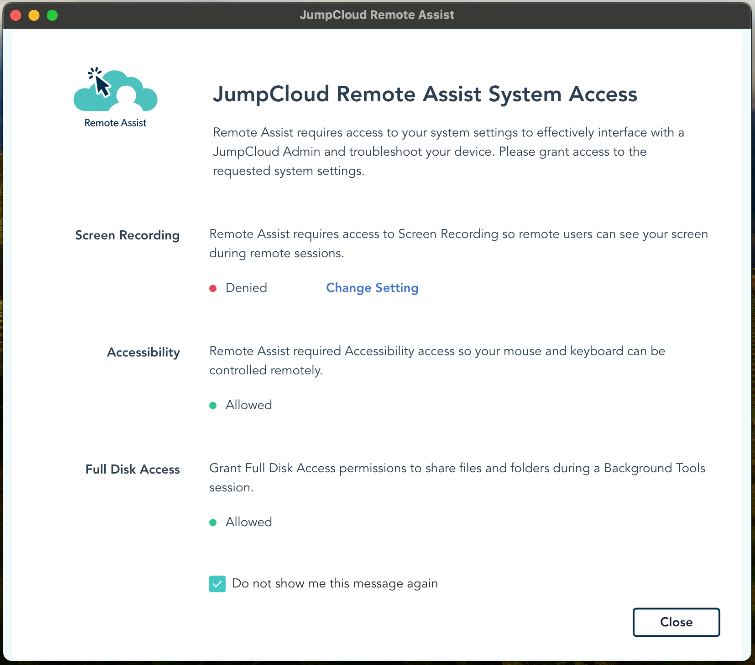 Release Notes 2024 (2026-10-13) · Oct 2026
· source
· release history
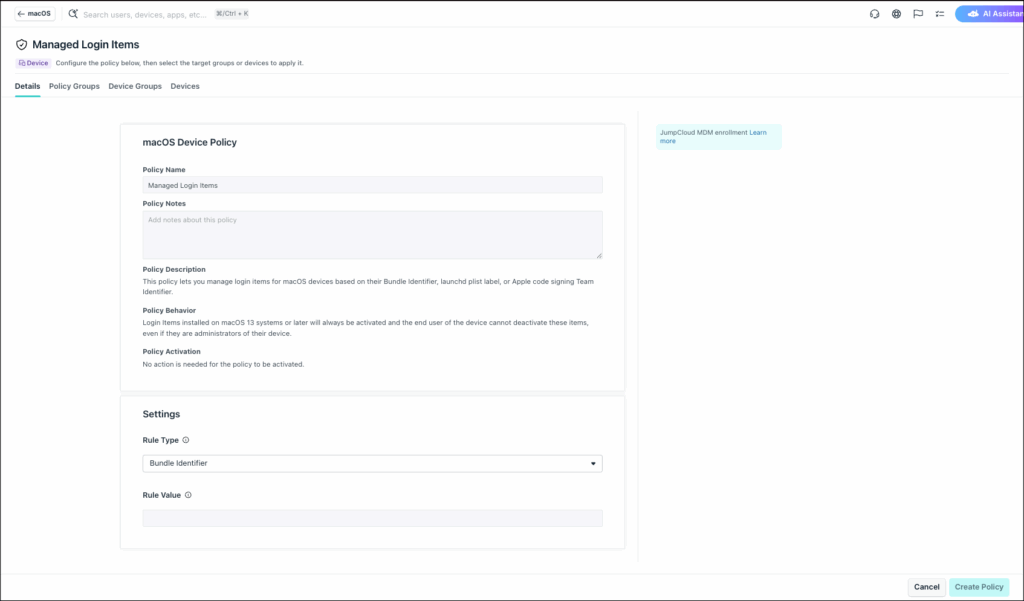 Release Notes 2022 (2026-10-13) · Oct 2026
· source
· release history
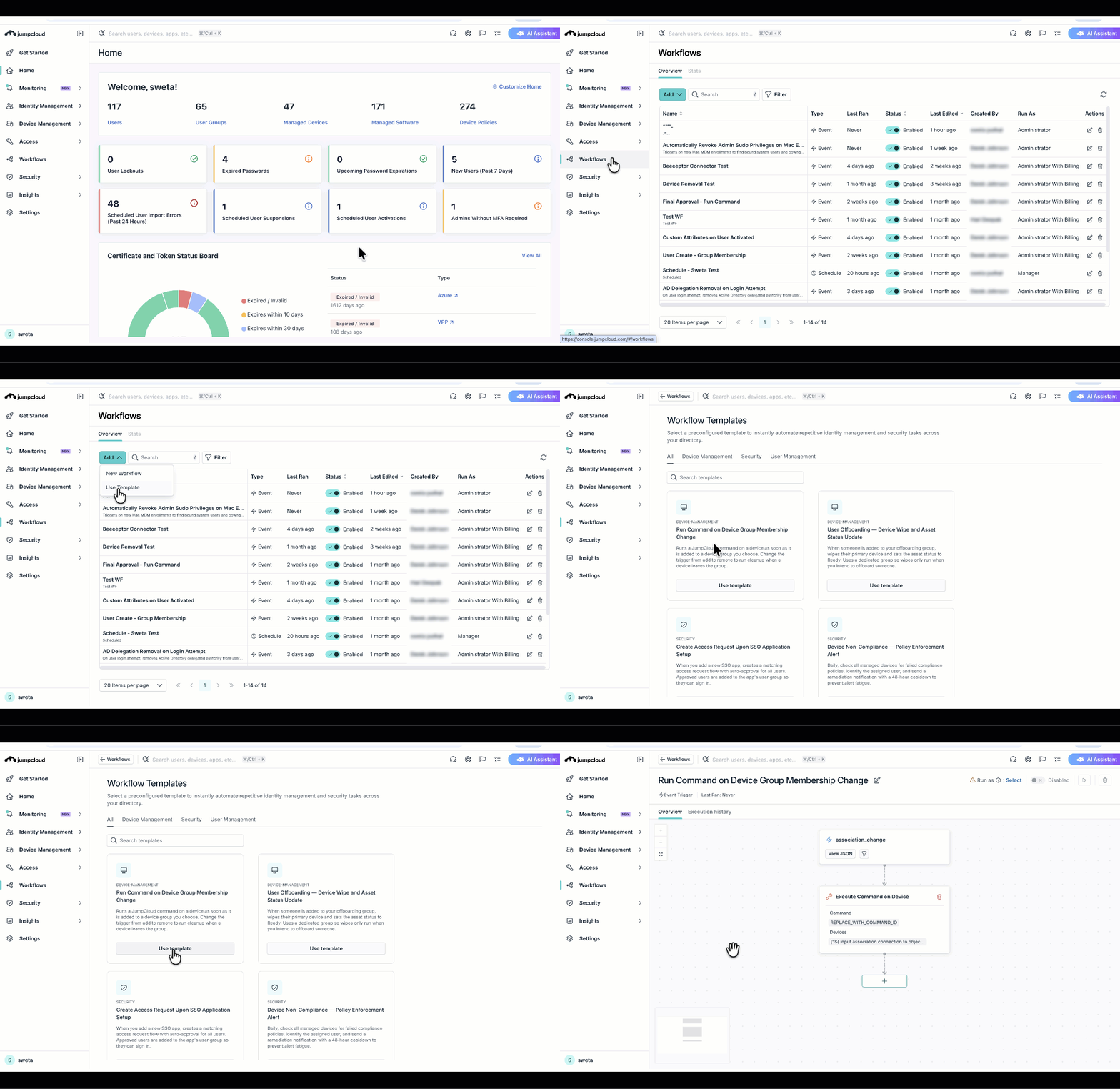 changelog · Oct 2026
· source
· release history
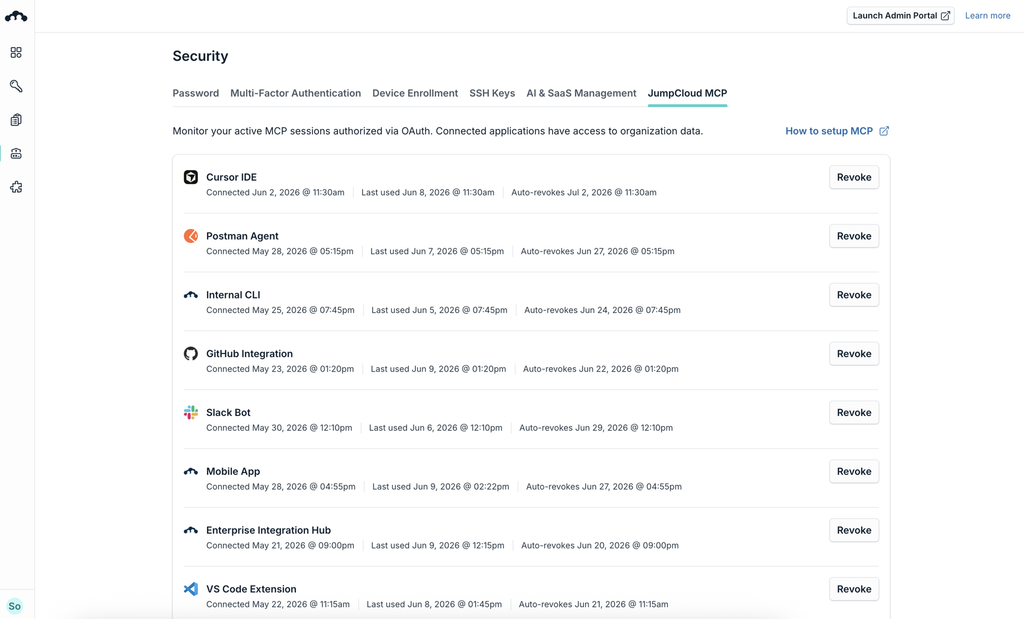 announced · Oct 2026
· source
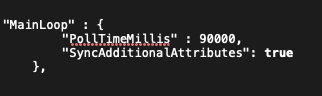 docs update · Sep 2026
· source
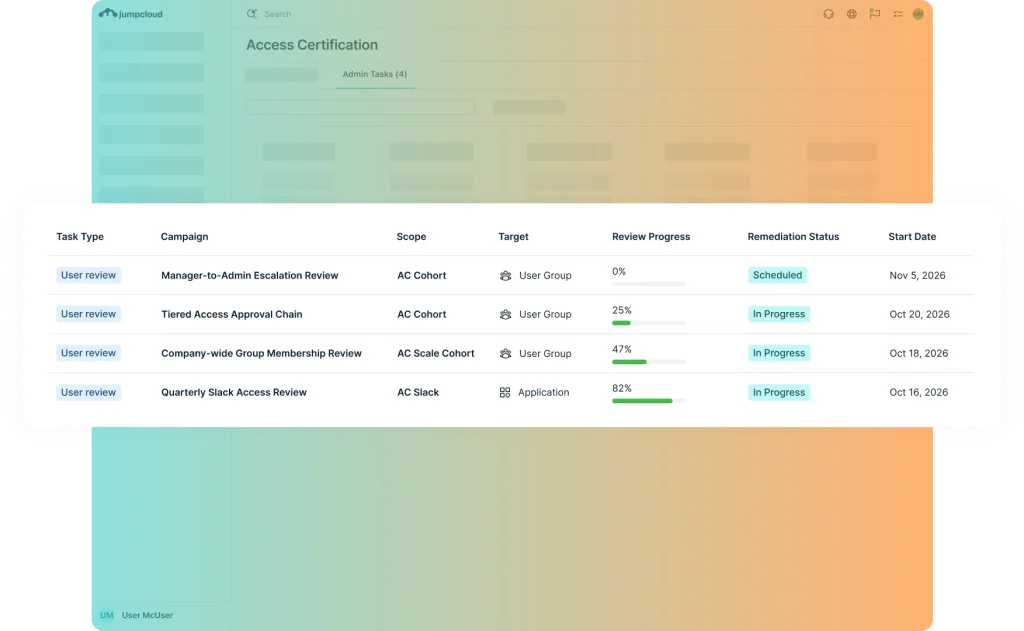 announced · Nov 2026
· source
· release history
 Choose a badge style and copy the code →